EP1394800A2 - Procédé et appareil d'édition orientée tache non lineaire de Hypervidéo - Google Patents
Procédé et appareil d'édition orientée tache non lineaire de Hypervidéo Download PDFInfo
- Publication number
- EP1394800A2 EP1394800A2 EP03253325A EP03253325A EP1394800A2 EP 1394800 A2 EP1394800 A2 EP 1394800A2 EP 03253325 A EP03253325 A EP 03253325A EP 03253325 A EP03253325 A EP 03253325A EP 1394800 A2 EP1394800 A2 EP 1394800A2
- Authority
- EP
- European Patent Office
- Prior art keywords
- user
- user action
- action
- editing
- information
- Prior art date
- Legal status (The legal status is an assumption and is not a legal conclusion. Google has not performed a legal analysis and makes no representation as to the accuracy of the status listed.)
- Withdrawn
Links
Images







Classifications
-
- G—PHYSICS
- G11—INFORMATION STORAGE
- G11B—INFORMATION STORAGE BASED ON RELATIVE MOVEMENT BETWEEN RECORD CARRIER AND TRANSDUCER
- G11B27/00—Editing; Indexing; Addressing; Timing or synchronising; Monitoring; Measuring tape travel
- G11B27/02—Editing, e.g. varying the order of information signals recorded on, or reproduced from, record carriers
- G11B27/031—Electronic editing of digitised analogue information signals, e.g. audio or video signals
-
- G—PHYSICS
- G11—INFORMATION STORAGE
- G11B—INFORMATION STORAGE BASED ON RELATIVE MOVEMENT BETWEEN RECORD CARRIER AND TRANSDUCER
- G11B27/00—Editing; Indexing; Addressing; Timing or synchronising; Monitoring; Measuring tape travel
- G11B27/02—Editing, e.g. varying the order of information signals recorded on, or reproduced from, record carriers
- G11B27/031—Electronic editing of digitised analogue information signals, e.g. audio or video signals
- G11B27/034—Electronic editing of digitised analogue information signals, e.g. audio or video signals on discs
Definitions
- the present invention relates to a nonlinear hypervideo editing method, and more particularly, to a hypervideo editing method and an apparatus that overcome problems of conventional nonlinear editors, such as Adobe Premier.
- Timeline editors can express an image as a set of rows of screens according to time.
- resources are configured in a form such that various video clips, sound tracks, and effects are stacked, the timeline editor is not suitable to edit videos according to the flow of time. For example, the time line editor requires a great number of windows to edit long movies.
- Storyboard editors arrange media resources in units of a series of blocks from left to right. Overlap between clips is managed by placing a transition called a T-block into the space between the clips and then tuning the properties of a transition using an additional dialog box.
- Storyboard editors as described above allow users to deal with still images and organize a slide show easily.
- storyboard editors have some functional limitations because editing lacks a concept of time.
- Korean Patent Publication No. 1999-55423 discloses a method of processing videos using a project table and managing data on changeover effect filters and special visual effect filters and a method of producing new digital videos without decompressing videos.
- the concept of a project table is used, which is comprised of clip IDs, storages, track starts, track ends, source starts, source ends, types, track numbers, and apply clips.
- the invention provided by the above Korean patent has no concept of user's editing commands as in the present invention and does not disclose a concrete descriptor language of editing commands.
- U.S. Patent No. 5,539,527 discloses a nonlinear video editing system, which includes a randomly accessible image data storage unit, an FIFO, a video effect unit, and a desired shot storage unit.
- the nonlinear video editing system is different from a nonlinear video editing method according to the present invention.
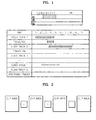
- Figure 1 is a table showing the concept of a timeline editing method.
- a video is expressed in a set of rows of video clips according to time, and the set of rows stacks various video clips, sound tracks, and effects in sequence.
- an icon representing a video clip is selected and dragged into a timeline interface.
- the video clip is represented as a bar, and the length of the bar indicates the actual duration of the clip in accordance to the time ruler of Figure 1.
- a desired editing operation is performed with the bar, and at the same time, different editing operations can be performed by controlling the time.
- a user can point an exact time to start displaying.
- additional commands a user can split a movie into separate pieces, delete some of the pieces and re-arrange others, and define a transition while easily controlling the time of transition.
- the implementation of the timeline method usually requires a rendering operation before previewing. Since there is a close connection with time, the timeline method is unsuitable for dealing with still images and video clips simultaneously.
- the timeline method is unsuitable for long video clips because a long time for scrolling is needed, and accordingly, several screens are needed. In the case of a 90-minute long movie, more than 30 screens are needed.
- a change in time scale can take place, however it disables the ability to precisely edit in a specific place.
- additional windows are needed.
- the timeline method is oriented to work with several consecutive clips. In other words, if ordered clips are placed into different tracks, it is possible to define a transition and control its duration. It is not required for different clips to be placed into the same line, however, if not done as such, the definition of transition becomes more complicated.
- the timeline method is suitable for editing short video clips and an exact example of a linear editing approach and its limitations.
- the linear editing approach is not obligatory at present, but influences present nonlinear editing systems.
- dealing with still images and organizing them into a sequence to display them in a proper order are difficult.
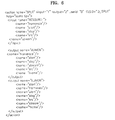
- Figure 2 illustrates the concept of a storyboard editing method.
- To begin editing in the storyboard editing method is absolutely the same as that of the timeline method.
- a user selects a thumbnail and drags it into a storyboard interface.
- the benefit of the storyboard editing method is its lucidity.
- the user makes a series of blocks of media resources and arranges the blocks so that they move from left to right.
- the overlap between clips is managed by placing a transition called a T-block into the space between the clips and then tuning properties using an additional dialog box.
- Editors adopting the storyboard editing method allow users to deal with still images and to organize a slide show easily. However, editing possibilities are limited because there is no time concept.
- Some editing tasks can be effected efficiently. For example, if two video clips are to be merged, it is necessary to put them into consecutive cells and select them in order to execute the merge command.
- splitting cannot be performed in a storyboard interface because of the absence of time concept.
- any operations related to time need additional windows that make the storyboard editing method more complex than the timeline editing method.
- the storyboard method may not be a linear approach, but it still has influence on the linear approach.
- the transition is defined as an indication to segue from one video clip to another. Accordingly, only two video clips are involved. This is a rule in linear editing methods. But, at present, simultaneous processing of three video sources is required to obtain good performance.
- An aim of the present invention is to provide a video editing method and apparatus which addresses the above problems, especially which reduces the use of computer resources, shortens the time required and/or increases productivity of editing.
- a preferred aim of the present invention is to provide a video editing method and apparatus that is simple and efficient for the user even when editing a long video clip.
- Another preferred aim is to allow the user to perform complex editing operations, such as the simultaneous processing of more than two video sources.
- the present invention provides a task-oriented nonlinear hypervideo editing method and apparatus for efficiently performing an editing process by providing a novel descriptor language for user's editing actions, dynamically controlling the editing process, and expressing the results of the edition in the XTL.
- a nonlinear video editing method in which a user action to be selected and performed is expressed as a template that is comprised of some components and described in an extended Markup Language (XML) and is then performed, and the result of the user action is then rendered.
- XML extended Markup Language
- nonlinear video editing method first, available user actions are initialized. Next, a user action is selected from the initialized available user actions. Thereafter, input resources used to perform the selected user action are selected. Then, the selected user action is performed, and the results of the user action are examined. Thereafter, the completion of the user action is confirmed, and the results of the user action are rendered.
- a computer recording medium which stores a computer program for executing the nonlinear video editing method.
- a nonlinear video editing apparatus including a user action initialization unit initializing available user actions, a user action input unit receiving a user action selected by a user from the initialized available user actions, a resource input unit receiving input resources used to perform the selected user action, a user action performing unit performing the selected user action, a result examining unit examining the results of the selected user action, and a rendering unit confirming the completion of the selected user action and rendering the results of editing.
- a graphic user interfacing method in a nonlinear video editor.
- the graphic user interfacing method first, available user actions are presented to a user, and a screen for receiving a user action selected by the user is provided.
- a file source screen for presenting and displaying a source file used to perform the selected user action is provided.
- a result screen for displaying results of the selected user action performed using a source file selected by the user is provided.
- FIG. 3 is a flowchart for illustrating a video editing method according to the present invention.
- the editing method according to the present invention is based on a novel idea in which a video editing process is considered a decision-making process. Accordingly, attention is paid on the logic of editing rather than other factors.
- the present invention proposes a novel descriptor language of user actions.
- the novel descriptor language is called an AV Station Editing Language (AVSEL).
- AVSEL is based on an eXtended Markup Language (XML), so a term "hypervideo" is used.
- XML eXtended Markup Language
- the present invention also provides a special algorithm to dynamically control an editing process and express editing results in terms of an XML transformation language (XTL).
- XTL XML transformation language
- the present invention provides a language analyzer and a grammar translator for translating from AVSEL to XTL or vice versa.
- the video editing method of Figure 3 has the following special characteristics.
- Second, the results of previous operations in Figure 3 can be used as real source files during editing. Indeed, the results are virtual, logical results, but appear as real media sources for users. Thus, computer storage resources are saved, and the productivity of editing is noticeably increased by shortening required time.
- a rendering process is algorithmically optimized using a method.
- Fifth, the results of editing can be expressed in three different forms: a list of performed actions, logical results of actions performed for rendering, and real media files. Sixth, conversion between logical results in an absolute form and logical results in related forms is implemented. Seventh, the openness is not only for new video/audio transforms but also for new user actions.
- a list of available user actions is initialized, in step 310.
- An action template language i.e., AVSEL, is described here.
- Every user action consists of several steps:
- step 350 after examination of the action results, a finishing action is confirmed.
- step 360 rendering is performed.
- Step 310 is actually a pre-editing process, which includes identifying user needs and configuring a method in accordance with the needs.
- Figure 4 shows a template that describes user actions.
- XXX1 denotes the name of an action
- N1 denotes the number of input parameters
- N2 denotes the number of output parameters
- userid indicates the level of access to the action
- CLSID denotes a clsid of the action
- help indicates a small tip about the action.
- YYY1 denotes the name of an input resource
- P1 through PN denote the names of resource characteristics
- ZZZ1 denotes the name of an output result.
- action, input, output, help, name, userid, ninput, and noutput are reserved words.
- TRANSFORM means transition or effects that can be applied to describe a certain behavior of resources.
- RESOURCE means a physically existing real resource, such as movie clips.
- VUNION means a virtual union of real resources and transforms.
- Figure 5 is a table showing the properties of TRANSFORM, the attributes of RESOURCE, and the attributes of VUNION.
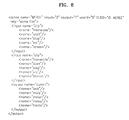
- Figure 6 shows a SPLIT action template.
- a SPLIT operation has one input parameter and two output parameters. Input and output parameters are based on the resources. In a case where an input parameter is a real file, output parameters are separated results that are accessible independently. Accordingly, an attribute "fname" is applicable.
- FIG. 7 shows a TRANSITION action template.
- a TRANSITION between two video clips has three input parameters, namely, two real resources and a transition description.
- An output parameter is a union or a combination of the input parameters. If a result of an operation is accessible as a whole union, "fname” must indicate this case. "mstart” is 0 as a default, and “mstop” can be a difference between the length of a transition and the sum of the lengths of the first and second video clips.
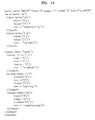
- Figure 8 shows a merging action template.
- a merging operation means concatenating two resources one by one to make a new resource, so "fname” can be used as the result.
- "mstart” is 0, and “mstop” is equal to the sum of the lengths of the first and second video clips.
- Figure 9 shows an inserting action template.
- a real video clip which is a second resource, has an attribute "mstart” which indicates the time relative to the insertion point of a first video clip.
- “mstart” is 0 as a default
- “mstop” is equal to the sum of the duration lengths of the first and second video clips
- “mlength” is the sum of the mstop of the first video clip and the mstop of the second video clip.
- Figure 10 is a table describing basic editing actions. Further user actions can be described. A list of available actions is contained in a *.ini file of an editor.
- the user action template language provided by the present invention is totally different from an XTL in terms of both idea and usage.
- the latter language expresses an editing process in terms of results using an approach for rendering process optimization. Accordingly, the latter language is related to the language provided by the present invention but is not the same.
- the language provided by the present invention describes user actions, while the XTL describes the results of an editing process.
- Figure 11 shows a screen called a decision center.
- An editing process starts from displaying a main window called the decision center of Figure 11.
- a desired action is selected.
- Some type of operation can be performed on the screen of Figure 11.
- the deletion of results can be performed by dragging a button "RESULT” onto a button "TRASH”.
- Some actions need an additional step. For example, after a splitting action "SPLIT" is selected, another window appears as shown in Figure 12.
- Figure 12 shows a screen that appears when a splitting action is selected.
- a media source is activated by dragging a source or result icon to be split into a main area or double clicking on the source icon to be split.
- a split task is performed by controlling a scrollbar under the screen indicating the split position and pressing a button 'APPL'.
- Split results are displayed on the result window.
- results are not available as real files for users at this time, and a rendering is performed after finishing editing since the system knows the suitable form of rendering operation that is to be executed.
- results are logical results, but they appear as real media resources for users.
- Figure 13 shows an example in which user actions to perform a splitting operation are described.
- a decision list denotes a list of user actions performed. In a case of a splitting operation, the next information is put into the decision list.
- some parameters are omitted. The omitted parameters are treated as default behaviors.
- the original video clip "myclip.mpg" is split into two clips: the first clip having a duration of 10 starting from the very beginning; and the second clip having a duration of 7 starting from 10.
- Figure 14 shows an example in which user actions to perform an inserting operation are described. Because a vunion is used, the result is treated as one video clip but has a complex structure.
- "mstart” denotes the time in a union proposed by the present invention. A union is defined as a small timeline.
- the editing method according to the present invention helps users to deal with time.
- the algorithm for calculating "mstart” depends on the type of actions and must be provided by an action itself as well as the process of implementing the action. However, there is also a general algorithm for calculating "mstart”. According to the general algorithm, “mstart” for the first video clip in the union is 0, “mstart” for the second video clip in the union is equal to the duration of the first video clip, and "mstart” for every next video clip increases by the duration of the previous video clip.
- action results are available immediately without any time delay, but they are virtual. User actions and their results are expressed in the language provided by the present invention, and they will be exported so as to become a real result after a special command is executed.
- decision list Users can create a decision list manually because the decision list is an open source and accessible in text editors. A language description is available, and another tool can be used to automatically produce the decision list.
- the result summary is based on the XML and deals with sources as links.
- the main difference from the user decision list is that information on how these results are obtained is ignored, and attention is only concentrated on the results.
- this format all user actions are summarized, and every virtual result is substituted by a description on how it was obtained. Contents are sorted by time according to a value "mstart", and extra nesting is eliminated.
- This format is almost ready for rendering and is convertible into the XTL. According to this converted format, user actions are recovered. Results of editing are results of user actions, so the language proposed by the present invention deals with TRANSFORM, RESOURCE, and VUNION.
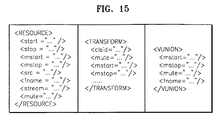
- Figure 15 is a table showing the attributes of the language proposed by the present invention. Instead of using “ “ “ “, “'” can be used or any symbols cannot be used.
- Term RESOURCE is similar to CLIP in the XTL, but some extra attributes have been removed from the RESOURCE.
- TRANSFORM is a combination of TRANSITION and EFFECTS in the XTL, the combination of which was made to simplify an editing process.
- Term VUNION actually brings about the present invention's distinctiveness. VUNION has attributes "mstop” and "mstart”. The present technologies lack these attributes, which are critical to optimize the rendering process.
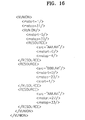
- AAA.AVI is inserted into AAA.AVI starting from 4. Then, the first one second is cut from the beginning of AAA.AVI and rendering is performed. The last two seconds of AAA.AVI are cut and then rendering is performed. This scenario is expressed in Figure 16.
- Figure 16 illustrates an insertion of BBB.AVI into AAA.AVI. Every nested VUNION must be rendered before a parent VUNION, because the nested VUNION provides resources and the hierarchy of a union optimizes a rendering process.
- Figure 17 shows a result of an optimization of the contents of Figure 16.
- the effect of optimization is expressed in terms of time required for optimization if it is done in real time.
- the optimization in the language provided by the present invention is two times more effective than an existing technology.
- FIG. 18 is a block diagram of a nonlinear video editing apparatus according to the present invention.
- the nonlinear video editing apparatus includes a user action initialization unit 1810, a user action input unit 1820, a resource input unit 1830, a user action performing unit 1840, a result examination unit 1850, and a rendering unit 1860.
- the user action initialization unit 1810 initializes available user actions.
- the user action input unit 1820 receives an action selected by a user from the initialized available user actions.
- the resource input unit 1830 receives input resources used to perform the selected user action.
- the user action performing unit 1840 performs the selected user action. While the selected user action is being performed, the result examination unit 1850 examines results.
- the rendering unit 1860 confirms finishing the action and renders results.
- Each of the user actions includes information on the name of the action to be performed, the number of input parameters used by the action, the number of output parameters output as the results of the action, and the level of access to the action to be performed.
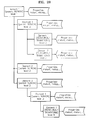
- Figure 19 is a flowchart for illustrating an algorithm for verifying the results of editing. Every program language consists of both syntax and semantics. XML, which is a currently used markup language, also has these characteristics, and a complier checks the consistency of the meaning of input information. The novel language provided by the present invention also has these characteristics and has additional unique properties.
- the verification algorithm of Figure 19 is an algorithm for verifying the user actions.
- step 1910 initialization is performed in step 1910.
- Z is set to be ⁇ ⁇
- N the number of user actions, is received, and K is set to be 1.
- step 1920 it is determined whether K ⁇ N.
- step 1930 A -1 / K is calculated if it is determined in step 1920 that K ⁇ N.
- step 1940 it is checked if the calculated A -1 / K is a real file.
- the availability of a resource is checked, and a resource file C is processed, in step 1950.
- the calculated A -1 / K is not a real file, it is checked if the calculated A -1 / K is an element of Z, in step 1960.
- Figure 20 is a block diagram of an architecture of a virtual union (vunion) proposed in the present invention.
- vunion virtual union
- properties such as, "mstart”, "mstop”, etc.
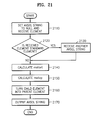
- Figure 21 is a flowchart for illustrating an algorithm for optimizing the results of editing.
- Rendering is the most important part in an editing process because the rendering process occupies a great amount of time.
- optimization of the rendering process is significantly important.
- the time required to perform rendering can be reduced using some well-known methods, among which there is a method of improving an encoding technique. This method does not greatly reduce the rendering time.
- the optimization method according to the present invention excels in reducing the rendering time.
- an AVSEL string is set to null, and a first element is received, in step 2110.
- a first element is received, in step 2110.
- another AVSEL string is received if it is determined that the received element is a standard element.
- step 2140 "mstart” is calculated if it is determined that the received element is not a standard element. "mstart” is calculated by setting Klopt to be “start”, moving to the first nested element, and performing the while sentence:
- step 2150 “mstop” is calculated by setting K2opt to be “mstop”, moving to the last nested element, and performing the while sentence: Thereafter, K2opt is stored in "mstop”.
- step 2160 After the calculation of "mstart” and "mstop", a child element is turned into a parent element, in step 2160.
- step 2170 the AVSEL string is output.
- This algorithm is applied to every element to obtain an AVSEL string. In other words, the next element is received and undergoes the above-described procedure.
- the embodiments of the present invention can be written as computer programs and can be implemented in general-use digital computers that execute the programs using a computer readable recording medium.
- Examples of computer readable recording media include magnetic storage media (e.g., ROM, floppy disks, hard disks, etc.), optical recording media (e.g., CD-ROMs, or DVDs), and a storage medium such as a carrier wave (e.g., transmission through the Internet).
- the present invention provides a novel descriptor language of user actions and provides a special algorithm for dynamically controlling an editing process and expressing editing results in the XTL. Accordingly, results of the previous steps in an editing process can be used as real source files and computer resources are saved, thereby shortening required time and increasing the productivity of editing.
- a user has to identify a problem first, clearly understand input information, and accomplish a task according to a special procedure to obtain certain results.
- results having transitions and effects can be previewed without being rendered, while Adobe Premier cannot automatically preview results.
- the video editing method according to the present invention is designed to have an open architecture: a user has direct access to a decision list and can add/remove any resources. Also, a user can use user-defined transformation if its description is available in a certain format.
- the method allows users to repeat the same action several times to achieve a desired result and even repeat just a certain operation that was done several steps before without repeating these steps.
- Editing and previewing stages are combined, but rendering is separated and not necessary required. Rendering can be performed as the last stage of an editing process. Intervening results are stored as links, which means hypervideo editing. Hypervideo editing helps to optimize an encoding procedure, simultaneously use resources in different formats, save computer resources, e.g., a hard disk or memory, and efficiently manage the editing process.
Landscapes
- Engineering & Computer Science (AREA)
- Multimedia (AREA)
- Television Signal Processing For Recording (AREA)
- User Interface Of Digital Computer (AREA)
Applications Claiming Priority (2)
| Application Number | Priority Date | Filing Date | Title |
|---|---|---|---|
| KR10-2002-0046801A KR100467603B1 (ko) | 2002-08-08 | 2002-08-08 | 태스크 기반의 비선형 하이퍼비디오 편집방법 및 그 장치 |
| KR2002046801 | 2002-08-08 |
Publications (2)
| Publication Number | Publication Date |
|---|---|
| EP1394800A2 true EP1394800A2 (fr) | 2004-03-03 |
| EP1394800A3 EP1394800A3 (fr) | 2005-01-12 |
Family
ID=31492835
Family Applications (1)
| Application Number | Title | Priority Date | Filing Date |
|---|---|---|---|
| EP03253325A Withdrawn EP1394800A3 (fr) | 2002-08-08 | 2003-05-28 | Procédé et appareil d'édition orientée tache non lineaire de Hypervidéo |
Country Status (5)
| Country | Link |
|---|---|
| US (1) | US20040170382A1 (fr) |
| EP (1) | EP1394800A3 (fr) |
| JP (1) | JP2004072779A (fr) |
| KR (1) | KR100467603B1 (fr) |
| CN (1) | CN1474408A (fr) |
Cited By (2)
| Publication number | Priority date | Publication date | Assignee | Title |
|---|---|---|---|---|
| WO2008004236A2 (fr) | 2006-07-06 | 2008-01-10 | Sundaysky Ltd. | Génération automatique de vidéo à partir d'un contenu structuré |
| EP2172936A3 (fr) * | 2008-09-22 | 2010-06-09 | a-Peer Holding Group, LLC | Édition audio et vidéo en ligne |
Families Citing this family (8)
| Publication number | Priority date | Publication date | Assignee | Title |
|---|---|---|---|---|
| JP4442500B2 (ja) * | 2005-04-15 | 2010-03-31 | ソニー株式会社 | 素材記録装置および素材記録方法 |
| US8458595B1 (en) | 2006-05-31 | 2013-06-04 | Adobe Systems Incorporated | Video editing including simultaneously displaying timelines and storyboards |
| KR100827241B1 (ko) * | 2006-12-18 | 2008-05-07 | 삼성전자주식회사 | 동적 영상물을 생성하기 위한 템플릿을 편집하는 장치 및방법 |
| CN100454982C (zh) * | 2007-11-19 | 2009-01-21 | 新奥特(北京)视频技术有限公司 | 一种工程快照文件的生成系统和装置 |
| US20110231426A1 (en) * | 2010-03-22 | 2011-09-22 | Microsoft Corporation | Song transition metadata |
| KR101535580B1 (ko) * | 2013-01-18 | 2015-07-13 | 주식회사 씨투몬스터 | 디지털 미디어 제작 공정관리 시스템 및 그 방법 |
| CN106060342B (zh) * | 2016-06-17 | 2019-07-09 | 深圳广播电影电视集团 | 一种在线图文编辑系统与非编系统的集成方法和系统 |
| CN110198420B (zh) * | 2019-04-29 | 2022-06-10 | 北京卡路里信息技术有限公司 | 基于非线性视频编辑的视频生成方法及装置 |
Family Cites Families (16)
| Publication number | Priority date | Publication date | Assignee | Title |
|---|---|---|---|---|
| US6016380A (en) * | 1992-09-24 | 2000-01-18 | Avid Technology, Inc. | Template-based edit decision list management system |
| EP0615244B1 (fr) * | 1993-03-11 | 1999-07-21 | Matsushita Electric Industrial Co., Ltd. | Système de montage video non-linéaire |
| JP3320197B2 (ja) * | 1994-05-09 | 2002-09-03 | キヤノン株式会社 | 画像編集装置及びその方法 |
| WO1996031829A1 (fr) * | 1995-04-06 | 1996-10-10 | Avid Technology, Inc. | Systeme de creation multimedia graphique |
| JP3091684B2 (ja) * | 1996-03-28 | 2000-09-25 | 日立ソフトウエアエンジニアリング株式会社 | Mpegファイル編集システムおよびmpegファイル編集方法 |
| JP3918246B2 (ja) * | 1996-09-20 | 2007-05-23 | ソニー株式会社 | 画像処理方法および装置 |
| CA2202106C (fr) * | 1997-04-08 | 2002-09-17 | Mgi Software Corp. | Methode et systeme de composition multimedia numerique non temporelle et non lineaire |
| JP4245083B2 (ja) * | 1997-11-11 | 2009-03-25 | トムソン ライセンシング | 加工再収録機能を有するノンリニア映像編集システム |
| JP4101926B2 (ja) * | 1998-04-24 | 2008-06-18 | 松下電器産業株式会社 | データ受信装置及びデータ送信装置 |
| AU2217700A (en) * | 1998-12-30 | 2000-07-31 | Earthnoise.Com Inc. | Creating and editing digital video movies |
| JP2001086453A (ja) * | 1999-09-14 | 2001-03-30 | Sony Corp | 信号処理装置及び方法並びに記録媒体 |
| JP2001169238A (ja) * | 1999-09-27 | 2001-06-22 | Matsushita Electric Ind Co Ltd | ノンリニア編集装置、ノンリニア編集方法、記録媒体、テスト方法 |
| JP3688543B2 (ja) * | 1999-12-27 | 2005-08-31 | 松下電器産業株式会社 | 編集システム |
| US6121963A (en) * | 2000-01-26 | 2000-09-19 | Vrmetropolis.Com, Inc. | Virtual theater |
| GB2359917B (en) * | 2000-02-29 | 2003-10-15 | Sony Uk Ltd | Media editing |
| JP4348821B2 (ja) * | 2000-03-27 | 2009-10-21 | ソニー株式会社 | 編集装置、編集方法 |
-
2002
- 2002-08-08 KR KR10-2002-0046801A patent/KR100467603B1/ko not_active Expired - Fee Related
-
2003
- 2003-05-26 CN CNA031378404A patent/CN1474408A/zh active Pending
- 2003-05-28 EP EP03253325A patent/EP1394800A3/fr not_active Withdrawn
- 2003-07-25 US US10/626,769 patent/US20040170382A1/en not_active Abandoned
- 2003-08-08 JP JP2003290757A patent/JP2004072779A/ja active Pending
Cited By (14)
| Publication number | Priority date | Publication date | Assignee | Title |
|---|---|---|---|---|
| US9330719B2 (en) | 2006-07-06 | 2016-05-03 | Sundaysky Ltd. | Automatic generation of video from structured content |
| US10283164B2 (en) | 2006-07-06 | 2019-05-07 | Sundaysky Ltd. | Automatic generation of video from structured content |
| US10755745B2 (en) | 2006-07-06 | 2020-08-25 | Sundaysky Ltd. | Automatic generation of video from structured content |
| EP2044764A4 (fr) * | 2006-07-06 | 2013-01-23 | Sundaysky Ltd | Génération automatique de vidéo à partir d'un contenu structuré |
| US8913878B2 (en) | 2006-07-06 | 2014-12-16 | Sundaysky Ltd. | Automatic generation of video from structured content |
| US9129642B2 (en) | 2006-07-06 | 2015-09-08 | Sundaysky Ltd. | Automatic generation of video from structured content |
| US9633695B2 (en) | 2006-07-06 | 2017-04-25 | Sundaysky Ltd. | Automatic generation of video from structured content |
| WO2008004236A2 (fr) | 2006-07-06 | 2008-01-10 | Sundaysky Ltd. | Génération automatique de vidéo à partir d'un contenu structuré |
| US9508384B2 (en) | 2006-07-06 | 2016-11-29 | Sundaysky Ltd. | Automatic generation of video from structured content |
| US9711179B2 (en) | 2006-07-06 | 2017-07-18 | Sundaysky Ltd. | Automatic generation of video from structured content |
| US9997198B2 (en) | 2006-07-06 | 2018-06-12 | Sundaysky Ltd. | Automatic generation of video from structured content |
| US10236028B2 (en) | 2006-07-06 | 2019-03-19 | Sundaysky Ltd. | Automatic generation of video from structured content |
| EP2172936A3 (fr) * | 2008-09-22 | 2010-06-09 | a-Peer Holding Group, LLC | Édition audio et vidéo en ligne |
| US8270815B2 (en) | 2008-09-22 | 2012-09-18 | A-Peer Holding Group Llc | Online video and audio editing |
Also Published As
| Publication number | Publication date |
|---|---|
| US20040170382A1 (en) | 2004-09-02 |
| KR100467603B1 (ko) | 2005-01-24 |
| EP1394800A3 (fr) | 2005-01-12 |
| KR20040013738A (ko) | 2004-02-14 |
| CN1474408A (zh) | 2004-02-11 |
| JP2004072779A (ja) | 2004-03-04 |
Similar Documents
| Publication | Publication Date | Title |
|---|---|---|
| CN112437342B (zh) | 一种视频编辑的方法及设备 | |
| US7313755B2 (en) | Media timeline sorting | |
| US6539163B1 (en) | Non-linear editing system and method employing reference clips in edit sequences | |
| KR101037864B1 (ko) | 복수의 미디어 객체들에서 사용하기 위한 특징을 생성하는방법 및 소프트웨어 프로그램 | |
| EP2174247B1 (fr) | Création, affichage, et édition d'un sous-processus dans un schéma de processus | |
| JP5260733B2 (ja) | ソースオブジェクトから少なくとも1つの対象オブジェクトに対するアニメーションエフェクトのコピー | |
| KR20080100434A (ko) | 콘텐츠 액세스 트리 | |
| CN101652743A (zh) | 用于媒体制作和分发的工作流引擎 | |
| JP5785227B2 (ja) | ユーザインタフェースにおける論理アセットと物理アセットのマッピングシステム及び方法 | |
| EP1394800A2 (fr) | Procédé et appareil d'édition orientée tache non lineaire de Hypervidéo | |
| CN116991935B (zh) | 一种多模态数据交互方法、设备、存储介质 | |
| US7934159B1 (en) | Media timeline | |
| US20060181545A1 (en) | Computer based system for selecting digital media frames | |
| US12541554B2 (en) | Transcript aggregation for non-linear editors | |
| CN118591841A (zh) | 用于视频编辑项目的变化相关预导出 | |
| EP2370905B1 (fr) | Portabilité et compatibilité de contenu multimédia pour différentes plates-formes de destination | |
| KR100878528B1 (ko) | 동영상편집방법 및 그 장치 | |
| EP2553572B1 (fr) | Mise en cache d'images opportuniste | |
| US8120610B1 (en) | Methods and apparatus for using aliases to display logic | |
| US8014883B2 (en) | Templates and style sheets for audio broadcasts | |
| Vladimir et al. | Task oriented non-linear method for interactive hypervideo media editing systems | |
| Vladimir et al. | THE APPARATUS FOR WEB-BASED VIDEO EDITING | |
| Akiyama | Supporting Novice Multimedia Authoring with An Interactive Task-Viewer |
Legal Events
| Date | Code | Title | Description |
|---|---|---|---|
| PUAI | Public reference made under article 153(3) epc to a published international application that has entered the european phase |
Free format text: ORIGINAL CODE: 0009012 |
|
| 17P | Request for examination filed |
Effective date: 20030618 |
|
| AK | Designated contracting states |
Kind code of ref document: A2 Designated state(s): AT BE BG CH CY CZ DE DK EE ES FI FR GB GR HU IE IT LI LU MC NL PT RO SE SI SK TR |
|
| AX | Request for extension of the european patent |
Extension state: AL LT LV MK |
|
| PUAL | Search report despatched |
Free format text: ORIGINAL CODE: 0009013 |
|
| AK | Designated contracting states |
Kind code of ref document: A3 Designated state(s): AT BE BG CH CY CZ DE DK EE ES FI FR GB GR HU IE IT LI LU MC NL PT RO SE SI SK TR |
|
| AX | Request for extension of the european patent |
Extension state: AL LT LV MK |
|
| 17Q | First examination report despatched |
Effective date: 20050228 |
|
| AKX | Designation fees paid |
Designated state(s): DE GB NL |
|
| STAA | Information on the status of an ep patent application or granted ep patent |
Free format text: STATUS: THE APPLICATION IS DEEMED TO BE WITHDRAWN |
|
| 18D | Application deemed to be withdrawn |
Effective date: 20071201 |