EP1436690B1 - Navigation mit nahtlos kombniertem, frei beweglichem cursor und springenden hervorhebungen - Google Patents
Navigation mit nahtlos kombniertem, frei beweglichem cursor und springenden hervorhebungen Download PDFInfo
- Publication number
- EP1436690B1 EP1436690B1 EP02751536A EP02751536A EP1436690B1 EP 1436690 B1 EP1436690 B1 EP 1436690B1 EP 02751536 A EP02751536 A EP 02751536A EP 02751536 A EP02751536 A EP 02751536A EP 1436690 B1 EP1436690 B1 EP 1436690B1
- Authority
- EP
- European Patent Office
- Prior art keywords
- user
- navigation
- coarse
- input means
- option
- Prior art date
- Legal status (The legal status is an assumption and is not a legal conclusion. Google has not performed a legal analysis and makes no representation as to the accuracy of the status listed.)
- Expired - Lifetime
Links
Images

Classifications
-
- G—PHYSICS
- G06—COMPUTING OR CALCULATING; COUNTING
- G06F—ELECTRIC DIGITAL DATA PROCESSING
- G06F3/00—Input arrangements for transferring data to be processed into a form capable of being handled by the computer; Output arrangements for transferring data from processing unit to output unit, e.g. interface arrangements
- G06F3/01—Input arrangements or combined input and output arrangements for interaction between user and computer
- G06F3/03—Arrangements for converting the position or the displacement of a member into a coded form
- G06F3/033—Pointing devices displaced or positioned by the user, e.g. mice, trackballs, pens or joysticks; Accessories therefor
-
- G—PHYSICS
- G06—COMPUTING OR CALCULATING; COUNTING
- G06F—ELECTRIC DIGITAL DATA PROCESSING
- G06F3/00—Input arrangements for transferring data to be processed into a form capable of being handled by the computer; Output arrangements for transferring data from processing unit to output unit, e.g. interface arrangements
- G06F3/01—Input arrangements or combined input and output arrangements for interaction between user and computer
- G06F3/048—Interaction techniques based on graphical user interfaces [GUI]
- G06F3/0481—Interaction techniques based on graphical user interfaces [GUI] based on specific properties of the displayed interaction object or a metaphor-based environment, e.g. interaction with desktop elements like windows or icons, or assisted by a cursor's changing behaviour or appearance
Definitions
- the invention relates to a data processing system with a user interface, in particular with a graphical user interface (GUI) and a remote control device (RC) within a living room or a consumer electronics (CE) environment.
- GUI graphical user interface
- RC remote control device
- the system enables the consumer to navigate among user-interactive items (such as commands or hyperlinks) and select a specific one with a highlight on a television display monitor (TV) as part of the GUI.
- TV television display monitor
- Interactive television enables two-way communication using a television display monitor as a GUI.
- ITV typically relates to entertainment, information retrieval, and electronic shopping.
- An example of an ITV is a Web-TV interactive set top box (STB).
- STB Web-TV interactive set top box
- ITV interactive television
- a computer mouse as input device is typically not useful for navigation in the living room environment.
- the RC has four directional navigation keys for navigation (up, down, left, right), and an OK-button for selection.
- the option that is currently selectable is shown highlighted.
- the user can move the highlight to another selectable option by using the navigation keys. This can be a long and tedious process when many options are available scattered over the display screen, as they are likely to distract and irritate the user.
- US 6,069,614 discloses a man machine interface for computer, television, electronic games and appliances, allowing rapid, easy and natural control and selections from a large array of choices.
- the remote control device has one multi-function thumb push switch, allowing cursor movement, rate of movement and object selection to be performed from this one thumb switch and an index finger slide switch for mode control, whereas these switches are located in the natural resting positions of thumb and finger when the device is held in either the left or the right hand.
- the remote control device is equipped with a display window for displaying device status, transmitting means, working in conjunction with a general purpose computer with a video monitor for controlling and selecting program data, or working in conjunction with a television controlling and selecting television programming choices.
- the Display Configuration providing a choice selection screen format, using a three dimensional array of four sided boxes with alphanumeric characters identifying the box, enabling natural and easy selection of choices numbering in thousands.
- US 4,719,455 discloses a pointing and control device for moving a cursor on a visual display and for controlling various operations, being operated by hand and finger movements, including both fine movement control and gross movement control; the assembly includes a graspable outer cover and an inner puck with a finger cup movably supported by a series of elements, a laser beam movement detector consisting of high and low frequency scanners, drivers, lower and upper photodetectors and signal amplifiers and processors. The entire assembly may be either fixed on a keyboard or operated as an independent accessory.
- US 5,910,798 discloses an apparatus for moving a cursor finely on a screen moving the cursor in an application program such as a CAD that requires high accuracy.
- the apparatus includes a mouse button formed at a predetermined portion of a mouse for selecting data; fine movement buttons formed to predetermined portions around the mouse button for moving a mouse cursor upward, downward, left and right by a preset value; and a fine movement interval regulator formed to a predetermined place of the mouse button for providing a fine movement signal per preset time while a user presses the fine movement button.
- the invention relates to a system for a user interface, in particular to a GUI within a living room environment, in which solutions are offered for dealing with an increased number of user-selectable options, while keeping it easy and fun for the user to control the options.
- the system provides in particular a solution for navigation to and the selection of a highlight, such as a command or hyperlink, as part of a GUI using a television screen (TV) as display.
- TV television screen
- an important navigation tool to a desired option in an on-screen-display is a mouse that controls an on-screen, freely moving cursor.
- OSD on-screen-display
- the cursor is moved to the option selected by the user, mainly using the mouse for coarse and fine positioning, the user can select the option by a mouse-click.
- the option closest to the current mouse position can be shown as highlighted.
- a trained user can navigate to a desired option in one arm swing and can make a selection shortly after.
- the invention describes a system that provides a solution for the home environment. It is therefore an object of the invention, among other things, to provide a solution that is intuitive and ergonomic to the user and is considered a natural extension to his/hers current user interface experience.
- a widely used and relative cheap tool is an RC.
- the inventors propose, for example, a highlighting that can be moved from one option to another as means to navigate to a desired option.
- Many RCs have four or more navigation keys that enable the user to jump from one option to a desired option.
- an OK-button or select-button is available to select and activate the highlight.
- the inventors propose to add a coarse positioning user input device.
- An input device that is expected to perform well for the user is, e.g., a joystick such as a Force Sensitive Resistor (FSR) stick or FSR button.
- FSRs are well known elements, typically employed as strain gauges. By grouping the navigation keys around the FSR component an ergonomic navigation solution is created.
- This can be achieved, e.g., by combining the navigation keys within the FSR device.
- a combination implementation is achieved by discriminating between contact time intervals.
- Contact time discrimination can be achieved within the RC but can also be implemented external to the RC, e.g., in a consumer STB.
- a short FSR contact period can be interpreted by the system as a fine positioning command and a longer or continuous contact period as a coarse positioning command.
- the user can now quickly navigate to the desired option by using the FSR that can be operated by, e.g., his/her thumb. If needed, the navigation keys can be used for local fine navigation.
- the OK- or select-button can be used to select the option.
- the FSR can be constructed in such a way that, when depressed, it also acts as the select button.
- FSR fine positioning input devices
- Examples are a touch-pad, a tracker ball and gravity/gyro based devices.
- the FSR can come in various sizes and shapes.
- An example of an ergonomic input device is one that can be hold with one hand whereby the navigation to the desired option and its selection can be done with one's thumb. Therefore the inventors have designed an RC with navigation keys and a FSR that can be depressed to double as OK-key for option selection.
- the form factor is such that the RC is easily controllable within the range of one's thumb when holding the RC.
- Position indication for coarse navigation can be visualized by using, e.g., a moving highlight or by a freely moving cursor or a combination of thereof. Further information about a method to calculate which options should be highlighted when using the moving highlight is found in, e.g., patent application US S/N 09/426,518 (Attorney docket PHA 23,785) filed 10/26/99 for Maurice Cuijpers and Jan van Ee for DIRECTIONAL NAVIGATION WITHIN A GRAPHICAL USER INTERFACE.).
- a freely moving cursor for coarse navigation and a jumping highlight for fine navigation to visualize the navigation position is described.
- an option closest to the cursor position will be highlighted and the cursor disappears.
- the cursor preferably fades out gradually a predetermined time after the user has stopped using the coarse control input.
- the GUI designer can, e.g., let the cursor re-appear at the position of the highlighted option of that moment.
- the inventor created a manner to seamlessly combine a freely moving cursor and a jumping highlight that are both used for the navigation method. It should be noted that even though a freely moving cursor is used for coarse navigation, a jumping highlight can be visible simultaneously. In another exemplary embodiment only a jumping highlight is used to visualize the navigation position for both coarse and fine navigation.
- the RC described can also be used for a non-visual coarse and fine navigation method.
- the navigation feedback can be realized by using an audible signal.
- the coarse navigation position feedback can be achieved by producing a sound of a certain frequency and the fine position feedback by voicing the name of a current highlight.
- the inventors propose that current interactive CE-devices, such as, but not limited to, a Web-TV STB, can be upgraded to the teachings of the invention. In practice this can be achieved by providing the user with an RC according to the invention and by installing or having installed a software (SW) upgrade at the CE-device that embeds the GUI and the GUI-behavior in accordance with the invention.
- SW software
- the inventors also propose that instead of downloading improved SW to the CE-device, a remote service can be responsible for generating the GUI and the GUI-behavior in accordance with the invention. In other words, the SW application is run at a server external to the home equipment.
- Fig. 1 is a diagram illustrating an RC 100, which can be used as a user input device according to this invention.
- RC 100 comprises an 8-way navigation key pad 104 for fine navigation, an FSR 106 for coarse navigation, and an OK-button 108 for selection of a desired option.
- RC 100 also comprises a back key 110 and a function key 112.
- An inexpensive RC version only uses a 4-way navigation key pad 104 (with left, right, up and down keys).
- FSR 106 comprises a navigation button. The firmer the user pushes the button in a certain direction in the plane of the button, the quicker the coarse navigation occurs.
- the OK button 108 is functionally a part of the FSR navigation button 106.
- the user Upon depressing button 106 the user activates the OK button 108.
- This is achieved, for example, by mounting FSR button 106 on a clickable element that can be moved perpendicularly to the plane of button 106 and that has two stable positions. One position is assumed when there is no vertical force applied to the element, the other one is assumed when a vertical force is applied of a magnitude above a certain threshold. In this manner the user experiences a tactile feedback when actually selecting an option through the OK button 108.
- the coarse positioning means 106 is positioned between the OK button 108 and the keypad 104 for fine navigation.
- the keys of keypad 108 are to be positioned at a certain minimum distance from each other. They are not to be positioned at a too large distance from each other either, so as to enable the user to operate them with his/her thumb. Accuracy is not so much of an issue with respect to the coarse navigation. Accordingly, it is preferred that in the lay-out of the buttons and keys, the coarse navigation user input means 106 lies within an area enclosed by the keys of keypad 104 for fine navigation.
- Back key 110 can be used to quickly get back to the previous navigation position.
- Functions key 112 can, e.g., navigate the user to a different set of options or to a higher-level functions menu.
- Key pad 104, FSR 106 and OK button 108 can be molded integrally as one part, making its usage more intuitive and ergonomically acceptable to the user.
- the RC can be made less expensive by using contact time discrimination detection. That is, contact time is measured to discriminate between coarse and fine navigation. For example, if the user uninterruptedly presses a navigation input for a longer time period, the system interprets this as the coarse positioning mode, and sweeps the highlight fast across the screen. If the user taps the navigation input slightly, the system interprets this as a fine positioning mode and lets the highlight jump accordingly only one step. By, e.g., shortly tapping one's finger on the top ("north") part of FSR 106 the user achieves an upwards moving highlight. In that case key-pad 104 may not use individual physical keys, but is rather implemented as an integral part of FSR 106. This not only makes the RC less costly, it also makes the RC smaller.
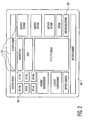
- FIG. 2 is a diagram illustrating a GUI screenshot 200 that shows a beginning of a user navigation action.
- Screenshot 200 comprises a highlighted option 202, a desired option 204 and some other hotspots and options, e.g., options 210.
- a hotspot in this context is meant an Internet hyperlink, a control command, etc.
- it will take the user quite a number of key-pad 104 presses to get from option 202 to desired option 204.
- this can be achieved in numerous combinations of key-pad 104 key-presses.
- the user actually has to decide on a strategy of how to get to the desired option in the quickest and/or easiest way. The user may well consider this as an annoying and unpleasant action. If the user chooses to do so, he or she can still navigate by only using key-pad 104 key-presses and OK-button 108 for activation or execution of the desired option 204.
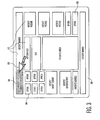
- Fig. 3 is a diagram illustrating another view of GUI screenshot 200 that shows some progress in the user navigation action.
- Screenshot 200 comprises the, previously highlighted, option 302, a newly highlighted option 306, a freely moving cursor 308, the desired option 204 and other hotspots and options 310.
- the cursor 308 disappears from the screen once the user stops applying a force to the FSR 106.
- a hotspot or option closest to the position of the cursor at that moment will be highlighted, in this case option 306.
Landscapes
- Engineering & Computer Science (AREA)
- General Engineering & Computer Science (AREA)
- Theoretical Computer Science (AREA)
- Human Computer Interaction (AREA)
- Physics & Mathematics (AREA)
- General Physics & Mathematics (AREA)
- Position Input By Displaying (AREA)
- User Interface Of Digital Computer (AREA)
- Details Of Television Systems (AREA)
- Selective Calling Equipment (AREA)
- Switches With Compound Operations (AREA)
- Position Fixing By Use Of Radio Waves (AREA)
- Controls And Circuits For Display Device (AREA)
Claims (11)
- Verbraucherelektroniksystem, das Folgendes umfasst:- eine Benutzerrückkopplungsanordnung (200) zum Wiedergeben vom Benutzer selektierbarer Optionen;- eine Benutzereingabevorrichtung (100) zum Selektieren einer spezifischen Option der wiedergegebenen Optionen, wobei diese Vorrichtung Folgendes umfasst:- Benutzereingabemittel zur Grobpositionierung (106), damit dem Benutzer die Möglichkeit geboten wird, in einer Grobpositionierungsbetriebsart zu einer Umgebung der betreffenden Option zu navigieren; und- Benutzereingabemittel zur Feinpositionierung (104), damit dem Benutzer die Möglichkeit geboten wird, in einer Feinpositionierungsbetriebsart innerhalb der Umgebung der betreffenden Option zu navigieren,
dadurch gekennzeichnet, dass das System Mittel zum Liefern einer springenden Hervorhebung (306), repräsentativ für eine aktuelle Position beim Navigieren in der Feinpositionierungsbetriebsart, an einem Wiedergabemonitor und einen frei beweglichen Cursor (308), repräsentativ für die aktuelle Position beim Navigieren in der Grobpositionierungsbetriebsart aufweist. - Verbraucherelektroniksystem nach Anspruch 1, wobei das Benutzereingabemittel zur Feinpositionierung (104) vier oder mehr Richtungseingabetasten aufweist.
- Verbraucherelektroniksystem nach Anspruch 1, wobei das Benutzereingabemittel zur Feinpositionierung (104) um das Benutzereingabemittel zur Grobpositionierung (106) herum vorgesehen ist, und zwar derart, dass das das Benutzereingabemittel zur Feinpositionierung und das Benutzereingabemittel zur Grobpositionierung mit dem Daumen des Benutzers steuerbar sind.
- Verbraucherelektroniksystem nach Anspruch 3, wobei das Eingabemittel zur Grobpositionierung mit einem Optionsselektionsmittel zum Selektieren der betreffenden Option physikalisch kombiniert ist.
- Verbraucherelektroniksystem nach Anspruch 3, wobei das Eingabemittel zur Grobpositionierung wenigstens eines der nachfolgenden Items aufweist: ein Touchpad; einen kraftempfindlichen Widerstand oder einen Trackball.
- Verbraucherelektroniksystem nach Anspruch 1, wobei das Eingabemittel zur Grobpositionierung mit einem Optionsselektionsmittel (108) zur Selektion der hervorgehobenen Option physikalisch kombiniert ist.
- Verbraucherelektroniksystem nach Anspruch 2, wobei das Eingabemittel zur Grobpositionierung und das Eingabemittel zur Feinpositionierung zu einer einzigen Vorrichtung kombiniert sind, und wobei die Vorrichtung Kontaktzeitunterschied benutzt, zwischen einer Grobnavigationsbetriebsart und einer Feinnavigationsbetriebsart unterscheiden zu können.
- Verfahren, durch das einem Benutzer die Möglichkeit geboten wird, zwischen vom Benutzer selektierbaren, an einem Wiedergabemonitor wiedergegebenen Optionen zu navigieren, wobei das Verfahren Folgendes umfasst:- dem Benutzer die Möglichkeit bieten, Grobpositionierungseingabedaten zur Navigation in eine Umgebung einer bestimmten Option in einer Grobpositionierungsbetriebsart einzugeben; und- dem Benutzer die Möglichkeit bieten, Feinpositionierungseingabedaten zur Navigation innerhalb der Umgebung der betreffenden Option in einer Feinpositionierungsbetriebsart einzugeben; gekennzeichnet durch Folgendes:- das Liefern einer springenden Hervorhebung (306) an dem Wiedergabemonitor, repräsentativ für eine aktuelle Position beim Navigieren in der Feinpositionierungsbetriebsart und eines frei beweglichen Cursors (308), repräsentativ für die aktuelle Position beim Navigieren in der Grobpositionierungsbetriebsart.
- Verfahren nach Anspruch 8, wobei das Verfahren Eingabedaten von dem Positionierungsbenutzereingabemittel, das vier oder mehr Richtungseingabetasten aufweist.
- Verfahren nach Anspruch 8, wobei das Verfahren mit einer eine Eingabevorrichtung angewandt werden kann, wobei Grob- und Feinpositionierungseingabemittel miteinander kombiniert sind, wobei Kontaktzeitunterschieddetektion angewandt wird, damit zwischen der Grob- und Feinnavigationseingaben des Benutzers unterschieden werden kann.
- Computerprogramm mit Computerprogrammcodemitteln zum Durchführen der Schritte der Ansprüche 8 bis 10, wenn das genannte Programm in einem Computer durchgeführt wird.
Applications Claiming Priority (3)
| Application Number | Priority Date | Filing Date | Title |
|---|---|---|---|
| US912123 | 2001-07-23 | ||
| US09/912,123 US6947062B2 (en) | 2001-07-23 | 2001-07-23 | Seamlessly combined freely moving cursor and jumping highlights navigation |
| PCT/IB2002/003109 WO2003010649A2 (en) | 2001-07-23 | 2002-07-17 | Seamlessly combined freely moving cursor and jumping highlights navigation |
Publications (2)
| Publication Number | Publication Date |
|---|---|
| EP1436690A2 EP1436690A2 (de) | 2004-07-14 |
| EP1436690B1 true EP1436690B1 (de) | 2011-04-20 |
Family
ID=25431421
Family Applications (1)
| Application Number | Title | Priority Date | Filing Date |
|---|---|---|---|
| EP02751536A Expired - Lifetime EP1436690B1 (de) | 2001-07-23 | 2002-07-17 | Navigation mit nahtlos kombniertem, frei beweglichem cursor und springenden hervorhebungen |
Country Status (9)
| Country | Link |
|---|---|
| US (1) | US6947062B2 (de) |
| EP (1) | EP1436690B1 (de) |
| JP (1) | JP4933027B2 (de) |
| KR (1) | KR100966513B1 (de) |
| CN (1) | CN1296805C (de) |
| AT (1) | ATE506646T1 (de) |
| DE (1) | DE60239818D1 (de) |
| ES (1) | ES2365211T3 (de) |
| WO (1) | WO2003010649A2 (de) |
Families Citing this family (54)
| Publication number | Priority date | Publication date | Assignee | Title |
|---|---|---|---|---|
| US20040046780A1 (en) * | 2002-09-05 | 2004-03-11 | Imagictv Inc. | Non-modal navigation of interactive multimedia content |
| JP3755499B2 (ja) * | 2002-09-06 | 2006-03-15 | ソニー株式会社 | Guiアプリケーション開発支援装置、gui表示装置、および方法、並びにコンピュータ・プログラム |
| US7134089B2 (en) * | 2002-11-13 | 2006-11-07 | Microsoft Corporation | Directional focus navigation |
| US20060143644A1 (en) * | 2003-02-05 | 2006-06-29 | Koninklijke Philips Electronics N.V. | Deletion order list for automatic video recorders |
| KR100780437B1 (ko) * | 2006-08-22 | 2007-11-29 | 삼성전자주식회사 | 포인팅 장치를 구비한 휴대 단말기의 포인터 제어 방법 |
| KR100594456B1 (ko) * | 2004-11-15 | 2006-07-03 | 엘지전자 주식회사 | 전자장치의 메뉴 리스트 검색 방법 |
| US20060109242A1 (en) * | 2004-11-19 | 2006-05-25 | Simpkins Daniel S | User interface for impaired users |
| KR100643306B1 (ko) * | 2005-06-13 | 2006-11-10 | 삼성전자주식회사 | 리모트 컨트롤에서의 선택 위치 또는 방향과 동일한 위치또는 방향의 메뉴를 선택할 수 있는 사용자 인터페이스를제공하는 장치 및 방법 |
| US20070080940A1 (en) * | 2005-10-07 | 2007-04-12 | Sharp Kabushiki Kaisha | Remote control system, and display device and electronic device using the remote control system |
| CN101336406B (zh) | 2006-02-02 | 2010-12-08 | 诺基亚公司 | 用于控制光标的系统和方法 |
| WO2007129255A2 (en) * | 2006-05-08 | 2007-11-15 | Koninklijke Philips Electronics N.V. | Method and electronic device for allowing a user to select a menu option |
| US20070273658A1 (en) * | 2006-05-26 | 2007-11-29 | Nokia Corporation | Cursor actuation with fingerprint recognition |
| US20070294636A1 (en) * | 2006-06-16 | 2007-12-20 | Sullivan Damon B | Virtual user interface apparatus, system, and method |
| USRE46020E1 (en) * | 2006-08-22 | 2016-05-31 | Samsung Electronics Co., Ltd. | Method of controlling pointer in mobile terminal having pointing device |
| KR100785068B1 (ko) * | 2006-11-23 | 2007-12-12 | 삼성전자주식회사 | 휴대 단말기의 사용자 인터페이스 모드 전환 방법 |
| JP2008180803A (ja) * | 2007-01-23 | 2008-08-07 | Sony Corp | 表示制御装置、表示制御方法、およびプログラム |
| JP2008276548A (ja) * | 2007-04-27 | 2008-11-13 | Toshiba Corp | 静電パッド装置および情報処理装置 |
| JP4678534B2 (ja) * | 2007-06-07 | 2011-04-27 | ソニー株式会社 | ナビゲーション装置及び地図スクロール処理方法 |
| CN101335845B (zh) * | 2007-06-28 | 2012-02-08 | 深圳Tcl新技术有限公司 | 一种电视遥控系统 |
| KR101451271B1 (ko) | 2007-10-30 | 2014-10-16 | 삼성전자주식회사 | 방송수신장치 및 그 제어방법 |
| US7552396B1 (en) | 2008-04-04 | 2009-06-23 | International Business Machines Corporation | Associating screen position with audio location to detect changes to the performance of an application |
| AU2010282212B2 (en) | 2009-08-11 | 2016-08-04 | Someones Group Intellectual Property Holdings Pty Ltd | Navigating a network of options |
| US8621380B2 (en) | 2010-01-06 | 2013-12-31 | Apple Inc. | Apparatus and method for conditionally enabling or disabling soft buttons |
| US9542091B2 (en) | 2010-06-04 | 2017-01-10 | Apple Inc. | Device, method, and graphical user interface for navigating through a user interface using a dynamic object selection indicator |
| US8587547B2 (en) | 2010-11-05 | 2013-11-19 | Apple Inc. | Device, method, and graphical user interface for manipulating soft keyboards |
| US8547354B2 (en) | 2010-11-05 | 2013-10-01 | Apple Inc. | Device, method, and graphical user interface for manipulating soft keyboards |
| CN102063187A (zh) * | 2010-12-17 | 2011-05-18 | 苏州汉辰数字多媒体有限公司 | 一种终端输入方法 |
| US9092132B2 (en) | 2011-01-24 | 2015-07-28 | Apple Inc. | Device, method, and graphical user interface with a dynamic gesture disambiguation threshold |
| US10365819B2 (en) | 2011-01-24 | 2019-07-30 | Apple Inc. | Device, method, and graphical user interface for displaying a character input user interface |
| KR101788006B1 (ko) * | 2011-07-18 | 2017-10-19 | 엘지전자 주식회사 | 원격제어장치 및 원격제어장치로 제어 가능한 영상표시장치 |
| USD655716S1 (en) * | 2011-05-27 | 2012-03-13 | Microsoft Corporation | Display screen with user interface |
| USD655712S1 (en) * | 2011-05-27 | 2012-03-13 | Microsoft Corporation | Display screen with user interface |
| USD655717S1 (en) * | 2011-05-27 | 2012-03-13 | Microsoft Corporation | Display screen with user interface |
| USD655715S1 (en) * | 2011-05-27 | 2012-03-13 | Microsoft Corporation | Display screen with user interface |
| USD664152S1 (en) * | 2011-05-27 | 2012-07-24 | Microsoft Corporation | Display screen with user interface |
| USD655713S1 (en) * | 2011-05-27 | 2012-03-13 | Microsoft Corporation | Display screen with user interface |
| USD658671S1 (en) * | 2011-05-27 | 2012-05-01 | Microsoft Corporation | Display screen with user interface |
| USD658670S1 (en) * | 2011-05-27 | 2012-05-01 | Microsoft Corporation | Display screen with user interface |
| USD655301S1 (en) * | 2011-05-27 | 2012-03-06 | Microsoft Corporation | Display screen with user interface |
| USD655718S1 (en) * | 2011-05-27 | 2012-03-13 | Microsoft Corporation | Display screen with user interface |
| USD655714S1 (en) * | 2011-05-27 | 2012-03-13 | Microsoft Corporation | Display screen with user interface |
| USD658672S1 (en) * | 2011-05-27 | 2012-05-01 | Microsoft Corporation | Display screen with user interface |
| USD664970S1 (en) * | 2011-05-27 | 2012-08-07 | Microsoft Corporation | Display screen with user interface |
| KR20130081596A (ko) * | 2012-01-09 | 2013-07-17 | 삼성전자주식회사 | 디스플레이 장치, 사용자 입력 장치 및 그 제어 방법 |
| CN102662583A (zh) * | 2012-04-01 | 2012-09-12 | 深圳创维数字技术股份有限公司 | 一种信息交互方法、装置及系统 |
| DE102012205865B4 (de) * | 2012-04-11 | 2025-08-07 | Bayerische Motoren Werke Aktiengesellschaft | Steuereinheit, Eingabevorrichtung und Verfahren für ein Informations- und Kommunikationssystem |
| KR20140020568A (ko) * | 2012-08-09 | 2014-02-19 | 삼성전자주식회사 | 디스플레이 장치 및 이의 제어 방법 |
| US9740304B2 (en) * | 2013-03-13 | 2017-08-22 | Google Inc. | Systems, methods, and media for providing an enhanced remote control having multiple modes |
| USD736818S1 (en) | 2013-03-14 | 2015-08-18 | Microsoft Corporation | Display screen with graphical user interface |
| CN104063076B (zh) * | 2013-03-18 | 2018-07-03 | 联想(北京)有限公司 | 一种输入装置、信息处理方法及一种电子设备 |
| JP5779683B2 (ja) * | 2013-03-27 | 2015-09-16 | シャープ株式会社 | 外部機器、制御方法、表示システム、表示装置、およびテレビジョン受像機 |
| CN103716672B (zh) * | 2013-12-19 | 2016-06-08 | 京东方科技集团股份有限公司 | 一种遥控器、显示装置以及遥控显示系统 |
| KR102354328B1 (ko) | 2015-09-22 | 2022-01-21 | 삼성전자주식회사 | 영상 표시 장치 및 그 동작 방법 |
| CN115738283A (zh) * | 2022-11-23 | 2023-03-07 | 武汉中海庭数据技术有限公司 | 一种基于ue4的场景构建系统和方法 |
Family Cites Families (38)
| Publication number | Priority date | Publication date | Assignee | Title |
|---|---|---|---|---|
| JPS5710832A (en) * | 1980-06-24 | 1982-01-20 | Sony Corp | Personal computer |
| JPS61143237U (de) * | 1985-02-20 | 1986-09-04 | ||
| US4719455A (en) | 1986-01-24 | 1988-01-12 | Louis William M | Integrating pointing device |
| JPH0276324A (ja) | 1988-08-15 | 1990-03-15 | Internatl Business Mach Corp <Ibm> | 項目選択装置と方法 |
| JPH04238524A (ja) * | 1991-01-23 | 1992-08-26 | Matsushita Electric Ind Co Ltd | アイコン選択方法 |
| US5184120A (en) | 1991-04-04 | 1993-02-02 | Motorola, Inc. | Menu selection using adaptive force sensing resistor |
| JPH0512957U (ja) * | 1991-07-19 | 1993-02-19 | 株式会社ワコム | 携帯型情報処理装置 |
| JPH05112186A (ja) * | 1991-10-21 | 1993-05-07 | Idea Kk | 集中コントロールシステム |
| US5510811A (en) * | 1992-11-25 | 1996-04-23 | Microsoft Corporation | Apparatus and method for controlling cursor movement |
| JP3257113B2 (ja) * | 1993-01-06 | 2002-02-18 | ソニー株式会社 | リモートコントロールシステム |
| JP3360347B2 (ja) * | 1993-04-06 | 2002-12-24 | ヤマハ株式会社 | 入力装置および表示装置 |
| US5596699A (en) | 1994-02-02 | 1997-01-21 | Driskell; Stanley W. | Linear-viewing/radial-selection graphic for menu display |
| JPH0876916A (ja) * | 1994-09-06 | 1996-03-22 | Hitachi Ltd | 小型コンピュータ |
| US6069614A (en) | 1995-05-04 | 2000-05-30 | Singhal; Tara C | Man machine interface via display peripheral |
| US5539478A (en) | 1995-05-31 | 1996-07-23 | International Business Machines Corporation | Video receiver display and three axis remote control |
| US5798760A (en) | 1995-06-07 | 1998-08-25 | Vayda; Mark | Radial graphical menuing system with concentric region menuing |
| US5790820A (en) | 1995-06-07 | 1998-08-04 | Vayda; Mark | Radial graphical menuing system |
| JPH0916370A (ja) * | 1995-06-29 | 1997-01-17 | Victor Co Of Japan Ltd | 表示オブジェクト選択方式 |
| US5995155A (en) | 1995-07-17 | 1999-11-30 | Gateway 2000, Inc. | Database navigation system for a home entertainment system |
| US5724106A (en) | 1995-07-17 | 1998-03-03 | Gateway 2000, Inc. | Hand held remote control device with trigger button |
| US5900867A (en) | 1995-07-17 | 1999-05-04 | Gateway 2000, Inc. | Self identifying remote control device having a television receiver for use in a computer |
| JPH0962600A (ja) * | 1995-08-30 | 1997-03-07 | Matsushita Electric Ind Co Ltd | ワイヤレス入力システム |
| US6075575A (en) * | 1995-10-02 | 2000-06-13 | Starsight Telecast, Inc. | Remote control device and method for using television schedule information |
| JPH09204274A (ja) * | 1996-01-26 | 1997-08-05 | Nec Corp | 座標入力装置 |
| JP3784031B2 (ja) * | 1996-03-18 | 2006-06-07 | 富士通株式会社 | 表示画面上での選択操作に反応する領域を拡大する反応領域拡大装置および方法 |
| US6173194B1 (en) * | 1996-04-15 | 2001-01-09 | Nokia Mobile Phones Limited | Mobile terminal having improved user interface |
| US5760763A (en) * | 1996-05-30 | 1998-06-02 | Ainsburg; David | Video display enhanced pointing control method |
| KR100243031B1 (ko) | 1996-11-27 | 2000-02-01 | 구자홍 | 컴퓨터 커서 조절장치 |
| JPH1153161A (ja) * | 1997-08-01 | 1999-02-26 | Canon Inc | 情報処理方法及び装置及び前記方法を実行する制御プログラムを記憶した記憶媒体 |
| US6115030A (en) * | 1997-12-18 | 2000-09-05 | International Business Machines Corporation | Trackpoint device |
| JPH1115583A (ja) * | 1998-05-28 | 1999-01-22 | Matsushita Electric Ind Co Ltd | アイコン表示制御装置及びアイコン表示制御方法 |
| JP3597060B2 (ja) * | 1998-11-10 | 2004-12-02 | 日本電気株式会社 | 携帯端末用日本語文字入力装置と文字入力方法 |
| GB2348520B (en) * | 1999-03-31 | 2003-11-12 | Ibm | Assisting user selection of graphical user interface elements |
| JP2000285767A (ja) * | 1999-03-31 | 2000-10-13 | Matsushita Electric Ind Co Ltd | スイッチ装置およびそのスイッチ装置を用いた携帯端末装置 |
| US6614455B1 (en) | 1999-09-27 | 2003-09-02 | Koninklijke Philips Electronics N.V. | Directional navigation within a graphical user interface |
| US6664989B1 (en) * | 1999-10-18 | 2003-12-16 | Honeywell International Inc. | Methods and apparatus for graphical display interaction |
| GB2357945A (en) | 1999-12-30 | 2001-07-04 | Nokia Corp | Navigating a focus around a display device |
| US6452587B1 (en) * | 2000-01-11 | 2002-09-17 | Mitsubishi Electric Research Laboratories, Inc | Cursor controller using speed position |
-
2001
- 2001-07-23 US US09/912,123 patent/US6947062B2/en not_active Expired - Lifetime
-
2002
- 2002-07-17 AT AT02751536T patent/ATE506646T1/de not_active IP Right Cessation
- 2002-07-17 WO PCT/IB2002/003109 patent/WO2003010649A2/en not_active Ceased
- 2002-07-17 EP EP02751536A patent/EP1436690B1/de not_active Expired - Lifetime
- 2002-07-17 ES ES02751536T patent/ES2365211T3/es not_active Expired - Lifetime
- 2002-07-17 DE DE60239818T patent/DE60239818D1/de not_active Expired - Lifetime
- 2002-07-17 CN CNB028030044A patent/CN1296805C/zh not_active Expired - Lifetime
- 2002-07-17 KR KR1020047001071A patent/KR100966513B1/ko not_active Expired - Lifetime
- 2002-07-17 JP JP2003515959A patent/JP4933027B2/ja not_active Expired - Lifetime
Also Published As
| Publication number | Publication date |
|---|---|
| KR100966513B1 (ko) | 2010-06-29 |
| ES2365211T3 (es) | 2011-09-26 |
| CN1296805C (zh) | 2007-01-24 |
| ATE506646T1 (de) | 2011-05-15 |
| JP2004537117A (ja) | 2004-12-09 |
| US20030016249A1 (en) | 2003-01-23 |
| US6947062B2 (en) | 2005-09-20 |
| CN1527970A (zh) | 2004-09-08 |
| EP1436690A2 (de) | 2004-07-14 |
| KR20040017832A (ko) | 2004-02-27 |
| JP4933027B2 (ja) | 2012-05-16 |
| WO2003010649A3 (en) | 2004-05-06 |
| WO2003010649A2 (en) | 2003-02-06 |
| DE60239818D1 (de) | 2011-06-01 |
Similar Documents
| Publication | Publication Date | Title |
|---|---|---|
| EP1436690B1 (de) | Navigation mit nahtlos kombniertem, frei beweglichem cursor und springenden hervorhebungen | |
| US11687170B2 (en) | Systems, methods, and media for providing an enhanced remote control having multiple modes | |
| US8997020B2 (en) | System and methods for interacting with a control environment | |
| EP2261776B1 (de) | Multimedia-Benutzeroberfläche | |
| JP4951570B2 (ja) | 情報処理装置とその表示方法 | |
| US20040090423A1 (en) | Remote controlled video display GUI using 2-directional pointing | |
| KR100514736B1 (ko) | 포인터 이동 제어 방법 | |
| JP2003511883A (ja) | 家庭娯楽装置リモート・コントロール | |
| KR101177453B1 (ko) | 클릭가능한 오브젝트를 활성화하는 사용자 인터페이스 방법및 그 방법을 제공하는 재생 장치 | |
| KR100654086B1 (ko) | 마우스포인팅 방식의 리모콘 | |
| KR200407233Y1 (ko) | 마우스포인팅 방식의 리모콘 | |
| CA3033118C (en) | Smart touch | |
| KR20140056872A (ko) | 디스플레이 장치를 제어하기 위한 셋탑 박스 및 그 방법 |
Legal Events
| Date | Code | Title | Description |
|---|---|---|---|
| PUAI | Public reference made under article 153(3) epc to a published international application that has entered the european phase |
Free format text: ORIGINAL CODE: 0009012 |
|
| AK | Designated contracting states |
Kind code of ref document: A2 Designated state(s): AT BE BG CH CY CZ DE DK EE ES FI FR GB GR IE IT LI LU MC NL PT SE SK TR |
|
| 17P | Request for examination filed |
Effective date: 20041108 |
|
| 17Q | First examination report despatched |
Effective date: 20091217 |
|
| GRAP | Despatch of communication of intention to grant a patent |
Free format text: ORIGINAL CODE: EPIDOSNIGR1 |
|
| GRAS | Grant fee paid |
Free format text: ORIGINAL CODE: EPIDOSNIGR3 |
|
| GRAA | (expected) grant |
Free format text: ORIGINAL CODE: 0009210 |
|
| AK | Designated contracting states |
Kind code of ref document: B1 Designated state(s): AT BE BG CH CY CZ DE DK EE ES FI FR GB GR IE IT LI LU MC NL PT SE SK TR |
|
| REG | Reference to a national code |
Ref country code: GB Ref legal event code: FG4D |
|
| REG | Reference to a national code |
Ref country code: CH Ref legal event code: EP |
|
| REG | Reference to a national code |
Ref country code: IE Ref legal event code: FG4D |
|
| REF | Corresponds to: |
Ref document number: 60239818 Country of ref document: DE Date of ref document: 20110601 Kind code of ref document: P |
|
| REG | Reference to a national code |
Ref country code: DE Ref legal event code: R096 Ref document number: 60239818 Country of ref document: DE Effective date: 20110601 |
|
| REG | Reference to a national code |
Ref country code: NL Ref legal event code: VDEP Effective date: 20110420 |
|
| REG | Reference to a national code |
Ref country code: ES Ref legal event code: FG2A Ref document number: 2365211 Country of ref document: ES Kind code of ref document: T3 Effective date: 20110926 |
|
| PG25 | Lapsed in a contracting state [announced via postgrant information from national office to epo] |
Ref country code: SE Free format text: LAPSE BECAUSE OF FAILURE TO SUBMIT A TRANSLATION OF THE DESCRIPTION OR TO PAY THE FEE WITHIN THE PRESCRIBED TIME-LIMIT Effective date: 20110420 Ref country code: PT Free format text: LAPSE BECAUSE OF FAILURE TO SUBMIT A TRANSLATION OF THE DESCRIPTION OR TO PAY THE FEE WITHIN THE PRESCRIBED TIME-LIMIT Effective date: 20110822 |
|
| PG25 | Lapsed in a contracting state [announced via postgrant information from national office to epo] |
Ref country code: AT Free format text: LAPSE BECAUSE OF FAILURE TO SUBMIT A TRANSLATION OF THE DESCRIPTION OR TO PAY THE FEE WITHIN THE PRESCRIBED TIME-LIMIT Effective date: 20110420 Ref country code: BE Free format text: LAPSE BECAUSE OF FAILURE TO SUBMIT A TRANSLATION OF THE DESCRIPTION OR TO PAY THE FEE WITHIN THE PRESCRIBED TIME-LIMIT Effective date: 20110420 Ref country code: FI Free format text: LAPSE BECAUSE OF FAILURE TO SUBMIT A TRANSLATION OF THE DESCRIPTION OR TO PAY THE FEE WITHIN THE PRESCRIBED TIME-LIMIT Effective date: 20110420 Ref country code: CY Free format text: LAPSE BECAUSE OF FAILURE TO SUBMIT A TRANSLATION OF THE DESCRIPTION OR TO PAY THE FEE WITHIN THE PRESCRIBED TIME-LIMIT Effective date: 20110420 Ref country code: GR Free format text: LAPSE BECAUSE OF FAILURE TO SUBMIT A TRANSLATION OF THE DESCRIPTION OR TO PAY THE FEE WITHIN THE PRESCRIBED TIME-LIMIT Effective date: 20110721 |
|
| PG25 | Lapsed in a contracting state [announced via postgrant information from national office to epo] |
Ref country code: NL Free format text: LAPSE BECAUSE OF FAILURE TO SUBMIT A TRANSLATION OF THE DESCRIPTION OR TO PAY THE FEE WITHIN THE PRESCRIBED TIME-LIMIT Effective date: 20110420 |
|
| PG25 | Lapsed in a contracting state [announced via postgrant information from national office to epo] |
Ref country code: EE Free format text: LAPSE BECAUSE OF FAILURE TO SUBMIT A TRANSLATION OF THE DESCRIPTION OR TO PAY THE FEE WITHIN THE PRESCRIBED TIME-LIMIT Effective date: 20110420 Ref country code: CZ Free format text: LAPSE BECAUSE OF FAILURE TO SUBMIT A TRANSLATION OF THE DESCRIPTION OR TO PAY THE FEE WITHIN THE PRESCRIBED TIME-LIMIT Effective date: 20110420 |
|
| PLBE | No opposition filed within time limit |
Free format text: ORIGINAL CODE: 0009261 |
|
| STAA | Information on the status of an ep patent application or granted ep patent |
Free format text: STATUS: NO OPPOSITION FILED WITHIN TIME LIMIT |
|
| PG25 | Lapsed in a contracting state [announced via postgrant information from national office to epo] |
Ref country code: SK Free format text: LAPSE BECAUSE OF FAILURE TO SUBMIT A TRANSLATION OF THE DESCRIPTION OR TO PAY THE FEE WITHIN THE PRESCRIBED TIME-LIMIT Effective date: 20110420 Ref country code: DK Free format text: LAPSE BECAUSE OF FAILURE TO SUBMIT A TRANSLATION OF THE DESCRIPTION OR TO PAY THE FEE WITHIN THE PRESCRIBED TIME-LIMIT Effective date: 20110420 Ref country code: MC Free format text: LAPSE BECAUSE OF NON-PAYMENT OF DUE FEES Effective date: 20110731 |
|
| REG | Reference to a national code |
Ref country code: CH Ref legal event code: PL |
|
| 26N | No opposition filed |
Effective date: 20120123 |
|
| REG | Reference to a national code |
Ref country code: IE Ref legal event code: MM4A |
|
| PG25 | Lapsed in a contracting state [announced via postgrant information from national office to epo] |
Ref country code: LI Free format text: LAPSE BECAUSE OF NON-PAYMENT OF DUE FEES Effective date: 20110731 Ref country code: CH Free format text: LAPSE BECAUSE OF NON-PAYMENT OF DUE FEES Effective date: 20110731 |
|
| REG | Reference to a national code |
Ref country code: DE Ref legal event code: R097 Ref document number: 60239818 Country of ref document: DE Effective date: 20120123 |
|
| PG25 | Lapsed in a contracting state [announced via postgrant information from national office to epo] |
Ref country code: IE Free format text: LAPSE BECAUSE OF NON-PAYMENT OF DUE FEES Effective date: 20110717 |
|
| PG25 | Lapsed in a contracting state [announced via postgrant information from national office to epo] |
Ref country code: LU Free format text: LAPSE BECAUSE OF NON-PAYMENT OF DUE FEES Effective date: 20110717 |
|
| PG25 | Lapsed in a contracting state [announced via postgrant information from national office to epo] |
Ref country code: BG Free format text: LAPSE BECAUSE OF FAILURE TO SUBMIT A TRANSLATION OF THE DESCRIPTION OR TO PAY THE FEE WITHIN THE PRESCRIBED TIME-LIMIT Effective date: 20110720 |
|
| PG25 | Lapsed in a contracting state [announced via postgrant information from national office to epo] |
Ref country code: TR Free format text: LAPSE BECAUSE OF FAILURE TO SUBMIT A TRANSLATION OF THE DESCRIPTION OR TO PAY THE FEE WITHIN THE PRESCRIBED TIME-LIMIT Effective date: 20110420 |
|
| REG | Reference to a national code |
Ref country code: ES Ref legal event code: PC2A Owner name: KONINKLIJKE PHILIPS N.V. Effective date: 20140221 |
|
| REG | Reference to a national code |
Ref country code: DE Ref legal event code: R082 Ref document number: 60239818 Country of ref document: DE Representative=s name: VOLMER, GEORG, DIPL.-ING., DE |
|
| REG | Reference to a national code |
Ref country code: DE Ref legal event code: R082 Ref document number: 60239818 Country of ref document: DE Representative=s name: MEISSNER, BOLTE & PARTNER GBR, DE Effective date: 20140328 Ref country code: DE Ref legal event code: R082 Ref document number: 60239818 Country of ref document: DE Representative=s name: MEISSNER BOLTE PATENTANWAELTE RECHTSANWAELTE P, DE Effective date: 20140328 Ref country code: DE Ref legal event code: R081 Ref document number: 60239818 Country of ref document: DE Owner name: KONINKLIJKE PHILIPS N.V., NL Free format text: FORMER OWNER: KONINKLIJKE PHILIPS ELECTRONICS N.V., EINDHOVEN, NL Effective date: 20140328 Ref country code: DE Ref legal event code: R082 Ref document number: 60239818 Country of ref document: DE Representative=s name: VOLMER, GEORG, DIPL.-ING., DE Effective date: 20140328 |
|
| REG | Reference to a national code |
Ref country code: FR Ref legal event code: CA Effective date: 20141126 Ref country code: FR Ref legal event code: CD Owner name: KONINKLIJKE PHILIPS ELECTRONICS N.V., NL Effective date: 20141126 |
|
| REG | Reference to a national code |
Ref country code: DE Ref legal event code: R082 Ref document number: 60239818 Country of ref document: DE Representative=s name: MEISSNER, BOLTE & PARTNER GBR, DE Ref country code: DE Ref legal event code: R082 Ref document number: 60239818 Country of ref document: DE Representative=s name: MEISSNER BOLTE PATENTANWAELTE RECHTSANWAELTE P, DE |
|
| REG | Reference to a national code |
Ref country code: FR Ref legal event code: PLFP Year of fee payment: 15 |
|
| REG | Reference to a national code |
Ref country code: FR Ref legal event code: PLFP Year of fee payment: 16 |
|
| REG | Reference to a national code |
Ref country code: FR Ref legal event code: PLFP Year of fee payment: 17 |
|
| PGFP | Annual fee paid to national office [announced via postgrant information from national office to epo] |
Ref country code: IT Payment date: 20210722 Year of fee payment: 20 Ref country code: FR Payment date: 20210726 Year of fee payment: 20 |
|
| PGFP | Annual fee paid to national office [announced via postgrant information from national office to epo] |
Ref country code: DE Payment date: 20210729 Year of fee payment: 20 Ref country code: GB Payment date: 20210726 Year of fee payment: 20 Ref country code: ES Payment date: 20210810 Year of fee payment: 20 |
|
| REG | Reference to a national code |
Ref country code: DE Ref legal event code: R071 Ref document number: 60239818 Country of ref document: DE |
|
| REG | Reference to a national code |
Ref country code: GB Ref legal event code: PE20 Expiry date: 20220716 |
|
| REG | Reference to a national code |
Ref country code: ES Ref legal event code: FD2A Effective date: 20220902 |
|
| PG25 | Lapsed in a contracting state [announced via postgrant information from national office to epo] |
Ref country code: GB Free format text: LAPSE BECAUSE OF EXPIRATION OF PROTECTION Effective date: 20220716 Ref country code: ES Free format text: LAPSE BECAUSE OF EXPIRATION OF PROTECTION Effective date: 20220718 |