EP1494107A2 - Ordinateur ayant un écran - Google Patents
Ordinateur ayant un écran Download PDFInfo
- Publication number
- EP1494107A2 EP1494107A2 EP04102414A EP04102414A EP1494107A2 EP 1494107 A2 EP1494107 A2 EP 1494107A2 EP 04102414 A EP04102414 A EP 04102414A EP 04102414 A EP04102414 A EP 04102414A EP 1494107 A2 EP1494107 A2 EP 1494107A2
- Authority
- EP
- European Patent Office
- Prior art keywords
- auxiliary
- display
- auxiliary system
- data
- wireless sending
- Prior art date
- Legal status (The legal status is an assumption and is not a legal conclusion. Google has not performed a legal analysis and makes no representation as to the accuracy of the status listed.)
- Ceased
Links
Images

Classifications
-
- G—PHYSICS
- G06—COMPUTING OR CALCULATING; COUNTING
- G06F—ELECTRIC DIGITAL DATA PROCESSING
- G06F1/00—Details not covered by groups G06F3/00 - G06F13/00 and G06F21/00
-
- G—PHYSICS
- G06—COMPUTING OR CALCULATING; COUNTING
- G06F—ELECTRIC DIGITAL DATA PROCESSING
- G06F1/00—Details not covered by groups G06F3/00 - G06F13/00 and G06F21/00
- G06F1/16—Constructional details or arrangements
- G06F1/1613—Constructional details or arrangements for portable computers
- G06F1/1632—External expansion units, e.g. docking stations
-
- G—PHYSICS
- G06—COMPUTING OR CALCULATING; COUNTING
- G06F—ELECTRIC DIGITAL DATA PROCESSING
- G06F1/00—Details not covered by groups G06F3/00 - G06F13/00 and G06F21/00
- G06F1/16—Constructional details or arrangements
- G06F1/1613—Constructional details or arrangements for portable computers
- G06F1/1615—Constructional details or arrangements for portable computers with several enclosures having relative motions, each enclosure supporting at least one I/O or computing function
- G06F1/1616—Constructional details or arrangements for portable computers with several enclosures having relative motions, each enclosure supporting at least one I/O or computing function with folding flat displays, e.g. laptop computers or notebooks having a clamshell configuration, with body parts pivoting to an open position around an axis parallel to the plane they define in closed position
-
- G—PHYSICS
- G06—COMPUTING OR CALCULATING; COUNTING
- G06F—ELECTRIC DIGITAL DATA PROCESSING
- G06F1/00—Details not covered by groups G06F3/00 - G06F13/00 and G06F21/00
- G06F1/16—Constructional details or arrangements
- G06F1/1613—Constructional details or arrangements for portable computers
- G06F1/1626—Constructional details or arrangements for portable computers with a single-body enclosure integrating a flat display, e.g. Personal Digital Assistants [PDAs]
-
- G—PHYSICS
- G06—COMPUTING OR CALCULATING; COUNTING
- G06F—ELECTRIC DIGITAL DATA PROCESSING
- G06F1/00—Details not covered by groups G06F3/00 - G06F13/00 and G06F21/00
- G06F1/16—Constructional details or arrangements
- G06F1/1613—Constructional details or arrangements for portable computers
- G06F1/1633—Constructional details or arrangements of portable computers not specific to the type of enclosures covered by groups G06F1/1615 - G06F1/1626
- G06F1/1637—Details related to the display arrangement, including those related to the mounting of the display in the housing
Definitions
- the present invention relates to a computer having a display and being movable between open and closed positions, said display not being visible to a user when the computer is in said closed position.
- portable computers In contrast to desktop computers, portable computers such as laptops, notebook computers and palmtop computers offer user's mobility.
- PDAs Personal Digital Assistants
- PIMS Personal Information Management System
- PDAs can support multimedia functions and can be used to play computer games, to store digital still images, to listen to music, to reproduce moving picture files and can communicate data with a desktop PC.
- PDAs have a limited RAM (Random Access Memory) capacity, which causes a problem when they are used to handle multimedia files.
- RAM Random Access Memory
- a cable is often required for a PDA to communicate data with a desktop PC, thereby making it impossible for a user to operate the desktop PC when mobility is needed.
- notebook computers can also perform the functions of PDAs, but it is very inconvenient to use notebook computers as PDAs when a user requires mobility. For example, even when a notebook computer is only used to read an e-mail, access a multimedia file or to conduct simple business such as PIMS, a user must open a display panel of the notebook computer and boot up the notebook computer, which is undesirably time consuming and wastes electrical power.
- a computer characterised by an auxiliary computer device docking station for bodily receiving an auxiliary computer device, wherein the computer is configured to transmit display control signals via the docking station.
- a computer system comprises said computer and an auxiliary computer device having a display, wherein the auxiliary computer device is configured to display images on its display in dependence on display control signals received via the docking station, so as to function as an auxiliary display for the computer.
- the auxiliary computer device is a PDA.
- a method of operation of said computer comprises detecting an auxiliary computer device in said docking station and transmitting display control signals to the auxiliary computer device via said docking station.
- the method comprises, after detecting an auxiliary computer device in said docking station, displaying a confirmation request message on a display of said auxiliary computer device and transmitting display control signals in dependence on a user response to said confirmation request message. Even more preferably, the method is performed when the computer is in said closed position.
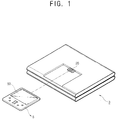
- a mounting part 20 is disposed on a side of the casing of the portable computer for mounting an auxiliary system 5 thereto.
- the auxiliary system 5 can be carried with the portable computer.
- the auxiliary system 5 may be an embedded system having an operating system independent of a main system 3 of the portable computer and may include memory, a battery, a display part 50 and the like.
- the mounting part 20 may be disposed such that the display part 50 of the auxiliary system 5 protrudes from an upper part of a display panel 10 of the main system 3. Otherwise, the mounting part 20 may be arranged such that the display part 50 of the auxiliary system 5 faces backwards.
- the display part 50 of the auxiliary system 5 may display an operating panel of a multimedia file player when the display panel 10 is opened, i.e. the display part 50 may serve as an additional display part of the main system 3.
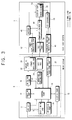
- the portable computer system comprises a main system 3 including a battery 12, a charging part 14 to charge the battery 12, a data storing part 18, a display panel 10 and the mounting part 20 for mounting the auxiliary system 5 thereto and for sending/receiving data to/from the auxiliary system 5.
- a mounting sensing part 40 in the main system 3 determines whether the auxiliary system 5 is mounted to the mounting part 20 of the main system 3, a wireless sending/receiving part 26 wirelessly communicates with the auxiliary system 5, a selecting part 30 selects whether the data in the data storing part 18 is displayed on the display part 50 of the auxiliary system 5 and a switching part 16 supplies/cuts-off electric power from the charging part 14 to the auxiliary system 5.
- a control part 28 in the main system 3 controls the portable computer system.
- the auxiliary system 5 comprises a battery 42 for supplying electric power, the display part 50 for displaying data and which has a touch screen 56, a TSP (Touch Screen Panel) controller 58 for processing signals input by a user using the touch screen 56 of the display part 50, a wireless sending/receiving part 46 to wirelessly communicate with the main system 3 and an embedded controller 44 to control the auxiliary system 5.
- TSP Touch Screen Panel
- the battery 12 supplies the electric power necessary to operate the components of the portable computer.
- the control part 28 controls the supply of electric power from the charging part 14 to the battery 12, in response to a signal from a sensing part indicating the remaining capacity of the battery 12.
- the auxiliary system 5 may be mounted on the mounting part 20 and the mounting part 20 may include a DVO (Digital Video Output) port 24 and a power supplying port 22.
- the auxiliary system 5 there is provided a DVO port connecting part 54 and a power supplying port connecting part 52 for connecting to the DVO (Digital Video Output) port 24 and the power supplying port 22 respectively.
- the mounting sensing part 40 includes a circuit for generating an electrical signal when the auxiliary system 5 is mounted on the mounting part 20 of the main system 3.
- the mounting sensing part 40 generates two different signals depending on whether the auxiliary system 5 is mounted on the main system 3 and supplies the signals to the control part 28.
- the wireless sending/receiving part 26 of the main system 3 and the wireless sending/receiving part 46 of the auxiliary system 5 may interface using Bluetooth or any type of UWB (ultra wideband) interface.
- the main system 3 and the auxiliary system 5 can wirelessly communicate with each other by means of their respective wireless sending/receiving parts 26, 46.
- the main system 3 can be connected to web-servers and serve as a web-browser using the wireless sending/receiving part 26.
- the wireless sending/receiving part 46 of the auxiliary part 5 is configured to only communicate data between the auxiliary part 5 and the main system 3, so that the auxiliary system 5 cannot be connected to web-servers using the wireless sending/receiving part 46 of the auxiliary system 5.
- the auxiliary system 5 can only serve as a web-browser by using the wireless sending/receiving part 26 of the main system 3.
- the auxiliary system 5 may be constructed so that the auxiliary system 5 can be connected to web-servers using the wireless sending/receiving part 46 of the auxiliary system 5 and serve as a stand-alone web-browser.
- the selecting part 30 selects whether the data of the main system 3 is displayed on the display part 50 of the auxiliary system 5 or on the display panel of the main system 3 and may be in the form of a predetermined button, a hot key or a selecting program.
- a selecting program may be used such that, when the switch of the auxiliary system 5 is turned on and a power supplying signal is transmitted from the auxiliary system 5 through the mounting part 20 or the wireless sending/receiving part 26 to the main system 3, the control part 28 of the main system 3 senses the power supplying signal and operates the selecting program.
- the switching part 16 is electrically connected to the charging part 14 and the power supplying port 22 of the mounting part 20, so as to control the supply of the electric power from the charging part 14 to the auxiliary system 5 through the power supplying port 22.
- the control part 28 determines whether the auxiliary system 5 is mounted on the mounting part 20 in response to a mounting sensing signal generated by the mounting sensing part 40. When it is determined that the auxiliary system 5 is mounted, the control part 28 turns on the switching part 16 so that electric power from the charging part 14 is supplied to the battery 42 of the auxiliary system 5 through the power supplying port 22.
- the control part 28 transmits data stored in the data storing part 18 to the auxiliary system 5 through the DVO port 24.
- the embedded controller 44 which stores a graphic controller of the auxiliary system 5, processes the data of the main system 3 transmitted through the DVO port 24 in a signal processing part (not shown) and displays the data of the main system 3 on the display part 50.
- control part 28 supplies a signal to cut-off power to the auxiliary system 5 using one of the mounting part 20 and the wireless sending/receiving part 26.
- the embedded controller 44 of the auxiliary system 5 controls the battery 42 in response to the signal to cut-off power and turns-off the electric power to the display part 50 of the auxiliary system 5, thereby reducing unnecessary power consumption when the user does not want to display data on the display part 50 of the auxiliary system 5.
- control part 28 When it is determined that the auxiliary system 5 is not mounted, the control part 28 turns-off the switching part 16 and stops charging the battery 42 of the auxiliary system 5, thereby preventing a current leakage to the charging part 14.
- control part 28 When a user selects to display data of the main system 3 on the display part 50 of the auxiliary system 5, the control part 28 reads the data stored in the data storing part 18 and transmits the data to the auxiliary system 5 using the wireless sending/receiving part 26.
- control part 28 supplies an operating signal corresponding to a PDA (Personal Digital Assistant) mode to the auxiliary system 5 using the wireless sending/receiving part 26.
- PDA Personal Digital Assistant
- the embedded controller 44 of the auxiliary system 5 to which the operating signal of the PDA mode is supplied determines whether the wireless sending/receiving part 26 of the main system 3 is turned on/off. When it is determined that the wireless sending/receiving part 26 of the main system 3 is turned on, the embedded controller 44 controls the auxiliary system 5 to operate in a web-pad mode, such as a web-browser, using the wireless sending/receiving part 26, in response to an user input made using the touch screen 56 of the auxiliary system 5.
- a web-pad mode such as a web-browser
- the embedded controller 44 controls the auxiliary system 5 to operate in the PIMS mode.
- the auxiliary system 5 can serve in the PIMS mode.
- the data of the main system 3 can be displayed on the display part 50 of the auxiliary system 5 without opening the portable computer, so that the user can speedily process data even while the user is in motion and the auxiliary system 5 can be used as a web-pad through the wireless sending/receiving part 26.
- the auxiliary system 5 can be operated in the PIMS mode such as data recording, reproducing and displaying machines.
- a signal input through the touch screen 56 of the auxiliary system 5 is received by the TSP controller 58 and then transmitted to the control part 28 of the main system 3 using the wireless sending/receiving parts 26, 46, thereby enabling the main system 3 to be controlled using the touch screen 56 of the auxiliary system 5.
- the input device of the auxiliary system 5 is described as the touch screen 56, but it is not limited thereto.
- the mounting part 20, for mounting the auxiliary system 5 thereto and the wireless sending/receiving part 26, for wirelessly communicating with the auxiliary system 5, are provided in the main system 3.
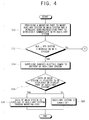
- the control part 28 determines whether the auxiliary system 5 is mounted on the main system 3 in response to a signal from the mounting sensing part 40.
- the control part 28 controls the charging part 14 to supply electric power to the battery 42 of the auxiliary system 5.
- the control part 28 controls the data stored in the data storing part 18 to be supplied to the auxiliary system 5 using the mounting part 20.
- the control part 28 controls the embedded controller 44 to cut-off the supply of electric power to the auxiliary system 5 using the wireless sending/receiving part 26 or the mounting part 20.
- the embedded controller controls the battery 42 to cut-off the supply of electric power to the auxiliary system 5.
- the control part 28 reads the data stored in the data storing part 18 and supplies the data to the auxiliary system 5 using the wireless sending/receiving part 26.
- the data of the main system 3 is displayed on the display part 50 of the auxiliary system 5.
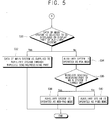
- control part 28 supplies a PDA operating mode signal to the embedded controller 44 using the wireless sending/receiving part 26 and controls the auxiliary system 5 to operate in the PDA mode.
- the embedded controller 44 determines whether the wireless sending/receiving part 26 of the main system 3 is turned on/off. When it is determined that the wireless sending/receiving part 26 of the main system 3 is turned on, at operation S38, the embedded controller 44 controls the auxiliary system 5 to operate in the web-pad mode. When it is determined that the wireless sending/receiving part 26 of the main system 3 is turned off, at operation S40, the embedded controller 44 controls the auxiliary system 5 to operate in the PIMS mode.
- the data of the main system 3 is supplied to the auxiliary system 5 using the mounting part 20, when the auxiliary system 5 is mounted on the main system 3.
- the auxiliary system 5 and the main system 3 may be connected by a cable, thereby enabling the sending/receiving of data between the auxiliary system 5 and the main system 3.
- the auxiliary system 5 is operated in the PIMS mode at operation S40, on the conditions that the auxiliary system 5 is not mounted on the main system 3, the user selects not to display the data of the main system 3 on the display part 50 of the auxiliary system 5 and the wireless sending/receiving part 26 of the main system 3 is turned off.
- the web-pad mode may be automatically switched to the PIMS mode by a user setting, if the auxiliary system 5 is not mounted on the main system 3.
- the data of the main system 3 is supplied to the auxiliary system 5 using the mounting part 20 or the wireless sending/receiving part 26, regardless of whether the auxiliary system 5 is mounted on the main system 3 or not, so that the user can speedily process data even while the user is in motion
- a portable computer and a control method thereof in which data stored in a main system is displayed on the display part of an auxiliary system, so that the user can speedily process data even while the user is in motion, is provided.
- a portable computer and a control method thereof in which an auxiliary system serves as a web-pad using a network interface of a main system or operates in a PIMS mode is provided.
- a portable computer and a control method thereof in which a main system can be controlled using an input device of an auxiliary system is provided.
- the portable computer system implementing the method described above includes permanent or removable storage, such as an application specific integrated circuit (ASIC), magnetic and optical discs, RAM, ROM, etc. on which the process and data structures of the present invention can be stored and distributed.
- ASIC application specific integrated circuit
- the processes can also downloaded over a network such as the Internet.
Landscapes
- Engineering & Computer Science (AREA)
- Theoretical Computer Science (AREA)
- Computer Hardware Design (AREA)
- Physics & Mathematics (AREA)
- General Engineering & Computer Science (AREA)
- General Physics & Mathematics (AREA)
- Human Computer Interaction (AREA)
- Mathematical Physics (AREA)
- Power Sources (AREA)
- Telephone Function (AREA)
- Control Of Indicators Other Than Cathode Ray Tubes (AREA)
- Stored Programmes (AREA)
Applications Claiming Priority (2)
| Application Number | Priority Date | Filing Date | Title |
|---|---|---|---|
| KR10-2003-0044389A KR100475573B1 (ko) | 2003-07-01 | 2003-07-01 | 휴대용 컴퓨터시스템 및 그 제어방법 |
| KR2003044389 | 2003-07-01 |
Publications (2)
| Publication Number | Publication Date |
|---|---|
| EP1494107A2 true EP1494107A2 (fr) | 2005-01-05 |
| EP1494107A3 EP1494107A3 (fr) | 2007-04-25 |
Family
ID=33432451
Family Applications (1)
| Application Number | Title | Priority Date | Filing Date |
|---|---|---|---|
| EP04102414A Ceased EP1494107A3 (fr) | 2003-07-01 | 2004-05-28 | Ordinateur ayant un écran |
Country Status (4)
| Country | Link |
|---|---|
| US (1) | US7231529B2 (fr) |
| EP (1) | EP1494107A3 (fr) |
| KR (1) | KR100475573B1 (fr) |
| CN (1) | CN1287253C (fr) |
Cited By (1)
| Publication number | Priority date | Publication date | Assignee | Title |
|---|---|---|---|---|
| US11409330B2 (en) | 2018-07-03 | 2022-08-09 | Hewlett-Packard Development Company, L.P. | Receptacles for electronic devices |
Families Citing this family (31)
| Publication number | Priority date | Publication date | Assignee | Title |
|---|---|---|---|---|
| US9507930B2 (en) | 2003-04-25 | 2016-11-29 | Z124 | Physical key secure peripheral interconnection |
| US20130198867A1 (en) | 2011-12-09 | 2013-08-01 | Z124 | A Docking Station for Portable Devices Providing Authorized Power Transfer and Facility Access |
| IL159838A0 (en) | 2004-01-13 | 2004-06-20 | Yehuda Binder | Information device |
| US7558884B2 (en) * | 2004-05-03 | 2009-07-07 | Microsoft Corporation | Processing information received at an auxiliary computing device |
| US7511682B2 (en) * | 2004-05-03 | 2009-03-31 | Microsoft Corporation | Context-aware auxiliary display platform and applications |
| US7577771B2 (en) * | 2004-05-03 | 2009-08-18 | Microsoft Corporation | Caching data for offline display and navigation of auxiliary information |
| US7660914B2 (en) | 2004-05-03 | 2010-02-09 | Microsoft Corporation | Auxiliary display system architecture |
| US7363525B2 (en) * | 2004-10-07 | 2008-04-22 | Cisco Technology, Inc. | Bidirectional inline power port |
| US7502947B2 (en) * | 2004-12-03 | 2009-03-10 | Hewlett-Packard Development Company, L.P. | System and method of controlling a graphics controller |
| US7502221B2 (en) * | 2005-04-22 | 2009-03-10 | Microsoft Corporation | Multiple-use auxiliary display |
| US8692816B2 (en) | 2005-04-22 | 2014-04-08 | Microsoft Corporation | State-based auxiliary display operation |
| TWI293156B (en) * | 2005-08-12 | 2008-02-01 | Winbond Electronics Corp | Embedded controller and a computer system with said embedded controller |
| TW200910060A (en) * | 2007-08-27 | 2009-03-01 | Inventec Corp | Portable computer |
| KR101494010B1 (ko) * | 2008-06-02 | 2015-02-17 | 엘지전자 주식회사 | 보조 출력 장치를 구비한 휴대용 컴퓨터 그리고 이를이용한 위치표시 방법 |
| CN101661304B (zh) | 2008-08-25 | 2011-07-27 | 联想(北京)有限公司 | 一种计算机及其输入设备共用方法 |
| US20100250817A1 (en) * | 2009-03-27 | 2010-09-30 | Qualcomm Incorporated | System and method of managing data communication at a portable computing device and a portable computing device docking station |
| US9201593B2 (en) | 2009-03-27 | 2015-12-01 | Qualcomm Incorporated | System and method of managing displays at a portable computing device and a portable computing device docking station |
| US20100250789A1 (en) * | 2009-03-27 | 2010-09-30 | Qualcomm Incorporated | System and method of managing memory at a portable computing device and a portable computing device docking station |
| US20100250818A1 (en) * | 2009-03-27 | 2010-09-30 | Qualcomm Incorporated | System and method of providing wireless connectivity between a portable computing device and a portable computing device docking station |
| US8630088B2 (en) | 2009-03-27 | 2014-01-14 | Qualcomm Incorporated | Portable docking station for a portable computing device |
| US8707061B2 (en) | 2009-03-27 | 2014-04-22 | Qualcomm Incorporated | System and method of providing scalable computing between a portable computing device and a portable computing device docking station |
| US8653785B2 (en) | 2009-03-27 | 2014-02-18 | Qualcomm Incorporated | System and method of managing power at a portable computing device and a portable computing device docking station |
| US9128669B2 (en) | 2009-03-27 | 2015-09-08 | Qualcomm Incorporated | System and method of managing security between a portable computing device and a portable computing device docking station |
| US20100251243A1 (en) * | 2009-03-27 | 2010-09-30 | Qualcomm Incorporated | System and method of managing the execution of applications at a portable computing device and a portable computing device docking station |
| WO2010144750A1 (fr) * | 2009-06-11 | 2010-12-16 | Gilad Odinak | Délivrance hors ligne de contenu par affichage sur écran actif |
| JP5827337B2 (ja) * | 2010-10-01 | 2015-12-02 | ゼット124Z124 | 携帯電子機器をドッキングするためのユーザインタフェースに関するシステムと方法 |
| TWM449288U (zh) * | 2011-01-04 | 2013-03-21 | Motorola Mobility Inc | 用於固定可持電子器件至配件器件之裝置 |
| US9244491B2 (en) | 2011-08-31 | 2016-01-26 | Z124 | Smart dock for auxiliary devices |
| US9383770B2 (en) | 2011-08-31 | 2016-07-05 | Z124 | Mobile device that docks with multiple types of docks |
| CN102855110A (zh) * | 2012-07-25 | 2013-01-02 | 苏州佳世达电通有限公司 | 资讯提示装置及显示装置 |
| USD741318S1 (en) | 2013-10-25 | 2015-10-20 | Intel Corporation | Electronic device with a window |
Family Cites Families (14)
| Publication number | Priority date | Publication date | Assignee | Title |
|---|---|---|---|---|
| WO1992003816A1 (fr) * | 1990-08-16 | 1992-03-05 | General Parametrics Corp. | Dispositif de commande d'affichage comprenant un affichage auxiliaire |
| JPH04333119A (ja) * | 1991-05-09 | 1992-11-20 | Matsushita Electric Ind Co Ltd | 情報処理装置 |
| JP3018050B2 (ja) | 1991-11-15 | 2000-03-13 | ローム株式会社 | 半導体装置およびその製造方法 |
| KR940009735B1 (ko) | 1992-08-25 | 1994-10-17 | 삼성전자 주식회사 | 노우트 북 컴퓨터 |
| EP0637793A1 (fr) * | 1993-07-28 | 1995-02-08 | AT&T GLOBAL INFORMATION SOLUTIONS INTERNATIONAL INC. | Appareil d'accouplement pour ordinateur portable |
| JPH0926832A (ja) | 1995-07-07 | 1997-01-28 | Seiko Epson Corp | 情報処理装置および処理方法 |
| KR19990030851A (ko) | 1997-10-07 | 1999-05-06 | 윤종용 | 모니터 및 모니터가 설치된 휴대용 컴퓨터 |
| KR100303082B1 (ko) * | 1997-10-13 | 2001-11-22 | 윤종용 | 휴대용컴퓨터를이용한멀티미디어기기 |
| JP3092560B2 (ja) * | 1997-10-30 | 2000-09-25 | 日本電気株式会社 | パーソナルコンピュータ |
| JPH11175187A (ja) | 1997-12-15 | 1999-07-02 | Tetsuro Kotani | サブディスプレイ付ノート型パソコン |
| US6535199B1 (en) * | 1999-02-04 | 2003-03-18 | Palm, Inc. | Smart cover for a handheld computer |
| JP2001142563A (ja) * | 1999-11-09 | 2001-05-25 | Internatl Business Mach Corp <Ibm> | 機能補完型携帯情報装置 |
| KR100761953B1 (ko) | 2001-02-07 | 2007-09-28 | 삼성전자주식회사 | 휴대용 컴퓨터 |
| US6798647B2 (en) * | 2001-07-16 | 2004-09-28 | Hewlett-Packard Development Company, L.P. | Portable computer with integrated PDA I/O docking cradle |
-
2003
- 2003-07-01 KR KR10-2003-0044389A patent/KR100475573B1/ko not_active Expired - Fee Related
-
2004
- 2004-04-09 US US10/820,813 patent/US7231529B2/en not_active Expired - Lifetime
- 2004-05-28 EP EP04102414A patent/EP1494107A3/fr not_active Ceased
- 2004-06-01 CN CNB2004100465363A patent/CN1287253C/zh not_active Expired - Fee Related
Non-Patent Citations (1)
| Title |
|---|
| None * |
Cited By (2)
| Publication number | Priority date | Publication date | Assignee | Title |
|---|---|---|---|---|
| US11409330B2 (en) | 2018-07-03 | 2022-08-09 | Hewlett-Packard Development Company, L.P. | Receptacles for electronic devices |
| EP3818426A4 (fr) * | 2018-07-03 | 2022-09-14 | Hewlett-Packard Development Company, L.P. | Réceptacles pour dispositifs électroniques |
Also Published As
| Publication number | Publication date |
|---|---|
| CN1287253C (zh) | 2006-11-29 |
| KR100475573B1 (ko) | 2005-03-14 |
| EP1494107A3 (fr) | 2007-04-25 |
| KR20050005339A (ko) | 2005-01-13 |
| US7231529B2 (en) | 2007-06-12 |
| CN1577216A (zh) | 2005-02-09 |
| US20050005176A1 (en) | 2005-01-06 |
Similar Documents
| Publication | Publication Date | Title |
|---|---|---|
| EP1494107A2 (fr) | Ordinateur ayant un écran | |
| US7449863B2 (en) | Battery pack and charger with memory having operating permission and image data recording means | |
| EP2244157B1 (fr) | Terminal doté d'un mode de veille qui lance un coup de téléphone en entrant dans un mode de fonctionnement normal | |
| US9606600B2 (en) | File storage state management, battery capacity management, and file reproduction management for client devices | |
| US8433373B2 (en) | Mobile terminal with multiple batteries | |
| CA2643798C (fr) | Gestion d'energie dans un systeme portable de diffusion de medias | |
| JP2000152168A (ja) | 画像再生装置 | |
| US7321975B2 (en) | Method for controlling power supply to function modules selectively based on function modules necessary for predetermined program execution in mobile device | |
| JP2006349689A (ja) | 電子機器、表示制御方法、記録媒体、並びにプログラム | |
| US20070294546A1 (en) | Host device shutdown system | |
| US20070130268A1 (en) | Information processing apparatus and communication control method | |
| JP4171455B2 (ja) | 携帯情報システムおよび携帯情報端末 | |
| JP2005062537A (ja) | 情報処理装置および方法、プログラム、並びに記録媒体 | |
| CZ2004428A3 (cs) | Přenosný počítačový systém a způsob jeho ovládání | |
| KR200371116Y1 (ko) | 엠피쓰리 플레이어의 이중 충전구조 | |
| JP2003140248A (ja) | 電子機器 | |
| JP2005173822A (ja) | 情報処理方法、情報処理システム、プログラム及び記憶媒体 | |
| JP2006211008A (ja) | データバックアップシステム及びデータバックアップ方法 | |
| KR100769377B1 (ko) | 개인정보단말기 스테이션에서의 데이터 파일 다운로드 및업로드 방법 | |
| KR20070020970A (ko) | 프리젠테이션 기능을 구비한 이동통신 단말기 및 그제어방법 | |
| JP2017044809A (ja) | 表示装置、表示方法及びプログラム | |
| JP2005012596A (ja) | 携帯通信装置 | |
| JP2004112458A (ja) | データ管理装置及びデータ管理方法 | |
| JP2002209008A (ja) | 携帯電話装置 | |
| HK1149965A (en) | Power management in a portable media delivery system |
Legal Events
| Date | Code | Title | Description |
|---|---|---|---|
| PUAI | Public reference made under article 153(3) epc to a published international application that has entered the european phase |
Free format text: ORIGINAL CODE: 0009012 |
|
| AK | Designated contracting states |
Kind code of ref document: A2 Designated state(s): AT BE BG CH CY CZ DE DK EE ES FI FR GB GR HU IE IT LI LU MC NL PL PT RO SE SI SK TR |
|
| AX | Request for extension of the european patent |
Extension state: AL HR LT LV MK |
|
| PUAL | Search report despatched |
Free format text: ORIGINAL CODE: 0009013 |
|
| AK | Designated contracting states |
Kind code of ref document: A3 Designated state(s): AT BE BG CH CY CZ DE DK EE ES FI FR GB GR HU IE IT LI LU MC NL PL PT RO SE SI SK TR |
|
| AX | Request for extension of the european patent |
Extension state: AL HR LT LV MK |
|
| 17P | Request for examination filed |
Effective date: 20071002 |
|
| AKX | Designation fees paid |
Designated state(s): DE FR GB NL |
|
| 17Q | First examination report despatched |
Effective date: 20100817 |
|
| RAP1 | Party data changed (applicant data changed or rights of an application transferred) |
Owner name: SAMSUNG ELECTRONICS CO., LTD. |
|
| STAA | Information on the status of an ep patent application or granted ep patent |
Free format text: STATUS: THE APPLICATION HAS BEEN REFUSED |
|
| 18R | Application refused |
Effective date: 20170210 |