EP1505512A2 - Entrée et évaluation de fractions utilisant un calculateur - Google Patents
Entrée et évaluation de fractions utilisant un calculateur Download PDFInfo
- Publication number
- EP1505512A2 EP1505512A2 EP04254473A EP04254473A EP1505512A2 EP 1505512 A2 EP1505512 A2 EP 1505512A2 EP 04254473 A EP04254473 A EP 04254473A EP 04254473 A EP04254473 A EP 04254473A EP 1505512 A2 EP1505512 A2 EP 1505512A2
- Authority
- EP
- European Patent Office
- Prior art keywords
- user
- calculator
- key
- entered
- fraction
- Prior art date
- Legal status (The legal status is an assumption and is not a legal conclusion. Google has not performed a legal analysis and makes no representation as to the accuracy of the status listed.)
- Withdrawn
Links
Images




Classifications
-
- G—PHYSICS
- G06—COMPUTING OR CALCULATING; COUNTING
- G06F—ELECTRIC DIGITAL DATA PROCESSING
- G06F15/00—Digital computers in general; Data processing equipment in general
- G06F15/02—Digital computers in general; Data processing equipment in general manually operated with input through keyboard and computation using a built-in program, e.g. pocket calculators
- G06F15/0225—User interface arrangements, e.g. keyboard, display; Interfaces to other computer systems
Definitions
- the present invention relates to a method of and apparatus for input and evaluation of fractions using a calculator.
- a hand-held calculator is an important and useful device. Similar to a computer, the hand-held calculator has a processor, a memory, a display, and an input device; however, there are important distinguishing differences between the hand-held calculator and the computer.
- the hand-held calculator is a specialized device and not a general purpose device, as is true of a computer. Because of this specialization, typically the handheld calculator costs less, has a longer useful lifespan, and is more reliable and more portable than the computer.
- a hand-held calculator typically executes a single program and less frequently supports execution of user-created programs.
- a hand-held calculator supports addition, subtraction, multiplication, and division of numbers either integer-based or decimal-based, entered by a user and displays the results on a built-in display.
- a graphical calculator is a further specialized version of a hand-held calculator having a display which is typically larger than a regular hand-held calculator display in order to enable graph output.
- graphical calculator displays are liquid crystal displays for more accurate representation and enhanced readability of a graph output.
- a graphical calculator is able to display a graph of a specific expression, e.g. a sine wave representing a sinusoidal function, entered by a user.
- a specific expression e.g. a sine wave representing a sinusoidal function
- graphical capabilities on hand-held calculators are only available as part of expensive and complex, "high end" scientific calculators. These graphical calculators are more expensive than other calculators, typically costing hundreds of Euros/Dollars. These graphical calculators are more complicated to operate than other calculators because of the large amount of functionality incorporated therein.
- the increased functionality has required a corresponding increase in the number of keys required for manipulating and using the calculator.
- currently available graphical calculators have approximately fifty (50) keys including two (2) shift or modifier keys for a user to manipulate, e.g. a Texas Instruments (TI) 83 plus calculator has 51 keys and two (2) shift keys which can be used concurrently, enabling up to four functions to be assigned per the 51 remaining keys, and a Hewlett-Packard (HP) 48G+/GX calculator has 49 keys and three (3) shift keys, enabling up six functions to be assigned per the remaining 49 keys.
- TI Texas Instruments
- HP Hewlett-Packard
- a user must contend with different modes of operation of the current graphical calculator. Different modes of operation, accessible via specific keys and/or key sequences, must be utilized in order to access specific calculator functionality, e.g. a graphical calculator may include a fraction mode, a decimal mode, a binary mode, a hexadecimal mode, a finance mode, a statistics mode, and a graph mode.
- expression input requires increasingly complicated key manipulations and combinations.
- a mode specifying combination may include manipulation of a graph key to instruct the calculator to graph the following expression entry.
- the expression entry combination may include manipulation of multiple keys to input the expression to be graphed and the completion combination includes manipulation of a key, e.g. an enter key, to instruct the calculator to perform the preceding operations, i.e. graph the entered expression.
- the user manual for a currently available hand-held graphical calculator has dramatically increased in size in order to fully explain the use of the calculator.
- the above-cited TI-83 plus calculator manual includes 269 pages and the HP 48G+/GX calculator manual includes 506 pages. These are very long documents which are typically not read by users. Further, users are likely to be deterred from reading the manual because of the imposing size of the manual.
- Graphical calculators are very popular and effective educational aides. School students using graphical calculators can easily visualize complex functions; however, the complexity and cost of currently available graphical calculators deters many students and schools from making a purchase. Purchasers are dissuaded by the size of the manual, multiple modes of operation, and the number of keys and key combinations required for inputting expressions.
- Prior hand-held calculators of which the inventor is aware enable a user to input fractions, i.e. fractional numbers or numbers having a fractional component such as 2/3 or 3 2/3; however, the prior calculators rely on one of two approaches.
- Prior approaches for calculators receiving fraction input include a fraction mode and designation of a fraction key.
- Using a fraction mode and designating a fraction key both require a user to manipulate a designated key on the calculator thereby providing input to the calculator indicating that the subsequently entered expression is to be evaluated as a fraction.
- the user is required to learn and memorize an additional calculator mode and corresponding activation key, and manipulate additional keys for expression entry.
- the user is more likely to mis-key either the designated fraction mode key or the expression and, at a minimum, additional keystrokes are required to input the fraction. Additional keystrokes necessitates more complexity, more time for input, and increased chance of an input error and frustration for the user.
- the present invention seeks to provide an improved calculator and in the preferred embodiment an improved method of and apparatus for input and evaluation of fractions using a hand-held calculator.
- a method aspect of input and evaluation of fractions using a calculator includes receiving a user-entered expression including a fraction where the fraction is entered using a division key.
- the user-entered expression causes the calculator to evaluate the user-entered expression and display the evaluated user-entered expression.
- An apparatus aspect includes a calculator enabling input and evaluation of fractions having means for receiving and displaying a user-entered expression including a fraction entered using a division key.
- the calculator further includes a processor for evaluating the user-entered expression.
- An attached calculator display displays the evaluated user-entered expression.
- Figure 1 is a front face view of a graphical calculator 100 according to an embodiment of the present invention.
- Calculator 100 includes a display 102 and a primarily key-based input area 104 set in a front face 106.
- front face 106 is depicted as a rounded rectangle, it is to be understood that the front face may be manufactured to be any of a number of different shapes.
- input mechanisms are described below, it is to be understood that variations in the number, type, and configuration of input mechanisms may be found in different embodiments of the present invention.
- Display 102 is a rectangular liquid crystal display (LCD) which is 96 pixels wide and 64 pixels in height. As shown in figure 1, display 102 displays a sine wave 102A on a graph having an X axis 102B and a Y axis 102C.
- Input area 104 includes four keys and one directional input device 108 in a row 110 and 16 keys arranged in a four by four grid 112. Although a four by four grid is depicted and described, it is to be understood that the input area keys may be arranged in different configurations.
- Directional input device 108 is used to navigate menus and perform information input, recall, and editing.
- Directional input device 108 may be manipulated by the user to input at least four directions, i.e. up, down, left, and right to calculator 100.
- Input of the left arrow of directional input device 108 inputs a move left command to processor 204 thereby moving the current cursor position on display 102 to the left one position.
- Input of the right arrow of directional input device 108 inputs a move right command to processor 204 thereby moving the current cursor position on display 102 to the right one position.
- a secondary function of directional input device 108 is editing an expression on display 102.
- the input of shift key 114 in conjunction with or prior to left arrow of directional input device 108 inputs a backspace command to processor 204 thereby deleting the character to the left of the current cursor position on display 102.
- the input of shift key 114 in conjunction with or prior to fight arrow of directional input device 108 inputs a delete command to processor 204 thereby deleting the character to the right of the current cursor position on display 102.
- the four remaining keys in row 110 are shift key 114, open parenthesis key 116, close parenthesis key 118, and power key 120.
- Shift key 114 is used to access a second set of functions, i.e. secondary functions, assigned to the remaining keys on calculator 100. For example, user activating power key 120 turns on calculator 100; however, activation of power key 120 subsequent to activation of shift key 114 turns off the calculator. In a similar fashion, each of the remaining keys of calculator 100 has an assigned secondary function.
- Open parenthesis key 116 inputs a beginning parenthesis in a user-entered expression.
- the secondary function of open parenthesis key 116 is to input a command causing calculator 100 to split a graphical output on display 102 such that one half of the display is a graph and the other half is numerical information related to the graph displayed.
- Close parenthesis key 118 inputs an ending parenthesis in a user-entered expression.
- the secondary function of close parenthesis key 118 is to input a T variable in a user-entered expression.
- Power key 120 turns on calculator 100 and, as described above, the secondary function of power key 120 is to turn off calculator 100. Additionally, power key 120 operates as a clear key after calculator 100 is turned on, i.e. the power key may be used to clear the displayed expression on display 102. Manipulation of shift key 114 followed by right arrow of directional input device 108 deletes input characters to the right of the current input position and manipulation of shift key 114 followed by left arrow of directional input device 108 deletes input characters to the left of the current input position.
- Row 1, column 1 key 122 i.e. the seven key, inputs a seven (7) value in user-entered expression and has a secondary function of inputting a sin function in a user-entered expression.
- Row 1, column 2 key 124 i.e. the eight key, inputs an eight (8) value in a user-entered expression and has a secondary function of inputting a cos function in a user-entered expression.
- Row 1, column 3 key 126, i.e. the nine key, inputs a nine (9) value in a user-entered expression and has a secondary function inputting a tan function in a user-entered expression.
- the division key inputs a division (/) function in a user-entered expression and has secondary function of inputting a theta (0) variable in a user-entered expression. Further, as described in detail below, the division key 128 is used to input a fractional value to calculator 100. Division key 128 is input between input of the digits of the numerator and denominator of a fraction.
- Row 2, column 1 key 130 i.e. the four key, inputs a four (4) value in a user-entered expression and has a secondary function of inputting a square root function in a user-entered expression.
- Row 2, column 2 key 132 i.e. the five key, inputs a five-(5) value in a user entered expression and has a secondary function of inputting squared function, i.e. raising a value to the second power, in a user-entered expression.
- Row 2, column 3 key 134 i.e. the six key, inputs a six (6) value in a userentered expression and has a secondary function of inputting a value raised to the power of a subsequently entered value function, i.e.
- Row 2 key 136 i.e. the multiplication key, inputs a multiplication (*) function in a user-entered expression and has a secondary function of inputting an X variable in a user-entered expression.
- Row 3, column 1 key 138 i.e. the one key, inputs a one (1) value in a user-entered expression and has a secondary function of inputting an absolute value function in a user-entered expression.
- Row 3, column 2 key 140 i.e. the 2 key, inputs a two (2) value in a user-entered expression and has a secondary function of inputting a natural logarithm function in a user-entered expression.
- Row 3, column 4 key 144 i.e. the minus key, inputs a subtraction (-) function in user-entered expression and has a secondary function of inputting a NOT function in a user-entered expression.
- Row 4, column 1 key 146 i.e. the execute key, inputs an execute command to calculator 100 and has a secondary function of inputting a menu command to the calculator.
- Row 4, column 2 key 148 i.e. the zero key, inputs a zero (0) value in user-entered expression and has a secondary function of inputting an e value in a userentered expression.
- Row 4, column 3 key 150 i.e. the dot key, inputs a decimal point in a value entry and has a secondary function of in putting a pi constant value in a user-entered expression.
- Row 4, column 4 key 152 of i.e.
- the plus key inputs an addition (+) function in a user-entered expression and has a secondary function of putting a times ten to the power of a subsequently entered value, i.e. "*10 ⁇ Y", in a user-entered expression.
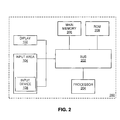
- Figure 2 is a block diagram illustrating an exemplary calculator 100 upon which an embodiment of the invention may be implemented.
- Calculator 100 includes a bus 202 or other communication mechanism for communicating information, and a processor 204 coupled with the bus 202 for processing information.
- processor 204 is a 16 bit processor.
- Calculator 100 also includes a main memory 206, such as a random access memory (RAM) or other dynamic storage device, coupled to the bus 202 for storing data and expressions according to an embodiment of the present invention and instructions to be executed by processor 204.
- Main memory 206 also may be used for storing temporary variables or other intermediate information during execution of instructions to be executed by processor 204.
- main memory 206 is an 8 Kilobyte RAM.
- the components of calculator 100 may be combined onto a single integrated circuit, e.g. processor 204 and main memory 206 may be combined on a single "system on a chip".
- Calculator 100 further includes a read only memory (ROM) 208 or other static storage device coupled to the bus 202 for storing static information and instructions for the processor 204.
- ROM 208 is a 128 Kilobyte ROM.
- Calculator 100 may be coupled via the bus 202 to a display 102, such as the above-described 96 * 64 pixel LCD, for displaying an interface to a user.
- An input area 104 is coupled to the bus 202 for communicating information, e.g. user-entered expressions and values, and command inputs to the processor 204.
- An input device 108 is part of input area 104 and communicates direction information and command selections to processor 204 and controls cursor movement on the display 102.
- This input device typically has two degrees of freedom in two axes, a first axis (e.g., x) and a second axis (e.g., y) allowing the device to specify positions in a plane.
- calculator 100 such as the depicted calculator of Figure 2
- operations e.g. expressions
- data is stored and accessed from main memory 206 by calculator 200 in response to processor 204 executing sequences of instructions contained in main memory 206 in response to input received via input area 104.
- a user interacts with the calculator 100 via a user interface displayed (as described below) on display 102.
- main memory 206 causes the processor 204 to perform the process steps described below.
- processor 204 executes the sequences of instructions contained in the main memory 206 to perform the process steps described below.
- hard-wired circuitry may be used in place of or in combination with computer software instructions to implement the invention.
- embodiments of the invention are not limited to any specific combination of hardware circuitry and software.
- a user is able to input and evaluate fractions as user-entered expressions using a calculator.
- a user using calculator 100 manipulates number keys, i.e. 0-9 keys 122, 124, 126, 130, 132, 134, 138, 140, 142, and 148, to input one or more digits representative of the numerator for a fraction to be evaluated by processor 204.
- the user then manipulates division key 128 to input a division symbol to processor 204.
- the user manipulates the number keys again to input one or more digits representative of the denominator for the fraction to be evaluated by processor 204.
- fractions may be input in the same manner as written by a user on paper; thereby providing a more natural feel to the user using calculator 100 for fraction evaluation. Further, because fractions are input as written, users may more easily remember how to input fractions.
- Calculator 100 will convert any user-entered expression using only integers, parenthesis, addition, subtraction, multiplication, and division into a fractional form. That is, 1+2/3(4+4/3) yields a fractional result of 41/9. It is to be understood that additional mathematical functions may be used in different embodiments.
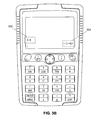
- display 102 displays a user input of a fraction value 302, i.e. "4/8", by sequential manipulation of the four key 130, the division key 128, and the eight key 124.
- ”, at the end of fraction value 302 indicates the cursor position to the user during editing/input of the user-entered expression, i.e. fraction value 302.
- Result 304 includes a fraction version of the result separated by an equal sign from the decimal version of the result. It is to be understood that in alternate embodiments only one of the fraction and decimal version may be displayed.
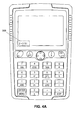
- display 102 displays a user input of a compound fraction 306, i.e. "2 and 2/3", by sequential manipulation of the two key 140, the addition key 152, the two key, the division key 128, and the three key 142.
- " at the end of fraction value 306 indicates the cursor position to the user during editing/input of the user-entered expression, i.e. fraction value 306.
- Result 308 includes a fraction version of the result separated by an equal sign from the decimal version of the result.
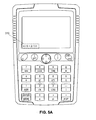
- display 102 displays a user input of fraction addition 310, i.e. "4/5 plus 2/3," by sequential manipulation of the four key 130, the division key 128, the five key 132, the addition key 152, the two key 140, the division key 128, and the three key 142.
- the uptight bar symbol, "1" at the end of fraction addition 310 indicates the cursor position to the user during editing/input of the userentered expression, i.e. fraction addition 310.
- Result 312 includes a fraction version of the result separated by an equal sign from the decimal version of the result.
Landscapes
- Engineering & Computer Science (AREA)
- Computer Hardware Design (AREA)
- Computing Systems (AREA)
- General Engineering & Computer Science (AREA)
- Theoretical Computer Science (AREA)
- Human Computer Interaction (AREA)
- Physics & Mathematics (AREA)
- General Physics & Mathematics (AREA)
- Calculators And Similar Devices (AREA)
Applications Claiming Priority (2)
| Application Number | Priority Date | Filing Date | Title |
|---|---|---|---|
| US636785 | 1991-01-02 | ||
| US10/636,785 US7325020B2 (en) | 2003-08-08 | 2003-08-08 | Input and evaluation of fractions using a calculator |
Publications (2)
| Publication Number | Publication Date |
|---|---|
| EP1505512A2 true EP1505512A2 (fr) | 2005-02-09 |
| EP1505512A3 EP1505512A3 (fr) | 2007-02-07 |
Family
ID=33552963
Family Applications (1)
| Application Number | Title | Priority Date | Filing Date |
|---|---|---|---|
| EP04254473A Withdrawn EP1505512A3 (fr) | 2003-08-08 | 2004-07-27 | Entrée et évaluation de fractions utilisant un calculateur |
Country Status (4)
| Country | Link |
|---|---|
| US (1) | US7325020B2 (fr) |
| EP (1) | EP1505512A3 (fr) |
| AU (1) | AU2004202575B2 (fr) |
| SG (1) | SG108951A1 (fr) |
Cited By (3)
| Publication number | Priority date | Publication date | Assignee | Title |
|---|---|---|---|---|
| CN102184156B (zh) * | 2005-12-22 | 2013-07-24 | 卡西欧计算机株式会社 | 分数计算装置以及分数显示方法 |
| WO2020157718A1 (fr) | 2019-01-31 | 2020-08-06 | Ernst & Young Gmbh | Interface utilisateur interactive pour système |
| WO2020157689A1 (fr) | 2019-01-31 | 2020-08-06 | Ernst & Young Gmbh | Système et procédé permettant d'obtenir une preuve d'audit |
Families Citing this family (4)
| Publication number | Priority date | Publication date | Assignee | Title |
|---|---|---|---|---|
| US8464179B2 (en) * | 2008-07-30 | 2013-06-11 | Hewlett-Packard Development Company, L.P. | Math menu user interface on a calculator |
| US20100185421A1 (en) * | 2009-01-19 | 2010-07-22 | Texas Instruments Incorporated | Method and Apparatus for Pictorial Representation of an Algebraic Expression |
| JP5892094B2 (ja) * | 2013-03-21 | 2016-03-23 | カシオ計算機株式会社 | グラフ表示制御装置、グラフ表示制御方法及びグラフ表示制御プログラム |
| USD766910S1 (en) * | 2014-11-11 | 2016-09-20 | Albert E. Packulak | Set of trigonometry calculator keys |
Citations (1)
| Publication number | Priority date | Publication date | Assignee | Title |
|---|---|---|---|---|
| US5519646A (en) | 1993-07-15 | 1996-05-21 | Sharp Kabushiki Kaisha | Calculator with display of processing for mulas as processing progresses |
Family Cites Families (9)
| Publication number | Priority date | Publication date | Assignee | Title |
|---|---|---|---|---|
| US4545022A (en) * | 1983-02-10 | 1985-10-01 | Hughins James T | Fractional calculator |
| JP3046027B2 (ja) * | 1987-08-05 | 2000-05-29 | キヤノン株式会社 | 文字処理方法 |
| US5101368A (en) * | 1988-06-20 | 1992-03-31 | Seymour Kaplan | Conversion calculator |
| US5241489A (en) * | 1989-10-02 | 1993-08-31 | Sharp Kabushiki Kaisha | Electronic computer with fraction and exponent display |
| US5025403A (en) * | 1989-10-30 | 1991-06-18 | Hewlett-Packard Company | Fraction entry and display |
| US5138566A (en) * | 1990-10-01 | 1992-08-11 | John Comforti | Fractional/decimal/digital converting calculator |
| US5586060A (en) * | 1993-06-25 | 1996-12-17 | Sharp Kabushiki Kaisha | Compact electronic equipment having a statistical function |
| US5870319A (en) * | 1996-01-04 | 1999-02-09 | Texas Instruments Incorporated | Device and method for collecting data from graphed images |
| US6829626B2 (en) * | 2000-07-11 | 2004-12-07 | Texas Instruments Incorporated | Computer algebra system and method |
-
2003
- 2003-08-08 US US10/636,785 patent/US7325020B2/en not_active Expired - Lifetime
-
2004
- 2004-06-11 AU AU2004202575A patent/AU2004202575B2/en not_active Ceased
- 2004-07-22 SG SG200404264A patent/SG108951A1/en unknown
- 2004-07-27 EP EP04254473A patent/EP1505512A3/fr not_active Withdrawn
Patent Citations (1)
| Publication number | Priority date | Publication date | Assignee | Title |
|---|---|---|---|---|
| US5519646A (en) | 1993-07-15 | 1996-05-21 | Sharp Kabushiki Kaisha | Calculator with display of processing for mulas as processing progresses |
Non-Patent Citations (1)
| Title |
|---|
| "TI-89, TI-92 PLUS GUIDEBOOK FOR ADVANCED MATHEMATICS SOFTWARE VERSION 2.0, OPERATING THE CALCULATOR- TI-89", USER'S GUIDE TEXAS INSTRUMENTS, 01011999 |
Cited By (3)
| Publication number | Priority date | Publication date | Assignee | Title |
|---|---|---|---|---|
| CN102184156B (zh) * | 2005-12-22 | 2013-07-24 | 卡西欧计算机株式会社 | 分数计算装置以及分数显示方法 |
| WO2020157718A1 (fr) | 2019-01-31 | 2020-08-06 | Ernst & Young Gmbh | Interface utilisateur interactive pour système |
| WO2020157689A1 (fr) | 2019-01-31 | 2020-08-06 | Ernst & Young Gmbh | Système et procédé permettant d'obtenir une preuve d'audit |
Also Published As
| Publication number | Publication date |
|---|---|
| AU2004202575B2 (en) | 2009-10-22 |
| EP1505512A3 (fr) | 2007-02-07 |
| US7325020B2 (en) | 2008-01-29 |
| SG108951A1 (en) | 2005-02-28 |
| US20050033784A1 (en) | 2005-02-10 |
| AU2004202575A1 (en) | 2005-02-24 |
Similar Documents
| Publication | Publication Date | Title |
|---|---|---|
| EP1505545B1 (fr) | Méthode et dispositif pour la visualisation d'une fonction dans le plan polaire au moyen d'un calculateur | |
| US20110219051A1 (en) | Electronic calculator, display method, and recording medium for displaying mathematical expression in full color | |
| CN104932801A (zh) | 电子设备、数学式显示控制方法 | |
| US6867777B2 (en) | Tracing and storing points of interest on a graphing calculator | |
| JP4661654B2 (ja) | 数式表示制御装置及び数式表示制御プログラム | |
| US20030041078A1 (en) | Interactive object transformation based expert system for symbolic mathematics on a handheld device | |
| US7325020B2 (en) | Input and evaluation of fractions using a calculator | |
| CN102193894A (zh) | 算式运算装置以及计算机的控制方法 | |
| US8832562B2 (en) | Graphical calculator user interface for function drawing | |
| US7272621B2 (en) | Previous calculation reuse in a calculator | |
| US6771252B2 (en) | Shading of inequalities on a graphing calculator | |
| EP1505513A2 (fr) | Calculateur graphique | |
| EP0446886B1 (fr) | Appareil entrée/sortie d'informations | |
| JP4134440B2 (ja) | 電子計算装置及びプログラムを記憶した記憶媒体 | |
| US20090064032A1 (en) | Computing machine with an inequality computation function | |
| JP2000057100A (ja) | 計算装置及び計算処理プログラムを記録した記録媒体 | |
| KR200342966Y1 (ko) | 전자계산기 | |
| JPH10289213A (ja) | 演算処理機能を備えた電子式計算機 | |
| JP2695082B2 (ja) | グラフ影付け機能付き電子機器 | |
| JP2011123664A (ja) | 表示装置およびプログラム | |
| JPH02213975A (ja) | 電子計算機 | |
| JPH0523455B2 (fr) | ||
| JP2000029610A (ja) | 情報機器 | |
| JPH0764924A (ja) | 電子機器 |
Legal Events
| Date | Code | Title | Description |
|---|---|---|---|
| PUAI | Public reference made under article 153(3) epc to a published international application that has entered the european phase |
Free format text: ORIGINAL CODE: 0009012 |
|
| AK | Designated contracting states |
Kind code of ref document: A2 Designated state(s): AT BE BG CH CY CZ DE DK EE ES FI FR GB GR HU IE IT LI LU MC NL PL PT RO SE SI SK TR |
|
| AX | Request for extension of the european patent |
Extension state: AL HR LT LV MK |
|
| PUAL | Search report despatched |
Free format text: ORIGINAL CODE: 0009013 |
|
| AK | Designated contracting states |
Kind code of ref document: A3 Designated state(s): AT BE BG CH CY CZ DE DK EE ES FI FR GB GR HU IE IT LI LU MC NL PL PT RO SE SI SK TR |
|
| AX | Request for extension of the european patent |
Extension state: AL HR LT LV MK |
|
| 17P | Request for examination filed |
Effective date: 20070806 |
|
| AKX | Designation fees paid |
Designated state(s): DE FR GB |
|
| 17Q | First examination report despatched |
Effective date: 20101130 |
|
| STAA | Information on the status of an ep patent application or granted ep patent |
Free format text: STATUS: THE APPLICATION IS DEEMED TO BE WITHDRAWN |
|
| 18D | Application deemed to be withdrawn |
Effective date: 20130201 |