EP1536324A1 - Dispositif de support de developpement d'application, dispositif d'affichage a interface graphique, et procede, et programme informatique - Google Patents
Dispositif de support de developpement d'application, dispositif d'affichage a interface graphique, et procede, et programme informatique Download PDFInfo
- Publication number
- EP1536324A1 EP1536324A1 EP03794137A EP03794137A EP1536324A1 EP 1536324 A1 EP1536324 A1 EP 1536324A1 EP 03794137 A EP03794137 A EP 03794137A EP 03794137 A EP03794137 A EP 03794137A EP 1536324 A1 EP1536324 A1 EP 1536324A1
- Authority
- EP
- European Patent Office
- Prior art keywords
- component
- graphics representation
- gui
- display
- components
- Prior art date
- Legal status (The legal status is an assumption and is not a legal conclusion. Google has not performed a legal analysis and makes no representation as to the accuracy of the status listed.)
- Ceased
Links
Images





Classifications
-
- G—PHYSICS
- G06—COMPUTING OR CALCULATING; COUNTING
- G06F—ELECTRIC DIGITAL DATA PROCESSING
- G06F8/00—Arrangements for software engineering
- G06F8/30—Creation or generation of source code
- G06F8/38—Creation or generation of source code for implementing user interfaces
Definitions
- the present invention relates to a GUI application development supporting apparatus, a GUI display apparatus, method and computer program. More specifically, the present invention relates to a GUI application development supporting apparatus, a GUI display apparatus, method and computer program that make it possible that each component, such as button, list, combo box and the like, that is set in graphical user interface (GUI) is configured as a component executing visually effective animation representation.
- GUI graphical user interface
- Displays such as CRT and LCD are used as data display interfaces or data user input/output interfaces for PCs, communications terminals and various information appliances .
- a screen image for which functions that suit the usage of an information appliance are set, is displayed, for example, as a graphical user interface (GUI).
- GUI graphical user interface
- Various functions such as the arrangement of input buttons, settings for data input fields, processes to be carried out when the buttons are pressed, for example, are set for the GUI.
- Java which is distributed by Sun Microsystems, Inc., is used widely.
- Java VM Java virtual machine
- Java in order to create application software easily in a short period of time, software components that do not require re-compiling are prepared in advance, and programs are created by combining those components. In Java, a technology for making these components reusable (Java Beans) is constructed.
- Components are set in units of various components such as, for example, windows to be displayed on a display, buttons, lists, combo boxes, text input fields and the like.
- components there are defined “property” as attribute information such as, for example, shapes of buttons, position information and the like, "method” as a process as the result of an action for a component, and further “event” as a function for, when an action with respect to a component, such as the arrival of data, the occurrence of an interruption, the alteration of properties, the calling of a method or the like, occurs, communicating the event to another component.
- These "properties, " "methods” and “events” are taken to be elements of components in Java Beans.
- class The smallest executable program unit in Java is referred to as "class" and a Java Program is constituted by one or more classes.
- a class has a variable as data and a method as an action. It is possible to forward and store this program component that is set as a class to a PC or an information appliance through a network such as the Internet or a LAN, and on the side of the apparatus in which the class file is stored, a platform-independent Java virtual machine is able to run the program saved in the class file.
- the various components that constitute a GUI are set as components that have attribute information, as property, such as their shapes, position information and the like, and further, for which functional information such as methods, events and the like are defined.
- the logical part that defines functions like, for example, the process to be carried out when turned on, the process to be carried out when turned off or the like, of a component (GUI component), such as a button or the like, that is set on a graphical user interface, and the display image of the component, that is, the graphics representation part, are integrated.
- GUI component such as a button or the like
- the display image of the component, that is, the graphics representation part are integrated.
- various applications are designed by selecting and setting components in which the logical part and the graphics representation part are integrated.
- the animations are basically set as fixed ones, and they are difficult to change.
- the optimum graphics images differ by device on which the GUI is installed, animations that someone wants to set sometimes differ by device.
- animation-laden settings are adopted in devices that children manipulate
- simple animation settings are adopted in business-oriented devices and the like.
- the optimum graphics images differ by performance such as memory, CPU and the like of device itself.
- the present invention is made in view of the problems described the above, and an object thereof is to provide a GUI application development supporting apparatus, a GUI display apparatus, method and computer program that make it possible to freely set various animation on each component that is set in a graphical user interface and make it possible to set different animation as different graphics representation depending on devices.
- the first aspect of the present invention is a GUI application development supporting apparatus for supporting the development of a GUI application that has setting information for functions and display modes of components constituting a graphical user interface (GUI), the GUI application development supporting apparatus characterized by including:
- an embodiment of a GUI application development supporting apparatus of the present invention is characterized in that the edit processing section has a configuration that enables setting of different read image data in association with each state of a plurality of different components.
- an embodiment of a GUI application development supporting apparatus of the present invention is characterized in that the graphics representation component storage section includes a plurality of graphics representation component storage sections in which a plurality of distinct graphics representation processing execution programs is stored, and in that graphics representation components stored in each graphics representation component storage section may have configurations in which they are individually associated with the read image files.
- an embodiment of a GUI application development supporting apparatus of the present invention is characterized by further including a logical component storage section storing a logic component storing a program related to function of component, characterized in that the edit processing section is of a configuration in which a GUI component is generated by combining a logical component extracted from the logical component storage section and a graphics representation component extracted from the graphics representation component storage section.
- the second aspect of the present invention is a GUI application program generating method that generates a GUI application having setting information for functions and display modes of components constituting a graphical user interface (GUI), the GUI application program generating method characterized by including:
- an embodiment of a GUI application program generating method of the present invention is characterized in that the edit processing step includes a step of setting individually animation image data to be read according to a method defined for the graphics representation component in association with each state of a plurality of distinct components.
- an embodiment of a GUI application program generating method of the present invention is characterized by further including the GUI application program generating method further includes a step of reading a logical component from a logical component storage section that stores logical components in which programs related to functions of components, characterized in that the edit processing step includes a step of generating a GUI component by combining a logical component extracted from the logical component storage section and a graphics representation component extracted from the graphics representation component storage section.
- the third aspect of the present invention is a GUI display apparatus that executes animation representation of a GUI component on a display
- the GUI display apparatus characterized by including control means for executing display control of a GUI component to be displayed on a display, characterized in that the control means is of a configuration that enables to read a graphics representation class of a graphics representation component in association with a component and executes it, and read image data that is set in advance corresponding to the component from an image file stored in a storage section in accordance with animation index methods that are called in the class executing process and executes a process of outputting the read image data on a display.
- an embodiment of a GUI display apparatus of the present invention is characterized in that the control means is of a configuration that enable to identify a state of the component, read image data according to the state of the component from the storage section, and execute a process of displaying the image data on a display.
- the fourth aspect of the present invention is an animation display processing method for a GUI component to be displayed on a display, the animation display processing method characterized by including:
- an embodiment of an animation display processing method of the present invention is characterized in that an image read at the image reading step is an image data according to a state of the component.
- the fifth aspect of the present invention is a computer program that executes a process of generating a GUI application program having setting information for functions and display modes of components constituting a graphical user interface (GUI), the computer program characterized by including:
- the sixth aspect of the present invention is a computer program that executes animation displaying process for a GUI component to be displayed on a display, the computer program characterized by including:
- a configuration of the present invention it becomes possible to freely set an animation of each component that is set in a GUI, and settings of optimal component animation that corresponds to GUI-equipped devices are easily carried out. That is, since the present invention is provided with a configuration that allows to read and display pre-set image data from an image file in accordance with animation index methods that are carried out by a graphics representation class of a graphics representation component that is included in a component, it becomes possible to carry out an animation with an image that is set according to the state of the component and it becomes possible to carry out animation representation with visual effectiveness according to the state of the GUI component.
- a GUI component is generated based on the logical part and the graphics representation part, and the graphics representation part is made to have an animation execution function based on image files according to the state of the component, it becomes possible to change with ease the setting mode of animation through a process that is independent of the logical part.
- a computer program of the present invention is a computer program that can be provided to, for example, a general-purpose computer system, which is capable of running various program codes, through storage media and communications media that provide them in a computer readable format, examples of which include recording media such as CDs, FDs, MDs and the li ke, or communications media such as networks.
- a program in a computer readable format, a process according to the program is realized on a computer system.
- a system as used in the present description refers to a logical aggregate configuration of a plurality of apparatuses, and is not limited to one in which each constituent apparatus resides in the same body.
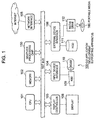
- a CPU (Central Processing Unit) 101 which is the main controller of the GUI application development supporting apparatus 100, executes various kinds of GUI application development programs under the control of an operating system (OS).
- the CPU 101 performs, for example, the execution of a program creating process based on the Java language, specifically processes of setting functions, setting the display image and the like of each component, such as buttons, combo boxes and the like, that is set on a GUI screen.
- the CPU 101 is interconnected with other constituent parts through a bus 107.
- a memory 102 is a storage device that is used to store program codes to be run by the CPU 101 or to temporarily store working data under execution.
- the memory 102 shown in the same diagram includes both a non-volatile memory such as ROM as well as a volatile memory such as DRAM.
- a graphics processing chip 150 is a chip into which is incorporated a dedicated processing circuit that executes color processing for various GUI components.
- a display controller 103 as a display control section is a dedicated controller for actually processing draw commands issued by the CPU 101.
- the draw data processed by the display controller 103 is screen outputted by a display 108 after, for example, being once written in a frame buffer (not shown) .
- a display 108 For example, an image reproduced from a HDD (111) or an image processed by the CPU 101 may be displayed on the display 108, and a user may view the presented screen.
- An input device interface 104 is an apparatus for connecting user input devices, such as a keyboard 109, a mouse 110 and the like, to the GUI application development supporting apparatus 100.
- the user is able to input commands for processing or displaying images and the like through the keyboard 109 and the mouse 110.
- a network interface 105 is capable of connecting the GUI application development supporting apparatus 100 to a local network such as a LAN (Local Area Network), and further to a wide area network such as the Internet.
- a local network such as a LAN (Local Area Network)
- a wide area network such as the Internet.
- a plurality of host terminals and servers (not shown) are connected on a network in a transparent state and a distributed computing environment is constructed. Distribution services of software programs and data contents can be provided on the network. For example, image data from another server in which moving images, still images and the like are stored can be downloaded to the HDD (111) via the network.
- An external device interface 106 is an apparatus for connecting external apparatuses, such as a digital camera, the hard disk drive (HDD) 111, a media drive 112 and the like, to the GUI application development supporting apparatus 100.
- external apparatuses such as a digital camera, the hard disk drive (HDD) 111, a media drive 112 and the like, to the GUI application development supporting apparatus 100.
- HDD hard disk drive
- the HDD 111 is an external storage apparatus in which a magnetic disk as a storage medium is fixedly mounted, and is advantageous in terms of storage capacity, data transfer rate and the like, and allows for random access. For example, program installation where a software program is stored on the HDD 111 in an executable condition is possible. On the HDD 111, program codes of the operating system, application programs and device drivers to be run by the CPU 101 are stored in a non-volatile manner.
- the media drive 112 is an apparatus into which portable media 160, such as a CD (Compact Disc), an MO (Magneto-Optical disc), a DVD (Digital Versatile Disc) and the like, can be loaded, and which is for accessing the data recording surface thereof.
- portable media 160 such as a CD (Compact Disc), an MO (Magneto-Optical disc), a DVD (Digital Versatile Disc) and the like, can be loaded, and which is for accessing the data recording surface thereof.
- the portable media 160 are used primarily for purposes such as backing up software programs, data files and the like as data in a computer readable format, and transferring them between systems (that is, including sales, circulation and distribution). It is possible to physically circulate and distribute an application program for performing various processes between a plurality of devices using these portable media.
- an apparatus such as the one shown in Fig. 1 can be realized as a compatible machine or a succeeding machine of IBM Corporation's personal computer "PC/AT (Personal Computer/Advanced Technology.”
- PC/AT Personal Computer/Advanced Technology
- GUI graphical user interface
- a GUI application development supporting apparatus of the present invention has a component storage section 200 in which various parts (components) to be set on a screen that is to serve as a user interface, such as buttons, combo boxes, lists, windows, text boxes and the like, are stored.
- the component storage section 200 includes a logical component storage section 201, a graphics representation component storage section (Simple) 202 and a graphics representation component storage section (Rich) 203.
- the logical component storage section 201 is a component that stores logical information regarding various parts (components) to be set on a screen that is to serve as a user interface, such as buttons, combo boxes, lists, windows, text boxes and the like. For example, if it were a button, it is configured as a software program component that defines functions, such as the process for when it is turned on, the process for when it is turned off and the like, as functions of the button.
- the graphics representation component storage section (Simple) 202 and the graphics representation component storage section (Rich) 203 are configured as software program components that store display image information of components, that is, as software program components that store a graphics representation program.
- the graphics representation component storage section (Simple) 202 and the graphics representation component storage section (Rich) 203 are components that each store a program that executes a different graphics representation.
- An image data storage section 205 stores image data such as, for example, jpeg, gif and the like. By associating these image data with the graphics representation component of each component, animation display based on image data according to various operations of components becomes possible. Such animation setting processes will be described later.
- An operator as a developer of GUI application programs executes various data input with respect to an edit processing section 210 via a data input/output section 220, and constructs a GUI component by setting the function and graphical image of each component, such as a button, combo box or the like.
- a creation process execution program for components is, for example, one class (factory class) of a JAVA program.
- the edit processing section 210 creates various components by executing the factory class.
- processing by the edit processing section 210 is, in the case of the hardware configuration shown in Fig.1, is processing executed under the control of the CPU 101.
- Components are edited at the edit processing section 210 as GUI components for which "property” as attribute information such as, for example, shapes of buttons, position information and the like, "method” as a process as the result of an action for a component, and further “event” as a function for, when an action with respect to a component, such as the arrival of data, the occurrence of an interruption, the alteration of properties, the calling of a method or the like, occurs, communicating the event to another component are defined.
- "property” as attribute information such as, for example, shapes of buttons, position information and the like
- method as a process as the result of an action for a component
- event as a function for, when an action with respect to a component, such as the arrival of data, the occurrence of an interruption, the alteration of properties, the calling of a method or the like, occurs, communicating the event to another component are defined.
- the edit processing section 210 includes a property editing section 211 that edits properties set for components, a method editing section 212 that edits methods, and an event editing section 213 that edits events.
- the operator In setting the look, that is, the graphics representation, of a GUI component to be generated, the operator inputs look & feel package specification data with respect to the edit processing section 210 that executes the factory class. In other words, the operator specifies either "Rich” or "Simple. "
- the factory class is executed at the edit processing section 210, and depending on the specification data, the corresponding program component is read from either the graphics representation component storage section (Simple) 202 or the graphics representation component storage section (Rich) 203, while at the same time the component is generated along with a component read from the logical component storage section 201.
- a button component is read from the logical component storage section 201 that stores components in which logical information regarding components is stored, and further, depending on the look & feel package specification data from the operator, namely the specification data of either "Rich” or "Simple," a component storing a graphics representation program of the button is read from the graphics representation component storage section (Simple) 202 or the graphics representation component storage section (Rich) 203, and a single button component is generated by combining the logical component and either the "Rich” or "Simple” graphics representation component.
- buttons such as combo boxes, lists, windows, text boxes and the like
- the set GUI application program is stored in a program storage section 221, executed at a program execution section 222, and the generated GUI is displayed on a display section 223.
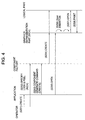
- Fig.3 is a diagram that shows a processing sequence in which the "Simple" graphics representation component is selected and a GUI component generated.
- Fig.3 there is shown, from the left, each of the processes of the operator, GUI generating application, component factory, graphics representation part and logical part.
- the processes of the graphics representation part and the logical part correspond to the execution of the programs stored in the components read from the graphics representation component storage section (Simple) 202 and the logical component storage section 201 shown in Fig.2, and these processes as well as the process of the component factory are executed at the edit processing section 210 in Fig.2.
- step S101 the operator inputs a create command (Create) for a GUI component to the GUI generating application.
- This create command (Create) for the GUI component is inputted along with data that specifies the kind of the component, such as, for example, "button, " “list, “ “combo box, “ “radio button, “ “window” and the like.
- step S102 a "look & feel" specification for specifying the graphics representation is outputted from the operator to the component factory via the application.
- "Simple” is specified as the "look & feel” specification.
- step S103 a component create command is outputted to the component factory from the application. Identification data that indicates the component kind specified in the previous step S101 is included in this command.
- step S104 the component create command (Create) is outputted from the component factory with respect to the graphics representation part (Simple) and the logical part, and the creation of a component is executed in accordance with the stored programs of the logical part and the graphics representation part.
- the processes subsequent to step S105 show a processing sequence in a case where a component is processed by the application, for example as in when an open process command for a "window" as a component is performed.
- An open process command for a component from the application is handed to the logical part, and based on the execution of the program of the logical part, a paint command is handed to the graphics representation part (Simple).
- the graphics representation part executes paint processing for the component based on the inputted command from the logical part.
- the graphics representation part adopted for component generation is "Simple"
- the generated component to be displayed on the display namely buttons and the like, take on a simple configuration in which color settings by paint are done.
- FIG.3 From the left, there are shown each of the processes by the operator, GUI generating application, component factory, graphics representation part and logical part.
- the processes of the graphics representation part and the logical part correspond to the execution of the programs stored in the components read from the graphics representation component storage section (Simple) 202 and the logical component storage section 201 shown in Fig.2, and these processes as well as the process of the component factory are executed at the edit processing section 210 in Fig.2.
- step S201 the operator inputs a create command (Create) for a GUI component to the GUI generating application.
- This create command (Create) for the GUI component is inputted along with data that specifies the kind of the component, such as, for example, "button, " “list, “ “combo box, “ “radio button, “ “window” and the like.
- step S202 a "look & feel" specification for specifying the graphics representation is outputted from the operator to the component factory via the application.
- "Rich” is specified as the "look & feel” specification.
- step S203 a component create command is outputted to the component factory from the application. Identification data that indicates the component kind specified in the previous step S201 is included in this command.
- step S204 the component create command (Create) is outputted from the component factory with respect to the graphics representation part (Simple) and the logical part, and the creation of a component is executed in accordance with the stored programs of the logical part and the graphics representation part (Rich).
- step S205 show a processing sequence in a case where a component is processed by the application, for example as in when an open process command for a "window" as a component is performed.
- An open process command for a component from the application is handed to the graphics representation part, and animation is executed (S20 6) based on the execution of an animation program stored in the graphics representation part.
- step S207 the open process command is handed to the logical part, and based on the execution of the program of the logical part, a paint command is handed to the graphics representation part (Simple), and the graphics representation part (Rich) executes paint processing for the component in accordance with the inputted command from the logical part.
- Application.java an application for displaying the created buttcon.
- a class refers to an executable unit of program in Java.
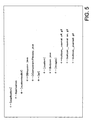
- FIG. 5 The directory configuration of each of the files above is shown in Fig. 5.
- java a class for implementing the logical part of the buttcon, CComponentFactory.java: a factory class that the application uses to create the buttcon and further a look & feeel file [ laf] as graphics representation information.
- Buttcon.java a class for implementing the look & feel part as the graphics representation part of the buttcon, that is, a class corresponding to the graphics representation component described above, is included in the look & feeel file [ laf] .
- image data files [ image] each of buttcon_normal_off.gif: the image for when the buttcon is "off, " buttcon_normal_on.gif: the image for when the buttcon is "on, " and buttcon_pushed.gif: the image for when the buttcon is being pushed is included.
- the GUI application program executes a process in which the processing programs and image data included in each of these files are applied. Specifically, both various function executing processes that follow the program of the logical part class as well as various graphics representationprocesses that follow the program of the graphics representation part class are executed.
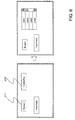
- Fig.6 shows an example in which each component is generated and displayed while applying the graphics representation part (Simple). A description will be given taking a button 311 and a combo box 312 as examples of GUI components.
- buttons 311 When the button 311 is manipulated, for example when the button is turned on, turned off, or when focus settings, in other words cursor settings, are carried out, processes based on on and off operations of the button are executed by processes of the logical part of the button component. Further, through, for example, a paint command from the logical part, the graphics representation part (Simple) is executed, and paint processing, that is, a process of changing the displayed color of the button, is carried out.
- a paint command from the logical part the graphics representation part (Simple) is executed, and paint processing, that is, a process of changing the displayed color of the button, is carried out.
- Fig.7 shows an example in which each component is generated and displayed while applying the graphics representation part (Rich) .
- a description will be given taking a button 320 and a combo box 330 as examples of GUI components.
- animation 321 and 322 are executed as processes of the graphics representation part (Rich) of the button component in addition to the paint processing described above. Though it is hard to see from the diagram, in (b) and (c), an animation where a ripple propagates around the button is executed. In addition, through processes of the logical part, processes based on on and off operations of the button are executed.
- FIG. 8 is a diagram showing a processing screen for setting image data for executing animation with respect to a component.
- a configuration is adopted where component [Button] is set in a component specifying field 351, an image data setting field 352 is configured therebelow, and the image to be called (jpeg) at each component state, that is under a normal state, or under on, off and focus settings and the like, can be set individually.
- Focus setting refers to a state where a cursor is set on that component, and the component is in a state where it is capable of operations such as on and off.
- an animation index method is called and executed in accordance with a program defined for the graphics representation component.
- Jpeg images 11 through 21 are read from image file [ Image]
- the image of a button displayed on the GUI based on these plurality of images is displayed in animation.
- Jpeg images 31 through 38 are read from image file [ Image]
- the image of a button displayed on the GUI based on these plurality of images is displayed in animation
- state definitions are not limited to these, and may be defined as follows, for example, and such a configuration may be adopted where image data is set according to each state.
- individual image files can be set so as to correspond to processes, and it becomes possible to freely set optimal animation representation that corresponds to various processes.
- FIG. 1 there is shown an example where an animation for a button is being set, but, similarly, setting animations that correspond to various processes is possible for other components, too.
- various animations are set by having images each individually selected and set from image files for an animation at open, an animation at close and the like for a combo box.
- a GUI application development supporting apparatus for executing the animation display setting process described above by setting image data corresponding to the state of each component is realized through the configuration previously described with reference to FIG.1 and FIG.2.
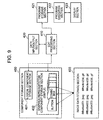
- a processing configuration limited to the function for carrying out the process of setting image files according to each component state will be described with reference to the block diagram shown in FIG.9.
- the GUI application development supporting apparatus has a component storage section 400 that stores various components, such as buttons, combo boxes, lists, windows, text boxes and the like, to be set on a screen as a user interface.
- the component storage section 400 has a logical component storage section 401 as a software program component that defines the processing functions of components, and a graphics representation component storage section 402 as a software program component that defines the graphics representation of components.
- graphics representation components may be, as described above, configured as a plurality of different components that execute a plurality of kinds of graphics representations such as Simple, Rich, and the like.
- An image data storage section 403 stores image data that are read in accordance with animation index methods that are called by executing a graphics representation class as a program stored in the graphics representation components stored in the graphics representation component storage section 402.
- Image data are data files of, for example, jpeg, gif and the like, and correspond to each of the graphics representation components stored in the graphics representation component storage section 402.
- An operator as a developer of GUI application programs executes various data input with respect to an edit processing section 410 via a data input/output section 420, and constructs a GUI component by setting the function and graphical image of each component, such as a button, combo box or the like.
- a creation process execution program for components is, for example, one class (factory class) of a JAVA program.
- the edit processing section 410 creates various components by executing the factory class.
- processing by the edit processing section 410 is, in the case of the hardware configuration shown in Fig.1, is processing executed under the control of the CPU 101.
- a process of associating image data to be read according to the state of a component is executed in the edit processing section 410. This process is executed as part of an editing process for the "property,” “method,” and “event” of a component.
- the operator In setting the look, that is, the graphics representation, of a GUI component to be generated, the operator inputs look & feel package specification data with respect to the edit processing section 410 that executes the factory class. In other words, the operator specifies either "Rich” or “Simple, " and further, as described with reference to FIG. 8, sets image data to be read according to the state of a component.
- a GUI application program having various components is generated, the generated GUI application program is stored in a program storage section 421, is executed at a program execution section 422, and the generated GUI is displayed on a display section 423.
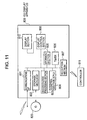
- the animation display process is executed by a graphics representation class 511 of a graphics representation component included in the component of a button.
- a graphics representation class 511 of a graphics representation component included in the component of a button.
- an animation index method is called, the Jpeg images 11 through 21 set in the setting process described previously with reference to FIG.8 are read from an image file [ Image] 512, and the image of a button that is GUI displayed based on these plural images is displayed as the animation 514.
- the image file [ Image] 512 can be stored by securing a partial region of the memory 102, the HDD 111 or some other storage means of the hardware configuration of FIG.1 and setting it as an image file storage section.
- various animations can be set easily by altering the called image data.
- various animations may be set, such as generating concave- or convex-shaped distortions in a button, or changing the color as on and off operations of the button.
- a plurality of graphics representation components storing different graphics representation process execution programs are prepared in the graphics representation component storage section even for the same component, a button for example, as in Simple, Rich or the like.
- a button for example as in Simple, Rich or the like.
- FIG. 2 only the two kinds of Simple and Rich are shown, but, further, the setting of a plurality of graphics representation components, such as Rich 1, Rich 2, ... and the like, is possible.
- the present invention is provided with the configuration that allows to read and display pre-set image data from an image file in accordance with an animation index method that is carried out by a graphics representation class of a graphics representation component that is included in the component, and to set the read image in various combinations according to the state (on, off, focused and the like) of the component, it becomes possible to make users recognize that the visual effect of the state of the GUI component is more improved.
- a GUI component is generated based on the logical part and the graphics representation part, and the graphics representation part is made to have an animation execution function based on image files according to the state of the component, it becomes possible to change with ease the setting mode of animation through a process that is independent of the logical part.
- GUI graphical user interface
- the apparatus configuration example shown in FIG.18 shows one such example, and shows a GUI display apparatus configuration example that has a configuration in which a moving image can be played by receiving it via a network or by reading it from a storage medium.
- a GUI display apparatus 800 shown in FIG.18 includes a communications interface 801 for receiving Internet-distributed data, broadcast data or the like, and receives HTML documents, movie contents and the like from data distribution sites.
- a storage medium interface 802 is a data transfer interface for such various storage media 820 as DVDs, flash memories and the like, and is an interface for inputting and outputting such various contents as moving image data and the like between the storage media 820 and the data processing apparatus 800.
- contents sent from an image distribution site or contents stored on the recording media 820 are encoded, they are displayed on a display apparatus 810 under the control of a display control section 808 after a decoding process is executed at a decode/encode processing section 803.
- control section 804 executes various processes in accordance with the previously described logical component that corresponds to each component, for example, executes an animation displayprocess, by obtaining an image data according to the state of the component and by outputting the obtained image data.
- the storage section in the GUI display apparatus 800 is a storage section that is used for the storage of received data, for the storage of various processing programs, for the storage of preset display image programs, as a storage area as a work area of the CPU 804 or the like, and is comprised of RAM, ROM and the like.
- a timer 806 is used for measuring the running time of the various programs in GUI processing.
- a program in which the processing sequence is recorded may be installed to a memory within a computer that is incorporated into dedicated hardware and executed, or the program may be installed to a general-purpose computer that is capable of executing various processes and executed.
- the program may be recorded in advance on a hard disk or ROM (Read Only Memory) as recording media.
- the program may be temporarily or permanently stored (recorded) on removable recording media, such as flexible disks, CD-ROMs (Compact Disc Read Only Memory), MO (Magneto Optical) disks, DVDs (Digital Versatile Disc), magnetic disks, semiconductor memories and the like.
- removable recording media may be provided as so-called packaged software.
- the program may be transferred wirelessly to a computer from a download site, or may be transferred by wire to a computer via such networks as a LAN (Local Area Network) and the Internet, and the computer may receive the program thus transferred, and install it to a recording medium such as a built-in hard disk or the like.
- LAN Local Area Network
- the computer may receive the program thus transferred, and install it to a recording medium such as a built-in hard disk or the like.
- system as used in the present specification refers to a logical aggregate configuration of a plurality of apparatuses, and is not limited to one in which each constituent apparatus resides in the same body.
- the present invention it becomes possible to freely set an animation of each component that is set in a GUI, and settings of optimal component animation that corresponds to GUI-equipped devices are easily carried out. That is, since the present invention is provided with a configuration that allows to read and display pre-set image data from an image file in accordance with animation index methods that is carried out by a graphics representation class of a graphics representation component that is included in a component, it becomes possible to carry out an animation with an image that is set according to the state of the component and it becomes possible to carry out animation representation with visual effectiveness according to the state of the GUI component.
- a GUI component is generated based on the logical part and the graphics representation part, and the graphics representation part is made to have an animation execution function based on image files according to the state of the component, it becomes possible to change with ease the setting mode of animation through a process that is independent of the logical part.
Landscapes
- Engineering & Computer Science (AREA)
- Software Systems (AREA)
- General Engineering & Computer Science (AREA)
- Theoretical Computer Science (AREA)
- Human Computer Interaction (AREA)
- Physics & Mathematics (AREA)
- General Physics & Mathematics (AREA)
- Stored Programmes (AREA)
- User Interface Of Digital Computer (AREA)
- Processing Or Creating Images (AREA)
Applications Claiming Priority (3)
| Application Number | Priority Date | Filing Date | Title |
|---|---|---|---|
| JP2002261354A JP3760904B2 (ja) | 2002-09-06 | 2002-09-06 | Guiアプリケーション開発支援装置、gui表示装置、および方法、並びにコンピュータ・プログラム |
| JP2002261354 | 2002-09-06 | ||
| PCT/JP2003/011036 WO2004023294A1 (fr) | 2002-09-06 | 2003-08-29 | Dispositif de support de developpement d'application, dispositif d'affichage a interface graphique, et procede, et programme informatique |
Publications (2)
| Publication Number | Publication Date |
|---|---|
| EP1536324A1 true EP1536324A1 (fr) | 2005-06-01 |
| EP1536324A4 EP1536324A4 (fr) | 2005-10-26 |
Family
ID=31973123
Family Applications (1)
| Application Number | Title | Priority Date | Filing Date |
|---|---|---|---|
| EP03794137A Ceased EP1536324A4 (fr) | 2002-09-06 | 2003-08-29 | Dispositif de support de developpement d'application, dispositif d'affichage a interface graphique, et procede, et programme informatique |
Country Status (7)
| Country | Link |
|---|---|
| US (1) | US7823075B2 (fr) |
| EP (1) | EP1536324A4 (fr) |
| JP (1) | JP3760904B2 (fr) |
| KR (1) | KR100975457B1 (fr) |
| CN (1) | CN1307540C (fr) |
| AU (1) | AU2003261822A1 (fr) |
| WO (1) | WO2004023294A1 (fr) |
Families Citing this family (24)
| Publication number | Priority date | Publication date | Assignee | Title |
|---|---|---|---|---|
| US7761800B2 (en) * | 2004-06-25 | 2010-07-20 | Apple Inc. | Unified interest layer for user interface |
| US7490295B2 (en) | 2004-06-25 | 2009-02-10 | Apple Inc. | Layer for accessing user interface elements |
| US7818682B2 (en) * | 2004-11-29 | 2010-10-19 | Sap Ag | Modeling editor |
| JP2006236323A (ja) * | 2005-01-25 | 2006-09-07 | Sony Corp | アプリケーション提供システム、サーバ、クライアントおよびアプリケーション提供方法 |
| US7752556B2 (en) | 2005-10-27 | 2010-07-06 | Apple Inc. | Workflow widgets |
| US7743336B2 (en) | 2005-10-27 | 2010-06-22 | Apple Inc. | Widget security |
| US9104294B2 (en) | 2005-10-27 | 2015-08-11 | Apple Inc. | Linked widgets |
| US7707514B2 (en) | 2005-11-18 | 2010-04-27 | Apple Inc. | Management of user interface elements in a display environment |
| KR100886336B1 (ko) | 2006-11-17 | 2009-03-02 | 삼성전자주식회사 | 그래픽 유저 인터페이스를 구성하는 멀티미디어 정보를관리하는 장치 및 방법 |
| KR100877066B1 (ko) * | 2007-01-22 | 2009-01-09 | 삼성전자주식회사 | Layout 구조를 이용한 GUI 위짓 구성 장치 및이를 운영하는 방법 |
| KR101274188B1 (ko) * | 2007-02-08 | 2013-06-14 | 삼성전자주식회사 | 메뉴 객체의 미리 보기 기능을 제공하는 장치 및 그 방법 |
| JP4986288B2 (ja) * | 2007-05-01 | 2012-07-25 | 日本システムウエア株式会社 | 組込み装置、その開発システム、開発プログラム、データの転送方法およびデータ構造 |
| US8954871B2 (en) | 2007-07-18 | 2015-02-10 | Apple Inc. | User-centric widgets and dashboards |
| US8417728B1 (en) * | 2007-08-03 | 2013-04-09 | Adobe Systems Incorporated | User interfaces, methods, and systems for developing computer applications using artwork |
| CN101364398B (zh) * | 2007-08-07 | 2010-07-28 | 瑞昱半导体股份有限公司 | 产生使用者接口相关的对象属性的方法 |
| US8223153B2 (en) | 2008-11-13 | 2012-07-17 | Samsung Electronics Co., Ltd. | Apparatus and method of authoring animation through storyboard |
| US8223152B2 (en) | 2008-11-13 | 2012-07-17 | Samsung Electronics Co., Ltd. | Apparatus and method of authoring animation through storyboard |
| US8812976B2 (en) | 2009-03-16 | 2014-08-19 | Rhk Technology, Inc. | Programmable equipment configuration method and apparatus |
| JP5645618B2 (ja) | 2009-12-24 | 2014-12-24 | キヤノン株式会社 | 情報処理装置、情報処理方法、およびプログラム |
| WO2012095978A1 (fr) * | 2011-01-13 | 2012-07-19 | 三菱電機株式会社 | Procédé d'aide à la sélection de réseau |
| US8887074B2 (en) * | 2011-02-16 | 2014-11-11 | Apple Inc. | Rigging parameters to create effects and animation |
| JP5365659B2 (ja) * | 2011-04-18 | 2013-12-11 | コニカミノルタ株式会社 | 画像形成装置、アプリケーション制御方法、アプリケーション制御プログラム |
| US9218188B2 (en) | 2012-11-14 | 2015-12-22 | Facebook, Inc. | Animation sequence associated with feedback user-interface element |
| EP3018600B1 (fr) * | 2014-11-10 | 2021-12-29 | B. Braun Avitum AG | Procédé de rétroaction de dispositif de purification du sang |
Family Cites Families (22)
| Publication number | Priority date | Publication date | Assignee | Title |
|---|---|---|---|---|
| JPH0644339A (ja) | 1992-03-06 | 1994-02-18 | Hewlett Packard Co <Hp> | 図形オブジェクト操作システム及び方法 |
| US5675752A (en) | 1994-09-15 | 1997-10-07 | Sony Corporation | Interactive applications generator for an interactive presentation environment |
| US5710880A (en) * | 1994-11-03 | 1998-01-20 | Microsoft Corporation | Method and system for creating a graphic image with geometric descriptors |
| JPH08147243A (ja) * | 1994-11-21 | 1996-06-07 | Nec Corp | マルチメディアデータ通信方式 |
| JP3601949B2 (ja) | 1996-09-17 | 2004-12-15 | 株式会社東芝 | プログラム合成装置及びプログラム合成方法 |
| US5844554A (en) | 1996-09-17 | 1998-12-01 | Bt Squared Technologies, Inc. | Methods and systems for user interfaces and constraint handling configurations software |
| US5959621A (en) | 1996-12-06 | 1999-09-28 | Microsoft Corporation | System and method for displaying data items in a ticker display pane on a client computer |
| CN1109313C (zh) * | 1997-06-30 | 2003-05-21 | 株式会社日立制作所 | 顾客操作型自动机的画面生成方法及顾客操作型自动机 |
| JP3804891B2 (ja) * | 1997-06-30 | 2006-08-02 | 日立オムロンターミナルソリューションズ株式会社 | 顧客操作型自動機の画面作成方法 |
| US6222537B1 (en) | 1997-07-29 | 2001-04-24 | International Business Machines Corporation | User interface controls for a computer system |
| US6563517B1 (en) * | 1998-10-02 | 2003-05-13 | International Business Machines Corp. | Automatic data quality adjustment to reduce response time in browsing |
| JP2000276339A (ja) * | 1999-03-25 | 2000-10-06 | Digital Electronics Corp | 画面データの処理システムおよび処理方法 |
| US7107547B2 (en) * | 2000-05-31 | 2006-09-12 | Grady Smith | Method of graphically indicating patient information |
| US7039875B2 (en) * | 2000-11-30 | 2006-05-02 | Lucent Technologies Inc. | Computer user interfaces that are generated as needed |
| US20020163535A1 (en) | 2000-12-11 | 2002-11-07 | Mitchell Kathryn L. | System and method for generating a graphical user interface from a template |
| US7287230B2 (en) | 2000-12-13 | 2007-10-23 | National Instruments Corporation | Configuring a GUI element to subscribe to data |
| US7043415B1 (en) | 2001-01-31 | 2006-05-09 | Pharsight Corporation | Interactive graphical environment for drug model generation |
| JP3881179B2 (ja) | 2001-02-14 | 2007-02-14 | 三菱電機株式会社 | ユーザインタフェース設計装置 |
| US7234111B2 (en) * | 2001-09-28 | 2007-06-19 | Ntt Docomo, Inc. | Dynamic adaptation of GUI presentations to heterogeneous device platforms |
| US7392483B2 (en) | 2001-09-28 | 2008-06-24 | Ntt Docomo, Inc, | Transformation of platform specific graphical user interface widgets migrated between heterogeneous device platforms |
| KR100426311B1 (ko) | 2001-12-28 | 2004-04-08 | 한국전자통신연구원 | Ejb 컴포넌트 조립 장치 및 방법 |
| JP3755500B2 (ja) | 2002-09-06 | 2006-03-15 | ソニー株式会社 | Guiアプリケーション開発支援装置および方法、並びにコンピュータ・プログラム |
-
2002
- 2002-09-06 JP JP2002261354A patent/JP3760904B2/ja not_active Expired - Fee Related
-
2003
- 2003-08-29 US US10/494,391 patent/US7823075B2/en not_active Expired - Fee Related
- 2003-08-29 EP EP03794137A patent/EP1536324A4/fr not_active Ceased
- 2003-08-29 AU AU2003261822A patent/AU2003261822A1/en not_active Abandoned
- 2003-08-29 WO PCT/JP2003/011036 patent/WO2004023294A1/fr not_active Ceased
- 2003-08-29 CN CNB038018195A patent/CN1307540C/zh not_active Expired - Fee Related
- 2003-08-29 KR KR1020047006798A patent/KR100975457B1/ko not_active Expired - Fee Related
Also Published As
| Publication number | Publication date |
|---|---|
| WO2004023294A1 (fr) | 2004-03-18 |
| JP2004102498A (ja) | 2004-04-02 |
| CN1610881A (zh) | 2005-04-27 |
| KR100975457B1 (ko) | 2010-08-11 |
| AU2003261822A1 (en) | 2004-03-29 |
| JP3760904B2 (ja) | 2006-03-29 |
| EP1536324A4 (fr) | 2005-10-26 |
| KR20050030619A (ko) | 2005-03-30 |
| CN1307540C (zh) | 2007-03-28 |
| US7823075B2 (en) | 2010-10-26 |
| US20050050156A1 (en) | 2005-03-03 |
Similar Documents
| Publication | Publication Date | Title |
|---|---|---|
| US7823075B2 (en) | GUI application development support device, GUI display device, and method, and computer program | |
| US7870511B2 (en) | GUI application development supporting device, GUI display device, method, and computer program | |
| US8074174B2 (en) | GUI application development supporting apparatus, method, and computer program | |
| KR100952549B1 (ko) | 응용 프로그래밍 인터페이스의 설계 | |
| US7266777B2 (en) | Configurable controlling device having an associated editing program | |
| KR100666450B1 (ko) | 그래픽 객체 디스플레이 | |
| JPH10116265A (ja) | マルチメディア・タイトル構築用のナビゲーション・エディタ | |
| CN101128816A (zh) | 用于显示分页内容并与之交互的方法和系统 | |
| JP2006518491A (ja) | ソフトウェアアプリケーションの生成 | |
| US20060181545A1 (en) | Computer based system for selecting digital media frames | |
| JP2005317115A (ja) | 情報処理装置および情報処理方法、並びに、プログラム | |
| EP1280155A2 (fr) | Système d'édition non lineaire | |
| JP2005317114A (ja) | 情報処理装置および情報処理方法、並びに、プログラム | |
| WO2000057271A1 (fr) | Appareil d'assistance a l'ecriture d'un programme d'interface utilisateur graphique, procede d'assistance associe et support d'enregistrement pour programme d'assistance a l'ecriture | |
| JPH10289106A (ja) | 情報処理装置 | |
| KR20010102575A (ko) | 디지털 오디오 재생 장치의 제어하에서 사용자 인터페이스장치의 스크린상에 정보를 디스플레이하기 위한 시스템 및방법 | |
| KR100668070B1 (ko) | 컴퓨터 프로그램의 기능 편집 장치 및 방법 | |
| JP2004102499A (ja) | Gui表示装置、guiアプリケーション開発支援装置、および方法、並びにコンピュータ・プログラム | |
| KR100607694B1 (ko) | Msc 및 mtp 듀얼 모드 시스템에서의 mtp 폴더관리 방법 | |
| CN118484242A (zh) | 虚拟资源的处理方法、装置及电子设备 | |
| JP2003036254A (ja) | コンテンツ制作装置及びコンテンツ制作方法 | |
| JP2007052678A (ja) | 階層構造表示装置、階層構造表示方法、プログラムおよび記録媒体 | |
| JPH05134832A (ja) | メニユー表示装置 |
Legal Events
| Date | Code | Title | Description |
|---|---|---|---|
| PUAI | Public reference made under article 153(3) epc to a published international application that has entered the european phase |
Free format text: ORIGINAL CODE: 0009012 |
|
| 17P | Request for examination filed |
Effective date: 20040505 |
|
| AK | Designated contracting states |
Kind code of ref document: A1 Designated state(s): AT BE BG CH CY CZ DE DK EE ES FI FR GB GR HU IE IT LI LU MC NL PT RO SE SI SK TR |
|
| AX | Request for extension of the european patent |
Extension state: AL LT LV MK |
|
| A4 | Supplementary search report drawn up and despatched |
Effective date: 20050913 |
|
| DAX | Request for extension of the european patent (deleted) | ||
| RBV | Designated contracting states (corrected) |
Designated state(s): DE FR GB |
|
| STAA | Information on the status of an ep patent application or granted ep patent |
Free format text: STATUS: THE APPLICATION HAS BEEN REFUSED |
|
| 18R | Application refused |
Effective date: 20101012 |