EP1550973A1 - Graphische Darstellung, Speicherung und Verbreitung dargestellter Gedanken - Google Patents
Graphische Darstellung, Speicherung und Verbreitung dargestellter Gedanken Download PDFInfo
- Publication number
- EP1550973A1 EP1550973A1 EP04258085A EP04258085A EP1550973A1 EP 1550973 A1 EP1550973 A1 EP 1550973A1 EP 04258085 A EP04258085 A EP 04258085A EP 04258085 A EP04258085 A EP 04258085A EP 1550973 A1 EP1550973 A1 EP 1550973A1
- Authority
- EP
- European Patent Office
- Prior art keywords
- card
- header
- subject
- cards
- space
- Prior art date
- Legal status (The legal status is an assumption and is not a legal conclusion. Google has not performed a legal analysis and makes no representation as to the accuracy of the status listed.)
- Withdrawn
Links
Images


Classifications
-
- G—PHYSICS
- G06—COMPUTING OR CALCULATING; COUNTING
- G06Q—INFORMATION AND COMMUNICATION TECHNOLOGY [ICT] SPECIALLY ADAPTED FOR ADMINISTRATIVE, COMMERCIAL, FINANCIAL, MANAGERIAL OR SUPERVISORY PURPOSES; SYSTEMS OR METHODS SPECIALLY ADAPTED FOR ADMINISTRATIVE, COMMERCIAL, FINANCIAL, MANAGERIAL OR SUPERVISORY PURPOSES, NOT OTHERWISE PROVIDED FOR
- G06Q10/00—Administration; Management
- G06Q10/10—Office automation; Time management
- G06Q10/101—Collaborative creation, e.g. joint development of products or services
Definitions
- the present invention relates, in general, to devices that facilitate and graphically creative and cognitive activities associated with planning and brainstorming, and more particularly to a computer-assisted approach to storyboard card generation, annotation, and association.
- adhesive notes or index cards are laid out in a tabular format with a simple row of header cards, or possibly header and sub-header cards, each with a column of idea cards below it, perhaps with added action or comment notes attached.
- Using different shaped or colored header cards to make them more striking is helpful.
- the cards are easily detached from the display surface for repositioning elsewhere on the surface.
- the team facilitator or group leader describes a problem to the participants, who in turn suggest possible categories of solutions. These are written on cards and displayed as a row of headers.
- the group leader selects a particular header card and encourages participants to write ideas relating to that header on idea cards. These idea cards are displayed under the relevant header, followed by the leader posing provocative questions to prompt further idea cards under that header. This process is repeated with other headers, until there is an adequate supply of ideas. If necessary, the group leader returns to generating further headers, and/or adding sub-header cards under a particular header card.
- the idea cards are then ranked via a suitable voting method and arranged in priority order under each header (or sub-header). The best several in each category are discussed further, and ranked amongst them.
- Annotations such as a string between idea cards, flags, etc., may be used to give further insight into the relation of each idea card.
- the invention overcomes the above-noted and other deficiencies of the prior art by providing an automated approach to representing displayed thinking, a category note taking built upon card story boarding. Efficient card creation, placement, annotation, and presentation upon a virtual board assists a facilitator in a displayed thinking session, as well as enabling participation by remote participants and capturing session results for later reference or revision. Thereby, a useful creative thinking technique is realized for individual or collaborative problem solving and innovation.
- a system, method, and program product of representing displayed thinking upon a virtual board includes creating a card for a virtual board.
- the created card is placed into a header space.
- the created card is designated as a subject card associated with the header card.
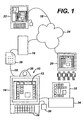
- a displayed thinking application 10 facilitates creative thinking via a graphical user interface (GUI) 12 hosted on a facilitator computer 14 (e.g., personal computer, workstation, network computer, terminal, personal digital assistant, etc.) and/or a distributed platform, depicted as a server 16.
- GUI graphical user interface
- Other participants connected to an enterprise network 18 may collaborate with the displayed thinking application 10, such as via a videoconferencing system 20 or a remote computer 22 that may be in communication via a public or private network, depicted as Internet 24.
- Verbal and human gestures may enhance the interaction between participants that are not co-located, as suggested by an audio/video device 26 proximate to the facilitator computer 14 that sends images and audio to the remote computer 22.
- remote need not require geographical remoteness in that multiple computers may be in close proximity to one another. For instance, a group of participants may be working from closely situated workstations at their respective desks or in an integrated conference room environment. Further, remote may well indicate participants who are in electronic communication at a distance.
- the facilitator may interact with the GUI 12 via various controls, such as voice recognition software, keyboard 28, pointing device (e.g., mouse, trackball, touch pad) 30 or other interfaces.
- the displayed thinking application 10 may produce a graphical recording of the work product, depicted as a hardcopy print 32 on a printer 34.
- a data file 36 that encodes the essential data for another displayed thinking application 10 to open and revise may be transferred or stored as would be generally understood.
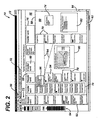
- GUI 12 of the displayed thinking application 10 is shown in greater detail, illustrating a range of features to graphically enhance knowledge capture and to provide intuitive use.
- the GUI 12 leverages familiarity with standard Windows-style pull-down menus 50 and toolbar icons 52 as well as a permanently displayed card annotation toolbar 54 and a header (or top) display box 56 above a splitter line 58. Below the splitter line 58, a sub-header/subject card (or bottom) display box 60 is presented. Both display boxes 56, 60 are open ended to the right with content placed to the right being accessible by rightward scrolling, such as by interacting with a horizontal scrollbar 62.
- the bottom box 60 is also open ended at its bottom to allow continuations of columns as desired, with the portion hidden from view being accessible by downward scrolling, such as by interacting with a vertical scrollbar 64.
- the display boxes 56, 60 have a grid 66, either displayed or invisible, that is used for leftwardly aligning a header card 68 or a column of cards that also includes subject cards 70.
- user information e.g., name
- the displayed thinking application 10 either from the facilitator computer or other means such as by user input, that may be captured for graphically presenting, as at 72, and/or for embedding in a recorded data file for tracking the creation/revision history of a given session.
- header cards 68 and subject cards 70 may be inserted or imported in various manner, such as by double clicking a pointing device on a blank position of one of the display boxes 56, 60 or by a hot key combination and positioning a free floating card, such as at 74.
- a header card 68 or subject card 70 may be resized at user direction or automatically to accept a larger text input, such as depicted respectively at 76 and 78.
- the bottom box 60 may further accept other objects that are dragged and dropped, pasted or inserted, for instance a graphical document or chart 80 and a text document 82.
- association lines 84 may be drawn between cards 70 to show additional relationships. Additional categorization may be introduced through selecting a card color via card color selection radio buttons 86 of the card annotation toolbar 54 and/or one or more colored flags 88 selected from flag color selection radio buttons 90 of the card annotation toolbar 54.
- the importance or role of an individual subject card 70 may be further denoted by added attributes such as a bolded contour 92 denoting a role of a "black hole”.
- Other examples of annotations include little fish, big fish, whale intuitive symbols 94 that convey a level of importance, speculation, utility, or other characteristic.
- some information may be hidden. For instance, a comment 96 may be entered for a subject card 70 with the comment 96 becoming selectively visible, for example by moving a cursor over the respective subject card 70.
- placing subject cards 70 into columns with a respective header card 68 may advantageously expedite revisions by automatic column grouping. For instance, dragging and dropping a selected header card 68 to a new horizontal position on the top box 56 may automatically expand the required space in both the top and bottom boxes 56, 80 for the header card 68 and will cause its column of subject cards 70 to move as a group to the new position. Similarly, moving a header card 68 down into the bottom box 60 may cause a repositioning of the cards 68, 70 as required to position this new sub-heading (not shown).
- a virtual board may be formed wherein the header box is not separated from the bottom box, allowing the header cards to disappear when scrolling downward.
- FIG. 3 a sequence of operations or procedure 200 is depicted for presentation of displayed thinking.
- a new session is opened (block 202), which entails preparing an empty database and a virtual board of default size. Alternatively, the new session may entail loading a previously recorded or transmitted session for further interaction and revision.
- session activity information may be automatically captured (e.g., date, time, location, business unit, session leader) (block 206), such as by accessing database information associated with an interactively logged in facilitator and participants.
- manual input session information may be received and stored, such as a list of inperson participants (block 208).
- various defaults parameters are used so that the facilitator need not design and place each card, such as would be the case if attempting to use a general purpose graphics program.
- the system may display current settings and accept modifications (e.g., print format, shadows, background colors, autosave on/off, etc.) (block 212).
- Various utility features may also be incorporated. If various session administrative activities are requested or enabled to be performed automatically (block 214), then such utilities are accessed (block 216), such as performing spell check on the virtual board or checking/auto correcting text as typed, finding a text string, searching for a text string through a database of stored session datafiles, exporting a session into a standard format (e.g., spreadsheet, two-dimensional picture format, wordprocessing document), auto arranging the virtual board, changing view (e.g., zoom), etc.
- a standard format e.g., spreadsheet, two-dimensional picture format, wordprocessing document
- changing view e.g., zoom
- the user may then choose to add a card. If so determined in block 218, reference is made to whether autosave is set to ON (block 220), and if so, each creation or modification to the virtual board is saved (block 220), thereby preventing loss of data. If not, then a reminder may be displayed to the user to provide an opportunity to enable autosave and/or to warn against inadvertently losing content if manual save is not periodically requested (block 224).
- a new card is tentatively to be placed where manually indicated by the user (block 226).
- a determination is made as to whether snap is inappropriate, such as if the new card is specified to be a media card (block 228). If so, its placement is not automatically positioned as a header or subject card. Instead, the media is associated with the media card by linking or embedding (block 230).
- the system may determine that overlaying subject cards is requested, which may be depicted as a perspective view of a stack of cards, thereby allowing visual consolidation. "Mousing over" the stack may cause the stacked cards to momentary explode for viewing.
- Another type of card modification includes adding hidden text to the card in order to further consolidate the depiction of the virtual board without losing the content. For instance, a footnote or hidden comment may be generally not displayed but depicted when moused over or printed in some fashion, such as end notes, when a hardcopy is prepared.
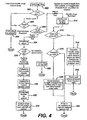
- FIG. 4 the positioning of a card that is dragged and dropped onto the virtual board is further described (block 300). If the card type is determined to be a media card (block 302), then the card stays as placed (block 304) and placement is complete. If determined not to be a media card in block 302, then a further determination is made as to whether grid snap is on (block 306). If not, then the card stays as placed (block 304). However, if grid snap is on in block 306, then the location of the drop is determined (block 308). If above the virtual board splitter line, then a header snap procedure is performed by referencing the location coordinates of the drop (block 310) and verifying whether the Control (CTRL) key was depressed (block 312). If so, then header snap is overridden for this particular card (block 314), which is then kept in place with other header cards, shifted as necessary to the right to create sufficient room (block 316). Placement of the card in this instance is then done.
- CTRL Control
- the created card is to be associated with an existing header card if substantially aligned thereto.
- the card being created is not a header card but rather another type of card (e.g., subject cards, sub-header cards).
- the drag/drop event (block 324) prompts reference to the spatial coordinates of the drop location (block 326). If no headers are present above the dropped card, then the card stays as placed ("free floating" or orphan) (block 328). However, if the created card has been dropped at least partially below one or more header cards, then the header card most nearly vertically aligned with the dropped card is determined (block 330). A parental association is then made between this header card and the dropped card (block 332) and the child dropped card is left aligned with the parent header card (block 334). Positioning is then done.
- a further feature may be incorporated into column snap wherein a default setting or user initiated limit on the vertical depth of a column simplifies viewing of the virtual board. Scrolling to see hidden cards would then require only scrolling horizontally.
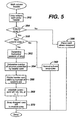
- a multi-column header feature (block 350) is initiated upon a subject card being dropped under a header card (block 352). If column snap is determined to have been disabled (block 354), then the subject card remains in the place where it was dropped (block 356) and placement is done. If column snap is enabled, then a further determination is made as to whether multi-column snap is enabled (block 358). If not, then normal column snap rules are applied as previously described (block 360) and placement is done.
- multi-columns may be multi-rows in instances where header cards are vertically aligned.
- a multi-stack of subject cards/subheader cards adopted by the header card may be graphically arrayed in other than a vertical column.
- the number of columns controlled by the header card is also determined (block 364).
- the width of the header card is divided by the number of columns (n) (block 366). Zones are established for aligning the subject card into one of the number of columns (block 368). Then the subject card is snap dropped left to the nearest available zone (block 370), with other subject cards shifted as necessary to provide the necessary spacing.
- FIG. 6 another procedure for an autogrid feature 400 is depicted that may be selected by the user (block 402).
- a determination is made as to whether any cards exist upon the virtual board (block 404), and if so, an error message is displayed (block 406).
- a dialog box is presented for grid parameters (e.g., metric or English units, specified spacing in the selected unit, grid snap on or off, visible or invisible grid, etc.) (block 408).
- the user may place cards (block 410) that are than positioned according to the auto grid selections.
- these features adapt a potentially large two-dimensional space to the constraints of a viewing screen.
- freeform work is allowed with orphan cards, which may further include other forms of graphic content (e.g., Object Linking and Embedding (OLE)) to capture the knowledge building process.
- OLE Object Linking and Embedding
- the user may apply multiple annotations (e.g., labels, flags, graphical elements such as black holes and big fish) to each card or OLE object.
- Interoperability and cooperation is enhanced in a number of ways, such as allowing the format of the data to be exported / imported in a standard office application format (e.g., MICROSOFT WORD, EXCEL).
- a search query may bridge a number of sessions to find content of interest.
- Autosave option prevents a session from being inadvertently lost.
- the multi-column header is another example, as mentioned.
- Other GUI features include header snap/header snap override; header/subject differentiation; hide/show cards; auto capture of session title and session leader and capture of participants; capture of session data (first saved, last revised, session leader, session title, number of cards); text dependent sizing and/or card autosizing based on amount of text; and creation/importation of templates.
- the process may batch accept a number of inputs from various users and perform an auto arrange of the various new cards into a master virtual board.
- the tracking of session information may include tracking of a participant who submitted each card creation or modification. In order to minimize clutter of the virtual board, this tracking of individual contributions may be made in an associated log file that captures various changes, including those that are later deleted or modified, thus allowing the process of the virtual board displayed thinking to be recreated.
- header cards may be vertically distributed with subject cards associated by being in a row.
- cards of various geometric shapes and attributes may be used to further convey information.
- the outer shape of the card may be a black hole swirl, a whale, a fish, etc.
- Importance of a card may be designated by the line weight or overall size given to a certain card, etc.
- a card may initially be created as a subject card and later be repositioned as a header card, and vice versa.
- Tools within the application may facilitate such regrouping. For instance, dragging a header card down to the subject space may in some instances cause a subheader card to be created, bringing along any previously associated subject cards.
Landscapes
- Business, Economics & Management (AREA)
- Entrepreneurship & Innovation (AREA)
- Human Resources & Organizations (AREA)
- Engineering & Computer Science (AREA)
- Strategic Management (AREA)
- Operations Research (AREA)
- Economics (AREA)
- Marketing (AREA)
- Data Mining & Analysis (AREA)
- Quality & Reliability (AREA)
- Tourism & Hospitality (AREA)
- Physics & Mathematics (AREA)
- General Business, Economics & Management (AREA)
- General Physics & Mathematics (AREA)
- Theoretical Computer Science (AREA)
- User Interface Of Digital Computer (AREA)
- Management, Administration, Business Operations System, And Electronic Commerce (AREA)
- Information Retrieval, Db Structures And Fs Structures Therefor (AREA)
Applications Claiming Priority (2)
| Application Number | Priority Date | Filing Date | Title |
|---|---|---|---|
| US747389 | 1991-08-20 | ||
| US10/747,389 US20050147950A1 (en) | 2003-12-29 | 2003-12-29 | Graphical representation, storage and dissemination of displayed thinking |
Publications (1)
| Publication Number | Publication Date |
|---|---|
| EP1550973A1 true EP1550973A1 (de) | 2005-07-06 |
Family
ID=34574745
Family Applications (1)
| Application Number | Title | Priority Date | Filing Date |
|---|---|---|---|
| EP04258085A Withdrawn EP1550973A1 (de) | 2003-12-29 | 2004-12-23 | Graphische Darstellung, Speicherung und Verbreitung dargestellter Gedanken |
Country Status (8)
| Country | Link |
|---|---|
| US (1) | US20050147950A1 (de) |
| EP (1) | EP1550973A1 (de) |
| JP (1) | JP2005209187A (de) |
| CN (1) | CN1637697A (de) |
| AU (1) | AU2004240253A1 (de) |
| BR (1) | BRPI0405948A (de) |
| CA (1) | CA2490613A1 (de) |
| MX (1) | MXPA05000208A (de) |
Families Citing this family (29)
| Publication number | Priority date | Publication date | Assignee | Title |
|---|---|---|---|---|
| US9047388B2 (en) | 2004-07-01 | 2015-06-02 | Mindjet Llc | System, method, and software application for displaying data from a web service in a visual map |
| US9038001B2 (en) * | 2004-07-01 | 2015-05-19 | Mindjet Llc | System and method for graphically illustrating external data source information in the form of a visual hierarchy in an electronic workspace |
| US20090228447A1 (en) * | 2004-07-01 | 2009-09-10 | Creekbaum William J | System, method, and solfware application for enabling a user to search an external domain within a visual mapping interface |
| US7932111B2 (en) | 2005-02-23 | 2011-04-26 | Cree, Inc. | Substrate removal process for high light extraction LEDs |
| US8103703B1 (en) * | 2006-06-29 | 2012-01-24 | Mindjet Llc | System and method for providing content-specific topics in a mind mapping system |
| US20080016093A1 (en) * | 2006-07-11 | 2008-01-17 | Clement Lambert Dickey | Apparatus, system, and method for subtraction of taxonomic elements |
| US7702679B2 (en) * | 2007-02-23 | 2010-04-20 | Mindjet Llc | Method for creating and tracking external system data via a mind map |
| US20090157801A1 (en) * | 2007-12-12 | 2009-06-18 | Richard Barber | System and method for integrating external system data in a visual mapping system |
| US20090157616A1 (en) * | 2007-12-12 | 2009-06-18 | Richard Barber | System and method for enabling a user to search and retrieve individual topics in a visual mapping system |
| US8161396B2 (en) * | 2007-12-20 | 2012-04-17 | Mindjet Llc | System and method for facilitating collaboration and communication in a visual mapping system by tracking user presence in individual topics |
| US20100070891A1 (en) * | 2008-09-18 | 2010-03-18 | Creekbaum William J | System and method for configuring an application via a visual map interface |
| US9396455B2 (en) * | 2008-11-10 | 2016-07-19 | Mindjet Llc | System, method, and software application for enabling a user to view and interact with a visual map in an external application |
| US8392267B1 (en) | 2009-06-30 | 2013-03-05 | Mindjet Llc | System, method, and software application for dynamically generating a link to an online procurement site within a software application |
| US20120077180A1 (en) * | 2010-09-26 | 2012-03-29 | Ajay Sohmshetty | Method and system for knowledge representation and processing using a structured visual idea map |
| US20130006688A1 (en) * | 2011-07-01 | 2013-01-03 | The Go Daddy Group, Inc. | Creating a 3rd party team project story board |
| US20130201161A1 (en) * | 2012-02-03 | 2013-08-08 | John E. Dolan | Methods, Systems and Apparatus for Digital-Marking-Surface Content-Unit Manipulation |
| US9483740B1 (en) | 2012-09-06 | 2016-11-01 | Go Daddy Operating Company, LLC | Automated data classification |
| US9516089B1 (en) | 2012-09-06 | 2016-12-06 | Locu, Inc. | Identifying and processing a number of features identified in a document to determine a type of the document |
| JP6160224B2 (ja) * | 2013-05-14 | 2017-07-12 | 富士通株式会社 | 表示制御装置、システム及び表示制御プログラム |
| US9659106B2 (en) | 2014-06-19 | 2017-05-23 | Go Daddy Operating Company, LLC | Software application customized for target market |
| US9602575B2 (en) | 2014-08-07 | 2017-03-21 | Go Daddy Operating Company, LLC | Monitoring social media for specific issues |
| US9996867B2 (en) | 2014-08-07 | 2018-06-12 | Go Daddy Operating Company, LLC | Local merchant recommendation engine |
| CN108133710A (zh) * | 2017-12-26 | 2018-06-08 | 安徽声讯信息技术有限公司 | 远程记录刷新和多端口同步修改的云端数据处理系统 |
| US11782587B1 (en) | 2018-01-23 | 2023-10-10 | Paul Erich Keel | Computer-implemented environment for creating, sharing, and storing documents in a modular format |
| US11112930B2 (en) * | 2018-01-23 | 2021-09-07 | Paul Erich Keel | Computer-implemented environment for creating, sharing, and storing documents in a modular format |
| CN110706309B (zh) * | 2018-07-10 | 2023-05-23 | 百度在线网络技术(北京)有限公司 | 用于生成鱼骨图的方法和装置 |
| US10739983B1 (en) * | 2019-04-10 | 2020-08-11 | Servicenow, Inc. | Configuration and management of swimlanes in a graphical user interface |
| CN111444306B (zh) * | 2020-03-23 | 2023-11-14 | 长沙禾子教育科技有限公司 | 一种微环境家庭教育系统 |
| JP7429577B2 (ja) * | 2020-03-27 | 2024-02-08 | 株式会社日立製作所 | 発想支援装置及び発想支援方法 |
Citations (4)
| Publication number | Priority date | Publication date | Assignee | Title |
|---|---|---|---|---|
| WO1996010231A1 (en) * | 1994-09-27 | 1996-04-04 | Micrografx, Inc. | System and method for generating graphics charts |
| US20030182168A1 (en) * | 2002-03-22 | 2003-09-25 | Martha Lyons | Systems and methods for virtual, real-time affinity diagramming collaboration by remotely distributed teams |
| US20030208373A1 (en) * | 2002-05-02 | 2003-11-06 | Collins William L. | Networked digital displayed thinking system and display writing tool |
| US20030206203A1 (en) * | 2002-05-03 | 2003-11-06 | Ly Eric Thichvi | Method for graphical collaboration with unstructured data |
Family Cites Families (9)
| Publication number | Priority date | Publication date | Assignee | Title |
|---|---|---|---|---|
| US5662478A (en) * | 1995-03-27 | 1997-09-02 | Smith, Jr.; Rolf C. | Method for training facilitator and method for teaching group of people in the use of an expeditionary map to practice a process for generating ideas |
| US5796398A (en) * | 1996-03-08 | 1998-08-18 | Ncr Corporation | Information visualization icons |
| US5878214A (en) * | 1997-07-10 | 1999-03-02 | Synectics Corporation | Computer-based group problem solving method and system |
| US6509912B1 (en) * | 1998-01-12 | 2003-01-21 | Xerox Corporation | Domain objects for use in a freeform graphics system |
| US6018346A (en) * | 1998-01-12 | 2000-01-25 | Xerox Corporation | Freeform graphics system having meeting objects for supporting meeting objectives |
| JP2000242664A (ja) * | 1999-02-17 | 2000-09-08 | Mikio Ishizawa | インターネットを活用した発想支援システム |
| US20010034629A1 (en) * | 2000-02-02 | 2001-10-25 | Cronin John E. | Process for facilitating the conception of inventions in a directed manner |
| US20020051958A1 (en) * | 2000-06-02 | 2002-05-02 | Khalsa Darshan Singh | Balanced group thinking |
| US20030070140A1 (en) * | 2001-10-10 | 2003-04-10 | Mtot Insight Ltd. | Tool and method for assistance with creative thinking |
-
2003
- 2003-12-29 US US10/747,389 patent/US20050147950A1/en not_active Abandoned
-
2004
- 2004-12-21 AU AU2004240253A patent/AU2004240253A1/en not_active Abandoned
- 2004-12-22 CA CA002490613A patent/CA2490613A1/en not_active Abandoned
- 2004-12-23 EP EP04258085A patent/EP1550973A1/de not_active Withdrawn
- 2004-12-28 JP JP2004380760A patent/JP2005209187A/ja active Pending
- 2004-12-29 BR BR0405948-4A patent/BRPI0405948A/pt not_active IP Right Cessation
- 2004-12-29 CN CN200410095465.6A patent/CN1637697A/zh active Pending
-
2005
- 2005-01-03 MX MXPA05000208A patent/MXPA05000208A/es not_active Application Discontinuation
Patent Citations (4)
| Publication number | Priority date | Publication date | Assignee | Title |
|---|---|---|---|---|
| WO1996010231A1 (en) * | 1994-09-27 | 1996-04-04 | Micrografx, Inc. | System and method for generating graphics charts |
| US20030182168A1 (en) * | 2002-03-22 | 2003-09-25 | Martha Lyons | Systems and methods for virtual, real-time affinity diagramming collaboration by remotely distributed teams |
| US20030208373A1 (en) * | 2002-05-02 | 2003-11-06 | Collins William L. | Networked digital displayed thinking system and display writing tool |
| US20030206203A1 (en) * | 2002-05-03 | 2003-11-06 | Ly Eric Thichvi | Method for graphical collaboration with unstructured data |
Also Published As
| Publication number | Publication date |
|---|---|
| US20050147950A1 (en) | 2005-07-07 |
| CA2490613A1 (en) | 2005-06-29 |
| MXPA05000208A (es) | 2005-08-26 |
| JP2005209187A (ja) | 2005-08-04 |
| AU2004240253A1 (en) | 2005-07-14 |
| BRPI0405948A (pt) | 2005-08-02 |
| CN1637697A (zh) | 2005-07-13 |
Similar Documents
| Publication | Publication Date | Title |
|---|---|---|
| EP1550973A1 (de) | Graphische Darstellung, Speicherung und Verbreitung dargestellter Gedanken | |
| US8230351B2 (en) | Method and apparatus for collaborative work | |
| Ren et al. | Chartaccent: Annotation for data-driven storytelling | |
| US11611595B2 (en) | Systems and methodologies providing collaboration among a plurality of computing appliances, utilizing a plurality of areas of memory to store user input as associated with an associated computing appliance providing the input | |
| JP4505069B2 (ja) | フリーフォームグラフィックスシステムおよびフリーフォームグラフィックスシステムを操作する方法 | |
| US8826147B2 (en) | System and methodology for collaboration, with selective display of user input annotations among member computing appliances of a group/team | |
| JP4335340B2 (ja) | 会議の目的を支援するための会議オブジェクトを有するフリーフォームグラフィックスシステム | |
| JP4315508B2 (ja) | フリーフォームグラフィックスシステムおよびフリーフォームグラフィックスシステムを操作する方法 | |
| US8806352B2 (en) | System for collaboration of a specific image and utilizing selected annotations while viewing and relative to providing a display presentation | |
| US8918722B2 (en) | System and methodology for collaboration in groups with split screen displays | |
| US20180309807A1 (en) | Apparatus and Method for Acquiring, Managing, Sharing, Monitoring, Analyzing and Publishing Web-Based Time Series Data | |
| US6610102B1 (en) | Data conferencing system with distributed electronic sheet | |
| US20120284605A1 (en) | Systems And Methodologies Providing For Collaboration Among A Plurality Of Users At A Plurality Of Computing Appliances | |
| US20050193333A1 (en) | Survey generation system | |
| US20120284646A1 (en) | Systems And Methodologies Providing Collaboration And Display Among A Plurality Of Users | |
| US20140075281A1 (en) | Systems and methods for annotating digital documents | |
| US20120284197A1 (en) | System And Method For Collaboration Via Team And Role Designation And Control And Management Of Annotations | |
| US7949690B2 (en) | Project structure | |
| EP3746912B1 (de) | Verfahren, vorrichtung und computerlesbares medium zur umwandlung von statischen objekten in dynamische intelligente objekte auf einer anzeigevorrichtung | |
| US8918721B2 (en) | Systems and methodologies providing for collaboration by respective users of a plurality of computing appliances working concurrently on a common project having an associated display | |
| US20190220157A1 (en) | Method and system for graph data management | |
| US9135234B1 (en) | Collaborative generation of digital content with interactive reports | |
| Qian et al. | Collaborative design with NetDraw | |
| JP2004094834A (ja) | 会議支援装置、コンピュータが読み取り可能なプログラム、及び電子会議システム | |
| CN114780084B (zh) | 一种协同多种类型交互界面设计的组态系统 |
Legal Events
| Date | Code | Title | Description |
|---|---|---|---|
| PUAI | Public reference made under article 153(3) epc to a published international application that has entered the european phase |
Free format text: ORIGINAL CODE: 0009012 |
|
| AK | Designated contracting states |
Kind code of ref document: A1 Designated state(s): AT BE BG CH CY CZ DE DK EE ES FI FR GB GR HU IE IS IT LI LT LU MC NL PL PT RO SE SI SK TR |
|
| AX | Request for extension of the european patent |
Extension state: AL BA HR LV MK YU |
|
| 17P | Request for examination filed |
Effective date: 20051219 |
|
| AKX | Designation fees paid |
Designated state(s): AT BE BG CH CY CZ DE DK EE ES FI FR GB GR HU IE IS IT LI LT LU MC NL PL PT RO SE SI SK TR |
|
| STAA | Information on the status of an ep patent application or granted ep patent |
Free format text: STATUS: THE APPLICATION IS DEEMED TO BE WITHDRAWN |
|
| 18D | Application deemed to be withdrawn |
Effective date: 20100701 |