EP1653336A2 - Tragbares Endgerät und Verfahren zur Bearbeitung der Anzeigedaten dafür - Google Patents
Tragbares Endgerät und Verfahren zur Bearbeitung der Anzeigedaten dafür Download PDFInfo
- Publication number
- EP1653336A2 EP1653336A2 EP05023752A EP05023752A EP1653336A2 EP 1653336 A2 EP1653336 A2 EP 1653336A2 EP 05023752 A EP05023752 A EP 05023752A EP 05023752 A EP05023752 A EP 05023752A EP 1653336 A2 EP1653336 A2 EP 1653336A2
- Authority
- EP
- European Patent Office
- Prior art keywords
- display
- data
- display data
- editing
- portable terminal
- Prior art date
- Legal status (The legal status is an assumption and is not a legal conclusion. Google has not performed a legal analysis and makes no representation as to the accuracy of the status listed.)
- Withdrawn
Links
Images









Classifications
-
- G—PHYSICS
- G06—COMPUTING OR CALCULATING; COUNTING
- G06F—ELECTRIC DIGITAL DATA PROCESSING
- G06F9/00—Arrangements for program control, e.g. control units
- G06F9/06—Arrangements for program control, e.g. control units using stored programs, i.e. using an internal store of processing equipment to receive or retain programs
- G06F9/44—Arrangements for executing specific programs
- G06F9/451—Execution arrangements for user interfaces
-
- H—ELECTRICITY
- H04—ELECTRIC COMMUNICATION TECHNIQUE
- H04M—TELEPHONIC COMMUNICATION
- H04M1/00—Substation equipment, e.g. for use by subscribers
- H04M1/72—Mobile telephones; Cordless telephones, i.e. devices for establishing wireless links to base stations without route selection
- H04M1/724—User interfaces specially adapted for cordless or mobile telephones
- H04M1/72469—User interfaces specially adapted for cordless or mobile telephones for operating the device by selecting functions from two or more displayed items, e.g. menus or icons
Definitions
- This invention relates to a portable terminal and, more particularly, to a portable terminal such as a portable telephone set and a display data editing method for the same, which permit changing display data.
- a prior art portable terminal has functions to permit various settings on a menu display or the like depending on a plurality of display items.
- Display data on a display screen for function settings or the like are preliminarily fixedly registered by the manufacturer. The user does such operations as various settings, communications, mail transmissions and receptions, etc., based on the display items.
- a portable terminal constitutes a part of fashion and living, and users who set waiting displays, call signals with melodies, etc. to suit their own taste in addition to decoration of the exteriors of their portable terminals, are increasing.
- a portable terminal is known to set a menu display by down-loading graphic user interfaces corresponding to the user's tastes or purposes of use from a menu display providing server via internet (See Japanese patent publication, JP2003-5883A1).
- Another object of the present invention is to provide a portable terminal and a display data editing method for the same, in which display data of the display items displayed on the display screen of the portable terminal can be freely changed as subject dealt with, for instance can be made to representations readily understandable by the user so as to improve readiness of use and to be friendly to the user.
- a further object of the present invention is to provide a portable terminal and a display data editing method for the same, in which at the time of display data change a check can be made as to the same display data used in other displays (duplication check), thereby easily permitting unification of display items.
- An aspect of the present invention is a portable terminal comprising a display unit for providing displays, a memory unit for storing display data including editable display data, a key entry unit for entering display data, a display processor for providing displays to the display unit by writing display data in and reading out the same from the memory unit and an editing processor for changing display data on the display unit for each display with display data entered from the key entry unit.
- the display processor has a switching function to switch the display data on the display to an editing display with a cursor for changing
- the editing processor has an editing function to change the display data at the cursor position on the editing display in response to an operation of the key entry unit.
- the portable terminal further comprises a retrieving processor for retrieving the same display data as editing subject display data before change, and the editing processor collectively changes the same display data retrieved for in the retrieval processor together with the editing subject display data before change.
- the display processor has a display function to provide a retrieving result of the display data before change containing display specifying data specifying a display containing the same display data found as a result of retrieving in the retrieval processor and permitting changing of the same display data by selection from the key entry unit, and the editing processor has a function to change the same display data on the display selected with the retrieving result of the display data before change.
- the display processor has a display shifting function to shift the display to a pertinent display with selection of the display specifying data on the retrieving result of the display data before change.
- the retrieving processor has a retrieving function to retrieve the same display data as the display data after change
- the editing processing part has a collectively changing function for collectively changing the display data containing the same display data as the display data after change retrieved in the retrieving processor together with the display data before change.
- the display processor has a display function to provide a retrieving result display of the display data after change containing display specifying data, which specifies a display containing the same display data as the retrieving result in the retrieving processor and is capable of setting the changing of the same display data with selection in the key entry unit, and the editing processor has a function to change the same display data on the display selected with the retrieving result display of the display data after change.
- the display processor has a display shifting function to shift the display to a pertinent display with selection of the display specifying data on the retrieving result display of the display data after change.
- the memory unit stores subordinate data relevant to the display data and including at least limited number of characters and font data
- the display processor provides display data according to the subordinate data
- the editing processor edits editing subject display data according to the subordinate data.
- the display specifying data is the data for operation procedure from a waiting display preliminarily registered as the subordinate data of the display data till a display containing the display data.
- the display containing the editing subject display data is a function set-up menu display for the portable terminal.
- Another aspect of the present invention is a display data editing method for a portable terminal capable of providing different displays to a display unit according to display data stored in a memory unit, comprising the steps of switching a given display to an editing display, changing the display data on the editing display with operation of a key entry unit, and storing the changed display data in the memory unit.
- the display data editing method for a portable terminal it is preferable to further comprise the steps of providing a cursor display for the editing subject display data on the editing display, and changing the display data at the cursor position.
- the display data editing method for a portable terminal further comprises the steps of retrieving the same display data as the editing subject display data before change in the display data and collectively changing the same data together with the editing subject of the display data before change.
- the display data editing method for a portable terminal further comprises the steps of providing a retrieval result display of the display data before change containing display specifying data, the display specifying data being a data specifying a display containing the same display data as a result of retrieving and capable of setting the changing of the same display data with selection in the key entry unit, and changing the same display data on the display selected with the retrieving result display before change.
- the display data editing method for a portable terminal further comprises the steps of retrieving the same display data as the display data after change, and collectively changing the display data containing the same display data as the retrieved display data after change together with the display data before change.
- the display data editing method for a portable terminal further comprising the steps of providing a retrieving result display after change containing display specifying data, the display specifying data being data specifying a display containing the same display data as a result of retrieving and capable of set-up the changing of the same display data with selection in the key entry unit, and changing the same display data on the display selected with the retrieval result display after change.
- the selection of the display specifying information on the retrieving result display after change enables to switch to the applicable display.
- the memory unit stores subordinate data relating to the display data including at least the limited number of characters and font data, displaying the display data according to the subordinate data, and editing the subject display data according to the subordinate data.
- the display specifying data is data of operation procedure from a waiting display preliminarily registered as subordinate data to the display data till a display including the display data.
- the display containing the editing subject display data is a menu display of function set-up in the portable terminal.
- the portable terminal permits the user to freely change display data on preliminarily registered displays, thus permitting its readiness of use.
- display items which are independently editable for individual displays can be suitably changed to suitable representations, and thus they can be suitably changed in conformity to the frequency and states of user' s use concerning the functions of the portable terminal.
- display data having been edited on the portable terminal can be transferred to other portable terminals via interface (e.g., USB, IrDA, Bluetooth, etc.) possessed by the portable terminal, mail, etc., it is possible to permit effective utilization of edited display data and cope with collections or the like of display data transferred from any other portable terminal.
- interface e.g., USB, IrDA, Bluetooth, etc.
- Fig. 1 shows an outer appearance of a portable terminal according to an embodiment of the present invention.
- the portable terminal has on the outside a key input unit 100 with a keyboard having keys, push buttons, etc. for various key input operations, a display unit 200 having a liquid crystal display screen for providing various displays (i.e., function displays), a microphone, a loudspeaker, etc.
- a key input unit 100 with a keyboard having keys, push buttons, etc. for various key input operations
- a display unit 200 having a liquid crystal display screen for providing various displays (i.e., function displays), a microphone, a loudspeaker, etc.
- the key input unit 100 serves to control the functions of the embodiment of the portable terminal, and it includes a "Menu" key 101 for starting a menu function, an SK1 key 102 disposed at a position corresponding to a guide display (i.e., a lower left position) on the display screen for designating the operation of guide contents, such as display data change, an SK2 key 103 for likewise designating the operation of guide contents of a guide display (a lower right), such as confirmation (or execution), a ⁇ key 104 for starting a predetermined function such as display switching, a * key 106 and a # key 107, and ⁇ and ⁇ keys for selecting a display item or the like as well as shifting a cursor.
- a "Menu" key 101 for starting a menu function
- an SK1 key 102 disposed at a position corresponding to a guide display (i.e., a lower left position) on the display screen for designating the operation of guide contents, such as display data change
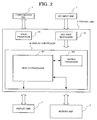
- Fig. 2 is a functional block diagram of the portable terminal.
- Reference numeral 1 designates a key input unit for receiving key inputs from keys provided in the portable terminal.
- Reference numeral 2 designates a communication unit having a microphone and a loudspeaker for inputting and outputting voice data.
- Reference numeral 3 designates a control unit for controlling the portable terminal as a whole.
- Reference numeral 4 designates a display unit for providing various displays concerning communication of the portable terminal, and also providing various function displays on the basis of preliminarily registered operation routines for providing various function displays, and further providing displays for changing data in an editing routine.
- Reference numeral 5 designates a memory unit including a memory or the like for storing display data including editable display data (referred to as "display data”) such as text data to be provided on the display and also other various data such as pertinent data to be described hereinafter.
- display data editable display data
- the control unit 3 has a key code recognizer 3a, a display controller 3b for controlling displaying, editing, etc. according to the invention, and a voice processing part 3c.
- the display controller 3b has a display processor 3b1 for executing display control necessary for controlling the editing and so forth according to the invention, and an editing processor 3b2 started on each display for editing such display data as text data provided on the display screen.
- the display processor 3b1 has a function of providing waiting displays of various functions corresponding to normal transmission and reception, function setting, etc. and also communication displays for transmission and reception, communication, etc.
- the display processor 3b1 has functions display control functions of providing such display data as menu display (i.e., main menu display), various displays such as various selection displays (i.e. menu displays) subordinate to the main display, editing displays with cursor as editing mode concerning display data on pertinent function displays, editing history displays, after-change displays after display data changes in editing and outputting these display data in switching as desired, for display provision by the display unit 4.
- the display processor 3b1 is utilized in an image data producing routine for reading out image data and pertinent data thereto preliminarily stored in the memory unit 5 and executing the above mentioned display. Also, the display processor 3b1 has functions of storing, in editing set-up state, display data of function displays after editing in the memory unit 5 and executing a registration routine.
- the display data stored in the memory unit 5 includes, as a series of image data concerning the menu display, the main menu display and individual layer selection displays in hierarchical structure of a selection branch started from a pertinent display, and also includes data associated with text data such as the number of characters and fonts of display items on individual selection displays.
- the display processor 3b1 has a function of registering display data change on the editing display in the memory unit 5 in a user' s decision operation and a function of provisionally setting and displaying the display data change until the registration.
- Fig. 3 shows an example of practical displays in a first embodiment.
- This example concerns an operation of changing display data of selection items on the menu display.
- Display 10 is a set-up display provided at the time of depression, in the waiting display, of the "MENU" key 101.
- the display 10 contains various display data (such as “Settings”, "Phone” and “Phone nodes”.
- "Setting” is a title representing the kind of set-up items on the display; for example "Phone” is a selection item directed to the telephone function and "Phone mode” is selection items directed to communication, transmission/reception, etc.
- individual selected items and also selected displays of detailed selection items having titles representing individual display data are developed on the display screen.
- Symbol "M1" at the right upper position on the display screen is a display specifying information and indicates a display at the time of selecting "Phone” subsequent to the depression of the "MENU” key 101 in the waiting display. That is, the symbol indicates the operation routine for operating keys in the waiting display for providing the pertinent display.
- the editing function for editing the display data is initiated and an initial stage display for editing function 11 is displayed. A judgment can be made whether the editing function is initiated or not by presence/absence of a cursor on the display 11.
- the cursor position can be appropriately moved to the desired direction by the ⁇ or ⁇ key 105.
- a display that appears when the cursor is moved to "Phone modes" desired to be edited is an editing function display 12, on which the selected item is displayed on a mesh or the like.
- the display data "Phone modes” before changing is changed to "Mode".
- "Mode” is entered in alphabet from the key input unit 1 for setting up to a display 13 after data entry.
- a ⁇ key 104 is depressed to execute a confirmation routine for registering the change in the text data.
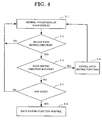
- Fig. 4 is a flow chart illustrating a start-up routine for data editing function.
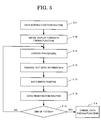
- Fig. 5 is a flowchart illustrating a data input-editing function routine.
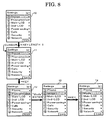
- Fig. 6 is a flowchart illustrating a data entry/registration routine in data editing.
- step S2 In the start-up routine as shown in Fig. 4, with any display (step S1) provided in the portable terminal, a check is always made (step S2) to see if the * key for starting the editing function has been depressed for an extended time. When the * key has been depressed for an extended time, a check is made to see if the data editing function is in force (step S3). If the data editing function is found to have been started, the editing function is cancelled to terminate the routine (step S4) and the normal display is restored (step S1). If it is found in step S3 that the editing function failed to start, a check is made to see any display data is present on the display (step S5). If no display data is found, the normal display is restored (step S1). If any display data is present, the routine goes to the data editing function routine in Fig. 5 (step S6).
- a data editing function initial stage display such as the display 11 (Fig. 3) appears (step S10) .
- the fact that the editing function is in the starting state is shown by providing a cursor to the display data as shown on the display 11 (step S11). Since the cursor display is also found in the normal display, a cursor of different color from that in the normal display is used so that it can be readily distinguished by the user. In the case of selecting display data that the user desired for editing by the ⁇ or ⁇ key operation, the cursor is shifted to display data corresponding to the pertinent key operation (step S11).
- step S12 read-out are such data as the font size and the maximum number of characters to be entered pertinent to the display data with cursor or operation routines from the waiting display as registered display specifying data (step S12).
- the operation procedure information is the "M1" display information in the upper right part on the display.
- “M” means depression of the "MENU” key; more specifically it means that the display 10 appears by depressing the "MENU” key on the waiting display and then depressing the "1" key.
- step S13 After reading out the pertinent information to the display data (step S12), the routine goes to a data entry routine as shown in Fig. 6 (step S13).
- step S20 a check is made to see if the * key for canceling the editing function has been depressed for an extended time. If the * key has been depressed for an extended time, the editing routine is terminated and the display 10 is restored (step S4). Otherwise, it goes to the character entry waiting step (step S21). If any character is entered, the entered character (or characters) is displayed at the cursor position (step S22) , and a check is made to see if the entered characters do not exceed the maximum number obtained in relation to the display data (step S23). If the entered characters do not exceed the maximum number, the cursor is shifted by one character to the right of the character where the cursor is inputted (step S24).
- step S25 If the entered characters have reached the maximum number, a check is made without cursor shift to see if the next entered key is the ⁇ key for data registration (step S25). If the ⁇ key for the data registration is depressed, the data registration routine is executed (step S14). After termination of the data registration routine, the routine goes back to the data editing function routine as shown in Fig. 5 for editing the next display data. At this time, the editing routine can be continued by making a check to see if the + key is depressed for an extended time to terminate the editing. If it is detected in step S15 that the * key has been depressed for an extended time in the step S15, the editing routine is terminated and the display 10 is restored (step S4).
- a second embodiment is arranged assuming that the same display data as editing subject display data having been edited with a particular display is used on a pertinent display or a different display.
- a decision operation depression of the ⁇ key
- the intended change by automatically starting a display data retrieving routine and retrieving for the same display data before the registering operation.
- Fig. 7 is a functional block diagram showing the second embodiment of the invention.
- the second embodiment has the following construction and functions in addition to the construction and functions of the first embodiment. More specifically, the display controller 3d has a retrieving processor 3d3 in addition to the display processor 3d1 and the editing processor 3d2.
- the retrieving processor 3d3 has functions performed in an interlocked relation to a user' s key entry operation (depression of the ⁇ key) for certifying the set-up of the display data change as shown in Fig. 3. Specifically, these functions are retrieving display data contained in a related display or the like from the data in the memory unit 5, specifying a display on which the same display data is retrieved are specified by the display specifying data (i.e., operation routine information such as M12 or the like) based on the retrieving result, and informing it to the display processor 3d1.
- the display specifying data i.e., operation routine information such as M12 or the like
- the display processor 3d1 has, in addition to the function of outputting display data as in the first embodiment, a function of providing a retrieving result display showing the display specifying data as a retrieval result display to the display unit 4 and a function of provisionally setting and showing display data change on the retrieving result display.
- the display data change is retained until its confirmation through the entire display that it is done as a display item collectively on other displays as well.
- a user's registration canceling routine or the like is made possible.
- the part 3d1 further has a function, provided at the time of changing the same display data by user's selection, of delivering the same display data on the display to the editing processor 3d2.
- the editing processor 3d2 has a function of collectively changing the display data sent out of the display processor 3d1.
- Figs. 8 and 9 are examples of featuring practical displays in the second embodiment. Specifically, they show display operations in the case of presence of duplicated display data in a duplication check at the time of display data check as in the first embodiment.
- a duplication check is made on the display data before change.
- the data editing function is the same as that in the display data change as shown in Fig. 3.
- a display operation example of the display data duplication check before change will be described in connection with the presence or absence of "Phone modes".
- Fig. 8 shows practical displays in data editing in the case free from any duplication in the display data before change.
- the Fig. 8 in the case free from data duplication in the display data before change, displayed is the same display 14 as in the first embodiment at the time of depression of the ⁇ key. Again in the case, at the time of display data change a check is made by retrieving to see if other display data "Phase modes" has been used in duplication. Since there is no duplicated display data, the "Mode" entered in the display 13 is registered in substitution for the "Phone modes" registered in the memory unit 4, thereby displaying the data registration display 14 after the substitution.
- Fig. 9 shows an example of practical displays in the case of presence of the same display data found as a result of retrieving.
- the result of the duplication check of the display data before change is shown as the data retrieval result display before change 15.
- Displayed on the display 15 is the display specifying data "M12" of display 16 that is extracted as the presence of the same display data found in the duplication check.
- the data retrieval result display before change 15 can be restored by depressing the SK2 key 103.
- the SK1 "Change” key is depressed for chaining the display data "Phone modes” of the display 16 to the "Mode” on the display 15.
- displayed is the data retrieving result set-up display 17 with a check mark to display specifying information of the display of the change setting.
- a check mark is provided on a box on the left side of the display specifying data "M12" on the display data retrieving result set-up display 17.
- a certifying routine is executed with the "Phone modes" of the display specifying data "M12” as a subject of substitution for the display data "Mode” as well as the "Phone mode” of the display specifying data "M1" as the present editing subject.
- the certifying routine the changing of the text data of change setting made at the time of depression of the SK2 "Done" key is registered in the memory unit 5.
- Fig. 10 is a flowchart showing a data entry/editing function routine.
- Fig. 11 is a flowchart showing data entry in data editing.
- Fig. 12 is a flowchart showing a data retrieving/registering routine.
- step S1 in Fig. 4 On a given display provided in the portable terminal (step S1 in Fig. 4) , a check is made to see if the * key for initiating the editing function is depressed for an extended time (step S2 in Fig. 4). If the * key is depressed, a check is made to see if the editing function has been initiated (step S3 in Fig. 4). If the editing function has been initiated, the editing function is cancelled to terminate the routine (step S4 in Fig. 4) and the normal display is restored (step S1 in Fig. 4). If the editing function is not yet initiated, a check is made to see if any display data is present on the display (step S5 in Fig. 4). In the absence of any display data, the normal display is restored (step S1 in Fig. 4). In case of the presence of any display data, it goes to the data editing function routine as shown in Fig. 10 (see S6 in Fig. 4).
- an editing function initial stage display such as the display 11 first appears (step S10). Whether the editing function is in force is shown by the cursor as in the display 11 (step S11). Similarly to the first embodiment, a different color cursor from that for the normal display is provided. If the user selects a display data desired to edit by operating the ⁇ or ⁇ key, the cursor is shifted to the display data in response to the key operation (step S11). Acquired is the font size or the maximum number of characters to be entered associated with the display data with cursor such as the display 12 or the display specifying information (e.g., M1, M12, etc.) (step S12). After reading out the information associated with the display data (step S12), it goes to the data entry routine as shown in Fig. 11 (step S13).
- step S20 a check is made to see if the * key for canceling the editing function is depressed for an extended time. If the * key is depressed for an extended time, the editing routine is terminated and the display 10 is restored. Otherwise, it goes to the character entry waiting mode (step S21) . If any character is entered, check is made on the entered character at the cursor position (step S23) . Unless the entered characters do not exceed the maximum number, the cursor is shifted by one character to the right of the cursor position (step S24). If the maximum number of characters have been entered, a check is made, without cursor shift, to see if the next entered is the ⁇ key for data registration (step S25). If the ⁇ key is depressed, it goes to the data retrieving routine in Fig. 12 (step S16).
- a retrieving routine for display data before change is executed (step S30).
- a duplication check is made to see if the display data before change is used on any other display (step S31).
- the display that is set is the data retrieving result set-up display 17 (step S26).
- the display 17 if there is any other subject display (step S37), the display is similarly set after confirmation.
- the data registration routine is executed by depressing the SK2 key "Done" (step S14).
- step S15 After termination of the data registering routine, it returns to the data editing function routine as shown in Fig. 10 for editing the next display data. At this time, a check is made to see if the editing routine is terminated by depressing the * key for an extended time (step S15), thereby enabling to continue the editing routine. If it is detected that the * key is depressed for an extended time in step S15, the editing routine is terminated and the display 10 is restored (step S4).
- the second embodiment described above is an example of changing display data on a particular display with data input and also changing the data collectively with the same display data on a different display or displays.
- the result of such editing may be the case that changed display data is used on the pertinent display or a different display relevant thereto.
- the first change i.e., change of the "Phone mode" to the "Mode
- a duplication check of changed display data is made as well.
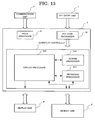
- Fig. 13 is a block diagram showing the third embodiment of the present invention.
- the third embodiment of the present invention has the following construction and functions in addition to those of the first and second embodiments. That is, in this embodiment, the display controller 3e has a retrieving processor 3e3 in addition to a display processing part 3e1 and an editing processing part 3e2 like those in Fig. 7.
- the retrieving processor 3e3 has a function provided in an interlocked relation to a user's key entry operation (i.e., depression of the ⁇ key) to certify the change set-up of display data as shown in Figs. 3 and 8. This function is to retrieve display data contained on a relevant display or the like. As a result of the retrieving, the retrieving processor 3e3 specifies any display containing the same display data retrieved for according to the display specifying data of the display, and informs it to the display processor 3e1.
- the retrieving processor 3e3 has a function of performing a data retrieving routine for display data after change by taking the data retrieving result for display data before change into consideration. In other words, in the display data retrieving routine, the retrieving processor 3e3 makes a duplication check of both of the display data before and after change.
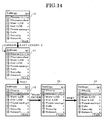
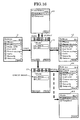
- Figs. 14 to 16 show examples of featuring practical displays in the third embodiment. Specifically, the Figures show display operation examples in the presence of duplicated display data found in the duplication check made at the time of changing editing subject display data.
- performed are first duplication check of the display data before change and second duplication check of the display data after change.
- the display data before change is checked with respect to the "Phone modes” and the display data after change is checked with respect to the "Mode".
- Such change example is, for instance, a case that the term "Mode” is used in a large number of display items; that is, it is based on a user's desire to provide for unified single expression of the "Mode” for alleviating the difficulty in understanding.
- Fig. 14 shows practical displays free from any duplication in the display data before and after change.
- performed are first duplication check of the display data before change and second duplication chick of the display data after change, but it is set that no retrieving result display appears before and after the change.
- the same is true with the editing displays (Figs. 4 and 8) in the first and second embodiments.
- Fig. 15 show practical displays in case of presence of duplication in the display data before change but no duplication in the display data after change.
- duplication is detected only in the duplication check of the display data before change, and it is set that no retrieving result display appears after the change.
- this is the same as in the case of the editing display (Fig. 9) in the second embodiment.
- the retrieving result display after change 19 does not appear, but the displays 14 and 18 or the display 16 remain, respectively.
- Fig. 16 shows practical displays in case of absence of duplication in the display data before change and presence of duplication in the display data after change. In this case, duplication is detected only in the duplication check of the display data after change, and no retrieval result display before change 15 is displayed.
- the retrieving result display after change 19 appears because of the fact that the display data after change on the display 10 of editing subject display specifying data "M1" contains the “Mode” and that the display 20 containing display specifying data "M873" (coming up by depressing, with the waiting display, the "Menu” key, the “8” key, the “7” key and the “3” key in this order) also contains the "Mode” as the "Mode editing".
- the display 19 thus indicates that both the display data including the "Mode” are extracted in the duplication check. In this example, no other duplications are shown for simplicity.
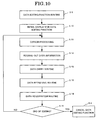
- Fig. 17 is a flowchart showing data retrieving and registration routines in the third embodiment.
- step S1 in Fig. 4 check is made to see if the * key for initiating the editing function is depressed for an extended time (step S2 in Fig. 4). If the * key is depressed for an extended time, check is made to see if the editing function has been started (step S3). If the editing function is in force, it is cancelled to terminate the routine (step S4 in Fig. 4), and the normal display is restored (step S1 in Fig. 4). If the editing function is not started yet, check is made to see if there is any display data on the display (step S5 in Fig. 4). If there is no display data, the normal display is restored (step S1 in Fig. 4). If there is any display data, it goes to the editing function routine in Fig. 10 (step S6 in Fig. 10).
- the editing function initial stage display such as the display 11 (Fig. 14) appears (step S10.
- the fact that the editing function is being started is shown by a cursor as in the display 11 (step S11 in Fig. 10).
- a cursor in a different color from that in the normal display.
- the cursor is shifted to the display data corresponding to the key operation (step S11 in Fig. 10).
- Read out is the font size or maximum input letter number subordinate to the display data with cursor like display 12 (Fig. 14) or display specifying data ("M1", "M12", etc.) (step S12 in Fig. 10). Then, it goes to the data entry routine as shown in Fig. 11 (step S13 in Fig. 10).
- step S20 in Fig. 11 check is made to see if the * key for canceling the editing function is depressed for an extended time (step S20 in Fig. 11). If the * key is depressed for an extended time, the editing routine is terminated and the display 10 (Fig. 14) is restored. Otherwise, it goes to the character entry state (step S21 in Fig. 11). If characters are entered, they are displayed at the cursor position (step S22). Then, check is made to see if the entered characters are less than the maximum number (step S23 in Fig, . 11). Unless otherwise the entered characters are less than the maximum number, the cursor is shifted by one character to the right of the entered characters (step S24 in Fig. 11).
- step S25 in Fig. 11 If the entered characters exceed the maximum number, check is made, without cursor shift, to see if the ⁇ key for data registration is depressed as the next entry key (step S25 in Fig. 11). If the ⁇ key is depressed, it goes to the data retrieving routine as shown in Fig. 12 (step S16 in Fig. 12).
- a retrieving routine for the data before change (step S30) is first executed, in which check is made to see if the display data before change is also used in any other display (step S31). If no such data is found, the display data before change is not duplicated, and executed in this case is only a data substitution routine based on the retrieving result for the display data after change.
- step S32 displayed is the retrieving result for display data before change 15 (step S32).
- step S33 By shifting the cursor to the "M12" on the display 15 (step S33) and depressing the ⁇ key, the display 16 of "M12" can be provide for confirmation during editing (step S34). After confirming the display content on the display 16, the display 15 is restored.
- step S35 the data on the display 15 to the same "Mode” (step S35), the SK 1 key "Change” is depressed, whereby substitution can be effective.
- the display that is set is the data retrieval result set-up display 17 (Fig. 15) (step S36). If any other subject display is found on the display 17 (step S37), the display is likewise confirmed and set.
- step S40 If data confirmation of all the retrieval result for display data before change has been completed, executed is the retrieving routine for the display data after change (step S40). Check is made to see if the display data after change "Mode" has been used in any other display as well (step S41). If such use has been found, provided is the retrieving result display after change 19 (step S42) .
- step S43 By shifting the cursor to the "M873" as shown on the display 19 (step S43) and depressing the ⁇ key, it is possible to provide a pertinent display 20 (step S44). After confirming the display content on the display 20, the display 19 is restored. If changing the data on the display 20 likewise to the "Mode” as well (step S45), the SK1 key "Change” is depressed, to provide the retrieving result set-up display 21 with a check of marking the check box in front of the "M873" (step S46).
- step S47 If any other subject display is found on the display 21 (step S47), the display is likewise confirmed and set. After checking all the retrieving results (step S47), the display data substitution is done according to the content set by depressing the SK2 key "Done" (step S15).
- step S15 the * key is depressed for an extended time
- step S45 the editing routine is terminated and the display 10 is restored (step S4).
- duplication checks can be made of both data before change and after change.
- a setup can be made to see if substitution to the same display data is to be done. If set-up of substitution is made, collective substitution can be done without execution of editing operation afresh with the same display.
- a setting is made to see if new display data is to be entered fresh or substitution is to be done directly. By so doing, the user can readily substitute the user' s own display data while confirming the content.
- the portable terminal can be connected to a personal computer for outputting data thereto. Also, it is possible to permit use of the same display data after change in other portable terminals or the like by transferring data thereto via IrDA, Bluetooth, etc.
- the present invention is suitably applicable to a portable telephone set, a PHS (personal handy-phone system), a PDA (personal data assistance, personal digital assistance; personal portable data communication system), etc.
- a portable telephone set a PHS (personal handy-phone system), a PDA (personal data assistance, personal digital assistance; personal portable data communication system), etc.
Landscapes
- Engineering & Computer Science (AREA)
- Software Systems (AREA)
- Human Computer Interaction (AREA)
- Theoretical Computer Science (AREA)
- General Engineering & Computer Science (AREA)
- Physics & Mathematics (AREA)
- Signal Processing (AREA)
- General Physics & Mathematics (AREA)
- Computer Networks & Wireless Communication (AREA)
- User Interface Of Digital Computer (AREA)
- Telephone Function (AREA)
- Information Retrieval, Db Structures And Fs Structures Therefor (AREA)
- Digital Computer Display Output (AREA)
- Calculators And Similar Devices (AREA)
Applications Claiming Priority (1)
| Application Number | Priority Date | Filing Date | Title |
|---|---|---|---|
| JP2004318523A JP4548093B2 (ja) | 2004-11-01 | 2004-11-01 | 携帯端末装置及び携帯端末装置の表示データ編集方法 |
Publications (2)
| Publication Number | Publication Date |
|---|---|
| EP1653336A2 true EP1653336A2 (de) | 2006-05-03 |
| EP1653336A3 EP1653336A3 (de) | 2007-01-03 |
Family
ID=35986231
Family Applications (1)
| Application Number | Title | Priority Date | Filing Date |
|---|---|---|---|
| EP05023752A Withdrawn EP1653336A3 (de) | 2004-11-01 | 2005-10-31 | Tragbares Endgerät und Verfahren zur Bearbeitung der Anzeigedaten dafür |
Country Status (4)
| Country | Link |
|---|---|
| US (2) | US8060838B2 (de) |
| EP (1) | EP1653336A3 (de) |
| JP (1) | JP4548093B2 (de) |
| CN (1) | CN1770782B (de) |
Families Citing this family (7)
| Publication number | Priority date | Publication date | Assignee | Title |
|---|---|---|---|---|
| JP5097476B2 (ja) * | 2007-08-20 | 2012-12-12 | 株式会社リコー | 画面編集装置、画面編集方法及びプログラム |
| US20090113333A1 (en) * | 2007-10-26 | 2009-04-30 | Palm, Inc. | Extendable Toolbar for Navigation and Execution of Operational Functions |
| JP5343652B2 (ja) * | 2009-03-24 | 2013-11-13 | コニカミノルタ株式会社 | 操作画面制御装置、画像形成装置、およびコンピュータプログラム |
| JP5786828B2 (ja) * | 2012-08-29 | 2015-09-30 | コニカミノルタ株式会社 | 表示装置、表示装置の制御方法、および表示装置の制御プログラム |
| CN103257796B (zh) * | 2013-05-15 | 2016-08-24 | 华为终端有限公司 | 移动通信设备及其主题色彩的切换方法 |
| US9767096B2 (en) | 2014-05-30 | 2017-09-19 | General Electric Company | Systems and methods for internationalization support |
| CN105721652B (zh) * | 2016-01-28 | 2020-03-27 | 努比亚技术有限公司 | 移动终端切换联系人信息的方法及装置 |
Family Cites Families (22)
| Publication number | Priority date | Publication date | Assignee | Title |
|---|---|---|---|---|
| US4686522A (en) | 1985-02-19 | 1987-08-11 | International Business Machines Corporation | Method of editing graphic objects in an interactive draw graphic system using implicit editing actions |
| JP3279556B2 (ja) * | 1990-07-06 | 2002-04-30 | 株式会社日立製作所 | データ編集方法 |
| JP3258379B2 (ja) | 1992-07-06 | 2002-02-18 | 富士通株式会社 | メニュー表示装置 |
| JP3529880B2 (ja) * | 1995-02-24 | 2004-05-24 | 佳能電産香港有限公司 | データ管理装置及びその方法 |
| JPH08241331A (ja) * | 1995-03-07 | 1996-09-17 | Toshiba Corp | 情報管理装置及び情報管理方法 |
| JP2798119B2 (ja) * | 1995-05-23 | 1998-09-17 | 日本電気株式会社 | 電子書籍表示装置 |
| GB2314726B (en) * | 1996-06-28 | 2000-07-12 | Nokia Mobile Phones Ltd | User interface |
| US5867162A (en) * | 1996-12-06 | 1999-02-02 | Sun Microsystems, Inc. | Methods, systems, and computer program products for controlling picklists |
| JPH10243079A (ja) * | 1997-02-28 | 1998-09-11 | Kokusai Electric Co Ltd | コードレス電話システムの携帯端末 |
| US6097964A (en) | 1997-09-04 | 2000-08-01 | Nokia Mobile Phones Limited | Navigation key for a handset |
| GB2341053A (en) * | 1998-08-26 | 2000-03-01 | Nokia Mobile Phones Ltd | Method of handling multiple phone numbers stored on a smart card under single name label |
| JP2000112612A (ja) | 1998-10-02 | 2000-04-21 | Sony Corp | 電子機器 |
| KR100450967B1 (ko) * | 1999-12-30 | 2004-10-02 | 삼성전자주식회사 | 휴대용 무선 단말기의 사용자 메뉴 작성 방법 |
| JP2003005883A (ja) * | 2001-06-26 | 2003-01-08 | Imobile Inc | 端末機能設定方法、端末機能設定システム、端末及びプログラム |
| JP2003022184A (ja) | 2001-07-06 | 2003-01-24 | Ntt Docomo Kansai Inc | アプリケーションプログラム生成システム、データ処理装置、アプリケーションプログラム提供装置、コンピュータプログラム、及び記録媒体 |
| JP2003050867A (ja) | 2001-08-08 | 2003-02-21 | Nippon Signal Co Ltd:The | 歩行者等健康チェック支援方法及びその装置 |
| JP2003114793A (ja) * | 2001-10-05 | 2003-04-18 | Cats Kk | 画面遷移図編集装置、画面遷移図編集方法およびその方法をコンピュータに実行させるプログラム |
| CN1220401C (zh) | 2001-11-20 | 2005-09-21 | 光宝科技股份有限公司 | 手机目录名称编辑方法及装置 |
| JP4093088B2 (ja) * | 2003-03-18 | 2008-05-28 | 松下電器産業株式会社 | リモコン送信機 |
| JP2005038414A (ja) * | 2003-06-30 | 2005-02-10 | Fuji Photo Film Co Ltd | ファイル管理プログラム、ファイル管理方法、ファイル管理装置、撮像装置及び記録媒体 |
| JP2005108041A (ja) * | 2003-09-30 | 2005-04-21 | Toshiba Corp | 携帯端末のメニュー画面表示方法及び携帯端末 |
| WO2005057890A2 (en) * | 2003-12-08 | 2005-06-23 | Kyocera Wireless Corp. | Push to talk user interface for the management of contacts |
-
2004
- 2004-11-01 JP JP2004318523A patent/JP4548093B2/ja not_active Expired - Fee Related
-
2005
- 2005-10-31 EP EP05023752A patent/EP1653336A3/de not_active Withdrawn
- 2005-10-31 US US11/261,610 patent/US8060838B2/en not_active Expired - Fee Related
- 2005-11-01 CN CN2005101186390A patent/CN1770782B/zh not_active Expired - Fee Related
-
2011
- 2011-09-24 US US13/244,390 patent/US8914745B2/en not_active Expired - Fee Related
Also Published As
| Publication number | Publication date |
|---|---|
| JP4548093B2 (ja) | 2010-09-22 |
| EP1653336A3 (de) | 2007-01-03 |
| US20060095856A1 (en) | 2006-05-04 |
| US20120017160A1 (en) | 2012-01-19 |
| US8914745B2 (en) | 2014-12-16 |
| CN1770782B (zh) | 2011-06-15 |
| JP2006129398A (ja) | 2006-05-18 |
| CN1770782A (zh) | 2006-05-10 |
| US8060838B2 (en) | 2011-11-15 |
Similar Documents
| Publication | Publication Date | Title |
|---|---|---|
| US8914745B2 (en) | Portable terminal and display data editing method for the same | |
| CN101308443B (zh) | 用于在移动设备上组织应用程序的图标的系统和方法 | |
| US8631349B2 (en) | Apparatus and method for changing application user interface in portable terminal | |
| KR101704531B1 (ko) | 휴대 단말기의 텍스트 정보 표시 방법 및 장치 | |
| US20090176533A1 (en) | Portable information apparatus, character display method in portable information apparatus, and program product for implementing the method | |
| CN103399847B (zh) | 用于管理计算环境语言的应用语言库 | |
| US8274474B2 (en) | Character input device, character input device control method, and information storage medium | |
| US7660002B2 (en) | Image forming system, method of displaying various kinds of information of image forming apparatus, and program for displaying various kinds of information of image forming apparatus | |
| WO2008032486A1 (en) | Portable terminal, display method, display mode determining program and computer readable recording medium | |
| US20030165218A1 (en) | Electric appliance, information retrieving method of electric appliance | |
| JP4180617B2 (ja) | 移動通信端末機及び移動通信端末機におけるデータ処理方法 | |
| JP2891206B2 (ja) | パスワード照合方式 | |
| JP2006331063A (ja) | 操作メニュー変更装置 | |
| US7643819B2 (en) | Template based messaging | |
| US20070097429A1 (en) | Portable terminal | |
| JP2007080257A (ja) | 携帯型の営業活動支援装置 | |
| JP2002229705A (ja) | 移動体通信機器 | |
| JP2007219940A (ja) | メニュー制御装置、携帯電話、およびメニュー制御装置用プログラム | |
| JP2007006172A (ja) | 通信装置、通信装置の制御方法、プログラム及び相手機種登録データ | |
| KR100667526B1 (ko) | 사용자 저장 데이터를 이용한 문자 메시지 작성 기능이구비된 이동 통신 단말기 및 그 문자 메시지 작성 방법 | |
| JP2008112414A (ja) | 仮想キーボードシステム、その制御方法及びコンピュータプログラム | |
| KR101314606B1 (ko) | 정보 표시 기능을 갖는 이동통신 단말기 및 이것의 정보표시 방법 | |
| JP2006211266A (ja) | 携帯電話機 | |
| JPH0764889A (ja) | 通信端末装置 | |
| JP2001142886A (ja) | 電話帳検索方法 |
Legal Events
| Date | Code | Title | Description |
|---|---|---|---|
| PUAI | Public reference made under article 153(3) epc to a published international application that has entered the european phase |
Free format text: ORIGINAL CODE: 0009012 |
|
| AK | Designated contracting states |
Kind code of ref document: A2 Designated state(s): AT BE BG CH CY CZ DE DK EE ES FI FR GB GR HU IE IS IT LI LT LU LV MC NL PL PT RO SE SI SK TR |
|
| AX | Request for extension of the european patent |
Extension state: AL BA HR MK YU |
|
| RIC1 | Information provided on ipc code assigned before grant |
Ipc: G06F 9/44 20060101ALI20060321BHEP Ipc: G06F 3/00 20060101AFI20060314BHEP |
|
| PUAL | Search report despatched |
Free format text: ORIGINAL CODE: 0009013 |
|
| AK | Designated contracting states |
Kind code of ref document: A3 Designated state(s): AT BE BG CH CY CZ DE DK EE ES FI FR GB GR HU IE IS IT LI LT LU LV MC NL PL PT RO SE SI SK TR |
|
| AX | Request for extension of the european patent |
Extension state: AL BA HR MK YU |
|
| 17P | Request for examination filed |
Effective date: 20070702 |
|
| AKX | Designation fees paid |
Designated state(s): DE FR GB IT |
|
| RAP1 | Party data changed (applicant data changed or rights of an application transferred) |
Owner name: LENOVO INNOVATIONS LIMITED (HONG KONG) |
|
| STAA | Information on the status of an ep patent application or granted ep patent |
Free format text: STATUS: THE APPLICATION HAS BEEN WITHDRAWN |
|
| 18W | Application withdrawn |
Effective date: 20150304 |