EP1659504A2 - Koordinierung von Animationen und Medien für Bildschirmausgabe am Rechner - Google Patents
Koordinierung von Animationen und Medien für Bildschirmausgabe am Rechner Download PDFInfo
- Publication number
- EP1659504A2 EP1659504A2 EP05021733A EP05021733A EP1659504A2 EP 1659504 A2 EP1659504 A2 EP 1659504A2 EP 05021733 A EP05021733 A EP 05021733A EP 05021733 A EP05021733 A EP 05021733A EP 1659504 A2 EP1659504 A2 EP 1659504A2
- Authority
- EP
- European Patent Office
- Prior art keywords
- property
- storyboard
- data
- timeline
- trigger
- Prior art date
- Legal status (The legal status is an assumption and is not a legal conclusion. Google has not performed a legal analysis and makes no representation as to the accuracy of the status listed.)
- Withdrawn
Links
Images


Classifications
-
- G—PHYSICS
- G06—COMPUTING OR CALCULATING; COUNTING
- G06F—ELECTRIC DIGITAL DATA PROCESSING
- G06F16/00—Information retrieval; Database structures therefor; File system structures therefor
- G06F16/40—Information retrieval; Database structures therefor; File system structures therefor of multimedia data, e.g. slideshows comprising image and additional audio data
- G06F16/43—Querying
- G06F16/438—Presentation of query results
- G06F16/4387—Presentation of query results by the use of playlists
- G06F16/4393—Multimedia presentations, e.g. slide shows, multimedia albums
-
- G—PHYSICS
- G06—COMPUTING OR CALCULATING; COUNTING
- G06F—ELECTRIC DIGITAL DATA PROCESSING
- G06F40/00—Handling natural language data
- G06F40/10—Text processing
- G06F40/103—Formatting, i.e. changing of presentation of documents
- G06F40/109—Font handling; Temporal or kinetic typography
-
- G—PHYSICS
- G06—COMPUTING OR CALCULATING; COUNTING
- G06F—ELECTRIC DIGITAL DATA PROCESSING
- G06F40/00—Handling natural language data
- G06F40/10—Text processing
- G06F40/12—Use of codes for handling textual entities
- G06F40/14—Tree-structured documents
-
- G—PHYSICS
- G06—COMPUTING OR CALCULATING; COUNTING
- G06F—ELECTRIC DIGITAL DATA PROCESSING
- G06F40/00—Handling natural language data
- G06F40/10—Text processing
- G06F40/12—Use of codes for handling textual entities
- G06F40/14—Tree-structured documents
- G06F40/143—Markup, e.g. Standard Generalized Markup Language [SGML] or Document Type Definition [DTD]
Definitions
- the invention relates generally to computer systems, and more particularly to the processing of graphical and other audiovisual information for display on computer systems.
- markup language technology In contemporary computing systems, the development of markup language technology has resulted in a straightforward way for program authors to provide valuable information to users, and to receive requests and the like corresponding to user interaction with the displayed information.
- the markup is processed to construct an element tree, and then the element tree is processed for rendering corresponding output data onto a display.
- U.S. Patent Application serial nos. 10/693,630 and 10/693,822 are among several patent applications (assigned to the assignee of the present invention) that among other things, describe one such markup language that is generally arranged to simplify program authoring, namely XAML (extensible Application Markup Language).
- XAML extensible Application Markup Language
- a program author uses XAML instructions along with calls to application programming interfaces (APIs) to place objects in a scene graph data structure.
- APIs application programming interfaces
- a XAML-based program generally adds child visual objects to other visual objects to build up a hierarchical scene graph, writes instruction lists such as geometry data, image data and other data for output, and may specify transform, clipping and opacity properties on visual objects.
- One of the capabilities of XAML described in the aforementioned patent applications is the ability to allow programs to specify animation parameters and/or media-related data, and then efficiently output corresponding display data that includes corresponding animations and/or media.
- a program author may describe a desired animation effect in terms of parameters, such as how much some displayed object property should change over time; for example, a rectangle's opacity property may be set to gradually fade from opaque to transparent, and then back, over some duration.
- the system manages the animation so that the program code need only specify the animation parameters initially, rather than requiring the program code itself to regularly redraw a changed image over time to accomplish the effect.
- the operating system provides for use of a timeline object that defines the evolution of an animation over time, and as needed, a clock object is instantiated to represent the timeline for that animation.
- a clock object is instantiated to represent the timeline for that animation.
- the clock is used by the lower-level graphics components to determine the updated, time-variable property parameter or parameters for the displayed object that is being animated, and the image is then redrawn based on the updated property data.
- media is similarly handled.
- timing information heretofore had to be individually applied to each animation or media element.
- the program author heretofore needed to manually synchronize various actions that may occur on different timelines, (e.g., the start and stop times of animations and media, and/or how events that are received are handled. This can lead to inconsistent states, such as one animated property being ahead of another animated property (at least temporarily), even though the program author would like both to be synchronized. This also adds complexity; for example, upon a restart event, the individual animations related to that event each need to be found and restarted.
- the present invention provides a method and system that allows authors to schedule sets of animations by grouping them within a named timeline object, referred to as a storyboard.
- a storyboards API set provides a way to combine timelines that affect a variety of objects and properties into a single timeline tree, enabling the program author to organize and control complex sets of timing events in a straightforward manner.
- Storyboards can be used on particular instances of animations /video audio, or to animations of a particular style.
- storyboards comprise objects that allow a timeline tree to be specified for elements in an element tree.
- Each timeline in the tree sets property values of elements, and controls animations for the element and its sub-tree.
- a storyboard essentially corresponds to a particular type of timeline object that may be started, stopped or paused, or used to seek, thereby controlling the appearance of animated elements and/or behavior of media that are associated with that storyboard.
- Storyboards may also comprise a collection of top-level timelines that can be associated with an element and started independently. For example, an author may associate two different animations with an element that is in the same storyboard collection, and although those animations may be triggered independently, they are contained as a unit. Storyboards thus provide connection points between a timing tree and an element tree that allows the animations in the storyboard to resolve their targets relative to the element to which the storyboard is attached.
- Storyboards also may contain a collection of triggers that can be activated by state changes, events, or other actions and contain a set of extensible actions to be executed when the trigger is activated (for instance, starting or stopping of a timeline).
- Storyboards are part of an underlying object model that allows the user to interactively start and stop timelines in a storyboard from code.
- timelines in a storyboard represent animation templates that can be applied to various subtrees, elements, and other objects.
- a storyboard can be set directly onto a framework element in the tree, or applied to a framework element via a style (a resource comprising one or more data values which may be applied to an element, such as color, size and other properties of a button.
- Storyboards also may be used to apply animations to objects that support cloning, such as changeables, which clone original information and then operating on the cloned information, such that the original information may be restored.
- Storyboards thus provide a way to combine otherwise independent timelines that affect a variety of objects and properties into a single timeline tree, enabling the program author to organize and control complex sets of timing events in a straightforward manner. For example, the separation of the timing tree and the element tree allows the author to use the timing tree to do manipulations in time, such as running a set of animations in sequence, or looping a complicated timing structure. Storyboards can be used on particular instances of animations / video / audio, or to an animation of a particular style.
- a storyboard is associated with properties that enable an author to specify the object and property to animate, and a base value from which to animate. Storyboards enable the author to organize and control sets of animations as a group instead of defining the change of each animation over time individually, thereby enabling straightforward creation of animations that are synchronized with each other in complex ways, including parallel animations and sequences of animations (described below).
- Storyboards allow the use of property triggers and event triggers to control their operation (e.g., start, pause, seek and stop actions).
- a property trigger corresponds to some state / value such as true or false, whereas an event fires.
- a property trigger may have a true value when the mouse was hovering over an element, and a false value when not hovering over it, and an event may fire when the mouse is clicked on the element.
- Each true or false state and/or event may be used to separately start, stop, pause, and/or seek in a storyboard (or storyboards). In this manner, animations are controllable via user interaction with the displayed element tree representation.
- property enter/exit triggers are also available for use in triggering timelines.
- Storyboards and triggers may be styled, wherein a style allows an author to group together data that represents one or more properties that then may be applied as a set to the corresponding properties of an element. These properties in a style may be animated and/or correspond to triggers.
- FIGURE 1 illustrates an example of a suitable computing system environment 100 on which the invention may be implemented.
- the computing system environment 100 is only one example of a suitable computing environment and is not intended to suggest any limitation as to the scope of use or functionality of the invention. Neither should the computing environment 100 be interpreted as having any dependency or requirement relating to any one or combination of components illustrated in the exemplary operating environment 100.
- the invention is operational with numerous other general purpose or special purpose computing system environments or configurations.
- Examples of well known computing systems, environments, and/or configurations that may be suitable for use with the invention include, but are not limited to, personal computers, server computers, hand-held or laptop devices, tablet devices, multiprocessor systems, microprocessor-based systems, set top boxes, programmable consumer electronics, network PCs, minicomputers, mainframe computers, distributed computing environments that include any of the above systems or devices, and the like.
- the invention may be described in the general context of computer-executable instructions, such as program modules, being executed by a computer.
- program modules include routines, programs, objects, components, data structures, and so forth, which perform particular tasks or implement particular abstract data types.
- the invention may also be practiced in distributed computing environments where tasks are performed by remote processing devices that are linked through a communications network.
- program modules may be located in both local and remote computer storage media including memory storage devices.
- an exemplary system for implementing the invention includes a general purpose computing device in the form of a computer 110.
- Components of the computer 110 may include, but are not limited to, a processing unit 120, a system memory 130, and a system bus 121 that couples various system components including the system memory to the processing unit 120.
- the system bus 121 may be any of several types of bus structures including a memory bus or memory controller, a peripheral bus, and a local bus using any of a variety of bus architectures.
- such architectures include Industry Standard Architecture (ISA) bus, Micro Channel Architecture (MCA) bus, Enhanced ISA (EISA) bus, Video Electronics Standards Association (VESA) local bus, Accelerated Graphics Port (AGP) bus, and Peripheral Component Interconnect (PCI) bus also known as Mezzanine bus.
- ISA Industry Standard Architecture
- MCA Micro Channel Architecture
- EISA Enhanced ISA
- VESA Video Electronics Standards Association
- AGP Accelerated Graphics Port
- PCI Peripheral Component Interconnect
- the computer 110 typically includes a variety of computer-readable media.
- Computer-readable media can be any available media that can be accessed by the computer 110 and includes both volatile and nonvolatile media, and removable and non-removable media.
- Computer-readable media may comprise computer storage media and communication media.
- Computer storage media includes both volatile and nonvolatile, removable and non-removable media implemented in any method or technology for storage of information such as computer-readable instructions, data structures, program modules or other data.
- Computer storage media includes, but is not limited to, RAM, ROM, EEPROM, flash memory or other memory technology, CD-ROM, digital versatile disks (DVD) or other optical disk storage, magnetic cassettes, magnetic tape, magnetic disk storage or other magnetic storage devices, or any other medium which can be used to store the desired information and which can accessed by the computer 110.
- Communication media typically embodies computer-readable instructions, data structures, program modules or other data in a modulated data signal such as a carrier wave or other transport mechanism and includes any information delivery media.
- modulated data signal means a signal that has one or more of its characteristics set or changed in such a manner as to encode information in the signal.
- communication media includes wired media such as a wired network or direct-wired connection, and wireless media such as acoustic, RF, infrared and other wireless media. Combinations of the any of the above should also be included within the scope of computer-readable media.
- the system memory 130 includes computer storage media in the form of volatile and/or nonvolatile memory such as read only memory (ROM) 131 and random access memory (RAM) 132.
- ROM read only memory
- RAM random access memory
- BIOS basic input/output system
- RAM 132 typically contains data and/or program modules that are immediately accessible to and/or presently being operated on by processing unit 120.
- FIG. 1 illustrates operating system 134, application programs 135, other program modules 136 and program data 137.
- the computer 110 may also include other removable/non-removable, volatile/nonvolatile computer storage media.
- FIG. 1 illustrates a hard disk drive 141 that reads from or writes to non-removable, nonvolatile magnetic media, a magnetic disk drive 151 that reads from or writes to a removable, nonvolatile magnetic disk 152, and an optical disk drive 155 that reads from or writes to a removable, nonvolatile optical disk 156 such as a CD ROM or other optical media.
- removable/non-removable, volatile/nonvolatile computer storage media that can be used in the exemplary operating environment include, but are not limited to, magnetic tape cassettes, flash memory cards, digital versatile disks, digital video tape, solid state RAM, solid state ROM, and the like.
- the hard disk drive 141 is typically connected to the system bus 121 through a non-removable memory interface such as interface 140, and magnetic disk drive 151 and optical disk drive 155 are typically connected to the system bus 121 by a removable memory interface, such as interface 150.
- hard disk drive 141 is illustrated as storing operating system 144, application programs 145, other program modules 146 and program data 147. Note that these components can either be the same as or different from operating system 134, application programs 135, other program modules 136, and program data 137. Operating system 144, application programs 145, other program modules 146, and program data 147 are given different numbers herein to illustrate that, at a minimum, they are different copies.
- a user may enter commands and information into the computer 110 through input devices such as a tablet (electronic digitizer) 164, a microphone 163, a keyboard 162 and pointing device 161, commonly referred to as mouse, trackball or touch pad.
- Other input devices may include a joystick, game pad, satellite dish, scanner, or the like.
- a monitor 191 or other type of display device is also connected to the system bus 121 via an interface, such as a video interface 190.
- the monitor 191 may also be integrated with a touch-screen panel 193 or the like that can input digitized input such as handwriting into the computer system 110 via an interface, such as a touchscreen interface 192.
- a touch-screen panel 193 can be physically coupled to a housing in which the computing device 110 is incorporated, such as in a tablet-type personal computer, wherein the touch screen panel 193 essentially serves as the tablet 164.
- computers such as the computing device 110 may also include other peripheral output devices such as speakers 195 and printer 196, which may be connected through an output peripheral interface 194 or the like.
- the computer 110 may operate in a networked environment using logical connections to one or more remote computers, such as a remote computer 180.
- the remote computer 180 may be a personal computer, a server, a router, a network PC, a peer device or other common network node, and typically includes many or all of the elements described above relative to the computer 110, although only a memory storage device 181 has been illustrated in FIG. 1.
- the logical connections depicted in FIG. 1 include a local area network (LAN) 171 and a wide area network (WAN) 173, but may also include other networks.
- LAN local area network
- WAN wide area network
- Such networking environments are commonplace in offices, enterprise-wide computer networks, intranets and the Internet.
- the computer 110 When used in a LAN networking environment, the computer 110 is connected to the LAN 171 through a network interface or adapter 170. When used in a WAN networking environment, the computer 110 typically includes a modem 172 or other means for establishing communications over the WAN 173, such as the Internet.
- the modem 172 which may be internal or external, may be connected to the system bus 121 via the user input interface 160 or other appropriate mechanism.
- program modules depicted relative to the computer 110, or portions thereof may be stored in the remote memory storage device.
- FIG. 1 illustrates remote application programs 185 as residing on memory device 181. It will be appreciated that the network connections shown are exemplary and other means of establishing a communications link between the computers may be used.
- a media integration layer architecture 200 is provided.
- An application program, control or other similar higher-level program code e.g., a user interface of an operating system component
- APIs application programming interfaces
- the media integration layer architecture 200 includes a high-level composition and animation engine 206, timing and animation components 208, and a low-level compositing and animation engine 210.
- high-level and low-level are similar to those used in other computing scenarios, wherein in general, the lower a software component relative to higher components, the closer the component is to the hardware.
- graphics information sent from the high-level composition and animation engine 206 may be received at the low-level compositing and animation engine 210, where the information is used to send graphics data to the graphics subsystem including the hardware.
- the high-level composition and animation engine (also referred to herein as the high-level compositor and animator or the high-level engine or component) 206 builds a display element tree to represent a graphics scene provided by the application program 202, while the timing and animation components provide declarative (or other) animation and timing control.
- the low-level compositing and animation engine (also referred to herein as the low-level compositor and animator or low-level engine or component) 210 composes the renderings for the scenes of multiple applications, and with rendering components, implements the actual rendering of graphics to the screen. Note, that it is still possible to do time-consuming or application-specific rendering at a higher levels, and pass references to a bitmap or the like to the lower layers.
- the high-level composition and animation engine 206 builds the element tree structure and traverses the structure, creating rendering instructions and simple animation intervals to be passed to the low-level compositing and animation engine 210.
- the rendering instructions generated by the high-level compositor may contain timing and animation information.
- the low-level compositing and animation engine 210 takes the rendering instructions and animation intervals and manages the animating, rendering and composing the scene that is then provided to the graphics subsystem (e.g., the graphics software and hardware) 212.
- the high-level composition and animation engine 206 may provide the rendering and animation instructions in an appropriate format to lower-level printing code 220 for sending fixed image data to a printer 222 or the like, and/or may provide rendering instructions and simple animation intervals in an appropriate format to a lower-level terminal transport server 226 for transmission to remote machines 228.
- richer information also may be passed across the network, e.g., it may be desirable to have the remote machine handle mouse rollover effects locally, without any network traffic.
- the media integration layer architecture 200 thus separates graphics processing into multiple levels, and each of these levels performs some intelligent graphics processing which together allows applications' user interfaces and the like 202 to output graphics with smooth animation, composite the graphics with the graphics of other applications, and work with video frames.
- the animation and/or compositing may also be synchronized with audio output. For example, by synchronizing audio with the frame rate at the low-level component, the timing of audio can essentially be exact with that of video or graphics, and not dependent on the ability of task-scheduled, complex preprocessing to keep up with the refresh rate.
- FIG. 3 represents one implementation in which markup code 302 such as XAML-based code may be interpreted by a parser / translator 304.
- the parser / translator 304 adds elements to the element tree / property system 314; the elements are visual objects that do their own layout. Further, note that some or all of the markup code may be compiled rather than interpreted on demand, thereby improving efficiency.
- an element is an object in the element layer that participates in the property system, triggering and layout/presentation system.
- the parser 304 finds tags and decides if those tags help to define an element or a resource object.
- tags may be interpreted as elements or also interpreted as resource objects, depending on the context of where those tags appear, e.g., depending on whether appearing in complex property syntax or not, as described in U.S. patent application serial no. 10/401,717.
- a resource instance may be located elsewhere (e.g., in the markup or in a file, which can be local or on a remote network and appropriately downloaded), and referenced by a name, (e.g., a text name, reference or other suitable identifier).
- a name e.g., a text name, reference or other suitable identifier
- the parser 304 handles markup in the complex property syntax by accessing the type converter 308 as necessary, and also by matching specified parameters to the object properties, thereby handling the complexity for the scene designer. Thus, the parser 304 does not just set up the objects, but also sets properties on the objects. Because the same rendering model is shared between the element level and the API level, many of the objects are essentially the same. This makes parsing / translation highly efficient, and also allows different types of programming languages (e.g., C#-like languages) the ability to easily convert from the markup to its own syntax, and vice-versa. Note that as represented in FIG. 3, another such programming language 310 (which may comprise compiled markup) can add elements to the element tree 208, or can directly interface with the visual API layer 316.
- another such programming language 310 (which may comprise compiled markup) can add elements to the element tree 208, or can directly interface with the visual API layer 316.
- the same markup 302 may be used to program at an element level and a resource level.
- the element level gives the scene designer full programmability, usage of the property system that provides inheritance (e.g., style-sheet like features), and triggering (e.g., whereby an element may have attached code to change its appearance, position and so forth in response to a user input event or action).
- the present invention also provides a resource-level mechanism by which scene designers can essentially shortcut the element tree and program directly to the visual API layer. For many types of static shapes, images and the like where element-level features are not needed, this provides a more efficient and lightweight way to output the appropriate object.
- a timing tree comprising clocks is also maintained, as described below with reference to FIGS. 4 and 5.
- the high-level compositor and animator engine 206 performs complex processing (sometimes referred to as compiling) that significantly simplifies the amount of processing and significantly reduces the amount of data that lower levels need to deal with to render the correct output. Note, however, that the amount and type of processing that is performed by the higher level may be dependent to a significant extent on the load, configuration and capabilities of the lower levels. For example, if high capability graphics hardware is present, the higher level may do a lesser amount of processing, and vice-versa.
- the high-level and low-level layers are adaptive to these factors.
- animation is accomplished by both the high-level compositor and animation engine 206 and the low-level compositor and animation engine 210.
- the high-level engine 206 traverses the scene and updates animation parameters with intervals for later interpolation, and packages these simplified data structures into instructions that get passed to the lower-level engine 210. This may be done in a synchronous and/or asynchronous manner.
- the interval data can be considered as including the timing endpoints (start and end timing data), as well as the parameterized values for the rendering instruction.
- the high-level engine 204 can perform some or all of a requested interpolation, e.g., if an interpolation or other motion function is too complex for the lower-level engine 210 to handle, or the lower-level cannot keep up with the processing demands placed thereon, the higher-level engine can perform some or all of the calculations and provide the lower-level with simplified data, instructions, tessellations, and so on to accomplish the desired result.
- the low-level engine 210 interpolates the parameter intervals to obtain instantaneous values, and decodes the instructions into rendering commands executed by the graphics device.
- the graphics device composes the final scene adding any video frames that might be present in the scene: Other data also may be added, such as content protected by digital rights management.
- the high-level engine 206 thus traverses the scene data-structures, computes an interval describing each animated parameter for a period of time, and passes these intervals and simplified parameterized drawing instructions to the low-level engine 210.
- the parameter data includes start time, end time, interpolator and interpolation data.
- the high-level compositor and animation engine 206 can instruct the low-level compositor and animation engine 210 as to how the image should change over time, e.g., starting coordinates, ending coordinates, the amount of time (interval) that the image should move between the coordinates, and a motion function such as linear; (note that motion is not required for animation, as a stationary object may be animated by changing its color property, for example).
- the low-level compositor and animation engine 210 will interpolate to determine new positions between frames, convert these into drawing instructions that the graphics device can understand, and pass the commands to the graphics device.
- Each pass of the high-level engine 206 preferably provides sufficient data for the low-level engine 210 to perform smooth animation over several frames.
- the low-level (e.g., fast-tick) engine 210 is a separate task from the high-level engine 206.
- the low-level engine 210 receives the simplified parameterized drawing instructions and parameter intervals describing the scene from the high-level engine 206.
- the low-level engine maintains and traverses these data structures until new ones are provided by the high-level engine 206.
- the low-level engine may service multiple high-level engines 206, maintaining separate data structures for each.
- the one-to-many relationship between the low-level engine 210 and high-level engine 206 allows the system to smoothly animate multiple scenes simultaneously.
- the low-level engine 210 interpolates essentially instantaneous animation parameters based on the high-level engine's provided intervals, updates drawing instructions and renders the scene for every frame.
- the low-level engine 210 task runs at a high priority on the system, to ensure that frames are ready for presentation such as at the graphics hardware screen refresh rate.
- the interpolations performed by the low-level engine 210 are thus typically limited to simple, fast functions such as linear, piecewise linear, cubic spline and those of similar speed.
- a program such as the application program 202, specifies animation property values along with timing information, referred to as clocks or clock properties, to the high-level component 206.
- clocks e.g., a program that specifies animation property values along with timing information, referred to as clocks or clock properties, to the high-level component 206.
- any independent animation or media e.g., linear media such as video and audio
- a storyboard that coordinates specified animations will have a clock maintained for it at the high-level component.
- the author specifies timeline data that is instantiated into the clocks as appropriate to keep them synchronized.
- the clock properties comprise timing properties that define the initial synchronization relationship between a given clock and the rest of the timing structure.
- the high-level component 206 may call high-level animation functions 520 H (e.g., written in managed code, which is code that provides information in the form of metadata that allows a common language runtime on which it runs to control its operation) in order to determine a current value of a property of an animation.
- high-level animation functions 520 H e.g., written in managed code, which is code that provides information in the form of metadata that allows a common language runtime on which it runs to control its operation
- the low-level component 210 calls similar (or the same) animation functions 520 L with the progress computed by the engine 414 in order to determine a current property value of an animation.
- the animation functions may be built into the lower-level component, for example.
- animations and linear media are associated with a set of clocks which are related to each other by synchronization primitives and rules.
- the clocks may be hierarchically arranged, e.g., the application program has a parent clock, and animated objects of the application program are children, which in turn may have other children.
- a property of a clock is defined or modified, any children of that clock are affected. For example, pausing a parent clock pauses any of its child clocks, and doubling the speed of a parent clock doubles the speed of any of its child clocks.
- clock properties may be modified by source events comprising interactive control events initiated by the application at run-time.
- the clocks are interactive, in that each clock can be individually started, paused, resumed and stopped at arbitrary times by the application, e.g., in response to user input.
- new clocks can be added to the timing structure, and existing clocks can be removed.
- the high-level timing component may generate an interval list for each clock based on a stored list of events (begin, pause, and so forth) and the associated synchronization primitives.
- the activation intervals are straightforward, nonoverlapping segments that describe the time expressed by a given clock at different points in real-world time.
- the clock properties may be hierarchically related in a timing tree 402 of clocks.
- Three such clocks with their properties are shown in FIG. 4, namely clock properties 404 1 -404 3 , however it is understood that many more clocks and alternative timing trees may be present in a given situation.
- the high-level component 206 includes a state machine, referred to as an event list generator 408, which generates an event list (e.g., 406 1 ) from the clock properties.
- the event list generator 408 groups the events that were initially scheduled by the specified clock properties together with any explicit interactive events, such as pause and resume requests that are received with respect to the animation, into an event list.
- a clock is maintained for each animation (or group of animations via a storyboard, as described below), and thus there is an event list corresponding to each independent animation / animation set, as well as one for each independent linear media.
- the high-level component includes an interval generator 410 that uses the event list (e.g., 406 3 ) for each animation or media to compute a corresponding interval list (e.g., 412 3 ), which is passed to the low-level component 210.
- the low-level component 210 includes a low-level computation engine 414 that controls the output based on the current time with respect to the interval data, such as by providing a progress value based on the interval data for that object and the current time to an low-level animation function subsystem 520 L that determines a current value for the varying property of an animated object.
- the low-level computation engine 414 interpolates the location of the animated object based on the interval data and the current time (which may be the system time or a relative time).
- the high-level timing component includes the timing tree 402 and the event lists 406 1 -406 3
- the low-level timing component 210 includes the interval lists 412 1 -412 3 , however these data structures may be maintained essentially anywhere in storage, ordinarily in highspeed random access memory.
- the high-level timing component 206 sees a tree 402 of clocks related (e.g., hierarchically) by synchronization rules and primitives.
- the present invention uses the clocks in the high-level timing component 206 to compile lists of activation intervals 412 that are consumed by the low-level timing engine.
- the low-level timing engine sees the interval lists 412, which represent independent (e.g., peranimated object or per-linear media) clocks.
- the high-level timing component In response to interactive changes received from the application 202 (or some other source), the high-level timing component needs to update the state of the clock that is directly involved with that change, as well any that are indirectly involved as specified by the synchronization primitives. Note that it is possible that a change to a single clock can affect other clocks in the timing structure. For example, a presenter of a slide show can pause the entire display, whereby any animations and linear media currently being displayed need to be paused. As described below, in accordance with an aspect of the present invention, a storyboard allows animations and/or media to be grouped together and thus coordinated in such a desired manner.
- the event list is regenerated as necessary and the interval list recomputed and sent to the lower-level timing component.
- the higher-level component performs these operations, (for example at a frequency on the order of six to ten times per second) such that the lower level component (e.g., operating at sixty times per second) only needs to deal with the current interval list for each animated object.
- an application can seek to a period in time, which corresponds to an event. The application specifies when the seek is to occur, and by how much. Like rewinding or fast-forwarding media, with a seek on an animation, an application can thus jump ahead or back to a particular point in time.
- a reverse event is another type of scheduled or interactive event that an application may specify. When a reverse event is in the list, the progress will automatically reverse, e.g., from one-hundred percent to zero percent. Speed changes are also supported, e.g., everything below a certain clock can be set to run faster or slower than actual time.
- Other attributes may be specified, such as to indicate for a particular clock whether restart is allowed, and/or whether to begin again if not currently running, e.g., start at one second, begin again at ten seconds, begin again at one-hundred seconds, and so forth, but optionally do or do not restart if currently running.
- the present invention is, among other things, directed to storyboards, which comprise objects that allow a timeline tree to be specified for an element (e.g., a FrameworkElement such as a window, panel, control such as button and so forth).
- the timeline sets property values of elements, and controls animations for the element and its sub-tree.
- a storyboard essentially corresponds to a particular type of timeline object that may be started, stopped or paused, or used to seek, thereby controlling the appearance of animated elements and/or behavior of media that are associated with that storyboard.
- storyboards comprise a collection of top-level timelines that can be associated with an element and started independently.
- the model allows an author to have a mouse Over animation and a mouseClick animation on an element that is in the same storyboard collection.
- the mouse Over and mouseClick animation timelines can be triggered independently, but are contained in the same unit.
- Storyboards also provide connection points between a timing tree and an element tree that allows the animations in the storyboard to resolve their targets relative to the element to which the Storyboard is attached.
- Storyboards also may contain a collection of triggers that can be activated by state changes, events, or other actions and contain a set of extensible actions to be executed when the trigger is activated (for instance, starting or stopping of a timeline).
- Storyboards are part of an underlying object model that allows the author to interactively start and stop timelines in a storyboard from code.
- timelines in a storyboard represent animation templates that can be applied to various subtrees, elements, and other objects (e.g., text letters, words, lines, paragraphs and so forth).
- a storyboard can be set directly onto a FrameworkElement, or applied to a FrameworkElement via a Style (a resource comprising one or more data values which may be applied to an element, such as color, size and other properties of a button, as described below).
- Style a resource comprising one or more data values which may be applied to an element, such as color, size and other properties of a button, as described below.
- Storyboards also may be used to apply animations to objects that support cloning, such as changeables, (e.g., brush, transform, geometry and the like, wherein changeables may be used to set properties of FrameworkElements, as described in U.S. patent application serial no. 10/693,438).
- a brush is a changeable that sets the background of a button or panel by cloning the original background information and then operating on the cloned information, such that the original information may be restored.
- a storyboard can be used to animate a changeable that sets a property of a FrameworkElement.
- objects related to a storyboard namely elements that participate with the storyboard (such as FrameworkElement) and those that do not (e.g. a changeable as described above).
- the storyboard's algorithm / data structures are such that those that participate work as specified, but even those that do not participate work as specified, as long as they support cloning.
- storyboards allow program authors to schedule sets of coordinated animations by grouping animations (to element properties) within timelines.
- a storyboard integrates the timing tree with the element tree, providing the ability to manipulate timing for different properties of different animations in a coordinated manner via the same timeline.
- Storyboards thus provide a way to combine otherwise independent timelines that affect a variety of objects and properties into a single timeline tree, enabling the program author to organize and control complex sets of timing events in a straightforward manner.
- the grouping of animations under a timeline as part of a storyboard allows restarting all the animations at once by simply restarting the storyboard.
- the separation of the timing tree and the element tree allows the user to use the timing tree to do manipulations in time, such as running a set of animations in sequence, or looping a complicated timing structure.
- Storyboards can be used on particular instances of animations / video / audio, or to an animation of a particular style.
- a program author adds Timeline, an association mechanism (e.g., SetterTimeline or an attached Storyboard property), and Animation objects to the Storyboards property of a FrameworkElement.
- Storyboards may be applied directly to specific elements, or defined within styles (as described below).
- a storyboard has at least one SetterTimeline which is used to link one or more timelines to a specified property of a specified object.
- a SetterTimeline has three unique properties that enable authors to specify the object and property to animate, and the base value from which to animate, namely TargetID, which targets the object animate; PropertyPath (synonymous herein with "Property” or “Path”), which targets the property to animate; and Value, an optional property which if present specifies a base value for the targeted property. Note that after the author has targeted an object and a property with the SetterTimeline, the author adds timelines and animations as its children to apply them to the targeted property.
- the following example code illustrates how storyboards simplify coding and improve functionality relative to the previous example code (note that this example uses a SetterTimeline example implementation instead of an alternative implementation that operates via attached properties on a Storyboard class, as described below):
- This second set of example XAML code alternatively uses a storyboard to initiate simultaneous animations on two buttons upon a click event.
- a storyboard timeline of the canvas there is one SetterTimeline that ties one element property (an opacity property of the myButton element) to that storyboard timeline and another SetterTimeline that ties another element property (a location property of the myButton2 element) to that same storyboard timeline.
- a single event clicking on myButton) triggers the storyboard to begin a coordinated animation that over time changes the opacity of my Button and the position of my Button 2.
- storyboards reduces code complexity and produces genuine coordination between the start times of the animations.
- both animations are started genuinely at the same time because there are no separate calls to Begin.
- no code behind the XAML is necessary to achieve interactivity, so the author is able to write the code entirely in XAML.
- the author only needs to set the coordinated begin time in one place, that is, on the storyboard's timeline.
- storyboards enable the author to organize and control sets of animations as a group instead of defining the change of each animation over time individually, thereby enabling straightforward creation of animations that are synchronized with each other, and sequences of animations (described below).
- a single storyboard timeline is used for coordinating the animation of the three hands:
- a time manager automatically calculates the rotation amount of each hand based on the current time, (since 00:00:00 in the year 0 AD where the hands were known to be at angle zero degrees) and the updated angles used when rendering.
- Each new animation calculation updates the hands' angular position, e.g., once per frame or at some other rate. All three hands start together, and all three would stop together, if, for example, some event (not shown in the above example code) stopped the clock.
- the complexity of the animation of element properties can be significant, as for example, multiple SetterTimelines may be grouped under a single storyboard timeline, with each SetterTimelines in turn referring to different target elements and properties of those elements.
- Storyboards can combine; for example, one storyboard can associate a transform with an element and another can set a value for that transform, (although the ordering in the code needs to be correct so that the transform exists before the value is set). Nevertheless, the use of storyboards makes it straightforward for authors to lay out the desired elements, properties and animation behavior.
- FIG. 6 is a general representation of how such code may be arranged, with a canvas having a set of storyboards (e.g., Storyboard 1 -Storyboard n ), with each storyboard of the set (e.g., Storyboard 1 ) comprising a timeline with possibly multiple SetterTimelines, e.g., SetterTimelines 1- SetterTimelines m (or with equivalent element tree association mechanisms such as a ParallelTimeline with properties, described below).
- the canvas also may include event trigger information, also described below, and information about elements and resources (such as style and file identifiers) associated with the storyboard as the targets having animated properties.
- an alternative association mechanism specifies similar association information via attached properties on a Storyboard class. Note that this facilitates the incorporation of media into storyboards.
- Example XAML for this alternative is shown below:
- a MediaTimeline for associating some media file (my.wmv) with a storyboard
- a ParallelTimeline in which the storyboard properties are set (with some ellipses shown for purposes of simplicity).
- a "ParallelTimeline” is essentially a storyboard timeline as previously understood, with a varied name to distinguish it from other types of timelines, including the MediaTimeline (above) and a SequentialTimeline (described below).
- the ParallelTimeline also eliminates the need for a SetterTimeline by the use of properties for the storyboard, e.g., Storyboard.Property, Storyboard.Value and Storyboard.Target (instead of TargetID, PropertyPath and Value of a SetterTimeline), although this tends to make attached properties long and not very discoverable.
- storyboard properties may be attached to any timeline, as long as for each storyboard, there is some target property (e.g., TargetID), other storyboard properties are on the same timeline as the TargetID, and there are no nested Targets. Note that if no TargetID is specified, it is assumed that the target is the element that hosts the storyboards, e.g. the Canvas in the previous example.
- MediaTimelines do not specify a Storyboard.Property or Storyboard.Value.
- the MediaTimeline is not a child of the SetterTimeline, but should be, to be part of a timeline tree, not a value on a timeline. Thus, this is generally a less desirable syntax.
- storyboards may be a timeline collection property on FrameworkElement; the timeline collection is instantiated into a clock on the element, when first applied to the element.
- the values in the Storyboards, properties are timeline instances, e.g., IList ⁇ Timeline>, with the leaves of each the timeline hierarchies being SetterTimeline (used in one implementation to set a property's base value) or the like, or animation instances (used to modify the base value), with the animations under a SetterTimeline in this implementation.
- SetterTimeline is a Timeline, and thus can have children, however in one implementation the only legal child of a SetterTimeline is an Animation.
- Each of the timeline instances in the storyboards property potentially represents a hierarchy. These timeline hierarchies are instantiated into TimelineClock hierarchies, and stored internally on the host FrameworkElement. These individual clock instances can then be obtained using a FindStoryboardClock API which takes a Timeline as an input (required to be one of the timelines from the storyboards), and uses it to find the associated clock.
- storyboards are processed when the ISupportInitialize.EndInit is called on the host framework element. Once the storyboards have been processed, the FrameworkElement.Storyboards may be made read-only, to help reflect the fact that changes will not be processed.
- SetterTimeline is a timeline for specifying a property, which may be implicitly targeted to the host FrameworkElement or to a target FrameworkElement if specified, and optionally a value. If specified, the TargetID is a reference to a FrameworkElement ID in the host FrameworkElement's descendency.
- the Path (synonymous herein with PropertyPath) property on SetterTimeline describes which property is being animated via the storyboard, and is required.
- the Value property of SetterTimeline is also optional. If specified, it indicates a base value that the property should take when the Timeline is active. This base value is used when there is no animation, or when the animation needs an implied value.
- the base value may equivalently come from a local value (set directly on the element), from inheritance, from styling, and so forth. For example, the following animates a property from a value of 10 to 20: Note that if the LengthAnimation above specified both From and To values, the base value (SetterTimeline.Value) would be ignored.
- the target needs to be a reference to a FrameworkElement, in the same tree as the host FrameworkElement of the Storyboards property.
- the first component of the PropertyPath needs to be a dependency property-backed property. For example, Window.WindowAutoLocation is not storyboard-able, because it is not a dependency property.
- a property may be an item in an indexed collection.
- the PropertyPath (or Path) attribute on SetterTimeline may "dot down" into an object, with a special case that attached properties are wrapped in parentheses. For example, if "brush" is a Brush, the following property path accesses the alpha on a color of a stop of a linear gradient brush:
- PropertyPath is defined as follows:
- storyboards allow the use of property triggers and event triggers to control their operation (e.g., start, pause, seek and stop actions).
- a property trigger corresponds to some state / value such as true or false, whereas an event fires (and thus does not have a false value).
- a property trigger may have a true value when the mouse was hovering over an element, and a false value when not hovering over it.
- Each true or false state may be used to separately start, stop, pause, and/or seek in a storyboard (or storyboards).
- An event such as a mouse click on an element, fires and thus does not have a variable state, but likewise may control a storyboard's operation.
- animations are controllable via user interaction with the displayed element tree representation.
- Triggers is a collection property on FrameworkElement.
- the trigger can specify actions, including SetAction and TimelineAction.
- SetAction specifies the value of a property.
- TimelineAction manipulates a timeline in the Storyboards property.
- TriggerAction and SetAction are defined as:
- SetAction follows the pattern of a SetterTimeline, but SetAction is not a Timeline.
- TimelineAction is an abstract class, with subclasses for each of the verb methods on a TimelineClock:
- the TargetID of a TimelineAction is a string, where the string is resolved within the current scope, and is resolved to a timeline.
- an event trigger takes as its source an event that causes actions to occur when that event fires on the host element.
- an event trigger is not scoped; it performs an operation, then that operation determines its own lifetime. For example, one event may start a timeline, and that timeline may run until its duration completes, or until another event trigger or the like stops it.
- a sequential timeline has its child timelines triggered in sequence, e.g., some storyboard corresponding to "bar” (not shown) is triggered upon the completion of "foo” and not on any program-specified time data.
- property enter/exit triggers are also available for use in triggering timelines, as generally shown in the example below:
- storyboards and triggers may be styled, (although not entirely like dependency properties, as Storyboards is not itself a dependency property).
- a Style allows an author to group together data that represents one or more properties, which may then be applied as a set to the corresponding properties of an element; these properties in a Style may be animated and/or correspond to triggers. For example, applying the following Style will style the buttons on a page to sequentially flash between red and blue:
- the Storyboards property has the next highest priority, with again a last-writer-wins solution should multiple storyboard setters try to set the same property.
- the last-writer is interpreted using a depth-first walk of the timeline tree.
- Styles generally follow next with the same priority ordering within a style, that is, Style triggers (again with last-writer-wins if a conflict at the same level), then Style Storyboards, then Style target-type values.
- complex properties are handled by first establishing what the property value is for an element, and then dotting down into that property for animation. For example, the following code exemplifies a red rectangle that repeatedly and gradually fades in and out by animating the opacity:
- the first component of the property is required to be a dependency property (e.g., the Background that is being filled in the example above).
- the type of that dependency property is also required to be a Changeable, because of the need to clone a copy so that the cloned copy may be modified;(alternatives include a deep cloning solution, or to keep it as a template). Note that this works because styles and Storyboards/Triggers are still fundamentally dependency property-based. If anything related to the Button.Background changes, the whole background value is recalculated.
- a copy of the solid color brush is first made and stored on the rectangle instance. Internally, the local value is not actually replaced, because the value needs to be preserved, for when the trigger deactivates. Second, the trigger is executed onto that copy, as if replaying a script.
- the property invalidation algorithm thus occurs in two passes, namely a first pass that triggers invalidation of properties, just as if there is no complex property path, and a second pass in which triggers with a complex property path (i.e., with a dot in it) invalidate only the base dependency property.
- the property value calculation algorithm uses the normal search algorithm to find the base property value, while ignoring any value that has a complex property path on it.
- the algorithm finds the applicable triggers and setters with complex property paths, and applies them to the base value from above. This may require making a copy of the Changeable, which may be optimized by sharing the value whenever possible; a copy is only made when necessary.
- markup code shows a button that gets a linear gradient brush background from a storyboard, where the first stop is modified by one property trigger (when the mouse is over the button), and the second stop is modified by a second trigger (when the button is pressed):
- the background of the button is a linear gradient, from red to green.
- the brush changes to a linear gradient from pink to green.
- the color varies linearly from pink to light green, until a time when the mouse button goes back up, at which moment the background changes back to the pink to green linear gradient brush.
- the background returns to the red to green linear gradient.
- a first step to accommodating this scenario is to store the clocks on the styled parent element when the style is applied (i.e. during OnStyleInvalidated). This allows the same clocks to be re-used when a property is rebuilt.
- a second step is to ignore property path errors; that is, after the first minute, when the timeline goes inactive, the button no longer has a linear gradient brush. At that point, the triggers which modify the stops make no longer make sense, and (consistent with data binding) are silently ignored.
- each Timeline tree is instantiated into a TimelineClock tree, stored internally on the same FrameworkElement that hosts the Storyboards.
- the targeted element For each setter and animation clock, the targeted element also is given a reference to the clock.
- the targeted element listens to active/inactive events on the clock, each of which triggers an invalidation of the property.
- the clock For each animation clock, the clock is incorporated into the target element's animation clock list for the property.
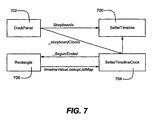
- FIG. 7 provides an example of the steps and data structure updates when a storyboard is set and processed on an element.
- FIG. 7 shows the objects and references for the following simple SetterTimeline example:
- one or more Timeline instances are added to the DockPanel's Storyboards property, e.g., by calling DockPanel.Storyboards.Add( new SetterTimeline((7) ).
- the storyboards (e.g., corresponding to the SetterTimeline 700 of the DockPanel 702 in FIG. 7) are processed such that each of the timelines in Storyboards is instantiated into a clock (e.g., labeled 704 in FIG. 7) via TimelineClock.CreateFromTimeline, and stored privately on the FrameworkElement, (e.g., the rectangle 706 in FIG. 7).
- the target of each setter is given a reference to the clock that is associated with the affected dependency property.
- the target also sets listeners on the clock boundary events such as (Begun and Ended). Any animations under the setter are added to the target's animation list (via FrameworkElement.GetAnimationClocks).
- storyboards which among other benefits eliminates the need for authors to manually synchronize on different timelines the various operations that happen during animation (e.g., start and stop times or responses to events). Further, the availability of storyboards through the styling system eliminates the need for timing information to have to be applied to each animation or media element individually.
Landscapes
- Engineering & Computer Science (AREA)
- Theoretical Computer Science (AREA)
- General Engineering & Computer Science (AREA)
- General Physics & Mathematics (AREA)
- Physics & Mathematics (AREA)
- Artificial Intelligence (AREA)
- Health & Medical Sciences (AREA)
- Multimedia (AREA)
- Audiology, Speech & Language Pathology (AREA)
- Computational Linguistics (AREA)
- General Health & Medical Sciences (AREA)
- Databases & Information Systems (AREA)
- Data Mining & Analysis (AREA)
- Processing Or Creating Images (AREA)
- User Interface Of Digital Computer (AREA)
Applications Claiming Priority (1)
| Application Number | Priority Date | Filing Date | Title |
|---|---|---|---|
| US10/992,462 US7336280B2 (en) | 2004-11-18 | 2004-11-18 | Coordinating animations and media in computer display output |
Publications (2)
| Publication Number | Publication Date |
|---|---|
| EP1659504A2 true EP1659504A2 (de) | 2006-05-24 |
| EP1659504A3 EP1659504A3 (de) | 2009-03-04 |
Family
ID=35976593
Family Applications (1)
| Application Number | Title | Priority Date | Filing Date |
|---|---|---|---|
| EP05021733A Withdrawn EP1659504A3 (de) | 2004-11-18 | 2005-10-05 | Koordinierung von Animationen und Medien für Bildschirmausgabe am Rechner |
Country Status (13)
| Country | Link |
|---|---|
| US (1) | US7336280B2 (de) |
| EP (1) | EP1659504A3 (de) |
| JP (1) | JP4694355B2 (de) |
| KR (1) | KR101143095B1 (de) |
| CN (1) | CN1776672B (de) |
| AU (1) | AU2005229639A1 (de) |
| BR (1) | BRPI0505092A (de) |
| CA (1) | CA2523730A1 (de) |
| MX (1) | MXPA05011864A (de) |
| MY (1) | MY147448A (de) |
| RU (1) | RU2391709C2 (de) |
| TW (1) | TW200627281A (de) |
| ZA (1) | ZA200508346B (de) |
Cited By (32)
| Publication number | Priority date | Publication date | Assignee | Title |
|---|---|---|---|---|
| CN100530088C (zh) * | 2007-06-26 | 2009-08-19 | 腾讯科技(深圳)有限公司 | 一种应用程序的触发方法及装置 |
| WO2013036251A1 (en) | 2011-09-10 | 2013-03-14 | Microsoft Corporation | Scenario based animation library |
| DK178589B1 (en) * | 2014-08-02 | 2016-08-01 | Apple Inc | Context-specific user interfaces |
| US9916075B2 (en) | 2015-06-05 | 2018-03-13 | Apple Inc. | Formatting content for a reduced-size user interface |
| US10055121B2 (en) | 2015-03-07 | 2018-08-21 | Apple Inc. | Activity based thresholds and feedbacks |
| US10254948B2 (en) | 2014-09-02 | 2019-04-09 | Apple Inc. | Reduced-size user interfaces for dynamically updated application overviews |
| US10272294B2 (en) | 2016-06-11 | 2019-04-30 | Apple Inc. | Activity and workout updates |
| US10304347B2 (en) | 2015-08-20 | 2019-05-28 | Apple Inc. | Exercised-based watch face and complications |
| US10452253B2 (en) | 2014-08-15 | 2019-10-22 | Apple Inc. | Weather user interface |
| US10613745B2 (en) | 2014-09-02 | 2020-04-07 | Apple Inc. | User interface for receiving user input |
| US10620590B1 (en) | 2019-05-06 | 2020-04-14 | Apple Inc. | Clock faces for an electronic device |
| US10771606B2 (en) | 2014-09-02 | 2020-09-08 | Apple Inc. | Phone user interface |
| US10802703B2 (en) | 2015-03-08 | 2020-10-13 | Apple Inc. | Sharing user-configurable graphical constructs |
| US10838586B2 (en) | 2017-05-12 | 2020-11-17 | Apple Inc. | Context-specific user interfaces |
| US10852905B1 (en) | 2019-09-09 | 2020-12-01 | Apple Inc. | Techniques for managing display usage |
| US10872318B2 (en) | 2014-06-27 | 2020-12-22 | Apple Inc. | Reduced size user interface |
| US11061372B1 (en) | 2020-05-11 | 2021-07-13 | Apple Inc. | User interfaces related to time |
| US11301130B2 (en) | 2019-05-06 | 2022-04-12 | Apple Inc. | Restricted operation of an electronic device |
| US11327650B2 (en) | 2018-05-07 | 2022-05-10 | Apple Inc. | User interfaces having a collection of complications |
| US11372659B2 (en) | 2020-05-11 | 2022-06-28 | Apple Inc. | User interfaces for managing user interface sharing |
| US11526256B2 (en) | 2020-05-11 | 2022-12-13 | Apple Inc. | User interfaces for managing user interface sharing |
| US11604571B2 (en) | 2014-07-21 | 2023-03-14 | Apple Inc. | Remote user interface |
| US11694590B2 (en) | 2020-12-21 | 2023-07-04 | Apple Inc. | Dynamic user interface with time indicator |
| US11720239B2 (en) | 2021-01-07 | 2023-08-08 | Apple Inc. | Techniques for user interfaces related to an event |
| US11921992B2 (en) | 2021-05-14 | 2024-03-05 | Apple Inc. | User interfaces related to time |
| US11960701B2 (en) | 2019-05-06 | 2024-04-16 | Apple Inc. | Using an illustration to show the passing of time |
| US12045014B2 (en) | 2022-01-24 | 2024-07-23 | Apple Inc. | User interfaces for indicating time |
| US12175065B2 (en) | 2016-06-10 | 2024-12-24 | Apple Inc. | Context-specific user interfaces for relocating one or more complications in a watch or clock interface |
| US12182373B2 (en) | 2021-04-27 | 2024-12-31 | Apple Inc. | Techniques for managing display usage |
| US12578975B2 (en) | 2022-09-15 | 2026-03-17 | Apple Inc. | User interfaces for indicating time |
| US12602154B2 (en) | 2024-01-18 | 2026-04-14 | Apple Inc. | User interfaces integrating hardware buttons |
| US12619345B2 (en) | 2024-09-23 | 2026-05-05 | Apple Inc. | User interfaces related to time |
Families Citing this family (40)
| Publication number | Priority date | Publication date | Assignee | Title |
|---|---|---|---|---|
| US7561159B2 (en) * | 2005-05-31 | 2009-07-14 | Magnifi Group Inc. | Control of animation timeline |
| US20070009088A1 (en) * | 2005-07-06 | 2007-01-11 | Edic Peter M | System and method for imaging using distributed X-ray sources |
| EP1902359A1 (de) * | 2005-07-08 | 2008-03-26 | Corizon Limited | Verfahren und vorrichtung zur benutzeroberflächen-modifikation |
| US8972423B2 (en) * | 2006-09-26 | 2015-03-03 | Siemens Product Lifecycle Management Software Inc. | Opaque mechanism for web service interoperability |
| US7782324B2 (en) | 2005-11-23 | 2010-08-24 | Dreamworks Animation Llc | Non-hierarchical unchained kinematic rigging technique and system for animation |
| US12373791B2 (en) * | 2005-12-22 | 2025-07-29 | Ncr Atleos Corporation | Self-service terminal |
| US20070200872A1 (en) * | 2006-02-21 | 2007-08-30 | Brauhaus Software | Generating an image sequence |
| US20080084416A1 (en) * | 2006-10-06 | 2008-04-10 | Microsoft Corporation | User-pluggable rendering engine |
| US8234392B2 (en) | 2006-11-17 | 2012-07-31 | Apple Inc. | Methods and apparatuses for providing a hardware accelerated web engine |
| US8813100B1 (en) | 2007-01-07 | 2014-08-19 | Apple Inc. | Memory management |
| US7903115B2 (en) * | 2007-01-07 | 2011-03-08 | Apple Inc. | Animations |
| US7872652B2 (en) | 2007-01-07 | 2011-01-18 | Apple Inc. | Application programming interfaces for synchronization |
| US8074227B2 (en) * | 2007-02-08 | 2011-12-06 | Microsoft Corporation | Utilizing a first managed process to host at least a second managed process |
| US20080250424A1 (en) * | 2007-04-04 | 2008-10-09 | Ms1 - Microsoft Corporation | Seamless Window Implementation for Windows Presentation Foundation based Applications |
| KR101445074B1 (ko) * | 2007-10-24 | 2014-09-29 | 삼성전자주식회사 | 미디어 플레이어에서 미디어 객체 처리 방법 및 그 장치 |
| TWI366143B (en) * | 2007-11-28 | 2012-06-11 | Inst Information Industry | System, method and recording medium for generating response motions of a virtual character dynamically in real time |
| US20090315897A1 (en) * | 2008-06-24 | 2009-12-24 | Microsoft Corporation | Animation platform |
| US20090315896A1 (en) * | 2008-06-24 | 2009-12-24 | Microsoft Corporation | Animation platform |
| US20090322760A1 (en) * | 2008-06-26 | 2009-12-31 | Microsoft Corporation | Dynamic animation scheduling |
| US8836706B2 (en) * | 2008-12-18 | 2014-09-16 | Microsoft Corporation | Triggering animation actions and media object actions |
| US20110090236A1 (en) * | 2009-10-15 | 2011-04-21 | Microsoft Corporation | Graphic Object Data Binding |
| US8866822B2 (en) * | 2010-09-07 | 2014-10-21 | Microsoft Corporation | Alternate source for controlling an animation |
| US8922564B2 (en) * | 2010-12-01 | 2014-12-30 | Microsoft Corporation | Controlling runtime execution from a host to conserve resources |
| US9152395B2 (en) | 2010-12-13 | 2015-10-06 | Microsoft Technology Licensing, Llc | Response to user input based on declarative mappings |
| US10169901B2 (en) | 2010-12-17 | 2019-01-01 | Microsoft Technology Licensing, Llc | Staggered animation scheduling |
| US8640047B2 (en) | 2011-06-01 | 2014-01-28 | Micorsoft Corporation | Asynchronous handling of a user interface manipulation |
| US8907957B2 (en) | 2011-08-30 | 2014-12-09 | Apple Inc. | Automatic animation generation |
| US8819567B2 (en) | 2011-09-13 | 2014-08-26 | Apple Inc. | Defining and editing user interface behaviors |
| US9164576B2 (en) | 2011-09-13 | 2015-10-20 | Apple Inc. | Conformance protocol for heterogeneous abstractions for defining user interface behaviors |
| US9223395B2 (en) * | 2011-09-14 | 2015-12-29 | Microsoft Technology Licensing, Llc | Viewing presentations in a condensed animation mode |
| US20140300611A1 (en) * | 2013-03-15 | 2014-10-09 | Trigger Happy, Ltd. | Web and native code environment modular player and modular rendering system |
| CN104090709B (zh) * | 2014-06-11 | 2017-11-21 | 小米科技有限责任公司 | 图片切换方法和装置 |
| US10146409B2 (en) | 2014-08-29 | 2018-12-04 | Microsoft Technology Licensing, Llc | Computerized dynamic splitting of interaction across multiple content |
| CN106887030B (zh) * | 2016-06-17 | 2020-03-06 | 阿里巴巴集团控股有限公司 | 一种动画生成方法和装置 |
| US10631047B1 (en) * | 2019-03-29 | 2020-04-21 | Pond5 Inc. | Online video editor |
| CN112328336B (zh) * | 2019-07-18 | 2025-06-20 | 阿里巴巴集团控股有限公司 | 控制方法、控制装置、计算设备和存储介质 |
| CN113870392B (zh) * | 2020-06-30 | 2025-06-20 | 微软技术许可有限责任公司 | 从静态信息图生成动画信息图 |
| CN113791821B (zh) * | 2021-09-18 | 2023-11-17 | 广州博冠信息科技有限公司 | 基于虚幻引擎的动画处理方法、装置、介质与电子设备 |
| CN114862996B (zh) * | 2022-03-31 | 2025-02-11 | 北京达佳互联信息技术有限公司 | 动画渲染方法、装置、电子设备及存储介质 |
| DE102023207603A1 (de) * | 2023-08-08 | 2025-02-13 | Volkswagen Aktiengesellschaft | Verfahren und Vorrichtung zur Steuerung eines Infotainmentsystems eines Fahrzeuges |
Family Cites Families (11)
| Publication number | Priority date | Publication date | Assignee | Title |
|---|---|---|---|---|
| US5104482A (en) * | 1989-02-21 | 1992-04-14 | Lam Research Corporation | Simultaneous glass deposition and viscoelastic flow process |
| US5659792A (en) * | 1993-01-15 | 1997-08-19 | Canon Information Systems Research Australia Pty Ltd. | Storyboard system for the simultaneous timing of multiple independent video animation clips |
| JPH07249683A (ja) * | 1993-10-12 | 1995-09-26 | Texas Instr Inc <Ti> | 低温リフロー用非均一複合ドープ膜およびその形成方法 |
| CN1248504C (zh) * | 1997-01-29 | 2006-03-29 | 数字广告及销售有限公司 | 通过通信网络传送媒体文件的方法 |
| JP2001022879A (ja) * | 1999-03-31 | 2001-01-26 | Canon Inc | 情報処理方法及び装置及びコンピュータ可読媒体 |
| US20040220926A1 (en) * | 2000-01-03 | 2004-11-04 | Interactual Technologies, Inc., A California Cpr[P | Personalization services for entities from multiple sources |
| US20020008704A1 (en) * | 2000-07-21 | 2002-01-24 | Sheasby Michael C. | Interactive behavioral authoring of deterministic animation |
| JP2002044594A (ja) * | 2000-07-21 | 2002-02-08 | Nippon Telegraph & Telephone West Corp | コンテンツ編集装置 |
| WO2003001413A1 (en) * | 2001-06-22 | 2003-01-03 | Nosa Omoigui | System and method for knowledge retrieval, management, delivery and presentation |
| US20040001106A1 (en) * | 2002-06-26 | 2004-01-01 | John Deutscher | System and process for creating an interactive presentation employing multi-media components |
| US20040205515A1 (en) * | 2003-04-10 | 2004-10-14 | Simple Twists, Ltd. | Multi-media story editing tool |
-
2004
- 2004-11-18 US US10/992,462 patent/US7336280B2/en not_active Expired - Fee Related
-
2005
- 2005-10-05 EP EP05021733A patent/EP1659504A3/de not_active Withdrawn
- 2005-10-13 TW TW094135740A patent/TW200627281A/zh unknown
- 2005-10-14 ZA ZA200508346A patent/ZA200508346B/xx unknown
- 2005-10-17 CA CA002523730A patent/CA2523730A1/en not_active Abandoned
- 2005-10-18 CN CN2005101161158A patent/CN1776672B/zh not_active Expired - Fee Related
- 2005-10-18 MY MYPI20054888A patent/MY147448A/en unknown
- 2005-10-25 KR KR1020050100758A patent/KR101143095B1/ko not_active Expired - Fee Related
- 2005-10-31 AU AU2005229639A patent/AU2005229639A1/en not_active Abandoned
- 2005-11-04 MX MXPA05011864A patent/MXPA05011864A/es active IP Right Grant
- 2005-11-09 BR BRPI0505092-8A patent/BRPI0505092A/pt not_active IP Right Cessation
- 2005-11-17 RU RU2005135845/09A patent/RU2391709C2/ru not_active IP Right Cessation
- 2005-11-18 JP JP2005334113A patent/JP4694355B2/ja not_active Expired - Fee Related
Cited By (90)
| Publication number | Priority date | Publication date | Assignee | Title |
|---|---|---|---|---|
| CN100530088C (zh) * | 2007-06-26 | 2009-08-19 | 腾讯科技(深圳)有限公司 | 一种应用程序的触发方法及装置 |
| WO2013036251A1 (en) | 2011-09-10 | 2013-03-14 | Microsoft Corporation | Scenario based animation library |
| EP2754036A4 (de) * | 2011-09-10 | 2015-05-06 | Microsoft Corp | Szenariobasierte animationsbibliothek |
| US11250385B2 (en) | 2014-06-27 | 2022-02-15 | Apple Inc. | Reduced size user interface |
| US11720861B2 (en) | 2014-06-27 | 2023-08-08 | Apple Inc. | Reduced size user interface |
| US12361388B2 (en) | 2014-06-27 | 2025-07-15 | Apple Inc. | Reduced size user interface |
| US10872318B2 (en) | 2014-06-27 | 2020-12-22 | Apple Inc. | Reduced size user interface |
| US12299642B2 (en) | 2014-06-27 | 2025-05-13 | Apple Inc. | Reduced size user interface |
| US12554382B2 (en) | 2014-07-21 | 2026-02-17 | Apple Inc. | Remote user interface |
| US12093515B2 (en) | 2014-07-21 | 2024-09-17 | Apple Inc. | Remote user interface |
| US11604571B2 (en) | 2014-07-21 | 2023-03-14 | Apple Inc. | Remote user interface |
| US9582165B2 (en) | 2014-08-02 | 2017-02-28 | Apple Inc. | Context-specific user interfaces |
| JP2017531225A (ja) * | 2014-08-02 | 2017-10-19 | アップル インコーポレイテッド | コンテキスト特化ユーザインターフェース |
| DK178589B1 (en) * | 2014-08-02 | 2016-08-01 | Apple Inc | Context-specific user interfaces |
| US11740776B2 (en) | 2014-08-02 | 2023-08-29 | Apple Inc. | Context-specific user interfaces |
| US12430013B2 (en) | 2014-08-02 | 2025-09-30 | Apple Inc. | Context-specific user interfaces |
| US10496259B2 (en) | 2014-08-02 | 2019-12-03 | Apple Inc. | Context-specific user interfaces |
| US9459781B2 (en) | 2014-08-02 | 2016-10-04 | Apple Inc. | Context-specific user interfaces for displaying animated sequences |
| US10606458B2 (en) | 2014-08-02 | 2020-03-31 | Apple Inc. | Clock face generation based on contact on an affordance in a clock face selection mode |
| US10990270B2 (en) | 2014-08-02 | 2021-04-27 | Apple Inc. | Context-specific user interfaces |
| US9804759B2 (en) | 2014-08-02 | 2017-10-31 | Apple Inc. | Context-specific user interfaces |
| US9547425B2 (en) | 2014-08-02 | 2017-01-17 | Apple Inc. | Context-specific user interfaces |
| US12229396B2 (en) | 2014-08-15 | 2025-02-18 | Apple Inc. | Weather user interface |
| US11042281B2 (en) | 2014-08-15 | 2021-06-22 | Apple Inc. | Weather user interface |
| US10452253B2 (en) | 2014-08-15 | 2019-10-22 | Apple Inc. | Weather user interface |
| US11550465B2 (en) | 2014-08-15 | 2023-01-10 | Apple Inc. | Weather user interface |
| US11922004B2 (en) | 2014-08-15 | 2024-03-05 | Apple Inc. | Weather user interface |
| US10613743B2 (en) | 2014-09-02 | 2020-04-07 | Apple Inc. | User interface for receiving user input |
| US10254948B2 (en) | 2014-09-02 | 2019-04-09 | Apple Inc. | Reduced-size user interfaces for dynamically updated application overviews |
| US10771606B2 (en) | 2014-09-02 | 2020-09-08 | Apple Inc. | Phone user interface |
| US11700326B2 (en) | 2014-09-02 | 2023-07-11 | Apple Inc. | Phone user interface |
| US10613745B2 (en) | 2014-09-02 | 2020-04-07 | Apple Inc. | User interface for receiving user input |
| US10409483B2 (en) | 2015-03-07 | 2019-09-10 | Apple Inc. | Activity based thresholds for providing haptic feedback |
| US10055121B2 (en) | 2015-03-07 | 2018-08-21 | Apple Inc. | Activity based thresholds and feedbacks |
| US10802703B2 (en) | 2015-03-08 | 2020-10-13 | Apple Inc. | Sharing user-configurable graphical constructs |
| US12019862B2 (en) | 2015-03-08 | 2024-06-25 | Apple Inc. | Sharing user-configurable graphical constructs |
| US10572132B2 (en) | 2015-06-05 | 2020-02-25 | Apple Inc. | Formatting content for a reduced-size user interface |
| US9916075B2 (en) | 2015-06-05 | 2018-03-13 | Apple Inc. | Formatting content for a reduced-size user interface |
| US11580867B2 (en) | 2015-08-20 | 2023-02-14 | Apple Inc. | Exercised-based watch face and complications |
| US12243444B2 (en) | 2015-08-20 | 2025-03-04 | Apple Inc. | Exercised-based watch face and complications |
| US10304347B2 (en) | 2015-08-20 | 2019-05-28 | Apple Inc. | Exercised-based watch face and complications |
| US11908343B2 (en) | 2015-08-20 | 2024-02-20 | Apple Inc. | Exercised-based watch face and complications |
| US12175065B2 (en) | 2016-06-10 | 2024-12-24 | Apple Inc. | Context-specific user interfaces for relocating one or more complications in a watch or clock interface |
| US10272294B2 (en) | 2016-06-11 | 2019-04-30 | Apple Inc. | Activity and workout updates |
| US11161010B2 (en) | 2016-06-11 | 2021-11-02 | Apple Inc. | Activity and workout updates |
| US11918857B2 (en) | 2016-06-11 | 2024-03-05 | Apple Inc. | Activity and workout updates |
| US11148007B2 (en) | 2016-06-11 | 2021-10-19 | Apple Inc. | Activity and workout updates |
| US12274918B2 (en) | 2016-06-11 | 2025-04-15 | Apple Inc. | Activity and workout updates |
| US11660503B2 (en) | 2016-06-11 | 2023-05-30 | Apple Inc. | Activity and workout updates |
| US10838586B2 (en) | 2017-05-12 | 2020-11-17 | Apple Inc. | Context-specific user interfaces |
| US11327634B2 (en) | 2017-05-12 | 2022-05-10 | Apple Inc. | Context-specific user interfaces |
| US12468434B2 (en) | 2017-05-12 | 2025-11-11 | Apple Inc. | Methods and user interfaces for editing a clock face |
| US11775141B2 (en) | 2017-05-12 | 2023-10-03 | Apple Inc. | Context-specific user interfaces |
| US11977411B2 (en) | 2018-05-07 | 2024-05-07 | Apple Inc. | Methods and systems for adding respective complications on a user interface |
| US11327650B2 (en) | 2018-05-07 | 2022-05-10 | Apple Inc. | User interfaces having a collection of complications |
| US10620590B1 (en) | 2019-05-06 | 2020-04-14 | Apple Inc. | Clock faces for an electronic device |
| US11340778B2 (en) | 2019-05-06 | 2022-05-24 | Apple Inc. | Restricted operation of an electronic device |
| US12572254B2 (en) | 2019-05-06 | 2026-03-10 | Apple Inc. | Clock faces for an electronic device |
| US10788797B1 (en) | 2019-05-06 | 2020-09-29 | Apple Inc. | Clock faces for an electronic device |
| US12265703B2 (en) | 2019-05-06 | 2025-04-01 | Apple Inc. | Restricted operation of an electronic device |
| US11131967B2 (en) | 2019-05-06 | 2021-09-28 | Apple Inc. | Clock faces for an electronic device |
| US11301130B2 (en) | 2019-05-06 | 2022-04-12 | Apple Inc. | Restricted operation of an electronic device |
| US11960701B2 (en) | 2019-05-06 | 2024-04-16 | Apple Inc. | Using an illustration to show the passing of time |
| US11340757B2 (en) | 2019-05-06 | 2022-05-24 | Apple Inc. | Clock faces for an electronic device |
| US10878782B1 (en) | 2019-09-09 | 2020-12-29 | Apple Inc. | Techniques for managing display usage |
| US10936345B1 (en) | 2019-09-09 | 2021-03-02 | Apple Inc. | Techniques for managing display usage |
| US10852905B1 (en) | 2019-09-09 | 2020-12-01 | Apple Inc. | Techniques for managing display usage |
| US12373079B2 (en) | 2019-09-09 | 2025-07-29 | Apple Inc. | Techniques for managing display usage |
| US10908559B1 (en) | 2019-09-09 | 2021-02-02 | Apple Inc. | Techniques for managing display usage |
| US11526256B2 (en) | 2020-05-11 | 2022-12-13 | Apple Inc. | User interfaces for managing user interface sharing |
| US11822778B2 (en) | 2020-05-11 | 2023-11-21 | Apple Inc. | User interfaces related to time |
| US11372659B2 (en) | 2020-05-11 | 2022-06-28 | Apple Inc. | User interfaces for managing user interface sharing |
| US11842032B2 (en) | 2020-05-11 | 2023-12-12 | Apple Inc. | User interfaces for managing user interface sharing |
| US12422977B2 (en) | 2020-05-11 | 2025-09-23 | Apple Inc. | User interfaces with a character having a visual state based on device activity state and an indication of time |
| US11061372B1 (en) | 2020-05-11 | 2021-07-13 | Apple Inc. | User interfaces related to time |
| US11442414B2 (en) | 2020-05-11 | 2022-09-13 | Apple Inc. | User interfaces related to time |
| US12333123B2 (en) | 2020-05-11 | 2025-06-17 | Apple Inc. | User interfaces for managing user interface sharing |
| US12099713B2 (en) | 2020-05-11 | 2024-09-24 | Apple Inc. | User interfaces related to time |
| US12008230B2 (en) | 2020-05-11 | 2024-06-11 | Apple Inc. | User interfaces related to time with an editable background |
| US12456406B2 (en) | 2020-12-21 | 2025-10-28 | Apple Inc. | Dynamic user interface with time indicator |
| US11694590B2 (en) | 2020-12-21 | 2023-07-04 | Apple Inc. | Dynamic user interface with time indicator |
| US11720239B2 (en) | 2021-01-07 | 2023-08-08 | Apple Inc. | Techniques for user interfaces related to an event |
| US12182373B2 (en) | 2021-04-27 | 2024-12-31 | Apple Inc. | Techniques for managing display usage |
| US11921992B2 (en) | 2021-05-14 | 2024-03-05 | Apple Inc. | User interfaces related to time |
| US12547300B2 (en) | 2021-05-14 | 2026-02-10 | Apple Inc. | User interfaces related to time |
| US12045014B2 (en) | 2022-01-24 | 2024-07-23 | Apple Inc. | User interfaces for indicating time |
| US12493267B2 (en) | 2022-01-24 | 2025-12-09 | Apple Inc. | User interfaces for indicating time |
| US12578975B2 (en) | 2022-09-15 | 2026-03-17 | Apple Inc. | User interfaces for indicating time |
| US12602154B2 (en) | 2024-01-18 | 2026-04-14 | Apple Inc. | User interfaces integrating hardware buttons |
| US12619345B2 (en) | 2024-09-23 | 2026-05-05 | Apple Inc. | User interfaces related to time |
Also Published As
| Publication number | Publication date |
|---|---|
| RU2391709C2 (ru) | 2010-06-10 |
| US7336280B2 (en) | 2008-02-26 |
| CN1776672A (zh) | 2006-05-24 |
| MY147448A (en) | 2012-12-14 |
| CN1776672B (zh) | 2010-06-09 |
| KR20060055321A (ko) | 2006-05-23 |
| CA2523730A1 (en) | 2006-05-18 |
| JP4694355B2 (ja) | 2011-06-08 |
| AU2005229639A1 (en) | 2006-06-01 |
| JP2006146924A (ja) | 2006-06-08 |
| ZA200508346B (en) | 2007-06-27 |
| TW200627281A (en) | 2006-08-01 |
| MXPA05011864A (es) | 2006-05-25 |
| RU2005135845A (ru) | 2007-05-27 |
| KR101143095B1 (ko) | 2012-05-08 |
| BRPI0505092A (pt) | 2006-07-04 |
| EP1659504A3 (de) | 2009-03-04 |
| US20060103655A1 (en) | 2006-05-18 |
Similar Documents
| Publication | Publication Date | Title |
|---|---|---|
| US7336280B2 (en) | Coordinating animations and media in computer display output | |
| US7477254B2 (en) | Smooth transitions between animations | |
| US7262775B2 (en) | System supporting animation of graphical display elements through animation object instances | |
| CN110235181B (zh) | 用于生成跨浏览器兼容动画的系统和方法 | |
| US8446415B2 (en) | Framework for graphics animation and compositing operations | |
| EP0826173B1 (de) | Hierarchische verkapselung instantierter objekten | |
| US20060181535A1 (en) | Apparatus for controlling a virtual environment | |
| US8674998B1 (en) | Snapshot keyframing | |
| JPH08510344A (ja) | マルチメディア同期システム | |
| WO2022183519A1 (zh) | 一种可实时交互的三维图形图像播放器 | |
| JPH08509825A (ja) | 並行フレームワーク・システム | |
| JPH08509824A (ja) | 共同作業システム | |
| WO1994027233A1 (en) | Audio synchronization system | |
| US7743387B2 (en) | Inheritance context for graphics primitives | |
| HK1084755A (en) | Coordinating animations and media in computer display output | |
| US12248652B1 (en) | Systems and methods for constructing audio/video content | |
| CN115205430A (zh) | 针对3d文件的导入导出方法及装置 | |
| HK1130928B (en) | Framework for graphics animation and compositing operations | |
| HK1130928A (en) | Framework for graphics animation and compositing operations |
Legal Events
| Date | Code | Title | Description |
|---|---|---|---|
| PUAI | Public reference made under article 153(3) epc to a published international application that has entered the european phase |
Free format text: ORIGINAL CODE: 0009012 |
|
| AK | Designated contracting states |
Kind code of ref document: A2 Designated state(s): AT BE BG CH CY CZ DE DK EE ES FI FR GB GR HU IE IS IT LI LT LU LV MC NL PL PT RO SE SI SK TR |
|
| AX | Request for extension of the european patent |
Extension state: AL BA HR MK YU |
|
| REG | Reference to a national code |
Ref country code: HK Ref legal event code: DE Ref document number: 1084755 Country of ref document: HK |
|
| PUAL | Search report despatched |
Free format text: ORIGINAL CODE: 0009013 |
|
| AK | Designated contracting states |
Kind code of ref document: A3 Designated state(s): AT BE BG CH CY CZ DE DK EE ES FI FR GB GR HU IE IS IT LI LT LU LV MC NL PL PT RO SE SI SK TR |
|
| AX | Request for extension of the european patent |
Extension state: AL BA HR MK YU |
|
| 17P | Request for examination filed |
Effective date: 20090807 |
|
| 17Q | First examination report despatched |
Effective date: 20090907 |
|
| AKX | Designation fees paid |
Designated state(s): AT BE BG CH CY CZ DE DK EE ES FI FR GB GR HU IE IS IT LI LT LU LV MC NL PL PT RO SE SI SK TR |
|
| STAA | Information on the status of an ep patent application or granted ep patent |
Free format text: STATUS: THE APPLICATION HAS BEEN WITHDRAWN |
|
| 18W | Application withdrawn |
Effective date: 20120925 |
|
| REG | Reference to a national code |
Ref country code: HK Ref legal event code: WD Ref document number: 1084755 Country of ref document: HK |