EP1741476A1 - Aufzeichnungsmedium für Anpassungsprogramm für Anzeigevorrichtungseingabe, Eingabeanpassungsvorrichtung und Eingabeanpassungsverfahren - Google Patents
Aufzeichnungsmedium für Anpassungsprogramm für Anzeigevorrichtungseingabe, Eingabeanpassungsvorrichtung und Eingabeanpassungsverfahren Download PDFInfo
- Publication number
- EP1741476A1 EP1741476A1 EP06113172A EP06113172A EP1741476A1 EP 1741476 A1 EP1741476 A1 EP 1741476A1 EP 06113172 A EP06113172 A EP 06113172A EP 06113172 A EP06113172 A EP 06113172A EP 1741476 A1 EP1741476 A1 EP 1741476A1
- Authority
- EP
- European Patent Office
- Prior art keywords
- range
- touch
- operating surface
- area
- correction value
- Prior art date
- Legal status (The legal status is an assumption and is not a legal conclusion. Google has not performed a legal analysis and makes no representation as to the accuracy of the status listed.)
- Granted
Links
Images





Classifications
-
- G—PHYSICS
- G06—COMPUTING OR CALCULATING; COUNTING
- G06F—ELECTRIC DIGITAL DATA PROCESSING
- G06F3/00—Input arrangements for transferring data to be processed into a form capable of being handled by the computer; Output arrangements for transferring data from processing unit to output unit, e.g. interface arrangements
- G06F3/01—Input arrangements or combined input and output arrangements for interaction between user and computer
- G06F3/03—Arrangements for converting the position or the displacement of a member into a coded form
- G06F3/033—Pointing devices displaced or positioned by the user, e.g. mice, trackballs, pens or joysticks; Accessories therefor
- G06F3/0354—Pointing devices displaced or positioned by the user, e.g. mice, trackballs, pens or joysticks; Accessories therefor with detection of two-dimensional [2D] relative movements between the device, or an operating part thereof, and a plane or surface, e.g. 2D mice, trackballs, pens or pucks
- G06F3/03547—Touch pads, in which fingers can move on a surface
-
- A—HUMAN NECESSITIES
- A63—SPORTS; GAMES; AMUSEMENTS
- A63F—CARD, BOARD, OR ROULETTE GAMES; INDOOR GAMES USING SMALL MOVING PLAYING BODIES; VIDEO GAMES; GAMES NOT OTHERWISE PROVIDED FOR
- A63F13/00—Video games, i.e. games using an electronically generated display having two or more dimensions
- A63F13/20—Input arrangements for video game devices
- A63F13/21—Input arrangements for video game devices characterised by their sensors, purposes or types
- A63F13/214—Input arrangements for video game devices characterised by their sensors, purposes or types for locating contacts on a surface, e.g. floor mats or touch pads
-
- A—HUMAN NECESSITIES
- A63—SPORTS; GAMES; AMUSEMENTS
- A63F—CARD, BOARD, OR ROULETTE GAMES; INDOOR GAMES USING SMALL MOVING PLAYING BODIES; VIDEO GAMES; GAMES NOT OTHERWISE PROVIDED FOR
- A63F13/00—Video games, i.e. games using an electronically generated display having two or more dimensions
- A63F13/40—Processing input control signals of video game devices, e.g. signals generated by the player or derived from the environment
- A63F13/42—Processing input control signals of video game devices, e.g. signals generated by the player or derived from the environment by mapping the input signals into game commands, e.g. mapping the displacement of a stylus on a touch screen to the steering angle of a virtual vehicle
- A63F13/422—Processing input control signals of video game devices, e.g. signals generated by the player or derived from the environment by mapping the input signals into game commands, e.g. mapping the displacement of a stylus on a touch screen to the steering angle of a virtual vehicle automatically for the purpose of assisting the player, e.g. automatic braking in a driving game
-
- G—PHYSICS
- G06—COMPUTING OR CALCULATING; COUNTING
- G06F—ELECTRIC DIGITAL DATA PROCESSING
- G06F3/00—Input arrangements for transferring data to be processed into a form capable of being handled by the computer; Output arrangements for transferring data from processing unit to output unit, e.g. interface arrangements
- G06F3/01—Input arrangements or combined input and output arrangements for interaction between user and computer
- G06F3/03—Arrangements for converting the position or the displacement of a member into a coded form
- G06F3/041—Digitisers, e.g. for touch screens or touch pads, characterised by the transducing means
- G06F3/0416—Control or interface arrangements specially adapted for digitisers
- G06F3/0418—Control or interface arrangements specially adapted for digitisers for error correction or compensation, e.g. based on parallax, calibration or alignment
- G06F3/04186—Touch location disambiguation
-
- G—PHYSICS
- G06—COMPUTING OR CALCULATING; COUNTING
- G06F—ELECTRIC DIGITAL DATA PROCESSING
- G06F3/00—Input arrangements for transferring data to be processed into a form capable of being handled by the computer; Output arrangements for transferring data from processing unit to output unit, e.g. interface arrangements
- G06F3/01—Input arrangements or combined input and output arrangements for interaction between user and computer
- G06F3/048—Interaction techniques based on graphical user interfaces [GUI]
- G06F3/0487—Interaction techniques based on graphical user interfaces [GUI] using specific features provided by the input device, e.g. functions controlled by the rotation of a mouse with dual sensing arrangements, or of the nature of the input device, e.g. tap gestures based on pressure sensed by a digitiser
- G06F3/0489—Interaction techniques based on graphical user interfaces [GUI] using specific features provided by the input device, e.g. functions controlled by the rotation of a mouse with dual sensing arrangements, or of the nature of the input device, e.g. tap gestures based on pressure sensed by a digitiser using dedicated keyboard keys or combinations thereof
-
- A—HUMAN NECESSITIES
- A63—SPORTS; GAMES; AMUSEMENTS
- A63F—CARD, BOARD, OR ROULETTE GAMES; INDOOR GAMES USING SMALL MOVING PLAYING BODIES; VIDEO GAMES; GAMES NOT OTHERWISE PROVIDED FOR
- A63F13/00—Video games, i.e. games using an electronically generated display having two or more dimensions
- A63F13/25—Output arrangements for video game devices
- A63F13/26—Output arrangements for video game devices having at least one additional display device, e.g. on the game controller or outside a game booth
-
- A—HUMAN NECESSITIES
- A63—SPORTS; GAMES; AMUSEMENTS
- A63F—CARD, BOARD, OR ROULETTE GAMES; INDOOR GAMES USING SMALL MOVING PLAYING BODIES; VIDEO GAMES; GAMES NOT OTHERWISE PROVIDED FOR
- A63F13/00—Video games, i.e. games using an electronically generated display having two or more dimensions
- A63F13/40—Processing input control signals of video game devices, e.g. signals generated by the player or derived from the environment
- A63F13/42—Processing input control signals of video game devices, e.g. signals generated by the player or derived from the environment by mapping the input signals into game commands, e.g. mapping the displacement of a stylus on a touch screen to the steering angle of a virtual vehicle
- A63F13/426—Processing input control signals of video game devices, e.g. signals generated by the player or derived from the environment by mapping the input signals into game commands, e.g. mapping the displacement of a stylus on a touch screen to the steering angle of a virtual vehicle involving on-screen location information, e.g. screen coordinates of an area at which the player is aiming with a light gun
-
- A—HUMAN NECESSITIES
- A63—SPORTS; GAMES; AMUSEMENTS
- A63F—CARD, BOARD, OR ROULETTE GAMES; INDOOR GAMES USING SMALL MOVING PLAYING BODIES; VIDEO GAMES; GAMES NOT OTHERWISE PROVIDED FOR
- A63F2300/00—Features of games using an electronically generated display having two or more dimensions, e.g. on a television screen, showing representations related to the game
- A63F2300/10—Features of games using an electronically generated display having two or more dimensions, e.g. on a television screen, showing representations related to the game characterized by input arrangements for converting player-generated signals into game device control signals
- A63F2300/1068—Features of games using an electronically generated display having two or more dimensions, e.g. on a television screen, showing representations related to the game characterized by input arrangements for converting player-generated signals into game device control signals being specially adapted to detect the point of contact of the player on a surface, e.g. floor mat, touch pad
-
- A—HUMAN NECESSITIES
- A63—SPORTS; GAMES; AMUSEMENTS
- A63F—CARD, BOARD, OR ROULETTE GAMES; INDOOR GAMES USING SMALL MOVING PLAYING BODIES; VIDEO GAMES; GAMES NOT OTHERWISE PROVIDED FOR
- A63F2300/00—Features of games using an electronically generated display having two or more dimensions, e.g. on a television screen, showing representations related to the game
- A63F2300/30—Features of games using an electronically generated display having two or more dimensions, e.g. on a television screen, showing representations related to the game characterized by output arrangements for receiving control signals generated by the game device
- A63F2300/301—Features of games using an electronically generated display having two or more dimensions, e.g. on a television screen, showing representations related to the game characterized by output arrangements for receiving control signals generated by the game device using an additional display connected to the game console, e.g. on the controller
Definitions
- the present invention relates to a storage medium storing pointing device input adjustment program, an input adjustment apparatus and an input adjustment method. More specifically, the present invention relates to a storage medium storing pointing device input adjustment program, an input adjustment apparatus and an input adjustment method, which adjust an input signal from a pointing device such as a touch pad.
- Japanese Patent Laying-open No. 6-161646 [G06F 3/03, G06F 3/033] laid-open on June 10,1994.
- the touch panel when the user touches the operating surface of the touch panel with his/her finger, the touch panel outputs a signal of coordinates of a touch position. Also, when the user moves the finger over the touch panel without lifting it off the operating surface, the amount of movement of the coordinate signal output from the touch panel is calculated. This allows the movement of the cursor to be controlled.
- WO1/027868 Another example of related art is disclosed in the brochure of WO1/027868 internationally publicized on April 19, 2001.
- a capacitance-type transparent touch pad is provided on the display of an LCD or CRT screen in such a manner as to perform an operation while watching the display.
- the capacitance-type touch pad (touch panel) or the like outputs a coordinate signal corresponding to the touch position and a value corresponding to the touch area (e.g. capacitance value).
- the size of a portion in which the finger touches the operating surface may vary according to a difference in finger thickness or a difference in the finger's touching force (pressure) or the like, which would cause an absolute or relative difference in a range covered by the coordinates of the touch position.
- the X touch coordinate moves from a position shown by P3 to a position shown by P4.
- the length of dragging is indicated by a distance L2.
- a frame is provided on an outer periphery of the touch pad, and the user stops dragging near the outer circumference of the operating surface because the movement of the finger is restricted by the frame or he/she feels the frame by the fmger.
- a distance capable of being dragged varies depending on fmger thickness, etc. (L1 > L2). This is because there is a difference in size of a portion touched by the finger on the operating surface between the user with thin fingers and the user with thick fmgers, as shown in Figure 11 (A) as a cross-sectional view of Figure 10 (A) taken at a line XIA-XIA and Figure 11 (B) as a cross-sectional view of Figure 10 (B) taken at a line XIB-XIB.
- the size of the touch area may vary depending on not only finger thickness (size) but also an operating manner (pressure, etc.).
- the size of the touched portion may be different among individual users (relative difference) and also may be different in the one and same user (absolute difference).
- Figure 11 (A) and Figure 11 (B) provide the size of the touched portion shown by the horizontal length of the touched portion as seen from the side (along the horizontal direction) for the sake of simplicity.
- a storage medium storing an input adjustment program for a pointing device stores an input adjustment program for a flat-type pointing device that has an operating surface and inputs touch coordinates on the operating surface and a value according to a touch area at a moment when a touch operation is performed.
- This input adjustment program allows a computer to execute a correction value calculation step, a first range calculation step, a scale factor calculation step, and a distance correction step.
- a correction value is calculated according to a radius of the perfect circle where the touch area is assumed to be the perfect circle area.
- a first range capable of being covered by the touch coordinates at a time of an actual operation is calculated using the correction value calculated in the correction value calculation step.
- a scale factor for conforming the first range calculated in the first range calculation step to a second range of the whole operating surface is calculated.
- the distance correction step a distance from a reference point to current touch coordinates is corrected by the scale factor calculated in the scale factor calculation step.
- the input adjustment program for a flat-type pointing device is executed by the computer (12).
- the flat-type pointing device (14) has an operating surface and, when the user touches the operating surface, inputs touch coordinates of a touch position and a value according to a touch area of a touched portion on the operating surface. That is, the device (14) provides them to the computer (12).
- the value according to the touch area means a numerical value that increases or decreases with an increase or decrease in the touch area.
- the value indicates an electrostatic capacity increasing or decreasing according to the touch are.
- the input adjustment program allows the computer (12) to execute a correction value calculation step (S7), a first range calculation step (S23), a scale factor calculation step (S25), and a distance correction step (S27).
- a correction value is calculated according to the radius of the perfect circle where the touch area is assumed to be the area of the perfect circle.
- the correction value according to the radius means a numerical value varying with length of radius of the circle, and equates to a value of radius of the circle or a value of square root of area of the circle, for example.
- the first range calculation step (S23) the first range except a portion that cannot be operated by the user's finger is calculated using the correction value calculated in the correction value calculation step.
- the scale factor calculation step (S25) a scale factor for conforming the first range calculated in the first range calculation step (S23) to the second range of the whole operating surface is calculated.
- the distance correction step (S27) the distance from the reference point to the current touch coordinates (movement amount) is corrected by the scale factor calculated in the scale factor calculation step (S25).
- the distance from the reference point to the current touch coordinates is corrected by the scale factor for the actual operable range to the whole operating range of the touch pad, which makes it possible to perform stable input operations regardless of user's individuality and touching manner.
- the reference point indicates touch coordinates at a moment when the operating surface is touched
- the computer is further allowed to execute a reference point correction step of correcting at least one of a deviation in a horizontal direction and a deviation in a vertical direction of the reference point from a central point of the operating surface. More specifically, the reference point indicates the touch coordinates at a moment when the user touches the operating surface.
- the reference point correction step S 11, S 13, S 15, S 17, S 19 and S21
- at least one of a deviation in the horizontal direction (X axis direction) and a deviation in the vertical direction (Y axis direction) of the reference point from the central point (original point) of the operating surface is corrected. This makes it possible to accommodate the deviation of the reference point and realize stable input operations.
- Another storage medium storing an input adjustment program for a pointing device stores an input adjustment program for a flat-type pointing device that has an operating surface and inputs touch coordinates and a value according to a touch area at a moment when the operating surface is touched.
- This input adjustment program allows a computer to execute a correction value calculation step, a first range calculation step, a scale factor calculation step, and a coordinate correction step.
- a correction value is calculated according to a radius of the perfect circle using the value according to the touch area.
- the first range calculation step a first range in which the whole operating surface is reduced toward the center by a distance according to the correction value calculated in the correction value calculation step is calculated.
- the scale factor calculation step an enlargement ratio for conforming the first range calculated in the first range calculation step to the whole operating surface is calculated.
- the coordinate correction step by enlarging and correcting the touch coordinates in the first range at the enlargement ratio calculated in the scale factor calculation step, the touch coordinates in the first range is converted into touch coordinates in the whole operating surface.
- the input adjustment program for a flat-type pointing device is executed by the computer (12).
- the flat-type pointing device (14) has an operating surface and, when the user touches the operating surface, provides the computer (12) with touch coordinates of a touch position and a value according to a touch area of a touched portion on the operating surface.
- the input adjustment program allows the computer (12) to execute a correction value calculation step (S7), a first range calculation step (S23), a scale factor calculation step (S25), and a coordinate correction step (S28).
- a correction value is calculated according to the radius of the perfect circle using the value according to the touch area input from the flat-type pointing device (14).
- the first range calculation step (S23) the first range in which the whole operating surface is reduced toward the center by a distance according to the correction value calculated in the correction value calculation step (S7) is calculated.
- the scale factor calculation step (S25) a scale factor for conforming the first range calculated in the first range calculation step (S23) to the second range as the whole operating surface is calculated.
- the coordinate correction step (S28) the touch coordinates in the first range is converted into touch coordinates in the second range (the whole operating surface) at the scale factor calculated in the scale factor calculation step (S25).
- the current touch coordinates are corrected by a scale factor for conforming the actual operable range to the whole operating range of the touch pad, it is possible to perform stable input operations regardless of user's individuality and touching manner.
- An input adjustment apparatus is an input adjustment apparatus for a flat-type pointing device that has an operating surface and inputs touch coordinates and a value according to a touch area at a moment when the operating surface is touched.
- This input adjustment apparatus comprises a correction value calculation means, a first range calculation means, a scale factor calculation means, and a distance correction means.
- the correction value calculation means calculates a correction value according to a radius of the perfect circle where the touch area is assumed to be the perfect circle area.
- the first range calculation means calculates a first range capable of being covered by the touch coordinates at a time of an actual operation using the correction value calculated by the correction value calculation means.
- the scale factor calculation means calculates a scale factor for conforming the first range calculated by the first range calculation means to a second range of the whole operating surface.
- the distance correction means corrects a distance from a reference point to current touch coordinates by the scale factor calculated by the scale factor calculation means.
- this invention also allows stable input operations regardless of user's individuality and touch manner.
- Another input adjustment apparatus is an input adjustment apparatus for a flat-type pointing device that has an operating surface and inputs touch coordinates and a value according to a touch area at a moment when the operating surface is touched.
- This input adjustment apparatus comprises a correction value calculation means, a first range calculation means, a scale factor calculation means, and a coordinate calculation means.
- the correction value calculation means calculates a correction value according to a radius of the perfect circle using the value according to the touch area.
- the first range calculation means calculates a first range in which the whole operating surface is reduced toward the center by a distance according to the correction value calculated by the correction value calculation means.
- the scale factor calculation means calculates an enlargement ratio for conforming the first range calculated by the first range calculation means to a second range as the whole operating surface.
- the coordinate correction means by enlarging and correcting the touch coordinates in the first range at the enlargement ratio calculated by the scale factor calculation means, converts the touch coordinates in the first range into touch coordinates in the second range.
- this invention also allows stable input operations regardless of user's individuality and touching manner.
- An input adjustment method is an input adjustment method for a flat-type pointing device that has an operating surface and inputs touch coordinates and a value according to a touch area at a moment when the operating surface is touched, including the following steps of: (a) on an assumption that the value according to the touch area input from the flat-type pointing device indicates an area of a perfect circle, calculating a correction value according to a radius of the perfect circle at a moment when the touch area is assumed to be the perfect circle area; (b) calculating a first range capable of being covered by the touch coordinates using the correction value calculated in the step (a); (c) calculating a scale factor for conforming the first range calculated in the step (b) to a second range as the whole operating surface; and (d) correcting a distance from a reference point to current touch coordinates by the scale factor calculated in the step (c).
- this invention also allows stable input operations.
- Another input adjustment method is an input adjustment method for a flat-type pointing device that has an operating surface and inputs touch coordinates and a value according to a touch area at a moment when the operating surface is touched, including following steps of: (a) on an assumption that a touch area input from the flat-type pointing device indicates an area of a perfect circle, calculating a correction value according to a radius of the perfect circle using the value according to the touch area; (b) calculating a first range in which the whole operating surface is reduced toward the center by a distance according to the correction value calculated in the step (a); (c) calculating an enlargement ratio for conforming the first range calculated in the step (b) to a second range as the whole operating surface; and (d) by enlarging and correcting the touch coordinates in the first range at the enlargement ratio calculated in the step (c), converting the touch coordinates in the first range into touch coordinates in the second range.
- this invention also allows stable input operations.
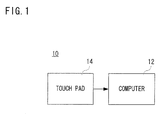
- an input device 10 of one embodiment of the present invention includes a computer 12.
- the computer 12 is connected with a touch pad 14.
- the computer 12 is typically a microcomputer and stores an input adjustment program for the touch pad 14 in a memory such as a ROM and serves as an input adjustment apparatus.
- the computer 12 is connected with an electronic device not illustrated. Applicable to the electronic device are personal computers, workstations, PDAs, game machines, and game machine controllers etc., for example. Alternatively, at least one of the computer 12 and the touch pad 14 may be included in the electronic device.
- the touch pad (or touch panel) 14 when a user touches the pad surface as an operating surface with a fmger, provides the computer 12 with touch coordinates corresponding to a position at a moment when the fmger touches the pad surface and a value according to a touch area. Included as an example of touch coordinates is data on coordinates (coordinate data) at a barycenter of a portion in which the fmger touches on the operating surface (touched position), for instance. Also, one example of the value according to the touch area is electrostatic capacity according to the area of the touched portion. These values are computed and output by an ASIC of the touch pad 14, etc.
- the touch pad 14 for example, a touch pad made by Synaptics (http://www.synaptics.com/technology/cps.cfm) may be utilized.
- the above mentioned barycentric coordinate data and electrostatic capacity are mere examples. It is acceptable that the touch coordinates are coordinates defined by a touch position and that the value according to the touch area (the area of the touched portion) is a value that increases or decreases with an increase or decrease of the area of the touched portion. Therefore, the electrostatic touch pad can be replaced by any kind of touch pad (touch panel) including an optical type.
- the computer 12 inputs input data in which the coordinate data and the electrostatic capacity provided from the touch pad 14 has been subjected to arithmetic operations (including adjustments), into the electronic device. Besides, the computer 12 may input the coordinate data and the electrostatic capacity directly into the electronic device. For example, a personal computer as the electronic device moves an arbitrary image such as a cursor (mouse pointer) and icon over the screen and scrolls through the screen, according to the input data. Moreover, a game machine as the electronic device controls the movement of a player character and the speed of the movement, according to the input data.
- a personal computer as the electronic device moves an arbitrary image such as a cursor (mouse pointer) and icon over the screen and scrolls through the screen, according to the input data.
- a game machine as the electronic device controls the movement of a player character and the speed of the movement, according to the input data.
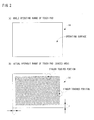
- the whole surface of the touch pad 14 constitutes the operating surface (the whole operating range).
- the surface of the touch pad 14 cannot be actually used up to an end (edge) as the operating range because the barycentric coordinate data of the portion touched with a finger is to be output. If a frame is provided around (on an outer periphery of) the touch pad 14, the user stops dragging near the outer periphery of the operating surface because the frame restricts the movement of the finger or he/she feels the frame by the fmger.
- a range capable of being dragging from side to side and up and down is reduced by a length corresponding to a certain distance from the barycenter (center) of a portion touched with a finger (here, assuming that the touched portion has the form of a perfect circle, the length indicates a correction value r' according to a radius r of the perfect circle).
- the touched portion may vary in size relatively or absolutely depending on a user's individuality and touching manners, which would cause variations in actual operable range.
- the actual operable range is corrected so as to conform to the whole operating range based on the size of the finger's touched portion.
- the computer 12 stores touch coordinates at a moment when the user touches the touch pad 14 as a reference point, i.e., a reference position. After that, upon an input of touch coordinates by a dragging operation, the computer 12 determines a difference of the current touch coordinates from the reference position and inputs the amounts of movement of an X element and Y element into the electronic device (not shown).
- the reference position is fixed in this embodiment for the sake of simplicity, and alternatively, it may come closer to the center of the touch pad over time.
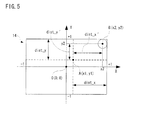
- the reference position may not match the center of the whole operating range of the touch pad 14, and thus a range (maximum value) in the horizontal direction (X axis direction) and a maximum value in the vertical direction (Y axis direction) which can be covered by the current touch coordinates are determined on the basis of a relationship between the touch coordinates and the reference position.
- the maximum value in the X axis direction is expressed by a variable dist_x
- the maximum value in the Y axis direction is expressed by a variable dist_y. Both the variable dist_x and the variable dist_y must have absolute values.
- the touch pad 14 is divided into a first quadrant, a second quadrant, a third quadrant, and a fourth quadrant, taking its center as an origin point.
- the variables dist_x and dist_y are thus defined as appropriate in accordance with their relationships with the reference position.
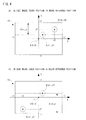
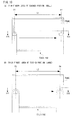
- circles of dotted lines show fmger touch shapes (touched portions) on the touch coordinates at a time of touch
- circles of solid lines indicate finger touch shapes (touched portions) at current touch positions.
- the maximum values in the X axis direction and the Y axis direction are determined in accordance with the relative positional relationship between the reference position A and the current touch position B. Besides, as shown in Figure 2 (B), no operation can be virtually performed in an outer region of surface of the touch pad 14. Therefore, a length corresponding to this region is excluded (subtracted) from both the maximum value in the X axis direction and the maximum value in the Y axis direction.
- the correction value r' according to the radius r of the perfect circle is determined according to equation 5, and then the actual maximum values (dist_x' and dist_y') in which this correction value r' is subtracted from the both maximum values in the X and Y directions as shown in equation 6.
- Equation 5 S denotes electrostatic capacity in the area of the touched portion and corresponds to the electrostatic capacity provided from the touch pad 14.
- the computer 12 of Figure 1 executes a data input process in Figure 6 and Figure 7.
- the computer 12 determines whether a touch input has been carried out or not in a step S1. To be more precise, it is determined whether coordinate data and area data have been provided or not from the touch pad 14. If "NO" in the step S1, that is, if no touch input has been carried out, the data input process is immediately terminated as shown in Figure 7.
- the barycentric coordinates of the touched portion i.e., the current touch coordinates (x2, y2) are obtained in a step S3, and the electrostatic capacity S of the touched portion is acquired in a step S5. More specifically, the current coordinates (x2, y2) is obtained on the basis of the coordinate data provided from the touch panel 14 and the electrostatic capacity S is obtained on the basis of the electrostatic capacity provided from the touch pad 14.
- a succeeding step S7 assuming that the shape of the touched portion is a perfect circle (completely round), the correction value r' according to the radius r of the perfect circle is calculated on the basis of equation 5.
- a next step S9 coordinates of the reference point (x1, y1) are obtained.
- the coordinates of the reference (x1, y1) are touch-on coordinates that, if "YES" in the first step S1, are obtained as coordinates (x2, y2) in the step S3.
- a step S11 it is determined in a step S11 whether x1 ⁇ x2 or not. That is, it is determined whether the x coordinate of the reference point falls below the x coordinate of the current touch coordinates. If “YES” in the step S11, that is if x1 ⁇ x2, a value 1 - x1 is assigned to the variable dist_x in a step S13 and then the process moves to a step S17. On the other hand, if "NO” in the step S11, that is, if x1 > x2, the value 1 + x1 is assigned to the variable dist_x in a step S15, and then the process moves to the step S17.
- step S 17 it is determined whether y1 ⁇ y2 or not. That is, it is determined whether or not the y coordinate of the reference point falls below the y coordinate of the current touch coordinates. If “YES” in the step S17, that is, if y1 ⁇ y2, the value 1 - y1 is assigned to the variable dist_y in a step S19, and then the process goes to a step S23 of Figure 7. On the other hand, if "NO” in the step S17, that is, if y1 > y2, a value 1 + y1 is assigned to the variable dist_y in a step S21, and then the process goes to the step S23.
- steps S 11 to S21 correct a deviation of the origin point from the reference point.
- a value dist_x - r' is assigned to the variable dist_x'
- a value dist_y - r' is assigned to the variable dist_y' in the step S23.
- a value 1 ⁇ dist_x' is assigned to the variable scale_x
- a value 1 ⁇ dist_y' is assigned to the variable scale_y. That is, the enlargement ratios are calculated.
- the input data is worked out. More specifically, the x element of the input data is calculated by an equation (x2 - x1) ⁇ scale _x, and the y element of the input data is calculated by an equation (y2 - y1) ⁇ scale_y. Then, the input data is input into the connected electronic device in a step S29, and the data input process is terminated.
- the above mentioned data input process is executed at regular time intervals (e.g. one frame (1/60 second)).
- an actual operable range is determined from the electrostatic capacity of the touched portion and then is adjusted so as to conform to the operable range of the touch pad. This eliminates relative and absolute differences in the operable range, making it possible to perform stable input operations.
- the actual operable range is adjusted so as to conform to the operable range of the touch pad each time a touch input is detected, it is possible to accommodate variations in the actual operable range of the touch pad by one dragging operation.
- step S10 since the variables dist_x and dist_y have constants, it is also possible to omit the process of step S10 by assigning "1" to the both variables dist_x and dist_y.
- the position at which the user firstly touches is set as a reference point, and a distance between the reference point and the current touch position is corrected.
- the current touch position may be corrected regardless of the reference point.
- the origin point may be fixedly set as a central point of the operating surface or as one of vertexes of he operating surface. Relative touch coordinates may be simply detected with respect to the origin point, which eliminates the need for correcting the origin point.
- the computer 12 executes a data input process according to the flowchart shown in Figure 9. Since this process is almost the same as the data input process of Figure 8, the identical steps of the process will be given the same reference numerals (step numbers) and a detailed description of this process will be omitted here.
- the data input process of Figure 9 is formulated in such a manner that the step S9 is deleted from the data input process of Figure 8 and the step S27 in the data input process of Figure 8 is replaced by a step S28. That is, there is no need to detect the coordinates of the reference point.
- the enlargement ratios (scale_x, scale_y) are calculated in a step S25
- the current touch coordinates (x2, y2) are corrected in the step S28.
- the touch coordinates after the correction (x', y') are calculated according to equation 9. Equation 9
Landscapes
- Engineering & Computer Science (AREA)
- General Engineering & Computer Science (AREA)
- Theoretical Computer Science (AREA)
- Human Computer Interaction (AREA)
- Physics & Mathematics (AREA)
- General Physics & Mathematics (AREA)
- Multimedia (AREA)
- Position Input By Displaying (AREA)
- User Interface Of Digital Computer (AREA)
Applications Claiming Priority (1)
| Application Number | Priority Date | Filing Date | Title |
|---|---|---|---|
| JP2005200618A JP4551830B2 (ja) | 2005-07-08 | 2005-07-08 | ポインティングデバイスの入力調整プログラムおよび入力調整装置 |
Publications (2)
| Publication Number | Publication Date |
|---|---|
| EP1741476A1 true EP1741476A1 (de) | 2007-01-10 |
| EP1741476B1 EP1741476B1 (de) | 2012-04-25 |
Family
ID=36997627
Family Applications (1)
| Application Number | Title | Priority Date | Filing Date |
|---|---|---|---|
| EP06113172A Expired - Lifetime EP1741476B1 (de) | 2005-07-08 | 2006-04-26 | Aufzeichnungsmedium für Anpassungsprogramm für Anzeigevorrichtungseingabe, Eingabeanpassungsvorrichtung und Eingabeanpassungsverfahren |
Country Status (3)
| Country | Link |
|---|---|
| US (2) | US7800593B2 (de) |
| EP (1) | EP1741476B1 (de) |
| JP (1) | JP4551830B2 (de) |
Cited By (4)
| Publication number | Priority date | Publication date | Assignee | Title |
|---|---|---|---|---|
| WO2011090514A1 (en) * | 2010-01-21 | 2011-07-28 | Apple Inc. | Touch sensor panel negative pixel compensation |
| EP2452733A1 (de) * | 2010-11-16 | 2012-05-16 | Nintendo Co., Ltd. | Informationsverarbeitungsprogramm, Informationsverarbeitungsvorrichtung, Informationsverarbeitungsverfahren und Informationsverarbeitungssystem |
| WO2012076637A1 (de) * | 2010-12-08 | 2012-06-14 | Trw Automotive Electronics & Components Gmbh | Verfahren zur bestimmung einer position einer berührung auf einem kapazitiven sensorfeld |
| CN101715087B (zh) * | 2008-09-29 | 2013-03-27 | 株式会社日立制作所 | 操作方法 |
Families Citing this family (35)
| Publication number | Priority date | Publication date | Assignee | Title |
|---|---|---|---|---|
| JP4876982B2 (ja) * | 2007-03-07 | 2012-02-15 | 日本電気株式会社 | 表示装置および携帯情報機器 |
| US20090051671A1 (en) * | 2007-08-22 | 2009-02-26 | Jason Antony Konstas | Recognizing the motion of two or more touches on a touch-sensing surface |
| EP2124117B1 (de) * | 2008-05-21 | 2012-05-02 | Siemens Aktiengesellschaft | Bedieneinrichtung zur Bedienung einer Werkzeugmaschine |
| JP4650703B2 (ja) * | 2008-12-25 | 2011-03-16 | ソニー株式会社 | 表示パネルおよびモジュール並びに電子機器 |
| JP5269648B2 (ja) * | 2009-03-02 | 2013-08-21 | パナソニック株式会社 | 携帯端末装置及び入力装置 |
| JP5219908B2 (ja) * | 2009-04-14 | 2013-06-26 | 株式会社ジャパンディスプレイイースト | タッチパネル装置 |
| JP5219965B2 (ja) * | 2009-08-27 | 2013-06-26 | 株式会社ジャパンディスプレイイースト | タッチパネル装置 |
| US9024886B2 (en) * | 2009-04-14 | 2015-05-05 | Japan Display Inc. | Touch-panel device |
| TWI400638B (zh) * | 2009-10-20 | 2013-07-01 | Acer Inc | 觸控顯示裝置、觸控顯示系統及其調整觸控區域之方法 |
| JP2011237995A (ja) * | 2010-05-10 | 2011-11-24 | Fujitsu Toshiba Mobile Communications Ltd | 情報処理装置 |
| TWI433004B (zh) * | 2010-05-14 | 2014-04-01 | Alcor Micro Corp | 觸控面板上之觸控點判斷方法及其系統 |
| KR101705872B1 (ko) * | 2010-09-08 | 2017-02-10 | 삼성전자주식회사 | 모바일 디바이스의 화면상의 영역 선택 방법 및 장치 |
| US9141229B2 (en) * | 2011-02-18 | 2015-09-22 | Mitsubishi Electric Corporation | Coordinate input device and touch panel device |
| EP2497543A3 (de) | 2011-03-08 | 2012-10-03 | Nintendo Co., Ltd. | Informationsverarbeitungsprogramm, Informationsverarbeitungssystem und Informationsverarbeitungsverfahren |
| EP2497547B1 (de) | 2011-03-08 | 2018-06-27 | Nintendo Co., Ltd. | Informationsverarbeitungsprogramm, Informationsverarbeitungsvorrichtung, Informationsverarbeitungssystem und Informationsverarbeitungsverfahren |
| EP2497546A3 (de) | 2011-03-08 | 2012-10-03 | Nintendo Co., Ltd. | Informationsverarbeitungsprogramm, Informationsverarbeitungssystem und Informationsverarbeitungsverfahren |
| US9539511B2 (en) | 2011-03-08 | 2017-01-10 | Nintendo Co., Ltd. | Computer-readable storage medium, information processing system, and information processing method for operating objects in a virtual world based on orientation data related to an orientation of a device |
| JP5792971B2 (ja) | 2011-03-08 | 2015-10-14 | 任天堂株式会社 | 情報処理システム、情報処理プログラム、および情報処理方法 |
| US9561443B2 (en) | 2011-03-08 | 2017-02-07 | Nintendo Co., Ltd. | Computer-readable storage medium, information processing system, and information processing method |
| WO2012132802A1 (ja) * | 2011-03-28 | 2012-10-04 | 富士フイルム株式会社 | タッチパネル装置及びその表示方法並びに表示用プログラム |
| US9507454B1 (en) * | 2011-09-19 | 2016-11-29 | Parade Technologies, Ltd. | Enhanced linearity of gestures on a touch-sensitive surface |
| JP5524937B2 (ja) * | 2011-11-22 | 2014-06-18 | レノボ・シンガポール・プライベート・リミテッド | タッチパッドを含む入力装置および携帯式コンピュータ |
| CN102622174B (zh) * | 2012-02-23 | 2013-12-11 | 中兴通讯股份有限公司 | 一种屏幕的解锁系统和方法 |
| JP5876325B2 (ja) * | 2012-02-29 | 2016-03-02 | 株式会社デンソー | 制御装置及びプログラム |
| JP2014006765A (ja) * | 2012-06-26 | 2014-01-16 | Tokai Rika Co Ltd | 操作装置 |
| JP5487262B2 (ja) * | 2012-08-03 | 2014-05-07 | 株式会社コナミデジタルエンタテインメント | 操作端末、操作制御方法、操作制御プログラム |
| JP6038547B2 (ja) * | 2012-08-27 | 2016-12-07 | 株式会社東海理化電機製作所 | 操作入力装置 |
| WO2014171177A1 (ja) * | 2013-04-19 | 2014-10-23 | シャープ株式会社 | タッチパネル装置、タッチパネル付き表示装置およびプログラム |
| US10126940B2 (en) * | 2014-10-19 | 2018-11-13 | Lenovo (Singapore) Pte. Ltd. | Touch zones on a soft keyboard |
| CN105094446A (zh) * | 2015-09-01 | 2015-11-25 | 京东方科技集团股份有限公司 | 一种触控定位方法及装置 |
| KR102017073B1 (ko) | 2015-10-21 | 2019-09-02 | 한화테크윈 주식회사 | 전력 공급 제어 시스템 및 방법 |
| JP2018010541A (ja) * | 2016-07-14 | 2018-01-18 | 望月 貴里子 | ユーザーインターフェース |
| JP7377088B2 (ja) * | 2019-12-10 | 2023-11-09 | キヤノン株式会社 | 電子機器およびその制御方法、プログラム、並びに記憶媒体 |
| KR102908962B1 (ko) * | 2020-03-11 | 2026-01-07 | 주식회사 엘엑스세미콘 | 터치 감지 장치 및 이의 터치 좌표 검출 방법 |
| DE112021004503T5 (de) * | 2020-08-24 | 2023-06-22 | Alps Alpine Co., Ltd. | Elektrostatische Eingabevorrichtung und Eingabebestimmungsverfahren |
Citations (6)
| Publication number | Priority date | Publication date | Assignee | Title |
|---|---|---|---|---|
| JPH06161646A (ja) | 1992-11-17 | 1994-06-10 | Oki Electric Ind Co Ltd | 平面型ポインティングデバイス |
| US5777605A (en) * | 1995-05-12 | 1998-07-07 | Sony Corporation | Coordinate inputting method and apparatus, and information processing apparatus |
| EP0987649A2 (de) * | 1998-09-14 | 2000-03-22 | Matsushita Electric Industrial Co., Ltd. | Berührungsempfindliche Tafel |
| WO2002007868A1 (en) | 2000-07-21 | 2002-01-31 | Pirovano S.R.L. | Dispenser device with terminals comprising rotary joints |
| US6359616B1 (en) | 1998-06-23 | 2002-03-19 | Alps Electric Co., Ltd. | Coordinate input apparatus |
| US6727892B1 (en) * | 1999-05-20 | 2004-04-27 | Micron Technology, Inc. | Method of facilitating the selection of features at edges of computer touch screens |
Family Cites Families (11)
| Publication number | Priority date | Publication date | Assignee | Title |
|---|---|---|---|---|
| JPH0683537A (ja) * | 1992-09-01 | 1994-03-25 | Ricoh Co Ltd | タッチパネル式情報処理装置 |
| JP3563119B2 (ja) * | 1994-09-14 | 2004-09-08 | 同和鉱業株式会社 | フラットディスプレイ用パネルヒータ及びタッチパネル並びにタッチパネルの座標変換設定方法 |
| JPH0887380A (ja) * | 1994-09-19 | 1996-04-02 | Tabai Espec Corp | 操作体対応型操作パネル装置 |
| JPH09231006A (ja) * | 1996-02-28 | 1997-09-05 | Nec Home Electron Ltd | 携帯情報処理装置 |
| JPH1011208A (ja) * | 1996-06-24 | 1998-01-16 | Sharp Corp | 座標入力装置 |
| JPH11306933A (ja) * | 1998-04-22 | 1999-11-05 | Tokai Rika Co Ltd | タッチ操作情報出力装置 |
| JP2001265481A (ja) * | 2000-03-21 | 2001-09-28 | Nec Corp | ページ情報表示方法及び装置並びにページ情報表示用プログラムを記憶した記憶媒体 |
| JP2002055781A (ja) * | 2000-08-14 | 2002-02-20 | Canon Inc | 情報処理装置及びその制御方法、コンピュータ可読メモリ |
| US20030095115A1 (en) * | 2001-11-22 | 2003-05-22 | Taylor Brian | Stylus input device utilizing a permanent magnet |
| JP3927412B2 (ja) * | 2001-12-28 | 2007-06-06 | シャープ株式会社 | タッチパネル入力装置,プログラム及びプログラムを記録した記録媒体 |
| US20060244733A1 (en) * | 2005-04-28 | 2006-11-02 | Geaghan Bernard O | Touch sensitive device and method using pre-touch information |
-
2005
- 2005-07-08 JP JP2005200618A patent/JP4551830B2/ja not_active Expired - Lifetime
-
2006
- 2006-04-21 US US11/408,069 patent/US7800593B2/en active Active
- 2006-04-26 EP EP06113172A patent/EP1741476B1/de not_active Expired - Lifetime
-
2010
- 2010-08-18 US US12/805,748 patent/US8139044B2/en not_active Expired - Lifetime
Patent Citations (6)
| Publication number | Priority date | Publication date | Assignee | Title |
|---|---|---|---|---|
| JPH06161646A (ja) | 1992-11-17 | 1994-06-10 | Oki Electric Ind Co Ltd | 平面型ポインティングデバイス |
| US5777605A (en) * | 1995-05-12 | 1998-07-07 | Sony Corporation | Coordinate inputting method and apparatus, and information processing apparatus |
| US6359616B1 (en) | 1998-06-23 | 2002-03-19 | Alps Electric Co., Ltd. | Coordinate input apparatus |
| EP0987649A2 (de) * | 1998-09-14 | 2000-03-22 | Matsushita Electric Industrial Co., Ltd. | Berührungsempfindliche Tafel |
| US6727892B1 (en) * | 1999-05-20 | 2004-04-27 | Micron Technology, Inc. | Method of facilitating the selection of features at edges of computer touch screens |
| WO2002007868A1 (en) | 2000-07-21 | 2002-01-31 | Pirovano S.R.L. | Dispenser device with terminals comprising rotary joints |
Cited By (10)
| Publication number | Priority date | Publication date | Assignee | Title |
|---|---|---|---|---|
| CN101715087B (zh) * | 2008-09-29 | 2013-03-27 | 株式会社日立制作所 | 操作方法 |
| WO2011090514A1 (en) * | 2010-01-21 | 2011-07-28 | Apple Inc. | Touch sensor panel negative pixel compensation |
| US8581879B2 (en) | 2010-01-21 | 2013-11-12 | Apple Inc. | Negative pixel compensation |
| US8754874B2 (en) | 2010-01-21 | 2014-06-17 | Apple Inc. | Negative pixel compensation |
| EP2452733A1 (de) * | 2010-11-16 | 2012-05-16 | Nintendo Co., Ltd. | Informationsverarbeitungsprogramm, Informationsverarbeitungsvorrichtung, Informationsverarbeitungsverfahren und Informationsverarbeitungssystem |
| US8251822B2 (en) | 2010-11-16 | 2012-08-28 | Nintendo Co., Ltd. | Computer-readable storage medium having information processing program stored therein, information processing apparatus, information processing method, and information processing system |
| WO2012076637A1 (de) * | 2010-12-08 | 2012-06-14 | Trw Automotive Electronics & Components Gmbh | Verfahren zur bestimmung einer position einer berührung auf einem kapazitiven sensorfeld |
| CN103250118A (zh) * | 2010-12-08 | 2013-08-14 | Trw车辆电气与零件有限公司 | 用于确定在电容式的感应区上的接触位置的方法 |
| US9342197B2 (en) | 2010-12-08 | 2016-05-17 | Trw Automotive Electronics & Components Gmbh | Method for determining a position of a contact on a capacitive sensor field |
| CN103250118B (zh) * | 2010-12-08 | 2016-07-06 | Trw车辆电气与零件有限公司 | 用于确定在电容式的感应区上的接触位置的方法 |
Also Published As
| Publication number | Publication date |
|---|---|
| US8139044B2 (en) | 2012-03-20 |
| US20100315365A1 (en) | 2010-12-16 |
| JP4551830B2 (ja) | 2010-09-29 |
| EP1741476B1 (de) | 2012-04-25 |
| US7800593B2 (en) | 2010-09-21 |
| JP2007018372A (ja) | 2007-01-25 |
| US20070008298A1 (en) | 2007-01-11 |
Similar Documents
| Publication | Publication Date | Title |
|---|---|---|
| EP1741476B1 (de) | Aufzeichnungsmedium für Anpassungsprogramm für Anzeigevorrichtungseingabe, Eingabeanpassungsvorrichtung und Eingabeanpassungsverfahren | |
| JP7541160B2 (ja) | ペン状態検出方法及び電子機器 | |
| KR101915615B1 (ko) | 모션 기반 사용자 인터페이스 제어 장치 및 방법 | |
| EP2521021B1 (de) | Verfahren und vorrichtung zur erzeugung einer dynamischen berührungstastatur | |
| US9060068B2 (en) | Apparatus and method for controlling mobile terminal user interface execution | |
| US8970518B2 (en) | Click position control apparatus, click position control method, and touch sensor system | |
| JP5552772B2 (ja) | 情報処理装置、情報処理方法およびコンピュータプログラム | |
| US20120162111A1 (en) | Method and apparatus for providing touch interface | |
| JP5461488B2 (ja) | タッチ表示装置上に表示されるキーボードレイアウトの表示外観を調節する方法 | |
| CN103823550A (zh) | 虚拟触控方法 | |
| JP5713180B2 (ja) | 検知領域がディスプレイの表示領域よりも小さくても同等時のように動作するタッチパネル装置 | |
| EP2474890A1 (de) | Konfiguration einer virtuellen Tastatur durch Ermittlung einer Ruheposition der Finger auf einem Multi-Touch-Screen zur Kaliebrierung der Tastenpositionen | |
| EP2418573A2 (de) | Anzeigevorrichtung und Verfahren zum Bewegen eines angezeigten Objekts | |
| JP6335015B2 (ja) | 情報処理装置、情報処理方法およびプログラム | |
| JPH10283325A (ja) | 計算機 | |
| JP5657866B2 (ja) | 入力装置、ポインタの表示位置調整方法およびプログラム | |
| US10649555B2 (en) | Input interface device, control method and non-transitory computer-readable medium | |
| JP5618554B2 (ja) | 情報入力装置、情報入力方法及びプログラム | |
| JP2011186880A (ja) | 座標入力装置および座標入力方法 | |
| JP4933997B2 (ja) | 数値設定方法およびタッチパネル式操作装置 | |
| JP2011034485A (ja) | 情報端末装置 | |
| EP2447821A2 (de) | Bildverarbeitungsvorrichtung, Bildverarbeitungssystem, Bildverarbeitungsverfahren und Programm | |
| JP7094631B2 (ja) | 入力装置 | |
| KR101835793B1 (ko) | 지도 제작 보조 입력 장치 | |
| KR100921814B1 (ko) | 포인팅 장치 및 이의 움직임 제어 방법 |
Legal Events
| Date | Code | Title | Description |
|---|---|---|---|
| PUAI | Public reference made under article 153(3) epc to a published international application that has entered the european phase |
Free format text: ORIGINAL CODE: 0009012 |
|
| AK | Designated contracting states |
Kind code of ref document: A1 Designated state(s): AT BE BG CH CY CZ DE DK EE ES FI FR GB GR HU IE IS IT LI LT LU LV MC NL PL PT RO SE SI SK TR |
|
| AX | Request for extension of the european patent |
Extension state: AL BA HR MK YU |
|
| 17P | Request for examination filed |
Effective date: 20070316 |
|
| 17Q | First examination report despatched |
Effective date: 20070524 |
|
| AKX | Designation fees paid |
Designated state(s): DE FR GB |
|
| REG | Reference to a national code |
Ref country code: DE Ref legal event code: R079 Ref document number: 602006029023 Country of ref document: DE Free format text: PREVIOUS MAIN CLASS: A63F0013060000 Ipc: G06F0003041000 |
|
| GRAP | Despatch of communication of intention to grant a patent |
Free format text: ORIGINAL CODE: EPIDOSNIGR1 |
|
| RIC1 | Information provided on ipc code assigned before grant |
Ipc: A63F 13/10 20060101ALI20111003BHEP Ipc: G06F 3/041 20060101AFI20111003BHEP Ipc: G06F 3/033 20060101ALI20111003BHEP Ipc: G06F 3/048 20060101ALI20111003BHEP Ipc: A63F 13/06 20060101ALI20111003BHEP |
|
| GRAS | Grant fee paid |
Free format text: ORIGINAL CODE: EPIDOSNIGR3 |
|
| GRAA | (expected) grant |
Free format text: ORIGINAL CODE: 0009210 |
|
| RAP1 | Party data changed (applicant data changed or rights of an application transferred) |
Owner name: NINTENDO CO., LTD. |
|
| AK | Designated contracting states |
Kind code of ref document: B1 Designated state(s): DE FR GB |
|
| REG | Reference to a national code |
Ref country code: GB Ref legal event code: FG4D |
|
| REG | Reference to a national code |
Ref country code: DE Ref legal event code: R096 Ref document number: 602006029023 Country of ref document: DE Effective date: 20120621 |
|
| PLBE | No opposition filed within time limit |
Free format text: ORIGINAL CODE: 0009261 |
|
| STAA | Information on the status of an ep patent application or granted ep patent |
Free format text: STATUS: NO OPPOSITION FILED WITHIN TIME LIMIT |
|
| 26N | No opposition filed |
Effective date: 20130128 |
|
| REG | Reference to a national code |
Ref country code: DE Ref legal event code: R097 Ref document number: 602006029023 Country of ref document: DE Effective date: 20130128 |
|
| REG | Reference to a national code |
Ref country code: FR Ref legal event code: PLFP Year of fee payment: 11 |
|
| REG | Reference to a national code |
Ref country code: FR Ref legal event code: PLFP Year of fee payment: 12 |
|
| REG | Reference to a national code |
Ref country code: FR Ref legal event code: PLFP Year of fee payment: 13 |
|
| P01 | Opt-out of the competence of the unified patent court (upc) registered |
Effective date: 20230428 |
|
| PGFP | Annual fee paid to national office [announced via postgrant information from national office to epo] |
Ref country code: FR Payment date: 20250310 Year of fee payment: 20 |
|
| PGFP | Annual fee paid to national office [announced via postgrant information from national office to epo] |
Ref country code: GB Payment date: 20250306 Year of fee payment: 20 |
|
| PGFP | Annual fee paid to national office [announced via postgrant information from national office to epo] |
Ref country code: DE Payment date: 20250305 Year of fee payment: 20 |