EP1804183B1 - Procédé de sélection d'objets dans une base de données PLM et appareil mettant en oeuvre ce procédé - Google Patents
Procédé de sélection d'objets dans une base de données PLM et appareil mettant en oeuvre ce procédé Download PDFInfo
- Publication number
- EP1804183B1 EP1804183B1 EP05028720.0A EP05028720A EP1804183B1 EP 1804183 B1 EP1804183 B1 EP 1804183B1 EP 05028720 A EP05028720 A EP 05028720A EP 1804183 B1 EP1804183 B1 EP 1804183B1
- Authority
- EP
- European Patent Office
- Prior art keywords
- objects
- view
- identified
- volume
- user
- Prior art date
- Legal status (The legal status is an assumption and is not a legal conclusion. Google has not performed a legal analysis and makes no representation as to the accuracy of the status listed.)
- Expired - Lifetime
Links
Images




Classifications
-
- G—PHYSICS
- G06—COMPUTING OR CALCULATING; COUNTING
- G06F—ELECTRIC DIGITAL DATA PROCESSING
- G06F30/00—Computer-aided design [CAD]
- G06F30/10—Geometric CAD
- G06F30/12—Geometric CAD characterised by design entry means specially adapted for CAD, e.g. graphical user interfaces [GUI] specially adapted for CAD
-
- G—PHYSICS
- G06—COMPUTING OR CALCULATING; COUNTING
- G06F—ELECTRIC DIGITAL DATA PROCESSING
- G06F17/00—Digital computing or data processing equipment or methods, specially adapted for specific functions
- G06F17/40—Data acquisition and logging
-
- G—PHYSICS
- G06—COMPUTING OR CALCULATING; COUNTING
- G06F—ELECTRIC DIGITAL DATA PROCESSING
- G06F16/00—Information retrieval; Database structures therefor; File system structures therefor
- G06F16/50—Information retrieval; Database structures therefor; File system structures therefor of still image data
- G06F16/56—Information retrieval; Database structures therefor; File system structures therefor of still image data having vectorial format
-
- G—PHYSICS
- G06—COMPUTING OR CALCULATING; COUNTING
- G06F—ELECTRIC DIGITAL DATA PROCESSING
- G06F3/00—Input arrangements for transferring data to be processed into a form capable of being handled by the computer; Output arrangements for transferring data from processing unit to output unit, e.g. interface arrangements
- G06F3/01—Input arrangements or combined input and output arrangements for interaction between user and computer
- G06F3/048—Interaction techniques based on graphical user interfaces [GUI]
- G06F3/0481—Interaction techniques based on graphical user interfaces [GUI] based on specific properties of the displayed interaction object or a metaphor-based environment, e.g. interaction with desktop elements like windows or icons, or assisted by a cursor's changing behaviour or appearance
- G06F3/0482—Interaction with lists of selectable items, e.g. menus
-
- G—PHYSICS
- G06—COMPUTING OR CALCULATING; COUNTING
- G06F—ELECTRIC DIGITAL DATA PROCESSING
- G06F30/00—Computer-aided design [CAD]
-
- G—PHYSICS
- G06—COMPUTING OR CALCULATING; COUNTING
- G06T—IMAGE DATA PROCESSING OR GENERATION, IN GENERAL
- G06T17/00—Three-dimensional [3D] modelling for computer graphics
- G06T17/005—Tree description, e.g. octree, quadtree
-
- G—PHYSICS
- G06—COMPUTING OR CALCULATING; COUNTING
- G06T—IMAGE DATA PROCESSING OR GENERATION, IN GENERAL
- G06T19/00—Manipulating three-dimensional [3D] models or images for computer graphics
-
- G—PHYSICS
- G06—COMPUTING OR CALCULATING; COUNTING
- G06F—ELECTRIC DIGITAL DATA PROCESSING
- G06F2111/00—Details relating to CAD techniques
- G06F2111/20—Configuration CAD, e.g. designing by assembling or positioning modules selected from libraries of predesigned modules
-
- G—PHYSICS
- G06—COMPUTING OR CALCULATING; COUNTING
- G06F—ELECTRIC DIGITAL DATA PROCESSING
- G06F3/00—Input arrangements for transferring data to be processed into a form capable of being handled by the computer; Output arrangements for transferring data from processing unit to output unit, e.g. interface arrangements
- G06F3/14—Digital output to display device ; Cooperation and interconnection of the display device with other functional units
-
- G—PHYSICS
- G06—COMPUTING OR CALCULATING; COUNTING
- G06F—ELECTRIC DIGITAL DATA PROCESSING
- G06F9/00—Arrangements for program control, e.g. control units
- G06F9/06—Arrangements for program control, e.g. control units using stored programs, i.e. using an internal store of processing equipment to receive or retain programs
- G06F9/44—Arrangements for executing specific programs
- G06F9/451—Execution arrangements for user interfaces
-
- G—PHYSICS
- G06—COMPUTING OR CALCULATING; COUNTING
- G06T—IMAGE DATA PROCESSING OR GENERATION, IN GENERAL
- G06T11/00—Two-dimensional [2D] image generation
- G06T11/10—Texturing; Colouring; Generation of textures or colours
-
- G—PHYSICS
- G06—COMPUTING OR CALCULATING; COUNTING
- G06T—IMAGE DATA PROCESSING OR GENERATION, IN GENERAL
- G06T15/00—Three-dimensional [3D] image rendering
- G06T15/005—General purpose rendering architectures
-
- G—PHYSICS
- G06—COMPUTING OR CALCULATING; COUNTING
- G06T—IMAGE DATA PROCESSING OR GENERATION, IN GENERAL
- G06T15/00—Three-dimensional [3D] image rendering
- G06T15/04—Texture mapping
-
- G—PHYSICS
- G06—COMPUTING OR CALCULATING; COUNTING
- G06T—IMAGE DATA PROCESSING OR GENERATION, IN GENERAL
- G06T2200/00—Indexing scheme for image data processing or generation, in general
- G06T2200/24—Indexing scheme for image data processing or generation, in general involving graphical user interfaces [GUIs]
Definitions
- the invention relates to the field of computer-implemented methods and systems, and more specifically to product life cycle management solutions, which contain databases of data representative of modeled objects.
- CAD computer-aided design
- NURBS non-uniform rational B-splines
- geometry and representation may be stored in a single CAD file or multiple ones.
- CAD systems include graphic tools for representing the modeled objects to the designers; these tools are dedicated to the display of complex objects - the typical size of a file representing an object in a CAD system being in the range of a Mega-byte for part, and an assembly may comprise thousands of parts.
- a CAD system manages models of objects, which are stored in electronic files.
- PLMIA product life cycle management
- Such PLM solutions comprise a relational database of products.
- a database is usually defined as a collection of data (typically data and relations between the data) organized for rapid search and retrieval. Databases are structured to facilitate storage, retrieval, modification, and deletion of data in conjunction with various data-processing operations. Databases generally consists of a file or set of files that can be broken down into records, each of which consist of one or more fields. Fields are the basic units of data storage. Users retrieve database information primarily through queries. Using keywords and sorting commands, users can rapidly search, rearrange, group, and select the field in many records to retrieve or create reports on particular aggregates of data according to the rules of the database management system being used.
- One of the problems with PLM solutions is that the users of the system may wish to work on one or more objects such as a part or an assembly of parts of a more complex product, and thus has to select said desired parts to edit, modify, view them, etc.
- a first method uses proximity queries.
- the user enters a proximity value; the query then retrieves all elements in the database having a clearance corresponding to this value. That method requires a perfect knowledge of the model from the user.
- the second method relies on volume queries.
- the user graphically defines a volume (a cube, a sphere%), for example by drawing said volume directly via a user pointer or a dedicated interface.
- the query retrieves from database all elements that are included in and/or intersected by the volume.
- US2005/223337 discloses 3D grid of rectilinear boxes, referred as "grid cells,” that can be established to enclose a 3D object. Once the 3D object is displayed, a user can select subsets of these 3D grid cells by any appropriate means. Then an adjust rendering operator can be used to adjust how the 3D object in the specified cells is rendered.
- An adjust rendering operator can include any of a number of options, such as a "Make Transparent" option.
- an "Adjust Level of Detail” option can allow an operator to select that specified cells be rendered with a specified level of detail.
- US-A-5982382 discloses system and method of selecting objects among three dimensional objects displayed on a display screen.
- a user can select among displayed objects represented in three dimensional space using three dimensional selection entities (such as cube, sphere, or torus), with which a user can select objects within a desired space displayed on a display screen.
- three dimensional selection entities such as cube, sphere, or torus
- a determination as to whether the object is deemed to be selected is made according to one of several schemes which may be specified by the user. In a first scheme, the object is deemed to be selected only if the center of the object is within the final space specified by the selection entity. In a second scheme, the object is deemed to be selected only if the whole object is within the final space specified by the selection entity. In a third scheme, the object is deemed to be selected if at least a portion of the object is encompassed by the area designated by the manipulation of the selection entity.
- three dimensional selection entities such as cube, sphere, or torus
- the invention therefore provides a process according to claim 1.
- the process according to the invention may comprise one or more of the features according to claims 2 to 12.
- the code means causing the computer to take the step of identifying objects comprise code means for causing the computer to take the step of retrieving from the database the exact representation of said identified objects.
- the computer program comprises code means for causing the computer, upon activation of user-selectable area, to take the step of loading said identified objects on an authoring tool in order to be edited.
- the invention further concerns an apparatus and a computer program implementing the process of the invention.
- the invention is directed to a process for selecting objects in a PLM database containing modeled objects.
- the user is provided with a graphical user interface with a user-controlled pointer.
- the process comprises displaying on the graphical user interface a view of a set of objects of the database - preferably a three dimensional view.
- Said view is a non-associative view, that is, the graphical elements of said view are not partitioned according to the individual objects of the set, from the system standpoint. Thus, the user may not select each object of the set.
- the process may for example comprise, prior to the step of displaying, aggregating representations of respective objects of the set of objects to form the displayed view.
- the light view is thereby rendered more rapidly.
- a volume is defined in the displayed view, for example through a drag and drop movement of the user pointer.
- the process comprises querying the database to search and identify to the user objects intersecting said defined volume.
- Use is for example made of bounding volumes, stored in the PLM database. However, no semantic information need be first provided to or known by the user to effect the selection.
- the proposed solution allows a user to rapidly display a view of the set of objects while allowing for selecting objects in the view and, if needed, loading the selected objects with their associated data in the session (design, navigation, viewing%), for example through a single mouse-click.
- This solution is thus easy and intuitive.
- a graphical user interface with a user-controlled pointer, for example a mouse.
- the graphical user interface (or GUI) 10 may be a typical CAD/CAM/CAE-like interface, having standard menu bars 11, 12, as well as bottom and side toolbars 14, 15.
- Such menu- and toolbars contain a set of user-selectable icons, each icon being associated with one or more operations or functions, as known in the art.
- Some of these icons are associated with software tools, adapted for editing and/or working on a modeled object 30 such as that displayed in the GUI 10.
- the software tools in question may be grouped into workbenches. Otherwise put, each workbench comprises a different subset of software tools. In particular, one of these is an edition workbench, suitable for editing geometrical features of the modeled object 30.
- a designer may for example pre-select a part of the object 30 and then initiate an operation (e.g. change the dimensions or any attributes, etc.) by selecting an appropriate icon.
- typical CAD operations are the modeling of the punching or the folding of a 3D modeled object displayed on the screen.
- the GUI may for example display data 25 related to the displayed object 30.
- the data 25, displayed as a "feature tree", and their 3D representation 30 pertain to a brake assembly including brake caliper and disc.
- the GUI may further show various types of graphic tool 13,40, for example for facilitating 3D orientation of the object, for triggering a simulation of an operation of an edited product or render various attributes of the displayed product 30.
- the process of the invention is implemented in a computer network comprising user computers and a product data management (PDM) system.
- the user computers are in communication through the PDM system, allowing for the management of numerous documents, relations and data, possibly hierarchically interrelated.
- the PDM system may for example be located at a backbone of the network.
- Such a PDM system utilizes a database having data related to modeled objects, which are likely to be edited by a designer. A plurality of users may thus work in a collaborative way, on different objects (for example parts, products or assemblies of parts).
- GUI 10 and associated CAD/CAM/CAE application may be designed for allowing access to the PLM database, either on users request or as a background task, in contrast with existing CAD/CAM/CAE interfaces.
- a user who wishes to access the database does not have to pass from a first CAD window to a PDM window (for example by minimizing the first window and maximizing the second window) and then go back to the CAD window.
- Such window switching operations frequently carried out by designers, are time consuming and particularly inappropriate in the field of CAD/CAM/CAE.
- the GUI 10 is run on one user computer of the network, having a display and memory. For instance, GUIs similar to that identified by reference numeral 10 displayed in FIG. 1 may be run on other user computers of the network. These computers may further benefit from similar local CAD/CAM/CAE applications and, more generally, a common environment.
- FIG. 2 a process to identify an object in a non-associative view. Note that the process hereafter described in reference to FIG. 2 and FIG. 4 relates to a specific way of selecting an object in the non associative view (step 130), that is, based on a determined location of the pointer in the view. Nonetheless, a description of said process will be useful for understanding the invention.
- the process of FIG. 2 broadly decomposes as a build time (comprising steps 100, 110) and a run time (steps 120 - 160).
- the build time notably comprises a pre-processing step 100, mainly dedicated to bounding volumes computation.
- bounding volume or bounding boxes, it is meant any mathematically simpler surface enclosing an object, for example for the purposes of culling or intersection tests. Typical bounding volumes are for example cubes, cylinder boxes or spheres. Use is made of bounding boxes in the following.
- Bounding boxes of respective objects to be displayed are computed and subsequently stored in the PLM database. Such bounding boxes are stored together with a relation to their corresponding object. Geometric definitions of objects can be used to compute said boxes. The definitions used may be either the complete definitions or simplified definitions, such as the definitions of tessellated representations of said objects.
- one uses definitions of tessellated representations, which gives rise to faster computation times.
- a product as a hierarchy of objects, e.g. a tree
- Product structure definitions are then used to compute (step 100) the assembly boxes, thanks to the definition of the structure and the terminal boxes already generated.
- subdivided boxes are computed and stored in the database, together with respective parent bounding boxes.
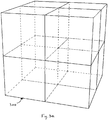
- Parent bounding boxes are in this case the parent nodes of an octree, that is, a tree data structure wherein each parent node has eight child nodes, which together partition the volume of space of the parent node.
- each node of the tree represents a cuboid volume, e.g. a subdivided bounding volume.
- Several subdivisions can be contemplated (parents, children, children's children, etc.), depending on the desired resolution.
- bounding box only one bounding box is stored for multi-instantiated objects of the set of objects. That is, bounding boxes are computed for the references only. In this case, instances of a same reference are stored together with a position matrix. Hence, in operation, a box may be equated on-the-fly to any of the multi-instantiated objects upon a simple Cartesian system change.
- the application or the system may, at step 110, proceeds to aggregate representations of objects of the set of objects, in order to form a view to be rendered next.
- This step occurs preferably during the build time, thus avoiding repetitions. It may however alternatively be carried out upon instruction of a user to open a file corresponding to a set of objects (s)he wishes to view.
- the view obtained i.e. the aggregated representations, form a simplified representation of the set of objects that will be used in the invention.
- it may for example be used simplified product structure definitions.
- the final view does not contain information on said product structure.
- Such a view is known as a non-associative view.
- said view is simplified based on various criteria, such as a threshold size (possibly user parameterized) or sag, that is, an entry parameter used for tessellated representations of the objects, as known in the art.
- a threshold size possibly user parameterized
- sag that is, an entry parameter used for tessellated representations of the objects, as known in the art.
- not all the parts of the set need be used during the aggregation (for example, rivets of a plane would be discarded if the entire airplane is displayed).
- parts contained in other parts need not be used in the aggregation.
- Other criteria may be used to discard some of the objects, for example user selectable categories of
- representations of objects which are used to form the simplified view, may consist in simplified representations like simplified tessellated representations stored in the database together with relations to their respective object.
- the view of the set of objects is displayed in the GUI, showing the set of objects in a given orientation.
- Said view will hereafter denoted as the "reference view”, corresponding to said given orientation of the set of objects.
- the obtained view is a non-associative view.
- the set of objects as represented in the view is not content addressable and a user may not select any individual object composing the set displayed in the view.
- neither a bitmap nor raster image is content addressable with respects to represented objects.
- a vectorial view is conceptually different as it is partitioned into various drawing elements. It is notwithstanding an example of non-associative view in the sense of the invention inasmuch as the drawing elements are not associated to the various parts of the set of objects stored in the PLM database.
- Rendering a non associative view makes a critical difference in terms of memory required to display the view, at least in the world of CAD/CAM/CAE. Indeed, while the aggregated view typically requires a few hundreds of kilobytes (for example 100 - 300 KB, depending on the desired definition), a view containing superimposed representations of the parts may require up to thousands of megabytes to be loaded in the computer memory. Thanks to the aggregation step, the view is more rapidly rendered and the user can more rapidly navigate in this view, for example through zoom-in/out and displacements, thanks to suitable tools available from the GUI.
- step 130 the location of the pointer in the view is determined, that is, the x,y location of the pointer in the screen. Any known convenient method can be used to carry out that step 130.
- steps 140 - 160 the system proceeds to search the database and identifies to the user one object according to the determined location. Such steps are detailed now, according to some specific embodiments of the process of the comparative example of FIG. 2 .
- step 140 it is computed a ray or any geometrical equivalent passing through a viewpoint of the view and a determined x,y location of the pointer in the screen.
- the viewpoint depends on the perspective choice used for the representation, in a 3D context. It may be the vanishing or camera station point, as known in the art, or any other type of perspective.
- step 150 it is identified one or more bounding boxes of a respective object of the set of objects, intersecting the computed ray.
- several known techniques might be used to determine whether an intersection exists or not. For example, thanks to the viewpoint and the pointer location first determined on the screen, it may be determined whether the ray intersects a bounding box.
- the algorithm may for example scan all bounding boxes corresponding to each child instance of the reference view, in order to determine which boxes intersect said computed ray. This step is carried out in the coordinate system of the reference view.
- R-tree technique that is, a spatial access method, wherein space is split with hierarchically nested, possibly overlapping boxes.
- R-tree technique a spatial access method, wherein space is split with hierarchically nested, possibly overlapping boxes.
- the initial ray is recomputed in the coordinate system of said intersected child instance and a new scan is performed within child instances thereof, etc. until no more intersection is found.
- intersection research algorithm is thus recursive (steps 150 - 160), that is, it is searched the last intersected child of an n th -order intersected parent box, and runs as follows:
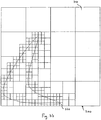
- Octrees 300 are themselves for example further subdivided, as shown in FIG.3b (represented in two dimension for the sake of clarity) except if an octree 310 does not contain any element of a model or is completely filled with an element of a model. Each octree 300 containing an element of the model is further subdivided.
- the octrees 300 are therefore scanned to detect any intersection with the computed ray, until the smallest undivided volume, known as a voxel 320 (which size may depend on the definition input by the user). The process then stops and the object in the view that is inside or close to the identified voxel is selected.
- the process recursively tests the other bounding boxes (steps 150 - 160) according to the same steps (bounding boxes, octrees, voxels) to find and select the object that would be the closest to the viewpoint (along the ray).
- bounding boxes, octrees, voxels the other bounding boxes
- that bounding box is discarded.
- a bounding box is intersected by the ray but the distance between that bounding box and the viewpoint is greater than the previously stored distance, then said bounding box will not be further tested.
- an exact representation of said object (for example the exact tessellated representation or a NURBS representation) is loaded from the database and displayed, superimposed to the global representation of the displayed assembly comprising the selected object.
- Said selected object may for example be highlighted, or displayed with is real attributes (color, texture, material%) and the other objects of the non-associative view may be rendered with different rendering parameters.
- the non-identified (or non-selected) objects may be made translucent to better identify the selected object.
- other retrieved information may be displayed next to the identified part or in the feature tree 25, such as its name, owner, or any other attributes, the representation of said object in the feature tree being, for example, highlighted.
- the global view is thus still a non-associative view, except for the selected object which is fully defined and represented.
- each movement of the pointer triggers a new query in the database according to the new position of the pointer, and then the selection and loading of a new object.
- FIG. 4 An embodiment of the above comparative example process will be illustrated now, in reference to FIG. 4 , showing a modeled object displayed in the same graphical user interface as in FIG. 1 . Notice that bounding boxes are depicted in dotted lines in FIG. 4 , as a guide for the eyes only.
- the GUI 10 has menu and toolbars similar to those already described in reference to FIG. 1 .
- the GUI 10 displays a simplified non-associative view of a skateboard 20, composed of a board 21, a front (f) and rear (r) trucks 22f, 22r.
- the trucks comprise respective shafts 23f, 23r and left (1) and right (r) wheels 24lf, 24rf, 24lr, 24rr ("lf” is for left-front, "rf” for right-front, etc.).
- Respective bounding boxes (b) are depicted under similar references 21b, 22fb, 22rb, 23fb, 23rb, 24lfb, 24rfb, 24lrb and 24rrb.
- some of the boxes correspond to terminal nodes, e.g. a wheel, a shaft and the board while other boxes correspond to some assemblies of parts (for example the trucks). Said boxes are computed according to product structure definitions, as explained above.
- a user who whishes to select the left-front wheel 24lf positions the pointer 32, e.g. thanks to a mouse, thereon.
- the result of the query is an occurrence, that is, an instance path.
- the result of the query is not simply the front left wheel 24lf but rather the "left wheel” instance of the reference “wheel”, in the "front truck” instance of the reference "truck".
- the process according to the comparative example may also provide the display of said occurrence, for example next to the identified object.
- the system may display a graphical representation of the path that leads to the identified object. This can for example be implemented through a serial of thumbnails, each thumbnail representing a level of the path. In the above described case (selection of wheel 24lf), the system would display:
- the process described in reference to FIG. 2 can be seen as a pre-selection method, and the final selection of the object is only carried out upon activation of the pointer pointing the identified object.
- FIG. 4 is obviously very simple, for the purpose of understanding. However, referring back to the flowchart of FIG. 2 , in case of several bounding boxes are found, an additional scheme may possibly be implemented to clearly distinguish boxes as seen above.
- the closest to the viewpoint would be identified as the one to be selected, etc.
- said process allows the user to directly select and retrieve a part, ready for edition, from the database.
- This is achieved by designating said part in a simplified 3D representation displayed on the screen, where no semantic information is available or required. No knowledge about the filename or other attribute of the part is needed from the user.
- the process provides simplicity and fastness for both casual and expert user. Indeed, this process is intuitive, no know-how is required (at variance with filtering steps of the prior art). Only a designation of the part, for example thanks to the position of a pointer, is required from the user; the part may thus be quickly selected. As a result, the part may be loaded, instead of loading all parts or all parts matching a given volume.
- Such an approach is further highly scalable, so that access to 3D data in 3D navigation on a light device (personal computers) becomes possible.
- the queries to the database are triggered each time the pointer is moved, one may wish to use the selection method only when requested.
- the user may activate the selection method by activating a search mode thanks, for example, to a user selectable area of the toolbar 14.
- the user may wish to know the objects that are in contact with a targeted object. Then, (s)he (s)he may activate an option where all the objects that are in contact with the identified object are also highlighted and upon activation of the pointer those objects may also be retrieved from the database and loaded in the session (design, review%), as it will be described below.
- the user may not be sure of the part (s)he wishes to select, or may wish to retrieve a set of objects in order to work on a complete environment. Therefore, the user may decide to trigger a volume query in order to retrieve all the parts (terminal nodes or not of the feature tree) intersecting the user-defined volume.
- the user may wish to retrieve all the objects of the skateboard 20 contained in the volume 500 (in this example, the objects to be retrieved include the left front wheel 24lf and the front shaft 23f).
- FIG. 6 shows a flowchart detailing the process of the invention implemented during the volume query.
- Steps 600-620 correspond to steps 100-120 described in connection with FIG. 2 .
- the bounding boxes are computed and stored (once for all)
- the non-associative view is created and displayed as seen in FIG. 2 .
- the user defines a volume basis of the search in the database (630).
- the volume may be a cubic box like the one 500 represented in FIG.5 , a sphere, a cylinder or the like.
- the definition of the volume may be implemented through various ways.
- the user may activate the pointer (through a mouse click for example) on the simplified non-associative view and drag the pointer in order to create a volume such as a sphere.
- a volume such as a sphere.
- the pointing device is released (like in a "drag and drop” process)
- a query to the database is triggered in order to identify all the parts intersecting the sphere using the previously defined bounding boxes (step 640). This enables the user to rapidly, easily and intuitively define a required volume thanks to a graphical feedback of the size of said volume.
- the user defines the volume thanks to a dedicated user interface where some pre-defined value are presented to the user, said user being able to modify the values (height, width, radius).
- the definition of the volume may use the computed ray previously described (step 140, FIG. 2 ).
- the user may input an offset distance in order to increment the size of the identified object. This way, the user defines a volume that may be used for a next volume query, enabling for example to retrieve all the objects close to the previously identified objects (within a predetermined distance, namely the offset distance).
- step 640 Once a set of objects are identified through the process of step 640, said identified objects are for example highlighted, and their respective exact representations are retrieved from the database (step 650). Those representations are therefore superimposed on the simplified non-associative representation already displayed. As seen before, in another embodiment of the invention, the exact representations of the identified objects are loaded and the other objects in the view are rendered with different rendering parameters, for example the non-identified objects may be made translucent in order to better distinct the retrieved objects.
- the feature tree 25 may be updated thanks to the result of the query. Then, the user is able to have the name, and possibly other attributes of the identified objects displayed in the view, and the number of parts identified.
- the volume defined in step 630 may also be moved in the view, triggering at each movement a new query in the database.
- the result in the view (loading of the exact representations and/or modification of the feature tree 25) is then updated on-the-fly.
- the user When the user is satisfied with the result of the query that can be seen as a pre-selection, (s)he may select the set of objects identified, for example by clicking on a user selectable area placed next to the volume defining the query.
- those objects are loaded in a current session of the user, for example a design session, a reviewing session or the like.
- the process of the invention enables the user to easily identify the objects (s)he may need in his session, without the need to load from the database a complete model in his session or to know the names of the parts (s)he wishes to modify or to work on.
- the user may wish to know all the parts that are in contact with a selected part, or in the vicinity of an identified part.
- the user may previously activates an option, for example by selecting a user-selectable icon of the compass 40.
- an option for example by selecting a user-selectable icon of the compass 40.
- the pointer 32 identifies an object, or if a set of objects is identified in the case of a volume query, the number, and possibly the respective names, of the objects that are in the vicinity of the identified objects are identified to the user and their respective exact representations are retrieved from the database and displayed in the view. This may help, for example, the user to find the object is looking for more quickly, or to be indicated other objects that may be impacted in case of the identified object is modified.
- a mixed representation may be contemplated when displaying a view on the GUI.
- Said view may hence remain a non-associative view as regards a particular set of objects while other objects could be loaded in the view with respective attributes allowing direct selection thereof.
- a representation of said other objects may comprise a set of hyperlinks to the database.
- clicking a suitable zone which corresponds to a hyperlink allows a respective part to be directly selected.
- the algorithm described above e.g. finding the intersection of a volume on the 3D representation
Landscapes
- Engineering & Computer Science (AREA)
- Physics & Mathematics (AREA)
- Theoretical Computer Science (AREA)
- General Engineering & Computer Science (AREA)
- General Physics & Mathematics (AREA)
- Geometry (AREA)
- Computer Hardware Design (AREA)
- Software Systems (AREA)
- Computer Graphics (AREA)
- Human Computer Interaction (AREA)
- Evolutionary Computation (AREA)
- Data Mining & Analysis (AREA)
- Databases & Information Systems (AREA)
- Architecture (AREA)
- Computational Mathematics (AREA)
- Mathematical Analysis (AREA)
- Mathematical Optimization (AREA)
- Pure & Applied Mathematics (AREA)
- Mathematical Physics (AREA)
- Processing Or Creating Images (AREA)
- User Interface Of Digital Computer (AREA)
Claims (16)
- Procédé de sélection d'objets dans une base de données de gestion du cycle de vie des produits contenant des objets modélisés, le procédé comprenant les étapes ci-dessous consistant à :- fournir une interface graphique utilisateur sur un système de conception assistée par ordinateur, CAD ;- calculer et stocker, dans la base de données de gestion du cycle de vie des produits, les volumes de délimitation (21b, 22b, 23b, 24b) d'objets respectifs (21, 22, 23, 24), dans lequel seul un volume de délimitation (21b, 22b, 23b, 24b) est stocké pour des objets multi-instanciés de l'ensemble d'objets, les instances d'une même référence d'un objet étant stockées conjointement avec une matrice de position ;- calculer une vue simplifiée d'un ensemble (20) d'objets (21, 22, 23, 24) de la base de données, dans lequel (i) les éléments graphiques de la vue simplifiée ne sont pas partitionnés selon les objets individuels de l'ensemble d'objets, (ii) l'ensemble d'objets, tel que représenté dans la vue simplifiée, n'est pas adressable par le contenu, et (iii) aucun objet individuel constituant l'ensemble d'objets ne peut être sélectionné, la vue simplifiée étant calculée en utilisant un une taille de seuil ou un sag en qualité de paramètre d'entrée utilisé pour des représentations en mosaïque des objets, ou en rejetant des parties contenues dans d'autres parties, ou en rejetant des catégories de parties sélectionnables par l'utilisateur, ou en utilisant une représentation en mosaïque simplifiée ;- afficher, sur l'interface graphique utilisateur, la vue simplifiée calculée, dans une orientation donnée ;- définir un volume (500) dans la vue affichée ;- rechercher dans la base de données et identifier des objets (23f, 24lf) de la vue coupant ledit volume défini, la recherche et l'identification d'objets étant mises en oeuvre en identifiant un ou plusieurs volumes de délimitation (21b, 22b, 23b, 24b) d'objets respectifs de l'ensemble (20) coupant le volume défini, l'identification d'un ou plusieurs volumes de délimitation sécants (21b, 22b, 23b, 24b) étant mise en oeuvre de manière récursive, sur la base de relations, stockées dans la base de données, entre les objets respectifs ;- extraire, de la base de données, les représentations exactes respectives desdits objets identifiés (23f, 24lf), dans lequel une représentation exacte comporte au moins une représentation en mosaïque exacte ou une représentation de surface B-spline rationnelle non uniforme, NURBS.
- Procédé selon la revendication 1, dans lequel l'étape d'identification comprend en outre l'étape ci-dessous consistant à :- appliquer, à des objets non identifiés de la vue non associative, des paramètres de rendu qui diffèrent des paramètres de rendu de l'objet identifié.
- Procédé selon la revendication 2, dans lequel les paramètres de rendu appliqués aux objets non identifiés de la vue non associative consistent à rendre translucides tous les objets non identifiés de la vue non associative.
- Procédé selon l'une quelconque des revendications 1 à 3, comprenant en outre, avant l'étape d'affichage, l'étape ci-dessous consistant à :- agréger des représentations d'objets respectifs de l'ensemble d'objets en vue de former la vue affichée non associative.
- Procédé selon l'une quelconque des revendications 1 à 4, comprenant en outre, avant l'étape d'affichage, l'étape ci-dessous consistant à :- calculer et stocker, dans la base de données de gestion PLM, des volumes de délimitation subdivisés de volumes de délimitation respectifs (21b, 22b, 23b, 24b).
- Procédé selon la revendication 5, comprenant en outre l'étape ci-dessous consistant à :- identifier un ou plusieurs volumes de délimitation subdivisés coupant le volume défini.
- Procédé selon l'une quelconque des revendications 1 à 6, dans lequel la vue affichée non associative est une vue d'un ensemble d'objets tridimensionnels.
- Procédé selon l'une quelconque des revendications 1 à 7, dans lequel, suite à l'activation d'une zone sélectionnable par l'utilisateur, lesdits objets identifiés sont chargés sur un outil de création afin d'être édités.
- Procédé selon l'une quelconque des revendications 1 à 8, dans lequel les objets en contact avec les objets identifiés (23f, 24lf) sont également identifiés.
- Procédé selon l'une quelconque des revendications 1 à 9, dans lequel le volume est défini à travers un mouvement de glisser-déposer d'un pointeur (32) dans la vue non associative affichée.
- Procédé selon l'une quelconque des revendications 1 à 9, dans lequel le volume est défini par un décalage du volume d'un objet identifié de la vue, ledit objet étant identifié à travers le calcul de l'intersection entre l'ensemble (20) d'objets dans la vue et un rayon calculé transitant par le point de vue de la vue et l'emplacement d'un pointeur (32) dans la vue.
- Procédé selon l'une quelconque des revendications 1 à 11, dans lequel l'identification des objets identifiés est mise à jour suite à un mouvement du volume défini dans la vue non associative.
- Appareil destiné à sélectionner un objet dans une base de données de gestion du cycle de vie des produits contenant des objets modélisés, l'appareil comprenant des moyens pour mettre en oeuvre le procédé selon la revendication 1.
- Appareil selon la revendication 13, comprenant en outre des moyens pour charger ledit objet identifié (23f, 24lf) sur un outil de création à des fins d'édition, suite à l'activation d'une zone sélectionnable par l'utilisateur.
- Programme informatique, stocké sur un support lisible par ordinateur, destiné à sélectionner un objet dans une base de données de gestion du cycle de vie des produits contenant des objets modélisés, comprenant des moyens de code pour amener un ordinateur, sur lequel ledit programme informatique est chargé, à mettre en oeuvre les étapes du procédé selon la revendication 1.
- Programme informatique selon la revendication 15, comprenant des moyens de code pour amener l'ordinateur, suite à l'activation d'une zone sélectionnable par l'utilisateur, à mettre en oeuvre l'étape de chargement desdits objets identifiés sur un outil de création à des fins d'édition.
Priority Applications (12)
| Application Number | Priority Date | Filing Date | Title |
|---|---|---|---|
| EP05028720.0A EP1804183B1 (fr) | 2005-12-30 | 2005-12-30 | Procédé de sélection d'objets dans une base de données PLM et appareil mettant en oeuvre ce procédé |
| EP06291228.2A EP1804187B1 (fr) | 2005-12-30 | 2006-07-28 | Procédé d'affichage d'objets dans une base de données plm et appareil mettant en oeuvre ce procédé |
| CA2571963A CA2571963C (fr) | 2005-12-30 | 2006-12-21 | Processus pour selectionner des objets dans un base de donnees de gestion de cycle de vie d'un produit et appareil de mise en oeuvre du processus |
| CA2571954A CA2571954C (fr) | 2005-12-30 | 2006-12-21 | Processus pour afficher des objets d'une base de donnees de gestion de cycle de vie d'un produit et appareil de mise en oeuvre du processus |
| JP2006350188A JP5230095B2 (ja) | 2005-12-30 | 2006-12-26 | Plmデータベース内のオブジェクトを表示する処理および本処理を実装した装置 |
| JP2006350187A JP5466812B2 (ja) | 2005-12-30 | 2006-12-26 | Plmデータベース内のオブジェクトを選択する処理および本処理を実装した装置 |
| US11/646,979 US8013854B2 (en) | 2005-12-30 | 2006-12-28 | Process for displaying objects of a PLM database and apparatus implementing this process |
| US11/646,725 US9135372B2 (en) | 2005-12-30 | 2006-12-28 | Process for selecting objects in a PLM database and apparatus implementing this process |
| KR1020060137971A KR101333865B1 (ko) | 2005-12-30 | 2006-12-29 | Plm 데이터베이스의 오브젝트를 디스플레이하는 방법 및 그 방법을 구현하는 장치 |
| CN200610156282XA CN101017492B (zh) | 2005-12-30 | 2006-12-29 | 用于显示plm数据库中的对象的方法和实现该方法的装置 |
| KR1020060137760A KR101333930B1 (ko) | 2005-12-30 | 2006-12-29 | Plm 데이터베이스에서 오브젝트를 선택하는 방법 및 그 방법을 구현하는 장치 |
| CN2006101562815A CN101004750B (zh) | 2005-12-30 | 2006-12-29 | 用于在plm数据库中选择对象的方法和实现该方法的装置 |
Applications Claiming Priority (1)
| Application Number | Priority Date | Filing Date | Title |
|---|---|---|---|
| EP05028720.0A EP1804183B1 (fr) | 2005-12-30 | 2005-12-30 | Procédé de sélection d'objets dans une base de données PLM et appareil mettant en oeuvre ce procédé |
Publications (2)
| Publication Number | Publication Date |
|---|---|
| EP1804183A1 EP1804183A1 (fr) | 2007-07-04 |
| EP1804183B1 true EP1804183B1 (fr) | 2017-06-21 |
Family
ID=36127304
Family Applications (1)
| Application Number | Title | Priority Date | Filing Date |
|---|---|---|---|
| EP05028720.0A Expired - Lifetime EP1804183B1 (fr) | 2005-12-30 | 2005-12-30 | Procédé de sélection d'objets dans une base de données PLM et appareil mettant en oeuvre ce procédé |
Country Status (6)
| Country | Link |
|---|---|
| US (1) | US9135372B2 (fr) |
| EP (1) | EP1804183B1 (fr) |
| JP (1) | JP5466812B2 (fr) |
| KR (1) | KR101333930B1 (fr) |
| CN (1) | CN101004750B (fr) |
| CA (1) | CA2571963C (fr) |
Families Citing this family (31)
| Publication number | Priority date | Publication date | Assignee | Title |
|---|---|---|---|---|
| AU6410699A (en) * | 1998-10-13 | 2000-05-01 | Chris Cheah | Method and system for controlled distribution of information over a network |
| US8773425B2 (en) * | 2007-05-01 | 2014-07-08 | M.E.P. CAD Inc. | Methods and apparatuses for proposing resolutions to conflicts in a CAD drawing with reflections |
| US8244508B1 (en) * | 2008-09-26 | 2012-08-14 | SpaceClaim Corporation | Method for modifying a piece of 3D geometry |
| EP2261827B1 (fr) | 2009-06-10 | 2015-04-08 | Dassault Systèmes | Procédé, programme et appareil pour l'affichage d'un ensemble d'objets d'une base de données PLM |
| US8907947B2 (en) * | 2009-12-14 | 2014-12-09 | Dassault Systèmes | Method and system for navigating in a product structure of a product |
| US10152198B2 (en) * | 2009-12-15 | 2018-12-11 | Dassault Systèmes | Method and system for editing a product assembly |
| US8686997B2 (en) * | 2009-12-18 | 2014-04-01 | Sassault Systemes | Method and system for composing an assembly |
| FR2963976B1 (fr) * | 2010-08-23 | 2013-05-10 | Gen Electric | Procede de traitement d'images pour la determination de zones suspectes dans une matrice tissulaire, et son utilisation pour la navigation 3d a travers la matrice tissulaire |
| EP2490142A1 (fr) * | 2011-02-15 | 2012-08-22 | Dassault Systèmes | Définition d'une scène de navigation |
| US9053254B2 (en) | 2011-11-23 | 2015-06-09 | Siemens Product Lifecycle Management Software Inc. | Massive model visualization in PDM systems |
| EP2827303B1 (fr) * | 2013-07-18 | 2017-11-15 | Dassault Systèmes | Procédé mis en oeuvre par ordinateur pour déterminer un trajet éclaté d'une vue éclatée d'un ensemble d'objets modélisés tridimensionnels |
| US10127332B2 (en) * | 2013-12-23 | 2018-11-13 | Dassault Systemes Solidworks Corporation | Automatic motion of a computer-aided design model |
| WO2018140645A1 (fr) * | 2017-01-27 | 2018-08-02 | FLIR Belgium BVBA | Systemes et procede de selection de cible tridimensionnel |
| US10852428B2 (en) | 2014-02-21 | 2020-12-01 | FLIR Belgium BVBA | 3D scene annotation and enhancement systems and methods |
| US10394938B2 (en) * | 2014-04-30 | 2019-08-27 | MBTE Holdings Sweden AB | Visual searching and navigation |
| US10802141B2 (en) | 2014-05-30 | 2020-10-13 | FLIR Belgium BVBA | Water temperature overlay systems and methods |
| US11181637B2 (en) | 2014-09-02 | 2021-11-23 | FLIR Belgium BVBA | Three dimensional target selection systems and methods |
| US10677921B2 (en) | 2014-09-02 | 2020-06-09 | FLIR Belgium BVBA | Casting guidance systems and methods |
| US10614632B2 (en) | 2015-04-23 | 2020-04-07 | Siemens Industry Software Inc. | Massive model visualization with a product lifecycle management system |
| US10401804B1 (en) * | 2015-12-29 | 2019-09-03 | Dassault Systemes Solidworks Corporation | Mate controller |
| KR20180051288A (ko) * | 2016-11-08 | 2018-05-16 | 삼성전자주식회사 | 디스플레이 장치 및 그 제어 방법 |
| US20220091707A1 (en) | 2020-09-21 | 2022-03-24 | MBTE Holdings Sweden AB | Providing enhanced functionality in an interactive electronic technical manual |
| US20220262358A1 (en) | 2021-02-18 | 2022-08-18 | MBTE Holdings Sweden AB | Providing enhanced functionality in an interactive electronic technical manual |
| US12242711B2 (en) | 2021-05-19 | 2025-03-04 | MBTE Holdings Sweden AB | Providing enhanced functionality in an interactive electronic technical manual |
| US11947906B2 (en) | 2021-05-19 | 2024-04-02 | MBTE Holdings Sweden AB | Providing enhanced functionality in an interactive electronic technical manual |
| WO2023104315A1 (fr) * | 2021-12-10 | 2023-06-15 | Siemens Industry Software GmbH | Ingénierie d'un procédé et d'un système de système physique |
| USD1034674S1 (en) * | 2022-05-09 | 2024-07-09 | Deere & Company | Display screen with an animated graphical user interface |
| USD1036466S1 (en) * | 2022-05-09 | 2024-07-23 | Deere & Company | Display screen with an animated graphical user interface |
| USD1037294S1 (en) * | 2022-06-08 | 2024-07-30 | Deere & Company | Display screen with an animated graphical user interface |
| USD1036467S1 (en) * | 2022-06-08 | 2024-07-23 | Deere & Company | Display screen with an animated graphical user interface |
| US12360651B2 (en) | 2022-11-02 | 2025-07-15 | MBTE Holdings Sweden AB | Providing enhanced functionality in an interactive electronic technical manual |
Family Cites Families (40)
| Publication number | Priority date | Publication date | Assignee | Title |
|---|---|---|---|---|
| JPH0554087A (ja) * | 1991-08-23 | 1993-03-05 | Fujitsu Ltd | 図形処理方式 |
| JPH05290110A (ja) * | 1992-04-09 | 1993-11-05 | Mutoh Ind Ltd | コマンド入力方法および装置 |
| US5563990A (en) * | 1992-10-30 | 1996-10-08 | International Business Machines Corporation | Method and apparatus for processing a pick event |
| US5485390A (en) * | 1993-11-30 | 1996-01-16 | The United States Of America As Represented By The Secrectary Of The Air Force | Inductive-deductive process design for machined parts |
| US5619630A (en) * | 1994-02-28 | 1997-04-08 | Hitachi, Ltd. | Apparatus for producing exploded view and animation of assembling and method thereof |
| JP3744969B2 (ja) * | 1995-06-20 | 2006-02-15 | キヤノン株式会社 | 情報処理装置及び出力方法 |
| US6219055B1 (en) * | 1995-12-20 | 2001-04-17 | Solidworks Corporation | Computer based forming tool |
| US5815154A (en) * | 1995-12-20 | 1998-09-29 | Solidworks Corporation | Graphical browser system for displaying and manipulating a computer model |
| DE19549306A1 (de) * | 1995-12-22 | 1997-07-03 | Art & Com Medientechnologie Un | Verfahren und Vorrichtung zur bildlichen Darstellung raumbezogener Daten |
| US5861889A (en) * | 1996-04-19 | 1999-01-19 | 3D-Eye, Inc. | Three dimensional computer graphics tool facilitating movement of displayed object |
| US5982382A (en) * | 1996-11-12 | 1999-11-09 | Silicon Graphics, Inc. | Interactive selection of 3-D on-screen objects using active selection entities provided to the user |
| US6057847A (en) * | 1996-12-20 | 2000-05-02 | Jenkins; Barry | System and method of image generation and encoding using primitive reprojection |
| US6285369B1 (en) * | 1998-05-12 | 2001-09-04 | Autodesk, Inc. | Electronic notebook for maintaining design information |
| SG80633A1 (en) * | 1998-07-18 | 2001-05-22 | Univ Singapore | System and method for creating bounding volume hierarchies utilizing model simplification |
| JP3033956B2 (ja) * | 1998-07-23 | 2000-04-17 | インターナショナル・ビジネス・マシーンズ・コーポレイション | 図形オブジェクトの表示属性を変更する方法、図形オブジェクトを選択する方法、図形オブジェクト表示制御装置、図形オブジェクトの表示属性を変更するプログラムを格納した記憶媒体及び、図形オブジェクトの選択を制御するプログラムを格納した記憶媒体 |
| US6898560B1 (en) * | 1999-06-02 | 2005-05-24 | Solidworks Corporation | Maintaining a computer-generated design model |
| US7502027B1 (en) * | 1999-09-13 | 2009-03-10 | Solidworks Corporation | Electronic drawing viewer |
| US6611725B1 (en) * | 2000-02-03 | 2003-08-26 | Solidworks Corporation | Computer drawing system |
| US6654027B1 (en) * | 2000-06-09 | 2003-11-25 | Dassault Systemes | Tool for three-dimensional analysis of a drawing |
| US6647305B1 (en) * | 2000-06-19 | 2003-11-11 | David H. Bigelow | Product design system and method |
| DE10031042A1 (de) * | 2000-06-26 | 2002-01-03 | Autodesk Inc | Erzeugen einer 2D-Ansicht eines 3D-Modells |
| US20020191034A1 (en) * | 2000-06-28 | 2002-12-19 | Sowizral Henry A. | Size conditioned visibility search system and method |
| US6906712B2 (en) * | 2000-11-30 | 2005-06-14 | Solidworks Corporation | Automated three-dimensional alternative position viewer |
| US7079990B2 (en) * | 2001-02-08 | 2006-07-18 | Solidworks Corporation | Automated connections of computer-aided design components |
| US7283136B2 (en) * | 2001-03-23 | 2007-10-16 | Dassault Systemes | Cell descriptor |
| JP2002366974A (ja) * | 2001-06-12 | 2002-12-20 | Hitachi Software Eng Co Ltd | オブジェクトの選択制御方法 |
| US7080065B1 (en) * | 2001-06-22 | 2006-07-18 | Oracle International Corporation | Query pruning using interior rectangles in an R-tree index |
| US6922599B2 (en) * | 2001-08-13 | 2005-07-26 | The Boeing Company | System and method for producing an assembly by directly implementing three-dimensional computer-aided design component definitions |
| US7068271B2 (en) * | 2001-09-05 | 2006-06-27 | Autodesk, Inc. | Assembly patterns by feature association |
| US6868297B1 (en) * | 2001-09-17 | 2005-03-15 | Impactxoft | Method and system for designing objects using functional modeling |
| US6907573B2 (en) * | 2001-09-28 | 2005-06-14 | Autodesk, Inc. | Intelligent constraint definitions for assembly part mating |
| US7324103B2 (en) * | 2001-10-30 | 2008-01-29 | Ford Motor Company | System and method of direct mesh manipulation |
| US7840443B2 (en) * | 2001-12-27 | 2010-11-23 | Proto Labs, Inc. | Automated quoting of CNC machined custom molds and/or custom parts |
| JP3749188B2 (ja) * | 2002-02-21 | 2006-02-22 | 三菱電機株式会社 | 数値制御プログラミング装置及び数値制御プログラミング方法 |
| US7337030B2 (en) * | 2003-03-12 | 2008-02-26 | Right Hemisphere Limited | Automated derivative view rendering system |
| US7366643B2 (en) * | 2003-03-20 | 2008-04-29 | Delphi Technologies, Inc. | System, method, and storage medium for determining a packaging design for a container |
| US7103434B2 (en) * | 2003-10-14 | 2006-09-05 | Chernyak Alex H | PLM-supportive CAD-CAM tool for interoperative electrical and mechanical design for hardware electrical systems |
| US7479959B2 (en) * | 2004-02-23 | 2009-01-20 | Ironclad Llc | Geometric modeling system with intelligent configuring of solid shapes |
| US20050203718A1 (en) * | 2004-03-12 | 2005-09-15 | Carek Rick A. | Knowledge management system with integrated product document management for computer-aided design modeling |
| US8042056B2 (en) * | 2004-03-16 | 2011-10-18 | Leica Geosystems Ag | Browsers for large geometric data visualization |
-
2005
- 2005-12-30 EP EP05028720.0A patent/EP1804183B1/fr not_active Expired - Lifetime
-
2006
- 2006-12-21 CA CA2571963A patent/CA2571963C/fr active Active
- 2006-12-26 JP JP2006350187A patent/JP5466812B2/ja active Active
- 2006-12-28 US US11/646,725 patent/US9135372B2/en active Active
- 2006-12-29 KR KR1020060137760A patent/KR101333930B1/ko active Active
- 2006-12-29 CN CN2006101562815A patent/CN101004750B/zh active Active
Non-Patent Citations (2)
| Title |
|---|
| CHANG FC ET AL: "Improved Transformation/ Rendering Pipeline for Lighting", IP.COM JOURNAL, IP.COM INC., WEST HENRIETTA, NY, US, 1 July 1992 (1992-07-01), XP013097180, ISSN: 1533-0001 * |
| S P MUDUR ET AL: "Graphics Pipeline for Interactive Visualization of Very Large 3D Models", INDIAN CONFERENCE ON CVGIP, 12/20-22/2000, 22 December 2000 (2000-12-22) - 22 December 2000 (2000-12-22), pages 12 pp., XP055264331 * |
Also Published As
| Publication number | Publication date |
|---|---|
| KR20070072409A (ko) | 2007-07-04 |
| US9135372B2 (en) | 2015-09-15 |
| EP1804183A1 (fr) | 2007-07-04 |
| KR101333930B1 (ko) | 2013-11-27 |
| JP2007220089A (ja) | 2007-08-30 |
| CA2571963C (fr) | 2016-10-04 |
| CN101004750B (zh) | 2013-04-03 |
| CN101004750A (zh) | 2007-07-25 |
| CA2571963A1 (fr) | 2007-06-30 |
| JP5466812B2 (ja) | 2014-04-09 |
| US20070159480A1 (en) | 2007-07-12 |
Similar Documents
| Publication | Publication Date | Title |
|---|---|---|
| US9135372B2 (en) | Process for selecting objects in a PLM database and apparatus implementing this process | |
| CA2705955C (fr) | Procede, programme et appareil concus pour afficher des objets repertories dans une base de donnees de gestion de cycle de vie d'un produit | |
| EP1804184B1 (fr) | Procédé de sélection d'un objet dans une base de données PLM et appareil mettant en oeuvre ce procédé | |
| CA2752348C (fr) | Conception d'un objet modelise dans une session d'un systeme de conception assistee par ordinateur ayant une interaction avec une base de donnees | |
| US8013854B2 (en) | Process for displaying objects of a PLM database and apparatus implementing this process | |
| EP3506133B1 (fr) | Procédé permettant d'assembler les pièces d'un produit | |
| CN102073499A (zh) | 在计算机辅助设计系统中设计对象组件的方法和系统 |
Legal Events
| Date | Code | Title | Description |
|---|---|---|---|
| PUAI | Public reference made under article 153(3) epc to a published international application that has entered the european phase |
Free format text: ORIGINAL CODE: 0009012 |
|
| AK | Designated contracting states |
Kind code of ref document: A1 Designated state(s): AT BE BG CH CY CZ DE DK EE ES FI FR GB GR HU IE IS IT LI LT LU LV MC NL PL PT RO SE SI SK TR |
|
| AX | Request for extension of the european patent |
Extension state: AL BA HR MK YU |
|
| 17P | Request for examination filed |
Effective date: 20080104 |
|
| 17Q | First examination report despatched |
Effective date: 20080206 |
|
| AKX | Designation fees paid |
Designated state(s): DE FR GB IT SE |
|
| GRAP | Despatch of communication of intention to grant a patent |
Free format text: ORIGINAL CODE: EPIDOSNIGR1 |
|
| STAA | Information on the status of an ep patent application or granted ep patent |
Free format text: STATUS: GRANT OF PATENT IS INTENDED |
|
| RIC1 | Information provided on ipc code assigned before grant |
Ipc: G06T 15/00 20110101ALN20161205BHEP Ipc: G06F 3/14 20060101ALN20161205BHEP Ipc: G06T 19/00 20110101ALN20161205BHEP Ipc: G06T 15/04 20110101ALN20161205BHEP Ipc: G06F 3/033 20130101ALI20161205BHEP Ipc: G06F 17/50 20060101AFI20161205BHEP Ipc: G06F 17/30 20060101ALN20161205BHEP Ipc: G06F 9/44 20060101ALN20161205BHEP Ipc: G06T 17/00 20060101ALI20161205BHEP Ipc: G06T 11/00 20060101ALN20161205BHEP Ipc: G06F 3/0482 20130101ALN20161205BHEP |
|
| INTG | Intention to grant announced |
Effective date: 20161222 |
|
| RIC1 | Information provided on ipc code assigned before grant |
Ipc: G06F 3/0482 20130101ALN20161213BHEP Ipc: G06F 9/44 20060101ALN20161213BHEP Ipc: G06F 3/14 20060101ALN20161213BHEP Ipc: G06T 15/04 20110101ALN20161213BHEP Ipc: G06F 3/033 20130101ALI20161213BHEP Ipc: G06F 17/30 20060101ALN20161213BHEP Ipc: G06T 15/00 20110101ALN20161213BHEP Ipc: G06T 11/00 20060101ALN20161213BHEP Ipc: G06T 19/00 20110101ALN20161213BHEP Ipc: G06F 17/50 20060101AFI20161213BHEP Ipc: G06T 17/00 20060101ALI20161213BHEP |
|
| GRAS | Grant fee paid |
Free format text: ORIGINAL CODE: EPIDOSNIGR3 |
|
| GRAA | (expected) grant |
Free format text: ORIGINAL CODE: 0009210 |
|
| STAA | Information on the status of an ep patent application or granted ep patent |
Free format text: STATUS: THE PATENT HAS BEEN GRANTED |
|
| AK | Designated contracting states |
Kind code of ref document: B1 Designated state(s): DE FR GB IT SE |
|
| RAP1 | Party data changed (applicant data changed or rights of an application transferred) |
Owner name: DASSAULT SYSTEMES |
|
| REG | Reference to a national code |
Ref country code: GB Ref legal event code: FG4D |
|
| REG | Reference to a national code |
Ref country code: DE Ref legal event code: R096 Ref document number: 602005052158 Country of ref document: DE |
|
| REG | Reference to a national code |
Ref country code: SE Ref legal event code: TRGR |
|
| REG | Reference to a national code |
Ref country code: FR Ref legal event code: PLFP Year of fee payment: 13 |
|
| REG | Reference to a national code |
Ref country code: DE Ref legal event code: R097 Ref document number: 602005052158 Country of ref document: DE |
|
| PLBE | No opposition filed within time limit |
Free format text: ORIGINAL CODE: 0009261 |
|
| STAA | Information on the status of an ep patent application or granted ep patent |
Free format text: STATUS: NO OPPOSITION FILED WITHIN TIME LIMIT |
|
| 26N | No opposition filed |
Effective date: 20180322 |
|
| REG | Reference to a national code |
Ref country code: DE Ref legal event code: R079 Ref document number: 602005052158 Country of ref document: DE Free format text: PREVIOUS MAIN CLASS: G06F0017500000 Ipc: G06F0030000000 |
|
| P01 | Opt-out of the competence of the unified patent court (upc) registered |
Effective date: 20230526 |
|
| PGFP | Annual fee paid to national office [announced via postgrant information from national office to epo] |
Ref country code: DE Payment date: 20241210 Year of fee payment: 20 |
|
| PGFP | Annual fee paid to national office [announced via postgrant information from national office to epo] |
Ref country code: GB Payment date: 20241224 Year of fee payment: 20 |
|
| PGFP | Annual fee paid to national office [announced via postgrant information from national office to epo] |
Ref country code: FR Payment date: 20241223 Year of fee payment: 20 |
|
| PGFP | Annual fee paid to national office [announced via postgrant information from national office to epo] |
Ref country code: SE Payment date: 20241219 Year of fee payment: 20 |
|
| PGFP | Annual fee paid to national office [announced via postgrant information from national office to epo] |
Ref country code: IT Payment date: 20241227 Year of fee payment: 20 |
|
| REG | Reference to a national code |
Ref country code: DE Ref legal event code: R071 Ref document number: 602005052158 Country of ref document: DE |
|
| REG | Reference to a national code |
Ref country code: GB Ref legal event code: PE20 Expiry date: 20251229 |
|
| REG | Reference to a national code |
Ref country code: SE Ref legal event code: EUG |