EP1830251A2 - Appareil et procédé pour régler l'image - Google Patents
Appareil et procédé pour régler l'image Download PDFInfo
- Publication number
- EP1830251A2 EP1830251A2 EP07004041A EP07004041A EP1830251A2 EP 1830251 A2 EP1830251 A2 EP 1830251A2 EP 07004041 A EP07004041 A EP 07004041A EP 07004041 A EP07004041 A EP 07004041A EP 1830251 A2 EP1830251 A2 EP 1830251A2
- Authority
- EP
- European Patent Office
- Prior art keywords
- image
- adjustment
- adjusting
- image quality
- adjustment display
- Prior art date
- Legal status (The legal status is an assumption and is not a legal conclusion. Google has not performed a legal analysis and makes no representation as to the accuracy of the status listed.)
- Withdrawn
Links
Images




Classifications
-
- G—PHYSICS
- G06—COMPUTING OR CALCULATING; COUNTING
- G06F—ELECTRIC DIGITAL DATA PROCESSING
- G06F3/00—Input arrangements for transferring data to be processed into a form capable of being handled by the computer; Output arrangements for transferring data from processing unit to output unit, e.g. interface arrangements
- G06F3/14—Digital output to display device ; Cooperation and interconnection of the display device with other functional units
-
- G—PHYSICS
- G09—EDUCATION; CRYPTOGRAPHY; DISPLAY; ADVERTISING; SEALS
- G09G—ARRANGEMENTS OR CIRCUITS FOR CONTROL OF INDICATING DEVICES USING STATIC MEANS TO PRESENT VARIABLE INFORMATION
- G09G5/00—Control arrangements or circuits for visual indicators common to cathode-ray tube indicators and other visual indicators
- G09G5/003—Details of a display terminal, the details relating to the control arrangement of the display terminal and to the interfaces thereto
- G09G5/006—Details of the interface to the display terminal
-
- G—PHYSICS
- G09—EDUCATION; CRYPTOGRAPHY; DISPLAY; ADVERTISING; SEALS
- G09G—ARRANGEMENTS OR CIRCUITS FOR CONTROL OF INDICATING DEVICES USING STATIC MEANS TO PRESENT VARIABLE INFORMATION
- G09G2320/00—Control of display operating conditions
- G09G2320/06—Adjustment of display parameters
- G09G2320/066—Adjustment of display parameters for control of contrast
-
- G—PHYSICS
- G09—EDUCATION; CRYPTOGRAPHY; DISPLAY; ADVERTISING; SEALS
- G09G—ARRANGEMENTS OR CIRCUITS FOR CONTROL OF INDICATING DEVICES USING STATIC MEANS TO PRESENT VARIABLE INFORMATION
- G09G2320/00—Control of display operating conditions
- G09G2320/06—Adjustment of display parameters
- G09G2320/0666—Adjustment of display parameters for control of colour parameters, e.g. colour temperature
-
- G—PHYSICS
- G09—EDUCATION; CRYPTOGRAPHY; DISPLAY; ADVERTISING; SEALS
- G09G—ARRANGEMENTS OR CIRCUITS FOR CONTROL OF INDICATING DEVICES USING STATIC MEANS TO PRESENT VARIABLE INFORMATION
- G09G2320/00—Control of display operating conditions
- G09G2320/06—Adjustment of display parameters
- G09G2320/0673—Adjustment of display parameters for control of gamma adjustment, e.g. selecting another gamma curve
Definitions
- the present invention relates to an apparatus and method for adjusting an image by an image quality parameters such as a color (i.e. hue) or gamma value of an image.
- the present invention is to provide an image adjusting apparatus including:
- the present invention is also to provide an image adjusting method for adjusting at least one kind of image quality parameter with regard to an inputted image, including the steps of:
- an image adjusting apparatus when an image quality is to be adjusted, first, the displaying device displays a plurality of adjustment display images having different image quality parameter values with regard to an adjustment image that is an image for adjusting the image quality parameter and thereafter, the controlling device causes the adjusting device to adjust the inputted image on the basis of an image quality parameter value of one adjustment display image selected.
- the controlling device causes the adjusting device to adjust the inputted image on the basis of an image quality parameter value of one adjustment display image selected.
- the adjustment image for adjusting the image quality parameter may be inputted from an adjustment image inputting device, and an adjustment display image forming device may form a plurality of the adjustment display images from the adjustment image so that the adjusting device displays a plurality of the adjustment display images. Thereby, the adjustment of the image quality can be carried out without inputting a plurality of the adjustment display images in advance.
- An adjustment display image inputting device may input a plurality of the adjustment display images, so that the adjusting device displays the adjustment display images. Thereby, it is not necessary to form the adjustment display images, so that a size of a relevant circuit can be small.
- a storing device may store the adjustment image for every image quality parameter. Thereby, even when a plurality of the image quality parameters are to be adjusted, the adjustment can be carried out with images that are suitable to each image quality parameter, therefore preciseness of the adjustment can be improved.
- the storing device may store a plurality of the adjustment images with regard to one image quality parameter, and one image quality parameter may be adjusted by adjusting a plurality of the adjustment images. Thereby, an adjustment suitable to a characteristic of the image quality parameter can be carried out compared to an adjustment with one adjustment image.
- an image adjusting method when an image quality is to be adjusted, first, a plurality of adjustment display images having different image quality parameter values of an adjustment image that is an image for adjusting the image quality parameter are displayed, and one adjustment display image is selected from a plurality of the displayed adjustment display images so as to determine an adjusting value of the image quality parameter.
- the image adjusting apparatus 1 includes an operating section 2, CPU 3, memory 4, image inputting terminal 5, selector 6, image quality adjusting section 7, and monitor 8.
- the operating section 2 as the taking-in device is an inputting device for a user to adjust an image that is outputted from the image adjusting apparatus 1, and includes a cursor key and decision key which are used upon the adjustment.
- the operating section 2 may be a type that can operate the image adjusting apparatus 1 by remote control.
- the CPU 3 as the controlling device includes a ROM (Read Only Memory) and RAM (Random Access Memory), and receives an instruction from the operating section 2 so as to control the whole image adjusting apparatus 1 with a control program stored in the ROM.
- ROM Read Only Memory
- RAM Random Access Memory
- the memory 4 as the adjustment image inputting device is a nonvolatile memory element, and stores in advance images suitable for adjusting respective image quality parameters for every image quality parameter.
- the selector 6 switches: adjustment images for adjusting respective image quality parameters outputted from the memory 4; and inputted images from, for example, television tuner, video deck and DVD (Digital Versatile Disk) player, which are inputted from the image inputting terminal 5, through control by the CPU 3.
- adjustment images for adjusting respective image quality parameters outputted from the memory 4 and inputted images from, for example, television tuner, video deck and DVD (Digital Versatile Disk) player, which are inputted from the image inputting terminal 5, through control by the CPU 3.
- the image quality adjusting section 7 adjusts each image quality parameter with regard to the inputted image and outputs it to the monitor 8.
- the image quality adjusting section 7 includes a gamma value adjustment 71, color temperature adjustment 72, color adjustment 73 and chroma adjustment 74.
- the gamma value adjustment 71, color temperature adjustment 72, color adjustment 73 and chroma adjustment 74 adjust the respective image quality parameters with regard to the images inputted to the image quality adjusting section 7, and form the respective adjustment display images by a command from the CPU 3.
- the image quality parameters are parameters such as a gamma value, color temperature, color (i.e. hue) and chroma, which can change an image quality such as a color or brightness of the image.
- the gamma value adjustment 71 adjusts a gamma value as the image quality parameter with regard to the inputted image.
- the gamma value is a parameter indicating a ratio of a change in brightness between the inputted signal level and a displayed image.
- a characteristic indicating a relation between an inputted signal and a color of the image to be outputted is called a gamma characteristic.
- the color temperature adjustment 72 adjusts a color temperature as the image quality parameter with regard to the inputted image.
- the color temperature is a parameter expressed by an absolute temperature unit indicating up to how high temperature a block body must be heated to radiate a light having such a relevant color.
- the color temperature is high, the image looks blue due to short wavelength light.
- the color temperature is low, the image looks red due to long wavelength light. That is, by adjusting the color temperature, the whole image can be adjusted to look blue or to look red.
- the color adjustment 73 adjusts color (i.e. hue) as the image quality parameter with regard to the inputted image.
- the color is a parameter indicating a hue such as red, blue or green. By adjusting the color, a hue of the image can be adjusted.
- the chroma adjustment 74 adjusts a chroma as the image quality parameter with regard to the inputted image.
- the chroma is a parameter indicating vividness of the image. By adjusting the chroma, the vividness of the image can be adjusted.
- the monitor 8 as the displaying device is a display device on which the image, the respective image quality parameters of which are adjusted in the image quality adjusting section 7 after being outputted from the image inputting terminal 5 or the memory 4, is displayed.
- the monitor 8 includes a CRT (Cathode Ray Tube), liquid crystal or plasma display.
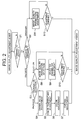
- step S1 it is judged whether or not a command of the image quality adjustment is performed to the CPU 3 by a user with a button-operation or the like from the operating section 2. If the command is performed (i.e. Y), the CPU 3 proceeds to step S2, on the other hand, if the command is not performed (i.e. N), the above judgment is carried out again.
- the favorite adjusting mode is a mode in which a method for adjusting according to the present invention is applied.
- the CPU 3 proceeds to step S3.
- the ordinary adjusting mode corresponds to a conventional method for adjusting.
- the CPU 3 proceeds to step S 11.
- a package adjusting mode is a mode in which all of the gamma value, color temperature, color and chroma are adjusted.
- the CPU 3 proceeds to step S4.
- the selection adjusting mode is a mode in which an item selected from the gamma value, color temperature, color and chroma is adjusted.
- the CPU 3 proceeds to step S8.
- step S4 the gamma value is adjusted and thereafter, the CPU 3 proceeds to step S5.
- a process for adjusting the gamma value is as follows: First, for example, an adjustment image 100 shown in Fig. 3 that is an image for adjusting the gamma value is read out from the memory 4, and the selector 6 is switched so as to select an input from the memory 4 and input it to the image quality adjusting section 7.
- the CPU 3 gives four predetermined adjusting values to the gamma value adjustment 71 of the image quality adjusting section 7 and displays four adjustment display images 101, 102, 103 and 104 having different gamma values from each other with regard to the same adjustment image on the monitor 8 as shown in Fig. 4A.
- Figure 4A is a schematic illustration of four adjustment display images having different gamma values from each other with regard to the adjustment image 100 shown in Fig. 3.
- the user selects a favorite image from the four displayed images from the operating section 2.
- the adjustment display image 101 is favorite one for the user in Fig. 4A
- the adjustment display image 101 is taken in so that only the adjustment display image 101 is displayed as shown in Fig. 4B.
- step S5 the CPU 3 proceeds to the next adjustment item, that is, to step S5.
- the user selects "return" 201 shown at left bottom in Fig. 4B so as to return to a state of Fig. 4A. That is, with regard to the adjustment image stored in the memory 4, a plurality of the adjustment display images having different gamma values from each other are formed and displayed them on the monitor 8, then a value of the image quality parameter of one adjustment display image selected from a plurality of the displayed adjustment display images is set to be an adjusted value of the gamma value.
- a plurality of images each suitable for adjusting the gamma value may be prepared so that an average value of the respective gamma values is set to be a final gamma value, for example, two types of the images consisting of an image having mainly bright colors and an image having mainly dark colors are prepared so that an average value of the respective selected gamma values is set to be a final adjusted value of the gamma value.
- step S5 the color temperature is adjusted and thereafter, the CPU 3 proceeds to step S6.
- Four adjustment display images having different predetermined adjusting values of the color temperature from each other with regard to the same adjustment image are displayed like Fig. 4A, and the user selects one adjustment display image from the four adjustment display images and decides it.
- the adjustment of the color temperature is carried out with an image for adjusting the color temperature.
- the gamma value selected at step S4 is reflected.
- step S6 the color (i.e. hue) of skin color is adjusted and thereafter, the CPU 3 proceeds to step S7.
- Four adjustment display images having different predetermined adjusting values of the color from each other with regard to the same adjustment image are displayed like Fig. 4A, and the user selects one adjustment display image from the four adjustment display images and decides it.
- the adjustment of the color of skin color is carried out with an image for adjusting the color of skin color.
- the image for adjusting the color of skin color is, for example, an image in which skin color is contained by 30 - 50 percent in the whole image and other colors besides the skin color are contained uniformly.
- the gamma value selected at step S4 and the color temperature value selected at step S5 are reflected.
- the chroma is adjusted and then, the adjustment is finished, and the selector 6 is switched so that the adjusted values of the image quality parameters are reflected in an image that is to be inputted from the image inputting terminal 5.
- Four adjustment display images having different predetermined adjusting values of the chroma from each other with regard to the same adjustment image are displayed like Fig. 4A, and the user selects one adjustment display image from the four adjustment display images and decides it.
- the chroma is adjusted with regard to four colors, that is, skin color, cyanogen, blue and green. That is, at step S7, exclusive adjustment images are prepared to the respective colors, and the selection and decision with Figs. 4A and 4B are carried out for each color.
- the image for adjusting the chroma is, for example, an image in which the color to be adjusted is contained by 30 - 50 percent in the whole image and other colors besides the color to be adjusted are contained uniformly.
- the gamma value selected at step S4 the color temperature value selected at step S5 and the color value selected at step S6 are reflected.
- a parameter to be adjusted is selected after the selection adjusting mode is selected at step S3 and thereafter, the CPU 3 proceeds to step S9.
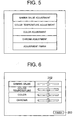
- step S8 for example, a menu shown in Fig. 5 is displayed, and the user selects a parameter to be adjusted with a cursor key from the operating section 2 (i.e. a state being surrounded by a thick frame) and decides it with a decision key.
- step S9 the parameter selected at step S8 is adjusted and thereafter, the CPU 3 proceeds to step S10.
- Methods of adjusting are the same as those at steps S4 - S7.
- step S10 it is judged whether or not "adjustment being finished” is selected. If the "adjustment being finished” is selected (i.e. Y), the adjustment is finished, and the selector 6 is switched so that the adjusted values of the parameters are made be reflected in an image that is to be inputted from the image inputting terminal 5. If the "adjustment being finished” is not selected (i.e. N), the CPU 3 returns to step S8.
- step S11 the parameters are adjusted and thereafter, the CPU 3 proceeds to step S12.
- step S12 since the ordinary adjustment has been selected at step S2, a picture shown in Fig. 6 is displayed. For example, when the gamma value is selected with a cursor key from the operating section 2, a slide bar 202 is moved left or right so as to adjust the gamma value. The other parameters are adjusted likewise.
- step S12 it is judged whether or not "finish" 203 is selected. If the "finish" 203 is selected (i.e. Y), the adjustment is finished, and the selector 6 is switched so that the adjusted values of the parameters are made be reflected in an image that is to be inputted from the image inputting terminal 5. If the "finish" 203 is not selected (i.e. N), the CPU 3 returns to step S11.
- the adjustment images corresponding to the image quality parameters that is, the gamma value, color temperature, color and chroma are in advance stored in the memory 4, and upon the adjustment, for example, four adjustment display images having different predetermined adjusting values of the gamma value from each other with regard to the image that is for adjusting the gamma value are displayed on the monitor 8, and the user selects one favorite adjustment display image from the four adjustment display images.
- the respective image quality parameters are adjusted so as to produce an image having a favorite image quality for the user. That is, even if a user is not conscious of a characteristic of the image quality parameters such as a gamma value, color temperature, color and chroma, an image can be easily adjusted to a favorite image for the user.
- the selection adjusting mode in which an image can be adjusted only a limited image quality parameter can be adjusted. For example, it is possible to readjust a limited image quality parameter after an image is once adjusted in the package adjusting mode.
- the second preferred embodiment is different from the first preferred embodiment in a point that the memory 4 does not store the adjustment images 100 but stores the adjustment display images formed for every image quality parameter in advance. That is, the memory 4 as the adjustment display image inputting device stores the adjustment display images in a form as shown in Fig. 4A and inputs them so as to display them on the monitor 8 as the displaying device by way of the selector 6 and the image quality adjusting section 7. At that time, the image quality adjusting section 7 outputs the inputted images as they are without doing anything until each image quality parameter is determined. Whenever the image quality parameters are determined in steps S4 - S7 and S9 shown in Fig. 2, the parameters are reflected in the adjustment display image to be inputted.
- the memory 4 stores the adjustment display images for every image quality parameter in advance and upon the adjustment of the image the adjustment display image inputted from the memory 4 is displayed on the monitor 8 so as to adjust the image, therefore a structure of a relevant circuit becomes simple since there is not need to form the adjustment display images.
- the adjustment images corresponding to the image quality parameters that is, the gamma value, color temperature, color and chroma are in advance stored in the memory 4, and upon the adjustment, for example, four adjustment display images having different predetermined adjusting values of the gamma value from each other with regard to the image that is for adjusting the gamma value are displayed on the monitor 8, and the user selects one favorite adjustment display image from the four adjustment display images.
- the respective image quality parameters are adjusted so as to produce an image having a favorite image quality for the user.
- an image can be easily adjusted to a favorite image for the user. Further, by providing the selection adjusting mode in which an image can be adjusted, only a limited image quality parameter can be adjusted. For example, it is possible to readjust a limited image quality parameter after an image is once adjusted in the package adjusting mode.
- each adjusted parameter is reflected in an adjustment of a next image quality parameter.
- each adjusted parameter may not be reflected in an adjustment of a next image quality parameter and instead, a parameter except a parameter to be adjusted may be adjusted with a corresponding predetermined default value.
- the parameters to be adjusted are the gamma value, color temperature, color and chroma.
- the parameters to be adjusted may be parameters, which vary image quality, such as contrast, brightness, sharpness and intensity of noise-reduction.
- the adjustment of color is carried out regarding a skin color.
- the adjustment of color may be carried out regarding another color or regarding a plurality of colors.
- the chroma may be adjusted regarding colors other than skin color, cyanogen, blue and green. The number of colors to be adjusted may be increased or decreased.
- a plurality of adjustment images that are for adjusting the color temperature may be prepared to carry out the adjustment.
- a user selects one adjustment display image from four adjustment display images.
- a use may select one adjustment display image from any plural adjustment display images.
- a displaying form when each image quality parameter is adjusted is not limited to the form shown in Fig. 4A, in which the selected adjustment display image is surrounded by a thick frame, and may be a form shown in Figs. 7A and 7B.
- the selected adjustment display image is displayed larger than the other adjustment display images (that is, non-selected adjustment display images).
- the adjustment display image 101 is selected.
- the adjustment display image 102 is selected and in this case, when the "decision" 204 is selected and a decision key of the operating section 2 is pressed, only the selected adjustment display image 102 is displayed as shown in Fig. 7C.
- the selected adjustment display image may be displayed at the center of a screen.
- the selected adjustment display image may be displayed at a specific position such as at a left end. That is, upon simultaneously displaying a plurality of the adjustment display images having different image quality parameters from each other, any displaying method may be used to clearly indicate one selected adjustment display image from a plurality of the adjustment display images, such as by surrounding the selected adjustment display image with a thick frame, by displaying it largely or by displaying it at a specific position.
- the adjustment image and the adjustment display image which are stored in the memory 4, are static images.
- the adjustment image and the adjustment display image may be dynamic images.
- the adjustment image inputting device or the adjustment display image inputting device is not limited to a nonvolatile memory element but may be a hard disk, an optical disk or a device from which the images are inputted through an external inputting terminal of such a device.
- the following image adjusting apparatus and image adjusting method can be obtained.
- An image adjusting apparatus 1 including:
- a user can select one image having a favorite image quality from the four adjustment display images 101, 102, 103 and 104 having different gamma values from each other with regard to an adjustment image 100, therefore the user can intuitively adjust the image quality without directly handling the gamma value and without understanding the meaning and characteristic of the gamma value.
- An image adjusting method for adjusting a gamma value with regard to an inputted image including the steps of:
- a user can select one image having a favorite image quality from the four adjustment display images 101, 102, 103 and 104 having different gamma values from each other with regard to an adjustment image 100, therefore the user can intuitively adjust the image quality without directly handling the gamma value and without understanding the meaning and characteristic of the gamma value.
Landscapes
- Engineering & Computer Science (AREA)
- Theoretical Computer Science (AREA)
- General Physics & Mathematics (AREA)
- Physics & Mathematics (AREA)
- Computer Hardware Design (AREA)
- General Engineering & Computer Science (AREA)
- Human Computer Interaction (AREA)
- Television Receiver Circuits (AREA)
- Controls And Circuits For Display Device (AREA)
- Color Image Communication Systems (AREA)
- Image Processing (AREA)
- Picture Signal Circuits (AREA)
- Processing Of Color Television Signals (AREA)
- Facsimile Image Signal Circuits (AREA)
Applications Claiming Priority (1)
| Application Number | Priority Date | Filing Date | Title |
|---|---|---|---|
| JP2006054361A JP2007235506A (ja) | 2006-03-01 | 2006-03-01 | 画像調整装置および画像調整方法 |
Publications (2)
| Publication Number | Publication Date |
|---|---|
| EP1830251A2 true EP1830251A2 (fr) | 2007-09-05 |
| EP1830251A3 EP1830251A3 (fr) | 2009-09-02 |
Family
ID=38091745
Family Applications (1)
| Application Number | Title | Priority Date | Filing Date |
|---|---|---|---|
| EP07004041A Withdrawn EP1830251A3 (fr) | 2006-03-01 | 2007-02-27 | Appareil et procédé pour régler l'image |
Country Status (3)
| Country | Link |
|---|---|
| US (1) | US20070206121A1 (fr) |
| EP (1) | EP1830251A3 (fr) |
| JP (1) | JP2007235506A (fr) |
Cited By (1)
| Publication number | Priority date | Publication date | Assignee | Title |
|---|---|---|---|---|
| EP2782092A3 (fr) * | 2013-03-18 | 2014-12-31 | Samsung Electronics Co., Ltd. | Procédé de commande d'écran et dispositif électronique correspondant |
Families Citing this family (12)
| Publication number | Priority date | Publication date | Assignee | Title |
|---|---|---|---|---|
| JP4947343B2 (ja) * | 2006-05-24 | 2012-06-06 | ソニー株式会社 | 情報処理システム、情報処理装置、情報処理方法、およびプログラム |
| JP4363468B2 (ja) * | 2007-07-12 | 2009-11-11 | ソニー株式会社 | 撮像装置及び撮像方法並びに映像信号処理プログラム |
| KR101362167B1 (ko) * | 2007-12-31 | 2014-02-13 | 엘지디스플레이 주식회사 | 선호색 보정방법 및 장치와, 그를 이용한 액정 표시장치 |
| JP5268538B2 (ja) | 2008-10-02 | 2013-08-21 | 三菱電機株式会社 | 表示装置の色調整システム |
| US8310594B2 (en) * | 2008-07-22 | 2012-11-13 | Samsung Electronics Co., Ltd. | Method and system for picture-based user interface for adjusting picture display parameter settings of a display device |
| JP5414216B2 (ja) * | 2008-08-07 | 2014-02-12 | キヤノン株式会社 | 撮像装置、その制御方法及びプログラム |
| JP2013003406A (ja) * | 2011-06-17 | 2013-01-07 | Kyocera Corp | 電子機器 |
| JP2014068145A (ja) * | 2012-09-25 | 2014-04-17 | Kyocera Corp | 携帯端末、表示制御プログラムおよび表示制御方法 |
| JP5496382B2 (ja) * | 2013-03-08 | 2014-05-21 | 三菱電機株式会社 | 表示装置の色調整システム |
| CN103295507B (zh) * | 2013-05-31 | 2015-11-18 | 明基电通有限公司 | 改善影像鉴别度的显示方法及其相关显示器 |
| CN103716561B (zh) * | 2013-12-27 | 2017-12-12 | 乐视致新电子科技(天津)有限公司 | 图像质量参数调节方法及系统 |
| CN104200766B (zh) * | 2014-08-27 | 2017-02-15 | 深圳市华星光电技术有限公司 | 画面补偿方法及具有画面补偿的显示器 |
Family Cites Families (6)
| Publication number | Priority date | Publication date | Assignee | Title |
|---|---|---|---|---|
| US7019778B1 (en) * | 1999-06-02 | 2006-03-28 | Eastman Kodak Company | Customizing a digital camera |
| JP2001268475A (ja) * | 2000-03-15 | 2001-09-28 | Sony Corp | 画質調整方法および画質調整装置 |
| JP3701204B2 (ja) * | 2001-01-18 | 2005-09-28 | キヤノン株式会社 | 画質調整機能を有する画像表示装置および画像表示方法、並びに記録媒体 |
| US20030190090A1 (en) * | 2002-04-09 | 2003-10-09 | Beeman Edward S. | System and method for digital-image enhancement |
| US7039222B2 (en) * | 2003-02-28 | 2006-05-02 | Eastman Kodak Company | Method and system for enhancing portrait images that are processed in a batch mode |
| JP4670494B2 (ja) * | 2005-06-13 | 2011-04-13 | 株式会社日立製作所 | 表示装置及び表示画質設定方法 |
-
2006
- 2006-03-01 JP JP2006054361A patent/JP2007235506A/ja not_active Abandoned
-
2007
- 2007-02-27 EP EP07004041A patent/EP1830251A3/fr not_active Withdrawn
- 2007-03-01 US US11/712,502 patent/US20070206121A1/en not_active Abandoned
Cited By (1)
| Publication number | Priority date | Publication date | Assignee | Title |
|---|---|---|---|---|
| EP2782092A3 (fr) * | 2013-03-18 | 2014-12-31 | Samsung Electronics Co., Ltd. | Procédé de commande d'écran et dispositif électronique correspondant |
Also Published As
| Publication number | Publication date |
|---|---|
| JP2007235506A (ja) | 2007-09-13 |
| US20070206121A1 (en) | 2007-09-06 |
| EP1830251A3 (fr) | 2009-09-02 |
Similar Documents
| Publication | Publication Date | Title |
|---|---|---|
| EP1830251A2 (fr) | Appareil et procédé pour régler l'image | |
| US8310594B2 (en) | Method and system for picture-based user interface for adjusting picture display parameter settings of a display device | |
| EP1848209A2 (fr) | Appareil et procédé pour régler l'image | |
| KR20000061224A (ko) | 영상기기의 메뉴화면 표시방법 | |
| KR20080007499A (ko) | 화상 표시 장치 및 화상 표시 방법 | |
| EP1814098A1 (fr) | Dispositif d'affichage capable de réduire la rémanence à l'extinction et procédé de réduction de la rémanence à l'extinction correspondant | |
| CN102210145A (zh) | 清晰度控制方法和使用该方法的图像显示装置 | |
| EP1742461A1 (fr) | Dispositif afficheur | |
| US5671011A (en) | Apparatus for displaying a test pattern by repeating a unit picture and method thereof | |
| CN102137232B (zh) | 画质调整装置、照相机和画质调整方法 | |
| JP2003122336A (ja) | 画像表示装置並びに表示画像の色およびガンマ値の調整方法 | |
| USRE42640E1 (en) | Display apparatus | |
| US7348936B2 (en) | Display device and image processing method thereof | |
| WO2013080752A1 (fr) | Dispositif d'affichage et récepteur de télévision | |
| JP2009170999A (ja) | 表示装置 | |
| US20050215903A1 (en) | Apparatus, method, and medium for adaptive display control | |
| US20040146287A1 (en) | Method of adjusting screen display properties using video pattern, DVD player providing video pattern, and method of providing information usable to adjust a display characteristic of a dispaly | |
| JP4556523B2 (ja) | ビデオ信号処理装置、ビデオ信号処理方法 | |
| EP2200281B1 (fr) | Appareil d'affichage d'images avec menu hiérarchique | |
| JPH07312729A (ja) | テレビジョン受像機 | |
| KR101003512B1 (ko) | Osd 메뉴 제어방법 | |
| JP5189810B2 (ja) | 画質制御装置及び画質制御方法 | |
| KR100774008B1 (ko) | 디스플레이장치 및 그 제어방법 | |
| JP4771866B2 (ja) | 映像表示装置 | |
| KR100296059B1 (ko) | 영상표시기의감성색채조절방법 |
Legal Events
| Date | Code | Title | Description |
|---|---|---|---|
| PUAI | Public reference made under article 153(3) epc to a published international application that has entered the european phase |
Free format text: ORIGINAL CODE: 0009012 |
|
| AK | Designated contracting states |
Kind code of ref document: A2 Designated state(s): AT BE BG CH CY CZ DE DK EE ES FI FR GB GR HU IE IS IT LI LT LU LV MC NL PL PT RO SE SI SK TR |
|
| AX | Request for extension of the european patent |
Extension state: AL BA HR MK YU |
|
| PUAL | Search report despatched |
Free format text: ORIGINAL CODE: 0009013 |
|
| AK | Designated contracting states |
Kind code of ref document: A3 Designated state(s): AT BE BG CH CY CZ DE DK EE ES FI FR GB GR HU IE IS IT LI LT LU LV MC NL PL PT RO SE SI SK TR |
|
| AX | Request for extension of the european patent |
Extension state: AL BA HR MK RS |
|
| AKX | Designation fees paid | ||
| STAA | Information on the status of an ep patent application or granted ep patent |
Free format text: STATUS: THE APPLICATION IS DEEMED TO BE WITHDRAWN |
|
| 18D | Application deemed to be withdrawn |
Effective date: 20100303 |
|
| REG | Reference to a national code |
Ref country code: DE Ref legal event code: 8566 |