EP1835401A2 - Appareil de traitement d'informations et son procédé - Google Patents
Appareil de traitement d'informations et son procédé Download PDFInfo
- Publication number
- EP1835401A2 EP1835401A2 EP07104038A EP07104038A EP1835401A2 EP 1835401 A2 EP1835401 A2 EP 1835401A2 EP 07104038 A EP07104038 A EP 07104038A EP 07104038 A EP07104038 A EP 07104038A EP 1835401 A2 EP1835401 A2 EP 1835401A2
- Authority
- EP
- European Patent Office
- Prior art keywords
- type
- application
- printer drivers
- printer
- printer driver
- Prior art date
- Legal status (The legal status is an assumption and is not a legal conclusion. Google has not performed a legal analysis and makes no representation as to the accuracy of the status listed.)
- Granted
Links
Images









Classifications
-
- G—PHYSICS
- G06—COMPUTING OR CALCULATING; COUNTING
- G06F—ELECTRIC DIGITAL DATA PROCESSING
- G06F3/00—Input arrangements for transferring data to be processed into a form capable of being handled by the computer; Output arrangements for transferring data from processing unit to output unit, e.g. interface arrangements
- G06F3/12—Digital output to print unit, e.g. line printer, chain printer
-
- G—PHYSICS
- G06—COMPUTING OR CALCULATING; COUNTING
- G06F—ELECTRIC DIGITAL DATA PROCESSING
- G06F9/00—Arrangements for program control, e.g. control units
- G06F9/06—Arrangements for program control, e.g. control units using stored programs, i.e. using an internal store of processing equipment to receive or retain programs
- G06F9/46—Multiprogramming arrangements
- G06F9/50—Allocation of resources, e.g. of the central processing unit [CPU]
- G06F9/5005—Allocation of resources, e.g. of the central processing unit [CPU] to service a request
- G06F9/5027—Allocation of resources, e.g. of the central processing unit [CPU] to service a request the resource being a machine, e.g. CPUs, Servers, Terminals
- G06F9/5055—Allocation of resources, e.g. of the central processing unit [CPU] to service a request the resource being a machine, e.g. CPUs, Servers, Terminals considering software capabilities, i.e. software resources associated or available to the machine
-
- G—PHYSICS
- G06—COMPUTING OR CALCULATING; COUNTING
- G06F—ELECTRIC DIGITAL DATA PROCESSING
- G06F3/00—Input arrangements for transferring data to be processed into a form capable of being handled by the computer; Output arrangements for transferring data from processing unit to output unit, e.g. interface arrangements
- G06F3/12—Digital output to print unit, e.g. line printer, chain printer
- G06F3/1201—Dedicated interfaces to print systems
- G06F3/1202—Dedicated interfaces to print systems specifically adapted to achieve a particular effect
- G06F3/1203—Improving or facilitating administration, e.g. print management
- G06F3/1206—Improving or facilitating administration, e.g. print management resulting in increased flexibility in input data format or job format or job type
-
- G—PHYSICS
- G06—COMPUTING OR CALCULATING; COUNTING
- G06F—ELECTRIC DIGITAL DATA PROCESSING
- G06F3/00—Input arrangements for transferring data to be processed into a form capable of being handled by the computer; Output arrangements for transferring data from processing unit to output unit, e.g. interface arrangements
- G06F3/12—Digital output to print unit, e.g. line printer, chain printer
- G06F3/1201—Dedicated interfaces to print systems
- G06F3/1223—Dedicated interfaces to print systems specifically adapted to use a particular technique
- G06F3/1237—Print job management
- G06F3/1242—Image or content composition onto a page
- G06F3/1243—Variable data printing, e.g. document forms, templates, labels, coupons, advertisements, logos, watermarks, transactional printing, fixed content versioning
-
- G—PHYSICS
- G06—COMPUTING OR CALCULATING; COUNTING
- G06F—ELECTRIC DIGITAL DATA PROCESSING
- G06F3/00—Input arrangements for transferring data to be processed into a form capable of being handled by the computer; Output arrangements for transferring data from processing unit to output unit, e.g. interface arrangements
- G06F3/12—Digital output to print unit, e.g. line printer, chain printer
- G06F3/1201—Dedicated interfaces to print systems
- G06F3/1223—Dedicated interfaces to print systems specifically adapted to use a particular technique
- G06F3/1237—Print job management
- G06F3/1244—Job translation or job parsing, e.g. page banding
- G06F3/1248—Job translation or job parsing, e.g. page banding by printer language recognition, e.g. PDL, PCL, PDF
-
- G—PHYSICS
- G06—COMPUTING OR CALCULATING; COUNTING
- G06F—ELECTRIC DIGITAL DATA PROCESSING
- G06F3/00—Input arrangements for transferring data to be processed into a form capable of being handled by the computer; Output arrangements for transferring data from processing unit to output unit, e.g. interface arrangements
- G06F3/12—Digital output to print unit, e.g. line printer, chain printer
- G06F3/1201—Dedicated interfaces to print systems
- G06F3/1278—Dedicated interfaces to print systems specifically adapted to adopt a particular infrastructure
- G06F3/1285—Remote printer device, e.g. being remote from client or server
-
- G—PHYSICS
- G06—COMPUTING OR CALCULATING; COUNTING
- G06F—ELECTRIC DIGITAL DATA PROCESSING
- G06F9/00—Arrangements for program control, e.g. control units
Definitions
- the present invention relates to an information processing technique for executing print processing using a plurality of different graphics engines.
- An arrangement shown in Fig. 1 is generally used when printing image and text data from an application on a host computer 3000 using a printer 1500.
- An application 101 passes drawing data to a graphics engine 103, which processes the drawing data and passes it to a printer driver 104.
- the printer driver 104 generates print data (generally, PDL, Page Description Language data) for the printer 1500, and stores the print data in a spooler 105. Then, the print data is sent to the printer 1500.
- the graphics engine 103 executes processing of the drawing data (e.g., conversion of the resolution of drawing data generated by the application 101, simulation processing in correspondence with the processing capacity of the printer driver 104, and the like).
- This graphics engine 103 is normally provided as a part of an OS (Operating System) 102.
- the number of graphics engines is not limited to one, and an arrangement that includes two or more graphics engines is available.
- Microsoft Corporation organized the hardware engineering conference "WinHEC 2005" in Seattle, U.S.A.
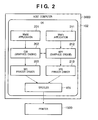
- Microsoft announced its latest OS (Windows® Vista) adopts an arrangement in which two graphics engines coexist, as shown in Fig. 2. http://www.microsoft.com/whdc/device/print/default.mspx (Advances in Windows Printing: TWPR05001_WinHEC05.ppt)
- Win32 application 201 that uses an API (Application Program Interface) (i.e., Win32 API) leverages a graphics engine 202 called a GDI (Graphic Device Interface).
- a printer driver (GDI printer driver) 203 called from the GDI 202 generates print data based on drawing data. This print processing flow will be referred to as a GDI print path hereinafter.
- Windows® Vista adds a new print processing flow called an XPS (XML Paper Specification) print path in addition to the conventional GDI print path.
- the XPS print path leverages a graphics engine 212 called a WPF (Windows® Presentation Foundation) from an application (WinFx application) 211 that uses a WinFx API.
- a printer driver (XPS printer driver) 213 converts drawing data in an XPS (XML Paper Specification) format into print data.
- graphics engines such as the GDI 202 and WPF 212 can cooperate with each other.
- the Win32 application 201 can pass drawing data to the XPS printer driver 213, and the WinFx application 211 can pass drawing data to the GDI printer driver 203.
- FIG. 3 shows cooperation between the two graphics engines in Windows@ Vista.
- a print processing flow (1) indicates the conventional GDI print path.
- the GDI 202 stores drawing data passed from the Win32 application 201 as an EMF spool file 301 having an EMF (Enhanced Metafile) format. After that, the GDI printer driver 203 converts the stored drawing data into print data.
- EMF Enhanced Metafile
- a print processing flow (4) indicates the XPS print path added in Windows® Vista.
- the WPF 212 stores drawing data passed from the WinFx application 211 as an XPS spool file 311. After that, the XPS printer driver 213 converts the stored drawing data into print data. In this way, the print processing flows (1) and (4) will be referred to as straight print paths hereinafter.
- a print processing flow (3) is used on printing data from the WinFx application 211 by the GDI printer driver 203.
- An XPS ⁇ GDI conversion module 312 converts drawing data passed from the WinFx application 211 into that of the EMF format via the WPF 212, and stores the converted data as an EMF spool file 301. After that, the GDI printer driver 203 converts the stored data into print data.
- a print processing flow (2) is used on printing data from the Win32 application 201 by the XPS printer driver 213.
- a GDI ⁇ XPS conversion module 302 converts drawing data passed from the Win32 application 201 into that of the XPS format via the GDI 202, and stores it as an XPS spool file 311. After that, the XPS printer driver 213 converts the stored data into print data. In this way, the print processing flows (2) and (3) will be referred to as cross print paths hereinafter.
- a printer can cope with print processing from both a Win32 application and a WinFx application by preparing either one of the GDI printer driver 203 or XPS printer driver 213.
- the XPS format does not support drawing data including logical operations such as ROP (raster operation processing) operations, which are supported by the EMF format. For this reason, depending on the specification determined by Microsoft Corporation, logical operation information may be excluded from such drawing data upon conversion by the GDI ⁇ XPS conversion module 302. In this case, since drawing data from which the logical operation information is discarded is passed to the XPS printer driver 312, the XPS printer driver 312 cannot generate the output result that the Win32 application 201 intended.
- ROP raster operation processing
- the EMF format does not support the advanced graphics drawing data supported by the XPS format.
- local bitmap conversion called "Flattering” is applied to such drawing data upon conversion by the XPS ⁇ GDI conversion module 312.
- the GDI printer driver 203 cannot discriminate original object attributes, and cannot generate an optimal output result. For example, upon executing N-page printing by the printer driver, since bitmap data are laid out in a reduced size, the image quality deteriorates compared to the case wherein graphics drawing objects are drawn in a reduced size.
- the EMF format does not support electronic signature information supported by the XPS format.
- the XPS format does not support processing which directly sends information from an application to the GDI printer driver 203, however, this is supported by the EMF format in the print processing flow (2). For this reason, even when an application uses functions which can be supported by print processing flows (1) and (4), such functions cannot be implemented by print processing flows (2) and (3).
- print processing flows to be referred to as "print processing flows” hereinafter
- print processing flows a print mode via the straight print path by print processing systems
- (4) will be referred to as a native print mode hereinafter
- a printer driver using such a mode will be referred to as a native driver hereinafter
- a print mode implemented via the cross print path using print processing flows (2) or (3) will be referred to as a non-native print mode, and a printer driver using such a mode will be referred to as a non-native driver hereinafter.
- the print processing speed is reduced compared to the print processing flow (1) or (4).
- a printer driver suited to an application can be easily selected.
- Fig. 1 is a diagram for explaining general print processing flows
- Fig. 2 is a diagram for explaining print processing flows when a plurality of graphics engines coexist
- Fig. 3 is a diagram for explaining print processing flows when a plurality of graphics engines coexist
- Fig. 4 is a block diagram for explaining the arrangement of an information processing system including an information processing apparatus and a printer;
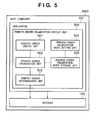
- Fig. 5 is a block diagram showing the arrangement of a printer driver enumeration display unit 500;
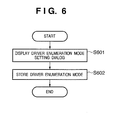
- Fig. 6 is a flowchart for explaining the processing procedure of a printer driver enumeration mode setting unit 504;
- Fig. 7 shows an example of a printer driver enumeration mode setting user interface (enumeration mode setting dialog);
- Fig. 8 is a flowchart for explaining the processing procedure of the printer driver enumeration display unit 500;
- Fig. 9 shows a display example of a printer driver enumeration displayed when the user selects the display mode of only native drivers (recommended) on the printer driver enumeration mode setting user interface shown in Fig. 7;
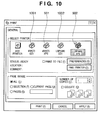
- Fig. 10 shows a display example of the detection result displayed when the user selects a display mode of compatible printer drivers on the printer driver enumeration mode setting user interface shown in Fig. 7;
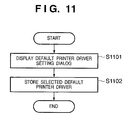
- Fig. 11 is a schematic flowchart for explaining the processing procedure for displaying a default printer driver
- Figs. 12A and 12B are flowcharts for explaining the processing procedure for displaying a default printer driver
- Fig. 13 shows an example of a user interface used to set a default printer driver
- Fig. 14 shows a save example of application-dependent default printer drivers which are used upon printing
- Fig. 15 shows a save example of graphics engine-dependent default printer drivers which are used upon printing
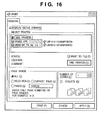
- Fig. 16 shows a display example of detected printer drivers
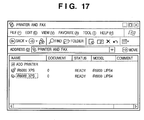
- Fig. 17 shows a display example of detected printer drivers
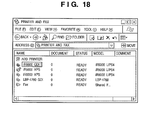
- Fig. 18 shows a display example of detected printer drivers
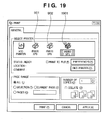
- Fig. 19 shows a window for displaying a default printer driver set as an output destination suited to an application as an output source
- Figs. 20A and 20B are diagrams showing the functional arrangement of an information processing apparatus according to one embodiment of the present invention.
- An information processing apparatus 3000 suited to this embodiment comprises a functional arrangement shown in Fig. 20A.
- a first drawing conversion unit 2010 converts a first type of drawing information generated by an application of the first type into a first type of print information which can be processed by a printer driver of the first type.
- a second drawing conversion unit 2011 converts a second type of drawing information generated by an application of the second type into a second type of print information which can be processed by a printer driver of the second type.
- a determination unit 2012 determines the type of the application of the first or second type as an output source with respect to the printer driver of the first or second type as an output destination of the first or second print information.
- a detection unit 2013 detects a printer driver that matches the type of the application of the first or second type determined by the determination unit 2012 from printer drivers of the first and second types which are installed in the information processing apparatus.
- a display control unit 2014 indicates or displays the printer driver detected by the detection unit 2013 on a display window used to select a printer driver as an output destination of the application of the first or second type as the output source.
- a setting unit 2015 sets a display condition required to indicate or display the printer driver detected by the detection unit on the display window.
- Fig. 4 is a block diagram for explaining the arrangement of an information processing system which includes the information processing apparatus (to be referred to as "host computer” hereinafter) 3000 and a printer 1500.
- host computer the information processing apparatus
- printer 1500 the printer 1500.
- a CPU 1 of the host computer 3000 can execute document processing based on a document processing program and the like stored in a program ROM of a ROM 3 or an external memory 11.
- the CPU 1 can execute document processing on data that includes graphics data, image data, text data, table data (including a spreadsheet), and the like together, and can systematically control devices connected to a system bus 4.
- the program ROM of the ROM 3 or the external memory 11 stores an operating system program (to be referred to as "OS" hereinafter) as a control program of the CPU 1.
- OS operating system program
- a font ROM of the ROM 3 or the external memory 11 stores font data and the like used upon execution of the document processing, and a data ROM of the ROM 3 or the external memory 11 stores various data used upon execution of the document processing.
- a RAM 2 serves as a main memory and work area of the CPU 1.
- Reference numeral 5 denotes a keyboard controller (KBC), which controls key inputs from a keyboard 9 and a pointing device (not shown).
- Reference numeral 6 denotes a CRT controller (CRTC), which controls display on a CRT display (CRT) 10.
- KBC keyboard controller
- CRT CRT controller
- Other display means can be used as an alternative.
- the external memory 11 such as a hard disk (HD), flexible disk (FD), etc., stores a boot program, various applications, font data, printer control command generation programs (printer drivers), and the like.
- a disk controller (DKC) 7 controls access to the external memory 11.
- Reference numeral 8 denotes a printer controller (PRTC), which is connected to the printer 1500 via a predetermined two-way interface 21, and executes communication control processing with the printer 1500.
- the CPU 1 executes rasterize processing of outline fonts on a display information RAM assured on, e.g., the RAM 2 to implement a WYSIWYG environment on the CRT 10.
- the CPU 1 opens various registered windows based on commands given by a mouse cursor or the like (not shown) on the CRT 10, and executes various kinds of data processing. Upon execution of printing, the user opens a window associated with print settings, and can set a printer and a print processing method for a printer driver as well as selection of a print mode.
- a CPU 12 of the printer 1500 outputs an image signal as output information to a printer engine 17 connected to a system bus 15 based on a control program and the like stored in a program ROM of a ROM 13 or an external memory 14.
- the program ROM of the ROM 13 stores a control program and the like of the CPU 12.
- a font ROM of the ROM 13 stores font data and the like used upon generating output information.
- a data ROM of the ROM 13 can store information and the like used on the host computer in the case of a printer which has no external memory 14 such as a hard disk or the like.
- the CPU 12 can execute communication processing with the host computer 3000 via an input unit 18, and can send information and the like in the printer 1500 to the host computer 3000.
- a RAM 19 serves as a main memory, work area, and the like of the CPU 12, and can expand its memory capacity by an option RAM connected to an expansion port (not shown). Note that the RAM 19 can also be used as an output information rasterize area, environmental data storage area, NVRAM, and the like.
- a disk controller (DKC) 20 controls access to the external memory 14 such as a hard disk (HD), IC card, or the like.
- the optional external memory 14 stores font data, emulation programs, form data, and the like.
- switches, LED indicators, and the like used to operate the printer 1500 are arranged.
- the number of external memories 14 is not limited to one, so that one or more external memories 14 may be connected.
- a plurality of external memories including an option font card in addition to built-in font data, an external memory which stores a program that interprets a printer control language of a different language system, and the like may be connected.
- the printer 1500 may comprise an NVRAM (not shown), and may store printer mode setting information from an operation unit 401.
- the information processing apparatus of this embodiment allows two graphics engines to run in Windows@ Vista, as has been explained using Fig. 3.
- the Win32 application 201 as an application of the first type outputs drawing information of the first type (GDI (Graphic Device Interface) functions).
- the GDI graphics engine 202 stores the drawing information of the first type as an EMF spool file 301 of the EMF (Enhanced Metafile) format, and converts the stored information into second print information (DDI (Device Driver Interface) functions) which can be processed by a printer driver as an output destination.
- the GDI printer driver 203 as a printer driver of the first type converts the second print information into print data.
- the print processing flow (4) indicates an XPS print path added in Windows® Vista.
- the WPF graphics engine 212 receives drawing information of the second type (WPF API information) passed from the WinFx application 211 as an application of the second type, converts it into an XPS spool file 311 as print information of the second type, and stores the converted spool file.
- the XPS printer driver 213 converts the stored information into print data.
- the print processing flows (1) and (4) will be referred to as straight print paths hereinafter.
- the print processing flow (3) is used on printing data from the WinFx application 211 by the GDI printer driver 203.
- An XPS ⁇ GDI conversion module 312 converts drawing data passed from the WinFx application 211 into drawing data of the EMF format via the WPF 212, and stores the converted data as an EMF spool file 301. After that, the GDI printer driver 203 converts the stored data into print data.
- the print processing flow (2) is used on printing data from the Win32 application 201 by the XPS printer driver 213.
- a GDI ⁇ XPS conversion module 302 converts drawing data passed from the Win32 application 201 into drawing data of the XPS format via the GDI 202, and stores the converted data as an XPS spool file 311.
- the XPS printer driver 213 converts the stored data into print data.
- the print processing flows (2) and (3) will be referred to as cross print paths hereinafter.
- a printer can cope with print processing from both the Win32 application and WinFx application by preparing either one of the GDI printer driver 203 and XPS printer driver 213.
- Fig. 5 is a block diagram showing the arrangement of a printer driver enumeration display application (to be referred to as “printer driver enumeration display unit” hereinafter).
- a printer driver enumeration display unit 500 detects printer drivers which match the type of an application, and enumerates the detection results. To implement such a function, the printer driver enumeration display unit 500 comprises the following arrangement.
- the printer driver display unit 501 presents printer drivers enumerated by a printer driver enumeration unit 502 to be described below to the user via the CRTC 6 and CRT 10.
- the printer driver enumeration unit 502 acquires the types of printer drivers from a printer driver determination unit 503 to be described later. Furthermore, the printer driver enumeration unit 502 acquires display conditions (to be referred to as "enumeration mode" hereinafter) from a printer driver enumeration mode storage unit 505. The printer driver enumeration unit 502 detects suited printer drivers from those installed in the host computer 3000 based on the types of printer drivers and the enumeration mode. Furthermore, the printer driver enumeration unit 502 enumerates and displays the detection results on the CRT 10 by controlling the CRTC 6.
- the printer driver determination unit 503 acquires printer driver information from a spooler 105, and determines the types of printer drivers. Since a technique for acquiring printer driver information from the spooler 105 is provided as an API of existing Microsoft Windows@, a detailed description thereof will be omitted.
- a printer driver enumeration mode setting unit 504 presents a display method for enumerating and displaying the printer driver detection results to the user, and stores user's settings in the printer driver enumeration mode storage unit 505.
- the printer driver enumeration mode storage unit 505 stores the enumeration mode set by the user, and passes the stored information to the printer driver enumeration unit 502.
- the printer driver enumeration mode setting unit 504 displays a printer driver enumeration mode setting dialog on the CRT 10 in step S601.
- Enumeration modes to be displayed on the CRT 10 include a mode for displaying only native drivers of an application, and a mode for displaying printable printer drivers (native and non-native drivers).
- step S602 the printer driver enumeration mode setting unit 504 stores a driver enumeration mode set by a user instruction via the enumeration mode setting dialog displayed in step S601 in the printer driver enumeration mode storage unit 505.
- Fig. 7 shows an example of a printer driver enumeration mode setting user interface (enumeration mode setting dialog) displayed by the printer driver enumeration mode setting unit 504 in step S601.
- This display example displays three different modes: a mode for displaying only native drivers of an application (recommended), a mode for displaying all compatible drivers of an application to display printable drivers, and a mode for displaying all drivers.
- buttons 701 to 703 When the user selects one of buttons 701 to 703 and then presses an OK button 704, the selected display method is set.
- the user presses a cancel button 705 before he or she presses the OK button 704 selection of the buttons 701 to 703 is canceled.
- the display timing of the setting dialog Fig.
- printer driver enumeration mode setting unit 504 can be set, that dialog can be displayed prior to detection of printer drivers and enumeration of detection results.
- the user can display the setting dialog and can select the enumeration mode at an arbitrary timing.
- Fig. 8 is a flowchart for explaining the procedure of printer driver enumeration display processing which is implemented by the respective processing units of the printer driver enumeration display unit 500 by collaboration with the CPU 1.
- step S801 the printer driver enumeration unit 502 acquires attribute information used to identify whether the type of application used to generate print data is a WinFx application or Win32 application, so as to detect and enumerate suited printer drivers.
- step S802 the printer driver enumeration unit 502 acquires the printer driver enumeration mode which is stored based on the user's settings in step S602 in Fig. 6.
- step S803 the printer driver enumeration unit 502 determines the type of application based on the attribute information used to identify it, acquired in step S801. That is, the unit 502 determines whether the type of application is a WinFx application (using the WPF graphics engine) or a Win32 application (using the GDI graphics engine).
- step S803 If the application is determined to be WinFX in step S803, the process advances to step S804; if the application is determined to be Win32, the process advances to step S809.
- step S804 the printer driver enumeration unit 502 determines the printer driver enumeration mode acquired in step S802. If the enumeration mode is that of native printer drivers (701 in Fig. 7) (S804 - Yes), the process advances to step S805. In step S805, the printer driver enumeration unit 502 detects XPS printer drivers and enumerates the detection results, and notifies the printer driver display unit 501 of the detection results. The printer driver display unit 501 displays the notified printer drivers (XPS drivers in this case), thus ending the processing.
- Fig. 9 shows a display example of the printer driver enumeration displayed when the user selects the display mode (701) of only native drivers (recommended) on the printer driver enumeration mode setting user interface in Fig. 7.
- iR6570XPS (901) and LBP5900XPS (902) are enumerated as native printer drivers compliant to the WinFx application.
- That printer driver may be selected (highlighted) and displayed.
- LBP5900XPS (902) is highlighted and displayed.
- step S804 If it is determined in step S804 that the enumeration mode of printer drivers is other than that of native printer drivers (if the user selects the button 702 or 703 in Fig. 7) (S804 - No), the process advances to step S806.
- step S806 If it is determined in step S806 that the enumeration mode of compatible printer drivers is set (if the user selects the button 702 in Fig. 7), the process advances to step S807.
- step S807 the printer driver enumeration unit 502 detects XPS printer drivers as those of the graphics engine that can be used in print processing of the WinFx application, and printer drivers, which have compatibility in terms of print functions and quality, of GDI printer drivers. The unit 502 then enumerates detection results, thus ending the processing.
- Fig. 10 shows a display example of the detection results when the user selects a display mode (702 in Fig. 7) of compatible printer drivers on the printer driver enumeration mode setting user interface in Fig. 7.
- iR6570XPS (901) and LBP5900XPS (902) are enumerated as native printer drivers compliant to the WinFx application.
- Ir6570GDI (1001) and LBP5900GDI (1002) compliant to the Win32 application are also enumerated and displayed.
- that printer driver may be highlighted and displayed.
- LBP5900XPS (902) is highlighted and displayed as in Fig. 9.
- Step S806 is the case wherein the user selects the display mode of all drivers on the user interface of Fig. 7 (when the user selects the button 703 in Fig. 7), and the printer driver enumeration unit 502 detects all printer drivers, and enumerates the detection results, thus ending the processing.
- step S809 the printer driver enumeration mode acquired in step S802 above is determined. If the type of application is the Win32 application, and the enumeration mode of native printer driver is set (S809 - Yes), the process advances to step S811, and the printer driver enumeration unit 502 detects only GDI printer drivers and enumerates the detection results, thus ending the processing.
- step S809 determines whether the enumeration mode of native printer drivers is not set (S809 - No). If it is determined in step S809 that the enumeration mode of native printer drivers is not set (S809 - No), the process advances to step S810 and the processing ends without detecting any installed printer drivers. In this case, no printer drivers are enumerated as the detection results.
- the arrangement of the printer driver enumeration display unit 500 described using Fig. 5 exemplifies that the application 101 includes the printer driver enumeration display unit 500 and its building components (501 to 505).
- the central point of this embodiment is not limited to such a specific arrangement.
- an arrangement in which the printer driver enumeration display unit 500 may be included in the spooler 105 or OS 102.
- the detection results of only native drivers are displayed, as shown in Fig. 17, and those of compatible printer drivers are displayed, as shown in Fig. 18.
- an arrangement which can acquire information of a graphics engine used by the application 101 and can acquire printer driver information provided by the spooler 105 is adopted, an arrangement in which the printer driver enumeration display unit 500 is not included in the application 101 may be adopted.
- This embodiment exemplifies the information processing apparatus in which the WPF 212 and GDI 202 exist together as examples of different graphics engines, and which can install the XPS printer driver 213 and GDI printer driver 203.
- the central point of the present invention is not limited to such a specific example.
- the present invention can be applied to an arrangement which includes another graphics engine, and an application and printer drivers compliant to such a graphic engine, in addition to the above arrangement.
- the present invention can be applied to an arrangement which includes three or more graphics engines, and applications and printer drivers compliant to these graphics engines.
- printer drivers In the display example of the detection results of printer drivers in this embodiment, only printer drivers which match the type of application and the designated enumeration mode are enumerated, and those which do not match them are not displayed.
- all these printer drivers may be displayed, and only those which meet the conditions may be identifiably displayed.
- printer drivers may be visually identifiable (e.g., by changing the background color, changing the display color of a printer driver of interest, and so forth) so that the ser can select a printer driver which meets the conditions.
- printer drivers of different graphics engines can be installed, printer drivers suited to an application can be easily selected.
- This embodiment will explain an arrangement and method that display a default printer driver as a suited output destination in accordance with the printer driver enumeration mode set by the user in the arrangement described in the first embodiment. Since the arrangement according to this embodiment is the same as that according to the first embodiment, a description will be omitted to avoid a redundant description. As for the same processes, a description of those common to the processing according to the first embodiment will be omitted.
- An information processing apparatus 3000 suited to this embodiment comprises a functional arrangement shown in Fig. 20B.
- a first drawing conversion unit 2020 converts first drawing information generated by an application of the first type into first print information which can be processed by a printer driver of the first type.
- a second drawing conversion unit 2021 converts second drawing information generated by an application of the second type into second print information which can be processed by a printer driver of the second type.
- a setting unit 2022 sets a default printer driver.
- the setting unit 2022 can set a default printer driver for each application of the first or second type. Also, the setting unit 2022 can set a default printer driver compliant to the application of the first or second type.
- a determination unit 2023 determines the type of the application of the first or second type as an output source with respect to the printer driver of the first or second type as an output destination of the first or second print information.
- a detection unit 2024 detects a default printer driver set by the setting unit 2022 with respect to the application of the first or second type determined by the determination unit 2023.
- a display control unit 2025 highlights and displays printer drivers detected by the detection unit 2024 on a display window used to select a printer driver which serves as the output destination of the application of the first and second type as the output source.
- Fig. 11 is a schematic flowchart for explaining the procedure of the processing for displaying a default printer driver.
- step S1101 a default printer driver setting dialog is displayed on the CRT 10.
- step S1102 the selected printer driver is stored.
- Fig. 13 shows an example of a user interface used to set a default printer driver according to this embodiment.
- Fig. 13 exemplifies selection of a default printer driver upon printing.
- default printer drivers of graphics engines used in print processing may be selected from one user interface.
- the user interface in Fig. 13 exemplifies a case wherein iR3300XPS is selected as a default printer driver.
- step S1102 the default printer driver selected in step S1101 is stored in the printer driver enumeration unit 502, thus ending the processing.
- Fig. 14 shows a storage example of application-dependent default printer drivers which are used for printing.
- Application names (1401) and default printers (1403) compliant to application operation modes (WinFx application or Win32 application) (1402) are stored.
- Fig. 15 shows a storage example of graphics engine-dependent default printer drivers which are used for printing.
- suitable printer drivers are detected, and enumerated and displayed in accordance with the type of application and the printer driver enumeration mode.
- a default printer driver is set to allow the user to further select a preferred printer driver from this enumeration display, it is displayed to notify the user of this.
- step S1201 After enumeration display, the process advances to step S1201 to check if default printer drivers for respective applications are stored (set) in step S1102 in Fig. 11. If default printer drivers for respective applications are set (S1201 - Yes), the process advances to step S1202 to display the default printer drivers for respective applications on the CRT 10, thus ending the processing. Note that determination in step S1201 and display in step S1202 are based on information shown in Fig. 14.
- Fig. 19 shows an example of display of a default printer driver as the output destination suited to an application of the output source.
- a default printer driver 1901 is added to printer drivers (901, 902) enumerated in step S805.
- the default printer driver (iR3300XPS) 1901 is selected on the user interface shown in Fig. 13. In order to visualize the default printer driver as a more preferable printer driver, it may be highlighted and displayed. As another display example of Fig. 19, the detection results may be narrowed down, and only the default printer driver 1901 may be displayed.
- step S1201 determines whether default printer drivers for respective applications are not stored (set) (S1201 - No). If it is determined in step S1201 that default printer drivers for respective applications are not stored (set) (S1201 - No), the process advances to step S1203. It is checked in step S1203 if a default printer driver of a graphics engine used in print processing is stored (set). If the default printer driver of the graphics engine is set, the process advances to step S1204, and the default printer driver of the graphics engine of interest is displayed on the CRT 10, thus ending the processing. Note that determination in step S1203 and display in step S1204 are based on information shown in Fig. 15.
- step S1203 If it is determined in step S1203 that a default printer driver of a graphics engine used in print processing is not set (S1203 - No), the process advances to step S1205. It is checked in step S1205 if a default printer driver of all printer drivers is registered. If a default printer driver is registered (S1205 - Yes), the printer driver set as a default is displayed on the CRT 10, thus ending the processing (S1206). If it is determined in step S1205 that a default printer driver of all the printer drivers is not registered (S1205 - No), the processing ends.
- determination of a default printer driver in steps S1201, S1203, and S1205 in Fig. 12B is not limited to this order, and the user may arbitrary select the priority order.
- a default printer driver can be selected as a suitable output destination from enumerated printer drivers in accordance with an application or graphics engine to be used.
- the objects of the present invention are also achieved by supplying a storage medium, which records a program code of a software program that can implement the functions of the above-mentioned embodiments to a system or apparatus. Also, the objects are achieved by reading out and executing the program code stored in the storage medium by a computer (or a CPU or MPU) of the system or apparatus.
- the program code itself read out from the storage medium implements the functions of the above-mentioned embodiments, and the storage medium which stores the program code constitutes the present invention.
- the storage medium for supplying the program code for example, a flexible disk, hard disk, optical disk, magneto-optical disk, CD-ROM, CD-R, nonvolatile memory card, ROM, and the like may be used.
- the functions of the above-mentioned embodiments may be implemented not only by executing the readout program code by the computer but also by some or all of actual processing operations executed by an OS (operating system) running on the computer based on an instruction of the program code.
- OS operating system
Landscapes
- Engineering & Computer Science (AREA)
- Theoretical Computer Science (AREA)
- Physics & Mathematics (AREA)
- General Engineering & Computer Science (AREA)
- General Physics & Mathematics (AREA)
- Human Computer Interaction (AREA)
- Software Systems (AREA)
- Record Information Processing For Printing (AREA)
- User Interface Of Digital Computer (AREA)
- Accessory Devices And Overall Control Thereof (AREA)
Applications Claiming Priority (1)
| Application Number | Priority Date | Filing Date | Title |
|---|---|---|---|
| JP2006075546A JP4785578B2 (ja) | 2006-03-17 | 2006-03-17 | 情報処理装置およびその方法 |
Publications (3)
| Publication Number | Publication Date |
|---|---|
| EP1835401A2 true EP1835401A2 (fr) | 2007-09-19 |
| EP1835401A3 EP1835401A3 (fr) | 2009-07-15 |
| EP1835401B1 EP1835401B1 (fr) | 2011-10-05 |
Family
ID=38017065
Family Applications (1)
| Application Number | Title | Priority Date | Filing Date |
|---|---|---|---|
| EP07104038A Not-in-force EP1835401B1 (fr) | 2006-03-17 | 2007-03-13 | Appareil de traitement d'informations et son procédé |
Country Status (6)
| Country | Link |
|---|---|
| US (1) | US7916330B2 (fr) |
| EP (1) | EP1835401B1 (fr) |
| JP (1) | JP4785578B2 (fr) |
| KR (1) | KR100949220B1 (fr) |
| CN (1) | CN100480982C (fr) |
| AT (1) | ATE527598T1 (fr) |
Cited By (1)
| Publication number | Priority date | Publication date | Assignee | Title |
|---|---|---|---|---|
| EP2048577A3 (fr) * | 2007-10-10 | 2009-07-15 | Samsung Electronics Co., Ltd. | Procédé et appareil de commande d'un pilote d'imprimante |
Families Citing this family (23)
| Publication number | Priority date | Publication date | Assignee | Title |
|---|---|---|---|---|
| JP5441303B2 (ja) * | 2006-01-20 | 2014-03-12 | キヤノン株式会社 | 情報処理装置及び情報処理方法 |
| JP4785580B2 (ja) * | 2006-03-17 | 2011-10-05 | キヤノン株式会社 | 画像形成装置及びその制御方法、プログラム |
| KR20090031111A (ko) * | 2007-09-21 | 2009-03-25 | 삼성전자주식회사 | 화상형성장치 드라이버 프로그램의 관리 방법 및 장치 |
| JP5142745B2 (ja) * | 2008-02-12 | 2013-02-13 | キヤノン株式会社 | デバイス管理システム、デバイス管理方法、情報処理装置、情報処理方法、プログラムおよび記憶媒体 |
| JP4524317B2 (ja) | 2008-02-21 | 2010-08-18 | 株式会社沖データ | 印刷システム及び情報処理装置 |
| JP5100488B2 (ja) * | 2008-04-28 | 2012-12-19 | キヤノン株式会社 | 情報処理装置、情報処理方法、プログラム |
| US8149430B2 (en) * | 2008-05-08 | 2012-04-03 | Canon Kabushiki Kaisha | Dual-head or hybrid print driver supporting XPS and GDI print paths without performing data conversion between XPS to EMF or vice versa |
| US8479192B2 (en) * | 2008-06-27 | 2013-07-02 | Xerox Corporation | Dynamic XPS filter |
| JP4840672B2 (ja) * | 2008-11-26 | 2011-12-21 | ブラザー工業株式会社 | 画像形成装置 |
| JP4683125B2 (ja) * | 2008-12-24 | 2011-05-11 | ブラザー工業株式会社 | 複写機 |
| JP2010160616A (ja) * | 2009-01-07 | 2010-07-22 | Seiko Epson Corp | ホスト装置、ホスト装置の制御方法、画像形成システム及びコンピュータープログラム |
| CN102043359A (zh) * | 2009-10-13 | 2011-05-04 | 株式会社东芝 | 印刷装置及印刷控制方法 |
| KR101612757B1 (ko) * | 2009-12-17 | 2016-04-26 | 삼성전자주식회사 | 인쇄 제어 단말장치 및 xps 파일 인쇄방법 |
| JP5595035B2 (ja) * | 2009-12-28 | 2014-09-24 | キヤノン株式会社 | 情報処理装置、その方法及びプログラム |
| JP5995461B2 (ja) | 2012-02-24 | 2016-09-21 | キヤノン株式会社 | 情報処理装置、制御方法、プログラム |
| JP5983094B2 (ja) * | 2012-06-27 | 2016-08-31 | ブラザー工業株式会社 | ドライバ管理プログラム、及び、情報処理装置 |
| CN103888522A (zh) * | 2014-03-11 | 2014-06-25 | 青岛海信电器股份有限公司 | 一种推荐应用的方法和电子设备 |
| JP6032567B2 (ja) * | 2014-05-08 | 2016-11-30 | コニカミノルタ株式会社 | プリンタドライバ及び印刷システム並びにプリンタドライバの画面表示方法 |
| JP2017021647A (ja) * | 2015-07-13 | 2017-01-26 | 株式会社リコー | プログラム、情報処理装置、インストールシステムおよびインストール方法 |
| US9965231B2 (en) * | 2015-07-23 | 2018-05-08 | Konica Minolta, Inc. | Printer driver and information processing device |
| US10275192B2 (en) * | 2016-09-08 | 2019-04-30 | Ricoh Company, Ltd. | Information processing apparatus, image processing system, and printer driver |
| US10761795B2 (en) * | 2018-06-29 | 2020-09-01 | PrinterLogic, Inc. | Printer driver profiles |
| US10255009B1 (en) * | 2018-09-28 | 2019-04-09 | Konica Minolta Laboratory U.S.A., Inc. | System and method for displaying a printing software user interface |
Family Cites Families (16)
| Publication number | Priority date | Publication date | Assignee | Title |
|---|---|---|---|---|
| JP3446532B2 (ja) * | 1997-04-23 | 2003-09-16 | セイコーエプソン株式会社 | コンピュータシステムの周辺機器 |
| JPH11184656A (ja) | 1997-12-19 | 1999-07-09 | Toshiba Corp | プリンタドライバ自動認識装置およびプリンタドライバ自動認識プログラムを記録したコンピュータ読み取り可能な記録媒体 |
| US6707568B1 (en) | 1999-11-02 | 2004-03-16 | Ricoh Company, Ltd. | Printer driver filter and method of printing with the same |
| JP3740346B2 (ja) * | 2000-02-04 | 2006-02-01 | キヤノン株式会社 | サーバ装置およびデバイス装置およびデータ処理方法およびコンピュータが読み取り可能なプログラムを格納した記憶媒体 |
| JP2002254774A (ja) | 2000-12-25 | 2002-09-11 | Canon Inc | 印刷制御方法、印刷情報生成装置、印刷制御装置、印刷制御システム、及び制御プログラムを提供する媒体 |
| JP2002222184A (ja) * | 2001-01-29 | 2002-08-09 | Jekku:Kk | 印刷データレイアウト編集システム及び記録媒体 |
| JP3809389B2 (ja) | 2001-04-19 | 2006-08-16 | キヤノン株式会社 | 印刷制御装置、情報処理装置、印刷制御方法、情報処理装置の方法及びプログラム |
| JP2003216378A (ja) * | 2001-11-15 | 2003-07-31 | Canon Inc | 情報処理装置及び方法及びコンピュータプログラム及びコンピュータ可読記憶媒体 |
| JP2005018494A (ja) * | 2003-06-27 | 2005-01-20 | Canon Inc | データ処理装置および印刷データ生成方法およびコンピュータが読取り可能なプログラムを格納した記憶媒体およびプログラム |
| JP4827388B2 (ja) * | 2003-07-31 | 2011-11-30 | キヤノン株式会社 | 通信システム、情報処理装置、印刷制御方法、及びプログラム |
| JP4266766B2 (ja) | 2003-10-10 | 2009-05-20 | キヤノン株式会社 | 情報処理装置および情報処理方法 |
| JP4006392B2 (ja) | 2003-12-03 | 2007-11-14 | キヤノン株式会社 | 情報処理装置、及び、制御プログラム |
| JP2005193648A (ja) | 2003-12-09 | 2005-07-21 | Canon Inc | 印刷制御装置、印刷制御方法およびコンピュータプログラム |
| CN1588312A (zh) * | 2004-08-31 | 2005-03-02 | 北京智凯办公自动化设备有限公司 | 打印机程序及参数设置的远程更新方法及系统 |
| JP2006092363A (ja) | 2004-09-24 | 2006-04-06 | Canon Inc | 印刷制御プログラム、印刷制御方法、および情報処理装置 |
| JP5441303B2 (ja) | 2006-01-20 | 2014-03-12 | キヤノン株式会社 | 情報処理装置及び情報処理方法 |
-
2006
- 2006-03-17 JP JP2006075546A patent/JP4785578B2/ja not_active Expired - Fee Related
-
2007
- 2007-03-02 US US11/681,660 patent/US7916330B2/en not_active Expired - Fee Related
- 2007-03-13 EP EP07104038A patent/EP1835401B1/fr not_active Not-in-force
- 2007-03-13 AT AT07104038T patent/ATE527598T1/de not_active IP Right Cessation
- 2007-03-16 CN CNB2007100885679A patent/CN100480982C/zh not_active Expired - Fee Related
- 2007-03-16 KR KR1020070025949A patent/KR100949220B1/ko not_active Expired - Fee Related
Non-Patent Citations (1)
| Title |
|---|
| None |
Cited By (1)
| Publication number | Priority date | Publication date | Assignee | Title |
|---|---|---|---|---|
| EP2048577A3 (fr) * | 2007-10-10 | 2009-07-15 | Samsung Electronics Co., Ltd. | Procédé et appareil de commande d'un pilote d'imprimante |
Also Published As
| Publication number | Publication date |
|---|---|
| CN100480982C (zh) | 2009-04-22 |
| ATE527598T1 (de) | 2011-10-15 |
| JP4785578B2 (ja) | 2011-10-05 |
| EP1835401B1 (fr) | 2011-10-05 |
| CN101038537A (zh) | 2007-09-19 |
| EP1835401A3 (fr) | 2009-07-15 |
| US20070216939A1 (en) | 2007-09-20 |
| JP2007249855A (ja) | 2007-09-27 |
| KR20070094546A (ko) | 2007-09-20 |
| US7916330B2 (en) | 2011-03-29 |
| KR100949220B1 (ko) | 2010-03-24 |
Similar Documents
| Publication | Publication Date | Title |
|---|---|---|
| EP1835401B1 (fr) | Appareil de traitement d'informations et son procédé | |
| CN101395569B (zh) | 用于改变信息处理设备中的打印机驱动程序的方法 | |
| US8537438B2 (en) | Information processing apparatus in which a plurality of types of print drivers and plurality of graphics units run, control method therefor, and program | |
| EP1710699B1 (fr) | Appareil de traitement d'informations capable de personnaliser un pilote, procédé de traitement d'informations et programme de commande | |
| US7325235B2 (en) | Data processing apparatus, data processing method, program, and storage medium | |
| KR100838871B1 (ko) | 정보 처리 장치, 정보 처리 방법, 및 기억 매체 | |
| JP2005228243A (ja) | 情報処理装置及びその制御方法、プログラム | |
| EP3293628B1 (fr) | Appareil de traitement d'informations et procédé de traitement d'informations | |
| US12547357B2 (en) | Information processing apparatus, method for controlling information processing apparatus, and storage medium | |
| US20110026079A1 (en) | Information processing apparatus, information processing method, and storage medium | |
| JP2002091728A (ja) | 情報処理装置、印刷システム、及びコマンド生成方法 | |
| US9990572B2 (en) | Information processing apparatus, print data generation method, and storage medium | |
| JP2006215725A (ja) | 印刷システムおよびプリンタ管理方法およびコンピュータが読み取り可能なプログラムを格納した記憶媒体およびプログラム | |
| JP2002328786A (ja) | 情報処理装置および情報処理方法および印刷制御プログラムおよび記憶媒体および印刷制御システム | |
| JP2009146362A (ja) | 情報処理装置、情報処理方法、プログラム、及び記憶媒体 | |
| JP2005165741A (ja) | 情報処理装置、印刷システム、情報処理装置の処理データ生成方法、及び制御プログラム | |
| JP2006178623A (ja) | 印刷制御装置および印刷制御方法および印刷制御プログラム | |
| JP2008001076A (ja) | 画像形成装置及び画像形成装置の制御方法、プログラム、記憶媒体 | |
| JP2006059235A (ja) | ダイレクトプリンティングシステムおよびその制御 | |
| JP2007066063A (ja) | 印刷制御方法及び装置並びにプログラム | |
| JP2013186844A (ja) | プリンタ制御装置 | |
| JP2003256160A (ja) | 情報処理装置、印刷制御方法、プログラム及び記憶媒体 | |
| JP2000218901A (ja) | 情報処理装置、情報処理方法及びコンピュータ読み取り可能なプログラムが格納された記憶媒体 | |
| JP2007115026A (ja) | 印刷制御装置、印刷制御方法、印刷制御プログラム及び記録媒体 |
Legal Events
| Date | Code | Title | Description |
|---|---|---|---|
| PUAI | Public reference made under article 153(3) epc to a published international application that has entered the european phase |
Free format text: ORIGINAL CODE: 0009012 |
|
| AK | Designated contracting states |
Kind code of ref document: A2 Designated state(s): AT BE BG CH CY CZ DE DK EE ES FI FR GB GR HU IE IS IT LI LT LU LV MC MT NL PL PT RO SE SI SK TR |
|
| AX | Request for extension of the european patent |
Extension state: AL BA HR MK YU |
|
| PUAL | Search report despatched |
Free format text: ORIGINAL CODE: 0009013 |
|
| AK | Designated contracting states |
Kind code of ref document: A3 Designated state(s): AT BE BG CH CY CZ DE DK EE ES FI FR GB GR HU IE IS IT LI LT LU LV MC MT NL PL PT RO SE SI SK TR |
|
| AX | Request for extension of the european patent |
Extension state: AL BA HR MK RS |
|
| 17P | Request for examination filed |
Effective date: 20100113 |
|
| AKX | Designation fees paid |
Designated state(s): AT BE BG CH CY CZ DE DK EE ES FI FR GB GR HU IE IS IT LI LT LU LV MC MT NL PL PT RO SE SI SK TR |
|
| GRAP | Despatch of communication of intention to grant a patent |
Free format text: ORIGINAL CODE: EPIDOSNIGR1 |
|
| GRAS | Grant fee paid |
Free format text: ORIGINAL CODE: EPIDOSNIGR3 |
|
| GRAA | (expected) grant |
Free format text: ORIGINAL CODE: 0009210 |
|
| AK | Designated contracting states |
Kind code of ref document: B1 Designated state(s): AT BE BG CH CY CZ DE DK EE ES FI FR GB GR HU IE IS IT LI LT LU LV MC MT NL PL PT RO SE SI SK TR |
|
| REG | Reference to a national code |
Ref country code: GB Ref legal event code: FG4D |
|
| REG | Reference to a national code |
Ref country code: CH Ref legal event code: EP |
|
| REG | Reference to a national code |
Ref country code: IE Ref legal event code: FG4D |
|
| REG | Reference to a national code |
Ref country code: DE Ref legal event code: R096 Ref document number: 602007017602 Country of ref document: DE Effective date: 20111201 |
|
| REG | Reference to a national code |
Ref country code: NL Ref legal event code: VDEP Effective date: 20111005 |
|
| PG25 | Lapsed in a contracting state [announced via postgrant information from national office to epo] |
Ref country code: SI Free format text: LAPSE BECAUSE OF FAILURE TO SUBMIT A TRANSLATION OF THE DESCRIPTION OR TO PAY THE FEE WITHIN THE PRESCRIBED TIME-LIMIT Effective date: 20111005 |
|
| LTIE | Lt: invalidation of european patent or patent extension |
Effective date: 20111005 |
|
| REG | Reference to a national code |
Ref country code: AT Ref legal event code: MK05 Ref document number: 527598 Country of ref document: AT Kind code of ref document: T Effective date: 20111005 |
|
| PG25 | Lapsed in a contracting state [announced via postgrant information from national office to epo] |
Ref country code: IS Free format text: LAPSE BECAUSE OF FAILURE TO SUBMIT A TRANSLATION OF THE DESCRIPTION OR TO PAY THE FEE WITHIN THE PRESCRIBED TIME-LIMIT Effective date: 20120205 Ref country code: BE Free format text: LAPSE BECAUSE OF FAILURE TO SUBMIT A TRANSLATION OF THE DESCRIPTION OR TO PAY THE FEE WITHIN THE PRESCRIBED TIME-LIMIT Effective date: 20111005 Ref country code: LT Free format text: LAPSE BECAUSE OF FAILURE TO SUBMIT A TRANSLATION OF THE DESCRIPTION OR TO PAY THE FEE WITHIN THE PRESCRIBED TIME-LIMIT Effective date: 20111005 |
|
| PG25 | Lapsed in a contracting state [announced via postgrant information from national office to epo] |
Ref country code: NL Free format text: LAPSE BECAUSE OF FAILURE TO SUBMIT A TRANSLATION OF THE DESCRIPTION OR TO PAY THE FEE WITHIN THE PRESCRIBED TIME-LIMIT Effective date: 20111005 Ref country code: GR Free format text: LAPSE BECAUSE OF FAILURE TO SUBMIT A TRANSLATION OF THE DESCRIPTION OR TO PAY THE FEE WITHIN THE PRESCRIBED TIME-LIMIT Effective date: 20120106 Ref country code: LV Free format text: LAPSE BECAUSE OF FAILURE TO SUBMIT A TRANSLATION OF THE DESCRIPTION OR TO PAY THE FEE WITHIN THE PRESCRIBED TIME-LIMIT Effective date: 20111005 Ref country code: SE Free format text: LAPSE BECAUSE OF FAILURE TO SUBMIT A TRANSLATION OF THE DESCRIPTION OR TO PAY THE FEE WITHIN THE PRESCRIBED TIME-LIMIT Effective date: 20111005 Ref country code: PT Free format text: LAPSE BECAUSE OF FAILURE TO SUBMIT A TRANSLATION OF THE DESCRIPTION OR TO PAY THE FEE WITHIN THE PRESCRIBED TIME-LIMIT Effective date: 20120206 |
|
| PG25 | Lapsed in a contracting state [announced via postgrant information from national office to epo] |
Ref country code: CY Free format text: LAPSE BECAUSE OF FAILURE TO SUBMIT A TRANSLATION OF THE DESCRIPTION OR TO PAY THE FEE WITHIN THE PRESCRIBED TIME-LIMIT Effective date: 20111005 |
|
| PG25 | Lapsed in a contracting state [announced via postgrant information from national office to epo] |
Ref country code: CZ Free format text: LAPSE BECAUSE OF FAILURE TO SUBMIT A TRANSLATION OF THE DESCRIPTION OR TO PAY THE FEE WITHIN THE PRESCRIBED TIME-LIMIT Effective date: 20111005 Ref country code: SK Free format text: LAPSE BECAUSE OF FAILURE TO SUBMIT A TRANSLATION OF THE DESCRIPTION OR TO PAY THE FEE WITHIN THE PRESCRIBED TIME-LIMIT Effective date: 20111005 Ref country code: BG Free format text: LAPSE BECAUSE OF FAILURE TO SUBMIT A TRANSLATION OF THE DESCRIPTION OR TO PAY THE FEE WITHIN THE PRESCRIBED TIME-LIMIT Effective date: 20120105 Ref country code: EE Free format text: LAPSE BECAUSE OF FAILURE TO SUBMIT A TRANSLATION OF THE DESCRIPTION OR TO PAY THE FEE WITHIN THE PRESCRIBED TIME-LIMIT Effective date: 20111005 Ref country code: DK Free format text: LAPSE BECAUSE OF FAILURE TO SUBMIT A TRANSLATION OF THE DESCRIPTION OR TO PAY THE FEE WITHIN THE PRESCRIBED TIME-LIMIT Effective date: 20111005 |
|
| PLBE | No opposition filed within time limit |
Free format text: ORIGINAL CODE: 0009261 |
|
| STAA | Information on the status of an ep patent application or granted ep patent |
Free format text: STATUS: NO OPPOSITION FILED WITHIN TIME LIMIT |
|
| PG25 | Lapsed in a contracting state [announced via postgrant information from national office to epo] |
Ref country code: PL Free format text: LAPSE BECAUSE OF FAILURE TO SUBMIT A TRANSLATION OF THE DESCRIPTION OR TO PAY THE FEE WITHIN THE PRESCRIBED TIME-LIMIT Effective date: 20111005 Ref country code: IT Free format text: LAPSE BECAUSE OF FAILURE TO SUBMIT A TRANSLATION OF THE DESCRIPTION OR TO PAY THE FEE WITHIN THE PRESCRIBED TIME-LIMIT Effective date: 20111005 Ref country code: RO Free format text: LAPSE BECAUSE OF FAILURE TO SUBMIT A TRANSLATION OF THE DESCRIPTION OR TO PAY THE FEE WITHIN THE PRESCRIBED TIME-LIMIT Effective date: 20111005 |
|
| 26N | No opposition filed |
Effective date: 20120706 |
|
| PG25 | Lapsed in a contracting state [announced via postgrant information from national office to epo] |
Ref country code: MC Free format text: LAPSE BECAUSE OF NON-PAYMENT OF DUE FEES Effective date: 20120331 |
|
| REG | Reference to a national code |
Ref country code: DE Ref legal event code: R097 Ref document number: 602007017602 Country of ref document: DE Effective date: 20120706 Ref country code: CH Ref legal event code: PL |
|
| REG | Reference to a national code |
Ref country code: FR Ref legal event code: ST Effective date: 20121130 |
|
| REG | Reference to a national code |
Ref country code: IE Ref legal event code: MM4A |
|
| PG25 | Lapsed in a contracting state [announced via postgrant information from national office to epo] |
Ref country code: FR Free format text: LAPSE BECAUSE OF NON-PAYMENT OF DUE FEES Effective date: 20120402 Ref country code: LI Free format text: LAPSE BECAUSE OF NON-PAYMENT OF DUE FEES Effective date: 20120331 Ref country code: AT Free format text: LAPSE BECAUSE OF FAILURE TO SUBMIT A TRANSLATION OF THE DESCRIPTION OR TO PAY THE FEE WITHIN THE PRESCRIBED TIME-LIMIT Effective date: 20111005 Ref country code: IE Free format text: LAPSE BECAUSE OF NON-PAYMENT OF DUE FEES Effective date: 20120313 Ref country code: CH Free format text: LAPSE BECAUSE OF NON-PAYMENT OF DUE FEES Effective date: 20120331 |
|
| REG | Reference to a national code |
Ref country code: DE Ref legal event code: R119 Ref document number: 602007017602 Country of ref document: DE Effective date: 20121002 |
|
| PG25 | Lapsed in a contracting state [announced via postgrant information from national office to epo] |
Ref country code: ES Free format text: LAPSE BECAUSE OF FAILURE TO SUBMIT A TRANSLATION OF THE DESCRIPTION OR TO PAY THE FEE WITHIN THE PRESCRIBED TIME-LIMIT Effective date: 20120116 |
|
| PG25 | Lapsed in a contracting state [announced via postgrant information from national office to epo] |
Ref country code: FI Free format text: LAPSE BECAUSE OF FAILURE TO SUBMIT A TRANSLATION OF THE DESCRIPTION OR TO PAY THE FEE WITHIN THE PRESCRIBED TIME-LIMIT Effective date: 20111005 |
|
| PG25 | Lapsed in a contracting state [announced via postgrant information from national office to epo] |
Ref country code: MT Free format text: LAPSE BECAUSE OF FAILURE TO SUBMIT A TRANSLATION OF THE DESCRIPTION OR TO PAY THE FEE WITHIN THE PRESCRIBED TIME-LIMIT Effective date: 20111005 |
|
| PG25 | Lapsed in a contracting state [announced via postgrant information from national office to epo] |
Ref country code: TR Free format text: LAPSE BECAUSE OF FAILURE TO SUBMIT A TRANSLATION OF THE DESCRIPTION OR TO PAY THE FEE WITHIN THE PRESCRIBED TIME-LIMIT Effective date: 20111005 |
|
| PG25 | Lapsed in a contracting state [announced via postgrant information from national office to epo] |
Ref country code: LU Free format text: LAPSE BECAUSE OF NON-PAYMENT OF DUE FEES Effective date: 20120313 |
|
| PG25 | Lapsed in a contracting state [announced via postgrant information from national office to epo] |
Ref country code: HU Free format text: LAPSE BECAUSE OF FAILURE TO SUBMIT A TRANSLATION OF THE DESCRIPTION OR TO PAY THE FEE WITHIN THE PRESCRIBED TIME-LIMIT Effective date: 20070313 |
|
| PG25 | Lapsed in a contracting state [announced via postgrant information from national office to epo] |
Ref country code: DE Free format text: LAPSE BECAUSE OF FAILURE TO SUBMIT A TRANSLATION OF THE DESCRIPTION OR TO PAY THE FEE WITHIN THE PRESCRIBED TIME-LIMIT Effective date: 20121002 |
|
| PGFP | Annual fee paid to national office [announced via postgrant information from national office to epo] |
Ref country code: GB Payment date: 20200326 Year of fee payment: 14 |
|
| GBPC | Gb: european patent ceased through non-payment of renewal fee |
Effective date: 20210313 |
|
| PG25 | Lapsed in a contracting state [announced via postgrant information from national office to epo] |
Ref country code: GB Free format text: LAPSE BECAUSE OF NON-PAYMENT OF DUE FEES Effective date: 20210313 |