EP1843275A2 - Detektion abweichender Seiten während des Scannens - Google Patents
Detektion abweichender Seiten während des Scannens Download PDFInfo
- Publication number
- EP1843275A2 EP1843275A2 EP07112438A EP07112438A EP1843275A2 EP 1843275 A2 EP1843275 A2 EP 1843275A2 EP 07112438 A EP07112438 A EP 07112438A EP 07112438 A EP07112438 A EP 07112438A EP 1843275 A2 EP1843275 A2 EP 1843275A2
- Authority
- EP
- European Patent Office
- Prior art keywords
- page
- image
- document
- images
- pages
- Prior art date
- Legal status (The legal status is an assumption and is not a legal conclusion. Google has not performed a legal analysis and makes no representation as to the accuracy of the status listed.)
- Withdrawn
Links
Images

Classifications
-
- G—PHYSICS
- G06—COMPUTING OR CALCULATING; COUNTING
- G06V—IMAGE OR VIDEO RECOGNITION OR UNDERSTANDING
- G06V30/00—Character recognition; Recognising digital ink; Document-oriented image-based pattern recognition
- G06V30/40—Document-oriented image-based pattern recognition
- G06V30/41—Analysis of document content
- G06V30/416—Extracting the logical structure, e.g. chapters, sections or page numbers; Identifying elements of the document, e.g. authors
-
- G—PHYSICS
- G06—COMPUTING OR CALCULATING; COUNTING
- G06V—IMAGE OR VIDEO RECOGNITION OR UNDERSTANDING
- G06V10/00—Arrangements for image or video recognition or understanding
- G06V10/20—Image preprocessing
- G06V10/24—Aligning, centring, orientation detection or correction of the image
- G06V10/242—Aligning, centring, orientation detection or correction of the image by image rotation, e.g. by 90 degrees
-
- G—PHYSICS
- G06—COMPUTING OR CALCULATING; COUNTING
- G06V—IMAGE OR VIDEO RECOGNITION OR UNDERSTANDING
- G06V10/00—Arrangements for image or video recognition or understanding
- G06V10/98—Detection or correction of errors, e.g. by rescanning the pattern or by human intervention; Evaluation of the quality of the acquired patterns
- G06V10/987—Detection or correction of errors, e.g. by rescanning the pattern or by human intervention; Evaluation of the quality of the acquired patterns with the intervention of an operator
Definitions
- One way of circumventing the human checking process is using an automated system that automatically checks each new scan image and if possible corrects faulty images by relevant image processing techniques.
- a scan image that does not conform to a predetermined quality standard is hereinbelow called an "outlier".
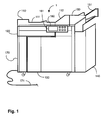
- Figure 1 shows an apparatus for processing documents, on which the different parts are separately shown in schematic form.
- the documents are usually paper documents, but may include any type of sheets for carrying information, e.g. overhead sheets, books, drawings, etc.
- the apparatus 1 for processing documents may be a scanner only, but preferably is a multi-functional device further including printing, copying or faxing functions, e.g. a versatile copier.
- a scanner unit 120 includes a flat bed scanner provided with a glass platen on which an original document can be placed, a CCD array and an imaging unit having a movable mirror and lens system for imaging the document on the CCD array. In these conditions, the CCD array generates electrical signals which are converted into digital image data in manner known per se.
- a document feeder 110 may be provided with an input tray 111 for the introduction of a stack of documents, a transport mechanism (not shown) for transporting the documents one by one along a scanner unit 120, and a delivery tray 112, in which the documents are placed after scanning.
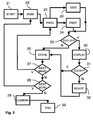
- Figure 2 shows a method of scanning a multi-page document.
- the method starts at START 21 with optically scanning the multi-page document in step SCAN 22.
- the scanning may be performed for the complete document, or for the document in parts.
- a scan image is generated by positioning a new original page on the scanner or, for a book, a dual page on the platen of the scan unit. Scan images containing two pages are called dual scan images.
- a scan image may contain a higher number of sub-images to be automatically processed to separate page images.
- the scan images may be directly processed or stored as intermediate file, or may be included in a final file, e.g. to maintain the raw source material as well.
- step PROC 23 statistical information STAT 20 is gathered, which statistical information is used to determine target criteria for image parameters based on page properties of the multi-page document derived during the processing of the scan images. For example expected values for properties like paper size, text area dimensions and contrast may be determined.
- the target criteria are expected values and tolerances for predetermined image parameters based on the properties statistically determined, e.g. the average or the median and a tolerance based on the variance.
- the processing step 23 generates, in step PROP 24, a proposed page image by the enhancement or correction processing functions based on detected image parameters.
- processing function Several examples of such processing function are given below.
- step STORE 26 If the page image is not an outlier the process is continued at step STORE 26 by automatically accepting the page image. However, if the page image is detected to be an outlier, the process is continued by an interaction with the operator as follows. In step DISPLAY 30 the page image is displayed for the operator. Hence the operator can visually inspect the proposed page image, i.e. the result of the processing. If the proposed page image is acceptable for him, the operator commands to accept the proposed page image at step ACCEPT 31. If the result is not acceptable, the processing of the page image can be manually adjusted in step ADJUST 32. For example if a wrong text area has been proposed, part of the scan image, including edges of the original text, may be cut off, and the operator may adjust the text area borders of the proposed page image. Subsequently the adjusted or accepted page image is stored in step STORE 26.
- the target criteria comprise a target range for at least one of the image parameters based on page properties derived during the processing the scan images.
- the image parameters may include a text area location.
- the text area parameters are usually consistent within a range for a multi-page document.
- more detailed features like the location of page headers or footers, or a sequence of page or chapter numbers, may be separately detected and stored as expected values. Hence a missing page may be detected.
- the processing in step PROC 23 may include a priori knowledge about documents, i.e. predefined parameters or properties of the pages of the multi-page document are assumed to be present.
- predefined parameters For example many scanned documents have a standard paper size like A4 or Letter.
- a practical example of a predefined parameter is the text line orientation, i.e. the assumption that text is aligned in lines in a direction parallel to a paper edge, and is considered to be arranged as horizontal lines of upright characters.
- the processing of the scan images includes detecting the text line orientation and correcting the skew of the scan image in dependence of the detected text line orientation.
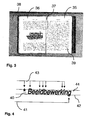
- Figure 3 shows an example of a scan image of a book.
- the scan image is a dual scan image of two pages 35,36 of a book.
- the pages were scanned in at 300 DPI (dots per inch), in 256 gray levels, whereas the Figure has a reduced resolution.
- the scan image contains a black or gray border area 38, which should be removed as it is not part of the original pages.
- the line between the pages, the so called spine 37 of the multi-page document, is to be detected to separate both pages.
- a text area 39 is available on each page, but may also be used to include pictures of may be unused, i.e. white, on some pages.
- the paper size may be detected from the boundaries of the white areas of the pages 35,36.
- the amount of paper hidden in the book spine may vary due to the way of positioning the book. Such varying amount may be compensated by reconstructing an original page having suitable page margins at both the left and right edges, for example by centering the text area 39 independently of the book spine.
- a further property of multi-page documents is that each page has a correct, so called upright, orientation.
- the multi-page document may be in an upside down or sideways orientation.
- the orientation of the original page on the scan image may be detected, and an upside up page image is generated from a differently oriented scan image by appropriate rotation.
- the page orientation may be detected by page layout properties like top or bottom margin, page numbers, etc.
- said detecting a page orientation is based on detecting text and determining properties of the text.
- the page was straight. If the ratio is near the inverse target ratio, the page was upside-down and rotation by 180 degrees is performed to correct the page. If the ratio of the (corrected) page substantially deviates from the target ratio, an outlier is detected.
- determining of an orientation of selected characters such as the character i provides a text orientation parameter.
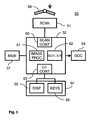
- the processor unit includes a scan control unit 60 for controlling the receiving of scan images, a user interface control unit 63 for communicating with an operator via the user interface 54, and an image processor unit 61 and an outlier detection unit 62 for generating an output document 59 containing page images that have been processed and have been checked to be within expected target ranges of image characteristics, and optionally adjusted by an operator.
- the image processor unit 61 processes the scan images to generate page images corresponding to original pages of the multi-page document.
- the outlier detection unit 62 detects if a page image is an outlier by detecting if image parameters are outside a target range of expected values. Subsequently, the outlier detection unit automatically accepts the page image if the page image is not an outlier. If the page image is an outlier, the page image is displayed on display 55 for an operator to accept or to adjust the page image via the user command elements 56 on the user interface unit 54.
- the workflow to generate the output document may be as follows.
- the processing of a multi-page document such as a book starts with a directory containing scan images and a table in the form of a comma separated text file.
- the table provides control data for a sequence of scan images and each line has several fields: a type of image - color or black and white; page number of the left page; page number of the right page; and a filename of the scan image containing both pages.
- the following consecutive steps are performed to process the scan images: deskew each image and save both a locally adaptive thresholded (bi-level) image and gray-level image; find the paper edges on the scan image, and a book spine; find the text areas of both left and right page; detect outlying parameters, e.g. possible errors in the orientation or text area selections; pop up a user interface for correcting errors; cut out the page images from the scan image by eliminating black/gray areas not corresponding to paper areas of the original multi-page document; and finally produce a file, for example in a well known publication format like PDF (Portable Document Format), or HTML (Hyper Text Markup Language).
- PDF Portable Document Format
- HTML Hyper Text Markup Language
- a bi-level image is created, for example with the Niblack method, described in "Digital Image Processing, page 115, W. Niblack, Prentice Hall 1986".
- the binarisation algorithm by Niblack is a local adaptive method.
- the size of the window (n) my for example be set to 31.
- Threshold mean(window) - 0.18 * stdev (window)
- This algorithm is very useful when images should not be dithered or have low contrast, due to bad illumination, or due to aging of the original.
- the -0.18 factor must be +0.18.
- the bi-level image is used to detect the angle of elements in the scan image, such as text lines or paper edges.
- the bi-level image may also used for OCR and text area location.
- the orientation of the pages is detected, for example as described with reference to Figure 4.
- Rotation over 90 or 180 degrees of the scan image or individual pages on the scan image may be required to achieve an upright orientation of the page images to compensate for differently positioning the original multi-page document.
- the pages needs to be deskewed individually, or may have a different orientation.
- deskewing may fail if the scan image contains disturbing elements like pen strokes of figures.
- a reliability factor to be used for outlier detection may be determined from the spectrum of angle indicators generated during the deskew process.
- Detecting the paper edges and book spine may be performed as follows. First step is to remove characters by a morphological filter, a closing operation (basic image proceeding to fill small openings by dilation followed by erosion) with a 9x9 kernel. Then a Sobel filter is used (derivative calculation based on differences between pixels in n x n kernel) on this image, resulting in the approximate derivative of the image having strong components at the borderlines between white and black areas. Next a fixed threshold is applied to the image and results in binary candidate book-edges. Although the morphological filter removes most characters and therefore false edges, figures present in the book will still generate false book-edge candidates. These candidates may be removed by applying cleanup rules, e.g. the following rule on eight-connected components.
- cleanup rules e.g. the following rule on eight-connected components.
- the object is a false candidate for paper edges or book spine and is removed.
- Such rule also removes 'blobby' objects and keeps elongated shapes, or parts of an outline.
- the resulting image contains only a number of lines near the book-edges, and near the book spine.
- a Hough transform is calculated and represents the image in an angle domain as follows.
- p is the perpendicular distance from the origin and ⁇ is the angle with the normal.
- a novel method to find the paper area and the middle is based on the whiteness of the paper.
- the gray deskewed image is used as input, and first the character objects are removed by a closing operation.
- the outcome is thresholded by an isodata algorithm to generate a binary image, for example as follows.
- the objects present in the binary image are labeled and the largest is selected. If the largest object is smaller than a certain threshold, the second largest object is selected too. All selected objects are then copied to a new image. Spurs at the edge of the binary objects are removed by morphological opening and a closing fills holes.
- the result image in general contains only one object, of which its bounding box is measured and used as the book paper edge. Gaps may appear in the final paper area mask (e.g. due to a picture not removed), but do not affect the bounding box of the object.
- the center of the book is determined (the book spine location).
- Two images are used for that purpose: the input image isodata thresholded as described above, and a processed image by closing, e.g. closed using an 11x11 pattern and filtered by a 3x3 Sobel filter.
- a processed image by closing e.g. closed using an 11x11 pattern and filtered by a 3x3 Sobel filter.
- several candidates for book center are calculated by finding those columns in the isodata thresholded image where the number of pixel transitions (from black to white or vice versa) drops below 25. From these candidates, the center is selected by finding the maximum sum of pixels in a column of the Sobel-filtered image.
- this step needs a deskewed original, this step (especially the book center location) will fail if deskewing failed.
- a reliability factor for this step may be dependent on parameters of the deskewing step. The reliability factor is applied to detect if the processed image is an outlier and needs operator approval or adjustment.
- the text area location on the scan image may be determined.
- This section describes the step needed to register the text areas of the book pages.
- the values calculated may be used for cutting the page images from the scan image without any black borders, or to guide OCR or page number recognition.
- a basic algorithm only uses the number of transitions of rows and columns.
- a quality improvement can be made by using layout analysis algorithms.
- the input image is the black and white deskewed image, generated in the deskewing step above.
- Figure 6 show a result of detecting a text area location.
- the Figure shows a scan image 67 and six image parameters indicating the text area location, each parameter X1,X2,X3,X4,Y1,Y2 indicating a proposed border of a text area.
- Two text areas 65,66 are defined by the six coordinate values, where the y-coordinates Y1,Y2 of the left text area 65 and right text area 66 are equal as depicted in the Figure. Starting from the top of the scan image, the number of transitions on each row is calculated. When this number exceeds 15, Y1 of the text area is found. For Y2, the same method is used. Finding the left and right boundaries of the text areas of both pages may be more difficult.
- Position X4 is located by the first occurrence of more than 15 transitions in a column, starting from the right and more than 25 transitions at a position of 30 pixels more to the left.
- Position X2 is located by the first occurrence of less than 5 transitions and less than 5 transitions at a position of 10 pixels more to the right. Search starts at 1/4 of the width of the scan image, towards the right.
- Position X3 is located by the first occurrence of less than 5 transitions and less than 5 transitions at a position of 10 pixels more to the left. Search starts at 3/4 of the width, towards the left. Due to the straightforward approach, this step may have errors.
- At least a deskewed image and some text is required on the page.
- Some common errors are that X1, X2, X3 or X4 cut through some text, page numbers are cut off, text in between X2 and X3, or effects caused by empty pages.
- An error detection step detects if the result has to be considered an outlier, by calculating parameters indicating the probability of such errors. For example empty pages can be detected. If objects in the space between X2 and X3 are detected, the X2 or X3 lines may be moved accordingly to solve the problem or the result may be classified as an outlier to be displayed for the operator.
- an error detection step calculates the likelihood of an error of the preceding processing steps, for example based on the reliability factors produced by the preceding processing steps, e.g. the deskewing reliability factor based on the histogram quality.
- Various parameters may be used for detecting outliers, such as paper width, spectral properties of certain areas (text or figures), qualities in different domains like angles, object sizes, colors, whiteness or contrast, etc.
- the outlier detection unit may also determine additional properties of the page image, e.g. outliers in the widths of the text areas, text area location with respect to the paper, etc. All parameters or properties may be compared with statistical knowledge of the multi-page document gathered during processing, or with a priori knowledge automatically assumed or entered by an operator.
- the outlier detector is capable of detecting outliers in the text area width by assuming regularity on the widths of the text areas of the pages. Note that the top and/or bottom of the left and right text areas may be assumed equal, or may be assumed different and processed separately.
- the threshold may be adjusted by the operator to find a practical value that substantially detects all errors in text area width or location. In a practical case for a normal book, a threshold value of 14 proved to give good results.
- Possible errors detected by the outlier function are subsequently displayed for the operator to be adjusted manually via a user interface.
- a dual scan image is cut into two page images at the text area borders, increased with 35 pixels on all sides. This is done to prevent a close shave, resulting in missing little parts of characters and images. It does not affect the registration of the images.
- a file is constructed containing the page images as cut out of the sequence of scan images.
- the file may be provided with bookmarks and page numbers corresponding to the original multi-page document, and may be used for optional processing such as adaptive background correction or optical character recognition (OCR).
- OCR optical character recognition
- a further method for processing a multi-page document accommodates generating a logical structure in the sequence of page images generated.
- a set of scan images of a single multi-page document is converted into a composite set of page images, which may for example be a single document file.
- the original multi-page document usually has a logical structure like chapters or sections, or may include annexes.
- the original structure is converted to a similar structure in the composite set, i.e. indicating logical parts of the set corresponding to ranges of pages in the multi-page document.
- the logical structure may be detected automatically, e.g. from the page numbering, or from a graphical layout features such as chapter titles in a bold and enlarged font.
- the scanner or processing unit may provide options for an operator to create the logical structure in the scanned document.
- the method includes receiving commands from the operator for indicating the structure to be assigned to the sequence of page images.
- the commands may be given during scanning the multi-page document.
- a special button may be pressed to before and/or after scanning a part of the multi-page document to indicate that a respective subset of scan images constitutes a logical part of the composite set of page images.
- Names of bookmarks may be generated automatically, e.g. an import set number, followed by start and end page numbers.
- structured multi-page documents may be scanned efficiently while at the same time generating a logical structure in the converted sequence of page images.
- Figure 7 shows a user interface.
- a user interface unit 70 has a number of buttons or keys 72 and a display screen 71 to provide visual data to an operator.
- the display 71 is of sufficient size and resolution to display a page image resulting from a scan, or at least a part of the image sufficiently large to judge and adjust the quality of the proposed page image as described above.
- the user interface 70 has an IMPORT button 74 and a START button 73.
- the START button may also be named OPEN/CLOSE button.
- the START button opens or closes any scanning operation, while the IMPORT button appends scan images of a part of a multi-page document to an existing set.
- the originals of the respective part may be placed as loose sheets in an automatic document feeder (ADF), or may be provided manually by an operator placing subsequent pages of a book or dossier on the platen.
- ADF automatic document feeder
- the operator may again press the IMPORT button to append a further part, and at the same time defining a bookmark in the document file for the part just closed.
- the process may be ended by pressing the START button, and the logical structure of the digital version of the document will be completed.
- the user interface may be provided with a special button or menu function to indicate that a logical part starts or ends on a left or right page of a dual scan image.
- document processing may be on any scale, such as at home for a consumer or as a public commercial service.
- the method of generating a logical structure in the sequence of page images generated may be applied separately.
Landscapes
- Engineering & Computer Science (AREA)
- Physics & Mathematics (AREA)
- General Physics & Mathematics (AREA)
- Multimedia (AREA)
- Theoretical Computer Science (AREA)
- Computer Vision & Pattern Recognition (AREA)
- Artificial Intelligence (AREA)
- Quality & Reliability (AREA)
- Editing Of Facsimile Originals (AREA)
- Processing Or Creating Images (AREA)
- Facsimile Scanning Arrangements (AREA)
- Image Input (AREA)
- Facsimiles In General (AREA)
- Character Input (AREA)
- Ultra Sonic Daignosis Equipment (AREA)
Priority Applications (1)
| Application Number | Priority Date | Filing Date | Title |
|---|---|---|---|
| EP07112438A EP1843275A3 (de) | 2004-08-10 | 2005-08-01 | Detektion abweichender Seiten während des Scannens |
Applications Claiming Priority (3)
| Application Number | Priority Date | Filing Date | Title |
|---|---|---|---|
| EP04077285 | 2004-08-10 | ||
| EP05107094A EP1628240B1 (de) | 2004-08-10 | 2005-08-01 | Detektion abweichender Seiten während des Scannens |
| EP07112438A EP1843275A3 (de) | 2004-08-10 | 2005-08-01 | Detektion abweichender Seiten während des Scannens |
Related Parent Applications (1)
| Application Number | Title | Priority Date | Filing Date |
|---|---|---|---|
| EP05107094A Division EP1628240B1 (de) | 2004-08-10 | 2005-08-01 | Detektion abweichender Seiten während des Scannens |
Publications (2)
| Publication Number | Publication Date |
|---|---|
| EP1843275A2 true EP1843275A2 (de) | 2007-10-10 |
| EP1843275A3 EP1843275A3 (de) | 2007-12-19 |
Family
ID=34928444
Family Applications (2)
| Application Number | Title | Priority Date | Filing Date |
|---|---|---|---|
| EP05107094A Expired - Lifetime EP1628240B1 (de) | 2004-08-10 | 2005-08-01 | Detektion abweichender Seiten während des Scannens |
| EP07112438A Withdrawn EP1843275A3 (de) | 2004-08-10 | 2005-08-01 | Detektion abweichender Seiten während des Scannens |
Family Applications Before (1)
| Application Number | Title | Priority Date | Filing Date |
|---|---|---|---|
| EP05107094A Expired - Lifetime EP1628240B1 (de) | 2004-08-10 | 2005-08-01 | Detektion abweichender Seiten während des Scannens |
Country Status (6)
| Country | Link |
|---|---|
| US (1) | US8564844B2 (de) |
| EP (2) | EP1628240B1 (de) |
| JP (1) | JP4963809B2 (de) |
| CN (1) | CN1734469B (de) |
| AT (1) | ATE388449T1 (de) |
| DE (1) | DE602005005117T2 (de) |
Cited By (1)
| Publication number | Priority date | Publication date | Assignee | Title |
|---|---|---|---|---|
| CN102447810A (zh) * | 2011-10-27 | 2012-05-09 | 天津大学 | 一种非接触式图像扫描还原方法 |
Families Citing this family (49)
| Publication number | Priority date | Publication date | Assignee | Title |
|---|---|---|---|---|
| US9110868B2 (en) * | 2005-01-10 | 2015-08-18 | Xerox Corporation | System and method for logical structuring of documents based on trailing and leading pages |
| TWI281346B (en) * | 2005-07-15 | 2007-05-11 | Avision Inc | Continuous scanning method with a multi-page preview function |
| JP4341629B2 (ja) * | 2006-01-27 | 2009-10-07 | カシオ計算機株式会社 | 撮像装置、画像処理方法及びプログラム |
| JP4174735B2 (ja) | 2006-03-24 | 2008-11-05 | ブラザー工業株式会社 | 印刷装置 |
| US8213687B2 (en) * | 2006-04-28 | 2012-07-03 | Hewlett-Packard Development Company, L.P. | Image processing methods, image processing systems, and articles of manufacture |
| JP2007336143A (ja) * | 2006-06-14 | 2007-12-27 | Ricoh Co Ltd | 画像処理装置 |
| US7917338B2 (en) * | 2007-01-08 | 2011-03-29 | International Business Machines Corporation | Determining a window size for outlier detection |
| US8208725B2 (en) * | 2007-06-21 | 2012-06-26 | Sharp Laboratories Of America, Inc. | Methods and systems for identifying text orientation in a digital image |
| US8144989B2 (en) * | 2007-06-21 | 2012-03-27 | Sharp Laboratories Of America, Inc. | Methods and systems for identifying text orientation in a digital image |
| US8340430B2 (en) | 2007-07-10 | 2012-12-25 | Sharp Laboratories Of America, Inc. | Methods and systems for identifying digital image characteristics |
| KR101198769B1 (ko) * | 2007-07-13 | 2012-11-12 | 삼성전자주식회사 | 화상형성장치 및 그 제어방법 |
| KR20090018339A (ko) * | 2007-08-17 | 2009-02-20 | 삼성전자주식회사 | 화상판독장치 및 이를 이용한 화상보정방법 |
| JP2009231977A (ja) * | 2008-03-19 | 2009-10-08 | Olympus Corp | 受信システム |
| US8023741B2 (en) * | 2008-05-23 | 2011-09-20 | Sharp Laboratories Of America, Inc. | Methods and systems for detecting numerals in a digital image |
| US8023770B2 (en) * | 2008-05-23 | 2011-09-20 | Sharp Laboratories Of America, Inc. | Methods and systems for identifying the orientation of a digital image |
| JP5060404B2 (ja) * | 2008-06-20 | 2012-10-31 | キヤノン株式会社 | 画像処理装置、画像処理方法、およびプログラム |
| US8160365B2 (en) * | 2008-06-30 | 2012-04-17 | Sharp Laboratories Of America, Inc. | Methods and systems for identifying digital image characteristics |
| JP4800365B2 (ja) * | 2008-09-30 | 2011-10-26 | 株式会社沖データ | 画像処理装置 |
| US8135776B2 (en) * | 2008-11-24 | 2012-03-13 | The Boeing Company | System and method for scalable architecture for web-based collaborative annotation of page-based documents |
| US8311331B2 (en) * | 2010-03-09 | 2012-11-13 | Microsoft Corporation | Resolution adjustment of an image that includes text undergoing an OCR process |
| CN101930594B (zh) * | 2010-04-14 | 2012-05-23 | 山东山大鸥玛软件有限公司 | 一种扫描文档图像的快速纠偏方法 |
| US8526709B2 (en) | 2011-01-13 | 2013-09-03 | Lam Research Corporation | Methods and apparatus for detecting multiple objects |
| JP5582106B2 (ja) | 2011-07-19 | 2014-09-03 | コニカミノルタ株式会社 | 画像処理装置および画像処理装置の制御プログラム |
| JP5813523B2 (ja) * | 2012-01-31 | 2015-11-17 | シャープ株式会社 | 画像処理装置、画像形成装置、画像処理方法、プログラムおよび記録媒体 |
| CN102938063B (zh) * | 2012-12-05 | 2016-02-10 | 上海合合信息科技发展有限公司 | 一种方便电子化的专业笔记本及其电子化方法 |
| US20140181155A1 (en) * | 2012-12-21 | 2014-06-26 | Dropbox, Inc. | Systems and methods for directing imaged documents to specified storage locations |
| US9076058B2 (en) | 2013-01-29 | 2015-07-07 | Sharp Laboratories Of America, Inc. | Methods, systems and apparatus for determining orientation in a document image |
| US9292537B1 (en) | 2013-02-23 | 2016-03-22 | Bryant Christopher Lee | Autocompletion of filename based on text in a file to be saved |
| US9256813B2 (en) * | 2014-05-22 | 2016-02-09 | Xerox Corporation | Automatic print job ticket settings based on raster images of previously printed document |
| US9239961B1 (en) * | 2014-09-24 | 2016-01-19 | Amazon Technologies, Inc. | Text recognition near an edge |
| US9639768B2 (en) * | 2014-12-09 | 2017-05-02 | Xerox Corporation | Methods and systems to adaptively detect object borders from electronic device images |
| US10042031B2 (en) | 2015-02-11 | 2018-08-07 | Xerox Corporation | Method and system for detecting that an object of interest has re-entered a field of view of an imaging device |
| KR20170076335A (ko) * | 2015-12-24 | 2017-07-04 | 에스프린팅솔루션 주식회사 | 화상형성장치, 그의 가이드 제공 방법, 클라우드 서버 및 그의 오류 분석 방법 |
| JP2017146938A (ja) * | 2016-02-19 | 2017-08-24 | 富士通株式会社 | 書籍検出装置、書籍検出方法及び書籍検出用コンピュータプログラム |
| US10255457B2 (en) * | 2016-09-28 | 2019-04-09 | Microsoft Technology Licensing, Llc | Outlier detection based on distribution fitness |
| US10043019B2 (en) * | 2016-09-28 | 2018-08-07 | Microsoft Technology Licensing, Llc | External dataset-based outlier detection for confidential data in a computer system |
| US10025939B2 (en) * | 2016-09-28 | 2018-07-17 | Microsoft Technology Licensing, Llc | Internal dataset-based outlier detection for confidential data in a computer system |
| US10121250B2 (en) * | 2016-12-01 | 2018-11-06 | International Business Machines Corporation | Image orientation detection |
| US10262154B1 (en) | 2017-06-09 | 2019-04-16 | Microsoft Technology Licensing, Llc | Computerized matrix factorization and completion to infer median/mean confidential values |
| JP6991072B2 (ja) * | 2018-01-31 | 2022-01-12 | シャープ株式会社 | 画像読取装置、画像形成装置および制御方法 |
| CN108449525B (zh) * | 2018-03-26 | 2019-06-28 | 京东方科技集团股份有限公司 | 自动光学检查中标准图像的获取方法及自动光学检查设备 |
| CN108810307B (zh) * | 2018-06-15 | 2020-09-04 | 深圳市成者云科技有限公司 | 一种边框页码扫描系统 |
| US10311556B1 (en) * | 2018-07-02 | 2019-06-04 | Capital One Services, Llc | Systems and methods for image data processing to remove deformations contained in documents |
| TWI733053B (zh) * | 2018-09-07 | 2021-07-11 | 虹光精密工業股份有限公司 | 事務機與事務機的操控組件之控制方法 |
| EP3767932B1 (de) * | 2019-07-16 | 2023-03-15 | Tata Consultancy Services Limited | Vorrichtung zur durchführung des sicheren und automatischen wendens und scannens von dokumenten |
| US20240404070A1 (en) * | 2023-05-31 | 2024-12-05 | Adobe Inc. | Precise book page boundary detection using deep machine learning model and image processing algorithms |
| CN118607469A (zh) * | 2024-04-25 | 2024-09-06 | 北京伟亚科技有限公司 | 在线扫描文件处理方法、相关装置及存储介质 |
| EP4683312A1 (de) | 2024-07-19 | 2026-01-21 | Andreas Randler | Verfahren zur dokumententrennung und/oder indexierung bei belegen |
| CN118972501B (zh) * | 2024-10-15 | 2024-12-31 | 天津宇翼开鸿智能科技有限公司 | 用于文件扫描矫正的智能控制处理方法及系统 |
Family Cites Families (19)
| Publication number | Priority date | Publication date | Assignee | Title |
|---|---|---|---|---|
| CA2109266C (en) * | 1992-11-05 | 2002-05-07 | Edward Schmid | Method of and system and apparatus for automatically creating, identifying, routing and storing digitally scanned documents |
| JPH06259597A (ja) * | 1993-03-09 | 1994-09-16 | Ricoh Co Ltd | ドキュメントイメージ処理方法並びに文字認識システムおよびドキュメントイメージ処理装置 |
| DE69600461T2 (de) * | 1995-01-17 | 1999-03-11 | Eastman Kodak Co | System und Verfahren zur Bewertung der Abbildung eines Formulars |
| JPH0927888A (ja) * | 1995-07-13 | 1997-01-28 | Ricoh Co Ltd | 画像読取装置 |
| EP0772145A3 (de) * | 1995-11-06 | 1999-02-24 | JOHNSON & QUIN, INC. | System und Verfahren zur Qualitätsbestimmung von Drucksachen |
| SE508972C2 (sv) | 1996-08-28 | 1998-11-23 | Ralip International Ab | Förfarande för kvalitetssäkring vid scanning/kopiering av bilder/dokument samt anordning för genomförande av förfarandet |
| JPH11136410A (ja) * | 1997-10-29 | 1999-05-21 | Canon Inc | 情報処理装置及びその方法、及びそのプログラムを記憶した記憶媒体 |
| JP3854024B2 (ja) * | 1999-11-30 | 2006-12-06 | 株式会社Pfu | 文字認識前処理装置及び方法並びにプログラム記録媒体 |
| US7668362B2 (en) * | 2000-05-03 | 2010-02-23 | Aperio Technologies, Inc. | System and method for assessing virtual slide image quality |
| US6735335B1 (en) * | 2000-05-30 | 2004-05-11 | Microsoft Corporation | Method and apparatus for discriminating between documents in batch scanned document files |
| JP2002290637A (ja) * | 2001-03-23 | 2002-10-04 | Murata Mach Ltd | 画像処理装置 |
| US7212671B2 (en) * | 2001-06-19 | 2007-05-01 | Whoi-Yul Kim | Method of extracting shape variation descriptor for retrieving image sequence |
| US6996290B2 (en) * | 2002-01-31 | 2006-02-07 | Hewlett-Packard Development Company, L.P. | Binding curvature correction |
| JP4141235B2 (ja) * | 2002-02-08 | 2008-08-27 | 株式会社リコー | 画像補正装置及びプログラム |
| US20030174228A1 (en) * | 2002-03-14 | 2003-09-18 | Brake Wilfred F. | System for user-selectable image pre-processing in a digital camera |
| US7170644B2 (en) * | 2002-08-30 | 2007-01-30 | Xerox Corporation | Method and system for reducing distortion in scanned images |
| JP3955515B2 (ja) * | 2002-09-09 | 2007-08-08 | 株式会社リコー | 画像読み取り方法、画像読み取り装置およびネットワークシステム |
| JP4113804B2 (ja) * | 2003-03-19 | 2008-07-09 | 株式会社リコー | 画像処理装置及び画像処理プログラム |
| US7483589B2 (en) * | 2004-12-07 | 2009-01-27 | Lexmark International, Inc. | Method for copying objects |
-
2005
- 2005-08-01 EP EP05107094A patent/EP1628240B1/de not_active Expired - Lifetime
- 2005-08-01 EP EP07112438A patent/EP1843275A3/de not_active Withdrawn
- 2005-08-01 DE DE602005005117T patent/DE602005005117T2/de not_active Expired - Lifetime
- 2005-08-01 AT AT05107094T patent/ATE388449T1/de not_active IP Right Cessation
- 2005-08-09 JP JP2005230964A patent/JP4963809B2/ja not_active Expired - Fee Related
- 2005-08-09 US US11/199,452 patent/US8564844B2/en not_active Expired - Fee Related
- 2005-08-10 CN CN2005100915355A patent/CN1734469B/zh not_active Expired - Fee Related
Cited By (1)
| Publication number | Priority date | Publication date | Assignee | Title |
|---|---|---|---|---|
| CN102447810A (zh) * | 2011-10-27 | 2012-05-09 | 天津大学 | 一种非接触式图像扫描还原方法 |
Also Published As
| Publication number | Publication date |
|---|---|
| EP1628240A3 (de) | 2006-05-31 |
| US20060033967A1 (en) | 2006-02-16 |
| CN1734469B (zh) | 2011-01-12 |
| EP1628240A2 (de) | 2006-02-22 |
| EP1628240B1 (de) | 2008-03-05 |
| JP2006054885A (ja) | 2006-02-23 |
| DE602005005117T2 (de) | 2009-03-19 |
| CN1734469A (zh) | 2006-02-15 |
| US8564844B2 (en) | 2013-10-22 |
| DE602005005117D1 (de) | 2008-04-17 |
| EP1843275A3 (de) | 2007-12-19 |
| ATE388449T1 (de) | 2008-03-15 |
| JP4963809B2 (ja) | 2012-06-27 |
Similar Documents
| Publication | Publication Date | Title |
|---|---|---|
| EP1628240B1 (de) | Detektion abweichender Seiten während des Scannens | |
| CN114299528B (zh) | 一种针对扫描文档的信息提取和结构化方法 | |
| US7483564B2 (en) | Method and apparatus for three-dimensional shadow lightening | |
| US6567628B1 (en) | Methods and apparatus to determine page orientation for post imaging finishing | |
| US6345130B1 (en) | Method and arrangement for ensuring quality during scanning/copying of images/documents | |
| EP0723247A1 (de) | System und Verfahren zur Bewertung der Abbildung eines Formulars | |
| US6959121B2 (en) | Document image processing device, document image processing method, and memory medium | |
| US8027539B2 (en) | Method and apparatus for determining an orientation of a document including Korean characters | |
| JPH06124358A (ja) | 用紙上のマークを検出する方法 | |
| US11838454B2 (en) | Inspection apparatus, control method thereof, and storage medium | |
| US12223261B2 (en) | Image processing apparatus, image processing method, and storage medium | |
| US7282687B2 (en) | Image forming apparatus having a processing deciding section and image formation controlling method | |
| US7903876B2 (en) | Distortion correction of a captured image | |
| US9110926B1 (en) | Skew detection for vertical text | |
| US11436733B2 (en) | Image processing apparatus, image processing method and storage medium | |
| US8339623B2 (en) | Paper document processing apparatus, paper document processing method, and computer readable medium | |
| JP2024153391A (ja) | 画像処理装置、制御方法及び制御プログラム | |
| US10943108B2 (en) | Image reader performing character correction | |
| CN107666547A (zh) | 图像处理装置和图像处理方法 | |
| US12183101B2 (en) | Image processing system, image processing method, and storage medium | |
| US6678427B1 (en) | Document identification registration system | |
| JP7434981B2 (ja) | 情報処理装置及びプログラム | |
| JPH02216587A (ja) | 画像ファイル装置 | |
| JPH0554074A (ja) | デジタル複写装置 |
Legal Events
| Date | Code | Title | Description |
|---|---|---|---|
| PUAI | Public reference made under article 153(3) epc to a published international application that has entered the european phase |
Free format text: ORIGINAL CODE: 0009012 |
|
| AC | Divisional application: reference to earlier application |
Ref document number: 1628240 Country of ref document: EP Kind code of ref document: P |
|
| AK | Designated contracting states |
Kind code of ref document: A2 Designated state(s): AT BE BG CH CY CZ DE DK EE ES FI FR GB GR HU IE IS IT LI LT LU LV MC NL PL PT RO SE SI SK TR |
|
| PUAL | Search report despatched |
Free format text: ORIGINAL CODE: 0009013 |
|
| AK | Designated contracting states |
Kind code of ref document: A3 Designated state(s): AT BE BG CH CY CZ DE DK EE ES FI FR GB GR HU IE IS IT LI LT LU LV MC NL PL PT RO SE SI SK TR |
|
| AKX | Designation fees paid | ||
| REG | Reference to a national code |
Ref country code: DE Ref legal event code: 8566 |
|
| STAA | Information on the status of an ep patent application or granted ep patent |
Free format text: STATUS: THE APPLICATION IS DEEMED TO BE WITHDRAWN |
|
| 18D | Application deemed to be withdrawn |
Effective date: 20080620 |