EP1865406A2 - Terminal de communication mobile et son procédé de commande - Google Patents
Terminal de communication mobile et son procédé de commande Download PDFInfo
- Publication number
- EP1865406A2 EP1865406A2 EP07009694A EP07009694A EP1865406A2 EP 1865406 A2 EP1865406 A2 EP 1865406A2 EP 07009694 A EP07009694 A EP 07009694A EP 07009694 A EP07009694 A EP 07009694A EP 1865406 A2 EP1865406 A2 EP 1865406A2
- Authority
- EP
- European Patent Office
- Prior art keywords
- signal
- screen
- rotary key
- generated
- speed
- Prior art date
- Legal status (The legal status is an assumption and is not a legal conclusion. Google has not performed a legal analysis and makes no representation as to the accuracy of the status listed.)
- Granted
Links
Images





Classifications
-
- G—PHYSICS
- G06—COMPUTING OR CALCULATING; COUNTING
- G06F—ELECTRIC DIGITAL DATA PROCESSING
- G06F3/00—Input arrangements for transferring data to be processed into a form capable of being handled by the computer; Output arrangements for transferring data from processing unit to output unit, e.g. interface arrangements
- G06F3/01—Input arrangements or combined input and output arrangements for interaction between user and computer
- G06F3/048—Interaction techniques based on graphical user interfaces [GUI]
- G06F3/0481—Interaction techniques based on graphical user interfaces [GUI] based on specific properties of the displayed interaction object or a metaphor-based environment, e.g. interaction with desktop elements like windows or icons, or assisted by a cursor's changing behaviour or appearance
- G06F3/0482—Interaction with lists of selectable items, e.g. menus
-
- G—PHYSICS
- G06—COMPUTING OR CALCULATING; COUNTING
- G06F—ELECTRIC DIGITAL DATA PROCESSING
- G06F3/00—Input arrangements for transferring data to be processed into a form capable of being handled by the computer; Output arrangements for transferring data from processing unit to output unit, e.g. interface arrangements
- G06F3/01—Input arrangements or combined input and output arrangements for interaction between user and computer
- G06F3/03—Arrangements for converting the position or the displacement of a member into a coded form
- G06F3/033—Pointing devices displaced or positioned by the user, e.g. mice, trackballs, pens or joysticks; Accessories therefor
- G06F3/0362—Pointing devices displaced or positioned by the user, e.g. mice, trackballs, pens or joysticks; Accessories therefor with detection of one-dimensional [1D] translations or rotations of an operating part of the device, e.g. scroll wheels, sliders, knobs, rollers or belts
-
- G—PHYSICS
- G06—COMPUTING OR CALCULATING; COUNTING
- G06F—ELECTRIC DIGITAL DATA PROCESSING
- G06F2203/00—Indexing scheme relating to G06F3/00 - G06F3/048
- G06F2203/048—Indexing scheme relating to G06F3/048
- G06F2203/04803—Split screen, i.e. subdividing the display area or the window area into separate subareas
-
- H—ELECTRICITY
- H04—ELECTRIC COMMUNICATION TECHNIQUE
- H04M—TELEPHONIC COMMUNICATION
- H04M1/00—Substation equipment, e.g. for use by subscribers
- H04M1/02—Constructional features of telephone sets
- H04M1/23—Construction or mounting of dials or of equivalent devices; Means for facilitating the use thereof
- H04M1/233—Construction or mounting of dials or of equivalent devices; Means for facilitating the use thereof including a pointing device, e.g. roller key, track ball, rocker switch or joystick
-
- H—ELECTRICITY
- H04—ELECTRIC COMMUNICATION TECHNIQUE
- H04M—TELEPHONIC COMMUNICATION
- H04M1/00—Substation equipment, e.g. for use by subscribers
- H04M1/72—Mobile telephones; Cordless telephones, i.e. devices for establishing wireless links to base stations without route selection
- H04M1/724—User interfaces specially adapted for cordless or mobile telephones
- H04M1/72469—User interfaces specially adapted for cordless or mobile telephones for operating the device by selecting functions from two or more displayed items, e.g. menus or icons
Definitions
- the present invention to a mobile terminal including at least one rotary key used to control displayed screens and a corresponding control method.
- Mobile terminals provide a variety of supplementary service functions in addition to basic call functions. For example, mobile terminals allow a user to send and receive text messages using a Short Message Service (SMS), access the Internet, play music or movies, etc. However, because the mobile terminal is small in size, the amount of space available for a display and input device is limited.
- SMS Short Message Service
- the mobile terminal is provided with a variety of function keys, a navigation key, etc.
- these keys are generally only used as up and down direction keys, a menu selection key, etc.
- an object of the present invention is to address the above-noted and other problems.
- Another object of the present invention is to provide a mobile communication terminal and corresponding method for controlling a variety of display screens using at least one rotary key.
- the present invention provides in one aspect a mobile communication terminal including a first rotary key configured to generate a first signal when the first rotary key is rotated, in which the first signal indicates a direction and an amount the first rotary key is rotated. Also included is a second rotary key configured to generate a second signal when the second rotary key is rotated, in which the second signal indicates a direction and an amount the first rotary key is rotated.
- the terminal also includes a display unit configured to display a screen thereon, and a controller configured to control a specific operation on the displayed screen based on the first and second signals.
- the present invention also provides a corresponding method for controlling the mobile terminal.
- the present invention provides a mobile communication terminal including an input device comprising a roller configured to be rotated to generate a first signal and configured to be pressed and rotated to generate a second signal, a display unit configured to display a screen thereon, and a controller configured to control a specific operation on the displayed screen based on the first and second signals.
- the present invention also provides a corresponding method for controlling the mobile terminal.
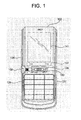
- FIGS. 1 and 2 are overviews illustrating a mobile communication terminal according to an embodiment of the present invention
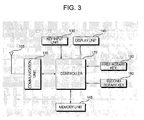
- FIG. 3 is a block diagram of a mobile communication terminal according to an embodiment of the present invention.
- FIG. 4 is a block diagram of a second rotary key shown in FIG. 3;
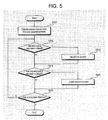
- FIG. 5 is a flowchart illustrating a method of controlling a mobile communication terminal according to a first embodiment of the present invention
- FIGS. 6(a)-(c) are overviews illustrating display screens shown when controlling the operation of the mobile communication terminal according to the first embodiment of the present invention
- FIG. 7 is a flowchart illustrating a method of controlling a mobile communication terminal according to a second embodiment of the present invention.
- FIG. 8 is a flowchart illustrating a method of controlling a mobile communication terminal according to a third embodiment of the present invention.
- FIGS. 9(a)-(c) are overviews illustrating display screens shown when controlling the operation of a mobile communication terminal according to the third embodiment of the present invention.
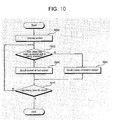
- FIG. 10 is a flowchart illustrating a method of controlling the operation of a mobile communication terminal according to a fourth embodiment of the present invention.
- FIG. 11 is a flowchart illustrating a method of controlling the operation of a mobile communication terminal according to a fifth embodiment of the present invention.
- FIG. 12 is a flowchart illustrating a method of controlling the operation of a mobile communication terminal according to a sixth embodiment of the present invention.
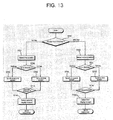
- FIG. 13 is a flowchart illustrating a method of controlling the operation of a mobile communication terminal according to a seventh embodiment of the present invention.
- FIGS. 1 and 2 are overviews illustrating a mobile communication terminal 100 according to an embodiment of the present invention.
- the terminal 100 includes a display window 141 (e.g., a Liquid Crystal Display (LCD)), left and right function keys 131, a button key 134 (e.g., a call key, a call end key and a number key) and a navigation key 135.
- the terminal 100 also includes a volume key 136 for controlling the volume level of the terminal 100 and a camera hot key 137 for operating a camera function of the terminal 100.
- LCD Liquid Crystal Display
- the terminal 100 also includes a first rotary key 150 and a second rotary key 160.
- the first rotary key 150 is located near a side of the terminal 100 and the second rotary key 160 is located at the center of the navigation key 135.
- the first rotary keys 150 and 160 may be rotated clockwise or counterclockwise and the second rotary key 160 may additionally be pressed to enter a command or select an item, for example.
- the first key 150 generates a signal corresponding to its rotation
- the second rotary key 160 generates signals corresponding to its rotation and pressing features.
- the first rotary key 150 may also be provided with a pressing function.
- FIG. 3 is a block diagram of the mobile terminal 100 shown in FIGS. 1 and 2.
- the mobile terminal 100 includes an antenna 105, a communication unit 110, a key input unit 130, a display unit 140, a memory unit 145, the first rotary key 150, the second rotary key 160 and a controller 170.
- the communication unit 110 provides an interface for wireless communication with a base station through the antenna 105.
- the communication unit 110 includes a duplex filter for filtering a signal received through the antenna 105, a power amplifier for amplifying a transmit signal, a frequency up-convert circuit in a transmission path, a frequency down-convert circuit in a reception path, etc. that are used for communicating with the base station and other terminals.
- the key input unit 130 includes a plurality of keys such as a number key and a function key. The key input unit 130 also receives input from a user and transfers a signal corresponding to a key pressed by a user to the controller 170.
- the display unit 140 includes an LCD display window, etc., and displays different menus for controlling the mobile terminal, information indicating a status of a received call, battery information, information about the operating status of the terminal, etc. Also, the memory unit 145 stores programs or data used to operate the mobile terminal, and other data entered or used by the user.
- the second rotary key 160 can be pressed in addition to rotated to perform different operations on the mobile terminal.
- the second rotary key 160 includes a pressing detection unit 163 for when the rotary key 160 is pressed, and a rotary encoder 165 for detecting when the rotary key 160 is rotated.
- the second rotary key 160 also includes a roller 161 that can be rotated up and down (i.e., clockwise and counter clockwise).
- the first rotary key 150 similarly includes a rotary encoder for determining how much and in what direction the key is rotated. The signals corresponding to the pressing/rotating of the first and second rotary keys 150 and 160 are then transmitted to the controller 170.
- the controller 170 uses these signal to control an operation of the mobile terminal.
- the controller 170 performs a variety of screen controls using a combination of signals received from the first and second rotary keys 150 and 160.
- the controller 170 also controls the operation of each element of the mobile terminal, as well as the overall operation of the terminal.
- FIG. 5 is a flowchart illustrating a method of controlling the operation of a mobile terminal according to a first embodiment of the present invention.
- the user first divides the display screen into at least two separate display screens (S300) (see FIG. 6(a), for example).
- the user can divide the display screen into other display screens by selecting a predetermined button a number of times. For example, if the user wants to display two screens, the user can repeatedly select the predetermined button twice.
- the user can display two screens by pressing the second rotary key 160 twice in a successive manner.
- the user may display one screen by selecting (rotating) the first rotary key 150 and display two screens by selecting (pressing or rotating) the second rotary key 160.
- the user may also display two screens by rotating one of the first and second rotary keys in a clockwise and counter clockwise direction in a successive manner. Therefore, the user can conveniently use his or her thumb to display two screens.
- the method determines if the first rotary key 150 has been rotated (S305). If the first rotary key 150 has been rotated (Yes in S305), the controller 170 scrolls through the first displayed screen in an upward or downward direction depending on the direction the first rotary key 150 is rotated. The method also determines if the second rotary key 160 has been rotated (S315), and if so (Yes in S315), the controller 170 scrolls through the second displayed screen in an upward or downward direction depending on the direction the second rotary key 160 is rotated. The method may also determine if the second rotary key 160 is rotated before determining if the first rotary key 150 is rotated (FIG. 5 illustrates the method determining if the first rotary key 150 is rotated before determining if the second rotary key 160 is rotated). The above process is repeated until the user closes or exits the options displayed in the two display screens (S325).
- the controller 170 can be configured to determine which screen to scroll through using a combination of the signals generated by the first and second rotary keys 150 and 160. For example, the controller 170 can scroll through first and second display screens when the first and second rotary keys 150 and 160 are rotated (as discussed above), and rotate through a third display screen when the second rotary key 160 is pressed three times in successive order to indicate the third display screen is to be scrolled through. Other variations are also possible.
- FIG. 6(a) illustrates a display screen 400 being divided into a first display screen 401 and a second display screen 403.
- the first display screen 401 includes a plurality of icons representing people that are in a chat room, for example.
- the second display screen 403 includes messages that are input by the different people in the chat room.
- FIG. 6(b) illustrates a user scrolling through the first display screen 401 by rotating the first rotary key 150.
- FIG. 6(c) illustrates a user scrolling through the second display screen 403 by rotating the second rotary key 160.
- the first and second display screens also include scroll bars 425 and 427 to indicate to the user how much they have scrolled through the particular display screen.
- the scroll bar 425 indicates the user is at a bottom of the display screen 401.
- horizontal scroll bars may also be used.
- the items may be highlighted as they are scrolled through to indicate where the user is in each respective window.
- the user scrolls through the second display screen 403 from a position 405 to a position 415 using the scroll bar 427 (shown only in FIG. 6(b)).
- FIG. 7 is a flowchart illustrating a method of controlling the operation of a mobile communication terminal according to a second embodiment of the present invention.
- the user can scroll through the first and second display screens using only the second rotary key 160.
- the user first divides the original screen into first and second display screens 401 and 403 (as shown in FIG. 6(a)) (S450). Then, the method determines if the user is only rotating the second rotary key 160 or rotating and pressing the second rotary key 160 (S455).
- the controller 170 scrolls the second display screen 403 (as shown in FIG. 6(c)). However, if the user is pressing and rotating the second rotary key 160 (Yes in S455), the controller 170 scrolls through the first display screen 401 (as shown in FIG. 6(b)). The above process is repeated until the user closes or exits the options displayed in the two display screens (S470).
- the first display screen 401 may be scrolled through if the user is only rotating the second rotary key 160 and the second display screen 403 may be scrolled through if the user is both rotating and pressing the second rotary key 160 (i.e., opposite to the method shown in FIG. 7).
- the first rotary key 150 may also be provided with a pressing detecting unit and then used to scroll through the two display screens rather than using the second rotary key 160.
- the user can easily scroll through different display screens using a single rotary key.
- FIG. 8 is a flowchart illustrating a method of controlling the operation of a mobile terminal according to a third embodiment of the present invention.
- the user selects a specific menu through the key input unit 130 and the controller 170 displays a corresponding screen on the display unit 140 (S500).
- the method determines if the first rotary key 150 has been rotated (S505). If the user has rotated the first rotary key 150 (Yes in S505), the controller 170 scrolls through the displayed screen at a fast speed.
- the method also determines if the user has rotated the second rotary key 160 (S515). If the user has rotated the second rotary key 160 (Yes in S515), the controller 170 scrolls through the displayed screen at a normal speed. Note, the fast speed is faster than the normal speed. This process is repeatedly performed until the selected menu is completed (S525).
- FIG. 9(a) illustrates a displayed specific list screen 600.
- the reference numeral 605 indicates an item that is currently highlighted.
- the items included in the displayed screen 600 are scrolled through at a normal speed as shown in FIG. 6(b).
- reference numeral 625 indicates a next currently highlighted item that was scrolled to at a normal speed (e.g., item by item).
- the controller 170 rotates through the displayed items at faster speed as shown in FIG. 6(c).
- the reference numeral 645 in FIG. 6(c) indicates a highlighted item that was quickly scrolled to.
- the normal and faster scrolling speeds can be preset by a manufacturer of the terminal and adjusted by a user using the appropriate menu options.
- FIG. 10 is a flowchart illustrating a method of controlling the operation of a mobile terminal according to a fourth embodiment of the present invention.
- the controller 170 displays a corresponding screen on the display unit 140 (S650). Then, the method determines if the user presses and rotates the second rotary key 160 (S655). If the user only rotates (and doesn't press) the second rotary key 160 (No in S655), the controller 170 scrolls through the items in the displayed screen at a normal speed (S655). Further, if the user presses and rotates the second rotary key 160 (Yes in S655), the controller 170 scrolls through the items in the displayed screen at a faster speed (S660). This process is repeatedly performed until the selected menu is completed (S670).
- FIG. 10 can also be described with reference to the displayed screens shown in FIGs. 9(a)-(c). That is, FIG. 9(a) illustrates the displayed screen corresponding to the selected specific menu, FIG. 9(b) illustrates scrolling through items at a normal speed, and FIG. 9(c) illustrates scrolling through the items at a faster speed.
- the speed at which the screen is scrolled can be controlled to be faster in proportion to how long the second rotary key 160 is pressed. In order words, if the second rotary key 160 is rotated while being pressed, the screen is scrolled faster and faster based on a length of time the second rotary key 160 is pressed.
- the same function can be implemented using the first rotary key 150 (if the first rotary key 150 also includes an appropriate pressing detection unit).
- FIGs. 11(a) and (b) are overviews illustrating display screens for illustrating a method of controlling the operation of a mobile terminal according to a fifth embodiment of the present invention.
- This embodiment illustrates a situation where a drag & drop function is provided using the first and second rotary keys 150 and 160.
- FIG. 11 (a) illustrates a display screen 700 of a main menu including a plurality of files and folders.
- the user may scroll through the items in display screen 700 by rotating, for example, the second rotary key 160.
- the highlighted item i.e., filename 2 in FIG. 11(a)
- the user may rotate the first rotary key 150 to scroll through the items in the display screen 700 to reach an item that he or she wants to drag and drop the selected item into.
- the item may be dropped into the selected folder or location by staying at the location for a predetermined amount of time or by pressing the second rotary key 160.
- FIG. 11(b) illustrates the filename 2 (designated as reference numeral 725) being selected and dragged to the Photos folder (designated as reference numeral 730).
- the user may then highlight the Photos folder and drop the filename 2 into the Photos folder by again pressing the second rotary key 160.
- the drag & drop function can also be provided using only the second rotary key 160. For instance, if any one file is selected by pressing the rotary key 160 in the menu 700, and the rotary key 160 is rotated while being pressed, the selected file 725 can be moved in a drag & drop manner to a desired folder or location.
- FIGs. 12(a)-(c) are overviews illustrating a method of controlling the operation of a mobile communication terminal according to a sixth embodiment of the present invention.
- the present embodiment illustrates a situation where the display setting of items are changed based on the first and second rotary keys 150 and 160.
- FIG. 12(a) illustrates a screen 800 having a wallpaper background 803.
- the wallpaper background 803 is changed to a wallpaper background 805 (see FIG. 12(b)) when the user rotates the second rotary key 160.
- FIG. 12(c) illustrates the display state of a specific item 807 being changed by rotating the first rotary key 150.
- the first and second rotary keys 150 and 160 can be used to change the display state of different items.
- the first and second rotary keys 150 and 160 can be used to easily scroll through particular screens at desired speeds and to drag and drop items shown on the display. Therefore, the present invention significantly improves the user's convenience.
- the terminal can be controlled with a single rotary key or with two rotary keys, the keys on a mobile terminal can be disposed in a limited space more efficiently, which results in further improving the user's convenience.
- FIG. 13 is a flowchart illustrating a method of controlling the operation of a mobile communication terminal according to a seventh embodiment of the present invention.
- the user can toggle between divided first and second display screens and scroll through each respective screen at different scrolling speeds.
- the method determines whether the user selects the first or second rotary keys 150 and 160 (S700). The user can select the rotary keys by rotating or pressing the keys. Further, this embodiment assumes the both of the first and second rotary keys 150 and 160 can be pressed and rotated.
- the method determines if the first rotary key 150 or second rotary key 160 is rotated (S702). If the first rotary key 150 is rotated, the selected first display screen is scrolled through at a first scroll speed (S708). Also, if the second rotary key 160 is rotated, the selected first display screen is scrolled through at a second scroll speed (S706). In addition, if the user then presses the second rotary key 160 while the first display screen is selected (highlighted) (S714), the second display screen is selected (S718) and the method goes to step S704.
- step S700 the second display screen is selected (highlighted) (S703), and the method determines if the first rotary key 150 or second rotary key 160 is rotated (S704). If the first rotary key 160 is rotated, the selected second display screen is scrolled through at a first scroll speed (S712). Also, if the second rotary key 150 is rotated, the selected second display screen is scrolled through at a second scroll speed (S710). In addition, if the user then presses the first rotary key 150 while the first display screen is selected (highlighted) (S716), the first display screen is selected (S720) and the method goes to step S702.
Landscapes
- Engineering & Computer Science (AREA)
- General Engineering & Computer Science (AREA)
- Theoretical Computer Science (AREA)
- Human Computer Interaction (AREA)
- Physics & Mathematics (AREA)
- General Physics & Mathematics (AREA)
- Telephone Function (AREA)
- User Interface Of Digital Computer (AREA)
- Telephone Set Structure (AREA)
- Input From Keyboards Or The Like (AREA)
Applications Claiming Priority (2)
| Application Number | Priority Date | Filing Date | Title |
|---|---|---|---|
| KR1020060050432A KR101144803B1 (ko) | 2006-06-05 | 2006-06-05 | 이동통신 단말기 및 그 동작 제어방법 |
| KR1020060056024A KR101186330B1 (ko) | 2006-06-21 | 2006-06-21 | 로터리 키를 구비한 이동통신 단말기 및 그 동작 제어방법 |
Publications (3)
| Publication Number | Publication Date |
|---|---|
| EP1865406A2 true EP1865406A2 (fr) | 2007-12-12 |
| EP1865406A3 EP1865406A3 (fr) | 2008-01-30 |
| EP1865406B1 EP1865406B1 (fr) | 2014-12-31 |
Family
ID=38329994
Family Applications (1)
| Application Number | Title | Priority Date | Filing Date |
|---|---|---|---|
| EP07009694.6A Not-in-force EP1865406B1 (fr) | 2006-06-05 | 2007-05-15 | Terminal de communication mobile et son procédé de commande |
Country Status (3)
| Country | Link |
|---|---|
| US (1) | US7856254B2 (fr) |
| EP (1) | EP1865406B1 (fr) |
| JP (1) | JP4948263B2 (fr) |
Families Citing this family (25)
| Publication number | Priority date | Publication date | Assignee | Title |
|---|---|---|---|---|
| US8000741B2 (en) * | 2006-02-13 | 2011-08-16 | Research In Motion Limited | Handheld wireless communication device with chamfer keys |
| USD556207S1 (en) | 2006-02-13 | 2007-11-27 | Research In Motion Limited | Keyboard of a hand-held electronic device |
| USD586804S1 (en) * | 2006-06-20 | 2009-02-17 | Research In Motion Limited | Hand-held electronic device |
| USD587705S1 (en) | 2006-06-20 | 2009-03-03 | Research In Motion Limited | Hand-held electronic device |
| USD586344S1 (en) | 2006-06-20 | 2009-02-10 | Research In Motion Limited | Hand-held electronic device |
| JP5196912B2 (ja) * | 2007-08-24 | 2013-05-15 | 京セラ株式会社 | 携帯電子機器 |
| US8639229B2 (en) | 2008-01-17 | 2014-01-28 | Microsoft Corporation | Creating a communication group |
| EP2606414B1 (fr) * | 2010-08-20 | 2015-04-15 | Sony Ericsson Mobile Communications AB | Methode pour une le menu intégré d'options d'une barre de déroulement avec dispositif et produit de programme d'ordinateur correspondants |
| JP5815932B2 (ja) * | 2010-10-27 | 2015-11-17 | 京セラ株式会社 | 電子機器 |
| US10691230B2 (en) | 2012-12-29 | 2020-06-23 | Apple Inc. | Crown input for a wearable electronic device |
| US10275117B2 (en) * | 2012-12-29 | 2019-04-30 | Apple Inc. | User interface object manipulations in a user interface |
| US10545657B2 (en) | 2013-09-03 | 2020-01-28 | Apple Inc. | User interface for manipulating user interface objects |
| EP3042271B1 (fr) | 2013-09-03 | 2020-03-18 | Apple Inc. | Manipulations d'un objet sur une interface utilisateur |
| US11068128B2 (en) | 2013-09-03 | 2021-07-20 | Apple Inc. | User interface object manipulations in a user interface |
| US12287962B2 (en) | 2013-09-03 | 2025-04-29 | Apple Inc. | User interface for manipulating user interface objects |
| US10503388B2 (en) | 2013-09-03 | 2019-12-10 | Apple Inc. | Crown input for a wearable electronic device |
| EP4036685A1 (fr) | 2014-06-27 | 2022-08-03 | Apple Inc. | Interface utilisateur de taille réduite |
| US10073590B2 (en) | 2014-09-02 | 2018-09-11 | Apple Inc. | Reduced size user interface |
| WO2016036510A1 (fr) | 2014-09-02 | 2016-03-10 | Apple Inc. | Interface utilisateur de musique |
| TWI676127B (zh) | 2014-09-02 | 2019-11-01 | 美商蘋果公司 | 關於電子郵件使用者介面之方法、系統、電子器件及電腦可讀儲存媒體 |
| TW201610758A (zh) | 2014-09-02 | 2016-03-16 | 蘋果公司 | 按鈕功能性 |
| KR20160031334A (ko) * | 2014-09-12 | 2016-03-22 | 엘지전자 주식회사 | 이동단말기 및 그 제어방법 |
| US10365807B2 (en) | 2015-03-02 | 2019-07-30 | Apple Inc. | Control of system zoom magnification using a rotatable input mechanism |
| DK179896B1 (en) | 2018-09-11 | 2019-08-30 | Apple Inc. | CONTENT-BASED TACTILE OUTPUTS |
| US11435830B2 (en) | 2018-09-11 | 2022-09-06 | Apple Inc. | Content-based tactile outputs |
Citations (3)
| Publication number | Priority date | Publication date | Assignee | Title |
|---|---|---|---|---|
| EP1004957A1 (fr) | 1998-03-05 | 2000-05-31 | Mitsubishi Denki Kabushiki Kaisha | Terminal portatif |
| WO2002021237A2 (fr) | 2000-09-06 | 2002-03-14 | Digital On-Demand, Incorporated | Systeme de selection par molette |
| WO2003021568A1 (fr) | 2001-09-04 | 2003-03-13 | Nokia Corporation | Zoomage et panoramique de contenu sur un ecran d'affichage |
Family Cites Families (12)
| Publication number | Priority date | Publication date | Assignee | Title |
|---|---|---|---|---|
| JP2646993B2 (ja) * | 1993-12-29 | 1997-08-27 | 日本電気株式会社 | 画面スクロール方法 |
| JPH11110106A (ja) * | 1997-10-02 | 1999-04-23 | Sharp Corp | メニュー操作装置 |
| JP3865169B2 (ja) * | 1997-11-28 | 2007-01-10 | ソニー株式会社 | 通信端末装置及び通信端末装置の制御方法 |
| US6803930B1 (en) * | 1999-12-16 | 2004-10-12 | Adobe Systems Incorporated | Facilitating content viewing during navigation |
| JP2001188656A (ja) * | 1999-12-28 | 2001-07-10 | Casio Comput Co Ltd | 携帯情報端末及び記憶媒体 |
| JP4518231B2 (ja) * | 2000-04-28 | 2010-08-04 | ソニー株式会社 | 携帯情報端末装置 |
| JP2002007016A (ja) * | 2000-06-21 | 2002-01-11 | Pioneer Electronic Corp | 携帯情報端末機 |
| JP2003162355A (ja) * | 2001-11-26 | 2003-06-06 | Sony Corp | タスクの表示切り替え方法及び携帯機器及び携帯通信機器 |
| US20040222979A1 (en) * | 2003-05-08 | 2004-11-11 | Knighton Mark S. | Multifunction floating button |
| JP2006330912A (ja) * | 2005-05-24 | 2006-12-07 | Toshiba Corp | 情報処理装置およびプログラム |
| KR100762635B1 (ko) * | 2005-11-30 | 2007-10-01 | 삼성전자주식회사 | 휴대 단말기의 키 입력 장치 |
| US20070264976A1 (en) * | 2006-03-30 | 2007-11-15 | Sony Ericsson Mobile Communication Ab | Portable device with short range communication function |
-
2007
- 2007-04-13 US US11/735,368 patent/US7856254B2/en not_active Expired - Fee Related
- 2007-05-15 EP EP07009694.6A patent/EP1865406B1/fr not_active Not-in-force
- 2007-05-23 JP JP2007136466A patent/JP4948263B2/ja not_active Expired - Fee Related
Patent Citations (3)
| Publication number | Priority date | Publication date | Assignee | Title |
|---|---|---|---|---|
| EP1004957A1 (fr) | 1998-03-05 | 2000-05-31 | Mitsubishi Denki Kabushiki Kaisha | Terminal portatif |
| WO2002021237A2 (fr) | 2000-09-06 | 2002-03-14 | Digital On-Demand, Incorporated | Systeme de selection par molette |
| WO2003021568A1 (fr) | 2001-09-04 | 2003-03-13 | Nokia Corporation | Zoomage et panoramique de contenu sur un ecran d'affichage |
Also Published As
| Publication number | Publication date |
|---|---|
| EP1865406B1 (fr) | 2014-12-31 |
| US7856254B2 (en) | 2010-12-21 |
| EP1865406A3 (fr) | 2008-01-30 |
| JP2007325255A (ja) | 2007-12-13 |
| US20080020810A1 (en) | 2008-01-24 |
| JP4948263B2 (ja) | 2012-06-06 |
Similar Documents
| Publication | Publication Date | Title |
|---|---|---|
| EP1865406A2 (fr) | Terminal de communication mobile et son procédé de commande | |
| US9369568B2 (en) | Mobile communication terminal including rotary key and method of controlling operation thereof | |
| KR100832260B1 (ko) | 이동통신 단말기 및 그 제어방법 | |
| RU2666236C2 (ru) | Способ работы блока отображения и терминал, его обеспечивающий | |
| US7761806B2 (en) | Mobile communication device and method of controlling operation of the mobile communication device | |
| US9916066B2 (en) | Object transfer method using gesture-based computing device | |
| JP5356818B2 (ja) | 電子機器用のグラフィカル・ユーザー・インターフェース | |
| US9170721B2 (en) | Displaying scroll bar on terminal | |
| US8056016B2 (en) | Method and mobile communication terminal for changing the mode of the terminal | |
| US8522169B2 (en) | Displaying web page on mobile communication terminal | |
| EP1990711A2 (fr) | Onglet de navigation dans un terminal de communication mobile | |
| US20110025632A1 (en) | Mobile communication terminal and method of selecting menu and item | |
| CN108701001A (zh) | 显示图形用户界面的方法及电子设备 | |
| KR20080079191A (ko) | 슬라이딩 타입 휴대 단말기에서 컨텐츠 표시장치 및 방법 | |
| JP2013232026A (ja) | 携帯情報端末 | |
| KR101405923B1 (ko) | 단말기의 화면 설정 방법 및 이를 이용한 단말기 | |
| EP1758350B1 (fr) | Terminal de communication mobile et méthode pour exécuter une application sur ledit terminal | |
| EP2687964A1 (fr) | Procédé et dispositif électronique pour faciliter le contrôle d'un menu par un utilisateur | |
| JP5262279B2 (ja) | 携帯通信端末、その表示方法及びプログラム | |
| CN101087323B (zh) | 移动通信终端及其控制方法 | |
| US20110289408A1 (en) | Menu path tracking and display of path steps | |
| KR101186330B1 (ko) | 로터리 키를 구비한 이동통신 단말기 및 그 동작 제어방법 |
Legal Events
| Date | Code | Title | Description |
|---|---|---|---|
| PUAI | Public reference made under article 153(3) epc to a published international application that has entered the european phase |
Free format text: ORIGINAL CODE: 0009012 |
|
| 17P | Request for examination filed |
Effective date: 20070515 |
|
| AK | Designated contracting states |
Kind code of ref document: A2 Designated state(s): AT BE BG CH CY CZ DE DK EE ES FI FR GB GR HU IE IS IT LI LT LU LV MC MT NL PL PT RO SE SI SK TR |
|
| AX | Request for extension of the european patent |
Extension state: AL BA HR MK YU |
|
| PUAL | Search report despatched |
Free format text: ORIGINAL CODE: 0009013 |
|
| AK | Designated contracting states |
Kind code of ref document: A3 Designated state(s): AT BE BG CH CY CZ DE DK EE ES FI FR GB GR HU IE IS IT LI LT LU LV MC MT NL PL PT RO SE SI SK TR |
|
| AX | Request for extension of the european patent |
Extension state: AL BA HR MK YU |
|
| 17Q | First examination report despatched |
Effective date: 20080717 |
|
| AKX | Designation fees paid |
Designated state(s): AT BE BG CH CY CZ DE DK EE ES FI FR GB GR HU IE IS IT LI LT LU LV MC MT NL PL PT RO SE SI SK TR |
|
| RAP1 | Party data changed (applicant data changed or rights of an application transferred) |
Owner name: LG ELECTRONICS INC. |
|
| GRAP | Despatch of communication of intention to grant a patent |
Free format text: ORIGINAL CODE: EPIDOSNIGR1 |
|
| INTG | Intention to grant announced |
Effective date: 20140728 |
|
| RAP1 | Party data changed (applicant data changed or rights of an application transferred) |
Owner name: LG ELECTRONICS INC. |
|
| GRAS | Grant fee paid |
Free format text: ORIGINAL CODE: EPIDOSNIGR3 |
|
| GRAA | (expected) grant |
Free format text: ORIGINAL CODE: 0009210 |
|
| AK | Designated contracting states |
Kind code of ref document: B1 Designated state(s): AT BE BG CH CY CZ DE DK EE ES FI FR GB GR HU IE IS IT LI LT LU LV MC MT NL PL PT RO SE SI SK TR |
|
| REG | Reference to a national code |
Ref country code: GB Ref legal event code: FG4D Ref country code: CH Ref legal event code: EP |
|
| REG | Reference to a national code |
Ref country code: IE Ref legal event code: FG4D |
|
| REG | Reference to a national code |
Ref country code: AT Ref legal event code: REF Ref document number: 704765 Country of ref document: AT Kind code of ref document: T Effective date: 20150215 |
|
| REG | Reference to a national code |
Ref country code: DE Ref legal event code: R096 Ref document number: 602007039834 Country of ref document: DE Effective date: 20150219 |
|
| PG25 | Lapsed in a contracting state [announced via postgrant information from national office to epo] |
Ref country code: LT Free format text: LAPSE BECAUSE OF FAILURE TO SUBMIT A TRANSLATION OF THE DESCRIPTION OR TO PAY THE FEE WITHIN THE PRESCRIBED TIME-LIMIT Effective date: 20141231 Ref country code: FI Free format text: LAPSE BECAUSE OF FAILURE TO SUBMIT A TRANSLATION OF THE DESCRIPTION OR TO PAY THE FEE WITHIN THE PRESCRIBED TIME-LIMIT Effective date: 20141231 |
|
| REG | Reference to a national code |
Ref country code: NL Ref legal event code: VDEP Effective date: 20141231 |
|
| REG | Reference to a national code |
Ref country code: LT Ref legal event code: MG4D |
|
| PG25 | Lapsed in a contracting state [announced via postgrant information from national office to epo] |
Ref country code: GR Free format text: LAPSE BECAUSE OF FAILURE TO SUBMIT A TRANSLATION OF THE DESCRIPTION OR TO PAY THE FEE WITHIN THE PRESCRIBED TIME-LIMIT Effective date: 20150401 Ref country code: LV Free format text: LAPSE BECAUSE OF FAILURE TO SUBMIT A TRANSLATION OF THE DESCRIPTION OR TO PAY THE FEE WITHIN THE PRESCRIBED TIME-LIMIT Effective date: 20141231 Ref country code: SE Free format text: LAPSE BECAUSE OF FAILURE TO SUBMIT A TRANSLATION OF THE DESCRIPTION OR TO PAY THE FEE WITHIN THE PRESCRIBED TIME-LIMIT Effective date: 20141231 |
|
| REG | Reference to a national code |
Ref country code: AT Ref legal event code: MK05 Ref document number: 704765 Country of ref document: AT Kind code of ref document: T Effective date: 20141231 |
|
| PG25 | Lapsed in a contracting state [announced via postgrant information from national office to epo] |
Ref country code: NL Free format text: LAPSE BECAUSE OF FAILURE TO SUBMIT A TRANSLATION OF THE DESCRIPTION OR TO PAY THE FEE WITHIN THE PRESCRIBED TIME-LIMIT Effective date: 20141231 |
|
| PG25 | Lapsed in a contracting state [announced via postgrant information from national office to epo] |
Ref country code: SK Free format text: LAPSE BECAUSE OF FAILURE TO SUBMIT A TRANSLATION OF THE DESCRIPTION OR TO PAY THE FEE WITHIN THE PRESCRIBED TIME-LIMIT Effective date: 20141231 Ref country code: ES Free format text: LAPSE BECAUSE OF FAILURE TO SUBMIT A TRANSLATION OF THE DESCRIPTION OR TO PAY THE FEE WITHIN THE PRESCRIBED TIME-LIMIT Effective date: 20141231 Ref country code: RO Free format text: LAPSE BECAUSE OF FAILURE TO SUBMIT A TRANSLATION OF THE DESCRIPTION OR TO PAY THE FEE WITHIN THE PRESCRIBED TIME-LIMIT Effective date: 20141231 Ref country code: CZ Free format text: LAPSE BECAUSE OF FAILURE TO SUBMIT A TRANSLATION OF THE DESCRIPTION OR TO PAY THE FEE WITHIN THE PRESCRIBED TIME-LIMIT Effective date: 20141231 |
|
| PG25 | Lapsed in a contracting state [announced via postgrant information from national office to epo] |
Ref country code: AT Free format text: LAPSE BECAUSE OF FAILURE TO SUBMIT A TRANSLATION OF THE DESCRIPTION OR TO PAY THE FEE WITHIN THE PRESCRIBED TIME-LIMIT Effective date: 20141231 Ref country code: IS Free format text: LAPSE BECAUSE OF FAILURE TO SUBMIT A TRANSLATION OF THE DESCRIPTION OR TO PAY THE FEE WITHIN THE PRESCRIBED TIME-LIMIT Effective date: 20150430 Ref country code: PL Free format text: LAPSE BECAUSE OF FAILURE TO SUBMIT A TRANSLATION OF THE DESCRIPTION OR TO PAY THE FEE WITHIN THE PRESCRIBED TIME-LIMIT Effective date: 20141231 |
|
| REG | Reference to a national code |
Ref country code: DE Ref legal event code: R097 Ref document number: 602007039834 Country of ref document: DE |
|
| PG25 | Lapsed in a contracting state [announced via postgrant information from national office to epo] |
Ref country code: DK Free format text: LAPSE BECAUSE OF FAILURE TO SUBMIT A TRANSLATION OF THE DESCRIPTION OR TO PAY THE FEE WITHIN THE PRESCRIBED TIME-LIMIT Effective date: 20141231 Ref country code: EE Free format text: LAPSE BECAUSE OF FAILURE TO SUBMIT A TRANSLATION OF THE DESCRIPTION OR TO PAY THE FEE WITHIN THE PRESCRIBED TIME-LIMIT Effective date: 20141231 |
|
| PLBE | No opposition filed within time limit |
Free format text: ORIGINAL CODE: 0009261 |
|
| STAA | Information on the status of an ep patent application or granted ep patent |
Free format text: STATUS: NO OPPOSITION FILED WITHIN TIME LIMIT |
|
| 26N | No opposition filed |
Effective date: 20151001 |
|
| REG | Reference to a national code |
Ref country code: CH Ref legal event code: PL |
|
| PG25 | Lapsed in a contracting state [announced via postgrant information from national office to epo] |
Ref country code: MC Free format text: LAPSE BECAUSE OF FAILURE TO SUBMIT A TRANSLATION OF THE DESCRIPTION OR TO PAY THE FEE WITHIN THE PRESCRIBED TIME-LIMIT Effective date: 20141231 Ref country code: LU Free format text: LAPSE BECAUSE OF FAILURE TO SUBMIT A TRANSLATION OF THE DESCRIPTION OR TO PAY THE FEE WITHIN THE PRESCRIBED TIME-LIMIT Effective date: 20150515 Ref country code: LI Free format text: LAPSE BECAUSE OF NON-PAYMENT OF DUE FEES Effective date: 20150531 Ref country code: CH Free format text: LAPSE BECAUSE OF NON-PAYMENT OF DUE FEES Effective date: 20150531 |
|
| REG | Reference to a national code |
Ref country code: IE Ref legal event code: MM4A |
|
| PG25 | Lapsed in a contracting state [announced via postgrant information from national office to epo] |
Ref country code: SI Free format text: LAPSE BECAUSE OF FAILURE TO SUBMIT A TRANSLATION OF THE DESCRIPTION OR TO PAY THE FEE WITHIN THE PRESCRIBED TIME-LIMIT Effective date: 20141231 |
|
| PG25 | Lapsed in a contracting state [announced via postgrant information from national office to epo] |
Ref country code: IE Free format text: LAPSE BECAUSE OF NON-PAYMENT OF DUE FEES Effective date: 20150515 |
|
| REG | Reference to a national code |
Ref country code: FR Ref legal event code: PLFP Year of fee payment: 10 |
|
| PG25 | Lapsed in a contracting state [announced via postgrant information from national office to epo] |
Ref country code: BE Free format text: LAPSE BECAUSE OF FAILURE TO SUBMIT A TRANSLATION OF THE DESCRIPTION OR TO PAY THE FEE WITHIN THE PRESCRIBED TIME-LIMIT Effective date: 20141231 |
|
| PGFP | Annual fee paid to national office [announced via postgrant information from national office to epo] |
Ref country code: GB Payment date: 20160421 Year of fee payment: 10 Ref country code: DE Payment date: 20160428 Year of fee payment: 10 |
|
| PGFP | Annual fee paid to national office [announced via postgrant information from national office to epo] |
Ref country code: IT Payment date: 20160516 Year of fee payment: 10 Ref country code: FR Payment date: 20160503 Year of fee payment: 10 |
|
| PG25 | Lapsed in a contracting state [announced via postgrant information from national office to epo] |
Ref country code: MT Free format text: LAPSE BECAUSE OF FAILURE TO SUBMIT A TRANSLATION OF THE DESCRIPTION OR TO PAY THE FEE WITHIN THE PRESCRIBED TIME-LIMIT Effective date: 20141231 |
|
| PG25 | Lapsed in a contracting state [announced via postgrant information from national office to epo] |
Ref country code: HU Free format text: LAPSE BECAUSE OF FAILURE TO SUBMIT A TRANSLATION OF THE DESCRIPTION OR TO PAY THE FEE WITHIN THE PRESCRIBED TIME-LIMIT; INVALID AB INITIO Effective date: 20070515 Ref country code: BG Free format text: LAPSE BECAUSE OF FAILURE TO SUBMIT A TRANSLATION OF THE DESCRIPTION OR TO PAY THE FEE WITHIN THE PRESCRIBED TIME-LIMIT Effective date: 20141231 |
|
| PG25 | Lapsed in a contracting state [announced via postgrant information from national office to epo] |
Ref country code: CY Free format text: LAPSE BECAUSE OF FAILURE TO SUBMIT A TRANSLATION OF THE DESCRIPTION OR TO PAY THE FEE WITHIN THE PRESCRIBED TIME-LIMIT Effective date: 20141231 |
|
| PG25 | Lapsed in a contracting state [announced via postgrant information from national office to epo] |
Ref country code: TR Free format text: LAPSE BECAUSE OF FAILURE TO SUBMIT A TRANSLATION OF THE DESCRIPTION OR TO PAY THE FEE WITHIN THE PRESCRIBED TIME-LIMIT Effective date: 20141231 |
|
| REG | Reference to a national code |
Ref country code: DE Ref legal event code: R119 Ref document number: 602007039834 Country of ref document: DE |
|
| GBPC | Gb: european patent ceased through non-payment of renewal fee |
Effective date: 20170515 |
|
| REG | Reference to a national code |
Ref country code: FR Ref legal event code: ST Effective date: 20180131 |
|
| PG25 | Lapsed in a contracting state [announced via postgrant information from national office to epo] |
Ref country code: GB Free format text: LAPSE BECAUSE OF NON-PAYMENT OF DUE FEES Effective date: 20170515 Ref country code: DE Free format text: LAPSE BECAUSE OF NON-PAYMENT OF DUE FEES Effective date: 20171201 |
|
| PG25 | Lapsed in a contracting state [announced via postgrant information from national office to epo] |
Ref country code: FR Free format text: LAPSE BECAUSE OF NON-PAYMENT OF DUE FEES Effective date: 20170531 Ref country code: IT Free format text: LAPSE BECAUSE OF NON-PAYMENT OF DUE FEES Effective date: 20170515 |
|
| PG25 | Lapsed in a contracting state [announced via postgrant information from national office to epo] |
Ref country code: PT Free format text: LAPSE BECAUSE OF FAILURE TO SUBMIT A TRANSLATION OF THE DESCRIPTION OR TO PAY THE FEE WITHIN THE PRESCRIBED TIME-LIMIT Effective date: 20141231 |