EP1978507A1 - Dispositif d'affichage - Google Patents
Dispositif d'affichage Download PDFInfo
- Publication number
- EP1978507A1 EP1978507A1 EP07713703A EP07713703A EP1978507A1 EP 1978507 A1 EP1978507 A1 EP 1978507A1 EP 07713703 A EP07713703 A EP 07713703A EP 07713703 A EP07713703 A EP 07713703A EP 1978507 A1 EP1978507 A1 EP 1978507A1
- Authority
- EP
- European Patent Office
- Prior art keywords
- image
- display
- magnified image
- page
- data
- Prior art date
- Legal status (The legal status is an assumption and is not a legal conclusion. Google has not performed a legal analysis and makes no representation as to the accuracy of the status listed.)
- Withdrawn
Links
Images







Classifications
-
- H—ELECTRICITY
- H04—ELECTRIC COMMUNICATION TECHNIQUE
- H04N—PICTORIAL COMMUNICATION, e.g. TELEVISION
- H04N1/00—Scanning, transmission or reproduction of documents or the like, e.g. facsimile transmission; Details thereof
- H04N1/387—Composing, repositioning or otherwise geometrically modifying originals
- H04N1/393—Enlarging or reducing
- H04N1/3935—Enlarging or reducing with modification of image resolution, i.e. determining the values of picture elements at new relative positions
-
- G—PHYSICS
- G06—COMPUTING OR CALCULATING; COUNTING
- G06T—IMAGE DATA PROCESSING OR GENERATION, IN GENERAL
- G06T3/00—Geometric image transformations in the plane of the image
- G06T3/40—Scaling of whole images or parts thereof, e.g. expanding or contracting
-
- G—PHYSICS
- G09—EDUCATION; CRYPTOGRAPHY; DISPLAY; ADVERTISING; SEALS
- G09G—ARRANGEMENTS OR CIRCUITS FOR CONTROL OF INDICATING DEVICES USING STATIC MEANS TO PRESENT VARIABLE INFORMATION
- G09G3/00—Control arrangements or circuits, of interest only in connection with visual indicators other than cathode-ray tubes
- G09G3/20—Control arrangements or circuits, of interest only in connection with visual indicators other than cathode-ray tubes for presentation of an assembly of a number of characters, e.g. a page, by composing the assembly by combination of individual elements arranged in a matrix no fixed position being assigned to or needed to be assigned to the individual characters or partial characters
- G09G3/34—Control arrangements or circuits, of interest only in connection with visual indicators other than cathode-ray tubes for presentation of an assembly of a number of characters, e.g. a page, by composing the assembly by combination of individual elements arranged in a matrix no fixed position being assigned to or needed to be assigned to the individual characters or partial characters by control of light from an independent source
- G09G3/3433—Control arrangements or circuits, of interest only in connection with visual indicators other than cathode-ray tubes for presentation of an assembly of a number of characters, e.g. a page, by composing the assembly by combination of individual elements arranged in a matrix no fixed position being assigned to or needed to be assigned to the individual characters or partial characters by control of light from an independent source using light modulating elements actuated by an electric field and being other than liquid crystal devices and electrochromic devices
- G09G3/344—Control arrangements or circuits, of interest only in connection with visual indicators other than cathode-ray tubes for presentation of an assembly of a number of characters, e.g. a page, by composing the assembly by combination of individual elements arranged in a matrix no fixed position being assigned to or needed to be assigned to the individual characters or partial characters by control of light from an independent source using light modulating elements actuated by an electric field and being other than liquid crystal devices and electrochromic devices based on particles moving in a fluid or in a gas, e.g. electrophoretic devices
-
- G—PHYSICS
- G09—EDUCATION; CRYPTOGRAPHY; DISPLAY; ADVERTISING; SEALS
- G09G—ARRANGEMENTS OR CIRCUITS FOR CONTROL OF INDICATING DEVICES USING STATIC MEANS TO PRESENT VARIABLE INFORMATION
- G09G5/00—Control arrangements or circuits for visual indicators common to cathode-ray tube indicators and other visual indicators
- G09G5/22—Control arrangements or circuits for visual indicators common to cathode-ray tube indicators and other visual indicators characterised by the display of characters or indicia using display control signals derived from coded signals representing the characters or indicia, e.g. with a character-code memory
- G09G5/222—Control of the character-code memory
- G09G5/227—Resolution modifying circuits, e.g. variable screen formats, resolution change between memory contents and display screen
-
- H—ELECTRICITY
- H04—ELECTRIC COMMUNICATION TECHNIQUE
- H04N—PICTORIAL COMMUNICATION, e.g. TELEVISION
- H04N1/00—Scanning, transmission or reproduction of documents or the like, e.g. facsimile transmission; Details thereof
- H04N1/387—Composing, repositioning or otherwise geometrically modifying originals
- H04N1/3877—Image rotation
-
- G—PHYSICS
- G09—EDUCATION; CRYPTOGRAPHY; DISPLAY; ADVERTISING; SEALS
- G09G—ARRANGEMENTS OR CIRCUITS FOR CONTROL OF INDICATING DEVICES USING STATIC MEANS TO PRESENT VARIABLE INFORMATION
- G09G2340/00—Aspects of display data processing
- G09G2340/04—Changes in size, position or resolution of an image
- G09G2340/0407—Resolution change, inclusive of the use of different resolutions for different screen areas
- G09G2340/0414—Vertical resolution change
-
- G—PHYSICS
- G09—EDUCATION; CRYPTOGRAPHY; DISPLAY; ADVERTISING; SEALS
- G09G—ARRANGEMENTS OR CIRCUITS FOR CONTROL OF INDICATING DEVICES USING STATIC MEANS TO PRESENT VARIABLE INFORMATION
- G09G2340/00—Aspects of display data processing
- G09G2340/04—Changes in size, position or resolution of an image
- G09G2340/0407—Resolution change, inclusive of the use of different resolutions for different screen areas
- G09G2340/0421—Horizontal resolution change
-
- G—PHYSICS
- G09—EDUCATION; CRYPTOGRAPHY; DISPLAY; ADVERTISING; SEALS
- G09G—ARRANGEMENTS OR CIRCUITS FOR CONTROL OF INDICATING DEVICES USING STATIC MEANS TO PRESENT VARIABLE INFORMATION
- G09G2340/00—Aspects of display data processing
- G09G2340/14—Solving problems related to the presentation of information to be displayed
- G09G2340/145—Solving problems related to the presentation of information to be displayed related to small screens
-
- G—PHYSICS
- G09—EDUCATION; CRYPTOGRAPHY; DISPLAY; ADVERTISING; SEALS
- G09G—ARRANGEMENTS OR CIRCUITS FOR CONTROL OF INDICATING DEVICES USING STATIC MEANS TO PRESENT VARIABLE INFORMATION
- G09G5/00—Control arrangements or circuits for visual indicators common to cathode-ray tube indicators and other visual indicators
- G09G5/34—Control arrangements or circuits for visual indicators common to cathode-ray tube indicators and other visual indicators for rolling or scrolling
Definitions
- the present invention relates to a display device, and more particularly to a display device capable of magnifying a displayed image with a simple operation, thereby improving visibility.
- a display device having a display panel for displaying a data file thereon such as a personal computer, a PDA (personal digital assistant) or a mobile phone.
- the display device can magnify a displayed image so as to display the magnified image on the display panel (See Japanese Patent Publication Hei08-87521 ).
- the electrophoretic display panel requires time for switching from the displayed image to another image. The user has to wait for a long time. When the user requires frequent switching operation, the user has to wait for a time long enough that the user feels that the switching operation is burdensome.
- a display device comprising: a display panel having a rectangular display region with a first area, and having a longer side and a shorter side with an aspect ratio of a (a > 1); a reading means for reading a rectangular original image; and a control means for controlling display of the original image on the display panel, wherein the control means includes: magnified-image producing means for magnifying the original image by a predetermined scale to produce a magnified image; image defining means for dividing the magnified image by a divisional line extending in parallel with either one of a longer side direction and a shorter side direction, to define a partial magnified image having a predetermined width and an area equal to or less than the first area; and display control means for displaying a whole of the partial magnified image in the display region.
- the invention as set forth in claim 2 features the display device as claimed in claim 1, wherein, if the predetermined scale is larger than one-fold, and equal to or less than a-fold, the image defining means divides the magnified image by the divisional line extending in parallel with the shorter side direction to define the partial magnified image having a width equal to or less than 1/ (a 2 ) of a total width of the magnified image, and the display control means rotates the partial magnified image by 90 degrees to produce the display image, thereby displaying the display image in the display region.
- the invention as set forth in claim 3 features the display device as claimed in claim 1, wherein, if the predetermined scale is larger than a-fold, and equal to or less than n-fold (n is an integer equal to or more than 2), the image defining means divides the magnified image by a first divisional line extending in parallel with the shorter side direction to define the partial magnified image having a width equal to or less than 1/(n 2 ) of a total width thereof, and the display control means divides the partial magnified image into n-number of provisional images by a second divisional line extending in parallel with the longer side direction, arranges and combines the n-number of provisional images in order in the longer side direction, thereby displaying combined images in the display region.
- the invention as set forth in claim 4 features the display device as claimed in claim 1, wherein, if the predetermined scale is larger than n-fold, and equal to or less than (a*n)-fold (n is an integer equal to or more than 2), the image defining means divides the magnified image by a first divisional line extending in parallel with the shorter side direction to define the partial magnified image having a width equal to or less than 1/((a•n) 2 ) of a total width thereof, and the display control means divides the partial magnified image into n-number of provisional images by a second divisional line extending in parallel with the longer side direction, arranges and combines the n-number of provisional images in order in the longer side direction, rotates the combined images by 90 degrees, thereby displaying the combined and rotated images in the display region.
- the invention as set forth in claim 5 features the display device as claimed in claim 1, wherein, if n is an integer equal to or more than 1, and the predetermined scale is larger than n-fold and equal to or less than a•n-fold, the image defining means divides the magnified image by a first divisional line extending in parallel with the longer side direction to define the partial magnified image having a width equal to or less than 1/((2n) 2 ) of a total width thereof, and the display control means divides the partial magnified image into n-number of provisional images by a second divisional line extending in parallel with the shorter side direction, arranges and combines the n-number of provisional images in order in the shorter side direction, and rotates the combined images by 90 degrees, thereby displaying the rotated and combined images in the display region.
- the invention as set forth in claim 6 features the display device as claimed in claim 1, wherein, if n is an integer equal to or more than 2, and the predetermined scale is larger than (n-1)-fold and equal to or less than n-fold, the image defining means divides the magnified image by a first divisional line extending in parallel with the longer side direction to define the partial magnified image having a width equal to or less than 1/(n 2 ) of a total width thereof, and the display control means divides the partial magnified image into n-number of provisional images by a second divisional line extending in parallel with the shorter side direction, and arranges and combines the n-number of provisional images in order in the shorter side direction, thereby displaying the combined images in the display region.
- the invention as set forth in claim 7 features a device comprising: display means having a rectangular data display region; reading means for reading original image data corresponding to a rectangular original image; magnified-image producing means for producing magnified image data from the original image data according to a magnification scale inputted by a user for displaying magnified image which is magnified with the original image; and control means for outputting at least a part of the magnified image data or the original image data to the display means and displaying either the at least a part of the magnified image or the original image in the data display region, characterized by further comprising: image determination means for dividing the magnified image in a first direction to define a partial magnified image having a predetermined width, the first direction being either one of a longitudinal direction and a lateral direction, wherein the partial magnified image includes a range from one end through the other end in a second direction orthogonal to the first direction, and has an area equal to or less than an area of the data display region, and the control means outputs a part of the magnified
- the invention as set forth in claim 8 features the display device as claimed in claim 7, wherein, if a second direction of the original image to be displayed in the data display region coincides with a shorter side direction of the data display region, the control means rotates the partial magnified image by 90 degrees relative to the original image so that the second direction of the partial magnified image coincides with a longer side direction of the data display region, and displays the partial magnified image in the data display region.
- the invention as set forth in claim 9 features the display device as claimed in claim 8, wherein, if a physical length of the partial magnified image in the second direction is larger than a length of the data display region in the shorter side direction and smaller than a length thereof in the longer side direction, the control means rotates the partial magnified image by 90 degrees relative to the original image to coincide the second direction of the partial magnified image with the longer side direction of the data display region, and displays the partial magnified image in the data display region.
- the invention as set forth in claim 10 features the display device as claimed in claim 7, further comprising division means for dividing the data display region into n-number of divided display regions (n is an integer equal to or more that 2), wherein the control means divides the partial magnified image into n-number of auxiliary images in the second direction, allocates the n-number of auxiliary images sequentially to the divided display regions, and displays the partial magnified image as a whole.
- the invention as set forth in claim 11 features the display device (1) as claimed in claim 10, wherein, if the second direction of the original image coincides with a shorter side direction of the data display region and a physical length of the partial magnified image in the second direction is equal to or less than a value obtained by multiplying n-fold of a length of the data display region in the shorter side direction, the division means arranges the n-number of divided display regions in a longer side direction of the data display region.
- the invention as set forth in claim 12 features the display device as claimed in claim 10, wherein if a physical length of the partial magnified image in the second direction is larger than a value obtained by multiplying n-fold of a length of the data display region in the shorter side direction thereof, the division means divides the data display region into n-number of divided display regions to be arranged in the shorter side direction, the control means divides the partial magnified image into n-number of auxiliary images in the second direction; allocates the n-number of auxiliary images to respective n-number of divided regions for display and rotates each of the n-number of auxiliary images by 90 degrees relative to the original image to coincide the second direction with the longer side direction of the data display region, and displays the partial magnified image in the data display region as a whole.
- the invention as set forth in claim 13 features the display device as claimed in any one of claims 7 to 12, wherein if the original image is a vertical-writing style document having a line including a character or a symbol arranged vertically, the image determination means determines the partial magnified image with a lateral direction of the original image regarding as the first direction, and if the original image is a horizontal-writing style document having a line including a character or a symbol arranged laterally, the image determination means determines the partial magnified image with a vertical direction of the original image regarding as the first direction.
- the invention as set forth in claim 14 features the display device as claimed in claim 13, wherein the original image data includes document data for specifying whether the original image is the vertical-writing style document or the horizontal-writing style document, and the image determination means defines the partial magnified image including a range from one end through the other end of the magnified image in the second direction, referring to the document data.
- the invention as set forth in claim 15 features the display device as claimed in claim 13, further comprising a document determination means for analyzing the original image data to determine whether the original image is the vertical-writing style document or the horizontal-writing style document, wherein the image determination means defines the partial magnified image including from one end through the other end of the magnified image in the second direction, based on a determination by the document determination means.
- the invention as set forth in claim 16 features the display device as claimed in claim 7, further comprising: detection means for detecting orientation of the data display region with respect to the user, wherein if the detection means detects that the orientation has been changed, the magnified-image producing means produces the magnified image data based on the original image data, the image determination means defines the partial magnified image including from one end through the other end of the magnified image in the second direction and having an area equal to or less than the area of the data display region, and the control means rotates the partial magnified image by 90 degrees relative to the original image to coincide the second direction of the partial magnified image with a longer side direction of the data display region, and displays the partial magnified image in the data display region.
- the partial magnified image includes the range from one end through the other end of the original image. Therefore, the display panel displays the range from the one end through the other end of the magnified image corresponding to the range from the one end through the other end of the original image. For example, if the original image has been processed from a document file, the user can view the range from one end through the other end of the original image in the direction parallel to the division line without scrolling the image on the screen. This operation reduces complexity in operating the display device when the original image is magnified for display.
- the partial magnified image includes at least the range from the one end through the other end in the second direction. Therefore, the user can view the range from the one end through the other end at one time in the second direction without scrolling the image on the screen. This operation reduces complexity in operating the display device when the original image is magnified for display.
- the partial magnified image is determined based on the result determined by the document determination means. Accordingly, when the original image data does not include the document data for specifying whether the original image is in the vertical-writing style document or in the horizontal writing style document, the range covering from the one end through the other end in the document reading direction can be displayed on the display panel.
- FIG. 1 shows a display device according to one embodiment of the present invention.
- the display device 1 includes a display panel 2; a control circuit 3 for controlling the display panel 2 (see Fig. 2 ); and a main body 4 embracing the periphery of the display panel 2 and holding the display panel 2.
- the display device 1 displays an image on the display panel 2 when a user performs a predetermined operation.
- the display device 1 which is a so-called portrait-type display panel
- the longer side of the display panel 2 corresponds to a longitudinal direction and the shorter side thereof corresponds to a lateral direction.
- the display panel 2 has an aspect ratio (ratio of the longer side relative to the shorter side) of 1.33. It is noted that the aspect ratio of the display panel 2 is not limited to 1.33, and an arbitrary value can be taken for the aspect ratio.
- the display panel 2 includes an electrophoretic display panel.
- two substrates facing each other are arranged at a predetermined interval through a spacer so as to form a sealed space.
- the front substrate configured to face the user is transparent.
- a display liquid obtained by dispersing particles in a dispersion medium is filled in the sealed space.
- the color of the particles is different from the color of the dispersion medium.
- the display panel 2 further includes a means for applying an electric field to the display liquid.
- the display panel 2 has a display region of a predetermined area. When the electric field is applied across the display liquid, the particles in the display liquid are moved to the transparent substrate side, thereby bringing the color of the particles onto the panel surface.
- a memory card slot 5 for receiving a memory card 6 is provided in an upper portion of the main body 3 above the display panel 2. An original image is read from the memory card 6 into the display device 1 via the memory card slot 5.
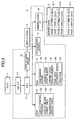
- the control circuit 3 includes a CPU 11; a ROM 12; a RAM 13; an acceleration sensor 14; a memory card interface 15 (memory card I/F 15) connectable to the memory card 6; a display panel driver 16; and a key interface 17 (key I/F 17).
- the CPU 11 is a processing unit for controlling the display device 1 as a whole.
- the CPU 11 is connected to the ROM 12, the RAM 13, the acceleration sensor 14, the memory card I/F 15, the display panel driver 16, and the key I/F 17.
- the ROM 12 is an unrewritable memory.
- the ROM 12 stores various control programs to be executed by the CPU 11, and fixed value data to be referred to when each of the control programs is executed.
- the RAM 13 is a rewritable memory for storing various kinds of data required for the control programs to be executed by the CPU 11.
- the RAM 13 includes a page number memory 13a, a current-page start memory 13b, a current-page scaling memory 13c, a page data expansion region 13d, and a video RAM 13e.
- the page number memory 13a stores the page number of the image which is displayed on the display panel 2.
- the current-page start memory 13b stores the display start position S of the display image.
- the current-page scaling memory 13c stores magnification scales of the display image. In this embodiment, the current-page scaling memory 13c stores one of the magnification scale values 100%, 133%, 200%, and 266%, depending on the user's selection.
- the page data expansion region 13d is a region in which the original image data read from the memory card 6 is expanded at the magnification scale stored in the current-page scaling memory 13c. At least a part of the original image data expanded in the page data expansion region 13d is transmitted to the video RAM 13e.
- the video RAM 13e stores display data produced based on the data transmitted from the page data expansion region 13d.
- the acceleration sensor 14 detects the acceleration of gravity to determine the orientation of the display panel 2. relative to the user.
- the memory card I/F 15 allows data transmission and reception between the CPU 11 and the memory card 6 inserted into the memory card slot 5.
- the display panel driver 16 is connected to the display panel 2.
- the display panel driver 16 transmits the display data outputted from the video RAM 13e to the display panel 2, and then displays the display image on the display panel 2.
- the key I/F 17 is connected to keys 7.
- the key I/F 17 allows the user to input an instruction to magnify or contract each image to the control circuit 3 through the keys 7.
- the keys 7 include a back key 7a, a next key 7b, a magnification key 7c, and a contraction key 7d.
- the back key 7a and the next key 7b are provided below the display panel 2 on the front surface of the main body 3.
- the magnification key 7c and the contraction key 7d are arranged between the back key 7a and the next key 7b.
- the magnification key 7c accepts a display image magnification instruction.
- the contraction key 7d accepts a display image contraction instruction.
- a power switch 8 is provided at a portion of the main body 3 above the display panel 2. When the user turns the power switch 8 on, the CPU 11 starts sending electricity to the display panel 2 and the control circuit 3.
- the memory card 6 readable by the display device 1 includes a plurality of page-data storage regions 6-1, 6-2...and 6-n (n is an integer larger than 1) to store the original image data corresponding to each original image.
- page display data corresponding to the original image for each page and page attribute data indicating the attribute of the page display data are stored together.
- the page attribute data indicates the orientation of the data corresponding to the original image for each page, i.e. in which mode the data is created: in a portrait mode or in a landscape mode.
- the page display data is a text file
- the page attribute data indicates the orientation of the character string contained in the file, i.e. in which style the text file has been created, in a horizontal writing style or in a vertical writing style.
- the page display data has a page number. The page display data is managed by the page number.
- the CPU 11 accesses a page-data storage region 6-i (i is an integer equal to or more than 1 and equal to or less than n) which stores the page display data having a predetermined page number, and then loads the page display data from the page-data storage region 6-i.
- the control circuit 3 displays the image corresponding to the page display data on the display panel 2.
- the page display data stored in one page-data storage region is displayed to be fitted to the size of the display panel 2 (standard size)
- the rectangular image displayed on the display panel 2 is referred to as a page image P.
- the magnified image WP produced by magnifying the page image P the image actually displayed on the display panel 2 is referred to as a partial magnified image WPs.
- the control circuit 3 displays the page image P so that the longer side direction thereof coincides with the longer side direction of the display panel 2.
- the control circuit 3 uses the display panel 2 in a portrait manner, as shown in Fig. 1 .
- the display panel 2 is orientated for the user looking at the display panel 2 so that the longer side of the display panel 2 extends vertically and the shorter side thereof extends horizontally.
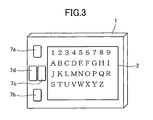
- the control circuit 3 uses the display panel 2 in a landscape manner, as shown in Fig. 3 .
- the display unit 2 is oriented for the user so that the longer side of the display panel 2 extends horizontally, and the shorter side thereof extends vertically.
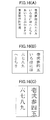
- the page display data is in a horizontal writing style-portrait mode and consists of a text file, and the page image P of the page display data is displayed on the display panel 2 as shown in Fig. 1 .
- the user when the user depresses the contraction key 7d while the page image P is displayed on the display panel 2 in a magnified state, the page image P is contracted in the order reverse to the magnification. Therefore, the user can magnify the page image P by one of the magnification scales 100%, 133%, 200%, and 266%, by depressing the magnification key 7c and the contraction key 7d as required.
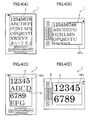
- the page image P is magnified by 133% thereby producing a magnified image WP.
- the magnified image WP extends off the display panel 2 as shown in Fig. 4(A) .
- the partial magnified image WPs is rotated by 90 degrees relative to the page image P as shown in Fig. 4(B) , so that the longer side direction of the display panel 2 coincides with the line direction of the partial magnified image WPs (lateral direction of the partial magnified image WPs).
- a division boundary D appears in parallel with the shorter side direction as shown in Fig. 4(C) .
- the display region of the display panel 2 is divided into two regions in the longer side direction.
- the partial magnified image WPs is divided into two regions so that one character string corresponding to one line is divided to two lines.
- the divided images are arranged above and below the division boundary D. Specifically, the divided images are combined through the division boundary D in the portrait-mode, and then displayed on the display panel 2 as one combined image.
- a division boundary D appears in parallel with the longer side direction as shown in Fig. 4(D) .
- the display region of the display panel 2 is divided into two regions in the shorter side direction.
- the partial magnified image WPs is rotated by 90 degrees relative to the page image P and displayed.
- the longer side direction of the display panel 2 coincides with the line direction of the partial magnified image WPs.
- the partial magnified image WPs is divided into two regions so that one character string corresponding to one line is divided to two lines.
- the divided images are arranged above and below the division boundary D. Specifically, the divided images are combined in the landscape mode through the division boundary D and displayed on the display panel 2 as one combined image.
- the partial magnified image WPs is rotated by 90 degrees relative to the page image P, depending on the magnification scale of the partial magnified image WPs, thereby promoting the utilization of the longer side direction of the display panel 2.
- the display region of the display panel 2 is divided into two regions, and the partial magnified image WPs is divided to two images, the divided partial magnified images WPs are simultaneously displayed on both display regions.
- one character string corresponding to one line is displayed on the display panel 2 as a whole in a state that the one character string can be viewed at the same time from the head through the end thereof.
- the user can read the character string corresponding to one line from the head through the end thereof without a switch operation for the displayed image such as a horizontal scroll thereof.
- the shape of the partial magnified image WPs is modified according to the magnification scale, and the length of the partial magnified image in the column direction orthogonal to the line direction is changed approximately.
- This length is a value preset according to the aspect ratio of the display panel 2 and the magnification scale. In the following description, the length is referred to as a "display region height H".
- the display region height H is predetermined according to the corresponding magnification scale, and stored in a display region height table 12b.
- the display region height H is a relative value determined based on the length (height) of the longer side of the page image P, as a reference. In this embodiment, "100" is employed as the reference value.
- the display region height H is determined so that the area of the partial magnified image WPs defined by the display region height H is equal to or smaller than the area of the display panel 2. As a result, the total area of the partial magnified image WPs can be displayed on the display panel 2 at one time.
- FIG. 5(A) schematically show the page image P and the magnified images WP obtained by magnifying the page image P by 133%, 200%, and 266%, respectively.
- the page image P is displayed in order to have the same size as the display panel 2 as stated above, the magnified image WP extends off the display panel 2 regardless of the magnification scale.
- the control circuit 3 selects the region indicated by an alternate long and short dashed line as a partial magnified image WPs from the magnified image WP, as shown in Figs. 5(B) to 5(E) .
- the partial magnified image WPs is defined in such a way that the magnified image WP is divided in the longer side direction (direction orthogonal to the line direction) by the display region height H, and that the partial magnified image WPs contains the range from one end (head) through the other end (end) of the magnified image WP in the shorter side direction (line direction).
- the display region height H has the following relations relative to the aspect ratio a of the display panel 2 and to the magnification scale of the page image P, depending on the attribute of the page image P.
- the length of the shorter side is expressed by L
- the length of the longer side is expressed by aL, as shown in Fig. 6 .
- the partial magnified image WPs is divided into no number of images.
- the divided images are combined vertically in a state that the orientation of the characters is maintained, thereby producing a combined image.
- the combined image has a height of n 0 H. Since the combined image cannot be displayed if the n 0 H exceeds the longer side length aL of the display panel 2, the display region height H has to satisfy the following conditions.
- the partial magnified image WPs is divided into n 0 -number of images.
- the divided images are combined vertically in a state that the orientation of the characters is maintained, thereby producing a combined image.
- the combined image has a height of n 0 H. Since the combined image cannot be displayed if the n 0 H exceeds the longer side length L of the display panel 2, the display region height H has to satisfy the following conditions.
- the partial magnified image WPs is divided into 2n 1 -number of images.
- the divided images are combined vertically in a state that the orientation of the characters is maintained, thereby producing a combined image.
- the combined image has a height of 2n 1 H. Since the combined image cannot be displayed if the 2n 1 H exceeds the longer side length aL of the display panel 2, the display region height H has to satisfy the following conditions.
- H ⁇ 1 / 2 ⁇ n 1 ⁇ anL Specifically, H ⁇ 100 / 2 ⁇ n 2
- the aspect ratio has to be equal to the following value or smaller.
- the partial magnified image WPs is rotated by 90 degrees relative to the page image P, and the display region is divided into two regions at the same time. Since the page image P has a shorter side length L and a longer side length aL, the a-folded magnified image WP has a shorter side length of aL and a longer side length of a 2 L.
- the respective aspect ratios have to be equal to the following values or smaller.
- the partial magnified image WPs is divided into n 0 -number of images.
- the divided images are combined vertically in a state that the orientation of the characters is maintained, thereby producing a combined image.
- the combined image has a height of n 0 H. Since the combined image cannot be displayed if the n 0 H exceeds the shorter side length L of the display panel 2, the display region height H has to satisfy the following conditions.
- the uppermost end of an image such as a page image P or a magnified image WP is referred to as a page head, and the lowermost end thereof is referred to as a page end.
- the vertical and horizontal directions of an image are defined when the image is positioned in an appropriate manner.
- the page head of the partial magnified image WPs is referred to as a display start position S. Settings can be made for the display start position S as required to change the partial magnified image WPs.
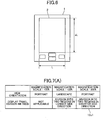
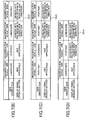
- magnification display setting table 12c is used to determine how the partial magnified image WPs described with reference to Fig. 5 is to be displayed. Specifically, the magnification display setting table 12c associates each magnification scale with the orientation in which the image magnified by each magnification scale is displayed, and a way how the display region of the display panel 2 is divided. In this embodiment, four kinds of magnification display setting tables 12c are stored according to the page attribute data.
- Fig. 7(A) shows a magnification display setting table 12c1 used for the page image P in the vertical-writing style-portrait mode document file.
- Fig. 7(B) is a magnification display setting table 12c2 used for the page data P in the vertical-writing style-landscape mode document file.
- Fig. 7(C) is a magnification display setting table 12c3 used for the page data P in the horizontal writing style-portrait mode document file; and
- Fig. 7(D) is a magnification display setting table 12c4 used for the page image P in the horizontal writing style-landscape mode document file.
- the page data has a horizontal writing style-portrait mode attribute
- the description is given with reference to a magnification display table 12c3 shown in Fig. 7(C) .
- the magnification display table 12c3 the magnification scale 100% corresponds to vertical orientation for "view orientation". Therefore, when a page image P is magnified by 100%, the page image P is displayed so that the column direction coincides with the longer side direction of the display panel 2. Furthermore, since "not applicable" is indicated for a display panel division method, the page image P is displayed without dividing the display panel 2 (see Fig. 1 ).
- the partial magnified image WPs obtained by magnifying by 200% is displayed so that the column direction coincides with the longer side direction of the display panel 2. Since the "display panel division method" indicates “division into two images in the longer side direction", the display panel 2 is divided into two sections vertically in the longer side direction by the division boundary D. The partial magnified image WPs is divided into two images, and the divided images are arranged one above the other (see Fig. 4(C) ).
- the "view orientation” indicates horizontal orientation
- the partial magnified image WPs obtained by magnifying the page image P by 266% is rotated by 90 degrees relative to the page image P, and then displayed so that the line direction coincides with the longer side direction of the display panel 2.
- the display panel division method indicates "division into two images in the shorter side direction”
- the display panel 2 is divided into two sections vertically in the shorter side direction by the division boundary D.
- the partial magnified image WPs is divided into two images, and the divided images are arranged one above the other (see Fig. 4(D) ).
- magnification scale is limited to equal to or less than 200%. Even when the user further depresses the magnification key 7c after the magnification scale reaches 200%, the magnification scale remains unchanged.
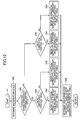
- the main process is started when the user turns on the power switch of the display device 1.
- the CPU 11 reads the page display data of a page number "1" from the memory card 6, expands the page display data in the page data expansion region 13d (see Fig. 2 ), and displays the page image P of the page number "1" on the display panel 2 based on the page display data.
- the CPU 11 determines whether or not the user has depressed either the magnification key 7c or the contraction key 7d (See Fig. 1 ) (S2). If the user has depressed either the magnification key 7c or the contraction key 7d (S2: Yes), the CPU 11 decides the magnification scale of the image to be displayed on the display panel 2 in a magnification scale change process (S4), and displays the image as a partial magnified image WPs corresponding to the magnification scale on the display panel 2 in a display process (S12).
- the CPU 11 determines whether or not the user has depressed the next key 7b (S6).
- the CPU 11 performs a page forward process (S10) on the page image P or the partial magnified image WPs displayed on the display panel 2.
- the CPU 11 switches to the next page image P in the page forward direction or the partial magnified image WPs on the page end side.
- the CPU 11 refers to the display region height table 12b and then acquires the display region height H corresponding to the magnification scale selected by the user (S8). Next, the CPU 11 executes a page forward process to determine the display start position S of the next partial magnified image in the page forward direction (S10). In a display process (S12), the CPU 11 displays the partial magnified image WPs determined based on the display start position S on the display panel 2.
- the CPU 11 determines whether or not the user has depressed the back key 7d (S14). When the user depresses the back key 7d, the CPU 11 performs a page return process (S18) on the page image P or the partial magnified image WPs displayed on the display panel 2. The CPU 11 switches to the previous page image P or to the partial magnified image WPs on the page head side in the page returning direction. Unless the user has depressed back key 7d (S14: No), the CPU 11 returns to S2.
- the CPU 11 refers to the display region height table 12b and then acquires the display region height H corresponding to the magnification scale selected by the user (S16). Next, the CPU 11 executes the page return process to determine the display start position S of the next partial magnified image in the page returning direction (S18). In the display process (S12), the CPU 11 displays the partial magnified image WPs determined based on the display start position S on the display panel 2. The CPU 11 returns to S2 after the display process (S12).
- the page forward process will be described.
- the CPU 11 determines the display start position S of the partial magnified image WPs on the page end side in the page forward direction when the user depresses the next key 7b.
- the CPU 11 acquires the display start position S of the page image P or the partial magnified image WPs currently displayed on the display panel 2, from the current-page start memory 13b.
- the CPU 11 adds the display region height H to the acquired display start position S, and then determines whether or not the value obtained by addition is equal to 100 or larger (S102).
- the relation between the display start position S and the display region height H will be described.
- the magnification scale 133% corresponds to the display region height H "56". Therefore, if "44" is employed for the display start position S, the value obtained by adding the display region height H to the display start position S is "100".
- the CPU 11 determines that the partial magnified image WPs covering the range from the display start position S "44" to the page end is displayed on the display panel 2.
- the CPU 11 determines that the page display data which is being partially displayed has no undisplayed region on the page end side of the magnified image WP. Therefore, the CPU 11 determines that the next image to be displayed in the page forward direction is the page display data of the next page.
- the partial magnified image WPs obtained by magnifying the page image P by 133% is displayed.
- the display start position S of the partial magnified image WPs is "0".
- the value obtained by adding the display region height H to the display start position S is "56", which is equal to or smaller than 100.
- the CPU 11 determines that the magnified image WP still has the undisplayed region corresponding to the height "44" in the page forward direction.
- the CPU 11 determines that the partial magnified image WPs to be displayed next in the page forward direction is the region on the page end side within the magnified image WP.
- the CPU 11 sets the position "94" obtained by subtracting the display region height H "56" from "100" corresponding to the page end, as the next display start position S. As a result, the CPU 11 then displays the partial magnified image WPs covering the range from the display start position S "44" to the page end on the display panel 2. Consequently, the CPU 11 moves the partial magnified image WPs by such a simpler process without a complicated process to combine the current image on the display panel 2 and a part of the page display data on the next page, thereby displaying the magnified image WP on the display panel 2 as a whole.
- the CPU 11 determines that the magnified image WP has no undisplayed region on the page end side. The CPU 11 then adds "1" to the page number stored in the page number memory 13a, and sets the display start position S to "0" (S104). As a result, the CPU 11 starts displaying the partial magnified image WPs from the head of the next page in the subsequent display process (S12).
- the CPU 11 determines whether or not the condition expressed by the following (Equation 1) is satisfied (S106). Display start position S + Display region height H ⁇ 2 ⁇ 100
- the CPU 11 updates the display start position S based on the display region height H preset for each magnification scale so as to shift the display start position S sequentially in the page forward direction.
- the CPU 11 displays the partial magnified image WPs defined by the display start position S on the display panel 2, and then displays the next partial magnified image WPs adjacent to the page end side in the page forward direction.
- the page return process (S18) will be described.
- the CPU 11 determines the display start position S of the partial magnified image WPs on the page head side in the page returning direction, when the user depresses the back key 7a.
- the CPU 11 acquires the display start position S of the partial magnified image WPs currently displayed on the display panel 2, from the current-page start memory 13b.
- the CPU 11 determines whether or not the display start position S is 0 (page head) or smaller (S182).
- the CPU 11 determines that the partial magnified image WPs starting from the page head and corresponding to the display region height H is currently displayed on the display panel 2. Specifically, the CPU 11 determines that the magnified image WP has no undisplayed region on the page head side. Therefore, the CPU 11 determines that the image to be displayed next in the page returning direction is the page display data for the previous page.
- the CPU 11 subtracts "1" from the page number stored in the page number memory 13a, and sets the next display start position S by subtracting the display region height H from 100 (S184). In the next display process (S12), the CPU 11 starts displaying the partial magnified image WPs from the end of the previous page and corresponding to the display region height H.
- the CPU 11 determines that the magnified image WP still has an undisplayed region on the page head side of the currently displayed partial magnified image WPs.
- the CPU 11 next determines whether or not the value obtained by subtracting the display region height H from the display start position S is "0" or smaller (S186). If the value obtained by subtracting the display region height H from the display start position S is larger than 0 (S186: No), the value obtained by subtracting the display region height H from the display start position S is set to the next display start position S (S190).
- the CPU 11 displays the undisplayed region of the magnified image WP adjacent to the page head side on the display panel 2 as a partial magnified image WPs.
- the display start position S is set to "0" (S188).
- the CPU 11 starts displaying the partial magnified image WPs corresponding to the display region height H from the page head on the display panel 2.
- a partial magnified image WPs is selected from the magnified image WP in the next display process (S12) by the display start position S determined in the page forward process (S10) or in the page return process (S18). The selected partial magnified image WPs is then displayed on the display panel 2.
- magnification scale change process S4
- the magnification scale of the page image P is changed.
- the CPU 11 determines each magnification scale, and then stores the determined magnification scale in the current-page scaling memory 13c (S42). In this embodiment, the four magnification scales 100%, 133%, 200%, and 266% are settable in the magnification order for the display device 10.
- the CPU 11 determines the magnification scale of the image to be displayed next, depending on the magnification scale stored in the current-page scaling memory 13c (magnification scale of the image currently displayed on the display panel 2), and depending on the number of times the user depresses the magnification key 7c or the contraction key 7d.
- the CPU 11 refers to the page attribute data of the page display data having the page number stored in the page number memory 13a (page number of the currently displayed image), and then determines whether or not the character string in the page display data is provided in the vertical writing style (S44). Next, the CPU 11 determines whether or not the page display data has been created in the portrait mode (546, S48). The CPU 11 then refers to the magnification display table 12c corresponding to the page attribute data of the page display data currently displayed on the display panel 2.
- the CPU 11 then refers to a vertical writing style-portrait mode magnification display table 12c1 ( Fig. 7(A) ) (S50). If the character string is provided in the vertical writing style (S44: Yes), and the page orientation is based on the landscape mode (S46: No) at the same time, the CPU 11 refers to a vertical writing style-landscape mode magnification display table 12c2 ( Fig. 7(B) ) (S52).
- the CPU 11 refers to a horizontal writing style-portrait mode magnification display table 12c3 ( Fig. 7(C) ) (S54). If the character string is provided in the horizontal writing style (S44: No), and the page orientation is based on the landscape mode (S48: No) at the same time, the CPU 11 refers to a horizontal writing style-landscape mode magnification display table 12c4 ( Fig. 7(D) ) (S56).
- the CPU 11 determines the view orientation and the display panel division method (S58). In the next display process (S12), the CPU displays the page image P or the partial magnified image WP on the display panel 2, according to the referred magnification display table 12c.
- a display process (S12) will be described.
- the CPU 11 displays the image according to the instruction on the display panel 2.
- the CPU 11 reads the page display data of the page number stored in the page number memory 13a from the memory card 6, and then expands the read page display data by the magnification scale stored in the current-page scaling memory 13c, in the page data expansion region 13d (see Fig. 3 ), as a magnified image WP (S122). If the page number and the magnification scale are same as those of the previous display process (S12), the process can be omitted.
- the CPU 11 transfers the data equivalent to the partial magnified image WPs starting from the display start position S and corresponding to the display region height H, to the video RAM 13e.
- the CPU 11 then produces display data corresponding to the partial magnified image WPs, based on the view orientation and the display panel division method determined according to the magnification display table 12c (S124).
- the CPU 11 then outputs the produced display data to the display panel driver 16 to display the data on the display panel 2 (S126).
- a display process (S12) to be executed when the magnification scale is 200% will be described.
- a division boundary D extending in parallel with the shorter side direction of the display panel 2 is displayed on the display panel 2, so that the display region of the display panel 2 is divided into two regions in the longer side direction, thereby arranging the divided display regions in the longer side direction.
- the upper region is referred to as a divided region X
- the lower region is referred to as a divided region Y.
- the partial magnified image WPs is divided into the divided region X and the divided region Y for display.
- Fig. 14(B) shows a magnified image WP magnified by 200%.
- the page display data corresponding to the magnified image WP is expanded in the page data expansion region 13d.
- Fig. 14(C) shows a partial magnified image WPs when the display start position S is "0".
- the page display data expanded in the page data expansion region 13d is partially transferred to the video RAM 13e so that display data is produced in the video RAM 13e.
- the half on the line head side (left side in Fig. 14(C) ) is displayed in the divided region X of the display panel 2
- the half on the line end side (right side in Fig. 14(C) ) is displayed in the divided region Y of the display panel 2.
- a display process (S12) to be executed when the magnification scale is 266% will be described.
- Fig. 15 (A) when a page image P is magnified by 266%, a division boundary D extending in parallel with the longer side direction of the display panel 2 is displayed on the display panel 2, so that the display region of the display panel 2 is divided into two regions in the shorter side direction, thereby arranging the two divided display regions in the shorter side direction. Between the two divided display regions, the upper region is referred to as the divided region X, and the lower region is referred to as the divided region Y. As described in Fig. 4(D) , the partial magnified image WPs is divided into the divided region X and the divided region Y for display.
- Fig. 15(B) shows a magnified image WP magnified by 266%.
- the page display data corresponding to the magnified image WP is expanded in the page data expansion region 13d.
- Fig. 15(C) shows a partial magnified image WPs when the display start position S is "0".
- the page display data expanded in the page data expansion region 13d is processed so that display data is produced in the video RAM 13e.
- Fig. 15(C) regarding the partial magnified image WPs, the half on the line head side (left side in Fig. 15 (C) ) is displayed in the divided region X of the display panel 2, and the half on the line end side (right side in Fig. 13(C) ) is displayed in the divided region Y of the display panel 2.
- the above description is based on the magnification display to be employed when the page image P has the horizontal writing style-portrait mode attribute.
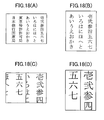
- the page display data attributes other than the horizontal writing style-portrait mode attribute are described with reference to Fig. 16 to Fig. 18 .
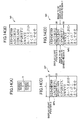
- the partial magnified image WPs is displayed on the display panel 2 based on the magnification display table 12c1 ( Fig. 7(A) ).
- Fig. 16(B) when a page image P is magnified by 133%, the CPU 11 displays a division boundary D extending in parallel with the shorter side direction of the display panel 2, so as to divide the display panel 2 into two sections in the longer side direction.
- the character string continuous in the line direction of the partial magnified image WPs is divided into two images.
- the divided character strings are arranged on the right and left sides of the division boundary D.
- Fig. 16(C) when a page image P is magnified by 200%, the CPU 11 displays a division boundary D extending in parallel with the longer side direction of the display panel 2, so as to divide the display panel 2 into two sections in the shorter side direction.
- the CPU 11 then divides the character string continuous in the line direction of the partial magnified image WPs into two images, and then arranges the divided character strings on the right and left sides of the division boundary D for display. In both cases of 133% magnification and 200% magnification, the character string continuous in the line direction corresponding to one line is displayed on the display panel 2 at one time from the head through the end thereof.
- the partial magnified image WPs is displayed on the display panel 2 based on the magnification display table 12c4 ( Fig. 7(D) ).
- the CPU 11 displays the page image P so that the longer side direction of the page image P coincides with the longer side direction of the display panel 2.
- the display panel 2 is used in the landscape mode.
- the CPU 11 displays a division boundary D extending in parallel with the shorter side direction of the display panel 2, so as to divide the display panel 2 into two sections in the longer side direction.
- the CPU 11 divides the partial magnified image WPs into two images in the line direction, and then arranges the divided partial magnified images above and below the division boundary D for display.
- a page image P is magnified by 200%
- the CPU 11 displays a division boundary D extending in parallel with the longer side direction of the display panel 2, so as to divide the display region of the display panel 2 into two regions in the shorter side direction.
- the CPU 11 further divides the partial magnified image WPs into two images in the line direction, so as to arrange the divided partial magnified images above and below the division boundary D for display. In both cases of 133% display and 200% display, the CPU 11 displays the character string corresponding to one line of the magnified image WP on the display panel 2 at one time from the head through the end thereof.
- the partial magnified image WPs is displayed on the display panel 2 based on the magnification display table 12c2 ( Fig. 7(B) ).
- the CPU 11 displays the page image P so that the longer side direction of the page image P coincides with the longer side direction of the display panel 2.
- the display panel 2 is used in the landscape mode.
- the CPU 11 rotates the partial magnified image WPs by 90 degrees relative to the page image P for display so that the line direction of the partial magnified image WPs coincides with the longer side direction of the display panel 2.
- the CPU 11 displays a division boundary D extending in parallel with the shorter side direction of the display panel 2, so as to divide the display panel 2 into two sections in the longer side direction. The CPU 11 then divides the partial magnified image WPs into two images in the line direction, and then arranges the divided partial magnified images on the right and left sides of the division boundary D for display.
- Fig. 18(B) when the page image P is magnified by 133%, the CPU 11 rotates the partial magnified image WPs by 90 degrees relative to the page image P for display so that the line direction of the partial magnified image WPs coincides with the longer side direction of the display panel 2.
- the CPU 11 displays a division boundary D extending in parallel with the shorter side direction of the display panel 2, so as to divide the display panel 2 into two sections in the longer side direction.
- the CPU 11 displays a division boundary D extending in parallel with the longer side direction of the display panel 2, so as to divide the display panel 2 into two sections in the shorter side direction.
- the CPU 11 then divides the partial magnified image WPs into two images in the line direction, and then arranges the divided partial magnified images on the right and left sides of the division boundary D for display.
- the character string corresponding to one line is displayed on the display panel 2 at one time from the head through the end thereof.
- the display device 1 of this embodiment even when a page image P is magnified, the character string corresponding to one line of the page image P can be displayed on the display panel 2 at the same time from the head through the end thereof. These operation reduces operational complexity when the text obtained by magnifying the page image P processed from a document file is read.
- the display panel 2 according to the first embodiment has been described on the precondition that the aspect ratio (longer side length/shorter side length) thereof is 1.33. Therefore, if the line direction of the page image P to be displayed on the display panel 2 coincides with the shorter side direction of the display panel 2 (in this embodiment, the page image P is the horizontal writing style-portrait mode document, or the vertical writing style-landscape mode document), and the page image P is magnified by 133%, the partial magnified image WPs is rotated by 90 degrees relative to the page image P so that the line direction of the partial magnified image WPs coincides with the longer side direction of the display panel 2. The partial magnified image WPs is thus displayed on the display panel 2.
- the aspect ratio longer side length/shorter side length
- the length of the line direction of the magnified image magnified by 133% is equal to the length of the longer side of the display panel 2. Therefore, the longer side direction of the display panel 2 can be utilized by rotating the partial magnified image WPs by 90 degrees relative to the page image P. As a result, the character string corresponding to one line is displayed on the display panel 2 at the same time from the head through the end thereof.
- the character string corresponding to one line of the partial magnified image WPs partially extends off the display panel 2 even when the partial magnified image WPs is rotated by 90 degrees relative to the page image P. Therefore, the partial magnified image WPs is divided into two images in the line direction so that the divided images are arranged one above the other for display. This simple operation enables the character string corresponding to one line to be displayed on the display panel 2 at the same time from the head through the end.
- the page image P to be displayed on the display panel 2 coincides with the shorter side direction of the display panel 2 (in this embodiment, the page image P is in the horizontal writing style-portrait mode, or the vertical writing style-landscape mode), and the page image P is magnified by 266%
- the partial magnified image WPs is divided into two images in the line direction so that the divided images are arranged one above the other.
- the partial magnified image WPs is rotated by 90 degrees relative to the page image P so that the line direction of the partial magnified image WPs coincides with the longer side direction of the display panel 2.
- the divided partial magnified images WPs are combined and displayed on the display panel 2. Therefore, the longer side direction of the display panel 2 can be used effectively.
- the CPU 11 changes the magnification scale of the magnified image WP when the user depresses the magnification key 7c or the contraction key 7d.
- the acceleration sensor 14 detects the change in the orientation of the display panel 2 relative to the user. The CPU 11 then changes the magnification scale of the magnified image WP based on the result detected by the acceleration sensor 14.
- the input to the magnification key 7c or to the contraction key 7d is disabled, and the image magnified only by either 100% or 133% is displayed on the display panel 2.
- the page image P has the horizontal writing style-portrait mode attribute.
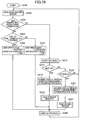
- the CPU 11 reads the acceleration (acceleration of gravity) detected by the acceleration sensor 14 (S202).
- the acceleration detected by the acceleration sensor 14 enables the CPU 11 to confirm how much the display device 1 is inclined relative to the vertical direction. Therefore, based on the detected acceleration, the CPU 11 determines in which way the longer side of the display panel 2 is oriented vertically (hereinafter, referred to as portrait orientation) or horizontally (hereinafter, referred to as landscape orientation).
- the CPU 11 determines whether or not the orientation of the display panel 2 coincides with the view orientation (S204). A description is given based on the precondition that the display panel 2 is in the portrait orientation, and on the precondition that a page image P magnified by 100% is displayed thereon. In this case, the page image P is in the portrait orientation for display (see magnification display table 12c3 in Fig. 7(C) ). Since the orientation of the display panel 2 coincides with the view orientation (S204: Yes), the CPU 11 now accepts key input (S212).
- the CPU 11 acquires the display region height H corresponding to the magnification scale (S216), executes a page forward process (S218), and then executes a display process (S226). As a result, the next image in the page forward direction is displayed on the display panel 2.
- the page forward process (S218) is the same as the page forward process (S10) described with reference to Fig. 9 .
- the display process (S226) is the same as the display process (S12) described with reference to Fig. 13 . Therefore, the detailed description thereof is omitted here.
- the CPU 11 acquires the display region height H corresponding to the magnification scale (S222), executes a page return process (S224), and then executes the display process (S226). As a result, the next image in the page returning direction is displayed on the display panel 2.
- the page return process (S224) is the same as the page return process (S18) described with reference to Fig. 11 , so the detailed description thereof is omitted here.
- the user happens to rotate the display device 1 so that the display panel 2 becomes in the landscape orientation. If the display panel 2 is changed from the portrait orientation to the landscape orientation, the view orientation does not coincide with the orientation of the display panel 2 (S204: No).
- the CPU 11 determines whether or not the display panel 2 is in the portrait orientation (S206). If the display device 1 is in the portrait orientation (S206: Yes), the CPU 11 sets the view orientation to the portrait orientation, and sets the magnification scale to be stored in the current-page scaling memory 13c to 100% (S208). As a result, in the display process (S226), the CPU 11 displays the page image P magnified by 100% in the portrait orientation on the display panel 2 which is used in the portrait orientation.
- the CPU 11 sets the view orientation to the landscape orientation, and sets the magnification scale to be stored in the current-page scaling memory 13c to 133% (S210). As a result, in the display process (S226), the CPU 11 displays the page image P magnified by 133% on the display panel 2 which is used in the landscape orientation.
- the user simply changes the orientation of the display panel 2, thereby switching the magnification scale of the page image P between 100% and 133% for display. Even when the page image P is magnified by 133%, the character string corresponding to one line is displayed on the display panel 2 at one time from the head through the end thereof. This improves visibility by image magnification, and requires less operational complexity at the same time.
- the display panel 2 consists of an electrophoretic panel.
- the display panel 2 is not restricted to the electrophoretic panel but any other types of panels such as a liquid crystal panel.
- the magnification scale has been selected from 133%, 200%, and 266%. These values are decided based on the aspect ratio (1.33) of a typical display panel. Therefore, if the aspect ratio of the display panel 2 is changed, these magnification scales are also changed as required.
- Each magnification scale does not have to be fixed.
- An arbitrary value can be set for the magnification scale by the user.
- the CPU 11 compares the magnification scale preset based on the aspect ratio of the display panel 2 with the arbitrary magnification scale set by the user, and then refers to the most suitable magnification display tables 12c.
- the CPU 11 acquires the attribute of the page image P by referring to the page attribute data stored in the memory card 6.
- the CPU 11 can also determine the attribute of the page image P by analyzing the loaded page display data. If the CPU 11 determines the attribute in this manner, the present invention is applicable to the case in which the page attribute data does not contain one of horizontal writing style/vertical writing style information and portrait mode/landscape mode information.
- the page image P has been processed from a document file.
- the present invention is also applicable to the page image P which has been processed from a non-document file. This is because the user sometimes needs to display a non-document file such as a graph or a table in a predetermined direction at the same time.
- the division boundary D for dividing the display region of the display panel 2 is displayed.
- the displayed division boundary D makes the arrangement of the divided partial magnified images WPs easily viewable, thereby improving visibility.
- the divided partial magnified image WPs can be displayed without displaying the division boundary D.
- the present invention is applicable to a display device including a display panel for displaying an image, such as a personal computer, a PDA, and a mobile phone.
Landscapes
- Engineering & Computer Science (AREA)
- Physics & Mathematics (AREA)
- General Physics & Mathematics (AREA)
- Theoretical Computer Science (AREA)
- Multimedia (AREA)
- Signal Processing (AREA)
- Computer Hardware Design (AREA)
- Controls And Circuits For Display Device (AREA)
Applications Claiming Priority (2)
| Application Number | Priority Date | Filing Date | Title |
|---|---|---|---|
| JP2006019814 | 2006-01-27 | ||
| PCT/JP2007/051171 WO2007086462A1 (fr) | 2006-01-27 | 2007-01-25 | Dispositif d'affichage |
Publications (2)
| Publication Number | Publication Date |
|---|---|
| EP1978507A1 true EP1978507A1 (fr) | 2008-10-08 |
| EP1978507A4 EP1978507A4 (fr) | 2012-06-20 |
Family
ID=38309251
Family Applications (1)
| Application Number | Title | Priority Date | Filing Date |
|---|---|---|---|
| EP07713703A Withdrawn EP1978507A4 (fr) | 2006-01-27 | 2007-01-25 | Dispositif d'affichage |
Country Status (3)
| Country | Link |
|---|---|
| US (1) | US20090027419A1 (fr) |
| EP (1) | EP1978507A4 (fr) |
| WO (1) | WO2007086462A1 (fr) |
Families Citing this family (18)
| Publication number | Priority date | Publication date | Assignee | Title |
|---|---|---|---|---|
| JP2009211159A (ja) * | 2008-02-29 | 2009-09-17 | Brother Ind Ltd | 端末装置 |
| JP4770878B2 (ja) * | 2008-06-19 | 2011-09-14 | 富士ゼロックス株式会社 | 情報表示装置及びプログラム |
| US8723802B2 (en) * | 2008-07-30 | 2014-05-13 | Kyocera Corporation | Mobile electronic device |
| WO2010018622A1 (fr) * | 2008-08-12 | 2010-02-18 | 富士通株式会社 | Dispositif électronique terminal papier, programme de commande d'affichage d'image, et procédé de commande d'affichage d'image |
| KR101116458B1 (ko) * | 2009-01-21 | 2012-03-07 | 파나소닉 전공 주식회사 | 감시 제어 장치 |
| JP5299125B2 (ja) * | 2009-06-30 | 2013-09-25 | 富士ゼロックス株式会社 | 文書処理装置及びプログラム |
| US20110134143A1 (en) * | 2009-12-04 | 2011-06-09 | Samsung Electronics Co., Ltd. | Method and apparatus for display screen reorientation |
| JP2011254962A (ja) * | 2010-06-08 | 2011-12-22 | Toshiba Corp | 超音波画像診断装置 |
| US9846688B1 (en) | 2010-12-28 | 2017-12-19 | Amazon Technologies, Inc. | Book version mapping |
| US8798366B1 (en) | 2010-12-28 | 2014-08-05 | Amazon Technologies, Inc. | Electronic book pagination |
| US9069767B1 (en) | 2010-12-28 | 2015-06-30 | Amazon Technologies, Inc. | Aligning content items to identify differences |
| JP5413688B2 (ja) * | 2011-02-16 | 2014-02-12 | ブラザー工業株式会社 | 画像区画プログラム、及び、表示装置 |
| US9881009B1 (en) | 2011-03-15 | 2018-01-30 | Amazon Technologies, Inc. | Identifying book title sets |
| KR20120123208A (ko) * | 2011-04-19 | 2012-11-08 | 삼성전자주식회사 | 휴대단말기의 어플리케이션 해상도 조절 장치 및 방법 |
| JP5751327B2 (ja) | 2011-06-17 | 2015-07-22 | 株式会社豊田自動織機 | 共鳴型非接触給電システム |
| JP5858774B2 (ja) * | 2011-12-26 | 2016-02-10 | キヤノン株式会社 | 表示画面生成装置及びその制御方法 |
| JP6080461B2 (ja) * | 2012-10-01 | 2017-02-15 | キヤノン株式会社 | 操作受付装置及び方法、並びにプログラム |
| JP6099948B2 (ja) * | 2012-11-28 | 2017-03-22 | 京セラ株式会社 | 電子機器及び制御プログラム並びに表示制御方法 |
Family Cites Families (7)
| Publication number | Priority date | Publication date | Assignee | Title |
|---|---|---|---|---|
| JPH0799555A (ja) * | 1993-09-28 | 1995-04-11 | Mitsubishi Electric Corp | ビデオスキャナ装置 |
| JPH0926769A (ja) * | 1995-07-10 | 1997-01-28 | Hitachi Ltd | 画像表示装置 |
| JP3720502B2 (ja) * | 1996-12-26 | 2005-11-30 | キヤノン株式会社 | 画像処理装置及び該装置における画像処理方法、並びにコンピュータ読み取り可能な記憶媒体 |
| JP2003280622A (ja) * | 2002-03-25 | 2003-10-02 | Matsushita Electric Ind Co Ltd | 電子表示装置とその表示方法 |
| JP2005156627A (ja) * | 2003-11-20 | 2005-06-16 | Sharp Corp | 表示装置、その表示装置を備えた携帯電話装置、画像表示方法、画像表示プログラム、および画像プログラムを記憶した記録媒体 |
| JP4352980B2 (ja) * | 2004-04-23 | 2009-10-28 | オムロン株式会社 | 拡大表示装置及び拡大画像制御装置 |
| JP5072194B2 (ja) * | 2004-05-14 | 2012-11-14 | キヤノン株式会社 | 情報処理装置および情報処理方法ならびに記憶媒体、プログラム |
-
2007
- 2007-01-25 EP EP07713703A patent/EP1978507A4/fr not_active Withdrawn
- 2007-01-25 WO PCT/JP2007/051171 patent/WO2007086462A1/fr not_active Ceased
-
2008
- 2008-07-28 US US12/181,179 patent/US20090027419A1/en not_active Abandoned
Also Published As
| Publication number | Publication date |
|---|---|
| US20090027419A1 (en) | 2009-01-29 |
| EP1978507A4 (fr) | 2012-06-20 |
| WO2007086462A1 (fr) | 2007-08-02 |
Similar Documents
| Publication | Publication Date | Title |
|---|---|---|
| EP1978507A1 (fr) | Dispositif d'affichage | |
| CN105705991B (zh) | 显示系统和方法 | |
| US6912326B2 (en) | Method for displaying an electronic document on a digital handheld device | |
| US7777764B2 (en) | Portable display device | |
| EP2555099A1 (fr) | Dispositif de traitement de commande d'affichage, procédé de traitement de commande d'affichage et programme de traitement de commande d'affichage | |
| JP2001175386A (ja) | 表示装置及び表示方法並びに記憶媒体 | |
| US20080301569A1 (en) | Image-displaying device | |
| JP2010049684A (ja) | ディスプレイ上に分割画面を表示する方法及び電子装置 | |
| US20100275151A1 (en) | Display device capable of scrolling navigation string of current display | |
| EP1225560A2 (fr) | Méthode et dispositif d'affichage de caractères et support d'enregistrement associé | |
| JP2013125426A (ja) | コンテンツ表示装置、方法及びプログラム | |
| US8560965B2 (en) | Display device for displaying setup screen with screen navigation path | |
| JP2001184187A (ja) | 情報表示装置 | |
| US7605827B2 (en) | Display processing apparatus | |
| JP4992437B2 (ja) | 表示装置 | |
| US20080301584A1 (en) | Image displaying device | |
| JP2011154427A (ja) | 表示端末装置、表示処理方法、表示処理プログラム | |
| JP2021105784A (ja) | 表示装置 | |
| JP2008209711A (ja) | 電子ペーパー | |
| JP2004265434A (ja) | 電子書籍表示装置 | |
| WO2010143500A1 (fr) | Dispositif de navigation de document, procédé d'affichage de document et programme d'affichage de document | |
| JPS61250681A (ja) | 表示制御装置 | |
| JP2004348755A (ja) | 電子ブック表示制御装置 | |
| JP2006221406A (ja) | 情報表示装置 | |
| JP2005215499A (ja) | 表示装置 |
Legal Events
| Date | Code | Title | Description |
|---|---|---|---|
| PUAI | Public reference made under article 153(3) epc to a published international application that has entered the european phase |
Free format text: ORIGINAL CODE: 0009012 |
|
| 17P | Request for examination filed |
Effective date: 20080729 |
|
| AK | Designated contracting states |
Kind code of ref document: A1 Designated state(s): AT BE BG CH CY CZ DE DK EE ES FI FR GB GR HU IE IS IT LI LT LU LV MC NL PL PT RO SE SI SK TR |
|
| A4 | Supplementary search report drawn up and despatched |
Effective date: 20120522 |
|
| RIC1 | Information provided on ipc code assigned before grant |
Ipc: G06T 3/40 20060101ALI20120515BHEP Ipc: G09G 5/22 20060101ALI20120515BHEP Ipc: G09G 5/00 20060101ALI20120515BHEP Ipc: H04N 1/387 20060101ALI20120515BHEP Ipc: G06T 11/60 20060101ALI20120515BHEP Ipc: G06F 3/048 20060101ALI20120515BHEP Ipc: H04N 1/393 20060101ALI20120515BHEP Ipc: G09G 3/34 20060101ALI20120515BHEP Ipc: G09G 5/36 20060101AFI20120515BHEP |
|
| DAX | Request for extension of the european patent (deleted) | ||
| STAA | Information on the status of an ep patent application or granted ep patent |
Free format text: STATUS: THE APPLICATION IS DEEMED TO BE WITHDRAWN |
|
| 18D | Application deemed to be withdrawn |
Effective date: 20121219 |