EP1995709A2 - Hilfsvorrichtung für Personen mit Kommunikationsschwierigkeiten - Google Patents
Hilfsvorrichtung für Personen mit Kommunikationsschwierigkeiten Download PDFInfo
- Publication number
- EP1995709A2 EP1995709A2 EP07020197A EP07020197A EP1995709A2 EP 1995709 A2 EP1995709 A2 EP 1995709A2 EP 07020197 A EP07020197 A EP 07020197A EP 07020197 A EP07020197 A EP 07020197A EP 1995709 A2 EP1995709 A2 EP 1995709A2
- Authority
- EP
- European Patent Office
- Prior art keywords
- screens
- message
- images
- messages
- scroll
- Prior art date
- Legal status (The legal status is an assumption and is not a legal conclusion. Google has not performed a legal analysis and makes no representation as to the accuracy of the status listed.)
- Withdrawn
Links
- 238000004891 communication Methods 0.000 title description 2
- 230000001771 impaired effect Effects 0.000 title 1
- 230000005236 sound signal Effects 0.000 claims abstract description 23
- 230000005540 biological transmission Effects 0.000 claims description 7
- 230000005484 gravity Effects 0.000 claims description 4
- 230000015572 biosynthetic process Effects 0.000 description 5
- 239000000758 substrate Substances 0.000 description 5
- 238000003786 synthesis reaction Methods 0.000 description 5
- 230000000694 effects Effects 0.000 description 4
- 230000009471 action Effects 0.000 description 3
- 235000013399 edible fruits Nutrition 0.000 description 3
- 238000005516 engineering process Methods 0.000 description 3
- 230000006870 function Effects 0.000 description 3
- 235000014443 Pyrus communis Nutrition 0.000 description 2
- 230000008033 biological extinction Effects 0.000 description 2
- 239000011248 coating agent Substances 0.000 description 2
- 238000000576 coating method Methods 0.000 description 2
- 239000003086 colorant Substances 0.000 description 2
- 238000001514 detection method Methods 0.000 description 2
- 230000001976 improved effect Effects 0.000 description 2
- 229920006267 polyester film Polymers 0.000 description 2
- 241000251468 Actinopterygii Species 0.000 description 1
- RYGMFSIKBFXOCR-UHFFFAOYSA-N Copper Chemical compound [Cu] RYGMFSIKBFXOCR-UHFFFAOYSA-N 0.000 description 1
- 241001639412 Verres Species 0.000 description 1
- 230000003044 adaptive effect Effects 0.000 description 1
- 230000015556 catabolic process Effects 0.000 description 1
- 230000008859 change Effects 0.000 description 1
- 230000001149 cognitive effect Effects 0.000 description 1
- 208000013407 communication difficulty Diseases 0.000 description 1
- 229910052802 copper Inorganic materials 0.000 description 1
- 239000010949 copper Substances 0.000 description 1
- 238000010586 diagram Methods 0.000 description 1
- 201000010099 disease Diseases 0.000 description 1
- 208000037265 diseases, disorders, signs and symptoms Diseases 0.000 description 1
- 230000002349 favourable effect Effects 0.000 description 1
- 239000011521 glass Substances 0.000 description 1
- 210000004247 hand Anatomy 0.000 description 1
- 229910052738 indium Inorganic materials 0.000 description 1
- APFVFJFRJDLVQX-UHFFFAOYSA-N indium atom Chemical compound [In] APFVFJFRJDLVQX-UHFFFAOYSA-N 0.000 description 1
- AMGQUBHHOARCQH-UHFFFAOYSA-N indium;oxotin Chemical compound [In].[Sn]=O AMGQUBHHOARCQH-UHFFFAOYSA-N 0.000 description 1
- 230000003993 interaction Effects 0.000 description 1
- 238000002955 isolation Methods 0.000 description 1
- 230000005923 long-lasting effect Effects 0.000 description 1
- 235000013372 meat Nutrition 0.000 description 1
- 238000001465 metallisation Methods 0.000 description 1
- 238000000034 method Methods 0.000 description 1
- 230000002688 persistence Effects 0.000 description 1
- 229920000728 polyester Polymers 0.000 description 1
- 230000003014 reinforcing effect Effects 0.000 description 1
- 238000009877 rendering Methods 0.000 description 1
- 230000002207 retinal effect Effects 0.000 description 1
- 230000033764 rhythmic process Effects 0.000 description 1
- 238000007789 sealing Methods 0.000 description 1
- 125000006850 spacer group Chemical group 0.000 description 1
- 230000006641 stabilisation Effects 0.000 description 1
- 238000011105 stabilization Methods 0.000 description 1
- 230000008093 supporting effect Effects 0.000 description 1
- VLCQZHSMCYCDJL-UHFFFAOYSA-N tribenuron methyl Chemical compound COC(=O)C1=CC=CC=C1S(=O)(=O)NC(=O)N(C)C1=NC(C)=NC(OC)=N1 VLCQZHSMCYCDJL-UHFFFAOYSA-N 0.000 description 1
- 230000001960 triggered effect Effects 0.000 description 1
- 238000010200 validation analysis Methods 0.000 description 1
- 235000013311 vegetables Nutrition 0.000 description 1
- 210000000707 wrist Anatomy 0.000 description 1
Images



Classifications
-
- G—PHYSICS
- G09—EDUCATION; CRYPTOGRAPHY; DISPLAY; ADVERTISING; SEALS
- G09B—EDUCATIONAL OR DEMONSTRATION APPLIANCES; APPLIANCES FOR TEACHING, OR COMMUNICATING WITH, THE BLIND, DEAF OR MUTE; MODELS; PLANETARIA; GLOBES; MAPS; DIAGRAMS
- G09B21/00—Teaching, or communicating with, the blind, deaf or mute
Definitions
- the present invention relates to a device for assisting people with communication difficulties, for example persons temporarily or permanently silent.
- the present invention aims to remedy these disadvantages.
- the user can implement both screens to select at least one message, the device then emitting a sound signal allowing third parties to understand each message selected by the user.
- At least one of said screens is a touch screen that includes both a capacitive sensor and a resistive sensor.
- At least one of said screens is a touch screen which comprises a capacitive sensor positioned under said screen.
- said capacitive sensor comprises a conductive loop placed under the screen.
- said loop is surrounded and / or superimposed on a ground plane.
- At least one of said screens is provided with a finger guide adapted to guide the user's finger towards the surface of said screen.
- the selection means and the control means are adapted to control a scrolling of images on at least one of the screens.
- control means is adapted so that, during a scroll, the same image appears successively on at least two screens.
- control means is adapted to rotate each image displayed on one of said screens.
- the selection means is disposed between two of said screens.
- the selection means comprises a multidirectional switch, or "joystick”.
- the selection means is, furthermore, adapted to control the scrolling of images, a sound power emitted by the sound signal emitting means.
- the selection means and the control means are adapted to first scroll through message categories and then, from the selection of a message category, to scroll messages of the message. selected category.
- the selection means and the control means are adapted to scroll through message categories on one of said screens and, from the selection of a message category, to scroll messages of the category selected on the other of said screens.
- each image comprises a subtitle representing, in clear, the message corresponding to the image.
- the selection means is adapted to select, firstly, a first message, the first message being memorized by the control means, then a second message, the control means being adapted to control the consecutive transmission. first and second message, by the means of transmitting sound signals.
- control means is adapted to memorize the first message during a long press on the selection means.
- At least one of the screens is an organic light-emitting diode screen.
- the device as described above comprises an internal sound box whose wall is formed by the sound signal emitting means.
- said sound box comprises fairings of components adapted to avoid, except at its end opposite to the sound signal emitting means, the surfaces perpendicular to an axis of movement of the sound signal emitting means.
- the means for transmitting sound signals is associated with triangular cutting bars whose angle faces the means for transmitting sound signals.
- the device as briefly described above comprises an ambient noise sensor, the control means being adapted to control the sound power emitted by the sound signal transmission means as a function of the ambient noise picked up by the ambient noise sensor.
- the device as briefly described above comprises, in vertical longitudinal section, a shape "W".
- the device as briefly described above comprises, in lateral section passing through its support points in a stable position, a round shape.
- the device as briefly described above has a center of gravity positioned below the center of curvature of said round shape.
- the device as briefly described above has a flat at least in the vicinity of its support points in a stable position.
- the device as briefly described above comprises a connector adapted to connect it to at least two external contactors.
- said connector is a standardized earphone connector.
- the device as briefly described above includes a connector adapted to connect to a computer, the control means being adapted to receive and store images associated with messages, through said connector.
- the device which is the subject of the present invention is a communication aid tool for certain handicapped persons (permanent or temporary).
- it takes the general shape of a remote control remote to hold in the hand of the user and to be used with one hand.
- This device is portable, easy to use with one hand, simple, lightweight, robust, waterproof, long-lasting and customizable.
- the device can, for example, have external dimensions of 14 ⁇ 6 ⁇ 3.5 centimeters and weigh about 150 grams.
- the connecting wires of the various components and circuits are not shown.
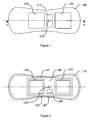
- FIG. 1 shows a housing 100 carrying on its upper face two color screens 105 and 110 and a navigation bar 115 mechanically associated with a multidirectional switch 120, that is to say that can cause commutations in several directions. and here two directions in each horizontal direction and one direction in the vertical direction.
- This type of multidirectional switch is known as the "joystick” (registered trademark).
- the distance between the two screens 105 and 110 allows a small movement of the finger to pass from one to the other and it is not necessary to change the position of the hand to make a selection on one or the other screens.
- FIG. 4 is a vertical longitudinal sectional view oriented along the arrows "D" represented in FIGS. 1 and 3.
- the arrows "A" represented in FIG. 4 correspond to the horizontal longitudinal sectional plane of the section illustrated in FIG. 2. It can be seen in FIG. 2 that the device comprises a shell 170 and a printed circuit 180 carrying the screens 105 and 110. the switch 120, a microcontroller 190, an ambient noise sensor 195 and a computer connector 145 and an analog connector 140. A dielectric (not shown) protects each screen and optimizes the capacitive detection.
- the shell 170 has, on at least a portion of its surface, a non-slip coating.
- these capacitive loops 130 and 135 are surrounded, on the circuit 180, with a ground plane and are superimposed on a ground plane on the other side of the circuit 180.
- These ground planes have the effect of reducing the range of each capacitive loop, that is to say the distance at which it reacts to the presence of a finger.
- the screens 105 and 110 are made tactile, that is to say that the microcontroller 190 can receive from these sensors a signal indicating that the user has put his finger on the one of screens 105 or 110.
- the screens 105 and 110 are devoid of a ground plane.
- the screens are preferably of OLED type (acronym for "organic light emitting diodes” for organic light-emitting diodes).
- the microcontroller 190 can rotate the images of 90, 180 or 270 degrees through the configuration menu described below. This function is used when the device is placed on a table or on a base, particularly when used in combination with contactors, as explained below, with the description of the connector 140.
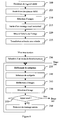
- the connector 145 is, for example, compliant with the USB standard (acronym for "universal serial bus” for universal serial bus) and allows the connection of the device to a computer to make it memorize images and associated messages as explained in see Figure 6, steps 200 to 225.
- the connector 140 is, for example, a 3.5 mm four-pole audio video jack connector. of diameter.
- This connector has several functions: it allows to connect headphones, for example used by the user or a particular interlocutor, or an auxiliary audio input of a sound signal amplifier.
- This connector also allows the device to connect two accessories type contactors (not shown), kinds of large switches, also called “bumpers", used in the medical field for pronounced motor disabilities. Indeed, each of these contactors uses a common ground and one of the inputs. These contactors allow to use the device when it is on a base (not shown), to scroll or validate the images on the screens.
- the three poles which complete the ground pole make it possible to produce a parallel bus supporting three binary inputs, ie eight signals of different significance or a serial bus.
- each of the connectors exposed above is replaced by a non-wired link, for example of the Bluetooth or Wifi (registered trademarks) type.
- the multi-directional switch 115 makes it possible to navigate between the images displayed on the screens 105 and / or 110.
- the vertical movements that is to say, longitudinal, with respect to the longitudinal axis of the remote control) make it possible to scroll the images in the same direction of movement as the pressing of the switch 115.
- a short press forwards or backwards scrolls a single image.
- a long press forward or backward scrolls images continuously until the press is released.
- the lateral movements of the switch 115 make it possible to increase or decrease the transmitted sound power.
- the ambient noise sensor 195 for example a microphone, also controls the transmitted sound power so that, in an adaptive manner, the audible message is audible and intelligible but does not risk disturbing the neighborhood with excessive loudness in comparison with the ambience. sound.
- the switch 115 only controls the difference, in decibels, between the ambient noise and the sound volume emitted.
- the device comprises a loudspeaker 125 at the end of a sound box delimited by the shell 170.
- the components, such as the battery 160 are provided with a fairing 165 and the reinforcing elements 155 have a shape without flat surface perpendicular to the longitudinal axis of the device, which is parallel to the axis of movement of the speaker 125.
- the loudspeaker 125 is positioned perpendicular to the main axis of the device and trapped in a jaw or channel 150. It thus isolates the inner sound box from the outside.
- the sound box has no sharp edge, but, on the contrary, rounded corners, possibly by leave to eliminate any perpendicularity of a flat surface to the longitudinal axis of the device. The sound wave can thus be amplified in the sound box.
- bars 175 of sectional shape, triangular which guide the sound waves emitted by the loudspeaker 125 to the holes, or openings (not shown), in order to optimize the rendering of the speaker.
- the upper planar shape and the lower round shape of the device also allow better internal resonance and increase the sound power dissipated.
- the lower part of the device has a "W" shape with two support points separated by a concave arch allowing easy grasping of the device.
- FIG. 5 which is a view in lateral section marked in FIG. 4, shows, by the arrows "C", that the outer shape of the device is, for its lower part, generally round and has a flat 185 in the vicinity of point of support of the device when it is in a stable position and, preferably, over the entire length of the device, in its plane of horizontal symmetry.
- the center of gravity is below the center of curvature of the round shape of the device.
- the lower part of the device part which is in the palm of the hand, thus has, on a section of the device perpendicular to its longitudinal axis, a round shape.
- This provides a "culbuto" effect to the device: when the device is placed on the sidewall, the position of its center of gravity, near the bottom, the round shape and the flat causes its rapid stabilization in a configuration where the upper surface , which carries the screens, is horizontal.
- the flat allows to position the fingers of the user when the device in the hand.
- a not shown strap allows to bind the device to the wrist of the user to prevent the device from falling and to release, at times, the hand of the user who actuates the device.
- the device further comprises a capacitive sensor placed in its lower part and adapted to detect the grip of the device. This capacitive sensor makes it possible to exit the device from the standby mode as soon as the user enters it.
- the inventors have found a two-day autonomy in continuous use, recharging the battery 160 through the connector 145.
- a dedicated software launches a dedicated software.
- a dedicated website includes, in particular, a library of images and icons.
- a step 210 the user makes a selection of images, either on the dedicated site or on another site, or on his computer or a camera, for example
- the user classifies these images into categories images. For example, these categories are "actions”, “hospital”, “fruits”, “vegetables,” meats, “fish”, ...
- a step 215 the user enters a text that he wishes to associate with each selected image. To do this, he can use the keyboard of the computer, a microphone built into the computer or associated text, on the dedicated website, the image.
- the dedicated website automatically provides a translation of the text entered, in a language chosen by the user.
- the computer scales each image, that is to say it replaces it with an image having a definition equal to or less than that of the screens 105 and 110 .
- the computer or the server of the site performs the voice synthesis of the inputted text and associates the sound signals produced with the corresponding image, in computer memory.
- the user can choose a voice of man, woman or child and a language.
- the computer provides the device with the message associated with each image in view of its subtitling.
- the images selected and organized into categories and the associated texts or sound signals are downloaded into the non-volatile memory of the device 100, for example via the connector 145.
- the entire tree that is to say all categories and all images in different categories, is customizable through a computer.
- the user chooses, with his computer, images to which he associates typed sentences with the keyboard of the computer or sounds recorded with a microphone.
- the user can also choose, on the Internet, images and / or associated messages.
- the images are automatically formatted in the device screens by the computer software.
- the user When, subsequently, the user turns the device 100 on or out of the "sleep" mode via the multidirectional switch 120 or a capacitive sensor, at the end of its initialization, during a step 230, the user chooses a mode of operation.
- the user can navigate in the tree of categories and images of the chosen category.
- the screens are used to display two successive images in a list of images corresponding to a category. During scrolling, each image appears successively on both screens.
- the images "apple” and “pear” are respectively displayed on the screens before 105 and rear 110, after a press on the joystick 115, the image "pear” appears on the screen before 105.
- a second navigation mode on the screen before 105 scroll images that represent the categories and on the rear screen 110, the images of the category selected with the screen before 105.
- a pressure on one of the screens allows to validate the category (for example "fruits") or the image in the category (for example "apple").
- a step 235 the user scrolls through the images that represent categories by implementing the joystick 115.
- a short press scrolls only one picture.
- a long press continuously scrolls the images, with a rhythm allowing their recognition.
- the device embeds in each image the message associated with the image. If the message can not be displayed in full on a line while remaining legible, the device scrolls it laterally down the image.
- the multi-directional switch allows navigation between category images.
- the vertical movements that is to say longitudinal, relative to the longitudinal axis of the remote control
- a short press forward or backward scrolls a single image.
- a long press forward or backward scrolls images continuously until the press is released.
- a category the user selects a category. To do this, it is enough for him to touch the image of the selected category. Then the messages available in the category are displayed and can scroll on the screens, in a step 245, as discussed above.
- a step 250 the user makes the selection of an image in a category, by pressing his finger on the screen that represents this image.
- a step 255 it is determined whether the support of the user on the screen is short, for example less than two seconds, or long.
- the microcontroller 190 controls the transmission, by the loudspeaker 125, of the sound signal associated with the image selected, possibly by performing its speech synthesis from a stored text.
- the device 100 says "I would like to eat an apple”.
- the microcontroller 190 stores the text associated with the selected image, which will be, in the following description, called "first" and displaying on one of the screens, until the end of step 290, the first selected image.
- steps 270 to 285 steps 235 through 250 are repeated, respectively.
- the microcontroller 190 causes the consecutive emission of the sound signals associated with the first selected image. then to the second selected image. Then we return to step 235.
- the standby of the device is triggered when no interaction of the user has been detected for a predetermined time, for example two minutes.
- the duration of the supports is exploited to trigger different actions.
- the message associated with the first image is broadcast.
- this message is kept in memory and is permanently displayed on the screen before 105, until an image is selected by means of the rear screen, by selection of category then of message in the selected category.
- the message corresponding to the image before, the first image selected is then first pronounced, followed by the message corresponding to the rear image, the second image selected. For example, we first choose, in the category "action”, the message “I want” then, in the category "fruit”, "an apple".
- a housing 300 carries, on its upper face, two color screens 305 and 310 and a navigation keyboard 315 comprising a central validation button 320. It also has, on a side face, a switch / modulator 330 with wheel which allows to put in standby mode or wake up the device and serves to adjust the volume.
- the color screens 305 and 310 comprise, on their upper surface, resistive slabs which, with respect to the first embodiment, replace the capacitive sensors placed below the screens.
- resistive slabs which, with respect to the first embodiment, replace the capacitive sensors placed below the screens.
- the metallization of the layers of the resistive slab also makes it possible to use capacitive technology.
- the combination of the two technologies makes it possible to increase the life of the device.
- the central joystick is replaced by five capacitive keys.
- the ergonomics are thus improved for some users and this replacement makes it possible to have an improved sealing of the hull.
- a simultaneous pressing on the central key 320 and on the two screens 305 and 310 makes it possible to deactivate the power supply of the device.
- the key assignment is configurable as described above.
- the two side keys closest to the screen 305 carry arrow symbols and the pressing of these keys causes the scrolling of the images displayed on the screens and the side keys closest to the screen other symbols and pressing these keys represents agreement or disagreement.
- the central key 320 may also allow the user to return to his personal menu.
- the keys of the keyboard 315 are backlit with light-emitting diodes of different colors, the choice of the colors used being left to the user during the configuration.
- the substrate and the film are separated by small printed transparent dots and isolation spacer.
- the polyester film When the polyester film is touched by the user, it moves toward the substrate to form electrical contact between the two ITO layers.
- the resistance formed between the two conductive layers then takes a minimum value detected by an electronic circuit of known type. It is observed that the support position can also be determined with this resistive slab.
- a capacitive sensor has been added using the same elements as the resistive slab described above.
- the resistive slab being metallized, one of its terminals is connected to a detection terminal of the integrated circuit QT1103 (Manufacturer QUANTUM, registered trademark).
- the capacitive sensor is based on the generation of an alternating current which passes, by capacitive effect, through the user and the "earth". The principle is to measure the current that is established between the electrode (direct electrical connection), the user (capacitive connection), the ground (capacitive connection), and the return to the circuit (capacitive connection or direct connection to the Earth).
Landscapes
- Engineering & Computer Science (AREA)
- Health & Medical Sciences (AREA)
- Audiology, Speech & Language Pathology (AREA)
- General Health & Medical Sciences (AREA)
- Business, Economics & Management (AREA)
- Physics & Mathematics (AREA)
- Educational Administration (AREA)
- Educational Technology (AREA)
- General Physics & Mathematics (AREA)
- Theoretical Computer Science (AREA)
- Position Input By Displaying (AREA)
- User Interface Of Digital Computer (AREA)
Applications Claiming Priority (1)
| Application Number | Priority Date | Filing Date | Title |
|---|---|---|---|
| FR0610117A FR2908914A1 (fr) | 2006-11-20 | 2006-11-20 | Dispositif d'assistance aux personnes presentant des difficultes de communication |
Publications (1)
| Publication Number | Publication Date |
|---|---|
| EP1995709A2 true EP1995709A2 (de) | 2008-11-26 |
Family
ID=38198336
Family Applications (1)
| Application Number | Title | Priority Date | Filing Date |
|---|---|---|---|
| EP07020197A Withdrawn EP1995709A2 (de) | 2006-11-20 | 2007-10-16 | Hilfsvorrichtung für Personen mit Kommunikationsschwierigkeiten |
Country Status (3)
| Country | Link |
|---|---|
| US (1) | US20080111764A1 (de) |
| EP (1) | EP1995709A2 (de) |
| FR (1) | FR2908914A1 (de) |
Families Citing this family (5)
| Publication number | Priority date | Publication date | Assignee | Title |
|---|---|---|---|---|
| US20110184736A1 (en) * | 2010-01-26 | 2011-07-28 | Benjamin Slotznick | Automated method of recognizing inputted information items and selecting information items |
| TR201009464A2 (tr) * | 2010-11-12 | 2011-06-21 | Aksoy Ahmet | Günlük hayatta kullanılan kelimeleri işaret dilinde kullanılan vücut hareketlerine çevirme yöntemi. |
| US9349234B2 (en) * | 2012-03-14 | 2016-05-24 | Autoconnect Holdings Llc | Vehicle to vehicle social and business communications |
| US20160284234A1 (en) * | 2015-03-24 | 2016-09-29 | Barbara Huntress Tresness | COMMUNICATING with NONVERBAL and LIMITED COMMUNICATORS |
| ES1170583Y (es) * | 2016-09-19 | 2017-02-13 | Sanchez Iván Exposito | Dispositivo multisensor para uso en videojuegos |
Family Cites Families (13)
| Publication number | Priority date | Publication date | Assignee | Title |
|---|---|---|---|---|
| DE623761C (de) * | 1934-02-22 | |||
| FR1392661A (fr) * | 1964-02-06 | 1965-03-19 | Cie Generale D Electronique In | Perfectionnements aux débitmètres électromagnétiques |
| US4307266A (en) * | 1978-08-14 | 1981-12-22 | Messina John D | Communication apparatus for the handicapped |
| USD342070S (en) * | 1992-12-07 | 1993-12-07 | Kabushiki Kaisha Toshiba | Remote controller for a video tape recorder |
| JPH0877176A (ja) * | 1994-09-07 | 1996-03-22 | Hitachi Ltd | 外国語翻訳装置 |
| US5790671A (en) * | 1996-04-04 | 1998-08-04 | Ericsson Inc. | Method for automatically adjusting audio response for improved intelligibility |
| US5847698A (en) * | 1996-09-17 | 1998-12-08 | Dataventures, Inc. | Electronic book device |
| AU8660398A (en) * | 1997-07-22 | 1999-02-16 | Addis E. Mayfield | Apparatus and method for language translation between patient and caregiv er, andfor communication with speech deficient patients |
| US20010013855A1 (en) * | 1998-06-12 | 2001-08-16 | Jean-Philippe Fricker | Resistive and capacitive touchpad |
| US20040017355A1 (en) * | 2002-07-24 | 2004-01-29 | Youngtack Shim | Cursor control systems and methods |
| US7307509B2 (en) * | 2004-11-02 | 2007-12-11 | Custom Lab Software Systems, Inc. | Assistive communication device |
| FR2882848A1 (fr) * | 2004-12-03 | 2006-09-08 | Edzigui Honorine Mboa | Dispositif permettant aux personnes sourdes et malentendantes de communiquer avec le monde exterieur et inversement |
| FR2881863B3 (fr) * | 2005-02-08 | 2007-05-25 | Fabrice Leblat | Machine a parler portative |
-
2006
- 2006-11-20 FR FR0610117A patent/FR2908914A1/fr not_active Withdrawn
-
2007
- 2007-10-16 US US11/873,016 patent/US20080111764A1/en not_active Abandoned
- 2007-10-16 EP EP07020197A patent/EP1995709A2/de not_active Withdrawn
Also Published As
| Publication number | Publication date |
|---|---|
| US20080111764A1 (en) | 2008-05-15 |
| FR2908914A1 (fr) | 2008-05-23 |
Similar Documents
| Publication | Publication Date | Title |
|---|---|---|
| EP0050565B1 (de) | Mit der Hand zusammenhängende Tastatur | |
| WO2006092531A1 (fr) | Procede et dispositifs de transmission d'informations tactiles | |
| EP1995709A2 (de) | Hilfsvorrichtung für Personen mit Kommunikationsschwierigkeiten | |
| US20090166098A1 (en) | Non-visual control of multi-touch device | |
| CN107728400A (zh) | 一种信息的显示方法及移动终端 | |
| JP2009239248A (ja) | 外観が変わるハート型構造 | |
| EP2887162B1 (de) | Vorrichtung zur Wiedergabe von Meldungen, und ihr Überwachungsverfahren | |
| CH698655B1 (fr) | Adaptabilité de l'interface d'un objet portable en fonction de son environnement. | |
| CH633925A5 (fr) | Adaptateur pour combine de telephone a mains libres. | |
| EP2789154A1 (de) | Mobiltelefon und computerprogramm mit mitteln zur erzeugung und versendung einer alarmmeldung | |
| EP0732023B1 (de) | Vorrichtung zur umschaltung eines telefonendgerätes mit telefonhörer auf ein zusatzgerät | |
| EP3030923B1 (de) | System zur konfiguration eines tragbaren detektors | |
| CN108416002A (zh) | 一种人机交互方法及移动终端 | |
| EP1263196B1 (de) | Telefongerät für Körperbehinderte | |
| BE1021602B1 (fr) | Kit d'enrolement biometrique | |
| WO2019224404A1 (fr) | Dispositif relationnel intelligent destiné aux personnes en perte d'autonomie | |
| JP2005323011A (ja) | 携帯電話機の付加機能動作システム及び方法 | |
| EP3573345A1 (de) | Verbundenes objekt, das mit einem funkkommunikationsmittel und einem integrierten mikrophon ausgestattet ist, das gemäss mindestens zweier fester positionen landet | |
| FR2773414A1 (fr) | Dispositif de transcription et d'affichage d'un message vocal | |
| EP1640939A1 (de) | Kommunikationsvorrichtung | |
| FR3095283A1 (fr) | Stylet muni d’au moins une manette de commande dont le manche est mobile par rapport au corps du stylet | |
| WO2010115752A1 (fr) | Carte du type bancaire avec un interrupteur actionnable par un utilisateur | |
| FR2992074A1 (fr) | Peripherique de frappe pour un equipement numerique | |
| FR3016264A1 (fr) | Dispositif d'enveloppe du type coque pour terminal portable tel qu'un ordiphone | |
| FR2862462A1 (fr) | Telephone cellulaire, avec clavier, commandes et fonctions simplifiees et de securite |
Legal Events
| Date | Code | Title | Description |
|---|---|---|---|
| PUAI | Public reference made under article 153(3) epc to a published international application that has entered the european phase |
Free format text: ORIGINAL CODE: 0009012 |
|
| AK | Designated contracting states |
Kind code of ref document: A2 Designated state(s): AT BE BG CH CY CZ DE DK EE ES FI FR GB GR HU IE IS IT LI LT LU LV MC MT NL PL PT RO SE SI SK TR |
|
| AX | Request for extension of the european patent |
Extension state: AL BA HR MK RS |
|
| STAA | Information on the status of an ep patent application or granted ep patent |
Free format text: STATUS: THE APPLICATION IS DEEMED TO BE WITHDRAWN |
|
| 18D | Application deemed to be withdrawn |
Effective date: 20110503 |