EP2001005A2 - Système d'entraînement, dispositif d'entraînement, et support d'enregistrement de programme et procédé de contrôle de lecture - Google Patents
Système d'entraînement, dispositif d'entraînement, et support d'enregistrement de programme et procédé de contrôle de lecture Download PDFInfo
- Publication number
- EP2001005A2 EP2001005A2 EP08251976A EP08251976A EP2001005A2 EP 2001005 A2 EP2001005 A2 EP 2001005A2 EP 08251976 A EP08251976 A EP 08251976A EP 08251976 A EP08251976 A EP 08251976A EP 2001005 A2 EP2001005 A2 EP 2001005A2
- Authority
- EP
- European Patent Office
- Prior art keywords
- pose
- elementary
- data
- display
- unit
- Prior art date
- Legal status (The legal status is an assumption and is not a legal conclusion. Google has not performed a legal analysis and makes no representation as to the accuracy of the status listed.)
- Pending
Links
Images




Classifications
-
- G—PHYSICS
- G09—EDUCATION; CRYPTOGRAPHY; DISPLAY; ADVERTISING; SEALS
- G09B—EDUCATIONAL OR DEMONSTRATION APPLIANCES; APPLIANCES FOR TEACHING, OR COMMUNICATING WITH, THE BLIND, DEAF OR MUTE; MODELS; PLANETARIA; GLOBES; MAPS; DIAGRAMS
- G09B7/00—Electrically-operated teaching apparatus or devices working with questions and answers
-
- G—PHYSICS
- G09—EDUCATION; CRYPTOGRAPHY; DISPLAY; ADVERTISING; SEALS
- G09B—EDUCATIONAL OR DEMONSTRATION APPLIANCES; APPLIANCES FOR TEACHING, OR COMMUNICATING WITH, THE BLIND, DEAF OR MUTE; MODELS; PLANETARIA; GLOBES; MAPS; DIAGRAMS
- G09B19/00—Teaching not covered by other main groups of this subclass
Definitions
- the present invention relates to a training system, a training device, a program recording medium, and a training program, which are used for lessons on yoga or stretching exercise.
- Yoga is an exercise system that uses a variety of twisted or bent poses with the body. Then, when a lesson is given while video is displayed on a television screen, a user must turn his/her face in a different direction from the television screen according to the kind of pose. Accordingly, to confirm the pose the television screen, it is necessary for the user to change the pose during training and to watch the screen. For this reason, the lesson cannot be smoothly given.
- yoga is closely connected with the breathing rhythm, and accordingly if it is not practiced with correct breathing technique, it does not provide mental and physical relief so much. It is difficult for the user to recognize the breathing timing of the instructor on the television screen, and to take the lesson with correct breathing.
- the invention has been finalized in consideration of the drawbacks inherent in the related art, and it is an object of the invention to provide a training system, a training device, a program recording medium, and a training program, which are capable of enabling a user to take a lesson with smooth and correct breathing technique and to continuously take the lesson while overcoming frustration.
- a training system that trains an exercise using poses with the body.
- the training system includes a reproducing device and a recording medium installed on the reproducing device.
- the reproducing device is a portable type, and includes a display unit, a notification unit, and a computer for controlling the units.
- the recording medium is readable by the computer included in the reproducing device, and includes an elementary pose data storage unit that stores elementary pose data which is used to display a plurality of elementary poses on the display unit, a simple pose data storage unit that stores simple pose data which, for each elementary pose, is used to display simple poses having lower difficulty level than the elementary pose, and a breathing timing data storage unit that stores timing data which is notified by the notification unit for each of the elementary poses and the simple poses.
- the recording medium has recorded thereon a program which causes the computer to execute the steps of: causing the display unit to display an elementary pose on the basis of the elementary pose data, and causing the notification unit to notify a breathing timing corresponding to the elementary pose on the basis of the breathing timing data; in a state in which the elementary pose is displayed on the display unit in the step of causing the display unit to display the elementary pose, detecting presence/absence of a predetermined operation; when the predetermined operation is detected in the step of detecting the predetermined operation, reading out, from the simple pose data storage unit, simple pose data corresponding to a simple pose, which corresponds to the elementary pose displayed on the display unit, and reading out, from the breathing timing data storage unit, breathing timing data corresponding to the read simple pose data; and causing the display unit to display the simple pose on the basis of the simple pose data read in the step of reading out the simple pose data, and causing the notification unit to notify a breathing timing corresponding to the simple pose on the basis of the breathing timing data.
- the user can hold the reproducing device in his/her hand, and take a lesson while watching the display unit. Therefore, the user can take a lesson smoothly without changing his/her pose during training and confirming the display unit. Furthermore, since the breathing timing is notified, the user can recognize the breathing timing during training. In addition, in a state in which the elementary pose is displayed, the simple poses having lower difficulty level than the elementary pose are displayed according to the predetermined operation. Therefore, there is no case in which a trainee gets frustrated during training.
- the display unit may function as the notification unit, and the step of causing the notification unit to notify the breathing timing corresponding to the elementary pose and the step of causing the notification unit to notify the breathing timing corresponding to the simple pose may cause the display unit to display the breathing timing on the basis of the breathing timing data.
- the lesson pose and the breathing timing can be displayed on the display unit simultaneously.
- the reproducing device may further include a playback unit that is controlled by the computer to play back sound
- the recording medium may further include a sound data storage unit that stores sound data related to the elementary pose displayed on the basis of the elementary pose data stored in the elementary pose data storage unit, and sound data related to the simple pose displayed on the basis of the simple pose data stored in the simple pose data storage unit, and the step of causing the notification unit to notify the breathing timing corresponding to the elementary pose and the step of causing the notification unit to notify the breathing timing corresponding to the simple pose may cause the playback unit to play back corresponding sound.
- the user can be directed by sound.
- the elementary pose data and the simple pose data may be data generated by photography.
- the recording medium may have recorded thereon a program which causes the computer to further execute a step of selecting one of a plurality of lesson courses according to an operation, and the step of causing the display unit to display the elementary pose may read out elementary pose data from the elementary pose data storage unit according to a lesson course selected in the step of selecting the lesson course, and cause the display unit to display the elementary pose.
- the lesson course in the training system according to the fifth aspect of the invention, in the step of selecting the lesson course, the lesson course may be selected according to a multi-stage selection operation.
- the recording medium may further include a writable storage area, and may have recorded thereon a program which causes the computer to execute a step of writing a training history in at least one of the step of causing the display unit to display the elementary pose and the step of causing the display unit to display the simple pose into the storage area.
- a portable training device that trains an exercise using poses with the body.
- the portable training device includes: a display unit; a notification unit; an elementary pose data storage unit that stores elementary pose data which is used to display a plurality of elementary poses on the display unit; a simple pose data storage unit that stores simple pose data which, for each elementary pose, is used to display simple poses having lower difficulty level than the elementary pose; a breathing timing data storage unit that stores timing data which is notified by the notification unit for each of the elementary poses and the simple poses; a first training processing unit that causes the display unit to display an elementary pose on the basis of the elementary pose data, and causes the notification unit to notify a breathing timing corresponding to the elementary pose on the basis of the breathing timing data; a detection unit that, in a state in which the elementary pose is displayed on the display unit by the first training processing unit, detects presence/absence of a predetermined operation; a readout processing unit that, when the predetermined operation is detected by the detection unit, reads out, from the simple pose data
- a program recording medium that is readable by a computer included in a portable training device, which includes a display unit and a notification unit, and trains an exercise using poses with the body.
- the program recording medium includes: an elementary pose data storage unit that stores elementary pose data which is used to display a plurality of elementary poses on the display unit; a simple pose data storage unit that stores simple pose data which, for each elementary pose, is used to display simple poses having lower difficulty level than the elementary pose; and a breathing timing data storage unit that stores timing data which is notified by the notification unit for each of the elementary poses and the simple poses.
- the program recording medium has recorded thereon a program which causes the computer to execute the steps of : causing the display unit to display an elementary pose on the basis of the elementary pose data, and causing the notification unit to notify a breathing timing corresponding to the elementary pose on the basis of the breathing timing data; in a state in which the elementary pose is displayed on the display unit in the step of causing the display unit to display the elementary pose, detecting presence/absence of a predetermined operation; when the predetermined operation is detected in the step of detecting the predetermined operation, reading out, from the simple pose data storage unit, simple pose data corresponding to a simple pose, which corresponds to the elementary pose displayed on the display unit, and reading out, from the breathing timing data storage unit, breathing timing data corresponding to the read simple pose data; and causing the display unit to display the simple pose on the basis of the simple pose data read in the step of reading out the simple pose data, and causing the notification unit to notify a breathing timing corresponding to the simple pose on the basis of the breathing timing data.
- a portable training device includes a display unit, a notification unit, an elementary pose data storage unit that stores elementary pose data which is used to display a plurality of elementary poses on the display unit, a simple pose data storage unit that stores simple pose data which, for each elementary pose, is used to display simple poses having lower difficulty level than the elementary pose, and a breathing timing data storage unit that stores timing data which is notified by the notification unit for each of the elementary poses and the simple poses.
- the training program causes a computer included in the portable training device to execute the steps of: causing the display unit to display an elementary pose on the basis of the elementary pose data, and causing the notification unit to notify a breathing timing corresponding to the elementary pose on the basis of the breathing timing data; in a state in which the elementary pose is displayed on the display unit in the step of causing the display unit to display the elementary pose, detecting presence/absence of a predetermined operation; when the predetermined operation is detected in the step of detecting the predetermined operation, reading out, from the simple pose data storage unit, simple pose data corresponding to a simple pose, which corresponds to the elementary pose displayed on the display unit, and reading out, from the breathing timing data storage unit, breathing timing data corresponding to the read simple pose data; and causing the display unit to display the simple pose on the basis of the simple pose data read in the step of reading out the simple pose data, and causing the notification unit to notify a breathing timing corresponding to the simple pose on the basis of the breathing timing data.
- the user can take a lesson while continuously watching the display unit by simply moving the training device by his/her hand. Therefore, the user can take the lesson smoothly without changing the pose during training and confirming the display unit.
- the breathing timing is notified to the user in the form of easy-to-understand, such as an image or sound, the user can recognize the breathing timing during training. Therefore, the user can take a lesson with correct breathing.
- the simple pose having lower difficulty level than the elementary pose is displayed according to the predetermined operation. Therefore, a primary trainee who is difficult to take the elementary pose can continuously take a lesson without getting frustrated during the lesson.
- Fig. 1 is a block diagram showing the configuration of a training device 100 according to an embodiment of the invention.
- the training device 100 includes a portable device main body 10, and individual units are mounted on the device main body 10.
- the display device 50 has a plurality of image display sections, for example, an upper image display section 51 and a lower image display section 52.
- the operation input section 21 is constituted form a power supply switch, and switches and keys, such as a cross key or other keys.
- a circuit provided in the device main body 10 includes a control section 11, a RAM (Random Access Memory) 12, a hard disc drive (HDD) 13, a sound processing section 14, a graphic processing section 15, a communication interface 17, an interface section 18, a frame memory 19, and a card slot 20.
- the control section 11, the RAM 12, the HDD 13, the sound processing section 14, the graphic processing section 15, the communication interface 17, and the interface section 18 are connected to an internal bus 22.
- the control section 11 includes a CPU (Central Processing Unit), a ROM (Read Only Memory), and the like, and controls the entire training device 100 according to control programs stored in the HDD 13 or a recording medium 70.
- the control section 11 includes an internal timer that is used to generate timer interruption.
- the RAM 12 is also used as a work area for the control section 11.
- the sound processing section 14 serves as a sound input/output interface that performs D/A conversion and A/D conversion on sound signals.
- the sound processing section 14 is connected to a sound output device 30, which includes a speaker.
- the sound processing section 14 outputs sound signals to the sound output device 30 according to a sound output instruction from the control section 11, which is executing a processing according to various control programs.
- the graphic processing section 15 is connected to the display device 50 that has the upper image display section 51 and the lower image display section 52.
- the graphic processing section 15 develops images to the frame memory 19 according to a drawing instruction from the control section 11, and simultaneously outputs video signals to the display device 50 such that the upper and lower image display sections 51 and 52 display images.
- a switching time for the images to be displayed according to the video signals is set to, for example, 1/30 per frame.
- a recording medium 70 in which programs and the like are stored, is installed in the card slot 20.
- the recording medium 70 is a semiconductor memory, such as a writable flash memory or the like.
- the communication interface 17 is connectable to another training device 100 in a wireless or wired manner, and simultaneously connectable to a communication network, such as Internet or the like, in a wireless or wired manner.
- the training device main body 10 can perform communication with another training device 100 by means of a communication function of the communication interface 17.
- the operation input section 21, the card slot 20, and a touch panel 40 are connected to the interface section 18.
- the interface section 18 causes the RAM 12 to store instruction data from the operation input section 21 based on an operation by a player (user) and instruction data based on an operation on the touch panel 40 with a touch pen 41 and the like by the player.
- the control section 11 executes various arithmetic processing.
- the touch panel 40 may be stacked on display screens of both the upper and lower image display sections 51 and 52, or a display screen of at least one of the upper and lower image display sections 51 and 52.
- the control unit 11 recognizes input information according to operation input by input operation by the player.
- the display device 50 may constitute a display screen from a single image display section, instead of having a plurality of image display sections, such as the upper and lower image display sections 51 and 52.
- the interface section 18 performs, according to the instructions from the control section 11, a processing to store data indicative of the progress of a lesson stored in the RAM 12 into the recording medium 70 installed in the card slot 20.
- the interface section 18 also performs a processing to read out data on the lesson when suspended stored in the recording medium 70 and to transmit such data to the RAM 12.
- Various kinds of data, such as the control programs, stored in the recording medium 70 are read out by the control section 11 via the card slot 20, in which the recording medium 70 is installed, and loaded onto the RAM 12.
- the control section 11 executes, according to the control programs loaded onto the RAM 12, various kinds of processing, such as a processing to output a drawing command to the graphic processing section 15, a processing to output a sound output command to the sound processing section 14, and the like. Moreover, while the control section 11 executes the processing, interim data generated according to the progress of the lesson is stored in the RAM 12 used as a work memory.
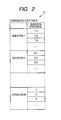
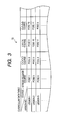
- the recording medium 70 stores a program for executing processing shown in flowcharts described below, a counseling data table 71 shown in Fig. 2 , a curriculum data table 72 shown in Fig. 3 , and a group of pose data tables 73 shown in Fig. 4 .
- the counseling data table 71 stores, as shown in Fig. 2 , a plurality of different question statements 1-1, 1-2, ... in correspondence with questions, for example, 'QUESTION 1', ' QUESTION 2' , and the like.
- the content of each of the question statements is, for example, data that causes a character string for forming a statement about an individual personality or mental state, such as 'ARE YOU CONSCIOUS OF THOSE AROUND AT ANY TIME?', to be displayed on the display device 50.
- the curriculum data table 72 stores, as shown in Fig. 3 , curriculums in correspondence with lesson courses, for example, 'STRESS RELEASE COURSE' , ' OOOO COURSE' , and the like.
- curriculums in correspondence with lesson courses, for example, 'STRESS RELEASE COURSE' , 'OOOO COURSE' , and the like.
- 'STRESS RELEASE COURSE' 'POSE 1' training is given in the lesson 1
- 'POSE 3' training is given in the lesson 2
- 'POSE 6' training is given in the lesson 3.
- different poses are stored in different sequences according to the courses.
- the number of lessons may be identical for all of the courses or may be different according to the courses.
- the group of pose data tables 73 include pose 1 to N data tables 74-1 to 74-N corresponding to N yoga poses. That is, yoga uses a plurality of poses, and among the plurality of yoga poses, the pose 1 to N data tables 74-1 to 74-N corresponding to N (for example, 100) elementary yoga poses 1 to N are included.
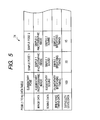
- Each pose data table 74 stores, as shown in Fig. 5 , data about an elementary pose, 'ELEMENTARY POSE', and data about a plurality of simple poses, 'SIMPLE POSE 1', 'SIMPLE POSE 2' , .... 'ELEMENTARY POSE' means data for an elementary pose corresponding to one of the N yoga poses 1 to N.
- 'SIMPLE POSE 1', 'SIMPLE POSE 2', ... are data about simple poses having a lower difficulty level than 'ELEMENTARY POSE', but having identity or commonality with respect to 'ELEMENTARY POSE' in view of the effects or purposes of yoga.
- Data, 'ELEMENTARY POSE', 'SIMPLE POSE 1', 'SIMPLE POSE 2', ... includes IMAGE DATA', 'SOUND DATA', 'BREATHING TIMING DATA', and 'DIFFICULTY LEVEL DATA'.
- IMAGE DATA' an image generated by photographing the pose by the instructor and the motions to that pose is recorded as data displayable on the display device 50.
- 'IMAGE DATA' is a motion picture, but it may be a still picture or a combination of a motion picture and a still picture.
- the image data may be generated by illustration or computer graphics, instead of the photography.
- 'SOUND DATA' commentary sound, direction sound, or the like to be played together with corresponding ' IMAGE DATA' is recorded as data playable by the sound output device 30.
- 'BREATHING TIMING DATA' a breathing timing for corresponding 'IMAGE DATA', specifically, a timing from 'BREATHE IN' to 'BREATHE OUT' is successively recorded as data displayable on the display device 50.
- 'DIFFICULTY LEVEL DATA' is a numeric value indicating the difficulty level of the corresponding pose. In this embodiment, the higher the difficulty level is, the larger the numeric value is stored.
- the recording medium 70 is a writable type, as described above, and is provided with a plurality of writable folders.
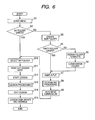
- Step S1 a start menu is displayed (Step S1). Though not shown, on the start menu, a list of folders named after player names is displayed. Then, a player views the list of folders and checks whether a folder named after his/her name exists or not. As a result, when the folder named after his/her name does not exist, the player touches 'CREATE NEW FOLDER' , which is displayed on the start menu along with the list of folders, with the pen. If so, it is determined NO in Step S2, the process progresses from Step S2 to Step S3 to start to create a new folder.
- Step S4 it is determined whether or not an empty folder exists.
- the process progresses to Step S7, and a name input processing is executed.
- the player assigns a folder to delete with the pen (Step S5).
- Step S6 data in the assigned folder is cleared (Step S6), and the process progresses to Step S7, and the name input processing is executed.
- a 'NAME INPUT' button 53 is displayed on the lower image display section 52 of the display device 50, and simultaneously characters 'NAME ENTRY' 54 and a notice 55 are displayed on the upper image display section 51.
- the display state of Fig. 7A is changed to the display state of Fig. 7B .
- a keyboard 56 and an 'OK' button 57 are displayed on the lower image display section 52, and simultaneously character display boxes 58 and a notice 59 are displayed on the upper image display section 51.
- the 'NO CANCEL' button 60 is pen-touched, the display state of Fig. 7C returns to the display state of Fig. 7B . Meanwhile, if the 'YES' button 61 is pen-touched, the name is decided.
- Fig. 8 is a flowchart showing the procedure of a counseling processing.
- initial screens are displayed on the lower image display section 52 and the upper image display section 51 (Step S101).
- a 'COUNSELING START' button 63 is displayed on the lower image display section 52
- a 'COUNSELING' button 64 and a notice 65 are displayed on the upper image display section 51.
- Step S102 it is determined whether the 'COUNSELING START' button 63 is pen-touched or not. If the 'COUNSELING START' button 63 is pen-touched, a first selection screen is displayed on the lower image display section 52, and a question statement read out from 'QUESTION 1' of the counseling data table 71 is displayed on the upper image display section 51 (Step S103). Through Step S103, as shown in Fig. 9B , a 'YES' button 94 and a 'NO' button 95 are displayed on the lower image display section 52, and simultaneously a question statement 66 is displayed on the upper image display section 51.
- Step S104 If the player views the question statement 66 and pen-touches one of the 'YES' button 94 and the 'NO' button 95, it is determined YES in Step S104, and the process progresses from Step S104 to Step S105. Then, a second selection screen is displayed on the lower image display section 52, and simultaneously a question statement read out from 'QUESTION 2' of the counseling data table 71 is displayed on the upper image display section 51 (Step S105). Through Step S105, as shown in Fig. 9C , a 'YES' button 94 and a 'NO' button 95 are displayed on the lower image display section 52, and simultaneously a question statement 66 is displayed on the upper image display section 51.
- Step S106 If the player views the question statement 66 and pen-touches one of the 'YES' button 94 and the 'NO' button 95, it is determined YES in Step S106, and the process progresses from Step S106 to Step S107. Then, a course read out from the curriculum data table 72 is displayed on the lower image display section 52, and simultaneously a conclusion statement read out 'CONCLUSION' of the counseling data table 71 is displayed on the upper image display section 51 (Step S107). Through Step S107, as shown in Fig. 9D , a 'NEXT' button 68 and a course name 67 ('STRESS RELEASE COURSE') are displayed on the lower image display section 52, and simultaneously a conclusion statement 69 is displayed on the upper image display section 51.
- a 'NEXT' button 68 and a course name 67 'STRESS RELEASE COURSE'
- Step S10 the new folder created through Steps S3 to S7 is selected as 'My Folder' (Step S10).
- Step S10 when a folder named after the name of the corresponding player exists in the list of folders named after player names, the process progresses from Step S2 to Step S10, and the pen-touched folder is selected as the 'My Folder' (Step S10).
- lesson data stored in that folder is read out (Step S11) .
- the lesson data includes the numbers (lesson 1, lesson 2, and the like) of lessons that are completed previously in the course selected by the player, or the number of a lesson that is suspended previously.
- Step S11 is not executed, and the process progresses to Step S12.
- a lesson starts (Step S12), and a lesson processing is executed (Step S13).
- Fig. 10 is a flowchart showing the procedure of a lesson processing (Step S13).
- an elementary photographic image is displayed on the upper image display section 51, and a breathing timing is displayed on the lower image display section 52.
- sound is played back by the sound output device 30 (Step S101).
- a pose data table 74 corresponding to the previous lesson number of the course stored in the 'My Folder' is read out from the group of pose data tables 73.
- a pose data table 74 corresponding to a pose of 'LESSON 1' in the determined course is read out from the group of pose data tables 73.
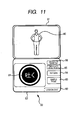
- the 'ELEMENTARY PHOTOGRAPHIC IMAGE' data is read out from the read pose data table 74, and is played back and displayed on the upper image display section 51. Accordingly, as shown in Fig. 11 , an instructor image (photographic motion picture) 80 that takes a yoga pose corresponding to that lesson is displayed on the upper image display section 51.
- the training device 100 is a portable type, even if the player takes any pose, he/she can move the training device 100 with him/her at a position according to the pose while continuously watching the screen. Accordingly, the player can take the lesson while watching the upper image display section 51. Therefore, the player can take a lesson smoothly without changing his/her pose during training and confirming the upper image display section 51.
- the corresponding 'BREATHING TIMING' data is read out from the read pose data table 74 and is displayed on the lower image display section 52.
- a breathing pattern image 81 having characters 'BREATHE IN' and a circle surrounding the characters is displayed, and the circle of the breathing pattern image 81 is sequentially decreased in synchronization with a breathe-out operation of the instructor image 80 on the basis of the 'BREATHING TIMING' data until a breathe-in timing reaches.
- the characters 'BREATHE-OUT' in the breathing pattern image 81 are changed to 'BREATHE-IN', and the circle of the breathing pattern image 81 is sequentially increased in synchronization with a breathe-in operation of the instructor image 80 on the basis of the 'BREATHING TIMING' data until a breathe-out timing reaches.
- the characters 'BREATHE-IN' in the breathing pattern image 81 are changed to 'BREATHE-OUT', and in the same manner as described above, the circle of the breathing pattern image 81 is sequentially decreased in synchronization with the breathe-out operation of the instructor image 80 on the basis of the 'BREATHING TIMING' data until the breathe-in timing reaches and this proceeding is repeated.
- the player can recognize the breathing timing during training by watching the change of the breathing pattern image 81, thereby taking the lesson with correct breathing.
- Step S201 as shown in Fig. 11 , a 'LESSON EXIT' button 82, a 'SIMPLE POSE' button 83, a 'RETURN' button 84, a 'DIFFICULTY LEVEL DOWN' button 85, and a 'DIFFICULTY LEVEL UP' button 86 are displayed on the lower image display section 52.
- the display form of the breathing timing is not limited to the above-described display form. Any display form may be used insofar as the player can visually recognize from the breathe-in timing to the breathe-out timing and from the breathe-out timing to the breathe-in timing.
- Step S202 it is determined whether or not the lesson ends, that is, whether or not the ' ELEMENTARY PHOTOGRAPHIC IMAGE' data is read out from the pose data table 74 and displayed, and the lesson of the corresponding number ends. If the lesson is not terminated, it is determined whether or not the SIMPLE POSE' button 85 is pen-touched (Step S204). When the 'SIMPLE POSE' button 85 is not pen-touched, the process returns to Step S201.
- Step S202 If it is determined in Step S202 that the lesson ends, a pose data table 74 corresponding to a pose of a next lesson in the corresponding course is read out from the group of pose data tables 73 (Step S203). Then, Step S201 and later steps are repeatedly executed.
- the player when the player has a limber body enough to take an elementary pose, he/she takes the yoga lessons without pen-touching the 'SIMPLE POSE' button 85. Therefore, the player can sequentially learn the yoga poses in the course while viewing the instructor images 80 consisting of the yoga pose of the lessons to be sequentially given through the upper image display section 51.
- Step S204 When it is difficult for the player to take the same pose as the instructor image 80 consist of the yoga pose, he/she touches the 'SIMPLE POSE' button 83 with the touch pen 41 or his/her finger. If so, it is determined YES in Step S204, and the process progresses from Step S204 to Step S205. Then, the simple pose data corresponding to the elementary pose during training currently displayed on the upper image display section 51 is read out (Step S205). That is, in Step S11 or Step S203, one of 'SIMPLE POSE 1' , 'SIMPLE POSE 2', ... is read out from the currently read pose data table 74.
- 'SIMPLE POSE 1' may be read out according to the storage sequence of ' SIMPLE POSE 1', 'SIMPLE POSE 2', ....
- a simple pose having highest difficulty level, a simple pose lowest difficulty level, or a simple pose having intermediate difficulty level may read out.
- Step S206 Sound is played back by the sound output device 30 (Step S206). That is, in Step S205, if it is assumed that 'SIMPLE POSE 1' data of Fig. 5 is read out, an image based on 'SIMPLE 1 PHOTOGRAPHIC IMAGE' data is displayed on the upper image display section 51, a breathing timing based on 'SIMPLE 1 BREATHING TIMING' data is displayed on the lower image display section 52. Simultaneously, sound based on 'SIMPLE 1 SOUND' data is output from the sound output device 30.
- Step S207 it is determined whether or not the playback of the simple pose data ends, that is, whether or not the 'SIMPLE 1 PHOTOGRAPHIC IMAGE' data is read out from the pose data table 74 and displayed, and the display of the corresponding simple pose ends.
- Step S208 next simple pose data is read out (Step S208), and Step S206 and later steps are repeatedly performed.
- Step S207 If the display of the simple pose does not end (Step S207; NO), it is determined whether or not an instruction to change the difficulty level is input by pen-touching of the 'DIFFICULTY LEVEL DOWN' button 85 or the 'DIFFICULTY LEVEL UP' button 86 (Step S209).
- Step S209 it is determined YES in Step S209. Accordingly, the process progresses from Step S209 to Step S208. Then, simple pose data having lower difficulty level or higher difficulty level is read out, and Step S206 and later steps are executed.
- the player can select and learn the simple pose having difficulty level according to his/her own limberness or muscular strength.
- all of the simple poses are poses having lower difficulty level than the corresponding elementary pose, even a player who is lacking in limberness or muscular strength can take the pose. As a result, the player can continuously take a lesson without getting frustrated during the lesson.
- Step S210 it is determined whether or not an instruction to return to the elementary pose is input by pen-touching of the 'RETURN' button 84 (Step S210).
- the process returns to Step S201 from Step S210. Accordingly, when the player gains confidence in the elementary pose by training a plurality of simple poses, he/she pen-touches the 'RETURN' button 84 to restart to learn the elementary pose.
- Step S210 If it is determined in Step S210 that the 'RETURN' button 84 is not pen-touched, it is determined whether or not an exit instruction is input by a key operation (Step S211). When no exit instruction is input, the process returns to Step S206. When the exit instruction is input, the process returns to the main flow shown in Fig. 6 , and progresses to Step S14.
- Step S14 the lesson ends, and in Step S15, a lesson data update and storage processing is executed.
- the lesson data is updated by writing, into the 'My Folder', the numbers (lesson 1, lesson 2, and the like) of lessons that are completed recently in the lesson course of the player, or the number of a lesson that is being trained currently.
- the difficulty level of the simple pose can be selected, but 'SIMPLE POSE 1', 'SIMPLE POSE 2', ... may be sequentially displayed, without allowing the player to select the difficulty level.
- the simple poses have lower difficulty level than the elementary pose, even a player who is lacking in limberness can take the pose, and there is no case where the player gets frustrated during the lesson.
- the breathing timing is displayed on the screen, but the breathing timing may be notified by sound, without displaying. In this way, if the breathing timing is notified by sound, the player can recognize the breathing timing, without intently watching the screen.
- the lesson course is indirectly determined by counseling, but it may be directly determined by a selection operation of the player.
- the player inputs his/her intension by touching with the touch pen 41, but a speech recognition function may be installed such that the player may input his/her intension by speech recognition.
- the speech recognition function is installed, the player does not need to hold the touch pen 41 while he/she is taking a pose.
- the player takes a pose using his/her hand or finger, he/she operates the training device 100 without changing his/her pose, thereby continuing to practice.
- the embodiment has been described by way of the training device 100, but the invention may be applied to various portable apparatuses, such as a personal computer, a cellular phone, and the like, insofar as they have an image generation function.
- the lesson data that causes the training device main body 10 to execute the above-described processing (various kinds of data, such as control programs, used for the lessons) is stored in the recording medium 70
- the lesson data may be distributed from a server apparatus, such as a WWW server.
- the training device main body 10 may acquire the lesson data to be distributed from the server apparatus through a communication network, store the acquired lesson data in the HDD 13, and load the lesson data from the HDD 13 onto the RAM 12.
Landscapes
- Engineering & Computer Science (AREA)
- Business, Economics & Management (AREA)
- Theoretical Computer Science (AREA)
- Physics & Mathematics (AREA)
- Educational Administration (AREA)
- Educational Technology (AREA)
- General Physics & Mathematics (AREA)
- Entrepreneurship & Innovation (AREA)
- Electrically Operated Instructional Devices (AREA)
Applications Claiming Priority (1)
| Application Number | Priority Date | Filing Date | Title |
|---|---|---|---|
| JP2007152552A JP4327215B2 (ja) | 2007-06-08 | 2007-06-08 | 教習システム、教習装置、プログラム記録媒体及び教習プログラム |
Publications (2)
| Publication Number | Publication Date |
|---|---|
| EP2001005A2 true EP2001005A2 (fr) | 2008-12-10 |
| EP2001005A3 EP2001005A3 (fr) | 2012-08-15 |
Family
ID=39735531
Family Applications (1)
| Application Number | Title | Priority Date | Filing Date |
|---|---|---|---|
| EP08251976A Pending EP2001005A3 (fr) | 2007-06-08 | 2008-06-06 | Système d'entraînement, dispositif d'entraînement, et support d'enregistrement de programme et procédé de contrôle de lecture |
Country Status (3)
| Country | Link |
|---|---|
| US (1) | US8905761B2 (fr) |
| EP (1) | EP2001005A3 (fr) |
| JP (1) | JP4327215B2 (fr) |
Families Citing this family (10)
| Publication number | Priority date | Publication date | Assignee | Title |
|---|---|---|---|---|
| JP4350722B2 (ja) * | 2006-05-22 | 2009-10-21 | 株式会社スクウェア・エニックス | 通信ゲームシステム、及びゲームの進行方法 |
| JP5578518B2 (ja) * | 2010-06-10 | 2014-08-27 | 任天堂株式会社 | 呼吸指示プログラム、呼吸指示装置、呼吸指示システム、および呼吸指示処理方法 |
| US10532174B2 (en) * | 2014-02-21 | 2020-01-14 | Masimo Corporation | Assistive capnography device |
| CN106422274A (zh) * | 2016-09-23 | 2017-02-22 | 江南大学 | 一种基于多传感器的瑜伽评估系统 |
| JP7011416B2 (ja) * | 2017-07-25 | 2022-01-26 | 株式会社クオンタム | 検出装置、検出システム、処理装置及び検出プログラム |
| US11185254B2 (en) | 2017-08-21 | 2021-11-30 | Muvik Labs, Llc | Entrainment sonification techniques |
| JP2019166238A (ja) * | 2018-03-26 | 2019-10-03 | 株式会社エヌ・ティ・ティ・データ | 動作模倣支援システム及び動作模倣支援装置 |
| EP3908182A1 (fr) * | 2019-01-07 | 2021-11-17 | Bose Corporation | Entraînement non linéaire de la respiration |
| KR102203140B1 (ko) * | 2019-07-26 | 2021-01-15 | 주식회사 캔들비랩스 | 시청 중인 콘텐츠를 위한 호흡 안내 시스템 및 그 안내 방법 |
| US20220270511A1 (en) * | 2021-02-19 | 2022-08-25 | Andrew John BLAYLOCK | Neuroscience controlled visual body movement training |
Citations (1)
| Publication number | Priority date | Publication date | Assignee | Title |
|---|---|---|---|---|
| JP2007152552A (ja) | 2005-12-08 | 2007-06-21 | Sandvik Intellectual Property Ab | 切り屑除去のための工具及び切削インサート |
Family Cites Families (13)
| Publication number | Priority date | Publication date | Assignee | Title |
|---|---|---|---|---|
| US4497312A (en) * | 1983-11-23 | 1985-02-05 | Byrd Brian K | Breathing and relaxation programs to aid childbirth |
| US20050112536A1 (en) * | 2003-11-21 | 2005-05-26 | Felix Frayman | Method and system for performing and delivering analysis of sports activities |
| WO2005069928A2 (fr) * | 2004-01-16 | 2005-08-04 | Respondesign, Inc. | Procedes et appareils de jeux didactiques |
| JP2005296358A (ja) * | 2004-04-12 | 2005-10-27 | Hiroyuki Iso | リラクゼーション支援装置およびコンピュータプログラム |
| EP1871219A4 (fr) * | 2005-02-22 | 2011-06-01 | Health Smart Ltd | Methodes et systemes de controle psychophysiologique et physiologique ainsi que leurs utilisations |
| US7618378B2 (en) * | 2005-06-13 | 2009-11-17 | The University Of Vermont And State Agricultural College | Breath biofeedback system and method |
| JP2007061451A (ja) | 2005-08-31 | 2007-03-15 | Square Enix Co Ltd | インタラクティブコンテンツ配信サーバ、インタラクティブコンテンツ配信方法、およびインタラクティブコンテンツ配信プログラム |
| JP4536638B2 (ja) | 2005-10-28 | 2010-09-01 | 株式会社スクウェア・エニックス | 表示情報選択装置及び方法、プログラム並びに記録媒体 |
| JP4116039B2 (ja) | 2006-01-27 | 2008-07-09 | 株式会社スクウェア・エニックス | ゲーム装置、ゲームの進行方法、並びにプログラム及び記録媒体 |
| JP4350722B2 (ja) | 2006-05-22 | 2009-10-21 | 株式会社スクウェア・エニックス | 通信ゲームシステム、及びゲームの進行方法 |
| JP2008043642A (ja) | 2006-08-21 | 2008-02-28 | Square Enix Co Ltd | ネットワーク育成ゲームシステム、育成ゲーム用サーバ装置及び育成ゲーム用端末装置、キャラクタ表示方法、並びにプログラム及び記録媒体 |
| US8025606B2 (en) * | 2008-08-15 | 2011-09-27 | Phresh, Llc | Method and apparatus for integrating physical exercise and interactive multimedia |
| US8235870B2 (en) * | 2008-08-15 | 2012-08-07 | Phresh, Llc | Method and apparatus for integrating physical exercise and interactive multimedia |
-
2007
- 2007-06-08 JP JP2007152552A patent/JP4327215B2/ja active Active
-
2008
- 2008-06-06 EP EP08251976A patent/EP2001005A3/fr active Pending
- 2008-06-06 US US12/134,305 patent/US8905761B2/en active Active
Patent Citations (1)
| Publication number | Priority date | Publication date | Assignee | Title |
|---|---|---|---|---|
| JP2007152552A (ja) | 2005-12-08 | 2007-06-21 | Sandvik Intellectual Property Ab | 切り屑除去のための工具及び切削インサート |
Also Published As
| Publication number | Publication date |
|---|---|
| US8905761B2 (en) | 2014-12-09 |
| EP2001005A3 (fr) | 2012-08-15 |
| JP4327215B2 (ja) | 2009-09-09 |
| JP2008302053A (ja) | 2008-12-18 |
| US20080305463A1 (en) | 2008-12-11 |
Similar Documents
| Publication | Publication Date | Title |
|---|---|---|
| US8905761B2 (en) | Training system, training device, and program recording medium and playback control method | |
| JP6747723B2 (ja) | Eラーニングシステム | |
| CA2745993C (fr) | Systeme d'apprentissage electronique | |
| US9870714B2 (en) | Tablet learning apparatus | |
| JP6911432B2 (ja) | 情報表示装置、情報表示装置の制御方法、及び情報表示装置の制御プログラム | |
| US20140234809A1 (en) | Interactive learning system | |
| JP7120637B2 (ja) | 学習支援システム、学習支援システムの制御方法及び学習支援プログラム | |
| CN107037946B (zh) | 提供绘图指导来引导用户的数字用户接口 | |
| JP2017097030A (ja) | 学習支援装置 | |
| JP6180011B2 (ja) | 動作評価支援装置、動作評価支援システム、動作評価支援方法及びプログラム | |
| CN110019757A (zh) | 书本点读互动设备及其控制方法、计算机可读存储介质 | |
| JP4904971B2 (ja) | 演奏教習用設定装置及びプログラム | |
| JP3823604B2 (ja) | 手話教育装置、手話教育方法、及び、手話教育方法が記録された記録媒体 | |
| JP5436061B2 (ja) | 運動教習システム | |
| US20210121774A1 (en) | Memory puzzle system | |
| KR101982130B1 (ko) | 학생 참여형 다자학습 영어교육 시스템, 이를 이용한 영어 학습방법 및 그 교습법 | |
| JP7440889B2 (ja) | 学習支援システム、プログラム | |
| KR20140063356A (ko) | 스토리텔링 및 터치 기반의 한글 학습 장치 및 방법 | |
| JP6544572B2 (ja) | 作文作成支援プログラム、作文作成支援方法および情報処理装置 | |
| KR102287721B1 (ko) | 단말기를 이용한 당구 교습 방법 및 컴퓨터 판독 가능한 기록매체 | |
| JP2014059452A (ja) | 学習用装置、その制御方法、学習用プログラム、および、学習システム | |
| KR101186636B1 (ko) | 멀티미디어 컨텐츠를 이용한 한자 학습 방법 및 이를 위한 컴퓨터로 판독가능한 기록매체 | |
| JP2019097670A (ja) | パズルゲーム装置、パズルゲーム方法及びそのプログラム | |
| US20220270511A1 (en) | Neuroscience controlled visual body movement training | |
| Lin et al. | A smartphone-based Chinese DAISY digital talking book player for visually impaired |
Legal Events
| Date | Code | Title | Description |
|---|---|---|---|
| PUAI | Public reference made under article 153(3) epc to a published international application that has entered the european phase |
Free format text: ORIGINAL CODE: 0009012 |
|
| AK | Designated contracting states |
Kind code of ref document: A2 Designated state(s): AT BE BG CH CY CZ DE DK EE ES FI FR GB GR HR HU IE IS IT LI LT LU LV MC MT NL NO PL PT RO SE SI SK TR |
|
| AX | Request for extension of the european patent |
Extension state: AL BA MK RS |
|
| PUAL | Search report despatched |
Free format text: ORIGINAL CODE: 0009013 |
|
| AK | Designated contracting states |
Kind code of ref document: A3 Designated state(s): AT BE BG CH CY CZ DE DK EE ES FI FR GB GR HR HU IE IS IT LI LT LU LV MC MT NL NO PL PT RO SE SI SK TR |
|
| AX | Request for extension of the european patent |
Extension state: AL BA MK RS |
|
| RIC1 | Information provided on ipc code assigned before grant |
Ipc: G09B 7/00 20060101AFI20120706BHEP Ipc: G09B 19/00 20060101ALI20120706BHEP |
|
| 17P | Request for examination filed |
Effective date: 20120918 |
|
| AKX | Designation fees paid |
Designated state(s): DE FR GB |
|
| 17Q | First examination report despatched |
Effective date: 20130523 |
|
| STAA | Information on the status of an ep patent application or granted ep patent |
Free format text: STATUS: THE APPLICATION HAS BEEN REFUSED |
|
| 18D | Application deemed to be withdrawn |
Effective date: 20160303 |
|
| 18R | Application refused |
Effective date: 20160303 |
|
| D18D | Application deemed to be withdrawn (deleted) |