EP2020633A1 - Räumlich eingeschränkte Markierungsmenüs für Mobilgeräte - Google Patents
Räumlich eingeschränkte Markierungsmenüs für Mobilgeräte Download PDFInfo
- Publication number
- EP2020633A1 EP2020633A1 EP07120700A EP07120700A EP2020633A1 EP 2020633 A1 EP2020633 A1 EP 2020633A1 EP 07120700 A EP07120700 A EP 07120700A EP 07120700 A EP07120700 A EP 07120700A EP 2020633 A1 EP2020633 A1 EP 2020633A1
- Authority
- EP
- European Patent Office
- Prior art keywords
- menu
- radial
- slices
- stroke
- touch
- Prior art date
- Legal status (The legal status is an assumption and is not a legal conclusion. Google has not performed a legal analysis and makes no representation as to the accuracy of the status listed.)
- Withdrawn
Links
Images


Classifications
-
- G—PHYSICS
- G06—COMPUTING OR CALCULATING; COUNTING
- G06F—ELECTRIC DIGITAL DATA PROCESSING
- G06F3/00—Input arrangements for transferring data to be processed into a form capable of being handled by the computer; Output arrangements for transferring data from processing unit to output unit, e.g. interface arrangements
- G06F3/01—Input arrangements or combined input and output arrangements for interaction between user and computer
- G06F3/048—Interaction techniques based on graphical user interfaces [GUI]
- G06F3/0481—Interaction techniques based on graphical user interfaces [GUI] based on specific properties of the displayed interaction object or a metaphor-based environment, e.g. interaction with desktop elements like windows or icons, or assisted by a cursor's changing behaviour or appearance
- G06F3/0482—Interaction with lists of selectable items, e.g. menus
-
- G—PHYSICS
- G06—COMPUTING OR CALCULATING; COUNTING
- G06F—ELECTRIC DIGITAL DATA PROCESSING
- G06F3/00—Input arrangements for transferring data to be processed into a form capable of being handled by the computer; Output arrangements for transferring data from processing unit to output unit, e.g. interface arrangements
- G06F3/01—Input arrangements or combined input and output arrangements for interaction between user and computer
- G06F3/048—Interaction techniques based on graphical user interfaces [GUI]
- G06F3/0487—Interaction techniques based on graphical user interfaces [GUI] using specific features provided by the input device, e.g. functions controlled by the rotation of a mouse with dual sensing arrangements, or of the nature of the input device, e.g. tap gestures based on pressure sensed by a digitiser
- G06F3/0488—Interaction techniques based on graphical user interfaces [GUI] using specific features provided by the input device, e.g. functions controlled by the rotation of a mouse with dual sensing arrangements, or of the nature of the input device, e.g. tap gestures based on pressure sensed by a digitiser using a touch-screen or digitiser, e.g. input of commands through traced gestures
- G06F3/04883—Interaction techniques based on graphical user interfaces [GUI] using specific features provided by the input device, e.g. functions controlled by the rotation of a mouse with dual sensing arrangements, or of the nature of the input device, e.g. tap gestures based on pressure sensed by a digitiser using a touch-screen or digitiser, e.g. input of commands through traced gestures for inputting data by handwriting, e.g. gesture or text
Definitions
- the present disclosure relates to computer user interfaces. More specifically, the present disclosure relates to space-constrained marking menus that can facilitate single-hand operation of a hand-held device.
- the user interface includes a touch-screen display and a set of marking menus comprising at least one radial menu which can be displayed on the touch-screen display.
- a radial menu allows a user to select a menu item by performing a stroke on the touch-screen display in a direction corresponding to a slice of the radial menu associated with the menu item.
- all the slices of a radial sub-menu are substantially at an angle of approximately 90° or less with respect to a previous stroke leading from a pervious radial menu, thereby allowing a series of consecutive strokes to end near the origin of the first stroke.
- the marking menus comprise at least one initial radial menu and at least one radial sub-menu.
- a radial sub-menu can be an edge radial menu placed along an edge of the touch-screen display, or a corner radial menu placed in a corner of the touch-screen display.
- the edge radial menu comprises three slices. Two of the three slices are in opposite directions along the edge. The middle slice of the three slices corresponds to a stroke which is substantially perpendicular to the edge and points away from the edge.
- the three slices do not have equal sizes.
- a wedge angle of the middle slice is greater than those of the other two slices.
- the corner radial menu comprises three slices. Two of the three slices on the outside are along the directions of the edges which form the corner, respectively. Furthermore, the middle slice of the three slices corresponds to a stroke which substantially points to a corner that is opposite to the corner associated with the corner radial menu.
- the three slices do not have equal sizes.
- a wedge angle the middle slice is larger than those of the other two slices.
- the marking menus comprise at least one of a radial menu that is deformed based on the shape of the touch-screen display and a radial menu wherein the slices therein are grouped in locations where the perimeter of the radial menu is visible.
- the marking menus are configured to allow a user to select a menu item by maintaining contact with a corresponding slice for a predetermined period.
- the marking menus are configured to allow a user to select a menu item by drawing a stroke either beyond the perimeter of a corresponding slice or by hitting an edge of the touch-screen display.
- the device is portable and hand-held.
- the menu items are preferably selectable using one hand, e.g. using the operator's thumb.
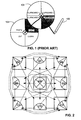
- FIG. 1 illustrates conventional marking menus which can be navigated with a stylus and be displayed on a sufficiently large display area.
- FIG. 2 illustrates an exemplary transition diagram between different marking menus displayed on a space-constrained display in accordance with one embodiment of the present invention.
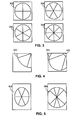
- FIG. 3 illustrates various configurations for an initial marking menu in accordance with one embodiment of the present invention.
- FIG. 4 illustrates an exemplary configuration of a corner radial menu containing slices with unequal wedge angles and a center region for an additional menu item, in accordance with one embodiment of the present invention.
- FIG. 5 illustrates different ways to deform and re-layout radial menus in accordance with one embodiment of the present invention.
- FIG. 6 illustrates an exemplary configuration where corner sub-menus are placed against a corner of the display screen in accordance with one embodiment of the present invention.
- FIG. 7 illustrates an exemplary configuration where corner marking menus are placed at the end of a previous stroke in accordance with one embodiment of the present invention.
- FIG. 8 illustrates a mark which includes three strokes, wherein the end of the last stroke is in the vicinity of the beginning of the first stroke, in accordance with one embodiment of the present invention.
- FIG. 9 illustrates an exemplary computer system that facilitates a space-constrained marking-menu user interface in accordance with one embodiment of the present invention.
- Embodiments of the present invention adopt special types of menus, called "marking menus," to facilitate operation of hand-held devices.
- Marking menus are typically implemented on touch screens and work as follows. During operation, a user presses down on the screen with an object, such as a stylus or finger, and waits for a certain period, typically less than a second (this operation is referred to as "press-and-wait"). A radial menu then appears. In one embodiment, the radial menu appears directly under the press-and-wait contact point on the screen. Note that a conventional radial menu typically has a circular shape, and the menu items are assigned to different "slices" or "wedges" of the circle.
- the user After the radial menu appears, the user then highlights an item by making a stroke with the stylus or finger towards the desired item. If the selected item corresponds to a sub-menu, another radial menu can appear at the end of the stroke. The user can then select a menu item by making another stroke on the sub-menu. Note that the user can also make a series of selections in an "expert mode" by drawing consecutive, connected strokes. In expert mode, the user does not perform "press-and-wait" and the user interface typically does not display the radial menus. Hence, the user can quickly bypass several menu hierarchies if he/she can remember the positions of the appropriate menu items. Note that, in this disclosure, the process of selecting menu items based on displayed radial menus is referred to as the "novice mode.”
- FIG. 1 illustrates conventional marking menus which can be navigated with a stylus and displayed on a sufficiently large display area.
- an initial radial menu 102 appears.
- Radial menu 102 includes four items, which are placed in four "slices," each of which is approximately 90° wide.
- the user first draws a stroke toward the upper-right slice, which is the "copy" operation.
- This selection results in a sub-menu 104, which further contains four choices with respect to which clipboard to use for the copy operation.
- the user can draw a second stroke toward the lower-right slice of sub-menu 104 without lifting stylus 106. This way, the user can traverse two menu levels by drawing consecutive strokes, which form a "mark.” Note that the user can optionally draw the two strokes without the press-and-wait process. In this case, the user interface does not present radial menus 102 and 104, and can immediately receive the instruction to perform the copy operation using clipboard 3 after the user completes the two consecutive strokes.
- Embodiments of the present invention provide a marking-menu based user interface that can be operated with a thumb. That is, a user can hold the hand-held device and navigate through the menus using the thumb of the holding hand.
- Marking menus are desirable for thumb-based interaction on touch-sensitive devices because they allow a relatively large number of options to be made available in a small space for selection using a thumb, which is an imprecise instrument. Marking menus do not require any dedicated display space because they are hidden until used. They can also be arranged hierarchically, which means that an arbitrary number of options can be made available.
- marking menus can be accessed by both novices (with explicitly displayed radial menus) and experts (without explicitly displayed radial menus).
- the expert-mode performance can be quite high, because accessing a known menu item becomes a gesture, which means that users can effect operations using very fast muscle memory rather than cognitive processing.
- Embodiments of the present invention provide an improved marking-menu system that prevents such runaway strokes.
- the improved marking-menu configuration can ensure that two consecutive strokes made by a user are not in the same direction. Hence, the end point of a series of strokes can remain in the vicinity of the starting point.
- the present improved marking-menu system uses both full and partial radial menus, such as quarter-circle menus and half-circle menus. These partial radial menus allow a user to use edges and corners of a touch-screen display, which are often available on hand-held devices, to draw more precise strokes with a thumb.
- Embodiments of the present invention provide space-constrained marking menus (SCMMs) which allow an arbitrary number of menu items to be presented in a constrained space, such as the touch-screen display of a hand-held device.
- SCMMs can be operated in both novice and expert mode.
- novice mode the user presses and holds down on a menu's anchor point, which is typically the center of a radial menu. After a delay (typically on the order of 200-500ms), a radial menu is displayed to allow the user to select an item from the menu. If one of the items is the anchor point for a submenu, the same pattern of selecting and holding can be repeated to display the sub-menu, and so forth.
- expert mode the user simply draws a series of strokes corresponding to a particular series of menu selections in order to invoke the desired operation.
- a sub-stroke is a stroke that follows a previous stroke and is typically drawn on a sub-menu invoked by the previous stroke.
- the slices of a sub-menu are placed in unique locations so that all sub-strokes are at an angle of approximately 90° or less with respect to the corresponding previous strokes. This is important for mobile devices because they have limited screen sizes.
- consecutive strokes are often arranged to maximize the number of subsequent stroke directions that can be taken.
- FIG. 2 illustrates an exemplary transition diagram between different marking menus displayed on a space-constrained display in accordance with one embodiment of the present invention.
- the squares in FIG. 2 represent boundaries of a touch-screen display.
- the screen can be square-shaped or rectangular-shaped, and embodiments of the present invention are not limited to square-shaped screens.
- a sub-menu can be a quarter-circle menu or a half-circle menu.
- a quarter-circle menu can be placed against a corner of the screen and referred to as a corner menu or corner sub-menu, and a half-circle menu can be placed against an edge of the screen and referred to as an edge menu or edge sub-menu.
- quarter-circle menus 202, 206, 218, and 214 are placed at the upper left, upper right, lower right, and lower left corners of the screen, respectively.
- Half-circle menus 204, 212, 216, and 208 are placed against the top, right, bottom, and left edges of the screen, respectively. This configuration ensures that any slice in a sub-menu points substantially towards the previous menu, thereby preventing runaway consecutive strokes.
- the initial menu can be a full-circle radial menu. All the sub-menus are either half-circle or quarter-circle menus, which force the sub-strokes to substantially point back at the previous menu or sub-menu. Note that it is not required that a sub-menu slice points directly back at the previous menu. Runaway strokes can still be avoided so long as a sub-stroke does not point in the same direction as the previous stroke.
- the top slice of menu 210 leads to the half-circle sub-menu 204 which is placed along the top edge of the screen.
- Sub-menu 204 has three slices, and each slice corresponds to a stroke at an angle of 90° or less with respect to the stroke from menu 210 to sub-menu 204.
- the three slices of sub-menu 204 lead to sub-menus 202, 216, and 206, respectively. Therefore, any combination of strokes leading from menu 210 to sub-menu 204 and to further sub-menus is contained within the screen.
- a quarter-circle or half-circle sub-menu has three slices, and the full-circle menu 210 has four slices.
- full-circle menu 210 can have six slices, three on the top and three on the bottom (or three on the left and three on the right). Each slice can point to a quarter-circle sub-menu (placed at a corner) or a half-circle sub-menu (placed against an edge).
- the four slices of menu 210 only point to half-circle sub-menus placed at the edges. If menu 210 contains more slices, some of these slices can point to half-circle sub-menus, and some can point to quarter-circle sub-menus.
- a quarter-circle menu is not required to be 90° wide, and a half-circle menu is not required to be 180° wide.
- a quarter-circle menu can be more generally referred to as a corner radial menu, as long as its two straight edges substantially match the shape of a corner of the screen.
- a half-circle menu can be more generally referred to as an edge radial menu, as long as its straight edges substantially match an edge of the screen.
- a quarter-circle or half-circle sub-menu can contain more than three slices.
- FIG. 2 illustrates nine menu-placement locations for the marking menus, the present invention is not limited to this configuration. It is possible to have more menu-placement locations. For example, there can be two half-circle sub-menu locations along each edge of the screen.
- transition relationship illustrated in FIG. 2 is not the only way to implement the present invention. Other transition relationships are also possible. For instance, the right-most slice in sub-menu 206 can lead to sub-menu 212, instead of sub-menu 218.
- the aforementioned configuration can be especially useful for thumb based operations.
- the contact area of a thumb on the touch screen is generally much larger than that of a stylus tip.
- a marking menu designed for one-thumb operation ideally has slices that are sufficiently large for relatively error free operation.
- a marking menu could easily take up almost the entire screen space.
- the present inventive configuration allows large-size sub-menus to be displayed in a limited space while containing the strokes within the screen area.
- the placement of sub-menus against corners and edges also allows the user to use the actual screen edges, which typically is a material above the screen and forms a "frame" around the screen, as guides when drawing strokes.
- Embodiments of the present invention can be implemented with different variations of marking menus.
- a radial menu can have any number of slices.
- FIG. 3 illustrates various configurations for an initial marking menu in accordance with one embodiment of the present invention.
- marking menu 302 contains four slices.
- Marking menus 304 and 306 each contains six slices with different orientations.
- Marking menu 308 contains eight slices. Although theoretically there is no limitation as to how many slices a marking menu can contain, eight or fewer slices may be preferable for the marking menu to be easily navigable with the touch of a thumb.
- a corner radial menu has three slices with equal wedge angles, i.e., 30° each.
- This angle configuration is equivalent to a full-circle with 12 slices, and hence may limit the menu's accuracy with thumb operations. It may be beneficial to use unequal wedge angles for the slices.
- the two slices along the edges have smaller wedge angles than the slice in the middle. Limiting the angle of a slice along the edge can facilitate more accurate thumb-based operation for two reasons. First, the origin of the sub-stroke is often offset from the screen corner; as a result, the sub-stroke is likely to move in a wedge-shaped region that spans more than 30° across.
- the edge can serve as a guide which will enhance the accuracy of that sub-stroke. Consequently, the user may need less than 30° of movement tolerance for the edge slices.
- the arch of the corner radial menu can be more than a quarter circle.
- a center region 406 placed at the corner of the corner radial menu can provide space for an additional menu item.
- a particularly useful menu action associated with this position would be a "cancellation" function which can cancel the current menu selection and/or close the current corner radial menu.
- the user interface allows the user to select an item by drawing the stroke beyond the edge of the corresponding slice of the radial menu.
- the radial menu can be relatively large and can occupy almost all the screen space, which leaves little space beyond the radial menu's perimeter.
- the user interface can cope with this situation with several different approaches.
- the user interface can only allow the marking menus to appear if there is enough room beyond the menu's perimeter.
- the user interface can also warp or deform the radial menu, so that some space beyond the menu's perimeter remains visible, as illustrated by the exemplary menu 502 in FIG. 5 .
- the user interface can re-layout the menu to "squeeze" the slices in the direction where the perimeter is visible.
- the exemplary menu 504 in FIG. 5 six slices are re-located to the top and bottom of the radial menu. The space on the left and right is not occupied by menu items.
- the user interface can use an extension of the aforementioned perimeter-crossing technique. If the perimeter of a portion of the menu falls outside the touch-screen display, then a menu item is considered selected if the user's contact point which falls within the corresponding slice hits an edge of the touch-screen display, even if the contact point is still within the slice.
- the user interface can use a timeout-based selection technique. That is, a menu item becomes selected after the user maintains contact with the corresponding slice for longer than a timeout period. This way, the user can select a menu item without drawing a stroke beyond the perimeter of the slice.
- FIG. 6 shows a series of corner sub-menus displayed against screen corners as a result of a series of strokes.
- a user first makes contact with the touch-screen display and maintains the contact for a period of time (operation 602). Note that the contact point is illustrated as a large dark dot. A full-circle marking menu then appears. The user draws a stroke across the upper right slice (operation 604). Note that a selected slice is indicated by a cross-hatch pattern.
- the user interface displays a corner sub-menu against the upper right corner of the screen.
- the user subsequently makes a downward sub-stroke to select the slice along the right edge of the screen (operation 606).
- the user interface displays a third-level corner sub-menu against the lower right corner.
- the user makes the final sub-stroke along the lower screen edge to invoke the bottom slice of this corner sub-menu (operation 608).
- FIG. 7 shows a series of corner sub-menus each of which is placed at the end of a previous stroke in accordance with one embodiment of the present invention.
- a user first makes contact with the touch-screen display and maintains the contact for a period of time (operation 702).
- a full-circle initial marking menu then appears.
- the user then draws a stroke across the upper right slice (operation 704).
- the user interface displays a corner sub-menu which contains slices that are pointing toward the lower edge or the left edge. Note that this corner sub-menu is placed at the end of the first stroke.
- the user then makes a downward stroke, which invokes the right slice of the sub-menu (operation 706).
- the user interface displays a third level corner sub-menu at the end of the second stroke.
- the user makes the final sub-stroke toward left to invoke the bottom slice of this corner sub-menu (operation 708).
- menu-item selection would not work very well if the selection is performed by drawing a stroke beyond a slice's perimeter. The selection mechanism would work better if the slices are shaped differently.
- FIG. 8 illustrates a mark which includes three strokes drawn in an expert mode, wherein the end of the last stroke is in the vicinity of the beginning of the first stroke, in accordance with one embodiment of the present invention. Note that a skilled user can quickly perform these three strokes in a gesture without the menu appearing and cause the same menu item to be selected as if the menus are displayed.
- FIG. 9 illustrates an exemplary computer system that facilitates a space-constrained marking-menu user interface in accordance with one embodiment of the present invention.
- Computer system 902 includes a processor 904, a memory 906, and a storage device 908.
- Computer system 902 is coupled to a touch-screen display 901.
- Storage device 908 stores code for an operating system 916, as well as applications 920 and 922.
- Operating system 916 further includes a user-interface module 918 based on space-constrained marking menus as taught in the present disclosure.
- the operating system 916 which includes the space-constrained marking-menu-based user interface module 918, is loaded in memory 906.
- processor 904 executes the corresponding code stored in memory 906, the spaced-constrained marking menus are displayed on touch-screen display 901.
Landscapes
- Engineering & Computer Science (AREA)
- General Engineering & Computer Science (AREA)
- Theoretical Computer Science (AREA)
- Human Computer Interaction (AREA)
- Physics & Mathematics (AREA)
- General Physics & Mathematics (AREA)
- User Interface Of Digital Computer (AREA)
- Position Input By Displaying (AREA)
Applications Claiming Priority (1)
| Application Number | Priority Date | Filing Date | Title |
|---|---|---|---|
| US11/831,632 US20090037813A1 (en) | 2007-07-31 | 2007-07-31 | Space-constrained marking menus for mobile devices |
Publications (1)
| Publication Number | Publication Date |
|---|---|
| EP2020633A1 true EP2020633A1 (de) | 2009-02-04 |
Family
ID=39832648
Family Applications (1)
| Application Number | Title | Priority Date | Filing Date |
|---|---|---|---|
| EP07120700A Withdrawn EP2020633A1 (de) | 2007-07-31 | 2007-11-14 | Räumlich eingeschränkte Markierungsmenüs für Mobilgeräte |
Country Status (3)
| Country | Link |
|---|---|
| US (1) | US20090037813A1 (de) |
| EP (1) | EP2020633A1 (de) |
| JP (1) | JP5133676B2 (de) |
Cited By (7)
| Publication number | Priority date | Publication date | Assignee | Title |
|---|---|---|---|---|
| WO2011126671A1 (en) * | 2010-04-08 | 2011-10-13 | Motorola Mobility, Inc. | Device and method for gestural operation of context menus on a touch-sensitive display |
| FR2997520A1 (fr) * | 2013-03-28 | 2014-05-02 | France Telecom | Procede de selection sur un ecran d'un icone parmi plusieurs icones organises sous forme arborescente en memoire |
| WO2014101519A1 (zh) * | 2012-12-24 | 2014-07-03 | Li Yonggui | 无边框平板 |
| WO2014123756A1 (en) * | 2013-02-05 | 2014-08-14 | Nokia Corporation | Method and apparatus for a slider interface element |
| EP2553559A4 (de) * | 2010-03-26 | 2015-03-18 | Autodesk Inc | Mehrfachberührungs-markierungsmenüs und direktionale akkord-gesten dafür |
| EP2824553A4 (de) * | 2012-04-09 | 2015-04-01 | Zte Corp | Mobiles endgerät und einstellverfahren für eine virtuelle tastatur des mobilen endgeräts |
| EP3223130A1 (de) * | 2016-03-22 | 2017-09-27 | Continental Automotive GmbH | Verfahren zur steuerung einer eingabevorrichtung zur navigation eines hierarchischen menüs |
Families Citing this family (54)
| Publication number | Priority date | Publication date | Assignee | Title |
|---|---|---|---|---|
| US8314789B2 (en) * | 2007-09-26 | 2012-11-20 | Autodesk, Inc. | Navigation system for a 3D virtual scene |
| US10460085B2 (en) | 2008-03-13 | 2019-10-29 | Mattel, Inc. | Tablet computer |
| US20100211899A1 (en) * | 2009-02-17 | 2010-08-19 | Robb Fujioka | Virtual Marketplace Accessible To Widgetized Avatars |
| US8245156B2 (en) | 2008-06-28 | 2012-08-14 | Apple Inc. | Radial menu selection |
| WO2010014852A1 (en) * | 2008-07-30 | 2010-02-04 | Kevin Francis Eustice | Social network model for semantic processing |
| US20100031198A1 (en) * | 2008-07-30 | 2010-02-04 | Michael Zimmerman | Data-Oriented User Interface for Mobile Device |
| JP4840474B2 (ja) * | 2008-08-11 | 2011-12-21 | ソニー株式会社 | 情報処理装置および方法、並びにプログラム |
| US9250797B2 (en) * | 2008-09-30 | 2016-02-02 | Verizon Patent And Licensing Inc. | Touch gesture interface apparatuses, systems, and methods |
| US20100174998A1 (en) | 2009-01-06 | 2010-07-08 | Kiha Software Inc. | Calendaring Location-Based Events and Associated Travel |
| US20100192101A1 (en) * | 2009-01-29 | 2010-07-29 | International Business Machines Corporation | Displaying radial menus in a graphics container |
| US20100192102A1 (en) * | 2009-01-29 | 2010-07-29 | International Business Machines Corporation | Displaying radial menus near edges of a display area |
| JP5369769B2 (ja) * | 2009-03-05 | 2013-12-18 | ソニー株式会社 | 情報処理装置、情報処理方法、プログラムおよび情報処理システム |
| US9015627B2 (en) * | 2009-03-30 | 2015-04-21 | Sony Corporation | User interface for digital photo frame |
| US8549432B2 (en) * | 2009-05-29 | 2013-10-01 | Apple Inc. | Radial menus |
| DE102009033882A1 (de) * | 2009-07-20 | 2011-01-27 | Bayerische Motoren Werke Aktiengesellschaft | Verfahren zum Betrieb eines Dialogsystems mit einem Touchscreen |
| CA2680602C (en) * | 2009-10-19 | 2011-07-26 | Ibm Canada Limited - Ibm Canada Limitee | System and method for generating and displaying hybrid context menus |
| WO2011102656A2 (en) * | 2010-02-17 | 2011-08-25 | Samsung Electronics Co., Ltd. | Apparatus and method for providing user interface |
| US9367205B2 (en) | 2010-02-19 | 2016-06-14 | Microsoft Technolgoy Licensing, Llc | Radial menus with bezel gestures |
| US9367198B2 (en) * | 2010-04-30 | 2016-06-14 | Microsoft Technology Licensing, Llc | Spin control user interface for selecting options |
| US11270066B2 (en) | 2010-04-30 | 2022-03-08 | Microsoft Technology Licensing, Llc | Temporary formatting and charting of selected data |
| WO2011152335A1 (ja) * | 2010-05-31 | 2011-12-08 | 日本電気株式会社 | タッチパネル入力を用いた電子機器及びそれによる操作受付方法 |
| US9223475B1 (en) * | 2010-06-30 | 2015-12-29 | Amazon Technologies, Inc. | Bookmark navigation user interface |
| US9367227B1 (en) | 2010-06-30 | 2016-06-14 | Amazon Technologies, Inc. | Chapter navigation user interface |
| WO2012044877A1 (en) * | 2010-10-01 | 2012-04-05 | Thomson Licensing | System and method for navigation in a user interfface |
| EP2490113B1 (de) * | 2011-02-15 | 2016-11-23 | Lg Electronics Inc. | Anzeigevorrichtung und Verfahren zur Steuerung des Betriebs davon |
| US20130019201A1 (en) * | 2011-07-11 | 2013-01-17 | Microsoft Corporation | Menu Configuration |
| US9746995B2 (en) * | 2011-07-14 | 2017-08-29 | Microsoft Technology Licensing, Llc | Launcher for context based menus |
| US9086794B2 (en) | 2011-07-14 | 2015-07-21 | Microsoft Technology Licensing, Llc | Determining gestures on context based menus |
| US9582187B2 (en) * | 2011-07-14 | 2017-02-28 | Microsoft Technology Licensing, Llc | Dynamic context based menus |
| US9026944B2 (en) | 2011-07-14 | 2015-05-05 | Microsoft Technology Licensing, Llc | Managing content through actions on context based menus |
| US20130024811A1 (en) * | 2011-07-19 | 2013-01-24 | Cbs Interactive, Inc. | System and method for web page navigation |
| JP2013025579A (ja) * | 2011-07-21 | 2013-02-04 | Panasonic Corp | 文字入力装置及び文字入力プログラム |
| KR101873741B1 (ko) * | 2011-10-26 | 2018-07-03 | 엘지전자 주식회사 | 휴대 단말기 및 그 제어 방법 |
| JP5894764B2 (ja) * | 2011-11-01 | 2016-03-30 | シャープ株式会社 | 情報処理装置 |
| US8954890B2 (en) * | 2012-04-12 | 2015-02-10 | Supercell Oy | System, method and graphical user interface for controlling a game |
| US8814674B2 (en) | 2012-05-24 | 2014-08-26 | Supercell Oy | Graphical user interface for a gaming system |
| GB2511668A (en) | 2012-04-12 | 2014-09-10 | Supercell Oy | System and method for controlling technical processes |
| CN102799347B (zh) * | 2012-06-05 | 2017-01-04 | 北京小米科技有限责任公司 | 应用于触屏设备的用户界面交互方法、装置及触屏设备 |
| US9195368B2 (en) * | 2012-09-13 | 2015-11-24 | Google Inc. | Providing radial menus with touchscreens |
| US9261989B2 (en) * | 2012-09-13 | 2016-02-16 | Google Inc. | Interacting with radial menus for touchscreens |
| US10203835B2 (en) * | 2012-12-24 | 2019-02-12 | Beijing Lenovo Software Ltd. | Display processing method and apparatus |
| KR102203885B1 (ko) * | 2013-04-26 | 2021-01-15 | 삼성전자주식회사 | 사용자 단말 장치 및 그 제어 방법 |
| JP2014238621A (ja) * | 2013-06-06 | 2014-12-18 | カルソニックカンセイ株式会社 | 入力受付装置 |
| JP6152779B2 (ja) * | 2013-10-31 | 2017-06-28 | 富士ゼロックス株式会社 | 情報処理装置及び情報処理プログラム |
| US20160306508A1 (en) * | 2013-12-02 | 2016-10-20 | Thales Canada Inc. | User interface for a tactical battle management system |
| US20160306545A1 (en) * | 2013-12-02 | 2016-10-20 | Thales Canada Inc. | Interactive reticle for a tactical battle management system user interface |
| USD828364S1 (en) | 2014-07-03 | 2018-09-11 | Verizon Patent And Licensing Inc. | Display panel for a graphical user interface with flip notification |
| USD816678S1 (en) | 2014-07-03 | 2018-05-01 | Verizon Patent And Licensing Inc. | Display panel or screen with graphical user interface |
| US10120529B2 (en) * | 2014-07-08 | 2018-11-06 | Verizon Patent And Licensing Inc. | Touch-activated and expandable visual navigation of a mobile device via a graphic selection element |
| EP3040838B1 (de) * | 2014-12-29 | 2021-04-21 | Dassault Systèmes | Einstellung eines Parameters |
| EP3040832A1 (de) * | 2014-12-29 | 2016-07-06 | Dassault Systèmes | Einstellung eines Parameters |
| EP3040831A1 (de) * | 2014-12-29 | 2016-07-06 | Dassault Systèmes | Einstellung eines Parameters |
| JP6565256B2 (ja) * | 2015-03-25 | 2019-08-28 | コニカミノルタ株式会社 | 表示装置、画像処理装置及びプログラム |
| US9980304B2 (en) | 2015-04-03 | 2018-05-22 | Google Llc | Adaptive on-demand tethering |
Citations (5)
| Publication number | Priority date | Publication date | Assignee | Title |
|---|---|---|---|---|
| US5798760A (en) | 1995-06-07 | 1998-08-25 | Vayda; Mark | Radial graphical menuing system with concentric region menuing |
| US6094197A (en) * | 1993-12-21 | 2000-07-25 | Xerox Corporation | Graphical keyboard |
| US6285367B1 (en) * | 1998-05-26 | 2001-09-04 | International Business Machines Corporation | Method and apparatus for displaying and navigating a graph |
| US20040212617A1 (en) * | 2003-01-08 | 2004-10-28 | George Fitzmaurice | User interface having a placement and layout suitable for pen-based computers |
| US20050210402A1 (en) * | 1999-03-18 | 2005-09-22 | 602531 British Columbia Ltd. | Data entry for personal computing devices |
Family Cites Families (8)
| Publication number | Priority date | Publication date | Assignee | Title |
|---|---|---|---|---|
| US5564112A (en) * | 1993-10-14 | 1996-10-08 | Xerox Corporation | System and method for generating place holders to temporarily suspend execution of a selected command |
| JPH0844481A (ja) * | 1994-07-26 | 1996-02-16 | Wacom Co Ltd | 座標指示器および座標入力装置 |
| JP3276079B2 (ja) * | 1998-09-14 | 2002-04-22 | 松下電器産業株式会社 | 平面型入力装置 |
| JP3250798B2 (ja) * | 1999-05-21 | 2002-01-28 | 松下電器産業株式会社 | 情報処理装置 |
| JP4390371B2 (ja) * | 2000-06-20 | 2009-12-24 | シャープ株式会社 | メニュー選択装置およびその方法、ならびにメニュー選択プログラムを記録したコンピュータ読取可能な記録媒体 |
| US7603633B2 (en) * | 2006-01-13 | 2009-10-13 | Microsoft Corporation | Position-based multi-stroke marking menus |
| US7644372B2 (en) * | 2006-01-27 | 2010-01-05 | Microsoft Corporation | Area frequency radial menus |
| US8352881B2 (en) * | 2007-03-08 | 2013-01-08 | International Business Machines Corporation | Method, apparatus and program storage device for providing customizable, immediate and radiating menus for accessing applications and actions |
-
2007
- 2007-07-31 US US11/831,632 patent/US20090037813A1/en not_active Abandoned
- 2007-11-14 EP EP07120700A patent/EP2020633A1/de not_active Withdrawn
- 2007-12-27 JP JP2007337024A patent/JP5133676B2/ja not_active Expired - Fee Related
Patent Citations (5)
| Publication number | Priority date | Publication date | Assignee | Title |
|---|---|---|---|---|
| US6094197A (en) * | 1993-12-21 | 2000-07-25 | Xerox Corporation | Graphical keyboard |
| US5798760A (en) | 1995-06-07 | 1998-08-25 | Vayda; Mark | Radial graphical menuing system with concentric region menuing |
| US6285367B1 (en) * | 1998-05-26 | 2001-09-04 | International Business Machines Corporation | Method and apparatus for displaying and navigating a graph |
| US20050210402A1 (en) * | 1999-03-18 | 2005-09-22 | 602531 British Columbia Ltd. | Data entry for personal computing devices |
| US20040212617A1 (en) * | 2003-01-08 | 2004-10-28 | George Fitzmaurice | User interface having a placement and layout suitable for pen-based computers |
Cited By (11)
| Publication number | Priority date | Publication date | Assignee | Title |
|---|---|---|---|---|
| EP2553559A4 (de) * | 2010-03-26 | 2015-03-18 | Autodesk Inc | Mehrfachberührungs-markierungsmenüs und direktionale akkord-gesten dafür |
| US9405404B2 (en) | 2010-03-26 | 2016-08-02 | Autodesk, Inc. | Multi-touch marking menus and directional chording gestures |
| WO2011126671A1 (en) * | 2010-04-08 | 2011-10-13 | Motorola Mobility, Inc. | Device and method for gestural operation of context menus on a touch-sensitive display |
| EP2824553A4 (de) * | 2012-04-09 | 2015-04-01 | Zte Corp | Mobiles endgerät und einstellverfahren für eine virtuelle tastatur des mobilen endgeräts |
| WO2014101519A1 (zh) * | 2012-12-24 | 2014-07-03 | Li Yonggui | 无边框平板 |
| WO2014123756A1 (en) * | 2013-02-05 | 2014-08-14 | Nokia Corporation | Method and apparatus for a slider interface element |
| US9652136B2 (en) | 2013-02-05 | 2017-05-16 | Nokia Technologies Oy | Method and apparatus for a slider interface element |
| US9747014B2 (en) | 2013-02-05 | 2017-08-29 | Nokia Technologies Oy | Method and apparatus for a slider interface element |
| US9760267B2 (en) | 2013-02-05 | 2017-09-12 | Nokia Technologies Oy | Method and apparatus for a slider interface element |
| FR2997520A1 (fr) * | 2013-03-28 | 2014-05-02 | France Telecom | Procede de selection sur un ecran d'un icone parmi plusieurs icones organises sous forme arborescente en memoire |
| EP3223130A1 (de) * | 2016-03-22 | 2017-09-27 | Continental Automotive GmbH | Verfahren zur steuerung einer eingabevorrichtung zur navigation eines hierarchischen menüs |
Also Published As
| Publication number | Publication date |
|---|---|
| JP2009037583A (ja) | 2009-02-19 |
| US20090037813A1 (en) | 2009-02-05 |
| JP5133676B2 (ja) | 2013-01-30 |
Similar Documents
| Publication | Publication Date | Title |
|---|---|---|
| EP2020633A1 (de) | Räumlich eingeschränkte Markierungsmenüs für Mobilgeräte | |
| US11079908B2 (en) | Method and apparatus for adding icon to interface of android system, and mobile terminal | |
| EP3243127B1 (de) | Auswahl von aktionsfähigen elementen in einer grafischen benutzerschnittstelle eines mobilen computersystems | |
| US7424683B2 (en) | Object entry into an electronic device | |
| US7644372B2 (en) | Area frequency radial menus | |
| US7730422B2 (en) | Smart icon placement across desktop size changes | |
| US9857945B2 (en) | Segment ring menu | |
| US20090183098A1 (en) | Configurable Keyboard | |
| KR101167352B1 (ko) | 단말의 문자 입력 장치 및 방법 | |
| US20120139844A1 (en) | Haptic feedback assisted text manipulation | |
| US20110239153A1 (en) | Pointer tool with touch-enabled precise placement | |
| US20110307843A1 (en) | Information Processing Apparatus, Operation Method, and Information Processing Program | |
| WO2006137078A1 (en) | Method, article, apparatus and computer system for inputting a graphical object | |
| WO1999028812A1 (en) | Intelligent touch display | |
| US20140033110A1 (en) | Accessing Secondary Functions on Soft Keyboards Using Gestures | |
| CN107844227A (zh) | 快捷菜单的显示方法、移动终端及装置 | |
| US8839123B2 (en) | Generating a visual user interface | |
| US20030128241A1 (en) | Information terminal device | |
| CN105204842B (zh) | 一种显示控制方法及电子设备 | |
| WO2016183912A1 (zh) | 菜单布局方法及装置 | |
| US20180120966A1 (en) | Method and device for handling event invocation using a stylus pen | |
| WO2013080425A1 (ja) | 入力装置、情報端末、入力制御方法、および入力制御プログラム | |
| JP3861526B2 (ja) | 入力指示装置およびそのプログラム記録媒体 | |
| KR101591263B1 (ko) | 정보 기술 장비의 디스플레이 디바이스 상에 디스플레이된 이미지 정보의 프리젠테이션에 영향을 미치기 위한 방법 | |
| WO2012116497A1 (en) | Inputting chinese characters in pinyin mode |
Legal Events
| Date | Code | Title | Description |
|---|---|---|---|
| PUAI | Public reference made under article 153(3) epc to a published international application that has entered the european phase |
Free format text: ORIGINAL CODE: 0009012 |
|
| AK | Designated contracting states |
Kind code of ref document: A1 Designated state(s): AT BE BG CH CY CZ DE DK EE ES FI FR GB GR HU IE IS IT LI LT LU LV MC MT NL PL PT RO SE SI SK TR |
|
| AX | Request for extension of the european patent |
Extension state: AL BA HR MK RS |
|
| 17P | Request for examination filed |
Effective date: 20090804 |
|
| 17Q | First examination report despatched |
Effective date: 20090826 |
|
| AKX | Designation fees paid |
Designated state(s): DE FR GB |
|
| STAA | Information on the status of an ep patent application or granted ep patent |
Free format text: STATUS: THE APPLICATION IS DEEMED TO BE WITHDRAWN |
|
| 18D | Application deemed to be withdrawn |
Effective date: 20161025 |