EP2172936A2 - Édition audio et vidéo en ligne - Google Patents
Édition audio et vidéo en ligne Download PDFInfo
- Publication number
- EP2172936A2 EP2172936A2 EP09252258A EP09252258A EP2172936A2 EP 2172936 A2 EP2172936 A2 EP 2172936A2 EP 09252258 A EP09252258 A EP 09252258A EP 09252258 A EP09252258 A EP 09252258A EP 2172936 A2 EP2172936 A2 EP 2172936A2
- Authority
- EP
- European Patent Office
- Prior art keywords
- target file
- segment
- editing
- playback
- target
- Prior art date
- Legal status (The legal status is an assumption and is not a legal conclusion. Google has not performed a legal analysis and makes no representation as to the accuracy of the status listed.)
- Withdrawn
Links
Images
Classifications
-
- G—PHYSICS
- G11—INFORMATION STORAGE
- G11B—INFORMATION STORAGE BASED ON RELATIVE MOVEMENT BETWEEN RECORD CARRIER AND TRANSDUCER
- G11B27/00—Editing; Indexing; Addressing; Timing or synchronising; Monitoring; Measuring tape travel
- G11B27/02—Editing, e.g. varying the order of information signals recorded on, or reproduced from, record carriers
- G11B27/031—Electronic editing of digitised analogue information signals, e.g. audio or video signals
- G11B27/034—Electronic editing of digitised analogue information signals, e.g. audio or video signals on discs
-
- G—PHYSICS
- G11—INFORMATION STORAGE
- G11B—INFORMATION STORAGE BASED ON RELATIVE MOVEMENT BETWEEN RECORD CARRIER AND TRANSDUCER
- G11B27/00—Editing; Indexing; Addressing; Timing or synchronising; Monitoring; Measuring tape travel
- G11B27/10—Indexing; Addressing; Timing or synchronising; Measuring tape travel
- G11B27/11—Indexing; Addressing; Timing or synchronising; Measuring tape travel by using information not detectable on the record carrier
-
- G—PHYSICS
- G11—INFORMATION STORAGE
- G11B—INFORMATION STORAGE BASED ON RELATIVE MOVEMENT BETWEEN RECORD CARRIER AND TRANSDUCER
- G11B27/00—Editing; Indexing; Addressing; Timing or synchronising; Monitoring; Measuring tape travel
- G11B27/10—Indexing; Addressing; Timing or synchronising; Measuring tape travel
- G11B27/34—Indicating arrangements
Definitions
- This document concerns an invention relating generally to online video and audio editing, and in particular an online video and audio editing method and system that can provide online editing via a communication network (e.g., the Internet).
- a communication network e.g., the Internet
- the present invention is intended to at least partially provide methods, systems, and devices for online video and audio editing that allows operators to perform editing operations such as cutting, synthesis editing (combination or "mash-up" of different files /media), special effect addition, etc. in real time via a communication network.
- the embodiments taught herein provide online video and audio editing methods, devices and systems able to provide more user-friendly operations and to make it possible to preview and perform editing operations, such as cutting, synthesis (combination), special effects addition, and so on, in real time on desired material acquired from a network, and/or from databases contained on the computers / editing devices and related equipment.
- the invention includes a method for online video and audio editing which can perform video and audio editing via a communication network to create an edited final product, wherein the method includes at least the following steps:
- the invention also includes a system for online video and audio editing which can perform video and audio editing via a communication network to create an edited final product.
- the system includes a server which provides a downloadable operator interface (as in the form of downloadable software), and a client terminal which is connected in communication with the server via the communication network.
- the client terminal downloads the operator interface from the server to execute the method described above.
- the client terminal can take the form of a personal computer, laptop computer, digital assistant, mobile phone, or digital assistant.
- the invention also includes a device for online video and audio editing including a computing device and a monitor, wherein the computing device is configured to display an operator interface on the monitor such as the one discussed above.
- the operator interface then allows performance of the method described above.
- the operator interface software generates an operator interface including a target file selection area and a playback area.
- target files are moved from the selection area to the playback area, the moved target files are selected as the ones for editing. Further, when a target file is placed in the playback area, the target file's playback start time is defined.
- any selected target file is a static image, it behaves as a dynamic image by setting the playback time of the static image as a predetermined duration.
- the preferred embodiments of the invention allow a client terminal's browser with limited resources quickly and easily to perform editing on video, audio, images, and other contents, and provide a user-friendly editing interface with intuitive operation. Operators can easily and quickly locate needed portions of target files and perform editing.
- the described embodiments generally relate to video and audio synthesis editing (i.e., assembly of video and audio from various sources), and can be realized in different forms, such as in procedures / methods or in devices / systems.
- Video and audio synthesis editing according to the invention will now be explained with reference to the accompanying drawings.
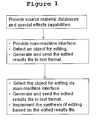
- FIG. 1 is a block diagram showing a video and audio synthesis editing operation 100 according to an embodiment of the present invention.
- the video and audio synthesis editing operation 100 includes a raw material database, special effect functions, an operation interface, and a synthesis editing operation.
- a target file (raw material) database and special effect functions are provided.
- Special effect functions include video or audio effects to be applied to files being edited. Numerous video or audio effects are provided as editing targets to be selected while editing. These special effect functions include image blurring, image distortion, colour changes, audio amplification, and sound distortion, among others.
- a target file database is also provided, which stores original target files and working target files for the video and audio synthesis (combination) editing.
- Original target files include digital content such as audio, video, and static images
- working target files include the digital content resulting after pre-treatment on the original target files.
- the content in working target files is largely unchanged from that in the original target files, but (for example) resolution may be reduced, allowing easier use of working target files for editing.
- the working target files obtained after pre-treatment on the original target files are used for editing. After the editing is completed, corresponding original target files are retrieved from the database for playback when the edited content is to be played.
- target files include, for example, dynamic videos such as video, audio content, and static images such as pictures and slides, wherein videos and audio content are series flows while static images are non-series flows. So-called “series flow” means that the content being played changes along with the playback time.
- images are used to represent working target files (i.e., different contents of target files are represented by unique images in the operator interface display window described below).
- the image resolution is processed (e.g., reduced) to be compatible with the operation of an editing operation window as described below.
- the static images themselves are used as the images representing target files.
- a pre-selected specific image from the dynamic image target file is used as the representative image: The resolution of the selected image will be reduced to decrease software and hardware resources consumed by the image, such as memory or transmission bandwidth. Of course, resolutions of static images and audio target files can also be reduced.
- the pre-treatment on working target files reduces the resolution of original target files to generate working target files, and uses images to represent the target files for display in the editing window.
- other information regarding these target files such as (for example) file name, author, and brief introduction, are simultaneously displayed as text on the representative images.
- a user-friendly operator interface is provided to allow operators to perform online editing in real time.
- the operator interface allows operators without special training to perform complex editing operations. It should be noted that these complex editing operations may be performed on browsers with limited resources.
- the program to generate the operator interface can be downloaded from a server via a communication network, such as the Internet, to a client terminal, e.g., an operator's personal computer or mobile device.
- a communication network such as the Internet
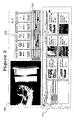
- FIG. 2 shows an exemplary operator interface, primarily including edited target file area 302, target file selection area 304, time axis area 306, and playback area 308.
- the edited target file area 302 different images are used to display an edited target file, a target file with editing in progress, and a blank file. Empty spaces represent target files that have not been edited. Upon appropriate input such as pressing a spacebar, a new editing file is generated.
- Target file selection area 304 displays target files for selection.
- target files may include video and audio files, video and audio special effect functions, text special effect functions, and recording functions, among others. These target files used for editing will be displayed as text or images in selection area 304 for selection by the operator.
- the foregoing video and audio contents can be displayed in the working target file display window to the right of selection area 304 (to be explained later) by the images of their corresponding working target files.
- operators can use a pointing device such as a mouse to select partial or full contents of target files and drag the same to the playback area 308 for editing.
- Playback area 308 is used to play back in real time the partial or full contents dragged from target file selection area 304.
- Playback area 308 can be a flash video player.
- time axis area 306 there may be a plurality of time axes such as main time axis (a-Mv), audio time axis (Music), text time axis (Text), special effect time axis (Effect), and recording time axis (Rec), among others.
- a-Mv main time axis
- Audio time axis Music
- text time axis Text time axis
- Effect special effect time axis
- Rec recording time axis
- selection area 304 images of working target files are displayed in the working target file display window at right.
- the working target file display window has a specific resolution to display target file images, and the length of its horizontal axis represents the total collective time length of the target files displayed therein. As a result, the horizontal axis can be seen as the time axis of target file playback.
- an indicator such as a straight line may be displayed therein (as discussed later in relation to FIGS. 3A-3B ).
- Segments of target files may be selected for use by operating the mouse to control the straight line, and the time periods of the selected segments relative to the overall target files may be displayed in shade or shadow.
- a target file When a target file is audio content or a static image, which is usually only represented by a single image, the image will not change no matter where on the horizontal axis the straight line moves to.
- a target file When a target file is a dynamic image including numerous image frames (such as a video), the image displayed on the working target file display window will change along with the movement of the straight control line on the horizontal axis representing the playback time thereof so that the operator can perform the selection operation.
- the selected segment of the target file will be displayed in shade or shadow, while the width of the shade on the horizontal axis represents the time length of the selected segment.
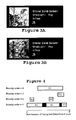
- the selected (shaded) segment of a target file will be further explained with reference to FIG. 3A and FIG. 3B .
- FIG. 3A and FIG. 3B in the case where a dynamic video is displayed in the working target file display window to the right of selection area 304, when an operator moves the straight line in the working target file display window to any position of the window using a pointing device such as mouse, the corresponding image frame can be displayed in the window in real time. At this time, the straight line's position also represents the time of the image frame with respect to the overall target file.
- the selected segment When a segment is selected with a mouse, the selected segment may be displayed in shade, and the ratio of the shade's width to the horizontal axis length of the working target file display window equals the ratio of the segment's playback length to the overall playback length of the target file.
- the selected segment may also be displayed in shade, and the ratio of the shade's width to the horizontal axis length of the working target file display window equals to the ratio of the segment's playback length to the overall playback length of the target file.
- coordinates of the control line pointer in the working target file display window will be recorded dynamically in real time. Therefore, when the selected segment is confirmed, the coordinates of the starting point and ending point of the segment will be recorded.
- coordinates are preferably recorded in real time in a manner that requires minimal storage space, such as a text file in XML format.
- a version of a synthesis editing operation i.e., a file / media combination operation, in accordance with the present invention will now be described with further reference to FIG. 2 .
- a segment selected from video A, a segment from video B, and digital picture C are synthesized (combined) in order to create a video.
- a segment of audio/music D is used as background music, and text T1 and synthesized special effects E1 and E2 are also added.
- a segment of video (target file) A to be edited is selected from selection area 304 using a computer mouse, and the resulting Segment A1 is then dragged to playback area 308. At this time, the selected segment will be immediately played back in playback area 308. Meanwhile, the colour of main time axis a-Mv in time axis area 306, representing the time length of the final product to be completed, changes to a different colour (e.g., from blank to black), or is shown in colour shade. At this time, the whole length of main time axis a-Mv represents the time length of selected Segment A1.
- the index information that represents video / target file A and the starting time, ending time, and priority order of Segment A1 will be generated from the working target file display window to the right of selection area 304 in a text file (e.g., in XML format).
- the synthesis editing operation will retrieve contents corresponding to this text file to play back the same in playback area 308, which is also used to control the display in the time axis area.
- the synthesis editing operation also generates an editing result file with the information of this text file, Segment A1's playback start time, and other information and stores the same in a text file.
- Playback start time refers to the “play head position” on the a-Mv time axis when Segment A1 is placed in the playback area 308 from the data area, which represents the time to start the playback of Segment A1 in the edited final product.
- the “play head” herein refers to a virtual play head, which is equivalent to a play head in a regular actual sound player, while the play head position in the product means that this position's content is being played.
- the priority order may define the priority level of the item to be processed.
- the priority order refers to the priority level of the target file to be processed.
- the priority order of video is assigned as 1, special effect as 2, text as 3, background music as 4, and recording as 5.
- a segment of video B with a length of P2 (hereinafter referred to as Segment B1) is then dragged to playback area 308.
- the length of main time axis a-MV will represent a total time of P1 + P2 - O1, wherein O1 is the overlapping part of the two segments.
- main time axis a-MV consists of a first segment representing the first period P1 of time and a second segment representing the second P2 period of time, and these two segments have the same colour.
- a small block of a different colour is placed between the two periods of time to separate the segments, with the small block representing the overlapping part (O1) of the two segments.
- the two segments may have different colours.
- the editing operation may retrieve contents corresponding to the text file to display the same in playback area 308, which is also used to control the display in the time axis area 306.
- the editing synthesis operation updates the editing result file previously generated with the information associated with Segment A1.
- the editing result file is updated by adding the information of this text file, Segment B1's playback start time, and other information into the editing result file.
- the play head position on the a-Mv time axis when Segment B1 is placed in the playback area represents the time to start the playback of Segment B1 in the edited final product.
- main time axis a-MV consists of a first segment representing the first period P1 of time, a second segment representing the second period P2 of time, and a third segment representing the third period P3 of time, while overlapping parts O1 and O2 between each period are represented by a small block of a different colour.
- the digital picture C that is continuously displayed for a period of time P3 is hereinafter referred to as Segment C1.
- the display control operation also retrieves contents corresponding to the text file from the selection operation to play back the same in playback area 308, which is also used to control the display in the time axis area 306.
- the editing operation generates an updated editing result file including the information regarding Segment C1.
- the play head position on the a-Mv time axis when Segment C is placed in the playback area represents the time to start the playback of Segment C1 in the edited final product.
- the priority order of Segment C1 is also assigned as 1.
- the working target file display window to the right of selection area 304 may record the information of target file segments selected by operators in real time, and when the selected segments are dragged to the playback area, it may also transmit the information to the editing operation, based on which playback contents are retrieved and played. Moreover, in the time axis area 306, the time axis display is correspondingly changed. In addition, the information is updated in an editing result file provided in a text format. Alternatively or additionally, other functions such as video, audio, and text special effects can also be displayed in an image or text format in the display area for selection, and can be dragged to the playback area to complete the selection operation.
- three target files are added into the synthesis editing.
- the present invention is not limited to three, and may include any number of segments greater than one.
- video or static image segments may be used as target files for the synthesis editing in the description above.
- teachings herein are not limited to these, and may also include, for example, audio target files.
- the music start time in Segment A1 can be quickly located by rapidly moving the play head (not shown) on main time axis aMV. Then, selected segment D1 of music D may be dragged to playback area 308 to complete the addition of background music. At this time, a colour-shaded segment will be generated on the music time axis to represent the period of time P4.
- the starting point of time period P4 on the music time axis is shown as corresponding to time T1 on main time axis a-Mv, while its ending point is shown as corresponding to time T2 in Segment C on main time axis a-Mv.
- the total length L1 of period of time P4 has a corresponding proportional relation with the total length Lm of main time axis a-Mv.
- L ⁇ 1 L ⁇ m ⁇ P ⁇ 4 / P ⁇ 1 + P ⁇ 2 + P ⁇ 3 - O ⁇ 1 - O ⁇ 2
- the working target file display window to the right of selection area 304 transmits the information related to segment D1 to the synthesis editing operation in a text file.
- the synthesis editing operation generates an updated editing result file, incorporating the information associated with segment D1.
- the play head's time position on the music time axis when content D1 is placed in the playback area represents the timing / position to start the playback of content D1 in the edited final product being constructed.
- the priority order (defining its processing priority level) of the music content is assigned as 4.
- colour-shaded segments will be generated on the effect time axis correspondingly.
- the duration of special effect E1 herein is P5 and that of special effect E2 is P6.
- the playback start time and the length of an effect can be easily changed by operating on its colour-shaded segment.
- the total time of required edited product is still P1 + P2 + P3 - O1 - O2.
- the synthesis editing operation also updates the previous editing result file in addition to receiving the information transmitted by the selection operation to display editing results and change the display in the time axis area 306.
- the priority order of special effects E1 and E2 is assigned as 2.
- an editing result file in text format is uploaded to an editing operation terminal, such as a network server, to perform editing to compile the edited final product.
- an editing operation terminal such as a network server
- the text file according to the above edited product can be expressed as follows.
- FIG. 4 is a schematic diagram showing the editing of each target file segment relative to the playback time sequence. In order to be concise, however, it is not plotted to scale.
- the editing operation compiles segments of the target files according to the received editing result file.
- selected video segments A1, B1 and C1 which have the highest priority order (e.g. 1), are retrieved from the database first. These are then collected in the prescribed order, according to the playback start time of each segment. As shown in FIG. 4 , as the playback start time of Segment A1 is earlier than those of Segments B1 and C1 and that of Segment B1 is earlier than that of Segment C1, the segments B1 and C1 will be placed after A1, and Segment C1 is placed after Segment B1.
- predetermined overlapping operation functions such as fade-in and/or fade-out
- black blocks are used to represent overlapping parts of the segments, and the time axis below represents the playback time sequence.
- special effects E1 and E2 with the second highest priority order are added to the already compiled segments A1 + B1 + C1.
- the special effect operation is performed on the collected segments from the time corresponding to the effects' playback start time and playback length (duration).
- blurring special effect E1's playback start time is the 25th second and its duration is 10 seconds.
- the editing operation will perform the blurring special effect E1 on the collected segments A1 + B1 + C1 starting from the 25th second to the 35th second to blur the segment A1.
- it will perform the operation of distortion special effect E2 on the segment B2 starting from 1 min: 25 sec to 1 min: 30 sec of the collected segments A1 + B1 + C1 to distort the segment B1.
- the editing operation then performs the text effect operation with the third highest priority order (i.e., 3).
- the third highest priority order i.e., 3
- text T1 "Happy Birthday” may be added to the segment from 2 min: 30 sec to 2 min: 40 sec of A1 + B1 + C1 to make the collected segments display the text "Happy Birthday” one or more times.
- the editing operation then performs the audio operation, which has priority order 4.
- Background music D1 with duration of 1 min 37 sec is added to the collected segments A1 + B1 + C 1 from 1 min: 00 sec to 2 min: 37 sec to make the compiled segments play background music D1.
- the editing operation completes the edited final product.
- the editing operation terminal is a website server, it may transmit a URL from which the edited final product can be downloaded by operators via a network such as the Internet. The operators may then download the previously edited final product from the website.
- An operator can then distribute a file containing the edited final product. For example, an operator may forward the edited final product as a birthday card. Additionally or alternatively, the website server can access the edited final product and provide it to other operators. Thus, the website server might forward the edited final product as a birthday card on the operator's behalf. It should be noted that during the distribution of the edited final product, the editing result file is transmitted in text format which requires minimal network resources. As a result, operators can easily and instantly download the edited final product from the specified website via a network.
- the method and system also include a selection operation and a control operation.
- the selection operation records the index / order of selected target files, and the beginning time and ending time of the selected segments (via the segment start time and segment playback length), in a text format and transmits the same to the control operation.
- the control operation edits the information transmitted from the selection part and other information, such as the current time of the play head (playback starting position), into an editing result file in a text format.
- the editing result file can be transmitted among different operations for retrieving, returning, and displaying target files such as video, and for performing the editing such as splitting, cutting and/or joining.
- the editing result file can be easily distributed to other operators.
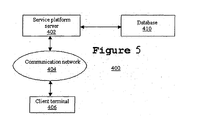
- FIG. 5 illustrates an exemplary online editing system 400.
- online editing system 400 includes service platform server 402, communication network 404, and client terminal 406.
- Service platform server 402 is configured with target file database 410 including audio, video, image, or other target files, and is connected with client terminal 406 via a communication network such as the Internet. Users / operators of client terminal 406 download the editing operator program / operator interface from server 402 via a communication network so as to perform the above-described editing operation.
- the client terminal can be a desktop computer, a laptop computer, a mobile phone, and/or a personal digital assistant.
- the data related to the edited contents can be stored in a text file and transmitted to service platform server 402 via a communication network.
- service platform server 402 may transmit the text file that can download the edited contents to client terminal 406 or other operators via communication network 404.
- a client terminal browser having limited resources can quickly and easily perform editing on video, audio, images, and other contents, while providing a user-friendly interface with intuitive operation. Operators can easily and quickly locate segments of data and perform editing.
- the foregoing editing operation can be performed by devices including a computing apparatus and monitors, such as (for example) a desktop computer, laptop computer, mobile phone, and/or personal digital assistant.
- a computing apparatus and monitors such as (for example) a desktop computer, laptop computer, mobile phone, and/or personal digital assistant.
Landscapes
- Engineering & Computer Science (AREA)
- Multimedia (AREA)
- Television Signal Processing For Recording (AREA)
- Management Or Editing Of Information On Record Carriers (AREA)
- Two-Way Televisions, Distribution Of Moving Picture Or The Like (AREA)
Applications Claiming Priority (3)
| Application Number | Priority Date | Filing Date | Title |
|---|---|---|---|
| CN2008101492544A CN101686333B (zh) | 2008-09-22 | 2008-09-22 | 图像编辑处理方法、装置、及系统 |
| CN2008101780999A CN101763880B (zh) | 2008-12-23 | 2008-12-23 | 电话响铃线上剪辑方法及系统 |
| CN200910128550A CN101840722A (zh) | 2009-03-18 | 2009-03-18 | 线上影音编辑处理方法、装置及系统 |
Publications (2)
| Publication Number | Publication Date |
|---|---|
| EP2172936A2 true EP2172936A2 (fr) | 2010-04-07 |
| EP2172936A3 EP2172936A3 (fr) | 2010-06-09 |
Family
ID=41698220
Family Applications (1)
| Application Number | Title | Priority Date | Filing Date |
|---|---|---|---|
| EP09252258A Withdrawn EP2172936A3 (fr) | 2008-09-22 | 2009-09-22 | Édition audio et vidéo en ligne |
Country Status (2)
| Country | Link |
|---|---|
| US (1) | US8270815B2 (fr) |
| EP (1) | EP2172936A3 (fr) |
Cited By (2)
| Publication number | Priority date | Publication date | Assignee | Title |
|---|---|---|---|---|
| WO2016198846A1 (fr) * | 2015-06-08 | 2016-12-15 | Forbidden Technologies Plc | Éditeur à fonction de mise en évidence |
| US10162506B2 (en) | 2014-07-18 | 2018-12-25 | Apple Inc. | Systems and methods for selecting portions of media for a preview |
Families Citing this family (49)
| Publication number | Priority date | Publication date | Assignee | Title |
|---|---|---|---|---|
| JP4367662B2 (ja) * | 2007-03-23 | 2009-11-18 | ソニー株式会社 | 情報処理システム、端末装置、情報処理方法、プログラム |
| JP4933932B2 (ja) * | 2007-03-23 | 2012-05-16 | ソニー株式会社 | 情報処理システム、情報処理装置、情報処理方法、プログラム |
| US20090088249A1 (en) | 2007-06-14 | 2009-04-02 | Robert Kay | Systems and methods for altering a video game experience based on a controller type |
| US8678896B2 (en) | 2007-06-14 | 2014-03-25 | Harmonix Music Systems, Inc. | Systems and methods for asynchronous band interaction in a rhythm action game |
| US8663013B2 (en) | 2008-07-08 | 2014-03-04 | Harmonix Music Systems, Inc. | Systems and methods for simulating a rock band experience |
| US20130014041A1 (en) * | 2008-12-09 | 2013-01-10 | Denny Jaeger | Using gesture objects to replace menus for computer control |
| US8465366B2 (en) | 2009-05-29 | 2013-06-18 | Harmonix Music Systems, Inc. | Biasing a musical performance input to a part |
| US8449360B2 (en) | 2009-05-29 | 2013-05-28 | Harmonix Music Systems, Inc. | Displaying song lyrics and vocal cues |
| US9981193B2 (en) | 2009-10-27 | 2018-05-29 | Harmonix Music Systems, Inc. | Movement based recognition and evaluation |
| WO2011056657A2 (fr) | 2009-10-27 | 2011-05-12 | Harmonix Music Systems, Inc. | Interface gestuelle |
| TWI493440B (zh) * | 2009-12-31 | 2015-07-21 | Acer Inc | 多螢幕電子裝置及其影像顯示方法 |
| US8874243B2 (en) | 2010-03-16 | 2014-10-28 | Harmonix Music Systems, Inc. | Simulating musical instruments |
| US9312969B2 (en) * | 2010-04-15 | 2016-04-12 | North Eleven Limited | Remote server system for combining audio files and for managing combined audio files for downloading by local systems |
| WO2011149558A2 (fr) | 2010-05-28 | 2011-12-01 | Abelow Daniel H | Réalité alternée |
| US9358456B1 (en) | 2010-06-11 | 2016-06-07 | Harmonix Music Systems, Inc. | Dance competition game |
| US20110306397A1 (en) | 2010-06-11 | 2011-12-15 | Harmonix Music Systems, Inc. | Audio and animation blending |
| US8562403B2 (en) | 2010-06-11 | 2013-10-22 | Harmonix Music Systems, Inc. | Prompting a player of a dance game |
| US8990693B2 (en) * | 2010-06-22 | 2015-03-24 | Newblue, Inc. | System and method for distributed media personalization |
| US8910046B2 (en) | 2010-07-15 | 2014-12-09 | Apple Inc. | Media-editing application with anchored timeline |
| US9024166B2 (en) | 2010-09-09 | 2015-05-05 | Harmonix Music Systems, Inc. | Preventing subtractive track separation |
| US9251855B2 (en) | 2011-01-28 | 2016-02-02 | Apple Inc. | Efficient media processing |
| US20120210219A1 (en) | 2011-02-16 | 2012-08-16 | Giovanni Agnoli | Keywords and dynamic folder structures |
| US9997196B2 (en) | 2011-02-16 | 2018-06-12 | Apple Inc. | Retiming media presentations |
| US11747972B2 (en) | 2011-02-16 | 2023-09-05 | Apple Inc. | Media-editing application with novel editing tools |
| US20120251083A1 (en) | 2011-03-29 | 2012-10-04 | Svendsen Jostein | Systems and methods for low bandwidth consumption online content editing |
| US10739941B2 (en) | 2011-03-29 | 2020-08-11 | Wevideo, Inc. | Multi-source journal content integration systems and methods and systems and methods for collaborative online content editing |
| US20120311624A1 (en) * | 2011-06-03 | 2012-12-06 | Rawllin International Inc. | Generating, editing, and sharing movie quotes |
| US8749618B2 (en) | 2011-06-10 | 2014-06-10 | Morgan Fiumi | Distributed three-dimensional video conversion system |
| US9026446B2 (en) | 2011-06-10 | 2015-05-05 | Morgan Fiumi | System for generating captions for live video broadcasts |
| US8532469B2 (en) | 2011-06-10 | 2013-09-10 | Morgan Fiumi | Distributed digital video processing system |
| US9443518B1 (en) | 2011-08-31 | 2016-09-13 | Google Inc. | Text transcript generation from a communication session |
| US9536564B2 (en) | 2011-09-20 | 2017-01-03 | Apple Inc. | Role-facilitated editing operations |
| US9240215B2 (en) | 2011-09-20 | 2016-01-19 | Apple Inc. | Editing operations facilitated by metadata |
| WO2013181756A1 (fr) * | 2012-06-08 | 2013-12-12 | Jugnoo Inc. | Système et procédé permettant de générer et de diffuser une vidéo numérique |
| US8612211B1 (en) * | 2012-09-10 | 2013-12-17 | Google Inc. | Speech recognition and summarization |
| US11748833B2 (en) | 2013-03-05 | 2023-09-05 | Wevideo, Inc. | Systems and methods for a theme-based effects multimedia editing platform |
| CN103455967A (zh) * | 2013-06-09 | 2013-12-18 | 厦门美图网科技有限公司 | 一种图片特效在线化处理方法 |
| US9971489B2 (en) | 2014-05-15 | 2018-05-15 | Dreamworks Animation L.L.C. | Computer-based training using a graphical user interface |
| CN106851385B (zh) * | 2017-02-20 | 2019-12-27 | 北京乐我无限科技有限责任公司 | 视频录制方法、装置和电子设备 |
| US11436776B2 (en) * | 2019-03-15 | 2022-09-06 | Canon Kabushiki Kaisha | Information processing apparatus and control method thereof |
| CN112379823B (zh) * | 2020-11-25 | 2022-01-21 | 武汉市人机科技有限公司 | 一种时间轴软件内四轴切换的方法 |
| CN113014959B (zh) * | 2021-03-15 | 2022-08-09 | 福建省捷盛网络科技有限公司 | 一种互联网短视频合并系统 |
| CN113485968B (zh) * | 2021-08-02 | 2024-06-07 | 安徽文香科技股份有限公司 | 一种基于时间线的编辑方法、装置、设备及存储介质 |
| CN113490036B (zh) * | 2021-09-07 | 2021-11-23 | 深圳墨世科技有限公司 | 流媒体编辑方法、装置、终端设备和可读存储介质 |
| CN115809957A (zh) * | 2021-09-13 | 2023-03-17 | 北京字跳网络技术有限公司 | 图像处理方法及设备 |
| US12113838B2 (en) | 2022-01-05 | 2024-10-08 | On24, Inc. | Methods, systems, and apparatuses for improved content creation and synchronization |
| CN114760428A (zh) * | 2022-03-03 | 2022-07-15 | 深圳市爱剪辑科技有限公司 | 一种应用于视频剪辑软件的快捷高效的画中画视频制作方法 |
| CN115136233B (zh) * | 2022-05-06 | 2023-09-22 | 湖南师范大学 | 一种基于自建模板的多模态快速转写及标注系统 |
| KR20250120387A (ko) * | 2023-06-26 | 2025-08-08 | 베이징 지티아오 네트워크 테크놀로지 컴퍼니, 리미티드 | 동영상 편집 방법, 기기, 전자 장치 및 저장 매체 |
Citations (1)
| Publication number | Priority date | Publication date | Assignee | Title |
|---|---|---|---|---|
| US20030146915A1 (en) * | 2001-10-12 | 2003-08-07 | Brook John Charles | Interactive animation of sprites in a video production |
Family Cites Families (11)
| Publication number | Priority date | Publication date | Assignee | Title |
|---|---|---|---|---|
| AU4279893A (en) | 1992-04-10 | 1993-11-18 | Avid Technology, Inc. | A method and apparatus for representing and editing multimedia compositions |
| US20010036356A1 (en) | 2000-04-07 | 2001-11-01 | Autodesk, Inc. | Non-linear video editing system |
| US6768499B2 (en) * | 2000-12-06 | 2004-07-27 | Microsoft Corporation | Methods and systems for processing media content |
| US20020175917A1 (en) | 2001-04-10 | 2002-11-28 | Dipto Chakravarty | Method and system for streaming media manager |
| US7073127B2 (en) * | 2002-07-01 | 2006-07-04 | Arcsoft, Inc. | Video editing GUI with layer view |
| KR100467603B1 (ko) | 2002-08-08 | 2005-01-24 | 삼성전자주식회사 | 태스크 기반의 비선형 하이퍼비디오 편집방법 및 그 장치 |
| WO2007082166A2 (fr) | 2006-01-05 | 2007-07-19 | Eyespot Corporation | Système et méthodes destinés à un traitement d'édition distribué dans un système d'édition vidéo en ligne |
| US20070162855A1 (en) | 2006-01-06 | 2007-07-12 | Kelly Hawk | Movie authoring |
| US8643745B2 (en) * | 2007-03-12 | 2014-02-04 | Panasonic Corporation | Content shooting apparatus |
| US20100153520A1 (en) * | 2008-12-16 | 2010-06-17 | Michael Daun | Methods, systems, and media for creating, producing, and distributing video templates and video clips |
| EP2460061A4 (fr) * | 2009-07-31 | 2013-09-25 | Citizenglobal Inc | Systèmes et procédés pour recevoir, traiter et organiser un contenu comprenant une vidéo |
-
2009
- 2009-09-22 US US12/564,311 patent/US8270815B2/en not_active Expired - Fee Related
- 2009-09-22 EP EP09252258A patent/EP2172936A3/fr not_active Withdrawn
Patent Citations (1)
| Publication number | Priority date | Publication date | Assignee | Title |
|---|---|---|---|---|
| US20030146915A1 (en) * | 2001-10-12 | 2003-08-07 | Brook John Charles | Interactive animation of sprites in a video production |
Cited By (3)
| Publication number | Priority date | Publication date | Assignee | Title |
|---|---|---|---|---|
| US10162506B2 (en) | 2014-07-18 | 2018-12-25 | Apple Inc. | Systems and methods for selecting portions of media for a preview |
| US10545654B2 (en) | 2014-07-18 | 2020-01-28 | Apple Inc. | Systems and methods for selecting portions of media for a preview |
| WO2016198846A1 (fr) * | 2015-06-08 | 2016-12-15 | Forbidden Technologies Plc | Éditeur à fonction de mise en évidence |
Also Published As
| Publication number | Publication date |
|---|---|
| US8270815B2 (en) | 2012-09-18 |
| US20100080528A1 (en) | 2010-04-01 |
| EP2172936A3 (fr) | 2010-06-09 |
Similar Documents
| Publication | Publication Date | Title |
|---|---|---|
| US8270815B2 (en) | Online video and audio editing | |
| US11989808B2 (en) | Systems and methods for template image edits | |
| US10650349B2 (en) | Methods and systems for collaborative media creation | |
| US8644679B2 (en) | Method and system for dynamic control of digital media content playback and advertisement delivery | |
| JP3219027B2 (ja) | シナリオ編集装置 | |
| US7660416B1 (en) | System and method for media content collaboration throughout a media production process | |
| US8966369B2 (en) | High quality semi-automatic production of customized rich media video clips | |
| US20190075181A1 (en) | Slice-and-stitch approach to editing media (video or audio) for multimedia online presentations | |
| US20060277457A1 (en) | Method and apparatus for integrating video into web logging | |
| US8989560B2 (en) | Systems and methods for variable video production, distribution and presentation | |
| US7970260B2 (en) | Digital media asset management system and method for supporting multiple users | |
| US20100005120A1 (en) | Method and apparatus for generating media file having media information compatible between media files having same format, and method and apparatus for executing the media file | |
| US9721321B1 (en) | Automated interactive dynamic audio/visual performance with integrated data assembly system and methods | |
| Jago | Adobe Premiere Pro Classroom in a Book (2022 release)--VitalSource (ACC) | |
| JP2004126637A (ja) | コンテンツ作成システム及びコンテンツ作成方法 | |
| CN101840722A (zh) | 线上影音编辑处理方法、装置及系统 | |
| JP4129162B2 (ja) | コンテンツ作成実演システム及びコンテンツ作成実演方法 | |
| KR101703321B1 (ko) | 복합 컨텐츠의 제공 방법 및 장치 | |
| JP4514671B2 (ja) | コンテンツ編集装置、コンピュータ読み取り可能なプログラム及びそれを記録した記録媒体 | |
| US20090222758A1 (en) | Content reproduction apparatus and method | |
| Harrington et al. | An Editor's Guide to Adobe Premiere Pro | |
| JPH09312818A (ja) | 動画提示方法 | |
| CN117911582A (zh) | 混合媒体内容的自适应编辑体验 | |
| JP2006173692A (ja) | 情報処理装置および情報処理方法 | |
| CN120416601A (zh) | 音视频编辑方法和装置、存储介质及电子设备 |
Legal Events
| Date | Code | Title | Description |
|---|---|---|---|
| PUAI | Public reference made under article 153(3) epc to a published international application that has entered the european phase |
Free format text: ORIGINAL CODE: 0009012 |
|
| AK | Designated contracting states |
Kind code of ref document: A2 Designated state(s): AT BE BG CH CY CZ DE DK EE ES FI FR GB GR HR HU IE IS IT LI LT LU LV MC MK MT NL NO PL PT RO SE SI SK SM TR |
|
| AX | Request for extension of the european patent |
Extension state: AL BA RS |
|
| PUAL | Search report despatched |
Free format text: ORIGINAL CODE: 0009013 |
|
| RIC1 | Information provided on ipc code assigned before grant |
Ipc: G06F 3/048 20060101ALN20100420BHEP Ipc: G11B 27/11 20060101ALI20100420BHEP Ipc: G11B 27/34 20060101ALI20100420BHEP Ipc: G11B 27/034 20060101AFI20100302BHEP |
|
| AK | Designated contracting states |
Kind code of ref document: A3 Designated state(s): AT BE BG CH CY CZ DE DK EE ES FI FR GB GR HR HU IE IS IT LI LT LU LV MC MK MT NL NO PL PT RO SE SI SK SM TR |
|
| AX | Request for extension of the european patent |
Extension state: AL BA RS |
|
| 17P | Request for examination filed |
Effective date: 20101209 |
|
| 17Q | First examination report despatched |
Effective date: 20140115 |
|
| STAA | Information on the status of an ep patent application or granted ep patent |
Free format text: STATUS: THE APPLICATION IS DEEMED TO BE WITHDRAWN |
|
| 18D | Application deemed to be withdrawn |
Effective date: 20140401 |