EP2175361A2 - Procédé de réglage de dispositif de contrôle et programme - Google Patents
Procédé de réglage de dispositif de contrôle et programme Download PDFInfo
- Publication number
- EP2175361A2 EP2175361A2 EP09171907A EP09171907A EP2175361A2 EP 2175361 A2 EP2175361 A2 EP 2175361A2 EP 09171907 A EP09171907 A EP 09171907A EP 09171907 A EP09171907 A EP 09171907A EP 2175361 A2 EP2175361 A2 EP 2175361A2
- Authority
- EP
- European Patent Office
- Prior art keywords
- group
- apparatuses
- software
- group information
- installer
- Prior art date
- Legal status (The legal status is an assumption and is not a legal conclusion. Google has not performed a legal analysis and makes no representation as to the accuracy of the status listed.)
- Withdrawn
Links
Images


Classifications
-
- G—PHYSICS
- G06—COMPUTING OR CALCULATING; COUNTING
- G06F—ELECTRIC DIGITAL DATA PROCESSING
- G06F3/00—Input arrangements for transferring data to be processed into a form capable of being handled by the computer; Output arrangements for transferring data from processing unit to output unit, e.g. interface arrangements
- G06F3/12—Digital output to print unit, e.g. line printer, chain printer
- G06F3/1201—Dedicated interfaces to print systems
- G06F3/1202—Dedicated interfaces to print systems specifically adapted to achieve a particular effect
- G06F3/1203—Improving or facilitating administration, e.g. print management
- G06F3/1204—Improving or facilitating administration, e.g. print management resulting in reduced user or operator actions, e.g. presetting, automatic actions, using hardware token storing data
-
- G—PHYSICS
- G06—COMPUTING OR CALCULATING; COUNTING
- G06F—ELECTRIC DIGITAL DATA PROCESSING
- G06F3/00—Input arrangements for transferring data to be processed into a form capable of being handled by the computer; Output arrangements for transferring data from processing unit to output unit, e.g. interface arrangements
- G06F3/12—Digital output to print unit, e.g. line printer, chain printer
- G06F3/1201—Dedicated interfaces to print systems
- G06F3/1223—Dedicated interfaces to print systems specifically adapted to use a particular technique
- G06F3/1224—Client or server resources management
- G06F3/1225—Software update, e.g. print driver, modules, plug-ins, fonts
-
- G—PHYSICS
- G06—COMPUTING OR CALCULATING; COUNTING
- G06F—ELECTRIC DIGITAL DATA PROCESSING
- G06F3/00—Input arrangements for transferring data to be processed into a form capable of being handled by the computer; Output arrangements for transferring data from processing unit to output unit, e.g. interface arrangements
- G06F3/12—Digital output to print unit, e.g. line printer, chain printer
- G06F3/1201—Dedicated interfaces to print systems
- G06F3/1223—Dedicated interfaces to print systems specifically adapted to use a particular technique
- G06F3/1224—Client or server resources management
- G06F3/1228—Printing driverless or using generic drivers
-
- G—PHYSICS
- G06—COMPUTING OR CALCULATING; COUNTING
- G06F—ELECTRIC DIGITAL DATA PROCESSING
- G06F3/00—Input arrangements for transferring data to be processed into a form capable of being handled by the computer; Output arrangements for transferring data from processing unit to output unit, e.g. interface arrangements
- G06F3/12—Digital output to print unit, e.g. line printer, chain printer
- G06F3/1201—Dedicated interfaces to print systems
- G06F3/1223—Dedicated interfaces to print systems specifically adapted to use a particular technique
- G06F3/1237—Print job management
- G06F3/1239—Restricting the usage of resources, e.g. usage or user levels, credit limit, consumables, special fonts
-
- G—PHYSICS
- G06—COMPUTING OR CALCULATING; COUNTING
- G06F—ELECTRIC DIGITAL DATA PROCESSING
- G06F3/00—Input arrangements for transferring data to be processed into a form capable of being handled by the computer; Output arrangements for transferring data from processing unit to output unit, e.g. interface arrangements
- G06F3/12—Digital output to print unit, e.g. line printer, chain printer
- G06F3/1201—Dedicated interfaces to print systems
- G06F3/1202—Dedicated interfaces to print systems specifically adapted to achieve a particular effect
- G06F3/1218—Reducing or saving of used resources, e.g. avoiding waste of consumables or improving usage of hardware resources
Definitions
- the present invention relates to a control device setting method and program, particularly to a method and program for setting, out of a plurality of apparatuses on the network, a group of image forming apparatuses from which an object of control is to be chosen.
- image forming apparatuses In recent years, there has been a widespread use of printing apparatuses such as printers and digital multi-functional peripherals (hereinafter referred to as "image forming apparatuses").
- image forming apparatuses As a network printer is used to perform printing, a document is created by using the document creating application installed in the user terminal linked with the network, and is converted into the print data in the form of PDL (Page Description Language), using the software (printer driver) for controlling the image forming apparatus. Then the data is sent to the image forming apparatus, which analyzes the print data, generates the intermediate data, converts it into bitmap data, and outputs it to a paper medium.
- PDL Peage Description Language
- the aforementioned printer driver is normally formed to conform to each image forming apparatus.
- a plurality of printer drivers must be installed and this involves complicated work procedures.
- a printer driver (hereinafter referred to as "universal printer driver”) has been put into commercial use in recent years, which is compatible with a plurality of image forming apparatuses and capable of selecting an image forming apparatus as the output destination in every execution of a printing job.
- the aforementioned universal printer driver ensures that all of the image forming apparatuses over the network can be possible output destinations. However, if there are a large number of image forming apparatuses as possible output destinations, an appropriate image forming apparatus must be selected from among a large number of them. This will involve a complicated work procedure especially for those not fully familiar with the work. Further, in the universal printer driver, output can be made to any image forming apparatus over the network (any image forming apparatus over the network is accessible). Thus, an unauthorized user may access the apparatus, for example, and such security problems may arise. To solve such problems, when a universal printer driver is installed for each user terminal, a group of the image forming apparatuses of permitted output destinations must be set for each user terminal.
- the Japanese Unexamined Patent Publication No. 2000-181641 discloses an information processing apparatus wherein access restrictions are imposed by sending the group template file containing the user access administration information to other clients. Further, the Japanese Unexamined Patent Publication No. 2001-14123 discloses the printer access control system wherein a printer server is used to impose restrictions on access to the printer group for each user.
- an administration apparatus such as a printer server is required to ensure that the printer server executes restrictions on access for each user. This involves a complicated system structure, and application of this technique to the existing system is accompanied by difficulties.
- Another object of the present invention is to provide a control device setting method and program capable of ensuring reliable imposition of access restrictions.
- an embodiment of the present invention is an installer building software for building installer software that installs the universal control software for providing universal control of a plurality of apparatuses, wherein a computer executing the installer building software functions as an installer building section that makes the aforementioned installer software store the group information or the address information indicating the location of storing this group information at the time of building the aforementioned installer software wherein the group information relates to information which classifies a plurality of the aforementioned apparatuses into groups and specifies the apparatuses belonging to each group.
- Another embodiment of the present invention is installer software for installing the universal control software for providing universal control of a plurality of apparatuses, wherein a computer executing the installer building software functions as:
- Another embodiment of the present invention is universal control software for providing universal control of a plurality of apparatuses, wherein a computer executing the universal control software functions as:
- another embodiment of the present invention is a control device setting method in a system including a plurality of apparatuses and a user terminal for performing at least:
- one of the techniques known in the conventional art is a universal printer driver (e.g., universal printer driver of Hewlett-Packard Company) that permits use of a plurality of image forming apparatuses linked to the network.
- a universal printer driver e.g., universal printer driver of Hewlett-Packard Company
- Use of this universal printer driver allows the user to access all of the image forming apparatuses over the network.
- the user is required to set an appropriate group as an output destination.
- the universal printer driver after the universal printer driver has been installed, the user himself acquires the group information or a printer server is used to administer the image forming apparatus of the output destination.
- the former method requires the work of acquiring the group information, and a problem has been found in that access to an inappropriate image forming apparatus cannot be disabled until group setting has been completed.
- the latter method requires a printer server to be arranged on the system. This involves a complicated system structure and causes difficulties in the application to the existing system.
- installer building software e.g., driver packaging utility for full-color multi-functional peripheral bizhub C650 of Konica Minolta
- This installer building software allows the customized installer software to be built, however the items that can be set by this software are restricted to such printing conditions as color/monochromatic conditions alone. This software fails to set the output destination group.
- the present embodiment has group information embedded in the installer software for installing a universal printer driver so that a universal printer driver in which group information corresponding to the user has been registered in advance can be installed.
- the installer building software for building installer software for installing the universal printer driver is provided with the function of creating group information, and the installer software is equipped with the function of instructing the group setting based on the group information having been created.
- the universal printer driver is provided with the function of receiving a group setting instruction from the outside, so that the group setting can be automatically performed after the universal printer driver has been installed in the computer.
- This arrangement ensures that candidates for the output destination corresponding to each user are displayed on the universal printer driver, and provides easy selection of the output destination. This arrangement also allows the administrator to conduct group setting and reliable imposition of restrictions on access for each user.
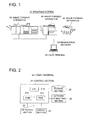
- Fig. 1 is a diagram schematically representing the structure of a printing system in the present example.
- Fig. 2 is a block diagram representing the structure of a user terminal.
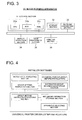
- Fig. 3 is a block diagram representing the structure of an image forming apparatus.
- Fig. 4 is a block diagram representing the functions of the universal printer driver and installer software.
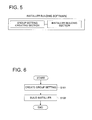
- Fig. 5 is a block diagram representing the function of the installer building software.
- Figs. 6 through 8 are the flow charts representing the control procedure in the user terminal in the present example.
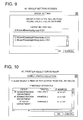
- Figs. 9 and 10 are diagrams showing examples of the structures of the screens displayed on a display section in the user terminal.
- the printing system 10 of the present example includes a computer terminal (hereinafter referred to as "user terminal 20") that creates a document by an application and creates the printing job of the page description language by the universal printer driver to give printing instructions, and a plurality of image forming apparatuses 30 such as printers or digital multi-functional peripherals which execute printing in conformity to the printing job from the user terminal 20.
- the user terminal 20 and image forming apparatuses 30 are connected via the communication network such as LAN (Local Area Network) or WAN (Wide Area Network). The following describes the details of each component.
- the user terminal 20 includes a control section 21, storage section 22, operation section 23, display section 24 and network connecting section 25.
- the control section 21 includes a CPU (Central Processing Unit), ROM (Read Only Memory) and RAM (Random Access Memory).
- the universal control software (universal printer driver) that universally controls the OS (Operating System), document creating application and a plurality of image forming apparatuses 30 is normally read from the ROM21b or storage section 22 into the RAM21c, and is executed on the CPU 21a.
- the aforementioned universal printer driver allows the control section 21 to serve as a group setting instruction receiving section, set group information storage section, apparatus selecting section and others.
- the group setting instruction receiving section receives the group setting instruction from the installer software to be described later.
- the set group information storage section stores the group information that specifies the image forming apparatus 30 belonging to the group to be selected by the apparatus selecting section.
- the apparatus selecting section allows the image forming apparatus 30 to be selected as the object of output from the group.
- the universal printer driver provided with the aforementioned functions is installed into the OS in the user terminal 20 by the installer software.
- this installer software allows the control section 21 to serve as an installation executing section, group setting instruction section, instructed group information storage section and others.
- this installer software includes a universal printer driver as internal data.
- the installation executing section conducts execution processing to install the universal printer driver in the OS.
- the group setting instruction section provides group setting instructions to the universal printer driver having been installed.
- the instructed group information storage section stores the group information for giving instructions to the universal printer driver.
- the aforementioned installer software is built by installer building software. As shown in Fig. 5 , this installer building software allows the control section 21 to serve as a group setting creation section, and installer building section.
- the group setting creation section classifies a plurality of image forming apparatuses 30 into groups and creates group information for specifying the image forming apparatus 30 belonging to each group.
- the installer building section ensures that the group information created by the group setting creation section is stored in the instructed group information storage section, whereby the installer software is built.
- the storage section 22 includes a flash memory or HHD (Hard Disk Drive), and stores various forms of data (e.g., group information) and programs (e.g., universal printer driver).
- HHD Hard Disk Drive
- the operation section 23 includes a keyboard or mouse, and is used to operate the group settings at the time of starting the installer building software, and to select the image forming apparatus 30 at the time of starting the universal printer driver.
- the display section 24 is made up of an LCD (Liquid Crystal Display), an organic electroluminescent display or others.
- Various forms of screens e.g., group setting screen and printer selection screen to be described later are displayed on the screen in conformity to the display signal from the control section 21.
- the network connecting section 25 includes an NIC (Network Interface Card) or modem, and is used for connection with the image forming apparatus 30.
- NIC Network Interface Card
- the installer building software is started by the user terminal 20 and installer software is built.
- the installer software is started by the same user terminal 20 and the universal printer driver is installed. It is also possible to arrange such a configuration that the installer building software and installer software are started by different user terminals 20 (i.e., the universal printer driver is installed in a user terminal different from the user terminal for building the installer software).
- the image forming apparatus 30 includes a CPU 31a, ROM31b, RAM31c, storage section 32, network connecting section 33, display operation section 34, image processing section 35, and printing section 36. These components are connected via a bus.
- the ROM31b stores a program for controlling operations of the entire image forming apparatus 30.
- the RAM31c stores the data required for control by the CPU 31a and the data that requires temporary storage during the control operation.
- the CPU 31a in collaboration with the ROM31b and RAM31c serves as the control section 31 that controls the operations of the entire image forming apparatus.
- the storage section 32 includes a flash memory or HDD, and stores the printing job acquired from the user terminal 20.
- the network connecting section 33 is an interface for connection with the communication network such as the NIC or modem, and receives the printing job from the user terminal 20.
- the display operation section 34 is made up of the display section such as an LCD, and the operation sections such as the touch panel covering the display section. In conformity to the display signal from the CPU 31a, the display operation section 34 displays the icon, key button and various forms of settings required for printing on the LCD or the like. At the same time, the display operation section 34 ensures that the operation signals inputted from the touch panel and others are outputted to the CPU 31a.
- the image processing section 35 analyzes the printing job acquired from the user terminal 20 through the network connecting section 33 and creates the image data in a bitmap format. It is also possible to arrange such a configuration that processing by the image processing section 35 is implemented by the RIP (Raster Image Processor) controller linked to the network. In this case, the printing job is analyzed by the RIP controller, and the image data in a bitmap format is created, whereby the image data is sent to the image processing apparatus 30.
- RIP Raster Image Processor
- the printing section 36 Based on the bitmap data created by the image processing section 35, the printing section 36 performs printing operations in conformity to the printing mode specified by the aforementioned parameters. To put it more specifically, the amount of light conforming to the bitmap data is applied by the exposure apparatus to the photoreceptor drum charged by the charging device, whereby an electrostatic latent image is formed. The toner charged by the development apparatus is attached to the image, and the toner image is transferred onto the paper medium through a primary transfer roller and secondary transfer belt. Then the fixing operation is performed by the fixing apparatus.
- the following describes the procedure for installing the universal printer driver into the user terminal 20 in the printing system of the aforementioned structure.
- the first place referring to Fig. 6 , the following describes the flow of the processes for setting of the group by the installer building software to build the installer building software.
- the image forming apparatus 30 is a printer
- the installer building software is stored in the user terminal 20 of the administrator in advance, and the system is ready for operation.
- the administrator operates the operation section 23 of the user terminal 20 (e.g., double-clicks on the icon on the desk top of the OS) to start the installer building software on the OS.
- Step S101 using the function of the group setting creation section of the installer building software having been started, the administrator creates group information.
- group information shown in Table 1 through 3 has been created by the administrator.
- Table 1 ⁇ Group> Group name 1F Administration department 2F Sales department Table 2 ⁇ 1F Administration department> Printer name Address Printer 1 xx.xx.xx.1 Printer 2 xx.xx.xx.2 Table 3 ⁇ 2F Sales department> Printer name Address Printer 3 xx.xx.xx.3
- the group information is composed of a group designation file and printer designation file.
- the group designation file includes the group name and the file name of the printer designation file with the group details described therein.
- the file name of this group designation file is the "group.csv" which is fixed without being changed.
- the printer designation file includes the name of the printer contained in a specific group, and the address associated therewith (e.g., IP (Internet Protocol) address).
- IP Internet Protocol
- the name of this printer designation file is defined within the group designation file. It should be noted that the printer designation file can be created in any desired format.
- the CSV Common Separated Values
- Fig. 9 shows an example of the GUI (group setting screen 40) of the group setting creation section that reads the file.
- the group setting creation section can use the CSV file directly as it is, or can create group information by converting it into the data structure defined internally. Here the CSV file is used directly.
- Step S102 installer software is built using the function of the installer building section of the installer building software.
- This installer building section builds the installer software by ensuring that group information created by the group setting creation section is stored in the instructed group information storage section of the installer software.
- the instructed group information storage section includes the CSV file group stored in the HDD and the DLL (Dynamic Link Library) capable of reading the same.
- the installation executing section (EXE file), universal printer driver (a plurality of files such as DLL) and group setting instruction section (DLL), which have been prepared in advance can be used directly.
- the aforementioned procedure ensures the installer software to be built in the OS of the user terminal 20 of the administrator.
- Fig. 7 the following describes the flow of the processes ranging from installation of the universal printer driver by the aforementioned installer software up to instruction of the group setting. If the user terminal 20 for building the installer software is different from the user terminal 20 for installing the universal printer driver, the installer software built in the aforementioned flow is assumed to have been copied in each user terminal 20 via the e-mail or file server.
- the user starts the installer software on the OS by operating the operation section 23 of the user terminal 20 (e.g., by double-clicking on the icon on the OS desktop (icon linked to the EXE file of the installation executing section)).
- Step S201 the universal printer driver provided internally is read by the function of the installation executing section of the installer software having been started.
- Step S202 installation is executed in the OS of the universal printer driver having been read.
- Step S203 the group setting instruction section of the installer software transfers the group information read from the instructed group information storage section, to the group setting instruction receiving section of the universal printer driver.
- the group setting instruction section reads the DLL file of the group setting instruction receiving section and calls up the group setting instruction receiving capability (function) which the group setting instruction receiving section has. Then the path of the CSV file group is transferred as an argument.
- the group setting instruction receiving section of the universal printer driver ensures that the group information received is stored in the set group information storage section.
- the set group information storage section refers to the path of the CSV file group received and copies the CSV file group which has been referred to directly in a predetermined location on the OS system, wherein the CSV file group is stored. If the CSV file group has been encoded or compressed into an archived form, it is converted into data that can be read.
- the aforementioned processing allows the universal printer driver to be installed in the OS of the user terminal 20.
- Fig. 8 the following describes the flow up to transferring the printing job to a desired printer by the universal printer driver.
- Step S301 the apparatus selecting section of the universal printer driver reads the group information from the set group information storage section (read as the CSV file or registry information), and the printer selection screen 41 is displayed on the display section 24 of the user terminal 20, as shown in Fig. 10 .
- Step S302 when the printer of the output destination has been selected from the printer selection screen 41 of Fig. 10 by the user, the universal printer driver prepares the address of the printer having been selected from the group information as a destination address of the printing job.
- the printer 1 is selected and the printing job is sent to the address "xx.xx.xx.1".
- Step S303 the universal printer driver generates the printing job that is readable for the printer 1.
- Step S304 the universal printer driver sends the printing job to the address "xx.xx.xx.1".
- the installer building software is booted and the group setting is reworked to rebuild the installer software.
- the universal printer driver is re-installed using that installer software.
- the universal printer driver with the group information pre-registered therein has been installed in each user terminal.
- This arrangement ensures that the image forming apparatus usable in each user terminal 20 can be selected as the output destination, immediately after driver installation. Further, since group information is registered in the universal printer driver in advance, restrictions can be imposed on possible access to the unregistered printers. Further, this arrangement eliminates the need of installing an administration apparatus such as a printer server. Thus, this structure provides simplification of the system structure and enhancement of general versatility.
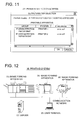
- Fig. 11 shows an example of the structure of the screen displayed on the display section of the user terminal.
- the description of the same components as those of the first Example will be omitted, and only the differences will be described.
- display is given in such a way that the same printers can be selected by the universal printer driver installed in each user terminal 20, though different printers are suited for the output, depending on the organizational division and post of the user as well as the location of the user terminal 20.
- the range of the printer selection for each user can be changed when the universal printer driver is installed.
- the group information includes a user designation file, group designation file and printer designation file.
- the user designation file contains the user name and the name of the group designation file describing the groups that can be used by the user.
- the file name is assumed as "user.csv" which is fixed without being changed.
- the group designation file includes the group name and the name of the printer designation file describing the details of the group.
- the file name is defined in the user designation file.
- the printer designation file includes the name of the printer contained in a predetermined group and the address associated therewith.
- the file name is determined in the group designation file. The following shows an example of the aforementioned file group.
- the installation procedure by the installer software of Fig. 7 is the same as that in the first Example.
- the installer software identifies the user that employs the user terminal 20 wherein installation has been completed. It should be noted that there is no particular restriction to the method of identifying the user terminal 20. It is possible to identify the user by acquiring the IP address or MAC (Media Access Control) address and referring to the pre-stored Table. Alternatively, the user can be identified by requesting the user ID or password to be inputted. Here it is assumed that the user has been identified as "user A".
- the group setting instruction section ensures that the group information for "user A” read from the instructed group information storage section is transferred to the group setting instruction receiving section of the universal printer driver.
- the "user.csv” is read and the group designation file for user A ("usera.csv” in this case) is obtained.
- "1fsoumubu.csv” is obtained from the “usera.csv”.
- the file name of the "users.csv” is converted to the "group.csv", and only the “group.csv” and “1fsoumubu.csv” are transferred.
- the group setting instruction receiving section of the universal printer driver causes the received group information to be stored in the set group information storage section. Thus, only the "group.csv” and “1fsoumubu.csv” are referred to without data on another user (user B in this case) being stored for the user A.
- the printing procedure of Fig. 8 is also the same as that of the first Example.
- the apparatus selecting section reads the group information from the set group information storage section and displays the printer selection screen 42 on the computer, as shown in Fig. 11 .
- the apparatus selecting section reads the group information from the set group information storage section and displays the printer selection screen 42 on the computer, as shown in Fig. 11 .
- the printer selection screen 42 on the computer, as shown in Fig. 11 .
- the apparatus selecting section reads the group information from the set group information storage section and displays the printer selection screen 42 on the computer, as shown in Fig. 11 .
- the printer selection screen 42 on the computer
- the installer building software is booted and the group setting is reworked to rebuild the installer software.
- the universal printer driver is re-installed using that installer software.
- FIG. 12 is a diagram schematically representing the structure of a printing system of the third example of the present invention.
- this Example as well, the description of the same components as those of the first and second Examples will be omitted, and only the differences will be described.
- this Example proposes a method of permitting the group information to be updated, without having to rebuild the installer software.
- the printing system of this Example includes a user terminal 20, image forming apparatus 30 and server 50, which are linked via the communication network.
- the server 50 includes a control section, storage section and authentication section that are not illustrated.
- the control section includes a CPU, ROM and RAM, and controls operations of the entire server 50.
- the authentication section performs authentication based on the information (IP address, MAC address, user ID, password and others) sent from each user terminal 20, and allows access to be made by the authenticated user terminal 20.
- the storage section stores the group information of each user.
- the building of installer software of Fig. 6 is performed on the server 50, the group setting creation section of the installer building software sets the group information for each user.
- the same group information as that of the second Example is assumed to have been created by the administrator.
- the administrator ensures that the group information for "user A” is stored in a location accessible for the "user A” (e.g., ⁇ server ⁇ usera) on the server 50, and the group information for "user B” is stored in a location accessible for the "user B" (e.g., ⁇ server ⁇ userb) on the server 50.
- the "user.csv” specifies each of the paths as follows and arranges them at a location accessible for all of the users on the server 50 (e.g., ⁇ server ⁇ alluser).
- the following describes an example of the aforementioned file group.
- the installer software when the installer software is built, the information for gaining access to the group information stored on the server 50 is stored in the instructed group information storage section, whereby the installer is built. Here only the "user.csv" is stored.
- the installation procedure of Fig. 7 is the same as that in the first Example.
- the group setting instruction section ensures that the information read from the instructed group information storage section and to be used to gain access to the group information stored on the server 50 is transferred to the group setting instruction receiving section of the universal printer driver. To put it more specifically, only the "user.csv” file is transferred.
- the group setting instruction receiving section of the universal printer driver causes access information to be stored in the set group information storage section. Here only the "user.csv” file is stored.
- the printing procedure of Fig. 8 is the same as that of the first Example.
- the apparatus selecting section reads the group information from the set group information storage section.
- the set group information storage section accesses the server 50 according to the information on access to the group information stored in the server 50.
- the access information is " ⁇ server ⁇ usera ⁇ usera.csv", for example.
- the server 50 authenticates that the user is "user A", and returns the group information for "user A". In this case, the user A is provided with only the “user.csv” and "1fsoumubu.csv”.
- the set group information storage section returns the group information for "user A” to the apparatus selecting section.
- the apparatus selecting section allows the printer selection screen 42 to be displayed on the computer, as shown in Fig. 11 .
- group information is registered in the server 50.
- this group information is referred to. This eliminates the need of re-building the installer software every time the group setting is updated, with the result that updating of the group setting is facilitated.
- the universal printer driver is installed using the installer software. Without the present invention being restricted thereto, the universal printer driver can be installed using the installer pre-set on the OS.
- the user terminal can be used to provide similar control to any desired device that can be controlled.
- the present invention is applicable to the method and software for setting the group of the apparatus as an object of control.
- control device setting method and program of the abovementioned embodiments of the present invention ensures easy selection of the apparatus as the output destination, and imposes reliable restrictions on the access.
Landscapes
- Engineering & Computer Science (AREA)
- Theoretical Computer Science (AREA)
- Human Computer Interaction (AREA)
- Physics & Mathematics (AREA)
- General Engineering & Computer Science (AREA)
- General Physics & Mathematics (AREA)
- Stored Programmes (AREA)
- Accessory Devices And Overall Control Thereof (AREA)
Applications Claiming Priority (1)
| Application Number | Priority Date | Filing Date | Title |
|---|---|---|---|
| JP2008263886A JP4587132B2 (ja) | 2008-10-10 | 2008-10-10 | 制御機器設定方法及びプログラム |
Publications (2)
| Publication Number | Publication Date |
|---|---|
| EP2175361A2 true EP2175361A2 (fr) | 2010-04-14 |
| EP2175361A3 EP2175361A3 (fr) | 2011-05-11 |
Family
ID=41181050
Family Applications (1)
| Application Number | Title | Priority Date | Filing Date |
|---|---|---|---|
| EP09171907A Withdrawn EP2175361A3 (fr) | 2008-10-10 | 2009-09-30 | Procédé de réglage de dispositif de contrôle et programme |
Country Status (4)
| Country | Link |
|---|---|
| US (1) | US8407695B2 (fr) |
| EP (1) | EP2175361A3 (fr) |
| JP (1) | JP4587132B2 (fr) |
| CN (1) | CN101727339A (fr) |
Cited By (2)
| Publication number | Priority date | Publication date | Assignee | Title |
|---|---|---|---|---|
| US11003402B2 (en) * | 2019-02-22 | 2021-05-11 | Brother Kogyo Kabushiki Kaisha | Non-transitory storage medium storing instructions executable by communication apparatus, the communication apparatus, and display method |
| US11137950B2 (en) * | 2019-02-22 | 2021-10-05 | Brother Kogyo Kabushiki Kaisha | Non-transitory storage medium storing instructions executable by communication apparatus, the communication apparatus, and display method |
Families Citing this family (12)
| Publication number | Priority date | Publication date | Assignee | Title |
|---|---|---|---|---|
| JP4889776B2 (ja) * | 2009-09-29 | 2012-03-07 | シャープ株式会社 | プリンタ制御装置、プリンタ制御方法、印刷システム、プログラムおよび記録媒体 |
| JP5528079B2 (ja) * | 2009-12-07 | 2014-06-25 | キヤノン株式会社 | 画像処理装置、制御方法、プログラム |
| JP5392201B2 (ja) * | 2010-07-29 | 2014-01-22 | ブラザー工業株式会社 | ユニバーサルドライバ、及びデバイス制御方法 |
| JP5780136B2 (ja) * | 2011-11-30 | 2015-09-16 | ブラザー工業株式会社 | サーバ |
| JP2013183405A (ja) * | 2012-03-05 | 2013-09-12 | Toshiba Corp | 情報処理装置及びクライアント管理方法 |
| JP5437468B2 (ja) * | 2012-12-05 | 2014-03-12 | シャープ株式会社 | プリンタ制御プログラムおよび記録媒体 |
| JP2015056100A (ja) * | 2013-09-13 | 2015-03-23 | セイコーエプソン株式会社 | 導入支援情報処理装置、導入支援プログラム |
| JP6355370B2 (ja) * | 2014-03-13 | 2018-07-11 | キヤノン株式会社 | 自動設置システム及び方法、情報処理装置、画像形成装置、プログラム |
| KR102289808B1 (ko) * | 2014-12-23 | 2021-08-13 | 휴렛-팩커드 디벨롭먼트 컴퍼니, 엘.피. | 위젯을 이용한 작업의 수행 방법 및 이를 수행하기 위한 화상형성장치 |
| KR20180060200A (ko) * | 2016-11-28 | 2018-06-07 | 에이치피프린팅코리아 주식회사 | 호스트 디바이스에 프린터 드라이버를 설치하는 화상 형성 장치 및 방법 |
| KR20200142952A (ko) | 2019-06-14 | 2020-12-23 | 휴렛-팩커드 디벨롭먼트 컴퍼니, 엘.피. | 그룹 정보를 이용한 보안 인쇄 |
| JP2025123794A (ja) * | 2024-02-13 | 2025-08-25 | セイコーエプソン株式会社 | 印刷制御プログラム、印刷制御装置、及び印刷方法 |
Citations (3)
| Publication number | Priority date | Publication date | Assignee | Title |
|---|---|---|---|---|
| JP2000181641A (ja) | 1998-10-08 | 2000-06-30 | Ricoh Co Ltd | 情報処理装置、ネットワ―クプリンタ・システム、プリンタ選択方法およびその方法をコンピュ―タに実行させるプログラムを記録したコンピュ―タ読み取り可能な記録媒体 |
| JP2001014123A (ja) | 1999-06-29 | 2001-01-19 | Ricoh Co Ltd | プリンタアクセス制御システム |
| US20040223182A1 (en) * | 2003-02-28 | 2004-11-11 | Canon Kabushiki Kaisha | Information processing apparatus, information processing method, and control program |
Family Cites Families (22)
| Publication number | Priority date | Publication date | Assignee | Title |
|---|---|---|---|---|
| EP0592079A2 (fr) * | 1992-09-20 | 1994-04-13 | Sun Microsystems, Inc. | Installation de logiciel automatisée et configuration d'environnement d'exploitation sur un système d'ordinateur |
| US5860012A (en) * | 1993-09-30 | 1999-01-12 | Intel Corporation | Installation of application software through a network from a source computer system on to a target computer system |
| US5845090A (en) * | 1994-02-14 | 1998-12-01 | Platinium Technology, Inc. | System for software distribution in a digital computer network |
| US5832191A (en) * | 1997-04-30 | 1998-11-03 | Hewlett-Packard Company | Method and apparatus for automatically enabling communication with a network printer |
| US7081969B1 (en) * | 1999-10-19 | 2006-07-25 | Electronics For Imaging, Inc. | Automatic print load balancing |
| CA2315270A1 (fr) * | 2000-08-04 | 2002-02-04 | Charon Systems Inc. | Systeme de pilote d'impression pour impression a distance |
| JP2002202837A (ja) * | 2000-12-28 | 2002-07-19 | Canon Inc | 情報処理装置およびデバイスリスト表示処理方法および記憶媒体 |
| JP2003216378A (ja) * | 2001-11-15 | 2003-07-31 | Canon Inc | 情報処理装置及び方法及びコンピュータプログラム及びコンピュータ可読記憶媒体 |
| US7689673B2 (en) * | 2002-04-23 | 2010-03-30 | Canon Kabushiki Kaisha | Remote creation of printer instances on a workstation |
| US7359076B2 (en) * | 2003-04-01 | 2008-04-15 | Seiko Epson Corporation | Document sharing service for network printing |
| JP4343604B2 (ja) * | 2003-07-08 | 2009-10-14 | キヤノン株式会社 | 印刷システム、情報処理装置、インストール方法およびプログラム |
| US7503043B2 (en) * | 2003-09-05 | 2009-03-10 | International Business Machines Corporation | Method of building dynamic installation packages using a declarative authoring tool |
| US8151280B2 (en) * | 2003-10-27 | 2012-04-03 | Microsoft Corporation | Simple and dynamic configuration of network devices |
| JP4788127B2 (ja) * | 2004-11-02 | 2011-10-05 | セイコーエプソン株式会社 | インストールシステム、インストール方法 |
| JP2007048229A (ja) * | 2005-08-12 | 2007-02-22 | Eikokai | 電話相談システムおよびプログラム |
| JP4736625B2 (ja) * | 2005-08-23 | 2011-07-27 | 富士ゼロックス株式会社 | インストール装置及びインストールプログラム |
| JP2007233616A (ja) * | 2006-02-28 | 2007-09-13 | Oki Data Corp | プリンタドライバ、情報処理装置、及び印刷システム |
| JP2007233665A (ja) * | 2006-02-28 | 2007-09-13 | Brother Ind Ltd | インストーラを作成するためのプログラム,該プログラムを記憶する記憶媒体,インストーラの作成方法,情報処理装置 |
| JP4386051B2 (ja) * | 2006-05-25 | 2009-12-16 | コニカミノルタビジネステクノロジーズ株式会社 | ソフトウエアインストール方法、プログラム及び記憶媒体 |
| JP2008191883A (ja) * | 2007-02-05 | 2008-08-21 | Ricoh Co Ltd | プリントシステム、プリントプログラム及び記録媒体 |
| KR101279438B1 (ko) * | 2007-07-23 | 2013-06-26 | 삼성전자주식회사 | 유니버셜 프린터 드라이버를 사용하는 인쇄 환경에서화상형성장치의 프린터 드라이버를 설치하는 방법 및 장치 |
| KR101352851B1 (ko) * | 2007-08-01 | 2014-01-20 | 삼성전자주식회사 | 유니버셜 프린터 드라이버를 이용하는 인쇄 환경에서화상형성장치의 프린터 드라이버를 설치하는 방법 및 장치 |
-
2008
- 2008-10-10 JP JP2008263886A patent/JP4587132B2/ja active Active
-
2009
- 2009-09-30 EP EP09171907A patent/EP2175361A3/fr not_active Withdrawn
- 2009-10-08 US US12/575,741 patent/US8407695B2/en not_active Expired - Fee Related
- 2009-10-10 CN CN200910179359A patent/CN101727339A/zh active Pending
Patent Citations (3)
| Publication number | Priority date | Publication date | Assignee | Title |
|---|---|---|---|---|
| JP2000181641A (ja) | 1998-10-08 | 2000-06-30 | Ricoh Co Ltd | 情報処理装置、ネットワ―クプリンタ・システム、プリンタ選択方法およびその方法をコンピュ―タに実行させるプログラムを記録したコンピュ―タ読み取り可能な記録媒体 |
| JP2001014123A (ja) | 1999-06-29 | 2001-01-19 | Ricoh Co Ltd | プリンタアクセス制御システム |
| US20040223182A1 (en) * | 2003-02-28 | 2004-11-11 | Canon Kabushiki Kaisha | Information processing apparatus, information processing method, and control program |
Cited By (2)
| Publication number | Priority date | Publication date | Assignee | Title |
|---|---|---|---|---|
| US11003402B2 (en) * | 2019-02-22 | 2021-05-11 | Brother Kogyo Kabushiki Kaisha | Non-transitory storage medium storing instructions executable by communication apparatus, the communication apparatus, and display method |
| US11137950B2 (en) * | 2019-02-22 | 2021-10-05 | Brother Kogyo Kabushiki Kaisha | Non-transitory storage medium storing instructions executable by communication apparatus, the communication apparatus, and display method |
Also Published As
| Publication number | Publication date |
|---|---|
| US8407695B2 (en) | 2013-03-26 |
| JP2010092404A (ja) | 2010-04-22 |
| US20100095295A1 (en) | 2010-04-15 |
| JP4587132B2 (ja) | 2010-11-24 |
| CN101727339A (zh) | 2010-06-09 |
| EP2175361A3 (fr) | 2011-05-11 |
Similar Documents
| Publication | Publication Date | Title |
|---|---|---|
| US8407695B2 (en) | Control device setting method and program | |
| US7853946B2 (en) | Information processing apparatus, information processing method, and control program | |
| US8776045B2 (en) | Device, method and program for creating installer | |
| US9075627B2 (en) | Server connected to image forming apparatus and client, client, and method of remotely installing driver of image forming apparatus | |
| JP4371673B2 (ja) | プログラムインストール方法およびサーバ装置 | |
| US8649030B2 (en) | Controlling an information processing apparatus on which a plurality of printer drivers are installed | |
| JP4486014B2 (ja) | 画像形成装置及び画像形成装置の設定方法 | |
| US20200004473A1 (en) | Information apparatus, controlling method for information apparatus, and storage medium | |
| US20110075176A1 (en) | Printer control apparatus, printer control method, printing system, and storage medium | |
| US20110066960A1 (en) | Program download system, program download method, image forming apparatus, program delivery server, and download program | |
| US20120281251A1 (en) | Method and system for configuring printer drivers for multiple printing devices | |
| JP2007128358A (ja) | 情報処理装置、印刷装置及びそれらの制御方法、印刷システム | |
| JP2017005475A (ja) | 画像形成装置、画像形成方法およびプログラム | |
| CN107229437A (zh) | 拉式打印系统 | |
| JP2013182367A (ja) | プリントキュー作成プログラム及びプリントキュー作成方法 | |
| JP6583731B2 (ja) | プリンタドライバのインストールパッケージ生成プログラム及びプリンタドライバの利用方法 | |
| US20090316190A1 (en) | Image forming system, image forming apparatus, print server, image forming method, and computer readable recording medium stored with image forming program | |
| US11228693B2 (en) | Information processing apparatus and non-transitory computer readable medium | |
| EP2234014A2 (fr) | Appareil de traitement d'informations, procédé de traitement d'informations et système de traitement d'informations | |
| WO2021080643A1 (fr) | Synchronisation d'applications installées dans chacun des appareils de formation d'image | |
| CN110764720B (zh) | 打印设备、打印设备的控制方法和存储介质 | |
| US20090106828A1 (en) | Device administration apparatus, device administration method and recording medium | |
| US9262109B2 (en) | Print instruction apparatus, printing system, and non-transitory computer readable medium | |
| JP2010214725A (ja) | 印刷装置及び印刷システムと、印刷装置の制御方法 | |
| JP2002215369A (ja) | 分散印刷制御装置、分散印刷制御方法及び記憶媒体 |
Legal Events
| Date | Code | Title | Description |
|---|---|---|---|
| PUAI | Public reference made under article 153(3) epc to a published international application that has entered the european phase |
Free format text: ORIGINAL CODE: 0009012 |
|
| AK | Designated contracting states |
Kind code of ref document: A2 Designated state(s): AT BE BG CH CY CZ DE DK EE ES FI FR GB GR HR HU IE IS IT LI LT LU LV MC MK MT NL NO PL PT RO SE SI SK SM TR |
|
| AX | Request for extension of the european patent |
Extension state: AL BA RS |
|
| PUAL | Search report despatched |
Free format text: ORIGINAL CODE: 0009013 |
|
| AK | Designated contracting states |
Kind code of ref document: A3 Designated state(s): AT BE BG CH CY CZ DE DK EE ES FI FR GB GR HR HU IE IS IT LI LT LU LV MC MK MT NL NO PL PT RO SE SI SK SM TR |
|
| AX | Request for extension of the european patent |
Extension state: AL BA RS |
|
| RIC1 | Information provided on ipc code assigned before grant |
Ipc: G06F 9/445 20060101ALI20110404BHEP Ipc: G06F 3/12 20060101AFI20091120BHEP |
|
| 17P | Request for examination filed |
Effective date: 20111111 |
|
| 17Q | First examination report despatched |
Effective date: 20130328 |
|
| STAA | Information on the status of an ep patent application or granted ep patent |
Free format text: STATUS: THE APPLICATION IS DEEMED TO BE WITHDRAWN |
|
| 18D | Application deemed to be withdrawn |
Effective date: 20130808 |