EP2176733B1 - Navigation durch listen anhand von eingabebewegungen - Google Patents
Navigation durch listen anhand von eingabebewegungen Download PDFInfo
- Publication number
- EP2176733B1 EP2176733B1 EP08795925.0A EP08795925A EP2176733B1 EP 2176733 B1 EP2176733 B1 EP 2176733B1 EP 08795925 A EP08795925 A EP 08795925A EP 2176733 B1 EP2176733 B1 EP 2176733B1
- Authority
- EP
- European Patent Office
- Prior art keywords
- input
- velocity
- items
- tick
- display
- Prior art date
- Legal status (The legal status is an assumption and is not a legal conclusion. Google has not performed a legal analysis and makes no representation as to the accuracy of the status listed.)
- Not-in-force
Links
Images




Classifications
-
- G—PHYSICS
- G06—COMPUTING OR CALCULATING; COUNTING
- G06F—ELECTRIC DIGITAL DATA PROCESSING
- G06F3/00—Input arrangements for transferring data to be processed into a form capable of being handled by the computer; Output arrangements for transferring data from processing unit to output unit, e.g. interface arrangements
- G06F3/01—Input arrangements or combined input and output arrangements for interaction between user and computer
- G06F3/048—Interaction techniques based on graphical user interfaces [GUI]
- G06F3/0487—Interaction techniques based on graphical user interfaces [GUI] using specific features provided by the input device, e.g. functions controlled by the rotation of a mouse with dual sensing arrangements, or of the nature of the input device, e.g. tap gestures based on pressure sensed by a digitiser
- G06F3/0488—Interaction techniques based on graphical user interfaces [GUI] using specific features provided by the input device, e.g. functions controlled by the rotation of a mouse with dual sensing arrangements, or of the nature of the input device, e.g. tap gestures based on pressure sensed by a digitiser using a touch-screen or digitiser, e.g. input of commands through traced gestures
- G06F3/04883—Interaction techniques based on graphical user interfaces [GUI] using specific features provided by the input device, e.g. functions controlled by the rotation of a mouse with dual sensing arrangements, or of the nature of the input device, e.g. tap gestures based on pressure sensed by a digitiser using a touch-screen or digitiser, e.g. input of commands through traced gestures for inputting data by handwriting, e.g. gesture or text
-
- G—PHYSICS
- G06—COMPUTING OR CALCULATING; COUNTING
- G06F—ELECTRIC DIGITAL DATA PROCESSING
- G06F3/00—Input arrangements for transferring data to be processed into a form capable of being handled by the computer; Output arrangements for transferring data from processing unit to output unit, e.g. interface arrangements
- G06F3/01—Input arrangements or combined input and output arrangements for interaction between user and computer
- G06F3/03—Arrangements for converting the position or the displacement of a member into a coded form
- G06F3/033—Pointing devices displaced or positioned by the user, e.g. mice, trackballs, pens or joysticks; Accessories therefor
- G06F3/0354—Pointing devices displaced or positioned by the user, e.g. mice, trackballs, pens or joysticks; Accessories therefor with detection of two-dimensional [2D] relative movements between the device, or an operating part thereof, and a plane or surface, e.g. 2D mice, trackballs, pens or pucks
- G06F3/03547—Touch pads, in which fingers can move on a surface
-
- G—PHYSICS
- G06—COMPUTING OR CALCULATING; COUNTING
- G06F—ELECTRIC DIGITAL DATA PROCESSING
- G06F3/00—Input arrangements for transferring data to be processed into a form capable of being handled by the computer; Output arrangements for transferring data from processing unit to output unit, e.g. interface arrangements
- G06F3/01—Input arrangements or combined input and output arrangements for interaction between user and computer
- G06F3/03—Arrangements for converting the position or the displacement of a member into a coded form
- G06F3/041—Digitisers, e.g. for touch screens or touch pads, characterised by the transducing means
- G06F3/0416—Control or interface arrangements specially adapted for digitisers
- G06F3/04166—Details of scanning methods, e.g. sampling time, grouping of sub areas or time sharing with display driving
-
- G—PHYSICS
- G06—COMPUTING OR CALCULATING; COUNTING
- G06F—ELECTRIC DIGITAL DATA PROCESSING
- G06F3/00—Input arrangements for transferring data to be processed into a form capable of being handled by the computer; Output arrangements for transferring data from processing unit to output unit, e.g. interface arrangements
- G06F3/01—Input arrangements or combined input and output arrangements for interaction between user and computer
- G06F3/048—Interaction techniques based on graphical user interfaces [GUI]
- G06F3/0484—Interaction techniques based on graphical user interfaces [GUI] for the control of specific functions or operations, e.g. selecting or manipulating an object, an image or a displayed text element, setting a parameter value or selecting a range
- G06F3/0485—Scrolling or panning
-
- G—PHYSICS
- G06—COMPUTING OR CALCULATING; COUNTING
- G06F—ELECTRIC DIGITAL DATA PROCESSING
- G06F3/00—Input arrangements for transferring data to be processed into a form capable of being handled by the computer; Output arrangements for transferring data from processing unit to output unit, e.g. interface arrangements
- G06F3/01—Input arrangements or combined input and output arrangements for interaction between user and computer
- G06F3/048—Interaction techniques based on graphical user interfaces [GUI]
- G06F3/0487—Interaction techniques based on graphical user interfaces [GUI] using specific features provided by the input device, e.g. functions controlled by the rotation of a mouse with dual sensing arrangements, or of the nature of the input device, e.g. tap gestures based on pressure sensed by a digitiser
- G06F3/0488—Interaction techniques based on graphical user interfaces [GUI] using specific features provided by the input device, e.g. functions controlled by the rotation of a mouse with dual sensing arrangements, or of the nature of the input device, e.g. tap gestures based on pressure sensed by a digitiser using a touch-screen or digitiser, e.g. input of commands through traced gestures
-
- G—PHYSICS
- G06—COMPUTING OR CALCULATING; COUNTING
- G06F—ELECTRIC DIGITAL DATA PROCESSING
- G06F3/00—Input arrangements for transferring data to be processed into a form capable of being handled by the computer; Output arrangements for transferring data from processing unit to output unit, e.g. interface arrangements
- G06F3/14—Digital output to display device ; Cooperation and interconnection of the display device with other functional units
Definitions
- US 2007/0146337 discloses that movement of a point of contact by a user of a touch-sensitive display is determined. In response to the movement, a list of items on the touch-sensitive display is scrolled through. The scroll through is accelerated in response to an accelerated movement of the point of contact.
- the scroll through and acceleration of the scroll through may be in accordance with a simulation of a physical device having friction.
- US 2007/0120835 describes an input device, which is capable of quickly searching a part of information included in a large amount of continuous data (contents), and a scroll control apparatus using the input device. If a key input operation on one of the operation keys is performed through a key input unit while a low-speed scroll is being performed due to a slide operation performed on the key input unit, the low-speed scroll switches to a jump operation or a high-speed scroll. Thus, it becomes possible to quickly search a part of information included in a large amount of continuous data.
- WO 03/036457 discloses graphical user interfaces in which a rotational user action supplied by a user via a user input device can provide accelerated scrolling.
- the amount of acceleration provided can be performed in successive stages, and/or performed based on the speed of the rotational user action.
- the rotational user action is transformed into linear action with respect to a graphical user interface.
- the resulting acceleration effect causes the linear action to be enhanced such that a lengthy data set is able to be rapidly traversed.
- US 2006/0026521 discloses methods and systems for processing touch inputs, which in one respect include reading data from a multipoint sensing device such as a multipoint touch screen where the data pertains to touch input with respect to the multipoint sensing device, and identifying at least one multipoint gesture based on the data from the multipoint sensing device.
- the invention provides a method of navigating items on a display on a computing device with a touch sensitive input device, along with a corresponding portable media device, as claimed hereinafter. Similar to a bike wheel, the claimed list of items will rotate in relation to the velocity of the input applied including speed up, slow down, stop and change directions.
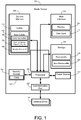
- Fig. 1 is an illustration of exemplary hardware that may be used for a media device 100.
- the media device 100 may have a processing unit 102, a memory 104, a user interface 106, a storage device 108 and a power source 127.
- the memory 104 may include volatile memory 110 (such as RAM), non-volatile memory 112 (such as ROM, flash memory, etc.) or some combination of the two or any other form of storage device.
- Applications may be stored as part of the non-volitile memory, including communication applications 130, nearby device tracking management applications 135 and nearby device user interface applications 140.
- the media device 100 may also include additional storage 108 (removable and/or non-removable) including, but not limited to, magnetic or optical disks or tape or any other memory.
- additional storage is illustrated in Figure 1 by removable storage 118 and non-removable storage 120.
- Computer storage media includes volatile and nonvolatile, removable and non-removable media implemented in any method or technology for storage of information such as computer readable instructions, data structures, program modules, digital media, or other data.
- the processing unit 102 may be any processing unit 102 capable of executing computer code to decode media data from a compressed format into a useable form fast enough such that music and video may be played continuously without skips or jumps. When in a portable media device, it may also be useful if the processor 102 is efficient in using power to increase the life of the power source.
- the processing unit 102 may also be used to execute code to support a user interface and external communications.
- the user interface 106 may include one or more displays 114 for both displaying control information and displaying viewable media.
- the display 114 may be a color LCD screen that fits inside the device 100.
- the display 114 may display items 115 ( Fig. 2a, 2b and 2c ) where the items 115 may be songs, videos, menu options, games, telephone numbers, contacts, etc.
- User input(s) 116 may include manual buttons, soft buttons, or a combination of both.
- the user input may be gesture driven which may use no buttons or may be voice activated.
- Soft buttons may be used when the display 114 includes a touch screen capability.
- Manual buttons may include re-definable keys with programmable legends.
- the media device 100 may also contain communications connection(s) 125 that allow the device 100 to communicate with external entities 124, such as network endpoints or a computer used for synchronization.
- the processor 102 also may be in communication with a security module 122. As part of the security module 122 may be a clock 123. The security module 122 assists in ensuring that communication occur only with approved external entities 124.
- Communications connection(s) 122 is an example of communication media.
- Communication media typically embodies computer readable instructions, data structures, program modules or other data in a modulated data signal such as a carrier wave or other transport mechanism and includes any information delivery media.
- modulated data signal means a signal that has one or more of its characteristics set or changed in such a manner as to encode information in the signal.
- communication media includes wired media such as a wired network or direct-wired connection, and wireless media such as acoustic, RF, infrared and other wireless media.
- the term computer readable media as used herein includes both storage media and communication media.
- the power source 127 may be a battery that may be rechargeable.
- the power source 127 may also be a standard battery or an input from a power converter or any other source of power.
- Fig. 3 illustrates a method of navigating items on a display on a computing device 100 with an user input 116 that is touch sensitive.
- the computing device 100 may be any computing device.
- the computing device 100 is a portable computing device such as a portable media player.
- the touch sensitive input device 116 may be any modern touch input device 116 such as a capacitive surface device.
- the touch sensitive input device 116 may be mounted in the computing device or may be part of an OLED device and may be the display on the portable computing device.
- the display may be any appropriate display device 114.
- the display device 114 may display menus for operating the various options on the computing device.
- the display device 114 may also display items 115 ( Fig. 2a, 2b, 2c ) that are stored on the device such as songs, photos, documents, books, videos, emails, phone numbers, email addresses, etc.
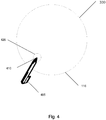
- the input device 116 may accept an input 405 at a first location 410 on the input device 116.
- the input 405 may be a touch of a finger or from a stylus or any other manner of creating an input 405 on the touch input device 116.
- a deadzone 420 may be created around the current location 410.
- the deadzone 420 is a zone surrounding the current location 410. In one embodiment, the zone is of a size such that unintentional shifting on the input device 116 is not considered leaving the deadzone 420.
- the deadzone 420 allows a user to make small input 405 moves without unintentionally activating undesired action.
- the size of the deadzone 420 is 50% of the area surrounding the current location 410. Of course, other deadzone 420 sizes are possible.
- the size of the deadzone 420 may be adjusted by the user or by applications on the device.
- a location at which the input 405 leaves the deadzone is stored in a memory 111.
- Fig. 5 may illustrate an example where a user moves a finger (as an input 405) outside the deadzone 420 and the finger left the deadzone 420 at a location 500.
- multiple surrounding locations may be possible locations 500 at which the input 405 left the deadzone 420.
- the locations 500 may be averaged to find a center or in another embodiment, the first input location 500 received outside the deadzone 420 may be used. Of course, other embodiments are possible.
- an input direction may be determined by using a direction from a previous location 410 to a current location 520.
- the current location 520 may be the first location and the previous location 410 may be the location at which the input left the deadzone 500.
- a vector may be created that connects the current location 520 and the previous location 410. This vector may be used to determine if the user desires to move up through a list of items, down through a list of items, or traverse in virtually any direction through a list of items when a variety of directions are enabled. For example, in a two dimensional list where movement is either up or down through a list, the motion across the input device 116 which primarily moves left to right but also move a bit upward (such as in Fig.
- tick lines 610 and vertical tick lines 620 may be created and the direction may be determined by comparing the location of the previous tick lined crossed to the current tick line crossed.
- the display of items on the display may be rotated by a factor of the number of tick distances in the input direction from block 330.
- the factor is one, but other factors are possible.
- a grid of tick lines 600, both horizontal 610 and vertical 620 surrounds the first input point 410.
- the tick distance 630 may be the distance between two horizontal tick lines 610 or two vertical tick lines 620.
- the grid could be on different angles and the lines 600 do not have to be perfectly vertical and horizontal.
- the lines 600 are rings around the input 405.
- the tick distance 630 may be any distance.
- the distance may be set by programmers for each application operating on the device 100.
- the distance may be modifiable by users.
- the tick distance may be related to the size of the input 405 at the first location 410. For example, if a user has enormous fingers resulting a large input 405, the tick distance may be larger than if the input 405 size is small.
- the distance between the tick lines may be set in the same manner.
- the tick distance 630 is a constant for all applications and all users such that users will develop a feel for the size of movements needed to execute a desire action on the computing device 100.
- the items 115 on the display may be rotated by a factor of the number of tick distances 630 in the input direction from block 330.
- the moving of a tick distance 630 may be indicated by a notification to the user, such as a click sound or a brief shake of the device using haptic feedback.
- a notification to the user such as a click sound or a brief shake of the device using haptic feedback.
- other feedback is possible and is contemplated.
- items 115 are displayed on the display 114 with the song "Black Dog" being the third displayed song. If a user moves two tick distances 630 down, the items may rotate down two items. In Fig. 2B , "Black Dog” now appears as the fifth song, having been moved down two spots. If a user then moves four tick distances 630 up, "Black Dog” may move up four spots to be the first listed song.
- one tick distance 630 could move two items 115 or any other variation thereof.
- the velocity may be determined in a variety of ways. As is known, velocity is determined by dividing distance by time. In one embodiment, the velocity is determined by using a location of the input 405 at sampled times and the distance the input traveled during the sampled times is used to determine the velocity. In another embodiment where tick lines are used, a plurality of times that the input crossed a plurality of tick lines is used and the distance the input traveled over the tick lines is used to determine the velocity. In another embodiment, the time the input 405 left the deadzone 420 and the location of leaving the deadzone 500 is stored.
- the items 115 on the display 114 may be displayed in a manner in which the items rotate past on the display 114 in the input direction at an initial velocity that decreases and in which the initial velocity is in relation to the velocity of the input 405 movement.
- the item 115 may be songs and the songs may rotate sequentially through the display 114 like a bicycle wheel turning with the songs being on the wheel.
- the speed of a spinning bicycle wheel relates to the velocity of the force applied to the wheel and the wheel eventually slows down. The wheel may slow faster if brakes are applied or may stop altogether if the brakes are applied very hard.
- a force applied to a bicycle wheel in the opposite direction in which it is spinning will not immediately bring the wheel up to a high velocity in the opposite direction but will slowly start the wheel spinning in the direction of the force.
- the items 115 may rotate through the display 114 at a velocity in relation to the velocity of the input 405.
- a fast input 405, i.e., a fast swipe across the input device 116, may result in a fast rotation of the item 115 list.
- a slow input 405 may result in a slow rotation of the item 115 list.
- Threshold may be set and input 405 over a threshold may result in the maximum velocity being created.
- the velocity also may relate to the number of items 115 in the list. If a number of items 115 is above an item limit, the velocity of rotating the items 115 may be greater and if the number of items 115 is below the item limit, the velocity may be lower. For example, the velocity through a 3,000 song list will be faster than rotating through a 10 song list even though a swipe input 405 of the same velocity may be applied in each case.
- subsequent inputs 405 may have a variety of outcomes.
- a subsequent input 520 may be received and a new deadzone 530 may be created around the subsequent input 520. If there is no movement out of the new deadzone 530 and the input 405 stops before a hold period of time, the velocity of the rotation of the items 115 on the display may be decreased.
- the hold period of time is a time threshold. In one embodiment, the hold period is half a second. The hold period may be user set, set by applications or set at the time of manufacture.
- the input 405 is similar to a tap on the input device 116 and the result may be similar to tapping on the brakes of the bike in that the bike may slow some, and in this case, the velocity of rotating the items may be reduce by a braking factor.
- the braking factor may be factory set, may be set by applications or may be set by users.
- the rotation of the items 115 may be slowed further.
- the rolling of the items 115 will slow similar to grabbing and holding the brakes on a bicycle.
- the display of items 115 may be rotated by a factor in the input direction for each tick length 630 passed. In addition, the rotation of the items 115 may stop after moving the tick length 630.
- the velocity of the rotation may be increased. Similar to applying more force to a spinning wheel in the same direction, the velocity of the wheel and the velocity of the list 115 rotation will increase. If the input 405 is in a direction opposite the current item rotation, the items may be rotated in the direction of the input at a velocity in relation to the velocity of the motion and the velocity at which the items 115 were moving before the input 405. Similar to applying pressure to a spinning wheel in the opposite direction, the wheel may slow, stop or spin in the opposite direction depending on the velocity of the force. The rotation of the items 115 may respond in a similar manner.
- the result may be going in the opposite direction at 3 songs per second. Also similar to a bike wheel, when the velocity of the rotating items 115 falls below a threshold, the list of items 115 will stop rotating.
- the result of the method is that long lists can be quickly scanned with simple and intuitive movement.
- input movements become intuitive to users.
- users can navigate through lists of songs, photos, games, telephone numbers - virtually any list - in an improved manner.
Landscapes
- Engineering & Computer Science (AREA)
- Theoretical Computer Science (AREA)
- General Engineering & Computer Science (AREA)
- Human Computer Interaction (AREA)
- Physics & Mathematics (AREA)
- General Physics & Mathematics (AREA)
- User Interface Of Digital Computer (AREA)
- Input From Keyboards Or The Like (AREA)
- Position Input By Displaying (AREA)
Claims (11)
- Verfahren zum Navigieren von Elementen (115) auf einer Anzeige (114) auf einer Computervorrichtung (100) mit einer berührungsempfindlichen Eingabevorrichtung (116), umfassend:- Annehmen (300) einer Eingabe (405) an einem ersten Ort (410) auf der Eingabevorrichtung (116);- Erzeugen (310) einer Totzone (420) um den ersten Ort (410);- Schaffen eines Gitters von Tick-Linien um die Eingabe (405), wobei das Gitter von Tick-Linien vertikale Tick-Linien (620) und horizontale Tick-Linien (610) umfasst;- falls (320) sich die Eingabe außerhalb der Totzone (420) bewegt, Speichern eines Koordinatenorts (500), der einen vertikalen und horizontalen Ort umfasst, bei welchem die Eingabe (405) die Totzone (420) verlässt;- Bestimmen (330) einer Eingaberichtung, indem ein Vektor erzeugt wird, der den Ort (500), bei welchem die Eingabe (405) die Totzone (420) verlassen hat, und einen gegenwärtigen Ort (520) verbindet, und Verwenden des Vektors, um die Eingaberichtung zu bestimmen, in welcher der Benutzer wünscht, die Elemente (115) zu queren;- falls (340) sich die Eingabe (405) eine Anzahl von Tick-Abständen (630) bewegt, wobei die Anzahl von Tick-Abständen (630) größer als null ist, Rotieren der Anzeige von Elementen (115) um einen Faktor der Tick-Abstände (630) in der Eingaberichtung;- falls (350) die Eingabe (450) die Eingabevorrichtung (116) verlässt, Bestimmen (360) einer Geschwindigkeit der Eingabebewegung unter Verwendung eines Orts der Eingabe (405) bei abgetasteten Zeiten und des Abstandes, den die Eingabe (405) während der abgetasteten Zeiten zurückgelegt hat, und falls (370) die Geschwindigkeit oberhalb eines Schwellenwerts liegt, Anzeigen der Elemente (115) auf der Anzeige (114), wobei die Elemente (115) auf der Anzeige (114) in der Eingaberichtung vorbei mit einer Anfangsgeschwindigkeit rotieren, die abnimmt, und wobei die Anfangsgeschwindigkeit in Beziehung zu der Geschwindigkeit der Eingabebewegung steht;- falls die Eingabe (405) auf der Eingabevorrichtung (116) bleibt, springt das Verfahren zu dem Schritt des Rotierens der Anzeige von Elementen um einen Faktor der Tick-Abstände (630) in der Eingaberichtung zurück, falls (340) sich die Eingabe eine Anzahl von Tick-Abständen (630) bewegt, wobei die Anzahl von Tick-Abständen (630) größer als null ist.
- Verfahren nach Anspruch 1, wobei, falls (360) eine Anzahl von Elementen oberhalb einer Elementgrenze liegt, die Geschwindigkeit des Rotierens der Elemente (115) größer ist, und falls die Anzahl von Elementen (115) unterhalb der Elementgrenze liegt, die Geschwindigkeit niedriger ist.
- Verfahren nach Anspruch 2, ferner umfassend ein Bestimmen (360) der Geschwindigkeit der Eingabebewegung unter Verwendung einer Mehrzahl von Malen, die die Eingabe eine Mehrzahl von Tick-Linien gequert hat, und des Abstandes, den die Eingabe (405) zurückgelegt hat.
- Verfahren nach Anspruch 1, ferner umfassend:- falls die Eingabe die Eingabevorrichtung (116) verlassen hat und die Geschwindigkeit (360) oberhalb des Schwellenwerts liegt,- Empfangen einer nachfolgenden Eingabe (520);- Erzeugen einer neuen Totzone (530) um die nachfolgende Eingabe (520);- falls es keine Bewegung aus der neuen Totzone (530) heraus gibt und die Eingabe (405) vor einem Haltezeitraum anhält;- Verringern der Geschwindigkeit (360) der Rotation der Elemente (115) auf der Anzeige (114).
- Verfahren nach Anspruch 4, ferner umfassend falls sich die nachfolgende Eingabe (520) jenseits des Haltezeitraums erstreckt, weiteres Verringern der Geschwindigkeit (360) der Rotation der Elemente (115) auf der Anzeige (114).
- Verfahren nach Anspruch 4, ferner umfassend- falls die nachfolgende Eingabe (520) vor einem Ablaufen des Haltezeitraums außerhalb der neuen Totzone (530) ist, und- falls die nachfolgende Eingabe eine Tick-Länge (630) ist,- Rotieren der Anzeige (114) von Elementen (115) um einen Faktor.
- Verfahren nach Anspruch 6, ferner umfassend- falls die nachfolgende Eingabe (520) von der Eingabevorrichtung (116) entfernt wird, und falls die nachfolgende Eingabe (520) oberhalb des Schwellenwerts liegt, und- falls die nachfolgende Eingabe (520) in einer Richtung der gegenwärtigen Menürotation ist,- Erhöhen der Geschwindigkeit (360) der Rotation, und- falls die nachfolgende Eingabe (520) in einer Richtung entgegengesetzt zu der gegenwärtigen Elementrotation ist,- Rotieren der Elemente (115) in der Richtung der nachfolgenden Eingabe (520) mit einer Geschwindigkeit in Relation zu der Geschwindigkeit der nachfolgenden Eingabe (520) und der Geschwindigkeit, mit welcher sich die Elemente (115) vor der nachfolgenden Eingabe (520) bewegt haben.
- Verfahren nach Anspruch 1, wobei, falls die Geschwindigkeit unterhalb eines Schwellenwerts fällt, die Rotation anhalten wird.
- Tragbare Medienvorrichtung (100) mit einem Prozessor (102) zum Ausführen von computerausführbaren Anweisungen, einem Speicher (104), um den Prozessor (102) zu unterstützen, computerausführbare Anweisungen auszuführen, und einer berührungsempfindlichen Eingabevorrichtung (116), wobei der Prozessor (102) dazu programmiert ist, das Verfahren nach einem der Ansprüche 1 bis 8 auszuführen.
- Tragbare Medienvorrichtung (100) nach Anspruch 9, wobei die Vorrichtung (100) eine ist, die ausgewählt ist aus einer Gruppe, die ein Mobiltelefon, einen Medienabspieler und eine Spielvorrichtung umfasst.
- Computer-Speichermedium, das computerausführbare Anweisungen zum Durchführen des Verfahrens nach einem der Ansprüche 1 bis 8 auf einer tragbaren Medienvorrichtung nach einem der Ansprüche 9 oder 10 umfasst.
Applications Claiming Priority (2)
| Application Number | Priority Date | Filing Date | Title |
|---|---|---|---|
| US11/771,646 US7750895B2 (en) | 2007-06-29 | 2007-06-29 | Navigating lists using input motions |
| PCT/US2008/067253 WO2009006017A2 (en) | 2007-06-29 | 2008-06-18 | Navigating lists using input motions |
Publications (3)
| Publication Number | Publication Date |
|---|---|
| EP2176733A2 EP2176733A2 (de) | 2010-04-21 |
| EP2176733A4 EP2176733A4 (de) | 2011-12-07 |
| EP2176733B1 true EP2176733B1 (de) | 2017-09-06 |
Family
ID=40159852
Family Applications (1)
| Application Number | Title | Priority Date | Filing Date |
|---|---|---|---|
| EP08795925.0A Not-in-force EP2176733B1 (de) | 2007-06-29 | 2008-06-18 | Navigation durch listen anhand von eingabebewegungen |
Country Status (7)
| Country | Link |
|---|---|
| US (1) | US7750895B2 (de) |
| EP (1) | EP2176733B1 (de) |
| JP (1) | JP5302304B2 (de) |
| KR (1) | KR101491870B1 (de) |
| CN (1) | CN101689082B (de) |
| TW (1) | TWI479375B (de) |
| WO (1) | WO2009006017A2 (de) |
Families Citing this family (34)
| Publication number | Priority date | Publication date | Assignee | Title |
|---|---|---|---|---|
| US8736557B2 (en) * | 2006-09-11 | 2014-05-27 | Apple Inc. | Electronic device with image based browsers |
| US8564543B2 (en) | 2006-09-11 | 2013-10-22 | Apple Inc. | Media player with imaged based browsing |
| US9001047B2 (en) | 2007-01-07 | 2015-04-07 | Apple Inc. | Modal change based on orientation of a portable multifunction device |
| US8327272B2 (en) | 2008-01-06 | 2012-12-04 | Apple Inc. | Portable multifunction device, method, and graphical user interface for viewing and managing electronic calendars |
| CA2747152C (en) | 2008-12-15 | 2016-01-12 | Textile Management Associates, Inc. | Method of recycling synthetic turf and infill product |
| US8572513B2 (en) | 2009-03-16 | 2013-10-29 | Apple Inc. | Device, method, and graphical user interface for moving a current position in content at a variable scrubbing rate |
| KR101553629B1 (ko) * | 2009-05-06 | 2015-09-17 | 삼성전자주식회사 | 인터페이스 제공 방법 |
| US8736561B2 (en) | 2010-01-06 | 2014-05-27 | Apple Inc. | Device, method, and graphical user interface with content display modes and display rotation heuristics |
| JP5418532B2 (ja) * | 2011-03-29 | 2014-02-19 | アイシン・エィ・ダブリュ株式会社 | 表示装置および表示装置の制御方法並びにプログラム |
| US9612265B1 (en) | 2011-09-23 | 2017-04-04 | Cypress Semiconductor Corporation | Methods and apparatus to detect a conductive object |
| US8903679B2 (en) | 2011-09-23 | 2014-12-02 | Cypress Semiconductor Corporation | Accuracy in a capacitive sense array |
| EP2666709A1 (de) * | 2012-05-25 | 2013-11-27 | ABB Research Ltd. | Schiff mit einem Fenster als Computerschnittstelle |
| US12287962B2 (en) | 2013-09-03 | 2025-04-29 | Apple Inc. | User interface for manipulating user interface objects |
| US10503388B2 (en) | 2013-09-03 | 2019-12-10 | Apple Inc. | Crown input for a wearable electronic device |
| EP3042271B1 (de) | 2013-09-03 | 2020-03-18 | Apple Inc. | Manipulationen von benutzerschnittstellenobjekten bei einer benutzerschnittstelle |
| US11068128B2 (en) * | 2013-09-03 | 2021-07-20 | Apple Inc. | User interface object manipulations in a user interface |
| US8872526B1 (en) | 2013-09-10 | 2014-10-28 | Cypress Semiconductor Corporation | Interleaving sense elements of a capacitive-sense array |
| US9495050B1 (en) | 2013-09-10 | 2016-11-15 | Monterey Research, Llc | Sensor pattern with signal-spreading electrodes |
| US10154569B2 (en) * | 2014-01-06 | 2018-12-11 | Cree, Inc. | Power over ethernet lighting fixture |
| EP4036685A1 (de) | 2014-06-27 | 2022-08-03 | Apple Inc. | Benutzerschnittstelle mit reduzierter grösse |
| TW201610758A (zh) | 2014-09-02 | 2016-03-16 | 蘋果公司 | 按鈕功能性 |
| WO2016036510A1 (en) | 2014-09-02 | 2016-03-10 | Apple Inc. | Music user interface |
| US10073590B2 (en) | 2014-09-02 | 2018-09-11 | Apple Inc. | Reduced size user interface |
| TWI676127B (zh) | 2014-09-02 | 2019-11-01 | 美商蘋果公司 | 關於電子郵件使用者介面之方法、系統、電子器件及電腦可讀儲存媒體 |
| US10992795B2 (en) | 2017-05-16 | 2021-04-27 | Apple Inc. | Methods and interfaces for home media control |
| US11431836B2 (en) | 2017-05-02 | 2022-08-30 | Apple Inc. | Methods and interfaces for initiating media playback |
| US10928980B2 (en) | 2017-05-12 | 2021-02-23 | Apple Inc. | User interfaces for playing and managing audio items |
| US12526361B2 (en) | 2017-05-16 | 2026-01-13 | Apple Inc. | Methods for outputting an audio output in accordance with a user being within a range of a device |
| CN111343060B (zh) | 2017-05-16 | 2022-02-11 | 苹果公司 | 用于家庭媒体控制的方法和界面 |
| US11435830B2 (en) | 2018-09-11 | 2022-09-06 | Apple Inc. | Content-based tactile outputs |
| KR102436985B1 (ko) | 2019-05-31 | 2022-08-29 | 애플 인크. | 오디오 미디어 제어를 위한 사용자 인터페이스 |
| US11010121B2 (en) | 2019-05-31 | 2021-05-18 | Apple Inc. | User interfaces for audio media control |
| US11392291B2 (en) | 2020-09-25 | 2022-07-19 | Apple Inc. | Methods and interfaces for media control with dynamic feedback |
| CN118891606A (zh) | 2022-06-16 | 2024-11-01 | 三星电子株式会社 | 电子装置及其ui提供方法 |
Citations (1)
| Publication number | Priority date | Publication date | Assignee | Title |
|---|---|---|---|---|
| US20060236262A1 (en) * | 2005-04-15 | 2006-10-19 | Microsoft Corporation | Tactile scroll bar with illuminated document position indicator |
Family Cites Families (35)
| Publication number | Priority date | Publication date | Assignee | Title |
|---|---|---|---|---|
| JP2827612B2 (ja) * | 1991-10-07 | 1998-11-25 | 富士通株式会社 | タッチパネル装置およびタッチパネル装置におけるオブジェクトの表示方法。 |
| US5889236A (en) | 1992-06-08 | 1999-03-30 | Synaptics Incorporated | Pressure sensitive scrollbar feature |
| US5612719A (en) | 1992-12-03 | 1997-03-18 | Apple Computer, Inc. | Gesture sensitive buttons for graphical user interfaces |
| US20090273574A1 (en) * | 1995-06-29 | 2009-11-05 | Pryor Timothy R | Programmable tactile touch screen displays and man-machine interfaces for improved vehicle instrumentation and telematics |
| US6131047A (en) * | 1997-12-30 | 2000-10-10 | Ericsson Inc. | Radiotelephones having contact-sensitive user interfaces and methods of operating same |
| US20060033724A1 (en) | 2004-07-30 | 2006-02-16 | Apple Computer, Inc. | Virtual input device placement on a touch screen user interface |
| US8479122B2 (en) | 2004-07-30 | 2013-07-02 | Apple Inc. | Gestures for touch sensitive input devices |
| KR100595926B1 (ko) * | 1998-01-26 | 2006-07-05 | 웨인 웨스터만 | 수동 입력 통합 방법 및 장치 |
| US6278443B1 (en) * | 1998-04-30 | 2001-08-21 | International Business Machines Corporation | Touch screen with random finger placement and rolling on screen to control the movement of information on-screen |
| US6429846B2 (en) * | 1998-06-23 | 2002-08-06 | Immersion Corporation | Haptic feedback for touchpads and other touch controls |
| JP2000259850A (ja) * | 1999-03-09 | 2000-09-22 | Sharp Corp | 描画処理装置及び描画処理方法並びに描画処理プログラムを記録した記録媒体 |
| SE514282C2 (sv) * | 1999-04-22 | 2001-02-05 | Nokia Multimedia Terminals Oy | Förfarande och anordning för rullbar krysspunktnavigering i ett användargränssnitt |
| KR200184802Y1 (ko) * | 1999-07-06 | 2000-06-01 | 주식회사지한정보통신 | 멀티 영상 종합 정보 무인 제공장치 |
| JP4018855B2 (ja) | 1999-11-22 | 2007-12-05 | Necアクセステクニカ株式会社 | タッチパネル入力座標変換装置およびタッチパネル入力座標変換方法 |
| US6791467B1 (en) * | 2000-03-23 | 2004-09-14 | Flextronics Semiconductor, Inc. | Adaptive remote controller |
| US6724370B2 (en) * | 2001-04-12 | 2004-04-20 | International Business Machines Corporation | Touchscreen user interface |
| JP2002366273A (ja) * | 2001-06-13 | 2002-12-20 | Matsushita Electric Ind Co Ltd | 選択情報表示装置、選択候補表示方法、および、選択候補表示ソフトウェア、並びに、選択候補表示ソフトウェアを記録した記録媒体 |
| US7202857B2 (en) | 2001-08-29 | 2007-04-10 | Microsoft Corporation | Manual controlled scrolling |
| US6690365B2 (en) | 2001-08-29 | 2004-02-10 | Microsoft Corporation | Automatic scrolling |
| US7312785B2 (en) * | 2001-10-22 | 2007-12-25 | Apple Inc. | Method and apparatus for accelerated scrolling |
| US6690387B2 (en) | 2001-12-28 | 2004-02-10 | Koninklijke Philips Electronics N.V. | Touch-screen image scrolling system and method |
| JP3793740B2 (ja) * | 2002-05-13 | 2006-07-05 | 株式会社モバイルコンピューティングテクノロジーズ | 携帯型情報端末装置、表示制御情報、及び表示制御方法 |
| TWI238348B (en) * | 2002-05-13 | 2005-08-21 | Kyocera Corp | Portable information terminal, display control device, display control method, and recording media |
| JP4215549B2 (ja) | 2003-04-02 | 2009-01-28 | 富士通株式会社 | タッチパネル・モードとポインティング・デバイス・モードで動作する情報処理装置 |
| US6956591B2 (en) * | 2003-04-17 | 2005-10-18 | Nokia Corporation | Smooth scrolling with highlighted navigation and marking of page changes |
| US20040259591A1 (en) | 2003-06-17 | 2004-12-23 | Motorola, Inc. | Gesture-based interface and method for wireless device |
| US7411575B2 (en) | 2003-09-16 | 2008-08-12 | Smart Technologies Ulc | Gesture recognition method and touch system incorporating the same |
| TWI262442B (en) * | 2004-06-25 | 2006-09-21 | Compal Electronics Inc | A Fn-key control system and method |
| US7728821B2 (en) | 2004-08-06 | 2010-06-01 | Touchtable, Inc. | Touch detecting interactive display |
| JP3734820B1 (ja) * | 2004-09-03 | 2006-01-11 | 任天堂株式会社 | ゲームプログラム、ゲーム装置、および入力装置 |
| TWI275950B (en) * | 2004-12-30 | 2007-03-11 | Inventec Appliances Corp | Method of processing system key instantaneously on embedded device |
| KR100791287B1 (ko) | 2005-10-26 | 2008-01-04 | 삼성전자주식회사 | 그래픽 객체의 3차원 동작을 제어하는 장치 및 방법 |
| JP2007148927A (ja) * | 2005-11-29 | 2007-06-14 | Alps Electric Co Ltd | 入力装置及びこれを用いたスクロール制御方法 |
| US7786975B2 (en) * | 2005-12-23 | 2010-08-31 | Apple Inc. | Continuous scrolling list with acceleration |
| US20080084400A1 (en) * | 2006-10-10 | 2008-04-10 | Outland Research, Llc | Touch-gesture control of video media play on handheld media players |
-
2007
- 2007-06-29 US US11/771,646 patent/US7750895B2/en not_active Expired - Fee Related
-
2008
- 2008-06-18 JP JP2010514976A patent/JP5302304B2/ja not_active Expired - Fee Related
- 2008-06-18 KR KR20097027246A patent/KR101491870B1/ko not_active Expired - Fee Related
- 2008-06-18 EP EP08795925.0A patent/EP2176733B1/de not_active Not-in-force
- 2008-06-18 WO PCT/US2008/067253 patent/WO2009006017A2/en not_active Ceased
- 2008-06-18 CN CN2008800225296A patent/CN101689082B/zh not_active Expired - Fee Related
- 2008-06-25 TW TW097123752A patent/TWI479375B/zh not_active IP Right Cessation
Patent Citations (1)
| Publication number | Priority date | Publication date | Assignee | Title |
|---|---|---|---|---|
| US20060236262A1 (en) * | 2005-04-15 | 2006-10-19 | Microsoft Corporation | Tactile scroll bar with illuminated document position indicator |
Also Published As
| Publication number | Publication date |
|---|---|
| TWI479375B (zh) | 2015-04-01 |
| KR101491870B1 (ko) | 2015-02-09 |
| US7750895B2 (en) | 2010-07-06 |
| CN101689082B (zh) | 2012-05-02 |
| EP2176733A4 (de) | 2011-12-07 |
| CN101689082A (zh) | 2010-03-31 |
| JP5302304B2 (ja) | 2013-10-02 |
| WO2009006017A3 (en) | 2009-05-14 |
| TW200915155A (en) | 2009-04-01 |
| EP2176733A2 (de) | 2010-04-21 |
| KR20100036272A (ko) | 2010-04-07 |
| WO2009006017A2 (en) | 2009-01-08 |
| US20090002396A1 (en) | 2009-01-01 |
| JP2010532529A (ja) | 2010-10-07 |
Similar Documents
| Publication | Publication Date | Title |
|---|---|---|
| EP2176733B1 (de) | Navigation durch listen anhand von eingabebewegungen | |
| US12197699B2 (en) | User interfaces for playing and managing audio items | |
| US12333124B2 (en) | Music user interface | |
| EP2458493B1 (de) | Vorrichtungen, Verfahren und grafische Benutzeroberflächen für den Zugriff über eine berührungsempfindliche Oberfläche | |
| US8972903B2 (en) | Using gesture to navigate hierarchically ordered user interface screens | |
| US8525839B2 (en) | Device, method, and graphical user interface for providing digital content products | |
| US9395905B2 (en) | Graphical scroll wheel | |
| US20100182264A1 (en) | Mobile Device Equipped With Touch Screen | |
| US20120327009A1 (en) | Devices, methods, and graphical user interfaces for accessibility using a touch-sensitive surface | |
| US20120169776A1 (en) | Method and apparatus for controlling a zoom function | |
| US20090179867A1 (en) | Method for providing user interface (ui) to display operating guide and multimedia apparatus using the same | |
| US20110283212A1 (en) | User Interface | |
| JP2017534934A (ja) | メディアコンテンツをナビゲートするためのデバイス、方法及びグラフィカルユーザインターフェース | |
| US20130227463A1 (en) | Electronic device including touch-sensitive display and method of controlling same | |
| EP2631755A1 (de) | Elektronische Vorrichtung mit berührungsempfindlicher Anzeige und Verfahren zu deren Steuerung | |
| AU2012200071B2 (en) | Devices, methods, and graphical user interfaces for accessibility using a touch-sensitive surface |
Legal Events
| Date | Code | Title | Description |
|---|---|---|---|
| PUAI | Public reference made under article 153(3) epc to a published international application that has entered the european phase |
Free format text: ORIGINAL CODE: 0009012 |
|
| 17P | Request for examination filed |
Effective date: 20100121 |
|
| AK | Designated contracting states |
Kind code of ref document: A2 Designated state(s): AT BE BG CH CY CZ DE DK EE ES FI FR GB GR HR HU IE IS IT LI LT LU LV MC MT NL NO PL PT RO SE SI SK TR |
|
| AX | Request for extension of the european patent |
Extension state: AL BA MK RS |
|
| A4 | Supplementary search report drawn up and despatched |
Effective date: 20111104 |
|
| RIC1 | Information provided on ipc code assigned before grant |
Ipc: G06F 3/041 20060101AFI20111028BHEP Ipc: G06F 3/033 20060101ALI20111028BHEP Ipc: G06F 3/048 20060101ALI20111028BHEP |
|
| DAX | Request for extension of the european patent (deleted) | ||
| 17Q | First examination report despatched |
Effective date: 20140318 |
|
| RAP1 | Party data changed (applicant data changed or rights of an application transferred) |
Owner name: MICROSOFT TECHNOLOGY LICENSING, LLC |
|
| REG | Reference to a national code |
Ref country code: DE Ref legal event code: R079 Ref document number: 602008052045 Country of ref document: DE Free format text: PREVIOUS MAIN CLASS: G06F0003041000 Ipc: G06F0003048800 |
|
| RIC1 | Information provided on ipc code assigned before grant |
Ipc: G06F 3/0485 20130101ALI20170127BHEP Ipc: G06F 3/0488 20130101AFI20170127BHEP |
|
| GRAP | Despatch of communication of intention to grant a patent |
Free format text: ORIGINAL CODE: EPIDOSNIGR1 |
|
| INTG | Intention to grant announced |
Effective date: 20170406 |
|
| GRAS | Grant fee paid |
Free format text: ORIGINAL CODE: EPIDOSNIGR3 |
|
| GRAA | (expected) grant |
Free format text: ORIGINAL CODE: 0009210 |
|
| AK | Designated contracting states |
Kind code of ref document: B1 Designated state(s): AT BE BG CH CY CZ DE DK EE ES FI FR GB GR HR HU IE IS IT LI LT LU LV MC MT NL NO PL PT RO SE SI SK TR |
|
| REG | Reference to a national code |
Ref country code: GB Ref legal event code: FG4D |
|
| REG | Reference to a national code |
Ref country code: CH Ref legal event code: EP Ref country code: AT Ref legal event code: REF Ref document number: 926547 Country of ref document: AT Kind code of ref document: T Effective date: 20170915 |
|
| REG | Reference to a national code |
Ref country code: IE Ref legal event code: FG4D |
|
| REG | Reference to a national code |
Ref country code: NL Ref legal event code: FP |
|
| REG | Reference to a national code |
Ref country code: DE Ref legal event code: R096 Ref document number: 602008052045 Country of ref document: DE |
|
| REG | Reference to a national code |
Ref country code: LT Ref legal event code: MG4D |
|
| PG25 | Lapsed in a contracting state [announced via postgrant information from national office to epo] |
Ref country code: NO Free format text: LAPSE BECAUSE OF FAILURE TO SUBMIT A TRANSLATION OF THE DESCRIPTION OR TO PAY THE FEE WITHIN THE PRESCRIBED TIME-LIMIT Effective date: 20171206 Ref country code: LT Free format text: LAPSE BECAUSE OF FAILURE TO SUBMIT A TRANSLATION OF THE DESCRIPTION OR TO PAY THE FEE WITHIN THE PRESCRIBED TIME-LIMIT Effective date: 20170906 Ref country code: FI Free format text: LAPSE BECAUSE OF FAILURE TO SUBMIT A TRANSLATION OF THE DESCRIPTION OR TO PAY THE FEE WITHIN THE PRESCRIBED TIME-LIMIT Effective date: 20170906 Ref country code: HR Free format text: LAPSE BECAUSE OF FAILURE TO SUBMIT A TRANSLATION OF THE DESCRIPTION OR TO PAY THE FEE WITHIN THE PRESCRIBED TIME-LIMIT Effective date: 20170906 Ref country code: SE Free format text: LAPSE BECAUSE OF FAILURE TO SUBMIT A TRANSLATION OF THE DESCRIPTION OR TO PAY THE FEE WITHIN THE PRESCRIBED TIME-LIMIT Effective date: 20170906 |
|
| REG | Reference to a national code |
Ref country code: AT Ref legal event code: MK05 Ref document number: 926547 Country of ref document: AT Kind code of ref document: T Effective date: 20170906 |
|
| PG25 | Lapsed in a contracting state [announced via postgrant information from national office to epo] |
Ref country code: BG Free format text: LAPSE BECAUSE OF FAILURE TO SUBMIT A TRANSLATION OF THE DESCRIPTION OR TO PAY THE FEE WITHIN THE PRESCRIBED TIME-LIMIT Effective date: 20171206 Ref country code: GR Free format text: LAPSE BECAUSE OF FAILURE TO SUBMIT A TRANSLATION OF THE DESCRIPTION OR TO PAY THE FEE WITHIN THE PRESCRIBED TIME-LIMIT Effective date: 20171207 Ref country code: LV Free format text: LAPSE BECAUSE OF FAILURE TO SUBMIT A TRANSLATION OF THE DESCRIPTION OR TO PAY THE FEE WITHIN THE PRESCRIBED TIME-LIMIT Effective date: 20170906 Ref country code: ES Free format text: LAPSE BECAUSE OF FAILURE TO SUBMIT A TRANSLATION OF THE DESCRIPTION OR TO PAY THE FEE WITHIN THE PRESCRIBED TIME-LIMIT Effective date: 20170906 |
|
| PG25 | Lapsed in a contracting state [announced via postgrant information from national office to epo] |
Ref country code: CZ Free format text: LAPSE BECAUSE OF FAILURE TO SUBMIT A TRANSLATION OF THE DESCRIPTION OR TO PAY THE FEE WITHIN THE PRESCRIBED TIME-LIMIT Effective date: 20170906 Ref country code: PL Free format text: LAPSE BECAUSE OF FAILURE TO SUBMIT A TRANSLATION OF THE DESCRIPTION OR TO PAY THE FEE WITHIN THE PRESCRIBED TIME-LIMIT Effective date: 20170906 Ref country code: RO Free format text: LAPSE BECAUSE OF FAILURE TO SUBMIT A TRANSLATION OF THE DESCRIPTION OR TO PAY THE FEE WITHIN THE PRESCRIBED TIME-LIMIT Effective date: 20170906 |
|
| PG25 | Lapsed in a contracting state [announced via postgrant information from national office to epo] |
Ref country code: SK Free format text: LAPSE BECAUSE OF FAILURE TO SUBMIT A TRANSLATION OF THE DESCRIPTION OR TO PAY THE FEE WITHIN THE PRESCRIBED TIME-LIMIT Effective date: 20170906 Ref country code: EE Free format text: LAPSE BECAUSE OF FAILURE TO SUBMIT A TRANSLATION OF THE DESCRIPTION OR TO PAY THE FEE WITHIN THE PRESCRIBED TIME-LIMIT Effective date: 20170906 Ref country code: IT Free format text: LAPSE BECAUSE OF FAILURE TO SUBMIT A TRANSLATION OF THE DESCRIPTION OR TO PAY THE FEE WITHIN THE PRESCRIBED TIME-LIMIT Effective date: 20170906 Ref country code: IS Free format text: LAPSE BECAUSE OF FAILURE TO SUBMIT A TRANSLATION OF THE DESCRIPTION OR TO PAY THE FEE WITHIN THE PRESCRIBED TIME-LIMIT Effective date: 20180106 Ref country code: AT Free format text: LAPSE BECAUSE OF FAILURE TO SUBMIT A TRANSLATION OF THE DESCRIPTION OR TO PAY THE FEE WITHIN THE PRESCRIBED TIME-LIMIT Effective date: 20170906 |
|
| REG | Reference to a national code |
Ref country code: DE Ref legal event code: R097 Ref document number: 602008052045 Country of ref document: DE |
|
| PLBE | No opposition filed within time limit |
Free format text: ORIGINAL CODE: 0009261 |
|
| STAA | Information on the status of an ep patent application or granted ep patent |
Free format text: STATUS: NO OPPOSITION FILED WITHIN TIME LIMIT |
|
| PG25 | Lapsed in a contracting state [announced via postgrant information from national office to epo] |
Ref country code: DK Free format text: LAPSE BECAUSE OF FAILURE TO SUBMIT A TRANSLATION OF THE DESCRIPTION OR TO PAY THE FEE WITHIN THE PRESCRIBED TIME-LIMIT Effective date: 20170906 |
|
| 26N | No opposition filed |
Effective date: 20180607 |
|
| PG25 | Lapsed in a contracting state [announced via postgrant information from national office to epo] |
Ref country code: SI Free format text: LAPSE BECAUSE OF FAILURE TO SUBMIT A TRANSLATION OF THE DESCRIPTION OR TO PAY THE FEE WITHIN THE PRESCRIBED TIME-LIMIT Effective date: 20170906 |
|
| REG | Reference to a national code |
Ref country code: DE Ref legal event code: R119 Ref document number: 602008052045 Country of ref document: DE |
|
| REG | Reference to a national code |
Ref country code: CH Ref legal event code: PL |
|
| REG | Reference to a national code |
Ref country code: NL Ref legal event code: MM Effective date: 20180701 |
|
| GBPC | Gb: european patent ceased through non-payment of renewal fee |
Effective date: 20180618 |
|
| REG | Reference to a national code |
Ref country code: BE Ref legal event code: MM Effective date: 20180630 |
|
| REG | Reference to a national code |
Ref country code: IE Ref legal event code: MM4A |
|
| PG25 | Lapsed in a contracting state [announced via postgrant information from national office to epo] |
Ref country code: LU Free format text: LAPSE BECAUSE OF NON-PAYMENT OF DUE FEES Effective date: 20180618 Ref country code: NL Free format text: LAPSE BECAUSE OF NON-PAYMENT OF DUE FEES Effective date: 20180701 Ref country code: MC Free format text: LAPSE BECAUSE OF FAILURE TO SUBMIT A TRANSLATION OF THE DESCRIPTION OR TO PAY THE FEE WITHIN THE PRESCRIBED TIME-LIMIT Effective date: 20170906 |
|
| PG25 | Lapsed in a contracting state [announced via postgrant information from national office to epo] |
Ref country code: GB Free format text: LAPSE BECAUSE OF NON-PAYMENT OF DUE FEES Effective date: 20180618 Ref country code: CH Free format text: LAPSE BECAUSE OF NON-PAYMENT OF DUE FEES Effective date: 20180630 Ref country code: DE Free format text: LAPSE BECAUSE OF NON-PAYMENT OF DUE FEES Effective date: 20190101 Ref country code: LI Free format text: LAPSE BECAUSE OF NON-PAYMENT OF DUE FEES Effective date: 20180630 Ref country code: IE Free format text: LAPSE BECAUSE OF NON-PAYMENT OF DUE FEES Effective date: 20180618 Ref country code: FR Free format text: LAPSE BECAUSE OF NON-PAYMENT OF DUE FEES Effective date: 20180630 |
|
| PG25 | Lapsed in a contracting state [announced via postgrant information from national office to epo] |
Ref country code: BE Free format text: LAPSE BECAUSE OF NON-PAYMENT OF DUE FEES Effective date: 20180630 |
|
| PG25 | Lapsed in a contracting state [announced via postgrant information from national office to epo] |
Ref country code: MT Free format text: LAPSE BECAUSE OF NON-PAYMENT OF DUE FEES Effective date: 20180618 |
|
| PG25 | Lapsed in a contracting state [announced via postgrant information from national office to epo] |
Ref country code: TR Free format text: LAPSE BECAUSE OF FAILURE TO SUBMIT A TRANSLATION OF THE DESCRIPTION OR TO PAY THE FEE WITHIN THE PRESCRIBED TIME-LIMIT Effective date: 20170906 |
|
| PG25 | Lapsed in a contracting state [announced via postgrant information from national office to epo] |
Ref country code: HU Free format text: LAPSE BECAUSE OF FAILURE TO SUBMIT A TRANSLATION OF THE DESCRIPTION OR TO PAY THE FEE WITHIN THE PRESCRIBED TIME-LIMIT; INVALID AB INITIO Effective date: 20080618 Ref country code: PT Free format text: LAPSE BECAUSE OF FAILURE TO SUBMIT A TRANSLATION OF THE DESCRIPTION OR TO PAY THE FEE WITHIN THE PRESCRIBED TIME-LIMIT Effective date: 20170906 |
|
| PG25 | Lapsed in a contracting state [announced via postgrant information from national office to epo] |
Ref country code: CY Free format text: LAPSE BECAUSE OF FAILURE TO SUBMIT A TRANSLATION OF THE DESCRIPTION OR TO PAY THE FEE WITHIN THE PRESCRIBED TIME-LIMIT Effective date: 20170906 |