EP2192477A1 - Tragbares Endgerät mit Berührungsbildschirm und Verfahren zur Anzeige von Etiketten in dem tragbaren Endgerät - Google Patents
Tragbares Endgerät mit Berührungsbildschirm und Verfahren zur Anzeige von Etiketten in dem tragbaren Endgerät Download PDFInfo
- Publication number
- EP2192477A1 EP2192477A1 EP09176494A EP09176494A EP2192477A1 EP 2192477 A1 EP2192477 A1 EP 2192477A1 EP 09176494 A EP09176494 A EP 09176494A EP 09176494 A EP09176494 A EP 09176494A EP 2192477 A1 EP2192477 A1 EP 2192477A1
- Authority
- EP
- European Patent Office
- Prior art keywords
- tags
- display unit
- tag
- touch
- distance
- Prior art date
- Legal status (The legal status is an assumption and is not a legal conclusion. Google has not performed a legal analysis and makes no representation as to the accuracy of the status listed.)
- Granted
Links
Images





Classifications
-
- G—PHYSICS
- G06—COMPUTING OR CALCULATING; COUNTING
- G06F—ELECTRIC DIGITAL DATA PROCESSING
- G06F3/00—Input arrangements for transferring data to be processed into a form capable of being handled by the computer; Output arrangements for transferring data from processing unit to output unit, e.g. interface arrangements
- G06F3/01—Input arrangements or combined input and output arrangements for interaction between user and computer
- G06F3/03—Arrangements for converting the position or the displacement of a member into a coded form
- G06F3/041—Digitisers, e.g. for touch screens or touch pads, characterised by the transducing means
- G06F3/0416—Control or interface arrangements specially adapted for digitisers
-
- G—PHYSICS
- G06—COMPUTING OR CALCULATING; COUNTING
- G06F—ELECTRIC DIGITAL DATA PROCESSING
- G06F1/00—Details not covered by groups G06F3/00 - G06F13/00 and G06F21/00
- G06F1/16—Constructional details or arrangements
- G06F1/1613—Constructional details or arrangements for portable computers
- G06F1/1626—Constructional details or arrangements for portable computers with a single-body enclosure integrating a flat display, e.g. Personal Digital Assistants [PDAs]
-
- G—PHYSICS
- G06—COMPUTING OR CALCULATING; COUNTING
- G06F—ELECTRIC DIGITAL DATA PROCESSING
- G06F1/00—Details not covered by groups G06F3/00 - G06F13/00 and G06F21/00
- G06F1/16—Constructional details or arrangements
- G06F1/1613—Constructional details or arrangements for portable computers
- G06F1/1633—Constructional details or arrangements of portable computers not specific to the type of enclosures covered by groups G06F1/1615 - G06F1/1626
- G06F1/1637—Details related to the display arrangement, including those related to the mounting of the display in the housing
- G06F1/1643—Details related to the display arrangement, including those related to the mounting of the display in the housing the display being associated to a digitizer, e.g. laptops that can be used as penpads
-
- G—PHYSICS
- G06—COMPUTING OR CALCULATING; COUNTING
- G06F—ELECTRIC DIGITAL DATA PROCESSING
- G06F3/00—Input arrangements for transferring data to be processed into a form capable of being handled by the computer; Output arrangements for transferring data from processing unit to output unit, e.g. interface arrangements
- G06F3/01—Input arrangements or combined input and output arrangements for interaction between user and computer
- G06F3/03—Arrangements for converting the position or the displacement of a member into a coded form
- G06F3/033—Pointing devices displaced or positioned by the user, e.g. mice, trackballs, pens or joysticks; Accessories therefor
- G06F3/0354—Pointing devices displaced or positioned by the user, e.g. mice, trackballs, pens or joysticks; Accessories therefor with detection of two-dimensional [2D] relative movements between the device, or an operating part thereof, and a plane or surface, e.g. 2D mice, trackballs, pens or pucks
-
- G—PHYSICS
- G06—COMPUTING OR CALCULATING; COUNTING
- G06F—ELECTRIC DIGITAL DATA PROCESSING
- G06F3/00—Input arrangements for transferring data to be processed into a form capable of being handled by the computer; Output arrangements for transferring data from processing unit to output unit, e.g. interface arrangements
- G06F3/01—Input arrangements or combined input and output arrangements for interaction between user and computer
- G06F3/03—Arrangements for converting the position or the displacement of a member into a coded form
- G06F3/041—Digitisers, e.g. for touch screens or touch pads, characterised by the transducing means
- G06F3/0412—Digitisers structurally integrated in a display
-
- G—PHYSICS
- G06—COMPUTING OR CALCULATING; COUNTING
- G06F—ELECTRIC DIGITAL DATA PROCESSING
- G06F3/00—Input arrangements for transferring data to be processed into a form capable of being handled by the computer; Output arrangements for transferring data from processing unit to output unit, e.g. interface arrangements
- G06F3/01—Input arrangements or combined input and output arrangements for interaction between user and computer
- G06F3/03—Arrangements for converting the position or the displacement of a member into a coded form
- G06F3/041—Digitisers, e.g. for touch screens or touch pads, characterised by the transducing means
- G06F3/0416—Control or interface arrangements specially adapted for digitisers
- G06F3/04166—Details of scanning methods, e.g. sampling time, grouping of sub areas or time sharing with display driving
-
- G—PHYSICS
- G06—COMPUTING OR CALCULATING; COUNTING
- G06F—ELECTRIC DIGITAL DATA PROCESSING
- G06F3/00—Input arrangements for transferring data to be processed into a form capable of being handled by the computer; Output arrangements for transferring data from processing unit to output unit, e.g. interface arrangements
- G06F3/01—Input arrangements or combined input and output arrangements for interaction between user and computer
- G06F3/048—Interaction techniques based on graphical user interfaces [GUI]
- G06F3/0481—Interaction techniques based on graphical user interfaces [GUI] based on specific properties of the displayed interaction object or a metaphor-based environment, e.g. interaction with desktop elements like windows or icons, or assisted by a cursor's changing behaviour or appearance
- G06F3/0482—Interaction with lists of selectable items, e.g. menus
-
- G—PHYSICS
- G06—COMPUTING OR CALCULATING; COUNTING
- G06F—ELECTRIC DIGITAL DATA PROCESSING
- G06F3/00—Input arrangements for transferring data to be processed into a form capable of being handled by the computer; Output arrangements for transferring data from processing unit to output unit, e.g. interface arrangements
- G06F3/01—Input arrangements or combined input and output arrangements for interaction between user and computer
- G06F3/048—Interaction techniques based on graphical user interfaces [GUI]
- G06F3/0484—Interaction techniques based on graphical user interfaces [GUI] for the control of specific functions or operations, e.g. selecting or manipulating an object, an image or a displayed text element, setting a parameter value or selecting a range
- G06F3/0486—Drag-and-drop
-
- G—PHYSICS
- G06—COMPUTING OR CALCULATING; COUNTING
- G06F—ELECTRIC DIGITAL DATA PROCESSING
- G06F3/00—Input arrangements for transferring data to be processed into a form capable of being handled by the computer; Output arrangements for transferring data from processing unit to output unit, e.g. interface arrangements
- G06F3/01—Input arrangements or combined input and output arrangements for interaction between user and computer
- G06F3/048—Interaction techniques based on graphical user interfaces [GUI]
- G06F3/0487—Interaction techniques based on graphical user interfaces [GUI] using specific features provided by the input device, e.g. functions controlled by the rotation of a mouse with dual sensing arrangements, or of the nature of the input device, e.g. tap gestures based on pressure sensed by a digitiser
- G06F3/0488—Interaction techniques based on graphical user interfaces [GUI] using specific features provided by the input device, e.g. functions controlled by the rotation of a mouse with dual sensing arrangements, or of the nature of the input device, e.g. tap gestures based on pressure sensed by a digitiser using a touch-screen or digitiser, e.g. input of commands through traced gestures
-
- G—PHYSICS
- G06—COMPUTING OR CALCULATING; COUNTING
- G06F—ELECTRIC DIGITAL DATA PROCESSING
- G06F3/00—Input arrangements for transferring data to be processed into a form capable of being handled by the computer; Output arrangements for transferring data from processing unit to output unit, e.g. interface arrangements
- G06F3/14—Digital output to display device ; Cooperation and interconnection of the display device with other functional units
-
- G—PHYSICS
- G06—COMPUTING OR CALCULATING; COUNTING
- G06F—ELECTRIC DIGITAL DATA PROCESSING
- G06F2203/00—Indexing scheme relating to G06F3/00 - G06F3/048
- G06F2203/048—Indexing scheme relating to G06F3/048
- G06F2203/04808—Several contacts: gestures triggering a specific function, e.g. scrolling, zooming, right-click, when the user establishes several contacts with the surface simultaneously; e.g. using several fingers or a combination of fingers and pen
Definitions
- the present invention relates to portable terminals, and more particularly, to a portable terminal with a touch screen and a method for displaying tags on the touch screen of the portable terminal using a multi-touch detected on the touch screen.
- Portable terminals such as cellular phones, personal digital assistances (PDA), MPEG-3 players, etc.
- PDA personal digital assistances
- MPEG-3 players etc.
- an input unit such as a keyboard or a mouse etc.
- the addition of keyboards and mice in the conventional portable terminals causes their size to be increased and causes a user to have difficulty carrying them.
- conventional portable terminals have been equipped with a touch screen instead of a keyboard or a mouse.
- Touch screens are configured to combine an input unit with a display unit, where the input unit receives signals generated by a user tapping action and the display unit displays functions and data as the portable terminal is operated.
- Portable terminals with a touch screen provide a user interface that a user can intuitively recognize.
- touch screens can perform a multiple tapping recognition function that is called a multi-touch. Therefore, portable terminals with a touch screen can detect a multi-touch via the touch screen and perform a corresponding function. Multi-touch means that multiple tapping points are touched on the touch screen.
- the number of functions performed in the conventional portable terminals is limited. Examples of such functions are zooming in/out and rotating with respect to an image. It is necessary to develop functions that can be performed by a multi-touch detected on a touch screen.
- the present invention provides a portable terminal with a touch screen and a method for displaying tags on the touch screen of the portable terminal using a multi-touch detected on the touch screen.
- the present invention provides a method for displaying tags on a touch screen of a portable terminal, including: calculating a distance between the first and second touch points detected on the touch screen; identifying the number of tags that will be displayed, according to the calculated distance; and displaying at least one of the identified number of tags.
- the present invention provides a portable terminal including: a touch screen including a display unit for displaying tags and at least one touch sensor for detecting touches; and a controller for calculating a distance between first and second touch points that are detected on the touch screen, identifying the number of tags that will be displayed, according to the calculated distance, and displaying at least one of the identified number of tags on the display unit.
- 'tag' refers to identification information set by data (identification data) or a menu (tag menu) of items related to the functions of the portable terminal.
- the tag menu contains items to select functions that will be performed in the portable terminal.
- the items in the menu may be icons set according to functions.
- the items may also be names indicating corresponding functions. Examples of the items are a screen item, an audio item, a content storing box item, a phone book item, a message item, etc.
- Each of the items contains a submenu composed of sub-items.
- Each of the sub-items may also contain a sub-submenu composed of sub-sub-items.
- the identification information set by data refers to detailed information regarding data stored in the portable terminal, serving to identify the stored data.
- Examples of the identification data are names, data sizes, data types, stored dates, icons, data sort items, thumbnails, etc., which are set when the data is stored in the storage unit.
- 'touch' refers to a state when a user's finger or a stylus contacts the touch screen. In other hands, the touch has a fixed coordination during the time period.
- 'drag' refers to a state when a user's finger or a stylus contacts the touch screen and then moves in a certain direction while contacting the screen within a certain period of time and then releases the contact. In other hands, the drag has a moving coordination during the time period.
- FIG. 1 is a schematic block diagram illustrating a portable terminal according to an embodiment of the present invention.
- the portable terminal 100 includes a storage unit 110, a controller 120, and a touch screen 130.
- the touch screen 130 includes a display unit 135 and a touch sensor 137.
- the storage unit 110 stores application programs required to perform the operations of the present invention and a variety of data generated when the portable terminal is operated.
- the storage unit 110 stores tag 115.
- the tag 115 refers to identification data or a tag menu of items related to the functions of the portable terminal, which are displayed on the portable terminal so as to allow a user to select corresponding functions.
- the tag menu may contain items and icons according to corresponding functions.
- the identification data may contain names according to stored data, the date when data is generated, a set icon, a group including data, a sort item for sorting data, etc.
- the sort item may contain a data type sort item for sorting data according to data types, a favorite sort item for sorting frequently used data according to preferences, a date sort item for sorting data according to dates when the data is generated, etc.
- the tags 115 can be classified as higher tags and lower tags according to the display order on the display unit 135.
- the higher tag may be a screen item, an audio item, a content storing box item, a phone book item, a message item, etc.
- the lower tag may be a submenu contained in each of the items, where the submenu contains sub-items.
- the higher tag is a message item
- the lower tag as sub-items may be message transmission, received message box, transmitting message box, text emoticon transmission, etc.
- the higher tag may be a group containing data.
- the lower tag may be names according to the data contained in the group. For example, if it is assumed that tag 115 is detailed information according to MP3 data and the MP3 data is sorted by singers, the higher tag then represents groups of singers, containing MP3 data, and the lower tag represents MP3 data contained within the groups of singers.
- the storage unit 110 can also store the order of priority by tags under the control of the controller 120.
- the order of priority by tags refers to the order in which to display the tag(s) 115 on the touch screen 130.
- the order of priority by tags is determined according to the frequency of tags selected by the user.
- the storage unit 110 stores the number of tags that can be displayed on the display unit 135 according to a distance between the first touch point and the second touch point, under the control of the controller 120.
- the storage unit 110 stores the number of tags in a table described in the following Table 1.
- the distance D and the number of tags, described in Table 1 are an embodiment, so the present invention is not limited to this illustrated embodiment. It will be appreciated that the distance D and the number of tags may be set differently according to portable terminal manufacturers or a user's settings.
- the illustrated example shown in Table 1 refers to a number of tags to be displayed with specific distances, wherein the tag size is a known value. It would be appreciated that the tag size may be varied and, thus, would also change the number of tags that may be displayed within a specific distance.
- the controller 120 controls the operation and state of the portable terminal.
- the controller 120 detects first and second touches via the touch screen 130, it displays tag(s) 115 on the display unit 135 according to the detected first and second touches.
- the controller 120 detects whether a first touch has occurred via the touch screen 130. If the touch screen 130 detects the first touch, the controller 120 identifies tags that will be displayed on the display unit 135 during the execution of the application program. After that, if the touch screen 130 detects the second touch, the controller 120 calculates a distance 117 between the first and second touch points.
- the distance between the first and second touch points can be calculated by the following method.
- the touch screen 130 detects the first and second touches, it identifies coordinates according to the detected first and second touch points and then outputs them to the controller 120.
- the controller 120 identifies the number of pixels between first and second coordinates that correspond to the first and second touch points, respectively, and then calculates a distance therebetween.
- the controller 120 identifies the number of tags according to the calculated distance and then displays the identified number of tags on the display unit 135. For example, if the distance between the first and second touch points is 280 pixels, the controller 120 refers to Table 1 stored in the storage unit 110. From Table 1, when the controller 120 ascertains that the number of tags corresponding to 280 pixels is five, it controls the display unit 135 to display five tags. The controller 120 may also identify the order of priority by tags stored in the storage unit 110 and then display five tags on the display unit 135 according to the identified order of priority. Additionally, the controller 120 may randomly select five tags from the tags stored in the storage unit 110 and then display the selected five tags on the display unit 135.
- the distance between the first and second touch points is explained based on the pixel unit, it should be understood that the present invention is not limited to this embodiment.
- the distance between the first and second touch points may be calculated using conventional units, such as inches and millimeters (mm).
- the controller 120 performs a function corresponding to the selected tag 115.
- the function may be an operation to display the lower tag contained within the selected tag 115 by re-detecting the first and second touches. For example, if the selected tag 115 is an item in a menu, the controller 120 controls the display unit 135 to display a submenu corresponding to the item, where the submenu contains sub-items.
- the function may also be an operation to display or reproduce data corresponding to the tag 115.
- the touch screen 130 is implemented with a capacitive touch screen to detect a plurality of touches.
- the touch screen 130 includes a display unit 135 and a touch sensor 137.
- the display unit 135 displays a variety of data related to the states and operations of the portable terminal.
- the display unit 135 is composed of a plurality of pixel units that display tag 115 under the control of the controller 120.
- the method for displaying tag 115 on the display unit 135 will be explained with reference to FIG. 2A and 2B to FIG. 5A and 5B .
- the touch sensor 137 is incorporated into the display unit 135 and detects input events according to touches or releases by a user's finger or a tool. If the touch sensor 137 detects a first touch, it outputs to the controller 120a coordinate corresponding to an area where the first touch has occurred. If the touch sensor 137 detects the second touch while the first touch is retained, it outputs to the controller 120a coordinate corresponding to an area where the second touch has occurred.
- the touch screen 130 can detect a plurality of touches as follows. It is assumed that the touch screen 130 is implemented with a capacitive touch screen. In that case, the capacitive touch screen 130 is configured to include a capacitance switch, such as a capacitor, for each pixel of the display unit 135, and detects changes in the capacitance.
- the capacitive touch screen 130 has coordinates allocated to its areas corresponding to pixels of the display unit 135, respectively, so as to detect a touch.
- the touch screen 130 identifies a capacitance switch that detects the change of capacitance. After that, the touch screen 130 outputs a first coordinate corresponding to the area where the identified capacitance switch is located to the controller 120. If the touch sensor 137 detects the change of capacitance according to the second touch while the first touch is retained, it identifies an area where the capacitance is changed by the second touch. After that, the touch sensor 137 outputs the second coordinate corresponding to the area where the capacitance has changed according to the second touch.
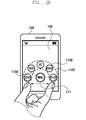
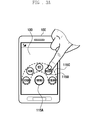
- FIGS. 2A and 2B are views illustrating a touch screen that displays tags, according to an embodiment of the present invention.
- the controller 120 when the controller 120 detects the first touch, it controls the display unit 135 to display tag 115A, referred to as "MENU," on an area when the first touch has occurred.
- the controller 120 when the controller 120 detects the second touch, it controls the display unit 135 to display tag 115a according to a distance between the first and second touch points.
- the display unit 135 displays tag 115A, as "MENU", according to the first touch.
- the display unit 135 displays five higher tags 115B, i.e., a screen item, an audio item, a note item, a message item, and a phonebook item, in an arc shape.
- the display unit 135 can adjust and display the number of tags 115 according to the distance between the first and second touch points. That is, the smaller the distance the less number of tags 115 the display unit 135 displays. In other words, the larger the distance the greater number of tags 115 the display unit 135 displays.
- the tags 115 can be displayed on the display unit 135 according to the order of priority.
- FIGS. 3A to 3C are views illustrating a touch screen that displays tags according to a distance between first and second touch points, according to an embodiment of the present invention.
- the display unit 135 displays lower tag(s) 115c, i.e., a sub-menu containing sub-items, corresponding to the selected item, in an arc shape, as shown in FIG. 3B . That is, when the particular item (e.g., message) is selected as shown in FIG. 3A , all the items of the higher tag 115B are removed and then the lower tag 115C, i.e., the submenu 115C containing sub-items, corresponding to the selected particular item (e.g., message), is displayed on the display unit 135 as shown in FIG. 3B .
- the particular item e.g., message
- the number of tags 115 displayed on the display unit 135 may be set according to the number of the user's frequently used tags 115. For example, if a message item of the higher tag 115B as shown in FIG. 3A , a submenu, as a lower tag 115C, composed of three sub-items, i.e., a received message box, a transmitting message box, and a message transmission, is displayed on the display unit 135 as shown in FIG. 3B .
- the display unit 135 may also display the lower tag 115C according to the distance between the first and second touch points.
- the display unit 135 may additionally display the tags 115 according to the increased distance. For example, as shown in FIG. 3B , in a state where three tags 115 are displayed on the display unit 135, if the touch screen 130 detects the first and second touch points, the controller 120 calculates a distance between the detected first and second touch points. If the calculated distance between the detected first and second touch points is increased, 117A, from the original distance, two more tags 115 are additionally displayed, so that five tags 115 total are displayed on the display unit 135 as shown in FIG. 3C .
- the tags 115 are displayed on the display unit 135 in an arc shape, it should be understood that the present invention is not limited to the illustrated embodiment.
- the tags 115 may also be arranged in a straight line.
- FIG. 4 is a view illustrating a screen that displays tags according to another embodiment of the present invention.
- the display unit 135 may also display only tags 115 selected by a user. That is, as shown in FIGS. 2A to 3C , the display unit 135 displays a menu, as tags 115, a message item, as the higher tag 115C, which is selected by a user, and sub-items of the message item, as the lower tag 115C. However, as shown in FIG. 4 , the display unit 135 can also display only the lower tag 115C that is contained in the particular tag.
- the display unit 135 may display items contained in the menu, as the higher tag 115B, for example, a phone book item, a message item, a note item, an audio item, and a screen item.
- the controller 120 adjusts the displayed number of tags according to the distance between the first and second touch points and then displays it on the display unit 135.
- the tags 115 are displayed according to the order of priority or how frequently the user selects tags 115.
- the tags 115 may also be randomly selected and displayed. According to the order of priority, the tags 115 may be displayed from top to bottom or vice versa.
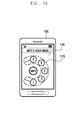
- FIGS. 5A and 5B are views illustrating a screen that re-displays tags, according to an embodiment of the present invention.
- the display unit 135 When a drag is detected in a state where tags 115 are displayed on a touch screen 130 as shown in FIG. 5A , the display unit 135 re-arranges the displayed tags 115 according to the detected drag direction and distance as shown in FIG. 5B . For example, as shown in FIG. 5A , when singers A, B, C, D, and E, as tag 115, are displayed on the display unit 135, a user performs a dragging operation with his/her finger. When the controller 120 detects the drag, it identifies the dragging direction and dragged distance.
- the controller 120 If the controller 120 ascertains that the drag direction is clockwise and the dragged distance correspond to a distance to re-arrange two tags 115, it re-arranges the tags 115 on the display unit 135 according to the identified drag direction and dragged distance. That is, according to the drag direction and dragged distance, singers A and B, as tag 115, shown in FIG. 5A , are removed from the display unit 135, and then new singers F and G, as tag 115, appears on the display unit 135, as shown in FIG. 5B . Consequently, as shown in FIG. 5B , singers C, D, E, F, and G, as tag 115, are rearranged and displayed on the display unit 135.
- tags 115 are arranged in an arc shape or in a straight line on the display unit 135, it should be understood that the present invention is not limited to the embodiment illustrated.
- the tags 115 may also be arranged in a circle or located at any area.
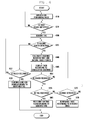
- FIG. 6 is a flow chart describing a method for displaying tags, according to an embodiment of the present invention.
- the controller 120 switches a current mode of the portable terminal to a mode to perform an application selected by a user (610).
- the application performing mode includes all modes that can be operable in the portable terminal, such as an idle mode, an MP3 data reproducing mode, an image displaying mode, etc.
- the application performing mode is an MP3 data reproducing mode where selected MP3 data is played back.
- this mode is for illustrative purposes only.
- the controller 120 determines whether the touch screen 130 detects a first touch event (620). If the controller 120 ascertains that the touch screen 130 detects the first touch event at 615, it identifies tags 115 that will be displayed on the display unit 135 (630). For example, the controller 120 identifies the order of priority for tags 115 corresponding to MP3 data that will be played back in the MP3 data reproducing mode. The order of priority for tags 115 may be the order according to the frequency how frequently the user selects MP3 data. After that, the controller 120 can display the identified tags 115 by a preset number. That is, the controller 120 displays a preset number of identified tags 115.
- the controller 120 determines whether the touch screen 130 detects a second touch event (635). If the second touch event is not detected, the controller 120 determines whether the first touch detected on the touch screen 130, is released (637). The controller 120 ascertains that the first touch is released, it performs a corresponding function of the identified tag at step 630 (639). For example, if the identified tag 115 contains lower tags, the controller 120 displays the lower tags of the identified tag on the display unit 135. If the controller 120 ascertains that the touch screen 130 detects the second touch event at 635, it calculates a distance between the first and second touch points (640). The distance between the first and second touch points can be calculated as follows. The controller 120 receives coordinates corresponding to areas on the touch screen 130 where the first and second touch points are detected. After that, the controller 120 identifies the number of pixels between the two coordinates and then calculates the distance therebetween.
- the controller 120 After calculating the distance at 640, the controller 120 displays tags 115 according to the calculated distance on the display unit 135 (645).
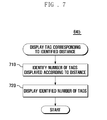
- the following detailed description regarding the method for displaying tags 115 at 645 refers to FIG. 7 .
- FIG. 7 is a flow chart describing a method for displaying tags, based on a distance between touch points, according to an embodiment of the present invention.
- the controller 120 identifies the number of tags 115 that will be displayed on the display unit 135 according to the calculated distance (710).
- the controller 120 may refer to a table stored in the storage unit 110. That is, when the controller 120 calculates the distance, it identifies the number of tags, mapped to the calculated distance, through the table stored in the storage unit 110. After that, the controller 120 displays the identified number of tags 115 on the display unit 135 (720).
- the controller 120 determines whether the first and second touches, detected on the touch screen 130, are released (650). If the controller 120 ascertains that the first and second touches are not released at 650, it returns to and proceeds with step 640. Through these processes, the controller 120 can change the number of tags 115 on the display unit 135 according to the altered distance between the first and second touch points.
- the controller 120 determines whether one of the items in the tags 115 that are displayed on the display unit 135 (655) is selected. If the controller 120 ascertains that one of the tags 115 is selected at 655, it performs a corresponding function of the selected tag (660). For example, if the selected tag 115 is MP3 data, the controller 120 plays the selected MP3 data. If the selected tag 115 is images, the controller 120 displays the selected image on the display unit 135. If the selected tag 115 contains lower tags 115c, the controller 120 displays a submenu of the selected item on the display unit 135.
- the controller 120 can adjust the number of sub-items, as lower tags, according to the distance between the first and second touch points that are detected on the touch screen 130, and then display the adjusted number of sub-items on the display unit 135. However, if the controller 120 ascertains that one of the tags 115 is not selected at 655, it determines whether a drag command is detected on the touch screen 130 (670). If the controller 120 ascertains a drag command is detected on the touch screen 130 at 670, it re-arranges the tags 115 on the display unit 135 according to the detected drag (675). More specifically, when the controller 120 detects a drag, it identifies the drag direction and dragged distance.
- the controller 120 identifies the order of priority with respect to the other tags 115 other than the tags 115 displayed on the display unit 135. After that, the controller 120 removes the tags 115 originally displayed on the display unit 135, according to the movement direction and distance of the detected drag. The controller 120 displays the tags 115 on the display unit 135 by adding new tags according to the removed number of tags.
- the portable terminal with a touch screen can adjust the number of tags displayed on the display unit using a distance between touch points, thereby providing a variety of user interfaces to the portable terminal user.
- the portable terminal user can rapidly and easily identify and select tags for which he/she wishes to search.
- the above-described methods according to the present invention can be realized in hardware or as software or computer code that can be stored in a recording medium such as a CD ROM, an RAM, a floppy disk, a hard disk, or a magneto-optical disk or downloaded over a network, so that the methods described herein can be executed by such software using a general purpose computer, or a special processor or in programmable or dedicated hardware, such as an ASIC or FPGA.
- the computer, the processor or the programmable hardware include memory components, e.g., RAM, ROM, Flash, etc. that may store or receive software or computer code that when accessed and executed by the computer, processor or hardware implement the processing methods described herein.
- the general purpose computer is transformed into a special purpose computer that may at least perform the processing shown herein.
Landscapes
- Engineering & Computer Science (AREA)
- Theoretical Computer Science (AREA)
- General Engineering & Computer Science (AREA)
- Human Computer Interaction (AREA)
- Physics & Mathematics (AREA)
- General Physics & Mathematics (AREA)
- Computer Hardware Design (AREA)
- User Interface Of Digital Computer (AREA)
Applications Claiming Priority (1)
| Application Number | Priority Date | Filing Date | Title |
|---|---|---|---|
| KR1020080115531A KR101568129B1 (ko) | 2008-11-20 | 2008-11-20 | 터치 스크린을 구비한 휴대 단말기 및 그 휴대 단말기에서 태그 정보 표시 방법 |
Publications (2)
| Publication Number | Publication Date |
|---|---|
| EP2192477A1 true EP2192477A1 (de) | 2010-06-02 |
| EP2192477B1 EP2192477B1 (de) | 2018-01-24 |
Family
ID=41426347
Family Applications (1)
| Application Number | Title | Priority Date | Filing Date |
|---|---|---|---|
| EP09176494.4A Not-in-force EP2192477B1 (de) | 2008-11-20 | 2009-11-19 | Tragbares Endgerät mit Berührungsbildschirm und Verfahren zur Anzeige von Icons in dem tragbaren Endgerät |
Country Status (4)
| Country | Link |
|---|---|
| US (1) | US8369898B2 (de) |
| EP (1) | EP2192477B1 (de) |
| KR (1) | KR101568129B1 (de) |
| CN (1) | CN101739207B (de) |
Cited By (1)
| Publication number | Priority date | Publication date | Assignee | Title |
|---|---|---|---|---|
| EP3356922A4 (de) * | 2015-09-30 | 2018-08-22 | Samsung Electronics Co., Ltd. | Verfahren zur darstellung eines transienten grafischen objekts und vorrichtung |
Families Citing this family (35)
| Publication number | Priority date | Publication date | Assignee | Title |
|---|---|---|---|---|
| KR101590043B1 (ko) * | 2009-05-18 | 2016-02-01 | 삼성전자주식회사 | 인체 통신을 이용한 기능 수행 방법 및 그를 수행하는 단말기 |
| US8756529B2 (en) | 2010-09-13 | 2014-06-17 | Kay Dirk Ullmann | Method and program for menu tree visualization and navigation |
| CN102445961A (zh) * | 2010-10-15 | 2012-05-09 | 鸿富锦精密工业(深圳)有限公司 | 计算机装置 |
| US20120110508A1 (en) * | 2010-10-29 | 2012-05-03 | Microsoft Corporation | Enterprise resource planning oriented context-aware user interface |
| US10026058B2 (en) | 2010-10-29 | 2018-07-17 | Microsoft Technology Licensing, Llc | Enterprise resource planning oriented context-aware environment |
| US8986118B2 (en) * | 2010-11-02 | 2015-03-24 | Novomatic Ag | Method and system for secretly revealing items on a multi-touch interface |
| CN102479028A (zh) * | 2010-11-24 | 2012-05-30 | 上海三旗通信科技股份有限公司 | 一种智能待机功能的方法 |
| US9223471B2 (en) * | 2010-12-28 | 2015-12-29 | Microsoft Technology Licensing, Llc | Touch screen control |
| JP5849502B2 (ja) * | 2011-08-01 | 2016-01-27 | ソニー株式会社 | 情報処理装置、情報処理方法およびプログラム |
| JP6048408B2 (ja) * | 2011-09-15 | 2016-12-21 | 日本電気株式会社 | 電子付箋の書込情報処理装置及び方法 |
| KR101879333B1 (ko) | 2011-12-06 | 2018-07-17 | 엘지전자 주식회사 | 이동 단말기 및 그의 아이콘 배열방법 |
| CN103246457B (zh) * | 2012-02-09 | 2016-05-04 | 宇龙计算机通信科技(深圳)有限公司 | 终端和应用程序的启动方法 |
| EP2631760A1 (de) | 2012-02-24 | 2013-08-28 | Research In Motion Limited | Verfahren und Vorrichtung zur Bereitstellung einer Benutzerschnittstelle auf einer Vorrichtung zur Ermöglichung der Auswahl von durchzuführenden Vorgängen im Zusammenhang mit Inhalt |
| US9223483B2 (en) | 2012-02-24 | 2015-12-29 | Blackberry Limited | Method and apparatus for providing a user interface on a device that indicates content operators |
| JP5978660B2 (ja) * | 2012-03-06 | 2016-08-24 | ソニー株式会社 | 情報処理装置及び情報処理方法 |
| CN103455261A (zh) * | 2012-05-30 | 2013-12-18 | 腾讯科技(深圳)有限公司 | 调用选项卡标签进行显示的方法及移动设备 |
| CN105678474B (zh) * | 2012-05-31 | 2020-09-08 | 国网山东省电力公司青岛供电公司 | 具有显示功能的移动作业终端系统 |
| US20130346892A1 (en) * | 2012-06-25 | 2013-12-26 | Google Inc. | Graphical user interface element expansion and contraction using a rotating gesture |
| KR102042177B1 (ko) * | 2013-01-09 | 2019-11-07 | 주식회사 카카오 | 단말 및 단말의 사용자 인터페이스 제공 방법 |
| CN103973859A (zh) * | 2013-01-29 | 2014-08-06 | 腾讯科技(深圳)有限公司 | 一种拨号方法、装置及移动终端 |
| KR101459447B1 (ko) * | 2013-03-27 | 2014-11-07 | 현대자동차 주식회사 | 터치스크린을 이용한 항목 선택 방법 및 시스템 |
| CN103226446B (zh) * | 2013-05-16 | 2016-08-03 | 上海欧拉网络技术有限公司 | 用于移动设备的用户界面的事件响应方法及移动设备 |
| CN103279266B (zh) * | 2013-05-16 | 2016-03-30 | 上海欧拉网络技术有限公司 | 用于移动设备的用户界面实现方法以及移动设备 |
| KR102192155B1 (ko) | 2013-11-12 | 2020-12-16 | 삼성전자주식회사 | 어플리케이션 정보를 제공하는 방법 및 장치 |
| US20150153932A1 (en) * | 2013-12-04 | 2015-06-04 | Samsung Electronics Co., Ltd. | Mobile device and method of displaying icon thereof |
| USD746859S1 (en) * | 2014-01-30 | 2016-01-05 | Aol Inc. | Display screen with an animated graphical user interface |
| US20150233721A1 (en) * | 2014-02-17 | 2015-08-20 | Fujitsu Ten Limited | Communication system |
| CN104731452B (zh) * | 2015-03-18 | 2018-07-06 | 联想(北京)有限公司 | 一种显示控制方法及电子设备 |
| CN104978589A (zh) * | 2015-06-18 | 2015-10-14 | 芜湖扬宇机电技术开发有限公司 | 零件监测系统 |
| USD802619S1 (en) * | 2015-08-12 | 2017-11-14 | Samsung Electronics Co., Ltd. | Display screen or portion thereof with animated graphical user interface |
| USD802620S1 (en) * | 2015-08-12 | 2017-11-14 | Samsung Electronics Co., Ltd. | Display screen or portion thereof with animiated graphical user interface |
| US10216405B2 (en) * | 2015-10-24 | 2019-02-26 | Microsoft Technology Licensing, Llc | Presenting control interface based on multi-input command |
| CN105892841A (zh) * | 2015-11-20 | 2016-08-24 | 乐视移动智能信息技术(北京)有限公司 | 应用搜索呼出方法、装置及系统 |
| USD910646S1 (en) * | 2018-03-30 | 2021-02-16 | Lightspeed Technologies, Inc. | Display screen or portion thereof with a graphical user interface |
| CN112732961B (zh) * | 2021-01-05 | 2025-06-24 | 维沃移动通信有限公司 | 图像分类方法及装置 |
Citations (8)
| Publication number | Priority date | Publication date | Assignee | Title |
|---|---|---|---|---|
| US5640580A (en) * | 1992-12-07 | 1997-06-17 | Microsoft Corporation | Method and system for previewing computer output |
| EP0971285A2 (de) * | 1998-06-30 | 2000-01-12 | Sun Microsystems, Inc. | Verfahren und Vorrichtung zur Lieferung einer Rückführung während einer Bildverschiebung |
| US20030071858A1 (en) | 2001-09-28 | 2003-04-17 | Hiroshi Morohoshi | Information input and output system, method, storage medium, and carrier wave |
| EP1517228A2 (de) | 2003-09-16 | 2005-03-23 | Smart Technologies, Inc. | Verfahren zur Erkennung von Gesten und dieses Verfahren enthaltendes Berührungssystem |
| US20070247435A1 (en) | 2006-04-19 | 2007-10-25 | Microsoft Corporation | Precise selection techniques for multi-touch screens |
| US20070252821A1 (en) | 2004-06-17 | 2007-11-01 | Koninklijke Philips Electronics, N.V. | Use of a Two Finger Input on Touch Screens |
| EP1983416A1 (de) | 2007-04-20 | 2008-10-22 | LG Electronics Inc. | Verarbeitung von Daten über ein mobiles Kommunikationsendgerät |
| US20080270886A1 (en) | 2007-04-30 | 2008-10-30 | Google Inc. | Hiding Portions of Display Content |
Family Cites Families (9)
| Publication number | Priority date | Publication date | Assignee | Title |
|---|---|---|---|---|
| US8479122B2 (en) * | 2004-07-30 | 2013-07-02 | Apple Inc. | Gestures for touch sensitive input devices |
| JP2007025786A (ja) * | 2005-07-12 | 2007-02-01 | Ricoh Co Ltd | コンテンツ検索装置、コンテンツ検索プログラムおよびコンテンツ検索方法 |
| US20090213086A1 (en) * | 2006-04-19 | 2009-08-27 | Ji Suk Chae | Touch screen device and operating method thereof |
| JP4768537B2 (ja) * | 2006-07-18 | 2011-09-07 | 株式会社リコー | コンテンツ閲覧システムおよびプログラム |
| KR100892966B1 (ko) * | 2007-01-20 | 2009-04-10 | 엘지전자 주식회사 | 터치 스크린을 구비한 전자 기기 및 이를 이용한 정보 표시방법 |
| KR100848272B1 (ko) * | 2007-02-13 | 2008-07-25 | 삼성전자주식회사 | 터치 스크린을 갖는 휴대 단말기의 아이콘 표시 방법 |
| ES2606396T3 (es) * | 2007-03-30 | 2017-03-23 | Microsoft Technology Licensing, Llc | Método para controlar un dispositivo de comunicación móvil equipado con pantalla táctil, dispositivo de comunicación y método de ejecución de funciones del mismo |
| US7884805B2 (en) | 2007-04-17 | 2011-02-08 | Sony Ericsson Mobile Communications Ab | Using touches to transfer information between devices |
| KR101019039B1 (ko) * | 2008-05-22 | 2011-03-04 | 삼성전자주식회사 | 터치 스크린을 구비한 단말기 및 데이터 검색 방법. |
-
2008
- 2008-11-20 KR KR1020080115531A patent/KR101568129B1/ko not_active Expired - Fee Related
-
2009
- 2009-11-19 EP EP09176494.4A patent/EP2192477B1/de not_active Not-in-force
- 2009-11-20 US US12/622,486 patent/US8369898B2/en not_active Expired - Fee Related
- 2009-11-20 CN CN2009102247991A patent/CN101739207B/zh not_active Expired - Fee Related
Patent Citations (8)
| Publication number | Priority date | Publication date | Assignee | Title |
|---|---|---|---|---|
| US5640580A (en) * | 1992-12-07 | 1997-06-17 | Microsoft Corporation | Method and system for previewing computer output |
| EP0971285A2 (de) * | 1998-06-30 | 2000-01-12 | Sun Microsystems, Inc. | Verfahren und Vorrichtung zur Lieferung einer Rückführung während einer Bildverschiebung |
| US20030071858A1 (en) | 2001-09-28 | 2003-04-17 | Hiroshi Morohoshi | Information input and output system, method, storage medium, and carrier wave |
| EP1517228A2 (de) | 2003-09-16 | 2005-03-23 | Smart Technologies, Inc. | Verfahren zur Erkennung von Gesten und dieses Verfahren enthaltendes Berührungssystem |
| US20070252821A1 (en) | 2004-06-17 | 2007-11-01 | Koninklijke Philips Electronics, N.V. | Use of a Two Finger Input on Touch Screens |
| US20070247435A1 (en) | 2006-04-19 | 2007-10-25 | Microsoft Corporation | Precise selection techniques for multi-touch screens |
| EP1983416A1 (de) | 2007-04-20 | 2008-10-22 | LG Electronics Inc. | Verarbeitung von Daten über ein mobiles Kommunikationsendgerät |
| US20080270886A1 (en) | 2007-04-30 | 2008-10-30 | Google Inc. | Hiding Portions of Display Content |
Cited By (2)
| Publication number | Priority date | Publication date | Assignee | Title |
|---|---|---|---|---|
| EP3356922A4 (de) * | 2015-09-30 | 2018-08-22 | Samsung Electronics Co., Ltd. | Verfahren zur darstellung eines transienten grafischen objekts und vorrichtung |
| US10503361B2 (en) | 2015-09-30 | 2019-12-10 | Samsung Electronics Company, Ltd. | Interactive graphical object |
Also Published As
| Publication number | Publication date |
|---|---|
| CN101739207A (zh) | 2010-06-16 |
| EP2192477B1 (de) | 2018-01-24 |
| CN101739207B (zh) | 2013-11-13 |
| KR101568129B1 (ko) | 2015-11-11 |
| US20100124946A1 (en) | 2010-05-20 |
| US8369898B2 (en) | 2013-02-05 |
| KR20100056639A (ko) | 2010-05-28 |
Similar Documents
| Publication | Publication Date | Title |
|---|---|---|
| US8369898B2 (en) | Portable terminal with touch screen and method for displaying tags in the portable terminal | |
| EP2608006B1 (de) | Kategoriesuchverfahren und daran angepasste mobile Vorrichtung | |
| US11216158B2 (en) | Method and apparatus for multitasking | |
| US10216342B2 (en) | Information processing apparatus, information processing method, and program | |
| EP3021204B1 (de) | Informationsverarbeitungsvorrichtung, informationsverarbeitungsverfahren und computerprogramm | |
| US10162482B2 (en) | Information display method and apparatus of mobile terminal | |
| US9626071B2 (en) | Method and apparatus for moving items using touchscreen | |
| US7728812B2 (en) | Portable electronic device, display method, program, and graphical user interface thereof | |
| JP5639158B2 (ja) | コンテンツ・コラムの編成 | |
| KR101224588B1 (ko) | 멀티포인트 스트록을 감지하기 위한 ui 제공방법 및 이를적용한 멀티미디어 기기 | |
| EP2184673A1 (de) | Informationsverarbeitungsvorrichtung, Informationsverarbeitungsverfahren und Programm | |
| US20110216095A1 (en) | Methods, Devices, and Computer Program Products Providing Multi-Touch Drag and Drop Operations for Touch-Sensitive User Interfaces | |
| US20110202835A1 (en) | Item selection method for touch screen devices | |
| US20100105443A1 (en) | Methods and apparatuses for facilitating interaction with touch screen apparatuses | |
| EP3021203A1 (de) | Informationsverarbeitungsvorrichtung, informationsverarbeitungsverfahren und computerprogramm | |
| US20140055398A1 (en) | Touch sensitive device and method of touch-based manipulation for contents | |
| WO2011027611A1 (ja) | 操作制御装置、操作制御方法およびコンピュータプログラム | |
| KR20070006477A (ko) | 가변적 메뉴 배열 방법 및 이를 이용한 디스플레이 장치 | |
| US20120060117A1 (en) | User interface providing method and apparatus | |
| GB2485567A (en) | Playlist creation using a graph of interconnected nodes | |
| US20170083212A1 (en) | Application program preview interface and operation method thereof | |
| CN113268182A (zh) | 应用图标的管理方法和电子设备 |
Legal Events
| Date | Code | Title | Description |
|---|---|---|---|
| PUAI | Public reference made under article 153(3) epc to a published international application that has entered the european phase |
Free format text: ORIGINAL CODE: 0009012 |
|
| AK | Designated contracting states |
Kind code of ref document: A1 Designated state(s): AT BE BG CH CY CZ DE DK EE ES FI FR GB GR HR HU IE IS IT LI LT LU LV MC MK MT NL NO PL PT RO SE SI SK SM TR |
|
| 17P | Request for examination filed |
Effective date: 20101202 |
|
| 17Q | First examination report despatched |
Effective date: 20101229 |
|
| RAP1 | Party data changed (applicant data changed or rights of an application transferred) |
Owner name: SAMSUNG ELECTRONICS CO., LTD. |
|
| GRAP | Despatch of communication of intention to grant a patent |
Free format text: ORIGINAL CODE: EPIDOSNIGR1 |
|
| RIC1 | Information provided on ipc code assigned before grant |
Ipc: G06F 3/048 20130101AFI20170721BHEP Ipc: G06F 3/0488 20130101ALI20170721BHEP |
|
| INTG | Intention to grant announced |
Effective date: 20170816 |
|
| GRAS | Grant fee paid |
Free format text: ORIGINAL CODE: EPIDOSNIGR3 |
|
| GRAA | (expected) grant |
Free format text: ORIGINAL CODE: 0009210 |
|
| AK | Designated contracting states |
Kind code of ref document: B1 Designated state(s): AT BE BG CH CY CZ DE DK EE ES FI FR GB GR HR HU IE IS IT LI LT LU LV MC MK MT NL NO PL PT RO SE SI SK SM TR |
|
| REG | Reference to a national code |
Ref country code: GB Ref legal event code: FG4D |
|
| REG | Reference to a national code |
Ref country code: CH Ref legal event code: EP |
|
| REG | Reference to a national code |
Ref country code: AT Ref legal event code: REF Ref document number: 966128 Country of ref document: AT Kind code of ref document: T Effective date: 20180215 |
|
| REG | Reference to a national code |
Ref country code: IE Ref legal event code: FG4D |
|
| REG | Reference to a national code |
Ref country code: DE Ref legal event code: R096 Ref document number: 602009050517 Country of ref document: DE |
|
| REG | Reference to a national code |
Ref country code: NL Ref legal event code: FP |
|
| REG | Reference to a national code |
Ref country code: LT Ref legal event code: MG4D |
|
| REG | Reference to a national code |
Ref country code: AT Ref legal event code: MK05 Ref document number: 966128 Country of ref document: AT Kind code of ref document: T Effective date: 20180124 |
|
| PG25 | Lapsed in a contracting state [announced via postgrant information from national office to epo] |
Ref country code: FI Free format text: LAPSE BECAUSE OF FAILURE TO SUBMIT A TRANSLATION OF THE DESCRIPTION OR TO PAY THE FEE WITHIN THE PRESCRIBED TIME-LIMIT Effective date: 20180124 Ref country code: NO Free format text: LAPSE BECAUSE OF FAILURE TO SUBMIT A TRANSLATION OF THE DESCRIPTION OR TO PAY THE FEE WITHIN THE PRESCRIBED TIME-LIMIT Effective date: 20180424 Ref country code: HR Free format text: LAPSE BECAUSE OF FAILURE TO SUBMIT A TRANSLATION OF THE DESCRIPTION OR TO PAY THE FEE WITHIN THE PRESCRIBED TIME-LIMIT Effective date: 20180124 Ref country code: LT Free format text: LAPSE BECAUSE OF FAILURE TO SUBMIT A TRANSLATION OF THE DESCRIPTION OR TO PAY THE FEE WITHIN THE PRESCRIBED TIME-LIMIT Effective date: 20180124 Ref country code: ES Free format text: LAPSE BECAUSE OF FAILURE TO SUBMIT A TRANSLATION OF THE DESCRIPTION OR TO PAY THE FEE WITHIN THE PRESCRIBED TIME-LIMIT Effective date: 20180124 Ref country code: CY Free format text: LAPSE BECAUSE OF FAILURE TO SUBMIT A TRANSLATION OF THE DESCRIPTION OR TO PAY THE FEE WITHIN THE PRESCRIBED TIME-LIMIT Effective date: 20180124 |
|
| PG25 | Lapsed in a contracting state [announced via postgrant information from national office to epo] |
Ref country code: BG Free format text: LAPSE BECAUSE OF FAILURE TO SUBMIT A TRANSLATION OF THE DESCRIPTION OR TO PAY THE FEE WITHIN THE PRESCRIBED TIME-LIMIT Effective date: 20180424 Ref country code: PL Free format text: LAPSE BECAUSE OF FAILURE TO SUBMIT A TRANSLATION OF THE DESCRIPTION OR TO PAY THE FEE WITHIN THE PRESCRIBED TIME-LIMIT Effective date: 20180124 Ref country code: IS Free format text: LAPSE BECAUSE OF FAILURE TO SUBMIT A TRANSLATION OF THE DESCRIPTION OR TO PAY THE FEE WITHIN THE PRESCRIBED TIME-LIMIT Effective date: 20180524 Ref country code: GR Free format text: LAPSE BECAUSE OF FAILURE TO SUBMIT A TRANSLATION OF THE DESCRIPTION OR TO PAY THE FEE WITHIN THE PRESCRIBED TIME-LIMIT Effective date: 20180425 Ref country code: LV Free format text: LAPSE BECAUSE OF FAILURE TO SUBMIT A TRANSLATION OF THE DESCRIPTION OR TO PAY THE FEE WITHIN THE PRESCRIBED TIME-LIMIT Effective date: 20180124 Ref country code: SE Free format text: LAPSE BECAUSE OF FAILURE TO SUBMIT A TRANSLATION OF THE DESCRIPTION OR TO PAY THE FEE WITHIN THE PRESCRIBED TIME-LIMIT Effective date: 20180124 Ref country code: AT Free format text: LAPSE BECAUSE OF FAILURE TO SUBMIT A TRANSLATION OF THE DESCRIPTION OR TO PAY THE FEE WITHIN THE PRESCRIBED TIME-LIMIT Effective date: 20180124 |
|
| REG | Reference to a national code |
Ref country code: DE Ref legal event code: R097 Ref document number: 602009050517 Country of ref document: DE |
|
| PG25 | Lapsed in a contracting state [announced via postgrant information from national office to epo] |
Ref country code: EE Free format text: LAPSE BECAUSE OF FAILURE TO SUBMIT A TRANSLATION OF THE DESCRIPTION OR TO PAY THE FEE WITHIN THE PRESCRIBED TIME-LIMIT Effective date: 20180124 Ref country code: IT Free format text: LAPSE BECAUSE OF FAILURE TO SUBMIT A TRANSLATION OF THE DESCRIPTION OR TO PAY THE FEE WITHIN THE PRESCRIBED TIME-LIMIT Effective date: 20180124 Ref country code: RO Free format text: LAPSE BECAUSE OF FAILURE TO SUBMIT A TRANSLATION OF THE DESCRIPTION OR TO PAY THE FEE WITHIN THE PRESCRIBED TIME-LIMIT Effective date: 20180124 |
|
| PG25 | Lapsed in a contracting state [announced via postgrant information from national office to epo] |
Ref country code: CZ Free format text: LAPSE BECAUSE OF FAILURE TO SUBMIT A TRANSLATION OF THE DESCRIPTION OR TO PAY THE FEE WITHIN THE PRESCRIBED TIME-LIMIT Effective date: 20180124 Ref country code: SM Free format text: LAPSE BECAUSE OF FAILURE TO SUBMIT A TRANSLATION OF THE DESCRIPTION OR TO PAY THE FEE WITHIN THE PRESCRIBED TIME-LIMIT Effective date: 20180124 Ref country code: SK Free format text: LAPSE BECAUSE OF FAILURE TO SUBMIT A TRANSLATION OF THE DESCRIPTION OR TO PAY THE FEE WITHIN THE PRESCRIBED TIME-LIMIT Effective date: 20180124 Ref country code: DK Free format text: LAPSE BECAUSE OF FAILURE TO SUBMIT A TRANSLATION OF THE DESCRIPTION OR TO PAY THE FEE WITHIN THE PRESCRIBED TIME-LIMIT Effective date: 20180124 |
|
| PLBE | No opposition filed within time limit |
Free format text: ORIGINAL CODE: 0009261 |
|
| STAA | Information on the status of an ep patent application or granted ep patent |
Free format text: STATUS: NO OPPOSITION FILED WITHIN TIME LIMIT |
|
| 26N | No opposition filed |
Effective date: 20181025 |
|
| PG25 | Lapsed in a contracting state [announced via postgrant information from national office to epo] |
Ref country code: SI Free format text: LAPSE BECAUSE OF FAILURE TO SUBMIT A TRANSLATION OF THE DESCRIPTION OR TO PAY THE FEE WITHIN THE PRESCRIBED TIME-LIMIT Effective date: 20180124 |
|
| REG | Reference to a national code |
Ref country code: CH Ref legal event code: PL |
|
| PG25 | Lapsed in a contracting state [announced via postgrant information from national office to epo] |
Ref country code: LU Free format text: LAPSE BECAUSE OF NON-PAYMENT OF DUE FEES Effective date: 20181119 Ref country code: MC Free format text: LAPSE BECAUSE OF FAILURE TO SUBMIT A TRANSLATION OF THE DESCRIPTION OR TO PAY THE FEE WITHIN THE PRESCRIBED TIME-LIMIT Effective date: 20180124 |
|
| REG | Reference to a national code |
Ref country code: BE Ref legal event code: MM Effective date: 20181130 |
|
| REG | Reference to a national code |
Ref country code: IE Ref legal event code: MM4A |
|
| PG25 | Lapsed in a contracting state [announced via postgrant information from national office to epo] |
Ref country code: CH Free format text: LAPSE BECAUSE OF NON-PAYMENT OF DUE FEES Effective date: 20181130 Ref country code: LI Free format text: LAPSE BECAUSE OF NON-PAYMENT OF DUE FEES Effective date: 20181130 |
|
| PG25 | Lapsed in a contracting state [announced via postgrant information from national office to epo] |
Ref country code: FR Free format text: LAPSE BECAUSE OF NON-PAYMENT OF DUE FEES Effective date: 20181130 Ref country code: IE Free format text: LAPSE BECAUSE OF NON-PAYMENT OF DUE FEES Effective date: 20181119 |
|
| PG25 | Lapsed in a contracting state [announced via postgrant information from national office to epo] |
Ref country code: BE Free format text: LAPSE BECAUSE OF NON-PAYMENT OF DUE FEES Effective date: 20181130 |
|
| PG25 | Lapsed in a contracting state [announced via postgrant information from national office to epo] |
Ref country code: MT Free format text: LAPSE BECAUSE OF NON-PAYMENT OF DUE FEES Effective date: 20181119 |
|
| PGFP | Annual fee paid to national office [announced via postgrant information from national office to epo] |
Ref country code: NL Payment date: 20191022 Year of fee payment: 11 Ref country code: DE Payment date: 20191021 Year of fee payment: 11 |
|
| PG25 | Lapsed in a contracting state [announced via postgrant information from national office to epo] |
Ref country code: TR Free format text: LAPSE BECAUSE OF FAILURE TO SUBMIT A TRANSLATION OF THE DESCRIPTION OR TO PAY THE FEE WITHIN THE PRESCRIBED TIME-LIMIT Effective date: 20180124 |
|
| PGFP | Annual fee paid to national office [announced via postgrant information from national office to epo] |
Ref country code: GB Payment date: 20191023 Year of fee payment: 11 |
|
| PG25 | Lapsed in a contracting state [announced via postgrant information from national office to epo] |
Ref country code: PT Free format text: LAPSE BECAUSE OF FAILURE TO SUBMIT A TRANSLATION OF THE DESCRIPTION OR TO PAY THE FEE WITHIN THE PRESCRIBED TIME-LIMIT Effective date: 20180124 |
|
| PG25 | Lapsed in a contracting state [announced via postgrant information from national office to epo] |
Ref country code: HU Free format text: LAPSE BECAUSE OF FAILURE TO SUBMIT A TRANSLATION OF THE DESCRIPTION OR TO PAY THE FEE WITHIN THE PRESCRIBED TIME-LIMIT; INVALID AB INITIO Effective date: 20091119 Ref country code: MK Free format text: LAPSE BECAUSE OF NON-PAYMENT OF DUE FEES Effective date: 20180124 |
|
| REG | Reference to a national code |
Ref country code: DE Ref legal event code: R119 Ref document number: 602009050517 Country of ref document: DE |
|
| REG | Reference to a national code |
Ref country code: NL Ref legal event code: MM Effective date: 20201201 |
|
| GBPC | Gb: european patent ceased through non-payment of renewal fee |
Effective date: 20201119 |
|
| PG25 | Lapsed in a contracting state [announced via postgrant information from national office to epo] |
Ref country code: NL Free format text: LAPSE BECAUSE OF NON-PAYMENT OF DUE FEES Effective date: 20201201 |
|
| PG25 | Lapsed in a contracting state [announced via postgrant information from national office to epo] |
Ref country code: DE Free format text: LAPSE BECAUSE OF NON-PAYMENT OF DUE FEES Effective date: 20210601 Ref country code: GB Free format text: LAPSE BECAUSE OF NON-PAYMENT OF DUE FEES Effective date: 20201119 |