EP2228731A1 - Rechner mit einem Touchpanel zur Eingabe von handgeschriebenen numerischen Ausdrücken und computerlesbares Medium - Google Patents
Rechner mit einem Touchpanel zur Eingabe von handgeschriebenen numerischen Ausdrücken und computerlesbares Medium Download PDFInfo
- Publication number
- EP2228731A1 EP2228731A1 EP10154455A EP10154455A EP2228731A1 EP 2228731 A1 EP2228731 A1 EP 2228731A1 EP 10154455 A EP10154455 A EP 10154455A EP 10154455 A EP10154455 A EP 10154455A EP 2228731 A1 EP2228731 A1 EP 2228731A1
- Authority
- EP
- European Patent Office
- Prior art keywords
- numerical expression
- handwritten
- text
- input
- recognized
- Prior art date
- Legal status (The legal status is an assumption and is not a legal conclusion. Google has not performed a legal analysis and makes no representation as to the accuracy of the status listed.)
- Granted
Links
Images




Classifications
-
- G—PHYSICS
- G06—COMPUTING OR CALCULATING; COUNTING
- G06F—ELECTRIC DIGITAL DATA PROCESSING
- G06F15/00—Digital computers in general; Data processing equipment in general
- G06F15/02—Digital computers in general; Data processing equipment in general manually operated with input through keyboard and computation using a built-in program, e.g. pocket calculators
- G06F15/025—Digital computers in general; Data processing equipment in general manually operated with input through keyboard and computation using a built-in program, e.g. pocket calculators adapted to a specific application
-
- G—PHYSICS
- G06—COMPUTING OR CALCULATING; COUNTING
- G06V—IMAGE OR VIDEO RECOGNITION OR UNDERSTANDING
- G06V30/00—Character recognition; Recognising digital ink; Document-oriented image-based pattern recognition
- G06V30/10—Character recognition
- G06V30/32—Digital ink
- G06V30/36—Matching; Classification
- G06V30/373—Matching; Classification using a special pattern or subpattern alphabet
-
- G—PHYSICS
- G06—COMPUTING OR CALCULATING; COUNTING
- G06V—IMAGE OR VIDEO RECOGNITION OR UNDERSTANDING
- G06V30/00—Character recognition; Recognising digital ink; Document-oriented image-based pattern recognition
- G06V30/10—Character recognition
- G06V30/32—Digital ink
- G06V30/36—Matching; Classification
- G06V30/387—Matching; Classification using human interaction, e.g. selection of the best displayed recognition candidate
Definitions
- the present disclosure relates to a calculator and a computer-readable medium.
- Scientific calculators have been known as calculators performing calculations on various kinds of input numerical expressions and displaying the calculation result.
- Exemplary embodiments of the present invention address the above disadvantages and other disadvantages not described above.
- the present invention is not required to overcome the disadvantages described above, and thus, an exemplary embodiment of the present invention may not overcome any of the disadvantages described above.
- a calculator such as a scientific calculator capable of easily correcting a handwritten numerical expression.
- a calculator includes: a display unit having a touch panel; a recognition unit configured to: (i) recognize a numerical expression which is handwritten on the touch panel; (ii) convert the handwritten numerical expression in a text format; and (iii) display the text-converted numerical expression on the display unit; and an erasing unit configured to: if a part of the text-converted numerical expression is erroneously recognized and the erroneously-recognized part is specified, (i) erase the erroneously-recognized part and a part of the handwritten numerical expression corresponding to the erroneously recognized part. If information is handwritten again in the erased part of the handwritten numerical expression, the recognition unit recognizes the handwritten information again, and then the erroneously-recognized part of the text-converted numerical expression is corrected.
- a computer readable medium storing a program for causing the computer to perform operations comprising: (a) recognizing a numerical expression which is handwritten on a touch panel; (b) converting the handwritten numerical expression in a text format; (c) displaying the text-converted numerical expression on a display unit; if a part of the text-converted numerical expression is erroneously recognized, (d) erasing the erroneously-recognized part and a part of the handwritten numerical expression corresponding to the erroneously recognized part; (e) recognizing information which is handwritten again in the erased part of the handwritten numerical expression; and (h) correcting the erroneously-recognized part of the text-converted numerical expression.
- a calculator includes: a display unit having a touch panel; and a processor which performs operation comprising: (a) recognizing a numerical expression which is handwritten on a touch panel; (b) converting the handwritten numerical expression in a text format; (c) displaying the text-converted numerical expression on a display unit; if a part of the text-converted numerical expression is erroneously recognized, (d) erasing the erroneously-recognized part and a part of the handwritten numerical expression corresponding to the erroneously recognized part; (e) recognizing information which is handwritten again in the erased part of the handwritten numerical expression; and (f) correcting the erroneously-recognized part of the text-converted numerical expression.
- FIG. 1 a schematic diagram of a scientific calculator 1 according to the invention will be described.
- the scientific calculator 1 includes an input key group 2 having various key groups and a display 3.
- the input key group 2 is a key group for receiving input operations of elements constituting numerical expression such as numerical values and operation signs or receiving instruction operations of various processes from the user, and includes a plurality of keys to which specific functions are assigned.
- the display 3 may be configured by a Liquid Crystal Display (LCD), an Electronic Luminescent Display (ELD), or the like. Specifically, the display 3 is configured to display various data necessary to use the scientific calculator 1, in addition to characters, signs, numerical expressions, calculation results according to the operation of an input pen (not shown) or the input key group 2.
- the display 3 is integrally provided with a touch panel 15A (see Fig. 2 ) on the whole display screen.
- the scientific calculator 1 includes: a Central Processing Unit (CPU) 11 serving as a recognition section, an erasing section, an automatic input section, an input candidate display section, and a candidate input section; a Random Access Memory (RAM) 12; a storage unit 13; an input unit 14; and a display unit 15 serving as a display section.
- CPU Central Processing Unit
- RAM Random Access Memory
- the CPU 11 centrally controls respective units of the scientific calculator 1. Specifically, the CPU 11 expands a program, which is specified by a system program and various application programs stored in the storage unit 13, onto the RAM 12, and then executes various programs in cooperation with the program expanded onto the RAM 12.
- the CPU 11 recognizes a numerical expression (handwriting numerical expression 41B) input to the input unit 14 through pen-touch input, converts the recognized numerical expression into text, and displays the text-converted numerical expression on the display unit 15.
- a numerical expression handwriting numerical expression 41B
- the CPU 11 erases the erroneously-recognized part (the text part 41C) and an erroneously-recognized handwriting input part (erroneously-recognized handwritten part 41D) corresponding to the erroneously recognized part.
- the CPU 11 recognizes the "d” again and corrects the text-converted numerical expression.
- the RAM 12 is a volatile memory for temporarily storing information, and has a plurality of work areas for storing various execution programs and data related to the various programs. Specifically, display data, numerical expression text data, input image data, and input coordinate data are stored in the RAM 12, respectively.
- the display data are displayed on the display unit 15.
- the numerical expression text data display the recognized numerical expression in a text format.
- the input image data represent coordinate rows of data input to the touch panel 15A through pen-touch input (handwriting input).
- the input coordinate data represent coordinate positions input through pen-touch input (i.e., coordinate positions at the time of pen-touch input).
- the storage unit 13 may be a nonvolatile memory configured by a Read Only Memory (ROM) or the like.
- the store unit 13 stores various programs and various data. Specifically, handwriting input programs are stored in the storage unit 13.
- the input unit 14 is provided with the input key group 2, and outputs operation signals corresponding to pressed keys to the CPU 11.
- the display unit 15 is provided with the display 3, performs screen display in response to display signals from the CPU 11.
- the display unit 15 is configured integrally with the touch panel 15A serving as an input section and a candidate specification input section.
- the touch panel 15A detects a contact position of an input pen (not shown) coming into contact with the display screen (display screen of display 3), and outputs information about the contact position to the CPU 11.
- the touch panel 15A is provided, for example, on the display screen or inside the display screen, detects XY coordinates of the contact position on the display screen by methods such as an electromagnetic induction method, a magnetic distortion method, and a pressure sensing method, and then outputs information about the XY coordinates to the CPU 11.
- a handwriting input process performed by the scientific calculator 1 will be described.
- a numerical expression handwritten by the user is converted into text data by character/sign recognition.
- the erroneously-recognized part is erased according to the user's specification.
- handwritten information re-input to the erased erroneously-recognized part is recognized again.
- the handwriting input process is performed in cooperation between the CPU 11 and the handwriting input programs which are read from the storage unit 13 and expanded onto the RAM 12.
- Step S1 it is determined whether or not there is a pen-touch input (Step S1). Specifically, this determination step is performed based on whether or not the CPU 11 receives a signal representing the pen-touch input.
- the signal representing the pen-touch input corresponds to a signal (input coordinate data signal) of input coordinate data representing a coordinate position of the pen-touch input.
- the input coordinate data signal is output from the touch panel 15A to the CPU 11.
- the CPU 11 receives the input coordinate data signal, it is determined that the pen touch is input (Step S1: Yes). In this case, the input coordinate data signal is continuously output from the touch panel 15A and the input coordinate data signal is continuously read by the CPU 11, until the input pen is moved away from the touch panel 15A.
- Step S1 when it is determined that no pen touch is input (Step S1: No), the process goes to Step S1.
- Step S1 when it is determined that a pen touch is input (Step S1: Yes), it is determined whether or not a text part is touched (Step S2).
- Step S1 When a pen-touch input (input of integral sign " ⁇ ") is started using the input pen by the user in a state where nothing is displayed on the display screen 41, the pen touch is detected (Step S1: Yes). Since the first contact is not in the text part (Step S2: No), handwriting input is received and displayed (Step S3).
- the input coordinate data output from the touch panel 15A are received (handwriting-input reception) by the CPU 11, the received input coordinate data are stored in the RAM 12, and image data corresponding to the input coordinate data are generated and displayed as trace of the pen on the display unit 15.
- Step S4 it is determined whether or not the pen is moved away from the touch panel 15A (Step S4). Specifically, this determination step is performed based on whether or not the CPU 11 receives the input coordinate data signal. For example, when the pen-touch input of " ⁇ " shown in Fig. 4A is completed and the input pen is moved away from the touch panel 15A, the input coordinate data signal is not output from the touch panel 15A and thus it is determined that the pen is moved away from the CPU 11.
- Step S4 when it is determined that the pen is not moved away from the touch panel 15A (Step S4: No), the process goes to Step S3. Accordingly, the trace corresponding to the handwriting input is displayed while the handwriting is input by the pen.
- Step S4 when it is determined that the pen is moved away from the touch panel 15A (Step S4: Yes), it is determined whether or not the handwriting can be recognized based on the handwriting data (Step S5). Specifically, in this step, it is determined whether or not the process goes to the recognition process based on whether or not a certain time has elapsed since the pen is moved away from the touch panel 15A.
- this determination step is performed based on whether or not the given time has elapsed. It is assumed that the given time is set by the user in advance and is stored in the storage unit 13 or the like.
- Step S5 when it is determined that the handwriting can be recognized (Step S5: Yes), a recognition/display process of Step S6 is performed. When the handwriting cannot be recognized (Step S5: No), the process returns to Step S1 thorough Step S7, and waits for the next pen input.
- Step S6 the recognition/display process of Step S6 will be described.
- the integral sign " ⁇ " is handwritten, then the pen is moved away from the touch panel 15A (Step S4: Yes) and then a given time has elapsed until the next pen input is performed.
- the recognition process can be performed (Step S5: Yes) and the input " ⁇ " is recognized as an integral sign.
- the recognized integral sign " ⁇ " is displayed on the left of the screen in a text format.
- Step S1 to Step S7 the pen-touch input 41B of the numerical expression shown in Fig. 4A is completed, and the text-converted numerical expression 41A is displayed.
- the handwriting "d” is erroneously recognized as “k” and the erroneously-recognized "k” is displayed in the erroneously-recognized text part 41C of the text-converted numerical expression 41A.
- the user determines the erroneous recognition with reference to the text-converted numerical expression 41 A, the user performs a specification input (pen-touch input) of the text part 41C. It is determined that the text part is touched through the pen-touch input (Step S2: Yes)
- Step S2 when it is determined as YES, the erroneously-recognized part is figured out (Step S8). Specifically, the text data corresponding to the erroneously-recognized part is selected from the pen-touch input coordinate (coordinate of the text part 41 C) in Step S2.
- Step S9 the erroneously recognized text is erased.
- the text character "k" of the erroneously recognized text part 41C is erased.
- Step S10 the erroneously-recognized handwritten part is erased.
- the erroneously-recognized handwritten part 41D corresponding to the text part 41C is erased.
- Step S10 the process goes to Step S1 and waits for a new pen input.
- the handwriting input “d” 42A is displayed as shown in Fig. 4B (Steps S1 to S3). Then, the handwriting input "d” is recognized. As shown in Fig. 4C , the numerical expression 41A corrected by the text-converted "d" 42B is displayed on the display screen 43.
- Step S7 when the user's operation (EXE operation) of an EXE key of the input unit 14 is detected, the text-converted numerical expression 41A is calculated and the calculation result is displayed (Step S11). After Step S11, the handwriting input process is ended.
- the scientific calculator 1 erases the text part 41C input by pen-touch and the handwritten part 41D when the text part 41C of the numerical expression 41A is specified by pen-touch input.
- the scientific calculator 1 recognizes the "d” 42A and corrects the text-converted numerical expression 41 A when the "d" 42A is handwritten again to the erased part (the handwritten part 41D) of the handwritten numerical expression. For this reason, even when the numerical expression input by pen-touch is erroneously recognized, the erroneously recognized part can be corrected only by specifying the erroneously recognized text part 41C and then inputting the "d” again.
- the scientific calculator 1 can recognize the numerical expression. Accordingly, the user does not have to handwrite the whole numerical expression and can easily correct the handwritten input numerical expression.
- a configuration of a scientific calculator according to the modified example is the same as the configuration of the scientific calculator 1 according to the above-mentioned embodiment.
- the same reference numerals are given to the same parts as those of the above-mentioned embodiment, and the detailed description is incorporated herein.
- Step S6 recognition/display process
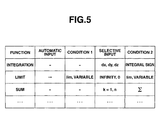
- the function list 13A is stored in the storage unit 13. As shown in Fig. 5 , the function list 13A has functions, automatic inputs (candidates), conditions 1, selective inputs (candidates), and conditions 2. The respective items are stored in association with each other.
- the functions are data representing functions used in the numerical expression.
- the automatic inputs are data representing candidates of items necessary for functions used in the numerical expression.
- As the automatic input candidates for example item " ⁇ " is stored.
- the conditions 1 are data representing conditions for automatically inputting the automatic input candidates into the numerical expression.
- functions e.g., "lim” function
- variables e.g., variable such as "x" used in the numerical expression are stored.
- the selective inputs are data representing candidates applied to the functions used in the numerical expression.
- the selective input candidates for example, "dx, dy, dz" are stored.
- the conditions 2 are data representing conditions for displaying the selective input candidates on the display unit 15.
- functions e.g., integral sign
- Step S6 shown in Fig. 3 .
- the item (automatic input candidate) necessary for the function is automatically input to the numerical expression input by pen touch.
- the candidates (selective input candidates) applied to the function are displayed, and the candidate specified in the displayed candidates is input to the numerical expression using touch pen.
- Steps S1 to S7 of the handwriting input process shown in Fig. 3 are repeatedly performed, and the numerical expression shown in Figs. 7A to 7C or Fig. 8 is already input.
- the recognition/display process will be described hereinafter.
- Step S5 when the pen is moved away from the touch panel 15A while the numerical expression is handwritten, it is determined that the recognition can be performed (Step S5: Yes). Thus, the recognition is performed (Step 21). In this step, the same process as the recognition process in Step S6 is performed.
- Step S22 it is determined whether or not an automatic input candidate is present (Step S22). Specifically, it is determined whether or not the condition 1 coinciding with the information input by pen-touch is present with reference to the function list 13A stored in the storage unit 13. Thereby, it is determined whether or not the automatic input candidate is present (whether or not it is stored in the function list 13A).
- Step S22 when it is determined that there is no automatic input candidate (Step S22: No), the process goes to Step S24.
- Step S22 when it is determined that there is the automatic input candidate (Step S22: Yes), the automatic input candidate is displayed (Step S23). Specifically, the automatic input candidate is automatically input to the numerical expression, and then the automatic input candidate is displayed on the display unit 15. For example, as shown in Fig. 8 , the items "lim" and "x" are handwritten on the touch panel 15A using the input pen by the user.
- the handwriting input function is recognized as a limit function ("lim" function) in Step S21, it is associated with the conditions 1 ("lim" and variable) in the function list 13A and " ⁇ " is stored as the automatic input candidate. Accordingly, the automatic input candidate " ⁇ " is automatically input and displayed onto the handwritten numerical expression as well as the text-converted numerical expression.
- Step S24 it is determined whether or not a selective input candidate is present. Specifically, it is determined whether or not the condition 2 coinciding with the information input by pen touch is present with reference to the function list 13A stored in the storage unit 13. Thereby, it is determined whether or not the selective input candidates are present (whether or not they are stored in the function list 13A).
- Step S24 when it is determined that there is no selective input candidate (Step S24: No), the process goes to Step S7 of the handwriting input process.
- Step S24 when it is determined that there are selective input candidates (Step S24: Yes), the selective input candidates are displayed as a list (Step S25). Accordingly, in Fig. 8 , the selective input candidates "infinity” and "0" are stored in association with the conditions 2 ("lim", variable) in the function list 13A. Therefore, as shown on the display screen 81 in Fig. 8 , the selective input candidates "infinity" and "0" are displayed on the display unit 15 separately from the automatic input candidates. Meanwhile, as shown in Fig.
- Step S21 when the integral sign " ⁇ " and the integral ranges "5" and “2" are handwritten on the touch panel 15A using the input pen by the user, the handwritten numerical expression is recognized as an integral function in Step S21. Also, the selective input candidates "dx, dy, dz" are stored association with the conditions 2 (integral sign) in the function list 13A. Accordingly, in this case, the selective input candidates "dx", “dy”, and “dz” are displayed on the display unit 15 as shown on the display screen 71 in Fig. 7A (Step S25).
- Step S26 it is determined whether or not the selective input candidate is touched by the user (Step S26). Specifically, one selective input candidate of the selective input candidates is touched (specified by the user) on the touch panel 15A using the input pen, this determination step is performed based on whether or not the CPU 11 receives a signal representing the user's specification.
- Step S26 when it is determined that the selective input candidate is touched (Step S26: Yes), the character/sign of the selective input candidate is added to the numerical expression (Step S27).
- the numerical expression is further input in the display screen 72 shown in Fig. 7B .
- the selective input candidate "dx” is automatically added to the numerical expression and displayed on the display screen 73 in Fig. 7C .
- the candidate "dx” is added to the text-converted numerical expression and displayed on the display screen 73.
- Step S27 the process goes to Step S7 of the handwriting input process. Meanwhile, in Fig. 8 , "infinity” or "0" is touched (specified by the user), so that the selected candidate is added to the rear part of "x ⁇ ".
- the numerical expression which is in the middle of handwriting input (pen-touch input)
- the item e.g., in case of "lim” function, an item “ ⁇ ” is necessary for the "lim” function
- the user can add the item " ⁇ ” necessary for the "lim” function without using touch pen, and it is possible to reduce time and effort for handwriting the numerical expression.
- the input candidates for the recognized function is displayed on the display unit 15.
- the candidates "dx, dy, dz" for the integral function is displayed on the display unit 15.
- the displayed candidates is not required to be handwritten with reference to the displayed candidates (dx, dy, and dz), and thus it is possible to reduce time and effort for handwriting the numerical expression.
- the specified candidate is automatically added to the numerical expression.
- the user can add the candidate ("dx") only by specifying the desired candidate (e.g., "dx") from the displayed candidates without using the pen touch, and thus it is possible to reduce time and effort for handwriting the numerical expression.
- a program for causing a computer to execute the operations of the exemplary embodiment may be installed in an electronic apparatus including a display unit with a touch panel.
- the present invention may be realized by the electronic apparatus such as a computer.
- a computer readable-medium may be used which stores a program for causing a computer to execute the operations of the exemplary embodiment.
Landscapes
- Engineering & Computer Science (AREA)
- Theoretical Computer Science (AREA)
- Physics & Mathematics (AREA)
- General Physics & Mathematics (AREA)
- Computer Vision & Pattern Recognition (AREA)
- Multimedia (AREA)
- Computing Systems (AREA)
- Computer Hardware Design (AREA)
- General Engineering & Computer Science (AREA)
- Character Discrimination (AREA)
- User Interface Of Digital Computer (AREA)
Applications Claiming Priority (1)
| Application Number | Priority Date | Filing Date | Title |
|---|---|---|---|
| JP2009058907A JP4775462B2 (ja) | 2009-03-12 | 2009-03-12 | 計算機及びプログラム |
Publications (2)
| Publication Number | Publication Date |
|---|---|
| EP2228731A1 true EP2228731A1 (de) | 2010-09-15 |
| EP2228731B1 EP2228731B1 (de) | 2014-04-09 |
Family
ID=42111057
Family Applications (1)
| Application Number | Title | Priority Date | Filing Date |
|---|---|---|---|
| EP10154455.9A Active EP2228731B1 (de) | 2009-03-12 | 2010-02-24 | Rechner mit einem Touchpanel zur Eingabe von handgeschriebenen numerischen Ausdrücken und computerlesbares Medium |
Country Status (5)
| Country | Link |
|---|---|
| US (1) | US8619045B2 (de) |
| EP (1) | EP2228731B1 (de) |
| JP (1) | JP4775462B2 (de) |
| CN (1) | CN101833532B (de) |
| AU (1) | AU2010200603B2 (de) |
Families Citing this family (16)
| Publication number | Priority date | Publication date | Assignee | Title |
|---|---|---|---|---|
| JP2011141592A (ja) * | 2010-01-05 | 2011-07-21 | Nec Informatec Systems Ltd | 数式レイアウト変更装置、数式レイアウト変更方法および数式レイアウト変更プログラム |
| JP5652104B2 (ja) * | 2010-10-13 | 2015-01-14 | カシオ計算機株式会社 | 電子計算機及びプログラム |
| JP5267546B2 (ja) * | 2010-12-22 | 2013-08-21 | カシオ計算機株式会社 | 手書き数式認識機能を備えた電子計算機およびプログラム |
| JP6035843B2 (ja) * | 2012-04-25 | 2016-11-30 | カシオ計算機株式会社 | 数式入力装置、数式入力方法およびプログラム |
| CN102789362A (zh) * | 2012-06-29 | 2012-11-21 | 鸿富锦精密工业(深圳)有限公司 | 电子设备及其智能计算控制方法 |
| WO2014086028A1 (en) * | 2012-12-06 | 2014-06-12 | Motorola Mobility Llc | Method and apparatus for providing a running sum total of user-selected data |
| JP2014127188A (ja) * | 2012-12-27 | 2014-07-07 | Toshiba Corp | 整形装置及び方法 |
| CN103218160A (zh) * | 2013-03-18 | 2013-07-24 | 广东国笔科技股份有限公司 | 人机交互方法及终端 |
| JP2015148946A (ja) * | 2014-02-06 | 2015-08-20 | ソニー株式会社 | 情報処理装置、情報処理方法及びプログラム |
| JP6331537B2 (ja) * | 2014-03-19 | 2018-05-30 | カシオ計算機株式会社 | 変数値表示制御装置、変数値表示制御方法及びプログラム |
| CN105893338B (zh) | 2015-02-17 | 2021-07-09 | 北京三星通信技术研究有限公司 | 用于输入公式的方法、装置和电子设备 |
| WO2019037001A1 (zh) * | 2017-08-24 | 2019-02-28 | 深圳双创科技发展有限公司 | 具有防止误操作功能的终端和相关产品 |
| JP2019168935A (ja) | 2018-03-23 | 2019-10-03 | カシオ計算機株式会社 | 入力装置、入力方法、およびプログラム |
| WO2020093329A1 (zh) * | 2018-11-08 | 2020-05-14 | 深圳市欢太科技有限公司 | 一种终端设备的数据输入方法、终端设备及存储介质 |
| CN111158574A (zh) * | 2019-12-27 | 2020-05-15 | 北京爱论答科技有限公司 | 一种数学符号输入的装置、方法、设备及存储介质 |
| CN223911244U (zh) * | 2024-12-24 | 2026-02-13 | 深圳市兴成立达科技有限公司 | 可基于手写公式输出结果的计算器 |
Citations (3)
| Publication number | Priority date | Publication date | Assignee | Title |
|---|---|---|---|---|
| EP0440450A2 (de) | 1990-01-31 | 1991-08-07 | Hewlett-Packard Company | Verfahren und Vorrichtung zur Anzeigen und Editieren von mathematischen Ausdrücken in Textformat |
| EP1538549A1 (de) | 2003-12-03 | 2005-06-08 | Microsoft Corporation | Ersetzung digitaler Tinte durch skalierten Text |
| US20080260240A1 (en) | 2007-04-19 | 2008-10-23 | Microsoft Corporation | User interface for inputting two-dimensional structure for recognition |
Family Cites Families (19)
| Publication number | Priority date | Publication date | Assignee | Title |
|---|---|---|---|---|
| JP3046027B2 (ja) * | 1987-08-05 | 2000-05-29 | キヤノン株式会社 | 文字処理方法 |
| JPH07334625A (ja) * | 1994-06-06 | 1995-12-22 | Nec Corp | 文字列入力装置 |
| US5544260A (en) * | 1994-07-12 | 1996-08-06 | International Business Machines Corporation | Silent training by error correction for on-line handwritting recognition systems |
| US5855000A (en) * | 1995-09-08 | 1998-12-29 | Carnegie Mellon University | Method and apparatus for correcting and repairing machine-transcribed input using independent or cross-modal secondary input |
| JPH09231310A (ja) * | 1996-02-21 | 1997-09-05 | Hitachi Ltd | 情報処理装置 |
| US6445384B1 (en) * | 1996-10-01 | 2002-09-03 | Greensteel, Inc. | Electronic whiteboard system eraser |
| US6795838B1 (en) * | 1999-02-05 | 2004-09-21 | Nec Corporation | Apparatus and method for transforming mathematical expression, and storage medium |
| US6754386B1 (en) * | 2000-08-22 | 2004-06-22 | Microsft Corporation | Method and system of matching ink processor and recognizer word breaks |
| JP4181310B2 (ja) * | 2001-03-07 | 2008-11-12 | 昌和 鈴木 | 数式認識装置および数式認識方法 |
| US7039234B2 (en) * | 2001-07-19 | 2006-05-02 | Microsoft Corporation | Electronic ink as a software object |
| JP2004145408A (ja) * | 2002-10-22 | 2004-05-20 | Hitachi Ltd | デジタルペンおよびデジタルペーパを利用した計算システム |
| US20060062470A1 (en) * | 2004-09-22 | 2006-03-23 | Microsoft Corporation | Graphical user interface for expression recognition |
| US7447360B2 (en) * | 2004-09-22 | 2008-11-04 | Microsoft Corporation | Analyzing tabular structures in expression recognition |
| US7561737B2 (en) * | 2004-09-22 | 2009-07-14 | Microsoft Corporation | Mathematical expression recognition |
| JP2007072718A (ja) | 2005-09-06 | 2007-03-22 | Univ Of Tokyo | 手書き数式の認識装置及び認識方法 |
| US8050500B1 (en) * | 2006-07-06 | 2011-11-01 | Senapps, LLC | Recognition method and system |
| US8073258B2 (en) * | 2007-08-22 | 2011-12-06 | Microsoft Corporation | Using handwriting recognition in computer algebra |
| US8285049B2 (en) * | 2008-06-06 | 2012-10-09 | Microsoft Corporation | Corrections for recognizers |
| US8121412B2 (en) * | 2008-06-06 | 2012-02-21 | Microsoft Corporation | Recognition of tabular structures |
-
2009
- 2009-03-12 JP JP2009058907A patent/JP4775462B2/ja not_active Expired - Fee Related
-
2010
- 2010-02-18 AU AU2010200603A patent/AU2010200603B2/en active Active
- 2010-02-24 EP EP10154455.9A patent/EP2228731B1/de active Active
- 2010-03-09 US US12/720,048 patent/US8619045B2/en active Active
- 2010-03-10 CN CN2010101325093A patent/CN101833532B/zh active Active
Patent Citations (3)
| Publication number | Priority date | Publication date | Assignee | Title |
|---|---|---|---|---|
| EP0440450A2 (de) | 1990-01-31 | 1991-08-07 | Hewlett-Packard Company | Verfahren und Vorrichtung zur Anzeigen und Editieren von mathematischen Ausdrücken in Textformat |
| EP1538549A1 (de) | 2003-12-03 | 2005-06-08 | Microsoft Corporation | Ersetzung digitaler Tinte durch skalierten Text |
| US20080260240A1 (en) | 2007-04-19 | 2008-10-23 | Microsoft Corporation | User interface for inputting two-dimensional structure for recognition |
Also Published As
| Publication number | Publication date |
|---|---|
| US8619045B2 (en) | 2013-12-31 |
| US20100231597A1 (en) | 2010-09-16 |
| CN101833532A (zh) | 2010-09-15 |
| AU2010200603A1 (en) | 2010-09-30 |
| JP2010211656A (ja) | 2010-09-24 |
| AU2010200603B2 (en) | 2011-08-18 |
| CN101833532B (zh) | 2013-03-27 |
| EP2228731B1 (de) | 2014-04-09 |
| JP4775462B2 (ja) | 2011-09-21 |
Similar Documents
| Publication | Publication Date | Title |
|---|---|---|
| US8619045B2 (en) | Calculator and computer-readable medium | |
| US9390341B2 (en) | Electronic device and method for manufacturing the same | |
| US8633906B2 (en) | Operation control apparatus, operation control method, and computer program | |
| US9025879B2 (en) | Electronic apparatus and handwritten document processing method | |
| JP6180888B2 (ja) | 電子機器、方法およびプログラム | |
| US9606981B2 (en) | Electronic apparatus and method | |
| US9411463B2 (en) | Electronic device having a touchscreen panel for pen input and method for displaying content | |
| CN101178633A (zh) | 一种手写屏错误纠正的方法、系统及装置 | |
| JP5892094B2 (ja) | グラフ表示制御装置、グラフ表示制御方法及びグラフ表示制御プログラム | |
| JP2014056389A (ja) | 文字認識装置、文字認識方法及びプログラム | |
| US9229608B2 (en) | Character display apparatus, character display method, and computer readable medium | |
| KR101069843B1 (ko) | 수식 연산 방법 및 장치 | |
| JP2010128666A (ja) | 情報処理装置 | |
| JP2017062584A (ja) | 電子機器及び方法 | |
| US9921742B2 (en) | Information processing apparatus and recording medium recording information processing program | |
| US20160012286A1 (en) | Electronic apparatus, method and storage medium | |
| EP2871570A2 (de) | Elektronische Vorrichtung, Verfahren und Speichermedium | |
| CN112764551A (zh) | 词汇显示方法、装置和电子设备 | |
| KR101389866B1 (ko) | 터치패드를 이용한 필기식 문자입력장치 및 방법 | |
| US20150253878A1 (en) | Electronic device and method | |
| JP2011209814A (ja) | 文字入力装置及び文字入力方法 | |
| US10474886B2 (en) | Motion input system, motion input method and program | |
| CN116384423A (zh) | 二维码识别方法和装置 | |
| Yonezawa et al. | Handwritten character and pictogram recognition for AV remote controller | |
| CN120653170A (zh) | 输入信息修正方法和信息终端 |
Legal Events
| Date | Code | Title | Description |
|---|---|---|---|
| PUAI | Public reference made under article 153(3) epc to a published international application that has entered the european phase |
Free format text: ORIGINAL CODE: 0009012 |
|
| 17P | Request for examination filed |
Effective date: 20100224 |
|
| AK | Designated contracting states |
Kind code of ref document: A1 Designated state(s): AT BE BG CH CY CZ DE DK EE ES FI FR GB GR HR HU IE IS IT LI LT LU LV MC MK MT NL NO PL PT RO SE SI SK SM TR |
|
| AX | Request for extension of the european patent |
Extension state: AL BA RS |
|
| 17Q | First examination report despatched |
Effective date: 20110811 |
|
| GRAP | Despatch of communication of intention to grant a patent |
Free format text: ORIGINAL CODE: EPIDOSNIGR1 |
|
| INTG | Intention to grant announced |
Effective date: 20131018 |
|
| GRAS | Grant fee paid |
Free format text: ORIGINAL CODE: EPIDOSNIGR3 |
|
| GRAA | (expected) grant |
Free format text: ORIGINAL CODE: 0009210 |
|
| AK | Designated contracting states |
Kind code of ref document: B1 Designated state(s): AT BE BG CH CY CZ DE DK EE ES FI FR GB GR HR HU IE IS IT LI LT LU LV MC MK MT NL NO PL PT RO SE SI SK SM TR |
|
| REG | Reference to a national code |
Ref country code: GB Ref legal event code: FG4D |
|
| REG | Reference to a national code |
Ref country code: AT Ref legal event code: REF Ref document number: 661680 Country of ref document: AT Kind code of ref document: T Effective date: 20140415 Ref country code: CH Ref legal event code: EP |
|
| REG | Reference to a national code |
Ref country code: IE Ref legal event code: FG4D |
|
| REG | Reference to a national code |
Ref country code: DE Ref legal event code: R096 Ref document number: 602010014939 Country of ref document: DE Effective date: 20140522 |
|
| REG | Reference to a national code |
Ref country code: AT Ref legal event code: MK05 Ref document number: 661680 Country of ref document: AT Kind code of ref document: T Effective date: 20140409 |
|
| REG | Reference to a national code |
Ref country code: NL Ref legal event code: VDEP Effective date: 20140409 |
|
| REG | Reference to a national code |
Ref country code: LT Ref legal event code: MG4D |
|
| PG25 | Lapsed in a contracting state [announced via postgrant information from national office to epo] |
Ref country code: LT Free format text: LAPSE BECAUSE OF FAILURE TO SUBMIT A TRANSLATION OF THE DESCRIPTION OR TO PAY THE FEE WITHIN THE PRESCRIBED TIME-LIMIT Effective date: 20140409 Ref country code: IS Free format text: LAPSE BECAUSE OF FAILURE TO SUBMIT A TRANSLATION OF THE DESCRIPTION OR TO PAY THE FEE WITHIN THE PRESCRIBED TIME-LIMIT Effective date: 20140809 Ref country code: GR Free format text: LAPSE BECAUSE OF FAILURE TO SUBMIT A TRANSLATION OF THE DESCRIPTION OR TO PAY THE FEE WITHIN THE PRESCRIBED TIME-LIMIT Effective date: 20140710 Ref country code: NO Free format text: LAPSE BECAUSE OF FAILURE TO SUBMIT A TRANSLATION OF THE DESCRIPTION OR TO PAY THE FEE WITHIN THE PRESCRIBED TIME-LIMIT Effective date: 20140709 Ref country code: BG Free format text: LAPSE BECAUSE OF FAILURE TO SUBMIT A TRANSLATION OF THE DESCRIPTION OR TO PAY THE FEE WITHIN THE PRESCRIBED TIME-LIMIT Effective date: 20140709 Ref country code: NL Free format text: LAPSE BECAUSE OF FAILURE TO SUBMIT A TRANSLATION OF THE DESCRIPTION OR TO PAY THE FEE WITHIN THE PRESCRIBED TIME-LIMIT Effective date: 20140409 Ref country code: FI Free format text: LAPSE BECAUSE OF FAILURE TO SUBMIT A TRANSLATION OF THE DESCRIPTION OR TO PAY THE FEE WITHIN THE PRESCRIBED TIME-LIMIT Effective date: 20140409 |
|
| PG25 | Lapsed in a contracting state [announced via postgrant information from national office to epo] |
Ref country code: AT Free format text: LAPSE BECAUSE OF FAILURE TO SUBMIT A TRANSLATION OF THE DESCRIPTION OR TO PAY THE FEE WITHIN THE PRESCRIBED TIME-LIMIT Effective date: 20140409 Ref country code: PL Free format text: LAPSE BECAUSE OF FAILURE TO SUBMIT A TRANSLATION OF THE DESCRIPTION OR TO PAY THE FEE WITHIN THE PRESCRIBED TIME-LIMIT Effective date: 20140409 Ref country code: HR Free format text: LAPSE BECAUSE OF FAILURE TO SUBMIT A TRANSLATION OF THE DESCRIPTION OR TO PAY THE FEE WITHIN THE PRESCRIBED TIME-LIMIT Effective date: 20140409 Ref country code: LV Free format text: LAPSE BECAUSE OF FAILURE TO SUBMIT A TRANSLATION OF THE DESCRIPTION OR TO PAY THE FEE WITHIN THE PRESCRIBED TIME-LIMIT Effective date: 20140409 Ref country code: SE Free format text: LAPSE BECAUSE OF FAILURE TO SUBMIT A TRANSLATION OF THE DESCRIPTION OR TO PAY THE FEE WITHIN THE PRESCRIBED TIME-LIMIT Effective date: 20140409 Ref country code: ES Free format text: LAPSE BECAUSE OF FAILURE TO SUBMIT A TRANSLATION OF THE DESCRIPTION OR TO PAY THE FEE WITHIN THE PRESCRIBED TIME-LIMIT Effective date: 20140409 |
|
| PG25 | Lapsed in a contracting state [announced via postgrant information from national office to epo] |
Ref country code: PT Free format text: LAPSE BECAUSE OF FAILURE TO SUBMIT A TRANSLATION OF THE DESCRIPTION OR TO PAY THE FEE WITHIN THE PRESCRIBED TIME-LIMIT Effective date: 20140811 |
|
| REG | Reference to a national code |
Ref country code: DE Ref legal event code: R097 Ref document number: 602010014939 Country of ref document: DE |
|
| PG25 | Lapsed in a contracting state [announced via postgrant information from national office to epo] |
Ref country code: SK Free format text: LAPSE BECAUSE OF FAILURE TO SUBMIT A TRANSLATION OF THE DESCRIPTION OR TO PAY THE FEE WITHIN THE PRESCRIBED TIME-LIMIT Effective date: 20140409 Ref country code: CZ Free format text: LAPSE BECAUSE OF FAILURE TO SUBMIT A TRANSLATION OF THE DESCRIPTION OR TO PAY THE FEE WITHIN THE PRESCRIBED TIME-LIMIT Effective date: 20140409 Ref country code: EE Free format text: LAPSE BECAUSE OF FAILURE TO SUBMIT A TRANSLATION OF THE DESCRIPTION OR TO PAY THE FEE WITHIN THE PRESCRIBED TIME-LIMIT Effective date: 20140409 Ref country code: BE Free format text: LAPSE BECAUSE OF FAILURE TO SUBMIT A TRANSLATION OF THE DESCRIPTION OR TO PAY THE FEE WITHIN THE PRESCRIBED TIME-LIMIT Effective date: 20140409 Ref country code: RO Free format text: LAPSE BECAUSE OF FAILURE TO SUBMIT A TRANSLATION OF THE DESCRIPTION OR TO PAY THE FEE WITHIN THE PRESCRIBED TIME-LIMIT Effective date: 20140409 Ref country code: DK Free format text: LAPSE BECAUSE OF FAILURE TO SUBMIT A TRANSLATION OF THE DESCRIPTION OR TO PAY THE FEE WITHIN THE PRESCRIBED TIME-LIMIT Effective date: 20140409 |
|
| PLBE | No opposition filed within time limit |
Free format text: ORIGINAL CODE: 0009261 |
|
| STAA | Information on the status of an ep patent application or granted ep patent |
Free format text: STATUS: NO OPPOSITION FILED WITHIN TIME LIMIT |
|
| 26N | No opposition filed |
Effective date: 20150112 |
|
| PG25 | Lapsed in a contracting state [announced via postgrant information from national office to epo] |
Ref country code: IT Free format text: LAPSE BECAUSE OF FAILURE TO SUBMIT A TRANSLATION OF THE DESCRIPTION OR TO PAY THE FEE WITHIN THE PRESCRIBED TIME-LIMIT Effective date: 20140409 |
|
| REG | Reference to a national code |
Ref country code: DE Ref legal event code: R097 Ref document number: 602010014939 Country of ref document: DE Effective date: 20150112 |
|
| PG25 | Lapsed in a contracting state [announced via postgrant information from national office to epo] |
Ref country code: SI Free format text: LAPSE BECAUSE OF FAILURE TO SUBMIT A TRANSLATION OF THE DESCRIPTION OR TO PAY THE FEE WITHIN THE PRESCRIBED TIME-LIMIT Effective date: 20140409 |
|
| PG25 | Lapsed in a contracting state [announced via postgrant information from national office to epo] |
Ref country code: LU Free format text: LAPSE BECAUSE OF FAILURE TO SUBMIT A TRANSLATION OF THE DESCRIPTION OR TO PAY THE FEE WITHIN THE PRESCRIBED TIME-LIMIT Effective date: 20150224 |
|
| REG | Reference to a national code |
Ref country code: CH Ref legal event code: PL |
|
| PG25 | Lapsed in a contracting state [announced via postgrant information from national office to epo] |
Ref country code: LI Free format text: LAPSE BECAUSE OF NON-PAYMENT OF DUE FEES Effective date: 20150228 Ref country code: MC Free format text: LAPSE BECAUSE OF FAILURE TO SUBMIT A TRANSLATION OF THE DESCRIPTION OR TO PAY THE FEE WITHIN THE PRESCRIBED TIME-LIMIT Effective date: 20140409 Ref country code: CH Free format text: LAPSE BECAUSE OF NON-PAYMENT OF DUE FEES Effective date: 20150228 |
|
| REG | Reference to a national code |
Ref country code: IE Ref legal event code: MM4A |
|
| REG | Reference to a national code |
Ref country code: FR Ref legal event code: PLFP Year of fee payment: 7 |
|
| PG25 | Lapsed in a contracting state [announced via postgrant information from national office to epo] |
Ref country code: IE Free format text: LAPSE BECAUSE OF NON-PAYMENT OF DUE FEES Effective date: 20150224 |
|
| PG25 | Lapsed in a contracting state [announced via postgrant information from national office to epo] |
Ref country code: MT Free format text: LAPSE BECAUSE OF FAILURE TO SUBMIT A TRANSLATION OF THE DESCRIPTION OR TO PAY THE FEE WITHIN THE PRESCRIBED TIME-LIMIT Effective date: 20140409 |
|
| REG | Reference to a national code |
Ref country code: FR Ref legal event code: PLFP Year of fee payment: 8 |
|
| PG25 | Lapsed in a contracting state [announced via postgrant information from national office to epo] |
Ref country code: SM Free format text: LAPSE BECAUSE OF FAILURE TO SUBMIT A TRANSLATION OF THE DESCRIPTION OR TO PAY THE FEE WITHIN THE PRESCRIBED TIME-LIMIT Effective date: 20140409 Ref country code: HU Free format text: LAPSE BECAUSE OF FAILURE TO SUBMIT A TRANSLATION OF THE DESCRIPTION OR TO PAY THE FEE WITHIN THE PRESCRIBED TIME-LIMIT; INVALID AB INITIO Effective date: 20100224 |
|
| PG25 | Lapsed in a contracting state [announced via postgrant information from national office to epo] |
Ref country code: CY Free format text: LAPSE BECAUSE OF FAILURE TO SUBMIT A TRANSLATION OF THE DESCRIPTION OR TO PAY THE FEE WITHIN THE PRESCRIBED TIME-LIMIT Effective date: 20140409 |
|
| PG25 | Lapsed in a contracting state [announced via postgrant information from national office to epo] |
Ref country code: TR Free format text: LAPSE BECAUSE OF FAILURE TO SUBMIT A TRANSLATION OF THE DESCRIPTION OR TO PAY THE FEE WITHIN THE PRESCRIBED TIME-LIMIT Effective date: 20140409 |
|
| REG | Reference to a national code |
Ref country code: FR Ref legal event code: PLFP Year of fee payment: 9 |
|
| PG25 | Lapsed in a contracting state [announced via postgrant information from national office to epo] |
Ref country code: MK Free format text: LAPSE BECAUSE OF FAILURE TO SUBMIT A TRANSLATION OF THE DESCRIPTION OR TO PAY THE FEE WITHIN THE PRESCRIBED TIME-LIMIT Effective date: 20140409 |
|
| PGFP | Annual fee paid to national office [announced via postgrant information from national office to epo] |
Ref country code: FR Payment date: 20251231 Year of fee payment: 17 |
|
| PGFP | Annual fee paid to national office [announced via postgrant information from national office to epo] |
Ref country code: GB Payment date: 20260106 Year of fee payment: 17 |
|
| PGFP | Annual fee paid to national office [announced via postgrant information from national office to epo] |
Ref country code: DE Payment date: 20260102 Year of fee payment: 17 |