EP0440450A2 - Verfahren und Vorrichtung zur Anzeigen und Editieren von mathematischen Ausdrücken in Textformat - Google Patents
Verfahren und Vorrichtung zur Anzeigen und Editieren von mathematischen Ausdrücken in Textformat Download PDFInfo
- Publication number
- EP0440450A2 EP0440450A2 EP91300723A EP91300723A EP0440450A2 EP 0440450 A2 EP0440450 A2 EP 0440450A2 EP 91300723 A EP91300723 A EP 91300723A EP 91300723 A EP91300723 A EP 91300723A EP 0440450 A2 EP0440450 A2 EP 0440450A2
- Authority
- EP
- European Patent Office
- Prior art keywords
- objects
- displaying
- entered
- expression
- mathematical expression
- Prior art date
- Legal status (The legal status is an assumption and is not a legal conclusion. Google has not performed a legal analysis and makes no representation as to the accuracy of the status listed.)
- Granted
Links
Images



Classifications
-
- G—PHYSICS
- G06—COMPUTING OR CALCULATING; COUNTING
- G06F—ELECTRIC DIGITAL DATA PROCESSING
- G06F15/00—Digital computers in general; Data processing equipment in general
- G06F15/02—Digital computers in general; Data processing equipment in general manually operated with input through keyboard and computation using a built-in program, e.g. pocket calculators
- G06F15/0225—User interface arrangements, e.g. keyboard, display; Interfaces to other computer systems
-
- G—PHYSICS
- G06—COMPUTING OR CALCULATING; COUNTING
- G06F—ELECTRIC DIGITAL DATA PROCESSING
- G06F40/00—Handling natural language data
- G06F40/10—Text processing
- G06F40/103—Formatting, i.e. changing of presentation of documents
- G06F40/111—Mathematical or scientific formatting; Subscripts; Superscripts
Definitions
- This invention relates to portable computing devices such as calculators and, more particularly, to the format for displaying information on the device's display screen.
- Portable computing devices such as calculators typically display information line-by-line, like the text on this page.
- This information may include mathematical expressions such as equations having variables, operators and other symbols which are displayed in a single-height linear format.
- More advanced devices include a larger display screen that can display several lines of information simultaneously. But in neither case is the information displayed in the form most familiar to the user-the way it appears printed in textbooks and journals and the way a user normally writes it with pencil and paper.
- mathematical expressions displayed in the more familiar "textbook” or "graphical" format are easier to read and understand than expressions displayed in the linear format.
- An object of the invention is to provide means for displaying mathematical expressions in a textbook format on a portable computing device.
- a second object of the invention is to provide a means for controlling the display of the mathematical expression as it is entered into the portable computing device to maintain the textbook format without user assistance.
- Another object of the invention is to provide syntax checking of a mathematical expression as it is entered in textbook format.
- Yet another object of the invention is to permit simple editing of a mathematical expression displayed in textbook format.
- a portable computing device having a display screen and keyboard includes method and apparatus for displaying in textbook format a mathematical expression comprised of objects such as variables, operators, syntactic symbols and numbers.
- the apparatus comprises a plurality of keys for entering objects into the portable computing device to form a mathematical expression.
- Displaying means is responsive to a key press for displaying an object associated with the key in textbook format.
- a cursor (36) is responsive to a currently entered object for indicating where a next object to be entered will be displayed.
- the displaying means is further responsive to a currently entered object for controlling the display of the next object to maintain the textbook format of the expression.
- Additional features include the implicit entering and displaying of an object in response to entry of a predetermined pattern of objects, such as a multiplier operator automatically inserted between two objects forming the predetermined pattern.
- means is also provided for checking the syntax of the mathematical expression as objects are entered to be displayed. For example, the syntax checking means checks the syntax of the mathematical expression after entry of an object following a mathematical operator.
- FIG. 1 is a view of a calculator which includes apparatus according to the invention.
- FIG. 2 is a flowchart illustrating the operation of the calculator according to the invention.
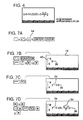
- FIGS. 3a-3f are views of the display screen of the calculator illustrating the display of a mathematical expression in textbook format as it is entered.
- FIG. 4 is a view of the display screen illustrating the implicit entry and display of an object in a mathematical expression in response to entry of a predetermined pattern of objects.
- FIGS. 5a-5g are views of the display screen illustrating the entering of a mathematical expression in textbook format into a storage location in the calculator and recall of the expression.
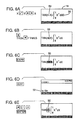
- FIGS. 6a-6e are views of the display screen illustrating the editing of a mathematical expression in textbook format.
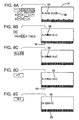
- FIGS. 7a-7d are views of the display screen illustrating the insertion of an object from a storage location of the calculator into a mathematical expression in textbook format.
- FIGS. 8a-8e are views of the display screen illustrating the rearrangement of a mathematical expression in textbook format without changing the expression's value.
- FIG. 1 illustrates a portable computing device such as a calculator 10 in which the present invention is implemented.
- calculator 10 includes a keyboard 12, multi-line liquid crystal display screen 14, a central processing unit and program and data memory. Through programs executed by the central processing unit, textual and graphics characters entered at the keyboard 12 may be written to the display screen. Calculations are normally handled in a command line which appears near the bottom of screen 14. The command line displays information such as an equation as it is entered. Results from execution information on the command line may then be stored in various memory locations in the calculator.
- a good example of such a device is the Hewlett-Packard 28S calculator. Calculators of this type may also have multi-action keys, as indicated by the key definitions above, on and below each key.
- Each key has a primary key action shown on its face. Three of the primary keys, when pressed, redefine the key actions to match one of the other definitions. Key 16, for example activates the key action above and to the left of each key. Key 18 activates the key definition above and to the right of each key. And key 20 activates the key definition to the lower right of each key.
- the keys labeled 22-28 are cursor keys for controlling the movement of a cursor around the display screen 14.
- the top row 30 of keys are menu keys.
- the current functions of these keys are defined by menu labels that appear immediately above row 30 in the display screen.
- the menu labels are part of a menu selected by pressing a key. For example, pressing key 32 will display menu labels relating to math functions.
- FIG. 2 is a flowchart 33 that illustrates the operation of program routines according to the invention. It should be understood, however, that the following description of the invention is intended only as an example and not as a limitation to this embodiment.
- An object may have parts or arguments that are also objects themselves. Expressions of objects such as a mathematical operator with arguments may also be referred to as objects.
- a ⁇ B may be a subexpression of a larger mathematical expression. In different contexts, a subexpression may be entered and displayed as one object or its parts may be separately entered and displayed as objects.
- Other examples of objects include mathematical symbols, alpha characters (letters) and numbers.
- the textbook format routine is entered by pressing keys 16 and 34 in succession.
- This action activates displaying means such as a program within the calculator's memory.
- the displaying means responds to further key presses by displaying objects associated with the keys in textbook format on the screen 14.
- a mathematical expression comprised of objects can be entered and displayed.
- FIG. 3a for example, several objects are shown displayed in response to key presses.
- a cursor 36 At the end of the objects is a cursor 36 that responds to objects currently entered in the mathematical expression by indicating where a next object to be entered will be displayed. This responsiveness can be appreciated by comparing the positions of the cursor in FIG. 3a and FIG. 3b.
- the preceding objects are variables followed by an addition operator 38.
- the next object to be entered then appears opposite the addition operator.
- This next object entered (FIG. 3b) is an integral sign 40 which is positioned where the cursor previously appeared.
- An integral sign takes two arguments that appear at the top and bottom of the sign, respectively.
- Cursor 36 responds to entry of the integral sign 40 by moving to the bottom of the sign to indicate where the next object, the lower limit of integration, will be displayed. The user thus does not have to determine where the next object is to be displayed.
- the means for displaying objects also responds to the context of the preceding expression structure in controlling the display of the next object. For example, the lower and upper limits of integration are displayed in their proper locations with appropriate sizing. And in FIG. 3e, the "d" preceding the variable of integration t is automatically inserted once t is entered.
- FIGS. 3c-3e also illustrate how a subexpression of objects is ended.
- objects entered with the cursor at the lower limit will be considered part of a subexpression for that limit until the user ends the subexpression.
- Pressing the cursor key 26 ends the subexpression and causes the cursor 36 to move to the upper limit.
- a subexpression is similarly entered and ended, causing the cursor to move back to the center of the integral for entry of the integrand.
- pressing the cursor key 26 and "t" ends the integrand and causes the displaying means to respond to the context by displaying the "d" before the "t.”
- the integral sign 40 is but one example of the context sensitivity of the displaying means.
- Other objects that clearly illustrate it include the summation and nth root functions.
- Means are also provided for entering a mathematical expression displayed in textbook format into a storage location of the calculator for computation.
- a program in the calculator's memory responds to the pressing of key 34 to display the expression in linear form. This action also serves to exit the textbook routine.
- FIG. 4 shows the operation for the case of multiplication.
- a multiplier operator " ⁇ ” is automatically inserted between the two objects.
- These predetermined patterns include, among others, a number followed by an alpha character and an alpha character followed by a prefix function (a function whose arguments(s) appear after its name). For that reason a " ⁇ ” is also automatically inserted between "Y” and "LOG” when the [LOG] key is pressed.
- FIG. 2 illustrates operation of a program routine (43) for one type of syntax checking, that of checking against incorrect entries of mathematical operators.
- the program first checks to see if the sequence of characters entered is a legal object. If not, it alerts the user to the error. If yes, it then checks to see if the legal object is permitted in the context of the preceding structure of the expression. If not, it alerts the user to the error.
- calculator 10 includes means for entering a mathematical expression displayed in textbook format into a storage location of the calculator 10 for purposes of computation.
- Objects or expressions presently in a storage location can be recalled for display in textbook format.
- FIGS. 5a-5g illustrate the movement of a mathematical expression between a textbook format on the display screen 14 to a storage location 44 and its recall and combination with other objects to form a new mathematical expression.
- a first expression 42 is entered and displayed in textbook format.
- FIG. 5b and 5c the expression is first entered into memory on the calculator's stack 44 and then stored in a storage location under the variable "RATE.”
- "RATE" is recalled to the stack.
- FIG. 6a illustrates a completed expression in which it is desired to change the multiplier operator of tangent argument 50 to a divisor operator. Pressing key 28 changes to a Selection menu and the menu labels change appropriately.
- the cursor 36 may then be moved to the multiplier operator of subexpression 50, as shown in FIG. 6b.
- the subexpression, for which the operator is the top level function may then be highlighted, as in FIG. 6c, by pressing the menu key EXPR. This highlighting allows the user to determine if he has the correct object for editing. If so he presses another menu key EDIT, as shown in FIG. 6d, which returns the subexpression to the calculator's command line 52 for editing.
- the user edits the subexpression using the appropriate keys and returns the subexpression to the display screen by pressing key 34 (FIG. 6e).
- FIGS. 7a-7d Another editing means comprises a program routine whose operation is illustrated in FIGS. 7a-7d.
- the program allows for insertion of an object from a storage location of the calculator 10 into the mathematical expression at the current location of the cursor.
- FIG. 7a shows an object 54 that has been entered and then copied onto the calculator stack at some point.
- the textbook format is activated by pressing keys 16 and 34 in succession and an integral sign 40 and its arguments are entered and displayed.
- FIG. 7c illustrates further entry of objects from the keyboard and insertion of another copy of object 54. This feature thus permits a user to create a library of frequently-used subexpressions for building larger mathematical expressions.
- FIGS. 8a-8e illustrate this feature.
- an equation is entered in textbook format as previously described.
- the unknown variable "X" appears on both sides of the equation.
- the user selects the RULES menu 58, indicated by the left menu label, by pressing the associated menu key (FIG. 5c).
Landscapes
- Engineering & Computer Science (AREA)
- Theoretical Computer Science (AREA)
- General Engineering & Computer Science (AREA)
- Physics & Mathematics (AREA)
- General Physics & Mathematics (AREA)
- Computer Hardware Design (AREA)
- Computing Systems (AREA)
- Mathematical Optimization (AREA)
- Artificial Intelligence (AREA)
- Mathematical Analysis (AREA)
- Human Computer Interaction (AREA)
- Mathematical Physics (AREA)
- Pure & Applied Mathematics (AREA)
- Health & Medical Sciences (AREA)
- Algebra (AREA)
- Audiology, Speech & Language Pathology (AREA)
- Computational Linguistics (AREA)
- General Health & Medical Sciences (AREA)
- Calculators And Similar Devices (AREA)
- Input From Keyboards Or The Like (AREA)
- Document Processing Apparatus (AREA)
Applications Claiming Priority (2)
| Application Number | Priority Date | Filing Date | Title |
|---|---|---|---|
| US472684 | 1990-01-31 | ||
| US07/472,684 US5067102A (en) | 1990-01-31 | 1990-01-31 | Method and apparatus for displaying and editing mathematical expressions in textbook format |
Publications (3)
| Publication Number | Publication Date |
|---|---|
| EP0440450A2 true EP0440450A2 (de) | 1991-08-07 |
| EP0440450A3 EP0440450A3 (en) | 1991-12-18 |
| EP0440450B1 EP0440450B1 (de) | 1996-11-06 |
Family
ID=23876525
Family Applications (1)
| Application Number | Title | Priority Date | Filing Date |
|---|---|---|---|
| EP91300723A Expired - Lifetime EP0440450B1 (de) | 1990-01-31 | 1991-01-30 | Verfahren und Vorrichtung zum Anzeigen und Editieren von mathematischen Ausdrücken in Textformat |
Country Status (4)
| Country | Link |
|---|---|
| US (1) | US5067102A (de) |
| EP (1) | EP0440450B1 (de) |
| JP (1) | JPH04252351A (de) |
| DE (1) | DE69122975T2 (de) |
Cited By (2)
| Publication number | Priority date | Publication date | Assignee | Title |
|---|---|---|---|---|
| EP1278144A3 (de) * | 2001-06-22 | 2006-11-15 | Sun Microsystems, Inc. | Verfaheren und Anordnung zur Eingabe und zum Editieren von Tabellenkalkulationsformeln |
| CN101833532A (zh) * | 2009-03-12 | 2010-09-15 | 卡西欧计算机株式会社 | 计算器以及计算机可读介质 |
Families Citing this family (32)
| Publication number | Priority date | Publication date | Assignee | Title |
|---|---|---|---|---|
| US5241489A (en) * | 1989-10-02 | 1993-08-31 | Sharp Kabushiki Kaisha | Electronic computer with fraction and exponent display |
| JP3358809B2 (ja) * | 1990-11-28 | 2002-12-24 | カシオ計算機株式会社 | グラフ表示制御装置及びグラフ表示制御方法 |
| JP2895257B2 (ja) * | 1991-04-05 | 1999-05-24 | シャープ株式会社 | 計算機 |
| JP2686008B2 (ja) * | 1991-11-26 | 1997-12-08 | 富士通株式会社 | 分子動力学計算装置 |
| JP3111120B2 (ja) * | 1992-12-28 | 2000-11-20 | シャープ株式会社 | 数式表示方法 |
| US5377130A (en) * | 1993-01-26 | 1994-12-27 | Texas Instruments Incorporated | Method and apparatus for solving terms of a numerical sequence |
| EP0615195B1 (de) * | 1993-02-05 | 1999-08-25 | Hewlett-Packard Company | Verfahren und Anordnung zur Anzeige von Menüauswahlmöglichkeiten zur Auswahl mit einem Minimum an Tastenanschlägen |
| US5526475A (en) * | 1994-03-02 | 1996-06-11 | Mathsoft, Inc. | Method for live symbolic calculations in a mathematical document editor |
| US5469538A (en) * | 1994-03-02 | 1995-11-21 | Mathsoft, Inc. | Mathematical document editor and method performing live symbolic calculations for use with an electronic book |
| JP3140916B2 (ja) * | 1994-08-05 | 2001-03-05 | シャープ株式会社 | 数式入力装置 |
| JPH10289211A (ja) * | 1997-04-14 | 1998-10-27 | Sharp Corp | 小型電子機器 |
| US7035885B2 (en) * | 2000-03-09 | 2006-04-25 | Kulak John A | Machinist calculating apparatus |
| US6748404B1 (en) * | 2000-08-22 | 2004-06-08 | Kinpo Electronics, Inc. | Data editable statistic calculator, and the related data editing method |
| US6956560B2 (en) * | 2001-08-24 | 2005-10-18 | Texas Instruments Incorporated | Selection of mathematical objects from the history screen on a handheld device |
| US6922710B2 (en) * | 2001-11-08 | 2005-07-26 | Texas Instruments Incorporated | Hand-held calculator with problems and operations linked lists |
| US7272621B2 (en) * | 2003-08-08 | 2007-09-18 | Hewlett-Packard Development Company, L.P. | Previous calculation reuse in a calculator |
| US7698638B2 (en) * | 2004-09-15 | 2010-04-13 | Microsoft Corporation | Systems and methods for automated equation buildup |
| TW200611122A (en) * | 2004-09-17 | 2006-04-01 | Kinpo Elect Inc | Calculator having error notification function and method thereof |
| US8020091B2 (en) * | 2005-07-15 | 2011-09-13 | Microsoft Corporation | Alignment and breaking of mathematical expressions in documents |
| JP4462181B2 (ja) | 2005-12-22 | 2010-05-12 | カシオ計算機株式会社 | 分数表示装置および分数表示プログラム |
| JP4661654B2 (ja) * | 2006-03-27 | 2011-03-30 | カシオ計算機株式会社 | 数式表示制御装置及び数式表示制御プログラム |
| EP1988453A1 (de) * | 2007-03-30 | 2008-11-05 | Casio Computer Co., Ltd. | Funktionsrechner mit Hilfsanzeigefunktion |
| US20100115403A1 (en) * | 2008-11-06 | 2010-05-06 | Microsoft Corporation | Transforming math text objects using build down and build up |
| US8190406B2 (en) * | 2008-11-26 | 2012-05-29 | Microsoft Corporation | Hybrid solver for data-driven analytics |
| CN101799796B (zh) * | 2010-03-25 | 2013-09-04 | 深圳市同洲电子股份有限公司 | 一种触摸屏计算器及其对输入数据进行多步运算的方法 |
| US8423898B2 (en) | 2010-08-23 | 2013-04-16 | Hale Software Concepts, Inc. | System and method for performing calculations using a portable electronic device |
| JP5786671B2 (ja) * | 2011-06-23 | 2015-09-30 | カシオ計算機株式会社 | 数式入力装置及びプログラム |
| EP2538346A3 (de) | 2011-06-23 | 2013-10-02 | Casio Computer Co., Ltd. | Expressionseingabevorrichtung, Expressionsanzeigevorrichtung, Expressionseingabeverfahren, Expressionsanzeigeverfahren, Aufzeichnungsmedium mit darauf gespeichertem Expressionseingabesteuerprogramm und Aufzeichnungsmedium mit darauf gespeichertem Expressionsanzeigesteuerprogramm |
| JP6331537B2 (ja) * | 2014-03-19 | 2018-05-30 | カシオ計算機株式会社 | 変数値表示制御装置、変数値表示制御方法及びプログラム |
| JP6269220B2 (ja) | 2014-03-20 | 2018-01-31 | カシオ計算機株式会社 | 数式表示制御装置、数式表示制御方法、数式表示制御プログラム |
| JP7674209B2 (ja) * | 2021-09-22 | 2025-05-09 | カシオ計算機株式会社 | 数式編集方法、数式編集装置及び数式編集プログラム |
| US12579356B2 (en) * | 2022-09-23 | 2026-03-17 | Texas Instruments Incorporated | Mathematical calculations with numerical indicators |
Family Cites Families (7)
| Publication number | Priority date | Publication date | Assignee | Title |
|---|---|---|---|---|
| US4386412A (en) * | 1979-12-17 | 1983-05-31 | Casio Computer Company, Ltd. | Calculator with equation display device |
| JPS56114047A (en) * | 1980-02-12 | 1981-09-08 | Sharp Corp | Execution system of electronic computer |
| JPS58213369A (ja) * | 1982-06-05 | 1983-12-12 | Casio Comput Co Ltd | 検算機能付小型電子式計算機 |
| DE3228589A1 (de) * | 1982-07-30 | 1984-02-02 | Siemens AG, 1000 Berlin und 8000 München | Verfahren zur darstellung von zeichen auf einer einzeiligen anzeigeeinrichtung einer textstation |
| JPS60193066A (ja) * | 1984-03-13 | 1985-10-01 | Sharp Corp | 電子式計算機 |
| US4852057A (en) * | 1986-10-27 | 1989-07-25 | Hewlett-Packard Company | Algebraic expression manipulation method and implementation for an electronic data processing apparatus |
| US4821228A (en) * | 1986-12-24 | 1989-04-11 | Hewlett-Packard Company | Method and apparatus for computation stack recovery in a calculator |
-
1990
- 1990-01-31 US US07/472,684 patent/US5067102A/en not_active Expired - Lifetime
-
1991
- 1991-01-30 EP EP91300723A patent/EP0440450B1/de not_active Expired - Lifetime
- 1991-01-30 DE DE69122975T patent/DE69122975T2/de not_active Expired - Lifetime
- 1991-01-31 JP JP3031528A patent/JPH04252351A/ja active Pending
Cited By (5)
| Publication number | Priority date | Publication date | Assignee | Title |
|---|---|---|---|---|
| EP1278144A3 (de) * | 2001-06-22 | 2006-11-15 | Sun Microsystems, Inc. | Verfaheren und Anordnung zur Eingabe und zum Editieren von Tabellenkalkulationsformeln |
| CN101833532A (zh) * | 2009-03-12 | 2010-09-15 | 卡西欧计算机株式会社 | 计算器以及计算机可读介质 |
| EP2228731A1 (de) | 2009-03-12 | 2010-09-15 | Casio Computer Co., Ltd. | Rechner mit einem Touchpanel zur Eingabe von handgeschriebenen numerischen Ausdrücken und computerlesbares Medium |
| CN101833532B (zh) * | 2009-03-12 | 2013-03-27 | 卡西欧计算机株式会社 | 手写输入数学式的修正装置及修正方法 |
| US8619045B2 (en) | 2009-03-12 | 2013-12-31 | Casio Computer Co., Ltd. | Calculator and computer-readable medium |
Also Published As
| Publication number | Publication date |
|---|---|
| EP0440450A3 (en) | 1991-12-18 |
| DE69122975D1 (de) | 1996-12-12 |
| EP0440450B1 (de) | 1996-11-06 |
| JPH04252351A (ja) | 1992-09-08 |
| US5067102A (en) | 1991-11-19 |
| DE69122975T2 (de) | 1997-03-06 |
Similar Documents
| Publication | Publication Date | Title |
|---|---|---|
| US5067102A (en) | Method and apparatus for displaying and editing mathematical expressions in textbook format | |
| US5021973A (en) | Method for assisting the operator of an interactive data processing system to enter data directly into a selected cell of a spreadsheet | |
| US20060015804A1 (en) | Method and system for presenting editable spreadsheet page layout view | |
| US9734123B2 (en) | Multimode mathematical user interface | |
| US20070061750A1 (en) | Software key labeling on software keyboards | |
| JP2966420B2 (ja) | 情報処理装置 | |
| Ellis et al. | The GRAIL Project: An experiment in man-machine communications | |
| JPH0261059B2 (de) | ||
| JPS60189568A (ja) | 情報処理装置 | |
| US4457638A (en) | Automatic centering of text column entries | |
| CA1175574A (en) | Column formatting by typed example | |
| EP0273764A1 (de) | Textverarbeitungssystem | |
| JPH069046B2 (ja) | 文章編集装置 | |
| JP2718171B2 (ja) | 電子学習機 | |
| Colin | On-line access systems in statistics | |
| JPS60114919A (ja) | 表示装置 | |
| JPH0346831B2 (de) | ||
| JP2671038B2 (ja) | 電子学習機 | |
| JP2669050B2 (ja) | 電子学習機 | |
| JPH0385670A (ja) | 二段階表示方式文書処理装置 | |
| JPS62271042A (ja) | 入力装置 | |
| JPH01169672A (ja) | 文字処理装置 | |
| JPS6366666A (ja) | 文字置換装置 | |
| ABS | THE MACPAINT DRAWING TOOL PALETTE | |
| Edmands | Keeping the system user's needs in mind how information retrievability was achieved in one reference manual |
Legal Events
| Date | Code | Title | Description |
|---|---|---|---|
| PUAI | Public reference made under article 153(3) epc to a published international application that has entered the european phase |
Free format text: ORIGINAL CODE: 0009012 |
|
| AK | Designated contracting states |
Kind code of ref document: A2 Designated state(s): DE FR GB IT |
|
| PUAL | Search report despatched |
Free format text: ORIGINAL CODE: 0009013 |
|
| AK | Designated contracting states |
Kind code of ref document: A3 Designated state(s): DE FR GB IT |
|
| 17P | Request for examination filed |
Effective date: 19920429 |
|
| 17Q | First examination report despatched |
Effective date: 19941019 |
|
| GRAG | Despatch of communication of intention to grant |
Free format text: ORIGINAL CODE: EPIDOS AGRA |
|
| GRAH | Despatch of communication of intention to grant a patent |
Free format text: ORIGINAL CODE: EPIDOS IGRA |
|
| GRAH | Despatch of communication of intention to grant a patent |
Free format text: ORIGINAL CODE: EPIDOS IGRA |
|
| GRAA | (expected) grant |
Free format text: ORIGINAL CODE: 0009210 |
|
| AK | Designated contracting states |
Kind code of ref document: B1 Designated state(s): DE FR GB IT |
|
| REF | Corresponds to: |
Ref document number: 69122975 Country of ref document: DE Date of ref document: 19961212 |
|
| ET | Fr: translation filed | ||
| ITF | It: translation for a ep patent filed | ||
| PLBE | No opposition filed within time limit |
Free format text: ORIGINAL CODE: 0009261 |
|
| STAA | Information on the status of an ep patent application or granted ep patent |
Free format text: STATUS: NO OPPOSITION FILED WITHIN TIME LIMIT |
|
| 26N | No opposition filed | ||
| REG | Reference to a national code |
Ref country code: GB Ref legal event code: 732E |
|
| REG | Reference to a national code |
Ref country code: FR Ref legal event code: TP |
|
| REG | Reference to a national code |
Ref country code: GB Ref legal event code: IF02 |
|
| PGFP | Annual fee paid to national office [announced via postgrant information from national office to epo] |
Ref country code: IT Payment date: 20100127 Year of fee payment: 20 Ref country code: FR Payment date: 20100205 Year of fee payment: 20 |
|
| PGFP | Annual fee paid to national office [announced via postgrant information from national office to epo] |
Ref country code: GB Payment date: 20100125 Year of fee payment: 20 Ref country code: DE Payment date: 20100127 Year of fee payment: 20 |
|
| REG | Reference to a national code |
Ref country code: GB Ref legal event code: PE20 Expiry date: 20110129 |
|
| PG25 | Lapsed in a contracting state [announced via postgrant information from national office to epo] |
Ref country code: GB Free format text: LAPSE BECAUSE OF EXPIRATION OF PROTECTION Effective date: 20110129 |
|
| PG25 | Lapsed in a contracting state [announced via postgrant information from national office to epo] |
Ref country code: DE Free format text: LAPSE BECAUSE OF EXPIRATION OF PROTECTION Effective date: 20110130 |