EP2287710A2 - Verfahren und Vorrichtung für elektronisches Papier mit einer Benutzerschnittstelle - Google Patents
Verfahren und Vorrichtung für elektronisches Papier mit einer Benutzerschnittstelle Download PDFInfo
- Publication number
- EP2287710A2 EP2287710A2 EP10161305A EP10161305A EP2287710A2 EP 2287710 A2 EP2287710 A2 EP 2287710A2 EP 10161305 A EP10161305 A EP 10161305A EP 10161305 A EP10161305 A EP 10161305A EP 2287710 A2 EP2287710 A2 EP 2287710A2
- Authority
- EP
- European Patent Office
- Prior art keywords
- paper
- user
- manipulation
- response
- touching
- Prior art date
- Legal status (The legal status is an assumption and is not a legal conclusion. Google has not performed a legal analysis and makes no representation as to the accuracy of the status listed.)
- Withdrawn
Links
Images







Classifications
-
- G—PHYSICS
- G06—COMPUTING OR CALCULATING; COUNTING
- G06F—ELECTRIC DIGITAL DATA PROCESSING
- G06F3/00—Input arrangements for transferring data to be processed into a form capable of being handled by the computer; Output arrangements for transferring data from processing unit to output unit, e.g. interface arrangements
- G06F3/01—Input arrangements or combined input and output arrangements for interaction between user and computer
- G06F3/048—Interaction techniques based on graphical user interfaces [GUI]
- G06F3/0487—Interaction techniques based on graphical user interfaces [GUI] using specific features provided by the input device, e.g. functions controlled by the rotation of a mouse with dual sensing arrangements, or of the nature of the input device, e.g. tap gestures based on pressure sensed by a digitiser
-
- G—PHYSICS
- G06—COMPUTING OR CALCULATING; COUNTING
- G06F—ELECTRIC DIGITAL DATA PROCESSING
- G06F3/00—Input arrangements for transferring data to be processed into a form capable of being handled by the computer; Output arrangements for transferring data from processing unit to output unit, e.g. interface arrangements
- G06F3/01—Input arrangements or combined input and output arrangements for interaction between user and computer
- G06F3/03—Arrangements for converting the position or the displacement of a member into a coded form
- G06F3/041—Digitisers, e.g. for touch screens or touch pads, characterised by the transducing means
- G06F3/0416—Control or interface arrangements specially adapted for digitisers
-
- G—PHYSICS
- G06—COMPUTING OR CALCULATING; COUNTING
- G06F—ELECTRIC DIGITAL DATA PROCESSING
- G06F1/00—Details not covered by groups G06F3/00 - G06F13/00 and G06F21/00
- G06F1/16—Constructional details or arrangements
- G06F1/1613—Constructional details or arrangements for portable computers
- G06F1/1633—Constructional details or arrangements of portable computers not specific to the type of enclosures covered by groups G06F1/1615 - G06F1/1626
- G06F1/1637—Details related to the display arrangement, including those related to the mounting of the display in the housing
- G06F1/1652—Details related to the display arrangement, including those related to the mounting of the display in the housing the display being flexible, e.g. mimicking a sheet of paper, or rollable
-
- G—PHYSICS
- G06—COMPUTING OR CALCULATING; COUNTING
- G06F—ELECTRIC DIGITAL DATA PROCESSING
- G06F3/00—Input arrangements for transferring data to be processed into a form capable of being handled by the computer; Output arrangements for transferring data from processing unit to output unit, e.g. interface arrangements
- G06F3/01—Input arrangements or combined input and output arrangements for interaction between user and computer
- G06F3/03—Arrangements for converting the position or the displacement of a member into a coded form
- G06F3/041—Digitisers, e.g. for touch screens or touch pads, characterised by the transducing means
- G06F3/0414—Digitisers, e.g. for touch screens or touch pads, characterised by the transducing means using force sensing means to determine a position
-
- G—PHYSICS
- G06—COMPUTING OR CALCULATING; COUNTING
- G06F—ELECTRIC DIGITAL DATA PROCESSING
- G06F3/00—Input arrangements for transferring data to be processed into a form capable of being handled by the computer; Output arrangements for transferring data from processing unit to output unit, e.g. interface arrangements
- G06F3/01—Input arrangements or combined input and output arrangements for interaction between user and computer
- G06F3/048—Interaction techniques based on graphical user interfaces [GUI]
- G06F3/0481—Interaction techniques based on graphical user interfaces [GUI] based on specific properties of the displayed interaction object or a metaphor-based environment, e.g. interaction with desktop elements like windows or icons, or assisted by a cursor's changing behaviour or appearance
- G06F3/0482—Interaction with lists of selectable items, e.g. menus
-
- G—PHYSICS
- G06—COMPUTING OR CALCULATING; COUNTING
- G06F—ELECTRIC DIGITAL DATA PROCESSING
- G06F3/00—Input arrangements for transferring data to be processed into a form capable of being handled by the computer; Output arrangements for transferring data from processing unit to output unit, e.g. interface arrangements
- G06F3/01—Input arrangements or combined input and output arrangements for interaction between user and computer
- G06F3/048—Interaction techniques based on graphical user interfaces [GUI]
- G06F3/0481—Interaction techniques based on graphical user interfaces [GUI] based on specific properties of the displayed interaction object or a metaphor-based environment, e.g. interaction with desktop elements like windows or icons, or assisted by a cursor's changing behaviour or appearance
- G06F3/0483—Interaction with page-structured environments, e.g. book metaphor
-
- G—PHYSICS
- G06—COMPUTING OR CALCULATING; COUNTING
- G06F—ELECTRIC DIGITAL DATA PROCESSING
- G06F3/00—Input arrangements for transferring data to be processed into a form capable of being handled by the computer; Output arrangements for transferring data from processing unit to output unit, e.g. interface arrangements
- G06F3/01—Input arrangements or combined input and output arrangements for interaction between user and computer
- G06F3/048—Interaction techniques based on graphical user interfaces [GUI]
- G06F3/0487—Interaction techniques based on graphical user interfaces [GUI] using specific features provided by the input device, e.g. functions controlled by the rotation of a mouse with dual sensing arrangements, or of the nature of the input device, e.g. tap gestures based on pressure sensed by a digitiser
- G06F3/0488—Interaction techniques based on graphical user interfaces [GUI] using specific features provided by the input device, e.g. functions controlled by the rotation of a mouse with dual sensing arrangements, or of the nature of the input device, e.g. tap gestures based on pressure sensed by a digitiser using a touch-screen or digitiser, e.g. input of commands through traced gestures
- G06F3/04883—Interaction techniques based on graphical user interfaces [GUI] using specific features provided by the input device, e.g. functions controlled by the rotation of a mouse with dual sensing arrangements, or of the nature of the input device, e.g. tap gestures based on pressure sensed by a digitiser using a touch-screen or digitiser, e.g. input of commands through traced gestures for inputting data by handwriting, e.g. gesture or text
-
- G—PHYSICS
- G06—COMPUTING OR CALCULATING; COUNTING
- G06F—ELECTRIC DIGITAL DATA PROCESSING
- G06F2203/00—Indexing scheme relating to G06F3/00 - G06F3/048
- G06F2203/041—Indexing scheme relating to G06F3/041 - G06F3/045
- G06F2203/04102—Flexible digitiser, i.e. constructional details for allowing the whole digitising part of a device to be flexed or rolled like a sheet of paper
Definitions
- the following description relates to a user interface, and more particularly, to a user interface for electronic paper (e-paper).
- e-paper electronic paper
- E-paper is a portable, reusable storage and display medium that looks like paper but can be repeatedly written on refreshed by electronic means.
- E-paper may be used for various applications, for example, e-books, electronic newspapers, portable signs, foldable, rollable displays, and the like.
- Information to be displayed may be downloaded through a connection to a computer or a cell phone, or created with mechanical tools such as an electronic "pencil".
- the e-paper may provide a clear image while at the same time using up only a small amount of power.
- a user interface of the e-paper or the e-book may include a user interface that is related to a notebook or a tablet PC. Accordingly, the user may input a desired command by using a keypad.
- e-paper increases, other methods of inputting information are becoming desirable.
- an e-paper apparatus including a user interface, the apparatus comprising a touch interface for receiving input from a user, a user manipulation sensor to sense a manipulation by a user on the touch interface, and an e-paper controller to control the e-paper to perform a function corresponding to the manipulation of the user, wherein the manipulation of the user corresponds to a method of handling a paper or a book.
- the user manipulation sensor may comprise a touch sensing unit to sense a touch event with respect to the touch interface, a pressure sensing unit to sense a pressure applied to the e-paper, and a gravity-directional sensing unit to sense a change in gravity direction of the e-paper.
- the touch sensing unit may sense a touch event with respect to a front side of the e-paper and a touch event with respect to a back side of the e-paper.
- the manipulation by the user may include the user turning the e-paper over, and, in response, the e-paper controller may control the e-paper to change a page displayed on the e-paper.
- the manipulation by the user may include the user bending the e-paper with both hands and leaving the e-paper bent, and, in response, the e-paper controller may control the e-paper to display a page selection menu.
- the e-paper may display a contents list
- the manipulation by the user may include the user touching at least one of a front side and back side of the e-paper with a finger to select one contents from among the contents list, and dragging the finger touching the at least one of the front side and back side of the e-paper, and, in response, the e-paper controller may control the e-paper to store or delete the selected contents depending on a drag direction of the finger touching the at least one of the front side and back side of the e-paper.
- the manipulation by the user may include bending a corner of the e-paper, and, in response, the e-paper controller may control the e-paper to set a bookmark on a page displayed on the e-paper.
- the manipulation by the user may include bending a corner of the e-paper, and, in response, the e-paper controller may control the e-paper to move to a page where a bookmark is set.
- the manipulation by the user may include touching at least one of a front side and a back side of a corner of the e-paper, over the course of a preset time threshold, and, in response, the e-paper controller may control the e-paper to provide a bookmark setting menu.
- the manipulation by the user may include touching a bookmark displayed on the e-paper, and, in response, the e-paper controller may control the e-paper to provide a bookmark delete menu.
- the manipulation by the user may include dragging a bookmark displayed on the e-paper, and, in response, the e-paper controller may control the e-paper to provide a bookmark list.
- the manipulation by the user may include folding the e-paper, and, in response, the e-paper controller may control the e-paper to provide a memory area.
- the manipulation by the user may include touching both faces of a folded e-paper and dragging the finger, and, in response, the e-paper controller may control the e-paper to delete a memo displayed on the e-paper.
- a method of controlling an e-paper based on user manipulation comprising providing a user interface for receiving input from a user, sensing a manipulation by a user on the user interface, and controlling, by a processor, the e-paper to perform a function corresponding to the manipulation by the user.
- the manipulation by the user may include turning the e-paper over, and, in response, the processor may control the e-paper to change a page displayed on the e-paper.
- the manipulation by the user may include turning the e-paper over, and, in response, the processor may control the e-paper to change contents on the e-paper.
- the manipulation by the user may include bending the e-paper with both hands, and, in response, the processor may control the e-paper to display a page selection menu.
- the manipulation by the user may include touching at least one of a front side and back side of a corner of the e-paper over the course of a preset time threshold, and, in response, the processor may control the e-paper to provide a bookmark setting menu.
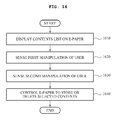
- a method of providing a user interface comprising displaying a contents list on an e-paper, sensing a first manipulation by a user including touching a front side and a back side of the e-paper to select one contents from among the contents list, sensing a second manipulation by a user including dragging a finger touching at least one of the front side and the back side of the e-paper, and controlling the e-paper to store or delete the selected contents according to a drag direction of the finger touching the at least one of the front side and back side of the e-paper.
- FIG. 1 illustrates an example of e-paper.
- the example e-paper 100 may display contents through a front side 110 or a back side 120.
- the e-paper 100 may include a flexible display capable of being folded or bent.
- the e-paper may include a rigid display.
- the e-paper 100 may include a user interface (not illustrated).
- FIG. 2 illustrates an example of a user interface.
- the example user interface 200 includes a touch interface 210, a user manipulation sensor 220, and an e-paper controller 230.
- the touch interface 210 may provide a user interface that supports a user input by a touch of a user finger, a stylus, and the like. Also, the touch interface 210 may display contents to a user. Referring to FIG. 1 and FIG. 2 , the touch interface 210 may be equipped on the front side 110 and/or the back side 120 of the e-paper 100. Accordingly, the user may touch both the front side 110 and/or the back side 120 of the e-paper, for example, by using a thumb, an index finger, and a stylus, to manipulate the e-paper 100.
- a user manipulation sensor 220 may sense the manipulation by the user on the e-paper.
- the user manipulation sensor 220 may sense a touch event with respect to the touch interface 210 and may sense a direction of a drag with respect to the touch event.
- the touch event may include, for example, a condition where a finger of the user touches the touch interface 210.
- the drag may be similar in concept to a drag of a mouse in a personal computer (PC) environment.
- the direction of the drag corresponding to the touch event may indicate a direction that the finger of the user moves, while the touch event is maintained.
- the touch event may simultaneously occur on both the front side 110 and the back side 120 of the e-paper 100.
- the user manipulation sensor 220 may sense a location where the e-paper 100 is being bent and a degree of bending.
- the e-paper controller 230 may control the e-paper 100 to perform one or more functions in response to the manipulation by the user.
- the manipulation of the user may be similar to handling the paper or the book. Accordingly, a user may manipulate the e-paper, for example, to scroll down the page, to highlight text, to enlarge text, to turn the page, and the like.
- FIG. 3 illustrates an example of a user manipulation sensor that may be included in the user interface of FIG. 2 .
- the example user manipulation sensor 220 may include a touch sensing unit 321, a pressure sensing unit 323, and a gravity-directional sensing unit 325.
- the touch sensing unit 321 senses a touch event of the e-paper 100.
- the touch sensing unit 321 may sense a touch event with respect to the front side 110 of the e-paper 100 and may sense a touch event with respect to the back side 120 of the e-paper 100.
- the pressure sensing unit 323 may sense a pressure applied to the e-paper 100.
- the pressure sensing unit 323 may sense the amount of pressure applied by a user's finger, a stylus, and the like.
- the gravity-directional sensing unit 325 may sense a change in a gravity direction of the e-paper 100.
- the gravity-directional sensing unit 325 may include at least one of a gyro sensor, a geomagnetic sensor, an acceleration sensor, and the like.
- the touch sensing unit 321, the pressure sensing unit 323, and the gravity-directional sensing unit 325 may be embodied in various configurations.
- the touch sensing unit 321, the pressure sensing unit 323, and the gravity-directional sensing unit 325 are examples of components that may be included in the user manipulation sensor 220.
- Other types of sensors may be used in the user manipulation sensor 220. That is, the user manipulation sensor 220 may include various other components to sense the manipulation of the user.
- FIG. 4 illustrates an example operation of manipulating an e-paper.
- a user manipulates the e-paper by turning the e-paper over to view the back side 120 while viewing the front side 110 of the e-paper. That is, the user may turn the e-paper over from direction 402 to direction 401.
- the user manipulation sensor 220 may sense the manipulation of turning the e-paper over.
- the e-paper controller 230 may control the e-paper to change a page displayed on the e-paper in response to the manipulation of turning the e-paper over.
- the page displayed on the e-paper is changed from page 10 to page 9. That is, the user turns the e-paper over from the direction 401 to the direction 402, and thus, the user is able to view a previous page with respect to a currently displayed page.
- the e-paper controller 230 may control the e-paper to change the page from page 10 to page 11 in response to the manipulation by the user of turning the e-paper over from direction 401 to direction 402.
- FIG. 5 illustrates a side-perspective view of the example shown in FIG. 4 .
- the front side 110 of the e-paper faces a gaze 501 of the user, at first.
- the back side 120 of the e-paper faces the ground 504, at first. Then, the user turns the e-paper over, and thus, the front side 110 of the e-paper now faces the ground 504.
- the user manipulation sensor 220 senses a gravity direction 502 and a change of a direction 503 that the back side 120 of the e-paper is facing, and thus, senses the manipulation of the user.
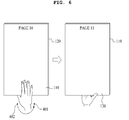
- FIG. 6 illustrates another example operation of manipulating e-paper.
- the user manipulates the e-paper by turning the e-paper over from direction 402 to direction 401.
- a page displayed on the e-paper is changed from a page 10 to a page 11. That is, the user turns the e-paper over from direction 402 to direction 401, and thus, views a next page with respect to the currently displayed page.
- FIG. 7 illustrates another example operation of manipulating e-paper.
- the user manipulates the e-paper by bending the e-paper as if turning pages of a book, and leaving the e-paper bent.
- the user manipulation sensor 220 may sense the manipulation of bending the e-paper by the user's hands and leaving the e-paper bent.
- the user manipulation sensor 220 may sense that both sides of the e-paper are touched by the user and the e-paper is bent, and thus, senses the manipulation of bending the e-paper with both hands and leaving the e-paper bent.
- the e-paper controller 230 may control the e-paper to display a page selection menu 701 in response to the manipulation of bending the e-paper with both hands.
- the user may direct the e-paper to a desired page by inputting the desired page to the page selection menu 701.
- FIG. 8 illustrates another example operation of manipulating e-paper.
- a user manipulates the e-paper by turning the e-paper 100 over to view the back side 120 while viewing the front side 110 of the e-paper.
- FIG. 8 illustrates an example of turning the e-paper over from direction 801 to direction 802.
- the user manipulation sensor 220 may sense the manipulation of rotating the e-paper over.
- the e-paper controller 230 may control the e-paper to change contents displayed on the e-paper in response to the manipulation of turning the e-paper over.
- contents displayed on the e-paper are changed from Book 1 to Book 2. That is, the user may turn the e-paper over from the direction 801 to the direction 802, and thus, may view next contents with respect to the currently displayed contents.
- the e-paper controller 230 may control the e-paper to change the displayed contents from Book 1 to Book 2 in response to the user turning the e-paper from direction 801 to direction 802. Also, the e-paper controller 230 may control the e-paper 100 to change the displayed contents from Book 2 to Book 1 in response to a user turning the e-paper from direction 802 to direction 801.
- FIG. 9 illustrates another example operation of manipulating e-paper.
- a contents list is displayed on the front side 110 of the e-paper.
- a user 903 manipulates the e-paper by touching at least one of the front side 110 and the back side 120 of the e-paper with a finger to select contents from among the contents list.
- the user 903 drags a finger from a direction 901 to a direction 902 by touching at least one of the front side 110 and the back side 120 of the e-paper. That is, the user 903 may select contents from among the contents list by performing an operation, for example, the operation may result in the user selecting a book from a plurality of books.
- the e-paper controller 230 may control the e-paper to display the selected contents or to store the selected contents in a memory, in response to the manipulation of the user.
- the user may select desired contents from a network-based contents provider, and the e-paper may be used as an interface for purchasing the selected contents. That is, the user may select a desired e-book by performing an operation using the user interface of the e-paper similar to the result of taking of a book from a bookshelf.
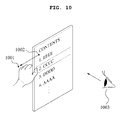
- FIG. 10 illustrates another example operation of manipulating e-paper.
- FIG. 10 illustrates a user manipulating the e-paper in a different direction with respect to the manipulation of FIG. 9 . That is, a user 1003 drags a finger from direction 1002 to direction 1001 by touching at least one of the front side 110 and the back side 120 of the e-paper.
- the e-paper controller 230 may control the e-paper to remove the selected contents from the contents list, in response to the manipulation of the user.
- FIG. 11 illustrates another example operation of manipulating e-paper.
- a user manipulates the e-paper by bending a corner 1101 of the e-paper.
- the user manipulation sensor 220 may sense that the corner 1101 of the e-paper is bent, and thus, may sense the manipulation of the user.
- the degree of bending the corner 1101 may be different depending on the flexibility of the e-paper.
- the user manipulation sensor 220 may be set to sense the manipulation of the user, when the corner 1101 is bent over a preset reference amount.
- the e-paper controller 230 may control the e-paper to set a bookmark on a page displayed on the e-paper, in response to the manipulation by the user of bending the corner 1101 of the e-paper. Accordingly, the user may set a bookmark on a desired page by bending the corner 1101 of the e-paper from direction 1102 to direction 1103.
- the e-paper controller 230 may control the e-paper to display a page where the representative bookmark is set, when the user bends the corner 1101 of the e-paper from the direction 1103 to the direction 1102.
- the page where the representative bookmark is set may be a bookmark set automatically by an e-book.
- the page where the representative bookmark is set may be a page manually set by the user.
- FIG. 12 illustrates another example operation of manipulating e-paper.
- FIG. 12 illustrates an example where a user marks contents by setting a plurality of bookmarks.
- a user may manipulate the e-paper by touching at least one of a front and a back of a corner of the e-paper, over the course of a preset time threshold.
- the e-paper controller 230 may control the e-paper to provide a bookmark setting menu, in response to the manipulation by the user of touching the at least one of the front and back of the corner of the e-paper during the preset amount of time.
- the predefined time may be set to 1 second, 2 seconds, three seconds, or other desired amount of time.
- the providing of the bookmark setting menu may display a message such as, "would you like to add a bookmark on the current page?"
- the e-paper may display the page where a bookmark 1201 is set, together with the bookmark 1201.
- the manipulation of the user may be touching the bookmark 1201 displayed on the e-paper during the predefined time.
- the e-paper controller 230 may control the e-paper to provide a bookmark delete menu, in response to the manipulation by the user of touching the bookmark displayed on the e-paper.
- the providing of the bookmark delete menu may display a message such as "would you like to delete the bookmark on the current page?"
- the manipulation of the user may be touching the bookmark 1201 displayed on the e-paper and dragging the touch from a direction 1202 to a direction 1203.
- the e-paper controller 230 may control the e-paper to delete the bookmark 1201, in response to the manipulation of the user.
- the manipulation of the user may be touching the bookmark 1201 displayed on the e-paper and dragging the touch to a direction 1204.
- the e-paper controller 230 may control the e-paper to provide a bookmark list, in response to the manipulation by the user of touching the bookmark 1201 and dragging the touch.
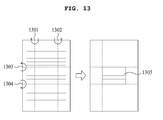
- FIG. 13 illustrates another example operation of manipulating e-paper.
- a user may manipulate the e-paper by folding the e-paper.
- the user may perform a manipulation of folding or bending at areas 1301, 1302, 1303, and 1304 of the e-paper to set a memo area 1305 in the e-paper.
- the e-paper controller 230 may control the e-paper to provide the memo area 1305, in response to the manipulation by the user of folding or bending the areas 1301, 1302, 1303, and 1304 of the e-paper.
- FIG. 14 illustrates another example operation of manipulating e-paper.
- a user may manipulate the e-paper by touching both faces of an e-paper 1402 with a finger and dragging the finger.
- the drag is performed from a direction 1403 to a direction 1404.
- the e-paper controller 230 may control the e-paper 1402 to delete a memo 1405 displayed on the e-paper 1402, in response to the manipulation by the user of touching and dragging the finger.
- the example methods described herein may be performed or controlled by a processor.
- the processor may perform an operation in the same manner as an operation performed by the e-paper controller 230.
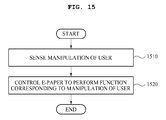
- FIG. 15 illustrates an example of a method of controlling a user interface.
- a user interface apparatus may sense a manipulation by a user on an e-paper.
- the user interface apparatus may control the e-paper to perform a function corresponding to the manipulation of the user.
- the manipulation of the user may relate to a method of handling a paper or a book.
- FIG. 16 illustrates another example of a method of controlling a user interface.
- a user interface apparatus may display a contents list on the e-paper.
- the user interface apparatus may sense a first user manipulation such as a touching of at least one of a front and a back of the e-paper to select contents from among the contents list.
- the user interface apparatus may sense a second user manipulation such as a dragging of a finger by touching at least one of the front and the back of the e-paper.
- the user interface apparatus may control the e-paper to store or delete the selected contents according to a drag direction of the finger touching the front and/or the back of the e-paper.
- the apparatus and methods described herein provide a user interface for e-paper.
- the user interface may be provided based on one or more user manipulations of the e-paper, for example, a bending, a turning, a folding, a drag event, an applied pressure, and the like.
- the user interface may sense the user manipulation with a user manipulation sensor.
- the user manipulation may correspond to a user handling an actual paper or a book, such as the turning of a page, the folding of a page, the marking of a page, and the like.
- the user interface may be provided based on gravity.
- the direction of gravity may be sensed by a gravity-directional sensing unit. For example, when the e-paper is turned over, the user interface can sense that gravity has changed and also change the current page being displayed on the e-paper.
- the processes, functions, methods and/or software described above may be recorded, stored, or fixed in one or more computer-readable storage media that includes program instructions to be implemented by a computer to cause a processor to execute or perform the program instructions.
- the media may also include, alone or in combination with the program instructions, data files, data structures, and the like.
- the media and program instructions may be those specially designed and constructed, or they may be of the kind well-known and available to those having skill in the computer software arts.
- Examples of computer-readable storage media include magnetic media such as hard disks, floppy disks, and magnetic tape; optical media such as CD ROM disks and DVDs; magneto-optical media, such as optical disks; and hardware devices that are specially configured to store and perform program instructions, such as read-only memory (ROM), random access memory (RAM), flash memory, and the like.
- Examples of program instructions include both machine code, such as produced by a compiler, and files containing higher level code that may be executed by the computer using an interpreter.
- the described hardware devices may be configured to act as one or more software modules in order to perform the operations of the above-described example embodiments, or vice versa.
- a computer-readable storage medium may be distributed among computer systems connected through a network and computer-readable codes or program instructions may be stored and executed in a decentralized manner.
Landscapes
- Engineering & Computer Science (AREA)
- Theoretical Computer Science (AREA)
- General Engineering & Computer Science (AREA)
- Human Computer Interaction (AREA)
- Physics & Mathematics (AREA)
- General Physics & Mathematics (AREA)
- Computer Hardware Design (AREA)
- User Interface Of Digital Computer (AREA)
- Position Input By Displaying (AREA)
Applications Claiming Priority (1)
| Application Number | Priority Date | Filing Date | Title |
|---|---|---|---|
| KR1020090076555A KR101602643B1 (ko) | 2009-08-19 | 2009-08-19 | 전자 종이를 위한 사용자 인터페이스 제공 장치 및 방법 |
Publications (2)
| Publication Number | Publication Date |
|---|---|
| EP2287710A2 true EP2287710A2 (de) | 2011-02-23 |
| EP2287710A3 EP2287710A3 (de) | 2014-06-04 |
Family
ID=43012567
Family Applications (1)
| Application Number | Title | Priority Date | Filing Date |
|---|---|---|---|
| EP10161305.7A Withdrawn EP2287710A3 (de) | 2009-08-19 | 2010-04-28 | Verfahren und Vorrichtung für elektronisches Papier mit einer Benutzerschnittstelle |
Country Status (4)
| Country | Link |
|---|---|
| US (1) | US9323378B2 (de) |
| EP (1) | EP2287710A3 (de) |
| JP (1) | JP2011044128A (de) |
| KR (1) | KR101602643B1 (de) |
Cited By (4)
| Publication number | Priority date | Publication date | Assignee | Title |
|---|---|---|---|---|
| WO2013151377A1 (en) * | 2012-04-07 | 2013-10-10 | Samsung Electronics Co., Ltd. | Electronic paper controlling apparatus and method thereof |
| CN103365552A (zh) * | 2012-04-09 | 2013-10-23 | 三星电子株式会社 | 电子书的书签设置方法及其装置 |
| CN103853491A (zh) * | 2012-12-05 | 2014-06-11 | 富士施乐株式会社 | 信息处理设备和信息处理方法 |
| US9805494B2 (en) | 2012-05-11 | 2017-10-31 | Semiconductor Energy Laboratory Co., Ltd. | Electronic device, storage medium, program, and displaying method |
Families Citing this family (20)
| Publication number | Priority date | Publication date | Assignee | Title |
|---|---|---|---|---|
| TWI393935B (zh) * | 2009-01-08 | 2013-04-21 | Prime View Int Co Ltd | 用於可撓性顯示裝置之觸控結構 |
| DE102010011039A1 (de) * | 2010-03-11 | 2011-09-15 | Volkswagen Ag | Verfahren und Vorrichtung zum Betreiben einer Benutzerschnittstelle |
| EP2437151B1 (de) | 2010-10-01 | 2020-07-08 | Samsung Electronics Co., Ltd. | Vorrichtung und Verfahren zum Blättern von e-Book-Seiten in einem tragbaren Endgerät |
| US9678572B2 (en) | 2010-10-01 | 2017-06-13 | Samsung Electronics Co., Ltd. | Apparatus and method for turning e-book pages in portable terminal |
| KR101743632B1 (ko) | 2010-10-01 | 2017-06-07 | 삼성전자주식회사 | 휴대용 단말기에서 전자책 페이지 넘김 장치 및 방법 |
| JP5665601B2 (ja) * | 2011-02-24 | 2015-02-04 | 京セラ株式会社 | 電子機器、接触操作制御プログラムおよび接触操作制御方法 |
| JP5327256B2 (ja) * | 2011-03-30 | 2013-10-30 | ブラザー工業株式会社 | 入力装置及び画像表示装置 |
| EP2696163B1 (de) * | 2011-04-08 | 2018-05-23 | Murata Manufacturing Co., Ltd. | Verschiebungssensor, verschiebungsdetektionsvorrichtung und betriebsvorrichtung |
| TWI438740B (zh) * | 2011-04-13 | 2014-05-21 | Wistron Corp | 可撓式電子裝置 |
| KR20130041531A (ko) * | 2011-10-17 | 2013-04-25 | 한국과학기술연구원 | 전자책 장치 및 전자책 장치의 사용자 인터페이스 제공 방법 |
| US9411423B2 (en) * | 2012-02-08 | 2016-08-09 | Immersion Corporation | Method and apparatus for haptic flex gesturing |
| CN103309435B (zh) * | 2012-03-13 | 2016-07-06 | 联想(北京)有限公司 | 接近传感单元 |
| WO2014033872A1 (ja) * | 2012-08-30 | 2014-03-06 | 富士通株式会社 | 表示装置,プログラム |
| KR101973993B1 (ko) * | 2012-10-08 | 2019-04-30 | 엘지전자 주식회사 | 단말의 제어 장치 및 그 방법 |
| JP5983366B2 (ja) * | 2012-12-05 | 2016-08-31 | 富士ゼロックス株式会社 | 情報処理装置及びプログラム |
| US20150033193A1 (en) * | 2013-07-25 | 2015-01-29 | Here Global B.V. | Methods for modifying images and related aspects |
| US9891743B2 (en) * | 2014-05-02 | 2018-02-13 | Semiconductor Energy Laboratory Co., Ltd. | Driving method of an input device |
| KR20160138748A (ko) | 2015-05-26 | 2016-12-06 | 삼성전자주식회사 | 플렉시블 장치 |
| JP6399158B2 (ja) * | 2017-06-22 | 2018-10-03 | 富士ゼロックス株式会社 | 画像処理システム |
| CN112181241A (zh) * | 2019-07-01 | 2021-01-05 | 珠海金山办公软件有限公司 | 一种切换处理的方法、装置、计算机存储介质及终端 |
Citations (3)
| Publication number | Priority date | Publication date | Assignee | Title |
|---|---|---|---|---|
| US20080316581A1 (en) * | 2007-06-22 | 2008-12-25 | Seiko Epson Corporation | Method of Driving Electrophoretic Display Device, and Electrophoretic Display Device |
| DE102007052008A1 (de) * | 2007-10-26 | 2009-04-30 | Andreas Steinhauser | Single- oder multitouchfähiger Touchscreen oder Touchpad bestehend aus einem Array von Drucksensoren sowie Herstellung solcher Sensoren |
| US20090144656A1 (en) * | 2007-11-29 | 2009-06-04 | Samsung Electronics Co., Ltd. | Method and system for processing multilayer document using touch screen |
Family Cites Families (24)
| Publication number | Priority date | Publication date | Assignee | Title |
|---|---|---|---|---|
| US6243071B1 (en) * | 1993-11-03 | 2001-06-05 | Apple Computer, Inc. | Tool set for navigating through an electronic book |
| US5917491A (en) * | 1997-08-29 | 1999-06-29 | Netscape Communications Corporation | Page proxy |
| US6340957B1 (en) | 1997-08-29 | 2002-01-22 | Xerox Corporation | Dynamically relocatable tileable displays |
| US6321209B1 (en) * | 1999-02-18 | 2001-11-20 | Wired Solutions, Llc | System and method for providing a dynamic advertising content window within a window based content manifestation environment provided in a browser |
| US6992687B1 (en) * | 1999-12-07 | 2006-01-31 | Microsoft Corporation | Bookmarking and placemarking a displayed document in a computer system |
| KR100383518B1 (ko) | 2001-01-29 | 2003-05-12 | 남용석 | 손으로 책장을 넘겨서 페이지를 전자적으로 전환하는 방법및 이를 이용한 휴대용 정보 입출력 장치 |
| US7071915B2 (en) | 2001-09-13 | 2006-07-04 | E-Book Systems Pte Ltd. | Method for displaying flipping pages via electromechanical information browsing device |
| KR100769783B1 (ko) | 2002-03-29 | 2007-10-24 | 가부시끼가이샤 도시바 | 표시 입력 장치 및 표시 입력 시스템 |
| JP4434609B2 (ja) | 2002-03-29 | 2010-03-17 | 株式会社東芝 | 表示入力システム |
| US7456823B2 (en) * | 2002-06-14 | 2008-11-25 | Sony Corporation | User interface apparatus and portable information apparatus |
| JP4287675B2 (ja) | 2003-02-27 | 2009-07-01 | 富士フイルム株式会社 | 電子ペーパー |
| JP3762412B2 (ja) | 2003-03-31 | 2006-04-05 | キヤノン株式会社 | 情報機器と情報表示方法 |
| JP4539132B2 (ja) | 2004-03-18 | 2010-09-08 | 富士ゼロックス株式会社 | 電子ペーパー |
| US7698644B2 (en) * | 2005-04-26 | 2010-04-13 | Cisco Technology, Inc. | System and method for displaying sticky notes on a phone |
| JP2007141029A (ja) | 2005-11-21 | 2007-06-07 | Matsushita Electric Ind Co Ltd | 携帯情報装置 |
| US20070247422A1 (en) * | 2006-03-30 | 2007-10-25 | Xuuk, Inc. | Interaction techniques for flexible displays |
| US7880718B2 (en) | 2006-04-18 | 2011-02-01 | International Business Machines Corporation | Apparatus, system, and method for electronic paper flex input |
| US7782274B2 (en) * | 2006-06-09 | 2010-08-24 | Cfph, Llc | Folding multimedia display device |
| US7934156B2 (en) | 2006-09-06 | 2011-04-26 | Apple Inc. | Deletion gestures on a portable multifunction device |
| US20080163053A1 (en) * | 2006-12-28 | 2008-07-03 | Samsung Electronics Co., Ltd. | Method to provide menu, using menu set and multimedia device using the same |
| US9823833B2 (en) * | 2007-06-05 | 2017-11-21 | Immersion Corporation | Method and apparatus for haptic enabled flexible touch sensitive surface |
| WO2009012820A1 (en) | 2007-07-25 | 2009-01-29 | Nokia Corporation | Deferring alerts |
| JP5111003B2 (ja) | 2007-07-30 | 2012-12-26 | セイコーエプソン株式会社 | 携帯情報機器、電子ブック、情報記憶媒体、携帯情報機器の制御方法及び電子ブックの制御方法 |
| US20100011291A1 (en) * | 2008-07-10 | 2010-01-14 | Nokia Corporation | User interface, device and method for a physically flexible device |
-
2009
- 2009-08-19 KR KR1020090076555A patent/KR101602643B1/ko not_active Expired - Fee Related
-
2010
- 2010-03-25 US US12/732,096 patent/US9323378B2/en active Active
- 2010-03-26 JP JP2010071386A patent/JP2011044128A/ja active Pending
- 2010-04-28 EP EP10161305.7A patent/EP2287710A3/de not_active Withdrawn
Patent Citations (3)
| Publication number | Priority date | Publication date | Assignee | Title |
|---|---|---|---|---|
| US20080316581A1 (en) * | 2007-06-22 | 2008-12-25 | Seiko Epson Corporation | Method of Driving Electrophoretic Display Device, and Electrophoretic Display Device |
| DE102007052008A1 (de) * | 2007-10-26 | 2009-04-30 | Andreas Steinhauser | Single- oder multitouchfähiger Touchscreen oder Touchpad bestehend aus einem Array von Drucksensoren sowie Herstellung solcher Sensoren |
| US20090144656A1 (en) * | 2007-11-29 | 2009-06-04 | Samsung Electronics Co., Ltd. | Method and system for processing multilayer document using touch screen |
Cited By (14)
| Publication number | Priority date | Publication date | Assignee | Title |
|---|---|---|---|---|
| WO2013151377A1 (en) * | 2012-04-07 | 2013-10-10 | Samsung Electronics Co., Ltd. | Electronic paper controlling apparatus and method thereof |
| CN103365552B (zh) * | 2012-04-09 | 2018-01-02 | 三星电子株式会社 | 电子书的书签设置方法及其装置 |
| CN103365552A (zh) * | 2012-04-09 | 2013-10-23 | 三星电子株式会社 | 电子书的书签设置方法及其装置 |
| EP2650770A3 (de) * | 2012-04-09 | 2017-07-05 | Samsung Electronics Co., Ltd | Lesezeicheneinstellungsverfahren für ein E-Book und Vorrichtung dafür |
| US10467797B2 (en) | 2012-05-11 | 2019-11-05 | Semiconductor Energy Laboratory Co., Ltd. | Electronic device, storage medium, program, and displaying method |
| US9805494B2 (en) | 2012-05-11 | 2017-10-31 | Semiconductor Energy Laboratory Co., Ltd. | Electronic device, storage medium, program, and displaying method |
| US20190172248A1 (en) | 2012-05-11 | 2019-06-06 | Semiconductor Energy Laboratory Co., Ltd. | Electronic device, storage medium, program, and displaying method |
| US10380783B2 (en) | 2012-05-11 | 2019-08-13 | Semiconductor Energy Laboratory Co., Ltd. | Electronic device, storage medium, program, and displaying method |
| US10719972B2 (en) | 2012-05-11 | 2020-07-21 | Semiconductor Energy Laboratory Co., Ltd. | Electronic device, storage medium, program, and displaying method |
| US11216041B2 (en) | 2012-05-11 | 2022-01-04 | Semiconductor Energy Laboratory Co., Ltd. | Electronic device, storage medium, program, and displaying method |
| US11815956B2 (en) | 2012-05-11 | 2023-11-14 | Semiconductor Energy Laboratory Co., Ltd. | Electronic device, storage medium, program, and displaying method |
| US12117872B2 (en) | 2012-05-11 | 2024-10-15 | Semiconductor Energy Laboratory Co., Ltd. | Electronic device, storage medium, program, and displaying method |
| CN103853491B (zh) * | 2012-12-05 | 2018-09-11 | 富士施乐株式会社 | 信息处理设备和信息处理方法 |
| CN103853491A (zh) * | 2012-12-05 | 2014-06-11 | 富士施乐株式会社 | 信息处理设备和信息处理方法 |
Also Published As
| Publication number | Publication date |
|---|---|
| EP2287710A3 (de) | 2014-06-04 |
| KR20110019019A (ko) | 2011-02-25 |
| US9323378B2 (en) | 2016-04-26 |
| US20110047460A1 (en) | 2011-02-24 |
| JP2011044128A (ja) | 2011-03-03 |
| KR101602643B1 (ko) | 2016-03-11 |
Similar Documents
| Publication | Publication Date | Title |
|---|---|---|
| US9323378B2 (en) | Method and apparatus of electronic paper comprising a user interface | |
| US9400601B2 (en) | Techniques for paging through digital content on touch screen devices | |
| US8650509B2 (en) | Touchscreen gestures for virtual bookmarking of pages | |
| US9575948B2 (en) | Annotation of digital content via selective fixed formatting | |
| KR101895818B1 (ko) | 단말기에서 전자책과 연관된 피드백 제공 방법 및 장치 | |
| US9256588B1 (en) | Transferring content to a substantially similar location in a virtual notebook using a stylus enabled device | |
| KR20130100580A (ko) | 단말기에서 페이지 넘김 방법 및 장치 | |
| KR20130114336A (ko) | 단말기에서 페이지 표시 방법 및 장치 | |
| US20130055140A1 (en) | System and method for navigation in an electronic document | |
| EP2953014B1 (de) | Dokumentendurchsuchungsvorrichtung, verfahren zum umdrehen von seiten elektronischer dokumente und programm | |
| CN103135898A (zh) | 在移动装置中用于管理书相关项的系统和方法 | |
| WO2010111053A2 (en) | Dual screen portable touch sensitive computing system | |
| CN102483690A (zh) | 显示具有多个页的文档的便携式多媒体装置 | |
| US20150100874A1 (en) | Ui techniques for revealing extra margin area for paginated digital content | |
| CN104081326A (zh) | 用于显示终端中的页面的方法和设备 | |
| JP2012008676A (ja) | 電子書籍表示装置 | |
| JP6517322B2 (ja) | 電子書籍の閲覧支援方法及び閲覧支援用プログラム | |
| KR100888402B1 (ko) | 사실적인 페이지 넘김 화면을 제공하는 전자서적 출력 방법그 시스템 | |
| Wightman et al. | TouchMark: Flexible document navigation and bookmarking techniques for e-book readers. | |
| KR20100041150A (ko) | 멀티터치를 이용한 사용자 인터페이스 제어방법 | |
| JP5777915B2 (ja) | 電子機器及びその表示方法 | |
| JP6283280B2 (ja) | 電子書籍閲覧装置及び電子書籍閲覧方法 | |
| WO2016079994A1 (en) | System and method for toggle interface | |
| KR101920407B1 (ko) | 가요성 표시부를 가지는 단말기 및 그의 데이터 표시 방법 | |
| KR102499899B1 (ko) | 이북 리더용 디바이스의 동작 방법, 어플리케이션 및 이북 리더용 디바이스 |
Legal Events
| Date | Code | Title | Description |
|---|---|---|---|
| PUAI | Public reference made under article 153(3) epc to a published international application that has entered the european phase |
Free format text: ORIGINAL CODE: 0009012 |
|
| AK | Designated contracting states |
Kind code of ref document: A2 Designated state(s): AT BE BG CH CY CZ DE DK EE ES FI FR GB GR HR HU IE IS IT LI LT LU LV MC MK MT NL NO PL PT RO SE SI SK SM TR |
|
| AX | Request for extension of the european patent |
Extension state: AL BA ME RS |
|
| RAP1 | Party data changed (applicant data changed or rights of an application transferred) |
Owner name: SAMSUNG ELECTRONICS CO., LTD. |
|
| PUAL | Search report despatched |
Free format text: ORIGINAL CODE: 0009013 |
|
| AK | Designated contracting states |
Kind code of ref document: A3 Designated state(s): AT BE BG CH CY CZ DE DK EE ES FI FR GB GR HR HU IE IS IT LI LT LU LV MC MK MT NL NO PL PT RO SE SI SK SM TR |
|
| AX | Request for extension of the european patent |
Extension state: AL BA ME RS |
|
| RIC1 | Information provided on ipc code assigned before grant |
Ipc: G06F 3/041 20060101AFI20140425BHEP Ipc: G06F 3/048 20130101ALI20140425BHEP |
|
| 17P | Request for examination filed |
Effective date: 20141204 |
|
| RBV | Designated contracting states (corrected) |
Designated state(s): AT BE BG CH CY CZ DE DK EE ES FI FR GB GR HR HU IE IS IT LI LT LU LV MC MK MT NL NO PL PT RO SE SI SK SM TR |
|
| 17Q | First examination report despatched |
Effective date: 20150610 |
|
| STAA | Information on the status of an ep patent application or granted ep patent |
Free format text: STATUS: THE APPLICATION IS DEEMED TO BE WITHDRAWN |
|
| 18D | Application deemed to be withdrawn |
Effective date: 20170725 |