EP2330558A1 - Dispositif d'interface utilisateur, procédé d'interface utilisateur, et support d'enregistrement - Google Patents
Dispositif d'interface utilisateur, procédé d'interface utilisateur, et support d'enregistrement Download PDFInfo
- Publication number
- EP2330558A1 EP2330558A1 EP09815911A EP09815911A EP2330558A1 EP 2330558 A1 EP2330558 A1 EP 2330558A1 EP 09815911 A EP09815911 A EP 09815911A EP 09815911 A EP09815911 A EP 09815911A EP 2330558 A1 EP2330558 A1 EP 2330558A1
- Authority
- EP
- European Patent Office
- Prior art keywords
- user
- face
- independent object
- user interface
- interface device
- Prior art date
- Legal status (The legal status is an assumption and is not a legal conclusion. Google has not performed a legal analysis and makes no representation as to the accuracy of the status listed.)
- Granted
Links
Images





Classifications
-
- G—PHYSICS
- G06—COMPUTING OR CALCULATING; COUNTING
- G06F—ELECTRIC DIGITAL DATA PROCESSING
- G06F3/00—Input arrangements for transferring data to be processed into a form capable of being handled by the computer; Output arrangements for transferring data from processing unit to output unit, e.g. interface arrangements
- G06F3/01—Input arrangements or combined input and output arrangements for interaction between user and computer
- G06F3/017—Gesture based interaction, e.g. based on a set of recognized hand gestures
-
- G—PHYSICS
- G06—COMPUTING OR CALCULATING; COUNTING
- G06F—ELECTRIC DIGITAL DATA PROCESSING
- G06F3/00—Input arrangements for transferring data to be processed into a form capable of being handled by the computer; Output arrangements for transferring data from processing unit to output unit, e.g. interface arrangements
- G06F3/01—Input arrangements or combined input and output arrangements for interaction between user and computer
- G06F3/048—Interaction techniques based on graphical user interfaces [GUI]
- G06F3/0481—Interaction techniques based on graphical user interfaces [GUI] based on specific properties of the displayed interaction object or a metaphor-based environment, e.g. interaction with desktop elements like windows or icons, or assisted by a cursor's changing behaviour or appearance
-
- H—ELECTRICITY
- H04—ELECTRIC COMMUNICATION TECHNIQUE
- H04N—PICTORIAL COMMUNICATION, e.g. TELEVISION
- H04N21/00—Selective content distribution, e.g. interactive television or video on demand [VOD]
- H04N21/40—Client devices specifically adapted for the reception of or interaction with content, e.g. set-top-box [STB]; Operations thereof
- H04N21/41—Structure of client; Structure of client peripherals
- H04N21/422—Input-only peripherals, i.e. input devices connected to specially adapted client devices, e.g. global positioning system [GPS]
- H04N21/4223—Cameras
-
- H—ELECTRICITY
- H04—ELECTRIC COMMUNICATION TECHNIQUE
- H04N—PICTORIAL COMMUNICATION, e.g. TELEVISION
- H04N21/00—Selective content distribution, e.g. interactive television or video on demand [VOD]
- H04N21/40—Client devices specifically adapted for the reception of or interaction with content, e.g. set-top-box [STB]; Operations thereof
- H04N21/43—Processing of content or additional data, e.g. demultiplexing additional data from a digital video stream; Elementary client operations, e.g. monitoring of home network or synchronising decoder's clock; Client middleware
- H04N21/431—Generation of visual interfaces for content selection or interaction; Content or additional data rendering
-
- H—ELECTRICITY
- H04—ELECTRIC COMMUNICATION TECHNIQUE
- H04N—PICTORIAL COMMUNICATION, e.g. TELEVISION
- H04N21/00—Selective content distribution, e.g. interactive television or video on demand [VOD]
- H04N21/40—Client devices specifically adapted for the reception of or interaction with content, e.g. set-top-box [STB]; Operations thereof
- H04N21/43—Processing of content or additional data, e.g. demultiplexing additional data from a digital video stream; Elementary client operations, e.g. monitoring of home network or synchronising decoder's clock; Client middleware
- H04N21/431—Generation of visual interfaces for content selection or interaction; Content or additional data rendering
- H04N21/4312—Generation of visual interfaces for content selection or interaction; Content or additional data rendering involving specific graphical features, e.g. screen layout, special fonts or colors, blinking icons, highlights or animations
- H04N21/4316—Generation of visual interfaces for content selection or interaction; Content or additional data rendering involving specific graphical features, e.g. screen layout, special fonts or colors, blinking icons, highlights or animations for displaying supplemental content in a region of the screen, e.g. an advertisement in a separate window
-
- H—ELECTRICITY
- H04—ELECTRIC COMMUNICATION TECHNIQUE
- H04N—PICTORIAL COMMUNICATION, e.g. TELEVISION
- H04N21/00—Selective content distribution, e.g. interactive television or video on demand [VOD]
- H04N21/40—Client devices specifically adapted for the reception of or interaction with content, e.g. set-top-box [STB]; Operations thereof
- H04N21/43—Processing of content or additional data, e.g. demultiplexing additional data from a digital video stream; Elementary client operations, e.g. monitoring of home network or synchronising decoder's clock; Client middleware
- H04N21/441—Acquiring end-user identification, e.g. using personal code sent by the remote control or by inserting a card
- H04N21/4415—Acquiring end-user identification, e.g. using personal code sent by the remote control or by inserting a card using biometric characteristics of the user, e.g. by voice recognition or fingerprint scanning
-
- H—ELECTRICITY
- H04—ELECTRIC COMMUNICATION TECHNIQUE
- H04N—PICTORIAL COMMUNICATION, e.g. TELEVISION
- H04N21/00—Selective content distribution, e.g. interactive television or video on demand [VOD]
- H04N21/40—Client devices specifically adapted for the reception of or interaction with content, e.g. set-top-box [STB]; Operations thereof
- H04N21/43—Processing of content or additional data, e.g. demultiplexing additional data from a digital video stream; Elementary client operations, e.g. monitoring of home network or synchronising decoder's clock; Client middleware
- H04N21/442—Monitoring of processes or resources, e.g. detecting the failure of a recording device, monitoring the downstream bandwidth, the number of times a movie has been viewed, the storage space available from the internal hard disk
- H04N21/44213—Monitoring of end-user related data
- H04N21/44218—Detecting physical presence or behaviour of the user, e.g. using sensors to detect if the user is leaving the room or changes his face expression during a TV programme
-
- H—ELECTRICITY
- H04—ELECTRIC COMMUNICATION TECHNIQUE
- H04N—PICTORIAL COMMUNICATION, e.g. TELEVISION
- H04N21/00—Selective content distribution, e.g. interactive television or video on demand [VOD]
- H04N21/40—Client devices specifically adapted for the reception of or interaction with content, e.g. set-top-box [STB]; Operations thereof
- H04N21/43—Processing of content or additional data, e.g. demultiplexing additional data from a digital video stream; Elementary client operations, e.g. monitoring of home network or synchronising decoder's clock; Client middleware
- H04N21/442—Monitoring of processes or resources, e.g. detecting the failure of a recording device, monitoring the downstream bandwidth, the number of times a movie has been viewed, the storage space available from the internal hard disk
- H04N21/44213—Monitoring of end-user related data
- H04N21/44222—Analytics of user selections, e.g. selection of programmes or purchase activity
- H04N21/44224—Monitoring of user activity on external systems, e.g. Internet browsing
-
- H—ELECTRICITY
- H04—ELECTRIC COMMUNICATION TECHNIQUE
- H04N—PICTORIAL COMMUNICATION, e.g. TELEVISION
- H04N21/00—Selective content distribution, e.g. interactive television or video on demand [VOD]
- H04N21/40—Client devices specifically adapted for the reception of or interaction with content, e.g. set-top-box [STB]; Operations thereof
- H04N21/43—Processing of content or additional data, e.g. demultiplexing additional data from a digital video stream; Elementary client operations, e.g. monitoring of home network or synchronising decoder's clock; Client middleware
- H04N21/443—OS processes, e.g. booting an STB, implementing a Java virtual machine in an STB or power management in an STB
- H04N21/4438—Window management, e.g. event handling following interaction with the user interface
-
- H—ELECTRICITY
- H04—ELECTRIC COMMUNICATION TECHNIQUE
- H04N—PICTORIAL COMMUNICATION, e.g. TELEVISION
- H04N21/00—Selective content distribution, e.g. interactive television or video on demand [VOD]
- H04N21/40—Client devices specifically adapted for the reception of or interaction with content, e.g. set-top-box [STB]; Operations thereof
- H04N21/45—Management operations performed by the client for facilitating the reception of or the interaction with the content or administrating data related to the end-user or to the client device itself, e.g. learning user preferences for recommending movies, resolving scheduling conflicts
- H04N21/4508—Management of client data or end-user data
- H04N21/4532—Management of client data or end-user data involving end-user characteristics, e.g. viewer profile, preferences
-
- H—ELECTRICITY
- H04—ELECTRIC COMMUNICATION TECHNIQUE
- H04N—PICTORIAL COMMUNICATION, e.g. TELEVISION
- H04N21/00—Selective content distribution, e.g. interactive television or video on demand [VOD]
- H04N21/40—Client devices specifically adapted for the reception of or interaction with content, e.g. set-top-box [STB]; Operations thereof
- H04N21/47—End-user applications
-
- H—ELECTRICITY
- H04—ELECTRIC COMMUNICATION TECHNIQUE
- H04N—PICTORIAL COMMUNICATION, e.g. TELEVISION
- H04N21/00—Selective content distribution, e.g. interactive television or video on demand [VOD]
- H04N21/80—Generation or processing of content or additional data by content creator independently of the distribution process; Content per se
- H04N21/83—Generation or processing of protective or descriptive data associated with content; Content structuring
- H04N21/84—Generation or processing of descriptive data, e.g. content descriptors
-
- H—ELECTRICITY
- H04—ELECTRIC COMMUNICATION TECHNIQUE
- H04N—PICTORIAL COMMUNICATION, e.g. TELEVISION
- H04N23/00—Cameras or camera modules comprising electronic image sensors; Control thereof
- H04N23/60—Control of cameras or camera modules
- H04N23/61—Control of cameras or camera modules based on recognised objects
- H04N23/611—Control of cameras or camera modules based on recognised objects where the recognised objects include parts of the human body
-
- H—ELECTRICITY
- H04—ELECTRIC COMMUNICATION TECHNIQUE
- H04N—PICTORIAL COMMUNICATION, e.g. TELEVISION
- H04N21/00—Selective content distribution, e.g. interactive television or video on demand [VOD]
- H04N21/40—Client devices specifically adapted for the reception of or interaction with content, e.g. set-top-box [STB]; Operations thereof
- H04N21/41—Structure of client; Structure of client peripherals
- H04N21/422—Input-only peripherals, i.e. input devices connected to specially adapted client devices, e.g. global positioning system [GPS]
- H04N21/42204—User interfaces specially adapted for controlling a client device through a remote control device; Remote control devices therefor
- H04N21/42206—User interfaces specially adapted for controlling a client device through a remote control device; Remote control devices therefor characterized by hardware details
- H04N21/42222—Additional components integrated in the remote control device, e.g. timer, speaker, sensors for detecting position, direction or movement of the remote control, microphone or battery charging device
Definitions
- the present invention relates to a user interface device for a large screen display operated by multiple people.
- an increase in display size tends to entail an increase in distance between a starting point and an ending point of movement of a content when transferring the content.
- a method is desired in which the content-passing user does not need to designate an exact location of the ending point and a content-receiving user can designate it.
- conventional techniques do not assume a situation of sharing content transfer, and have a problem that the content-receiving user cannot successfully receive the content when the content-passing user does not designate a movement direction of the content in a sufficiently adequate manner.
- the present invention has been devised to solve the above conventional problems, and an object of the present invention is to provide a user interface device which controls movement of a content so that a user can readily obtain the content when the user attempts to obtain the content displayed on a screen.
- a user interface device allows a user to operate an object displayed in a work space assigned to the user.
- the user interface device includes a detection unit which detects a position of the user; a display unit which displays the work space; and a control unit which controls display of an independent object which belongs to no user.
- the control unit moves the independent object in a mode which varies between when the independent object is in a face-to-face space of the display unit which is face to face with the position of the user and when the independent object is outside the face-to-face space.
- the control unit also stops the moving independent object in a workspace assigned to the user when the user obtains the independent object.
- control unit may cause a moving speed of the independent object moving in the face-to-face space to be slower than a moving speed of the independent object moving outside the face-to-face space.
- control unit may cause a display size of the independent object moving in the face-to-face space to be larger than a display size of the independent object moving outside the face-to-face space.
- the detection unit detects a gesture of the user.
- the control unit may stop the independent object in the work space assigned to the user when the detection unit detects an obtainment gesture indicating that the independent object is to be obtained.
- the obtainment gesture may be a gesture of turning a palm to a screen for a predetermined time period.
- the obtainment gesture may be a gesture of moving a fingertip of a thumb and fingertips of other fingers in a pinching manner.
- the obtainment gesture may be a gesture in which an open hand facing the display unit is clenched while a palm is being turned toward oneself.
- the control unit may control display of the object as the independent object. With this, the user does not need to move the object to a work space assigned to a receiving user, and thus can simplify a transfer operation.
- control unit may approximate a display angle of the independent objects moving in the face-to-face space to a display angle at a time when the other user makes the releasing gesture.
- the independent object returns to its initial state even when the independent object moves while turning, and thus it becomes easy for the user to watch the independent object.
- the display unit is divided into work spaces each assigned to a corresponding one of users.
- the user interface device further includes a determination unit which determines, among the users, a recipient-candidate user which is a candidate to receive the independent object.
- the control unit moves the independent object in the mode which varies between when the independent object is in a face-to-face space of the display unit which is face to face with a position of the recipient-candidate user detected by the detection unit and when the independent object is outside the face-to-face space.
- the control unit may stop the independent object in a work space assigned to the recipient-candidate user when the recipient-candidate user obtains the independent object.
- the detection unit detects a gesture of the user.
- the control unit may increase a moving speed of the independent object when the detection unit detects an obtainment refusing gesture of the recipient-candidate user indicating that the independent object is not to be obtained, with the independent object being in the face-to-face space of the recipient-candidate user. This also makes it possible to increase the efficiency of the transfer of object, and at the same time to suppress the discomfort of the user having no intention of obtainment.
- the obtainment refusing gesture may be a gesture of moving a hand from side to side.
- the obtainment refusing gesture may be a state where the obtainment gesture has been made.
- control unit may control the display of the independent object based on a physical characteristic of the user. This enables more precise display control. For example, the following aspect can be considered.
- the physical characteristic is an age of the user.
- the control unit may cause a moving speed of the independent object moving in the face-to-face space to be slower as the age of the user is lower.
- the physical characteristic is a dominant arm of the user.
- the control unit may change a moving speed of the independent object moving in the face-to-face space according to a combination of the dominant arm and a moving direction of the independent object on the display unit.
- the physical characteristic is a body height of the user.
- the control unit may cause a moving speed of the independent object moving in the face-to-face space to be slower as the body height of the user is lower.
- the physical characteristic is a body height of the user.
- the control unit may cause a display height of the independent object moving in the face-to-face space to be lower as the body height of the user is lower.
- control unit may control the display of the independent object according to metadata attached to the independent object and attribute information of the user. For instance, the control unit may obtain the attribute information by communicating with a mobile terminal carried by the user.
- the object may be a picture.
- the object is not limited to the picture, and may include various files (or folders) that can be processed by general computers such as video data, music data, and document data.
- control unit may move the independent object toward the other end of the display unit. Accordingly, it is possible to give an occasion for re-obtainment a user who has failed to obtain the independent object once at least (or has not dared to obtain the independent object).
- control unit may stop the independent object. Further, when a predetermined time period elapses with the independent object stopped, the control unit may hide the independent object. Consequently, it is possible to delete, from the display unit, an object for which no user shows intention of obtainment.
- a user interface method is a method of allowing a user to operate an object displayed in a work space assigned to the user, using a display unit which displays the work space, and specifically includes: detecting a position of the user; and controlling display of an independent object which belongs to no user.
- the independent object is moved in a mode which varies between when the independent object is in a face-to-face space of the display unit which is face to face with the position of the user detected in the detecting and when the independent object is outside the face-to-face space.
- the independent object is stopped in the work space assigned to the user when the user obtains the independent object.
- a computer-readable recording medium on which a program causing a computer to execute the above user interface method is recorded.
- the present invention can be realized not only as the user interface device but also as the program causing the computer to execute functions of the user interface device. Needless to say, such a program can be distributed via recording media such as CD-ROMs and transmission media such as the Internet.
- the user interface device of the present invention controls movement of a content according to a position of a user when the user attempts to obtain the content displayed on a screen, and thus the user can readily receive the content.
- a user interface device of the present invention is, for example, a device which controls an application which divides an image display unit into work spaces and is executed by users in the work spaces each assigned to one of the users.
- Fig. 1A is a diagram showing an appearance of the user interface device of the present invention and an example of an interface between the user interface device and related apparatuses.
- the user interface device includes, for instance, one or more user-detecting cameras. Display on the image display unit is controlled according to a position and a movement of a user detected based on an analysis of image information obtained by the one or more user-detecting cameras.
- the display on the image display unit may be controlled based on a movement of the user's hand holding a gesture-input remote control or a remote control operation of the user such as holding down a button provided on the remote control.
- the user interface device may receive an input from a touch table including an electrostatic touchpad. Accordingly, the user can further selectively use various input methods to suit situations of the user or types of applications.
- the user interface device obtains, from a tag (typically an IC tag) attached to an apparatus owned by the user, information about a name, a gender, an age, interests, preferences and the like of the user that is recorded in the tag, and thus can use the information to control an application.
- a tag typically an IC tag
- the user interface device may be network-connected to other household electrical appliances such as a digital still camera and a digital camera recorder through radio transmission or via a router/hub.
- household electrical appliances such as a digital still camera and a digital camera recorder through radio transmission or via a router/hub.
- the user interface device makes it possible to show on a screen digital information and an operation menu received from the appliances, and at the same time transmit to the appliances operation information of the user with respect to the menu shown on the screen.
- users can use the above user interface device to perform a group work such as creation and execution of a slide show using pictures.
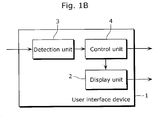
- Fig. 1B is a block diagram of the user interface device 1.
- the user interface device 1 is a device which assigns a work space to each of users and allows each user to operate an object in the work space.
- the work space is displayed on a display unit 2.
- object may include, for example, various files (or folders) that can be processed by general computers such as picture data, video data, music data, and document data. Further, the phrase "to operate an object” indicates, for instance, creating, browsing, editing, and deleting the above data.
- a typical use case of the user interface device 1 is that the users cause plural picture data to be displayed in the work spaces each of which is assigned to a corresponding one of the users, and, for instance, browse and organize the plural picture data.
- the display unit 2 is, for instance, a large-size display panel. Every available display panel such as a liquid crystal display, a plasma display, and an organic EL display can be used as the display panel. A work space and an object are displayed on the display unit 2. It is to be noted that the display unit 2 may be a large-size display which displays work spaces or a combination of displays which displays one work space.
- a detection unit 3 detects a position of a user in front of the display unit 2. Further, the detection unit 3 may identify the user in front of the display unit 2, and detect a gesture of each of users and an amount of speech of each user.
- the detection unit 3 includes, for instance, an imaging unit such as a user-detecting camera and an analysis unit which analyzes an image captured by the imaging unit and detects a position of a user or the like.
- a control unit 4 controls display on the display unit 2 and mainly display of an object.
- the control unit 4 moves an object which belongs to no user (hereinafter referred to as "independent object").
- independent object For instance, a user selects an object displayed in a work space of the user and makes a gesture (hereinafter referred to as "releasing gesture") indicating that the object is to be released, and thus an independent object is generated.
- releasing gesture a gesture
- the user interface device 1 may automatically generate the independent object.
- the control unit 4 moves the independent object in a mode which varies between when the independent object is in a space (hereinafter referred to as "face-to-face space") which is on the display unit 2 and in front of a user and when the independent object is outside the face-to-face space.
- face-to-face space a space which is on the display unit 2 and in front of a user and when the independent object is outside the face-to-face space.
- a moving speed of an independent object moving in a face-to-face space may be caused to be slower than that of an independent object moving outside the face-to-face space.
- a display size of the independent object moving in the face-to-face space may be caused to be larger than that of the independent object moving outside the face-to-face space.
- a display angle of the independent object moving in the face-to-face space may be approximated to a display angle at a time when the user makes a releasing gesture.
- control unit 4 stops the moving independent object in a work space assigned to the user. Subsequently, the user who has obtained the independent object can operate the object freely.
- the user can obtain the independent object by making, for instance, a gesture (hereinafter referred to as "obtainment gesture") indicating that the independent object is to be obtained, in front of the display unit 2.
- a gesture hereinafter referred to as "obtainment gesture”
- the obtainment gesture may be a gesture of moving a fingertip of a thumb and fingertips of other fingers in a pinching manner.
- the obtainment gesture may be a gesture in which an open hand facing the display unit is clenched while a palm is being turned toward oneself.
- the control unit 4 may move the independent object in the same mode as in the case where the independent object is outside the face-to-face space of the user, even in the case where the independent object is in the face-to-face space.
- a specific example of the "obtainment refusing gesture” is not limited, but may be, for instance, a gesture of moving a hand from side to side.
- the control unit 4 may determine that the user does not intend to obtain the independent object when not making an obtainment gesture for a predetermined time period.
- control unit 4 may control the display of the independent object based on a physical characteristic of the user. For example, the lower the user's age is, the slower the moving speed of the independent object may be. Alternatively, the moving speed may be changed according to a combination of a moving direction of the object and the user's dominant arm. Still alternatively, the lower the user's body height is, the slower the moving speed of the independent object may be. What is more, the lower the user's body height is, the lower the height of the display of the independent object may be.
- control unit 4 may control the display of the independent object in consideration of the independent object's attribute and the user's attribute. For instance, when the object is a content for children, the moving speed may be slowest in a face-to-face space of a child.
- the independent object's attribute can be obtained from metadata attached to the object.
- the user's attribute may be obtained by communicating with a mobile terminal carried by the user or attribute information of the user may be held in a database beforehand.
- the control unit 4 may move the independent object toward the other end.
- the independent object may be stopped, and in the case where a predetermined time period elapses with the independent object being in a stopped state, the independent object may be hidden.
- Figs. 2A to 2C each are a diagram showing an example of installation of the user interface device of the present invention.
- User-detecting cameras are installed on a frame of the image display unit as shown in Fig. 2A .
- the installation is not limited to this, and the user-detecting cameras may be installed on a wall or a ceiling in a space where the image display unit is installed as shown in Fig. 2B .
- a user-detecting camera installed around the image display unit and a user-detecting camera installed on the wall or the ceiling may be used in combination.
- installing a floor pressure sensor on a floor makes it possible to highly accurately detect a position of a user based on an output of the floor pressure sensor, without analyzing an image captured by a user-detecting camera.
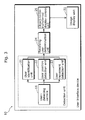
- Fig. 3 is a diagram showing a configuration example of a user interface device 10 according to a preferred embodiment of the present invention.
- the user interface device 10 includes a user-detecting camera 11, a user identification unit 21, a user position detection unit 22, a user movement detection unit 23, a receiving user determination unit 24, an object-to-be-transferred display control unit 25, and an image display unit 31.
- the user-detecting camera 11, the user identification unit 21, the user position detection unit 22, and the user movement detection unit 23 constitute the detection unit 3 shown in Fig. 1B in the present embodiment.
- the object-to-be-transferred display control unit 25 and the image display unit 31 correspond to the control unit 4 and the display unit 2 that are shown in Fig. 1B , respectively.
- the receiving user determination unit 24 is not an essential element of the present invention, and can be omitted.
- Figs. 4A to 4C each are a diagram showing an overview of data components of a user information DB (database).
- the user interface device 10 may include the user information DB which stores, for instance, basic attribute information and physical characteristics information.
- the basic attribute information includes, for example, a name, an age, a gender, and a relationship.
- the basic attribute information may be referred to, for instance, at a time when the user identification unit 21 identifies a user in front of the image display unit 31.
- the physical characteristics information stored in the user information DB includes, for example, body shapes according to user's postures, visual abilities, and auditory abilities, such as a body height and an eye height in a standing position, a body height and an eye height in a sitting position, a dominant hand, a dominant eye, eye sight, and audibility.
- the physical characteristics information may be referred to as reference information, for instance, at a time when the receiving user determination unit 24 determines a recipient-candidate user.
- the user-detecting camera 11 is an image sensor such as a CCD (charge coupled device) and a CMOS (complementary metal oxide semiconductor) that are installed around the image display unit 31.
- the user-detecting camera 11 captures an image of the user in front of the image display unit 31.
- the user identification unit 21 extracts a face region from the image captured by the user-detecting camera 11, and then outputs user identification information for identifying a user, by checking the extracted face image against pre-registered face images.
- the user position detection unit 22 extracts user regions from images captured by the user-detecting camera 11, and then calculates a relative position between a user and the image display unit 31 based on a correspondence relationship between the user regions in the images, according to a principle of stereoscopy.
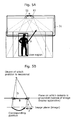
- Figs. 5A and 5B each are a diagram showing a user position calculation method based on a principle of stereoscopy in the user position detection unit 22 according to the one embodiment of the present invention.
- a pair of two user-detecting cameras 11 is installed at an interval B in parallel to a screen of the image display unit 31.
- the user position detection unit 22 calculates a distance D between a user and the image display unit 31 based on position gaps between corresponding user regions in images each captured by a corresponding one of the user-detecting cameras 11. Extraction of the user regions in the images each captured by the corresponding one of the user-detecting cameras 11 can be achieved by, for instance, storing in advance an image captured by each of the user-detecting cameras 11 when there is no user in front of the user-detecting cameras 11 and determining differences between the stored images and images captured when the user appears in front of the user-detecting cameras 11.
- a face region of the user is determined by detecting a face image of the user and checking the face image against pre-registered face images, and the determined face region can be used as a user region.
- Fig. 5B shows a principle of stereoscopy for determining a distance D between a user and a plane on which the user-detecting camera 11 is installed (the screen of the image display unit 31), based on corresponding user regions in two images.
- the corresponding user region in each of the images captured by the two user-detecting cameras 11 is an object of which position is measured, the object is projected onto the two images as shown in Fig. 5B .
- a user position in a direction parallel to the screen of the image display unit 31 can be determined based on a position of the user region in each of the images and the above distance D.
- the user position detection unit 22 outputs the thus obtained relative position of the user with respect to the image display unit 31.
- a distance image sensor which outputs distance information according to a principle of electro-optical distance measurement (time of flight) may be used as the user-detecting camera 11. Including the distance image sensor in the user interface device 10 makes it easier for the user position detection unit 22 to calculate the relative position of the user with respect to the image display unit 31.
- the user position detection unit 22 can calculate, using an output value of the floor pressure sensor as an input, the relative position of the user with respect to the image display unit 31, without using the information provided by the user-detecting camera 11.
- the user movement detection unit 23 After a hand region of the user is extracted, the user movement detection unit 23 checks whether a hand position and a hand shape match which pre-defined shape, and then outputs hand-shape information such as "clenched”, “opened”, “selecting right”, and “selecting left”.
- Figs. 6A and 6B each show a method of detecting a hand position and a hand shape which is performed by the user movement detection unit 23 according to the one embodiment of the present invention.
- the user movement detection unit 23 first detects a person's position based on an image captured by the user-detecting camera 11, and then detects a hand position and a hand shape around the person's position.
- the estimation is made possible by using the following method. The following describes such a method with reference to Fig. 6B .
- the user movement detection unit 23 prepares a lot of training images of a hand to be detected (S501). It is desirable that conditions such as a lighting environment and orientation for the training images are consistent with conditions preferably in conformance to an environment where actual detection is performed.
- the user movement detection unit 23 generates an eigenspace constituting a principal component of the hand from the training images prepared in S501, using a principal component analysis (S502).
- the user movement detection unit 23 prepares a template image of a hand as a sample of the hand to be detected.
- the template image may be a prepared average image of a hand or several images of a hand such as clenched and opened may be prepared.
- the user movement detection unit 23 stores, into a hand template database, a projection matrix onto the generated eigenspace and the template image of the hand (S503).
- the user-detecting camera 11 captures an image of a user in front of the image display unit 31 (S504).
- the user movement detection unit 23 detects a face region from the image captured by the user-detecting camera 11 (S505).
- the user movement detection unit 23 detects a hand of the user around the face region.
- the user movement detection unit 23 searches a region around the face region for a region similar to the prepared template of the hand, using the template of the hand stored in the hand template database (S506).
- the region around the face region may be determined within a predetermined size range with respect to a position of a face of the user or a search range for the determination may be reduced by searching the region around the face region for a region close to the face in a depth distance, according to the principle of stereoscopy in which the two user-detecting cameras 11 are used.
- a candidate region image of the hand and the template image of the hand are projected onto the eigenspace using the prepared projection matrix onto the eigenspace. Then, a method of comparing distances of the candidate region image and the template image in the eigenspace is performed. Comparing the distances in the space indicating the major component of the hand makes it possible to perform the detection with reduced influence of noise such as background.
- a region which satisfies a predetermined threshold value and is closest to the template of the hand in distance within the search range is determined as the position of the hand.
- a shape of the hand template for example, clenched and opened having the shortest distance is determined as a detected hand shape (S507).
- a template matching method is used for detecting the hand position and the hand shape in the above example, other methods such as boosting may be used.
- choices and hand positions and hand shapes each corresponding to a corresponding one of the choices are previously associated with each other for the user. Accordingly, it is possible to determine that a corresponding choice is made according to a change of the hand position and the hand shape of the user detected by the user movement detection unit 23.
- the receiving user determination unit 24 determines a user (recipient-candidate user) estimated to be a user candidate receiving an object, using, as input information, the user identification information outputted by the user identification unit 21, the user position detected by the user position detection unit 22, and the information about the hand position and the hand shape outputted by the user movement detection unit 23.
- Figs. 7A to 8B each are a diagram showing an example of a preferred use case of the user interface device 10 according to the one embodiment of the present invention.
- an object transferred between users is picture data.
- Fig. 7A shows a case where a user B transfers an object.
- the receiving user determination unit 24 determines that a user A positioned to the left of the user B is the recipient-candidate user.
- the receiving user determination unit 24 determines that a user C positioned to the right of the user B is the recipient-candidate user.
- Fig. 7B shows a case where the user A transfers an object.
- the receiving user determination unit 24 can determine that the user A is attempting to transfer the picture to the user B or the user C and determines that the users B and C are the recipient-candidate users. Which of the users B and C receive the picture is determined by gestures of the users B and C.
- Fig. 8A shows a case where the user A transfers an object.
- a picture browsing application is executed in work spaces each corresponding to one of the users A, B, and D, and a broadcast content (news program) is displayed in a work space (work space C) on the screen corresponding to the user C.
- a broadcast content news program
- the receiving user determination unit 24 determines that the users B and D among the users B, C, and D positioned to the right of the user A are the recipient-candidate users. On the other hand, the receiving user determination unit 24 determines that the user C is not the recipient-candidate user, because an application executed in the work space corresponding to the user C has little to do with the content to be transferred (picture).
- Fig. 8B shows a case where the user A transfers an object.
- the picture browsing application is executed in the work spaces each corresponding to the corresponding one of the users A, B, and D, and no application is executed in the work space corresponding to the user C even though the user C is in front of the image display unit 31. For instance, the user C is sleeping.
- the receiving user determination unit 24 determines that the users B and D among the users B, C, and D positioned to the right of the user A are the recipient-candidate users. On the other hand, the receiving user determination unit 24 determines that the user C is not the recipient-candidate user, because no application is executed even though the user C is in front of the image display unit 31.
- the object-to-be-transferred display control unit 25 controls the display of the object on the screen, using, as the input information, the user identification information outputted by the user identification unit 21, the user position detected by the user position detection unit 22, and the information about the hand position and the hand shape outputted by the user movement detection unit 23.
- the following section "3. Operation" describes a specific control method.
- Fig. 9 is a diagram showing an operation example of the user interface device 10 according to the one embodiment of the present invention.
- a processing flow of the user interface device 10 is described using, as an example, a situation where three users (users A to C) are in front of the image display unit 31, and each of the three users uses the picture browsing application and transfers a picture with each other on the screen, as shown by the upper row in Fig. 9 .
- the situation is a situation where a content is transferred on the screen as if playing catch.
- the three users are members of a family, the user A is a father, the user B is a daughter, and the user C is a mother.
- the processing flow is described especially using, as an example, a situation where the user A (father) is attempting to transfer a picture to the users B (daughter) and C (mother).
- Fig. 10 is a flowchart showing an overview of processing performed by the user interface device 10 according to the one embodiment of the present invention.
- the user identification unit 21 performs user identification by checking faces of the users A to C detected by the user-detecting camera 11 against pre-registered physical characteristics information stored in a user information DB (S801). Then, the user position detection unit 22 and the user movement detection unit 23 calculate, for each of the identified users A to C, user position information and information about a hand position and a hand shape, respectively (S802).
- the receiving user determination unit 24 determines a recipient-candidate user (S804).
- the object-to-be-transferred display control unit 25 controls a movement of the object to be transferred according to a position of the recipient-candidate user (S805).
- the users B and C are determined as recipient-candidate users. The determination results from considering a situation where the users A to C use the same type of application.
- the object-to-be-transferred display control unit 25 slows down the object (S902).
- the space of the recipient-candidate user may be defined based on a width of a work space of each of the users A to C in the x axis direction or may be a space defined by portions having a predetermined size each on a corresponding one of the right and left sides of a position on the screen corresponding to a front of a standing position of the user.
- the object-to-be-transferred display control unit 25 When the recipient-candidate user makes a gesture indicating selection for reception (Yes in S903), the object-to-be-transferred display control unit 25 further slows down the object (S904). Further, when the recipient-candidate user makes a gesture indicating confirmation of reception (Yes in S905), the object-to-be-transferred display control unit 25 stops the object (S906). Coordinating the object with a hand movement before stopping the object allows a receiving user to stop the object at a desired position.
- the gesture indicating selection for reception may be an operation of turning a palm to a screen for a predetermined time period.
- the gesture indicating confirmation of reception may be an operation of moving a fingertip of a thumb and fingertips of other fingers in a pinching manner or an operation in which a hand facing the screen is turned toward one's own face or chest. These operations correspond to an operation of grabbing an object, and become an intuitive operation such as holding and catching a picture on the screen.
- the user A turns the user A's palm to the screen to select a picture to be transferred.
- Moving the hand from side to side or up and down changes focus display of each of pictures in tandem with the movement, and thus the user A can select a desired picture.
- the selection may be confirmed by the user's above grabbing operation.
- the user movement detection unit 23 interprets the user A's operation and generates a command for transferring (throwing) the picture to the right. Then, the picture starts moving to the right. Accordingly, the picture becomes an "independent object,".
- a gesture corresponding to the command for transferring (throwing) may be an operation of moving a hand of a user for more than a predetermined distance in a direction that the user wants a picture to move.
- the user B can check the picture without haste, because the picture is slowed down.
- Presentation on which the user B finds it easier to look at the picture and to operate can be achieved by controlling, as shown by the middle row in Fig. 9 , a trajectory of the independent object so that the independent object passes at a height of the user B's eyes or shoulder, in consideration of the user B's body height.
- a user's body height can be obtained from a user information DB or be approximately calculated based on an image analysis of an image captured by the user-detecting camera 11.
- the user B checks the picture, but thinks of not receiving the picture because the user B is not interested in the picture very much. Thus, the user B does not make a gesture indicating intention to receive. In that case, as shown by the bottom row in Fig. 9 , slowing down of the independent object is terminated.
- the independent object when the independent object enters a space of the user C, the user C can check the picture without haste, because the picture is slowed down again.
- the user C makes the gesture indicating selection for reception, that is, an operation of turning the user C's palm to the screen, because the user C is interested in the picture when the user C checks the picture. In that case, the independent object is further slowed down.
- the recipient-candidate user of the object is estimated and the movement of the object is controlled based on the position of the recipient-candidate user, and thus the user to be a receiver can easily obtain the object.
- the gestures are assumed the free hand gestures and the user's hand position and hand shape are detected using the image analysis of the image captured by the user-detecting camera in the present embodiment, one or all of the users may make a gesture on the touch table including the electrostatic touchpad shown in Fig. 1A , and the present invention is certainly effective in such a use case.
- an object to be transferred may be selected for reception, and further when the user puts the hand on the touch table, the reception of the object is confirmed.
- contents to be transferred between multiple people includes the picture in the present embodiment
- contents to be transferred in a preferred manner made possible by applying the present invention are not certainly limited to pictures.
- Various kinds of contents displayed by the image display unit 31 are a scope of the application of the present invention.
- the present invention is not limited to the situation of the standing position. Needless to say, the present invention is effective to a case where a user is in a posture such as a sitting position.
- the object-to-be-transferred display control unit 25 may control a movement of an object to be transferred, in consideration of the following points.
- the movement of the object may be controlled based on a recipient-candidate user's physical characteristic.
- the user's physical characteristic include an age, a dominant arm, and a body height of the user. Data of these can be obtained from a user information DB.
- the body height of the user can be calculated by analyzing an image captured by the user-detecting camera.
- a degree of slowing down the object may be greater than a predetermined degree of slowing down. For instance, it is possible to enhance usability by making the degree of slowing down greater than the predetermined degree of slowing down for old people and children.
- the degree of slowing down may be greater than the predetermined degree of slowing down in the case where the recipient-candidate user is left-handed, in comparison to a case where the recipient-candidate user is right-handed.
- the degree of slowing down may be greater than the predetermined degree of slowing down in the case where the recipient-candidate user is right-handed, in comparison to a case where the recipient-candidate user is left-handed.
- a body height and a arm length basically have a positive correlation, making the degree of slowing down greater than the predetermined degree of slowing down when the body height is less than a predetermined value substantially corresponds to performing control in consideration of the arm length.
- the usability can be enhanced by considering the user's body height and controlling the trajectory of the object so that the object passes at the height of the user's eyes or shoulder.
- the movement of the object may be controlled based on a recipient-candidate user's attribute.
- the trajectory and moving speed of the object may be controlled in view of metadata assigned to the object and a user's attribute.
- the user's attribute include information about a name, a gender, an age, interests, preferences and the like of the user which is recorded in a tag attached to an apparatus owned by the user.
- a degree of interest with respect to an object to be transferred is estimated based on information about user's interests and preferences.
- the degree of interest is estimated high, the degree of slowing down the object at a position near the user may be greater than the predetermined degree of slowing down.
- the movement of the object may be controlled by the following method.
- the object When a moving object to be transferred reaches the edge of the screen, the object may be bounded off using bouncing coefficient 1.
- the bouncing coefficient is not certainly limited to 1. Further, the number of times the object is bounced off at the edge of the screen is counted, and the bouncing coefficient may be changed depending on the number of times the object is bounced off.
- the movement of the object may be stopped.
- the object may be hidden.
- the object is bounced off even when the recipient-candidate user fails to make the gesture indicating intention to receive once, and thus the recipient-candidate user can make the gesture indicating intention to receive when the object is bounced off.
- hiding the object after the elapse of the predetermined time period makes it possible to avoid a situation where a content undesired by the recipient-candidate user becomes distraction by being continuously displayed on the screen.
- the present invention is not limited to this, and a common work space that is shareable among multiple users may be provided.
- the common work space may be displayed at a halfway point between two users, and an object obtained by one of the users may be stopped in the common work space.
- the user may make the obtainment gesture, facing the common work space (that is, facing obliquely).
- the present invention is not limited to this, and the user interface device 10 may identify a user who is supposed to obtain an independent object, and stop the independent object in a work space assigned to the user.
- the user interface device 10 may allow the child user to obtain the independent object without waiting for the child user's obtainment gesture.
- the user interface device 10 may allow the user to obtain the independent object without waiting for the user's obtainment gesture.
- the present invention is not limited to this, and multiple objects can be simultaneously released.
- the object-to-be-transferred display control unit 25 may control display so that the multiple objects do not overlap with each other.
- the present invention is not limited to this, and the user interface device 10 may allow the user to obtain an object released by the user interface device 10.
- the present invention can be modified in the following manner and is not certainly limited to the user interface device according to the embodiment of the present invention.
- Each of the above devices may be specifically a computer system including a micro processing unit, a ROM, a RAM, a hard disk unit, a display unit, a keyboard, a mouse, and the like.
- a computer program is stored in the RAM or the hard disk unit.
- the micro processing unit operates according to the computer program, so that each of the devices fulfills a function.
- the computer program is programmed by combining plural instruction codes each of which indicates an instruction for a computer. It is to be noted that each of the devices is not limited to the computer system including the micro processing unit, the ROM, the RAM, the hard disk unit, the display unit, the keyboard, the mouse, and the like, and may be a computer system including some of the components.
- the system LSI is a super-multifunctional LSI manufactured by integrating components on one chip and is, specifically, a computer system including a micro processing unit, a ROM, a RAM, and the like.
- the computer program is stored in the RAM.
- the micro processing unit operates according to the computer program, so that the system LSI fulfills its function.
- a method for realizing an integrated circuit is not limited to the LSI, and may be achieved by a dedicated circuit or a generic processor. After manufacturing the LSI, it is acceptable to use a Field Programmable Gate Array (FPGA) that is programmable or a reconfigurable processor in which connections and setting of circuit cells within the LSI are reconfiguration.
- FPGA Field Programmable Gate Array
- the IC card or the module is a computer system including a micro processing unit, a ROM, a RAM, and the like.
- the IC card or the module may include the above super-multifunctional LSI.
- the micro processing unit operates according to the computer program, so that the IC card or the module fulfills its function.
- the IC card or the module may have tamper-resistance.
- the present invention may be any of the above methods. Furthermore, the present invention may be a computer program which causes a computer to execute these methods, and a digital signal which is composed of the computer program.
- the computer program or the digital signal may be recorded on a computer-readable recording medium such as a flexible disk, a hard disk, a CD-ROM, an MO, a DVD, a DVD-ROM, a DVD-RAM, a Blu-ray Disc, and a semiconductor memory.
- the computer program or the digital signal may be recorded on these recording media.
- the computer program or the digital signal may be transmitted via an electronic communication line, a wireless or wired communication line, a network represented by the Internet, data broadcasting, and the like.
- the present invention may be a computer system including a micro processing unit and a memory.
- the memory may store the above computer program, and the micro processing unit may operate according to the computer program.
- the present invention may execute the computer program or the digital signal in another independent computer system by recording the computer program or the digital signal on the recording medium and transmitting the recorded computer program or the digital signal or by transmitting the computer program or the digital signal via the network and the like.
- the user interface device is a large screen display operated by multiple people, and is useful to be applied to, for example, a large screen TV and outdoor electronic advertisement (digital signage).
Landscapes
- Engineering & Computer Science (AREA)
- Multimedia (AREA)
- Signal Processing (AREA)
- Health & Medical Sciences (AREA)
- General Health & Medical Sciences (AREA)
- Theoretical Computer Science (AREA)
- Human Computer Interaction (AREA)
- General Engineering & Computer Science (AREA)
- Databases & Information Systems (AREA)
- Social Psychology (AREA)
- Computer Networks & Wireless Communication (AREA)
- Physics & Mathematics (AREA)
- General Physics & Mathematics (AREA)
- Software Systems (AREA)
- Biomedical Technology (AREA)
- Business, Economics & Management (AREA)
- Marketing (AREA)
- User Interface Of Digital Computer (AREA)
- Image Analysis (AREA)
- Details Of Television Systems (AREA)
Applications Claiming Priority (2)
| Application Number | Priority Date | Filing Date | Title |
|---|---|---|---|
| JP2008251044 | 2008-09-29 | ||
| PCT/JP2009/004911 WO2010035491A1 (fr) | 2008-09-29 | 2009-09-28 | Dispositif d’interface utilisateur, procédé d’interface utilisateur, et support d'enregistrement |
Publications (3)
| Publication Number | Publication Date |
|---|---|
| EP2330558A1 true EP2330558A1 (fr) | 2011-06-08 |
| EP2330558A4 EP2330558A4 (fr) | 2014-04-30 |
| EP2330558B1 EP2330558B1 (fr) | 2016-11-02 |
Family
ID=42059503
Family Applications (1)
| Application Number | Title | Priority Date | Filing Date |
|---|---|---|---|
| EP09815911.4A Active EP2330558B1 (fr) | 2008-09-29 | 2009-09-28 | Dispositif d'interface utilisateur, procédé d'interface utilisateur, et support d'enregistrement |
Country Status (5)
| Country | Link |
|---|---|
| US (1) | US8451216B2 (fr) |
| EP (1) | EP2330558B1 (fr) |
| JP (1) | JP5345129B2 (fr) |
| CN (1) | CN101878487B (fr) |
| WO (1) | WO2010035491A1 (fr) |
Families Citing this family (27)
| Publication number | Priority date | Publication date | Assignee | Title |
|---|---|---|---|---|
| JP5558899B2 (ja) * | 2010-04-22 | 2014-07-23 | キヤノン株式会社 | 情報処理装置、その処理方法及びプログラム |
| JP5345113B2 (ja) * | 2010-09-08 | 2013-11-20 | シャープ株式会社 | コンテンツ出力システム、出力制御装置、出力制御方法、及びコンピュータプログラム |
| JP5807399B2 (ja) * | 2011-06-13 | 2015-11-10 | ソニー株式会社 | 情報処理装置及びプログラム |
| US20130009875A1 (en) * | 2011-07-06 | 2013-01-10 | Fry Walter G | Three-dimensional computer interface |
| US8687023B2 (en) * | 2011-08-02 | 2014-04-01 | Microsoft Corporation | Cross-slide gesture to select and rearrange |
| JP5902444B2 (ja) * | 2011-11-24 | 2016-04-13 | 京セラ株式会社 | 携帯端末装置、プログラムおよび表示制御方法 |
| WO2013099407A1 (fr) * | 2011-12-28 | 2013-07-04 | 株式会社ニコン | Dispositif d'affichage et dispositif de projection |
| US9690368B2 (en) | 2011-12-30 | 2017-06-27 | Adidas Ag | Customization based on physiological data |
| US10402879B2 (en) | 2011-12-30 | 2019-09-03 | Adidas Ag | Offering a customized collection of products |
| US8902198B1 (en) | 2012-01-27 | 2014-12-02 | Amazon Technologies, Inc. | Feature tracking for device input |
| JP5651639B2 (ja) * | 2012-06-29 | 2015-01-14 | 株式会社東芝 | 情報処理装置、情報表示装置、情報処理方法およびプログラム |
| CN103838483B (zh) | 2012-11-27 | 2018-02-27 | 联想(北京)有限公司 | 一种显示方法及电子设备 |
| JP5916590B2 (ja) | 2012-12-06 | 2016-05-11 | コニカミノルタ株式会社 | オブジェクト操作装置及びオブジェクト操作制御プログラム |
| US9060162B2 (en) * | 2012-12-21 | 2015-06-16 | Ati Technologies Ulc | Providing multiple viewer preferences on a display device |
| US9460453B2 (en) | 2013-03-13 | 2016-10-04 | Intel Corporation | System and method to provide location-based digital signage services |
| US20140282273A1 (en) * | 2013-03-15 | 2014-09-18 | Glen J. Anderson | System and method for assigning voice and gesture command areas |
| US9268929B2 (en) * | 2013-03-15 | 2016-02-23 | Intelmate Llc | Dossier packaging |
| KR102241074B1 (ko) * | 2014-07-22 | 2021-04-16 | 엘지전자 주식회사 | 디스플레이 디바이스 및 그 제어 방법 |
| KR102194923B1 (ko) | 2014-07-22 | 2020-12-24 | 엘지전자 주식회사 | 디스플레이 디바이스 및 그 제어 방법 |
| JP2016053769A (ja) * | 2014-09-02 | 2016-04-14 | ソニー株式会社 | 情報処理装置、情報処理方法およびプログラム |
| JP6455258B2 (ja) * | 2015-03-19 | 2019-01-23 | 富士通株式会社 | 表示方法、プログラム及び表示制御装置 |
| JP2016194792A (ja) * | 2015-03-31 | 2016-11-17 | ソニー株式会社 | 情報処理装置、情報処理方法およびプログラム |
| JP2017126935A (ja) * | 2016-01-15 | 2017-07-20 | ソニー株式会社 | 情報処理装置、情報処理システム、および情報処理方法、並びにプログラム |
| CN105892665B (zh) * | 2016-03-31 | 2019-02-05 | 联想(北京)有限公司 | 信息处理方法及电子设备 |
| JP6697967B2 (ja) * | 2016-06-30 | 2020-05-27 | シャープ株式会社 | 画像表示装置、画像表示方法及びプログラム |
| WO2019130896A1 (fr) * | 2017-12-27 | 2019-07-04 | ソニー株式会社 | Dispositif de commande d'affichage, procédé de commande d'affichage et programme |
| JP7256665B2 (ja) * | 2019-03-28 | 2023-04-12 | シャープ株式会社 | 情報処理装置 |
Family Cites Families (18)
| Publication number | Priority date | Publication date | Assignee | Title |
|---|---|---|---|---|
| CA2068486C (fr) | 1991-08-30 | 1998-09-15 | Stephen S. Fleming | Systeme et methode graphique de creation d'objets |
| JP3968477B2 (ja) * | 1997-07-07 | 2007-08-29 | ソニー株式会社 | 情報入力装置及び情報入力方法 |
| JP2000222133A (ja) | 1999-01-28 | 2000-08-11 | Canon Inc | 電子情報表示装置及びその表示制御方法並びに記憶媒体 |
| JP2002157079A (ja) | 2000-11-09 | 2002-05-31 | Doko Kagi Kofun Yugenkoshi | 意向識別方法 |
| JP2003263145A (ja) | 2002-03-07 | 2003-09-19 | Pioneer Electronic Corp | 情報表示装置 |
| JP4095040B2 (ja) * | 2004-02-12 | 2008-06-04 | 株式会社日立製作所 | テーブル型情報端末の表示方法 |
| US7397464B1 (en) * | 2004-04-30 | 2008-07-08 | Microsoft Corporation | Associating application states with a physical object |
| JP4273332B2 (ja) | 2004-06-02 | 2009-06-03 | 富士フイルム株式会社 | 画像表示制御テーブル、画像の天地制御方法及び画像の天地制御プログラム |
| JP4045550B2 (ja) * | 2004-06-28 | 2008-02-13 | 富士フイルム株式会社 | 画像表示制御装置及び画像表示制御プログラム |
| US7519223B2 (en) * | 2004-06-28 | 2009-04-14 | Microsoft Corporation | Recognizing gestures and using gestures for interacting with software applications |
| JP4742531B2 (ja) * | 2004-07-21 | 2011-08-10 | 株式会社日立製作所 | 情報表示装置 |
| US20070064004A1 (en) * | 2005-09-21 | 2007-03-22 | Hewlett-Packard Development Company, L.P. | Moving a graphic element |
| JP4725423B2 (ja) * | 2006-06-06 | 2011-07-13 | パナソニック株式会社 | 画像処理装置 |
| EP1895391A1 (fr) | 2006-08-16 | 2008-03-05 | Siemens Aktiengesellschaft | Procédé et système d'affichage d'une multitude d'objets sur un afficheur |
| JP5132131B2 (ja) * | 2006-11-17 | 2013-01-30 | 任天堂株式会社 | ポインティング装置の調整プログラムおよびポインティング装置 |
| JP2008181248A (ja) * | 2007-01-23 | 2008-08-07 | Kyocera Mita Corp | 表示制御装置及び表示制御プログラム |
| US20090106667A1 (en) * | 2007-10-19 | 2009-04-23 | International Business Machines Corporation | Dividing a surface of a surface-based computing device into private, user-specific areas |
| WO2009154045A1 (fr) * | 2008-06-20 | 2009-12-23 | コニカミノルタホールディングス株式会社 | Procédé de traitement d'informations et dispositif de traitement d'informations |
-
2009
- 2009-09-28 WO PCT/JP2009/004911 patent/WO2010035491A1/fr not_active Ceased
- 2009-09-28 EP EP09815911.4A patent/EP2330558B1/fr active Active
- 2009-09-28 JP JP2010503294A patent/JP5345129B2/ja active Active
- 2009-09-28 US US12/744,373 patent/US8451216B2/en active Active
- 2009-09-28 CN CN2009801011706A patent/CN101878487B/zh active Active
Also Published As
| Publication number | Publication date |
|---|---|
| US20100259473A1 (en) | 2010-10-14 |
| WO2010035491A1 (fr) | 2010-04-01 |
| EP2330558B1 (fr) | 2016-11-02 |
| EP2330558A4 (fr) | 2014-04-30 |
| US8451216B2 (en) | 2013-05-28 |
| JPWO2010035491A1 (ja) | 2012-02-16 |
| CN101878487A (zh) | 2010-11-03 |
| CN101878487B (zh) | 2013-04-10 |
| JP5345129B2 (ja) | 2013-11-20 |
Similar Documents
| Publication | Publication Date | Title |
|---|---|---|
| EP2330558B1 (fr) | Dispositif d'interface utilisateur, procédé d'interface utilisateur, et support d'enregistrement | |
| KR101541561B1 (ko) | 유저 인터페이스 장치, 유저 인터페이스 방법, 및 기록 매체 | |
| JP7663915B2 (ja) | 生産性のためのエクステンデッド・リアリティ | |
| US8379098B2 (en) | Real time video process control using gestures | |
| US10120454B2 (en) | Gesture recognition control device | |
| US10191616B2 (en) | Method and system for tagging information about image, apparatus and computer-readable recording medium thereof | |
| US10146316B2 (en) | Method and apparatus for disambiguating a plurality of targets | |
| WO2022170221A1 (fr) | Réalité étendue pour la productivité | |
| US9971491B2 (en) | Gesture library for natural user input | |
| US20200142495A1 (en) | Gesture recognition control device | |
| CN107209775A (zh) | 用于搜索图像的方法和装置 | |
| CN105009025A (zh) | 基于观看距离的自适应屏幕接口 | |
| CN105229582A (zh) | 基于近距离传感器和图像传感器的手势检测 | |
| US20150370336A1 (en) | Device Interaction with Spatially Aware Gestures | |
| US20230011143A1 (en) | Systems and methods for using conjunctions in a voice input to cause a search application to wait for additional inputs | |
| US20120206348A1 (en) | Display device and method of controlling the same | |
| US20250284735A1 (en) | Searching using a wearable computing device | |
| HK1197944A (en) | Augmented reality display of scene behind surface | |
| HK1197944B (en) | Augmented reality display of scene behind surface |
Legal Events
| Date | Code | Title | Description |
|---|---|---|---|
| PUAI | Public reference made under article 153(3) epc to a published international application that has entered the european phase |
Free format text: ORIGINAL CODE: 0009012 |
|
| 17P | Request for examination filed |
Effective date: 20110315 |
|
| AK | Designated contracting states |
Kind code of ref document: A1 Designated state(s): AT BE BG CH CY CZ DE DK EE ES FI FR GB GR HR HU IE IS IT LI LT LU LV MC MK MT NL NO PL PT RO SE SI SK SM TR |
|
| AX | Request for extension of the european patent |
Extension state: AL BA RS |
|
| DAX | Request for extension of the european patent (deleted) | ||
| A4 | Supplementary search report drawn up and despatched |
Effective date: 20140402 |
|
| RIC1 | Information provided on ipc code assigned before grant |
Ipc: H04N 21/431 20110101ALI20140327BHEP Ipc: H04N 5/445 20110101ALI20140327BHEP Ipc: G06F 3/0481 20130101ALI20140327BHEP Ipc: G06F 3/14 20060101ALI20140327BHEP Ipc: G06F 3/01 20060101AFI20140327BHEP |
|
| RAP1 | Party data changed (applicant data changed or rights of an application transferred) |
Owner name: PANASONIC INTELLECTUAL PROPERTY CORPORATION OF AME |
|
| 17Q | First examination report despatched |
Effective date: 20150203 |
|
| REG | Reference to a national code |
Ref country code: DE Ref legal event code: R079 Ref document number: 602009042161 Country of ref document: DE Free format text: PREVIOUS MAIN CLASS: G06T0007200000 Ipc: H04N0005232000 |
|
| GRAP | Despatch of communication of intention to grant a patent |
Free format text: ORIGINAL CODE: EPIDOSNIGR1 |
|
| RIC1 | Information provided on ipc code assigned before grant |
Ipc: G06F 3/01 20060101ALI20160616BHEP Ipc: H04N 5/445 20060101ALI20160616BHEP Ipc: H04N 21/4415 20110101ALI20160616BHEP Ipc: H04N 21/442 20110101ALI20160616BHEP Ipc: H04N 21/45 20110101ALI20160616BHEP Ipc: H04N 21/84 20110101ALI20160616BHEP Ipc: H04N 21/443 20110101ALI20160616BHEP Ipc: H04N 5/232 20060101AFI20160616BHEP Ipc: H04N 21/4223 20110101ALI20160616BHEP Ipc: G06F 3/0481 20130101ALI20160616BHEP Ipc: H04N 21/44 20110101ALI20160616BHEP Ipc: H04N 21/431 20110101ALI20160616BHEP Ipc: H04N 5/44 20060101ALI20160616BHEP |
|
| INTG | Intention to grant announced |
Effective date: 20160715 |
|
| GRAS | Grant fee paid |
Free format text: ORIGINAL CODE: EPIDOSNIGR3 |
|
| GRAA | (expected) grant |
Free format text: ORIGINAL CODE: 0009210 |
|
| AK | Designated contracting states |
Kind code of ref document: B1 Designated state(s): AT BE BG CH CY CZ DE DK EE ES FI FR GB GR HR HU IE IS IT LI LT LU LV MC MK MT NL NO PL PT RO SE SI SK SM TR |
|
| REG | Reference to a national code |
Ref country code: GB Ref legal event code: FG4D |
|
| REG | Reference to a national code |
Ref country code: AT Ref legal event code: REF Ref document number: 842864 Country of ref document: AT Kind code of ref document: T Effective date: 20161115 Ref country code: CH Ref legal event code: EP |
|
| REG | Reference to a national code |
Ref country code: IE Ref legal event code: FG4D |
|
| REG | Reference to a national code |
Ref country code: DE Ref legal event code: R096 Ref document number: 602009042161 Country of ref document: DE |
|
| PG25 | Lapsed in a contracting state [announced via postgrant information from national office to epo] |
Ref country code: LV Free format text: LAPSE BECAUSE OF FAILURE TO SUBMIT A TRANSLATION OF THE DESCRIPTION OR TO PAY THE FEE WITHIN THE PRESCRIBED TIME-LIMIT Effective date: 20161102 |
|
| REG | Reference to a national code |
Ref country code: NL Ref legal event code: MP Effective date: 20161102 |
|
| REG | Reference to a national code |
Ref country code: LT Ref legal event code: MG4D |
|
| REG | Reference to a national code |
Ref country code: AT Ref legal event code: MK05 Ref document number: 842864 Country of ref document: AT Kind code of ref document: T Effective date: 20161102 |
|
| PG25 | Lapsed in a contracting state [announced via postgrant information from national office to epo] |
Ref country code: LT Free format text: LAPSE BECAUSE OF FAILURE TO SUBMIT A TRANSLATION OF THE DESCRIPTION OR TO PAY THE FEE WITHIN THE PRESCRIBED TIME-LIMIT Effective date: 20161102 Ref country code: NL Free format text: LAPSE BECAUSE OF FAILURE TO SUBMIT A TRANSLATION OF THE DESCRIPTION OR TO PAY THE FEE WITHIN THE PRESCRIBED TIME-LIMIT Effective date: 20161102 Ref country code: GR Free format text: LAPSE BECAUSE OF FAILURE TO SUBMIT A TRANSLATION OF THE DESCRIPTION OR TO PAY THE FEE WITHIN THE PRESCRIBED TIME-LIMIT Effective date: 20170203 Ref country code: NO Free format text: LAPSE BECAUSE OF FAILURE TO SUBMIT A TRANSLATION OF THE DESCRIPTION OR TO PAY THE FEE WITHIN THE PRESCRIBED TIME-LIMIT Effective date: 20170202 Ref country code: SE Free format text: LAPSE BECAUSE OF FAILURE TO SUBMIT A TRANSLATION OF THE DESCRIPTION OR TO PAY THE FEE WITHIN THE PRESCRIBED TIME-LIMIT Effective date: 20161102 |
|
| PG25 | Lapsed in a contracting state [announced via postgrant information from national office to epo] |
Ref country code: HR Free format text: LAPSE BECAUSE OF FAILURE TO SUBMIT A TRANSLATION OF THE DESCRIPTION OR TO PAY THE FEE WITHIN THE PRESCRIBED TIME-LIMIT Effective date: 20161102 Ref country code: ES Free format text: LAPSE BECAUSE OF FAILURE TO SUBMIT A TRANSLATION OF THE DESCRIPTION OR TO PAY THE FEE WITHIN THE PRESCRIBED TIME-LIMIT Effective date: 20161102 Ref country code: PL Free format text: LAPSE BECAUSE OF FAILURE TO SUBMIT A TRANSLATION OF THE DESCRIPTION OR TO PAY THE FEE WITHIN THE PRESCRIBED TIME-LIMIT Effective date: 20161102 Ref country code: FI Free format text: LAPSE BECAUSE OF FAILURE TO SUBMIT A TRANSLATION OF THE DESCRIPTION OR TO PAY THE FEE WITHIN THE PRESCRIBED TIME-LIMIT Effective date: 20161102 Ref country code: AT Free format text: LAPSE BECAUSE OF FAILURE TO SUBMIT A TRANSLATION OF THE DESCRIPTION OR TO PAY THE FEE WITHIN THE PRESCRIBED TIME-LIMIT Effective date: 20161102 Ref country code: IS Free format text: LAPSE BECAUSE OF FAILURE TO SUBMIT A TRANSLATION OF THE DESCRIPTION OR TO PAY THE FEE WITHIN THE PRESCRIBED TIME-LIMIT Effective date: 20170302 Ref country code: PT Free format text: LAPSE BECAUSE OF FAILURE TO SUBMIT A TRANSLATION OF THE DESCRIPTION OR TO PAY THE FEE WITHIN THE PRESCRIBED TIME-LIMIT Effective date: 20170302 |
|
| PG25 | Lapsed in a contracting state [announced via postgrant information from national office to epo] |
Ref country code: RO Free format text: LAPSE BECAUSE OF FAILURE TO SUBMIT A TRANSLATION OF THE DESCRIPTION OR TO PAY THE FEE WITHIN THE PRESCRIBED TIME-LIMIT Effective date: 20161102 Ref country code: DK Free format text: LAPSE BECAUSE OF FAILURE TO SUBMIT A TRANSLATION OF THE DESCRIPTION OR TO PAY THE FEE WITHIN THE PRESCRIBED TIME-LIMIT Effective date: 20161102 Ref country code: CZ Free format text: LAPSE BECAUSE OF FAILURE TO SUBMIT A TRANSLATION OF THE DESCRIPTION OR TO PAY THE FEE WITHIN THE PRESCRIBED TIME-LIMIT Effective date: 20161102 Ref country code: EE Free format text: LAPSE BECAUSE OF FAILURE TO SUBMIT A TRANSLATION OF THE DESCRIPTION OR TO PAY THE FEE WITHIN THE PRESCRIBED TIME-LIMIT Effective date: 20161102 Ref country code: SK Free format text: LAPSE BECAUSE OF FAILURE TO SUBMIT A TRANSLATION OF THE DESCRIPTION OR TO PAY THE FEE WITHIN THE PRESCRIBED TIME-LIMIT Effective date: 20161102 |
|
| REG | Reference to a national code |
Ref country code: DE Ref legal event code: R097 Ref document number: 602009042161 Country of ref document: DE |
|
| PG25 | Lapsed in a contracting state [announced via postgrant information from national office to epo] |
Ref country code: SM Free format text: LAPSE BECAUSE OF FAILURE TO SUBMIT A TRANSLATION OF THE DESCRIPTION OR TO PAY THE FEE WITHIN THE PRESCRIBED TIME-LIMIT Effective date: 20161102 Ref country code: IT Free format text: LAPSE BECAUSE OF FAILURE TO SUBMIT A TRANSLATION OF THE DESCRIPTION OR TO PAY THE FEE WITHIN THE PRESCRIBED TIME-LIMIT Effective date: 20161102 Ref country code: BE Free format text: LAPSE BECAUSE OF FAILURE TO SUBMIT A TRANSLATION OF THE DESCRIPTION OR TO PAY THE FEE WITHIN THE PRESCRIBED TIME-LIMIT Effective date: 20161102 Ref country code: BG Free format text: LAPSE BECAUSE OF FAILURE TO SUBMIT A TRANSLATION OF THE DESCRIPTION OR TO PAY THE FEE WITHIN THE PRESCRIBED TIME-LIMIT Effective date: 20170202 |
|
| PLBE | No opposition filed within time limit |
Free format text: ORIGINAL CODE: 0009261 |
|
| STAA | Information on the status of an ep patent application or granted ep patent |
Free format text: STATUS: NO OPPOSITION FILED WITHIN TIME LIMIT |
|
| 26N | No opposition filed |
Effective date: 20170803 |
|
| PG25 | Lapsed in a contracting state [announced via postgrant information from national office to epo] |
Ref country code: SI Free format text: LAPSE BECAUSE OF FAILURE TO SUBMIT A TRANSLATION OF THE DESCRIPTION OR TO PAY THE FEE WITHIN THE PRESCRIBED TIME-LIMIT Effective date: 20161102 |
|
| REG | Reference to a national code |
Ref country code: CH Ref legal event code: PL |
|
| GBPC | Gb: european patent ceased through non-payment of renewal fee |
Effective date: 20170928 |
|
| PG25 | Lapsed in a contracting state [announced via postgrant information from national office to epo] |
Ref country code: MC Free format text: LAPSE BECAUSE OF FAILURE TO SUBMIT A TRANSLATION OF THE DESCRIPTION OR TO PAY THE FEE WITHIN THE PRESCRIBED TIME-LIMIT Effective date: 20161102 |
|
| REG | Reference to a national code |
Ref country code: IE Ref legal event code: MM4A |
|
| PG25 | Lapsed in a contracting state [announced via postgrant information from national office to epo] |
Ref country code: LU Free format text: LAPSE BECAUSE OF NON-PAYMENT OF DUE FEES Effective date: 20170928 |
|
| REG | Reference to a national code |
Ref country code: FR Ref legal event code: ST Effective date: 20180531 |
|
| PG25 | Lapsed in a contracting state [announced via postgrant information from national office to epo] |
Ref country code: CH Free format text: LAPSE BECAUSE OF NON-PAYMENT OF DUE FEES Effective date: 20170930 Ref country code: LI Free format text: LAPSE BECAUSE OF NON-PAYMENT OF DUE FEES Effective date: 20170930 Ref country code: GB Free format text: LAPSE BECAUSE OF NON-PAYMENT OF DUE FEES Effective date: 20170928 Ref country code: IE Free format text: LAPSE BECAUSE OF NON-PAYMENT OF DUE FEES Effective date: 20170928 |
|
| PG25 | Lapsed in a contracting state [announced via postgrant information from national office to epo] |
Ref country code: FR Free format text: LAPSE BECAUSE OF NON-PAYMENT OF DUE FEES Effective date: 20171002 |
|
| PG25 | Lapsed in a contracting state [announced via postgrant information from national office to epo] |
Ref country code: MT Free format text: LAPSE BECAUSE OF NON-PAYMENT OF DUE FEES Effective date: 20170928 |
|
| PG25 | Lapsed in a contracting state [announced via postgrant information from national office to epo] |
Ref country code: HU Free format text: LAPSE BECAUSE OF FAILURE TO SUBMIT A TRANSLATION OF THE DESCRIPTION OR TO PAY THE FEE WITHIN THE PRESCRIBED TIME-LIMIT; INVALID AB INITIO Effective date: 20090928 |
|
| PG25 | Lapsed in a contracting state [announced via postgrant information from national office to epo] |
Ref country code: CY Free format text: LAPSE BECAUSE OF NON-PAYMENT OF DUE FEES Effective date: 20161102 |
|
| PG25 | Lapsed in a contracting state [announced via postgrant information from national office to epo] |
Ref country code: MK Free format text: LAPSE BECAUSE OF FAILURE TO SUBMIT A TRANSLATION OF THE DESCRIPTION OR TO PAY THE FEE WITHIN THE PRESCRIBED TIME-LIMIT Effective date: 20161102 |
|
| PG25 | Lapsed in a contracting state [announced via postgrant information from national office to epo] |
Ref country code: TR Free format text: LAPSE BECAUSE OF FAILURE TO SUBMIT A TRANSLATION OF THE DESCRIPTION OR TO PAY THE FEE WITHIN THE PRESCRIBED TIME-LIMIT Effective date: 20161102 |
|
| REG | Reference to a national code |
Ref country code: DE Ref legal event code: R079 Ref document number: 602009042161 Country of ref document: DE Free format text: PREVIOUS MAIN CLASS: H04N0005232000 Ipc: H04N0023600000 |
|
| PGFP | Annual fee paid to national office [announced via postgrant information from national office to epo] |
Ref country code: DE Payment date: 20250919 Year of fee payment: 17 |