EP2381409A2 - Self-Service-System für die Einkaufs und Einkaufswagen - Google Patents
Self-Service-System für die Einkaufs und Einkaufswagen Download PDFInfo
- Publication number
- EP2381409A2 EP2381409A2 EP11158092A EP11158092A EP2381409A2 EP 2381409 A2 EP2381409 A2 EP 2381409A2 EP 11158092 A EP11158092 A EP 11158092A EP 11158092 A EP11158092 A EP 11158092A EP 2381409 A2 EP2381409 A2 EP 2381409A2
- Authority
- EP
- European Patent Office
- Prior art keywords
- cart
- goods
- shopping
- payment
- rfid
- Prior art date
- Legal status (The legal status is an assumption and is not a legal conclusion. Google has not performed a legal analysis and makes no representation as to the accuracy of the status listed.)
- Withdrawn
Links
Images









Classifications
-
- G—PHYSICS
- G06—COMPUTING OR CALCULATING; COUNTING
- G06Q—INFORMATION AND COMMUNICATION TECHNOLOGY [ICT] SPECIALLY ADAPTED FOR ADMINISTRATIVE, COMMERCIAL, FINANCIAL, MANAGERIAL OR SUPERVISORY PURPOSES; SYSTEMS OR METHODS SPECIALLY ADAPTED FOR ADMINISTRATIVE, COMMERCIAL, FINANCIAL, MANAGERIAL OR SUPERVISORY PURPOSES, NOT OTHERWISE PROVIDED FOR
- G06Q20/00—Payment architectures, schemes or protocols
- G06Q20/08—Payment architectures
- G06Q20/20—Point-of-sale [POS] network systems
-
- G—PHYSICS
- G06—COMPUTING OR CALCULATING; COUNTING
- G06Q—INFORMATION AND COMMUNICATION TECHNOLOGY [ICT] SPECIALLY ADAPTED FOR ADMINISTRATIVE, COMMERCIAL, FINANCIAL, MANAGERIAL OR SUPERVISORY PURPOSES; SYSTEMS OR METHODS SPECIALLY ADAPTED FOR ADMINISTRATIVE, COMMERCIAL, FINANCIAL, MANAGERIAL OR SUPERVISORY PURPOSES, NOT OTHERWISE PROVIDED FOR
- G06Q20/00—Payment architectures, schemes or protocols
- G06Q20/08—Payment architectures
- G06Q20/18—Payment architectures involving self-service terminals [SST], vending machines, kiosks or multimedia terminals
-
- G—PHYSICS
- G07—CHECKING-DEVICES
- G07G—REGISTERING THE RECEIPT OF CASH, VALUABLES, OR TOKENS
- G07G1/00—Cash registers
- G07G1/0036—Checkout procedures
-
- G—PHYSICS
- G07—CHECKING-DEVICES
- G07G—REGISTERING THE RECEIPT OF CASH, VALUABLES, OR TOKENS
- G07G1/00—Cash registers
- G07G1/0036—Checkout procedures
- G07G1/0045—Checkout procedures with a code reader for reading of an identifying code of the article to be registered, e.g. barcode reader or radio-frequency identity [RFID] reader
- G07G1/0081—Checkout procedures with a code reader for reading of an identifying code of the article to be registered, e.g. barcode reader or radio-frequency identity [RFID] reader the reader being a portable scanner or data reader
-
- G—PHYSICS
- G07—CHECKING-DEVICES
- G07G—REGISTERING THE RECEIPT OF CASH, VALUABLES, OR TOKENS
- G07G1/00—Cash registers
- G07G1/0036—Checkout procedures
- G07G1/0045—Checkout procedures with a code reader for reading of an identifying code of the article to be registered, e.g. barcode reader or radio-frequency identity [RFID] reader
- G07G1/009—Checkout procedures with a code reader for reading of an identifying code of the article to be registered, e.g. barcode reader or radio-frequency identity [RFID] reader the reader being an RFID reader
Definitions
- the present invention relates to self-service shopping system and is designed for shopping centers, to modernize the shopping process and the payment for the goods, as well as to increase the convenience of shopping.
- the invention comprises the sorting, entry and comparison of the products' data, stored on different media.
- the customer selecting and placing goods into a shopping cart does not know what will be their total price. Knowing the total purchase price, the shopping would be far more convenient, because the consumer could choose the items to match the amount of money he is willing to spend.
- Theft of goods is also a great deficiency of the current shopping system. Goods with the bar codes, without being noticed by the security cameras, can easily be taken through the checkout counter, as the BAR-code does not carry any security feature. While the cameras and security personnel are able to detect only a part of the thefts.
- US 2005/0230472 A 1 describes the system and method for remote shopping.
- the shop is divided into two rooms, one of which contains product samples, the other one contains the goods that will be bought by the buyer.
- the system offers to optimize the size of the room, where customers move.
- the customers with the mobile indicator, operating on the wireless network will be able to scan only the sample goods, workers in the warehouse will load the goods into a cart and will leave it at the exit point.
- a lot of commercial space is saved and customers are not required to do a lot of walking.
- many customers want to choose the goods themselves, such as fruits, vegetables and so on from a larger range of goods. In this case, they can not see what goods they are buying.
- U.S. Patent No. 4 071 740 describes an automated mobile shopping system.
- the cart scans the bar codes, but does not scan the RFID tags.
- the cart itself does not perform the self-service function.
- the payment for the goods can not be performed on it. Therefore, the shopping process within the shop is not as quick.
- the cart has no direct wireless communication link with the server.
- the closest to the present invention is a shopping system described in U.S. 2008/0238615 A .
- Known shopping system comprises a supermarket shopping cart designed for advertising.
- the cart has integrated RFID and bar code scanners.
- the shopping cart is made both, for products with bar codes and RFID tags.
- the cart is good, because the customer can see product prices, the map of the retail space and the way to the products on a LCD (liquid crystal) display.
- the LCD screen displays advertisements.
- the cart is handled through a control panel mounted on a cart handle.
- the LCD screen is installed at the end of the cart, therefore for the customer it is not convenient to watch video. It is not possible to make a payment for the goods using the cart, and the card reader is for scanning the customer loyalty cards.
- the shopping system that uses this shopping cart does not sufficiently streamline the shopping process, it does not solve the problem of forming waiting lines.
- the invention aims to speed up the shopping process by overcoming the problem of forming waiting lines, as well as to improve the service quality and protect against theft.
- the self-service shopping system comprises a main server, coupled with data bases, which contain information about the goods; at least one cart for the goods, in which are arranged the equipment such as:
- the magnetic and/or smart card reader present on the cart and aligned with the system allows customers to pay for the goods directly using the cart, anywhere on the trade floor.
- the customer only has to leave through the exit control gate.
- the supermarket does not need cash registers and employees working with them. There are no queues, because each customer buys the goods individually and pays for them using his cart, therefore there is a possibility to increase customer flows.
- a stationary self-service terminal with a device for cash payments there is no need for repeated scanning of goods, it remains only to put cash for the goods, which are in the cart, into the device. After installing such a system in the shopping center, the shopping process is much faster compared to the traditional way of shopping.
- Another advantage of the presented system is that within the proposed system there can be installed a monitoring system for tracking real-time turnover.
- the RFID reader present on the shelves scans the RFID tags of the goods.
- the server shows that the product is no longer present on the shelf. It shows how many products are on shelves and the total number of products within the store. This way the precise number of goods on the retail floor is known. Knowing what products have been purchased and what goods are still on the shelves, the comparison of the number of goods taken from the shelves and the sold goods is performed in the database. Also, such a system makes visible in real-time how many goods have to be placed on which shelves.
- the server accurately counts all the bought goods, goods present on the shelves and the goods removed from the shelves. In this way, the real-time goods turnover is visible and allows the store to improve service quality as well as to improve protection against theft.
- the communication link with the server is a wireless connection.
- a proposed shopping cart for self-service shopping system comprising a computer with the monitor and its control unit, RFID reader for scanning the information about the goods placed in the shopping cart, based on the RFID tags attached to the goods, and for showing the information on a computer monitor, magnetic and/or smart card reader to read customer loyalty cards.
- the cart is provided with RFID tag for cart identification, while said magnetic and/or smart card reader designed and adapted additionally to read the payment cards and to carry out payment transactions in a shopping cart.
- the cart's computer monitor is a touch-sensitive LCD screen, mounted in front of the cart, better on its handle, in a convenient location for the buyer.
- the shopping cart may have integrated electronic scales with a communication link with the said computer.
- the goods placed into the shopping cart get weighed, and it is not possible to take them out with damaged or removed RFID tags. There is an opportunity to weigh the bulk products (fruits, vegetables, etc.) immediately in the shopping cart.
- the information about the goods loaded into the cart gets read based on their RFID codes and is associated with the weight of the goods, quantity, expiry date, volume, composition, price, the total price of all the goods placed in the cart, etc.
- the advantage of the cart lies in the fact that its control is simple, the customer does not need to separately scan each product he wants to buy, it is enough to put the item into a shopping cart, where its screen immediately shows the price and other information about that product.
- the customer can fully take care of the shopping process, select payment method, that is to perform the payment transaction using the cart, anywhere on the shop floor, and then leave through the control gate.
- a shopping method in a self-service shopping system comprising the following steps: at the entrance gate the customer activates the computerized cart based on its RFID code via the mutual communication link with the server, the customer loads the goods with RFID tags into the cart; the RFID reader present in the cart automatically scans the RFID tags from the goods and shows the information about the goods and their price on the computer's LCD touch-sensitive screen, it also transfers this information via the communications link to the main server, after all the desired goods are loaded into the cart, the customer with the help of the touch-sensitive LCD screen selects the payment method to pay by card or in cash, and based on the selected payment method carries out the payment using the computerized cart by inserting the payment card into the magnetic or smart card reader present in the cart, or goes to the stationary self-service terminal, where carries out the payment in cash; then the customer goes to the control exit gate, where the RFID reader scans the carts RFID code and once again scans the RFID codes from the goods loaded into the cart, while using the mutual communication
- the proposed shopping method within the self-service system streamlines the shopping process, solves the queuing problem, improves service quality and provides protection against theft.
- the data exchange between the main supermarket server and the mobile device takes place over the wireless link.
- the information about the scanned products is wirelessly transmitted from the cart to the wireless access points, from there it is transferred to the central server.
- the data from the server goes to the exit points, where, when the buyer leaves with the cart, the comparison is performed on the bought goods with the goods, which at that time are being carried through the exit gate. This way the repeated scanning of goods is performed, which provides greater security.
- This system distinguishes between the two main devices, which are used to carry out the shopping process by the three above-mentioned customer groups:
- Fig. 1 shows the parts: shopping center 1; retail floor 2; wireless access point 3; store area 4; buyer 5; shopping cart (mobile self-service terminal -MST) 6; shopping basket 8; central server 13; database 14; Internet 15; stationary self-service terminal (SST) 16; exit control gate 17; entrance gate 18; exit from the retail floor 19; MST charging device 20; the parking place for shopping baskets 21; receipt printer 23; security staff room 25; entrance to the retail floor 28; security staff computers 29; shelves for goods 32;
- SST stationary self-service terminal
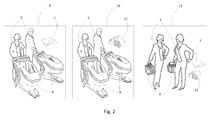
- Fig. 2 shows the parts which are not shown in Fig.1 : the first customer group 9; the second customer group 10; the third customer group 11; smart / magnetic payment card 7; cash 12;
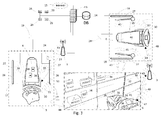
- Fig. 3 shows the parts, which are not shown in Fig. Fig. 1-2 : purchase receipt 24; sound alarm 26; RFID reader in the exit control gate 27; active RFID tag 30; signal sent from an active RFID tag 31; signal sent by the RFID reader 33; goods 34; RFID reader 35 on a (MST) cart 6; MST LCD touch screen 36; reading RFID tag information 37; RFID tag 38; data sent via wireless connection 39 from the MST to the server using wireless access point; data 40 received via wireless access point from the server to the MST; magnetic card reader 41; smart card reader 42; movement 43 from the entrance gate to the shelves; movement 44 from the shelves to the exit gate; signal sent by the RFID reader 45; automatic entrance gate 46; signal emitted by active RFID tag 47 for communication with the security gates; data 48 sent via wireless connection from the server to the MST using wireless access point; wireless link 49; data 50 sent via wireless connection from the server to the MST using wireless access point;
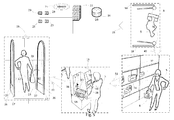
- Fig. 4 shows the parts, which are not shown in Fig. Fig. 1-3 : movement 51 from the shelves to the SST; place 52 to enter with the MST; SST RFID reader 53; touch-sensitive LCD screen 54; SST security gate 55; data sent via radio frequency 56 from the MST to the SST; signal emitted by the active RFID tag 57 to communicate with the SST;
- Fig. 5 shows the parts, which are not shown in Fig. Fig. 1-4 : A special place 58 in a stationary self-service terminal, to place the shopping basket; the signal 59 sent by the RFID reader, which is in SST; reading of an RFID tag 60; device 61 to insert and to issue cash; the signal 62 sent by the RFID reader, which is at the security gate;
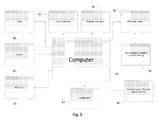
- Fig. 6 shows the parts, which are not shown in Fig. Fig. 1-5 : Cart's (MST) computer 63; RFID reader - recorder 64; batteries 65; scales 66; MST audio speakers 67;
- MST Cart's
- Fig. 7 shows the parts, which are not shown in Fig. Fig. 1-6 : bag for the goods 68; rubber band 69; the rear frame 70; front wheels 71; curved lower frame 72; curved side frame 73; rear wheels 74; front frame 75; openings for legs of a seat for children 76; seat for children 77; the upper front frame 78; the opening side of a shopping basket 79; the charging socket 80; the charging plug 86; handle 87;
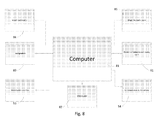
- Fig. 8 shows the parts, which are not shown in Fig. Fig. 1-7 : SST computer 81; RFID reader 82; SST audio speakers 83; smart payment card reader 84; magnetic payment card reader 85;
- Fig. 9 shows the parts, which are not shown in Fig. Fig. 1-8 : SST base 88;
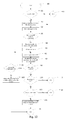
- Fig. 10 shows the parts, which are not shown in Fig. Fig. 1-9 : Start of the shopping process 89; condition 90: "If one is using the MST”; action 91: “MST gets switched off from the charging device”; action 92: “passes through the gate”; condition 93: “if the device is ready for operation”; action 94: "sends a command to activate MST”; action 95: “activate MST”; action 96: “puts the goods into the MST”; action 97: “RFID tags of the goods are scanned at the mobile self-service terminal”; condition 98: “if one wants to make a payment”; condition 99: “If one wants to continue with the purchase”; condition 100: “If the payment is with the card”; condition 101: “if payment is in cash”; action 102: “removes the goods from MST and places them on the shelves”; action 103: “removes the goods from the MST and places them on the shelves ";
- Fig. 11 shows the parts, which are not shown in Fig. Fig. 1-10 : condition 104: "If the payment was successful”; action 105: “records the purchase identification code (hereinafter - ID) in the database and assigns it to the unique MST RFID tag code”; action 106; “receives approval from the central server on a successfully performed payment”; action 107: “shows warning about the failure to execute operation”; end 108: “the purchase process is stopped”; action 147: "inserts the payment card into MST and performs the payment”;
- Fig. 12 shows the parts, which are not shown in Fig. Fig. 1-11 : action 109 "goes to SST”; action 110: “MST moved next to SST”; action 111: “SST identifies the MST, which was moved next to it”; action 112: “SST shows the list of goods”; condition 113: “if you want to make a payment”; action 114: “puts cash into the SST”; condition 115: “if the payment was successful”; action 116: “shows the message about the failed operation”; end 117: “terminating the shopping process”; action 118: “removes the goods from MST and puts them on the shelves”; action 119: “records the purchase ID to the database and assigns it with the unique MST's RFID tag code”; action 120: “receives approval from the central server on a successful payment”;
- Fig. 13 shows the parts, which are not shown in Fig. Fig. 1-12 : action 121 "puts the goods to the basket”; action 122: “goes to SST”; action 123: “places the basket on SST”; action 124: “SST identifies the RFID tags of goods present in the basket”; action 125: “SST displays the list of goods”; condition 126: “if one wants to perform the payment”; action 127: “puts cash or a payment card into the SST”; condition 128: “if the payment was successful”; the end 130: “terminating the purchasing process”; action 131: “removes the goods from the basket and puts them on the shelves”; action 132: “records the purchase ID to the database”; action 133: “receives approval from the central server on a successful payment”;
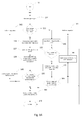
- Fig. 14 shows the parts, which are not shown in Fig. Fig. 1-13 : action 134: “goes through the gate”; condition 135: "if the RFID tag was identified in MST”; action 136: “sends RFID tag's information to the central server”; action 137: “scans the RFID tags of the goods”; action 138: “MST tag compares the purchased goods with the goods being transported based on their tags”; condition 139: "if the goods being transported with MST match the purchased goods”; action 140: “issues a receipt based on the purchase ID”; action 141: “scans the RFID tags on the goods”; action 142: “compares the purchased goods with the goods being transported”; condition 143: “if the goods being transported match the purchased goods”; action 144: “sends a signal to security computers”; action 145: “sends a signal to security computers”; condition 146: “if the product's RFID tag is identified”; the end 148: "the purchase
- Fig. 15 shows the parts, which are not shown in Fig. Fig. 1-14 : purchase group 149, created after making the payment; the unique MST RFID tag code 150 in the table after the payment; the purchase ID 151 in the table after the payment; the identification code of the product's RFID tag 152 in the table after the payment; the purchase group 153, created at the moment of departure; the unique code of the MST RFID tag 152 in the table on departure; the purchase ID 155 in the table on departure; the identification code of the RFID tag 156 in the table on departure;
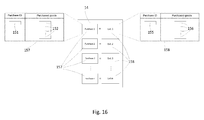
- Fig. 16 shows the parts, which are not shown in Fig. Fig. 1-15 : the purchase group 157, created after making a payment without the MST; purchase group 158 created on departure without the MST;
- Fig. 17 shows the parts, which are not shown in Fig. Fig. 1-16 : shopping basket 22;
- Fig. 18 shows the parts, which are not shown in Fig. Fig. 1-17 : RFID readers installed on shelves 159;
- Fig. 19 shows the parts, which are not shown in Fig. Fig. 1-18 : Reading information from RFID tag 160;
- the presented invention relates to the shopping system, where there is a typical shopping center 1, where there are retail premises 2 of the store ( fig. 1 ).
- a customer using a shopping cart (MST) 6 wirelessly connected with the main server 13, purchases goods at any time, anywhere on the retail floor 2.
- MST shopping cart
- the wireless network covers all retail premises 2 and part of the territory behind the exit from the retail premises 4.
- the retail space has one or several entrance points 28 and the number of exits 19, selected based on the size of the retail space 12.
- the customer 5 with the MST 6 or the shopping basket 8 enters through the entrance 28.
- the database 14, which contains all the information required for the purchase is in the server 13.
- the server 13 is connected to the Internet in order to conduct the payment transactions from MST 6 and SST 16.
- the security staff computers 29 are connected to the main server using wired connection, from which they receive a signal from, on an attempt to carry goods through the exit 19 without paying for them.
- the charging unit 20 is connected using wired connection to the main server 13, in order to capture the information about the charging MST 6.
- the shopping baskets 8 are kept near the entrance to the retail premises 21.
- the security gates 17, which register the goods that leave the retail premises 2, are connected to the server 13.
- the receipt issuing devices 23, which print the receipt when the customer leaves through the exit 19 with the MST with the purchased goods, are connected to the main server 13 using wired connection.
- MST 6 is for the first 9 and the second 10 customer groups ( fig. 2 ).
- the first customer group 9 - are the customers 5, who use MST 6, and pay for the goods anywhere on the retail floor 2 by using chip or magnetic payment cards 7 ( fig. 2 ).
- SST 16 is for the second 10 and the third 11 customer groups ( fig. 2 ).
- the second customer group 10 - are the buyers 5, who use MST and pay for the goods in cash 12 at the stationary self-service terminal (SST) 16.
- the third customer group 11 - are the buyers 5, who use shopping baskets 8 and pay for the goods in cash 12 or with payment cards 7 at the stationary self-service terminal (SST) 16.
- the first customer group 9 ( fig. 2 ), after loading the goods from the shelves 32 of the retail premises 2 ( fig. 3 ) into the MST 6 and after making a decision to buy them inserts the payment card 7 into MST 6 and carries out the payment transaction.
- Wirelessly the payment data is sent to the server 13, from which the data is sent to the bank via the Internet 15.
- the data from the server 13 are wirelessly sent back to the MST 6 and the customer 5 can see the confirmation on the screen telling that the payment was successful.
- the customer 5 may leave the retail floor 2 through the security gate 17 ( Fig. 1 ).
- the customer 5 unloads the goods from MST 6 and takes them with him, while the MST 6 gets parked next to the charging device 20 or another MST 6 connected to the charging unit 20.
- the second customer group 10 after loading the goods from the shelves 32 on the retail floor 2 into MST 6 and having decided that he wants to buy them, goes with the goods to SST 16, parks the MST next to SST 16, in a special dedicated space 52, and, without unloading the goods, pays them in cash using SST 16 ( fig. 4 ). Then the customer 5 may leave the retail floor 2 through the security gate 17 ( Fig. 1 ). Then the customer 5 unloads the goods from MST 6 and takes them with him, while the MST 6 gets parked next to the charging device 20 or another MST 6 connected to the charging unit 20.
- the third customer group 11 ( fig. 2 ) loads the goods from the shelves 32 on the retail floor 2 into a shopping basket 8 and having decided that he wants to buy them, goes with the goods to SST 16, places the shopping basket 8 on SST 16 on a special dedicated place 58, and, without unloading the goods, pays for them in cash 12 or a payment card using the SST 16 ( fig. 5 ). Then the customer 5 may leave the showroom 2 through the security gate 17 (Fig. Then the customer 5 unloads the goods from the shopping basket 8 and takes them with him, while the shopping basket 8 gets placed in a special dedicated place 21.
- Built-in RFID reader 27, at the gate 17, next to the exit 19 from the retail floor 2, are connected to the main server 13 using wired connection ( Fig. 3 ).
- the RFID reader 27 once again scans 33, 62 transported goods ( fig. 3 , fig. 5 ) thus ensuring additional security.
- the security alarm will not be activated, if through the gate 17 the customer 5 carries only the items for which he has paid. If the customer 5 carries through the five gate unpaid goods, that triggers sound alarm 26, as well as the signal is sent to the server 13 notifying that the unpaid goods are transported through the gate. From the server 13 the signal is sent to the security staff computers 29, which are located at the premises of the security staff 25.
- the devices 23, that issue purchase receipts 24, are connected with the main server 13 using wired connection ( Fig. 3 ). Receipts 24 issued for all customer groups, the first 9, the second 10, and the third 11, at the moment when they pass through the security gate 17 with the purchased goods. If the customer passes through the gate 17 without carrying any goods, the purchase receipt 24 will not be issued.
- Figure 3 shows the shopping process of the first customer group.
- the customer 5 starts the shopping process at the moment when he together with the MST 6 passes through the entrance 28 into the retail floor 2.
- the automatic entrance gates 46 open, while the RFID readers installed in the security gate 18, when MST 6 passes through the gates 18, scan 45 its active RFID tag 30, which also emits a signal 47. After scanning this tag 30, a signal is given to activate the MST 6 devices and at the same time the scanned RFID tag data 30 is sent to the server 13, using wired connection.
- the unique MST 6 code and the information from RFID tag about the readiness of all the devices to operate gets recorded in the database 14 on the server 13.
- the server 13 via a wireless network 49 sends a signal 48 back to the MST 6, allowing to initiate the shopping process.
- the customer 5 sees the on screen 36 message allowing him to start placing the goods he wants to buy goods into the MST 6.
- the customer 5 goes 43 with the MST 6 to the shelves 32, where the goods are laid out 34.
- the customer 5 loads the goods 34 into the MST 6.
- It is equipped with RFID reader 35, linked to the MST 6 computer 63, which automatically scans 37 the RFID tag 38 attached to the product 34.
- the identification code 152 of the scanned RFID tag 38 gets sent to the main server 13 via the wireless link 39 ( fig. 3 ), while another part of the information gets immediately displayed on the LCD screen 36 of the MST.
- the server 13 according to the identification code 152 in the database 14 selects the price of the product and sends it back wirelessly 40 to the MST 6 computer 63, where it is displayed on the LCD screen 36.
- the information on RFID tag 38 - that is the product's 34 weight, "best before” date, volume, composition, etc.. This way all the goods 34 placed into the MST 6 are scanned. From the time when the first product 34 is loaded on MST 6, the customer 5 sees the message with a proposal to pay displayed on the LCD screen 36. On the touch sensitive LCD screen 36, all product 34 data are shown, including the total price of the products 34.
- the customer 5 who decided to pay for the goods 34, clicks a button "TO PAY” on the touch-sensitive LCD screen 36, chooses the payment method "PAY WITH THE CARD", inserts the payment card 7 into a magnetic 41 and smart card 42 reader in the MST 6, and anywhere on the retail floor 2, for instance standing next to the shelves 32 displaying the goods 34, by using the LCD touch screen 36 performs the payment transaction.
- the data about the money transfer travels 39 from the MST 6 computer 63 to the server 13 via the wireless link 49. From there, via Internet 15 the data is sent to the bank. After the bank approves the payment, the information on the successful execution of a transaction is sent back to the server 13.
- the server 13 stores the RFID tag 38 identification codes 152 of the paid goods 34 as well as the unique code 150 of the MST 6 ( Fig. 15 ). Based on those the check is performed, the MST 6 together with the products 34 leaves through the exit 19 gates 17.
- the customer 5 goes 44 with the MST 6 through the exit 19 from the retail floor 2.
- the RFID reader 27, present at the gates 17, captures 33 the signal 31 emitted by the RFID tag 30 and the RFID tags 38 of the goods 34 that are transported. From the gates 17, via the wired connection, this information is sent to the server 13.
- the identification codes 154 and 156 of the RFID tags 38 of the goods 34 and RFID tag of the MST 6 are checked against the codes 150 and 152 ( fig. 15 ), which were recorded in the database 14 after the payment has been made. This ensures additional security, in case the customer 5 is trying to transport the goods 34, for which payment has not been made, away from the retail floor 2 using the MST 6 ( fig. 3 ).
- the MST 6 transports the goods 34 for which payment has not been made, then the data from the server 13 is sent to the computers 29 of the security staff.
- the security staff can see which MST 6, through which gates 17, transports what kind of goods 34.
- the sound alarm 26 gets triggered. If there no violations observed when comparing the identification codes of the RFID tags 38 and the RFID tags 30 in the database 14, then the information is sent over the wired link from the server 13 to the device 23, which prints the purchase receipts 24.
- the device 23 prints a receipt 24 based on the purchased goods 34, which the customer 5 takes out from the retail floor 2 in the MST 6.
- the customer 5 takes the receipt 24.
- the signal is sent via the wireless link from the server 13 to the MST 6 computer 63 to turn off the devices on MST 6.
- MST 6 completes the operation. The customer 5 is free to unload the goods 34.
- FIG 4 shows the purchasing process of the second customer group.
- the customer 5 starts the shopping process at the moment when he together with the MST 6 passes through the entrance 28 into the retail floor 2.
- the automatic entrance gates 46 open, while the RFID readers installed in the security gate 18, when MST 6 passes through the gates 18, scan 45 its active RFID tag 30, which also emits a signal 47. After scanning this tag 30, a signal is given to activate the MST 6 devices and at the same time the scanned RFID tag data 30 is sent to the server 13, using wired connection.
- the unique MST 6 code and the information from RFID tag about the readiness of all the devices to operate get recorded in the database 14 on the server 13.
- the server 13 via a wireless network 49 sends a signal 48 back to the MST 6, which allows initiating the shopping process.
- the customer 5 sees the on screen 36 message allowing him to start placing the goods he wants to buy goods into the MST 6.
- the customer 5 goes 43 with the MST 6 to the shelves 32, where the goods are laid out 34.
- the customer 5 loads the goods 34 into the MST 6.
- It is equipped with RFID reader 35, linked to the MST 6 computer 63, which automatically scans 37 the RFID tag 38 attached to the product 34.
- the identification code 152 of the scanned RFID tag 38 gets sent to the main server 13 via the wireless link 39 ( fig. 4 ), while the other part of the information gets immediately displayed on the MST LCD display 36.
- the server 13 according to the identification code 152 in the database 14 selects the price of the product and sends it back wirelessly 40 to the MST 6 computer 63, where it is displayed on the LCD screen 36.
- the information on RFID tag 38 - that is the product's 34 weight, "best before” date, volume, composition, etc.. This way all the goods 34 placed into the MST 6 are scanned. From the time when the first product 34 is loaded on MST 6, the customer 5 sees the message with a proposal to pay displayed on the LCD screen 36. On the touch sensitive LCD screen 36, all product 34 data are shown, including the total price of the products 34. The customer 5, who decided to pay for the goods 34, clicks a button "TO PAY" on the touch-sensitive LCD screen 36, chooses the payment method "PAY WITH CASH", (however he can choose to pay with the card).
- the customer 5 goes 51 with the MST 6 to the self-service terminal (SST) 16, where he can make the payment in cash 12 for the goods 34.
- MST 6 gets parked next to the SST 16 in a special dedicated place 52.
- the RFID scanner 53 scans the unique code 150 of a RFID tag 30 ( fig. 15 ) and sends 56 the data through the SST 16 to the server 13 ( fig. 4 ).
- the unique identifier 150 of the RFID tag 30 of the MST 6 gets checked in the database 14.
- the SST 16 is provided with the security gate 55 with a built-in RFID reader 82.
- the goods 34, for which the payment is underway, are additionally scanned.
- the data about the goods 34 present in the MST 6, are sent via wired connection from the server 13 to the SST 16.
- the SST 16 On the LCD screen 54 of the SST 16, all product 34 data are shown, including the total price of the products 34.
- the customer 5 who decided to pay for the goods 34 clicks a button "TO PAY" on the touch-sensitive LCD screen 54, inserts cash 12 into the device 61 of the SST 16 for receiving cash ( fig. 9 ).
- the payment data travels via the wired connection to the server 13 ( Fig. 4 ). If the payment is completed successfully, the server 13 sends the information about the successfully execute operation back to the SST 16 computer.
- the server 13 stores the RFID tag 38 identification codes 152 of the paid goods 34 as well as the unique code 150 of the MST 6. Based on those the check is performed, the MST 6 together with the products 34 leaves through the exit 19 gates 17.
- the customer 5 goes 44 with the MST 6 through the exit 19 from the retail floor 2.
- the RFID reader 27, present at the gates 17, captures 33 the signal 31 emitted by the RFID tag 30 and the RFID tags 38 of the goods 34 that are transported. From the gates 17, via the wired connection, this information is sent to the server 13.
- the identification codes 154 and 156 of the RFID tags 38 of the goods 34 and RFID tag of the MST 6 are checked against the codes 150 and 152 ( fig. 15 ), which were recorded in the database 14 after the payment has been made. This ensures additional security, in case the customer 5 is trying to transport the goods 34, for which payment has not been made, away from the retail floor 2 using the MST 6 ( fig. 4 ).
- the MST 6 transports the goods 34 for which payment has not been made, then the data from the server 13 is sent to the computers 29 of the security staff.
- the security staff can see which MST 6, through which gates 17, transports what kind of goods 34.
- the sound alarm 26 gets triggered. If there no violations observed when comparing the identification codes of the RFID tags 38 and the RFID tags 30 in the database 14, then the information is sent over the wired link from the server 13 to the device 23, which prints the purchase receipts 24.
- the device 23 prints a receipt 24 based on the purchased goods 34, which the customer 5 takes out from the retail floor 2 in the MST 6.
- the customer 5 takes the receipt 24.
- the signal is sent via the wireless link from the server 13 to the MST 6 computer 63 to turn off the devices on MST 6.
- MST 6 completes the operation. The customer 5 is free to unload the goods 34.
- Figure 5 shows the purchasing process of the third customer group.
- the customer 5 starts the purchasing process at the moment when he together with the shopping basket 8 passes through the entrance 28 into the showroom 2.
- At the entrance 28 opens the automatic gate 46.
- the customer 5 goes 43 with the shopping basket 8 to the shelves 32, where the goods 34 are laid out. The customer 5 loads the goods 34 into the shopping basket 8.
- the customer 5 goes 51 with the shopping basket 8 to the SST 16, where he can make the payment in cash 12 or with the payment card 7 for the goods 34. Puts the shopping basket 8 with the goods 34 on the special dedicated place 58 on the SST 16.
- the RFID reader 53 scans the RFID tags 59 from the products 38.
- the scanned identification code of the RFID tag 38 is sent 60 via the wired link from the SST 16 to the main server 13. Based on that, the server 13 returns via the wired link the price of the product back to the computer 81 of the SST 16, and displays it on the LCD screen 54.
- Other information from the scanned RFID tag 38 - are the details about the product 34, which has and RFID tag 38 attached to it.
- the information may be the product's weight, "best before” date, volume, composition, etc..
- the customer 5 who decided to pay for the goods 34, clicks a button "TO PAY” on the touch-sensitive LCD screen 54, chooses the payment method "PAY WITH CASH” or "PAY WITH CARD”.
- the customer 5 puts cash 12 into the cash-accepting device 61 on the SST 16. Or inserts the payment card 7 into the SST 16.
- the server 13 sends the information about the successfully executed operation back to the SST 16 computer.
- the server 13 stores the RFID tag 38 identification codes 152 of the paid goods 34 and based on them and on the purchase ID 151 it creates the group of the paid and bought goods 34 ( fig. 16 ). Based on those the check is performed, when the customer 5 together with the goods 34 leaves through the exit 19 gates 17 ( fig. 5 ).
- the customer 5 with the shopping basket 8 goes 44 through the exit 19 out from the showroom 2.
- the RFID reader present on the gate 17 registers 62 the RFID tags of the transported goods 34. From the gates 17, the identification code 156 of the RFID tag is sent via the wired connection to the server 13. In the database 14 the identification codes 156 of the RFID tags 38 of the goods 34 and are compared with the purchase ID 151, based on that the payment receipt 24 is issued ( fig. 16 ). If through the gate 17 the goods 34 are carried for which payment has not been made, then the data from the server 13 is sent to the computers 29 of the security staff. The security staff can see which goods 34 are carried through which gates 17 ( fig. 5 ). The sound alarm 26 gets triggered.
- the information is sent over the wired link from the server 13 to the device 23, which prints the purchase receipts 24 ( fig. 5 ).
- the device 23 prints a receipt 24 for the purchased goods 34, which the customer 5 takes out from the retail floor 2.
- the shopping process is completed, when the customer 5 takes the receipt 24.
- FIG. 6 shows the flow diagram for the MST. It shows the main elements of this terminal.
- the Mobile Self Service Terminal (MST) - is a computerized shopping cart 6, with a built-in computer 63, with an integrated RFID reader-recorder 64, an active readable-recordable RFID tag 30, a liquid crystal touch sensitive display 36, audio speakers 67, RFID reader 35, smart payment card reader 42, magnetic payment card reader 41, scales 66 and batteries 65.
- the MST 6 described in the invention is dedicated for store customers 5 purchasing goods, using payment cards 7 or cash 12. When shopping using payment cards 7 with this MST 6, the waiting queues do not form on the retail floor 2 ( fig. 1 ).
- the customer 5 after loading the goods 34 to the MST 6, can pay for them immediately and leave the retail floor 2 without stopping anywhere.
- the customer 5 sees all the necessary information required to make the purchase: the price of goods loaded to MST, the total price, information about the goods, discount. Also, with it it is possible to make the search of goods 34 on the retail floor 2.
- the display 36 shows its price, description, its place on the retail floor 2, the number of remaining items, the discount and so on..
- the customer 5 manages the shopping process using the touch-sensitive LCD screen 36. The customer through it performs searching for the goods 34, performs the payment with the card 7, or chooses to pay in cash 12. Over the loudspeakers, the customer hears the shopping guide, which facilitates payment transaction.
- the LCD screen 36 can also display advertisements. If the screen 36 remains untouched for a certain period of time, the promotional video clip starts. After touching the screen 36, the promotional video stops and it displays the information about the goods in the MST 6, and optionally about the products on the retail floor.
- FIG. 7 shows the MST 6.
- the scales 66 are located at the bottom 68 of the MST basket.
- the scales 66 are attached to a special folding fitting. When the MST 6 is slid into another MST 6, the folding fitting with the scales 66 are lowered to the bottom. This way a vacant space is created for another MST 6 to be pushed in.
- a monitor 36 is integrated in the upper case 75 in the front of the MST. Just to make it convenient for the customer to reach.
- the monitor 36 is tilted at an angle of 30 degrees, therefore it has a convenient viewing angle for the customer standing in front of the MST.
- the upper case 75 has integrated magnetic 41 and smart 42 card readers, an active RFID tag 30 and RFID reader-recorder 64.
- the RFID reader-recorder 64 is for reading the information form the active RFID tag 30.
- the Active RFID tag 30 is for communication between the MST 6 and other devices: security gate 17, SST 16.
- MST handle 87 is integral with its frontal case 75. It is connected with the upper frontal case 78.
- the curved lower case 72 is coupled with the rear case 70 and with the curved side case 73.
- the MST 6 maneuvers with the rotating front wheels 71.
- the protective rubber band 69, surrounding the shopping basket 68, is for cushioning the MST from impact, when two MSTs collide with each other, or in case MST hits the wall.
- the MST 6 has a battery 65 fitted under the rear case 70.
- FIG. 8 shows the block diagram for the SST.
- the stationary self service terminal (SST) - is a computerized stationary self-service device 16, with the integrated computer 81, RFID reader-writer 53, a liquid crystal touch sensitive display 54, audio speakers 83, RFID reader 82, smart payment card reader 84, magnetic payment card reader 85, and a device 61 for receiving and issuing cash.
- the SST 16 described in the invention is dedicated for store customers 5 purchasing goods, using MST 6 or shopping basket 8, and making payments in cash 12 or using payment cards 7 ( fig. 2 ). This SST is used by the customers, who use shopping baskets 8 or MST 6 and pay in cash 12.
- the SST 16 is made software compatible with the MST 6.
- the RFID reader-writer 53 is for indicating the goods in the shopping basket 8 and for reading the MST RFID tag information.
- the RFID reader 82 which is at the place 52 for entering with MST 6, once again re-scans the contents of the MST 6 shopping basket.
- the customer 5 performs all the operations necessary for making purchases on the touch sensitive LCD screen 54. Over the loudspeakers 83, the customer hears the shopping guide, which facilitates payment transaction.
- FIG 9 shows the conceptual SST 6 model.
- the SST 16 is composed of two main elements: the security gate 55 and the base unit 88, equipped with a computer 81 ( fig. 8 ), RFID reader-writer 53, a liquid crystal touch sensitive display 54, audio speakers 83, smart payment card reader 84, magnetic payment card reader 85, and a device 61 for receiving and issuing cash.
- a computer 81 fig. 8
- RFID reader-writer 53 a liquid crystal touch sensitive display 54
- audio speakers 83 audio speakers 83
- smart payment card reader 84 magnetic payment card reader 85
- a device 61 for receiving and issuing cash.
- the security gate 55 and the base unit 88 there is the special space for the MST entrance 52.
- the RFID reader-writer 53 scans the RFID tag 30 of the MST 6. Based on that, it identifies the goods present in the MST 6. Then the screen 54 of the SST 16 automatically shows the same information as the one that appears on the screen 36 of MST 6.
- the customer 5 comes next to the SST 16, and there makes a payment for the goods, that are inside the MST 6.
- SST 16 is handled using the touch-sensitive LCD screen 54. In order to cancel the item from the list of items, it is enough to just remove it from the basket 8, placed on the special spot 58 on the SST 16.
- FIG 10 shows the diagram of the flow of the shopping process.
- the shopping process starts 89 when the customer chooses 90 the means, with which he will do the shopping. If he does not chooses MST, and then the customer is assigned to the third customer group ( fig. 2 ). If he chooses the MST, first it gets disconnected from the charging device 91. Then, he enters the showroom 92 through the gate. Passing through the gate, the MST sends information about the devices to the server 13. If the devices are ready for operation 93, the server 13 sends a command to activate the MST devices 94. Then the MST gets activated 95, and the customer can start loading it with goods. The customer loads the goods to the MST 96, the RFID reader scans the RFID tags of the goods 97.
- the screen 36 displays the query message "Make a Payment? " 98.
- the customer chooses whether to pay for the goods now or not yet. If he decides to pay, he chooses the method of payment for the goods 100. If the choice is made to pay using the payment card, then the customer gets assigned to the first customer group ( fig. 2 ). If the customer decides not to pay for goods 99, then he unloads the goods from the MST, puts them back on the shelves and leaves the retail floor 103. Otherwise, he continues loading the goods into the MST and later pays for them. If the customer chooses to pay in cash 101, then he is assigned to the second customer group ( fig. 2 ). If no payment selected, the customer removes the goods from the MST 102 and goes to the exit.
- Figure 11 shows the flow of the shopping process of the first customer group.
- the customer makes a choice to pay using a card, he inserts the payment card 147 into the MST and performs the payment. If the payment is successful 104, the purchase ID gets recorded in the database and assigned with the unique RFID tag code of the MST 105. Then the payment confirmation is sent from the server to the MST 106. The customer after successfully completing the payment goes through the exit gate. In case of payment failure, the warning about the payment error is sent from the server to the MST 107. Then the shopping process gets suspended, with help of a special button the assistance is called and the problem is being solved 108.
- Figure 12 shows the flow of the shopping process of the second customer group up till the exit through the gate.
- the customer selects the method of payment to pay in cash, and goes 109 to SST. Pushes 110 the MST next to the SST.
- the identification of MST is performed 111. After identifying the MST, the list of the goods 112, present in the MST, is displayed on the monitor 54 of the SST. If the customer decides to make the payment 113, he inserts cash into the SST 114. If the payment is successful 115, the purchase ID gets recorded in the database and assigned with the unique RFID tag code of the MST 119. Then the payment confirmation is sent from the server to the MST 120. After successfully completing the payment, the customer goes through the exit gate.
- the warning about the error that occurred during the payment is sent from the server to the SST 116. Then the shopping process gets suspended, with help of a special button the assistance is called and the problem is being solved 117. If the customer decides not to pay for goods, then he unloads the goods from the MST, puts them back on the shelves and leaves the retail floor 118.
- Figure 13 shows the flow of the shopping process of the third customer group up till the exit through the gate.
- the customer loads the goods from the shelves into the shopping basket 121, goes to the SST 122 and places the basket on a special dedicated spot 123.
- the SST identifies the RFID tags present on the products 124.
- the SST monitor displays the information about the goods 125. Also the screen displays the query message "Proceed with the payment?" 126.
- the customer chooses whether to pay for the goods or not. If he decides to pay, he inserts cash or a payment card into the SST 127. If the payment is successful 128, the purchase ID gets recorded in the database 132. Then the payment confirmation is sent from the server to the SST 133. After successfully completing the payment, the customer goes through the exit gate.
- the warning about the error that occurred during the payment is sent from the server to the SST 129. Then the shopping process gets suspended, with the help of a special button the assistance is called and the problem is being solved 130. If the customer decides not to pay for goods, then he unloads the goods from the shopping basket, puts them back on the shelves and leaves the showroom 131.
- Figure 14 shows the exit through the gate for all three customer groups.
- the customer passes through the gates 134 with the purchased goods or without the goods.
- the RFID reader present in the gates searches for the signal emitted by the MST RFID tag 135. If it identifies the tag, that means the customer goes with the MST. If the signal from the RFID tag is not received, that means the customer transports the goods in a shopping basket or without it.
- the MST records the RFID tag, its information is sent from the RFID reader present in the gates to the server 136. Then it scans the RFID tags present on the goods 137. This scan is repetitive to make sure that there are no transported goods for which the payment has not been done.
- the purchase ID is found on the server and the purchased goods are compared with the ones being transported 138. If the transported goods match the ones that have been purchased 139, the purchase receipt 140 is issued based on the purchase ID, and the shopping process is completed 148. If the transported goods do not match the list of purchased goods, the signal gets sent to the security computers 145. There the security staff can see all the information about the goods that are being transported through the gates and carry out the inspection of the goods 162. If the customer goes through the gate with the shopping basket or without it, at the gate scanned products 141 are compared with the goods recorded to the database after the payment 142.
- the purchase receipt 140 is issued based on the purchase ID, and the shopping process is completed 148. If the transported goods do not match, the signal gets sent to the security staff computers 144. The security officers carry out the inspection 161, in the computers they can see, which goods do not match the purchase.
- the purchase ID 151 gets saved in the database, the unique codes of the goods are assigned to the purchase ID 152 ( Fig. 15 ). If the customer bought the goods using the MST, in addition to the purchase ID 151, the unique code 150 of the RFID tag 30 will be recorded in the database 14. This way the purchase group 149 gets created in the database 14. The number of purchases that occur during the day in the store, as many purchase groups 149 will be created in the database.
- the RFID reader 27 scans the RFID tag 30 and the goods that are present in the MST 6 ( fig. 3 , fig. 4 ).
- the scanned code 154 of the RFID tag 30 and the scanned codes 156 of the goods are assigned to the same purchase ID 154 ( fig. 15 ). Then the same data table 153 of leaving from the showroom is created in the database 14. The exit from the showroom 2 is considered successful, when the data in the table 149 and the table 153 are identical.
- the purchase ID 151 which has the unique codes of the purchased goods assigned, gets saved in the database 14 ( fig. 16 ). This way the purchase group 149 gets created in the database 14. Same as the number of purchases that occur during the day in the store, as many purchase groups 157 will be created in the database 14.
- the RFID reader 27 scans the goods that are present in the shopping basket 8 ( fig. 5 ).
- the scanned product codes 156 are assigned to the same purchase ID 155.
- the same data table 158 of leaving from the showroom is created in the database 14.
- the exit from the showroom 2 is considered successful, when the data in the table 157 and the table 158 are identical.
- the customer who has paid for the goods 34, can exit through the gate with a shopping basket 8, with a shopping cart 22 or to carry the purchases in his hands ( fig. 17 ). If only the purchased goods are carried through the gate, the printing machine 23 issues a receipt 24.
- the customer 5 picks it up and leaves the showroom.
- the receipt is not issued, in case a mistake occurs, or if the goods that have not been paid for are transported through the gates.
- the store may be equipped with the real-time turnover tracking system.
- This system comprises RFID readers 159, which are present on the shelves 32 and are connected to the main server 13. They track the quantity of the goods present on all shelves 32 ( fig. 18 ).
- the RFID scanner 159 present on the shelves 32 scans the RFID tags 38 of the goods 34 and sends 160 the information to the server 13. After the product 34 is removed from the shelves 32, the radio signal 160 between the RFID tag 38 and the RFID reader 159 gets interrupted ( fig. 19 ).
- the server 13 shows that the product 34 has been removed from the shelves 32. In this way the real-time goods turnover can be tracked on the retail floor.
- the server shows how many products are on shelves 32 and at the same time within the entire store. Knowing what products have been purchased and what goods are still on the shelves, the comparison of the number of goods taken from the shelves and the sold goods is performed in real-time in the database 14. That way it is tracked whether all the goods that were removed from the shelf were actually purchased, and what is the number of thefts.
Landscapes
- Business, Economics & Management (AREA)
- Accounting & Taxation (AREA)
- Physics & Mathematics (AREA)
- General Physics & Mathematics (AREA)
- Finance (AREA)
- Strategic Management (AREA)
- General Business, Economics & Management (AREA)
- Engineering & Computer Science (AREA)
- Theoretical Computer Science (AREA)
- Cash Registers Or Receiving Machines (AREA)
Applications Claiming Priority (1)
| Application Number | Priority Date | Filing Date | Title |
|---|---|---|---|
| LT2010033A LT5774B (lt) | 2010-04-21 | 2010-04-21 | Pirkimo sistema savitarnos būdu |
Publications (2)
| Publication Number | Publication Date |
|---|---|
| EP2381409A2 true EP2381409A2 (de) | 2011-10-26 |
| EP2381409A3 EP2381409A3 (de) | 2012-10-17 |
Family
ID=44041503
Family Applications (1)
| Application Number | Title | Priority Date | Filing Date |
|---|---|---|---|
| EP11158092A Withdrawn EP2381409A3 (de) | 2010-04-21 | 2011-03-14 | Self-Service-System für die Einkaufs und Einkaufswagen |
Country Status (2)
| Country | Link |
|---|---|
| EP (1) | EP2381409A3 (de) |
| LT (1) | LT5774B (de) |
Cited By (36)
| Publication number | Priority date | Publication date | Assignee | Title |
|---|---|---|---|---|
| CN102903190A (zh) * | 2012-09-28 | 2013-01-30 | 苏州萃智新技术开发有限公司 | 一种超市自助购物系统 |
| JP2014041530A (ja) * | 2012-08-23 | 2014-03-06 | Toshiba Tec Corp | 商品登録装置及びプログラム |
| ES2503419R1 (es) * | 2013-04-04 | 2014-10-14 | Jose Marcos ARROYO RUIZ | Dispositivo artificial articulado para la manipulación y el transporte de alimentos. |
| RU2531575C1 (ru) * | 2013-02-07 | 2014-10-20 | Вячеслав Вячеславович Колесников | Расчетно-кассовый узел самообслуживания |
| EP2797059A1 (de) * | 2013-04-23 | 2014-10-29 | Telefonica Digital España, S.L.U. | System und Verfahren zum Einkaufen von Waren und Kiste zur Identifizierung der darin platzierten Waren |
| US8950671B2 (en) | 2012-06-29 | 2015-02-10 | Toshiba Global Commerce Solutions Holdings Corporation | Item scanning in a shopping cart |
| CN104680677A (zh) * | 2013-11-26 | 2015-06-03 | 中国银联股份有限公司 | 用于实现电子自助购物的装置和方法 |
| EP2913807A1 (de) * | 2014-02-28 | 2015-09-02 | Yapital Financial A.G. | Selbstbedienungskasse mit mobilem Bezahlen |
| EP2842093A4 (de) * | 2012-04-24 | 2015-12-16 | Toshiba Global Commerce Solutions Holdings Corp | Verwaltung mehrerer elektronischer vorrichtungen in einer transaktionssitzung |
| WO2016078289A1 (zh) * | 2014-11-19 | 2016-05-26 | 肖丹 | 一种智能商场自动结算系统及其实现方法 |
| ITUB20160566A1 (it) * | 2016-02-08 | 2017-08-08 | Simone Mandice | Sistema automatizzato per l’acquisto di beni in un punto vendita. |
| CN107221107A (zh) * | 2014-01-08 | 2017-09-29 | 东芝泰格有限公司 | 信息处理装置及其控制方法 |
| CN107393227A (zh) * | 2017-08-24 | 2017-11-24 | 浙江行雨网络科技有限公司 | 一种智能机器人值守的多功能便利店购物系统 |
| US9961486B2 (en) | 2014-11-20 | 2018-05-01 | At&T Intellectual Property I, L.P. | Smart machine to machine behavior tracking |
| PT109770A (pt) * | 2016-11-30 | 2018-05-30 | Miguel Coutinho Da Rocha Pereira Rodrigo | Consola digital tactil com sistema facilitador e de acompanhamento de clientes durante o processo de selecção, registo e pagamento de productos em espaços comerciais |
| CN108108976A (zh) * | 2017-12-29 | 2018-06-01 | 深圳正品创想科技有限公司 | 一种无人商店中刷脸支付的方法及装置 |
| WO2018161362A1 (zh) * | 2017-03-07 | 2018-09-13 | 深圳市楼通宝实业有限公司 | 自助售卖方法及系统 |
| US20180315011A1 (en) * | 2017-02-23 | 2018-11-01 | John Clarke | Limited Spatial Digital Directory with Physical Navigation for Optimizing Smart Carts |
| CN108877110A (zh) * | 2018-09-12 | 2018-11-23 | 河北戴斯特尼科技有限公司 | 商品自动结算机 |
| RU2674881C1 (ru) * | 2017-12-28 | 2018-12-13 | Сергей Николаевич Иванов | Способ и система организации продаж в магазинах самообслуживания |
| CN109377249A (zh) * | 2017-11-30 | 2019-02-22 | 金超 | 一种用于无人便利店购物车的射频扫描技术 |
| RU2684490C2 (ru) * | 2017-07-27 | 2019-04-09 | Общество с ограниченной ответственностью "Аваль-Маркет" | Способ и система розничной продажи товаров |
| US10319198B2 (en) | 2016-05-02 | 2019-06-11 | Focal Systems, Inc. | Expedited checkout system through portable checkout units |
| CN110288441A (zh) * | 2019-06-26 | 2019-09-27 | 浪潮金融信息技术有限公司 | 一种新型无人商店的设计方案 |
| US10600043B2 (en) | 2017-01-31 | 2020-03-24 | Focal Systems, Inc. | Automated checkout system through mobile shopping units |
| US10762309B2 (en) | 2014-12-19 | 2020-09-01 | Avery Dennison Retail Information Services, Llc | RFID mobile workstation device |
| JP2021043847A (ja) * | 2019-09-13 | 2021-03-18 | 和則 藤沢 | 商品購入分析支援システム |
| CN112529561A (zh) * | 2019-09-19 | 2021-03-19 | 东芝泰格有限公司 | 交易处理系统、交易处理装置及存储介质 |
| US10963740B2 (en) | 2017-05-12 | 2021-03-30 | Focal Systems, Inc. | Automatic labeling of products via expedited checkout system |
| EP3876175A1 (de) * | 2020-03-06 | 2021-09-08 | Toshiba TEC Kabushiki Kaisha | System und verfahren zur transaktionsverarbeitung |
| EP3779897A4 (de) * | 2018-03-30 | 2021-12-29 | Boe Technology Group Co., Ltd. | Verfahren zur erhebung von parkgebühren, ausrüstung, einkaufswagen und system |
| CN114426057A (zh) * | 2022-03-09 | 2022-05-03 | 吉林大学 | 一种超市智能购物小车及其识别方法 |
| CN114999078A (zh) * | 2022-05-30 | 2022-09-02 | 徐万昌 | 一种电子秤和人工智能监控设备 |
| US12086783B1 (en) | 2020-08-19 | 2024-09-10 | Anthony Justen | Intelligent shopping cart and checkout system |
| WO2025150137A1 (ja) * | 2024-01-11 | 2025-07-17 | 日本電気株式会社 | 判定装置、判定システム、判定方法、及び、記録媒体 |
| EP4752808A1 (de) * | 2024-11-27 | 2026-06-03 | NCR Voyix Corporation | Automatisierte wagen-zu-terminal-transaktionstransfers |
Families Citing this family (6)
| Publication number | Priority date | Publication date | Assignee | Title |
|---|---|---|---|---|
| CN104657891A (zh) * | 2015-03-15 | 2015-05-27 | 王小安 | 一种自助购物系统 |
| CN106447965A (zh) * | 2016-11-14 | 2017-02-22 | 李锐渊 | 一种快速收银系统的使用方法 |
| CN106781113A (zh) * | 2016-12-28 | 2017-05-31 | 广东技术师范学院 | 一种基于rfid的超市智能收银机构及其使用方法 |
| CN108038999B (zh) * | 2018-02-05 | 2024-04-05 | 徐天宏 | 智能无人超市防盗系统及其控制方法 |
| CN109285246A (zh) * | 2018-08-03 | 2019-01-29 | 深圳神目信息技术有限公司 | 无人值守超市的管控方法及管控系统 |
| RU201880U1 (ru) * | 2020-08-21 | 2021-01-19 | Общество с ограниченной ответственностью «ПЭЙКОН-ТЕХНОЛОДЖИ» | Устройство для мобильного самостоятельного совершения покупок в розничном магазине |
Citations (3)
| Publication number | Priority date | Publication date | Assignee | Title |
|---|---|---|---|---|
| US4071740A (en) | 1976-05-26 | 1978-01-31 | Paul Gogulski | Mobile automated shopping system |
| US20050230472A1 (en) | 2004-04-20 | 2005-10-20 | Chang Seok K | System and method for real-time remote shopping |
| US20080238615A1 (en) | 2007-03-26 | 2008-10-02 | Media Cart Holdings, Inc. | Media enhanced shopping systems with electronic queuing |
Family Cites Families (11)
| Publication number | Priority date | Publication date | Assignee | Title |
|---|---|---|---|---|
| CH684445A5 (de) * | 1990-11-27 | 1994-09-15 | Marie Louise Deile | Gemischtwaren-Wiegtest-Kassier-Automat für Ladungen auf Einkaufswagen in Total-Selbstbedienungs-Märkten. |
| JP2993830B2 (ja) * | 1993-11-18 | 1999-12-27 | 富士通株式会社 | セルフスキャン機能を有する購入商品収納運搬装置およびposシステム |
| CA2201423C (en) * | 1997-04-01 | 2007-06-26 | Michael Coveley | Cashierless shopping store and components for use therein |
| US6910697B2 (en) * | 2000-12-15 | 2005-06-28 | Symbol Technologies, Inc. | Shopping cart that enables self-checkout |
| US7853477B2 (en) * | 2003-12-30 | 2010-12-14 | O'shea Michael D | RF-based electronic system and method for automatic cross-marketing promotional offers and check-outs |
| US7660747B2 (en) * | 2005-06-28 | 2010-02-09 | Media Cart Holdings, Inc. | Media enabled shopping cart system with point of sale identification and method |
| FR2892230B1 (fr) | 2005-10-19 | 2008-07-04 | Soitec Silicon On Insulator | Traitement d'une couche de germamium |
| US20070143188A1 (en) * | 2005-12-15 | 2007-06-21 | International Business Machines Corporation | System and method for processing items placed in a container |
| US8452660B2 (en) * | 2006-06-06 | 2013-05-28 | Fujitsu Frontech North America Inc. | Self-checkout security system and method therefor |
| MX2010005096A (es) * | 2007-11-08 | 2010-07-02 | Wal Mart Stores Inc | Metodo y aparato para pago automatizado para compradores que usa tecnologia de identificacion de radio frecuencia. |
| US7944354B2 (en) * | 2007-11-29 | 2011-05-17 | International Business Machines Corporation | System and method for shopping cart security |
-
2010
- 2010-04-21 LT LT2010033A patent/LT5774B/lt not_active IP Right Cessation
-
2011
- 2011-03-14 EP EP11158092A patent/EP2381409A3/de not_active Withdrawn
Patent Citations (3)
| Publication number | Priority date | Publication date | Assignee | Title |
|---|---|---|---|---|
| US4071740A (en) | 1976-05-26 | 1978-01-31 | Paul Gogulski | Mobile automated shopping system |
| US20050230472A1 (en) | 2004-04-20 | 2005-10-20 | Chang Seok K | System and method for real-time remote shopping |
| US20080238615A1 (en) | 2007-03-26 | 2008-10-02 | Media Cart Holdings, Inc. | Media enhanced shopping systems with electronic queuing |
Cited By (48)
| Publication number | Priority date | Publication date | Assignee | Title |
|---|---|---|---|---|
| EP2842093A4 (de) * | 2012-04-24 | 2015-12-16 | Toshiba Global Commerce Solutions Holdings Corp | Verwaltung mehrerer elektronischer vorrichtungen in einer transaktionssitzung |
| US8950671B2 (en) | 2012-06-29 | 2015-02-10 | Toshiba Global Commerce Solutions Holdings Corporation | Item scanning in a shopping cart |
| JP2014041530A (ja) * | 2012-08-23 | 2014-03-06 | Toshiba Tec Corp | 商品登録装置及びプログラム |
| CN102903190A (zh) * | 2012-09-28 | 2013-01-30 | 苏州萃智新技术开发有限公司 | 一种超市自助购物系统 |
| RU2531575C1 (ru) * | 2013-02-07 | 2014-10-20 | Вячеслав Вячеславович Колесников | Расчетно-кассовый узел самообслуживания |
| ES2503419R1 (es) * | 2013-04-04 | 2014-10-14 | Jose Marcos ARROYO RUIZ | Dispositivo artificial articulado para la manipulación y el transporte de alimentos. |
| EP2797059A1 (de) * | 2013-04-23 | 2014-10-29 | Telefonica Digital España, S.L.U. | System und Verfahren zum Einkaufen von Waren und Kiste zur Identifizierung der darin platzierten Waren |
| CN104680677B (zh) * | 2013-11-26 | 2017-09-29 | 中国银联股份有限公司 | 用于实现电子自助购物的装置和方法 |
| CN104680677A (zh) * | 2013-11-26 | 2015-06-03 | 中国银联股份有限公司 | 用于实现电子自助购物的装置和方法 |
| CN107221107A (zh) * | 2014-01-08 | 2017-09-29 | 东芝泰格有限公司 | 信息处理装置及其控制方法 |
| CN107221107B (zh) * | 2014-01-08 | 2020-01-31 | 东芝泰格有限公司 | 信息处理装置及其控制方法 |
| WO2015128422A1 (en) * | 2014-02-28 | 2015-09-03 | Yapital Financial A.G. | Self-checkout with mobile payment |
| EP2913807A1 (de) * | 2014-02-28 | 2015-09-02 | Yapital Financial A.G. | Selbstbedienungskasse mit mobilem Bezahlen |
| WO2016078289A1 (zh) * | 2014-11-19 | 2016-05-26 | 肖丹 | 一种智能商场自动结算系统及其实现方法 |
| US10706451B2 (en) | 2014-11-19 | 2020-07-07 | Dan Xiao | Intelligent market automatic clearing system and implementation method therefof |
| US9961486B2 (en) | 2014-11-20 | 2018-05-01 | At&T Intellectual Property I, L.P. | Smart machine to machine behavior tracking |
| US10587985B2 (en) | 2014-11-20 | 2020-03-10 | At&T Intellectual Property I, L.P. | Smart machine to machine behavior tracking |
| US10762309B2 (en) | 2014-12-19 | 2020-09-01 | Avery Dennison Retail Information Services, Llc | RFID mobile workstation device |
| ITUB20160566A1 (it) * | 2016-02-08 | 2017-08-08 | Simone Mandice | Sistema automatizzato per l’acquisto di beni in un punto vendita. |
| US10319198B2 (en) | 2016-05-02 | 2019-06-11 | Focal Systems, Inc. | Expedited checkout system through portable checkout units |
| PT109770A (pt) * | 2016-11-30 | 2018-05-30 | Miguel Coutinho Da Rocha Pereira Rodrigo | Consola digital tactil com sistema facilitador e de acompanhamento de clientes durante o processo de selecção, registo e pagamento de productos em espaços comerciais |
| US10600043B2 (en) | 2017-01-31 | 2020-03-24 | Focal Systems, Inc. | Automated checkout system through mobile shopping units |
| US20180315011A1 (en) * | 2017-02-23 | 2018-11-01 | John Clarke | Limited Spatial Digital Directory with Physical Navigation for Optimizing Smart Carts |
| WO2018161362A1 (zh) * | 2017-03-07 | 2018-09-13 | 深圳市楼通宝实业有限公司 | 自助售卖方法及系统 |
| US10963740B2 (en) | 2017-05-12 | 2021-03-30 | Focal Systems, Inc. | Automatic labeling of products via expedited checkout system |
| US11847543B2 (en) | 2017-05-12 | 2023-12-19 | Focal Systems, Inc. | Automatic labeling of products via expedited checkout system |
| US11544506B2 (en) | 2017-05-12 | 2023-01-03 | Focal Systems, Inc. | Automatic labeling of products via expedited checkout system |
| RU2684490C2 (ru) * | 2017-07-27 | 2019-04-09 | Общество с ограниченной ответственностью "Аваль-Маркет" | Способ и система розничной продажи товаров |
| CN107393227A (zh) * | 2017-08-24 | 2017-11-24 | 浙江行雨网络科技有限公司 | 一种智能机器人值守的多功能便利店购物系统 |
| CN109377249A (zh) * | 2017-11-30 | 2019-02-22 | 金超 | 一种用于无人便利店购物车的射频扫描技术 |
| RU2674881C1 (ru) * | 2017-12-28 | 2018-12-13 | Сергей Николаевич Иванов | Способ и система организации продаж в магазинах самообслуживания |
| CN108108976A (zh) * | 2017-12-29 | 2018-06-01 | 深圳正品创想科技有限公司 | 一种无人商店中刷脸支付的方法及装置 |
| EP3779897A4 (de) * | 2018-03-30 | 2021-12-29 | Boe Technology Group Co., Ltd. | Verfahren zur erhebung von parkgebühren, ausrüstung, einkaufswagen und system |
| US11250532B2 (en) | 2018-03-30 | 2022-02-15 | Boe Technology Group Co., Ltd. | Method and device for charging vehicle parking, as well as shopping cart and system |
| CN108877110A (zh) * | 2018-09-12 | 2018-11-23 | 河北戴斯特尼科技有限公司 | 商品自动结算机 |
| CN110288441A (zh) * | 2019-06-26 | 2019-09-27 | 浪潮金融信息技术有限公司 | 一种新型无人商店的设计方案 |
| JP2021043847A (ja) * | 2019-09-13 | 2021-03-18 | 和則 藤沢 | 商品購入分析支援システム |
| EP3796275A1 (de) * | 2019-09-19 | 2021-03-24 | Toshiba TEC Kabushiki Kaisha | Transaktionsverarbeitungssystem, transaktionsverarbeitungsvorrichtung und informationsverarbeitungsverfahren |
| CN112529561A (zh) * | 2019-09-19 | 2021-03-19 | 东芝泰格有限公司 | 交易处理系统、交易处理装置及存储介质 |
| US11593788B2 (en) * | 2019-09-19 | 2023-02-28 | Toshiba Tec Kabushiki Kaisha | Transaction processing system, transaction processing device, and information processing method |
| EP3876175A1 (de) * | 2020-03-06 | 2021-09-08 | Toshiba TEC Kabushiki Kaisha | System und verfahren zur transaktionsverarbeitung |
| US12086783B1 (en) | 2020-08-19 | 2024-09-10 | Anthony Justen | Intelligent shopping cart and checkout system |
| CN114426057A (zh) * | 2022-03-09 | 2022-05-03 | 吉林大学 | 一种超市智能购物小车及其识别方法 |
| CN114426057B (zh) * | 2022-03-09 | 2023-12-22 | 吉林大学 | 一种超市智能购物小车及其识别方法 |
| CN114999078B (zh) * | 2022-05-30 | 2023-08-08 | 永康市华鹰衡器有限公司 | 一种电子秤和人工智能监控设备 |
| CN114999078A (zh) * | 2022-05-30 | 2022-09-02 | 徐万昌 | 一种电子秤和人工智能监控设备 |
| WO2025150137A1 (ja) * | 2024-01-11 | 2025-07-17 | 日本電気株式会社 | 判定装置、判定システム、判定方法、及び、記録媒体 |
| EP4752808A1 (de) * | 2024-11-27 | 2026-06-03 | NCR Voyix Corporation | Automatisierte wagen-zu-terminal-transaktionstransfers |
Also Published As
| Publication number | Publication date |
|---|---|
| LT5774B (lt) | 2011-09-26 |
| EP2381409A3 (de) | 2012-10-17 |
| LT2010033A (lt) | 2011-05-25 |
Similar Documents
| Publication | Publication Date | Title |
|---|---|---|
| LT2010033A (lt) | Pirkimo sistema savitarnos būdu | |
| US10552814B2 (en) | Shopping cart monitoring system and method for store checkout | |
| US6435407B1 (en) | Computerized shopping cart with storage and distribution system, for supermarket use | |
| CN100585653C (zh) | 超市自助结算购物方法 | |
| JP2811373B2 (ja) | 自動ドライブ・アップ販売施設 | |
| CN204605901U (zh) | 智能购物车和智能购物系统 | |
| CN107845212B (zh) | 基于身份识别的智能购物系统 | |
| US20040238629A1 (en) | System and method for conducting sales of goods and retail store employing the same | |
| US20020079367A1 (en) | Method and apparatus for operating a self-service checkout terminal to access a customer account | |
| US20130153656A1 (en) | Checkout Station | |
| US20070235533A1 (en) | System and/or method for self-serve purchases | |
| JP2002024921A (ja) | 無人販売システム | |
| CN107392687A (zh) | 自动化零售实现系统 | |
| JP7723501B2 (ja) | 販売管理システム | |
| JP7855105B2 (ja) | 登録装置、情報処理装置、およびプログラム | |
| CN107665357A (zh) | 一种基于大数据的无人超市管理系统及方法 | |
| WO2019045598A1 (ru) | Система контроля и идентификации товара в магазине | |
| RU113391U1 (ru) | Интерактивная касса самообслуживания | |
| JPH0969129A (ja) | ショッピングシステム | |
| US20050228537A1 (en) | Method and device for selling goods and for handling over the purchased goods | |
| US9700159B2 (en) | Non-linear checkout stand | |
| RU2684490C2 (ru) | Способ и система розничной продажи товаров | |
| KR20050028472A (ko) | 알에프 아이디를 이용한 물품의 관리 및 판매 자동화시스템과 이에 의한 물품의 관리 및 판매방법 | |
| JPH0773380A (ja) | Posシステム | |
| CN110706424A (zh) | 一种智能自助无人超市 |
Legal Events
| Date | Code | Title | Description |
|---|---|---|---|
| 17P | Request for examination filed |
Effective date: 20110414 |
|
| AK | Designated contracting states |
Kind code of ref document: A2 Designated state(s): AL AT BE BG CH CY CZ DE DK EE ES FI FR GB GR HR HU IE IS IT LI LT LU LV MC MK MT NL NO PL PT RO RS SE SI SK SM TR |
|
| AX | Request for extension of the european patent |
Extension state: BA ME |
|
| PUAI | Public reference made under article 153(3) epc to a published international application that has entered the european phase |
Free format text: ORIGINAL CODE: 0009012 |
|
| PUAL | Search report despatched |
Free format text: ORIGINAL CODE: 0009013 |
|
| AK | Designated contracting states |
Kind code of ref document: A3 Designated state(s): AL AT BE BG CH CY CZ DE DK EE ES FI FR GB GR HR HU IE IS IT LI LT LU LV MC MK MT NL NO PL PT RO RS SE SI SK SM TR |
|
| AX | Request for extension of the european patent |
Extension state: BA ME |
|
| RIC1 | Information provided on ipc code assigned before grant |
Ipc: G07G 1/14 20060101ALI20120907BHEP Ipc: G06Q 20/00 20120101ALI20120907BHEP Ipc: G07G 1/00 20060101ALI20120907BHEP Ipc: G07F 7/08 20060101ALI20120907BHEP Ipc: G06Q 30/00 20120101AFI20120907BHEP |
|
| 17Q | First examination report despatched |
Effective date: 20121019 |
|
| STAA | Information on the status of an ep patent application or granted ep patent |
Free format text: STATUS: THE APPLICATION IS DEEMED TO BE WITHDRAWN |
|
| 18D | Application deemed to be withdrawn |
Effective date: 20151001 |