EP2426580A2 - Informationsverarbeitungsvorrichtung, Eingabesteuerverfahren für diese Informationsverarbeitungsvorrichtung und Programm - Google Patents
Informationsverarbeitungsvorrichtung, Eingabesteuerverfahren für diese Informationsverarbeitungsvorrichtung und Programm Download PDFInfo
- Publication number
- EP2426580A2 EP2426580A2 EP20110174926 EP11174926A EP2426580A2 EP 2426580 A2 EP2426580 A2 EP 2426580A2 EP 20110174926 EP20110174926 EP 20110174926 EP 11174926 A EP11174926 A EP 11174926A EP 2426580 A2 EP2426580 A2 EP 2426580A2
- Authority
- EP
- European Patent Office
- Prior art keywords
- input
- depressing force
- threshold value
- timing
- candidate
- Prior art date
- Legal status (The legal status is an assumption and is not a legal conclusion. Google has not performed a legal analysis and makes no representation as to the accuracy of the status listed.)
- Granted
Links
Images





Classifications
-
- G—PHYSICS
- G06—COMPUTING OR CALCULATING; COUNTING
- G06F—ELECTRIC DIGITAL DATA PROCESSING
- G06F3/00—Input arrangements for transferring data to be processed into a form capable of being handled by the computer; Output arrangements for transferring data from processing unit to output unit, e.g. interface arrangements
- G06F3/01—Input arrangements or combined input and output arrangements for interaction between user and computer
- G06F3/03—Arrangements for converting the position or the displacement of a member into a coded form
-
- G—PHYSICS
- G06—COMPUTING OR CALCULATING; COUNTING
- G06F—ELECTRIC DIGITAL DATA PROCESSING
- G06F3/00—Input arrangements for transferring data to be processed into a form capable of being handled by the computer; Output arrangements for transferring data from processing unit to output unit, e.g. interface arrangements
- G06F3/01—Input arrangements or combined input and output arrangements for interaction between user and computer
- G06F3/048—Interaction techniques based on graphical user interfaces [GUI]
- G06F3/0487—Interaction techniques based on graphical user interfaces [GUI] using specific features provided by the input device, e.g. functions controlled by the rotation of a mouse with dual sensing arrangements, or of the nature of the input device, e.g. tap gestures based on pressure sensed by a digitiser
- G06F3/0488—Interaction techniques based on graphical user interfaces [GUI] using specific features provided by the input device, e.g. functions controlled by the rotation of a mouse with dual sensing arrangements, or of the nature of the input device, e.g. tap gestures based on pressure sensed by a digitiser using a touch-screen or digitiser, e.g. input of commands through traced gestures
- G06F3/04886—Interaction techniques based on graphical user interfaces [GUI] using specific features provided by the input device, e.g. functions controlled by the rotation of a mouse with dual sensing arrangements, or of the nature of the input device, e.g. tap gestures based on pressure sensed by a digitiser using a touch-screen or digitiser, e.g. input of commands through traced gestures by partitioning the display area of the touch-screen or the surface of the digitising tablet into independently controllable areas, e.g. virtual keyboards or menus
-
- G—PHYSICS
- G06—COMPUTING OR CALCULATING; COUNTING
- G06F—ELECTRIC DIGITAL DATA PROCESSING
- G06F3/00—Input arrangements for transferring data to be processed into a form capable of being handled by the computer; Output arrangements for transferring data from processing unit to output unit, e.g. interface arrangements
- G06F3/01—Input arrangements or combined input and output arrangements for interaction between user and computer
- G06F3/02—Input arrangements using manually operated switches, e.g. using keyboards or dials
-
- G—PHYSICS
- G06—COMPUTING OR CALCULATING; COUNTING
- G06F—ELECTRIC DIGITAL DATA PROCESSING
- G06F3/00—Input arrangements for transferring data to be processed into a form capable of being handled by the computer; Output arrangements for transferring data from processing unit to output unit, e.g. interface arrangements
- G06F3/01—Input arrangements or combined input and output arrangements for interaction between user and computer
- G06F3/02—Input arrangements using manually operated switches, e.g. using keyboards or dials
- G06F3/023—Arrangements for converting discrete items of information into a coded form, e.g. arrangements for interpreting keyboard generated codes as alphanumeric codes, operand codes or instruction codes
- G06F3/0233—Character input methods
- G06F3/0236—Character input methods using selection techniques to select from displayed items
-
- G—PHYSICS
- G06—COMPUTING OR CALCULATING; COUNTING
- G06F—ELECTRIC DIGITAL DATA PROCESSING
- G06F3/00—Input arrangements for transferring data to be processed into a form capable of being handled by the computer; Output arrangements for transferring data from processing unit to output unit, e.g. interface arrangements
- G06F3/01—Input arrangements or combined input and output arrangements for interaction between user and computer
- G06F3/03—Arrangements for converting the position or the displacement of a member into a coded form
- G06F3/041—Digitisers, e.g. for touch screens or touch pads, characterised by the transducing means
- G06F3/0414—Digitisers, e.g. for touch screens or touch pads, characterised by the transducing means using force sensing means to determine a position
-
- G—PHYSICS
- G06—COMPUTING OR CALCULATING; COUNTING
- G06F—ELECTRIC DIGITAL DATA PROCESSING
- G06F3/00—Input arrangements for transferring data to be processed into a form capable of being handled by the computer; Output arrangements for transferring data from processing unit to output unit, e.g. interface arrangements
- G06F3/01—Input arrangements or combined input and output arrangements for interaction between user and computer
- G06F3/03—Arrangements for converting the position or the displacement of a member into a coded form
- G06F3/041—Digitisers, e.g. for touch screens or touch pads, characterised by the transducing means
- G06F3/0416—Control or interface arrangements specially adapted for digitisers
-
- G—PHYSICS
- G06—COMPUTING OR CALCULATING; COUNTING
- G06F—ELECTRIC DIGITAL DATA PROCESSING
- G06F2203/00—Indexing scheme relating to G06F3/00 - G06F3/048
- G06F2203/041—Indexing scheme relating to G06F3/041 - G06F3/045
- G06F2203/04105—Pressure sensors for measuring the pressure or force exerted on the touch surface without providing the touch position
Definitions
- the present disclosure relates to an information processing apparatus, an input control method of the information processing apparatus, and a program.
- an input method using a touch panel capable of detecting a proximity state of a button.
- a button in a proximity and preliminary selection state is presented to an operator, using a change in display.
- an input determination operation of the button is performed.
- input determination of the button may be made. Accordingly, a touch error as described above may be reduced. Further, even if the size of each button is small with respect to the size of an operating finger or a stylus, the selection operation and the input determination operation of the button may be correctly performed.
- the position of the operating finger may unintentionally change.
- the operator may unintentionally input a different button which is present in the proximity of the button in the preliminary selection state.
- This problem may be manifest especially when the size of a button is smaller than the size of the operating finger, or when a pitch of buttons is narrow as in the case of a keyboard screen on which buttons are arranged in the form of tiles.
- an operator increases the depressing force of his finger. At that point, the position of the finger may deviate in a direction toward the base of the finger. Consequently, the position of the finger may change to a "d” button when depression of the "e” button is determined. As a result, input of the "d” button may be determined.
- the present disclosure has been made in view of the above-mentioned problems. It is desirable to provide an information processing apparatus, an input control method of the information processing apparatus, and a program related to input control based on a depression operation, in which erroneous input button depression due to an input position deviation at a time of an input operation may be prevented, and an efficient and high-speed input operation may be performed by a desired depression operation.
- an information processing apparatus including: an input position acquisition unit which obtains an input position detected with respect to an input operation; a depressing force acquisition unit which obtains a depressing force detected with respect to the input operation; and an input control unit which fixes the input position as a position of an input candidate in response to a timing at which an increase amount of the depressing force has exceeded a first threshold value, at a stage prior to an input candidate determination operation of determining the input candidate as input information.
- an input control method of an information processing apparatus including:obtaining an input position detected with respect to an input operation; obtaining a depressing force detected with respect to the input operation; and fixing the input position as a position of an input candidate in response to a timing at which an increase amount of the depressing force has exceeded a first threshold value, at a stage prior to an input candidate determination operation of determining the input candidate as input information.
- erroneous input button depression due to an input position deviation at a time of an input operation may be prevented, and an efficient and high-speed input operation may be implemented by a desired depression operation.
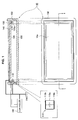
- FIG. 1 A diagram illustrated in the lower portion of the page of Fig. 1 is a plan view of a mobile apparatus 10 including a display screen 10a.
- a liquid crystal display LCD: Liquid Crystal Display
- organic electroluminescene display organic EL, OELD: Organic Electroluminescence Display
- the mobile apparatus 10 is an example of an information processing apparatus capable of receiving information by touching or depressing the display screen 10a.
- the information processing apparatus may be a PC (Personal Computer), a cellular phone, a smart phone, a portable music player, a personal digital assistant (PDA: Personal Digital Assistant), a game apparatus, or a digital household appliance.
- PC Personal Computer
- PDA Personal Digital Assistant
- a diagram illustrated in the upper portion of the page of Fig. 1 is a sectional view of the mobile apparatus 10 shown in the diagram in the lower portion of the page of Fig. 1 , taken along a line 1 ⁇ 1.
- the mobile apparatus 10 includes a base member 100, a pressure-sensitive sensor 110, a touch panel 120, an electrically conductive vapor-deposited film 130, a top plate 140, and an electrically conductive housing 150.
- the base member 100 constitutes the bottom portion of the mobile apparatus 10, and is formed of a resin substrate or the like, for example.
- the pressure-sensitive sensor 110 is in the shape of a sheet, and is shaped like a substantially rectangular frame. Referring to a diagram on the left side of the page of Fig. 1 in which the pressure-sensitive sensor 110 has been enlarged, the pressure-sensitive sensor 110 has a structure in which a pressure-sensitive electrically conductive rubber 110a is sandwiched between two sheet panels 110b that form electrode surfaces.
- the touch panel 120 is disposed directly on the pressure-sensitive sensor 110.
- the touch panel 120 is a touch panel of a capacitance type, and detects a touch position of an operating finger.
- a display panel not shown is disposed between the touch panel 120 and the base member 100.
- a key input region Er for displaying a software keyboard on the display screen 10a of the display panel.
- the software keyboard with a QWERTY key arrangement capable of receiving "kana" characters and English alphabet characters is displayed in the key input region Er.
- An operator causes an operating finger to touch or depress a predetermined portion of the touch panel 120 based on the software keyboard displayed on the display panel 120.
- the touch panel 120 detects X and Y coordinates of the input position of the touch panel the operating finger has touched.
- the X and Y coordinates detected by the touch panel 120 are transmitted to a controller 160.
- the electrically conductive vapor-deposited film 130 is a thin metal film formed in the shape of a frame by vapor deposition, and covers an upper surface of the pressure sensitive sensor 110 via the touch panel 120.
- the electrically conductive vapor-deposited film 130 does not exist on a region other than a peripheral edge portion of the touch panel 120. Thus, the electrically conductive vapor-deposited film 130 does not affect position detection by the touch panel 120.
- the top plate 140 is formed above the touch panel 120 with the electrically conductive vapor-deposited film sandwiched between the top plate 140 and the touch panel 120.
- the top plate 140 protects the touch panel 120 and prevents the touch panel 120 from being scratched.
- the top plate 140 is formed of a glass substrate or a resin substrate, for example. The finger depresses the touch panel 120 via the top plate 140.
- the electrically conductive housing 150 is a frame body surrounding the outer periphery of the touch panel 120, and is fitted in the base member 100.
- the electrically conductive housing 150 is formed of an electrically conductive material mainly made of aluminum, an electrically conductive rubber, electrically conductive carbon, or the like, for example, and is connected to the ground. With this arrangement, the electrically conductive housing 150 includes a function of blocking electrical connection between the operating finger which comes close to the mobile apparatus 10 from a side surface of the mobile apparatus 10 and the pressure-sensitive sensor 110.
- a projecting portion 150a projecting toward an inside of the electrically conductive housing 150 is formed at the center of an inner wall of the electrically conductive housing 150.
- the pressure-sensitive sensor 110, the touch panel 120, the electrically conductive vapor-deposited film 130, and the top plate 140 are laminated in this stated order, and are disposed inside the electrically conductive housing 150, being supported by the projecting portion 150a of the electrically conductive housing 150.
- the projecting portion 150a of the electrically conductive housing 150 includes a function of blocking electrical connection between the pressure-sensitive sensor 110 and the operating finger which has come close from a bottom direction of the mobile apparatus 10.
- the pressure-sensitive electrically conductive rubber 110a When the pressure-sensitive electrically conductive rubber 110a deforms with respect to depression of the display surface by the operating finger, the pressure-sensitive sensor 110 detects electrical conduction of the portion of deformation of the pressure-sensitive electrically conductive rubber, thereby detecting a depressing force. The value of detection by the pressure-sensitive sensor 110 is transmitted to the controller 160 and is converted to an electrical signal indicating the depressing force (depression pressure). An insulator not shown is formed on the surface of each sheet panel 110b.
- the controller 160 is a microprocessor included in the mobile apparatus 10.
- the mobile apparatus 10 includes a depressing force acquisition unit 200, an input position acquisition unit 210, an input control unit 220, a display control unit 230, and a storage unit 240.
- the depressing force acquisition unit 200 obtains a depressing force detected with respect to an input operation.
- a user causes an operating finger to touch a predetermined position on the touch panel, and depresses the predetermined position.
- the pressure-sensitive electrically conductive rubber 110a deforms (contracts) according to the pressure.
- the pressure-sensitive electrically conductive rubber 110a contracts, a capacitance between the electrodes changes.
- the capacitance of the pressure-sensitive sensor 110 is transmitted to the controller 160 connected to the pressure-sensitive sensor 110, and is converted to an electrical signal indicating the depressing force (depression pressure).
- the electrical signal obtained by the conversion is transmitted to the depressing force acquisition unit 200 from the controller 160. In this manner, the depressing force acquisition unit 200 acquires the depressing force detected with respect to the input operation.
- the input position acquisition unit 210 acquires the position of input detected with respect to the input operation.
- the user When performing the input operation, the user causes the operating finger to touch the predetermined position on the touch panel.
- the touch panel 120 detects X and Y coordinates touched by the operating finger, as the position of input.
- the X and Y coordinates detected by the touch panel 120 are transmitted to the input position acquisition unit 210 via the controller 160. In this manner, the input position acquisition unit 210 obtains the position of input detected with respect to the input operation.
- the input control unit 220 fixes the position of input as the position of an input candidate, in response to a timing at which an increase amount of the depressing force has exceeded a first threshold value, at a stage prior to an input candidate determination operation of determining the input candidate as input information.
- the operation prior to the input candidate determination operation and the input candidate determination operation will be described later.
- the display control unit 230 controls information to be displayed on the display screen 10a.
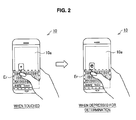
- the display control unit 230 may perform control such that, when the operating finger has touched the touch panel 120, a pop-up display of a character "e" at the position of touch is performed, as shown in a diagram on the left side of the page of Fig. 2 .
- the display control unit 230 may perform control such that, when the operating finger is depressed for determination, the pop-up display of the character "e" at the position of depression is highlighted, as shown in a diagram illustrated on the right side of the page of Fig. 2 , for example.
- the display control unit 230 may change screen display according to the operation by the operating finger.
- the storage unit 240 stores an input start threshold value 240a, an input end threshold value 240b, a first threshold value 240c, a second threshold value 240d, and the like, as parameters necessary for the input candidate determination operation and the operation prior to the input candidate determination operation.
- the mobile apparatus 10 described above includes a CPU, a RAM, a non-volatile memory, and the like not shown, and each of the functions of the mobile apparatus 10 is executed by the CPU.
- the controller 160 also includes a CPU, a RAM, a non-volatile memory, and the like not shown. Information on the depressing force and the coordinates of the input position transmitted from the controller 160 is stored in the RAM and the non-volatile memory.
- the CPU analyzes the operation of the operating finger, based on the depressing force and the X and Y coordinates (of the input position) stored in the RAM and the like.
- the CPU controls an input operation to the mobile apparatus 10 based on the analyzed operation of the operating finger.
- Figs. 4 to 8 are a flowchart and diagrams each showing a transition of a depressing force, for explaining an input control process example 1.
- Figs. 7 and 8 are a flowchart and a diagram showing a transition of a depressing force, for explaining an input control process example 2.
- Lock and unlock processes in this embodiment constitute the operation prior to the input candidate determination operation.
- a preliminary selection process and an input determination process constitute the input candidate determination operation.
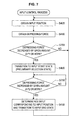
- the input position acquisition unit 210 obtains X and Y coordinates of a position of the touch panel 120 touched by an operating finger, as an input position, in step S405.
- the depressing force acquisition unit 200 obtains the depressing force of the operating finger which depresses the touch panel 120, in step S410.
- the input control unit 220 determines whether or not the depressing force has exceeded the input start threshold value 240a, in step S415.
- the operation is returned to step S405, and the processes in steps S405 to S415 are executed again.
- step S420 When it is determined in step S415 that the depressing force has exceeded the input start threshold value 240a, the operation proceeds to step S420 to cause transition of a key at the input position to an input start state (preliminary selection state or determination standby state).
- a time t 1 in Fig. 5 indicates a timing of preliminary selection of the key, or a timing at which the transition to the determination standby state has been made.
- the display control unit 230 may show the preliminary selection state to a user as shown in Fig. 2 in which the pop-up display of the character "e" is highlighted.
- step S425 the input control unit 220 determines whether or not the depressing force has fallen below the input end threshold 240b.
- the input end threshold value 240b is set to be smaller than the input start threshold value 240a.
- step S430 The input control unit 220 causes the key to transition to an input end state (standby finish state) in step S430. That is, the input control unit 220 determines input of the key corresponding to the input position, and causes the input operation of the key to be finished.
- a time t 2 in Fig. 5 indicates a timing at which input of the key corresponding to the position of touch by the operating finger has been determined and the transition to the standby finish state has been made. At this timing, the pop-up display of the key "e" in Fig. 2 , for example, is finished, and the mobile apparatus 10 receives subsequent input of a character.
- a vibration device such as a vibration motor is included in the mobile apparatus 10, and the surface of the touch panel is vibrated by the vibration device at each timing to notify the timing to the user.
- the input control process example 1 may prevent successive input determinations of unintended characters. This phenomenon occurs when a depressing force hovers around the input start threshold value 240a, for example. Due to a subtle variation of the depressing force and noise of the electrical signal in this condition, the depressing force frequently exceeds the input start threshold value, so that the successive input determinations of unintended characters occur.
- the preliminary selection state of a key is shown to the user by highlighted display of a pop-up character or the like.
- the user may adjust a degree of depression and may perform input determination after confirming that an intended button has been selected. A touch error may be thereby reduced. Further, even when the size of the button is small with respect to the operating finger or the size of a stylus, selection and input determination operations of the button may be correctly performed.
- the determination operation of input by depression is controlled using the absolute value of the depressing force.
- a description will be given below about an example where the input determination operation is controlled according to a depressing force variation, with reference to Fig. 7 .
- the input position acquisition unit 210 obtains X and Y coordinates of a position of the touch panel 120 touched by an operating finger, as an input position, in step S405.
- the depressing force acquisition unit 200 obtains the depressing force of the operating finger which depresses the touch panel 120, in step S410.
- the input control unit 220 determines whether or not the depressing force has changed by a given amount ( ⁇ P1) or more after the depressing force has started to decrease.
- ⁇ P1 a given amount
- the operation is returned to step S405. Then, the processes in steps S405, S410, and S705 are executed again.
- step S705 When it is determined in step S705 that the depressing force has decreased by the given amount ( ⁇ P1) or more, the operation proceeds to step S420. Transition to the input start state (preliminary selection state or determination standby state) is then made.
- the display control unit 230 may highlight the pop-up display of the character "e" shown in Fig. 2 , in response to this timing.
- step S710 the input control unit 220 determines whether or not the depressing force has changed by a given amount ( ⁇ P2) or more after the depression has started to increase. While it is determined that the depressing force has not increased by the given amount ( ⁇ P2) or more, the input control unit 220 repeats the process in step S710. When it is determined that the depressing force has increased by the given amount ( ⁇ P2) or more, the operation proceeds to step S430.
- F 0
- the position of the operating finger may unintentionally change.
- the operator may unintentionally input a different button which is present in the proximity of the button in the preliminary selection state even if either of the input control methods described above is used.
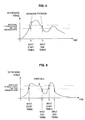
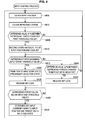
- Figs. 9 is a flowchart and Fig. 10 includes diagrams each showing a transition of a depressing force, for explaining the input control process in this embodiment.
- step S405 When the input control process in Fig. 9 is started, an input position is obtained in step S405, and the depressing force of an operating finger which depresses the touch panel 120 is obtained in step S410.
- the input control unit 220 determines whether or not a differential value of the depressing force of an operator has exceeded the predetermined first threshold value 240c.
- the differential value of the depressing force of the operator is a difference value ( ⁇ Pd: change amount of the depressing force) between a depressing force obtained at an immediately preceding time and the depressing force obtained at a current time
- ⁇ Pd change amount of the depressing force
- step S905 When the depressing force increases and then it is determined in step S905 that the difference value ⁇ Pd of the depressing force has exceeded the first threshold value 240c, the input control unit 220 determines that the operator is in a state of performing input by depression. The operation then proceeds to step S910, and the input control unit 220 records X and Y coordinates (X1, Y1) of the input position in the recording unit 240 as the position of an input candidate.
- a function of the input control unit 220 of fixing the input position as the position of the input candidate at a predetermined timing is executed at the stage prior to the input candidate determination operation of determining the input candidate as input information.
- a time t 1 is a timing at which it has been determined that the depression operation was started and an input key was then locked.
- the magnitude of the first threshold value 240c is set to exceed the magnitude of a depressing force variation (increase) caused by each of a usual sliding operation of the finger and noise.
- the input control unit 220 determines whether the depressing force has exceeded the input start threshold value 240a, in step S915. When it is determined that the depressing force has exceeded the input start threshold value 240a, the operation proceeds to step S420 to cause the key to transition to the input start state (preliminary selection state), and then, locking of the input key is released in step S930. That is, fixing of the coordinates of the input position performed in step S910 is canceled at this timing. With this arrangement, the operator may execute the determination operation of key input.
- a time t 2 in the diagram in the lower portion of the page of Fig. 10 is a timing at which the key locking has been released.
- step S915 When it is determined in step S915 that the depressing force has not exceeded the input start threshold value 240a, the operation proceeds to step S920 to determine whether or not the difference value ⁇ Pd of the depressing force has changed from a positive value to a negative value. When it is determined that the difference value ⁇ Pd of the depressing force has not changed from the positive value to the negative value, the operation is returned to step S915. On the other hand, when it is determined that the depressing force has changed from the positive value to the negative value, the operation proceeds to step S925 to determine the depression operation has been finished without transition of the input key to the input start state (preliminary selection state). Locking of the key is therefore released, and the operation is returned to step S405.
- a time t 3 in the diagram in the middle portion of the page of Fig. 10 is a timing at which locking of the key has been released.
- the mobile apparatus 10 may receive a subsequent input operation without performing input determination when the operator stops the input operation in the middle of the input operation.
- step S425 determines whether or not the depressing force has fallen below the input end threshold value 240b in step S425 and determines that the depressing force has fallen below the input end threshold value 240b
- the same process as that described above is performed. That is, the operation proceeds to step S430, and transition to the input end state is made. Input of the key corresponding to the input position is determined, and the input operation of the key is finished.
- a time t 4 in the diagram in the lower portion of the page of Fig. 10 is a timing at which the input determination has been made, and then the input has been finished.
- Fig. 11 is a flowchart
- Fig. 12 includes diagrams each showing a transition of a depressing force, for explaining an input control process in this embodiment.
- the second embodiment prevents erroneous button depression which may occur due to an unintentional change in coordinates of a position of input by a finger of an operator at a time of a depressing force increase. Further, the second embodiment solves a problem that the coordinates of an input position is fixed though the operator does not intend to fix the coordinates of the input position.
- step S405 When the input control process in Fig. 11 is started, an input position is obtained in step S405 and the depressing force of an operating finger which depresses the touch panel 120 is obtained in step S410.
- the input control unit 220 determines whether or not the difference value ⁇ Pd (increase amount) between a depressing force obtained at an immediately preceding time and the depressing force obtained at a current time, which is a differential value of the depressing force of an operator, has exceeded the predetermined first threshold value 240c.
- the difference value ⁇ Pd has not exceeded the predetermined first threshold value 240c
- the operation is returned to step S405, and the processes in steps S405, S410, and S905 are executed.
- step S905 When it is determined in step S905 that the difference value ⁇ Pd of the depressing force has exceeded the predetermined first threshold value 240c, the input control unit 220 determines that the operator is going to perform input by depression. The operation then proceeds to step S910, and the input control unit 220 records X and Y coordinates (X1, Y1) of the input position in the storage unit 240.
- a time t 1 is a timing at which it has been determined that the depression operation was started and an input key was then locked.
- the input control unit 220 determines whether or not the depressing force has exceeded the input start threshold value 240a, in step S915.
- the operation proceeds to step S420 to cause the key to the input start state (preliminary selection state).
- locking of the input key is released in step S930. That is, fixing of the coordinates of the input position performed in step S910 is canceled at this timing.
- step S915 when it is determined that the depressing force has not exceeded the input start threshold 240a in step S915, the operation proceeds to step S1105. Then, the input control unit 220 determines whether or not a change amount of the input position has exceeded the second threshold value 240d. When it is determined that the change amount of the input position has not exceeded the second threshold value 240d, the operation is returned to step S915. When it is determined that the change amount of the input position has exceeded the second threshold value 240d, the operation proceeds to step S925. The input control unit determines that the coordinate value change of the input position is intended by the operator. Then, locking of the key is released. The operation is then returned to step S405.
- the mobile apparatus 10 may receive a subsequent input operation without making input determination when the operator stops the input operation in the middle of the input operation.
- the description using Fig. 12 was directed to the case of the amount of change in the Y coordinate.
- a similar operation may be used when a change in the X coordinate occurs. That is, also when an amount of change in the X coordinate has exceeded a predetermined threshold value ( ⁇ X), locking of the key is released.
- ⁇ X predetermined threshold value
- Each of threshold values ⁇ X and ⁇ Y as the second threshold value 240d is determined, based on the magnitude of deformation of the finger or the magnitude of a coordinate displacement caused by an input position deviation when the finger has normally depressed a button (key) .
- step S425 determines whether or not the depressing force has fallen below the input end threshold value 240b in step S425 and determines that the depressing force has fallen below the input end threshold value 240b. That is, the operation proceeds to step S430, input of the key corresponding to the input position is determined, and transition to the input end state is made, thereby finishing the input operation of the key.
- Fig. 13 is a flowchart
- Fig. 14 includes diagrams each showing a transition of a depressing force, for explaining an input control process in this embodiment.
- step S405 When the input control process in Fig. 13 is started, an input position is obtained in step S405 and the depressing force of an operating finger which depresses the touch panel 120 is obtained in step S410.
- the input control unit 220 determines whether or not the difference value ⁇ Pd (increase amount) between a depressing force obtained at an immediately preceding time and the depressing force obtained at a current time has exceeded the predetermined first threshold value 240c, in step S905.
- the operation is returned to step S405, and the processes in steps S405, S410, and S905 are executed.
- step S905 When it is determined that the difference value ⁇ Pd has exceeded the predetermined first threshold value 240c in step S905, the input control unit 220 determines that an operator is going to perform input by depression. Then, the operation proceeds to step S910, and the input control unit 220 records X and Y coordinates (X1, Y1) of the input position in the storage unit 240. Referring to Fig. 14 , a time t 1 is a timing at which it has been determined that the depression operation was started and the input key was then locked.
- the input control unit 220 determines whether or not the depressing force has exceeded the input start threshold value 240a, in step S915.
- the operation proceeds to step S420 to cause the input key to transition to the input start state (preliminary selection state).
- locking of the input key is released in step S930. That is, fixing of the coordinates of the input position performed in step S910 is canceled at this timing.
- step S915 When it is determined in step S915 that the depressing force has not exceeded the input start threshold value 240a, the operation proceeds to step S 1305. Then, the input control unit 220 determines whether or not the depressing force has fallen below the input end threshold value 240b. When it is determined that the depressing force has not fallen below the input end threshold value 240b, the operation is returned to step S915. On the other hand, when it is determined that the depressing force has fallen below the input end threshold value 240b, the input control unit 220 determines that the coordinate value change of the input position is intended by the operator. The operation proceeds to step S925, in which locking of the key is canceled. Then, the operation is returned to step S405.
- a deviation (change amount) of the input position gradually decreases after the deviation has increased. Accordingly, a deviation dY at a time t 2 is reduced from a maximum value ⁇ Y of the deviation at a time tm. Thus, locking of the key is released at the time t 2 in this embodiment.
- This arrangement may solve the problem of a large jump in the coordinate of an input position which may occur at a moment when an operator stops an input operation in the middle of the input operation.
- the input control unit 220 determines whether or not the depressing force has fallen below the input end threshold value 240b, in step S425. When it is determined that the depressing force has fallen below the input end threshold value 240b, the operation proceeds to step S430 to determine input of the key corresponding to the input position.
- the input control unit causes the key to transition to the input end state, thereby finishing the input operation of the key.
- the processes in steps 425 and 430 are the same as those described above.
- a timing at which coordinate fixing (locking of the key) is cancelled after an input start timing may be a timing at which the depressing force has fallen below the input end threshold value 240b.
- the timing at which the coordinate fixing is cancelled may be a timing at which the depressing force has fallen below a desired given value.
- the desired given value may be a third threshold value smaller than the input start threshold value.
- fixing of an input candidate position is canceled in response to a timing at which the depressing force has fallen below the third threshold value smaller than the input start threshold value or a timing at which the depressing force has exceeded the input start threshold value after the input candidate position has been fixed.
- This arrangement may prevent erroneous button depression which may occur due to an unintentional change in the coordinates of the position of input by a finger at a time of a depressing force increase when input button depression intended for determination is performed. This arrangement may further solve the problem of a large jump in the coordinates of the input position when key locking is released.
- erroneous input button depression due to an input position deviation at a time of an input operation may be prevented, and an efficient and high-speed input operation may be implemented by a desired depression operation.
- the lock and unlock processes in each of the embodiments may be applied to an operation system in which input determination is made at a timing of a start of input and an operation system in which input determination is made at a timing of an end of input (corresponding to determination by a mouse-up, for example). In both cases, a similar effect may be achieved.
- the operations of the respective units are related to each other and may be replaced with a series of operations and a series of processes in consideration of the relation to each other.
- the embodiment of the information processing apparatus can be thereby converted into the embodiment of an input method of the information processing apparatus and the embodiment of a program for causing a computer to implement functions of the information processing apparatus.
- the present disclosure may be applied to operation of an electronic apparatus such as a remote controller using a touch pad, in which a screen and an operation surface are present at different locations, as well as an electronic apparatus such as a cellular phone including a touch panel. Further, as described above, by using release of locking of input position coordinates when a displacement amount of an operating finger has exceeded the desired threshold value, an input operation for moving input position coordinates with the touch panel or the touch pad kept depressed also becomes possible.
- a touch pad operation is performed by determination of depression
- a PC mouse pad with a mechanical switch installed on a back surface thereof may be pointed out. Even in such an operation system, an intuitive determination operation as with the method described above may be performed.
- a mechanical switch is used, however, an intermediate state of depression of the mechanical switch may not be detected. Accordingly, a position deviation at a time of depression as described in the present disclosure may not be prevented.
- the depression determination method of the present disclosure using a touch panel or a touch pad capable of detecting a depressing force is useful as a technique that is more advantageous to other methods.
- Input information which is applied to an input operation includes numerals and signs as well as characters such as katakanas, hiraganas, kanjis, and English alphabets.
Landscapes
- Engineering & Computer Science (AREA)
- General Engineering & Computer Science (AREA)
- Theoretical Computer Science (AREA)
- Human Computer Interaction (AREA)
- Physics & Mathematics (AREA)
- General Physics & Mathematics (AREA)
- User Interface Of Digital Computer (AREA)
- Position Input By Displaying (AREA)
- Input From Keyboards Or The Like (AREA)
Applications Claiming Priority (1)
| Application Number | Priority Date | Filing Date | Title |
|---|---|---|---|
| JP2010196815A JP5732783B2 (ja) | 2010-09-02 | 2010-09-02 | 情報処理装置、情報処理装置の入力制御方法及びプログラム |
Publications (3)
| Publication Number | Publication Date |
|---|---|
| EP2426580A2 true EP2426580A2 (de) | 2012-03-07 |
| EP2426580A3 EP2426580A3 (de) | 2013-04-03 |
| EP2426580B1 EP2426580B1 (de) | 2019-10-02 |
Family
ID=44503617
Family Applications (1)
| Application Number | Title | Priority Date | Filing Date |
|---|---|---|---|
| EP11174926.3A Active EP2426580B1 (de) | 2010-09-02 | 2011-07-21 | Informationsverarbeitungsvorrichtung, Eingabesteuerverfahren für diese Informationsverarbeitungsvorrichtung und Programm |
Country Status (6)
| Country | Link |
|---|---|
| US (2) | US8780075B2 (de) |
| EP (1) | EP2426580B1 (de) |
| JP (1) | JP5732783B2 (de) |
| KR (1) | KR20120023563A (de) |
| CN (2) | CN107506131B (de) |
| BR (1) | BRPI1104224A2 (de) |
Cited By (45)
| Publication number | Priority date | Publication date | Assignee | Title |
|---|---|---|---|---|
| WO2014029906A1 (en) * | 2012-08-21 | 2014-02-27 | Nokia Corporation | Apparatus and method for providing for interaction with content within a digital bezel |
| WO2013169877A3 (en) * | 2012-05-09 | 2014-03-13 | Yknots Industries Llc | Device, method, and graphical user interface for selecting user interface objects |
| WO2013169865A3 (en) * | 2012-05-09 | 2014-04-17 | Yknots Industries Llc | Device, method, and graphical user interface for moving a user interface object based on an intensity of a press input |
| WO2013169842A3 (en) * | 2012-05-09 | 2014-07-10 | Yknots Industries Llc | Device, method, and graphical user interface for selecting object within a group of objects |
| GB2517087A (en) * | 2013-08-08 | 2015-02-11 | Panasonic Ip Corp America | Electronic device and coordinate detecting method |
| CN104471521A (zh) * | 2012-05-09 | 2015-03-25 | 苹果公司 | 用于针对改变用户界面对象的激活状态来提供反馈的设备、方法和图形用户界面 |
| EP2835725A3 (de) * | 2013-08-08 | 2015-04-01 | Panasonic Intellectual Property Corporation of America | Elektronische Vorrichtung und Koordinatendetektionsverfahren |
| EP2905676A4 (de) * | 2012-10-05 | 2016-06-15 | Nec Solution Innovators Ltd | Benutzerschnittstellenvorrichtung und benutzerschnittstellenverfahren |
| US9602729B2 (en) | 2015-06-07 | 2017-03-21 | Apple Inc. | Devices and methods for capturing and interacting with enhanced digital images |
| US9612741B2 (en) | 2012-05-09 | 2017-04-04 | Apple Inc. | Device, method, and graphical user interface for displaying additional information in response to a user contact |
| US9619076B2 (en) | 2012-05-09 | 2017-04-11 | Apple Inc. | Device, method, and graphical user interface for transitioning between display states in response to a gesture |
| US9632664B2 (en) | 2015-03-08 | 2017-04-25 | Apple Inc. | Devices, methods, and graphical user interfaces for manipulating user interface objects with visual and/or haptic feedback |
| US9639184B2 (en) | 2015-03-19 | 2017-05-02 | Apple Inc. | Touch input cursor manipulation |
| US9645732B2 (en) | 2015-03-08 | 2017-05-09 | Apple Inc. | Devices, methods, and graphical user interfaces for displaying and using menus |
| US9665206B1 (en) | 2013-09-18 | 2017-05-30 | Apple Inc. | Dynamic user interface adaptable to multiple input tools |
| US9674426B2 (en) | 2015-06-07 | 2017-06-06 | Apple Inc. | Devices and methods for capturing and interacting with enhanced digital images |
| US9753639B2 (en) | 2012-05-09 | 2017-09-05 | Apple Inc. | Device, method, and graphical user interface for displaying content associated with a corresponding affordance |
| US9778771B2 (en) | 2012-12-29 | 2017-10-03 | Apple Inc. | Device, method, and graphical user interface for transitioning between touch input to display output relationships |
| US9785305B2 (en) | 2015-03-19 | 2017-10-10 | Apple Inc. | Touch input cursor manipulation |
| CN107257383A (zh) * | 2017-07-14 | 2017-10-17 | 广东欧珀移动通信有限公司 | 一种信息推送方法、装置及存储介质、电子设备 |
| US9830048B2 (en) | 2015-06-07 | 2017-11-28 | Apple Inc. | Devices and methods for processing touch inputs with instructions in a web page |
| US9880735B2 (en) | 2015-08-10 | 2018-01-30 | Apple Inc. | Devices, methods, and graphical user interfaces for manipulating user interface objects with visual and/or haptic feedback |
| US9891811B2 (en) | 2015-06-07 | 2018-02-13 | Apple Inc. | Devices and methods for navigating between user interfaces |
| US9959025B2 (en) | 2012-12-29 | 2018-05-01 | Apple Inc. | Device, method, and graphical user interface for navigating user interface hierarchies |
| US9990107B2 (en) | 2015-03-08 | 2018-06-05 | Apple Inc. | Devices, methods, and graphical user interfaces for displaying and using menus |
| US9996231B2 (en) | 2012-05-09 | 2018-06-12 | Apple Inc. | Device, method, and graphical user interface for manipulating framed graphical objects |
| US10037138B2 (en) | 2012-12-29 | 2018-07-31 | Apple Inc. | Device, method, and graphical user interface for switching between user interfaces |
| US10042542B2 (en) | 2012-05-09 | 2018-08-07 | Apple Inc. | Device, method, and graphical user interface for moving and dropping a user interface object |
| US10048757B2 (en) | 2015-03-08 | 2018-08-14 | Apple Inc. | Devices and methods for controlling media presentation |
| US10067653B2 (en) | 2015-04-01 | 2018-09-04 | Apple Inc. | Devices and methods for processing touch inputs based on their intensities |
| US10073615B2 (en) | 2012-05-09 | 2018-09-11 | Apple Inc. | Device, method, and graphical user interface for displaying user interface objects corresponding to an application |
| US10078442B2 (en) | 2012-12-29 | 2018-09-18 | Apple Inc. | Device, method, and graphical user interface for determining whether to scroll or select content based on an intensity theshold |
| US10095396B2 (en) | 2015-03-08 | 2018-10-09 | Apple Inc. | Devices, methods, and graphical user interfaces for interacting with a control object while dragging another object |
| US10126930B2 (en) | 2012-05-09 | 2018-11-13 | Apple Inc. | Device, method, and graphical user interface for scrolling nested regions |
| US10162452B2 (en) | 2015-08-10 | 2018-12-25 | Apple Inc. | Devices and methods for processing touch inputs based on their intensities |
| US10175757B2 (en) | 2012-05-09 | 2019-01-08 | Apple Inc. | Device, method, and graphical user interface for providing tactile feedback for touch-based operations performed and reversed in a user interface |
| US10200598B2 (en) | 2015-06-07 | 2019-02-05 | Apple Inc. | Devices and methods for capturing and interacting with enhanced digital images |
| US10235035B2 (en) | 2015-08-10 | 2019-03-19 | Apple Inc. | Devices, methods, and graphical user interfaces for content navigation and manipulation |
| US10248308B2 (en) | 2015-08-10 | 2019-04-02 | Apple Inc. | Devices, methods, and graphical user interfaces for manipulating user interfaces with physical gestures |
| US10275087B1 (en) | 2011-08-05 | 2019-04-30 | P4tents1, LLC | Devices, methods, and graphical user interfaces for manipulating user interface objects with visual and/or haptic feedback |
| US10346030B2 (en) | 2015-06-07 | 2019-07-09 | Apple Inc. | Devices and methods for navigating between user interfaces |
| US10416800B2 (en) | 2015-08-10 | 2019-09-17 | Apple Inc. | Devices, methods, and graphical user interfaces for adjusting user interface objects |
| US10437333B2 (en) | 2012-12-29 | 2019-10-08 | Apple Inc. | Device, method, and graphical user interface for forgoing generation of tactile output for a multi-contact gesture |
| US10496260B2 (en) | 2012-05-09 | 2019-12-03 | Apple Inc. | Device, method, and graphical user interface for pressure-based alteration of controls in a user interface |
| US10620781B2 (en) | 2012-12-29 | 2020-04-14 | Apple Inc. | Device, method, and graphical user interface for moving a cursor according to a change in an appearance of a control icon with simulated three-dimensional characteristics |
Families Citing this family (39)
| Publication number | Priority date | Publication date | Assignee | Title |
|---|---|---|---|---|
| US9141224B1 (en) * | 2012-05-17 | 2015-09-22 | Amazon Technologies, Inc. | Shielding capacitive touch display |
| JP2014016707A (ja) * | 2012-07-06 | 2014-01-30 | Nec Saitama Ltd | 情報処理装置 |
| US10817096B2 (en) | 2014-02-06 | 2020-10-27 | Apple Inc. | Force sensor incorporated into display |
| CN105190495A (zh) | 2013-02-08 | 2015-12-23 | 苹果公司 | 基于电容感测的力测定 |
| CN103176651B (zh) * | 2013-03-05 | 2016-08-03 | 山东明海软件技术有限公司 | 一种手写信息快速采集方法 |
| US9671889B1 (en) | 2013-07-25 | 2017-06-06 | Apple Inc. | Input member with capacitive sensor |
| US10545657B2 (en) | 2013-09-03 | 2020-01-28 | Apple Inc. | User interface for manipulating user interface objects |
| EP3042271B1 (de) | 2013-09-03 | 2020-03-18 | Apple Inc. | Manipulationen von benutzerschnittstellenobjekten bei einer benutzerschnittstelle |
| US10503388B2 (en) | 2013-09-03 | 2019-12-10 | Apple Inc. | Crown input for a wearable electronic device |
| US11068128B2 (en) | 2013-09-03 | 2021-07-20 | Apple Inc. | User interface object manipulations in a user interface |
| US12287962B2 (en) | 2013-09-03 | 2025-04-29 | Apple Inc. | User interface for manipulating user interface objects |
| CN114237485B (zh) | 2013-12-11 | 2025-05-02 | 北京三星通信技术研究有限公司 | 触控操作的方法及装置 |
| FR3015383B1 (fr) * | 2013-12-19 | 2017-01-13 | Dav | Dispositif de controle pour vehicule automobile et procede de commande |
| WO2015123322A1 (en) | 2014-02-12 | 2015-08-20 | Apple Inc. | Force determination employing sheet sensor and capacitive array |
| JP6171998B2 (ja) | 2014-03-14 | 2017-08-02 | ソニー株式会社 | 情報処理装置、入力装置、情報処理方法及びプログラム |
| JP5866526B2 (ja) | 2014-06-20 | 2016-02-17 | パナソニックIpマネジメント株式会社 | 電子機器、制御方法、及びプログラム |
| JP5736551B1 (ja) * | 2014-06-20 | 2015-06-17 | パナソニックIpマネジメント株式会社 | 電子機器及び制御方法 |
| JP5656307B1 (ja) | 2014-06-20 | 2015-01-21 | パナソニック株式会社 | 電子機器 |
| EP4036685A1 (de) | 2014-06-27 | 2022-08-03 | Apple Inc. | Benutzerschnittstelle mit reduzierter grösse |
| TWI676127B (zh) | 2014-09-02 | 2019-11-01 | 美商蘋果公司 | 關於電子郵件使用者介面之方法、系統、電子器件及電腦可讀儲存媒體 |
| TW201610758A (zh) | 2014-09-02 | 2016-03-16 | 蘋果公司 | 按鈕功能性 |
| US10073590B2 (en) | 2014-09-02 | 2018-09-11 | Apple Inc. | Reduced size user interface |
| WO2016036510A1 (en) | 2014-09-02 | 2016-03-10 | Apple Inc. | Music user interface |
| US10365807B2 (en) | 2015-03-02 | 2019-07-30 | Apple Inc. | Control of system zoom magnification using a rotatable input mechanism |
| US10006937B2 (en) | 2015-03-06 | 2018-06-26 | Apple Inc. | Capacitive sensors for electronic devices and methods of forming the same |
| US10007343B2 (en) | 2016-03-31 | 2018-06-26 | Apple Inc. | Force sensor in an input device |
| KR20180017852A (ko) * | 2016-08-11 | 2018-02-21 | 주식회사 하이딥 | 터치 입력 장치의 압력 터치 방법 |
| JP2018036903A (ja) * | 2016-08-31 | 2018-03-08 | 富士通株式会社 | 入力装置、端末装置および入力制御プログラム |
| DE102016216590A1 (de) * | 2016-09-01 | 2018-03-01 | Bayerische Motoren Werke Aktiengesellschaft | Verfahren, Vorrichtung und Computerprogramm zur Erzeugung und Übermittlung einer Fahrerinformation |
| WO2019009138A1 (ja) * | 2017-07-04 | 2019-01-10 | パイオニア株式会社 | 操作入力装置 |
| JP6428866B2 (ja) * | 2017-07-06 | 2018-11-28 | ソニー株式会社 | 情報処理装置、入力装置、情報処理方法及びプログラム |
| CN108510441B (zh) * | 2018-03-19 | 2022-03-08 | 东南大学 | 一种基于交错网格的影像多分辨率显示方法 |
| US10866683B2 (en) | 2018-08-27 | 2020-12-15 | Apple Inc. | Force or touch sensing on a mobile device using capacitive or pressure sensing |
| US11435830B2 (en) | 2018-09-11 | 2022-09-06 | Apple Inc. | Content-based tactile outputs |
| DK179896B1 (en) | 2018-09-11 | 2019-08-30 | Apple Inc. | CONTENT-BASED TACTILE OUTPUTS |
| JP2023119599A (ja) * | 2020-07-16 | 2023-08-29 | アルプスアルパイン株式会社 | ジェスチャ判定装置 |
| CN114791770B (zh) * | 2021-01-25 | 2025-05-02 | 阿尔卑斯通信器件技术(上海)有限公司 | 非接触式动作识别装置以及动作识别方法 |
| JP2024116430A (ja) * | 2021-07-07 | 2024-08-28 | アルプスアルパイン株式会社 | 入力装置 |
| GB2625111B (en) * | 2022-12-07 | 2025-05-07 | Sony Interactive Entertainment Europe Ltd | System and method for involuntary user command compensation on an input device |
Citations (2)
| Publication number | Priority date | Publication date | Assignee | Title |
|---|---|---|---|---|
| JPH11119882A (ja) | 1997-10-20 | 1999-04-30 | Sanyo Electric Co Ltd | キー入力装置 |
| JP2010196815A (ja) | 2009-02-25 | 2010-09-09 | Toyota Motor Corp | ダイナミックダンパ |
Family Cites Families (38)
| Publication number | Priority date | Publication date | Assignee | Title |
|---|---|---|---|---|
| US5063407A (en) * | 1989-12-21 | 1991-11-05 | Fuji Photo Film Co., Ltd. | Method and apparatus for recording image |
| EP0490001B1 (de) * | 1990-12-14 | 1996-07-10 | International Business Machines Corporation | Koordinatenprozessor für ein Rechnersystem mit einer Zeigeranordnung |
| JP3223580B2 (ja) * | 1992-05-29 | 2001-10-29 | ソニー株式会社 | 画像作成装置 |
| US5621438A (en) * | 1992-10-12 | 1997-04-15 | Hitachi, Ltd. | Pointing information processing apparatus with pointing function |
| EP0758769B1 (de) * | 1995-08-11 | 2003-01-15 | Sharp Kabushiki Kaisha | Belegverarbeitungsvorrichtung |
| US5675329A (en) * | 1996-05-09 | 1997-10-07 | International Business Machines Corporation | Method of obtaining a second function from keys on a keyboard using pressure differentiation |
| US7614008B2 (en) * | 2004-07-30 | 2009-11-03 | Apple Inc. | Operation of a computer with touch screen interface |
| JP2001356869A (ja) * | 2000-06-13 | 2001-12-26 | Alps Electric Co Ltd | 入力装置 |
| JP2001265519A (ja) * | 2001-02-26 | 2001-09-28 | Alps Electric Co Ltd | コンピュータ装置 |
| US7746325B2 (en) * | 2002-05-06 | 2010-06-29 | 3M Innovative Properties Company | Method for improving positioned accuracy for a determined touch input |
| US7532202B2 (en) * | 2002-05-08 | 2009-05-12 | 3M Innovative Properties Company | Baselining techniques in force-based touch panel systems |
| JP4113440B2 (ja) * | 2003-02-13 | 2008-07-09 | 株式会社東海理化電機製作所 | 車両用画面操作装置 |
| WO2006013518A2 (en) * | 2004-08-02 | 2006-02-09 | Koninklijke Philips Electronics N.V. | Touch screen with pressure-dependent visual feedback |
| US7629966B2 (en) * | 2004-12-21 | 2009-12-08 | Microsoft Corporation | Hard tap |
| US20080297475A1 (en) * | 2005-08-02 | 2008-12-04 | Woolf Tod M | Input Device Having Multifunctional Keys |
| US8018440B2 (en) * | 2005-12-30 | 2011-09-13 | Microsoft Corporation | Unintentional touch rejection |
| JP2008015584A (ja) * | 2006-07-03 | 2008-01-24 | Kyocera Mita Corp | 操作装置,画像形成装置 |
| JP2008033739A (ja) * | 2006-07-31 | 2008-02-14 | Sony Corp | 力覚フィードバックおよび圧力測定に基づくタッチスクリーンインターラクション方法および装置 |
| US7692629B2 (en) * | 2006-12-07 | 2010-04-06 | Microsoft Corporation | Operating touch screen interfaces |
| US20080251368A1 (en) * | 2007-04-12 | 2008-10-16 | Sony Ericsson Mobile Communications Ab | Input device |
| US20090009482A1 (en) * | 2007-05-01 | 2009-01-08 | Mcdermid William J | Touch sensor pad user input device |
| JP2008305174A (ja) * | 2007-06-07 | 2008-12-18 | Sony Corp | 情報処理装置、情報処理方法、プログラム |
| US8661340B2 (en) * | 2007-09-13 | 2014-02-25 | Apple Inc. | Input methods for device having multi-language environment |
| CN101587418A (zh) * | 2008-05-23 | 2009-11-25 | 宏达国际电子股份有限公司 | 使用者界面的操作方法、电脑可读取媒体以及可携式装置 |
| TW200951793A (en) * | 2008-06-13 | 2009-12-16 | Asustek Comp Inc | Touch panel device and control method thereof |
| KR101495559B1 (ko) * | 2008-07-21 | 2015-02-27 | 삼성전자주식회사 | 사용자 명령 입력 방법 및 그 장치 |
| US8385885B2 (en) * | 2008-10-17 | 2013-02-26 | Sony Ericsson Mobile Communications Ab | Method of unlocking a mobile electronic device |
| JP4746086B2 (ja) * | 2008-12-25 | 2011-08-10 | 京セラ株式会社 | 入力装置 |
| JP4746085B2 (ja) * | 2008-12-25 | 2011-08-10 | 京セラ株式会社 | 入力装置 |
| US8878793B2 (en) * | 2009-04-24 | 2014-11-04 | Kyocera Corporation | Input apparatus |
| JP5304544B2 (ja) * | 2009-08-28 | 2013-10-02 | ソニー株式会社 | 情報処理装置、情報処理方法、及びプログラム |
| US8390583B2 (en) * | 2009-08-31 | 2013-03-05 | Qualcomm Incorporated | Pressure sensitive user interface for mobile devices |
| JP5278259B2 (ja) * | 2009-09-07 | 2013-09-04 | ソニー株式会社 | 入力装置、入力方法及びプログラム |
| TWI405101B (zh) * | 2009-10-05 | 2013-08-11 | Wistron Corp | 具觸控面板之電子裝置及其運作方法 |
| US8347221B2 (en) * | 2009-10-07 | 2013-01-01 | Research In Motion Limited | Touch-sensitive display and method of control |
| US8692815B2 (en) * | 2009-11-06 | 2014-04-08 | Bose Corporation | Touch-based user interface user selection accuracy enhancement |
| US8451255B2 (en) * | 2010-05-14 | 2013-05-28 | Arnett Ryan Weber | Method of providing tactile feedback and electronic device |
| US8351993B2 (en) * | 2010-10-08 | 2013-01-08 | Research In Motion Limited | Device having side sensor |
-
2010
- 2010-09-02 JP JP2010196815A patent/JP5732783B2/ja not_active Expired - Fee Related
-
2011
- 2011-07-15 US US13/183,623 patent/US8780075B2/en not_active Ceased
- 2011-07-21 EP EP11174926.3A patent/EP2426580B1/de active Active
- 2011-08-25 KR KR1020110085307A patent/KR20120023563A/ko not_active Withdrawn
- 2011-08-26 CN CN201710596523.0A patent/CN107506131B/zh not_active Expired - Fee Related
- 2011-08-26 CN CN201110253450.8A patent/CN102385478B/zh not_active Expired - Fee Related
- 2011-08-29 BR BRPI1104224-9A patent/BRPI1104224A2/pt not_active IP Right Cessation
-
2016
- 2016-06-23 US US15/190,831 patent/USRE47028E1/en not_active Expired - Fee Related
Patent Citations (2)
| Publication number | Priority date | Publication date | Assignee | Title |
|---|---|---|---|---|
| JPH11119882A (ja) | 1997-10-20 | 1999-04-30 | Sanyo Electric Co Ltd | キー入力装置 |
| JP2010196815A (ja) | 2009-02-25 | 2010-09-09 | Toyota Motor Corp | ダイナミックダンパ |
Cited By (143)
| Publication number | Priority date | Publication date | Assignee | Title |
|---|---|---|---|---|
| US10664097B1 (en) | 2011-08-05 | 2020-05-26 | P4tents1, LLC | Devices, methods, and graphical user interfaces for manipulating user interface objects with visual and/or haptic feedback |
| US10275087B1 (en) | 2011-08-05 | 2019-04-30 | P4tents1, LLC | Devices, methods, and graphical user interfaces for manipulating user interface objects with visual and/or haptic feedback |
| US10338736B1 (en) | 2011-08-05 | 2019-07-02 | P4tents1, LLC | Devices, methods, and graphical user interfaces for manipulating user interface objects with visual and/or haptic feedback |
| US10345961B1 (en) | 2011-08-05 | 2019-07-09 | P4tents1, LLC | Devices and methods for navigating between user interfaces |
| US10365758B1 (en) | 2011-08-05 | 2019-07-30 | P4tents1, LLC | Devices, methods, and graphical user interfaces for manipulating user interface objects with visual and/or haptic feedback |
| US10386960B1 (en) | 2011-08-05 | 2019-08-20 | P4tents1, LLC | Devices, methods, and graphical user interfaces for manipulating user interface objects with visual and/or haptic feedback |
| US10540039B1 (en) | 2011-08-05 | 2020-01-21 | P4tents1, LLC | Devices and methods for navigating between user interface |
| US10649571B1 (en) | 2011-08-05 | 2020-05-12 | P4tents1, LLC | Devices, methods, and graphical user interfaces for manipulating user interface objects with visual and/or haptic feedback |
| US10656752B1 (en) | 2011-08-05 | 2020-05-19 | P4tents1, LLC | Gesture-equipped touch screen system, method, and computer program product |
| US12067229B2 (en) | 2012-05-09 | 2024-08-20 | Apple Inc. | Device, method, and graphical user interface for providing feedback for changing activation states of a user interface object |
| US9886184B2 (en) | 2012-05-09 | 2018-02-06 | Apple Inc. | Device, method, and graphical user interface for providing feedback for changing activation states of a user interface object |
| US10114546B2 (en) | 2012-05-09 | 2018-10-30 | Apple Inc. | Device, method, and graphical user interface for displaying user interface objects corresponding to an application |
| EP3096218A1 (de) * | 2012-05-09 | 2016-11-23 | Apple Inc. | Vorrichtung, verfahren und grafische benutzeroberfläche zur auswahl von benutzerschnittstellenobjekten |
| US10942570B2 (en) | 2012-05-09 | 2021-03-09 | Apple Inc. | Device, method, and graphical user interface for providing tactile feedback for operations performed in a user interface |
| US9612741B2 (en) | 2012-05-09 | 2017-04-04 | Apple Inc. | Device, method, and graphical user interface for displaying additional information in response to a user contact |
| US9619076B2 (en) | 2012-05-09 | 2017-04-11 | Apple Inc. | Device, method, and graphical user interface for transitioning between display states in response to a gesture |
| US10775994B2 (en) | 2012-05-09 | 2020-09-15 | Apple Inc. | Device, method, and graphical user interface for moving and dropping a user interface object |
| US10775999B2 (en) | 2012-05-09 | 2020-09-15 | Apple Inc. | Device, method, and graphical user interface for displaying user interface objects corresponding to an application |
| US10782871B2 (en) | 2012-05-09 | 2020-09-22 | Apple Inc. | Device, method, and graphical user interface for providing feedback for changing activation states of a user interface object |
| US10592041B2 (en) | 2012-05-09 | 2020-03-17 | Apple Inc. | Device, method, and graphical user interface for transitioning between display states in response to a gesture |
| CN104487927A (zh) * | 2012-05-09 | 2015-04-01 | 苹果公司 | 用于选择用户界面对象的设备、方法和图形用户界面 |
| US12340075B2 (en) | 2012-05-09 | 2025-06-24 | Apple Inc. | Device, method, and graphical user interface for selecting user interface objects |
| US10496260B2 (en) | 2012-05-09 | 2019-12-03 | Apple Inc. | Device, method, and graphical user interface for pressure-based alteration of controls in a user interface |
| CN104471521B (zh) * | 2012-05-09 | 2018-10-23 | 苹果公司 | 用于针对改变用户界面对象的激活状态来提供反馈的设备、方法和图形用户界面 |
| US10481690B2 (en) | 2012-05-09 | 2019-11-19 | Apple Inc. | Device, method, and graphical user interface for providing tactile feedback for media adjustment operations performed in a user interface |
| US9753639B2 (en) | 2012-05-09 | 2017-09-05 | Apple Inc. | Device, method, and graphical user interface for displaying content associated with a corresponding affordance |
| US10969945B2 (en) | 2012-05-09 | 2021-04-06 | Apple Inc. | Device, method, and graphical user interface for selecting user interface objects |
| US10996788B2 (en) | 2012-05-09 | 2021-05-04 | Apple Inc. | Device, method, and graphical user interface for transitioning between display states in response to a gesture |
| US10126930B2 (en) | 2012-05-09 | 2018-11-13 | Apple Inc. | Device, method, and graphical user interface for scrolling nested regions |
| US9823839B2 (en) | 2012-05-09 | 2017-11-21 | Apple Inc. | Device, method, and graphical user interface for displaying additional information in response to a user contact |
| US11010027B2 (en) | 2012-05-09 | 2021-05-18 | Apple Inc. | Device, method, and graphical user interface for manipulating framed graphical objects |
| US12045451B2 (en) | 2012-05-09 | 2024-07-23 | Apple Inc. | Device, method, and graphical user interface for moving a user interface object based on an intensity of a press input |
| CN104471521A (zh) * | 2012-05-09 | 2015-03-25 | 苹果公司 | 用于针对改变用户界面对象的激活状态来提供反馈的设备、方法和图形用户界面 |
| US10884591B2 (en) | 2012-05-09 | 2021-01-05 | Apple Inc. | Device, method, and graphical user interface for selecting object within a group of objects |
| US10908808B2 (en) | 2012-05-09 | 2021-02-02 | Apple Inc. | Device, method, and graphical user interface for displaying additional information in response to a user contact |
| US10168826B2 (en) | 2012-05-09 | 2019-01-01 | Apple Inc. | Device, method, and graphical user interface for transitioning between display states in response to a gesture |
| US11947724B2 (en) | 2012-05-09 | 2024-04-02 | Apple Inc. | Device, method, and graphical user interface for providing tactile feedback for operations performed in a user interface |
| AU2016204411B2 (en) * | 2012-05-09 | 2018-03-15 | Apple Inc. | Device, method, and graphical user interface for selecting user interface objects |
| CN104487927B (zh) * | 2012-05-09 | 2018-04-20 | 苹果公司 | 用于选择用户界面对象的设备、方法和图形用户界面 |
| WO2013169842A3 (en) * | 2012-05-09 | 2014-07-10 | Yknots Industries Llc | Device, method, and graphical user interface for selecting object within a group of objects |
| US11023116B2 (en) | 2012-05-09 | 2021-06-01 | Apple Inc. | Device, method, and graphical user interface for moving a user interface object based on an intensity of a press input |
| US9971499B2 (en) | 2012-05-09 | 2018-05-15 | Apple Inc. | Device, method, and graphical user interface for displaying content associated with a corresponding affordance |
| US9990121B2 (en) | 2012-05-09 | 2018-06-05 | Apple Inc. | Device, method, and graphical user interface for moving a user interface object based on an intensity of a press input |
| WO2013169865A3 (en) * | 2012-05-09 | 2014-04-17 | Yknots Industries Llc | Device, method, and graphical user interface for moving a user interface object based on an intensity of a press input |
| US9996231B2 (en) | 2012-05-09 | 2018-06-12 | Apple Inc. | Device, method, and graphical user interface for manipulating framed graphical objects |
| WO2013169877A3 (en) * | 2012-05-09 | 2014-03-13 | Yknots Industries Llc | Device, method, and graphical user interface for selecting user interface objects |
| US11068153B2 (en) | 2012-05-09 | 2021-07-20 | Apple Inc. | Device, method, and graphical user interface for displaying user interface objects corresponding to an application |
| US11221675B2 (en) | 2012-05-09 | 2022-01-11 | Apple Inc. | Device, method, and graphical user interface for providing tactile feedback for operations performed in a user interface |
| US10042542B2 (en) | 2012-05-09 | 2018-08-07 | Apple Inc. | Device, method, and graphical user interface for moving and dropping a user interface object |
| US11314407B2 (en) | 2012-05-09 | 2022-04-26 | Apple Inc. | Device, method, and graphical user interface for providing feedback for changing activation states of a user interface object |
| US11354033B2 (en) | 2012-05-09 | 2022-06-07 | Apple Inc. | Device, method, and graphical user interface for managing icons in a user interface region |
| US10191627B2 (en) | 2012-05-09 | 2019-01-29 | Apple Inc. | Device, method, and graphical user interface for manipulating framed graphical objects |
| US10073615B2 (en) | 2012-05-09 | 2018-09-11 | Apple Inc. | Device, method, and graphical user interface for displaying user interface objects corresponding to an application |
| US10175757B2 (en) | 2012-05-09 | 2019-01-08 | Apple Inc. | Device, method, and graphical user interface for providing tactile feedback for touch-based operations performed and reversed in a user interface |
| US10095391B2 (en) | 2012-05-09 | 2018-10-09 | Apple Inc. | Device, method, and graphical user interface for selecting user interface objects |
| US10175864B2 (en) | 2012-05-09 | 2019-01-08 | Apple Inc. | Device, method, and graphical user interface for selecting object within a group of objects in accordance with contact intensity |
| WO2014029906A1 (en) * | 2012-08-21 | 2014-02-27 | Nokia Corporation | Apparatus and method for providing for interaction with content within a digital bezel |
| US9720586B2 (en) | 2012-08-21 | 2017-08-01 | Nokia Technologies Oy | Apparatus and method for providing for interaction with content within a digital bezel |
| EP2905676A4 (de) * | 2012-10-05 | 2016-06-15 | Nec Solution Innovators Ltd | Benutzerschnittstellenvorrichtung und benutzerschnittstellenverfahren |
| US9778771B2 (en) | 2012-12-29 | 2017-10-03 | Apple Inc. | Device, method, and graphical user interface for transitioning between touch input to display output relationships |
| US10915243B2 (en) | 2012-12-29 | 2021-02-09 | Apple Inc. | Device, method, and graphical user interface for adjusting content selection |
| US9965074B2 (en) | 2012-12-29 | 2018-05-08 | Apple Inc. | Device, method, and graphical user interface for transitioning between touch input to display output relationships |
| US10101887B2 (en) | 2012-12-29 | 2018-10-16 | Apple Inc. | Device, method, and graphical user interface for navigating user interface hierarchies |
| US9857897B2 (en) | 2012-12-29 | 2018-01-02 | Apple Inc. | Device and method for assigning respective portions of an aggregate intensity to a plurality of contacts |
| US10078442B2 (en) | 2012-12-29 | 2018-09-18 | Apple Inc. | Device, method, and graphical user interface for determining whether to scroll or select content based on an intensity theshold |
| US10175879B2 (en) | 2012-12-29 | 2019-01-08 | Apple Inc. | Device, method, and graphical user interface for zooming a user interface while performing a drag operation |
| US12050761B2 (en) | 2012-12-29 | 2024-07-30 | Apple Inc. | Device, method, and graphical user interface for transitioning from low power mode |
| US10185491B2 (en) | 2012-12-29 | 2019-01-22 | Apple Inc. | Device, method, and graphical user interface for determining whether to scroll or enlarge content |
| US10437333B2 (en) | 2012-12-29 | 2019-10-08 | Apple Inc. | Device, method, and graphical user interface for forgoing generation of tactile output for a multi-contact gesture |
| US9996233B2 (en) | 2012-12-29 | 2018-06-12 | Apple Inc. | Device, method, and graphical user interface for navigating user interface hierarchies |
| US9959025B2 (en) | 2012-12-29 | 2018-05-01 | Apple Inc. | Device, method, and graphical user interface for navigating user interface hierarchies |
| US10037138B2 (en) | 2012-12-29 | 2018-07-31 | Apple Inc. | Device, method, and graphical user interface for switching between user interfaces |
| US10620781B2 (en) | 2012-12-29 | 2020-04-14 | Apple Inc. | Device, method, and graphical user interface for moving a cursor according to a change in an appearance of a control icon with simulated three-dimensional characteristics |
| US12135871B2 (en) | 2012-12-29 | 2024-11-05 | Apple Inc. | Device, method, and graphical user interface for switching between user interfaces |
| US10013129B2 (en) | 2013-08-08 | 2018-07-03 | Panasonic Intellectual Property Corporation Of America | Electronic device and coordinate detecting method |
| US9727197B2 (en) | 2013-08-08 | 2017-08-08 | Panasonic Intellectual Property Corporation Of America | Electronic device and coordinate detecting method |
| US9310950B2 (en) | 2013-08-08 | 2016-04-12 | Panasonic Intellectual Property Corporation Of America | Electronic device and coordinate detecting method |
| GB2517087B (en) * | 2013-08-08 | 2015-10-14 | Panasonic Ip Corp America | Electronic device and coordinate detecting method |
| US9141245B2 (en) | 2013-08-08 | 2015-09-22 | Panasonic Intellectual Property Corporation Of America | Electronic device and coordinate detecting method |
| EP2835725A3 (de) * | 2013-08-08 | 2015-04-01 | Panasonic Intellectual Property Corporation of America | Elektronische Vorrichtung und Koordinatendetektionsverfahren |
| GB2517087A (en) * | 2013-08-08 | 2015-02-11 | Panasonic Ip Corp America | Electronic device and coordinate detecting method |
| US9665206B1 (en) | 2013-09-18 | 2017-05-30 | Apple Inc. | Dynamic user interface adaptable to multiple input tools |
| US10613634B2 (en) | 2015-03-08 | 2020-04-07 | Apple Inc. | Devices and methods for controlling media presentation |
| US10268341B2 (en) | 2015-03-08 | 2019-04-23 | Apple Inc. | Devices, methods, and graphical user interfaces for manipulating user interface objects with visual and/or haptic feedback |
| US10387029B2 (en) | 2015-03-08 | 2019-08-20 | Apple Inc. | Devices, methods, and graphical user interfaces for displaying and using menus |
| US9990107B2 (en) | 2015-03-08 | 2018-06-05 | Apple Inc. | Devices, methods, and graphical user interfaces for displaying and using menus |
| US10402073B2 (en) | 2015-03-08 | 2019-09-03 | Apple Inc. | Devices, methods, and graphical user interfaces for interacting with a control object while dragging another object |
| US10338772B2 (en) | 2015-03-08 | 2019-07-02 | Apple Inc. | Devices, methods, and graphical user interfaces for manipulating user interface objects with visual and/or haptic feedback |
| US10095396B2 (en) | 2015-03-08 | 2018-10-09 | Apple Inc. | Devices, methods, and graphical user interfaces for interacting with a control object while dragging another object |
| US11977726B2 (en) | 2015-03-08 | 2024-05-07 | Apple Inc. | Devices, methods, and graphical user interfaces for interacting with a control object while dragging another object |
| US10860177B2 (en) | 2015-03-08 | 2020-12-08 | Apple Inc. | Devices, methods, and graphical user interfaces for manipulating user interface objects with visual and/or haptic feedback |
| US9632664B2 (en) | 2015-03-08 | 2017-04-25 | Apple Inc. | Devices, methods, and graphical user interfaces for manipulating user interface objects with visual and/or haptic feedback |
| US10268342B2 (en) | 2015-03-08 | 2019-04-23 | Apple Inc. | Devices, methods, and graphical user interfaces for manipulating user interface objects with visual and/or haptic feedback |
| US11112957B2 (en) | 2015-03-08 | 2021-09-07 | Apple Inc. | Devices, methods, and graphical user interfaces for interacting with a control object while dragging another object |
| US9645709B2 (en) | 2015-03-08 | 2017-05-09 | Apple Inc. | Devices, methods, and graphical user interfaces for manipulating user interface objects with visual and/or haptic feedback |
| US10180772B2 (en) | 2015-03-08 | 2019-01-15 | Apple Inc. | Devices, methods, and graphical user interfaces for manipulating user interface objects with visual and/or haptic feedback |
| US10067645B2 (en) | 2015-03-08 | 2018-09-04 | Apple Inc. | Devices, methods, and graphical user interfaces for manipulating user interface objects with visual and/or haptic feedback |
| US10048757B2 (en) | 2015-03-08 | 2018-08-14 | Apple Inc. | Devices and methods for controlling media presentation |
| US9645732B2 (en) | 2015-03-08 | 2017-05-09 | Apple Inc. | Devices, methods, and graphical user interfaces for displaying and using menus |
| US12436662B2 (en) | 2015-03-08 | 2025-10-07 | Apple Inc. | Devices, methods, and graphical user interfaces for manipulating user interface objects with visual and/or haptic feedback |
| US9785305B2 (en) | 2015-03-19 | 2017-10-10 | Apple Inc. | Touch input cursor manipulation |
| US9639184B2 (en) | 2015-03-19 | 2017-05-02 | Apple Inc. | Touch input cursor manipulation |
| US10222980B2 (en) | 2015-03-19 | 2019-03-05 | Apple Inc. | Touch input cursor manipulation |
| US10599331B2 (en) | 2015-03-19 | 2020-03-24 | Apple Inc. | Touch input cursor manipulation |
| US11054990B2 (en) | 2015-03-19 | 2021-07-06 | Apple Inc. | Touch input cursor manipulation |
| US11550471B2 (en) | 2015-03-19 | 2023-01-10 | Apple Inc. | Touch input cursor manipulation |
| US10152208B2 (en) | 2015-04-01 | 2018-12-11 | Apple Inc. | Devices and methods for processing touch inputs based on their intensities |
| US10067653B2 (en) | 2015-04-01 | 2018-09-04 | Apple Inc. | Devices and methods for processing touch inputs based on their intensities |
| US9891811B2 (en) | 2015-06-07 | 2018-02-13 | Apple Inc. | Devices and methods for navigating between user interfaces |
| US9916080B2 (en) | 2015-06-07 | 2018-03-13 | Apple Inc. | Devices and methods for navigating between user interfaces |
| US10841484B2 (en) | 2015-06-07 | 2020-11-17 | Apple Inc. | Devices and methods for capturing and interacting with enhanced digital images |
| US9602729B2 (en) | 2015-06-07 | 2017-03-21 | Apple Inc. | Devices and methods for capturing and interacting with enhanced digital images |
| US10705718B2 (en) | 2015-06-07 | 2020-07-07 | Apple Inc. | Devices and methods for navigating between user interfaces |
| US12346550B2 (en) | 2015-06-07 | 2025-07-01 | Apple Inc. | Devices and methods for capturing and interacting with enhanced digital images |
| US9674426B2 (en) | 2015-06-07 | 2017-06-06 | Apple Inc. | Devices and methods for capturing and interacting with enhanced digital images |
| US9706127B2 (en) | 2015-06-07 | 2017-07-11 | Apple Inc. | Devices and methods for capturing and interacting with enhanced digital images |
| US10455146B2 (en) | 2015-06-07 | 2019-10-22 | Apple Inc. | Devices and methods for capturing and interacting with enhanced digital images |
| US9830048B2 (en) | 2015-06-07 | 2017-11-28 | Apple Inc. | Devices and methods for processing touch inputs with instructions in a web page |
| US10346030B2 (en) | 2015-06-07 | 2019-07-09 | Apple Inc. | Devices and methods for navigating between user interfaces |
| US10303354B2 (en) | 2015-06-07 | 2019-05-28 | Apple Inc. | Devices and methods for navigating between user interfaces |
| US9860451B2 (en) | 2015-06-07 | 2018-01-02 | Apple Inc. | Devices and methods for capturing and interacting with enhanced digital images |
| US11835985B2 (en) | 2015-06-07 | 2023-12-05 | Apple Inc. | Devices and methods for capturing and interacting with enhanced digital images |
| US11681429B2 (en) | 2015-06-07 | 2023-06-20 | Apple Inc. | Devices and methods for capturing and interacting with enhanced digital images |
| US10200598B2 (en) | 2015-06-07 | 2019-02-05 | Apple Inc. | Devices and methods for capturing and interacting with enhanced digital images |
| US11231831B2 (en) | 2015-06-07 | 2022-01-25 | Apple Inc. | Devices and methods for content preview based on touch input intensity |
| US11240424B2 (en) | 2015-06-07 | 2022-02-01 | Apple Inc. | Devices and methods for capturing and interacting with enhanced digital images |
| US9880735B2 (en) | 2015-08-10 | 2018-01-30 | Apple Inc. | Devices, methods, and graphical user interfaces for manipulating user interface objects with visual and/or haptic feedback |
| US10248308B2 (en) | 2015-08-10 | 2019-04-02 | Apple Inc. | Devices, methods, and graphical user interfaces for manipulating user interfaces with physical gestures |
| US10209884B2 (en) | 2015-08-10 | 2019-02-19 | Apple Inc. | Devices, Methods, and Graphical User Interfaces for Manipulating User Interface Objects with Visual and/or Haptic Feedback |
| US10162452B2 (en) | 2015-08-10 | 2018-12-25 | Apple Inc. | Devices and methods for processing touch inputs based on their intensities |
| US11182017B2 (en) | 2015-08-10 | 2021-11-23 | Apple Inc. | Devices and methods for processing touch inputs based on their intensities |
| US11740785B2 (en) | 2015-08-10 | 2023-08-29 | Apple Inc. | Devices, methods, and graphical user interfaces for manipulating user interface objects with visual and/or haptic feedback |
| US10235035B2 (en) | 2015-08-10 | 2019-03-19 | Apple Inc. | Devices, methods, and graphical user interfaces for content navigation and manipulation |
| US10884608B2 (en) | 2015-08-10 | 2021-01-05 | Apple Inc. | Devices, methods, and graphical user interfaces for content navigation and manipulation |
| US11327648B2 (en) | 2015-08-10 | 2022-05-10 | Apple Inc. | Devices, methods, and graphical user interfaces for manipulating user interface objects with visual and/or haptic feedback |
| US10416800B2 (en) | 2015-08-10 | 2019-09-17 | Apple Inc. | Devices, methods, and graphical user interfaces for adjusting user interface objects |
| US10203868B2 (en) | 2015-08-10 | 2019-02-12 | Apple Inc. | Devices, methods, and graphical user interfaces for manipulating user interface objects with visual and/or haptic feedback |
| US10754542B2 (en) | 2015-08-10 | 2020-08-25 | Apple Inc. | Devices, methods, and graphical user interfaces for manipulating user interface objects with visual and/or haptic feedback |
| US12386501B2 (en) | 2015-08-10 | 2025-08-12 | Apple Inc. | Devices, methods, and graphical user interfaces for manipulating user interface objects with visual and/or haptic feedback |
| US10963158B2 (en) | 2015-08-10 | 2021-03-30 | Apple Inc. | Devices, methods, and graphical user interfaces for manipulating user interface objects with visual and/or haptic feedback |
| US10698598B2 (en) | 2015-08-10 | 2020-06-30 | Apple Inc. | Devices, methods, and graphical user interfaces for manipulating user interface objects with visual and/or haptic feedback |
| CN107257383B (zh) * | 2017-07-14 | 2019-10-25 | Oppo广东移动通信有限公司 | 一种信息推送方法、装置及存储介质、电子设备 |
| CN107257383A (zh) * | 2017-07-14 | 2017-10-17 | 广东欧珀移动通信有限公司 | 一种信息推送方法、装置及存储介质、电子设备 |
Also Published As
| Publication number | Publication date |
|---|---|
| JP5732783B2 (ja) | 2015-06-10 |
| US20120056848A1 (en) | 2012-03-08 |
| EP2426580A3 (de) | 2013-04-03 |
| CN107506131A (zh) | 2017-12-22 |
| JP2012053754A (ja) | 2012-03-15 |
| USRE47028E1 (en) | 2018-09-04 |
| KR20120023563A (ko) | 2012-03-13 |
| US8780075B2 (en) | 2014-07-15 |
| BRPI1104224A2 (pt) | 2013-01-08 |
| CN102385478A (zh) | 2012-03-21 |
| CN107506131B (zh) | 2021-03-05 |
| CN102385478B (zh) | 2017-08-15 |
| EP2426580B1 (de) | 2019-10-02 |
Similar Documents
| Publication | Publication Date | Title |
|---|---|---|
| EP2426580B1 (de) | Informationsverarbeitungsvorrichtung, Eingabesteuerverfahren für diese Informationsverarbeitungsvorrichtung und Programm | |
| US10444989B2 (en) | Information processing apparatus, and input control method and program of information processing apparatus | |
| US8451236B2 (en) | Touch-sensitive display screen with absolute and relative input modes | |
| JP5732784B2 (ja) | 情報処理装置、情報処理方法およびコンピュータプログラム | |
| JP4213414B2 (ja) | 機能の実現方法及び装置 | |
| US7903094B2 (en) | Information processing apparatus, operation input method, and sensing device | |
| EP2575013B1 (de) | Stiftsystem und Verfahren zur Durchführung von Eingabeoperationen über dieses System in ein mobiles Gerät | |
| CN101098533B (zh) | 小键盘触摸用户接口方法与使用其的移动终端 | |
| US8456433B2 (en) | Signal processing apparatus, signal processing method and selection method of user interface icon for multi-touch panel | |
| EP2703961A2 (de) | Berührungsbildschirmvorrichtung | |
| EP2293177A2 (de) | Eingabegerät, Eingabeverfahren und Programm | |
| EP2472381A2 (de) | Verfahren und Vorrichtung zur Bereitstellung einer Maus-Rechtsklickfunktion in einem Berührungsbildschirmendgerät | |
| JP2012247960A (ja) | 情報処理装置、情報処理方法およびコンピュータプログラム | |
| JP2010277191A (ja) | 情報処理装置 | |
| US20090167693A1 (en) | Electronic device and method for executing commands in the same | |
| US20090040188A1 (en) | Terminal having touch screen and method of performing function thereof | |
| EP2741194A1 (de) | Scroll-Sprung-Schnittstelle für die Eingabe-/Ausgabevorrichtung eines Berührungsbildschirms | |
| JP5754483B2 (ja) | 操作デバイス | |
| CN105264464A (zh) | 使用多功能键的导航和语言输入 | |
| JP2011034281A (ja) | 電子機器、文字受付方法、および文字受付プログラム | |
| KR101392565B1 (ko) | 잠금해제 제스쳐 패턴 결합 사용자 단말의 잠금 해제 방법, 장치 및 이를 구비한 사용자 단말 | |
| JP5777934B2 (ja) | 情報処理装置、情報処理装置の制御方法、及び制御プログラム | |
| WO2013136838A1 (ja) | 電子機器、情報処理方法およびプログラム |
Legal Events
| Date | Code | Title | Description |
|---|---|---|---|
| 17P | Request for examination filed |
Effective date: 20110805 |
|
| AK | Designated contracting states |
Kind code of ref document: A2 Designated state(s): AL AT BE BG CH CY CZ DE DK EE ES FI FR GB GR HR HU IE IS IT LI LT LU LV MC MK MT NL NO PL PT RO RS SE SI SK SM TR |
|
| AX | Request for extension of the european patent |
Extension state: BA ME |
|
| PUAI | Public reference made under article 153(3) epc to a published international application that has entered the european phase |
Free format text: ORIGINAL CODE: 0009012 |
|
| PUAL | Search report despatched |
Free format text: ORIGINAL CODE: 0009013 |
|
| AK | Designated contracting states |
Kind code of ref document: A3 Designated state(s): AL AT BE BG CH CY CZ DE DK EE ES FI FR GB GR HR HU IE IS IT LI LT LU LV MC MK MT NL NO PL PT RO RS SE SI SK SM TR |
|
| AX | Request for extension of the european patent |
Extension state: BA ME |
|
| RIC1 | Information provided on ipc code assigned before grant |
Ipc: G06F 3/01 20060101ALI20130227BHEP Ipc: G06F 3/048 20130101ALI20130227BHEP Ipc: G06F 3/023 20060101ALI20130227BHEP Ipc: G06F 3/041 20060101AFI20130227BHEP |
|
| 17Q | First examination report despatched |
Effective date: 20150319 |
|
| STAA | Information on the status of an ep patent application or granted ep patent |
Free format text: STATUS: EXAMINATION IS IN PROGRESS |
|
| GRAP | Despatch of communication of intention to grant a patent |
Free format text: ORIGINAL CODE: EPIDOSNIGR1 |
|
| STAA | Information on the status of an ep patent application or granted ep patent |
Free format text: STATUS: GRANT OF PATENT IS INTENDED |
|
| RIC1 | Information provided on ipc code assigned before grant |
Ipc: G06F 3/041 20060101AFI20190321BHEP Ipc: G06F 3/01 20060101ALI20190321BHEP Ipc: G06F 3/023 20060101ALI20190321BHEP Ipc: G06F 3/0488 20130101ALI20190321BHEP Ipc: G06F 3/048 20130101ALI20190321BHEP |
|
| INTG | Intention to grant announced |
Effective date: 20190416 |
|
| GRAS | Grant fee paid |
Free format text: ORIGINAL CODE: EPIDOSNIGR3 |
|
| GRAA | (expected) grant |
Free format text: ORIGINAL CODE: 0009210 |
|
| STAA | Information on the status of an ep patent application or granted ep patent |
Free format text: STATUS: THE PATENT HAS BEEN GRANTED |
|
| AK | Designated contracting states |
Kind code of ref document: B1 Designated state(s): AL AT BE BG CH CY CZ DE DK EE ES FI FR GB GR HR HU IE IS IT LI LT LU LV MC MK MT NL NO PL PT RO RS SE SI SK SM TR |
|
| REG | Reference to a national code |
Ref country code: GB Ref legal event code: FG4D |
|
| REG | Reference to a national code |
Ref country code: CH Ref legal event code: EP Ref country code: AT Ref legal event code: REF Ref document number: 1186916 Country of ref document: AT Kind code of ref document: T Effective date: 20191015 |
|
| REG | Reference to a national code |
Ref country code: DE Ref legal event code: R096 Ref document number: 602011062414 Country of ref document: DE |
|
| REG | Reference to a national code |
Ref country code: IE Ref legal event code: FG4D |
|
| REG | Reference to a national code |
Ref country code: NL Ref legal event code: MP Effective date: 20191002 |
|
| REG | Reference to a national code |
Ref country code: LT Ref legal event code: MG4D |
|
| REG | Reference to a national code |
Ref country code: AT Ref legal event code: MK05 Ref document number: 1186916 Country of ref document: AT Kind code of ref document: T Effective date: 20191002 |
|
| PG25 | Lapsed in a contracting state [announced via postgrant information from national office to epo] |
Ref country code: PT Free format text: LAPSE BECAUSE OF FAILURE TO SUBMIT A TRANSLATION OF THE DESCRIPTION OR TO PAY THE FEE WITHIN THE PRESCRIBED TIME-LIMIT Effective date: 20200203 Ref country code: LT Free format text: LAPSE BECAUSE OF FAILURE TO SUBMIT A TRANSLATION OF THE DESCRIPTION OR TO PAY THE FEE WITHIN THE PRESCRIBED TIME-LIMIT Effective date: 20191002 Ref country code: FI Free format text: LAPSE BECAUSE OF FAILURE TO SUBMIT A TRANSLATION OF THE DESCRIPTION OR TO PAY THE FEE WITHIN THE PRESCRIBED TIME-LIMIT Effective date: 20191002 Ref country code: BG Free format text: LAPSE BECAUSE OF FAILURE TO SUBMIT A TRANSLATION OF THE DESCRIPTION OR TO PAY THE FEE WITHIN THE PRESCRIBED TIME-LIMIT Effective date: 20200102 Ref country code: SE Free format text: LAPSE BECAUSE OF FAILURE TO SUBMIT A TRANSLATION OF THE DESCRIPTION OR TO PAY THE FEE WITHIN THE PRESCRIBED TIME-LIMIT Effective date: 20191002 Ref country code: LV Free format text: LAPSE BECAUSE OF FAILURE TO SUBMIT A TRANSLATION OF THE DESCRIPTION OR TO PAY THE FEE WITHIN THE PRESCRIBED TIME-LIMIT Effective date: 20191002 Ref country code: GR Free format text: LAPSE BECAUSE OF FAILURE TO SUBMIT A TRANSLATION OF THE DESCRIPTION OR TO PAY THE FEE WITHIN THE PRESCRIBED TIME-LIMIT Effective date: 20200103 Ref country code: PL Free format text: LAPSE BECAUSE OF FAILURE TO SUBMIT A TRANSLATION OF THE DESCRIPTION OR TO PAY THE FEE WITHIN THE PRESCRIBED TIME-LIMIT Effective date: 20191002 Ref country code: NO Free format text: LAPSE BECAUSE OF FAILURE TO SUBMIT A TRANSLATION OF THE DESCRIPTION OR TO PAY THE FEE WITHIN THE PRESCRIBED TIME-LIMIT Effective date: 20200102 Ref country code: ES Free format text: LAPSE BECAUSE OF FAILURE TO SUBMIT A TRANSLATION OF THE DESCRIPTION OR TO PAY THE FEE WITHIN THE PRESCRIBED TIME-LIMIT Effective date: 20191002 Ref country code: NL Free format text: LAPSE BECAUSE OF FAILURE TO SUBMIT A TRANSLATION OF THE DESCRIPTION OR TO PAY THE FEE WITHIN THE PRESCRIBED TIME-LIMIT Effective date: 20191002 Ref country code: AT Free format text: LAPSE BECAUSE OF FAILURE TO SUBMIT A TRANSLATION OF THE DESCRIPTION OR TO PAY THE FEE WITHIN THE PRESCRIBED TIME-LIMIT Effective date: 20191002 |
|
| PG25 | Lapsed in a contracting state [announced via postgrant information from national office to epo] |
Ref country code: CZ Free format text: LAPSE BECAUSE OF FAILURE TO SUBMIT A TRANSLATION OF THE DESCRIPTION OR TO PAY THE FEE WITHIN THE PRESCRIBED TIME-LIMIT Effective date: 20191002 Ref country code: IS Free format text: LAPSE BECAUSE OF FAILURE TO SUBMIT A TRANSLATION OF THE DESCRIPTION OR TO PAY THE FEE WITHIN THE PRESCRIBED TIME-LIMIT Effective date: 20200224 Ref country code: HR Free format text: LAPSE BECAUSE OF FAILURE TO SUBMIT A TRANSLATION OF THE DESCRIPTION OR TO PAY THE FEE WITHIN THE PRESCRIBED TIME-LIMIT Effective date: 20191002 Ref country code: RS Free format text: LAPSE BECAUSE OF FAILURE TO SUBMIT A TRANSLATION OF THE DESCRIPTION OR TO PAY THE FEE WITHIN THE PRESCRIBED TIME-LIMIT Effective date: 20191002 |
|
| PG25 | Lapsed in a contracting state [announced via postgrant information from national office to epo] |
Ref country code: AL Free format text: LAPSE BECAUSE OF FAILURE TO SUBMIT A TRANSLATION OF THE DESCRIPTION OR TO PAY THE FEE WITHIN THE PRESCRIBED TIME-LIMIT Effective date: 20191002 |
|
| REG | Reference to a national code |
Ref country code: DE Ref legal event code: R097 Ref document number: 602011062414 Country of ref document: DE |
|
| PG2D | Information on lapse in contracting state deleted |
Ref country code: IS |
|
| PG25 | Lapsed in a contracting state [announced via postgrant information from national office to epo] |
Ref country code: EE Free format text: LAPSE BECAUSE OF FAILURE TO SUBMIT A TRANSLATION OF THE DESCRIPTION OR TO PAY THE FEE WITHIN THE PRESCRIBED TIME-LIMIT Effective date: 20191002 Ref country code: DK Free format text: LAPSE BECAUSE OF FAILURE TO SUBMIT A TRANSLATION OF THE DESCRIPTION OR TO PAY THE FEE WITHIN THE PRESCRIBED TIME-LIMIT Effective date: 20191002 Ref country code: RO Free format text: LAPSE BECAUSE OF FAILURE TO SUBMIT A TRANSLATION OF THE DESCRIPTION OR TO PAY THE FEE WITHIN THE PRESCRIBED TIME-LIMIT Effective date: 20191002 Ref country code: IS Free format text: LAPSE BECAUSE OF FAILURE TO SUBMIT A TRANSLATION OF THE DESCRIPTION OR TO PAY THE FEE WITHIN THE PRESCRIBED TIME-LIMIT Effective date: 20200202 |
|
| PLBE | No opposition filed within time limit |
Free format text: ORIGINAL CODE: 0009261 |
|
| STAA | Information on the status of an ep patent application or granted ep patent |
Free format text: STATUS: NO OPPOSITION FILED WITHIN TIME LIMIT |
|
| PG25 | Lapsed in a contracting state [announced via postgrant information from national office to epo] |
Ref country code: SM Free format text: LAPSE BECAUSE OF FAILURE TO SUBMIT A TRANSLATION OF THE DESCRIPTION OR TO PAY THE FEE WITHIN THE PRESCRIBED TIME-LIMIT Effective date: 20191002 Ref country code: IT Free format text: LAPSE BECAUSE OF FAILURE TO SUBMIT A TRANSLATION OF THE DESCRIPTION OR TO PAY THE FEE WITHIN THE PRESCRIBED TIME-LIMIT Effective date: 20191002 Ref country code: SK Free format text: LAPSE BECAUSE OF FAILURE TO SUBMIT A TRANSLATION OF THE DESCRIPTION OR TO PAY THE FEE WITHIN THE PRESCRIBED TIME-LIMIT Effective date: 20191002 |
|
| 26N | No opposition filed |
Effective date: 20200703 |
|
| PGFP | Annual fee paid to national office [announced via postgrant information from national office to epo] |
Ref country code: DE Payment date: 20200721 Year of fee payment: 10 |
|
| PG25 | Lapsed in a contracting state [announced via postgrant information from national office to epo] |
Ref country code: SI Free format text: LAPSE BECAUSE OF FAILURE TO SUBMIT A TRANSLATION OF THE DESCRIPTION OR TO PAY THE FEE WITHIN THE PRESCRIBED TIME-LIMIT Effective date: 20191002 |
|
| PG25 | Lapsed in a contracting state [announced via postgrant information from national office to epo] |
Ref country code: MC Free format text: LAPSE BECAUSE OF FAILURE TO SUBMIT A TRANSLATION OF THE DESCRIPTION OR TO PAY THE FEE WITHIN THE PRESCRIBED TIME-LIMIT Effective date: 20191002 |
|
| REG | Reference to a national code |
Ref country code: CH Ref legal event code: PL |
|
| GBPC | Gb: european patent ceased through non-payment of renewal fee |
Effective date: 20200721 |
|
| REG | Reference to a national code |
Ref country code: BE Ref legal event code: MM Effective date: 20200731 |
|
| PG25 | Lapsed in a contracting state [announced via postgrant information from national office to epo] |
Ref country code: LU Free format text: LAPSE BECAUSE OF NON-PAYMENT OF DUE FEES Effective date: 20200721 Ref country code: FR Free format text: LAPSE BECAUSE OF NON-PAYMENT OF DUE FEES Effective date: 20200731 Ref country code: GB Free format text: LAPSE BECAUSE OF NON-PAYMENT OF DUE FEES Effective date: 20200721 Ref country code: LI Free format text: LAPSE BECAUSE OF NON-PAYMENT OF DUE FEES Effective date: 20200731 Ref country code: CH Free format text: LAPSE BECAUSE OF NON-PAYMENT OF DUE FEES Effective date: 20200731 |
|
| PG25 | Lapsed in a contracting state [announced via postgrant information from national office to epo] |
Ref country code: BE Free format text: LAPSE BECAUSE OF NON-PAYMENT OF DUE FEES Effective date: 20200731 |
|
| PG25 | Lapsed in a contracting state [announced via postgrant information from national office to epo] |
Ref country code: IE Free format text: LAPSE BECAUSE OF NON-PAYMENT OF DUE FEES Effective date: 20200721 |
|
| REG | Reference to a national code |
Ref country code: DE Ref legal event code: R119 Ref document number: 602011062414 Country of ref document: DE |
|
| PG25 | Lapsed in a contracting state [announced via postgrant information from national office to epo] |
Ref country code: DE Free format text: LAPSE BECAUSE OF NON-PAYMENT OF DUE FEES Effective date: 20220201 |
|
| PG25 | Lapsed in a contracting state [announced via postgrant information from national office to epo] |
Ref country code: TR Free format text: LAPSE BECAUSE OF FAILURE TO SUBMIT A TRANSLATION OF THE DESCRIPTION OR TO PAY THE FEE WITHIN THE PRESCRIBED TIME-LIMIT Effective date: 20191002 Ref country code: MT Free format text: LAPSE BECAUSE OF FAILURE TO SUBMIT A TRANSLATION OF THE DESCRIPTION OR TO PAY THE FEE WITHIN THE PRESCRIBED TIME-LIMIT Effective date: 20191002 Ref country code: CY Free format text: LAPSE BECAUSE OF FAILURE TO SUBMIT A TRANSLATION OF THE DESCRIPTION OR TO PAY THE FEE WITHIN THE PRESCRIBED TIME-LIMIT Effective date: 20191002 |
|
| PG25 | Lapsed in a contracting state [announced via postgrant information from national office to epo] |
Ref country code: MK Free format text: LAPSE BECAUSE OF FAILURE TO SUBMIT A TRANSLATION OF THE DESCRIPTION OR TO PAY THE FEE WITHIN THE PRESCRIBED TIME-LIMIT Effective date: 20191002 |