EP2535799A2 - Appareil et procédé de défilement dans un dispositif à écran tactile - Google Patents
Appareil et procédé de défilement dans un dispositif à écran tactile Download PDFInfo
- Publication number
- EP2535799A2 EP2535799A2 EP12171581A EP12171581A EP2535799A2 EP 2535799 A2 EP2535799 A2 EP 2535799A2 EP 12171581 A EP12171581 A EP 12171581A EP 12171581 A EP12171581 A EP 12171581A EP 2535799 A2 EP2535799 A2 EP 2535799A2
- Authority
- EP
- European Patent Office
- Prior art keywords
- touch screen
- screen
- speed
- touch
- scroll
- Prior art date
- Legal status (The legal status is an assumption and is not a legal conclusion. Google has not performed a legal analysis and makes no representation as to the accuracy of the status listed.)
- Withdrawn
Links
Images




Classifications
-
- G—PHYSICS
- G06—COMPUTING OR CALCULATING; COUNTING
- G06F—ELECTRIC DIGITAL DATA PROCESSING
- G06F3/00—Input arrangements for transferring data to be processed into a form capable of being handled by the computer; Output arrangements for transferring data from processing unit to output unit, e.g. interface arrangements
- G06F3/01—Input arrangements or combined input and output arrangements for interaction between user and computer
- G06F3/03—Arrangements for converting the position or the displacement of a member into a coded form
-
- G—PHYSICS
- G06—COMPUTING OR CALCULATING; COUNTING
- G06F—ELECTRIC DIGITAL DATA PROCESSING
- G06F3/00—Input arrangements for transferring data to be processed into a form capable of being handled by the computer; Output arrangements for transferring data from processing unit to output unit, e.g. interface arrangements
- G06F3/01—Input arrangements or combined input and output arrangements for interaction between user and computer
- G06F3/048—Interaction techniques based on graphical user interfaces [GUI]
- G06F3/0487—Interaction techniques based on graphical user interfaces [GUI] using specific features provided by the input device, e.g. functions controlled by the rotation of a mouse with dual sensing arrangements, or of the nature of the input device, e.g. tap gestures based on pressure sensed by a digitiser
- G06F3/0488—Interaction techniques based on graphical user interfaces [GUI] using specific features provided by the input device, e.g. functions controlled by the rotation of a mouse with dual sensing arrangements, or of the nature of the input device, e.g. tap gestures based on pressure sensed by a digitiser using a touch-screen or digitiser, e.g. input of commands through traced gestures
-
- G—PHYSICS
- G06—COMPUTING OR CALCULATING; COUNTING
- G06F—ELECTRIC DIGITAL DATA PROCESSING
- G06F3/00—Input arrangements for transferring data to be processed into a form capable of being handled by the computer; Output arrangements for transferring data from processing unit to output unit, e.g. interface arrangements
- G06F3/01—Input arrangements or combined input and output arrangements for interaction between user and computer
- G06F3/048—Interaction techniques based on graphical user interfaces [GUI]
- G06F3/0484—Interaction techniques based on graphical user interfaces [GUI] for the control of specific functions or operations, e.g. selecting or manipulating an object, an image or a displayed text element, setting a parameter value or selecting a range
- G06F3/0485—Scrolling or panning
Definitions
- the present disclosure relates to a device with a touch screen. More particularly, the present disclosure relates to an apparatus and method for providing an automatic scroll functioning in a device with a touch screen.
- Portable terminals having become a necessity of modern people because of the ease of carriage and the inclusion of a variety of functions such as voice and video call functions, information input/output functions, and data storage.
- functions of the portable terminal are diversified as above, information to display on a display unit of the portable terminal is gradually increasing.
- a size of the display unit is restrictive for the sake of the ease of carriage of the portable terminal, there is an inconvenience of having to shift the screen one by one so as to confirm information not displayed on the screen.
- the portable terminal provides a user interface using a touch screen so that a user can conveniently make use of various functions.
- a portable terminal with a touch screen as above scrolls a screen (i.e., scrolls a screen image or display) to correspond to a user's touch input (e.g., drag, flick, sweep) occurring on the touch screen.
- a user's touch input e.g., drag, flick, sweep
- the portable terminal with the touch screen has an inconvenience of having to repeatedly receive a touch input for scrolling a screen for a user to confirm information not displayed on the touch screen.
- An aspect of the present disclosure is to substantially solve at least the above problems and/or disadvantages and to provide at least the advantages below. Accordingly, one aspect of the present disclosure is to provide an apparatus and method for providing an automatic scroll function in a device with a touch screen.
- Another aspect of the present disclosure is to provide an apparatus and method for providing an automatic scroll function in consideration of holding information of a touch input for scroll in a device with a touch screen.
- a further aspect of the present disclosure is to provide an apparatus and method for controlling an automatic scroll speed in a device with a touch screen.
- Yet another aspect of the present disclosure is to provide an apparatus and method for controlling an automatic scroll speed according to a holding time of a touch input for scroll in a device with a touch screen.
- a method for scrolling a screen in a device with a touch screen includes, when a touch input through the touch screen is confirmed, scrolling a screen image of the touch screen in the direction of the touch input according to the touch input.
- the method also includes, when the touch input is held, continuously scrolling the screen image of the touch screen in the direction of the touch input.
- an apparatus for scrolling a screen in a device with a touch screen includes a touch screen and a controller.
- the controller is configured to scroll a screen image of the touch screen in the direction of a touch input through the touch input of the touch screen and, when the touch input is held, continuously scroll the screen image of the touch screen in the direction of the touch input.
- FIGURES 1 through 6 discussed below, and the various embodiments used to describe the principles of the present disclosure in this patent document are by way of illustration only and should not be construed in any way to limit the scope of the disclosure. Those skilled in the art will understand that the principles of the present disclosure may be implemented in any suitably arranged wireless communication system. Embodiments of the present disclosure will be described herein below with reference to the accompanying drawings.
- the device with the touch screen includes a Personal Digital Assistant (PDA) with a touch screen, a laptop, a smart phone, a net-book, a Mobile Internet Device (MID), a Ultra Mobile Personal Computer (UMPC), a tablet personal computer, an electronic book (e-book) device, a mobile communication terminal, and the like.
- PDA Personal Digital Assistant
- MID Mobile Internet Device
- UMPC Ultra Mobile Personal Computer
- tablet personal computer an electronic book (e-book) device, a mobile communication terminal, and the like.
- FIG. 1 illustrates a construction of a device with a touch screen according to the present disclosure.
- the device with the touch screen includes a controller 100, a display unit 110, an input unit 120, a storage unit 130, a timer 140, and an audio processor 150.
- the controller 100 performs the control of the whole operation of the device with the touch screen.
- the controller 100 controls an automatic scroll function. For example, when a user scrolls a screen through the display unit 110 as illustrated at 601 in FIG. 6 , the controller 100 identifies if a touch input for the user's scroll is held. When the touch input for the user's scroll is held for a predetermined time or longer, the controller 100 drives the automatic scroll. That is, even in the absence of an additional touch input for the user's scroll, the controller 100 automatically scrolls the screen. In an embodiment, the controller 100 scrolls the screen at a preset speed.
- the controller 100 may control an automatic scroll speed.
- the controller 100 can control an automatic scroll speed considering a holding time of a touch input for the user's scroll.
- the controller 100 displays a speed control menu on the display unit 110. After that, the controller 100 may control an automatic scroll speed according to a speed that a user selects through the speed control menu.
- the controller 100 may decelerate an automatic scroll speed according to an input of an automatic scroll deceleration control key.
- the display unit 110 is composed of a touch screen for performing functions of information display and input means together.
- the display unit 110 can display state information of the device with the touch screen, character input by a user, moving pictures, still pictures, and the like according to the control of the controller 100.
- the display unit 110 provides information associated with a user's touch to the controller 100.
- the display unit 110 provides information associated with the touch input for the user's scroll to the controller 110.
- the display unit 110 provides holding information of the touch input for the user's scroll, to the controller 110.
- the input unit 120 provides input data generated by user's selection to the controller 100.
- the input unit 120 includes a control button for control of the device with the touch screen.
- the input unit 120 may be composed of a keypad for receiving input data from a user independent of the display unit 110.
- the storage unit 130 can be composed of a program storage unit configured to store a program for controlling an operation of the device with the touch screen and a data storage unit configured to store data generated during program execution.
- the storage unit 130 stores constant time information for recognizing an automatic scroll.
- the controller 100 controls an automatic scroll speed in consideration of the holding time of the touch input for the user's scroll
- the storage unit 130 stores reference time information for changing the automatic scroll speed.
- the audio processor 150 controls input and output of an audio signal.
- the portable terminal further includes the timer 140 to confirm the holding time of the touch input for the user's scroll. If a touch input for scroll is sensed, the timer 140 is driven according to the control of the controller 100. Also, the timer 140 may be reset whenever the automatic scroll speed is updated according to an automatic scroll speed control scheme.
- the device with the touch screen when the device with the touch screen includes a communication function, the device with the touch screen further includes a communication unit for processing a transmitted/received signal.
- a method for providing an automatic scroll function in a device with a touch screen is described below.
- FIG. 2 illustrates a procedure of providing an automatic scroll function in a device with a touch screen according to an embodiment of the present disclosure.
- the device with the touch screen identifies if screen scroll is performed. For example, when a user scrolls a screen, the user drags on the display unit 110 as illustrated at 601 in FIG. 6 . Accordingly, in step 201, the device with the touch screen identifies if a user's touch information for screen scroll is input through the display unit 110.
- step 201 When it is identified in step 201 that the user's touch information for the screen scroll is not input, the device with the touch screen recognizes that it does not perform the screen scroll. Accordingly, the device with the touch screen terminates an algorithm according to the embodiment of the present disclosure.
- step 201 when it is identified in step 201 that the user's touch information for the screen scroll is input, the device with the touch screen recognizes that it performs the screen scroll. Accordingly, the device with the touch screen scrolls the screen to correspond to the touch input. Then, the device with the touch screen proceeds to step 203 and identifies if the touch input for the user's scroll is held.
- step 203 When it is identified in step 203 that the touch input for the user's scroll is not held, the device with the touch screen recognizes that it does not perform an automatic scroll. Accordingly, in order to identify if the user continuously scrolls the screen, the device with the touch screen returns to step 201 and again identifies if the screen scroll is performed.
- step 203 when it is identified in step 203 that the touch input for the user's scroll is held for a predetermined time or longer, the device with the touch screen proceeds to step 205 and performs an automatic scroll function. That is, the device with the touch screen automatically scrolls the screen despite the absence of the user's touch input. In an embodiment, the device with the touch screen scrolls the screen at a preset speed.
- the device with the touch screen proceeds to step 207 and identifies if an automatic scroll stop event occurs. For example, when a user touches on display unit 110 during the automatic scroll, the device with the touch screen recognizes that the automatic scroll stop event occurs. For another example, the device with the touch screen identifies if an automatic scroll stop key is input during the automatic scroll.
- step 207 When it is identified in step 207 that the automatic scroll stop event does not occur, the device with the touch screen returns to step 205 and continuously performs the automatic scroll function.
- step 207 when it is identified in step 207 that the automatic scroll stop event occurs, the device with the touch screen stops the automatic scroll. Accordingly, the device with the touch screen terminates an algorithm according to the embodiment of the present disclosure.
- the device with the touch screen provides an automatic scroll function depending on holding or non-holding of a touch input for scroll.
- the device with the touch screen may control an automatic scroll speed as illustrated in FIG. 3 or FIG. 4 below.
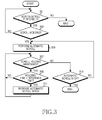
- FIG. 3 illustrates a procedure of providing an automatic scroll function in a device with a touch screen according to another embodiment of the present disclosure.
- the device with the touch screen identifies if a screen scroll is performed. For example, when a user scrolls a screen, the user drags on the display unit 110 as illustrated at 601 in FIG. 6 . Accordingly, in step 301, the device with the touch screen identifies if the user's touch information for screen scroll is input through the display unit 110.
- step 301 When it is identified in step 301 that the user's touch information for the screen scroll is not input, the device with the touch screen recognizes that it does not perform the screen scroll. In this situation, the device with the touch screen terminates an algorithm according to the embodiment of the present disclosure.
- step 301 when it is identified in step 301 that the user's touch information for the screen scroll is input, the device with the touch screen recognizes that it performs the screen scroll. Accordingly, the device with the touch screen scrolls the screen to correspond to the touch input. Then, the device with the touch screen proceeds to step 303 and identifies if the touch input for the user's scroll is held.
- step 303 When it is identified in step 303 that the touch input for the user's scroll is not held, the device with the touch screen recognizes that it does not perform an automatic scroll. Accordingly, in order to identify if the user continuously scrolls the screen, the device with the touch screen returns to step 301 and again identifies if the screen scroll is performed.
- step 303 when it is identified in step 303 that the touch input for the user's scroll is held for a predetermined time or longer, the device with the touch screen proceeds to step 305 and performs an automatic scroll function. That is, the device with the touch screen automatically scrolls the screen despite the absence of the user's touch input. In an embodiment, the device with the touch screen scrolls the screen at a preset basic speed.
- step 307 identifies if the holding of the touch input for the scroll is continuously maintained.
- the device with the touch screen proceeds to step 309 and compares a holding time of a touch input for scroll and a reference time.
- the reference time may be set to the same value irrespective of a current automatic scroll speed or be set to a different value according to an automatic scroll speed. For example, when the reference time is different according to the current automatic scroll speed, the device with the touch screen changes the reference time whenever a change of the automatic scroll speed is made.
- step 309 When it is identified in step 309 that the holding time of the touch input for the scroll is less than or equal to the reference time, the device with the touch screen returns to step 307 and identifies if the holding of the touch input for the scroll is maintained.
- step 309 when it is identified in step 309 that the holding time of the touch input for the scroll is greater than the reference time, the device with the touch screen proceeds to step 311 and increases the automatic scroll speed. For example, the device with the touch screen increases the automatic scroll speed by a preset level.
- step 307 identifies if the holding of the touch input for the scroll is continuously maintained.
- step 307 the device with the touch screen proceeds to step 313 and identifies if an automatic scroll stop event occurs. For example, when a user touches on the display unit 110 during the automatic scroll, the device with the touch screen recognizes that the automatic scroll stop event occurs. For another example, the device with the touch screen identifies if an automatic scroll stop key is input during the automatic scroll.
- step 313 When it is identified in step 313 that the automatic scroll stop event does not occur, the device with the touch screen returns to step 305 and continuously performs the automatic scroll function.
- the device with the touch screen When the automatic scroll speed is changed in step 311, the device with the touch screen performs an automatic scroll at the changed speed.
- the device with the touch screen automatically scrolls the screen at a preset basic speed.
- the device with the touch screen stops the automatic scroll. Accordingly, the device with the touch screen terminates an algorithm according to the embodiment of the present disclosure.
- a device with a touch screen controls an automatic scroll speed considering a holding time of a touch input for scroll. For example, when the automatic scroll speed is set to a maximum speed, although holding of the touch input for the scroll is maintained, the device with the touch screen maintains the automatic scroll speed at the maximum speed. For another example, when the holding time of the touch input for the scroll exceeds the reference time in a state where the automatic scroll speed is set to the maximum speed, the device with the touch screen may change the automatic scroll speed into a preset basic speed. For another example, when the holding time of the touch input for the scroll exceeds the reference time in a state where the automatic scroll speed is set to the maximum speed, the device with the touch screen may decrease the automatic scroll speed in a preset unit.
- the device with the touch screen displays the automatic scroll speed on the display unit 110.
- the device with the touch screen displays (605, 607) an automatic scroll speed in an oval form centering a point where a touch input is held.
- the portable terminal can display the automatic scroll speed in a bar form, a point form and the like as well as the oval form.
- a device with a touch screen controls an automatic scroll speed considering a holding time of a touch input for scroll.
- the device with the touch screen when the device with the touch screen performs automatic scroll, the device with the touch screen may display a separate automatic scroll speed control menu on the display unit 110 to control an automatic scroll speed.
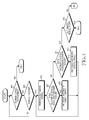
- FIG. 4 illustrates a procedure of providing an automatic scroll function in a device with a touch screen according to a further embodiment of the present disclosure.
- the device with the touch screen identifies if a screen scroll is performed. For example, when a user scrolls a screen, the user drags on the display unit 110 as illustrated at 601 in FIG. 6 . Accordingly, in step 401, the device with the touch screen identifies if the user's touch information for the screen scroll is input through the display unit 110.
- step 401 When it is identified in step 401 that the user's touch information for the screen scroll is not input, the device with the touch screen recognizes that it does not perform the screen scroll. Accordingly, the device with the touch screen terminates an algorithm according to the embodiment of the present disclosure.
- step 401 when it is identified in step 401 that the user's touch information for the screen scroll is input, the device with the touch screen recognizes that it performs the screen scroll. Accordingly, the device with the touch screen scrolls the screen to correspond to the touch input. Then, the device with the touch screen proceeds to step 403 and identifies if the touch input for the user's scroll is held.
- step 403 When it is identified in step 403 that the touch input for the user's scroll is not held, the device with the touch screen recognizes that it does not perform automatic scroll. Accordingly, in order to identify if the user continuously scrolls the screen, the device with the touch screen returns to step 401 and again identifies if the screen scroll is performed.
- step 403 when it is identified in step 403 that the touch input for the user's scroll is held during a constant time or more, the device with the touch screen proceeds to step 405 and performs an automatic scroll function. That is, the device with the touch screen automatically scrolls the screen despite the absence of the user's touch input. In an embodiment, the device with the touch screen scrolls the screen at a preset basic speed.
- the device with the touch screen proceeds to step 407 and identifies if an automatic scroll acceleration event occurs. For example, the device with the touch screen compares a holding time of a touch input for the scroll and a reference time and identifies if an automatic scroll acceleration event occurs. In this situation, when the holding time of the touch input for the scroll is greater than the reference time, the device with the touch screen recognizes that the automatic scroll acceleration event occurs. For another example, the device with the touch screen identifies if an acceleration menu is selected in an automatic scroll speed control menu.
- step 407 When it is identified in step 407 that the automatic scroll acceleration event occurs, the device with the touch screen proceeds to step 409 and increases an automatic scroll speed. For example, the device with the touch screen increases an automatic scroll speed by a preset level.
- the device with the touch screen returns to step 405 and performs the automatic scroll function. That is, the device with the touch screen automatically scrolls the screen at the changed speed of step 409 despite the absence of a user's touch input.
- the device with the touch screen proceeds to step 411 and identifies if an automatic scroll deceleration event occurs. For example, the device with the touch screen identifies if a deceleration menu is selected in an automatic scroll speed control menu. For another example, the device with the touch screen identifies if an automatic scroll deceleration control key is input.
- the device with the touch screen proceeds to step 413 and decreases the automatic scroll speed.
- the device with the touch screen decreases an automatic scroll speed by a preset level.
- the device with the touch screen may change an automatic scroll speed into a preset basic speed.
- the device with the touch screen returns to step 405 and performs the automatic scroll function. That is, the device with the touch screen automatically scrolls the screen at the changed speed of step 413 despite the absence of a user's touch input.
- step 411 when it is identified in step 411 that the automatic scroll deceleration event does not occur, the device with the touch screen proceeds to step 415 and identifies if an automatic scroll stop event occurs. For example, when a user touches on display unit 110 during the automatic scroll, the device with the touch screen recognizes that the automatic scroll stop event occurs. For another example, the device with the touch screen identifies if an automatic scroll stop key is input during the automatic scroll.
- step 415 when it is identified in step 415 that the automatic scroll stop event does not occur, the device with the touch screen returns to step 405 and performs the automatic scroll function.
- step 409 or step 413 the device with the touch screen performs the automatic scroll at the changed speed.
- the device with the touch screen stops the automatic scroll. Accordingly, the device with the touch screen terminates an algorithm according to the embodiment of the present disclosure.
- a device with a touch screen when a touch input for scroll is held, a device with a touch screen initiates automatic scroll. After that, the device with the touch screen determines whether to control an automatic scroll speed.
- a device with a touch screen may determine whether to control an automatic scroll speed as illustrated in FIG. 5 below. After that, the device with the touch screen performs automatic scroll at the determined speed.
- FIG. 5 illustrates a procedure of providing an automatic scroll function in a device with a touch screen according to a yet another embodiment of the present disclosure.
- step 501 the device with the touch screen identifies if a screen scroll is performed. For example, when a user scrolls a screen, the user drags on the display unit 110 as illustrated at 601 in FIG. 6 . Accordingly, in step 501, the device with the touch screen identifies if the user's touch information for the screen scroll is input through the display unit 110.
- step 501 When it is identified in step 501 that the user's touch information for the screen scroll is not input, the device with the touch screen recognizes that it does not perform the screen scroll. Accordingly, the device with the touch screen terminates an algorithm according to the embodiment of the present disclosure.
- step 501 when it is identified in step 501 that the user's touch information for the screen scroll is input, the device with the touch screen recognizes that it performs the screen scroll. Accordingly, the device with the touch screen scrolls the screen to correspond to the touch input. Then, the device with the touch screen proceeds to step 503 and identifies if the touch input for the user's scroll is held.
- step 503 When it is identified in step 503 that the touch input for the user's scroll is not held, the device with the touch screen recognizes that it does not perform automatic scroll. Accordingly, in order to identify if the user continuously scrolls the screen, the device with the touch screen returns to step 501 and again identifies if the screen scroll is performed.
- step 503 when it is identified in step 503 that the touch input for the user's scroll is held for a predetermined time or longer, the device with the touch screen proceeds to step 505 and identifies if an automatic scroll acceleration event occurs.
- the device with the touch screen compares a holding time of a touch input for scroll and a reference time and identifies if an automatic scroll acceleration event occurs. In this situation, when the touch input for screen scroll is continuously maintained during the reference time or longer, the device with the touch screen recognizes that the automatic scroll acceleration event occurs. For another example, the device with the touch screen identifies if an acceleration menu is selected in an automatic scroll speed control menu.
- step 505 When it is identified in step 505 that the automatic scroll acceleration event does not occur, the device with the touch screen jumps to step 509 and performs an automatic scroll function. That is, the device with the touch screen automatically scrolls a screen despite the absence of a user's touch input. In an embodiment, the device with the touch screen scrolls the screen at a preset basic speed.
- the device with the touch screen proceeds to step 507 and determines an automatic scroll speed.
- the device with the touch screen determines an automatic scroll speed considering the holding time of the touch input for the scroll.
- the device with the touch device may determine an automatic scroll speed according to a speed that a user selects through a speed control menu.
- the device with the touch screen After determining the automatic scroll speed, the device with the touch screen proceeds to step 509 and performs an automatic scroll function.
- the device with the touch screen scrolls a screen at the automatic scroll speed determined in step 507 despite the absence of a user's touch input.
- the device with the touch screen proceeds to step 511 and identifies if an automatic scroll stop event occurs. For example, when a user touches on the display unit 110 during the automatic scroll, the device with the touch screen recognizes that an automatic scroll stop event occurs. For another example, the device with the touch screen identifies if an automatic scroll stop key is input during the automatic scroll.
- step 511 When it is identified in step 511 that the automatic scroll stop event does not occur, the device with the touch screen returns to step 509 and performs the automatic scroll function.
- step 507 the device with the touch screen performs automatic scroll at the changed speed.
- the device with the touch screen stops the automatic scroll. Accordingly, the device with the touch screen terminates an algorithm according to the embodiment of the present disclosure.
- a device with a touch screen when a device with a touch screen recognizes that it does not perform an automatic scroll, in order to identify if a user continuously scrolls a screen, the device with the touch screen again identifies if a screen scroll is performed.
- the device with the touch screen may terminate an algorithm for automatic scroll.
- a device with a touch screen scrolls a screen to correspond to a user's touch input.
- the device with the touch screen can scroll the screen in any one direction of up/down/left/right according to direction information included in the touch input. For example, when a user attempts to scroll down as illustrated in FIG. 6 , the device with the touch screen scrolls the screen down.
- the device with the touch screen when performing an automatic scroll because a user's touch input is held, the device with the touch screen continuously scrolls the screen down despite the absence of a user's touch input.
- exemplary embodiments of the present disclosure have an advantage that, by providing an automatic scroll function according to holding or non-holding of a touch input for scroll, a user can automatically scroll a screen with a minimum operation in a device with a touch screen.
- the exemplary embodiments of the present disclosure have an advantage that, by controlling an automatic scroll speed, the user can scroll the screen more conveniently in the device with the touch screen.
- the computer readable storage medium stores one or more programs (software modules), the one or more programs comprising instructions, which when executed by one or more processors in an electronic device, cause the electronic device to perform a method of the present invention.
- Any such software may be stored in the form of volatile or non-volatile storage such as, for example, a storage device like a ROM, whether erasable or rewritable or not, or in the form of memory such as, for example, RAM, memory chips, device or integrated circuits or on an optically or magnetically readable medium such as, for example, a CD, DVD, magnetic disk or magnetic tape or the like.
- volatile or non-volatile storage such as, for example, a storage device like a ROM, whether erasable or rewritable or not
- memory such as, for example, RAM, memory chips, device or integrated circuits or on an optically or magnetically readable medium such as, for example, a CD, DVD, magnetic disk or magnetic tape or the like.
- the storage devices and storage media are embodiments of machine-readable storage that are suitable for storing a program or programs comprising instructions that, when executed, implement embodiments of the present invention.
- embodiments provide a program comprising code for implementing apparatus or a method as claimed in any one of the claims of this specification and a machine-readable storage storing such a program. Still further, such programs may be conveyed electronically via any medium such as a communication signal carried over a wired or wireless connection and embodiments suitably encompass the same.
Landscapes
- Engineering & Computer Science (AREA)
- General Engineering & Computer Science (AREA)
- Theoretical Computer Science (AREA)
- Human Computer Interaction (AREA)
- Physics & Mathematics (AREA)
- General Physics & Mathematics (AREA)
- User Interface Of Digital Computer (AREA)
- Position Input By Displaying (AREA)
Applications Claiming Priority (1)
| Application Number | Priority Date | Filing Date | Title |
|---|---|---|---|
| KR1020110056794A KR101794000B1 (ko) | 2011-06-13 | 2011-06-13 | 터치 스크린을 구비하는 기기에서 스크롤 장치 및 방법 |
Publications (2)
| Publication Number | Publication Date |
|---|---|
| EP2535799A2 true EP2535799A2 (fr) | 2012-12-19 |
| EP2535799A3 EP2535799A3 (fr) | 2017-07-26 |
Family
ID=46229342
Family Applications (1)
| Application Number | Title | Priority Date | Filing Date |
|---|---|---|---|
| EP12171581.7A Withdrawn EP2535799A3 (fr) | 2011-06-13 | 2012-06-12 | Appareil et procédé de défilement dans un dispositif à écran tactile |
Country Status (5)
| Country | Link |
|---|---|
| US (1) | US20120313977A1 (fr) |
| EP (1) | EP2535799A3 (fr) |
| JP (1) | JP6043500B2 (fr) |
| KR (1) | KR101794000B1 (fr) |
| CN (1) | CN102830898B (fr) |
Cited By (1)
| Publication number | Priority date | Publication date | Assignee | Title |
|---|---|---|---|---|
| GB2544116B (en) * | 2015-11-09 | 2020-07-29 | Sky Cp Ltd | Television user interface |
Families Citing this family (37)
| Publication number | Priority date | Publication date | Assignee | Title |
|---|---|---|---|---|
| US8994755B2 (en) * | 2011-12-20 | 2015-03-31 | Alcatel Lucent | Servers, display devices, scrolling methods and methods of generating heatmaps |
| KR20130081580A (ko) * | 2012-01-09 | 2013-07-17 | 삼성전자주식회사 | 표시 장치 및 그 제어 방법 |
| US9013514B2 (en) * | 2012-03-08 | 2015-04-21 | John F. Bochniak | Variable speed autoscroll system and method |
| JP5994412B2 (ja) * | 2012-06-13 | 2016-09-21 | 富士ゼロックス株式会社 | 画像表示装置、画像制御装置、画像形成装置およびプログラム |
| CN104035692B (zh) * | 2013-03-04 | 2018-02-27 | 联想(北京)有限公司 | 一种信息处理方法及电子设备 |
| US10491694B2 (en) | 2013-03-15 | 2019-11-26 | Oath Inc. | Method and system for measuring user engagement using click/skip in content stream using a probability model |
| US20140280890A1 (en) * | 2013-03-15 | 2014-09-18 | Yahoo! Inc. | Method and system for measuring user engagement using scroll dwell time |
| KR20140122292A (ko) | 2013-03-28 | 2014-10-20 | 삼성전자주식회사 | 디스플레이 장치의 디스플레이 방법 및 디스플레이 장치 |
| KR102234400B1 (ko) * | 2013-07-08 | 2021-03-31 | 삼성전자주식회사 | 컨텐츠의 순서 또는 위치를 변경하는 전자 장치 및 방법 |
| WO2015049899A1 (fr) * | 2013-10-01 | 2015-04-09 | オリンパスイメージング株式会社 | Dispositif d'affichage d'image et procédé d'affichage d'image |
| KR20150071130A (ko) * | 2013-12-18 | 2015-06-26 | 삼성전자주식회사 | 휴대단말기에서 스크롤을 제어하는 방법 및 장치 |
| KR102138529B1 (ko) * | 2014-02-04 | 2020-07-28 | 엘지전자 주식회사 | 이동 단말기 및 이의 제어 방법 |
| US20150268827A1 (en) * | 2014-03-24 | 2015-09-24 | Hideep Inc. | Method for controlling moving direction of display object and a terminal thereof |
| JP6300604B2 (ja) | 2014-04-01 | 2018-03-28 | キヤノン株式会社 | 触感制御装置、触感制御方法及びプログラム |
| US9785331B2 (en) | 2014-06-27 | 2017-10-10 | Symbol Technologies, Llc | One touch scroll and select for a touch screen device |
| CN105468241A (zh) * | 2014-09-12 | 2016-04-06 | 腾讯科技(深圳)有限公司 | 电子书的浏览方法及装置 |
| US20170102848A1 (en) * | 2014-09-18 | 2017-04-13 | Sskm Corporation | Mobile website authoring tool utilizing unique tile layout convention for ease of navigation |
| US10088993B2 (en) | 2015-04-01 | 2018-10-02 | Ebay Inc. | User interface for controlling data navigation |
| CN106293364A (zh) * | 2015-05-20 | 2017-01-04 | 腾讯科技(深圳)有限公司 | 一种数据处理方法及终端 |
| CN105511762A (zh) * | 2015-12-15 | 2016-04-20 | 魅族科技(中国)有限公司 | 一种页面控制的方法及终端 |
| JP6106772B1 (ja) * | 2016-01-20 | 2017-04-05 | ヤフー株式会社 | 情報表示プログラム、情報表示装置、情報表示方法および配信装置 |
| US9977569B2 (en) * | 2016-01-29 | 2018-05-22 | Visual Supply Company | Contextually changing omni-directional navigation mechanism |
| US9910563B2 (en) | 2016-01-29 | 2018-03-06 | Visual Supply Company | Contextually changing omni-directional navigation mechanism |
| CN105786330A (zh) * | 2016-03-01 | 2016-07-20 | 太仓苏易信息科技有限公司 | 一种在线自动阅读系统 |
| JP1568793S (fr) * | 2016-04-27 | 2017-02-06 | ||
| JP6729069B2 (ja) * | 2016-06-28 | 2020-07-22 | 富士ゼロックス株式会社 | 情報処理装置 |
| CN106527909A (zh) * | 2016-09-26 | 2017-03-22 | 维沃移动通信有限公司 | 一种启动截屏功能的方法和移动终端 |
| CN107728918A (zh) * | 2017-09-27 | 2018-02-23 | 北京三快在线科技有限公司 | 浏览连续页面的方法、装置及电子设备 |
| JP6730972B2 (ja) * | 2017-10-20 | 2020-07-29 | ヤフー株式会社 | 情報制御プログラム、情報制御方法および端末装置 |
| CN108196699B (zh) * | 2017-12-19 | 2021-02-02 | 维沃移动通信有限公司 | 一种页面切换的方法及设备 |
| JP7172146B2 (ja) * | 2018-06-04 | 2022-11-16 | 京セラドキュメントソリューションズ株式会社 | 表示装置、画像形成装置、及び表示制御プログラム |
| KR102530285B1 (ko) * | 2018-10-30 | 2023-05-08 | 삼성에스디에스 주식회사 | 콘텐츠 미리보기 화면 디스플레이 방법 및 장치 |
| CN111197229A (zh) * | 2018-11-19 | 2020-05-26 | 青岛海尔洗衣机有限公司 | 衣物处理设备 |
| CN111197230A (zh) * | 2018-11-19 | 2020-05-26 | 青岛海尔洗衣机有限公司 | 衣物处理设备和用于衣物处理设备的控制方法 |
| CN112650437B (zh) * | 2020-12-23 | 2022-06-03 | 北京小米移动软件有限公司 | 光标控制方法及装置、电子设备、存储介质 |
| JP7464895B2 (ja) * | 2022-05-10 | 2024-04-10 | 株式会社Mixi | 情報処理装置、機能表示方法及び機能表示プログラム |
| JP2023181017A (ja) * | 2022-06-10 | 2023-12-21 | 圭 大隅 | 携帯情報端末装置 |
Family Cites Families (52)
| Publication number | Priority date | Publication date | Assignee | Title |
|---|---|---|---|---|
| JP2827612B2 (ja) * | 1991-10-07 | 1998-11-25 | 富士通株式会社 | タッチパネル装置およびタッチパネル装置におけるオブジェクトの表示方法。 |
| US5495566A (en) * | 1994-11-22 | 1996-02-27 | Microsoft Corporation | Scrolling contents of a window |
| US8479122B2 (en) * | 2004-07-30 | 2013-07-02 | Apple Inc. | Gestures for touch sensitive input devices |
| US7152210B1 (en) * | 1999-10-20 | 2006-12-19 | Koninklijke Philips Electronics N.V. | Device and method of browsing an image collection |
| JP3618303B2 (ja) * | 2001-04-24 | 2005-02-09 | 松下電器産業株式会社 | 地図表示装置 |
| US6690365B2 (en) * | 2001-08-29 | 2004-02-10 | Microsoft Corporation | Automatic scrolling |
| US6690387B2 (en) * | 2001-12-28 | 2004-02-10 | Koninklijke Philips Electronics N.V. | Touch-screen image scrolling system and method |
| US7319457B2 (en) * | 2004-02-12 | 2008-01-15 | Sentelic Corporation | Method of scrolling window screen by means of controlling electronic device |
| JP2006221390A (ja) * | 2005-02-10 | 2006-08-24 | Xanavi Informatics Corp | 画面スクロール制御装置およびナビゲーション装置 |
| US20060199616A1 (en) * | 2005-03-03 | 2006-09-07 | Agere Systems Inc. | Mobile communication device having automatic scrolling capability and method of operation thereof |
| JP3888382B2 (ja) * | 2005-07-05 | 2007-02-28 | 松下電器産業株式会社 | データ処理装置 |
| US7958456B2 (en) * | 2005-12-23 | 2011-06-07 | Apple Inc. | Scrolling list with floating adjacent index symbols |
| US7786975B2 (en) * | 2005-12-23 | 2010-08-31 | Apple Inc. | Continuous scrolling list with acceleration |
| US20090213086A1 (en) * | 2006-04-19 | 2009-08-27 | Ji Suk Chae | Touch screen device and operating method thereof |
| TW200805131A (en) * | 2006-05-24 | 2008-01-16 | Lg Electronics Inc | Touch screen device and method of selecting files thereon |
| US7956847B2 (en) * | 2007-01-05 | 2011-06-07 | Apple Inc. | Gestures for controlling, manipulating, and editing of media files using touch sensitive devices |
| US8689132B2 (en) * | 2007-01-07 | 2014-04-01 | Apple Inc. | Portable electronic device, method, and graphical user interface for displaying electronic documents and lists |
| WO2008149431A1 (fr) * | 2007-06-06 | 2008-12-11 | Mitsubishi Electric Corporation | Dispositif de création de programme, dispositif de commande numérique et procédé de création de programme |
| JP4678534B2 (ja) * | 2007-06-07 | 2011-04-27 | ソニー株式会社 | ナビゲーション装置及び地図スクロール処理方法 |
| US20090002324A1 (en) * | 2007-06-27 | 2009-01-01 | Nokia Corporation | Method, Apparatus and Computer Program Product for Providing a Scrolling Mechanism for Touch Screen Devices |
| US8509854B2 (en) * | 2007-09-18 | 2013-08-13 | Lg Electronics Inc. | Mobile terminal and method of controlling operation of the same |
| US8217906B2 (en) * | 2007-11-16 | 2012-07-10 | Sony Ericsson Mobile Communications Ab | User interface, apparatus, method, and computer program for viewing of content on a screen |
| US8723811B2 (en) * | 2008-03-21 | 2014-05-13 | Lg Electronics Inc. | Mobile terminal and screen displaying method thereof |
| CN101308440A (zh) * | 2008-06-25 | 2008-11-19 | 宇龙计算机通信科技(深圳)有限公司 | 一种基于触摸屏的交互控制方法及系统 |
| CN101655765A (zh) * | 2008-08-22 | 2010-02-24 | 深圳富泰宏精密工业有限公司 | 利用虚拟方向键进行操作的电子装置及相应的操作方法 |
| JP2010087203A (ja) * | 2008-09-30 | 2010-04-15 | Dainippon Printing Co Ltd | 電磁波シールド材、ディスプレイ装置及び電磁波シールド材の品質管理方法 |
| JP4752900B2 (ja) * | 2008-11-19 | 2011-08-17 | ソニー株式会社 | 画像処理装置、画像表示方法および画像表示プログラム |
| JP4811452B2 (ja) * | 2008-11-19 | 2011-11-09 | ソニー株式会社 | 画像処理装置、画像表示方法および画像表示プログラム |
| JP5524868B2 (ja) * | 2009-02-02 | 2014-06-18 | パナソニック株式会社 | 情報表示装置 |
| JP5267990B2 (ja) * | 2009-02-26 | 2013-08-21 | Necインフロンティア株式会社 | 電子ジャーナルデータ閲覧システム、電子ジャーナルデータ閲覧方法、そのプログラムおよび記録媒体 |
| US8601389B2 (en) * | 2009-04-30 | 2013-12-03 | Apple Inc. | Scrollable menus and toolbars |
| KR101640463B1 (ko) * | 2009-05-19 | 2016-07-18 | 삼성전자 주식회사 | 휴대 단말기의 운용 방법 및 이를 지원하는 휴대 단말기 |
| KR101588242B1 (ko) * | 2009-07-13 | 2016-01-25 | 삼성전자주식회사 | 휴대 단말기의 스크롤 방법 및 장치 |
| US20110072388A1 (en) * | 2009-09-23 | 2011-03-24 | Thomas Merrell | Method and Apparatus for Altering the Presentation Data Based Upon Displacement and Duration of Contact |
| JP5413111B2 (ja) * | 2009-10-02 | 2014-02-12 | ソニー株式会社 | 表示制御装置、表示制御方法及び表示制御プログラム |
| JP2011150414A (ja) * | 2010-01-19 | 2011-08-04 | Sony Corp | 情報処理装置、操作入力決定方法及び操作入力決定プログラム |
| CN102725783B (zh) * | 2010-01-29 | 2015-11-25 | 三菱电机株式会社 | 地图信息处理装置 |
| JP2011191577A (ja) * | 2010-03-16 | 2011-09-29 | Aisin Aw Co Ltd | 地図表示装置、地図表示方法及びプログラム |
| US8887086B2 (en) * | 2010-04-19 | 2014-11-11 | Blackberry Limited | Portable electronic device and method of controlling same |
| CA2792987C (fr) * | 2010-04-21 | 2014-09-09 | Research In Motion Limited | Procede d'interaction avec une zone deroulante sur un dispositif electronique portable |
| US8683377B2 (en) * | 2010-05-12 | 2014-03-25 | Adobe Systems Incorporated | Method for dynamically modifying zoom level to facilitate navigation on a graphical user interface |
| JP5533254B2 (ja) * | 2010-05-24 | 2014-06-25 | アイシン・エィ・ダブリュ株式会社 | 情報表示装置、情報表示方法及びプログラム |
| US9542091B2 (en) * | 2010-06-04 | 2017-01-10 | Apple Inc. | Device, method, and graphical user interface for navigating through a user interface using a dynamic object selection indicator |
| JP2012033058A (ja) * | 2010-07-30 | 2012-02-16 | Sony Corp | 情報処理装置、情報処理方法及び情報処理プログラム |
| JP2012033059A (ja) * | 2010-07-30 | 2012-02-16 | Sony Corp | 情報処理装置、情報処理方法及び情報処理プログラム |
| US8766984B2 (en) * | 2010-08-20 | 2014-07-01 | Qualcomm Incorporated | Graphics rendering methods for satisfying minimum frame rate requirements |
| JP5304763B2 (ja) * | 2010-10-22 | 2013-10-02 | アイシン・エィ・ダブリュ株式会社 | 画像表示装置、画像表示方法及びプログラム |
| JP5671318B2 (ja) * | 2010-12-07 | 2015-02-18 | 任天堂株式会社 | 情報処理プログラム、情報処理装置、情報処理システム、及び情報処理方法 |
| KR101182076B1 (ko) * | 2011-03-31 | 2012-09-11 | 선문대학교 산학협력단 | 터치 스크린을 구비하는 휴대 단말기의 화면 이동 장치 및 방법 |
| JP5871937B2 (ja) * | 2011-09-13 | 2016-03-01 | 株式会社ソニー・コンピュータエンタテインメント | 情報処理装置、表示制御方法、プログラム及び情報記憶媒体 |
| US8654076B2 (en) * | 2012-03-15 | 2014-02-18 | Nokia Corporation | Touch screen hover input handling |
| KR20140110452A (ko) * | 2013-03-08 | 2014-09-17 | 삼성전자주식회사 | 전자장치에서 근접 터치를 이용한 사용자 인터페이스 제어 방법 및 장치 |
-
2011
- 2011-06-13 KR KR1020110056794A patent/KR101794000B1/ko not_active Expired - Fee Related
-
2012
- 2012-04-12 JP JP2012090869A patent/JP6043500B2/ja not_active Expired - Fee Related
- 2012-06-05 US US13/488,849 patent/US20120313977A1/en not_active Abandoned
- 2012-06-12 EP EP12171581.7A patent/EP2535799A3/fr not_active Withdrawn
- 2012-06-12 CN CN201210193281.8A patent/CN102830898B/zh not_active Expired - Fee Related
Non-Patent Citations (3)
| Title |
|---|
| ANONYMOUS: "Tim, the Enchanter: Autoscroll in Safari, Firefox", 23 August 2008 (2008-08-23), XP055521253, Retrieved from the Internet <URL:http://tim.theenchanter.com/2008/08/autoscroll-in-safari-firefox.html> [retrieved on 20181106] * |
| TEHSEEN BAWEJA: "ScrollyFox: Automatically Scroll Web Pages in Firefox", 17 June 2010 (2010-06-17), XP055521266, Retrieved from the Internet <URL:https://www.makeuseof.com/tag/scrollyfox-automatically-scroll-web-page/> [retrieved on 20181106] * |
| TEHSEEN BAWEJA: "ScrollyFox: Automatically Scroll Web Pages in Firefox", MAKEUSEOF.COM, 17 June 2010 (2010-06-17), XP055521269, Retrieved from the Internet <URL:https://www.makeuseof.com/tag/scrollyfox-automatically-scroll-web-page/> [retrieved on 20181106] * |
Cited By (1)
| Publication number | Priority date | Publication date | Assignee | Title |
|---|---|---|---|---|
| GB2544116B (en) * | 2015-11-09 | 2020-07-29 | Sky Cp Ltd | Television user interface |
Also Published As
| Publication number | Publication date |
|---|---|
| US20120313977A1 (en) | 2012-12-13 |
| EP2535799A3 (fr) | 2017-07-26 |
| CN102830898B (zh) | 2018-02-02 |
| JP6043500B2 (ja) | 2016-12-14 |
| KR101794000B1 (ko) | 2017-11-06 |
| CN102830898A (zh) | 2012-12-19 |
| JP2013004083A (ja) | 2013-01-07 |
| KR20120137753A (ko) | 2012-12-24 |
Similar Documents
| Publication | Publication Date | Title |
|---|---|---|
| EP2535799A2 (fr) | Appareil et procédé de défilement dans un dispositif à écran tactile | |
| US20230259231A1 (en) | Method and apparatus for a touch display | |
| US9990109B2 (en) | Information display terminal | |
| US9921744B2 (en) | Text input method in touch screen terminal and apparatus therefor | |
| EP2713242A2 (fr) | Rotation d'écran intelligent selon l'orientation d'utilisateur | |
| US8839155B2 (en) | Accelerated scrolling for a multifunction device | |
| US9323444B2 (en) | Device, method, and storage medium storing program | |
| EP2703946B1 (fr) | Appareil et procédé de détection de faible puissance | |
| EP2924553A1 (fr) | Procédé et système de commande du déplacement d'un curseur dans un dispositif électronique | |
| EP3056982A1 (fr) | Appareil de terminal, procédé de commande d'affichage et support d'enregistrement | |
| CN104035678B (zh) | 滚动方法及使用该滚动方法的电子设备 | |
| EP3260967A1 (fr) | Procédé et appareil de sélection de texte | |
| US20130082965A1 (en) | Device, method, and storage medium storing program | |
| EP2426591A1 (fr) | Dispositif multifonction portable et interface graphique utilisateur pour interpréter un geste de doigt sur un dispositif à écran tactile | |
| US20130135234A1 (en) | Device, method, and storage medium storing program | |
| US20140198032A1 (en) | Method and apparatus for displaying screen with eye tracking in portable terminal | |
| EP2921969A1 (fr) | Procédé et appareil de réglage de page Internet et dispositif électronique | |
| EP2963533A1 (fr) | Dispositif électronique, procédé de commande et programme de commande | |
| EP2637090A2 (fr) | Appareil et procédé pour commander un service de raccourci dans un dispositif électronique | |
| CN106354504A (zh) | 消息显示方法及装置 | |
| EP3079053B1 (fr) | Dispositif électronique portable incluant un écran tactile et procédé de contrôle de la sélection d'informations | |
| EP4482116A1 (fr) | Procédé et appareil de traitement de message de notification, et support d'informations lisible par ordinateur non transitoire | |
| EP2573662A1 (fr) | Appareil et procédé de contrôle de taille d'écran dans un terminal portable | |
| KR20150053398A (ko) | 모바일에서 스크롤 이동 제어장치 및 그 방법 | |
| KR101729821B1 (ko) | 내비게이션 실행 장치 및 그 제어방법과, 그 제어방법을 실행하기 위한 프로그램을 기록한 기록 매체와, 하드웨어와 결합되어 그 제어방법을 실행시키기 위하여 매체에 저장된 애플리케이션 |
Legal Events
| Date | Code | Title | Description |
|---|---|---|---|
| PUAI | Public reference made under article 153(3) epc to a published international application that has entered the european phase |
Free format text: ORIGINAL CODE: 0009012 |
|
| AK | Designated contracting states |
Kind code of ref document: A2 Designated state(s): AL AT BE BG CH CY CZ DE DK EE ES FI FR GB GR HR HU IE IS IT LI LT LU LV MC MK MT NL NO PL PT RO RS SE SI SK SM TR |
|
| AX | Request for extension of the european patent |
Extension state: BA ME |
|
| PUAL | Search report despatched |
Free format text: ORIGINAL CODE: 0009013 |
|
| AK | Designated contracting states |
Kind code of ref document: A3 Designated state(s): AL AT BE BG CH CY CZ DE DK EE ES FI FR GB GR HR HU IE IS IT LI LT LU LV MC MK MT NL NO PL PT RO RS SE SI SK SM TR |
|
| AX | Request for extension of the european patent |
Extension state: BA ME |
|
| RIC1 | Information provided on ipc code assigned before grant |
Ipc: G06F 3/048 20130101AFI20170616BHEP |
|
| 17P | Request for examination filed |
Effective date: 20171031 |
|
| RBV | Designated contracting states (corrected) |
Designated state(s): AL AT BE BG CH CY CZ DE DK EE ES FI FR GB GR HR HU IE IS IT LI LT LU LV MC MK MT NL NO PL PT RO RS SE SI SK SM TR |
|
| 17Q | First examination report despatched |
Effective date: 20180405 |
|
| STAA | Information on the status of an ep patent application or granted ep patent |
Free format text: STATUS: THE APPLICATION IS DEEMED TO BE WITHDRAWN |
|
| 18D | Application deemed to be withdrawn |
Effective date: 20200103 |