EP2565752A2 - Verfahren zur Bereitstellung einer Benutzerschnittstelle in einem tragbaren Endgerät, und Vorrichtung davon - Google Patents
Verfahren zur Bereitstellung einer Benutzerschnittstelle in einem tragbaren Endgerät, und Vorrichtung davon Download PDFInfo
- Publication number
- EP2565752A2 EP2565752A2 EP12182474A EP12182474A EP2565752A2 EP 2565752 A2 EP2565752 A2 EP 2565752A2 EP 12182474 A EP12182474 A EP 12182474A EP 12182474 A EP12182474 A EP 12182474A EP 2565752 A2 EP2565752 A2 EP 2565752A2
- Authority
- EP
- European Patent Office
- Prior art keywords
- stylus
- input device
- touch
- touch input
- sensed
- Prior art date
- Legal status (The legal status is an assumption and is not a legal conclusion. Google has not performed a legal analysis and makes no representation as to the accuracy of the status listed.)
- Withdrawn
Links
Images



Classifications
-
- G—PHYSICS
- G06—COMPUTING OR CALCULATING; COUNTING
- G06F—ELECTRIC DIGITAL DATA PROCESSING
- G06F3/00—Input arrangements for transferring data to be processed into a form capable of being handled by the computer; Output arrangements for transferring data from processing unit to output unit, e.g. interface arrangements
- G06F3/01—Input arrangements or combined input and output arrangements for interaction between user and computer
- G06F3/048—Interaction techniques based on graphical user interfaces [GUI]
- G06F3/0487—Interaction techniques based on graphical user interfaces [GUI] using specific features provided by the input device, e.g. functions controlled by the rotation of a mouse with dual sensing arrangements, or of the nature of the input device, e.g. tap gestures based on pressure sensed by a digitiser
- G06F3/0488—Interaction techniques based on graphical user interfaces [GUI] using specific features provided by the input device, e.g. functions controlled by the rotation of a mouse with dual sensing arrangements, or of the nature of the input device, e.g. tap gestures based on pressure sensed by a digitiser using a touch-screen or digitiser, e.g. input of commands through traced gestures
-
- G—PHYSICS
- G06—COMPUTING OR CALCULATING; COUNTING
- G06F—ELECTRIC DIGITAL DATA PROCESSING
- G06F2203/00—Indexing scheme relating to G06F3/00 - G06F3/048
- G06F2203/041—Indexing scheme relating to G06F3/041 - G06F3/045
- G06F2203/04106—Multi-sensing digitiser, i.e. digitiser using at least two different sensing technologies simultaneously or alternatively, e.g. for detecting pen and finger, for saving power or for improving position detection
-
- G—PHYSICS
- G06—COMPUTING OR CALCULATING; COUNTING
- G06F—ELECTRIC DIGITAL DATA PROCESSING
- G06F2203/00—Indexing scheme relating to G06F3/00 - G06F3/048
- G06F2203/041—Indexing scheme relating to G06F3/041 - G06F3/045
- G06F2203/04108—Touchless 2D- digitiser, i.e. digitiser detecting the X/Y position of the input means, finger or stylus, also when it does not touch, but is proximate to the digitiser's interaction surface without distance measurement in the Z direction
Definitions
- the present invention relates generally to a method of providing a user interface of a portable terminal, and an apparatus thereof More particularly, although not exclusively, the present invention relates to a method and an apparatus for providing a user interface for a touch input device (e.g. finger or stylus) when approach of the touch input device towards a touch screen of the portable terminal is sensed.
- a touch input device e.g. finger or stylus
- a mobile communication terminal can provide various functions such as a TV watching function (e.g., mobile broadcasting such as Digital Multimedia Broadcasting (DMB) or Digital Video Broadcasting (DVB)), a music playing function (e.g., MPEG Audio Layer-3 (MP3)), a photographing function, and an Internet access function as well as a general communication function such as speech call or text/multimedia message transmission/reception.
- a TV watching function e.g., mobile broadcasting such as Digital Multimedia Broadcasting (DMB) or Digital Video Broadcasting (DVB)
- DMB Digital Multimedia Broadcasting
- DVD Digital Video Broadcasting
- MP3 MPEG Audio Layer-3
- photographing function e.g., MPEG Audio Layer-3 (MP3)
- MP3 MPEG Audio Layer-3
- the touch screen may sense contact of a touch input device such as a finger or a stylus to generate an output at a contacted location. For example, when a touch occurs on an electromagnetic induction touch screen, the capacitance of a touched point varies. When the variation of capacitance exceeds a preset threshold, it is determined that a touch event is occurring. Through an algorithm that receives a signal of the capacitance variation, the location of the touch event may be determined by the algorithm.
- a conventional portable terminal provides the same user interface without discriminating between a finger or a stylus being used as the basis of a touch input scheme of a touch screen. Accordingly, there is a problem in that a function of a user interface provided on the touch screen, or an image of a corresponding function, may have an unnecessary complex configuration. For example, when a touch input is performed using a finger, unnecessary functions suitable only for a stylus having a small touch region may be displayed.
- the present invention has been made in view of the above problems. It is an aim of certain embodiments and aspects of the present invention to address, solve, mitigate or obviate, at least partly, at least one of the problems and/or disadvantages associated with the prior art, such as those mentioned above. Certain embodiments and aspects aim to provide at least one of the advantages described below.
- an affordance image comprises an image (e.g. including one or more icons), which may be selected by a user by a touch input, in order to execute a function corresponding the affordance image.
- a method of providing a user interface of a portable terminal with a touch screen includes: checking whether approach of a touch input device towards the touch screen is sensed; determining a type of the sensed touch input device when the approach of the touch input device is sensed; and outputting a first affordance image corresponding to at least one function executable using a first type of touch input device (e.g. a stylus) at a sensed region of the approach of the stylus when the touch input device is the first type of touch input device as the determination result.
- a first type of touch input device e.g. a stylus
- an apparatus for providing a user interface of a portable terminal includes: a touch panel for recognizing approach of a touch input device towards the touch panel, and for recognizing touch of the touch panel by the touch input device; a controller for determining a type of the sensed touch input device when the approach of the touch input device is sensed, and for controlling such that a first affordance image corresponding to at least one function executable using a first type of touch input device (e.g. a stylus) is displayed at a sensed region of the approach of the stylus when the touch input device is the first type of touch input device as the determination result; and a display panel for outputting the first affordance image.
- a touch panel for recognizing approach of a touch input device towards the touch panel, and for recognizing touch of the touch panel by the touch input device
- a controller for determining a type of the sensed touch input device when the approach of the touch input device is sensed, and for controlling such that a first affordance image corresponding to at least one function executable using a first type of
- a method of providing a user interface of a portable terminal with a touch screen includes: sensing approach of a first type of touch input device (e.g. a stylus) towards the touch screen; and outputting an affordance image corresponding to at least one function executable using the first type of touch input device at a sensed region of the approach of the first type touch input device when the approach of the first type of touch input device is sensed.
- a first type of touch input device e.g. a stylus
- an apparatus for providing a user interface of a portable terminal includes: a touch screen for sensing approach of a first type of touch input device towards the touch screen; and a controller for controlling the touch screen to output an affordance image corresponding to at least one function executable using the first type of touch input device at a sensed region of the approach of the first type of touch input device when the approach of the first type of touch input device is sensed.
- Another aspect of the present invention provides a computer program comprising instructions arranged, when executed, to implement a method, user interface, and/or apparatus in accordance with any of the above-described aspects.
- a further aspect provides machine-readable storage storing such a program.
- a portable terminal may be an electronic device with a touch screen, and may include a mobile communication terminal, a personal digital assistant (PDA), a smart phone, a tablet personal computer (PC), and a Portable Multimedia Player (PMP), although this description is not limited to only such terminals.
- PDA personal digital assistant
- PC tablet personal computer
- PMP Portable Multimedia Player
- a portable terminal may include other portable electronic devices incorporating a touch screen with a processor for computing and/or communication.
- an affordance image comprises an image (e.g. including one or more icons), which may be selected by a user by a touch input, in order to execute a function corresponding the affordance image.
- FIG. 1 is a block diagram illustrating a configuration of a portable terminal 100 and a touch input device 200 according to an exemplary embodiment of the present invention.
- the touch input device 200 is a stylus, although other types of touch input device may be used.
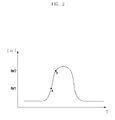
- FIG. 2 is a view illustrating the variation of capacitance or electric current in a touch panel for implementing a method of sensing approach of a touch input device according to an embodiment of the present invention.
- a portable terminal 100 may include a radio frequency (RF) communication unit 140, a touch screen 130, a memory 120, and a controller 110.
- the touch screen 130 may include a display panel 131 and a touch panel 132.
- the stylus 200 is a touch input device in the form of a pen, which may be used, for example, on an electromagnetic induction touch panel.
- the stylus 200 may include a resonance circuit.
- the resonance circuit may resonate by an electromagnetic field generated on the touch screen 130, and generate an induction current due to the resonance.
- the induction current generated by the resonance may cause current variation in the touch screen 130. That is, the touch screen 130 may recognize and react to the approach and touch of the stylus 200 through current variation due to the induction current.
- the design and construction of foregoing stylus 200 including a resonance circuit will be apparent to a person having ordinary skill in the art to which the invention pertains and is known in the art, and thus the detailed description thereof is omitted.
- the RF communication unit 140 may form a communication channel for calls (voice and image calls) with a base station and a data communication channel for data transmission.
- the RF communication unit 110 may include a transmitter (not shown) for up-converting a frequency of a transmitted signal and amplifying the signal, a receiver (not shown) for low-noise-amplifying a received signal and down-converting the signal, and a transmission/reception separator (not shown) for separating the received signal from the transmitted signal.
- the touch screen 130 may perform an input function and an output function.
- the touch screen 130 may include a display panel 131 for performing an output function and a touch panel 132 for performing an input function.
- the touch panel 132 may be configured as a combination touch panel utilising a combination of an electromagnetic induction scheme and a capacitive scheme.
- the touch panel 132 may be configured as a combination touch panel utilising a combination of the electromagnetic induction scheme and a resistive scheme.
- the touch panel 132 is provided in a front surface of the display panel 131, and generates a touch event according to a touch of the touch panel 132 by a touch input device, for example a user's finger or the stylus 200, and transfers the generated touch event to the controller 110.
- the touch panel 132 may recognize the touch through variation in a physical property (e.g., capacitance, electric current, etc.), and transfer the type of touch (e.g., tap, drag, flick, double touch, long touch, multi touch, etc.) and touched positional information to the controller 110.
- the foregoing touch panel 132 will be apparent to a person having ordinary skill in the art to which the invention pertains, and thus the detailed description thereof is omitted.
- the touch panel 132 in certain embodiments of the present invention may sense approach, touch, approach release, and touch release of the touch input device.
- FIG. 2 illustrates an example in which, when the touch input device approaches and contacts the touch panel 132, and then, when the contact is released, the capacitance C or an electric current I vary as illustrated in FIG. 2 .
- the touch panel 132 recognizes approach of a touch input device (e.g., within a distance of approximately 1 ⁇ 2 cm to the touch panel 132).
- the touch panel 132 may recognize that a touch input device contacts (touches) the touch panel 132.
- the touch panel 132 is a combination touch panel including a capacitive touch panel and an electromagnetic induction touch panel
- the capacitive touch panel may sense the approach contact (touch) and contact (touch) release of a finger
- the electromagnetic induction touch panel may sense the approach, contact (touch), and contact (touch) release of the stylus 200.
- the touch panel 132 may be a combination touch panel in which an electromagnetic induction touch panel and a resistive touch panel are combined with each other.
- the display panel 131 displays information input by the user or information provided to the user as well as various menus of the portable terminal 100. That is, the display panel 131 may provide various screens according to utilization of the portable terminal 100. For example, an idle screen (home screen), a menu screen, a message creation screen, a call screen, a schedule management screen, and an address book screen. In particular, when approach of the touch input device is sensed, the display panel 131 of the present invention may output an affordance image under the control of the controller 110. This will be described in detail with reference to an example of a screen.
- the display panel 131 may be configured in the form of a flat panel display such as a Liquid Crystal Display (LCD), an Organic Light Emitted Diode (OLED), or an Active Matrix Organic Light Emitted Diode (AMOLED).
- LCD Liquid Crystal Display
- OLED Organic Light Emitted Diode
- AMOLED Active Matrix Organic Light Emitted Diode
- the memory 120 may store an Operating System (OS) of a portable terminal 100, and an application program necessary for enabling other options and functions.
- Other options and functions may include, for example, a voice playback function, an image or moving image playback function, a broadcasting playback function, a user data communication function.
- the memory 120 may store a key map or a menu map for operating the touch screen 130.
- the key map or the menu map may be configured in various forms, respectively.
- the key map may become a key board map, a 3*4 key map, a QWERTY key map, or a control key map for controlling operation of a currently activated application program.
- the menu map may become a menu map for controlling an operation of a currently activated application program.
- the memory 120 may store character messages, game files, music files, movie files, and contact information.
- the memory 120 may store a program for outputting an affordance image when a touch input device approaches the touch panel.
- the affordance image that is output may be changed according to a type of the approached item, or a type of the touch input device.
- the affordance image that is output may be in the form of a "time change” image to which a "time change” function of a schedule is set.
- the "time change” image represents a "time change” function, such that the user may execute the "time change” function by touching or otherwise selecting the "time change” image.
- the affordance image may be in the form of a "moving" affordance image to which a "moving" function of an icon is set.
- the affordance image may be in the form of a "function" affordance image including icons corresponding to frequently used functions, such as a call icon, a character icon, an e-mail icon, and an instant message icon.
- the affordance image that is output may be in the form of a "delete” affordance image to which a "schedule delete” function is set.
- the affordance image may be in the form of a "copy” affordance image to which an "icon copy” function is set.
- an affordance image may not be output.
- the memory 120 may store a program for setting an affordance display mode to be ON or OFF, for selectively displaying the affordance image, and may store a program for changing a function set to an affordance image. That is, if the touch input device approaches when the user has activated an affordance image display mode (ON), then the program may output an affordance image. On the other hand, if the touch input device approaches when the user has deactivated the affordance image display mode (OFF), then the program may not output an affordance image. Moreover, the program may change a function set to an affordance image to a function requested by the user.
- the controller 110 may control an overall operation of the portable terminal 100 and signal flow between internal blocks of the portable terminal 100, and perform a data processing function for processing data. Particularly, when approach of the touch input device is sensed, the controller 110 in an embodiment of the present invention outputs a preset affordance image. When a touch event occurs on the affordance image, the controller 110 may control the respective structural elements such that a function set to the affordance image is performed. In this case, the controller 110 may output a different affordance image according a type of a touch input device (e.g., finger or stylus 200) approaching the touch screen 130.
- a type of a touch input device e.g., finger or stylus 200
- the portable terminal 100 may include structural elements for providing additional functions such as a camera module for taking images or moving images, a transmitting/receiving module for receiving or broadcasting data or voice communications, a digital sound source playback module such as an MP3 module, a near distance wireless communication module such as a Bluetooth transmitter, and a proximity sensor module for proximity sensing.
- a camera module for taking images or moving images
- a transmitting/receiving module for receiving or broadcasting data or voice communications
- a digital sound source playback module such as an MP3 module
- a near distance wireless communication module such as a Bluetooth transmitter
- a proximity sensor module for proximity sensing.
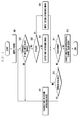
- FIG. 3 is a flowchart illustrating a method of providing a user interface of a portable terminal according to an exemplary embodiment of the present invention.
- a combination touch panel in which a capacitive touch panel and an electromagnetic induction touch panel are combined will be explained by way of example.
- a controller 110 of a portable terminal 100 may control power from a power supply that is supplied to respective structural elements of the portable terminal 100 (301).
- the controller 110 may check whether approach of a touch input device (e.g., stylus 200, finger, etc.) is sensed (303).
- a touch input device e.g., stylus 200, finger, etc.
- a physical quantity such as capacitance or electric current varies.
- the touch panel 132 senses variation in the capacitance or the electric current and transfers the sensed variation to the controller 110.
- the controller 110 may determine that the touch input device is approaching a predetermined region of the touch screen 130. In this case, the controller 110 may output a location in which approach of the touch input device is sensed. If approach of the touch input device is not sensed, the controller 110 may repeat step 303 and continue to monitor for the approach of a touch input device. Conversely, if the approach of the touch input device is sensed, the controller 110 may determine a type of the touch input device whose approach is sensed (305). For example, the controller 110 may determine whether the sensed touch input device is a stylus 200 or a finger. Determination of a type of the touch input device may use various known technologies.
- the controller 110 determines that a finger is approaching.
- the controller 110 may determine that the stylus 200 is approaching.
- the present invention is not limited to these examples. That is, embodiments of the present invention may use other various known techniques as a technology for determining a type of the touch input device.
- the controller 110 may output a first affordance image at a sensed location of the approach (307).
- the first affordance image may include, for example, at least one icon for allowing execution of a function by a user (e.g. a function for which a precise touch is required) using the stylus 200. This will be described in detail with reference to FIG. 4 to FIG. 6 .
- the controller 110 may output a second affordance image distinguished from the first affordance image (309).
- the second affordance image may include, for example, at least one icon for allowing execution of a function by the user that does not require precise handling or touch (i.e. that does not require the stylus 200).
- the controller 110 may determine whether a touch input signal is generated (311). To do this, the controller 110 may check whether the level of the capacitance or electric current is greater than the second reference value to determine a touch. In this case, after performing step 307, in step 311 it is determined whether a touch event occurs within an image display region or in another region. After performing step 309 or 307, in step 311 it is determined whether a touch event occurs within a second affordance image display region or another region.
- the controller 110 may determine whether a signal corresponding to an approach release of the touch input device (e.g. the touch input device moves away from the touch panel) is input (315). When the signal corresponding to the approach release of the touch input device is input, the controller 110 eliminates the first affordance image or the second affordance image (317), and the process returns to step 303, and the forgoing procedure may repeat iteratively in accordance with the application or function being accessed by the user.
- a signal corresponding to an approach release of the touch input device e.g. the touch input device moves away from the touch panel
- the controller 110 may control such that a function corresponding to a touch signal input is performed (313). For example, when a touch event occurs on the first affordance image, the controller 110 may execute a function set to the first affordance image. When a touch event occurs on the second affordance image, the controller 110 may execute a function set to the second affordance image. When a touch event occurs on another region (e.g., other item), the controller 110 executes another function set to the other item. If the function corresponding to the input touch signal is terminated, the process returns to step 303 and the controller 110 may repeat the foregoing procedures.
- the controller 110 may control such that the first affordance image or the second affordance image is moved according to movement of the touch input device.
- the affordance image may be changed according to an attribute of an item existing in a location in which approach of the touch input device is sensed. For example, when approach of the touch input device is sensed on a music file item, an affordance image including a function (playback, stop, addition in a playback file list) is outputted.
- the controller 110 may output an affordance image including a function (call, character message, e-mail, etc.) associated with the contact point.
- the controller 110 controls such that the second affordance image is output when a touch input device approaching the touch screen 130 is not the stylus 200, for example, when approach of a finger is sensed through a capacitive type touch panel.
- another embodiment of the present invention may process such that approach of a touch input device, other than the stylus 200, is disregarded.
- the controller 110 may control such that no affordance image is outputted. That is, in another embodiment of the present invention, only when approach of the stylus 200 is sensed, the controller 110 may control such that a preset affordance image may be output.
- the touch panel 132 may be configured as a combination touch panel being a combination of an electromagnetic induction type touch panel for sensing approach of the stylus 200 and a touch panel of various schemes (e.g., capacitive type, resistive type) capable of sensing a touch of a finger.
- the touch input device distinguished from said stylus may include touch gloves, capacitive stylus, and conductive stylus, etc.
- the present invention may further include a step of determining whether an affordance image display mode is activated after step 301 or step 303. To reach the determination result, when the affordance image display mode is activated, the controller 110 performs following procedures. When the affordance image display mode is not activated, the controller 110 may sense only a touch event generated on the touch screen 130, and perform a function according to the sensed touch event.
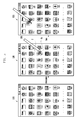
- FIG. 4 is a view illustrating an example of a screen for expressing an example of an interface providing an affordance image when a stylus approaches a schedule management screen according to an embodiment of the present invention.
- a display panel 131 may be utilized such that a schedule management screen is displayed. As illustrated in an example of a screen of reference numeral 410, the user may display a plurality of registered schedules to be divided into dates and times.
- the controller 110 may control the display panel 131 to output a time change affordance image 41 in the form of "-" capable of adjusting a due of the meal schedule 1 as illustrated in an example of a screen of reference numeral 420.
- the time change affordance image 41 is not limited to be displayed in the form of "-”. That is, the time change affordance image 41 may be expressed in various forms according to intention of a designer.
- the user may touch the time change affordance image 41 by the stylus 200, and move the touch (e.g., drag) to change an end time of the meal schedule 1.
- the controller 110 may control such that a corresponding function (e.g., view of detailed specification) is performed.
- the controller 110 controls such that a time change function is performed when the time change affordance image 41 is touched. Furthermore, it has illustrated that when the region that the time change affordance image 41 is not outputted among a display region of the meal schedule 1 is touched, the controller 110 controls such that a function (output of details) corresponding to selection of the meal schedule 1 is performed.
- the present invention is not limited thereto.
- another embodiment of the present invention may set a region spaced apart from an edge of the display region of the meal schedule 1 by a predetermined distance as a first virtual region of a display region of a meal schedule 1 and set a region except for the first virtual region included in the display region of the meal schedule 1 as second virtual region.
- the controller 110 may control such that a time change affordance image 41 indicating that a time may be changed is displayed.
- the controller 110 may control such that a selection affordance image indicating that the meal schedule 1 may be selected is displayed or display of the affordance image is omitted.
- the present invention mentioned above may display a time change affordance image 41 at one side of the display region of the meal schedule 1 to easily change a time period of the meal schedule.
- the related art needs to change a due date of a schedule through a plurality of steps.
- the related art may require a long-touch of the schedule to activate a time change mode, and changes, when the time change mode is activated, a due date of the schedule through an additional touch input.
- the related art may require a touch of the schedule to output a detailed report and change a due date of the schedule on a detailed report screen. That is, embodiments of the present invention allow a due date of the schedule to be changed rapidly, easily, and conveniently as compared with the related art.
- FIG. 4 illustrates that only a time change affordance image capable of changing an end time of a schedule is displayed.
- the controller 110 may further output a time change affordance image capable of changing a start time, a start date, and an end date when approach of the stylus 200 is sensed.
- the controller 110 may disregard sensing of the approach. That is, when a touch input device (e.g., finger) other than the stylus 200 is approached, the controller 110 may control such that no affordance image is outputted. This reason is because it may be difficult to touch an affordance image having a relatively small size displayed on a side of a display region. In this case, the user may, for example, touch a schedule to confirm a detailed report or long-touch the schedule to active a predetermined time change mode.
- the controller 110 may output another affordance image distinguished from an affordance image (e.g., time change affordance image) displayed when approach of the stylus 200 is sensed. For instance, the controller 110 may output an affordance image indicating that the schedule may be selected.
- an affordance image e.g., time change affordance image
- FIG. 5 is a view illustrating an example of a screen for expressing an example of an interface providing an affordance image when a stylus approaches a home screen according to an embodiment of the present invention.
- a controller 110 may control the display panel 131 to display a home screen.
- a plurality of icons may be arranged and displayed in multiple-rows and multiple-columns.
- the controller 110 may provide output of a moving affordance image 51 to which an icon moving function is set at one side of the music icon 2 which is approached by the stylus 200.
- FIG. 5 illustrates that the moving affordance image 51 has a form of " ⁇ ", and is displayed at a lower right end of the music icon 2.
- the present invention is not limited thereto and the moving affordance image may take any number of forms as determined by a designer. That is, a form and a display location of the moving affordance image 51 may be variously set.
- the user may touch the moving affordance image 51 by a stylus 2 and moves the point of contact of the stylus and screen (e.g., drag) to change a location of the music icon 2.
- the controller 110 may control such that a music play function set to the music icon 2 is performed.
- embodiments of the present invention allow an icon to be easily moved without using a plurality of steps.
- the related art requires a long-touch of a music icon 2 to activate an icon moving function and moves the icon through a drag.
- a touch and then a drag of a moving affordance image displayed on one side of an icon may be made to perform an icon moving function rapidly, easily, and conveniently.
- the controller 110 classifies a display region of the music icon 2 into a first virtual region and a second virtual region.
- the controller 110 may control such that a time change affordance image 41 displaying that the due data can be changed can be displayed.
- the controller 110 may control such that a selection affordance image corresponding to selection is outputted or no image is outputted.
- FIG. 5 illustrates that a location of an icon displayed on the home screen is changed.
- the controller 110 may display a size change affordance image for changing the size of the icon.
- a widget whose size is changed such as a weather widget or a schedule widget, is applicable to a home screen.
- the controller 110 may disregard sensing of the approach. That is, when the approach of the touch input device (e.g., finger) is sensed, the controller 110 may control such that no affordance image is outputted. This reason is because it may be difficult to touch an affordance image having a relatively small size displayed on a side of a display region. In this case, the user may, for example, long-touch an icon to perform an icon moving function.
- the controller 110 may output another affordance image distinguished from an affordance image (e.g., moving affordance image) displayed when approach of the stylus 200 is sensed. For instance, the controller 110 may output an affordance image indicating that the music icon 2 may be selected.
- an affordance image e.g., moving affordance image
- FIG. 6 is a view illustrating an example of a screen for expressing an example of an interface providing an affordance image when a stylus approaches a screen of an address book.
- a controller 110 may control a display panel 131 to display an address book screen.
- the address book screen may display contact information registered in the portable terminal 100 in the form of a list.
- the controller 110 may provide control such that a function affordance image 61 is output to a side of the first contact information field 3.
- the function affordance image 61 may include icons indicating executable functions, for example, a call icon, a character icon, an e-mail icon, and an instant image icon using information (phone number, e-mail address, instant message ID, etc.) registered in corresponding contact information.
- the user may touch one of icons included in the function affordance image 61 by the stylus 200 to perform a corresponding function. For example, when the user touches a call icon, the controller 110 may request a call using a phone number of the corresponding contact information.
- the controller 110 may output a detailed information screen of the first contact point.
- the controller 110 may move the function affordance image 61 to another contact information field.
- the controller 110 may control such that the function affordance image 61 is displayed at a side of the second contact information field 4.
- embodiments of the present invention may easily allow a user to perform a certain function without using a plurality of steps.
- a desired function character message, call, e-mail, etc.
- embodiments of the present invention allow a user to touch one of icons included in a function affordance image displayed on one side of a contact point field to perform a desired function rapidly, easily, and conveniently.
- the controller 110 may disregard sensing the approach. That is, when the touch input device (e.g., finger) other than the stylus 200 is approached, the controller 110 may control such that no image is outputted. The reason is because it is difficult to touch an affordance image having a relatively small size displayed on one side of a display region of the icon using the finger. For example, when the user attempts touching a character message icon using the finger, the user firstly touches a call icon due to the finger having a relatively large size.
- an affordance image having a controlling function through a stylus with a small touch region namely, a function for which a precise touch is requested is output.
- approach of the stylus 200 may control a display panel 131 to output an affordance image including a function for which a precise touch is not requested.
- the present invention may output a suitable affordance image according to situations but not output unnecessary images on a screen to improve convenience for the user.
- the touch approach other than touch sensing is sensed, the present invention may rapidly perform a desired function of the user according to output of an affordance image.
- embodiments of the present invention may allow a user to rapidly perform a desired function without processing a plurality of steps. Further, embodiments of the present invention may output an affordance image corresponding to types of touch input devices. Accordingly, embodiments of the present invention may provide a suitable affordance image according to situations to enhance the convenience for the user.
- Any such software may be stored in the form of volatile or non-volatile storage such as, for example, a storage device like a ROM, whether erasable or rewritable or not, or in the form of memory such as, for example, RAM, memory chips, device or integrated circuits, or on an optically or magnetically readable recording medium such as, for example, a CD (including CD ROM, CD-R and CD-RW), DVD (including DVD ROM, DVD-R and DVD-RW), a RAM, magnetic tape, magnetic disk (including a floppy disk and a hard disk), or a magneto-optical disk, or the like.
- volatile or non-volatile storage such as, for example, a storage device like a ROM, whether erasable or rewritable or not
- memory such as, for example, RAM, memory chips, device or integrated circuits
- an optically or magnetically readable recording medium such as, for example, a CD (including CD ROM, CD-R and CD-R
- Any such software or computer code may be downloaded over a network originally stored on a remote recording medium or a non-transitory machine readable medium and to be stored on a local recording medium, so that the methods described herein can be rendered in such software that is stored on the recording medium using a general purpose computer, or a special processor or in programmable or dedicated hardware, such as an ASIC or FPGA.
- the computer, the processor, microprocessor controller or the programmable hardware include memory components, e.g., RAM, ROM, Flash, etc. that may store or receive software or computer code that when accessed and executed by the computer, processor or hardware, implement the processing methods described herein.
- memory components e.g., RAM, ROM, Flash, etc.
- the execution of the code transforms the general purpose computer into a special purpose computer for executing the processing shown herein.
- the storage devices and storage media are embodiments of machine-readable storage that are suitable for storing a program or programs comprising instructions that, when executed, implement embodiments of the present invention. Accordingly, embodiments provide a program comprising code for implementing apparatus or a method as claimed in any one of the claims of this specification and a machine-readable storage storing such a program. Still further, such programs may be conveyed electronically via any medium such as a communication signal carried over a wired or wireless connection and embodiments suitably encompass the same.
Landscapes
- Engineering & Computer Science (AREA)
- General Engineering & Computer Science (AREA)
- Theoretical Computer Science (AREA)
- Human Computer Interaction (AREA)
- Physics & Mathematics (AREA)
- General Physics & Mathematics (AREA)
- User Interface Of Digital Computer (AREA)
- Position Input By Displaying (AREA)
Applications Claiming Priority (2)
| Application Number | Priority Date | Filing Date | Title |
|---|---|---|---|
| KR20110087832 | 2011-08-31 | ||
| KR1020120077301A KR101971067B1 (ko) | 2011-08-31 | 2012-07-16 | 휴대 단말기의 사용자 인터페이스 제공 방법 및 장치 |
Publications (2)
| Publication Number | Publication Date |
|---|---|
| EP2565752A2 true EP2565752A2 (de) | 2013-03-06 |
| EP2565752A3 EP2565752A3 (de) | 2015-12-09 |
Family
ID=47076083
Family Applications (1)
| Application Number | Title | Priority Date | Filing Date |
|---|---|---|---|
| EP12182474.2A Withdrawn EP2565752A3 (de) | 2011-08-31 | 2012-08-30 | Verfahren zur Bereitstellung einer Benutzerschnittstelle in einem tragbaren Endgerät, und Vorrichtung davon |
Country Status (4)
| Country | Link |
|---|---|
| US (1) | US20130050143A1 (de) |
| EP (1) | EP2565752A3 (de) |
| JP (1) | JP6309705B2 (de) |
| WO (1) | WO2013032234A1 (de) |
Cited By (1)
| Publication number | Priority date | Publication date | Assignee | Title |
|---|---|---|---|---|
| CN105229590A (zh) * | 2013-04-26 | 2016-01-06 | 三星电子株式会社 | 具有笔的用户终端装置和用户终端装置的控制方法 |
Families Citing this family (47)
| Publication number | Priority date | Publication date | Assignee | Title |
|---|---|---|---|---|
| US9417754B2 (en) | 2011-08-05 | 2016-08-16 | P4tents1, LLC | User interface system, method, and computer program product |
| WO2013169882A2 (en) | 2012-05-09 | 2013-11-14 | Yknots Industries Llc | Device, method, and graphical user interface for moving and dropping a user interface object |
| WO2013169842A2 (en) | 2012-05-09 | 2013-11-14 | Yknots Industries Llc | Device, method, and graphical user interface for selecting object within a group of objects |
| CN109298789B (zh) | 2012-05-09 | 2021-12-31 | 苹果公司 | 用于针对激活状态提供反馈的设备、方法和图形用户界面 |
| WO2013169865A2 (en) | 2012-05-09 | 2013-11-14 | Yknots Industries Llc | Device, method, and graphical user interface for moving a user interface object based on an intensity of a press input |
| WO2013169849A2 (en) | 2012-05-09 | 2013-11-14 | Industries Llc Yknots | Device, method, and graphical user interface for displaying user interface objects corresponding to an application |
| EP2847660B1 (de) | 2012-05-09 | 2018-11-14 | Apple Inc. | Vorrichtung, verfahren und grafische benutzeroberfläche zur auswahl von benutzerschnittstellenobjekten |
| JP6273263B2 (ja) | 2012-05-09 | 2018-01-31 | アップル インコーポレイテッド | ユーザ接触に応答して追加情報を表示するための、デバイス、方法、及びグラフィカルユーザインタフェース |
| WO2013169875A2 (en) | 2012-05-09 | 2013-11-14 | Yknots Industries Llc | Device, method, and graphical user interface for displaying content associated with a corresponding affordance |
| WO2013169843A1 (en) | 2012-05-09 | 2013-11-14 | Yknots Industries Llc | Device, method, and graphical user interface for manipulating framed graphical objects |
| CN107977084B (zh) | 2012-05-09 | 2021-11-05 | 苹果公司 | 用于针对在用户界面中执行的操作提供触觉反馈的方法和装置 |
| WO2013169851A2 (en) | 2012-05-09 | 2013-11-14 | Yknots Industries Llc | Device, method, and graphical user interface for facilitating user interaction with controls in a user interface |
| JP6002836B2 (ja) | 2012-05-09 | 2016-10-05 | アップル インコーポレイテッド | ジェスチャに応答して表示状態間を遷移するためのデバイス、方法、及びグラフィカルユーザインタフェース |
| WO2013169845A1 (en) | 2012-05-09 | 2013-11-14 | Yknots Industries Llc | Device, method, and graphical user interface for scrolling nested regions |
| EP2939096B1 (de) | 2012-12-29 | 2019-08-28 | Apple Inc. | Vorrichtung, verfahren und grafische benutzeroberfläche zur entscheidung über das scrollen oder auswählen von bildschirminhalten |
| WO2014105275A1 (en) | 2012-12-29 | 2014-07-03 | Yknots Industries Llc | Device, method, and graphical user interface for forgoing generation of tactile output for a multi-contact gesture |
| CN105144057B (zh) | 2012-12-29 | 2019-05-17 | 苹果公司 | 用于根据具有模拟三维特征的控制图标的外观变化来移动光标的设备、方法和图形用户界面 |
| JP6158947B2 (ja) | 2012-12-29 | 2017-07-05 | アップル インコーポレイテッド | タッチ入力からディスプレイ出力への関係間を遷移するためのデバイス、方法及びグラフィカルユーザインタフェース |
| KR101742808B1 (ko) | 2012-12-29 | 2017-06-01 | 애플 인크. | 사용자 인터페이스 계층을 내비게이션하기 위한 디바이스, 방법 및 그래픽 사용자 인터페이스 |
| WO2014105279A1 (en) | 2012-12-29 | 2014-07-03 | Yknots Industries Llc | Device, method, and graphical user interface for switching between user interfaces |
| US9342162B2 (en) * | 2013-01-29 | 2016-05-17 | Lg Electronics Inc. | Mobile terminal and controlling method thereof |
| US20140331146A1 (en) * | 2013-05-02 | 2014-11-06 | Nokia Corporation | User interface apparatus and associated methods |
| JP5884948B2 (ja) * | 2013-05-28 | 2016-03-15 | 株式会社村田製作所 | タッチ式入力装置およびタッチ式入力検出方法 |
| WO2014192126A1 (ja) * | 2013-05-30 | 2014-12-04 | 株式会社 東芝 | 電子機器および手書き入力方法 |
| US10073578B2 (en) | 2013-08-13 | 2018-09-11 | Samsung Electronics Company, Ltd | Electromagnetic interference signal detection |
| US10141929B2 (en) | 2013-08-13 | 2018-11-27 | Samsung Electronics Company, Ltd. | Processing electromagnetic interference signal using machine learning |
| US10042504B2 (en) | 2013-08-13 | 2018-08-07 | Samsung Electronics Company, Ltd. | Interaction sensing |
| US10042446B2 (en) | 2013-08-13 | 2018-08-07 | Samsung Electronics Company, Ltd. | Interaction modes for object-device interactions |
| US10101869B2 (en) | 2013-08-13 | 2018-10-16 | Samsung Electronics Company, Ltd. | Identifying device associated with touch event |
| KR20160032565A (ko) * | 2014-09-16 | 2016-03-24 | 엘지전자 주식회사 | 이동 단말기 및 그것의 제어방법 |
| US10048757B2 (en) | 2015-03-08 | 2018-08-14 | Apple Inc. | Devices and methods for controlling media presentation |
| US9645732B2 (en) | 2015-03-08 | 2017-05-09 | Apple Inc. | Devices, methods, and graphical user interfaces for displaying and using menus |
| US9632664B2 (en) * | 2015-03-08 | 2017-04-25 | Apple Inc. | Devices, methods, and graphical user interfaces for manipulating user interface objects with visual and/or haptic feedback |
| US9990107B2 (en) | 2015-03-08 | 2018-06-05 | Apple Inc. | Devices, methods, and graphical user interfaces for displaying and using menus |
| US10095396B2 (en) | 2015-03-08 | 2018-10-09 | Apple Inc. | Devices, methods, and graphical user interfaces for interacting with a control object while dragging another object |
| US9639184B2 (en) | 2015-03-19 | 2017-05-02 | Apple Inc. | Touch input cursor manipulation |
| US20170045981A1 (en) | 2015-08-10 | 2017-02-16 | Apple Inc. | Devices and Methods for Processing Touch Inputs Based on Their Intensities |
| US10067653B2 (en) | 2015-04-01 | 2018-09-04 | Apple Inc. | Devices and methods for processing touch inputs based on their intensities |
| US9830048B2 (en) | 2015-06-07 | 2017-11-28 | Apple Inc. | Devices and methods for processing touch inputs with instructions in a web page |
| US9860451B2 (en) | 2015-06-07 | 2018-01-02 | Apple Inc. | Devices and methods for capturing and interacting with enhanced digital images |
| US9891811B2 (en) | 2015-06-07 | 2018-02-13 | Apple Inc. | Devices and methods for navigating between user interfaces |
| US10346030B2 (en) | 2015-06-07 | 2019-07-09 | Apple Inc. | Devices and methods for navigating between user interfaces |
| US10200598B2 (en) | 2015-06-07 | 2019-02-05 | Apple Inc. | Devices and methods for capturing and interacting with enhanced digital images |
| US9880735B2 (en) | 2015-08-10 | 2018-01-30 | Apple Inc. | Devices, methods, and graphical user interfaces for manipulating user interface objects with visual and/or haptic feedback |
| US10235035B2 (en) | 2015-08-10 | 2019-03-19 | Apple Inc. | Devices, methods, and graphical user interfaces for content navigation and manipulation |
| US10416800B2 (en) | 2015-08-10 | 2019-09-17 | Apple Inc. | Devices, methods, and graphical user interfaces for adjusting user interface objects |
| US10248308B2 (en) | 2015-08-10 | 2019-04-02 | Apple Inc. | Devices, methods, and graphical user interfaces for manipulating user interfaces with physical gestures |
Family Cites Families (32)
| Publication number | Priority date | Publication date | Assignee | Title |
|---|---|---|---|---|
| JP3688361B2 (ja) * | 1995-10-06 | 2005-08-24 | 富士通株式会社 | 表示制御装置 |
| JPH09190268A (ja) * | 1996-01-11 | 1997-07-22 | Canon Inc | 情報処理装置およびその方法 |
| JP2003271310A (ja) * | 2002-03-13 | 2003-09-26 | Canon Inc | 情報入出力装置、その制御方法および該制御方法を実現するためのプログラム |
| JP2003280803A (ja) * | 2002-03-22 | 2003-10-02 | Sharp Corp | 情報処理装置 |
| US20040026347A1 (en) * | 2002-08-09 | 2004-02-12 | Brickman J. David | Item display system |
| JP4146188B2 (ja) * | 2002-08-15 | 2008-09-03 | 富士通株式会社 | 超音波型座標入力装置 |
| US7515135B2 (en) * | 2004-06-15 | 2009-04-07 | Research In Motion Limited | Virtual keypad for touchscreen display |
| EP1769326A2 (de) * | 2004-06-29 | 2007-04-04 | Koninklijke Philips Electronics N.V. | Verfahren und einrichtung zur verhinderung einer verunreinigung einer anzeigeeinrichtung |
| US7653883B2 (en) * | 2004-07-30 | 2010-01-26 | Apple Inc. | Proximity detector in handheld device |
| US7802202B2 (en) * | 2005-03-17 | 2010-09-21 | Microsoft Corporation | Computer interaction based upon a currently active input device |
| US7561145B2 (en) * | 2005-03-18 | 2009-07-14 | Microsoft Corporation | Systems, methods, and computer-readable media for invoking an electronic ink or handwriting interface |
| US20070132789A1 (en) * | 2005-12-08 | 2007-06-14 | Bas Ording | List scrolling in response to moving contact over list of index symbols |
| US7903094B2 (en) * | 2006-06-23 | 2011-03-08 | Wacom Co., Ltd | Information processing apparatus, operation input method, and sensing device |
| JP4841359B2 (ja) * | 2006-08-21 | 2011-12-21 | アルパイン株式会社 | 表示制御装置 |
| US20080165151A1 (en) * | 2007-01-07 | 2008-07-10 | Lemay Stephen O | System and Method for Viewing and Managing Calendar Entries |
| TWI380201B (en) * | 2007-05-15 | 2012-12-21 | Htc Corp | Method for browsing a user interface for an electronic device and the software thereof |
| KR20090022466A (ko) * | 2007-08-30 | 2009-03-04 | 엘지전자 주식회사 | 메뉴 선택 방법 |
| JP4900824B2 (ja) * | 2007-09-18 | 2012-03-21 | トヨタ自動車株式会社 | 入力表示装置 |
| FR2925714B1 (fr) * | 2007-12-19 | 2010-01-15 | Stantum | Circuit electronique d'analyse a alternance de mesure capacitive/resistive pour capteur tactile multicontacts a matrice passive |
| US8525802B2 (en) * | 2008-03-31 | 2013-09-03 | Lg Electronics Inc. | Portable terminal capable of sensing proximity touch and method for providing graphic user interface using the same |
| JP2009265759A (ja) * | 2008-04-22 | 2009-11-12 | Wacom Co Ltd | 位置検出装置及び位置検出用部品 |
| US9030418B2 (en) * | 2008-06-24 | 2015-05-12 | Lg Electronics Inc. | Mobile terminal capable of sensing proximity touch |
| WO2010035878A1 (ja) * | 2008-09-29 | 2010-04-01 | 京セラ株式会社 | 電子機器及び電子機器における表示方法 |
| EP2228711A3 (de) * | 2009-03-12 | 2014-06-04 | Lg Electronics Inc. | Mobiles Endgerät und Verfahren zur Bereitstellung einer Benutzerschnittstelle dafür |
| TWM368133U (en) * | 2009-07-09 | 2009-11-01 | Waltop Int Corp | Dual mode input device |
| US8373669B2 (en) * | 2009-07-21 | 2013-02-12 | Cisco Technology, Inc. | Gradual proximity touch screen |
| KR101590762B1 (ko) * | 2009-07-28 | 2016-02-02 | 삼성전자주식회사 | 사용자의 동작에 따른 디스플레이 장치 및 방법 |
| JP5532300B2 (ja) * | 2009-12-24 | 2014-06-25 | ソニー株式会社 | タッチパネル装置およびタッチパネル制御方法、プログラム、並びに記録媒体 |
| JP2011164746A (ja) * | 2010-02-05 | 2011-08-25 | Seiko Epson Corp | 端末装置、持ち手検出方法、及びプログラム |
| JP2012003742A (ja) * | 2010-05-18 | 2012-01-05 | Panasonic Corp | 入力装置、入力方法、プログラム及び記録媒体 |
| US20120030624A1 (en) * | 2010-07-30 | 2012-02-02 | Migos Charles J | Device, Method, and Graphical User Interface for Displaying Menus |
| KR20130108556A (ko) * | 2010-08-23 | 2013-10-04 | 사이프레스 세미컨덕터 코포레이션 | 컨패시턴스 스캐닝 근접성 검출 |
-
2012
- 2012-08-27 US US13/595,157 patent/US20130050143A1/en not_active Abandoned
- 2012-08-30 JP JP2012190182A patent/JP6309705B2/ja not_active Expired - Fee Related
- 2012-08-30 EP EP12182474.2A patent/EP2565752A3/de not_active Withdrawn
- 2012-08-30 WO PCT/KR2012/006914 patent/WO2013032234A1/en not_active Ceased
Non-Patent Citations (1)
| Title |
|---|
| None |
Cited By (3)
| Publication number | Priority date | Publication date | Assignee | Title |
|---|---|---|---|---|
| CN105229590A (zh) * | 2013-04-26 | 2016-01-06 | 三星电子株式会社 | 具有笔的用户终端装置和用户终端装置的控制方法 |
| US10289268B2 (en) | 2013-04-26 | 2019-05-14 | Samsung Electronics Co., Ltd. | User terminal device with pen and controlling method thereof |
| US11340759B2 (en) | 2013-04-26 | 2022-05-24 | Samsung Electronics Co., Ltd. | User terminal device with pen and controlling method thereof |
Also Published As
| Publication number | Publication date |
|---|---|
| WO2013032234A1 (en) | 2013-03-07 |
| US20130050143A1 (en) | 2013-02-28 |
| JP6309705B2 (ja) | 2018-04-11 |
| EP2565752A3 (de) | 2015-12-09 |
| JP2013054738A (ja) | 2013-03-21 |
Similar Documents
| Publication | Publication Date | Title |
|---|---|---|
| US20130050143A1 (en) | Method of providing of user interface in portable terminal and apparatus thereof | |
| KR101971067B1 (ko) | 휴대 단말기의 사용자 인터페이스 제공 방법 및 장치 | |
| KR102020345B1 (ko) | 터치스크린을 구비하는 단말에서 홈 화면의 구성 방법 및 장치 | |
| US9298292B2 (en) | Method and apparatus for moving object in terminal having touch screen | |
| US9632681B2 (en) | Electronic Device, memory and control method for displaying multiple objects on a display screen | |
| US20210089201A1 (en) | Apparatus and method of copying and pasting content in a computing device | |
| AU2013276998B2 (en) | Mouse function provision method and terminal implementing the same | |
| CN104007922B (zh) | 响应于用户输入提供反馈的方法和实现所述方法的终端 | |
| US20140258901A1 (en) | Apparatus and method for deleting an item on a touch screen display | |
| US10928948B2 (en) | User terminal apparatus and control method thereof | |
| US20140035851A1 (en) | Method for controlling user input and electronic device thereof | |
| EP2770421A2 (de) | Elektronische Vorrichtung mit berührungsempfindlicher Benutzerschnittstelle und entsprechendes Betriebsverfahren | |
| EP2787429A2 (de) | Verfahren und Vorrichtung zur Texteingabe in eine elektronische Vorrichtung mit Berührungsbildschirm | |
| KR20140028223A (ko) | 주소록 제공 방법 및 장치 | |
| EP2677413A2 (de) | Verfahren zur Verbesserung der Berührungserkennung und elektronische Vorrichtung damit | |
| KR102157078B1 (ko) | 휴대 단말기에서 전자문서 작성 방법 및 장치 | |
| CN105009038A (zh) | 具有触敏用户界面的电子装置以及相关操作方法 | |
| KR102118091B1 (ko) | 오브젝트에 대한 사전 실행 기능을 가지는 모바일 장치 및 그 제어방법 | |
| KR101963787B1 (ko) | 휴대 단말기의 부가 기능 운용 방법 및 장치 | |
| CN105739839A (zh) | 多媒体菜单项的选择方法及装置 | |
| US20130113741A1 (en) | System and method for searching keywords |
Legal Events
| Date | Code | Title | Description |
|---|---|---|---|
| PUAI | Public reference made under article 153(3) epc to a published international application that has entered the european phase |
Free format text: ORIGINAL CODE: 0009012 |
|
| AK | Designated contracting states |
Kind code of ref document: A2 Designated state(s): AL AT BE BG CH CY CZ DE DK EE ES FI FR GB GR HR HU IE IS IT LI LT LU LV MC MK MT NL NO PL PT RO RS SE SI SK SM TR |
|
| AX | Request for extension of the european patent |
Extension state: BA ME |
|
| PUAL | Search report despatched |
Free format text: ORIGINAL CODE: 0009013 |
|
| AK | Designated contracting states |
Kind code of ref document: A3 Designated state(s): AL AT BE BG CH CY CZ DE DK EE ES FI FR GB GR HR HU IE IS IT LI LT LU LV MC MK MT NL NO PL PT RO RS SE SI SK SM TR |
|
| AX | Request for extension of the european patent |
Extension state: BA ME |
|
| RIC1 | Information provided on ipc code assigned before grant |
Ipc: G06F 3/0354 20130101AFI20151102BHEP Ipc: G06F 3/0488 20130101ALI20151102BHEP |
|
| 17P | Request for examination filed |
Effective date: 20160609 |
|
| STAA | Information on the status of an ep patent application or granted ep patent |
Free format text: STATUS: EXAMINATION IS IN PROGRESS |
|
| 17Q | First examination report despatched |
Effective date: 20180814 |
|
| STAA | Information on the status of an ep patent application or granted ep patent |
Free format text: STATUS: THE APPLICATION IS DEEMED TO BE WITHDRAWN |
|
| 18D | Application deemed to be withdrawn |
Effective date: 20200616 |