EP2579194A1 - Fourniture d'une capacité améliorée pour réaliser une transaction basée sur un paramètre régional - Google Patents
Fourniture d'une capacité améliorée pour réaliser une transaction basée sur un paramètre régional Download PDFInfo
- Publication number
- EP2579194A1 EP2579194A1 EP11183811.6A EP11183811A EP2579194A1 EP 2579194 A1 EP2579194 A1 EP 2579194A1 EP 11183811 A EP11183811 A EP 11183811A EP 2579194 A1 EP2579194 A1 EP 2579194A1
- Authority
- EP
- European Patent Office
- Prior art keywords
- currency
- mobile device
- default
- selector
- transaction
- Prior art date
- Legal status (The legal status is an assumption and is not a legal conclusion. Google has not performed a legal analysis and makes no representation as to the accuracy of the status listed.)
- Ceased
Links
Images





Classifications
-
- G—PHYSICS
- G06—COMPUTING OR CALCULATING; COUNTING
- G06Q—INFORMATION AND COMMUNICATION TECHNOLOGY [ICT] SPECIALLY ADAPTED FOR ADMINISTRATIVE, COMMERCIAL, FINANCIAL, MANAGERIAL OR SUPERVISORY PURPOSES; SYSTEMS OR METHODS SPECIALLY ADAPTED FOR ADMINISTRATIVE, COMMERCIAL, FINANCIAL, MANAGERIAL OR SUPERVISORY PURPOSES, NOT OTHERWISE PROVIDED FOR
- G06Q20/00—Payment architectures, schemes or protocols
- G06Q20/30—Payment architectures, schemes or protocols characterised by the use of specific devices or networks
- G06Q20/32—Payment architectures, schemes or protocols characterised by the use of specific devices or networks using wireless devices
- G06Q20/327—Short range or proximity payments by means of M-devices
- G06Q20/3278—RFID or NFC payments by means of M-devices
-
- G—PHYSICS
- G06—COMPUTING OR CALCULATING; COUNTING
- G06Q—INFORMATION AND COMMUNICATION TECHNOLOGY [ICT] SPECIALLY ADAPTED FOR ADMINISTRATIVE, COMMERCIAL, FINANCIAL, MANAGERIAL OR SUPERVISORY PURPOSES; SYSTEMS OR METHODS SPECIALLY ADAPTED FOR ADMINISTRATIVE, COMMERCIAL, FINANCIAL, MANAGERIAL OR SUPERVISORY PURPOSES, NOT OTHERWISE PROVIDED FOR
- G06Q20/00—Payment architectures, schemes or protocols
- G06Q20/08—Payment architectures
- G06Q20/20—Point-of-sale [POS] network systems
-
- G—PHYSICS
- G06—COMPUTING OR CALCULATING; COUNTING
- G06Q—INFORMATION AND COMMUNICATION TECHNOLOGY [ICT] SPECIALLY ADAPTED FOR ADMINISTRATIVE, COMMERCIAL, FINANCIAL, MANAGERIAL OR SUPERVISORY PURPOSES; SYSTEMS OR METHODS SPECIALLY ADAPTED FOR ADMINISTRATIVE, COMMERCIAL, FINANCIAL, MANAGERIAL OR SUPERVISORY PURPOSES, NOT OTHERWISE PROVIDED FOR
- G06Q20/00—Payment architectures, schemes or protocols
- G06Q20/38—Payment protocols; Details thereof
- G06Q20/381—Currency conversion
Definitions
- the present disclosure relates to the field of mobile devices, and more specifically, to a method and system for enabling locale based currency conversion when performing mobile payment transactions using a mobile device.
- Mobile devices or handheld electronic devices such as cell phones or mobile phones, have become increasingly part of everyday life and can be used to facility payment rather than traditional cash, credit card or debit card transactions.
- NFC near field communications
- the electronic transaction enables money to be transferred or charged to an account by using an e-wallet and can reduce the need to carry traditional payment forms.
- a different currency may be used to facilitate the transaction.
- As a user of a mobile device travels easily understanding the cost of a transaction can be difficult in real-time mobile payment transactions. In performing a mobile payment transaction, or when a user desires to cost out something in currencies different than the base currency, it can be difficult for the user to determine and understand the cost of the transaction easily.
- a method for performing a locale specific transaction on a mobile device comprises the steps recited in claim 1.
- a system for performing a locale specific transaction on a mobile device a receiver for communicating with mobile payment devices; a display; a processor coupled to the receiver of the mobile device; a memory coupled to the processor containing instructions which when executed by the processor for executing the method of claim 1.
- a computer readable memory containing instructions for performing a locale specific transaction on a mobile device, the instructions when executed by a processor the for implementing a method according to claim 1.
- Embodiments of the present disclosure are not limited to any particular operating system, mobile device architecture, server architecture, or computer programming language.
- the disclosed system and method allows a user to select a default currency to be used with the mobile device and associate it with the currency selector of the device.
- the user can actuate the currency selector to convert the currency amount to the default currency and easily determine the default equivalent currency value.
- the currency selector allows amounts to be converted between currencies on the mobile device without the requirement for executing additional applications or processes.
- the mobile device enables changes in currency to be identified based upon a change in location of the device and enables the user to transact mobile payment in different currencies while being able to view or understand the cost in a default currency they are more familiar with.
- Mobile devices are generally intended to be portable, and thus are of a relatively compact configuration in which keys and other input structures often perform multiple functions under certain circumstances or may otherwise have multiple aspects or features assigned thereto.
- the keys of a keypad either in a physical form or presented on the display of the mobile device in a virtual keyboard, can only be reduced to a certain small size before the keys become relatively unusable.
- a single currency character or symbol can present itself on the keyboard, within a symbol screen or within a user interface display as a choice due to space constraints. This means the user must change the currency associated with the particular key or component which enables this via configuration of the device.
- the currency selector or component may be configured to cycle through preferred currencies but a default currency is usually assigned but has only been utilized for presenting a currency symbol in text entry applications.
- a currency selector For mobile devices with limited input real-estate a currency selector is provided that enables the user to select a default currency symbol to be used by the mobile device rather than presenting all the possible currency symbols on the keyboard to conserve space.
- an input signal is used by the mobile device to select the predetermined default currency or convert a transaction from a default currency to an alternative currency.
- Figure 1 is a representation of a mobile device changing locations between two distinct regions.
- regional information can be defined or selected such as time format, number formatting, text formatting, language selection and currency symbols.
- the regional information may be automatically determined by the mobile device based upon wireless network 122 parameters such as system or network identifiers or by a physical location of the device such as provided by a global positioning system (GPS) 190.
- GPS global positioning system
- region 1 a home area or default location for the device, the device 100 is associated with a default currency, for example $USD US dollars.
- the keyboard or input method may still use the same symbol and conversion of currencies can be inconvenient and difficult for the user to understand the true cost of the transaction in a default currency.
- the mobile device 100 can determine a location change based upon wireless network 132 parameters or by determining a location change of the mobile device 100 using GPS 190 positioning information.
- a query to a remote data source 124, through the wireless network, or to a database stored in memory of the device 100 may determine the currency, or currencies, associated with the determined location and associated region.
- NFC near-field communication
- POS point-of-sale
- the currency selector on the mobile device 100 can be used to convert local currency of region 2 to default currency of region 1. This enables the user to conveniently understand the cost of the transaction when differing currencies are used.
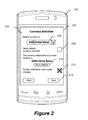
- FIG. 2 shows a representation of default currency preference selection on a mobile device 100.
- the mobile device 100 provides a screen 202 for display of a user interface and, in this example, provides a touch interface to receive user input and interaction.
- the preference screen 204 provides an example user selection of the default currency to be associated with the mobile device 100.
- the currency selection may occur during first use or configuration of the mobile device, first actuation of the currency selection, or be accessed through configuration menus of the mobile device 100 operating system.
- the default currency selection 204 can present the current default currency 206, for example "$ USD".
- the default currency may be performed by a location look up by a global positioning system (GPS), network parameters such as network identifier or service identifier, time zones or other regional parameters which can be associated with a local currency value.
- GPS global positioning system
- a user may select New York City as their time zone and the default currency selection may be associated with "$ USD".
- the default currency may be determined automatically, however the user may be able to manually select a different currency 208 in which case the currency selection 206 (shown as being greyed out) would be selectable and an alternative currency can be selected.
- the default currency is different than the currency determined relative to the current location of the device, an option may be provided to set the default currency to the determined local currency 210.
- the notification of currency changes may be configurable 212 such that a user may wish to be notified when a new currency is associated with the location. Alternatively a notification may not necessarily be provided depending on user preferences.
- the change in the default currency can be saved 214 by the user.
- any monetary transaction performed on the mobile device converts the amount of the mobile payment transaction to the default currency when the currency selector is actuated.
- the currency selection may be presented in any number of ways with other common configuration parameters of the mobile device 100 or independently.
- the preference screen 204 is presented to show some of the features that may be associated with configuration currency selection on the mobile device 100.
- Figure 3 shows a representation of location change notification on a mobile device 100.
- the mobile device 100 identifies that a location change has occurred, such as for example by GPS or by a change in network parameters, the associated currency with the geographical region is determined, if it is a different currency than the default currency.
- a notification window 310 identifying the new local currency 312 and the default currency 314 that was previously selected can be displayed.
- multiple currencies may be identified and the user may be presented with an option as to which local currency they would like to perform the mobile payment transactions in.
- the notification may also identify other information associated with the locale change such as time zone, standard formatting information such as date and time etc. If the currency is incorrect or the user wants to use other currencies, options may be presented to change the currency as shown in Figure 4 .
- a current exchange rate that may be utilized for the transaction may also be identified or the user may be able to adjust the conversion rate to account for exchange fees if desired.
- the notification may be provided in a number of ways such as a pop-up window, a notification icon, a sound or a change in appearance of a visual cue on the screen.
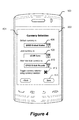
- FIG. 4 shows an alternative representation of currency selection on a mobile device.
- the currency selection screen 404 may be presented as an alternative or to augment the currency selection screen 204.
- the default currency is displayed 406 and the determined local currency 408 is also displayed.
- the user may be able to change the currencies at this screen if the predetermined selection is not desirable.
- one or more alternate currencies may be automatically or manually selected 410 if desired if more than one currency is utilized in the region.
- the functionality of the currency selector may also be selected 412, for example when the currency selector is actuated it can be configured to only convert the transaction value to the default currency, or potentially toggle between currencies, or utilize alternate currencies. Conversion rates may also be identified or changed in a currency selection screen. The currency selections may then be saved 414.
- FIG. 5 shows a representation of a mobile payment transaction confirmation such as a point-of-sale (POS) purchase on a mobile device 100.
- POS point-of-sale
- the mobile device 100 When a user performs a mobile payment using the mobile device 100 through an interface such as NFC short-range wireless interface, the mobile device 100 is placed near the mobile payment device 550 or interface to initiate the transaction.
- the mobile device 100 may support a digital wallet, or e-wallet, for storing different payment options available to the user.
- the mobile payment device 550 exchanges transaction information with the mobile device 100.
- the mobile device 100 can present a confirmation notification or screen 504 allowing the user to confirm that transaction is to proceed from their associated e-wallet.
- Additional security such as a confirmation code 522 or personal identification number (PIN) may be presented during the process for additional security.
- the transaction currency is not in the user's default currency, for example Euros 520
- the currency selector 534 of the virtual keyboard 530 displayed on the mobile device can be selected to initiate conversion of the currency to the default currency as discussed below.
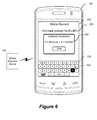
- FIG. 6 shows a representation of a currency conversion notification on a mobile device 100.
- the currency selector 534 is presented on a virtual keyboard 530 as part of one of standard keys for text entry.
- the currency selector or key 534 may be represented with the standard QWERTY keyboard, on a symbol or number keyboard, or as a stand alone currency key.
- the currency selector 534 is actuated by the user to provide conversion for a non-default currency identified in the transaction.
- the notification can be presented 622 on the display 202 of the mobile device 100 showing a conversion of the transaction from the local currency to the default currency. For example a €5.00 transaction would convert to $7.18 US based upon the available exchange rate.
- the notification may include confirmation, or acceptance, or be provided for information purposes only to the user.
- the keyboard presents the currency selector using a "$", the same as the default currency, it should be understood that the keyboard may depict the currency which may or may not match the actual default currency.
- the currency selector is identified as a currency key on the virtual keyboard, however the currency selector may be associated with a convenience key of the device, an icon, or one or more gestures input on the device.
- the currency selector may be actuated prior to the transaction to automatically present a conversion notification when the transaction occurs.
- the currency conversion notification is provided prior to accepting the transaction, however it may be provided after the transaction has occurred or at an earlier step of the mobile payment process.
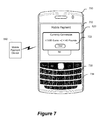
- Figure 7 shows a representation of a currency conversion notification on a mobile device having a physical keyboard 730 with a currency key 732 as the currency selector.
- the notification can be presented 722 showing a conversion of the transaction.
- conversion to an alternate currency may be shown by actuating the currency selector an additional time.
- €5.00 is equal to £4.40.
- the transaction may be converted to the default currency in the display screen of the transaction without requiring a notification window to be presented. Additional actuations of the currency selector may cycle between the default and alternate currencies.
- the currency selector may not be necessarily associated with a physical currency key but may be initiated by user input to the device relative to the mobile payment context. That is, within the payment process context, input or keys that are not utilized for another function may be associated with the currency selector.
- Alternative method may include icon selection, convenience key selection, gestures, audio or voice commands or by motion sensing of the device such as a shake gesture.
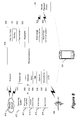
- Figure 8 is a schematic depiction of an example mobile device 100 for providing currency conversion in transactions based upon locale.
- the mobile device 100 includes a processor (or microprocessor) 810 for executing one or more applications, memory in the form of flash memory 850 and RAM 852 (or any equivalent memory devices) for storing the one or more applications, related data and received documents, and a user interface 820 with which the user interacts with the device.
- the user interface 820 may include a display 102, a touch screen 824 and/or virtual or physical keyboard 826.
- the mobile device 100 may include a radiofrequency (RF) transceiver comprising a receiver 816 and transmitter 814.
- the RF transceiver is for communication with a wireless network 802 using a wireless communication protocols such as, for example but not limited to, GSM, UMTS, LTE, HSPDA, CDMA, W-CDMA, Wi-MAX, Wi-Fi etc.
- a subscriber identify module (SIM) card 854 may be provided depending on the access technology supported by the device.
- the mobile device can be for example, a tablet, smartphone, mobile phone or cell phone.
- a voice-enable device would further include a microphone 858 and a speaker 856.
- Short-range communications 830 is provided through wireless technologies such as BluetoothTM or wired Universal Serial BusTM connections to other peripheries or computing devices.
- a near-field communication interface 840 is provided to enable interaction with NFC devices 550 such as a point-of-sale terminal.
- a global navigation satellite system (GNSS) receiver such as a Global Positioning System (GPS) receiver chipset 860 or other location-determining subsystem can be provided to determine location of the device or be incorporated in other components of the device.
- GNSS global navigation satellite system
- GPS Global Positioning System
- the mobile device 100 also includes an operating system 870 and software components 872 to 878 which are described in more detail below.
- the operating system 870 and the software components 872 to 878 that are executed by the microprocessor 810 are typically stored in a persistent store such as the flash memory 850, which may alternatively be a read-only memory (ROM) or similar storage element (not shown).
- the memory may store instructions for executing the method as described below.
- portions of the operating system 870 and the software components 872 to 878, such as specific device applications, or parts thereof may be temporarily loaded into a volatile store such as the RAM 852.
- Other software components can also be included, as is well known to those skilled in the art.
- the memory may also store currency conversion data including exchange rates and location information or instructions for retrieving the required information from repositories coupled to the network.
- the subset of software applications that control basic device operations, including data and voice communication applications, may be installed on the mobile device 100 during its manufacture.
- Other software applications include a message application 872 that can be any suitable software program that allows a user of the mobile device 100 to send and receive electronic messages or interact with services coupled to a network for receiving transactional information.
- the software components 874 or software applications can provide user notification and implement transaction processing with POS devices to facilitate transactions.
- the networking component 876 can determine which interfaces the mobile device can access for IP connectivity and interact with.
- the interface I/O 878 may interact with physical or virtual keyboards and control communication with communication interfaces of the mobile device 100.
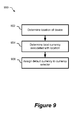
- Figure 9 shows a method 900 of default currency assignment on the mobile device 100.
- the location of the mobile device 100 may be determined (902).
- the location in the form of a location identifier may be based upon the system identifier, network identifier or by a positioning device such as GPS locations.
- the currency location associated with the mobile device 100 and can then be determined (904) by either a look-up in a mobile device 100 resident table or similar structure stored in memory, or by a request sent through one of the networking interfaces in identifying the currency associated with the location identifier.
- the currency can then be assigned as the default currency and assigned to the currency selector (906). In the case of a virtual keyboard the currency selector may be changed to show the selected currency.
- the currency determination may be part of default regional parameters such as data formatting or time configuration of the mobile device 100.
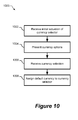
- Figure 10 shows an alternative method 1000 of default currency assignment on the mobile device 100.
- An input is received when the currency selector is actuated for the first time on the mobile device 100 (1002) or during initial configuration of the mobile device.
- the available currency options are presented to the user on the display of the mobile device (1004).
- the currency selection by the user is received (1006) and assigned to the currency selector (1008).
- the currency selector may be changed to show the associated currency symbol on the key.
- Figure 11 shows a method 1100 of currency conversion for a point-of-sale transaction on a mobile device.
- the mobile device changes location to a new region or locale, where a different currency may be utilized, the mobile device determines a change in location (1102) by network identification or using a positioning system such as GPS.
- the mobile device may determine currency associated with location (1104) either by a local look-up or to a query to a server via the wireless network.
- the mobile device may also determine a current conversion rate between default currency and local currency.
- a mobile payment transaction is initiated using the mobile device such as with a NFC POS, the transaction associated with local currency (1106) is received at the mobile device.
- the currency selector input is actuated by the user providing a signal input to convert the local currency to the default currency defined on the mobile device (1108).
- the currency is converted (1110) using a conversion factor from the local currency value to the default currency value.
- the converted currency value can then be displayed to the user (1112) on the display screen by presenting a notification of the conversion change either through a separate notification to the transaction information or by conversion of the transaction information on the transaction screen. Additional input may be provided to allow the user to approve or decline the transaction on the mobile device screen.
- the currency selector may show the local currency symbol while displaying the default currency symbol in the background, faded out but identifiable for selection.
- Figure 12 shows an alternative method 1200 of currency conversion for a mobile payment using a mobile device 100.
- a transaction is received by the mobile device 100 or processed by the mobile device 100 (1202).
- the user actuates the currency selector input (1204) it is determined if a foreign currency, or non-default currency, is represented in the transaction and is identified for conversion (1206).
- the conversion rate for the local currency to the default currency is retrieved either from local memory or by a query through a network coupled through a wireless interface of the mobile device 100 and the value of the local currency is converted (1208) based upon the currency exchange rate and then be displayed to the user (1210).
- the conversion may be presented by a notification of the conversion change or by changing the display of the currency itself within a mobile payment display screen.
- Additional input may be provided to allow the user to approve or decline the transaction on the mobile device screen 102.
- the currency may be associated with multiple currencies in that subsequent presses of the currency selector input may be associated with other default currencies.
- the first press of the currency selector may be associated with $USD, where as the second press may be $CDN, wherein the display would cycle the conversion display to the desired currency based upon the defined currencies.
- the same symbol may be used for the currency different currency conversion rates may apply for the transaction when multiple currencies are supported.
- the user of the mobile device can now easily convert between currencies and allow the user to readily comprehend the cost of a transaction.
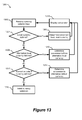
- Figure 13 shows a method 1300 of multiple currency selector actuations.
- the current method may be used in combination with any of the previous methods for display or selection of currency for example on the first use of the currency selector or when a location change occurs.
- the method determines if the local currency has been defined (1304). If the local currency has been defined, either automatically through detection of a location change or manually by the user selection, a conversion from the default currency to the local currency for a transaction value is determined (1306) and displayed (1318). If multiple local currencies are defined (1308), and the currency selector has previously been actuated, on a subsequent actuation the local currency may be converted to an alternative currency (1310) and displayed (1318) to the user.
- an alternative default currency is defined (1312) on an actuation of the currency selector
- a conversion may be done to the alternative default currency (1314) and displayed (1318).
- the conversion notification can be removed or if no local currencies or default currencies are defined an initial currency selection screen may be presented on first actuation (1316).
- the process of determining the functions that are to occur on action of the currency selector may be performed in any order and not limited to those described.
- the currency selector function may be configured to perform any number of conversions between one or more local currencies to and from one or more default currencies.
- the example screens shown and described above in reference to the figures are provided as examples and should not be considered limiting in terms or visual presentation or content as any number of alternative configurations and implementations can be contemplated within the scope of the present disclosure.
- the presentation of currency selection, identification, notification, and mobile payment transaction screens may be based upon the application or operating system of a particular device and may be presented in any number of ways to facilitate mobile payment transactions using a currency selector.
Landscapes
- Business, Economics & Management (AREA)
- Accounting & Taxation (AREA)
- Engineering & Computer Science (AREA)
- General Business, Economics & Management (AREA)
- Strategic Management (AREA)
- Physics & Mathematics (AREA)
- General Physics & Mathematics (AREA)
- Theoretical Computer Science (AREA)
- Finance (AREA)
- Computer Networks & Wireless Communication (AREA)
- Development Economics (AREA)
- Economics (AREA)
- Financial Or Insurance-Related Operations Such As Payment And Settlement (AREA)
Priority Applications (2)
| Application Number | Priority Date | Filing Date | Title |
|---|---|---|---|
| EP11183811.6A EP2579194A1 (fr) | 2011-10-04 | 2011-10-04 | Fourniture d'une capacité améliorée pour réaliser une transaction basée sur un paramètre régional |
| CA2791367A CA2791367A1 (fr) | 2011-10-04 | 2012-10-04 | Offre d'une capacite amelioree a effectuer une transaction en fonction du lieu |
Applications Claiming Priority (1)
| Application Number | Priority Date | Filing Date | Title |
|---|---|---|---|
| EP11183811.6A EP2579194A1 (fr) | 2011-10-04 | 2011-10-04 | Fourniture d'une capacité améliorée pour réaliser une transaction basée sur un paramètre régional |
Publications (1)
| Publication Number | Publication Date |
|---|---|
| EP2579194A1 true EP2579194A1 (fr) | 2013-04-10 |
Family
ID=44897625
Family Applications (1)
| Application Number | Title | Priority Date | Filing Date |
|---|---|---|---|
| EP11183811.6A Ceased EP2579194A1 (fr) | 2011-10-04 | 2011-10-04 | Fourniture d'une capacité améliorée pour réaliser une transaction basée sur un paramètre régional |
Country Status (1)
| Country | Link |
|---|---|
| EP (1) | EP2579194A1 (fr) |
Cited By (10)
| Publication number | Priority date | Publication date | Assignee | Title |
|---|---|---|---|---|
| EP3176740A1 (fr) * | 2015-12-01 | 2017-06-07 | Xiaomi Inc. | Procédé et appareil de traitement d'informations, programme informatique et support d'enregistrement |
| US9996829B1 (en) | 2016-12-27 | 2018-06-12 | Square, Inc. | System for global point-of-sale capabilities |
| US10163107B1 (en) | 2016-03-31 | 2018-12-25 | Square, Inc. | Technical fallback infrastructure |
| US10515354B1 (en) | 2014-12-05 | 2019-12-24 | Square, Inc. | Discounted card not present rates following failed card present attempts |
| EP3623931A1 (fr) * | 2018-09-11 | 2020-03-18 | Seiko Epson Corporation | Appareil de traitement d'informations, procédé de commande de l'appareil de traitement d'informations et programme d'enregistrement de support d'enregistrement pour appareil de traitement d'informations |
| US10755281B1 (en) | 2017-03-31 | 2020-08-25 | Square, Inc. | Payment transaction authentication system and method |
| US11107056B2 (en) | 2013-11-26 | 2021-08-31 | Square, Inc. | Card data output for cardless transactions |
| US11593773B1 (en) | 2017-03-31 | 2023-02-28 | Block, Inc. | Payment transaction authentication system and method |
| US11861589B2 (en) | 2017-04-28 | 2024-01-02 | Block, Inc. | Multi-source transaction processing |
| US12387212B2 (en) | 2017-03-20 | 2025-08-12 | Block, Inc. | Configuring verification information at point-of-sale devices |
Citations (10)
| Publication number | Priority date | Publication date | Assignee | Title |
|---|---|---|---|---|
| JP2000113081A (ja) * | 1998-10-07 | 2000-04-21 | Toshiba Tec Corp | 電子現金取引処理方法及び処理装置並びに電子財布カード |
| US6065673A (en) * | 1996-12-18 | 2000-05-23 | Telefonaktiebolaget L M Ericsson Ab | Method and apparatus for performing currency conversions |
| EP1032228A2 (fr) * | 1999-02-22 | 2000-08-30 | Nokia Mobile Phones Ltd. | Une méthode et un appareil de télécommunication cellulaire pour convertir des monnaies |
| FR2807273A1 (fr) * | 2000-04-03 | 2001-10-05 | Canecaude Emmanuel De | Equipement de communication mobile, notamment telephone mobile, a fonctions etendues, et accessoires d'extension associes |
| US20060287004A1 (en) * | 2005-06-17 | 2006-12-21 | Fuqua Walter B | SIM card cash transactions |
| US20070095892A1 (en) * | 2005-10-27 | 2007-05-03 | Lyons Robert E | Method and system for managing monetary value on a mobile device |
| US20070236461A1 (en) * | 2006-03-31 | 2007-10-11 | Jason Griffin | Method and system for selecting a currency symbol for a handheld electronic device |
| US20100036741A1 (en) * | 2008-08-04 | 2010-02-11 | Marc Cleven | Application currency code for dynamic currency conversion transactions with contactless consumer transaction payment device |
| US20100049619A1 (en) * | 2006-06-28 | 2010-02-25 | Planet Payment, Inc. | Telephone-based commerce system and method |
| US7747475B1 (en) * | 2008-09-05 | 2010-06-29 | Amazon Technologies, Inc. | Intelligent and firm currency conversion |
-
2011
- 2011-10-04 EP EP11183811.6A patent/EP2579194A1/fr not_active Ceased
Patent Citations (10)
| Publication number | Priority date | Publication date | Assignee | Title |
|---|---|---|---|---|
| US6065673A (en) * | 1996-12-18 | 2000-05-23 | Telefonaktiebolaget L M Ericsson Ab | Method and apparatus for performing currency conversions |
| JP2000113081A (ja) * | 1998-10-07 | 2000-04-21 | Toshiba Tec Corp | 電子現金取引処理方法及び処理装置並びに電子財布カード |
| EP1032228A2 (fr) * | 1999-02-22 | 2000-08-30 | Nokia Mobile Phones Ltd. | Une méthode et un appareil de télécommunication cellulaire pour convertir des monnaies |
| FR2807273A1 (fr) * | 2000-04-03 | 2001-10-05 | Canecaude Emmanuel De | Equipement de communication mobile, notamment telephone mobile, a fonctions etendues, et accessoires d'extension associes |
| US20060287004A1 (en) * | 2005-06-17 | 2006-12-21 | Fuqua Walter B | SIM card cash transactions |
| US20070095892A1 (en) * | 2005-10-27 | 2007-05-03 | Lyons Robert E | Method and system for managing monetary value on a mobile device |
| US20070236461A1 (en) * | 2006-03-31 | 2007-10-11 | Jason Griffin | Method and system for selecting a currency symbol for a handheld electronic device |
| US20100049619A1 (en) * | 2006-06-28 | 2010-02-25 | Planet Payment, Inc. | Telephone-based commerce system and method |
| US20100036741A1 (en) * | 2008-08-04 | 2010-02-11 | Marc Cleven | Application currency code for dynamic currency conversion transactions with contactless consumer transaction payment device |
| US7747475B1 (en) * | 2008-09-05 | 2010-06-29 | Amazon Technologies, Inc. | Intelligent and firm currency conversion |
Cited By (14)
| Publication number | Priority date | Publication date | Assignee | Title |
|---|---|---|---|---|
| US11107056B2 (en) | 2013-11-26 | 2021-08-31 | Square, Inc. | Card data output for cardless transactions |
| US10515354B1 (en) | 2014-12-05 | 2019-12-24 | Square, Inc. | Discounted card not present rates following failed card present attempts |
| EP3176740A1 (fr) * | 2015-12-01 | 2017-06-07 | Xiaomi Inc. | Procédé et appareil de traitement d'informations, programme informatique et support d'enregistrement |
| US10163107B1 (en) | 2016-03-31 | 2018-12-25 | Square, Inc. | Technical fallback infrastructure |
| US10949858B2 (en) | 2016-03-31 | 2021-03-16 | Square, Inc. | Technical fallback infrastructure |
| WO2018125444A1 (fr) * | 2016-12-27 | 2018-07-05 | Square, Inc. | Système pour des capacités globales de point de vente |
| US9996829B1 (en) | 2016-12-27 | 2018-06-12 | Square, Inc. | System for global point-of-sale capabilities |
| US12387212B2 (en) | 2017-03-20 | 2025-08-12 | Block, Inc. | Configuring verification information at point-of-sale devices |
| US10755281B1 (en) | 2017-03-31 | 2020-08-25 | Square, Inc. | Payment transaction authentication system and method |
| US11593773B1 (en) | 2017-03-31 | 2023-02-28 | Block, Inc. | Payment transaction authentication system and method |
| US11861589B2 (en) | 2017-04-28 | 2024-01-02 | Block, Inc. | Multi-source transaction processing |
| US12020235B2 (en) | 2017-04-28 | 2024-06-25 | Block, Inc. | Multi-source transaction processing |
| EP3623931A1 (fr) * | 2018-09-11 | 2020-03-18 | Seiko Epson Corporation | Appareil de traitement d'informations, procédé de commande de l'appareil de traitement d'informations et programme d'enregistrement de support d'enregistrement pour appareil de traitement d'informations |
| US10984298B2 (en) | 2018-09-11 | 2021-04-20 | Seiko Epson Corporation | Acquiring item values from printers based on notation form settings |
Similar Documents
| Publication | Publication Date | Title |
|---|---|---|
| US20130085927A1 (en) | Providing Increased Ability To Perform A Transaction Based On Locale | |
| EP2579194A1 (fr) | Fourniture d'une capacité améliorée pour réaliser une transaction basée sur un paramètre régional | |
| US12260379B2 (en) | System and method for electronically transferring money | |
| US9922488B2 (en) | Wireless communication for consumer-operated kiosks | |
| US10748137B2 (en) | Methods, apparatus, and storage medium for displaying virtual cards | |
| US9038894B2 (en) | Payment or other transaction through mobile device using NFC to access a contactless transaction card | |
| CN119599656B (zh) | 近场通信业务处理方法、装置、设备以及收银设备 | |
| US20130282459A1 (en) | Methods and apparatus for standard approach to coupon selection | |
| JP6696683B2 (ja) | 方法、コンピュータプログラム、取引端末システム、モバイル通信デバイス及びモバイルアプリケーション | |
| WO2013067278A1 (fr) | Procédé et système pour de multiples applications de paiement | |
| WO2017116623A1 (fr) | Procédé permettant d'ajouter une nouvelle fonctionnalité de produit à une carte numérique d'un client | |
| GB2528869A (en) | Payment mode selection | |
| KR20110068116A (ko) | 결제 정보를 제공하는 이동통신 단말기, 스마트 카드 및 그 방법 | |
| KR20110111801A (ko) | 할부 정보를 이용한 모바일 결제 시스템, 이동통신 단말기 및 방법 | |
| US20130138561A1 (en) | Method and system for cross-border stored value payment | |
| CN112837051A (zh) | 支付方法和装置 | |
| CA2791367A1 (fr) | Offre d'une capacite amelioree a effectuer une transaction en fonction du lieu | |
| KR101085766B1 (ko) | 이동통신 단말기에서 결제 내역을 알려주기 위한 장치 및방법 | |
| WO2005057445A1 (fr) | Outil de gestion d'affaires pour telephone mobile | |
| AU2021106923A4 (en) | Electronic payments platform | |
| KR101513421B1 (ko) | 결제프로그램의 실행 환경에 따른 결제 처리 방법 | |
| US20240273513A1 (en) | Mobile device application for account selection on multi-account card | |
| KR101965741B1 (ko) | 이동 단말기, 그것의 제어 방법 및 전자 화폐 시스템 | |
| KR101922060B1 (ko) | 전화번호에 의한 자판기 결제 시스템 및 방법 | |
| KR20190056480A (ko) | 전화번호에 의한 노래방 결제 시스템 및 방법 |
Legal Events
| Date | Code | Title | Description |
|---|---|---|---|
| PUAI | Public reference made under article 153(3) epc to a published international application that has entered the european phase |
Free format text: ORIGINAL CODE: 0009012 |
|
| 17P | Request for examination filed |
Effective date: 20111004 |
|
| AK | Designated contracting states |
Kind code of ref document: A1 Designated state(s): AL AT BE BG CH CY CZ DE DK EE ES FI FR GB GR HR HU IE IS IT LI LT LU LV MC MK MT NL NO PL PT RO RS SE SI SK SM TR |
|
| AX | Request for extension of the european patent |
Extension state: BA ME |
|
| RAP1 | Party data changed (applicant data changed or rights of an application transferred) |
Owner name: BLACKBERRY LIMITED |
|
| RAP1 | Party data changed (applicant data changed or rights of an application transferred) |
Owner name: BLACKBERRY LIMITED |
|
| STAA | Information on the status of an ep patent application or granted ep patent |
Free format text: STATUS: THE APPLICATION HAS BEEN REFUSED |
|
| 18R | Application refused |
Effective date: 20160627 |