EP2608005A2 - Appareil et procédé de modification d'écran dans un terminal sans fil - Google Patents
Appareil et procédé de modification d'écran dans un terminal sans fil Download PDFInfo
- Publication number
- EP2608005A2 EP2608005A2 EP12198002.3A EP12198002A EP2608005A2 EP 2608005 A2 EP2608005 A2 EP 2608005A2 EP 12198002 A EP12198002 A EP 12198002A EP 2608005 A2 EP2608005 A2 EP 2608005A2
- Authority
- EP
- European Patent Office
- Prior art keywords
- background screen
- fixed area
- displayed
- application
- wireless terminal
- Prior art date
- Legal status (The legal status is an assumption and is not a legal conclusion. Google has not performed a legal analysis and makes no representation as to the accuracy of the status listed.)
- Withdrawn
Links
Images
Classifications
-
- G—PHYSICS
- G06—COMPUTING OR CALCULATING; COUNTING
- G06F—ELECTRIC DIGITAL DATA PROCESSING
- G06F3/00—Input arrangements for transferring data to be processed into a form capable of being handled by the computer; Output arrangements for transferring data from processing unit to output unit, e.g. interface arrangements
- G06F3/01—Input arrangements or combined input and output arrangements for interaction between user and computer
- G06F3/048—Interaction techniques based on graphical user interfaces [GUI]
- G06F3/0481—Interaction techniques based on graphical user interfaces [GUI] based on specific properties of the displayed interaction object or a metaphor-based environment, e.g. interaction with desktop elements like windows or icons, or assisted by a cursor's changing behaviour or appearance
- G06F3/04817—Interaction techniques based on graphical user interfaces [GUI] based on specific properties of the displayed interaction object or a metaphor-based environment, e.g. interaction with desktop elements like windows or icons, or assisted by a cursor's changing behaviour or appearance using icons
-
- H—ELECTRICITY
- H04—ELECTRIC COMMUNICATION TECHNIQUE
- H04B—TRANSMISSION
- H04B1/00—Details of transmission systems, not covered by a single one of groups H04B3/00 - H04B13/00; Details of transmission systems not characterised by the medium used for transmission
- H04B1/38—Transceivers, i.e. devices in which transmitter and receiver form a structural unit and in which at least one part is used for functions of transmitting and receiving
- H04B1/40—Circuits
-
- G—PHYSICS
- G06—COMPUTING OR CALCULATING; COUNTING
- G06F—ELECTRIC DIGITAL DATA PROCESSING
- G06F3/00—Input arrangements for transferring data to be processed into a form capable of being handled by the computer; Output arrangements for transferring data from processing unit to output unit, e.g. interface arrangements
- G06F3/01—Input arrangements or combined input and output arrangements for interaction between user and computer
- G06F3/048—Interaction techniques based on graphical user interfaces [GUI]
-
- G—PHYSICS
- G06—COMPUTING OR CALCULATING; COUNTING
- G06F—ELECTRIC DIGITAL DATA PROCESSING
- G06F3/00—Input arrangements for transferring data to be processed into a form capable of being handled by the computer; Output arrangements for transferring data from processing unit to output unit, e.g. interface arrangements
- G06F3/14—Digital output to display device ; Cooperation and interconnection of the display device with other functional units
Definitions
- the present invention relates generally to an apparatus and method for editing a screen in a wireless terminal, and more particularly, to a screen editing apparatus and method capable of editing a background screen in a wireless terminal.
- a background screen is displayed during a standby mode of a wireless terminal, and icons or application widgets indicating their applications are displayed on the background screen.
- application widget or, for short, application, is meant an icon, widget, or application shortcut, that serves as a user interface element for selecting an application or widget.
- the standby mode of a wireless terminal generally includes a plurality of initial screens which can be navigated using a user's finger gesture, and the background screen is displayed on the plurality of initial screens with application widgets selectable by a user.
- Each of the plurality of initial screens displays a set of application widgets from a plurality of such sets.
- application widgets or icons indicating their corresponding applications are displayed on each of the plurality of initial screens during the standby mode of a wireless terminal, causing a user to inconveniently search for a desired application by changing the initial screens to find a corresponding initial screen containing the desired application.
- An aspect of the present invention is to provide a screen editing apparatus and method capable of editing a background screen in a wireless terminal so that a fixed area can be defined.
- An aspect of the present invention is thus to provide a screen editing apparatus and method capable of always displaying the fixed area selected by a user on a predetermined portion of a background screen regardless of which initial screen is being displayed on a portable terminal.
- an apparatus for editing a screen in a wireless terminal including: a display unit for displaying a fixed area selected by a user on a background screen; and a controller for controlling the display unit to display the fixed area selected by the user on the background screen regardless of which mode of initial screen the terminal is currently on, wherein the fixed area includes a number of application widgets preselected by a user.
- a method of editing a screen in a wireless terminal including: displaying a background screen in a standby mode of the wireless terminal; and displaying a fixed area selected by a user on the background screen, and providing a number of desired applications or widgets in the fixed area so that the desired applications or widgets can be always shown at a preselected portion of the background regardless of which initial screen is being displayed on the terminal.
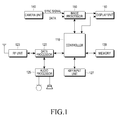
- FIG. 1 is a block diagram of a wireless terminal according to an embodiment of the present invention.
- a Radio Frequency (RF) unit 123 performs a wireless communication function of the wireless terminal.
- the RF unit 123 includes an RF transmitter for up-converting a frequency of a transmission signal and amplifying the up-converted transmission signal, and an RF receiver for low-noise amplifying a received signal and down-converting a frequency of the amplified received signal.
- a data processor 120 includes a transmitter for coding and modulating the transmission signal and a receiver for demodulating and decoding the received signal.
- the data processor 120 may include a modem and a codec.
- the codec includes a data codec for processing packet data and the like, and an audio codec for processing an audio signal such as voice.
- An audio processor 125 plays a received audio signal output from the audio codec in the data processor 120 and transfers a transmission audio signal picked up by a microphone to the audio codec in the data processor 120.
- a key input unit 127 includes alphanumeric keys for inputting alphanumeric information and function keys for setting various functions.
- a memory 130 may include a program memory and a data memory.
- the program memory may store programs for controlling a general operation of the wireless terminal.
- the program memory may store programs for controlling a display unit 160 to display a fixed area selected by a user on a background screen of the wireless terminal and display application widgets selected by the user in the fixed area.
- the data memory may temporarily store data generated while the programs are executed.
- the memory 130 stores position information of the fixed area selected by the user in a background screen area editing mode according to an embodiment of the present invention.
- a controller 110 controls the overall operation of the wireless terminal.
- the controller 110 switches to the background screen area editing mode and performs a control so that an area selected by the user from the image is set as a fixed area.
- the screen is displayed as a plurality of areas during the background screen area editing mode, so that the user can select the desired screen by touch.
- the controller 110 performs a control so that application widgets selected by the user from a plurality of applications of the wireless terminal are set as application widgets of the fixed area in the background screen area editing mode.
- the applications may be displayed as icons.
- the controller 110 controls the display unit 160 to display the image selected in the background screen setting mode as a background screen in a standby mode of the wireless terminal, display the fixed area set in the background screen area editing mode on the background screen, and display the selected application widgets within the fixed area, so that the fixed area containing the selected application widgets is always shown during any of the idle mode or during a display of any of the initial screen. That is, when the standby mode of the wireless terminal includes a plurality of initial screens on which the background screen is displayed, the controller 110 may display the fixed area in which the selected application widgets are to be displayed every time the wireless terminal moves to any of the initial screens.
- each of the plurality of initial screens display, outside the fixed area, application widgets from a set of application widgets corresponding to that initial screen. That is, for each initial screen a (different) set of application widgets is provided. However, the fixed area in each initial screen will display the same application widgets.
- the controller 110 may display the selected application widgets in the fixed area.
- the controller 110 may download and display the downloaded application as an application widget in the fixed area. This can be subject to a user preference.
- the controller 110 may perform a control so that a size of the fixed area is variably changed.
- the controller may be configured so that one or more application widgets corresponding to applications with a least frequency of use by the user may be deleted to accommodate a new application widget to be displayed in the fixed area.
- a camera unit 140 includes a camera sensor for capturing image data and converting the captured optical signal into an electrical signal, and a signal processor for converting an analog image signal captured by the camera sensor into digital data.
- the camera sensor is assumed herein to be a Charge-Coupled Device (CCD) or Complementary Metal Oxide Semiconductor (CMOS) sensor, and the signal processor may be realized by a Digital Signal Processor (DSP).
- DSP Digital Signal Processor
- the camera sensor and the signal processor may be realized in an integrated manner or in a separated manner.
- An image processor 150 performs Image Signal Processing (ISP) for displaying image signals output from the camera unit 140 on the display unit 160, and the ISP performs functions such as gamma correction, interpolation, spatial variation, image effects, image scaling, Automatic White Balance (AWB), Automatic Exposure (AE), and Automatic Focusing (AF).
- the image processor 150 processes the image signals output from the camera unit 140 on a frame basis, and outputs the frame-based image data according to the characteristics and size of the display unit 160.
- the image processor 150 which includes a video codec, compresses frame image data displayed on the display unit 160 by preset coding, and restores (or decompresses) the compressed frame image data into its original frame image data.
- the video codec may include a JPEG codec, MPEG4 codec, Wavelet codec, etc.
- the controller 110 may control the image processor 150 to output OSD data according to the size of a screen on which the data is displayed.
- OSD On-Screen Display
- the display unit 160 displays an image output from the image processor 150 and user data output from the controller 110 on a screen.
- the display unit 160 may include a Liquid Crystal Display (LCD), and in this case, the display unit 160 includes an LCD controller, a memory for storing image data, and an LCD panel.
- LCD Liquid Crystal Display
- the LCD may serve as an input unit with a touch screen, and in this case, the display unit 160 may display the alphanumeric keys of the key input unit 127.
- the display unit 160 displays a fixed area on a background screen during the standby mode of the wireless terminal and displays application widgets in the fixed area.
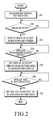
- FIG. 2 is a flowchart illustrating a process of setting a fixed area on a background screen in a wireless terminal according to an embodiment of the present invention
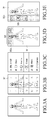
- FIGs. 3A - 3E are illustrative diagrams for describing setting a fixed area displayed on a background screen in a wireless terminal according to an embodiment of the present invention.
- step 201 if a specific image to be used as a background screen is selected from among a plurality of images stored in the wireless terminal in step 201, i.e., in the background screen setting mode of the wireless terminal, the controller 110 detects this request in step 202 and proceeds to step 203 to display the image selected as the background screen.
- FIG. 3A shows the image selected as the background screen.
- the controller 110 detects this in step 204 and switches to the background screen area editing mode.
- the controller 110 divides the image selected as the background screen into a plurality of areas.
- FIG. 3B shows the image selected as the background screen, which is divided into the plurality of areas in the background screen area editing mode.
- the display provides visual markers, such as lines, to indicate the division of the main display area into a plurality of areas (labelled 1-18, in figure 3B ).
- the controller 110 detects this and proceeds to step 205 to set the selected at least one specific area as a fixed area on the background screen. If the action of setting of application widgets to be displayed in the fixed area is selected, the controller 110 detects this in step 206 and displays a plurality of application widgets stored in the wireless terminal.
- the controller 110 detects this and proceeds to step 207 to set the selected at least one application/widget as an application/widget to be displayed in the fixed area.
- FIG. 3B if areas 1 through 3 are selected as fixed areas of the background screen from among the plurality of areas 1 through 18 of the image selected as the background screen through the touch operation of the user, and in FIG.3C , the selection of an alarm application, a music application, and a camera application from among the plurality of applications is completed, then a background screen 301 in which fixed areas 302a are set is displayed on an initial screen of a standby mode of the portable terminal, as shown in FIG. 3D . As shown in FIG. 3D , the selected image is displayed as the background screen 301 on the initial screen, and icons 303 indicating the alarm application, the music application, and the camera application, respectively, are displayed on the fixed areas 302a set by the user on the background screen 301.
- FIG. 3B if areas 1, 4, 7, 10,13 and 16 are selected as fixed areas of the background screen from among the plurality of areas 1 through 18 of the image selected as the background screen through the touch operation of the user, and in FIG. 3C , the selection of an alarm application, a music application, and a camera application from among the plurality of applications is completed, then the background screen 301 in which the fixed areas 302b are set is displayed on an initial screen of the standby mode of the portable terminal, as shown in FIG. 3E . As shown in FIG. 3E , the selected image is displayed as the background screen 301 on the initial screen, and the icons 303 indicating the alarm application, the music application, and the camera application, respectively, are displayed on the fixed areas 302b set by the user on the background screen 301.
- the fixed area, selected and defined by the user, is always displayed on the background screen, and when the standby mode of the wireless terminal includes a plurality of initial screens on which the background screen is displayed, application widgets in the fixed area are displayed every time any of the plurality of initial screens is displayed.
- the controller 110 displays the application/widget in the fixed area on the next background screens so that the fixed area containing the selected application widgets is always shown.
- the controller 110 downloads and displays the application in the fixed area of the background screen.
- the controller 110 may change variably a size of the fixed area to accommodate all the selected application widgets within the fixed area. Alternatively, when the number of application widgets exceeds the allowable displayable number of application widgets in the fixed area, the controller 110 may delete an application/widget with a least frequent use by the user to accommodate more popular application/widgets.
- the proposed apparatus and method for editing a screen in a wireless terminal to always display a fixed area selected by a user on a background screen allow the user to set the fixed area at a desired position on the background screen and to always view the desired application widgets through the fixed area during the standby mode of the wireless terminal regardless of which background screen is selected
- the above-described methods according to the present invention can be implemented in hardware, firmware or as software or computer code that can be stored in a recording medium such as a CD ROM, an RAM, a floppy disk, a hard disk, or a magneto-optical disk or computer code downloaded over a network originally stored on a remote recording medium or a non-transitory machine readable medium and to be stored on a local recording medium, so that the methods described herein can be rendered in such software that is stored on the recording medium using a general purpose computer, or a special processor or in programmable or dedicated hardware, such as an ASIC or FPGA.
- a recording medium such as a CD ROM, an RAM, a floppy disk, a hard disk, or a magneto-optical disk or computer code downloaded over a network originally stored on a remote recording medium or a non-transitory machine readable medium and to be stored on a local recording medium, so that the methods described herein can be rendered in such software that is stored on the recording medium using a
- the computer, the processor, microprocessor controller or the programmable hardware include memory components, e.g., RAM, ROM, Flash, etc. that may store or receive software or computer code that when accessed and executed by the computer, processor or hardware implement the processing methods described herein.
- memory components e.g., RAM, ROM, Flash, etc.
- the execution of the code transforms the general purpose computer into a special purpose computer for executing the processing shown herein.
Landscapes
- Engineering & Computer Science (AREA)
- Theoretical Computer Science (AREA)
- General Engineering & Computer Science (AREA)
- Human Computer Interaction (AREA)
- Physics & Mathematics (AREA)
- General Physics & Mathematics (AREA)
- Computer Networks & Wireless Communication (AREA)
- Signal Processing (AREA)
- User Interface Of Digital Computer (AREA)
- Telephone Function (AREA)
- Facsimiles In General (AREA)
- Controls And Circuits For Display Device (AREA)
Applications Claiming Priority (1)
| Application Number | Priority Date | Filing Date | Title |
|---|---|---|---|
| KR1020110139389A KR20130071908A (ko) | 2011-12-21 | 2011-12-21 | 휴대단말기의 화면편집 장치 및 방법 |
Publications (2)
| Publication Number | Publication Date |
|---|---|
| EP2608005A2 true EP2608005A2 (fr) | 2013-06-26 |
| EP2608005A3 EP2608005A3 (fr) | 2014-01-15 |
Family
ID=47683445
Family Applications (1)
| Application Number | Title | Priority Date | Filing Date |
|---|---|---|---|
| EP12198002.3A Withdrawn EP2608005A3 (fr) | 2011-12-21 | 2012-12-19 | Appareil et procédé de modification d'écran dans un terminal sans fil |
Country Status (5)
| Country | Link |
|---|---|
| US (1) | US20130167083A1 (fr) |
| EP (1) | EP2608005A3 (fr) |
| JP (1) | JP2013131219A (fr) |
| KR (1) | KR20130071908A (fr) |
| CN (1) | CN103179268A (fr) |
Families Citing this family (7)
| Publication number | Priority date | Publication date | Assignee | Title |
|---|---|---|---|---|
| CN103455245B (zh) * | 2013-08-20 | 2017-02-01 | 华为技术有限公司 | 微件面积调节的方法及装置 |
| USD751082S1 (en) * | 2013-09-13 | 2016-03-08 | Airwatch Llc | Display screen with a graphical user interface for an email application |
| JP2017004090A (ja) * | 2015-06-05 | 2017-01-05 | アズビル株式会社 | 配色パターン画面表示装置 |
| CN107249069A (zh) * | 2017-04-20 | 2017-10-13 | 捷开通讯(深圳)有限公司 | 锁屏界面快捷操作的方法、移动终端及存储装置 |
| JP6933057B2 (ja) * | 2017-08-30 | 2021-09-08 | セイコーエプソン株式会社 | 表示制御装置、表示制御プログラム |
| EP3842908A1 (fr) * | 2019-12-25 | 2021-06-30 | Shanghai Transsion Co., Ltd. | Procédé d'interaction pour une barre de menu latérale, appareil et support de d'enregistrement lisible sur ordinateur |
| CN114416243A (zh) * | 2021-12-31 | 2022-04-29 | 上海洛轲智能科技有限公司 | 车载终端的界面显示方法、装置以及电子设备 |
Family Cites Families (17)
| Publication number | Priority date | Publication date | Assignee | Title |
|---|---|---|---|---|
| US5644739A (en) * | 1995-01-27 | 1997-07-01 | Microsoft Corporation | Method and system for adding buttons to a toolbar |
| US7013431B2 (en) * | 2001-04-30 | 2006-03-14 | Broadband Graphics, Llc | Cell based EUI methods and apparatus |
| JP4026071B2 (ja) * | 2003-09-25 | 2007-12-26 | ソニー株式会社 | 車載装置及びコンテンツ提供方法 |
| KR100703690B1 (ko) * | 2004-11-19 | 2007-04-05 | 삼성전자주식회사 | 스킨 이미지를 사용하여 아이콘을 그룹별로 관리하는사용자 인터페이스 및 방법 |
| WO2006123513A1 (fr) * | 2005-05-19 | 2006-11-23 | Access Co., Ltd. | Dispositif d'affichage d'informations et procédé d'affichage d'informations |
| US9086779B2 (en) * | 2005-12-22 | 2015-07-21 | Core Wireless Licensing S.A.R.L. | Input device |
| KR101387527B1 (ko) * | 2007-12-06 | 2014-04-23 | 엘지전자 주식회사 | 단말기 및 그 메뉴 아이콘 디스플레이 방법 |
| JP2009141636A (ja) * | 2007-12-06 | 2009-06-25 | Sting Corp | 携帯端末カスタマイズ可能な情報表示システム |
| KR101470543B1 (ko) * | 2008-02-15 | 2014-12-08 | 엘지전자 주식회사 | 터치스크린을 구비하는 휴대 단말기 및 그 동작 제어방법 |
| US8099332B2 (en) * | 2008-06-06 | 2012-01-17 | Apple Inc. | User interface for application management for a mobile device |
| US8191011B2 (en) * | 2008-09-18 | 2012-05-29 | Microsoft Corporation | Motion activated content control for media system |
| KR20110023977A (ko) * | 2009-09-01 | 2011-03-09 | 삼성전자주식회사 | 휴대단말기의 위젯 관리 방법 및 장치 |
| CN102033710B (zh) * | 2010-04-07 | 2015-03-11 | 苹果公司 | 用于管理文件夹的方法和相关设备 |
| US9170708B2 (en) * | 2010-04-07 | 2015-10-27 | Apple Inc. | Device, method, and graphical user interface for managing folders |
| CN102279694A (zh) * | 2010-06-08 | 2011-12-14 | 联想(北京)有限公司 | 电子设备及其应用软件窗口显示方法 |
| EP2528339B1 (fr) * | 2011-05-26 | 2019-12-04 | Lg Electronics Inc. | Appareil d'affichage pour traiter plusieurs applications et son procédé de contrôle |
| KR101830653B1 (ko) * | 2011-07-18 | 2018-02-21 | 엘지전자 주식회사 | 휴대 전자기기 및 이의 제어방법 |
-
2011
- 2011-12-21 KR KR1020110139389A patent/KR20130071908A/ko not_active Withdrawn
-
2012
- 2012-11-27 US US13/686,108 patent/US20130167083A1/en not_active Abandoned
- 2012-12-17 JP JP2012275155A patent/JP2013131219A/ja active Pending
- 2012-12-19 EP EP12198002.3A patent/EP2608005A3/fr not_active Withdrawn
- 2012-12-20 CN CN2012105574982A patent/CN103179268A/zh active Pending
Non-Patent Citations (1)
| Title |
|---|
| None |
Also Published As
| Publication number | Publication date |
|---|---|
| CN103179268A (zh) | 2013-06-26 |
| KR20130071908A (ko) | 2013-07-01 |
| US20130167083A1 (en) | 2013-06-27 |
| EP2608005A3 (fr) | 2014-01-15 |
| JP2013131219A (ja) | 2013-07-04 |
Similar Documents
| Publication | Publication Date | Title |
|---|---|---|
| US12487728B2 (en) | Terminal and method for setting menu environments in the terminal | |
| AU2011215017B2 (en) | Apparatus and method for performing multi-tasking | |
| EP2597558A1 (fr) | Appareil et procédé pour afficher une application dans un terminal sans fil | |
| EP2608005A2 (fr) | Appareil et procédé de modification d'écran dans un terminal sans fil | |
| US9491281B2 (en) | Apparatus and method for displaying unchecked messages in a terminal | |
| EP2439915B1 (fr) | Appareil et procédé pour contrôler une application dans un terminal sans fil | |
| EP3751406B1 (fr) | Appareil et procédé permettant de disposer un clavier dans un terminal sans fil | |
| EP2549471A2 (fr) | Appareil et procédé d'affichage d'une fenêtre contextuelle dans un terminal portable | |
| AU2014200244B2 (en) | Method of Controlling Tasks on an Apparatus | |
| EP1772801A2 (fr) | Procédé de recherche de données dans un terminal sans fil | |
| KR100703437B1 (ko) | 휴대단말기에서 대기화면 디스플레이 방법 | |
| US20140189059A1 (en) | Apparatus and method for transmitting data in terminal | |
| KR20170028771A (ko) | 사용자 단말 장치 및 그 미확인 메시지 표시방법 |
Legal Events
| Date | Code | Title | Description |
|---|---|---|---|
| AK | Designated contracting states |
Kind code of ref document: A2 Designated state(s): AL AT BE BG CH CY CZ DE DK EE ES FI FR GB GR HR HU IE IS IT LI LT LU LV MC MK MT NL NO PL PT RO RS SE SI SK SM TR |
|
| AX | Request for extension of the european patent |
Extension state: BA ME |
|
| PUAI | Public reference made under article 153(3) epc to a published international application that has entered the european phase |
Free format text: ORIGINAL CODE: 0009012 |
|
| PUAL | Search report despatched |
Free format text: ORIGINAL CODE: 0009013 |
|
| AK | Designated contracting states |
Kind code of ref document: A3 Designated state(s): AL AT BE BG CH CY CZ DE DK EE ES FI FR GB GR HR HU IE IS IT LI LT LU LV MC MK MT NL NO PL PT RO RS SE SI SK SM TR |
|
| AX | Request for extension of the european patent |
Extension state: BA ME |
|
| RIC1 | Information provided on ipc code assigned before grant |
Ipc: G06F 3/0481 20130101AFI20131211BHEP |
|
| 17P | Request for examination filed |
Effective date: 20140715 |
|
| RBV | Designated contracting states (corrected) |
Designated state(s): AL AT BE BG CH CY CZ DE DK EE ES FI FR GB GR HR HU IE IS IT LI LT LU LV MC MK MT NL NO PL PT RO RS SE SI SK SM TR |
|
| STAA | Information on the status of an ep patent application or granted ep patent |
Free format text: STATUS: THE APPLICATION HAS BEEN WITHDRAWN |
|
| 18W | Application withdrawn |
Effective date: 20161215 |