EP2629183A2 - Verfahren zum Betreiben einer Berührungstafel, Berührungstafel und Anzeigevorrichtung - Google Patents
Verfahren zum Betreiben einer Berührungstafel, Berührungstafel und Anzeigevorrichtung Download PDFInfo
- Publication number
- EP2629183A2 EP2629183A2 EP13150386.4A EP13150386A EP2629183A2 EP 2629183 A2 EP2629183 A2 EP 2629183A2 EP 13150386 A EP13150386 A EP 13150386A EP 2629183 A2 EP2629183 A2 EP 2629183A2
- Authority
- EP
- European Patent Office
- Prior art keywords
- touch
- lines
- sensing
- driving
- scan
- Prior art date
- Legal status (The legal status is an assumption and is not a legal conclusion. Google has not performed a legal analysis and makes no representation as to the accuracy of the status listed.)
- Ceased
Links
Images





Classifications
-
- G—PHYSICS
- G06—COMPUTING OR CALCULATING; COUNTING
- G06F—ELECTRIC DIGITAL DATA PROCESSING
- G06F3/00—Input arrangements for transferring data to be processed into a form capable of being handled by the computer; Output arrangements for transferring data from processing unit to output unit, e.g. interface arrangements
- G06F3/01—Input arrangements or combined input and output arrangements for interaction between user and computer
- G06F3/03—Arrangements for converting the position or the displacement of a member into a coded form
- G06F3/041—Digitisers, e.g. for touch screens or touch pads, characterised by the transducing means
- G06F3/0416—Control or interface arrangements specially adapted for digitisers
-
- G—PHYSICS
- G06—COMPUTING OR CALCULATING; COUNTING
- G06F—ELECTRIC DIGITAL DATA PROCESSING
- G06F3/00—Input arrangements for transferring data to be processed into a form capable of being handled by the computer; Output arrangements for transferring data from processing unit to output unit, e.g. interface arrangements
- G06F3/01—Input arrangements or combined input and output arrangements for interaction between user and computer
- G06F3/03—Arrangements for converting the position or the displacement of a member into a coded form
- G06F3/041—Digitisers, e.g. for touch screens or touch pads, characterised by the transducing means
- G06F3/044—Digitisers, e.g. for touch screens or touch pads, characterised by the transducing means by capacitive means
- G06F3/0446—Digitisers, e.g. for touch screens or touch pads, characterised by the transducing means by capacitive means using a grid-like structure of electrodes in at least two directions, e.g. using row and column electrodes
-
- G—PHYSICS
- G01—MEASURING; TESTING
- G01R—MEASURING ELECTRIC VARIABLES; MEASURING MAGNETIC VARIABLES
- G01R27/00—Arrangements for measuring resistance, reactance, impedance, or electric characteristics derived therefrom
- G01R27/02—Measuring real or complex resistance, reactance, impedance, or other two-pole characteristics derived therefrom, e.g. time constant
- G01R27/26—Measuring inductance or capacitance; Measuring quality factor, e.g. by using the resonance method; Measuring loss factor; Measuring dielectric constants ; Measuring impedance or related variables
- G01R27/2605—Measuring capacitance
-
- G—PHYSICS
- G06—COMPUTING OR CALCULATING; COUNTING
- G06F—ELECTRIC DIGITAL DATA PROCESSING
- G06F3/00—Input arrangements for transferring data to be processed into a form capable of being handled by the computer; Output arrangements for transferring data from processing unit to output unit, e.g. interface arrangements
- G06F3/01—Input arrangements or combined input and output arrangements for interaction between user and computer
- G06F3/03—Arrangements for converting the position or the displacement of a member into a coded form
- G06F3/041—Digitisers, e.g. for touch screens or touch pads, characterised by the transducing means
-
- G—PHYSICS
- G06—COMPUTING OR CALCULATING; COUNTING
- G06F—ELECTRIC DIGITAL DATA PROCESSING
- G06F3/00—Input arrangements for transferring data to be processed into a form capable of being handled by the computer; Output arrangements for transferring data from processing unit to output unit, e.g. interface arrangements
- G06F3/01—Input arrangements or combined input and output arrangements for interaction between user and computer
- G06F3/03—Arrangements for converting the position or the displacement of a member into a coded form
- G06F3/041—Digitisers, e.g. for touch screens or touch pads, characterised by the transducing means
- G06F3/0412—Digitisers structurally integrated in a display
-
- G—PHYSICS
- G06—COMPUTING OR CALCULATING; COUNTING
- G06F—ELECTRIC DIGITAL DATA PROCESSING
- G06F3/00—Input arrangements for transferring data to be processed into a form capable of being handled by the computer; Output arrangements for transferring data from processing unit to output unit, e.g. interface arrangements
- G06F3/01—Input arrangements or combined input and output arrangements for interaction between user and computer
- G06F3/03—Arrangements for converting the position or the displacement of a member into a coded form
- G06F3/041—Digitisers, e.g. for touch screens or touch pads, characterised by the transducing means
- G06F3/0416—Control or interface arrangements specially adapted for digitisers
- G06F3/04166—Details of scanning methods, e.g. sampling time, grouping of sub areas or time sharing with display driving
- G06F3/041661—Details of scanning methods, e.g. sampling time, grouping of sub areas or time sharing with display driving using detection at multiple resolutions, e.g. coarse and fine scanning; using detection within a limited area, e.g. object tracking window
-
- G—PHYSICS
- G06—COMPUTING OR CALCULATING; COUNTING
- G06F—ELECTRIC DIGITAL DATA PROCESSING
- G06F3/00—Input arrangements for transferring data to be processed into a form capable of being handled by the computer; Output arrangements for transferring data from processing unit to output unit, e.g. interface arrangements
- G06F3/01—Input arrangements or combined input and output arrangements for interaction between user and computer
- G06F3/03—Arrangements for converting the position or the displacement of a member into a coded form
- G06F3/041—Digitisers, e.g. for touch screens or touch pads, characterised by the transducing means
- G06F3/044—Digitisers, e.g. for touch screens or touch pads, characterised by the transducing means by capacitive means
-
- G—PHYSICS
- G06—COMPUTING OR CALCULATING; COUNTING
- G06F—ELECTRIC DIGITAL DATA PROCESSING
- G06F2203/00—Indexing scheme relating to G06F3/00 - G06F3/048
- G06F2203/041—Indexing scheme relating to G06F3/041 - G06F3/045
- G06F2203/04104—Multi-touch detection in digitiser, i.e. details about the simultaneous detection of a plurality of touching locations, e.g. multiple fingers or pen and finger
-
- G—PHYSICS
- G06—COMPUTING OR CALCULATING; COUNTING
- G06F—ELECTRIC DIGITAL DATA PROCESSING
- G06F2203/00—Indexing scheme relating to G06F3/00 - G06F3/048
- G06F2203/041—Indexing scheme relating to G06F3/041 - G06F3/045
- G06F2203/04112—Electrode mesh in capacitive digitiser: electrode for touch sensing is formed of a mesh of very fine, normally metallic, interconnected lines that are almost invisible to see. This provides a quite large but transparent electrode surface, without need for ITO or similar transparent conductive material
Definitions
- the present invention relates to touch panels. More particularly, example embodiments of the inventive concept relate to methods of operating touch panels, the touch panels and display devices.
- a touch panel (or a touch screen) is widely used in electronic devices to detect an input action or an event by a user.
- the touch panel may detect the presence and location of a touch by the user by generating an electrical signal when the touch panel is touched by a finger, a stylus pen, or the like.
- the touch panel may be mounted on a display panel, e.g., an organic light emitting diode (OLED) display panel, a liquid crystal display (LCD) panel, etc., or may be formed within the display panel.
- OLED organic light emitting diode
- LCD liquid crystal display
- the touch panel may be classified into, e.g., a resistive touch panel, a capacitive touch panel, an electromagnetic touch panel, an infrared touch panel, a surface acoustic wave (SAW) touch panel, a near field imaging (NFI) touch panel, etc.
- a resistive touch panel e.g., a resistive touch panel, a capacitive touch panel, an electromagnetic touch panel, an infrared touch panel, a surface acoustic wave (SAW) touch panel, a near field imaging (NFI) touch panel, etc.
- SAW surface acoustic wave
- NFI near field imaging
- a conventional touch panel detects a touch by the user by scanning all touch points included in the touch panel. As a display device and the touch panel included in the display device become larger, the number of touch points included in the touch panel increases, and thus, power consumption and scan time of the touch panel increases.
- Example embodiments provide a method of operating a touch panel capable of reducing scan time and power consumption of the touch panel.
- Example embodiments also provide a touch panel with reduced scan time and power consumption thereof.
- Example embodiments also provide a display device including a touch panel with reduced scan time and power consumption.
- a method of operating a touch panel including a plurality of driving lines and a plurality of sensing lines, the method including performing a first limited scan by activating only a first portion of the plurality of driving lines and only a first portion of the plurality of sensing lines, such that a first coarse position of a first touch by a user is detected, and performing a first local scan by activating only driving lines and sensing lines adjacent to the detected first coarse position of the first touch, such that a first fine position of the first touch by the user is detected.
- Performing the first limited scan may include activating M driving lines of N driving lines among the plurality of driving lines, where N is an integer greater than 1, and M is an integer greater than 0 and smaller than N, and activating K sensing lines of L sensing lines among the plurality of sensing lines, where L is an integer greater than 1, and K is an integer greater than 0 and smaller than L.
- Performing the first limited scan may include activating only odd-numbered driving lines among the plurality of driving lines, and activating only odd-numbered sensing lines among the plurality of sensing lines.
- Performing the first limited scan may include activating only even-numbered driving lines among the plurality of driving lines, and activating only even-numbered sensing lines among the plurality of sensing lines.
- Performing the first limited scan may include activating only odd-numbered driving lines among the plurality of driving lines in an odd-numbered touch frame, activating only odd-numbered sensing lines among the plurality of sensing lines in the odd-numbered touch frame, activating only even-numbered driving lines among the plurality of driving lines in an even-numbered touch frame, and activating only even-numbered sensing lines among the plurality of sensing lines in the even-numbered touch frame.
- Performing the first local scan may include activating a first driving line corresponding to the first coarse position of the first touch and at least one second driving line adjacent to the first driving line among the plurality of driving lines, and activating a first sensing line corresponding to the first coarse position of the first touch and at least one second sensing line adjacent to the first sensing line among the plurality of sensing lines.
- the method may further include performing a second local scan subsequent to the first local scan by activating driving lines and sensing lines adjacent to the first fine position of the first touch, such that a changed fine position of the first touch is detected.
- Performing the second local scan may detect a drag operation of the user.
- the method may further include performing subsequent second limited and local scans, after a period of sensing no touch, such that a second touch at a second position spaced apart from the first position is determined.
- the method may further comprising performing a second limited scan simultaneously with the first local scan to detect a second coarse position simultaneously with the first fine position by further activating a second portion of the driving lines and a second portion of the sensing lines.
- Performing the first limited scan may include activating M driving lines of N driving lines among the plurality of driving lines, where N is an integer greater than 1, and M is an integer greater than 0 and smaller than N, and activating K sensing lines of L sensing lines among the plurality of sensing lines, where L is an integer greater than 1, and K is an integer greater than 0 and smaller than L.
- Performing the simultaneous limited and local scans may include activating the second portion of the plurality of driving lines, a first driving line corresponding to the first coarse position of the first touch, and at least one second driving line adjacent to the first driving line among the plurality of driving lines, and activating the second portion of the plurality of sensing lines, a first sensing line corresponding to the first coarse position of the first touch, and at least one second sensing line adjacent to the first sensing line among the plurality of sensing lines.
- the method may further include performing a third limited scan simultaneously with a second local scan to detect a third coarse position simultaneously with a second fine position by further activating driving lines adjacent to the second coarse position, a third portion of the driving lines, sensing lines adjacent to the second coarse position, and a third portion of the sensing lines.
- Performing the third limited scan simultaneously with the second local scan may include sensing a multi-touch of the first touch and the second touch.
- a touch panel including a plurality of driving lines extending in a first direction, and a plurality of sensing lines extending in a second direction substantially perpendicular to the first direction, wherein the touch panel is configured to activate only a portion of the plurality of driving lines and only a portion of the plurality of sensing lines to perform a first limited scan detecting a coarse position of a touch by a user by, and wherein the touch panel is configured to activate only driving and sensing lines adjacent to the coarse position of the touch to perform a first local scan detecting a fine position of the touch.
- the touch panel may be configured to perform a second limited scan simultaneously with the first local scan to detect a second coarse position simultaneously with the fine position by further activating a second portion of the driving lines and a second portion of the sensing lines.
- a display device may include a display panel configured to display an image, a display driver configured to drive the display panel, the touch panel as described above and a touch controller configured to drive the touch panel.
- the display driver and the touch controller may be separate chips or in a single chip.
- the touch controller may include a transmitting block configured to apply a driving pulse to the plurality of driving lines, and a receiving block configured to receive outputs from the plurality of sensing lines, the transmitting block of the touch controller being within the display driver.
- the touch controller may be configured to control the touch panel to perform a second limited scan simultaneously with the first local scan to detect a second coarse position simultaneously with the fine position by further activating a second portion of the driving lines and a second portion of the sensing lines.
- a display device including a display panel configured to display an image, a display driver configured to drive the display panel, a touch panel including a plurality of sensing blocks configured to operate independently of each other, the touch panel being configured to sense a touch by a user, and a touch controller configured to drive the touch panel, wherein the touch controller is configured to control the touch panel, such that a portion of the plurality of sensing blocks is configured to perform a limited scan that detects a coarse position of a touch in each touch frame, and wherein the touch controller is configured to control the touch panel, such that one of the plurality of sensing blocks having sensed the touch performs a local scan that detects a fine position of the touch.
- the touch controller may be configured to sequentially activate the plurality of sensing blocks to have one of the plurality of sensing blocks perform the limited scan in each touch frame.
- a method of operating a touch panel including a plurality of touch sensor cells arranged in a matrix form having a plurality of rows and a plurality of columns, the method including performing a first limited scan that detects a first coarse position of a first touch by a user by activating a portion of the plurality of touch sensor cells, and performing a first local scan that detects a first fine position of the first touch by activating touch sensor cells adjacent to the first coarse position of the first touch among the plurality of touch sensor cells.
- the method may further include performing a second limited scan simultaneously with the first local scan, such that a second coarse position of a second touch by the user is detected simultaneously with the first fine position, by further activating a portion of the touch sensor cells with the touch sensor cells adjacent to the first coarse position of the first touch.
- a method of operating a touch panel including a plurality of driving lines and a plurality of sensing lines, the method including receiving information about a region receiving an input of a user from an external host, and performing a local scan that detects a position of a touch by the user by activating a portion of the plurality of driving lines and a portion of the plurality of sensing lines corresponding to the region receiving the input based on the information about the region receiving the input.
- the region receiving the input may be a region where a user interface is displayed.
- the information about the region receiving the input may include driving line information that represents at least one driving line located at the region receiving the input and sensing line information that represents at least one sensing line located at the region receiving the input.
- a touch panel may perform a limited scan that detects a coarse position, e.g., an approximate position, of a touch by a user by activating a first portion of a plurality of driving lines and a first portion of a plurality of sensing lines (S110).
- a coarse position e.g., an approximate position
- only a portion of the plurality of driving lines and only a portion of the plurality of sensing lines may be activated, while the remaining plurality of driving lines and the remaining plurality of sensing lines may be deactivated or skipped in each touch frame.
- the portion of the plurality of driving lines activated during the limited scan may be any one or more driving lines, and the portion of the plurality of sensing lines activated during the limited scan may be any one or more sensing lines.
- the touch panel may activate M driving lines out of a total of N driving lines, and may activate K sensing lines out of a total of L sensing lines, where N is an integer greater than 1, M is an integer greater than 0 and smaller than N, L is an integer greater than 1, and K is an integer greater than 0 and smaller than L.
- the touch panel may activate odd-numbered (or even-numbered) driving lines and odd-numbered (or even-numbered) sensing lines.
- the portion of the plurality of driving lines and the portion of the plurality of sensing lines activated during the limited scan may be changed per touch frame, e.g., the touch panel may activate the odd-numbered driving lines and the odd-numbered sensing lines in odd-numbered touch frames, and may activate the even-numbered driving lines and the even-numbered sensing lines in even-numbered touch frames.
- the touch panel may operate in synchronization with a vertical synchronization signal (VSYNC) and/or a horizontal synchronization signal (HSYNC) for a display panel, and a period of the touch frame for the touch panel may be the same as (or in proportion to) a period of a display frame for the display panel.
- VSYNC vertical synchronization signal
- HSELNC horizontal synchronization signal
- the occurrence and the coarse position of the touch may be detected by the limited scan.
- the limited scan is performed again (S110). If the touch is sensed by the limited scan (S120: YES), the touch panel detects the coarse position of the touch (S130).
- the touch panel may perform a local scan that detects a fine position, e.g., a precise position, of the touch by activating driving lines and sensing lines near the coarse position of the touch among the plurality of driving lines and the plurality of sensing lines (S140).
- the touch panel may activate a first driving line corresponding to the coarse position and at least one second driving line adjacent to the first driving line, and may activate a first sensing line corresponding to the coarse position and at least one second sensing line adjacent to the first sensing line.
- the first driving line corresponding to the coarse position may be a driving line at a horizontal coordinate of the coarse position
- the first sensing line corresponding to the coarse position may be a sensing line at a vertical coordinate of the coarse position.
- the touch panel may activate (Xa-A)-th through (Xa+A)-th driving lines, i.e., an Xa-th driving line corresponding to the coarse position and (Xa-A)-th through (Xa-1)-th and (Xa+1)-th through (Xa+A)-th driving lines adjacent to each side of the Xa-th driving line, where A is an integer greater than 0.
- the touch panel may activate (Ya-B)-th through (Ya+B)-th sensing lines, i.e., an Yb-th sensing line corresponding to the coarse position and (Yb-B)-th through (Yb-1)-th and (Yb+1)-th through (Yb+B)-th sensing lines adjacent to each side of the Yb-th sensing line, where B is an integer greater than 0.
- the touch panel detects the fine position of the touch (S160). Therefore, according to example embodiments, the touch panel may detect the coarse position (e.g., (Xa, Ya)) of the touch with low resolution by performing the limited scan, and may detect the fine position (e.g., (Xa', Ya')) of the touch with high resolution by performing the local scan. If a sensing operation of the touch panel is not stopped (S170: NO), the local scan may be performed again (S140).
- the coarse position e.g., (Xa, Ya)
- the fine position e.g., (Xa', Ya'
- the touch panel may perform the limited scan again (S110). While the touch panel performs the sensing operation, the touch panel may receive a request (for example, from a host) to stop the sensing operation (S170: YES), and may stop the sensing operation in response to the request.
- a request for example, from a host
- stop the sensing operation S170: YES
- the touch panel may detect a coarse position of a touch with low resolution by performing a limited scan, and subsequently, may detect a fine position of the touch with high resolution by performing a local scan. Accordingly, since only a portion of the driving lines and a only portion of the sensing lines are activated during each of the limited scan and the local scan, scan time and power consumption of the touch panel according to example embodiments may be substantially reduced compared with those of a conventional touch panel, e.g., where all the driving lines and all sensing lines are activated in each touch frame. For example, a conventional method of operating a touch panel may be rarely applied to a large display device because of a long scan time of the touch panel. However, the method of operating the touch panel according to example embodiments may provide reduced scan time of a touch panel, thereby facilitating operation of a large display device with a large number of driving lines and sensing lines.
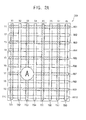
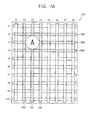
- a touch panel 200 may include a plurality of driving lines TX1, TX2, TX3, TX4, TX5, TX6, TX7 and TX8 extending in a first direction, and a plurality of sensing lines RX1, RX2, RX3, RX4, RX5, RX6, RX7, RX8, RX9 and RX10 extending in a second direction substantially perpendicular to the first direction.
- the first direction may be a vertical direction
- the second direction may be a horizontal direction.
- the touch panel 200 may use any coordinate system.
- the touch panel 200 may use a polar coordinate system, e.g., the driving lines may extend in a radial direction and the sensing lines may extend in an angular direction, or vice versa.
- the touch panel 200 may operate in synchronization with a vertical synchronization signal (VSYNC) and/or a horizontal synchronization signal (HSYNC) for a display panel.
- VSYNC vertical synchronization signal
- HSELNC horizontal synchronization signal
- the touch panel 200 may perform a sensing operation during a porch period in which display data are not transferred before and/or after the vertical synchronization signal.
- the touch panel 200 may perform a limited scan by activating a portion of the plurality of driving lines TX1, TX2, TX3, TX4, TX5, TX6, TX7 and TX8.
- the touch panel 200 may activate only odd-numbered driving lines TX1, TX3, TX5 and TX7 (shaded lines in FIG. 2A ).
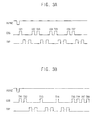
- the touch panel 200 may operate in synchronization with the vertical synchronization signal VSYNC.
- the touch panel 200 may sequentially select the plurality of driving lines TX1, TX2, TX3, TX4, TX5, TX6, TX7 and TX8 in response to each pulse of a channel select signal CSS, and may apply a driving pulse TXP to the selected driving line each time one of the odd-numbered driving lines TX1, TX3, TX5 and TX7 is selected.
- the touch panel 200 may activate odd-numbered sensing lines RX1, RX3, RX5, RX7 and RX9.
- the touch panel 200 may sequentially or simultaneously receive outputs from the odd-numbered sensing lines RX1, RX3, RX5, RX7 and RX9, and may measure capacitances at intersections (or touch points) between the one of the odd-numbered driving lines TX1, TX3, TX5 and TX7 and the odd-numbered sensing lines RX1, RX3, RX5, RX7 and RX9.
- a touch "A" i.e., a coarse touch position
- the touch points located at the intersections between the odd-numbered driving lines TX1, TX3, TX5 and TX7 and the odd-numbered sensing lines RX1, RX3, RX5, RX7 and RX9.
- the limited scan may be performed by activating any one or more driving lines of the plurality of driving lines TX1, TX2, TX3, TX4, TX5, TX6, TX7 and TX8 and any one or more sensing lines of the plurality of sensing lines RX1, RX2, RX3, RX4, RX5, RX6, RX7, RX8, RX9 and RX10.
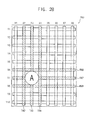
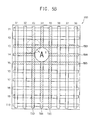
- the touch panel 200 may perform a local scan by activating driving lines TX2, TX3 and TX4 and sensing lines RX6, RX7 and RX8 near the coarse position (X3, Y7) of the touch A among the plurality of driving lines TX1, TX2, TX3, TX4, TX5, TX6, TX7 and TX8, and the plurality of sensing lines RX1, RX2, RX3, RX4, RX5, RX6, RX7, RX8, RX9 and RX10.
- driving lines TX2, TX3 and TX4 and sensing lines RX6, RX7 and RX8 near the coarse position (X3, Y7) of the touch A among the plurality of driving lines TX1, TX2, TX3, TX4, TX5, TX6, TX7 and TX8, and the plurality of sensing lines RX1, RX2, RX3, RX4, RX5, RX6, RX7, RX8, RX9 and RX10.
- the touch panel 200 may apply the driving pulse TXP to a driving line TX3 corresponding to the coarse horizontal position "X3" and at least one driving line TX2 and TX4 on each side of and adjacent to the driving line TX3.
- the touch panel 200 may receive outputs from a sensing line RX7 corresponding to the coarse vertical position "Y7" and at least one sensing line RX6 and RX8 adjacent to the sensing line RX7, and thus may measure capacitance at intersections between the driving lines TX2, TX3 and TX4 and the sensing lines RX6, RX7, and RX8 near the coarse position "(X3, Y7)" of the touch A. Accordingly, a fine position of the touch A may be detected.
- the number of the driving lines TX2, TX3 and TX4 and the number of the sensing lines RX6, RX7 and RX8 activated during the local scan may vary depending on a size, a resolution, etc. of the touch panel 200.
- the touch panel 200 may detect a coarse position of a touch with low resolution by performing a limited scan, i.e., a smaller number than a total number of driving/sensing lines may be used, and may detect a fine position of the touch with high resolution by performing a local scan, i.e., only driving/sensing lines adjacent to the coarse position may be used, thereby reducing scan time and power consumption of the touch panel 200.
- a limited scan i.e., a smaller number than a total number of driving/sensing lines may be used
- a fine position of the touch with high resolution by performing a local scan, i.e., only driving/sensing lines adjacent to the coarse position may be used, thereby reducing scan time and power consumption of the touch panel 200.
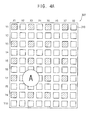
- a touch panel 300 may include a plurality of touch sensor cells 310 arranged in a matrix form having a plurality of rows and a plurality of columns. Each touch sensor cell 310 may correspond to one touch point. Thus, the touch panel 300 may have a plurality of touch points arranged in a matrix form having a plurality of rows and a plurality of columns.
- the plurality of touch sensor cells 310 may be, e.g., resistive touch sensors, capacitive touch sensors, electromagnetic touch sensors, infrared touch sensors, surface acoustic wave (SAW) touch sensors, near field imaging (NFI) touch sensors, etc.
- SAW surface acoustic wave
- NFI near field imaging
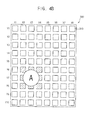
- the touch panel 300 may perform a limited scan that detects a coarse position of the touch A by the user by activating a portion of the plurality of touch sensor cells 310. For example, as illustrated in FIG. 4A , to perform the limited scan, the touch panel 300 may sequentially or simultaneously activate a portion of the plurality of touch sensor cells 310 located at intersections (e.g., only (X1, Y1), (X1, Y3), (X1, Y5), (X1, Y7), (X1, Y9), (X3, Y1), (X3, Y3), (X3, Y5), (X3, Y7), (X3, Y9), (X5, Y1), (X5, Y3), (X5, Y5), (X5, Y7), (X5, Y9), (X7, Y1), (X7, Y3), (X7, Y5), (X7, Y7) and (X7, Y9)) between a limited scan that detects a coarse position of the touch A
- the touch panel 300 may perform a local scan by activating touch sensor cells near the coarse position of the touch A. For example, to perform the local scan, the touch panel 300 may activate only the touch sensor cell of the coarse position (e.g., (X3, Y7)) of the touch A and touch sensor cells (e.g., only touch sensor cells located at (X2, Y6), (X3, Y6), (X4, Y6), (X2, Y7), (X3, Y7), (X4, Y7), (X2, Y8), (X3, Y8) and (X4, Y8)) adjacent to the touch sensor cell.
- the number of the touch sensor cells activated during the local scan may vary depending on a size, a resolution, etc. of the touch panel 300.
- the touch panel 300 may detect a coarse position of a touch by performing a limited scan, and may detect a fine position of the touch by performing a local scan. Therefore, scan time and power consumption of the touch panel 300 may be reduced.
- FIGS. 4A and 4B illustrate an example of the touch panel 300 performing the local scan once the coarse position of the touch is detected by the limited scan
- the touch panel 300 may perform a limited scan and a local scan after an initial limited scan. In this case, the touch panel 300 may readily sense multiple touches by a user.
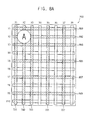
- the touch panel 200 may detect a fine position (e.g., (X3, Y3)) of the touch "A" by a user by sequentially performing a limited scan and a first local scan.
- the touch panel 200 may perform the first local scan by activating driving lines (e.g., TX2, TX3 and TX4) and sensing lines (e.g., RX2, RX3 and RX4) near a coarse position of the touch "A" detected by the limited scan, and thus may detect the fine position (e.g., (X3, Y3)) of the touch A.
- driving lines e.g., TX2, TX3 and TX4
- sensing lines e.g., RX2, RX3 and RX4
- the touch panel 200 may detect a new fine position (e.g., (X4, Y4)) of the touch A' having a changed position by performing a second local scan. For example, if the position of the touch "A” is changed from the coordinate "(X3, Y3)" to the coordinate "(X4, Y4)", occurrence of the touch A' having the changed coordinate "(X4, Y4)" may be approximately detected by the first local scan.
- the touch panel 200 may then perform the second local scan by activating driving lines (e.g., TX3, TX4 and TX5) and sensing lines (e.g., RX3, RX4 and RX5) near the approximately detected changed position of the touch A'. Accordingly, the new fine position (e.g., (X4, Y4)) of the touch A' may be detected by the second local scan. Further, the position of the touch A' having the changed coordinate "(X4, Y4)" may be further changed, for example, from the coordinate "(X4, Y4)" to a coordinate "(X5, Y5)” by the drag operation by the user.
- driving lines e.g., TX3, TX4 and TX5
- sensing lines e.g., RX3, RX4 and RX5
- the touch panel 200 may detect a fine position (e.g., (X5, Y5)) of the touch A" having a changed position by performing a third local scan. For example, if the position of the touch A' is changed from the coordinate "(X4, Y4)" to the coordinate "(X5, Y5)", the touch A" having the changed coordinate "(X5, Y5)” may be detected by the second local scan, and the touch panel 200 may perform the third local scan by activating driving lines (e.g., TX4, TX5 and TX6) and sensing lines (e.g., RX4, RX5 and RX6) near a changed position of the touch A" detected by the second local scan. Accordingly, a fine position (e.g., (X5, Y5)) of the touch A" having the changed coordinate "(X5, Y5)” may be detected by the third local scan.
- driving lines e.g., TX4, TX5 and TX6
- sensing lines e.g., RX4, RX5
- the touch panel 200 may repeatedly perform subsequent local scans that detect changed fine positions of the touch by activating driving lines and sensing lines near a previous fine position of a touch detected by a local scan. Accordingly, the drag operation of the user may be sensed by an initial local scan and subsequent local scans.
- the touch panel 200 may detect the fine position (e.g., (X3, Y3)) of the first touch A by a user by sequentially performing a first limited scan and a first local scan, as described previously with reference to FIGS. 2A-2B .
- the touch panel 200 may perform the first local scan by activating driving lines (e.g., TX2, TX3 and TX4) and sensing lines (e.g., RX2, RX3 and RX4) near a coarse position of the first touch A detected by the first limited scan, and thus may detect the fine position (e.g., (X3, Y3)) of the first touch A.
- driving lines e.g., TX2, TX3 and TX4
- sensing lines e.g., RX2, RX3 and RX4
- the touch panel 200 may perform a second limited scan.
- the touch panel 200 may detect a coarse position (e.g., (X7, Y7)) of the second touch B by the user by performing the second limited scan.
- a coarse position e.g., (X7, Y7)
- the touch panel 200 may perform the second limited scan by activating odd-numbered driving lines TX1, TX3, TX5 and TX7 and odd-numbered sensing lines RX1, RX3, RX5, RX7 and RX9.
- the coarse position of the second touch B may be detected by the second limited scan. Once the coarse position of the second touch B is detected, the touch panel 200 may perform a second local scan by activating driving lines and sensing lines near the coarse position of the second touch B.
- the touch panel 200 may detect a fine position (e.g., (X7, Y7)) of the second touch B by the user by performing the second local scan.
- the touch panel 200 may perform the second local scan by activating driving lines (e.g., TX6, TX7 and TX8) and sensing lines (e.g., RX6, RX7 and RX8) near the coarse position of the second touch B detected by the second limited scan, and thus may detect the fine position (e.g., (X7, Y7)) of the second touch B.
- driving lines e.g., TX6, TX7 and TX8
- sensing lines e.g., RX6, RX7 and RX8
- the first touch A may be sensed by the first limited scan and the first local scan
- the second touch B spaced apart from the first touch A may be sensed by the subsequent second limited scan and the subsequent second local scan. Accordingly, a plurality of successive single touches by the user may be sensed by repeatedly performing the limited scans and the local scans.
- a touch panel may perform a limited scan that detects a coarse position of a first touch by a user by activating a portion of a plurality of driving lines and a portion of a plurality of sensing lines (S410).
- the portion of the plurality of driving lines activated during the limited scan may be any one or more driving lines
- the portion of the plurality of sensing lines activated during the limited scan may be any one or more sensing lines.
- the touch panel may activate only odd-numbered (or only even-numbered) driving lines and only odd-numbered (or only even-numbered) sensing lines.
- the limited scan may be performed again (S410). If the first touch is sensed by the limited scan (S420: YES), the touch panel may detect the coarse position of the first touch (S430).
- the touch panel may perform an additional limited scan and a local scan that detect a coarse position of a new second touch and a fine position of the first touch by activating the portion of the plurality of driving lines and the portion of the plurality of sensing lines and by activating driving lines and sensing lines near the coarse position of the first touch (S440).
- the touch panel 200 may activate not only a first driving line corresponding to the coarse position of the first touch and at least one second driving line adjacent to the first driving line but also the odd-numbered (or even-numbered) driving lines, and may activate not only a first sensing line corresponding to the coarse position of the first touch and at least one second sensing line adjacent to the first sensing line but also the odd-numbered (or even-numbered) sensing lines.
- the touch panel may activate the odd-numbered driving lines (i.e., driving lines corresponding to horizontal positions X1, X3, ...) as well as (Xa-A)-th through (Xa+A)-th driving lines, and may activate the odd-numbered sensing lines (i.e., sensing lines corresponding to vertical positions Y1, Y3, ...) as well as (Ya-B)-th through (Ya + B)-th sensing lines, where A is an integer greater than 0, and B is an integer greater than 0.
- the touch panel may detect the fine position of the first touch and/or the coarse position of the second touch (S460). That is, once the first touch is sensed by the limited scan, the touch panel may perform not only a local scan for the first touch but also the limited scan. Accordingly, the coarse position of the second touch, as well as the fine position of the first touch, may be simultaneously detected.
- the touch panel may perform a subsequent limited and local scan (S440).
- the touch panel may detect a coarse position of a new third touch, as well as fine positions of the first and second touches, by activating the portion of the plurality of driving lines and the portion of the plurality of sensing lines, by activating driving lines and sensing lines near the fine position of the first touch, and by activating driving lines and sensing lines near the coarse position of the second touch.
- the touch panel may activate the odd-numbered driving lines, (Xa'- A)-th through (Xa'+A)-th driving lines and (Xb-A)-th through (Xb+A)-th driving lines, and may activate the odd-numbered sensing lines, (Ya'-B)-th through (Ya'+B)-th sensing lines and (Yb-B)-th through (Yb+B)-th sensing lines.
- the touch panel may sense multiple touches by the user, i.e., a multi-touch, by performing not only the local scan for a region where each touch has been occurred but also the limited scan.
- the touch panel may perform the limited scan again (S410). While the touch panel performs the sensing operation, the touch panel may receive a request (for example, from a host) to stop the sensing operation (S470: YES), and may stop the sensing operation in response to the request.
- a request for example, from a host
- stop the sensing operation S470: YES
- the touch panel may detect a first coarse position of a first touch with low resolution by performing the limited scan. If the first coarse position of the touch is detected by the limited scan, the touch panel may perform limited and local scans in a region near the detected first coarse position, thereby detecting a second coarse position of a new touch and a fine position of the first touch simultaneously. Accordingly, scan time and power consumption of the touch panel may be reduced, and the multi-touch by the user may be readily sensed.
- the touch panel 200 may detect a fine position (e.g., (X2, Y2)) of a first touch A and a coarse position of a second touch by sequentially performing a limited scan and a first limited and local scan.
- the touch panel 200 may perform the limited scan to detect a coarse position of the first touch A. If the coarse position of the first touch A is detected by the limited scan, the touch panel 200 may perform the first limited and local scan to detect the fine position of the first touch A and a coarse position of a second touch.
- the touch panel 200 may activate odd-numbered driving lines TX1, TX3, TX5 and TX7 and driving lines TX1, TX2 and TX3 near the coarse position of the first touch A, and may activate odd-numbered sensing lines RX1, RX3, RX5 and RX7 and sensing lines RX1, RX2 and RX3 near the coarse position of the first touch A.
- the touch panel 200 may detect the fine position of the first touch A, a fine position (e.g., (X6, Y6)) of the second touch B, and a coarse position of a third touch by performing a second limited and local scan.
- a fine position e.g., (X6, Y6)
- a coarse position of a third touch by performing a second limited and local scan.
- the touch panel 200 may activate the odd-numbered driving lines TX1, TX3, TX5 and TX7, driving lines TX1, TX2 and TX3 near the fine position of the first touch A and driving lines TX5, TX6 and TX7 near the coarse position of the second touch B, and may activate the odd-numbered sensing lines RX1, RX3, RX5 and RX7, sensing lines RX1, RX2 and RX3 near the fine position of the first touch A and sensing lines RX5, RX6 and RX7 near the coarse position of the second touch B. Accordingly, the fine positions of the first and second touches A and B and the coarse position of the third touch may be detected.
- the touch panel 200 may detect the fine position of the first touch A, the fine position of the second touch B, and a fine position (e.g., (X7, Y7)) of the third touch C by performing a third limited and local scan.
- a fine position e.g., (X7, Y7)
- the touch panel 200 may activate the odd-numbered driving lines TX1, TX3, TX5 and TX7, the driving lines TX1, TX2 and TX3 near the fine position of the first touch A, driving lines TX5, TX6 and TX7 near the fine position of the second touch B, and driving lines TX6, TX7 and TX8 near the coarse position of the third touch C, and may activate the odd-numbered sensing lines RX1, RX3, RX5 and RX7, the sensing lines RX1, RX2 and RX3 near the fine position of the first touch A, sensing lines RX5, RX6 and RX7 near the fine position of the second touch B, and sensing lines RX6, RX7 and RX8 near the coarse position of the third touch C.
- the fine positions of the first, second, and third touches A, B, and C may be detected. If one or more driving lines near positions of touches and/or one or more sensing lines near the positions of the touches overlap with each other, as in the case of the second touch B and the third touch C, the overlapping driving lines and/or the overlapping sensing lines may be activated once per touch frame.
- the touch panel 200 may detect not only a fine position of the touch but also a coarse position of a new touch by performing a limited and local scan including the limited scan as well as a local scan for a region near the coarse position of the touch. Accordingly, scan time and power consumption of the touch panel 200 may be reduced, and a multi-touch by a user may be readily sensed.
- a display device 500 may include a display panel 510, a display driver 530, a touch panel 550, and a touch controller 570.
- the display panel 510 may display an image.
- the display panel 510 may be one of various display panels, e.g., a liquid crystal display (LCD) panel, a light emitting diode (LED) panel, an organic light emitting diode (OLED) panel, a field emission display (FED) panel, etc.
- LCD liquid crystal display
- LED light emitting diode
- OLED organic light emitting diode
- FED field emission display
- the display driver 530 may drive the display panel 510.
- the display driver 530 may apply a display data signal DDS to the display panel 510, and the display panel 510 may display the image corresponding to the display data signal DDS.
- the display driver 530 may include a scan driver that selects each row of the display panel 510, a source driver that applies the display data signal DDS to pixels of the selected row, and a timing controller that controls timings of the scan driver and the source driver.
- the touch panel 550 may include a plurality of driving lines extending in a first direction, and a plurality of sensing lines extending in a second direction substantially perpendicular to the first direction.
- the touch panel 550 may be, e.g., a resistive touch panel, a capacitive touch panel, an electromagnetic touch panel, an infrared touch panel, a surface acoustic wave (SAW) touch panel, a near field imaging (NFI) touch panel, or the like.
- the touch panel 550 may be, e.g., an add-on type touch panel that is mounted on the display panel 510 or an embedded type touch panel that is formed within the display panel 510.
- the touch panel 550 may be an on-cell type embedded touch panel of which touch sensor cells are formed on the pixels of the display panel 510, or may be an in-cell type embedded touch panel of which the touch sensor cells are formed within the pixels of the display panel 510.
- the touch controller 570 may drive the touch panel 550.
- the touch controller 570 may apply a touch pulse TXP to the plurality of driving lines of the touch panel 550, and may receive outputs RXP from the plurality of sensing lines of the touch panel 550.
- the display driver 530 and the touch controller 570 may be implemented as separate chips.
- the touch controller 570 may drive the touch panel 550 to perform a limited scan and a local scan.
- the touch controller 570 may control the touch panel 550 to perform the limited scan that detects a coarse position of a touch by activating a portion, e.g., a subset, of the plurality of driving lines and a portion, e.g., a subset, of the plurality of sensing lines.
- the touch controller 570 may control the touch panel 550 to perform the local scan that detects a fine position of the touch by activating driving lines and sensing lines near, e.g., adjacent, the coarse position of the touch.
- the touch panel 550 may perform the limited scan and the local scan, thereby reducing scan time and power consumption of the touch panel 550.
- the touch controller 570 may drive the touch panel 550 to perform the limited scan and additional simultaneous limited and local scan.
- the touch controller 570 may control the touch panel 550 to perform the limited scan that detects a coarse position of a first touch by activating the portion of the plurality of driving lines and the portion of the plurality of sensing lines.
- the touch controller 570 may control the touch panel 550 to perform the limited and local scan that detects a fine position of the first touch and a coarse position of a second touch by activating the portion of the plurality of driving lines and sensing lines near the coarse position of the first touch and by activating the portion of the plurality of driving lines and sensing lines near the coarse position of the first touch.
- the touch panel 550 may perform the limited scan and the additional simultaneous limited and local scan, thereby readily sensing a multi-touch by a user while reducing the scan time and the power consumption of the touch panel 550.
- the display device 500 may reduce the scan time and the power consumption of the touch panel 550.
- the touch controller 570 may include a transmitting block 580 and a receiving block 590.
- the transmitting block 580 may apply a driving pulse TXP to a plurality of driving lines TX1, TX2, TXN-1, and TXN.
- the transmitting block 580 may include a pulse generator 581, a first switching unit 583, and a driving line selector 585.
- the pulse generator 581 may generate the driving pulse TXP.
- the first switching unit 583 may be controlled by the driving line selector 585 to couple the pulse generator 581 to a selected driving line among the plurality of driving lines TX1, TX2, TXN-1, and TXN.
- the driving line selector 585 may control the first switching unit 583 to sequentially couple the pulse generator 581 to odd-numbered driving lines TX1 and TXN-1, and thus the driving pulse TXP may be sequentially applied only to the odd-numbered driving lines TX1 and TXN-1.
- the driving line selector 585 may control the first switching unit 583 to sequentially couple the pulse generator 581 to driving lines near a coarse position of a sensed touch, and thus the driving pulse TXP may be sequentially applied only to the driving lines near the coarse position.
- the transmitting block 580 may further include transmitting buffers 587 amplifying the driving pulse TXP to a predetermined level.
- the driving line selector 585 may supply power only to at least one transmitting buffer 587 coupled to the selected driving line, thereby reducing power consumption.
- the receiving block 590 may receive outputs RXP from a plurality of sensing lines RX1, RX2, RXM-1, and RXM.
- the receiving block 590 may include a second switching unit 595, a sensing line selector 591, and a touch data generator 597.
- the second switching unit 595 may be controlled by the sensing line selector 591 to simultaneously or sequentially couple at least one selected sensing line among the plurality of sensing lines RX1, RX2, RXM-1, and RXM to the touch data generator 597.
- the sensing line selector 591 may control the second switching unit 595 to sequentially couple only odd-numbered sensing lines RX1 and RXM-1 to the touch data generator 597, and thus outputs RXP from the odd-numbered sensing lines RX1 and RXM-1 may be sequentially applied to the touch data generator 597.
- the sensing line selector 591 may control the second switching unit 595 to sequentially couple only sensing lines near the coarse position of the sensed touch to the touch data generator 597, and thus outputs RXP from the sensing lines near the coarse position may be sequentially applied to the touch data generator 597.
- the touch data generator 597 may generate touch data TD based on the outputs RXP from the plurality of sensing lines RX1, RX2, RXM-1 and RXM, and may provide the touch data TD to an external host, e.g., an application processor.
- the receiving block 590 may further include receiving buffers 593 amplifying the outputs RXP of the plurality of sensing lines RX1, RX2, RXM-1, and RXM to a predetermined level.
- the sensing line selector 591 may supply power only to at least one receiving buffer 593 coupled to the selected sensing line, thereby reducing power consumption.
- a display device 600 may include a display panel 610, a display driver 630, a touch panel 650, and a touch controller 670.
- the display device 600 of FIG. 11 may have a configuration substantially similar to that of the display device 500 of FIG. 9 , except for a location of a transmitting block 680.
- the transmitting block 680 applying a driving pulse TXP to a plurality of driving lines may be located at a chip where the display driver 630 is implemented, and a receiving block 690 receiving outputs RXP from a plurality of sensing lines may be located at a chip where the touch controller 670 is implemented.
- a display device 700 may include a display panel 710, a touch panel 750, and a display driver and touch controller 730.
- the display device 700 of FIG. 12 may have a configuration substantially similar to that of the display device 500 of FIG. 9 , except that a display driver and a touch controller may be implemented as one chip 730.
- the display driver driving the display panel 710 and the touch controller driving the touch panel 750 may be implemented as one chip 730.
- a transmitting block 780 applying a driving pulse TXP to a plurality of driving lines and a receiving block 790 receiving outputs RXP from a plurality of sensing lines may be located at the chip 730 where the display driver and the touch controller are implemented.
- a display device 800 may include a display panel 810, a touch panel 850, and touch controllers 871, 873, 875, and 877.
- the display device 800 may further include a display driver driving the display panel 810.
- the touch panel 850 may include a plurality of sensing blocks 851, 853, 855, and 857 that operate independently of each other. As a display device becomes larger, the number of driving lines and the number of sensing lines included in a touch panel may increase. If the number of driving lines and sensing lines increases, scan time of all the driving and sensing lines in the touch panel may increase, thereby not being able to complete a sensing operation of the touch panel within a desired time period. However, in the display device 800 according to example embodiments, the touch panel 850 may be divided into the plurality of sensing blocks 851, 853, 855, and 857 that operate independently of each other, and thus the touch panel 850 may have a reduced scan time.
- the plurality of sensing blocks 851, 853, 855, and 857 may be respectively controlled by the touch controllers 871, 873, 875, and 877 to operate independently of each other.
- a first sensing block 851 may be controlled by a first touch controller 871
- a second sensing block 853 may be controlled by a second touch controller 873
- a third sensing block 855 may be controlled by a third touch controller 875
- a fourth sensing block 857 may be controlled by a fourth touch controller 877.
- the scan time of the touch panel 850 may substantially be the same as a scan time of each of the sensing block 851, 853, 855, and 857.
- FIG. 13 illustrates an example where a plurality of touch controllers 871, 873, 875, and 877 controls the plurality of sensing blocks 851, 853, 855, and 857, respectively, in some example embodiments, a single touch controller may control the plurality of sensing blocks 851, 853, 855, and 857 to operate independently.
- the touch controllers 871, 873, 875, and 877 may control the touch panel 850 such that, in each touch frame, a portion of the plurality of sensing blocks 851, 853, 855, and 857 may perform a limited scan that detects a coarse position of a touch by a user, and the remaining portion of the plurality of sensing blocks 851, 853, 855, and 857 may not perform a sensing operation.
- the touch controllers 871, 873, 875, and 877 may sequentially activate the plurality of sensing blocks 851, 853, 855 and 857, such that one of the plurality of sensing blocks 851, 853, 855, and 857 performs the limited scan in each touch frame.
- the first touch controller 871 may activate the first sensing block 851 in a first touch frame
- the second touch controller 873 may activate the second sensing block 853 in a second touch frame
- the third touch controller 875 may activate the third sensing block 855 in a third touch frame
- the fourth touch controller 877 may activate the fourth sensing block 857 in a fourth touch frame.
- the touch controllers 871, 873, 875, and 877 may control the touch panel 850 such that a sensing block having sensed the touch among the plurality of sensing blocks 851, 853, 855, and 857 may perform a local scan that detects a fine position of the touch.
- the first touch controller 871 may control the first sensing block 851 to perform the local scan in the second touch frame.
- the touch controllers 871, 873, 875, and 877 may control the touch panel 850 such that the sensing block having sensed the touch may perform the local scan and another sensing block may perform the limited scan.
- the first touch controller 871 may control the first sensing block 851 to perform the local scan and the second touch controller 873 may control the second sensing block 853 to perform the limited scan.
- a portion of the plurality of sensing blocks 851, 853, 855, and 857 may perform the limited scan and/or the local scan at a certain time, thereby reducing the scan time and power consumption of the touch panel 850.
- the touch panel 850 may operate in synchronization with a vertical synchronization signal (VSYNC) for the display panel 810, and a period of the touch frame for the touch panel 850 may be the same as (or in proportion to) a period of a display frame for the display panel 810.
- VSYNC vertical synchronization signal
- a portion of a plurality of sensing blocks 851, 853, 855 and 857 may perform a limited scan in each touch frame.
- the first sensing block 851 may perform the limited scan in a first touch frame
- the second sensing block 853 may perform the limited scan in a second touch frame
- the third sensing block 855 may perform the limited scan in a third touch frame. If the third sensing block 855 senses a touch in the third touch frame, the third sensing block 855 may perform a local scan in a fourth touch frame. Further, in some example embodiments, the fourth sensing block 857 may perform the limited scan in the fourth touch frame.
- a touch controller may receive information about a region receiving an input of a user from an external host (e.g., an application processor).
- the region receiving the input of the user may be a region displaying a user interface, e.g., a button, a scroll bar, a menu, an icon, a character, etc.
- the information about the region may represent a location of the user interface.
- the information about the region may include driving line information that represents at least one driving line located at the region receiving the input and sensing line information that represents at least one sensing line located at the region receiving the input.
- the touch controller may control a touch panel to perform a local scan that detects a position of a touch by the user based on the information about the region (S930). For example, the touch controller may control the touch panel to activate the at least one driving line and the at least one sensing line corresponding to the region receiving the input.
- the touch panel may perform the local scan for the region displaying the user interface, thereby reducing scan time and power consumption of the touch panel.
- a display panel 1000 may display a first button 1010, a second button 1030, and a scroll bar 1050.
- the first button 1010, the second button 1030, and the scroll bar 1050 may be user interfaces to receive input actions, e.g., a tap operation, a click operation, a drag operation, etc., from a user.
- the touch panel 200 may perform a local scan for a region of the user interface.
- the touch panel 200 may activate driving lines TX2 and TX3 corresponding to a region displaying the first button 1010, driving lines TX6 and TX7 corresponding to a region displaying the second button 1030, and a driving line TX7 corresponding to a region displaying the scroll bar 1050, and may activate sensing lines RX8 and RX9 corresponding to the region displaying the first button 1010, sensing lines RX8 and RX9 corresponding to the region displaying the second button 1030, and sensing lines RX2, RX3, RX4, RX5 and RX6 corresponding to the region displaying the scroll bar 1050.
- the touch panel 200 may perform the local scan for the region displaying the user interface 1010, 1030, and 150, thereby reducing scan time and power consumption of the touch panel 200.
- a display controller 1115 included in a host 1110 may provide a display driver 1160 included in a display device 1150 with display data, and may provide a touch controller 1170 included in the display device 1150 with information about a region receiving an input from a user.
- the host 110 may be a mobile system-on-chip (SOC), an application processor, a media processor, a microprocessor, a central processing unit (CPU), or the like.
- the touch controller 1170 may control a touch panel to perform a local scan by activating driving lines and sensing lines corresponding to the region receiving the input from the user. Accordingly, since the display device 1150 performs the local scan for the region receiving the input, scan time and power consumption of the touch panel may be reduced.
- the command 1200 may include a command type field 1210, a driving line information field 1230, and a sensing line information field 1250.
- the command type field 1210 may contain a predetermined value indicating that the command 1200 is a command related to the information about the region receiving the input
- the driving line information field 1230 may contain information about driving lines corresponding to the region receiving the input
- the sensing line information field 1250 may contain information about sensing lines corresponding to the region receiving the input.
- the driving line information field 1230 may include a driving line bitmap
- the sensing line information field 1250 may include a sensing line bitmap.
- Each bit of the driving line bitmap may correspond to one driving line, and may have a value of "1" if the corresponding driving line is located at the region receiving the input.
- each bit of the sensing line bitmap may correspond to one sensing line, and may have a value of "1" if the corresponding sensing line is located at the region receiving the input.
- a computing system 1300 may include a processor 1310, a memory device 1320, an input/output device 1330, a display device 1340, a modem 1350, and a power supply 1360.
- the processor 1310 may perform specific calculations or tasks.
- the processor 1310 may be a mobile SOC, an application processor, a media processor, a microprocessor, a CPU, or the like.
- the processor 1310 may be coupled to the memory device 1320 via a bus, e.g., an address bus, a control bus, and/or a data bus.
- the memory device 1320 may be implemented by a dynamic random access memory (DRAM), a mobile DRAM, a static random access memory (SRAM), a phase random access memory (PRAM), a ferroelectric random access memory (FRAM), a resistive random access memory (RRAM), a magnetic random access memory (MRAM), or the like.
- DRAM dynamic random access memory
- SRAM static random access memory
- PRAM phase random access memory
- FRAM ferroelectric random access memory
- RRAM resistive random access memory
- MRAM magnetic random access memory
- the processor 1310 may be coupled to an extension bus, e.g., a peripheral component interconnect (PCI) bus, and may control the input/output device 1330 including at least one input device, e.g., a keyboard, a mouse, a touch screen, etc., and at least one output device, e.g., a printer, a display device, etc.
- the display device 1340 may include a touch panel sensing a touch by a user. The touch panel may perform a limited scan, a local scan, and/or a simultaneous limited and local scan, thereby reducing scan time and power consumption of the touch panel.
- the processor 1310 may control a storage device, e.g., a solid state drive, a hard disk drive, a CD-ROM, etc., via the extension bus.
- the modem 1350 may perform wired or wireless communication with an external device.
- the power supply 1360 may supply power to the computing system 1300.
- the computing system 1300 may further include, e.g., an application chipset, a camera image processor (CIS), etc.
- the computing system 1300 may be any computing system including the display device 1340.
- the computing system 1300 may include a digital television (TV), a three-dimensional TV, a personal computer (PC), a home appliance, a laptop computer, a tablet computer, a mobile phone, a smart phone, a personal digital assistant (PDA), a portable multimedia player (PMP), a digital camera, a music player, a portable game console, a navigation system, etc.
- TV digital television
- PC personal computer
- PMP personal digital assistant
- PMP portable multimedia player
- digital camera a music player
- portable game console a navigation system, etc.
- the method of operating the touch panel, the touch panel, and the display device may perform a limited scan, a local scan, and/or simultaneous limited and local scans, thereby reducing scan time and power consumption of the touch panel. Further, the method of operating the touch panel, the touch panel, and the display device according to example embodiments may be readily applied to a large display device.
Landscapes
- Engineering & Computer Science (AREA)
- General Engineering & Computer Science (AREA)
- Theoretical Computer Science (AREA)
- Physics & Mathematics (AREA)
- General Physics & Mathematics (AREA)
- Human Computer Interaction (AREA)
- Position Input By Displaying (AREA)
- Control Of Indicators Other Than Cathode Ray Tubes (AREA)
Priority Applications (1)
| Application Number | Priority Date | Filing Date | Title |
|---|---|---|---|
| EP19159280.7A EP3514668A1 (de) | 2012-02-16 | 2013-01-07 | Verfahren zum betreiben einer berührungstafel, berührungstafel und anzeigevorrichtung |
Applications Claiming Priority (1)
| Application Number | Priority Date | Filing Date | Title |
|---|---|---|---|
| KR1020120015783A KR101898979B1 (ko) | 2012-02-16 | 2012-02-16 | 터치 패널의 구동 방법, 터치 패널 및 디스플레이 장치 |
Related Child Applications (1)
| Application Number | Title | Priority Date | Filing Date |
|---|---|---|---|
| EP19159280.7A Division EP3514668A1 (de) | 2012-02-16 | 2013-01-07 | Verfahren zum betreiben einer berührungstafel, berührungstafel und anzeigevorrichtung |
Publications (2)
| Publication Number | Publication Date |
|---|---|
| EP2629183A2 true EP2629183A2 (de) | 2013-08-21 |
| EP2629183A3 EP2629183A3 (de) | 2016-03-09 |
Family
ID=47603232
Family Applications (2)
| Application Number | Title | Priority Date | Filing Date |
|---|---|---|---|
| EP13150386.4A Ceased EP2629183A3 (de) | 2012-02-16 | 2013-01-07 | Verfahren zum Betreiben einer Berührungstafel, Berührungstafel und Anzeigevorrichtung |
| EP19159280.7A Ceased EP3514668A1 (de) | 2012-02-16 | 2013-01-07 | Verfahren zum betreiben einer berührungstafel, berührungstafel und anzeigevorrichtung |
Family Applications After (1)
| Application Number | Title | Priority Date | Filing Date |
|---|---|---|---|
| EP19159280.7A Ceased EP3514668A1 (de) | 2012-02-16 | 2013-01-07 | Verfahren zum betreiben einer berührungstafel, berührungstafel und anzeigevorrichtung |
Country Status (6)
| Country | Link |
|---|---|
| US (1) | US9563294B2 (de) |
| EP (2) | EP2629183A3 (de) |
| JP (1) | JP2013168121A (de) |
| KR (1) | KR101898979B1 (de) |
| CN (2) | CN203133786U (de) |
| TW (1) | TWI608394B (de) |
Cited By (5)
| Publication number | Priority date | Publication date | Assignee | Title |
|---|---|---|---|---|
| EP2863294A1 (de) * | 2013-10-15 | 2015-04-22 | LG Display Co., Ltd. | Berührungsempfindliches System und Anzeigevorrichtung |
| EP2960759A1 (de) * | 2014-06-23 | 2015-12-30 | LG Display Co., Ltd. | Berührungstafel mit druck- und positionsbestimmung |
| EP3074846A4 (de) * | 2014-01-16 | 2017-10-18 | Tactual Labs Co. | Vorrichtung und verfahren zum betrieb einer berührungsempfindlichen vorrichtung bei reduzierter empfindlichkeit |
| EP3246801A1 (de) * | 2016-05-17 | 2017-11-22 | Samsung Electronics Co., Ltd. | Kombinierte fingerabdruckerkennungs-berührungsbildschirmvorrichtung, verfahren zur ansteuerung der berührungsbildschirmvorrichtung und elektronische vorrichtung mit der berührungsbildschirmvorrichtung |
| US20220093694A1 (en) * | 2020-09-22 | 2022-03-24 | Samsung-Ro Display Co., Ltd. | Display device |
Families Citing this family (108)
| Publication number | Priority date | Publication date | Assignee | Title |
|---|---|---|---|---|
| US8633915B2 (en) | 2007-10-04 | 2014-01-21 | Apple Inc. | Single-layer touch-sensitive display |
| US20090174676A1 (en) | 2008-01-04 | 2009-07-09 | Apple Inc. | Motion component dominance factors for motion locking of touch sensor data |
| US8922521B2 (en) | 2009-02-02 | 2014-12-30 | Apple Inc. | Switching circuitry for touch sensitive display |
| US8593410B2 (en) | 2009-04-10 | 2013-11-26 | Apple Inc. | Touch sensor panel design |
| US8957874B2 (en) | 2009-06-29 | 2015-02-17 | Apple Inc. | Touch sensor panel design |
| US8884910B2 (en) * | 2010-08-30 | 2014-11-11 | Microsoft Corporation | Resistive matrix with optimized input scanning |
| US9310923B2 (en) | 2010-12-03 | 2016-04-12 | Apple Inc. | Input device for touch sensitive devices |
| US9329703B2 (en) | 2011-06-22 | 2016-05-03 | Apple Inc. | Intelligent stylus |
| US8928635B2 (en) | 2011-06-22 | 2015-01-06 | Apple Inc. | Active stylus |
| KR101898979B1 (ko) | 2012-02-16 | 2018-09-17 | 삼성디스플레이 주식회사 | 터치 패널의 구동 방법, 터치 패널 및 디스플레이 장치 |
| US9329723B2 (en) | 2012-04-16 | 2016-05-03 | Apple Inc. | Reconstruction of original touch image from differential touch image |
| US9557845B2 (en) | 2012-07-27 | 2017-01-31 | Apple Inc. | Input device for and method of communication with capacitive devices through frequency variation |
| US9652090B2 (en) | 2012-07-27 | 2017-05-16 | Apple Inc. | Device for digital communication through capacitive coupling |
| JP6012437B2 (ja) * | 2012-11-29 | 2016-10-25 | シナプティクス・ジャパン合同会社 | 半導体装置及び電子機器 |
| US20140160054A1 (en) * | 2012-12-06 | 2014-06-12 | Qualcomm Incorporated | Anchor-drag touch symbol recognition |
| US10175874B2 (en) * | 2013-01-04 | 2019-01-08 | Samsung Electronics Co., Ltd. | Display system with concurrent multi-mode control mechanism and method of operation thereof |
| CN103116429A (zh) * | 2013-01-31 | 2013-05-22 | 敦泰科技有限公司 | 面向in-cell技术的扫描方法、装置、控制器和电子设备 |
| TWI475462B (zh) * | 2013-03-06 | 2015-03-01 | Pixart Imaging Inc | 電容式觸控裝置 |
| US10048775B2 (en) | 2013-03-14 | 2018-08-14 | Apple Inc. | Stylus detection and demodulation |
| US9939935B2 (en) | 2013-07-31 | 2018-04-10 | Apple Inc. | Scan engine for touch controller architecture |
| US9886141B2 (en) | 2013-08-16 | 2018-02-06 | Apple Inc. | Mutual and self capacitance touch measurements in touch panel |
| JP2015045909A (ja) * | 2013-08-27 | 2015-03-12 | 株式会社東海理化電機製作所 | 操作入力装置 |
| CN103970337B (zh) | 2013-10-21 | 2017-07-25 | 上海中航光电子有限公司 | 触摸屏的触摸扫描方法及其触摸扫描控制电路、显示装置 |
| CN103927042B (zh) * | 2013-10-31 | 2017-02-01 | 上海中航光电子有限公司 | 一种定位触摸点的方法、装置及电子设备 |
| KR102117670B1 (ko) * | 2013-11-15 | 2020-06-01 | 엘지디스플레이 주식회사 | 터치 스크린 구동 장치 및 방법 |
| US9304575B2 (en) | 2013-11-26 | 2016-04-05 | Apple Inc. | Reducing touch sensor panel power consumption |
| JP6214065B2 (ja) * | 2013-11-27 | 2017-10-18 | 株式会社ワコム | 電子機器 |
| WO2015089818A1 (en) * | 2013-12-20 | 2015-06-25 | Nokia Technologies Oy | Touch screen and electronic device using the same |
| KR102235495B1 (ko) * | 2013-12-31 | 2021-04-02 | 엘지디스플레이 주식회사 | 터치 스크린 일체형 디스플레이 장치와 이의 구동 방법 |
| KR102192521B1 (ko) * | 2013-12-31 | 2020-12-17 | 엘지디스플레이 주식회사 | 터치 스크린 장치, 이를 이용한 터치 스크린 표시장치 및 그 구동 방법 |
| US10126807B2 (en) | 2014-02-18 | 2018-11-13 | Cambridge Touch Technologies Ltd. | Dynamic switching of power modes for touch screens using force touch |
| KR101652028B1 (ko) | 2014-02-19 | 2016-08-30 | 주식회사 하이딥 | 터치 입력 장치 |
| CN103823596A (zh) * | 2014-02-19 | 2014-05-28 | 青岛海信电器股份有限公司 | 一种触摸事件扫描方法及装置 |
| JP2015170139A (ja) * | 2014-03-07 | 2015-09-28 | シナプティクス・ディスプレイ・デバイス合同会社 | 半導体装置 |
| JP5943021B2 (ja) | 2014-03-10 | 2016-06-29 | コニカミノルタ株式会社 | タッチパネル入力装置 |
| WO2015178920A1 (en) | 2014-05-22 | 2015-11-26 | Onamp Research Llc | Panel bootstrapping architectures for in-cell self-capacitance |
| KR101522141B1 (ko) * | 2014-07-29 | 2015-05-20 | 주식회사 동부하이텍 | 스마트 기기 및 이를 제어하는 방법 |
| US10289251B2 (en) | 2014-06-27 | 2019-05-14 | Apple Inc. | Reducing floating ground effects in pixelated self-capacitance touch screens |
| KR101637174B1 (ko) * | 2014-06-30 | 2016-07-21 | 엘지디스플레이 주식회사 | 터치스크린 일체형 표시장치 |
| JP6212448B2 (ja) * | 2014-08-04 | 2017-10-11 | 株式会社ジャパンディスプレイ | タッチ検出装置、タッチ検出機能付き表示装置、及びタッチ検出方法 |
| KR102384103B1 (ko) | 2014-08-26 | 2022-04-07 | 엘지디스플레이 주식회사 | 터치 패널의 구동 장치 |
| US9880655B2 (en) | 2014-09-02 | 2018-01-30 | Apple Inc. | Method of disambiguating water from a finger touch on a touch sensor panel |
| TWI614661B (zh) * | 2014-09-12 | 2018-02-11 | 義隆電子股份有限公司 | 觸控面板的掃描方法及觸控裝置 |
| CN107077260B (zh) | 2014-09-22 | 2020-05-12 | 苹果公司 | 触摸控制器和用于触摸传感器面板的方法 |
| US9671910B2 (en) * | 2014-10-23 | 2017-06-06 | Stmicroelectronics Asia Pacific Pte Ltd | Multiple controller communication method for active stylus data acquisition |
| US10712867B2 (en) | 2014-10-27 | 2020-07-14 | Apple Inc. | Pixelated self-capacitance water rejection |
| US10061450B2 (en) | 2014-12-04 | 2018-08-28 | Apple Inc. | Coarse scan and targeted active mode scan for touch |
| AU2015101688B4 (en) * | 2014-12-04 | 2016-02-11 | Apple Inc. | Coarse scan and targeted active mode scan for touch |
| EP3244289B1 (de) * | 2015-01-06 | 2019-02-06 | Wacom Co., Ltd. | Positionserkennungsvorrichtung |
| US10394392B2 (en) * | 2015-01-14 | 2019-08-27 | Atmel Corporation | Object detection and scan |
| AU2016215616B2 (en) | 2015-02-02 | 2018-12-06 | Apple Inc. | Flexible self-capacitance and mutual capacitance touch sensing system architecture |
| US10037100B2 (en) * | 2015-03-02 | 2018-07-31 | Apple Inc. | SNR-aware active mode touch scans with electrode reallocation |
| US10488992B2 (en) | 2015-03-10 | 2019-11-26 | Apple Inc. | Multi-chip touch architecture for scalability |
| US10606419B2 (en) * | 2015-03-24 | 2020-03-31 | Intel Corporation | Touch screen control |
| JP6250585B2 (ja) | 2015-04-16 | 2017-12-20 | 株式会社東海理化電機製作所 | 操作検出装置 |
| KR101717424B1 (ko) * | 2015-06-04 | 2017-03-20 | (주)이미지스테크놀로지 | 정전용량 터치센서에서 인터레이스 방식의 스캔 방법 |
| CN104991689B (zh) * | 2015-08-10 | 2018-04-24 | 京东方科技集团股份有限公司 | 触控显示面板的驱动方法、装置和触控显示装置 |
| KR102482296B1 (ko) * | 2015-08-13 | 2022-12-30 | 삼성디스플레이 주식회사 | 터치 스크린 패널 |
| CN105045437B (zh) * | 2015-09-18 | 2018-11-06 | 京东方科技集团股份有限公司 | 一种触控感测电极、触控感测方法及设备 |
| KR102084637B1 (ko) * | 2015-09-18 | 2020-03-05 | 삼성디스플레이 주식회사 | 터치 스크린 패널 및 그의 제어방법 |
| US10365773B2 (en) * | 2015-09-30 | 2019-07-30 | Apple Inc. | Flexible scan plan using coarse mutual capacitance and fully-guarded measurements |
| KR102409945B1 (ko) * | 2015-10-13 | 2022-06-20 | 삼성디스플레이 주식회사 | 영상 표시 시스템 및 이를 이용한 터치 입력 검출 방법 |
| JP6577344B2 (ja) | 2015-11-18 | 2019-09-18 | 株式会社ジャパンディスプレイ | 表示装置及びその製造方法 |
| CN105373282A (zh) * | 2015-12-04 | 2016-03-02 | 上海天马微电子有限公司 | 一种显示面板及显示装置 |
| CN105426010A (zh) * | 2015-12-15 | 2016-03-23 | 天马微电子股份有限公司 | 触摸屏的驱动电路及其驱动方法和显示装置 |
| TWI581152B (zh) * | 2016-01-20 | 2017-05-01 | Intelligent touch touch device | |
| GB2547031B (en) | 2016-02-05 | 2019-09-25 | Cambridge Touch Tech Ltd | Touchscreen panel signal processing |
| JP2016122471A (ja) * | 2016-04-01 | 2016-07-07 | コニカミノルタ株式会社 | タッチパネル入力装置およびプログラム |
| US10474277B2 (en) | 2016-05-31 | 2019-11-12 | Apple Inc. | Position-based stylus communication |
| US10126896B2 (en) * | 2016-06-28 | 2018-11-13 | Synaptics Incorporated | Selective receiver electrode scanning |
| CN117032475A (zh) * | 2016-07-27 | 2023-11-10 | 株式会社和冠 | 传感器控制器、方法及电子设备 |
| KR102600592B1 (ko) * | 2016-08-29 | 2023-11-10 | 삼성디스플레이 주식회사 | 터치 센서 및 이를 포함하는 표시 장치 |
| CN106354317B (zh) * | 2016-08-30 | 2024-04-16 | 京东方科技集团股份有限公司 | 一种触控显示面板及显示装置 |
| AU2017208277B2 (en) | 2016-09-06 | 2018-12-20 | Apple Inc. | Back of cover touch sensors |
| CN106462310B (zh) * | 2016-09-28 | 2019-04-19 | 深圳市汇顶科技股份有限公司 | 触控芯片和触控芯片检测触摸屏的触摸点的方法 |
| TWI595396B (zh) * | 2016-11-18 | 2017-08-11 | 友達光電股份有限公司 | 觸控方法 |
| US10121053B2 (en) * | 2016-11-28 | 2018-11-06 | Himax Technologies Limited | Touch device and waking up method thereof |
| KR101898053B1 (ko) * | 2017-03-23 | 2018-09-12 | 주식회사 하이딥 | 터치 입력 장치 및 이의 제어 방법 |
| US10642418B2 (en) | 2017-04-20 | 2020-05-05 | Apple Inc. | Finger tracking in wet environment |
| TWI621981B (zh) * | 2017-05-03 | 2018-04-21 | 奇景光電股份有限公司 | 觸控面板以及觸控面板的感測方法 |
| US10067603B1 (en) | 2017-05-03 | 2018-09-04 | Himax Technologies Limited | Touch panel and sensing method of touch panel capable of simultaneously activating columns of sensors within one drive cycle |
| CN108874197A (zh) * | 2017-05-16 | 2018-11-23 | 奇景光电股份有限公司 | 触控面板以及触控面板的感测方法 |
| JP7092480B2 (ja) * | 2017-09-27 | 2022-06-28 | エルジー ディスプレイ カンパニー リミテッド | センサ装置及びその制御方法 |
| JP2019061543A (ja) * | 2017-09-27 | 2019-04-18 | エルジー ディスプレイ カンパニー リミテッド | センサ装置及びその制御方法 |
| JP7148232B2 (ja) * | 2017-09-27 | 2022-10-05 | エルジー ディスプレイ カンパニー リミテッド | センサ装置及びその制御方法 |
| US20200064954A1 (en) * | 2018-08-21 | 2020-02-27 | Wuhan China Star Optoelectronics Semiconductor Display Technology Co.,Ltd. | Touch panel and method thereof |
| US10984215B2 (en) * | 2019-03-27 | 2021-04-20 | Wuhan China Star Optoelectronics Technology Co., Ltd. | Method of recognizing fingerprint and mobile terminal |
| US11003288B2 (en) * | 2019-06-21 | 2021-05-11 | Synaptics Incorporated | Active input sensing using regional scanning |
| FR3101717B1 (fr) * | 2019-10-04 | 2021-09-10 | ISKn | système de relevé d’une trace effectuee par un ustensile sur une surface d’écriture |
| CN113391710B (zh) * | 2020-03-10 | 2023-06-20 | 华为技术有限公司 | 主动笔触控位置的检测方法和电子终端 |
| CN111666004B (zh) * | 2020-05-29 | 2021-08-24 | 深圳市鸿合创新信息技术有限责任公司 | 互容式电容屏的扫描控制方法及装置、互容式电容屏 |
| US11662867B1 (en) | 2020-05-30 | 2023-05-30 | Apple Inc. | Hover detection on a touch sensor panel |
| CN113760113B (zh) * | 2020-06-03 | 2024-01-23 | 京东方科技集团股份有限公司 | 一种触控面板的驱动方法及装置、触控显示装置 |
| CN115803789A (zh) * | 2020-07-09 | 2023-03-14 | 高通股份有限公司 | 超声感测 |
| KR102819293B1 (ko) | 2020-08-13 | 2025-06-11 | 삼성전자주식회사 | 다중 채널에 기초한 터치 감지를 위한 장치 및 방법 |
| CN111796724A (zh) * | 2020-08-17 | 2020-10-20 | 安徽鸿程光电有限公司 | 电容触控模组及其控制方法以及相关设备 |
| US12153764B1 (en) | 2020-09-25 | 2024-11-26 | Apple Inc. | Stylus with receive architecture for position determination |
| CN113687742B (zh) * | 2021-09-02 | 2023-01-06 | 山东蓝贝思特教装集团股份有限公司 | 一种基于tft的电磁定位方法及系统 |
| KR102912877B1 (ko) * | 2021-11-23 | 2026-01-15 | 엘지디스플레이 주식회사 | 터치 구동 회로 및 터치 디스플레이 장치 |
| KR20230088569A (ko) | 2021-12-10 | 2023-06-20 | 삼성디스플레이 주식회사 | 표시 장치 |
| CN114637428B (zh) * | 2022-03-28 | 2025-02-11 | Tcl华星光电技术有限公司 | 触控驱动电路及触控驱动方法 |
| CN115167702B (zh) * | 2022-06-27 | 2026-03-27 | 北京奕斯伟计算技术股份有限公司 | 触摸检测装置及其检测方法、电子设备和可读存储介质 |
| CN115268691B (zh) * | 2022-07-19 | 2025-11-28 | 深圳市爱协生科技股份有限公司 | 触摸屏的扫描方法、装置和显示设备 |
| KR20240065503A (ko) | 2022-10-31 | 2024-05-14 | 삼성디스플레이 주식회사 | 센서 장치 및 그 구동 방법 |
| CN118575154A (zh) * | 2022-12-30 | 2024-08-30 | 谷歌有限责任公司 | 触敏led显示器 |
| KR20250033463A (ko) * | 2023-08-30 | 2025-03-10 | 삼성디스플레이 주식회사 | 표시 장치 |
| US12493379B2 (en) * | 2024-01-31 | 2025-12-09 | Novatek Microelectronics Corp. | Touch detection method |
| US20250291439A1 (en) * | 2024-03-14 | 2025-09-18 | Microchip Touch Solutions Limited | Dynamic configuration of driven shield bga balls of a capacitive sensor array |
Citations (1)
| Publication number | Priority date | Publication date | Assignee | Title |
|---|---|---|---|---|
| EP2575012A2 (de) * | 2011-09-30 | 2013-04-03 | Cypress Semiconductor Corporation | Prädiktive Berührungsflächenabtastung |
Family Cites Families (26)
| Publication number | Priority date | Publication date | Assignee | Title |
|---|---|---|---|---|
| KR20000039893A (ko) | 1998-12-16 | 2000-07-05 | 구자홍 | 터치 패널 회로 |
| TWI226018B (en) * | 2003-06-16 | 2005-01-01 | Wintek Corp | Method for prediction and estimation filtering of coordinates of touch panel |
| US9019209B2 (en) | 2005-06-08 | 2015-04-28 | 3M Innovative Properties Company | Touch location determination involving multiple touch location processes |
| KR100830467B1 (ko) | 2006-07-13 | 2008-05-20 | 엘지전자 주식회사 | 터치 패널을 갖는 영상기기 및 이 영상기기에서 줌 기능을수행하는 방법 |
| US7812827B2 (en) * | 2007-01-03 | 2010-10-12 | Apple Inc. | Simultaneous sensing arrangement |
| US7877707B2 (en) * | 2007-01-06 | 2011-01-25 | Apple Inc. | Detecting and interpreting real-world and security gestures on touch and hover sensitive devices |
| KR20090027066A (ko) * | 2007-09-11 | 2009-03-16 | 리디스 테크놀로지 인코포레이티드 | 터치 패드 구동 장치 및 구동 방법 |
| FR2925716B1 (fr) * | 2007-12-19 | 2010-06-18 | Stantum | Circuit electronique d'analyse a modulation de caracteristiques de balayage pour capteur tactile multicontacts a matrice passive |
| US8289289B2 (en) * | 2008-04-03 | 2012-10-16 | N-trig, Ltd. | Multi-touch and single touch detection |
| JP5127572B2 (ja) | 2008-06-02 | 2013-01-23 | 三菱電機株式会社 | タッチパネル |
| JP4770889B2 (ja) | 2008-08-01 | 2011-09-14 | ソニー株式会社 | タッチパネルおよびその動作方法ならびに電子機器およびその動作方法 |
| US20100110040A1 (en) * | 2008-10-30 | 2010-05-06 | Samsung Electronics Co., Ltd. | Touch controller having increased sensing sensitivity, and display driving circuit and display device and system having the touch controller |
| KR20100048236A (ko) | 2008-10-30 | 2010-05-11 | 삼성전자주식회사 | 센싱 감도를 향상시킨 터치 콘트롤러, 터치 콘트롤러를 포함하는 디스플레이 구동회로 및 디스플레이 장치 |
| US8325147B2 (en) | 2008-12-19 | 2012-12-04 | Motorola Mobility Llc | Touch screen device and methods thereof configured for a plurality of resolutions |
| TWI472993B (zh) * | 2009-02-11 | 2015-02-11 | Elan Microelectronics Corp | Touch circuit and scanning method of capacitive touch sensor |
| US20110157068A1 (en) * | 2009-12-31 | 2011-06-30 | Silicon Laboratories Inc. | Touch screen power-saving screen scanning algorithm |
| TW201044234A (en) * | 2009-06-08 | 2010-12-16 | Chunghwa Picture Tubes Ltd | Method of scanning touch panel |
| US9069405B2 (en) * | 2009-07-28 | 2015-06-30 | Cypress Semiconductor Corporation | Dynamic mode switching for fast touch response |
| KR101105978B1 (ko) | 2009-12-04 | 2012-01-18 | 위순임 | 분할 스캔 구역을 갖는 터치스크린 장치 및 분할 스캔 방법 |
| KR20110087904A (ko) * | 2010-01-27 | 2011-08-03 | 삼성전자주식회사 | 터치 이미지 검출 방법 및 이를 수행하기 위한 표시 장치 |
| JP2011242908A (ja) * | 2010-05-17 | 2011-12-01 | Panasonic Corp | タッチパネル装置及びこれを備えたタッチパネルシステム |
| TWI408587B (zh) * | 2010-06-14 | 2013-09-11 | Pixart Imaging Inc | 觸控系統及其定位方法 |
| US9013441B2 (en) * | 2010-08-24 | 2015-04-21 | Cypress Semiconductor Corporation | Smart scanning for a capacitive sensing array |
| KR101503103B1 (ko) * | 2011-03-25 | 2015-03-17 | 엘지디스플레이 주식회사 | 터치 센서 내장형 표시장치와 그 구동 방법 |
| JP5818145B2 (ja) * | 2011-08-23 | 2015-11-18 | コニカミノルタ株式会社 | 入力装置及び入力制御プログラム並びに入力制御方法 |
| KR101898979B1 (ko) | 2012-02-16 | 2018-09-17 | 삼성디스플레이 주식회사 | 터치 패널의 구동 방법, 터치 패널 및 디스플레이 장치 |
-
2012
- 2012-02-16 KR KR1020120015783A patent/KR101898979B1/ko active Active
- 2012-08-30 JP JP2012190371A patent/JP2013168121A/ja active Pending
- 2012-11-21 US US13/683,368 patent/US9563294B2/en active Active
-
2013
- 2013-01-07 EP EP13150386.4A patent/EP2629183A3/de not_active Ceased
- 2013-01-07 EP EP19159280.7A patent/EP3514668A1/de not_active Ceased
- 2013-01-15 TW TW102101488A patent/TWI608394B/zh active
- 2013-01-31 CN CN2013200546384U patent/CN203133786U/zh not_active Expired - Lifetime
- 2013-01-31 CN CN201310038976.3A patent/CN103257740B/zh active Active
Patent Citations (1)
| Publication number | Priority date | Publication date | Assignee | Title |
|---|---|---|---|---|
| EP2575012A2 (de) * | 2011-09-30 | 2013-04-03 | Cypress Semiconductor Corporation | Prädiktive Berührungsflächenabtastung |
Cited By (10)
| Publication number | Priority date | Publication date | Assignee | Title |
|---|---|---|---|---|
| EP2863294A1 (de) * | 2013-10-15 | 2015-04-22 | LG Display Co., Ltd. | Berührungsempfindliches System und Anzeigevorrichtung |
| US9916049B2 (en) | 2013-10-15 | 2018-03-13 | Lg Display Co., Ltd. | Touch sensing system and display apparatus |
| EP3074846A4 (de) * | 2014-01-16 | 2017-10-18 | Tactual Labs Co. | Vorrichtung und verfahren zum betrieb einer berührungsempfindlichen vorrichtung bei reduzierter empfindlichkeit |
| EP2960759A1 (de) * | 2014-06-23 | 2015-12-30 | LG Display Co., Ltd. | Berührungstafel mit druck- und positionsbestimmung |
| US10564742B2 (en) | 2014-06-23 | 2020-02-18 | Lg Display Co., Ltd. | Touch panel and apparatus for driving thereof |
| US11327615B2 (en) | 2014-06-23 | 2022-05-10 | Lg Display Co., Ltd. | Touch panel and apparatus for driving thereof |
| EP3246801A1 (de) * | 2016-05-17 | 2017-11-22 | Samsung Electronics Co., Ltd. | Kombinierte fingerabdruckerkennungs-berührungsbildschirmvorrichtung, verfahren zur ansteuerung der berührungsbildschirmvorrichtung und elektronische vorrichtung mit der berührungsbildschirmvorrichtung |
| US10345950B2 (en) | 2016-05-17 | 2019-07-09 | Samsung Electronics Co., Ltd. | Combined fingerprint recognition touch screen device, method of driving the touch screen device, and electronic device including the touch screen device |
| US20220093694A1 (en) * | 2020-09-22 | 2022-03-24 | Samsung-Ro Display Co., Ltd. | Display device |
| US11687191B2 (en) * | 2020-09-22 | 2023-06-27 | Samsung Display Co., Ltd. | Display device |
Also Published As
| Publication number | Publication date |
|---|---|
| CN103257740B (zh) | 2018-11-02 |
| US20130215049A1 (en) | 2013-08-22 |
| EP3514668A1 (de) | 2019-07-24 |
| KR20130094495A (ko) | 2013-08-26 |
| TW201335825A (zh) | 2013-09-01 |
| US9563294B2 (en) | 2017-02-07 |
| CN103257740A (zh) | 2013-08-21 |
| EP2629183A3 (de) | 2016-03-09 |
| KR101898979B1 (ko) | 2018-09-17 |
| CN203133786U (zh) | 2013-08-14 |
| JP2013168121A (ja) | 2013-08-29 |
| TWI608394B (zh) | 2017-12-11 |
Similar Documents
| Publication | Publication Date | Title |
|---|---|---|
| EP2629183A2 (de) | Verfahren zum Betreiben einer Berührungstafel, Berührungstafel und Anzeigevorrichtung | |
| US20260010271A1 (en) | Method and apparatus for displaying application | |
| AU2018282404B2 (en) | Touch-sensitive button | |
| US11567593B2 (en) | Display device including a touch panel | |
| US11752432B2 (en) | Information processing device and method of causing computer to perform game program | |
| CN105359086B (zh) | 控制聊天窗口的方法和实施该方法的电子设备 | |
| US20140351724A1 (en) | Method and apparatus for repositioning of visual items | |
| US9250801B2 (en) | Unlocking method, portable electronic device and touch-sensitive device | |
| KR102485575B1 (ko) | 디스플레이 장치의 터치 감지 방법 및 디스플레이 장치 | |
| US9733777B2 (en) | Touch sensing device and method for driving the same | |
| US9857907B2 (en) | Method and device for accuracy enhancement of touchscreen input | |
| KR101903415B1 (ko) | 터치스크린이 구비된 디스플레이장치 및 그 구동 방법 |
Legal Events
| Date | Code | Title | Description |
|---|---|---|---|
| PUAI | Public reference made under article 153(3) epc to a published international application that has entered the european phase |
Free format text: ORIGINAL CODE: 0009012 |
|
| AK | Designated contracting states |
Kind code of ref document: A2 Designated state(s): AL AT BE BG CH CY CZ DE DK EE ES FI FR GB GR HR HU IE IS IT LI LT LU LV MC MK MT NL NO PL PT RO RS SE SI SK SM TR |
|
| AX | Request for extension of the european patent |
Extension state: BA ME |
|
| RAP1 | Party data changed (applicant data changed or rights of an application transferred) |
Owner name: SAMSUNG DISPLAY CO., LTD. |
|
| PUAL | Search report despatched |
Free format text: ORIGINAL CODE: 0009013 |
|
| AK | Designated contracting states |
Kind code of ref document: A3 Designated state(s): AL AT BE BG CH CY CZ DE DK EE ES FI FR GB GR HR HU IE IS IT LI LT LU LV MC MK MT NL NO PL PT RO RS SE SI SK SM TR |
|
| AX | Request for extension of the european patent |
Extension state: BA ME |
|
| RIC1 | Information provided on ipc code assigned before grant |
Ipc: G06F 3/041 20060101ALI20160202BHEP Ipc: G06F 3/044 20060101AFI20160202BHEP |
|
| 17P | Request for examination filed |
Effective date: 20160513 |
|
| RBV | Designated contracting states (corrected) |
Designated state(s): AL AT BE BG CH CY CZ DE DK EE ES FI FR GB GR HR HU IE IS IT LI LT LU LV MC MK MT NL NO PL PT RO RS SE SI SK SM TR |
|
| STAA | Information on the status of an ep patent application or granted ep patent |
Free format text: STATUS: EXAMINATION IS IN PROGRESS |
|
| 17Q | First examination report despatched |
Effective date: 20161219 |
|
| STAA | Information on the status of an ep patent application or granted ep patent |
Free format text: STATUS: THE APPLICATION HAS BEEN REFUSED |
|
| 18R | Application refused |
Effective date: 20181129 |