EP2631764A2 - Dispositif et procédé permettant de modifier la taille de fenêtre d'affichage sur écran - Google Patents
Dispositif et procédé permettant de modifier la taille de fenêtre d'affichage sur écran Download PDFInfo
- Publication number
- EP2631764A2 EP2631764A2 EP13155846.2A EP13155846A EP2631764A2 EP 2631764 A2 EP2631764 A2 EP 2631764A2 EP 13155846 A EP13155846 A EP 13155846A EP 2631764 A2 EP2631764 A2 EP 2631764A2
- Authority
- EP
- European Patent Office
- Prior art keywords
- display window
- size
- user input
- display
- moving
- Prior art date
- Legal status (The legal status is an assumption and is not a legal conclusion. Google has not performed a legal analysis and makes no representation as to the accuracy of the status listed.)
- Granted
Links
Images



Classifications
-
- G—PHYSICS
- G06—COMPUTING OR CALCULATING; COUNTING
- G06F—ELECTRIC DIGITAL DATA PROCESSING
- G06F3/00—Input arrangements for transferring data to be processed into a form capable of being handled by the computer; Output arrangements for transferring data from processing unit to output unit, e.g. interface arrangements
- G06F3/01—Input arrangements or combined input and output arrangements for interaction between user and computer
- G06F3/048—Interaction techniques based on graphical user interfaces [GUI]
-
- G—PHYSICS
- G06—COMPUTING OR CALCULATING; COUNTING
- G06F—ELECTRIC DIGITAL DATA PROCESSING
- G06F3/00—Input arrangements for transferring data to be processed into a form capable of being handled by the computer; Output arrangements for transferring data from processing unit to output unit, e.g. interface arrangements
- G06F3/01—Input arrangements or combined input and output arrangements for interaction between user and computer
- G06F3/048—Interaction techniques based on graphical user interfaces [GUI]
- G06F3/0484—Interaction techniques based on graphical user interfaces [GUI] for the control of specific functions or operations, e.g. selecting or manipulating an object, an image or a displayed text element, setting a parameter value or selecting a range
-
- G—PHYSICS
- G06—COMPUTING OR CALCULATING; COUNTING
- G06F—ELECTRIC DIGITAL DATA PROCESSING
- G06F3/00—Input arrangements for transferring data to be processed into a form capable of being handled by the computer; Output arrangements for transferring data from processing unit to output unit, e.g. interface arrangements
- G06F3/01—Input arrangements or combined input and output arrangements for interaction between user and computer
- G06F3/048—Interaction techniques based on graphical user interfaces [GUI]
- G06F3/0487—Interaction techniques based on graphical user interfaces [GUI] using specific features provided by the input device, e.g. functions controlled by the rotation of a mouse with dual sensing arrangements, or of the nature of the input device, e.g. tap gestures based on pressure sensed by a digitiser
- G06F3/0488—Interaction techniques based on graphical user interfaces [GUI] using specific features provided by the input device, e.g. functions controlled by the rotation of a mouse with dual sensing arrangements, or of the nature of the input device, e.g. tap gestures based on pressure sensed by a digitiser using a touch-screen or digitiser, e.g. input of commands through traced gestures
- G06F3/04883—Interaction techniques based on graphical user interfaces [GUI] using specific features provided by the input device, e.g. functions controlled by the rotation of a mouse with dual sensing arrangements, or of the nature of the input device, e.g. tap gestures based on pressure sensed by a digitiser using a touch-screen or digitiser, e.g. input of commands through traced gestures for inputting data by handwriting, e.g. gesture or text
-
- G—PHYSICS
- G06—COMPUTING OR CALCULATING; COUNTING
- G06F—ELECTRIC DIGITAL DATA PROCESSING
- G06F3/00—Input arrangements for transferring data to be processed into a form capable of being handled by the computer; Output arrangements for transferring data from processing unit to output unit, e.g. interface arrangements
- G06F3/14—Digital output to display device ; Cooperation and interconnection of the display device with other functional units
Definitions
- the present invention relates to a device for and method of changing the size of a display window on a screen. More particularly, the present invention relates to a device for and method of displaying a display window having a changed size after a user input for changing the size of the display window is terminated.
- a touch-screen is a device that detects the presence and location of a touch in a display area, thereby allowing a touch input on the display area.
- the touch-screen is generally formed by assembling a touch panel together with a display.
- the touch-screen is increasingly used due to its convenience.
- a high quality moving image file may be executed in the device, and display windows for a large number of applications may be displayed on the screen of the device.
- the device should also change the sizes of contents displayed in the display window while the size of the display window is changed, and thus, resources of the device are wasted.
- the size of the display window is small, it is difficult for a user to accurately select a portion of the display window and to change the size of the display window.
- an aspect of the present invention is to provide a device for and method of changing the size of a display window on a screen by using a small number of resources.
- Another aspect of the present invention is to provide a device for and method of displaying a display window having a changed size on a screen, after a user input for changing the size of the display window is terminated.
- Another aspect of the present invention further is to provide a device for and method of providing guidelines for changing a display window's size while a user input for changing the size of the display window is received.
- a method of changing a size of a display window on a screen includes receiving a user input for changing the size of the display window, moving a guideline indicating the size of the display window according to the user input and displaying the moving guideline, determining a changed size of the display window after the user input is terminated, and displaying the display window with the determined changed size, wherein contents are displayed in the displayed display window.
- the display window may be displayed with the size of the display window before the user input is received.
- the contents may be moving images, and the displaying of the contents may include displaying the contents with a resolution corresponding to the determined changed size after the user input is terminated.
- the method may further include displaying a guide point on at least one side of the display window, wherein the receiving of the user input includes selecting the guide point and moving the selected guide point.
- the guide point may be used for moving a side of the display window, the side of the display window including the guide point.
- the side of the display window may be moved when the guide point is selected, and dragged and dropped.
- the method may further include displaying a guide point on at least one vertex of the display window, wherein the receiving of the user input includes selecting the guide point and moving the selected guide point.
- the user input may include an input for selecting a border of the display window, dragging and dropping the selected border, and flicking the selected border toward a predetermined position of the screen, wherein the displaying of the display window includes moving the display window displayed with the determined size to the predetermined position.
- the changed size of the display window may be set within a predetermined range, and the determining of the changed size of the display window may include determining the changed size of the display window within the set predetermined range.
- the method may further include increasing a thickness of at least one side of the display window and displaying the at least one side of the display window having increased thickness, wherein the receiving of the user input includes selecting and moving the at least one side of the display window having the increased thickness.
- a non-transitory computer-readable recording medium having recorded thereon a program for executing the method of changing a size of a display window on a screen, which is first described above.
- a device for changing a size of a display window on a screen includes an input unit that receives a user input for changing the size of the display window, a display unit that displays the display window on the screen, and displays movement of a guideline indicating the size of the display window according to the user input, and a size determiner that determines a changed size of the display window after the user input is terminated, wherein the display unit displays the display window with the determined changed size after the user input is terminated and displays contents in the displayed display window.
- the display unit may display the display window with the size of the display window before the user input is received.
- the contents may be moving images, and the display unit may display the contents with a resolution corresponding to the determined changed size after the user input is terminated.
- the display unit may display a guide point on at least one side of the display window, and the input unit may select the guide point and may move the selected guide point.
- the guide point may be used for moving a side of the display window, the side of the display window including the guide point.
- the input unit may receive a user input for selecting the guide point, and dragging and dropping the selected guide point, and the display unit may move the side of the display window according to the user input.
- the display unit may display a guide point on at least one vertex of the display window, and the input unit may select the guide point and may move the selected guide point.
- the input unit may receive the user input for selecting a border of the display window, dragging and dropping the selected border, and flicking the selected border toward a predetermined position of the screen, and the display unit may move the display window displayed with the determined changed size to the predetermined position.
- the changed size of the display window may be set within a predetermined range, and the size determiner may determine the changed size of the display window to be within the set predetermined range.
- the display unit may increase a thickness of at least one side of the display window and may display the at least one side of the display window having the increased thickness, and the input unit may receive a user input for selecting and moving the at least one side of the display window having the increased thickness.
- a method of changing a size of a display window on a screen includes increasing a thickness of at least one side of the display window and displaying the at least one side of the display window having the increased thickness, receiving a user input for selecting and moving the at least one side of the display window having the increased thickness, determining a changed size of the display window according to the user input, and displaying the display window with the determined changed size.
- a non-transitory computer-readable recording medium having recorded thereon a program for executing the method of changing a size of a display window on a screen, which is first described above.
- the size of a display window on a screen may be changed by using a small number of resources.
- a display window having a changed size may be displayed on a screen, after a user input for changing the size of the display window is terminated.
- guidelines for changing a display window' size may be provided when a user input for changing the size of the display window is received.
- FIG. 1 is a diagram illustrating a plurality of display windows displayed to overlap each other on a touch-screen, according to an exemplary embodiment of the present invention
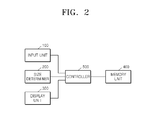
- FIG. 2 is a block diagram of a device for changing a size of a display window on a screen, according to an exemplary embodiment of the present invention
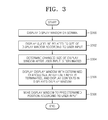
- FIG. 3 is a flowchart illustrating a method of changing a size of a display window displayed on a screen, according to an exemplary embodiment of the present invention
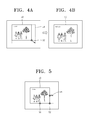
- FIGs. 4A and 4B are diagrams illustrating an example in which a size of a display window is changed by using a guide point displayed in a vertex of the display window and then a changed display window is displayed, according to an exemplary embodiment of the present invention
- FIG. 5 is a diagram illustrating an example in which a size of a display window is changed by using a guide point displayed on a right side of the display window and then a changed display window is displayed, according to an exemplary embodiment of the present invention
- FIG. 6 is a diagram illustrating an example in which a size of a display window is changed by using a guide point displayed on a bottom side of the display window and then a changed display window is displayed, according to an exemplary embodiment of the present invention
- FIGs. 7A and 7B are diagrams illustrating an example in which a size of a display window is changed based on a user input and a changed display window is moved to a predetermined position, according to an exemplary embodiment of the present invention
- FIGs. 8A and 8B are diagrams illustrating an example in which a size of a display window is changed within a predetermined range, according to an exemplary embodiment of the present invention.
- FIGs. 9A and 9B are diagrams illustrating an example in which a thickness of a border of a display window is changed, according to an exemplary embodiment of the present invention.
- FIGs. 10A and 10B are diagrams illustrating an example in which a thickness of a border of a display window is changed, according to another exemplary embodiment of the present invention.
- FIG. 1 is a diagram illustrating a plurality of display windows displayed to overlap each other on a touch-screen, according to an exemplary embodiment of the present invention.
- a plurality of display windows 10, 20, 30, and 40 may be displayed to overlap each other on a touch-screen.
- a pin-up display window 10 set so as to be displayed at the highest position of a screen may always be displayed at the highest position of the screen when the pin-up display window is displayed together with other display windows on the screen.
- an icon 5 may be displayed in a predetermined area of the pin-up display window 10. For example, in the pin-up display window 10, a pin-shaped icon may be displayed as if it is stuck in the pin-up display window 10.
- a whole screen mode display window 20 is set so as to be displayed on the entire screen may be displayed to have the same size as the screen.
- a part screen mode display window 30 set so as to be displayed on a part of the screen may be suitable for applications supporting displaying a window of a smaller size than the screen. Also, the part screen mode display window 30 may be suitable for applications providing, for example, a chatting function, memo function, and the like.
- a free size mode display window 40 is displayed on a part of the screen and may be a window of which size may be freely adjusted by a user input.
- the display windows 10, 20, 30, and 40 may be displayed to overlap each other, and a predetermined window of the display windows 10, 20, 30, and 40 may be displayed according to a type of application.
- FIG. 2 is a block diagram of a device for changing a size of a display window on a screen, according to an exemplary embodiment of the present invention.
- a device includes an input unit 100, a size determiner 200, a display unit 300, a memory unit 400, and a controller 500.
- the input unit 100 receives a user input that is input to the device.
- a user may touch a predetermined area on a screen of the device, and the input unit 100 may receive a user input according to the user's touch.
- the input unit 100 may receive a user input from an input tool such as a keyboard, a mouse, a stylus, or the like.
- the input unit 100 may receive a user input for changing a display window.
- the user may select a border of a display window displayed on the screen of the device and drag & drop or flick the selected border, and the input unit 100 may receive such a user input.
- the size determiner 200 determines a size (hereinafter, referred to as a changed size of a display window) to which a display window is changed from an original size according to a user input for changing the size of the display window.
- the user may change the size of the display window by selecting a border of a display window, and the size determiner 200 may determine the size of the display window to be changed based on a user input.
- the size determiner 200 may determine the size of a display window after a user input for changing the size of the display window is terminated. For example, when a user selects a border of a display window through a touch input and moves the selected border, the size determiner 200 may determine a changed size of the display window after the touch input of the user is terminated.
- the size determiner 200 may set the range of changing the size of a display window, and may determine the changed size of the display window within the set range. For example, when a user input for magnifying the size of a display window to be larger than a predetermined maximum size is received, the size determiner 200 may determine the predetermined maximum size as the changed size of the display window. In addition, when a user input for reducing the size of a display window to be smaller than a predetermined minimum size is received, the size determiner 200 may determine the predetermined minimum size as the changed size of the display window.
- the display unit 300 displays a display window on the screen, and also displays a guideline indicating a changed size of the display window according to a user input.
- the display unit 300 may display guidelines indicating the size of the display window on the screen by moving the display window according to a user input. For example, when a user selects a vertex of a display window and moves the selected vertex, the display unit 300 may display a guideline of a display window including a moved vertex on the screen.
- the display unit 300 may display a guide point on a border of the display window, wherein the guide point is used to change the size of a display window. For example, when a user selects a predetermined vertex of a display window, the display unit 300 may display a guide point on a side of the display window, which includes the selected vertex. If a user selects a guide point displayed on the bottom side of a display window and moves the selected guide point up and down, the display unit 300 may display a guideline of a magnified or reduced display window on the screen by moving a side including the guide point up and down.
- the display unit 300 may display a guideline of a magnified or reduced display window on the screen by moving a side including the guide point from side to side.
- the display unit 300 may change the thickness of a border of a display window so that a user may change the size of the display window. For example, when a user selects a predetermined vertex of a display window or a bottom side border of the display window, the display unit 300 may display at least one side of the display window with an increased thickness. Accordingly, a user may change the size of a display window by touching the thick border of the display window.
- the display unit 300 may display an upper side border of a display window with an increased thickness when a user selects the upper side border of the display window. In this case, the user may move the display window by touching the thick upper side border of the display window.
- the display unit 300 may display predetermined contents in a display window.
- the contents may include images and moving images, which are output through the display window, and for example, may include pictures of a web page, photographs, and video images.
- the present invention is not limited thereto.
- the display unit 300 may display contents on the screen according to the size of the display window before a change thereof.
- the display unit 300 may confirm a changed size of the display window, and may change the size of the display window and then display contents in the changed display window with a resolution suitable for the confirmed changed size. For example, if a user input for magnifying a display window is received in the middle of reproducing moving images with a 100 x 200 resolution on the display window, while the user input is received, the display unit 300 may display a guideline while displaying reproduction images of the moving images with the 100 x 200 resolution.
- the size determiner 200 may determine a changed size of the display window to be 150 x 300 according to the user input and the display unit 300 may adjust the resolution of the moving images to a 150 x 300 resolution to display the moving image on the display window of which the size has been changed.
- display unit 300 may move the display window having the changed size to a predetermined position. For example, when a user touches and drags a vertex of a display window and then flicks the vertex toward an upper side of the screen in the touched state, the display unit 300 may change the size of the display window and move a changed display window to the upper side of the screen.
- the memory unit 400 stores various types of information used when the device changes the size of a display window displayed on the screen in response to a user input.
- the memory unit 400 may store various setting values related to operations of the device depending on a type of a user input.
- the controller 500 controls the entire operation of the device, and controls the input unit 100, the size determiner 200, the display unit 300, and the memory unit 400 so that the device may change the size of a display window displayed on the screen in response to a user input.
- FIG. 3 is a flowchart illustrating a method of changing a size of a display window displayed on a screen, according to an exemplary embodiment of the present invention.
- the device of FIG. 2 displays a display window on the screen.
- the device displays a guideline related to a changed size of the display window according to a user input.
- the device may display guidelines indicating the size of the display window on the screen by moving the guidelines according to a user input. For example, when a user selects a vertex of a display window and moves the selected vertex, the device may display a guideline of a display window including a moved vertex on the screen.
- the device may display a guide point, which is used to change the size of a display window, on a border of the display window. For example, when a user selects a predetermined vertex of a display window, the device may display a guide point on a side of the display window, which includes the selected vertex. If a user selects a guide point displayed on the bottom side of a display window and moves the selected guide point up or down, the device may display a guideline of a magnified or reduced display window on the screen by moving a side including the guide point in a corresponding manner.
- the device may display a guideline of a magnified or reduced display window on the screen by moving a side including the guide in a corresponding manner.
- the device may change the thickness of a border of a display window so that a user may change the size of the display window. For example, when a user selects a predetermined vertex of a display window or a bottom side border of the display window, the device may display at least one side of the display window with an increased thickness. Accordingly, a user may change the size of a display window by touching the thick border of the display window.
- the device may display an upper side border of a display window with an increased thickness when a user selects the upper side border of the display window. In this case, the user may easily move the display window by touching the thick upper side border of the display window.
- the device determines a changed size of a display window after the reception of the user input is terminated. For example, when a user selects a border of a display window through a touch input and moves the selected border, the device may determine a changed size of the display window after the touch input of the user is terminated.
- the device may set the range of changing the size of a display window, and may determine the size of the display window within the set range. For example, when a user input for magnifying the size of a display window to be larger than a predetermined maximum size is received, the device may determine the predetermined maximum size as the changed size of the display window. In addition, when a user input for reducing the size of a display window to be smaller than a predetermined minimum size is received, the device may determine the predetermined minimum size as the changed size of the display window.
- the device displays a display window with a determined changed size after a user input is terminated, and displays contents in the displayed display window.
- the contents may include images and moving images, which are output through the display window, and for example, may include pictures of a web page, photographs, and video images.
- the present invention is not limited thereto.
- the device may display contents on the screen according to the size of the display window before a change thereof.
- the device 300 may confirm a changed size of the display window, and may change the size of the display window and then display contents in the changed display window with a resolution suitable for a confirmed changed size. For example, if a user input for magnifying a display window is received in the middle of reproducing moving images with a 100 x 200 resolution on the display window, while the user input is received, the device may display a guideline while displaying reproduction images of the moving images with the 100 x 200 resolution.
- the device may determine a changed size of the display window to be 150 x 300 according to the user input and may adjust the resolution of the moving images to a 150 x 300 resolution to display the moving image on the display window of which size has been changed.
- the device moves the display window to a predetermined position according to a user input. For example, when a user touches and drags a vertex of a display window and then flicks the vertex toward an upper side of the screen in the touched state, the device may change the size of the display window and move a changed display window to the upper side of the screen.
- FIGs. 4 through 8 An example of changing the size of a display window on a screen according to a user input and displaying a changed display window, according to an exemplary embodiment of the present invention, is described below with reference to FIGs. 4 through 8 .
- FIGs. 4A and 4B are diagrams illustrating an example in which a size of a display window is changed by using a guide point displayed in a vertex of the display window and then a changed display window is displayed, according to an exemplary embodiment of the present invention.
- a display window 50 is displayed with the size of 100 x 200 on the screen of the device, and a user may select a vertex 52 of the display window 50 and may move the selected vertex 52.
- a guideline 54 indicating a changed size of the display window 50 may be displayed on the screen.
- the display window 50 is displayed with the size of 100 x 200 and contents may be displayed in the display window 50.
- the device may determine a changed size (for example, 150 x 300) of the display window 50 and as illustrated in FIG. 4B , may display the display window 50 and the contents by using the changed size.
- FIG. 5 is a diagram illustrating an example where a size of a display window is changed by using a guide point displayed on the right side of the display window and then a changed display window is displayed, according to an exemplary embodiment of the present invention.
- a guide point 56 may be displayed on the right side of the display window 50 including the selected vertex.
- a guide point 58 may also be displayed on the bottom side of the display window 50 including the selected vertex. If a user selects the guide point 56 and then moves the selected guide point 56 to the right side, a guideline of a display window magnified to the right side along the moved guide point 56 may be displayed.
- FIG. 6 is a diagram illustrating an example where a size of a display window is changed by using a guide point displayed on the bottom side of the display window and then a changed display window is displayed, according to an exemplary embodiment of the present invention.
- a guide point 58 may be displayed on the bottom side of the display window 50 including the selected vertex.
- a guide point 56 may also be displayed on the right side of the display window 50 including the selected vertex. If the user selects the guide point 58 and then moves the selected guide point 58 downwards, a guideline of a display window magnified downwards along the moved guide point 58 may be displayed.
- FIGs. 7A and 7B are diagrams illustrating an example where a size of a display window is changed based on a user input and a changed display window is moved to a predetermined position, according to an exemplary embodiment of the present invention.
- a user may touch and drag a vertex 52 of a display window 50 (refer to 60) and then flick the selected vertex 52 toward the right side of the screen 50 in the touched state (refer to 62).
- the device may change the size of the display window 50 via the drag operation.
- a guideline of a magnified display window may be displayed with the dragging of the vertex 52 (refer to 60).
- the device may move the changed display window to the right side of the screen via the flick operation.
- FIGs. 8A and 8B are diagrams illustrating an example where a size of a display window is changed within a predetermined range, according to an exemplary embodiment of the present invention.
- the device may set a range of change of the size of a display window 50 and may determine the size of the display window 50 within the set range.
- a user may select a vertex 52 of the display window 50 and then may move the selected vertex 52.
- the device may magnify the display window 50 to the predetermined maximum size.
- FIGs. 9A and 9B are diagrams illustrating an example where a thickness of a border of a display window is changed, according to an exemplary embodiment of the present invention.
- the left side, right side, and bottom side of the display window 70 may be displayed to be thicker (refer to 72). Also, the user may change the size of the display window 70 by selecting at least one of the left side, the right side, and the bottom side, which are thick, and moving the selected at least one side. In addition, when the user selects the bottom side border of the display window 70, the left side, right side, and bottom side of the display window 70 may be displayed to be thicker (refer to 72).
- the present invention is not limited thereto.
- FIGs. 10A and 10B are diagrams illustrating an example where the thickness of a border of a display window is changed, according to an exemplary embodiment of the present invention.
- the thickness of the upper side of the display window 80 may be displayed to be thicker (refer to 82). Also, the user may change the position of the display window 80 on a screen by selecting the thick upper side 82 of the display window 80 and moving the selected upper side.
- the one or more exemplary embodiments of the present invention may be written as computer programs in a non-transitory computer-readable recording medium, e.g., a program module to be executed in computers, which include computer-readable commands.
- the non-transitory computer-readable recording medium may include any usable medium that may be accessed by computers, volatile and non-volatile media, and detachable and non-detachable media.
- the non-transitory computer-readable recording medium includes all of volatile and non-volatile media, and detachable and non-detachable media that are designed to store information including computer readable commands, data structures, program modules or other data.
Landscapes
- Engineering & Computer Science (AREA)
- Theoretical Computer Science (AREA)
- General Engineering & Computer Science (AREA)
- Human Computer Interaction (AREA)
- Physics & Mathematics (AREA)
- General Physics & Mathematics (AREA)
- User Interface Of Digital Computer (AREA)
- Digital Computer Display Output (AREA)
Applications Claiming Priority (1)
| Application Number | Priority Date | Filing Date | Title |
|---|---|---|---|
| KR1020120019181A KR101932718B1 (ko) | 2012-02-24 | 2012-02-24 | 화면 상의 디스플레이창의 크기를 변경하는 디바이스 및 방법 |
Publications (3)
| Publication Number | Publication Date |
|---|---|
| EP2631764A2 true EP2631764A2 (fr) | 2013-08-28 |
| EP2631764A3 EP2631764A3 (fr) | 2016-03-16 |
| EP2631764B1 EP2631764B1 (fr) | 2019-04-03 |
Family
ID=47843056
Family Applications (1)
| Application Number | Title | Priority Date | Filing Date |
|---|---|---|---|
| EP13155846.2A Active EP2631764B1 (fr) | 2012-02-24 | 2013-02-19 | Dispositif et procédé permettant de modifier la taille de fenêtre d'affichage sur écran |
Country Status (4)
| Country | Link |
|---|---|
| US (1) | US10379706B2 (fr) |
| EP (1) | EP2631764B1 (fr) |
| KR (1) | KR101932718B1 (fr) |
| CN (1) | CN103294341B (fr) |
Families Citing this family (12)
| Publication number | Priority date | Publication date | Assignee | Title |
|---|---|---|---|---|
| TWI530865B (zh) * | 2013-08-01 | 2016-04-21 | 宏碁股份有限公司 | 電子裝置以及使用者介面顯示方法 |
| TWI520610B (zh) * | 2013-08-01 | 2016-02-01 | 晨星半導體股份有限公司 | 電視控制裝置與相關方法 |
| CN104461223B (zh) * | 2013-09-17 | 2018-01-26 | 宏碁股份有限公司 | 电子装置以及使用者界面显示方法 |
| US10417763B2 (en) | 2014-07-25 | 2019-09-17 | Samsung Electronics Co., Ltd. | Image processing apparatus, image processing method, x-ray imaging apparatus and control method thereof |
| KR20160012837A (ko) * | 2014-07-25 | 2016-02-03 | 삼성전자주식회사 | 영상 처리 장치 및 그 영상 처리 방법 |
| CN107272993A (zh) * | 2017-06-30 | 2017-10-20 | 深圳铂睿智恒科技有限公司 | 智能终端窗口视图的控制方法及系统 |
| CN110083429B (zh) * | 2019-04-29 | 2024-03-22 | 努比亚技术有限公司 | 可穿戴设备及其输入法面板显示控制方法和存储介质 |
| CN111857630B (zh) * | 2020-07-27 | 2023-06-16 | 平安科技(深圳)有限公司 | 地图多屏显示方法、装置、计算机设备和存储介质 |
| CN112130739B (zh) * | 2020-10-10 | 2021-09-10 | 佳都科技集团股份有限公司 | 触摸屏显示框调整方法、装置、触摸屏设备和存储介质 |
| US11726644B2 (en) * | 2021-06-21 | 2023-08-15 | Microsoft Technology Licensing, Llc | Providing visual feedback during touch-based operations on user interface elements |
| US11921547B2 (en) * | 2021-08-20 | 2024-03-05 | Lenovo (Singapore) Pte. Ltd. | Apparatus, methods, and program products for modifying a size and/or shape of a computing display screen |
| WO2024158207A1 (fr) * | 2023-01-26 | 2024-08-02 | 삼성전자 주식회사 | Dispositif électronique de commutation d'état de fenêtre et son procédé de fonctionnement |
Family Cites Families (50)
| Publication number | Priority date | Publication date | Assignee | Title |
|---|---|---|---|---|
| US5880733A (en) * | 1996-04-30 | 1999-03-09 | Microsoft Corporation | Display system and method for displaying windows of an operating system to provide a three-dimensional workspace for a computer system |
| GB2314245A (en) * | 1996-06-10 | 1997-12-17 | Ibm | Graphical user interface |
| JPH10260784A (ja) | 1997-03-17 | 1998-09-29 | Hitachi Ltd | カーソル制御方法及び装置 |
| US6229536B1 (en) * | 1998-03-05 | 2001-05-08 | Agilent Technologies, Inc. | System and method for displaying simultaneously a main waveform display and a magnified waveform display in a signal measurement system |
| US6832355B1 (en) | 1998-07-28 | 2004-12-14 | Microsoft Corporation | Web page display system |
| US6686852B1 (en) | 2000-09-15 | 2004-02-03 | Motorola, Inc. | Keypad layout for alphabetic character input |
| JP4102045B2 (ja) | 2001-09-28 | 2008-06-18 | 富士フイルム株式会社 | デスクトップ上の隠蔽ウインドウの表示制御方法および表示制御処理装置 |
| CN1458576A (zh) | 2002-05-17 | 2003-11-26 | 张逶 | 一种微型电脑和手机显示和键盘方案 |
| JP2004046796A (ja) | 2002-07-15 | 2004-02-12 | Seiko Epson Corp | ディレクトリ管理プログラム、オブジェクト表示プログラム、ディレクトリ管理方法及びディレクトリ管理装置 |
| US20040056894A1 (en) * | 2002-09-19 | 2004-03-25 | Igor Zaika | System and method for describing and instantiating extensible user interfaces |
| KR100478920B1 (ko) | 2002-11-07 | 2005-03-28 | 에스케이 텔레콤주식회사 | 화면 분할 기능을 갖는 이동통신 단말기 및 그 제어 방법 |
| KR100652626B1 (ko) | 2004-03-04 | 2006-12-06 | 엘지전자 주식회사 | 이동통신단말기의 멀티윈도우 전환 방법 |
| US7743348B2 (en) | 2004-06-30 | 2010-06-22 | Microsoft Corporation | Using physical objects to adjust attributes of an interactive display application |
| KR100650257B1 (ko) | 2004-08-19 | 2006-11-24 | 주식회사 팬택앤큐리텔 | 화면분할 제어 기능을 갖는 무선통신 단말기 및 그 방법 |
| JP2006115213A (ja) | 2004-10-14 | 2006-04-27 | Sony Ericsson Mobilecommunications Japan Inc | 携帯端末装置及び携帯端末の表示方法 |
| JP2006073015A (ja) | 2005-09-05 | 2006-03-16 | Hitachi Kokusai Electric Inc | 携帯端末 |
| KR100700171B1 (ko) | 2005-10-25 | 2007-03-28 | 엘지전자 주식회사 | 이동통신단말기의 서브 디스플레이 표시장치 및 그제어방법 |
| WO2007073584A1 (fr) | 2005-12-29 | 2007-07-05 | Ozmiz Pty. Ltd. | Procede et systeme d'affichage de donnees sur un terminal mobile |
| CN101352057B (zh) | 2005-12-29 | 2013-05-29 | Ozmiz私人有限公司 | 在移动终端上显示数据的方法和系统 |
| CN1996285A (zh) | 2006-01-06 | 2007-07-11 | 胡擘 | 一种网页浏览器网中的窗口系统 |
| KR100818918B1 (ko) | 2006-02-14 | 2008-04-04 | 삼성전자주식회사 | 윈도우의 배치를 관리하는 장치 및 그 방법 |
| US8464177B2 (en) * | 2006-07-26 | 2013-06-11 | Roy Ben-Yoseph | Window resizing in a graphical user interface |
| JP4958517B2 (ja) | 2006-11-06 | 2012-06-20 | ソニーモバイルコミュニケーションズ, エービー | 携帯端末およびその表示制御方法 |
| JP5242043B2 (ja) | 2006-11-27 | 2013-07-24 | 富士通株式会社 | 携帯端末装置および表示方法 |
| US20080172609A1 (en) | 2007-01-11 | 2008-07-17 | Nokia Corporation | Multiple application handling |
| US8549429B2 (en) | 2007-01-25 | 2013-10-01 | Sharp Kabushiki Kaisha | Multi-window management apparatus and program, storage medium and information processing apparatus |
| JP2008211379A (ja) | 2007-02-23 | 2008-09-11 | Fujitsu Ltd | 表示制御プログラムおよび携帯端末装置 |
| JP4796017B2 (ja) | 2007-07-30 | 2011-10-19 | 京セラ株式会社 | 電子機器 |
| KR20090016044A (ko) | 2007-08-10 | 2009-02-13 | 삼성전자주식회사 | 휴대용 단말기의 멀티태스킹 방법 및 장치 |
| US8219936B2 (en) | 2007-08-30 | 2012-07-10 | Lg Electronics Inc. | User interface for a mobile device using a user's gesture in the proximity of an electronic device |
| CN101387954B (zh) | 2007-09-10 | 2011-06-22 | 汉王科技股份有限公司 | 实现可拉伸涂写的电子幕布的方法 |
| KR101404746B1 (ko) * | 2007-10-19 | 2014-06-12 | 엘지전자 주식회사 | 휴대 단말기 및 그 휴대 단말기의 통화 영상 녹화 방법 |
| US8587614B2 (en) | 2007-12-10 | 2013-11-19 | Vistaprint Schweiz Gmbh | System and method for image editing of electronic product design |
| KR100900295B1 (ko) | 2008-04-17 | 2009-05-29 | 엘지전자 주식회사 | 이동 디바이스와 이동 통신 시스템의 사용자 인터페이스방법 |
| US20090322690A1 (en) | 2008-06-30 | 2009-12-31 | Nokia Corporation | Screen display |
| KR20100030968A (ko) | 2008-09-11 | 2010-03-19 | 엘지전자 주식회사 | 단말기 및 그의 메뉴 디스플레이 방법 |
| US20100107128A1 (en) * | 2008-10-27 | 2010-04-29 | Microsoft Corporation | Displaying available content via a screen saver |
| KR101514460B1 (ko) | 2008-11-13 | 2015-04-22 | 주식회사 케이티 | 휴대용 단말기의 어플리케이션 연동 방법 |
| JP5163472B2 (ja) * | 2008-12-17 | 2013-03-13 | 富士通株式会社 | パラメタ空間を分割してモデル化する設計支援装置、方法、及びプログラム |
| CN101477436A (zh) | 2008-12-18 | 2009-07-08 | 腾讯科技(深圳)有限公司 | 对程序窗口的客户区进行交互的方法与系统 |
| KR101525760B1 (ko) | 2009-02-26 | 2015-06-04 | 삼성전자주식회사 | 통화 기능 지원을 위한 사용자 인터페이스 및 이를 지원하는 휴대 단말기 |
| KR101640460B1 (ko) | 2009-03-25 | 2016-07-18 | 삼성전자 주식회사 | 휴대 단말기의 분할 화면 운용 방법 및 이를 지원하는 휴대 단말기 |
| EP3907593B1 (fr) | 2010-01-19 | 2025-03-26 | LG Electronics, Inc. | Terminal mobile et son procédé de commande |
| US9465457B2 (en) * | 2010-08-30 | 2016-10-11 | Vmware, Inc. | Multi-touch interface gestures for keyboard and/or mouse inputs |
| US20120303476A1 (en) | 2010-11-09 | 2012-11-29 | Openpeak Inc. | Communication devices, networks, services and accompanying methods |
| CN102063256B (zh) | 2010-12-29 | 2012-12-05 | 北京新媒传信科技有限公司 | 一种移动/拉伸窗口的方法以及装置 |
| US10042546B2 (en) | 2011-01-07 | 2018-08-07 | Qualcomm Incorporated | Systems and methods to present multiple frames on a touch screen |
| US8689116B2 (en) * | 2011-01-14 | 2014-04-01 | Apple Inc. | Email user interface |
| KR101888457B1 (ko) | 2011-11-16 | 2018-08-16 | 삼성전자주식회사 | 복수 개의 어플리케이션을 실행하는 터치스크린을 가지는 장치 및 그 제어 방법 |
| US8890808B2 (en) * | 2012-01-06 | 2014-11-18 | Microsoft Corporation | Repositioning gestures for chromeless regions |
-
2012
- 2012-02-24 KR KR1020120019181A patent/KR101932718B1/ko not_active Expired - Fee Related
-
2013
- 2013-02-14 US US13/767,610 patent/US10379706B2/en active Active
- 2013-02-19 EP EP13155846.2A patent/EP2631764B1/fr active Active
- 2013-02-25 CN CN201310058657.9A patent/CN103294341B/zh not_active Expired - Fee Related
Also Published As
| Publication number | Publication date |
|---|---|
| KR20130097491A (ko) | 2013-09-03 |
| CN103294341A (zh) | 2013-09-11 |
| EP2631764B1 (fr) | 2019-04-03 |
| EP2631764A3 (fr) | 2016-03-16 |
| US20130227458A1 (en) | 2013-08-29 |
| CN103294341B (zh) | 2019-08-23 |
| US10379706B2 (en) | 2019-08-13 |
| KR101932718B1 (ko) | 2018-12-26 |
Similar Documents
| Publication | Publication Date | Title |
|---|---|---|
| US10379706B2 (en) | Device for and method of changing size of display window on screen | |
| US12189925B2 (en) | Method and device for managing tab window indicating application group including heterogeneous applications | |
| JP5865039B2 (ja) | 情報処理装置、情報処理装置の制御方法、及びプログラム | |
| JP5627985B2 (ja) | 情報処理装置、情報処理装置の制御方法、制御プログラム、および記録媒体 | |
| JP6080515B2 (ja) | 情報処理装置、表示装置、情報処理装置の制御方法、及びプログラム | |
| US10146341B2 (en) | Electronic apparatus and method for displaying graphical object thereof | |
| US9778733B2 (en) | Method of setting printing option through touch input and mobile device to perform same | |
| US8762840B1 (en) | Elastic canvas visual effects in user interface | |
| JP2014038560A (ja) | 情報処理装置、情報処理方法及びプログラム | |
| JP2015035092A (ja) | 表示制御装置及び表示制御装置の制御方法 | |
| KR20150094967A (ko) | 적어도 하나의 어플리케이션을 실행하는 전자 장치 및 그 제어 방법 | |
| JP6053291B2 (ja) | 画像処理装置、画像処理装置の制御方法、及びプログラム | |
| US9785333B2 (en) | Display device, image processing apparatus, non-transitory computer readable medium, and display control method | |
| JP6832822B2 (ja) | 表示制御装置及びプログラム | |
| CN103809903A (zh) | 用于控制虚拟屏幕的方法和装置 | |
| JP2015138360A (ja) | オブジェクト操作システム及びオブジェクト操作制御プログラム並びにオブジェクト操作制御方法 | |
| KR20140135884A (ko) | 디스플레이 장치 및 그 제어방법 | |
| US20150012879A1 (en) | Device and method for moving display window on screen | |
| US20180173411A1 (en) | Display device, display method, and non-transitory computer readable recording medium | |
| US20110119579A1 (en) | Method of turning over three-dimensional graphic object by use of touch sensitive input device | |
| US20180173362A1 (en) | Display device, display method used in the same, and non-transitory computer readable recording medium | |
| JP2014108533A (ja) | 画像処理装置、画像処理装置の制御方法、及びプログラム | |
| US20180129466A1 (en) | Display control device and display system | |
| JP6759023B2 (ja) | 表示制御装置、その制御方法、およびプログラム、並びに記憶媒体 | |
| US20140089843A1 (en) | Information processing apparatus and method of controlling the same, and storage medium thereof |
Legal Events
| Date | Code | Title | Description |
|---|---|---|---|
| PUAI | Public reference made under article 153(3) epc to a published international application that has entered the european phase |
Free format text: ORIGINAL CODE: 0009012 |
|
| 17P | Request for examination filed |
Effective date: 20130219 |
|
| AK | Designated contracting states |
Kind code of ref document: A2 Designated state(s): AL AT BE BG CH CY CZ DE DK EE ES FI FR GB GR HR HU IE IS IT LI LT LU LV MC MK MT NL NO PL PT RO RS SE SI SK SM TR |
|
| AX | Request for extension of the european patent |
Extension state: BA ME |
|
| PUAL | Search report despatched |
Free format text: ORIGINAL CODE: 0009013 |
|
| AK | Designated contracting states |
Kind code of ref document: A3 Designated state(s): AL AT BE BG CH CY CZ DE DK EE ES FI FR GB GR HR HU IE IS IT LI LT LU LV MC MK MT NL NO PL PT RO RS SE SI SK SM TR |
|
| AX | Request for extension of the european patent |
Extension state: BA ME |
|
| RIC1 | Information provided on ipc code assigned before grant |
Ipc: G06F 3/0484 20130101AFI20160208BHEP Ipc: G06F 3/0488 20130101ALI20160208BHEP |
|
| STAA | Information on the status of an ep patent application or granted ep patent |
Free format text: STATUS: EXAMINATION IS IN PROGRESS |
|
| 17Q | First examination report despatched |
Effective date: 20170404 |
|
| GRAJ | Information related to disapproval of communication of intention to grant by the applicant or resumption of examination proceedings by the epo deleted |
Free format text: ORIGINAL CODE: EPIDOSDIGR1 |
|
| GRAP | Despatch of communication of intention to grant a patent |
Free format text: ORIGINAL CODE: EPIDOSNIGR1 |
|
| GRAP | Despatch of communication of intention to grant a patent |
Free format text: ORIGINAL CODE: EPIDOSNIGR1 |
|
| STAA | Information on the status of an ep patent application or granted ep patent |
Free format text: STATUS: GRANT OF PATENT IS INTENDED |
|
| INTG | Intention to grant announced |
Effective date: 20181128 |
|
| GRAS | Grant fee paid |
Free format text: ORIGINAL CODE: EPIDOSNIGR3 |
|
| GRAA | (expected) grant |
Free format text: ORIGINAL CODE: 0009210 |
|
| STAA | Information on the status of an ep patent application or granted ep patent |
Free format text: STATUS: THE PATENT HAS BEEN GRANTED |
|
| AK | Designated contracting states |
Kind code of ref document: B1 Designated state(s): AL AT BE BG CH CY CZ DE DK EE ES FI FR GB GR HR HU IE IS IT LI LT LU LV MC MK MT NL NO PL PT RO RS SE SI SK SM TR |
|
| REG | Reference to a national code |
Ref country code: GB Ref legal event code: FG4D |
|
| REG | Reference to a national code |
Ref country code: CH Ref legal event code: EP Ref country code: AT Ref legal event code: REF Ref document number: 1116565 Country of ref document: AT Kind code of ref document: T Effective date: 20190415 |
|
| REG | Reference to a national code |
Ref country code: DE Ref legal event code: R096 Ref document number: 602013053187 Country of ref document: DE |
|
| REG | Reference to a national code |
Ref country code: IE Ref legal event code: FG4D |
|
| REG | Reference to a national code |
Ref country code: NL Ref legal event code: FP |
|
| REG | Reference to a national code |
Ref country code: LT Ref legal event code: MG4D |
|
| REG | Reference to a national code |
Ref country code: AT Ref legal event code: MK05 Ref document number: 1116565 Country of ref document: AT Kind code of ref document: T Effective date: 20190403 |
|
| PG25 | Lapsed in a contracting state [announced via postgrant information from national office to epo] |
Ref country code: SE Free format text: LAPSE BECAUSE OF FAILURE TO SUBMIT A TRANSLATION OF THE DESCRIPTION OR TO PAY THE FEE WITHIN THE PRESCRIBED TIME-LIMIT Effective date: 20190403 Ref country code: HR Free format text: LAPSE BECAUSE OF FAILURE TO SUBMIT A TRANSLATION OF THE DESCRIPTION OR TO PAY THE FEE WITHIN THE PRESCRIBED TIME-LIMIT Effective date: 20190403 Ref country code: ES Free format text: LAPSE BECAUSE OF FAILURE TO SUBMIT A TRANSLATION OF THE DESCRIPTION OR TO PAY THE FEE WITHIN THE PRESCRIBED TIME-LIMIT Effective date: 20190403 Ref country code: LT Free format text: LAPSE BECAUSE OF FAILURE TO SUBMIT A TRANSLATION OF THE DESCRIPTION OR TO PAY THE FEE WITHIN THE PRESCRIBED TIME-LIMIT Effective date: 20190403 Ref country code: CZ Free format text: LAPSE BECAUSE OF FAILURE TO SUBMIT A TRANSLATION OF THE DESCRIPTION OR TO PAY THE FEE WITHIN THE PRESCRIBED TIME-LIMIT Effective date: 20190403 Ref country code: NO Free format text: LAPSE BECAUSE OF FAILURE TO SUBMIT A TRANSLATION OF THE DESCRIPTION OR TO PAY THE FEE WITHIN THE PRESCRIBED TIME-LIMIT Effective date: 20190703 Ref country code: FI Free format text: LAPSE BECAUSE OF FAILURE TO SUBMIT A TRANSLATION OF THE DESCRIPTION OR TO PAY THE FEE WITHIN THE PRESCRIBED TIME-LIMIT Effective date: 20190403 Ref country code: PT Free format text: LAPSE BECAUSE OF FAILURE TO SUBMIT A TRANSLATION OF THE DESCRIPTION OR TO PAY THE FEE WITHIN THE PRESCRIBED TIME-LIMIT Effective date: 20190803 Ref country code: AL Free format text: LAPSE BECAUSE OF FAILURE TO SUBMIT A TRANSLATION OF THE DESCRIPTION OR TO PAY THE FEE WITHIN THE PRESCRIBED TIME-LIMIT Effective date: 20190403 |
|
| PG25 | Lapsed in a contracting state [announced via postgrant information from national office to epo] |
Ref country code: BG Free format text: LAPSE BECAUSE OF FAILURE TO SUBMIT A TRANSLATION OF THE DESCRIPTION OR TO PAY THE FEE WITHIN THE PRESCRIBED TIME-LIMIT Effective date: 20190703 Ref country code: LV Free format text: LAPSE BECAUSE OF FAILURE TO SUBMIT A TRANSLATION OF THE DESCRIPTION OR TO PAY THE FEE WITHIN THE PRESCRIBED TIME-LIMIT Effective date: 20190403 Ref country code: PL Free format text: LAPSE BECAUSE OF FAILURE TO SUBMIT A TRANSLATION OF THE DESCRIPTION OR TO PAY THE FEE WITHIN THE PRESCRIBED TIME-LIMIT Effective date: 20190403 Ref country code: GR Free format text: LAPSE BECAUSE OF FAILURE TO SUBMIT A TRANSLATION OF THE DESCRIPTION OR TO PAY THE FEE WITHIN THE PRESCRIBED TIME-LIMIT Effective date: 20190704 Ref country code: RS Free format text: LAPSE BECAUSE OF FAILURE TO SUBMIT A TRANSLATION OF THE DESCRIPTION OR TO PAY THE FEE WITHIN THE PRESCRIBED TIME-LIMIT Effective date: 20190403 |
|
| PG25 | Lapsed in a contracting state [announced via postgrant information from national office to epo] |
Ref country code: AT Free format text: LAPSE BECAUSE OF FAILURE TO SUBMIT A TRANSLATION OF THE DESCRIPTION OR TO PAY THE FEE WITHIN THE PRESCRIBED TIME-LIMIT Effective date: 20190403 Ref country code: IS Free format text: LAPSE BECAUSE OF FAILURE TO SUBMIT A TRANSLATION OF THE DESCRIPTION OR TO PAY THE FEE WITHIN THE PRESCRIBED TIME-LIMIT Effective date: 20190803 |
|
| REG | Reference to a national code |
Ref country code: DE Ref legal event code: R097 Ref document number: 602013053187 Country of ref document: DE |
|
| PG25 | Lapsed in a contracting state [announced via postgrant information from national office to epo] |
Ref country code: DK Free format text: LAPSE BECAUSE OF FAILURE TO SUBMIT A TRANSLATION OF THE DESCRIPTION OR TO PAY THE FEE WITHIN THE PRESCRIBED TIME-LIMIT Effective date: 20190403 Ref country code: RO Free format text: LAPSE BECAUSE OF FAILURE TO SUBMIT A TRANSLATION OF THE DESCRIPTION OR TO PAY THE FEE WITHIN THE PRESCRIBED TIME-LIMIT Effective date: 20190403 Ref country code: SK Free format text: LAPSE BECAUSE OF FAILURE TO SUBMIT A TRANSLATION OF THE DESCRIPTION OR TO PAY THE FEE WITHIN THE PRESCRIBED TIME-LIMIT Effective date: 20190403 Ref country code: EE Free format text: LAPSE BECAUSE OF FAILURE TO SUBMIT A TRANSLATION OF THE DESCRIPTION OR TO PAY THE FEE WITHIN THE PRESCRIBED TIME-LIMIT Effective date: 20190403 |
|
| PLBE | No opposition filed within time limit |
Free format text: ORIGINAL CODE: 0009261 |
|
| STAA | Information on the status of an ep patent application or granted ep patent |
Free format text: STATUS: NO OPPOSITION FILED WITHIN TIME LIMIT |
|
| PG25 | Lapsed in a contracting state [announced via postgrant information from national office to epo] |
Ref country code: SM Free format text: LAPSE BECAUSE OF FAILURE TO SUBMIT A TRANSLATION OF THE DESCRIPTION OR TO PAY THE FEE WITHIN THE PRESCRIBED TIME-LIMIT Effective date: 20190403 Ref country code: IT Free format text: LAPSE BECAUSE OF FAILURE TO SUBMIT A TRANSLATION OF THE DESCRIPTION OR TO PAY THE FEE WITHIN THE PRESCRIBED TIME-LIMIT Effective date: 20190403 |
|
| 26N | No opposition filed |
Effective date: 20200106 |
|
| PG25 | Lapsed in a contracting state [announced via postgrant information from national office to epo] |
Ref country code: TR Free format text: LAPSE BECAUSE OF FAILURE TO SUBMIT A TRANSLATION OF THE DESCRIPTION OR TO PAY THE FEE WITHIN THE PRESCRIBED TIME-LIMIT Effective date: 20190403 |
|
| PG25 | Lapsed in a contracting state [announced via postgrant information from national office to epo] |
Ref country code: SI Free format text: LAPSE BECAUSE OF FAILURE TO SUBMIT A TRANSLATION OF THE DESCRIPTION OR TO PAY THE FEE WITHIN THE PRESCRIBED TIME-LIMIT Effective date: 20190403 |
|
| REG | Reference to a national code |
Ref country code: CH Ref legal event code: PL |
|
| REG | Reference to a national code |
Ref country code: BE Ref legal event code: MM Effective date: 20200229 |
|
| PG25 | Lapsed in a contracting state [announced via postgrant information from national office to epo] |
Ref country code: MC Free format text: LAPSE BECAUSE OF FAILURE TO SUBMIT A TRANSLATION OF THE DESCRIPTION OR TO PAY THE FEE WITHIN THE PRESCRIBED TIME-LIMIT Effective date: 20190403 Ref country code: LU Free format text: LAPSE BECAUSE OF NON-PAYMENT OF DUE FEES Effective date: 20200219 |
|
| PG25 | Lapsed in a contracting state [announced via postgrant information from national office to epo] |
Ref country code: CH Free format text: LAPSE BECAUSE OF NON-PAYMENT OF DUE FEES Effective date: 20200229 Ref country code: LI Free format text: LAPSE BECAUSE OF NON-PAYMENT OF DUE FEES Effective date: 20200229 |
|
| PG25 | Lapsed in a contracting state [announced via postgrant information from national office to epo] |
Ref country code: IE Free format text: LAPSE BECAUSE OF NON-PAYMENT OF DUE FEES Effective date: 20200219 Ref country code: FR Free format text: LAPSE BECAUSE OF NON-PAYMENT OF DUE FEES Effective date: 20200229 |
|
| PG25 | Lapsed in a contracting state [announced via postgrant information from national office to epo] |
Ref country code: BE Free format text: LAPSE BECAUSE OF NON-PAYMENT OF DUE FEES Effective date: 20200229 |
|
| PGFP | Annual fee paid to national office [announced via postgrant information from national office to epo] |
Ref country code: NL Payment date: 20210121 Year of fee payment: 9 |
|
| PGFP | Annual fee paid to national office [announced via postgrant information from national office to epo] |
Ref country code: GB Payment date: 20220121 Year of fee payment: 10 |
|
| PG25 | Lapsed in a contracting state [announced via postgrant information from national office to epo] |
Ref country code: MT Free format text: LAPSE BECAUSE OF FAILURE TO SUBMIT A TRANSLATION OF THE DESCRIPTION OR TO PAY THE FEE WITHIN THE PRESCRIBED TIME-LIMIT Effective date: 20190403 Ref country code: CY Free format text: LAPSE BECAUSE OF FAILURE TO SUBMIT A TRANSLATION OF THE DESCRIPTION OR TO PAY THE FEE WITHIN THE PRESCRIBED TIME-LIMIT Effective date: 20190403 |
|
| PG25 | Lapsed in a contracting state [announced via postgrant information from national office to epo] |
Ref country code: MK Free format text: LAPSE BECAUSE OF FAILURE TO SUBMIT A TRANSLATION OF THE DESCRIPTION OR TO PAY THE FEE WITHIN THE PRESCRIBED TIME-LIMIT Effective date: 20190403 |
|
| REG | Reference to a national code |
Ref country code: NL Ref legal event code: MM Effective date: 20220301 |
|
| PG25 | Lapsed in a contracting state [announced via postgrant information from national office to epo] |
Ref country code: NL Free format text: LAPSE BECAUSE OF NON-PAYMENT OF DUE FEES Effective date: 20220301 |
|
| GBPC | Gb: european patent ceased through non-payment of renewal fee |
Effective date: 20230219 |
|
| PG25 | Lapsed in a contracting state [announced via postgrant information from national office to epo] |
Ref country code: GB Free format text: LAPSE BECAUSE OF NON-PAYMENT OF DUE FEES Effective date: 20230219 |
|
| PG25 | Lapsed in a contracting state [announced via postgrant information from national office to epo] |
Ref country code: GB Free format text: LAPSE BECAUSE OF NON-PAYMENT OF DUE FEES Effective date: 20230219 |
|
| PGFP | Annual fee paid to national office [announced via postgrant information from national office to epo] |
Ref country code: DE Payment date: 20260120 Year of fee payment: 14 |