EP2677403A1 - Informationsverarbeitungsendgerät und verfahren zu seiner steuerung - Google Patents
Informationsverarbeitungsendgerät und verfahren zu seiner steuerung Download PDFInfo
- Publication number
- EP2677403A1 EP2677403A1 EP11858732.8A EP11858732A EP2677403A1 EP 2677403 A1 EP2677403 A1 EP 2677403A1 EP 11858732 A EP11858732 A EP 11858732A EP 2677403 A1 EP2677403 A1 EP 2677403A1
- Authority
- EP
- European Patent Office
- Prior art keywords
- information
- contact
- detected item
- display
- detected
- Prior art date
- Legal status (The legal status is an assumption and is not a legal conclusion. Google has not performed a legal analysis and makes no representation as to the accuracy of the status listed.)
- Ceased
Links
Images



Classifications
-
- G—PHYSICS
- G06—COMPUTING OR CALCULATING; COUNTING
- G06F—ELECTRIC DIGITAL DATA PROCESSING
- G06F3/00—Input arrangements for transferring data to be processed into a form capable of being handled by the computer; Output arrangements for transferring data from processing unit to output unit, e.g. interface arrangements
- G06F3/01—Input arrangements or combined input and output arrangements for interaction between user and computer
- G06F3/03—Arrangements for converting the position or the displacement of a member into a coded form
- G06F3/041—Digitisers, e.g. for touch screens or touch pads, characterised by the transducing means
- G06F3/0412—Digitisers structurally integrated in a display
-
- G—PHYSICS
- G06—COMPUTING OR CALCULATING; COUNTING
- G06F—ELECTRIC DIGITAL DATA PROCESSING
- G06F1/00—Details not covered by groups G06F3/00 - G06F13/00 and G06F21/00
- G06F1/16—Constructional details or arrangements
- G06F1/1613—Constructional details or arrangements for portable computers
- G06F1/1615—Constructional details or arrangements for portable computers with several enclosures having relative motions, each enclosure supporting at least one I/O or computing function
- G06F1/1616—Constructional details or arrangements for portable computers with several enclosures having relative motions, each enclosure supporting at least one I/O or computing function with folding flat displays, e.g. laptop computers or notebooks having a clamshell configuration, with body parts pivoting to an open position around an axis parallel to the plane they define in closed position
-
- G—PHYSICS
- G06—COMPUTING OR CALCULATING; COUNTING
- G06F—ELECTRIC DIGITAL DATA PROCESSING
- G06F1/00—Details not covered by groups G06F3/00 - G06F13/00 and G06F21/00
- G06F1/16—Constructional details or arrangements
- G06F1/1613—Constructional details or arrangements for portable computers
- G06F1/1633—Constructional details or arrangements of portable computers not specific to the type of enclosures covered by groups G06F1/1615 - G06F1/1626
- G06F1/1637—Details related to the display arrangement, including those related to the mounting of the display in the housing
- G06F1/1643—Details related to the display arrangement, including those related to the mounting of the display in the housing the display being associated to a digitizer, e.g. laptops that can be used as penpads
-
- G—PHYSICS
- G06—COMPUTING OR CALCULATING; COUNTING
- G06F—ELECTRIC DIGITAL DATA PROCESSING
- G06F1/00—Details not covered by groups G06F3/00 - G06F13/00 and G06F21/00
- G06F1/16—Constructional details or arrangements
- G06F1/1613—Constructional details or arrangements for portable computers
- G06F1/1633—Constructional details or arrangements of portable computers not specific to the type of enclosures covered by groups G06F1/1615 - G06F1/1626
- G06F1/1637—Details related to the display arrangement, including those related to the mounting of the display in the housing
- G06F1/1647—Details related to the display arrangement, including those related to the mounting of the display in the housing including at least an additional display
-
- G—PHYSICS
- G06—COMPUTING OR CALCULATING; COUNTING
- G06F—ELECTRIC DIGITAL DATA PROCESSING
- G06F1/00—Details not covered by groups G06F3/00 - G06F13/00 and G06F21/00
- G06F1/16—Constructional details or arrangements
- G06F1/1613—Constructional details or arrangements for portable computers
- G06F1/1633—Constructional details or arrangements of portable computers not specific to the type of enclosures covered by groups G06F1/1615 - G06F1/1626
- G06F1/1684—Constructional details or arrangements related to integrated I/O peripherals not covered by groups G06F1/1635 - G06F1/1675
- G06F1/169—Constructional details or arrangements related to integrated I/O peripherals not covered by groups G06F1/1635 - G06F1/1675 the I/O peripheral being an integrated pointing device, e.g. trackball in the palm rest area, mini-joystick integrated between keyboard keys, touch pads or touch stripes
-
- G—PHYSICS
- G06—COMPUTING OR CALCULATING; COUNTING
- G06F—ELECTRIC DIGITAL DATA PROCESSING
- G06F3/00—Input arrangements for transferring data to be processed into a form capable of being handled by the computer; Output arrangements for transferring data from processing unit to output unit, e.g. interface arrangements
- G06F3/01—Input arrangements or combined input and output arrangements for interaction between user and computer
- G06F3/048—Interaction techniques based on graphical user interfaces [GUI]
- G06F3/0484—Interaction techniques based on graphical user interfaces [GUI] for the control of specific functions or operations, e.g. selecting or manipulating an object, an image or a displayed text element, setting a parameter value or selecting a range
- G06F3/0486—Drag-and-drop
-
- G—PHYSICS
- G06—COMPUTING OR CALCULATING; COUNTING
- G06F—ELECTRIC DIGITAL DATA PROCESSING
- G06F3/00—Input arrangements for transferring data to be processed into a form capable of being handled by the computer; Output arrangements for transferring data from processing unit to output unit, e.g. interface arrangements
- G06F3/01—Input arrangements or combined input and output arrangements for interaction between user and computer
- G06F3/048—Interaction techniques based on graphical user interfaces [GUI]
- G06F3/0487—Interaction techniques based on graphical user interfaces [GUI] using specific features provided by the input device, e.g. functions controlled by the rotation of a mouse with dual sensing arrangements, or of the nature of the input device, e.g. tap gestures based on pressure sensed by a digitiser
- G06F3/0488—Interaction techniques based on graphical user interfaces [GUI] using specific features provided by the input device, e.g. functions controlled by the rotation of a mouse with dual sensing arrangements, or of the nature of the input device, e.g. tap gestures based on pressure sensed by a digitiser using a touch-screen or digitiser, e.g. input of commands through traced gestures
- G06F3/04883—Interaction techniques based on graphical user interfaces [GUI] using specific features provided by the input device, e.g. functions controlled by the rotation of a mouse with dual sensing arrangements, or of the nature of the input device, e.g. tap gestures based on pressure sensed by a digitiser using a touch-screen or digitiser, e.g. input of commands through traced gestures for inputting data by handwriting, e.g. gesture or text
-
- G—PHYSICS
- G06—COMPUTING OR CALCULATING; COUNTING
- G06F—ELECTRIC DIGITAL DATA PROCESSING
- G06F3/00—Input arrangements for transferring data to be processed into a form capable of being handled by the computer; Output arrangements for transferring data from processing unit to output unit, e.g. interface arrangements
- G06F3/01—Input arrangements or combined input and output arrangements for interaction between user and computer
- G06F3/048—Interaction techniques based on graphical user interfaces [GUI]
- G06F3/0487—Interaction techniques based on graphical user interfaces [GUI] using specific features provided by the input device, e.g. functions controlled by the rotation of a mouse with dual sensing arrangements, or of the nature of the input device, e.g. tap gestures based on pressure sensed by a digitiser
- G06F3/0488—Interaction techniques based on graphical user interfaces [GUI] using specific features provided by the input device, e.g. functions controlled by the rotation of a mouse with dual sensing arrangements, or of the nature of the input device, e.g. tap gestures based on pressure sensed by a digitiser using a touch-screen or digitiser, e.g. input of commands through traced gestures
- G06F3/04886—Interaction techniques based on graphical user interfaces [GUI] using specific features provided by the input device, e.g. functions controlled by the rotation of a mouse with dual sensing arrangements, or of the nature of the input device, e.g. tap gestures based on pressure sensed by a digitiser using a touch-screen or digitiser, e.g. input of commands through traced gestures by partitioning the display area of the touch-screen or the surface of the digitising tablet into independently controllable areas, e.g. virtual keyboards or menus
Definitions
- the present invention relates to an information processing terminal having a plurality of touch panel displays.
- More and more information processing terminals such as mobile phone terminals, smart phones, tablet terminals, personal computers, etc. in recent years have touch panel displays. Some of these information processing terminals have two or more touch panel displays for use as a virtual large screen (see Patent document 1).
- a device can be provided with a large screen but the device size can be effectively reduced by integrating the touch panel display with the respective device casing in which the panel display and casing are foldably coupled to each other.
- Mobile devices can also be provided with a large screen but the device size can be reduced by integrating the touch panel display with the respective casing in which the panel display and casing are detachably coupled to each other.
- a high sensitivity mode electrostatic capacitance touch panel is capable of detecting an action made by a finger when the finger moves close to the touch panel without directing touching the surface of the touch panel.
- a high-sensitivity-mode electrostatic capacitance touch panel is incorporated in a touch panel display, the user can operate the touch panel display while wearing gloves.
- Some high-sensitivity electrostatic capacitance touch panels are able to distinguish whether a finger has touched the touch panel surface or has become close to the touch panel surface.
- Such a high-sensitivity electrostatic capacitance touch panel may be used to make information processing terminals that are capable of performing more operations than information processing terminals which incorporate a touch panel display that detects only when a finger contacts the touch panel surface.
- Patent documents are:
- An information processing terminal having a plurality of touch panel displays has a gap between the touch panel displays at the joint, such as a hinge, between the casings of the touch panel displays.
- the information processing terminal may find it difficult to decide if the user has simultaneously touched the two touch panel displays or if the user has made a single touch action to be intermediate between the two touch panel displays.
- Patent document 1 is concerned with a special processing sequence in the vicinity of the gap between the two touch panel displays. According to the technology disclosed in Patent document 1, when the user slides a finger to move an object near an edge of one of the touch panel displays, the object is moved to either of the touch panel displays based on the position of the center of gravity of the object. Therefore, the object can be moved from one of the touch panel displays to the other touch panel display.
- Patent document 1 automatically moves the object based on the position of the center of gravity thereof, although it works well to move the object from one of the touch panel displays to the other touch panel display, it is not suitable for sliding the object successively between the two touch panel displays. If the user wants to again move the object on the touch panel display to which the object has moved, the user needs to again touch the touch panel display to which the object has moved and then slide his/her finger.
- the high-sensitivity electrostatic capacitance touch panels have a wide detection area at the time a finger becomes close thereto. If there is a finger near the gap between a plurality of high-sensitivity electrostatic capacitance touch panel displays, then both touch panel displays detect pointing by the finger, resulting in the occurrence of two events. When a single touch action is made by a large finger in the vicinity of the gap between two touch panel displays, the finger tends to contact both touch panel displays at the same time, causing two events to occur. It is difficult to accurately identify whether the finger has made a single touch action or a multi-touch action or whether the finger has directly touched the surfaces of the touch panel displays or has only come close to the surfaces of the touch panel displays. Therefore, the action intended by the user is difficult to accurately recognize.
- an information processing terminal comprising:
- a method of controlling an information processing terminal including first and second combination display and detectors that display an image and detect contact on first and second display detection surfaces thereof and detect contact with the first and second display detection surfaces, and a detector that detects contact, the detector being disposed in a gap between the first display detection surface of the first combination display and detector and the second display detection surface of the second combination display and detector, comprising:
- operability can be improved in the vicinity of the gap between combination display and detectors.
- Fig. 1 is a front elevational view of an information processing terminal according to an exemplary embodiment of the present invention.
- Information processing terminal 10 is of a structure having two casings 14, 15 that are openably and closably coupled to each other by coupling 16 of a hinge mechanism, for example.
- Fig. 1 shows information processing terminal 10 in the open state.
- Casing 14 houses combination display and detector 11 therein, and casing 15 houses combination display and detector 12 therein.
- Each of combination display and detectors 14, 12 comprises a touch panel display having a function to display an image on a display and detection surface for both display and detection, and a function to detect a contacting object, such as a finger, coming into contact with the display and detection surface.
- Detector 13 is mounted on coupling 16 that is positioned in the gap between the display and detection surface of combination display and detector 11 and the display and detection surface of combination display and detector 12.
- Detector 13 comprises a touch panel that has a function to detect a contacting object, but does not have a display function unlike combination display and detectors 11, 12.
- Fig. 2 is a block diagram showing a functional configuration of the information processing terminal according to the exemplary embodiment.
- information processing terminal 10 includes combination display and detectors 11, 12, detector 13, and processing unit 17.
- Processing unit 17 comprises a processing unit that is realized when a processor executes a program, for example.
- Processing unit 17 carries out various processing sequences including plotting of images on combination display and detectors 11, 12 based on detected information from combination display and detectors 11, 12 and detector 13.
- combination display and detector 11 displays images and detects contact, and outputs first detected item of information when it detects a contacting object, such as a finger, making contact.
- combination display and detector 12 displays images and detects contact, and outputs second detected item of information when it detects a contacting object, such as a finger, making contact.
- Detector 13 is disposed on coupling 16 in the gap between the combination display and detector 11 and combination display and detector 12. Detector 13 detects contact, and outputs third detected item of information when it detects a contacting object, such as a finger, making contact.
- the first through third detected information is input to processing unit 17.
- Processing unit 17 performs various processing sequences based on one information item from among the first detected information item, the second detected information item, and the third detected information item, or based on one information item from a plurality or all the information items. Depending on the detection by detector 13, processing unit 17 may carry out processing sequences based on one or two or three information items from among the first through the third information items.
- processing unit 17 judges whether a touch action that is made is a single touch action for touching one place or a multi-touch action for touching combination display and detector 11 and combination display and detector 12.
- the single touch action is a tapping action, clicking action or sliding action with a single finger, for example.
- the multi touch action is a tapping action, clicking action or sliding action with a plurality of fingers, for example.
- operability can be improved in the vicinity of the gap between combination display and detectors 11, 12.
- Combination display and detectors 11, 12 may output contact coordinates as detected information, and detector 13 may output detected contact as detected information.
- processing unit 17 may recognize that a single touch action is made on a midpoint between the contact coordinates represented by the first detected item of information and the contact coordinates represented by the second detected item of information.
- processing unit 17 When processing unit 17 is supplied with first detected item of information representing a path followed by contact coordinates and then with second detected item of information representing a path followed by contact coordinates, if processing unit 17 is supplied with third item of detected information between the first detected item of information and the third detected item of information, then processing unit 17 may join the path represented by the first detected item of information and the path represented by the second detected item of information, and carry out processing sequences based on the joined paths.
- Combination display and detectors 11, 12 may comprise various touch panels as detectors, such as an electrostatic capacitance touch sensor, a pressure touch sensor, or the like. Combination display and detectors 11, 12 may also comprise an electrostatic capacitance touch sensor having a high-sensitivity mode capable of distinguishing whether a finger has touched the touch panel surface or has come close to the touch panel surface. For example, when combination display and detectors 11, 12 detect an action in which a finger moves closer to the touch panel surface, the processing unit may judge that the user is wearing gloves, and may automatically change the logic of the operation mode to detect the touch action and the displayed size of the object, etc. on the screen. Detector 13 may also comprise various touch panels and sensors.
- Detector 13 may also comprise an electrostatic capacitance touch sensor having a high-sensitivity mode capable of distinguishing whether a finger has touched detector 13 of has moved close to detector 13.
- Detector 13 may comprise, other than an electrostatic capacitance touch panel and a pressure touch panel, a metal-type contact sensor if detector 13 needs to detect only whether there is or there is not contact, but does not need to detect coordinates.
- combination display and detectors 11, 12 may output first and second item of detected information capable of distinguishing between contact with a touch panel surface and being in close proximity to the touch panel surface, whereas detector 13 may output third detected item of information capable of distinguishing between contact with a touch panel surface and being in close proximity to the touch panel surface.
- processing unit 17 may determine proximity when it is simultaneously supplied with first detected item of information representing proximity, second detected item of information representing proximity, and third item of detected information representing proximity.
- Processing unit 17 may determine contact when it is simultaneously supplied with first detected item of information representing proximity, second item of detected information representing proximity, and third item of detected information representing contact.
- Detector 13 may not necessarily be independent, but may be integrally combined with one or both of combination display and detectors 11, 12.
- a transparent touch panel may be superposed on combination display and detectors 11, 12 which comprise displays such as liquid crystal displays for displaying images.
- the transparent touch panel may be greater in size than the display surfaces of the displays, and a portion of the transparent touch panel which extends beyond the displays may serve as detector 13. With this arrangement, information processing terminal 10 has improved operability in the vicinity of the gap between combination display and detectors 11, 12 without the need for detector 13 to be separate from combination display and detectors 11, 12.
- detector 13 is mounted on coupling 16 of the hinge mechanism which interconnects two casings 14, 15.
- the present invention is not limited to such a structure, however.
- Detector 13 may be disposed in the gap between two combination display and detectors 11, 12, but not necessarily on the coupling.
- the present invention is also applicable to a slide-type information processing terminal wherein two superposed casings are slidable to bring two display surfaces thereof into a juxtaposed layout when in use.
- an information processing terminal has a connecting mechanism that interconnects two casings 14, 15 rotatably with respect to each other with a pivot shaft that extends perpendicularly to the display surfaces near corners of the casings, then when the two display surfaces are juxtaposed, there is no coupling in the gap between two combination display and detectors 11, 12.
- detector 13 may be disposed in the gap, but not the coupling.
- Fig. 3 is a block diagram showing a configuration of information processing terminal 10 according to a first example.
- the information processing terminal according to the first example includes touch panels 21, 22 as input devices, displays 26, 27 as output devices, touch panel display controllers 28, 29 for controlling displays 26, 27 and touch panels 21, 22, contact sensor 23 disposed in the gap between touch panels 21, 22, contact sensor controller 30 for controlling contact sensor 23, memory 31 for storing various items of information, and processing unit 32 for carrying out various processing sequences by executing programs.
- Display 26 physically underlies touch panel 21.
- display 27 physically underlies touch panel 22.
- Display 26 and touch panel 21 are housed in casing 24, whereas display 27 and touch panel 22 are housed in casing 25.
- Figs. 4(A) and 4(B) are perspective views showing appearances of the information processing terminal according to the first example.
- Casing 24 and casing 25 are coupled to each other by hinge 33.
- Casing 24 and casing 25 can be closed about hinge 33, as shown in Fig. 4(A) , and can be opened about hinge 33, as shown in Fig. 4(B) .
- touch panel 21 comes into view on casing 24 and touch panel 22 comes into view on casing 25.
- Contact sensor 23 is disposed between touch panels 21, 22. Contact sensor 23 detects contacting object, such as a finger or the like, making contact.
- touch panels 21, 22 detect a contacting object making contact, detect contact positions thereon, and output signals.
- Touch panel display controllers 28, 29 convert the signals from touch panels 21, 22 into signals to be processed, and send the converted signals to processing unit 32.
- Contact sensor 23 detect a contacting object making contact, and outputs a signal.
- Contact sensor controller 30 converts the signal from contact sensor 23 into a signal to be processed, and sends the converted signal to processing unit 32.
- Processing unit 32 is a processing unit for carrying out processing sequences based on programs and data stored in memory 31. Processing unit 32 carries out processing sequences on information that is input as signals from touch panel display controllers 28, 29 and contact sensor controller 30. Processing unit 32 displays objects, images, message texts, etc. on displays 26, 28 in response to processed results, e.g., a touch action made by a finger.
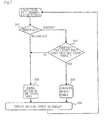
- Fig. 5 is a flowchart of an operation sequence of the information processing terminal according to the first example.
- Processing unit 32 judges whether or not information of contact coordinates has been input from touch panel 21 (step 101). If information of contact coordinates has been input from touch panel 21, then processing unit 32 judges whether information of contact coordinates has been input from touch panel 22 (step 102). If information of contact coordinates has not been input from touch panel 22, then processing unit 32 judges a single touch on touch penal 21 (step 103), and carries out a processing sequence (step 104).
- processing unit 32 judges whether or not information indicating contact with contact sensor 23 has been input (step 105). If information indicating contact with contact sensor 23 has been input, then processing unit 32 judges a single touch intermediate between touch panel 21 and touch panel 22 (step 106), and carries out a processing sequence (step 104).
- processing unit 32 judges a multi-touch action on touch panel 21 and touch panel 22 (step 107), and carries out a processing sequence (step 104).
- processing unit 32 judges whether information of contact coordinates has been input from touch panel 22 (step 108). If information of contact coordinates has been input from touch panel 22, then processing unit 32 judges a single touch on touch penal 22 (step 109), and carries out a processing sequence (step 104). If information of contact coordinates has not been input from touch panel 22, then processing unit 32 judges that no touch action has been made (step 110), and does not carry out a processing sequence.
- contact sensor 23 disposed between touch panel 21 and touch panel 22 is used to identify whether a single contacting object has contacted both touch panel 21 and touch panel 22 (single touch) such as when the contacting object is large and touch panels 21, 22 are highly sensitive, or such as when each of the contacting objects have separately contacted touch panel 21 and touch panel 22 (multi-touch).
- an action is made possible to draw a path across two touch panels with a contacting object such as a finger or the like.
- An information processing terminal has a basic configuration which is the same as the first example shown in Figs. 3 and 4(A), 4(B).
- Fig. 6 is a view showing the manner in which an action is made to draw a path across two touch panel displays according to the second example.
- Fig. 7 is a flowchart of an operation sequence of the information processing terminal according to the second example.
- an action may be made to draw a path across touch panel 21 and touch panel 22. It is assumed that, as shown in Fig. 6 , the user makes an action to slide his/her finger from touch panel 21 to touch panel 22, drawing a path chronologically successively across two touch panels 21, 22. The action may be used to select an object displayed on display 26 at the start point of the path, move the object from display 26 to display 27, and then complete the movement at the end point of the path. Alternatively, the action may be used to draw a path across touch panel 21 and touch panel 22, as an action to execute a gesture command for horizontally scrolling the screen.
- processing unit 32 judges whether the contacting object has contacted contact sensor 23 after the path was drawn on touch panel 21 (step 201).
- processing unit 32 judges whether or not the start point of the next path exists on the other touch panel (here, touch panel 22) (step 202). If the start point of a next path exists on touch panel 22, then processing unit 32 joins the paths on touch panels 21, 22 (step 203), and carries out a processing sequence (step 204).
- processing unit 32 judges that the action is a flicking or sliding action on one touch panel (step 205), and carries out a processing sequence (step 204).
- information processing terminal 10 is capable of properly recognizing whether a path representing a flicking action or the like is a path across touch panels 21, 22 or separate paths on respective touch panels 21, 22, and carrying out a processing sequence accordingly.
- an information processing terminal has two high-sensitivity touch panels capable of distinguishing whether a contacting object has contacted the touch panels or has come close to the touch panels, and outputting information of coordinates where the contacting object has contacted the touch panels or has come close to the touch panels.
- a contacting object such as a finger or the like is close to a touch panel, it is not in contact with the touch panel, but is in close proximity to the touch panel within a predetermined distance.
- the information processing terminal according to the third example has a basic configuration which is the same as the first example shown in Figs. 3 and 4(A), 4(B) .
- Fig. 8 is a flowchart of an operation sequence of the information processing terminal according to the third example.
- Processing unit 32 judges whether or not information of coordinates where a contacting object has contacted or has come close to touch panel 21 has been input from touch panel 21 (step 301). If information of contact or proximity coordinates has been input from touch panel 21, then processing unit 32 judges whether or not information of coordinates where a contacting object has come close to touch panel 22 has been input from touch panel 22 (step 302).
- processing unit 32 judges whether or not information indicating contact has been input from contact sensor 23 (step 303). If information indicating contact with contact sensor 23 has been input, then processing unit 32 judges a single touch to be intermediate between touch panel 21 and touch panel 22 (step 304), and carries out a processing sequence (step 305).
- processing unit 32 judges contact or proximity by a single touch on touch panel 21 (step 306 or step 307) depending on the judged result from step S301, and carries out a processing sequence (step 305).
- processing unit 32 judges whether or not information indicating contact has been input from contact sensor 23 (step 308). If information indicating contact with contact sensor 23 has not been input, then processing unit 32 judges contact or proximity by a single touch on touch panel 21 (step 306 or step 307) depending on the judged result from step S301, and carries out a processing sequence (step 305). If information indicating contact with contact sensor 23 has been input in step 308, then processing unit 32 judges contact of a single touch on touch panel 21 (step 306), and carries out a processing sequence (step 305).
- processing unit 32 judges whether or not information of proximity coordinates has been input from touch panel 22 (step 309). If information of proximity coordinates has been input from touch panel 22, then processing unit 32 judges whether or not information indicating contact with contact sensor 23 has been input (step 310).
- processing unit 32 judges a single touch on touch panel 22 (step 311), and carries out a processing sequence (step 305). If information indicating contact with contact sensor 23 has not been input, then processing unit 32 judges proximity to touch panel 22 (step 307).
- processing unit 32 judges that a touch action has not been made (step 301), and does not carry out a processing sequence.
- the information processing terminal judges contact, and carries out a processing sequence. Therefore, the information processing terminal can properly recognize a touch action on the gap between touch panels 21, 22.
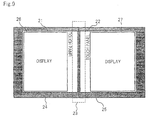
- Fig. 9 is a front elevational view of an information processing terminal according to a fourth example.
- touch panels 21, 22 and a portion corresponding to contact sensor 23 are integrally combined with each other.
- a display device such as a liquid crystal display device has a thickness and an outer peripheral frame
- casing 24 and casing 25 are disposed in the vicinity of each other, it is difficult to keep the display areas of display 26 and display 27 close to each other.
- casing 24 and casing 25 are disposed in the vicinity of each other, then it is possible to make the distance between touch panel 21 and touch panel 22. smaller than the distance between display 26 and display 27.
- touch panels 21, 22 are of a size that is greater than displays 26, 27, and a portion that is capable of detecting a touch action on touch panels 21, 22, but not displaying images, is disposed between displays 26, 27. This portion is used as contact sensor 23. According to the present example, as a result, there is essentially no gap between touch panel 21 and touch panel 22.
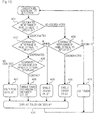
- Fig. 10 is a flowchart of an operation sequence of the information processing terminal according to the fourth example.
- Processing unit 32 judges whether or not information of contact coordinates within a range of touch panel 21 which is equal to display 26 has been input (step 401). If information of contact coordinates within a range of touch panel 21 which is equal to display 26 has been input, then processing unit 32 judges whether or not information of contact coordinates within a range of touch panel 22 which is equal to display 27 has been input (step 402). If information of contact coordinates within a range of touch panel 22 which is equal to display 27 has not been input, then processing unit 32 judges a single touch on touch penal 21 (step 403), and carries out a processing sequence (step 404).
- processing unit 32 judges whether or not information of contact coordinates outside ranges of touch panels 21, 22 which are equal to displays 26, 27 has been input (step 405). If information indicating contact with contact sensor 23 has been input, then processing unit 32 judges a single touch intermediate between touch panel 21 and touch panel 22 (step 406), and carries out a processing sequence (step 404).
- processing unit 32 judges a multi-touch action on touch panel 21 and touch panel 22 (step 407), and carries out a processing sequence (step 404).
- processing unit 32 judges whether or not information of contact coordinates within a range of touch panel 22, which is equal to display 27, has been input (step 408). If information of contact coordinates within a range of touch panel 22 which is equal to display 27 has not been input, then processing unit 32 judges that no touch action has been made (step 410), and does not carry out a processing sequence.
- the information processing terminal offers the same advantages as the first example even though it lacks physically independent contact sensor 23.
- contact sensor 23 disposed in the gap between displays 26, 27 may typically comprise a metal plate.
- the present invention is not limited to a metal plate.
- contact sensor 23 may comprise a pressure sensor or an electrostatic capacitance touch sensor. A pressure sensor is preferable if the user operates the information processing terminal while wearing gloves, and a metal contact sensor is preferable if the user operates the information processing terminal with his/her bare hands.
- Contact sensor 23 may comprise a sensor capable of outputting contact coordinates, and processing unit 32 may carry out processing sequences based on information of coordinates from touch panels 21, 22 and information of coordinates from contact sensor 23.
Landscapes
- Engineering & Computer Science (AREA)
- Theoretical Computer Science (AREA)
- General Engineering & Computer Science (AREA)
- Physics & Mathematics (AREA)
- Computer Hardware Design (AREA)
- Human Computer Interaction (AREA)
- General Physics & Mathematics (AREA)
- Mathematical Physics (AREA)
- User Interface Of Digital Computer (AREA)
- Position Input By Displaying (AREA)
Applications Claiming Priority (2)
| Application Number | Priority Date | Filing Date | Title |
|---|---|---|---|
| JP2011030970 | 2011-02-16 | ||
| PCT/JP2011/079007 WO2012111230A1 (ja) | 2011-02-16 | 2011-12-15 | 情報処理端末およびその制御方法 |
Publications (2)
| Publication Number | Publication Date |
|---|---|
| EP2677403A1 true EP2677403A1 (de) | 2013-12-25 |
| EP2677403A4 EP2677403A4 (de) | 2014-10-01 |
Family
ID=46672179
Family Applications (1)
| Application Number | Title | Priority Date | Filing Date |
|---|---|---|---|
| EP11858732.8A Ceased EP2677403A4 (de) | 2011-02-16 | 2011-12-15 | Informationsverarbeitungsendgerät und verfahren zu seiner steuerung |
Country Status (5)
| Country | Link |
|---|---|
| US (1) | US9122337B2 (de) |
| EP (1) | EP2677403A4 (de) |
| JP (1) | JP5846129B2 (de) |
| CN (1) | CN103384862B (de) |
| WO (1) | WO2012111230A1 (de) |
Families Citing this family (9)
| Publication number | Priority date | Publication date | Assignee | Title |
|---|---|---|---|---|
| CN205139862U (zh) | 2013-05-08 | 2016-04-06 | 阿尔卑斯电气株式会社 | 输入装置 |
| JP6236308B2 (ja) * | 2013-12-09 | 2017-11-22 | シャープ株式会社 | 情報表示制御装置、情報表示制御方法、プログラム及び情報表示システム |
| US20150185839A1 (en) * | 2013-12-28 | 2015-07-02 | Aleksander Magi | Multi-screen wearable electronic device for wireless communication |
| JP2015194983A (ja) * | 2014-03-25 | 2015-11-05 | パナソニックIpマネジメント株式会社 | 入力装置および表示装置 |
| KR102408828B1 (ko) * | 2015-09-03 | 2022-06-15 | 삼성디스플레이 주식회사 | 전자장치 및 그 구동방법 |
| KR102510395B1 (ko) * | 2015-12-01 | 2023-03-16 | 삼성디스플레이 주식회사 | 표시 장치 시스템 |
| JP6396567B2 (ja) * | 2017-10-30 | 2018-09-26 | シャープ株式会社 | 情報表示制御装置、情報表示制御方法及びプログラム |
| USD891427S1 (en) * | 2017-11-13 | 2020-07-28 | Samsung Display Co., Ltd. | Display device |
| JP6973025B2 (ja) * | 2017-12-20 | 2021-11-24 | コニカミノルタ株式会社 | 表示装置、画像処理装置及びプログラム |
Family Cites Families (6)
| Publication number | Priority date | Publication date | Assignee | Title |
|---|---|---|---|---|
| US5644469A (en) * | 1991-03-06 | 1997-07-01 | Canon Kabushiki Kaisha | Information processing apparatus support system with support arms which are capable of closing toward a keyboard unit or away from a keyboard unit |
| JPH0926832A (ja) * | 1995-07-07 | 1997-01-28 | Seiko Epson Corp | 情報処理装置および処理方法 |
| US20090322689A1 (en) * | 2008-06-30 | 2009-12-31 | Wah Yiu Kwong | Touch input across touch-sensitive display devices |
| JP2010176332A (ja) | 2009-01-28 | 2010-08-12 | Sony Corp | 情報処理装置、情報処理方法およびプログラム |
| JP5606686B2 (ja) | 2009-04-14 | 2014-10-15 | ソニー株式会社 | 情報処理装置、情報処理方法及びプログラム |
| JP5229083B2 (ja) | 2009-04-14 | 2013-07-03 | ソニー株式会社 | 情報処理装置、情報処理方法及びプログラム |
-
2011
- 2011-12-15 WO PCT/JP2011/079007 patent/WO2012111230A1/ja not_active Ceased
- 2011-12-15 EP EP11858732.8A patent/EP2677403A4/de not_active Ceased
- 2011-12-15 CN CN201180067743.5A patent/CN103384862B/zh active Active
- 2011-12-15 US US13/979,800 patent/US9122337B2/en active Active
- 2011-12-15 JP JP2012557795A patent/JP5846129B2/ja active Active
Also Published As
| Publication number | Publication date |
|---|---|
| US20130335359A1 (en) | 2013-12-19 |
| WO2012111230A1 (ja) | 2012-08-23 |
| US9122337B2 (en) | 2015-09-01 |
| CN103384862A (zh) | 2013-11-06 |
| CN103384862B (zh) | 2017-04-12 |
| EP2677403A4 (de) | 2014-10-01 |
| JP5846129B2 (ja) | 2016-01-20 |
| JPWO2012111230A1 (ja) | 2014-07-03 |
Similar Documents
| Publication | Publication Date | Title |
|---|---|---|
| US9122337B2 (en) | Information processing terminal, and method for controlling same | |
| US8810533B2 (en) | Systems and methods for receiving gesture inputs spanning multiple input devices | |
| EP2241963B1 (de) | Informationsverarbeitungsvorrichtung, Informationsverarbeitungs-Verfahren und -Programm | |
| US8289292B2 (en) | Electronic device with touch input function and touch input method thereof | |
| EP2817704B1 (de) | Vorrichtung und verfahren zur bestimmung der position einer benutzereingabe | |
| CN102870084B (zh) | 信息处理终端和用于该信息处理终端的操作控制方法 | |
| CN103345312B (zh) | 以智能终端同时作为主机、鼠标和触摸板的系统及方法 | |
| JP6319298B2 (ja) | 情報端末、表示制御方法及びそのプログラム | |
| CN107111440A (zh) | 信息处理装置及其控制方法 | |
| TWI460623B (zh) | 觸控式電子裝置及其相關控制方法 | |
| JP2012212230A (ja) | 電子機器 | |
| US20150002433A1 (en) | Method and apparatus for performing a zooming action | |
| JP5854928B2 (ja) | タッチ検出機能を有する電子機器、プログラムおよびタッチ検出機能を有する電子機器の制御方法 | |
| US20090160811A1 (en) | Information processing apparatus and input control method | |
| JP6304232B2 (ja) | 携帯電子機器、その制御方法及びプログラム | |
| JP5515951B2 (ja) | 情報処理装置、入力制御方法、プログラム及び記録媒体 | |
| CN105183353B (zh) | 用于触控设备的多点触控输入方法 | |
| JP2013020344A (ja) | 入力装置及び入力検出方法 | |
| KR101251578B1 (ko) | 광학 입력 장치 및 이를 이용한 명령 입력 방법 | |
| KR20140056868A (ko) | 터치스크린을 구비한 단말기 | |
| TW201638724A (zh) | 手持式電子裝置及其操作方法 | |
| KR20120134426A (ko) | 움직임 감지장치를 이용한 거래 정보 제공 방법 및 장치 | |
| CN107250954A (zh) | 信息处理装置、信息处理装置的控制方法及控制程序 |
Legal Events
| Date | Code | Title | Description |
|---|---|---|---|
| PUAI | Public reference made under article 153(3) epc to a published international application that has entered the european phase |
Free format text: ORIGINAL CODE: 0009012 |
|
| 17P | Request for examination filed |
Effective date: 20130809 |
|
| AK | Designated contracting states |
Kind code of ref document: A1 Designated state(s): AL AT BE BG CH CY CZ DE DK EE ES FI FR GB GR HR HU IE IS IT LI LT LU LV MC MK MT NL NO PL PT RO RS SE SI SK SM TR |
|
| DAX | Request for extension of the european patent (deleted) | ||
| A4 | Supplementary search report drawn up and despatched |
Effective date: 20140902 |
|
| RIC1 | Information provided on ipc code assigned before grant |
Ipc: G06F 1/16 20060101ALI20140827BHEP Ipc: G06F 3/0488 20130101ALI20140827BHEP Ipc: G06F 3/048 20130101AFI20140827BHEP Ipc: G06F 3/0486 20130101ALI20140827BHEP |
|
| RAP1 | Party data changed (applicant data changed or rights of an application transferred) |
Owner name: NEC CORPORATION |
|
| STAA | Information on the status of an ep patent application or granted ep patent |
Free format text: STATUS: EXAMINATION IS IN PROGRESS |
|
| 17Q | First examination report despatched |
Effective date: 20180118 |
|
| R17C | First examination report despatched (corrected) |
Effective date: 20180118 |
|
| APBK | Appeal reference recorded |
Free format text: ORIGINAL CODE: EPIDOSNREFNE |
|
| APBN | Date of receipt of notice of appeal recorded |
Free format text: ORIGINAL CODE: EPIDOSNNOA2E |
|
| APBR | Date of receipt of statement of grounds of appeal recorded |
Free format text: ORIGINAL CODE: EPIDOSNNOA3E |
|
| APAF | Appeal reference modified |
Free format text: ORIGINAL CODE: EPIDOSCREFNE |
|
| REG | Reference to a national code |
Ref country code: DE Ref legal event code: R003 |
|
| APBT | Appeal procedure closed |
Free format text: ORIGINAL CODE: EPIDOSNNOA9E |
|
| STAA | Information on the status of an ep patent application or granted ep patent |
Free format text: STATUS: THE APPLICATION HAS BEEN REFUSED |
|
| 18R | Application refused |
Effective date: 20230929 |