EP2851771A1 - Procédé et terminal d'affichage d'application - Google Patents
Procédé et terminal d'affichage d'application Download PDFInfo
- Publication number
- EP2851771A1 EP2851771A1 EP13754908.5A EP13754908A EP2851771A1 EP 2851771 A1 EP2851771 A1 EP 2851771A1 EP 13754908 A EP13754908 A EP 13754908A EP 2851771 A1 EP2851771 A1 EP 2851771A1
- Authority
- EP
- European Patent Office
- Prior art keywords
- video
- window
- terminal
- application
- displayed
- Prior art date
- Legal status (The legal status is an assumption and is not a legal conclusion. Google has not performed a legal analysis and makes no representation as to the accuracy of the status listed.)
- Withdrawn
Links
Images

Classifications
-
- H—ELECTRICITY
- H04—ELECTRIC COMMUNICATION TECHNIQUE
- H04N—PICTORIAL COMMUNICATION, e.g. TELEVISION
- H04N21/00—Selective content distribution, e.g. interactive television or video on demand [VOD]
- H04N21/40—Client devices specifically adapted for the reception of or interaction with content, e.g. set-top-box [STB]; Operations thereof
- H04N21/47—End-user applications
- H04N21/472—End-user interface for requesting content, additional data or services; End-user interface for interacting with content, e.g. for content reservation or setting reminders, for requesting event notification, for manipulating displayed content
- H04N21/47217—End-user interface for requesting content, additional data or services; End-user interface for interacting with content, e.g. for content reservation or setting reminders, for requesting event notification, for manipulating displayed content for controlling playback functions for recorded or on-demand content, e.g. using progress bars, mode or play-point indicators or bookmarks
-
- H—ELECTRICITY
- H04—ELECTRIC COMMUNICATION TECHNIQUE
- H04N—PICTORIAL COMMUNICATION, e.g. TELEVISION
- H04N21/00—Selective content distribution, e.g. interactive television or video on demand [VOD]
- H04N21/40—Client devices specifically adapted for the reception of or interaction with content, e.g. set-top-box [STB]; Operations thereof
- H04N21/47—End-user applications
- H04N21/472—End-user interface for requesting content, additional data or services; End-user interface for interacting with content, e.g. for content reservation or setting reminders, for requesting event notification, for manipulating displayed content
-
- G—PHYSICS
- G06—COMPUTING OR CALCULATING; COUNTING
- G06F—ELECTRIC DIGITAL DATA PROCESSING
- G06F3/00—Input arrangements for transferring data to be processed into a form capable of being handled by the computer; Output arrangements for transferring data from processing unit to output unit, e.g. interface arrangements
- G06F3/01—Input arrangements or combined input and output arrangements for interaction between user and computer
- G06F3/048—Interaction techniques based on graphical user interfaces [GUI]
- G06F3/0481—Interaction techniques based on graphical user interfaces [GUI] based on specific properties of the displayed interaction object or a metaphor-based environment, e.g. interaction with desktop elements like windows or icons, or assisted by a cursor's changing behaviour or appearance
-
- G—PHYSICS
- G06—COMPUTING OR CALCULATING; COUNTING
- G06F—ELECTRIC DIGITAL DATA PROCESSING
- G06F3/00—Input arrangements for transferring data to be processed into a form capable of being handled by the computer; Output arrangements for transferring data from processing unit to output unit, e.g. interface arrangements
- G06F3/01—Input arrangements or combined input and output arrangements for interaction between user and computer
- G06F3/048—Interaction techniques based on graphical user interfaces [GUI]
- G06F3/0484—Interaction techniques based on graphical user interfaces [GUI] for the control of specific functions or operations, e.g. selecting or manipulating an object, an image or a displayed text element, setting a parameter value or selecting a range
-
- H—ELECTRICITY
- H04—ELECTRIC COMMUNICATION TECHNIQUE
- H04N—PICTORIAL COMMUNICATION, e.g. TELEVISION
- H04N21/00—Selective content distribution, e.g. interactive television or video on demand [VOD]
- H04N21/40—Client devices specifically adapted for the reception of or interaction with content, e.g. set-top-box [STB]; Operations thereof
- H04N21/43—Processing of content or additional data, e.g. demultiplexing additional data from a digital video stream; Elementary client operations, e.g. monitoring of home network or synchronising decoder's clock; Client middleware
- H04N21/431—Generation of visual interfaces for content selection or interaction; Content or additional data rendering
- H04N21/4312—Generation of visual interfaces for content selection or interaction; Content or additional data rendering involving specific graphical features, e.g. screen layout, special fonts or colors, blinking icons, highlights or animations
-
- G—PHYSICS
- G06—COMPUTING OR CALCULATING; COUNTING
- G06F—ELECTRIC DIGITAL DATA PROCESSING
- G06F2203/00—Indexing scheme relating to G06F3/00 - G06F3/048
- G06F2203/048—Indexing scheme relating to G06F3/048
- G06F2203/04804—Transparency, e.g. transparent or translucent windows
-
- G—PHYSICS
- G06—COMPUTING OR CALCULATING; COUNTING
- G06F—ELECTRIC DIGITAL DATA PROCESSING
- G06F9/00—Arrangements for program control, e.g. control units
- G06F9/06—Arrangements for program control, e.g. control units using stored programs, i.e. using an internal store of processing equipment to receive or retain programs
- G06F9/44—Arrangements for executing specific programs
- G06F9/451—Execution arrangements for user interfaces
Definitions
- the method relates to a terminal technology, and more particular, to a method and terminal for displaying an application.
- the screens in the mobile terminals are usually small. Thus, when the windows occupy most, even the entire screens, other applications will not be displayed at the same time. Thus, the utilization of the screens in the mobile terminals is reduced.
- a method and terminal for displaying an application are provided according to examples of the present disclosure, so as to improve utilization of a screen in a terminal.
- a method for displaying an application includes:
- a terminal includes a receiving module and a creating module.
- the receiving module is to receive an operation command from a user, transmit the operation command to the creating module;
- the creating module is to when a video displaying command from the user is received, create a video decoder and a video displaying window, wherein the video displaying window is in a designated area in a user interface (UI) provided by the terminal; create a UI operation controller and a UI operation window when receiving an operation command for another application, wherein the entire UI operation window covers the entire designated area and has a same size with the designated area, or the entire UI operation window is within the designated area; configure an attribute of the UI operation window with transparency and semi-transparency, and configure the UI operation window on the video displaying window when both the video displaying window and the UI operation window are displayed in the UI.
- UI user interface
- a video being displayed is taken as a background of another application other than a video application, and the application other than the video application is displayed on the background of the video being displayed.
- a video application and the application other than the video application may be displayed on the screen of the terminal at the same time, so as to improve utilization of the screen of the terminal.
- a static image is taken as the background of the application, e.g., a blank background, a specific color background or an image background, which is much monotonous.
- a dynamic image is taken as the background, so that a form of the background is much rich.
- the technical solution is simple for implementation and easy for popularization and promotion.
- a method for displaying an application is provided for a problem existing in a conventional technology according to an example of the present disclosure.
- a background of another application is configured with a video being displayed, and the application rather than a video application is displayed on the background of the video being displayed.
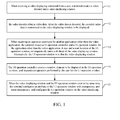
- FIG. 1 is a flowchart illustrating a method for displaying an application according to an example of the present disclosure. As shown in FIG. 1 , the method includes the following procedures.
- a terminal when receiving a video displaying command from a user, creates a video decoder and a video displaying window, wherein the video displaying command is an operation command for a video application, the video decoder is a UI (User Interface) operation controller for the video application, the video displaying window is a UI operation window of the video application.
- the UI operation controller is a program for controlling content displayed in the UI, or accepting and responding an operation of the user on the UI.
- the video application includes: a point-to-point real-time video communication application, a video-on-demand programming application and a local video application.
- the terminal When receiving the video displaying command from the user, the terminal respectively creates the video decoder and the video displaying window. In additional, the terminal further creates a video controller.
- the video displaying window occupies a designated area in the UI provided by the terminal.
- the video displaying window may occupy the entire UI, and the UI occupies the entire screen in the terminal.
- a start location (StartLeft, StartTop) is an upper left corner of the screen.
- the video decoder obtains video data. After the video data is decoded, the decoded video data is transmitted to the video displaying window to be displayed.
- the video controller may create a window element to be displayed in the video displaying window, and respond an operation for the video displaying window.
- the video controller may include a control function related with interaction with the UI and a set of status parameters.
- the status parameters may include the window element to be displayed in the video displaying window, e.g., a text, a picture, a button, and an attribute value of the window element, e.g., a location, a size, text content, and picture content.
- the control function may include a response function for a user's operation.
- the video controller may create a window element to be displayed in the video displaying window and responds a user's operation for the window element being displayed in the video displaying window, e.g., responding fast forwarding, responding pausing.
- the video decoder may decode the video data, and then transmit the decoded video data to the video displaying window to be displayed.
- the process that the video decoder obtains the video data may include the video decoder reading the video data stored.
- the process that the video decoder obtains the video data may also include the video decoder receiving the video data inputted via a hardware device.
- the video decoder may read the video data from a corresponding directory.
- the video controller may receive external video data, e.g., the video data inputted from a camera.
- the terminal when receiving an operation command for another application rather than the video application, the terminal creates a UI operation controller and a UI operation window for the application other than the video application.
- a size and a start location of the UI operation window are respectively same with those of the video displaying window.
- the UI operation window is within the video displaying window.
- the application other than the video application excludes the application that competes to use a same hardware in the terminal with the video application.
- the application may include an instant messaging application, a webpage browsing application, a document (e.g., word/PDF) processing application, an image processing application, a game application.
- the UI operation controller e.g., a programing for displaying data and controlling data transmission for an instant messaging tool
- the UI operation window e.g., an instant messaging charting window
- the area located by the UI operation window may be within the area of the video displaying window.
- the former method is usually adopted.
- the UI operation controller creates a window element to be displayed in the UI operation window, and responds an operation performed by the user for the UI operation window.
- the UI operation controller may include a control function related with interaction with a UI and a set of status parameters.
- the terminal configures an attribute of the UI operation window with transparency and semi-transparency, and configures the UI operation window on the video displaying window.
- the terminal may only receive the video displaying command. In another example, the terminal may only receive the operation command for the application X. In another example, the terminal may receive both the video displaying command and the operation command for the application X. When receiving a corresponding command, the terminal may perform a corresponding process as described above.
- both the video displaying command and the operation command for the application X are received, there are three subcases that: 1) the video displaying command is received firstly, and then the operation command for the application X is received; 2) the operation command for the application X is received firstly, and then the video displaying command is received; 3) the video displaying command and the operation command for the application X are received at the same time, e.g., a video displaying function and a text charting function may be integrated in a software, the video displaying command and the operation command for the application X are received at the same time when the software is started.
- the terminal may further configure the attribute of the UI operation window with transparency, and configure the UI operation window on the video displaying window. That is, the video being displayed may be a background for the application X, the application X is presented on the background of the video being displayed.
- FIG. 2 is a schematic diagram illustrating relationships among various elements created according to an example in FIG. 1 of the present disclosure. As shown in FIG. 2 , the size and the start location of the UI operation window are the same as those of the video displaying window. A description way as shown in FIG. 2 may make the UI operation window distinguished from the video displaying window.
- a process at block 11 may be performed after the process at block 13. In another example, the process at block 11 and the process at block 13 may be performed at the same time.
- the video decoder, the video controller, the video displaying window, UI operation controller and the UI operation window may be created according to methods in the conventional technology.
- FIG. 3 is a schematic diagram illustrating a structure of a terminal according to an example of the present disclosure. As shown in FIG. 3 , the terminal includes a receiving module 31 and a creating module 32.
- the receiving module 31 is to receive an operation command from a user, and transmits the operation command to the creating module 32.
- the creating module 32 is to creating a video decoder and a video displaying window when receiving a video displaying command for a video application, wherein the video decoder is to obtain video data and transmit the video data to be displayed in the video displaying window after the video data is decoded.
- the creating module 32 When receiving an operation command for another application rather than the video application, the creating module 32 is to create a UI operation controller and a UI operation window for the application other than the video application. A size and a start location of the UI operation window are respectively same with those of the video displaying window, or, an area where the UI operation window locates is within an area where the video displaying window locates.
- the creating module 32 is to create a window element to be displayed in the UI operation window and respond an operation from the user for the UI operation window through the UI operation controller.
- the creating module 32 is to configure an attribute of the UI operation window with transparency, and configure the UI operation window overlaid on the video displaying window.
- the video displaying window may occupy the entire UI.
- the UI may occupy the entire screen of the terminal.
- the video application includes: a point-to-point real-time video communication application, a video-on-demand programming application and a local video application.
- the creating module 32 is further to create a video controller when the video decoder and the video displaying window are created, create a window element to be displayed in the window displaying window and respond an operation performed for the video displaying window by the user through the video controller.
- a method described in the method example above may apply to the terminal as shown in FIG. 3 , which is not described repeatedly herein.
- the terminal as shown in FIG. 3 may be a mobile terminal, e.g., a phone, a laptop, a tablet PC, a POS (Point of Sales) machine, an on-board computer.
- the terminal may also be a terminal not moved, e.g., a desktop computer and a server, to which the technical solution may apply.
- a video being displayed is taken as a background of another application other than the video application, and the application other than the video application is displayed on the background of the video being displayed.
- a video displaying application and the application other than the video application may be displayed on the screen of the terminal at the same time, so as to improve utilization of the screen of the terminal.
- a static image is taken as the background of the application, e.g., a blank background, a specific color background or an image background, which is much monotonous.
- a dynamic image is taken as the background, so that a form of the background is much rich.
- the technical solution is simple for implementation and easy for popularization and promotion.
- a machine readable storage medium to store instructions for a machine to execute a method for displaying an application according to the present disclosure.
- a system or an apparatus with a storage medium may be provided. Codes of software program for executing functions of any of examples of the present disclosure, so that a computer (or a CPU or a MPU) in the system or the apparatus reads and execute the codes of the program stored in the storage medium.
- the codes of the program read from the storage medium may implement functions of any of examples.
- the codes of the program and the storage medium storing the codes of the program are a part to implement the technical solution for displaying an application.
- the storage medium for storing the codes of the program includes a floppy disk, a hard disk, a magneto-optical disk, an optical disk (e.g., CD-ROM, CD-R, CD-RW, DVD-ROM, DVD-RAM, DVD-RW, DVD + RW), a magnetic tape, a nonvolatile memory card, and ROM.
- the codes of the program may be downloaded from a computer as a server through a communication network.
- the codes of the program read from the storage medium may be written into memory in an expansion board inserted into the computer, afterwards, the instructions based on the codes of the program may make a CPU installed in the expansion board or an expansion unit execute all or part of practical operations.
- the technical solution of the present disclosure when searching out a user, if a time when a user transmits a geographical location itself is far from the current time, it is considered that the user may change the geographical location. Thus, the user may be not in a searching result so as to improve availability of the searching result. Moreover, a request stored may be deleted so as to efficiently protect privacy such as a user's geographical location and save a storage space of a server. Moreover, the technical solution is simple for implementation and easy for popularization and promotion.
Landscapes
- Engineering & Computer Science (AREA)
- General Engineering & Computer Science (AREA)
- Theoretical Computer Science (AREA)
- Human Computer Interaction (AREA)
- Multimedia (AREA)
- Signal Processing (AREA)
- Physics & Mathematics (AREA)
- General Physics & Mathematics (AREA)
- Databases & Information Systems (AREA)
- User Interface Of Digital Computer (AREA)
- Digital Computer Display Output (AREA)
Applications Claiming Priority (2)
| Application Number | Priority Date | Filing Date | Title |
|---|---|---|---|
| CN201210052872.3A CN103297855B (zh) | 2012-03-02 | 2012-03-02 | 一种应用展示方法以及一种终端 |
| PCT/CN2013/071713 WO2013127308A1 (fr) | 2012-03-02 | 2013-02-21 | Procédé et terminal d'affichage d'application |
Publications (2)
| Publication Number | Publication Date |
|---|---|
| EP2851771A4 EP2851771A4 (fr) | 2015-03-25 |
| EP2851771A1 true EP2851771A1 (fr) | 2015-03-25 |
Family
ID=49081626
Family Applications (1)
| Application Number | Title | Priority Date | Filing Date |
|---|---|---|---|
| EP13754908.5A Withdrawn EP2851771A1 (fr) | 2012-03-02 | 2013-02-21 | Procédé et terminal d'affichage d'application |
Country Status (12)
| Country | Link |
|---|---|
| US (1) | US9936257B2 (fr) |
| EP (1) | EP2851771A1 (fr) |
| JP (1) | JP2015509633A (fr) |
| CN (1) | CN103297855B (fr) |
| AP (1) | AP2014007965A0 (fr) |
| AU (1) | AU2013225479B2 (fr) |
| CA (1) | CA2865960C (fr) |
| IN (1) | IN2014MN01963A (fr) |
| MX (1) | MX351302B (fr) |
| SG (1) | SG11201405031WA (fr) |
| WO (1) | WO2013127308A1 (fr) |
| ZA (1) | ZA201406645B (fr) |
Families Citing this family (14)
| Publication number | Priority date | Publication date | Assignee | Title |
|---|---|---|---|---|
| US9608944B2 (en) * | 2013-08-09 | 2017-03-28 | Beijing Lenovo Software Ltd. | Information processing apparatus and information processing method |
| CN104469513A (zh) * | 2013-09-25 | 2015-03-25 | 联想(北京)有限公司 | 一种显示方法及电子设备 |
| CN104394480A (zh) * | 2014-03-10 | 2015-03-04 | 贵阳朗玛信息技术股份有限公司 | 一种在移动终端上实现聊天的方法及装置 |
| US9516269B2 (en) | 2014-06-04 | 2016-12-06 | Apple Inc. | Instant video communication connections |
| WO2015187458A1 (fr) * | 2014-06-04 | 2015-12-10 | Apple Inc. | Affichage dynamique de données de communication vidéo |
| CN105323626B (zh) * | 2014-07-03 | 2018-04-10 | 深圳Tcl新技术有限公司 | 视频节目播放方法及装置 |
| CN104822077B (zh) * | 2014-12-04 | 2019-01-08 | 腾讯科技(北京)有限公司 | 客户端的运行方法及客户端 |
| CN105828160B (zh) * | 2016-04-01 | 2017-09-12 | 腾讯科技(深圳)有限公司 | 视频播放方法及装置 |
| CN105979339B (zh) * | 2016-05-25 | 2020-07-14 | 腾讯科技(深圳)有限公司 | 一种窗口显示方法及客户端 |
| CN106131686B (zh) * | 2016-06-27 | 2019-06-25 | 北京奇虎科技有限公司 | 利用寄生工具包实现的视频播放模式切换方法及装置 |
| CN108269222A (zh) * | 2016-12-30 | 2018-07-10 | 华为技术有限公司 | 一种窗口渲染方法及终端 |
| CN109600659B (zh) | 2018-12-17 | 2021-08-31 | 北京小米移动软件有限公司 | 播放视频时的操作方法、装置、设备及存储介质 |
| CN112584195B (zh) * | 2019-09-29 | 2023-06-09 | 中兴通讯股份有限公司 | 视频播放和处理方法、装置、云化机顶盒、云平台和介质 |
| CN111541948A (zh) * | 2020-04-10 | 2020-08-14 | 早安科技(广州)有限公司 | 一种文字与视频双线程显示方法及装置 |
Family Cites Families (35)
| Publication number | Priority date | Publication date | Assignee | Title |
|---|---|---|---|---|
| EP0605945B1 (fr) * | 1992-12-15 | 1997-12-29 | Sun Microsystems, Inc. | Présentation d'informations dans un système d'affichage à fenêtres transparentes |
| JPH07121345A (ja) * | 1993-10-26 | 1995-05-12 | Canon Inc | マルチウインドウ表示装置 |
| US5768539A (en) * | 1994-05-27 | 1998-06-16 | Bell Atlantic Network Services, Inc. | Downloading applications software through a broadcast channel |
| JPH07334342A (ja) * | 1994-06-07 | 1995-12-22 | Sharp Corp | 画像データ表示装置 |
| JPH08106373A (ja) * | 1994-10-05 | 1996-04-23 | Nec Eng Ltd | ウィンドウ表示変更制御装置 |
| IT1268196B1 (it) * | 1994-12-23 | 1997-02-21 | Sip | Dispositivo per la ricetrasmissione e decodifica di sequenze audiovisivi compresse. |
| US5602597A (en) * | 1995-05-31 | 1997-02-11 | International Business Machines Corporation | Video receiver display of video overlaying menu |
| US5539479A (en) * | 1995-05-31 | 1996-07-23 | International Business Machines Corporation | Video receiver display of cursor and menu overlaying video |
| US5896140A (en) * | 1995-07-05 | 1999-04-20 | Sun Microsystems, Inc. | Method and apparatus for simultaneously displaying graphics and video data on a computer display |
| US5903261A (en) * | 1996-06-20 | 1999-05-11 | Data Translation, Inc. | Computer based video system |
| JPH11249782A (ja) * | 1998-03-04 | 1999-09-17 | Toshiba Corp | 複数のウインドウを持つ端末装置、ウインドウ表示方法及びウインドウ表示制御プログラムを記録した記録媒体 |
| JP4889857B2 (ja) * | 1998-07-20 | 2012-03-07 | トムソン ライセンシング | 多チャンネルディジタルテレビジョンシステム用ナビゲーションシステム |
| US20050166232A1 (en) * | 1999-04-21 | 2005-07-28 | Lamkin Allan B... | Presentation of media content from multiple media sources |
| CN1475081A (zh) * | 2000-10-11 | 2004-02-11 | 联合视频制品公司 | 补充按需式媒体的系统和方法 |
| US20020073123A1 (en) * | 2000-12-08 | 2002-06-13 | Wen-Sung Tsai | Method for displaying overlapping documents in a computer environment |
| US6981227B1 (en) * | 2002-02-04 | 2005-12-27 | Mircrosoft Corporation | Systems and methods for a dimmable user interface |
| US8065614B2 (en) * | 2003-04-09 | 2011-11-22 | Ati Technologies, Inc. | System for displaying video and method thereof |
| US7492386B2 (en) * | 2004-11-05 | 2009-02-17 | Sony Ericsson Mobile Communications Ab | Display management during a multi-party conversation |
| US8069466B2 (en) * | 2005-08-04 | 2011-11-29 | Nds Limited | Advanced digital TV system |
| KR100754828B1 (ko) * | 2005-08-31 | 2007-09-04 | 에스케이 텔레콤주식회사 | 사용자 취향에 따라 사용자 인터페이스 설정이 가능한이동통신 단말기 및 방법 |
| US7418668B2 (en) * | 2005-11-30 | 2008-08-26 | Microsoft Corporation | Glass appearance window frame colorization |
| WO2007138423A2 (fr) * | 2006-05-25 | 2007-12-06 | Shuki Binyamin | Procédé et système d'accès à distance à des applications |
| US20100182505A1 (en) * | 2007-06-11 | 2010-07-22 | Trident Microsystems ( Far East) Ltd. a corporation | Video receiver |
| KR101299639B1 (ko) * | 2007-08-17 | 2013-08-23 | 피닉스 미르 테크놀로지 피티와이 엘티디 | 콘텐츠 전달 방법 및 시스템 |
| JP2009177603A (ja) * | 2008-01-25 | 2009-08-06 | Toshiba Corp | 情報処理装置および表示制御方法 |
| CN101500125B (zh) * | 2008-02-03 | 2011-03-09 | 突触计算机系统(上海)有限公司 | 用户终端上用于在视频显示时提供用户交互的方法及装置 |
| US8125495B2 (en) * | 2008-04-17 | 2012-02-28 | Microsoft Corporation | Displaying user interface elements having transparent effects |
| US8266522B2 (en) * | 2009-04-17 | 2012-09-11 | Jokaroo Entertainment Inc. | Method and device for temporally displaying advertising content on a webpage |
| JP4786739B2 (ja) * | 2009-10-21 | 2011-10-05 | 株式会社東芝 | 情報処理装置および映像コンテンツデータ再生方法 |
| US9727226B2 (en) * | 2010-04-02 | 2017-08-08 | Nokia Technologies Oy | Methods and apparatuses for providing an enhanced user interface |
| US20120144424A1 (en) * | 2010-12-07 | 2012-06-07 | Prasanna Ganesan | On-demand user-interface |
| US9715326B2 (en) | 2011-03-16 | 2017-07-25 | Peking University | Superimposed annotation output |
| CN102207825A (zh) * | 2011-05-23 | 2011-10-05 | 昆山富泰科电脑有限公司 | 在便携式多功能设备上进行多应用切换的方法与用户图形界面 |
| WO2012106868A1 (fr) * | 2011-07-06 | 2012-08-16 | 华为技术有限公司 | Procédé, appareil et terminal mobile pour la commutation de contenu de lecture vidéo |
| US20130279877A1 (en) * | 2012-04-19 | 2013-10-24 | Qnx Software Systems Limited | System and Method Of Video Decoder Resource Sharing |
-
2012
- 2012-03-02 CN CN201210052872.3A patent/CN103297855B/zh active Active
-
2013
- 2013-02-21 CA CA2865960A patent/CA2865960C/fr active Active
- 2013-02-21 JP JP2014559072A patent/JP2015509633A/ja active Pending
- 2013-02-21 EP EP13754908.5A patent/EP2851771A1/fr not_active Withdrawn
- 2013-02-21 AP AP2014007965A patent/AP2014007965A0/xx unknown
- 2013-02-21 WO PCT/CN2013/071713 patent/WO2013127308A1/fr not_active Ceased
- 2013-02-21 SG SG11201405031WA patent/SG11201405031WA/en unknown
- 2013-02-21 AU AU2013225479A patent/AU2013225479B2/en active Active
- 2013-02-21 MX MX2014010450A patent/MX351302B/es active IP Right Grant
-
2014
- 2014-09-02 US US14/475,476 patent/US9936257B2/en active Active
- 2014-09-10 ZA ZA2014/06645A patent/ZA201406645B/en unknown
- 2014-09-30 IN IN1963MUN2014 patent/IN2014MN01963A/en unknown
Also Published As
| Publication number | Publication date |
|---|---|
| US9936257B2 (en) | 2018-04-03 |
| CA2865960A1 (fr) | 2013-09-06 |
| CN103297855B (zh) | 2015-05-20 |
| IN2014MN01963A (fr) | 2015-07-10 |
| ZA201406645B (en) | 2016-02-24 |
| MX351302B (es) | 2017-10-09 |
| AP2014007965A0 (en) | 2014-09-30 |
| CN103297855A (zh) | 2013-09-11 |
| EP2851771A4 (fr) | 2015-03-25 |
| AU2013225479A1 (en) | 2014-10-23 |
| CA2865960C (fr) | 2018-03-13 |
| MX2014010450A (es) | 2014-10-13 |
| AU2013225479B2 (en) | 2018-06-14 |
| US20140372890A1 (en) | 2014-12-18 |
| WO2013127308A1 (fr) | 2013-09-06 |
| JP2015509633A (ja) | 2015-03-30 |
| SG11201405031WA (en) | 2014-09-26 |
Similar Documents
| Publication | Publication Date | Title |
|---|---|---|
| US9936257B2 (en) | Application display method and terminal | |
| KR102809232B1 (ko) | 컨텐츠를 처리하는 방법 및 이를 위한 이동 통신 장치 및 저장 매체 | |
| CN108924626B (zh) | 图片生成方法、装置、设备及存储介质 | |
| US9569097B2 (en) | Video streaming in a web browser | |
| CN108924622B (zh) | 一种视频处理方法及其设备、存储介质、电子设备 | |
| CN107111496B (zh) | 可定制刀片应用 | |
| EP3442238A1 (fr) | Procédé et dispositif de capture de trame vidéo | |
| KR102278932B1 (ko) | 애플리케이션 프로그램 처리 방법 및 단말 디바이스 | |
| US9674580B2 (en) | Method and system for recording video directly into an HTML framework | |
| EP3093755B1 (fr) | Terminal mobile et son procédé de contrôle | |
| EP3413184A1 (fr) | Terminal mobile et son procédé de commande | |
| US20140132634A1 (en) | Method And Apparatus For Recognizing Target Object At Machine Side in Human-Machine Interaction | |
| US20140363098A1 (en) | Image correlation method and electronic device thereof | |
| US20110252302A1 (en) | Fitting network content onto a reduced-size screen | |
| KR20140092873A (ko) | 적응식 입력 언어 전환 | |
| KR20160005609A (ko) | 그래픽 사용자 인터페이스를 표시하는 방법 및 이를 지원하는 전자장치 | |
| EP4243427A1 (fr) | Procédé et appareil de génération de vidéo, dispositif et support d'enregistrement | |
| KR101968977B1 (ko) | 카툰 제공 시스템, 카툰 제공 장치 및 카툰 제공 방법 | |
| CN104571877A (zh) | 一种页面的显示处理方法及装置 | |
| US20220229528A1 (en) | Method, apparatus, and system for generating resource value transfer request | |
| CN106598410B (zh) | 电子书的显示方法、装置和终端设备 | |
| US20170161871A1 (en) | Method and electronic device for previewing picture on intelligent terminal | |
| CN113157468B (zh) | 跨进程信息处理方法、控制器、终端和存储介质 | |
| US20160077795A1 (en) | Display apparatus and method of controlling thereof | |
| OA17627A (en) | Application display method and terminal. |
Legal Events
| Date | Code | Title | Description |
|---|---|---|---|
| PUAI | Public reference made under article 153(3) epc to a published international application that has entered the european phase |
Free format text: ORIGINAL CODE: 0009012 |
|
| PUAB | Information related to the publication of an a document modified or deleted |
Free format text: ORIGINAL CODE: 0009199EPPU |
|
| PUAI | Public reference made under article 153(3) epc to a published international application that has entered the european phase |
Free format text: ORIGINAL CODE: 0009012 |
|
| 17P | Request for examination filed |
Effective date: 20140923 |
|
| A4 | Supplementary search report drawn up and despatched |
Effective date: 20150109 |
|
| AK | Designated contracting states |
Kind code of ref document: A1 Designated state(s): AL AT BE BG CH CY CZ DE DK EE ES FI FR GB GR HR HU IE IS IT LI LT LU LV MC MK MT NL NO PL PT RO RS SE SI SK SM TR |
|
| AX | Request for extension of the european patent |
Extension state: BA ME |
|
| DAX | Request for extension of the european patent (deleted) | ||
| 17Q | First examination report despatched |
Effective date: 20151130 |
|
| STAA | Information on the status of an ep patent application or granted ep patent |
Free format text: STATUS: THE APPLICATION HAS BEEN WITHDRAWN |
|
| 18W | Application withdrawn |
Effective date: 20170113 |