EP2927902A1 - Anzeigevorrichtung, anzeigeverfahren und computerprogramm - Google Patents
Anzeigevorrichtung, anzeigeverfahren und computerprogramm Download PDFInfo
- Publication number
- EP2927902A1 EP2927902A1 EP13859511.1A EP13859511A EP2927902A1 EP 2927902 A1 EP2927902 A1 EP 2927902A1 EP 13859511 A EP13859511 A EP 13859511A EP 2927902 A1 EP2927902 A1 EP 2927902A1
- Authority
- EP
- European Patent Office
- Prior art keywords
- content
- screen
- display
- displayed
- pieces
- Prior art date
- Legal status (The legal status is an assumption and is not a legal conclusion. Google has not performed a legal analysis and makes no representation as to the accuracy of the status listed.)
- Ceased
Links
Images









Classifications
-
- H—ELECTRICITY
- H04—ELECTRIC COMMUNICATION TECHNIQUE
- H04N—PICTORIAL COMMUNICATION, e.g. TELEVISION
- H04N21/00—Selective content distribution, e.g. interactive television or video on demand [VOD]
- H04N21/40—Client devices specifically adapted for the reception of or interaction with content, e.g. set-top-box [STB]; Operations thereof
- H04N21/47—End-user applications
-
- G—PHYSICS
- G09—EDUCATION; CRYPTOGRAPHY; DISPLAY; ADVERTISING; SEALS
- G09G—ARRANGEMENTS OR CIRCUITS FOR CONTROL OF INDICATING DEVICES USING STATIC MEANS TO PRESENT VARIABLE INFORMATION
- G09G5/00—Control arrangements or circuits for visual indicators common to cathode-ray tube indicators and other visual indicators
- G09G5/14—Display of multiple viewports
-
- G—PHYSICS
- G06—COMPUTING OR CALCULATING; COUNTING
- G06F—ELECTRIC DIGITAL DATA PROCESSING
- G06F3/00—Input arrangements for transferring data to be processed into a form capable of being handled by the computer; Output arrangements for transferring data from processing unit to output unit, e.g. interface arrangements
- G06F3/01—Input arrangements or combined input and output arrangements for interaction between user and computer
- G06F3/017—Gesture based interaction, e.g. based on a set of recognized hand gestures
-
- G—PHYSICS
- G06—COMPUTING OR CALCULATING; COUNTING
- G06F—ELECTRIC DIGITAL DATA PROCESSING
- G06F3/00—Input arrangements for transferring data to be processed into a form capable of being handled by the computer; Output arrangements for transferring data from processing unit to output unit, e.g. interface arrangements
- G06F3/01—Input arrangements or combined input and output arrangements for interaction between user and computer
- G06F3/048—Interaction techniques based on graphical user interfaces [GUI]
-
- G—PHYSICS
- G06—COMPUTING OR CALCULATING; COUNTING
- G06F—ELECTRIC DIGITAL DATA PROCESSING
- G06F3/00—Input arrangements for transferring data to be processed into a form capable of being handled by the computer; Output arrangements for transferring data from processing unit to output unit, e.g. interface arrangements
- G06F3/01—Input arrangements or combined input and output arrangements for interaction between user and computer
- G06F3/048—Interaction techniques based on graphical user interfaces [GUI]
- G06F3/0484—Interaction techniques based on graphical user interfaces [GUI] for the control of specific functions or operations, e.g. selecting or manipulating an object, an image or a displayed text element, setting a parameter value or selecting a range
- G06F3/0485—Scrolling or panning
-
- G—PHYSICS
- G06—COMPUTING OR CALCULATING; COUNTING
- G06F—ELECTRIC DIGITAL DATA PROCESSING
- G06F3/00—Input arrangements for transferring data to be processed into a form capable of being handled by the computer; Output arrangements for transferring data from processing unit to output unit, e.g. interface arrangements
- G06F3/01—Input arrangements or combined input and output arrangements for interaction between user and computer
- G06F3/048—Interaction techniques based on graphical user interfaces [GUI]
- G06F3/0487—Interaction techniques based on graphical user interfaces [GUI] using specific features provided by the input device, e.g. functions controlled by the rotation of a mouse with dual sensing arrangements, or of the nature of the input device, e.g. tap gestures based on pressure sensed by a digitiser
- G06F3/0488—Interaction techniques based on graphical user interfaces [GUI] using specific features provided by the input device, e.g. functions controlled by the rotation of a mouse with dual sensing arrangements, or of the nature of the input device, e.g. tap gestures based on pressure sensed by a digitiser using a touch-screen or digitiser, e.g. input of commands through traced gestures
-
- G—PHYSICS
- G06—COMPUTING OR CALCULATING; COUNTING
- G06F—ELECTRIC DIGITAL DATA PROCESSING
- G06F3/00—Input arrangements for transferring data to be processed into a form capable of being handled by the computer; Output arrangements for transferring data from processing unit to output unit, e.g. interface arrangements
- G06F3/14—Digital output to display device ; Cooperation and interconnection of the display device with other functional units
-
- G—PHYSICS
- G06—COMPUTING OR CALCULATING; COUNTING
- G06F—ELECTRIC DIGITAL DATA PROCESSING
- G06F3/00—Input arrangements for transferring data to be processed into a form capable of being handled by the computer; Output arrangements for transferring data from processing unit to output unit, e.g. interface arrangements
- G06F3/14—Digital output to display device ; Cooperation and interconnection of the display device with other functional units
- G06F3/1423—Digital output to display device ; Cooperation and interconnection of the display device with other functional units controlling a plurality of local displays, e.g. CRT and flat panel display
-
- G—PHYSICS
- G09—EDUCATION; CRYPTOGRAPHY; DISPLAY; ADVERTISING; SEALS
- G09G—ARRANGEMENTS OR CIRCUITS FOR CONTROL OF INDICATING DEVICES USING STATIC MEANS TO PRESENT VARIABLE INFORMATION
- G09G5/00—Control arrangements or circuits for visual indicators common to cathode-ray tube indicators and other visual indicators
-
- G—PHYSICS
- G09—EDUCATION; CRYPTOGRAPHY; DISPLAY; ADVERTISING; SEALS
- G09G—ARRANGEMENTS OR CIRCUITS FOR CONTROL OF INDICATING DEVICES USING STATIC MEANS TO PRESENT VARIABLE INFORMATION
- G09G5/00—Control arrangements or circuits for visual indicators common to cathode-ray tube indicators and other visual indicators
- G09G5/36—Control arrangements or circuits for visual indicators common to cathode-ray tube indicators and other visual indicators characterised by the display of a graphic pattern, e.g. using an all-points-addressable [APA] memory
-
- G—PHYSICS
- G09—EDUCATION; CRYPTOGRAPHY; DISPLAY; ADVERTISING; SEALS
- G09G—ARRANGEMENTS OR CIRCUITS FOR CONTROL OF INDICATING DEVICES USING STATIC MEANS TO PRESENT VARIABLE INFORMATION
- G09G5/00—Control arrangements or circuits for visual indicators common to cathode-ray tube indicators and other visual indicators
- G09G5/36—Control arrangements or circuits for visual indicators common to cathode-ray tube indicators and other visual indicators characterised by the display of a graphic pattern, e.g. using an all-points-addressable [APA] memory
- G09G5/38—Control arrangements or circuits for visual indicators common to cathode-ray tube indicators and other visual indicators characterised by the display of a graphic pattern, e.g. using an all-points-addressable [APA] memory with means for controlling the display position
-
- H—ELECTRICITY
- H04—ELECTRIC COMMUNICATION TECHNIQUE
- H04N—PICTORIAL COMMUNICATION, e.g. TELEVISION
- H04N21/00—Selective content distribution, e.g. interactive television or video on demand [VOD]
- H04N21/40—Client devices specifically adapted for the reception of or interaction with content, e.g. set-top-box [STB]; Operations thereof
- H04N21/41—Structure of client; Structure of client peripherals
- H04N21/422—Input-only peripherals, i.e. input devices connected to specially adapted client devices, e.g. global positioning system [GPS]
- H04N21/42201—Input-only peripherals, i.e. input devices connected to specially adapted client devices, e.g. global positioning system [GPS] biosensors, e.g. heat sensor for presence detection, EEG sensors or any limb activity sensors worn by the user
-
- H—ELECTRICITY
- H04—ELECTRIC COMMUNICATION TECHNIQUE
- H04N—PICTORIAL COMMUNICATION, e.g. TELEVISION
- H04N21/00—Selective content distribution, e.g. interactive television or video on demand [VOD]
- H04N21/40—Client devices specifically adapted for the reception of or interaction with content, e.g. set-top-box [STB]; Operations thereof
- H04N21/41—Structure of client; Structure of client peripherals
- H04N21/422—Input-only peripherals, i.e. input devices connected to specially adapted client devices, e.g. global positioning system [GPS]
- H04N21/42202—Input-only peripherals, i.e. input devices connected to specially adapted client devices, e.g. global positioning system [GPS] environmental sensors, e.g. for detecting temperature, luminosity, pressure, earthquakes
-
- H—ELECTRICITY
- H04—ELECTRIC COMMUNICATION TECHNIQUE
- H04N—PICTORIAL COMMUNICATION, e.g. TELEVISION
- H04N21/00—Selective content distribution, e.g. interactive television or video on demand [VOD]
- H04N21/40—Client devices specifically adapted for the reception of or interaction with content, e.g. set-top-box [STB]; Operations thereof
- H04N21/41—Structure of client; Structure of client peripherals
- H04N21/422—Input-only peripherals, i.e. input devices connected to specially adapted client devices, e.g. global positioning system [GPS]
- H04N21/42203—Input-only peripherals, i.e. input devices connected to specially adapted client devices, e.g. global positioning system [GPS] sound input device, e.g. microphone
-
- H—ELECTRICITY
- H04—ELECTRIC COMMUNICATION TECHNIQUE
- H04N—PICTORIAL COMMUNICATION, e.g. TELEVISION
- H04N21/00—Selective content distribution, e.g. interactive television or video on demand [VOD]
- H04N21/40—Client devices specifically adapted for the reception of or interaction with content, e.g. set-top-box [STB]; Operations thereof
- H04N21/41—Structure of client; Structure of client peripherals
- H04N21/422—Input-only peripherals, i.e. input devices connected to specially adapted client devices, e.g. global positioning system [GPS]
- H04N21/42204—User interfaces specially adapted for controlling a client device through a remote control device; Remote control devices therefor
-
- H—ELECTRICITY
- H04—ELECTRIC COMMUNICATION TECHNIQUE
- H04N—PICTORIAL COMMUNICATION, e.g. TELEVISION
- H04N21/00—Selective content distribution, e.g. interactive television or video on demand [VOD]
- H04N21/40—Client devices specifically adapted for the reception of or interaction with content, e.g. set-top-box [STB]; Operations thereof
- H04N21/41—Structure of client; Structure of client peripherals
- H04N21/422—Input-only peripherals, i.e. input devices connected to specially adapted client devices, e.g. global positioning system [GPS]
- H04N21/42204—User interfaces specially adapted for controlling a client device through a remote control device; Remote control devices therefor
- H04N21/42206—User interfaces specially adapted for controlling a client device through a remote control device; Remote control devices therefor characterized by hardware details
- H04N21/42224—Touch pad or touch panel provided on the remote control
-
- H—ELECTRICITY
- H04—ELECTRIC COMMUNICATION TECHNIQUE
- H04N—PICTORIAL COMMUNICATION, e.g. TELEVISION
- H04N21/00—Selective content distribution, e.g. interactive television or video on demand [VOD]
- H04N21/40—Client devices specifically adapted for the reception of or interaction with content, e.g. set-top-box [STB]; Operations thereof
- H04N21/43—Processing of content or additional data, e.g. demultiplexing additional data from a digital video stream; Elementary client operations, e.g. monitoring of home network or synchronising decoder's clock; Client middleware
- H04N21/431—Generation of visual interfaces for content selection or interaction; Content or additional data rendering
- H04N21/4312—Generation of visual interfaces for content selection or interaction; Content or additional data rendering involving specific graphical features, e.g. screen layout, special fonts or colors, blinking icons, highlights or animations
-
- H—ELECTRICITY
- H04—ELECTRIC COMMUNICATION TECHNIQUE
- H04N—PICTORIAL COMMUNICATION, e.g. TELEVISION
- H04N21/00—Selective content distribution, e.g. interactive television or video on demand [VOD]
- H04N21/40—Client devices specifically adapted for the reception of or interaction with content, e.g. set-top-box [STB]; Operations thereof
- H04N21/43—Processing of content or additional data, e.g. demultiplexing additional data from a digital video stream; Elementary client operations, e.g. monitoring of home network or synchronising decoder's clock; Client middleware
- H04N21/431—Generation of visual interfaces for content selection or interaction; Content or additional data rendering
- H04N21/4312—Generation of visual interfaces for content selection or interaction; Content or additional data rendering involving specific graphical features, e.g. screen layout, special fonts or colors, blinking icons, highlights or animations
- H04N21/4314—Generation of visual interfaces for content selection or interaction; Content or additional data rendering involving specific graphical features, e.g. screen layout, special fonts or colors, blinking icons, highlights or animations for fitting data in a restricted space on the screen, e.g. EPG data in a rectangular grid
-
- H—ELECTRICITY
- H04—ELECTRIC COMMUNICATION TECHNIQUE
- H04N—PICTORIAL COMMUNICATION, e.g. TELEVISION
- H04N21/00—Selective content distribution, e.g. interactive television or video on demand [VOD]
- H04N21/40—Client devices specifically adapted for the reception of or interaction with content, e.g. set-top-box [STB]; Operations thereof
- H04N21/43—Processing of content or additional data, e.g. demultiplexing additional data from a digital video stream; Elementary client operations, e.g. monitoring of home network or synchronising decoder's clock; Client middleware
- H04N21/431—Generation of visual interfaces for content selection or interaction; Content or additional data rendering
- H04N21/4312—Generation of visual interfaces for content selection or interaction; Content or additional data rendering involving specific graphical features, e.g. screen layout, special fonts or colors, blinking icons, highlights or animations
- H04N21/4316—Generation of visual interfaces for content selection or interaction; Content or additional data rendering involving specific graphical features, e.g. screen layout, special fonts or colors, blinking icons, highlights or animations for displaying supplemental content in a region of the screen, e.g. an advertisement in a separate window
-
- H—ELECTRICITY
- H04—ELECTRIC COMMUNICATION TECHNIQUE
- H04N—PICTORIAL COMMUNICATION, e.g. TELEVISION
- H04N21/00—Selective content distribution, e.g. interactive television or video on demand [VOD]
- H04N21/40—Client devices specifically adapted for the reception of or interaction with content, e.g. set-top-box [STB]; Operations thereof
- H04N21/43—Processing of content or additional data, e.g. demultiplexing additional data from a digital video stream; Elementary client operations, e.g. monitoring of home network or synchronising decoder's clock; Client middleware
- H04N21/44—Processing of video elementary streams, e.g. splicing a video clip retrieved from local storage with an incoming video stream or rendering scenes according to encoded video stream scene graphs
- H04N21/4402—Processing of video elementary streams, e.g. splicing a video clip retrieved from local storage with an incoming video stream or rendering scenes according to encoded video stream scene graphs involving reformatting operations of video signals for household redistribution, storage or real-time display
- H04N21/440263—Processing of video elementary streams, e.g. splicing a video clip retrieved from local storage with an incoming video stream or rendering scenes according to encoded video stream scene graphs involving reformatting operations of video signals for household redistribution, storage or real-time display by altering the spatial resolution, e.g. for displaying on a connected PDA
- H04N21/440272—Processing of video elementary streams, e.g. splicing a video clip retrieved from local storage with an incoming video stream or rendering scenes according to encoded video stream scene graphs involving reformatting operations of video signals for household redistribution, storage or real-time display by altering the spatial resolution, e.g. for displaying on a connected PDA for performing aspect ratio conversion
-
- H—ELECTRICITY
- H04—ELECTRIC COMMUNICATION TECHNIQUE
- H04N—PICTORIAL COMMUNICATION, e.g. TELEVISION
- H04N21/00—Selective content distribution, e.g. interactive television or video on demand [VOD]
- H04N21/40—Client devices specifically adapted for the reception of or interaction with content, e.g. set-top-box [STB]; Operations thereof
- H04N21/43—Processing of content or additional data, e.g. demultiplexing additional data from a digital video stream; Elementary client operations, e.g. monitoring of home network or synchronising decoder's clock; Client middleware
- H04N21/443—OS processes, e.g. booting an STB, implementing a Java virtual machine in an STB or power management in an STB
- H04N21/4438—Window management, e.g. event handling following interaction with the user interface
-
- H—ELECTRICITY
- H04—ELECTRIC COMMUNICATION TECHNIQUE
- H04N—PICTORIAL COMMUNICATION, e.g. TELEVISION
- H04N21/00—Selective content distribution, e.g. interactive television or video on demand [VOD]
- H04N21/40—Client devices specifically adapted for the reception of or interaction with content, e.g. set-top-box [STB]; Operations thereof
- H04N21/47—End-user applications
- H04N21/472—End-user interface for requesting content, additional data or services; End-user interface for interacting with content, e.g. for content reservation or setting reminders, for requesting event notification, for manipulating displayed content
- H04N21/47202—End-user interface for requesting content, additional data or services; End-user interface for interacting with content, e.g. for content reservation or setting reminders, for requesting event notification, for manipulating displayed content for requesting content on demand, e.g. video on demand
-
- H—ELECTRICITY
- H04—ELECTRIC COMMUNICATION TECHNIQUE
- H04N—PICTORIAL COMMUNICATION, e.g. TELEVISION
- H04N21/00—Selective content distribution, e.g. interactive television or video on demand [VOD]
- H04N21/40—Client devices specifically adapted for the reception of or interaction with content, e.g. set-top-box [STB]; Operations thereof
- H04N21/47—End-user applications
- H04N21/472—End-user interface for requesting content, additional data or services; End-user interface for interacting with content, e.g. for content reservation or setting reminders, for requesting event notification, for manipulating displayed content
- H04N21/47205—End-user interface for requesting content, additional data or services; End-user interface for interacting with content, e.g. for content reservation or setting reminders, for requesting event notification, for manipulating displayed content for manipulating displayed content, e.g. interacting with MPEG-4 objects, editing locally
-
- H—ELECTRICITY
- H04—ELECTRIC COMMUNICATION TECHNIQUE
- H04N—PICTORIAL COMMUNICATION, e.g. TELEVISION
- H04N21/00—Selective content distribution, e.g. interactive television or video on demand [VOD]
- H04N21/40—Client devices specifically adapted for the reception of or interaction with content, e.g. set-top-box [STB]; Operations thereof
- H04N21/47—End-user applications
- H04N21/482—End-user interface for programme selection
-
- H—ELECTRICITY
- H04—ELECTRIC COMMUNICATION TECHNIQUE
- H04N—PICTORIAL COMMUNICATION, e.g. TELEVISION
- H04N21/00—Selective content distribution, e.g. interactive television or video on demand [VOD]
- H04N21/40—Client devices specifically adapted for the reception of or interaction with content, e.g. set-top-box [STB]; Operations thereof
- H04N21/47—End-user applications
- H04N21/482—End-user interface for programme selection
- H04N21/4821—End-user interface for programme selection using a grid, e.g. sorted out by channel and broadcast time
-
- H—ELECTRICITY
- H04—ELECTRIC COMMUNICATION TECHNIQUE
- H04N—PICTORIAL COMMUNICATION, e.g. TELEVISION
- H04N5/00—Details of television systems
- H04N5/44—Receiver circuitry for the reception of television signals according to analogue transmission standards
- H04N5/445—Receiver circuitry for the reception of television signals according to analogue transmission standards for displaying additional information
-
- H—ELECTRICITY
- H04—ELECTRIC COMMUNICATION TECHNIQUE
- H04N—PICTORIAL COMMUNICATION, e.g. TELEVISION
- H04N5/00—Details of television systems
- H04N5/66—Transforming electric information into light information
-
- G—PHYSICS
- G06—COMPUTING OR CALCULATING; COUNTING
- G06F—ELECTRIC DIGITAL DATA PROCESSING
- G06F2203/00—Indexing scheme relating to G06F3/00 - G06F3/048
- G06F2203/048—Indexing scheme relating to G06F3/048
- G06F2203/04803—Split screen, i.e. subdividing the display area or the window area into separate subareas
-
- G—PHYSICS
- G09—EDUCATION; CRYPTOGRAPHY; DISPLAY; ADVERTISING; SEALS
- G09G—ARRANGEMENTS OR CIRCUITS FOR CONTROL OF INDICATING DEVICES USING STATIC MEANS TO PRESENT VARIABLE INFORMATION
- G09G2340/00—Aspects of display data processing
- G09G2340/04—Changes in size, position or resolution of an image
- G09G2340/0442—Handling or displaying different aspect ratios, or changing the aspect ratio
-
- G—PHYSICS
- G09—EDUCATION; CRYPTOGRAPHY; DISPLAY; ADVERTISING; SEALS
- G09G—ARRANGEMENTS OR CIRCUITS FOR CONTROL OF INDICATING DEVICES USING STATIC MEANS TO PRESENT VARIABLE INFORMATION
- G09G2340/00—Aspects of display data processing
- G09G2340/04—Changes in size, position or resolution of an image
- G09G2340/045—Zooming at least part of an image, i.e. enlarging it or shrinking it
-
- G—PHYSICS
- G09—EDUCATION; CRYPTOGRAPHY; DISPLAY; ADVERTISING; SEALS
- G09G—ARRANGEMENTS OR CIRCUITS FOR CONTROL OF INDICATING DEVICES USING STATIC MEANS TO PRESENT VARIABLE INFORMATION
- G09G2340/00—Aspects of display data processing
- G09G2340/14—Solving problems related to the presentation of information to be displayed
-
- G—PHYSICS
- G09—EDUCATION; CRYPTOGRAPHY; DISPLAY; ADVERTISING; SEALS
- G09G—ARRANGEMENTS OR CIRCUITS FOR CONTROL OF INDICATING DEVICES USING STATIC MEANS TO PRESENT VARIABLE INFORMATION
- G09G2354/00—Aspects of interface with display user
-
- H—ELECTRICITY
- H04—ELECTRIC COMMUNICATION TECHNIQUE
- H04N—PICTORIAL COMMUNICATION, e.g. TELEVISION
- H04N21/00—Selective content distribution, e.g. interactive television or video on demand [VOD]
- H04N21/40—Client devices specifically adapted for the reception of or interaction with content, e.g. set-top-box [STB]; Operations thereof
- H04N21/47—End-user applications
- H04N21/485—End-user interface for client configuration
- H04N21/4858—End-user interface for client configuration for modifying screen layout parameters, e.g. fonts, size of the windows
Definitions
- the technology disclosed in this specification relates to a display apparatus that displays videos in parallel, a display method, and a computer program.
- video display apparatuses such as Hi-Vision television receivers have widely spread.
- Some of the video display apparatuses have more than one video source, such as television broadcast reception tuners, a decoder for videos distributed over the Internet and the like, a Blu-ray Disc reproduction device, and the like.
- Such a video display apparatus is capable of displaying two or more pieces of video content in parallel.
- PIP Picture in Picture
- PAP Picture and Picture
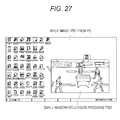
- a television program 2702 can be viewed in a small window while an input image 2701 from a PC (Personal Computer) is displayed on the screen, as shown in Fig. 27 , for example.
- a PC Personal Computer
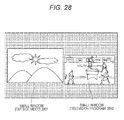
- an outside video 2801 from a Blu-ray Disc reproduction device or the like, and a television program 2802 can be displayed in small windows, as shown in Fig. 28 , for example. Each of the small windows can be freely moved in the screen.
- the screen of the display apparatus When a portrait-oriented photograph taken with a digital camera is viewed, or a portrait-oriented document such as A4 paper is displayed, the screen of the display apparatus is set in a portrait layout.
- most of the pieces of video content that are currently available, such as broadcast programs and movies are landscape-oriented videos. Where a large screen is put into a landscape-oriented state, a landscape-oriented video can be viewed in a preferred manner.
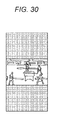
- a portrait layout however, only part of the video is displayed (see Fig. 29 ), or the video needs to be reduced to the size that matches the width of the portrait-oriented screen (see Fig. 30 ). In the former case, some information is lost. In the latter case, the resolution becomes lower than that of the original image, and the use efficiency in the usable display region also becomes lower.
- PIP or PAP a user needs to switch videos being displayed in parallel on the parent screen and the child screen, using a remote controller or the like. This is troublesome for the user. Furthermore, there is no interrelation between the videos being displayed on the parent screen and the child screen, and the channel of one screen does not change when the channel of the other screen is changed. Therefore, the user has to select a piece of video content for each screen, which is troublesome.
- videos are displayed only in a predetermined screen division pattern, such as on the parent screen and the child screen. In other words, there is no flexibility to allow display of a video in a desired size or with a desired aspect ratio.
- the technology disclosed in this specification aims to provide an excellent display apparatus, a display method, and a computer program that are capable of displaying videos in parallel without missing information and a decrease in efficiency in the usable display region.
- the technology disclosed in this specification further aims to provide an excellent display apparatus, a display method, and a computer program that are capable of switching videos displayed in parallel on screens through efficient user operations.
- the present application is made in view of the above problems, and the technology according to claim 1 is a display apparatus that includes:
- the content display control unit of the display apparatus of claim 1 controls the number of pieces of content to be displayed in parallel on the screen, in accordance with a rotational position of the screen.
- the content display control unit divides the screen into "a" small screens in a vertical direction and displays pieces of content in parallel on the respective small screens.
- the screen of the display apparatus of claim 1 has an aspect ratio of 16 : 9.
- the content display unit divides the screen into three small screens in a vertical direction and displays pieces of content in parallel on the respective small screens.
- the display content selecting unit of the display apparatus of claim 3 switches the pieces of content being displayed on the small screens in response to a user operation performed on the screen.
- the content display control unit of the display apparatus of claim 3 reduces the small screens in size, and causes the small screens to transit to a screen layout in which smallest screens are arranged in "a 2 " rows and "a" columns.
- the content display control unit of the display apparatus of claim 6 in response to a pinching-out or tapping operation performed by a user on one of the smallest screens, causes the smallest screens to transit to a screen layout in which "a" small screens are arranged in the vertical direction.
- the content display control unit of the display apparatus of claim 3 enlarges the one of the small screens, so that display of a region of one "a"th in size in a horizontal direction transits to full-screen display on the screen in the portrait layout.
- the content display control unit of the display apparatus of claim 8 in response to a pinching-in operation performed by a user on the screen displaying the enlarged one of the small screens, the content display control unit of the display apparatus of claim 8 causes the screen to transit to a screen layout in which "a" small screens are arranged in the vertical direction.
- the content display control unit of the display apparatus of claim 8 moves the 1/a region being displayed on the screen in a direction of the dragging or flicking operation.
- the display apparatus of claim 3 further includes a content receiving unit that receives pieces of content that are broadcast on television.
- the content managing unit manages the received pieces of content based on channel numbers, and, in accordance with ascending order or descending order of channel number, the display content selecting unit selects respective pieces of content to be displayed on the "a" small screens arranged in the vertical direction.
- the display content selecting unit of the display apparatus of claim 11 sequentially increments or decrements the respective channel numbers of the pieces of content being displayed on the "a" small screens.
- the display content selecting unit of the display apparatus of claim 11 increments or decrements, by "a", the respective channel numbers of the pieces of content being displayed on the "a" small screens.
- the display content selecting unit of the display apparatus of claim 11 increments or decrements the channel number of the piece of content being displayed on the specific small screen, in accordance with the number of times the flicking operation is performed.
- the display content selecting unit of the display apparatus of claim 14 selects content so that pieces of content being displayed on two or more small screens do not have the same channel number.
- the display apparatus of claim 3 further includes a content receiving unit that receives pieces of content that are VOD-distributed.
- the content managing unit manages the pieces of content based on channel numbers in respective categories, and the display content selecting unit selects respective categories and channel numbers of the pieces of content to be displayed on the "a" small screens arranged in the vertical direction.
- the display content selecting unit of the display apparatus of claim 16 sequentially switches categories of the pieces of content being displayed on the "a" small screens.
- the display content selecting unit of the display apparatus of claim 16 sequentially switches categories of the pieces of content being displayed on the "a" small screens.
- the technology disclosed in claim 19 of this application is a display method that includes:
- the computer program according to claim 20 of this application defines a computer program written in a computer-readable format so as to realize predetermined processing in a computer.
- the computer program according to claim 20 of this application is installed into a computer, cooperative actions are realized in the computer, and the same effects as those of the display apparatus according to claim 1 of this application can be achieved.
- the technology disclosed in this specification can provide an excellent display apparatus, a display method, and a computer program that are capable of displaying videos in parallel without missing information and a decrease in efficient in the usable display region by allotting different videos to three small screens obtained by dividing a large screen having an aspect ratio of 16 : 9 in a portrait layout into three in the vertical direction.
- the technology disclosed in this specification can also provide an excellent display apparatus, a display method, and a computer program that are capable of switching videos displayed in parallel on screens through efficient user operations.
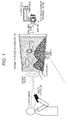
- An information processing apparatus 100 has a large screen, and the main types of usage thereof are assumed to be a "Wall” type that is hung on a wall as shown in Fig. 1 , and a "Tabletop” type that is placed on a table as shown in Fig. 2 .
- the information processing apparatus 100 is rotatably and detachably attached to the surface of a wall with a rotation/attachment mechanism unit 200, for example.
- the rotational position is set in such a position that the large screen is presented in a landscape layout.
- the rotation/attachment mechanism unit 200 also serves as the electrical contact point between the information processing apparatus 100 and the outside, and a power cable and a network cable (both not shown) are connected to the information processing apparatus 100 via this rotation/attachment mechanism unit 200, so that the information processing apparatus 100 can receive drive power from a commercial AC power supply and access various kinds of servers on the Internet.
- the information processing apparatus 100 includes a camera, a distance sensor, a proximity sensor, and a touch sensor, and can recognize the position (distance and orientation) of a user who is facing the screen.
- the information processing apparatus 100 also automatically selects an optimum interaction in accordance with the position of the user. For example, in accordance with the position of the user, the information processing apparatus 100 automatically selects or adjusts GUI (Graphical User Interface) display such as the density of the information to be displayed on the large screen.
- GUI Graphic User Interface
- the information processing apparatus 100 can also automatically select an optimum input means from among several input means such as a direct operation involving a touch on the screen, proximity to the screen, a gesture with a hand, or a remote controller, and an indirect operation depending on a user state.
- the information processing apparatus 100 also includes one or more cameras.
- a camera is placed almost at the center of the bottom edge in the landscape layout.
- the optical axis of the camera extends horizontally, and can capture an image of the user who is facing the large screen.
- the image captured by the camera is processed, so that the position of the user can be measured, and various things such as persons, objects, and machines can also be recognized.
- a gesture input can also be made.
- the information processing apparatus 100 also includes an ultrashort-distance communication unit, and can exchange data with an apparatus such as a tablet terminal or a mobile terminal owned by a user who is located at a very short distance.
- the aspect ratio of the large screen is assumed to be 16 : 9, which is the standard in the market of television products. Accordingly, in a situation where the rotational position of the information processing apparatus 100 hung on a wall is set so that the large screen is in the landscape layout as shown in Fig. 1 , a landscape-oriented video at 16 : 9 can be displayed on the entire screen, to show almost the exact worldview shown in a "movie".
- the large screen can be positioned in a portrait layout as shown in Fig. 2 .
- the position of the camera integrated with the main frame of the information processing apparatus 100 moves to almost the center of the right edge of the screen.
- the information processing apparatus 100 is placed flat on a table. While the rotation/attachment mechanism unit 200 also serves as the electrical contact point in the usage examples shown in Figs. 1 and 2 (described above), no electrical contact with the information processing apparatus 100 is not seen in the state where the information processing apparatus 100 is placed on a table as shown in Fig. 3 .
- the information processing apparatus 100 may be designed to be driven by an internal battery (not shown), without any power supply.
- the information processing apparatus 100 includes a wireless communication unit equivalent to a mobile station function of a wireless LAN (Local Area Network), for example, and the rotation/attachment mechanism unit 200 includes a wireless communication unit equivalent to an access point function of a wireless LAN, the information processing apparatus 100 can access, even in the "Tabletop" state, various servers on the Internet through wireless communication with the rotation/attachment mechanism unit 200 as an access point.
- a wireless communication unit equivalent to a mobile station function of a wireless LAN Local Area Network
- the rotation/attachment mechanism unit 200 includes a wireless communication unit equivalent to an access point function of a wireless LAN
- the information processing apparatus 100 includes a proximity sensor at each of the four side edges of the large screen, to detect the existence or the state of a user.
- a proximity sensor at each of the four side edges of the large screen, to detect the existence or the state of a user.
- an image of a user who is located near the large screen may be captured by a camera, so that the person may be recognized.
- the ultrashort-distance communication unit determines whether the user whose existence has been detected owns an apparatus such as a mobile terminal, and detects a data transmission/reception request from the mobile terminal owned by the user.
- the information processing apparatus 100 uses the detection results in UI control. If not only the existence of a user but also the positions of the torso, the hands and the legs, and the head of the user can be detected, the detection result can be used in more detailed UI control.
- the information processing apparatus 100 also includes the ultrashort-distance communication unit, and can exchange data with an apparatus owned by a user who is located at a very short distance.
- the screen of the information processing apparatus 100 is made larger in size, an extra space enough to allow two or more users to make touch inputs at the same time in the "Tabletop” state is formed. Also, users can face one another across the large screen, and converse or have a discussion while looking at the display on the screen (see Fig. 4 ).
- Fig. 5 schematically shows the functional structure of the information processing apparatus 100.
- the information processing apparatus 100 includes an input interface unit 110 to which an information signal from outside is input, an arithmetic operation unit 120 that performs arithmetic processing for display screen control or the like based on the input information signal, an output interface unit 130 that outputs information to the outside based on an arithmetic operation result, a large-capacity storage unit 140 formed with a hard disk drive (HDD) or the like, a communication unit 150 connected to an external network, a power supply unit 160 that handles drive power, a television tuner unit 170, and a video input interface (IF) unit 180, which are connected to one another via a bus 190.
- the storage unit 140 stores various processing algorithms to be executed by the arithmetic operation unit 120, and various databases to be used in arithmetic processing by the arithmetic operation unit 120.
- the principal functions of the arithmetic operation unit 120 are arithmetic processing such as a UI screen generation process based on a result of user detection conducted by the input interface unit 110, a result of screen touch detection, and data received from an apparatus such as a mobile terminal owned by a user, and outputting of arithmetic operation results to the output interface unit 130.
- the arithmetic operation unit 120 loads an application program installed in the storage unit 140, for example, and then executes the application, so as to realize arithmetic processing for each application.
- the communication unit 150 connects the information processing apparatus 100 to the external network such as a LAN or the Internet.
- the form of the connection to the external network may or may not involve a cable.
- a video stream distributed from a distribution server (not shown) in the external network can be received via the communication unit 150, be decoded by the arithmetic operation unit 120, and be reproduced and output through the output interface unit 130.
- the information processing apparatus 100 can also communicate with other apparatuses including a mobile terminal such as a smartphone owned by a user, a tablet terminal, and the like.
- a mobile terminal such as a smartphone owned by a user
- a tablet terminal and the like.
- the information processing apparatus 100 can provide a UI that makes the three screens coordinate with one another on a larger screen than the other two screens.
- a cloud server or the like is installed in the external network, and the triple screen can gain the benefit of cloud computing, such as using the computing capability of the cloud server, through the information processing apparatus 100.
- the television tuner unit 170 selectively receives a digital broadcast signal transmitted as ground waves or satellite waves from each broadcasting station.
- the arithmetic operation unit 120 decodes received broadcast waves, and reproduces and outputs the broadcast waves through the output interface unit 130.
- the video input interface unit 180 connects to an external Blu-ray Disc (BD) reproduction device or the like with an HDMI (a registered trade name) (High Definition Multimedia Interface), for example, and receives a video signal reproduced from a Blu-ray Disc.
- the arithmetic operation unit 120 decodes an input video signal, and reproduces and outputs the video signal through the output interface unit 130.
- the principal functions of the input interface unit 110 are detection of the existence of a user, detection of a touch operation performed by the detected user on the screen or the touch panel, detection of an apparatus such as a mobile terminal owned by the user, and a process of receiving data transmitted from the apparatus.
- Fig. 6 shows the internal structure of the input interface unit 110.
- a remote control receiving unit 501 receives a remote control signal from a remote controller or a mobile terminal.
- a signal analyzing unit 502 demodulates and decodes the received remote control signal, to obtain a remote control command.
- a camera unit 503 includes an imaging device such as a CMOS (Complememtary Metal Oxide Semiconductor) or a CCD (Charge Coupled Device), and employs a monocular type, or a binocular and/or active type.
- the camera unit 503 includes a camera control unit that controls panning, tilting, zooming, and the like.
- the camera unit 503 notifies the arithmetic operation unit 120 of camera information about panning, tilting, zooming, or the like, and can controls panning, tilting, or zooming of the camera unit 503 in accordance with camera control information supplied from the arithmetic operation unit 120.
- An image recognizing unit 504 performs a recognition process on an image captured by the camera unit 503. Specifically, the image recognizing unit 504 recognizes a gesture by detecting the face of movement of a hand of a user from a background difference, recognizes an object such as the face or a hand of a user included in a captured image, or recognizes the distance to a user.
- the image recognizing unit 504 scans a template image on an image captured by a camera of the camera unit 503, and performs pattern matching, to detect an object to be recognized, such as a face.
- An audio input such as sound or a conversation of the user is input to a microphone unit 505.
- a sound recognizing unit 506 recognizes a sound signal input from the microphone unit 505.
- a distance sensor 507 is formed with a PSD (Position Sensitive Detector), for example, and detects a signal returned from the user or some other object.
- a signal analyzing unit 508 analyzes the detected signal, and measures the distance to the user or the object.
- a PDS sensor a pyroelectric sensor, a simplified camera, or the like can be used as the distance sensor 507.
- the distance sensor 507 constantly monitors whether the user exists within a radius of five to ten meters from the information processing apparatus 100, for example. Therefore, a sensor device that consumes a small amount of power is preferably used as the distance sensor 507.
- a touch detecting unit 509 is formed with a touch sensor placed on the screen, and outputs a detection signal from a point where the tip of the user's finger touches the screen.
- a signal analyzing unit 510 analyzes the detection signal from the touch detecting unit 509, to obtain location information.
- a proximity sensor 511 is placed at each of the four side edges of the large screen, and detects the user who is in the proximity of the screen by an electrostatic capacitance method, for example.
- a signal analyzing unit 512 analyzes a detection signal from the proximity sensor 511.
- An ultrashort-distance communication unit 513 receives a non-contact communication signal from an apparatus such as a mobile terminal owned by the user, through NFC (Near Field Communication), for example.
- a signal analyzing unit 514 demodulates and decodes the signal received by the ultrashort-distance communication unit 513, and obtains received data.
- a triaxial sensor unit 515 is formed with a gyro and the like, and detects postures of the information processing apparatus 100 about the x-, y-, and z-axes.
- a GPS (Global Positioning System) receiving unit 516 receives a signal from a GPS satellite.
- a signal analyzing unit 517 analyzes the signals from the triaxial sensor unit 515 and the GPS receiving unit 516, and obtains location information and posture information about the information processing apparatus 100.
- An input interface integrating unit 520 integrates inputs of the above information signals, and transfers the integrated signals to the arithmetic operation unit 120.
- the input interface integrating unit 520 also acquires location information about the user in the vicinity of the information processing apparatus 100 by integrating the results of the analyses conducted by the respective signal analyzing units 508, 510, 512, 514, and 517, and transfers the location information to the arithmetic operation unit 120.
- the principal functions of the output interface unit 130 are display of content and a UI on the screen based on a result of an operation performed by the arithmetic operation unit 120, and data transmission to an apparatus owned by a user.
- Fig. 7 shows the internal structure of the output interface unit 130.
- An output interface integrating unit 610 collectively outputs information based on a result of an operation performed by the arithmetic operation unit 120.
- the output interface integrating unit 610 instructs a content display unit 601 to output images and sound of distributed content received by the communication unit 150, TV broadcast content received by the television tuner unit 170, and content reproduced from a recording medium such as a Blu-ray Disc, to a moving or still image content display unit 603 and a speaker unit 604.
- the output interface integrating unit 610 also instructs a GUI display unit 602 to display a GUI on the display unit 603.
- the display unit 603 has a screen formed with a liquid crystal display, for example.
- the screen size is as large as approximately 50 inches, and the aspect ratio is assumed to be 16 : 9, which is the standard in the market of television products.
- the output interface integrating unit 610 also instructs the ultrashort-distance communication unit 513 to transmit data to an apparatus such as a mobile terminal owned by a user through non-contact communication.
- the information processing apparatus 100 includes the communication unit 150 that can be connected to a distribution server, the television tuner unit 170, and the video interface unit 180, and is capable of decoding and reproducing pieces of video content such as Internet videos and television broadcast programs.
- the display unit 603 is a large screen of approximately 50 inches, for example, and has a sufficient display area to simultaneously display pieces of video content in parallel.
- the aspect ratio of the large screen of the information processing apparatus 100 is assumed to be 16 : 9, which is compatible with a Hi-Vision video.
- 16 : 9 in the landscape layout is the golden ratio.
- the aspect ratio of a video content to be used in arrangement on the screen is 1 : X
- the aspect ratio can be generalized as the golden ratio when the screen is divided into "a" tiers in the vertical direction in the portrait layout.
- the following equations (1) hold.
- Fig. 8 shows a situation where the large screen is put into a portrait-oriented state and is used in the portrait layout, and pieces of video content #1 through #3 with the aspect ratio of 16 : 9 are displayed in parallel on respective small screens arranged in the vertical direction.
- three kinds of content #1 through #3 such as broadcast content simultaneously received from different broadcasting stations, content reproduced from recording media, or streaming videos from a network can be arranged in the vertical direction and be displayed at the same time.
- a content switching instruction or the like on the large screen in the portrait layout displaying pieces (three in the example shown in Fig. 8 ) of video content are displayed in parallel is basically issued through a touch panel operation, but may be issued through an operation of the arrow keys on a remote controller or through a gesture input.
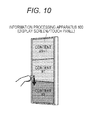
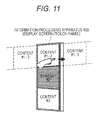
- Figs. 10 and 11 show basic user operations on the screen in the portrait layout displaying pieces of video content in parallel.
- a dragging or flicking operation when a dragging or flicking operation is performed in the vertical direction while the tip of a finger remains in contact with the screen, the pieces of video content displayed in parallel move in the vertical direction. This resembles an operation of scrolling the screen up and down on the GUI screen of a computer.
- the dragging or flicking operation in the vertical direction can be replaced with an operation of the upward and downward buttons on the remote controller (the same applies in the examples described below).
- a dragging or flicking operation in the horizontal direction when a user performs a dragging or flicking operation in the horizontal direction with a finger in any of the three tiers, the screen in the tier scrolls in the horizontal direction.
- a dragging or flicking operation in the horizontal direction an operation to scroll all the three tiers, instead of one particular tier, may be performed.
- the dragging or flicking operation in the horizontal direction can be replaced with an operation of the right and left buttons on the remote controller (the same applies in the examples described below).
- the video content displayed on the large screen in the portrait layout scrolls in the vertical direction or the horizontal direction at high speed.
- the dragging or flicking operation to be performed by the user in the vertical direction or the horizontal direction on the touch panel can be replaced with an input through the arrow keys on the remote controller or a gesture operation by the user.
- zapping can be performed collectively on the three screens, or one particular tier can be changed. Also, in accordance with the video content to be displayed on the center screen, information related to the video content can be displayed on the top and bottom screens.
- a large number of pieces of content acquired via the communication unit 150, the television tuner unit 170, the video interface unit 180, and the like are arranged in a matrix fashion as shown in Fig. 12 , for example, and are managed.
- pieces of video content that have the same video source or similar video sources such as television broadcast programs or Internet videos
- pieces of video content that belong to the same category or similar categories, such as videos associated with the same keyword can be arranged in the horizontal direction.
- the screen display example shown in Fig. 8 is equivalent to the three pieces of content that are surrounded by a bold line in the matrix and are arranged in a line in the vertical direction as shown in Fig. 12 , and are expanded in the portrait layout.
- the collective zapping of the three screens shown in Fig. 10 is equivalent to moving the three pieces of content surrounded by a bold line one screen upward as shown in Fig. 13 .
- the changing of only one particular tier among the three tiers of video content shown in Fig. 11 is equivalent to moving the entire corresponding row in the matrix as shown in Fig. 14 .
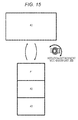
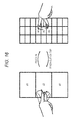
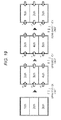
- Figs. 15 through 18 show examples of screen transitions in accordance with rotating operations of the large screen and screen operations by a user in the information processing apparatus 100.
- the main frame of the information processing apparatus 100 is put into a landscape-oriented state that is the initial state where only one piece of video content is displayed in the landscape layout of the large screen.
- the screen state transits to a state where three 16 : 9 videos that are approximately one third in size are displayed in the vertical direction with the use of the portrait layout of the large screen, as shown in the lower portion of Fig. 15 .
- the screen state returns to the initial state where only one piece of video content is displayed in the landscape layout of the large screen.
- Each of the 27 smallest screens arranged in nine rows and three columns in the large screen has lower resolution and holds a smaller amount of information than the original video.
- the user can recognize, from the nine rows and three columns of screens, the video content currently available to him/her (such as television programs being aired by the other broadcasting stations).
- the user can also understand, from the nine rows and three columns of screens, how to perform a dragging or flicking operation to reach desired video content.
- the screen state transits to a state where three small screens are arranged, with the operated small screen being located at the center.
- a pinching-out operation or a tapping operation is performed on the small screen displaying the video content #2, and the screen state transits to a state where the pieces of video content #1, #2, and #3 are displayed in three tiers in the vertical direction.
- the amount of information in each piece of video content becomes smaller, but efficient zapping can be performed. Also, where three tiers of video content are arranged in the portrait layout with the use of the golden ratio of 16 : 9 for the screen, the usable display region can be used with high efficiency.
- Figs. 19 through 22 show screen transition examples using three-tier display in the portrait layout in selecting television broadcasting channels.
- the television tuner unit 170 of the information processing apparatus 100 is in an environment to receive approximately 10 channels.
- all the receivable channels can be efficiently viewed.
- Fig. 19 shows a screen transition example in which upward and downward flicking operations (or upward and downward button operations on the remote controller) are performed to switch display of three tiers of small screens.
- the respective television programs on channels 1 through 12 are virtually arranged in ascending order (or descending order, which applies in the examples described below) of channel number from left to right in each tier. It is not possible to randomly combine broadcasting channels.
- the television programs on channels 1, 2, and 3 are vertically arranged and displayed in the respective tiers in this order from the top.
- the small screen in each tier moves rightward by one, the channel number in each tier increases by one, and the screen state transits to a screen state where the television programs on channels 2, 3, and 4 are displayed in parallel in three tiers.
- the small screen in each tier moves rightward by one, the channel number in each tier increases by one, and the screen state transits to a screen state where the television programs on channels 3, 4, and 5 are displayed in parallel in three tiers.
- the small screen in each tier moves leftward by one, the channel number in each tier decreases by one, and the screen state transits to a screen state where the television programs on channels 2, 3, and 4 are displayed in parallel in three tiers.
- the user can constantly view television programs of three broadcasting stations with consecutive channel numbers. Also, video display is switched only by an amount equivalent to one channel in each small screen through one upward/downward flicking operation or one upward/downward button operation, and the screen transition speed is low. Accordingly, the user can view the videos on the respective channels without any omission.
- Fig. 20 shows a screen transition example in which rightward and leftward flicking operations (or right and left button operations on the remote controller) are performed to switch display of three tiers of small screens.
- the television program on channel (3N + 1) on the small screen in the top tier, the television program on channel (3N + 2) on the small screen in the center tier, and the television program on channel 3(N + 1) on the small screen in the bottom tier are virtually arranged in ascending order of channel number from left to right (N being an integer of 0 to 3).
- N being an integer of 0 to 3
- the television programs on channels 1, 2, and 3 are vertically arranged and displayed in this order.
- the small screen in each tier moves rightward by one, the channel number in each tier increases by three, and the screen state transits to a screen state where the television programs on channels 4, 5, and 6 are displayed in parallel in three tiers.
- the small screen in each tier moves rightward by one, the channel number in each tier increases by three, and the screen state transits to a screen state where the television programs on channels 7, 8, and 9 are displayed in parallel in three tiers.
- the user performs a leftward flicking operation once or presses the left button on the remote controller once
- the small screen in each tier moves leftward by one, the channel number in each tier decreases by three, and the screen state transits to a screen state where the television programs on channels 4, 5, and 6 are displayed in parallel in three tiers.
- the user can constantly view television programs of three broadcasting stations with consecutive channel numbers. Also, video display is switched by an amount equivalent to three channels through one rightward/leftward flicking operation or one right/left button operation. Accordingly, the user can view the television programs through efficient zapping.
- Fig. 21 shows a screen transition example in which upward and downward flicking operations (or upward and downward button operations on the remote controller) are performed to switch display of three tiers of small screens.
- the respective television programs on channels 1 through 12 are virtually arranged in ascending order of channel number from top to bottom. Unlike the example shown in Fig. 19 , this example allows a combination of desired broadcasting channels.
- a screen transition is caused to move each of the videos on the small screens upward by one tier.
- the television program on channel 4 on the small screen in the top tier disappears, and each of the television programs on channels 6 and 7 displayed on the small screens in the center and bottom tiers is moved up by one tier.
- the emptied bottom tier is filled with the television program on channel 8, which is one greater than the channel number of the television program previously displayed therein.
- a screen transition is caused to move each of the small screens downward by one tier this time.
- the television program on channel 8 on the small screen in the bottom tier disappears, and each of the television programs on channels 6 and 7 displayed on the small screens in the top and center tiers is moved down by one tier.
- the emptied top tier is filled with the television program on channel 5, which is one smaller than the channel number of the television program previously displayed therein.
- the user can constantly view television programs of three broadcasting stations with consecutive channel numbers. Through one upward/downward flicking operation or one upward/downward button operation, channel numbers are sequentially changed by one. As the screen transition speed is low, the user can view videos of the respective broadcasting stations without omission. Furthermore, unlike the example shown in Fig. 19 , this example allows a combination of desired broadcasting channels.
- Fig. 22 shows an example in which the small screens of the respective tiers are moved through rightward and leftward flicking operations (right and left button operations on the remote controller).
- the respective television programs on channels 1 through 12 are virtually arranged in ascending order of channel number from left to right in each tier.
- the example shown in the drawing also allows a combination of desired broadcasting channels.
- a leftward flicking operation is further performed on this small screen once (or the left button on the remote controller is pressed once).
- the display on the small screen in the center tier switches to the television program on channel 1, which is the same video as the video being currently displayed on the small screen in the top tier (or a problem that is caused in a case where channel switching operations are performed on the respective tiers independently of one another is caused). Therefore, if the same channel as the channel being currently displayed in another tier is displayed, the channel number is further reduced by one, and the display is switched to the television program on channel 12. To the user, only the small screen in the center tier appears as if moving leftward.
- a leftward flicking operation is further performed on this small screen once.
- the display on the small screen in the top tier switches to the television program on channel 12, which is the same video as the video being currently displayed on the small screen in the center tier. Therefore, if the same channel as the channel being currently displayed in another tier is displayed, the channel number is further reduced by one, and the display is switched to the television program on channel 11. To the user, only the small screen in the top tier appears as if moving leftward.
- the user performs channel switching operations on the respective small screens arranged in three tiers independently of one another, and can constantly view a desired combination of television programs of three broadcasting stations. Also, even when channel switching operations are performed on the respective small screens independently of one another, the channel numbers at the transition destinations are automatically controlled so that a television program of the same broadcasting station is not displayed on two or more screens at the same time. Accordingly, the user can perform efficient zapping.
- Figs. 23 through 25 show screen transition examples in which the three-tier display in the portrait layout is used in VOD (Video On Demand) distribution services.
- VOD Video On Demand
- the content to be VOD-distributed is classified into categories A through Z, and 20 to 30 channels are set in each category in the VOD reception environment.
- category A is news
- category B is weather
- category C is drama.
- categories being displayed on the small screens are basically switched through upward and downward flicking operations (or upward and downward button operations on the remote controller), and channels being displayed on the small screens are basically switched through rightward and leftward flicking operations (or right and left button operations on the remote controller).
- channels being displayed on the small screens are basically switched through rightward and leftward flicking operations (or right and left button operations on the remote controller).
- Fig. 23 shows a screen transition example in which upward and downward flicking operations (or upward and downward button operations on the remote controller) are performed to switch display of three tiers of small screens.
- categories A through Z are arranged from top to bottom, and pieces of content in each category are virtually arranged in ascending order of channel number from left to right.
- the television program on channel A-1 on the small screen in the top tier disappears, and each of the television programs on channels C-1 and D-1 displayed on the small screens in the center and bottom tiers is moved up by one tier in the same manner as above.
- the emptied bottom tier is filled with the distributed content on channel E-1, which is one category higher than the video content previously displayed therein and has the same channel number.
- a screen transition is caused to move each of the small screens downward by one tier this time.
- the television program on channel E-1 on the small screen in the bottom tier disappears, and each of the television programs on channels C-1 and D-1 displayed on the small screens in the top and center tiers is moved down by one tier.
- the emptied top tier is filled with the distributed content on channel B-1, which is one category higher than the video content previously displayed therein and has the same channel number.
- the categories of the content being displayed on the small screens in the three tiers are sequentially switched by one. Also, categories are switched only by an amount equivalent to one category through one upward/downward flicking operation or one upward/downward button operation, and the screen transition speed is low. Accordingly, the user can view the videos in the respective categories without any omission. It is not possible to randomly combine categories.
- Fig. 24 shows an example in which the small screens of the respective tiers are moved through rightward and leftward flicking operations (right and left button operations on the remote controller).
- categories A through Z are arranged from top to bottom, and pieces of content in each category are virtually arranged in ascending order of channel number from left to right. In the example shown in the drawing, it is not possible to randomly combine categories, either.
- a leftward flicking operation is further performed on this small screen once (or the left button on the remote controller is pressed once).
- the small screen in the center tier decreases by one. Since the first channel number is "1", when the channel number decreases by one, the small screen in the center tier transits to a screen that displays the VOD content on channel B-20, which has the last channel number. To the user, only the small screen in the center tier appears as if moving rightward by one channel. As different categories are displayed in the respective tiers, any problem that is caused in a case where channel switching operations are performed on the respective tiers independently of one another is not caused.
- a leftward flicking operation is further performed on this small screen once.
- the small screen in the top tier changes. Since the first channel number is "1", when the channel number decreases by one, the small screen in the center tier transits to a screen that displays the VOD content on channel A-30, which has the last channel number. To the user, only the small screen in the top tier appears as if moving leftward.
- channel numbers can be switched in the category being displayed on the small screen in one of the tiers. Also, channel numbers are sequentially switched by one through one rightward/leftward flicking operation or one rightward/leftward button operation, and the screen transition speed is low. Accordingly, the user can view the videos in the respective categories without any omission. As in the example shown in Fig. 23 , it is not possible to randomly combine categories, either.
- Fig. 25 shows an example in which the small screens of the respective tiers are moved through upward and downward flicking operations (upward and downward button operations on the remote controller).
- categories A through Z are arranged from top to bottom, and pieces of content in each category are virtually arranged in ascending order of channel number from left to right.
- the example shown in the drawing allows a combination of desired categories.
- category A being displayed in the top tier is the first category
- the content being displayed is switched to the VOD content on channel Z-1, which is in the last category Z and has the same channel.
- the small screen in the center tier appears as if moving rightward by one channel.
- a downward flicking operation is further performed on this small screen once.
- the category is made lower only by one, which is equivalent to the number of times a flicking operation is performed, the category becomes the same as category Z being currently displayed on the small screen in the center tier. Therefore, in a case where the category is the same as the category in another tier, the category is made lower by another one while the channel number is maintained. That is, the content being displayed is switched to the VOD content on channel Y-1 in category Y, which is one category lower than category Z as the last category, while the channel remains the same. To the user, only the small screen in the top tier appears as if moving leftward.
- the category being displayed on the small screen in one of the tiers can be switched. Also, categories are sequentially switched through one upward/downward flicking operation or one upward/downward button operation, and the screen transition speed is low. Accordingly, the user can view the videos in the respective categories without any omission. Also, even when category switching operations are performed on the respective small screens independently of one another, the categories at the transition destinations are automatically controlled so that the same category is not displayed on two or more screens at the same time. Accordingly, the user can perform efficient zapping. Furthermore, unlike the example shown in Fig. 23 , this example allows a combination of desired categories.
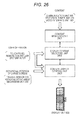
- Fig. 26 schematically shows a functional structure for controlling display of content in accordance with the rotational position of the large screen in the information processing apparatus 100.
- the functional structure shown in the drawing can be realized by the arithmetic operation unit 120 executing a predetermined program, for example.
- a content managing unit 2601 manages video content that is input to the information processing apparatus 100, such as distributed content including VOD and the like acquired via the communication unit 150, television broadcast content of respective broadcasting stations received by the television tuner unit 170, and content that is reproduced from Blu-ray Discs and is acquired via the video interface unit 180.
- the content managing unit 2601 arranges and manages the acquired pieces of video content in a matrix fashion as shown in Fig. 12 , in accordance with categories, the channel numbers of the input sources, and the like.
- a display content selecting unit 2602 selects the content to be displayed from among the pieces of video content arranged in the matrix fashion, in accordance with a touch operation, a remote control operation, a gesture input, or the like performed by a user on the large screen.
- the display content selecting unit 2602 basically searches the content in the matrix in the vertical direction.
- the display content selecting unit 2602 basically searches the content in the matrix in the horizontal direction.
- the display content selecting unit 2602 preferably selects content so that the same content is not displayed on the small screens in the three tiers in the vertical direction.
- a content display control unit 2603 controls display of content on the display unit 603 in accordance with the usage state of the information processing apparatus 100.
- the usage state of the information processing apparatus 100 herein is the rotational position of the large screen.
- the rotational position of the large screen can be acquired from the triaxial sensor 515 or the rotation/attachment mechanism unit 200, for example.
- the content display control unit 2603 displays video content in either the landscape layout or the portrait layout.
- the aspect ratio of the large screen of the information processing apparatus 100 is assumed to be 16 : 9, which is compatible with a Hi-Vision video. As described above, in a case where the large screen is divided into three small screens in the vertical direction, and three 16 : 9 videos that are approximately one third in size are displayed in the vertical direction, the usable display region is efficiently used.
- the content display control unit 2603 in this embodiment divides the large screen into three small screens in the vertical direction, and requests three pieces of content to be displayed on the respective small screens from the display content selecting unit 2602.
- the display content selecting unit 2602 Upon receipt of the request from the content display control unit 2603 for the pieces of content to be displayed in three tiers on the large screen in the portrait layout, the display content selecting unit 2602 searches the matrix shown in Fig. 12 , selects the three pieces of content to be displayed in the three tiers, and supplies the selected pieces of content to the content display control unit 2603. In doing so, the display content selecting unit 2602 selects the three pieces of content so that there is no overlapping of categories or channel numbers. When a pinching-out operation is performed on a screen displaying video content in three tiers in the portrait layout, the content display control unit 2603 requests 27 pieces of video content to be displayed in nine rows and three columns from the display content selecting unit 2602.
- the large screen in a case where the large screen having an aspect ratio of 16 : 9 is put into the portrait layout, the large screen is divided into three small screens in the vertical direction, and different videos are allotted to the respective small screens as shown in Fig. 15 . In this manner, different videos can be displayed in parallel, without any missing information and a decrease in efficiency in the usable display region.
- respective videos displayed in parallel on screens can be switched through an efficient user operation, as shown in Figs. 19 through 25 , for example.
- TV receiver having a large screen has been mainly described as the information processing apparatus 100 to which the technology disclosed in this specification is applied, the scope of the technology disclosed in this specification is not limited to the above.
- the technology disclosed in this specification can also be applied to various kinds of information processing apparatuses other than TV receivers, such as multifunctional terminals including personal computers, tablets, and smartphones.
Landscapes
- Engineering & Computer Science (AREA)
- Multimedia (AREA)
- Signal Processing (AREA)
- Theoretical Computer Science (AREA)
- Human Computer Interaction (AREA)
- General Engineering & Computer Science (AREA)
- General Physics & Mathematics (AREA)
- Physics & Mathematics (AREA)
- Computer Hardware Design (AREA)
- Life Sciences & Earth Sciences (AREA)
- Business, Economics & Management (AREA)
- Databases & Information Systems (AREA)
- Software Systems (AREA)
- General Health & Medical Sciences (AREA)
- Emergency Management (AREA)
- Health & Medical Sciences (AREA)
- Biophysics (AREA)
- Biomedical Technology (AREA)
- Analytical Chemistry (AREA)
- Marketing (AREA)
- Biodiversity & Conservation Biology (AREA)
- Ecology (AREA)
- Neurosurgery (AREA)
- Environmental & Geological Engineering (AREA)
- Environmental Sciences (AREA)
- Remote Sensing (AREA)
- Chemical & Material Sciences (AREA)
- User Interface Of Digital Computer (AREA)
- Controls And Circuits For Display Device (AREA)
- Transforming Electric Information Into Light Information (AREA)
- Two-Way Televisions, Distribution Of Moving Picture Or The Like (AREA)
Applications Claiming Priority (2)
| Application Number | Priority Date | Filing Date | Title |
|---|---|---|---|
| JP2012258785 | 2012-11-27 | ||
| PCT/JP2013/078023 WO2014083953A1 (ja) | 2012-11-27 | 2013-10-16 | 表示装置及び表示方法、並びにコンピューター・プログラム |
Publications (2)
| Publication Number | Publication Date |
|---|---|
| EP2927902A1 true EP2927902A1 (de) | 2015-10-07 |
| EP2927902A4 EP2927902A4 (de) | 2016-07-06 |
Family
ID=50827599
Family Applications (1)
| Application Number | Title | Priority Date | Filing Date |
|---|---|---|---|
| EP13859511.1A Ceased EP2927902A4 (de) | 2012-11-27 | 2013-10-16 | Anzeigevorrichtung, anzeigeverfahren und computerprogramm |
Country Status (5)
| Country | Link |
|---|---|
| US (3) | US20150304593A1 (de) |
| EP (1) | EP2927902A4 (de) |
| JP (1) | JP6382721B2 (de) |
| CN (1) | CN104798129B (de) |
| WO (1) | WO2014083953A1 (de) |
Cited By (1)
| Publication number | Priority date | Publication date | Assignee | Title |
|---|---|---|---|---|
| EP3016397B1 (de) * | 2014-11-03 | 2022-01-05 | Samsung Electronics Co., Ltd. | Benutzerendgerät und steuerungsverfahren dafür |
Families Citing this family (62)
| Publication number | Priority date | Publication date | Assignee | Title |
|---|---|---|---|---|
| JP5598232B2 (ja) * | 2010-10-04 | 2014-10-01 | ソニー株式会社 | 情報処理装置、情報処理システムおよび情報処理方法 |
| US10691219B2 (en) | 2012-01-17 | 2020-06-23 | Ultrahaptics IP Two Limited | Systems and methods for machine control |
| US8693731B2 (en) | 2012-01-17 | 2014-04-08 | Leap Motion, Inc. | Enhanced contrast for object detection and characterization by optical imaging |
| US9070019B2 (en) | 2012-01-17 | 2015-06-30 | Leap Motion, Inc. | Systems and methods for capturing motion in three-dimensional space |
| US9501152B2 (en) | 2013-01-15 | 2016-11-22 | Leap Motion, Inc. | Free-space user interface and control using virtual constructs |
| US12260023B2 (en) | 2012-01-17 | 2025-03-25 | Ultrahaptics IP Two Limited | Systems and methods for machine control |
| US8638989B2 (en) | 2012-01-17 | 2014-01-28 | Leap Motion, Inc. | Systems and methods for capturing motion in three-dimensional space |
| US9679215B2 (en) | 2012-01-17 | 2017-06-13 | Leap Motion, Inc. | Systems and methods for machine control |
| US11493998B2 (en) | 2012-01-17 | 2022-11-08 | Ultrahaptics IP Two Limited | Systems and methods for machine control |
| JP6382721B2 (ja) * | 2012-11-27 | 2018-08-29 | サターン ライセンシング エルエルシーSaturn Licensing LLC | 表示装置及び表示方法、並びにコンピューター・プログラム |
| US9459697B2 (en) | 2013-01-15 | 2016-10-04 | Leap Motion, Inc. | Dynamic, free-space user interactions for machine control |
| US9702977B2 (en) | 2013-03-15 | 2017-07-11 | Leap Motion, Inc. | Determining positional information of an object in space |
| US9916009B2 (en) | 2013-04-26 | 2018-03-13 | Leap Motion, Inc. | Non-tactile interface systems and methods |
| USD734774S1 (en) * | 2013-06-09 | 2015-07-21 | Apple Inc. | Display screen or portion thereof with graphical user interface |
| TWD182525S (zh) * | 2013-06-10 | 2017-04-21 | 蘋果公司 | 顯示螢幕之圖形化使用者介面 |
| USD775656S1 (en) * | 2013-08-01 | 2017-01-03 | Guangzhou Ucweb Computer Technology Co., Ltd. | Display screen or portion thereof with animated graphical user interface |
| US10281987B1 (en) | 2013-08-09 | 2019-05-07 | Leap Motion, Inc. | Systems and methods of free-space gestural interaction |
| US10846942B1 (en) | 2013-08-29 | 2020-11-24 | Ultrahaptics IP Two Limited | Predictive information for free space gesture control and communication |
| US9632572B2 (en) | 2013-10-03 | 2017-04-25 | Leap Motion, Inc. | Enhanced field of view to augment three-dimensional (3D) sensory space for free-space gesture interpretation |
| US9996638B1 (en) | 2013-10-31 | 2018-06-12 | Leap Motion, Inc. | Predictive information for free space gesture control and communication |
| US9679197B1 (en) | 2014-03-13 | 2017-06-13 | Leap Motion, Inc. | Biometric aware object detection and tracking |
| US9785247B1 (en) | 2014-05-14 | 2017-10-10 | Leap Motion, Inc. | Systems and methods of tracking moving hands and recognizing gestural interactions |
| US9741169B1 (en) | 2014-05-20 | 2017-08-22 | Leap Motion, Inc. | Wearable augmented reality devices with object detection and tracking |
| JP2016038889A (ja) | 2014-08-08 | 2016-03-22 | リープ モーション, インコーポレーテッドLeap Motion, Inc. | モーション感知を伴う拡張現実 |
| USD789402S1 (en) | 2014-09-01 | 2017-06-13 | Apple Inc. | Display screen or portion thereof with graphical user interface |
| USD788787S1 (en) * | 2014-09-10 | 2017-06-06 | Baidu Online Network Technology (Beijing) Co., Ltd. | Display screen or portion thereof with animated graphical user interface |
| USD776129S1 (en) * | 2014-09-29 | 2017-01-10 | Zte Corporation | Display screen with graphical user interface with widget |
| JP6230521B2 (ja) * | 2014-10-30 | 2017-11-15 | 恒夫 鳥居 | デジタルサイネージ |
| KR101636460B1 (ko) * | 2014-11-05 | 2016-07-05 | 삼성전자주식회사 | 전자 장치 및 그 제어 방법 |
| KR102328823B1 (ko) * | 2014-11-12 | 2021-11-19 | 삼성전자 주식회사 | 화면 내 빈 영역 활용 방법 및 장치 |
| CN105677265A (zh) * | 2014-11-18 | 2016-06-15 | 中兴通讯股份有限公司 | 一种显示方法及终端 |
| USD762662S1 (en) * | 2015-01-02 | 2016-08-02 | Samsung Electronics Co., Ltd. | Display screen or portion thereof with animated graphical user interface |
| USD761816S1 (en) * | 2015-01-02 | 2016-07-19 | Samsung Electronics Co., Ltd. | Display screen or portion thereof with animated graphical user interface |
| US10656720B1 (en) | 2015-01-16 | 2020-05-19 | Ultrahaptics IP Two Limited | Mode switching for integrated gestural interaction and multi-user collaboration in immersive virtual reality environments |
| US10319408B2 (en) * | 2015-03-30 | 2019-06-11 | Manufacturing Resources International, Inc. | Monolithic display with separately controllable sections |
| USD786907S1 (en) | 2015-09-08 | 2017-05-16 | Apple Inc. | Display screen or portion thereof with graphical user interface |
| JP6052363B1 (ja) * | 2015-09-18 | 2016-12-27 | 富士ゼロックス株式会社 | 表示装置、管理装置、管理システム及びプログラム |
| CN105979342B (zh) * | 2016-06-24 | 2018-01-02 | 武汉斗鱼网络科技有限公司 | 一种直播网站横屏竖屏直播切换方法及系统 |
| USD799530S1 (en) * | 2016-12-23 | 2017-10-10 | Beijing Kingsoft Internet Security Software Co., Ltd. | Mobile terminal display screen with a graphical user interface |
| USD802007S1 (en) * | 2016-12-23 | 2017-11-07 | Beijing Kingsoft Internet Security Software Co., Ltd. | Mobile terminal display screen with a graphical user interface |
| USD847829S1 (en) * | 2016-12-28 | 2019-05-07 | Samsung Electronics Co., Ltd. | Display screen or portion thereof with transitional graphical user interface |
| USD846580S1 (en) * | 2017-06-11 | 2019-04-23 | Facebook, Inc. | Display panel of a programmed computer system with a graphical user interface |
| USD849770S1 (en) * | 2017-06-11 | 2019-05-28 | Facebook, Inc. | Display panel of a programmed computer system with a graphical user interface |
| USD831689S1 (en) * | 2017-06-11 | 2018-10-23 | Facebook, Inc. | Display panel of a programmed computer system with a graphical user interface |
| USD865783S1 (en) * | 2017-07-19 | 2019-11-05 | Lenovo (Beijing) Co., Ltd. | Flexible display screen with graphical user interface |
| CN108509907B (zh) | 2018-03-30 | 2022-03-15 | 北京市商汤科技开发有限公司 | 车灯检测方法、实现智能驾驶的方法、装置、介质及设备 |
| CN108833965A (zh) * | 2018-06-27 | 2018-11-16 | 北京优屏科技服务有限公司 | 用于银幕的视频投放的方法、装置、终端和存储介质 |
| CN109361937A (zh) * | 2018-09-25 | 2019-02-19 | 江苏电力信息技术有限公司 | 一种大屏多路推流码率自动调整方法 |
| CN111866565B (zh) * | 2019-04-26 | 2022-09-02 | 三星电子株式会社 | 显示装置及显示装置的控制方法 |
| USD967125S1 (en) * | 2019-08-14 | 2022-10-18 | Samsung Electronics Co., Ltd. | Display screen or portion thereof with transitional graphical user interface |
| USD947863S1 (en) * | 2019-12-09 | 2022-04-05 | Monday.com Ltd. | Display screen or portion thereof with animated graphical user interface |
| CN116325761B (zh) * | 2020-05-19 | 2024-05-03 | 聚好看科技股份有限公司 | 显示设备及媒资播放方法 |
| CN112068749B (zh) * | 2020-08-21 | 2021-09-21 | 易思维(杭州)科技有限公司 | 多屏幕单终端设备屏幕集中显示、控制的系统及方法 |
| JP2022071797A (ja) * | 2020-10-28 | 2022-05-16 | 株式会社日本総合研究所 | 車両及び表示方法 |
| USD1026031S1 (en) * | 2020-11-20 | 2024-05-07 | Google Llc | Display screen or portion thereof with transitional graphical user interface |
| JP7561686B2 (ja) * | 2021-05-27 | 2024-10-04 | 憲司 岡田 | 携帯情報端末装置及びそのプログラム |
| KR102595096B1 (ko) * | 2021-07-06 | 2023-10-27 | 한국전자기술연구원 | 지능적 가로-세로 영상 변환을 위한 전자 장치, 시스템 및 방법 |
| KR20230024637A (ko) * | 2021-08-12 | 2023-02-21 | 삼성전자주식회사 | 플렉서블 디스플레이를 포함하는 전자 장치 및 이의 제어 방법 |
| TWI778749B (zh) * | 2021-08-17 | 2022-09-21 | 睿至股份有限公司 | 適用虛擬實境的影像傳輸方法、影像處理裝置及影像生成系統 |
| US11895362B2 (en) | 2021-10-29 | 2024-02-06 | Manufacturing Resources International, Inc. | Proof of play for images displayed at electronic displays |
| JP1748847S (ja) * | 2022-06-28 | 2023-07-19 | 血液浄化装置進捗状況表示用画像 | |
| JP7833607B1 (ja) * | 2025-12-18 | 2026-03-19 | 岳史 加藤 | 情報処理方法、情報処理装置、及び情報処理プログラム |
Family Cites Families (107)
| Publication number | Priority date | Publication date | Assignee | Title |
|---|---|---|---|---|
| KR910013904A (ko) * | 1989-12-21 | 1991-08-08 | 강진구 | Hd 스크린을 이용한 pop 재생 tv |
| GB9012326D0 (en) * | 1990-06-01 | 1990-07-18 | Thomson Consumer Electronics | Wide screen television |
| US5434625A (en) * | 1990-06-01 | 1995-07-18 | Thomson Consumer Electronics, Inc. | Formatting television pictures for side by side display |
| JP3526056B2 (ja) | 1992-05-06 | 2004-05-10 | ソニー株式会社 | テレビジョン受像機 |
| TW335241U (en) * | 1992-11-30 | 1998-06-21 | Thomson Consumer Electronics | A video display system |
| US6469746B1 (en) * | 1992-12-28 | 2002-10-22 | Sanyo Electric Co., Ltd. | Multi-vision screen adapter |
| JP3855282B2 (ja) * | 1995-02-06 | 2006-12-06 | ソニー株式会社 | 受信装置および受信方法 |
| US5594469A (en) * | 1995-02-21 | 1997-01-14 | Mitsubishi Electric Information Technology Center America Inc. | Hand gesture machine control system |
| KR100197835B1 (ko) * | 1995-09-01 | 1999-06-15 | 윤종용 | 더블스크린을 이용한 정보신호 표시장치 |
| JP3840266B2 (ja) * | 1996-03-15 | 2006-11-01 | 株式会社 日立製作所 | 表示装置およびその操作方法 |
| CA2175148C (en) * | 1996-04-26 | 2002-06-11 | Robert Cecco | User interface control for creating split panes in a single window |
| KR100200616B1 (ko) * | 1996-09-02 | 1999-06-15 | 윤종용 | 감시 화면 분할 표시장치 및 그 방법 |
| US6333750B1 (en) * | 1997-03-12 | 2001-12-25 | Cybex Computer Products Corporation | Multi-sourced video distribution hub |
| WO1998046022A1 (en) * | 1997-04-09 | 1998-10-15 | Matsushita Electric Industrial Co., Ltd. | Recording and reproducing device |
| JPH10285514A (ja) * | 1997-04-09 | 1998-10-23 | Matsushita Electric Ind Co Ltd | 記録再生装置 |
| JPH1124577A (ja) | 1997-07-04 | 1999-01-29 | Fujitsu General Ltd | Pdpの取付け装置 |
| US9292111B2 (en) * | 1998-01-26 | 2016-03-22 | Apple Inc. | Gesturing with a multipoint sensing device |
| US8479122B2 (en) * | 2004-07-30 | 2013-07-02 | Apple Inc. | Gestures for touch sensitive input devices |
| US6453078B2 (en) * | 1998-08-28 | 2002-09-17 | Eastman Kodak Company | Selecting, arranging, and printing digital images from thumbnail images |
| US6204887B1 (en) * | 1998-12-11 | 2001-03-20 | Hitachi America, Ltd. | Methods and apparatus for decoding and displaying multiple images using a common processor |
| US6400851B1 (en) * | 1999-01-28 | 2002-06-04 | Microsoft Corporation | Rotating image data |
| KR100534672B1 (ko) * | 1999-05-26 | 2005-12-08 | 삼성전자주식회사 | 온 스크린 디스플레이를 피벗시키기 위한 기능을 갖는 영상표시장치 |
| US7373650B1 (en) * | 2000-02-01 | 2008-05-13 | Scientific-Atlanta, Inc. | Apparatuses and methods to enable the simultaneous viewing of multiple television channels and electronic program guide content |
| JP2002354367A (ja) * | 2001-05-25 | 2002-12-06 | Canon Inc | マルチ画面表示装置、マルチ画面表示方法、記録媒体、及びプログラム |
| JP2003157016A (ja) | 2001-11-20 | 2003-05-30 | Fujitsu General Ltd | ディスプレイ回転機構 |
| US7474327B2 (en) * | 2002-02-12 | 2009-01-06 | Given Imaging Ltd. | System and method for displaying an image stream |
| GB0209219D0 (en) * | 2002-04-23 | 2002-06-05 | Koninkl Philips Electronics Nv | Electronic device including a display |
| JP3676345B2 (ja) * | 2003-01-20 | 2005-07-27 | 株式会社本宏製作所 | 表示装置並びに表示装置を用いた広告方法 |
| US20050212822A1 (en) * | 2002-06-03 | 2005-09-29 | Yoshinori Honma | Display device, display method and advertisement method using display device |
| AU2003241895A1 (en) * | 2002-06-03 | 2003-12-19 | Honko Mfg. Co., Ltd. | Display device, display method, and advertisement method using display device |
| KR20030095663A (ko) * | 2002-06-14 | 2003-12-24 | 삼성전자주식회사 | 트리플 윈도우 구현이 가능한 영상처리장치 및 그의구현방법 |
| US6987882B2 (en) * | 2002-07-01 | 2006-01-17 | Xerox Corporation | Separation system for Multiple Raster Content (MRC) representation of documents |
| US7454707B2 (en) * | 2002-09-30 | 2008-11-18 | Canon Kabushiki Kaisha | Image editing method, image editing apparatus, program for implementing image editing method, and recording medium recording program |
| JP4096356B2 (ja) * | 2002-10-07 | 2008-06-04 | ソニー株式会社 | プロジェクタ、および位相差板の配置方法 |
| US7559834B1 (en) * | 2002-12-02 | 2009-07-14 | Microsoft Corporation | Dynamic join/exit of players during play of console-based video game |
| US20050140696A1 (en) * | 2003-12-31 | 2005-06-30 | Buxton William A.S. | Split user interface |
| US7535481B2 (en) * | 2004-06-28 | 2009-05-19 | Microsoft Corporation | Orienting information presented to users located at different sides of a display surface |
| KR101046587B1 (ko) * | 2004-07-16 | 2011-07-06 | 삼성전자주식회사 | 디스플레이장치 및 그 제어방법 |
| US20060020903A1 (en) * | 2004-07-26 | 2006-01-26 | Shih-Yang Wang | Window split system and method |
| KR100651938B1 (ko) * | 2004-08-16 | 2006-12-06 | 엘지전자 주식회사 | 영상 배향 제어장치, 방법 및 매체 |
| US7760269B2 (en) * | 2005-08-22 | 2010-07-20 | Hewlett-Packard Development Company, L.P. | Method and apparatus for sizing an image on a display |
| US8184137B2 (en) * | 2005-12-15 | 2012-05-22 | Broadcom Corporation | System and method for ordering of scaling and capturing in a video system |
| JP4865355B2 (ja) * | 2006-02-21 | 2012-02-01 | キヤノン株式会社 | 放送受信装置及び放送受信装置の制御方法 |
| US7773075B2 (en) * | 2006-03-22 | 2010-08-10 | Panasonic Corporation | Display apparatus |
| US20070252919A1 (en) * | 2006-04-27 | 2007-11-01 | Mcgreevy Roy L | Remotely controlled adjustable flat panel display support system |
| US8081252B2 (en) * | 2006-06-13 | 2011-12-20 | Panasonic Corporation | Image displaying apparatus |
| JP5352065B2 (ja) * | 2006-06-13 | 2013-11-27 | パナソニック株式会社 | 画像表示装置 |
| JP4294040B2 (ja) * | 2006-07-24 | 2009-07-08 | シャープ株式会社 | デジタル放送受信装置 |
| JP4749355B2 (ja) * | 2007-02-07 | 2011-08-17 | シャープ株式会社 | 携帯電話機 |
| TW200835320A (en) * | 2007-02-09 | 2008-08-16 | Mitac Int Corp | Portable multimedia device |
| EP2132927A2 (de) * | 2007-04-11 | 2009-12-16 | Thomson Licensing | Seitenverhältnis-hinweise für umbemessbare videofenster |
| JP5145797B2 (ja) * | 2007-07-04 | 2013-02-20 | パナソニック株式会社 | 映像表示装置 |
| US8125458B2 (en) * | 2007-09-28 | 2012-02-28 | Microsoft Corporation | Detecting finger orientation on a touch-sensitive device |
| JP5018515B2 (ja) * | 2007-11-20 | 2012-09-05 | ソニー株式会社 | 情報処理装置、情報処理方法、表示制御装置、表示制御方法、およびプログラム |
| US9202444B2 (en) * | 2007-11-30 | 2015-12-01 | Red Hat, Inc. | Generating translated display image based on rotation of a display device |
| EP2065795A1 (de) * | 2007-11-30 | 2009-06-03 | Koninklijke KPN N.V. | Autozoom-Anzeigesystem und -verfahren |
| US20100313110A1 (en) * | 2007-12-14 | 2010-12-09 | Doubleiq Pty Ltd | Method and apparatus for the display and/or processing of information, such as data |
| KR20090068675A (ko) * | 2007-12-24 | 2009-06-29 | 엘지전자 주식회사 | 티브이의 채널 탐색 장치 및 방법 |
| JP5248225B2 (ja) * | 2008-07-11 | 2013-07-31 | 富士フイルム株式会社 | コンテンツ表示装置、コンテンツ表示方法およびプログラム |
| TWM348883U (en) * | 2008-09-10 | 2009-01-11 | Amtran Technology Co Ltd | Electronic device |
| US8896632B2 (en) * | 2008-09-12 | 2014-11-25 | Qualcomm Incorporated | Orienting displayed elements relative to a user |
| KR101075728B1 (ko) * | 2008-09-25 | 2011-10-21 | 엘지전자 주식회사 | 영상표시장치 및 영상표시장치의 채널정보 표시방법 |
| US9176526B2 (en) * | 2008-10-01 | 2015-11-03 | Lenovo Innovations Limited (Hong Kong) | Portable terminal device, image display method used for same, and recording medium to record program for same |
| JP5037473B2 (ja) * | 2008-10-30 | 2012-09-26 | シャープ株式会社 | 表示装置、その表示装置を備えた携帯電話装置、および画像表示プログラム |
| US8249388B2 (en) * | 2008-11-24 | 2012-08-21 | Microsoft Corporation | Identifying portions of an image for cropping |
| JP2011017738A (ja) | 2009-07-07 | 2011-01-27 | Miyoshi:Kk | ディスプレイ支持装置 |
| US9277021B2 (en) * | 2009-08-21 | 2016-03-01 | Avaya Inc. | Sending a user associated telecommunication address |
| JP2011061280A (ja) * | 2009-09-07 | 2011-03-24 | Toshiba Corp | 映像出力装置および映像出力方法 |
| JP5568929B2 (ja) * | 2009-09-15 | 2014-08-13 | ソニー株式会社 | 表示装置および制御方法 |
| GB2474536B (en) * | 2009-10-13 | 2011-11-02 | Pointgrab Ltd | Computer vision gesture based control of a device |
| KR101714781B1 (ko) * | 2009-11-17 | 2017-03-22 | 엘지전자 주식회사 | 컨텐츠 재생 방법 |
| EP2334088A1 (de) * | 2009-12-14 | 2011-06-15 | Koninklijke Philips Electronics N.V. | Erzeugung eines 3D-Videosignals |
| KR101655807B1 (ko) * | 2009-12-17 | 2016-09-08 | 엘지전자 주식회사 | 영상표시장치 및 그 동작 방법 |
| WO2011072497A1 (zh) * | 2009-12-18 | 2011-06-23 | 联想(北京)有限公司 | 窗口管理方法、装置及计算设备 |
| US20110187664A1 (en) * | 2010-02-02 | 2011-08-04 | Mark Rinehart | Table computer systems and methods |
| KR101684704B1 (ko) * | 2010-02-12 | 2016-12-20 | 삼성전자주식회사 | 휴대용 단말기에서 메뉴 실행 방법 및 이를 제공하는 장치 |
| US8799827B2 (en) * | 2010-02-19 | 2014-08-05 | Microsoft Corporation | Page manipulations using on and off-screen gestures |
| KR101735610B1 (ko) * | 2010-05-06 | 2017-05-15 | 엘지전자 주식회사 | 영상표시장치의 동작 방법 |
| JP5230684B2 (ja) * | 2010-05-13 | 2013-07-10 | パナソニック株式会社 | 電子機器、表示方法、及びプログラム |
| US8457353B2 (en) * | 2010-05-18 | 2013-06-04 | Microsoft Corporation | Gestures and gesture modifiers for manipulating a user-interface |
| US20110298722A1 (en) * | 2010-06-04 | 2011-12-08 | Smart Technologies Ulc | Interactive input system and method |
| JP2012049745A (ja) * | 2010-08-25 | 2012-03-08 | Funai Electric Co Ltd | Vod再生装置 |
| JP5740972B2 (ja) * | 2010-09-30 | 2015-07-01 | ソニー株式会社 | 情報処理装置および情報処理方法 |
| KR101730422B1 (ko) * | 2010-11-15 | 2017-04-26 | 엘지전자 주식회사 | 영상표시기기 및 그 동작 방법 |
| US8572508B2 (en) * | 2010-11-22 | 2013-10-29 | Acer Incorporated | Application displaying method for touch-controlled device and touch-controlled device thereof |
| KR101752698B1 (ko) * | 2011-01-06 | 2017-07-04 | 삼성전자주식회사 | 촬영 장치 및 그 촬영 방법 |
| US10042546B2 (en) * | 2011-01-07 | 2018-08-07 | Qualcomm Incorporated | Systems and methods to present multiple frames on a touch screen |
| US9354899B2 (en) * | 2011-04-18 | 2016-05-31 | Google Inc. | Simultaneous display of multiple applications using panels |
| KR101804917B1 (ko) * | 2011-05-06 | 2018-01-10 | 엘지전자 주식회사 | 채널 가이드 화면을 제공하는 디스플레이 장치 및 그 제어 방법 |
| JP2012243116A (ja) * | 2011-05-20 | 2012-12-10 | Kyocera Corp | 携帯端末、制御方法及びプログラム |
| KR101286358B1 (ko) * | 2011-08-11 | 2013-07-15 | 엘지전자 주식회사 | 영상표시방법 및 장치 |
| US8176435B1 (en) * | 2011-09-08 | 2012-05-08 | Google Inc. | Pinch to adjust |
| EP2571280A3 (de) * | 2011-09-13 | 2017-03-22 | Sony Corporation | Informationsverarbeitungsvorrichtung und Computerprogramm |
| JP5944150B2 (ja) * | 2011-12-05 | 2016-07-05 | 株式会社ビジネス・ブレークスルー | 携帯情報端末、携帯情報端末を制御するためのプログラムおよび遠隔教育方法 |
| JP5957893B2 (ja) * | 2012-01-13 | 2016-07-27 | ソニー株式会社 | 情報処理装置及び情報処理方法、並びにコンピューター・プログラム |
| JP5957892B2 (ja) * | 2012-01-13 | 2016-07-27 | ソニー株式会社 | 情報処理装置及び情報処理方法、並びにコンピューター・プログラム |
| WO2013105443A1 (ja) * | 2012-01-13 | 2013-07-18 | ソニー株式会社 | 情報処理装置及び情報処理方法、並びにコンピューター・プログラム |
| JP2013145463A (ja) * | 2012-01-13 | 2013-07-25 | Sony Corp | 情報処理装置及び情報処理方法、並びにコンピューター・プログラム |
| JP6196017B2 (ja) * | 2012-01-13 | 2017-09-13 | サターン ライセンシング エルエルシーSaturn Licensing LLC | 情報処理装置及び情報処理方法、並びにコンピューター・プログラム |
| US9494973B2 (en) * | 2012-05-09 | 2016-11-15 | Blackberry Limited | Display system with image sensor based display orientation |
| JP6058978B2 (ja) * | 2012-11-19 | 2017-01-11 | サターン ライセンシング エルエルシーSaturn Licensing LLC | 画像処理装置及び画像処理方法、撮影装置、並びにコンピューター・プログラム |
| JP6382721B2 (ja) * | 2012-11-27 | 2018-08-29 | サターン ライセンシング エルエルシーSaturn Licensing LLC | 表示装置及び表示方法、並びにコンピューター・プログラム |
| US10282088B2 (en) * | 2012-12-06 | 2019-05-07 | Samsung Electronics Co., Ltd. | Configuration of application execution spaces and sub-spaces for sharing data on a mobile tough screen device |
| JP6215534B2 (ja) * | 2013-01-07 | 2017-10-18 | サターン ライセンシング エルエルシーSaturn Licensing LLC | 情報処理装置及び情報処理方法、並びにコンピューター・プログラム |
| CN110083287A (zh) * | 2013-02-19 | 2019-08-02 | 索尼互动娱乐股份有限公司 | 信息处理设备和信息处理方法 |
| JP2015090547A (ja) * | 2013-11-05 | 2015-05-11 | ソニー株式会社 | 情報入力装置及び情報入力方法、並びにコンピューター・プログラム |
| KR20160019693A (ko) * | 2014-08-12 | 2016-02-22 | 삼성전자주식회사 | 사용자 단말 장치, 디스플레이 장치, 시스템 및 그 제어 방법 |
-
2013
- 2013-10-16 JP JP2014550081A patent/JP6382721B2/ja not_active Expired - Fee Related
- 2013-10-16 WO PCT/JP2013/078023 patent/WO2014083953A1/ja not_active Ceased
- 2013-10-16 US US14/435,847 patent/US20150304593A1/en not_active Abandoned
- 2013-10-16 CN CN201380060732.3A patent/CN104798129B/zh not_active Expired - Fee Related
- 2013-10-16 EP EP13859511.1A patent/EP2927902A4/de not_active Ceased
-
2016
- 2016-10-11 US US15/290,732 patent/US20170201711A1/en not_active Abandoned
-
2017
- 2017-09-22 US US15/712,922 patent/US20180013974A1/en not_active Abandoned
Cited By (1)
| Publication number | Priority date | Publication date | Assignee | Title |
|---|---|---|---|---|
| EP3016397B1 (de) * | 2014-11-03 | 2022-01-05 | Samsung Electronics Co., Ltd. | Benutzerendgerät und steuerungsverfahren dafür |
Also Published As
| Publication number | Publication date |
|---|---|
| US20170201711A1 (en) | 2017-07-13 |
| CN104798129A (zh) | 2015-07-22 |
| US20150304593A1 (en) | 2015-10-22 |
| EP2927902A4 (de) | 2016-07-06 |
| US20180013974A1 (en) | 2018-01-11 |
| JPWO2014083953A1 (ja) | 2017-01-05 |
| JP6382721B2 (ja) | 2018-08-29 |
| WO2014083953A1 (ja) | 2014-06-05 |
| CN104798129B (zh) | 2018-10-19 |
Similar Documents
| Publication | Publication Date | Title |
|---|---|---|
| US20170201711A1 (en) | Display apparatus, display method, and computer program | |
| US9762842B2 (en) | Image display method and apparatus | |
| KR102266901B1 (ko) | 디스플레이 장치 및 디스플레이 방법 | |
| US9137476B2 (en) | User-defined home screen for ultra high definition (UHD) TV | |
| CN107637089B (zh) | 显示装置及其控制方法 | |
| US20130181948A1 (en) | Information processing apparatus and information processing method and computer program | |
| KR102414806B1 (ko) | 영상 표시 장치 및 영상 표시 방법 | |
| US20130326399A1 (en) | Techniques for a display navigation system | |
| KR20160097867A (ko) | 영상 표시 장치 및 영상 표시 방법 | |
| US9733718B2 (en) | Display apparatus and display method thereof | |
| US10732792B2 (en) | Image display apparatus and method for changing properties of a highlighted item and surrounding items | |
| EP3479590B1 (de) | Bildanzeigevorrichtung und betriebsverfahren dafür zum anzeigen von 360°-bildern | |
| KR20110123154A (ko) | 영상표시장치의 동작 방법 | |
| KR20160060846A (ko) | 디스플레이 장치 및 디스플레이 방법 | |
| WO2004111827A1 (ja) | 入力方法および入力装置 | |
| EP2804372A1 (de) | Informationsverarbeitungsvorrichtung und informationsverarbeitungsverfahren sowie computerprogramm | |
| KR20170059242A (ko) | 영상 표시 장치 및 그 동작방법 | |
| CN107343215A (zh) | 图像显示装置及其操作方法 | |
| WO2021218473A1 (zh) | 一种显示方法及显示设备 | |
| KR20160078027A (ko) | 디스플레이 디바이스 및 디스플레이 방법 | |
| KR102190007B1 (ko) | 영상제공장치, 서버, 및 이를 포함하는 영상 제공 시스템 | |
| KR101000062B1 (ko) | 영상표시기기 및 그 동작 방법 | |
| CN114157889A (zh) | 一种显示设备及触控协助交互方法 | |
| CN116347143A (zh) | 显示设备及双应用同屏显示方法 | |
| KR20140087787A (ko) | 디스플레이 장치 및 그의 제어 방법 |
Legal Events
| Date | Code | Title | Description |
|---|---|---|---|
| PUAI | Public reference made under article 153(3) epc to a published international application that has entered the european phase |
Free format text: ORIGINAL CODE: 0009012 |
|
| 17P | Request for examination filed |
Effective date: 20150520 |
|
| AK | Designated contracting states |
Kind code of ref document: A1 Designated state(s): AL AT BE BG CH CY CZ DE DK EE ES FI FR GB GR HR HU IE IS IT LI LT LU LV MC MK MT NL NO PL PT RO RS SE SI SK SM TR |
|
| AX | Request for extension of the european patent |
Extension state: BA ME |
|
| DAX | Request for extension of the european patent (deleted) | ||
| RA4 | Supplementary search report drawn up and despatched (corrected) |
Effective date: 20160607 |
|
| RIC1 | Information provided on ipc code assigned before grant |
Ipc: H04N 5/66 20060101ALI20160601BHEP Ipc: G09G 5/36 20060101ALI20160601BHEP Ipc: G09G 5/00 20060101AFI20160601BHEP Ipc: G06F 3/048 20060101ALI20160601BHEP Ipc: G09G 5/14 20060101ALI20160601BHEP Ipc: G09G 5/38 20060101ALI20160601BHEP Ipc: H04N 21/422 20110101ALI20160601BHEP Ipc: G06F 3/14 20060101ALI20160601BHEP |
|
| RAP1 | Party data changed (applicant data changed or rights of an application transferred) |
Owner name: SATURN LICENSING LLC |
|
| 17Q | First examination report despatched |
Effective date: 20180713 |
|
| REG | Reference to a national code |
Ref country code: DE Ref legal event code: R003 |
|
| STAA | Information on the status of an ep patent application or granted ep patent |
Free format text: STATUS: THE APPLICATION HAS BEEN REFUSED |
|
| 18R | Application refused |
Effective date: 20191102 |