EP2940567A2 - Terminal à écran tactile et procédé permettant d'obtenir une fonction de contrôle de celui-ci - Google Patents
Terminal à écran tactile et procédé permettant d'obtenir une fonction de contrôle de celui-ci Download PDFInfo
- Publication number
- EP2940567A2 EP2940567A2 EP13806816.8A EP13806816A EP2940567A2 EP 2940567 A2 EP2940567 A2 EP 2940567A2 EP 13806816 A EP13806816 A EP 13806816A EP 2940567 A2 EP2940567 A2 EP 2940567A2
- Authority
- EP
- European Patent Office
- Prior art keywords
- target objects
- gesture operation
- check
- touch screen
- sliding
- Prior art date
- Legal status (The legal status is an assumption and is not a legal conclusion. Google has not performed a legal analysis and makes no representation as to the accuracy of the status listed.)
- Ceased
Links
Images

Classifications
-
- G—PHYSICS
- G06—COMPUTING OR CALCULATING; COUNTING
- G06F—ELECTRIC DIGITAL DATA PROCESSING
- G06F3/00—Input arrangements for transferring data to be processed into a form capable of being handled by the computer; Output arrangements for transferring data from processing unit to output unit, e.g. interface arrangements
- G06F3/01—Input arrangements or combined input and output arrangements for interaction between user and computer
- G06F3/048—Interaction techniques based on graphical user interfaces [GUI]
- G06F3/0487—Interaction techniques based on graphical user interfaces [GUI] using specific features provided by the input device, e.g. functions controlled by the rotation of a mouse with dual sensing arrangements, or of the nature of the input device, e.g. tap gestures based on pressure sensed by a digitiser
- G06F3/0488—Interaction techniques based on graphical user interfaces [GUI] using specific features provided by the input device, e.g. functions controlled by the rotation of a mouse with dual sensing arrangements, or of the nature of the input device, e.g. tap gestures based on pressure sensed by a digitiser using a touch-screen or digitiser, e.g. input of commands through traced gestures
-
- G—PHYSICS
- G06—COMPUTING OR CALCULATING; COUNTING
- G06F—ELECTRIC DIGITAL DATA PROCESSING
- G06F21/00—Security arrangements for protecting computers, components thereof, programs or data against unauthorised activity
- G06F21/30—Authentication, i.e. establishing the identity or authorisation of security principals
- G06F21/31—User authentication
- G06F21/36—User authentication by graphic or iconic representation
-
- G—PHYSICS
- G06—COMPUTING OR CALCULATING; COUNTING
- G06F—ELECTRIC DIGITAL DATA PROCESSING
- G06F3/00—Input arrangements for transferring data to be processed into a form capable of being handled by the computer; Output arrangements for transferring data from processing unit to output unit, e.g. interface arrangements
- G06F3/01—Input arrangements or combined input and output arrangements for interaction between user and computer
- G06F3/048—Interaction techniques based on graphical user interfaces [GUI]
- G06F3/0484—Interaction techniques based on graphical user interfaces [GUI] for the control of specific functions or operations, e.g. selecting or manipulating an object, an image or a displayed text element, setting a parameter value or selecting a range
- G06F3/04842—Selection of displayed objects or displayed text elements
-
- G—PHYSICS
- G06—COMPUTING OR CALCULATING; COUNTING
- G06F—ELECTRIC DIGITAL DATA PROCESSING
- G06F3/00—Input arrangements for transferring data to be processed into a form capable of being handled by the computer; Output arrangements for transferring data from processing unit to output unit, e.g. interface arrangements
- G06F3/01—Input arrangements or combined input and output arrangements for interaction between user and computer
- G06F3/048—Interaction techniques based on graphical user interfaces [GUI]
- G06F3/0487—Interaction techniques based on graphical user interfaces [GUI] using specific features provided by the input device, e.g. functions controlled by the rotation of a mouse with dual sensing arrangements, or of the nature of the input device, e.g. tap gestures based on pressure sensed by a digitiser
- G06F3/0488—Interaction techniques based on graphical user interfaces [GUI] using specific features provided by the input device, e.g. functions controlled by the rotation of a mouse with dual sensing arrangements, or of the nature of the input device, e.g. tap gestures based on pressure sensed by a digitiser using a touch-screen or digitiser, e.g. input of commands through traced gestures
- G06F3/04883—Interaction techniques based on graphical user interfaces [GUI] using specific features provided by the input device, e.g. functions controlled by the rotation of a mouse with dual sensing arrangements, or of the nature of the input device, e.g. tap gestures based on pressure sensed by a digitiser using a touch-screen or digitiser, e.g. input of commands through traced gestures for inputting data by handwriting, e.g. gesture or text
-
- G—PHYSICS
- G06—COMPUTING OR CALCULATING; COUNTING
- G06F—ELECTRIC DIGITAL DATA PROCESSING
- G06F2203/00—Indexing scheme relating to G06F3/00 - G06F3/048
- G06F2203/048—Indexing scheme relating to G06F3/048
- G06F2203/04808—Several contacts: gestures triggering a specific function, e.g. scrolling, zooming, right-click, when the user establishes several contacts with the surface simultaneously; e.g. using several fingers or a combination of fingers and pen
-
- G—PHYSICS
- G06—COMPUTING OR CALCULATING; COUNTING
- G06F—ELECTRIC DIGITAL DATA PROCESSING
- G06F3/00—Input arrangements for transferring data to be processed into a form capable of being handled by the computer; Output arrangements for transferring data from processing unit to output unit, e.g. interface arrangements
- G06F3/01—Input arrangements or combined input and output arrangements for interaction between user and computer
- G06F3/048—Interaction techniques based on graphical user interfaces [GUI]
- G06F3/0481—Interaction techniques based on graphical user interfaces [GUI] based on specific properties of the displayed interaction object or a metaphor-based environment, e.g. interaction with desktop elements like windows or icons, or assisted by a cursor's changing behaviour or appearance
- G06F3/0483—Interaction with page-structured environments, e.g. book metaphor
-
- H—ELECTRICITY
- H04—ELECTRIC COMMUNICATION TECHNIQUE
- H04M—TELEPHONIC COMMUNICATION
- H04M1/00—Substation equipment, e.g. for use by subscribers
- H04M1/72—Mobile telephones; Cordless telephones, i.e. devices for establishing wireless links to base stations without route selection
- H04M1/724—User interfaces specially adapted for cordless or mobile telephones
- H04M1/72403—User interfaces specially adapted for cordless or mobile telephones with means for local support of applications that increase the functionality
-
- H—ELECTRICITY
- H04—ELECTRIC COMMUNICATION TECHNIQUE
- H04M—TELEPHONIC COMMUNICATION
- H04M2250/00—Details of telephonic subscriber devices
- H04M2250/22—Details of telephonic subscriber devices including a touch pad, a touch sensor or a touch detector
Definitions
- the present disclosure relates to the technical field of mobile terminals, in particular to a touch screen terminal and a method for achieving a check function thereof.
- a user can only select target objects one by one via a finger or a keyboard, which is a very painful experience although the function of selecting or deselecting all can be completed in some cases with respect to the computer.
- the input experience of the user can be improved greatly and the possibility of misoperation is reduced, but the check operation on the touch screen is actually not improved at all.
- a user needs to click the objects to be selected one by one when an existing check manner is adopted for a touch screen terminal.
- Such a method involves a low efficiency and a long operation time, and it is apt to missing selection of an object when there are too many objects to be selected.
- the main objective of embodiments of the present disclosure is to provide a touch screen terminal and a method for achieving a check function thereof, in order to greatly reduce the time for a check operation, improve the efficiency of the check operation, and improve the user experience.
- An embodiment of the present disclosure provides a method for achieving a check function on a touch screen terminal, including:
- the step that the touch screen terminal identifies a gesture operation and marks a plurality of target objects according to the gesture operation may include:
- the step that the touch screen terminal identifies a gesture operation and marks a plurality of target objects according to the gesture operation may include:
- the step that a plurality of target objects are marked according to a sliding trace of the sliding gesture operation may include:
- the step that a plurality of target objects are marked according to a sliding trace of the sliding gesture operation may include:
- the step that a plurality of target objects are marked according to a sliding trace of the sliding gesture operation may include:
- the step that a start position and an end position of the target objects to be selected are determined according to the click or long press gesture operation, and a plurality of target objects are marked according to the start position and the end position may include:
- the step that a start position and an end position of the target objects to be selected are determined according to the click or long press gesture operation, and a plurality of target objects are marked according to the start position and the end position may include:
- An embodiment of the present disclosure further provides a touch screen terminal, including a mode selecting unit, a gesture identifying unit and a processing unit, wherein the mode selecting unit is configured to select a check mode and a positive/negative check manner, and trigger the processing unit; the gesture identifying unit is configured to identify a gesture operation; and the processing unit is configured to lock a check page in the check mode selected by the mode selecting unit, and mark a plurality of target objects according to the gesture operation identified by the gesture identifying unit.
- the gesture identifying unit may be configured to identify the gesture operation, and notify the processing unit when the gesture operation is a sliding gesture operation; and the processing unit is configured to, in the positive check manner, when the gesture operation identified by the gesture identifying unit is the sliding gesture operation, mark a plurality of target objects according to a sliding trace of the sliding gesture operation; the processing unit may be further configured to, in the negative check manner, mark other target objects except the plurality of target objects according to the sliding trace of the sliding gesture operation identified by the gesture identifying unit in the check page.
- the gesture identifying unit may be configured to identify the gesture operation, and notify the processing unit when the gesture operation is click or long press gesture operation; and the processing unit is configured to, in the positive check manner, when the gesture operation identified by the gesture identifying unit is the click or long press gesture operation, determine a start position and an end position of the target objects to be selected according to the click or long press gesture operation and mark a plurality of target objects according to the start position and the end position; the processing unit may be further configured to, in the negative check manner, mark other target objects except the plurality of target objects according to the start position and the end position determined according to the click or long press gesture operation identified by the gesture identifying unit in the check page.
- the processing unit may be configured to, in the positive check manner, acquire a start position and an end position of the sliding gesture operation, determine a rectangular area which takes a connecting line between the start position and the end position as a diagonal according to the start position and the end position, and retrieve and mark the target objects in the rectangular area; the processing unit may be further configured to, in the negative check manner, determine the rectangular area which takes the connecting line between the start position and the end position as a diagonal according to the start position and the end position, and retrieve and mark target objects outside the rectangular area.
- the processing unit may be configured to, in the positive check manner, determine a closed area formed by a moving trace of the sliding gesture operation and retrieve and mark target objects in the closed area; the processing unit may be further configured to, in the negative check manner, determine the closed area formed by the moving trace of the sliding gesture operation and retrieve and mark target objects outside the closed area.
- the processing unit may be configured to, in the positive check manner, determine and mark target objects touched by a moving trace of the sliding gesture operation; the processing unit may be further configured to, in the negative check manner, determine the target objects touched by the moving trace of the sliding gesture operation and mark other target objects except the touched target objects.
- the processing unit may be configured to, in the positive check manner, mark a start target object and an end target object of the target objects to be selected according to the click or long press gesture operation and mark the target objects between the start target object and the end target object; the processing unit may be further configured to, in the negative check manner, mark the start target object and the end target object of the target objects to be selected according to the click or long press gesture operation and mark other target objects except the target objects between the start target object and the end target object.
- the processing unit may be configured to, in the positive check manner, set a start line and an end line of the target objects to be selected according to the click or long press operation and mark the target objects between the start line and the end line; the processing unit may be further configured to, in the negative check manner, set the start line and the end line of the target objects to be selected according to the click or long press operation and mark other target objects except the target objects between the start line and the end line.
- a selected area range is determined according to a sliding gesture operation and the target objects in the selected area range are marked; through the target objects touched by the moving trace of the sliding gesture operation, the touched target objects are marked directly; the start target object and the end target object of the target objects to be selected are marked through a click or long press gesture operation, and the target objects between the start target objects and the end target objects are marked; and the start line and the end line of the target objects to be selected are set by the click or long press gesture operation, and the target objects between the start line and the end line are marked.
- the target objects to be selected can be selected quickly and accurately, the time spent on the check operation is greatly reduced, the efficiency of the check operation is improved, and the user experience is improved.
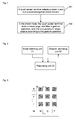
- Fig. 1 is a diagram showing the flow of a method for achieving a check function on a touch screen terminal according to a first embodiment of the present disclosure; as shown in Fig. 1 , the method includes the following steps.
- Step 101 is that a touch screen terminal selects a check mode and a positive/negative check manner.
- the touch screen terminal may select the check mode according to the input of a user. For example, if the user selects to enable a check mode, the touch screen terminal activates the check mode after detecting the input operation of the user.
- the touch screen terminal may select different check modes according to different interface display layouts. For example, in a grid layout, a check function may be implemented by area selection and other check manners; and in a table layout, a check function may be implemented by determining a start target object and an end target object or setting a start line and an end line.
- the touch screen terminal may select a positive/negative check manner according to the requirement of a user, wherein the positive check manner is to mark the target objects selected by the touch screen terminal, and the negative check manner is to mark other target objects except the target objects selected by the touch screen terminal.
- Step 102 is that in the check mode, the touch screen terminal locks a check page, identifies a gesture operation, and marks a plurality of target objects according to the gesture operation.
- the step that the touch screen terminal identifies a gesture operation and marks a plurality of target objects according to the gesture operation includes:
- the step that a plurality of target objects are marked according to the sliding trace of the sliding gesture operation includes:
- the step that the touch screen terminal identifies a gesture operation and marks a plurality of target objects according to the gesture operation includes:
- the step that the start position and the end position of the target objects to be selected are determined according to the click or long press gesture operation, and a plurality of target objects are marked according to the start position and the end position includes:
- Fig. 2 is a diagram showing the composition structure of a touch screen terminal according to a first embodiment of the present disclosure, as shown in Fig. 2 , the touch screen terminal includes a mode selecting unit 21, a gesture identifying unit 22 and a processing unit 23, wherein the mode selecting unit 21 is configured to select a check mode and a positive/negative check manner, and trigger the processing unit 23; the gesture identifying unit 22 is configured to identify a gesture operation; and the processing unit 23 is configured to lock a check page in the check mode selected by the mode selecting unit 21, and mark a plurality of target objects according to the gesture operation identified by the gesture identifying unit 22.
- the mode selecting unit 21 is configured to select a check mode and a positive/negative check manner, and trigger the processing unit 23
- the gesture identifying unit 22 is configured to identify a gesture operation
- the processing unit 23 is configured to lock a check page in the check mode selected by the mode selecting unit 21, and mark a plurality of target objects according to the gesture operation identified by the gesture identifying unit 22.
- the gesture identifying unit 22 is configured to identify the gesture operation, and notify the processing unit 23 when the gesture operation is a sliding gesture operation; and the processing unit 23 is configured to, in the positive check manner, when the gesture operation identified by the gesture identifying unit 22 is a sliding gesture operation, mark a plurality of target objects according to the sliding trace of the sliding gesture operation; the processing unit 23 is further configured to, in the negative check manner, mark other target objects, except the plurality of target objects marked above, according to the sliding trace of the sliding gesture operation identified by the gesture identifying unit in the check page.
- the gesture identifying unit 22 is configured to identify the gesture operation, and notify the processing unit 23 when the gesture operation is click or long press; and the processing unit 23 is configured to, in the positive check manner, when the gesture operation identified by the gesture identifying unit 22 is a click or long press gesture operation, determine the start position and the end position of the target objects to be selected according to the click or long press gesture operation and mark a plurality of target objects according to the start position and the end position; the processing unit 23 is further configured to, in the negative check manner, mark other target objects, except the plurality of target objects marked above, according to the start position and the end position determined according to the click or long press identified by the gesture identifying unit in the check page.
- the processing unit 23 is configured to, in the positive check manner, acquire the start position and the end position of the sliding gesture operation, determine a rectangular area which takes the connecting line between the start position and the end position as a diagonal according to the start position and the end position, and retrieve and mark the target objects in the rectangular area; the processing unit 23 is further configured to, in the negative check manner, determine the rectangular area which takes the connecting line between the start position and the end position as a diagonal according to the start position and the end position, and retrieve and mark the target objects outside the rectangular area.
- the processing unit 23 is configured to, in the positive check manner, determine a closed area formed by the moving trace of the sliding gesture operation and retrieve and mark the target objects in the closed area; the processing unit 23 is further configured to, in the negative check manner, determine a closed area formed by the moving trace of the sliding gesture operation and retrieve and mark the target objects outside the closed area.
- the processing unit 23 is configured to, in the positive check manner, determine and mark the target objects touched by the moving trace of the sliding gesture operation; the processing unit 23 is further configured to, in the negative check manner, determine the target objects touched by the moving trace of the sliding gesture operation and mark other target objects except the touched target objects.
- the processing unit 23 is configured to, in the positive check manner, mark the start target object and the end target object of the target objects to be selected according to the click or long press gesture operation and mark the target objects between the start target object and the end target object; the processing unit 23 is further configured to, in the negative check manner, mark the start target object and the end target object of the target objects to be selected according to the click or long press gesture operation and mark other target objects except the target objects between the start target object and the end target object.
- the processing unit 23 is configured to, in the positive check manner, set the start line and the end line of the target objects according to the click or long press operation and mark the target objects between the start line and the end line; the processing unit 23 is further configured to, in the negative check manner, set the start line and the end line of the target objects to be selected according to the click or long press operation and mark other target objects except the target objects between the start line and the end line.
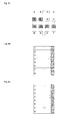
- Fig. 3 is a displaying diagram showing the implementation of a check function on a touch screen terminal according to a second embodiment of the present disclosure.
- a first check mode and a positive check manner are selected; and when the check mode is activated, a check page is locked, namely, when it is detected that the current page cannot be turned during the sliding gesture operation, the current check page is locked.
- the first check mode when the gesture operation is a sliding gesture operation, the start position of the sliding gesture operation is detected and is taken as a first vertex to obtain the coordinate of the first vertex.
- the coordinate of the first vertex is (X1, Y1)
- the sliding gesture operation on a touch screen is detected; and when the sliding gesture operation leaving the touch screen is detected, the end position leaving the touch screen is taken as a diagonal vertex of the first vertex to obtain the coordinate of the diagonal vertex.
- the coordinate of the diagonal vertex is (X2, Y2)
- a rectangle taking the connecting line between the first vertex and the diagonal vertex as a diagonal is created; the four sides of the rectangle are parallel with the four sides of the touch screen; and the coordinates of other two vertexes of the rectangle are (X1, Y2) and (X2, Y1) respectively.
- a rectangular area with the four coordinate points as the vertexes is created.
- the target objects in the rectangular area are retrieved to obtain that target objects B, C, D, F, G, H, J, K and L in the display interface are within the rectangular area, and the target objects are marked to complete the check operation.
- a floating direction key in the clicked display interface is detected, and the floating direction key is for switching among a plurality of pages to complete the check operation needed by a user in different pages, and further for checking the target objects in different positions in all the pages once.
- the target objects are considered to be within the rectangular area.
- Fig. 4 is a displaying diagram showing the implementation of a check function on a touch screen terminal according to a third embodiment of the present disclosure.
- a second check mode and a positive check manner are selected, and a check page is locked when the check mode is activated, namely, when it is detected that the current page cannot be turned during the sliding gesture operation, the current check page is locked.
- a closed area is formed according to the moving trace of the sliding gesture operation, wherein the closed area may be polygonal, circular or in other irregular shape. With a polygonal closed area in Fig.
- the start position of the sliding gesture operation is detected and is taken as a first vertex to obtain the coordinate of the first vertex;
- the tracing point of the moving trace can be recorded continuously by setting an interval time, for example, the current tracing point is recorded every 0.1 second, so as to obtain the coordinate range of the closed area, complete the section of the closed area and determine the coordinate range of the closed area.
- the target objects in the closed area are retrieved, as shown in Fig. 4 , to obtain that the target objects B, F, G, J, K and L in the display interface are within the closed area, and the target objects are marked to complete the check operation.
- a floating direction key in the clicked display interface is detected, and the floating direction key may switch between a plurality of pages to complete the check operation needed by a user in different pages, and may further check the target objects in different positions in all the pages once.
- the target objects are considered to be within the closed area.
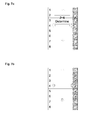
- Figs. 5a to 5c are displaying diagrams showing the implementation of a check function on a touch screen terminal according to a fourth embodiment of the present disclosure.
- a third check mode and a positive check manner are selected, and a check page is locked when the check mode is activated, namely, when it is detected that the current page cannot be turned during a sliding gesture operation, the current check page is locked.
- the third check mode when the touch objects are touched by the moving trace of the sliding gesture operation during the sliding gesture operation, the target objects touched by the moving trace of the sliding gesture operation may be marked directly.
- the moving trace of the sliding gesture operation directly touches target objects F, E, I, J, K and L, the touched target objects are marked directly.
- a floating direction key in the clicked display interface is detected, and the floating direction key may switch among a plurality of pages to complete the check operation needed by a user in different pages, and may further check the target objects in different positions in all the pages once.
- Figs. 6a to 6b are displaying diagrams showing the implementation of a check function on a touch screen terminal according to a fifth embodiment of the present disclosure.
- a fourth check mode and a positive check mode are selected, and a check page is locked when the check mode is activated, namely, when it is detected that the current page cannot be turned during the sliding gesture operation, the current check page is locked.
- the fourth check mode when a click, a long press or other gesture operation are detected, a start target object and an end target object can be selected, and all the target objects between the start target object and the end target object are marked.
- the target object in the second line is selected as the start target object
- the target object in the sixth line is selected as the end target object
- all the target objects between the second line and the sixth line, including the second line and the sixth line, are selected automatically by selecting the start target object and the end target object.
- a floating direction key in the clicked display interface is detected, and the floating direction key may switch among a plurality of pages to complete the check operation needed by a user in different pages, and may further check the target objects in different positions in all the pages once.
- Figs. 7a to 7b are displaying diagram showing the implementation of a check function on a touch screen terminal according to a sixth embodiment of the present disclosure.
- a fifth check mode and a positive check mode may be selected, and a check page is locked when the check mode is activated, namely, when it is detected that the current page cannot be turned during a sliding gesture operation, the current check page is locked.
- a dialog box for setting a start position and an end position may pop up, all the target objects between the start line and the end line are marked.
- a second line and a sixth line are set as a start position and an end position by user input respectively.
- all the target objects between the second and the sixth lines are marked, including the second and the sixth lines.
- a floating direction key in the clicked display interface is detected, and the floating direction key may switch among a plurality of pages to complete the check operation needed by a user in different pages, and may further check the target objects in different positions in all the pages once.
- a touch screen terminal in a selected check mode, locks a check page, identifies a gesture operation, and marks a plurality of target objects by the gesture operation, so that all the selected target objects can be selected quickly and accurately, the time spent on the check operation is reduced greatly, the efficiency of the check operation is improved, and the user experience is promoted.
Landscapes
- Engineering & Computer Science (AREA)
- Theoretical Computer Science (AREA)
- General Engineering & Computer Science (AREA)
- Physics & Mathematics (AREA)
- General Physics & Mathematics (AREA)
- Human Computer Interaction (AREA)
- Computer Security & Cryptography (AREA)
- Computer Hardware Design (AREA)
- Software Systems (AREA)
- User Interface Of Digital Computer (AREA)
- Management, Administration, Business Operations System, And Electronic Commerce (AREA)
Applications Claiming Priority (2)
| Application Number | Priority Date | Filing Date | Title |
|---|---|---|---|
| CN201210592091.3A CN103064626B (zh) | 2012-12-31 | 2012-12-31 | 一种触屏终端及其实现复选功能的方法 |
| PCT/CN2013/081800 WO2013189372A2 (fr) | 2012-12-31 | 2013-08-19 | Terminal à écran tactile et procédé permettant d'obtenir une fonction de contrôle de celui-ci |
Publications (2)
| Publication Number | Publication Date |
|---|---|
| EP2940567A2 true EP2940567A2 (fr) | 2015-11-04 |
| EP2940567A4 EP2940567A4 (fr) | 2015-12-16 |
Family
ID=48107270
Family Applications (1)
| Application Number | Title | Priority Date | Filing Date |
|---|---|---|---|
| EP13806816.8A Ceased EP2940567A4 (fr) | 2012-12-31 | 2013-08-19 | Terminal à écran tactile et procédé permettant d'obtenir une fonction de contrôle de celui-ci |
Country Status (4)
| Country | Link |
|---|---|
| US (1) | US20150355782A1 (fr) |
| EP (1) | EP2940567A4 (fr) |
| CN (1) | CN103064626B (fr) |
| WO (1) | WO2013189372A2 (fr) |
Families Citing this family (36)
| Publication number | Priority date | Publication date | Assignee | Title |
|---|---|---|---|---|
| CN103064626B (zh) * | 2012-12-31 | 2016-06-15 | 中兴通讯股份有限公司 | 一种触屏终端及其实现复选功能的方法 |
| CN104182155B (zh) * | 2013-05-21 | 2017-11-03 | 上海斐讯数据通信技术有限公司 | 触摸屏自动调整键盘显示区块的方法 |
| CN104346078B (zh) * | 2013-07-24 | 2017-09-15 | 中国移动通信集团公司 | 一种应用定位方法和装置 |
| CN104598096A (zh) * | 2013-10-30 | 2015-05-06 | 华为终端有限公司 | 多图标选择方法与终端 |
| CN104657049B (zh) * | 2013-11-21 | 2018-08-03 | 腾讯科技(深圳)有限公司 | 数据项目选择方法、装置和电子设备 |
| WO2015109530A1 (fr) * | 2014-01-24 | 2015-07-30 | 宇龙计算机通信科技(深圳)有限公司 | Procédé d'opération par lot et dispositif d'opération par lot |
| CN103885689B (zh) | 2014-03-07 | 2017-11-28 | 联想(北京)有限公司 | 信息处理方法和电子设备 |
| JP6318794B2 (ja) | 2014-04-08 | 2018-05-09 | 富士通株式会社 | 情報処理装置及び情報処理プログラム |
| CN104049864B (zh) * | 2014-06-18 | 2017-07-14 | 小米科技有限责任公司 | 对象控制方法及装置 |
| CN104360806A (zh) * | 2014-10-13 | 2015-02-18 | 厦门美图移动科技有限公司 | 一种快速对桌面图标进行批量管理的方法 |
| CN104484109B (zh) * | 2014-12-25 | 2018-11-13 | 英华达(上海)科技有限公司 | 对象选取方法及其系统 |
| JP6617422B2 (ja) * | 2015-03-27 | 2019-12-11 | 富士通株式会社 | ウィンドウ設定方法、プログラム及び表示制御装置 |
| CN106201235A (zh) * | 2015-04-29 | 2016-12-07 | 宇龙计算机通信科技(深圳)有限公司 | 对象选择的方法、装置及终端 |
| US10198252B2 (en) | 2015-07-02 | 2019-02-05 | Microsoft Technology Licensing, Llc | Transformation chain application splitting |
| US9785484B2 (en) | 2015-07-02 | 2017-10-10 | Microsoft Technology Licensing, Llc | Distributed application interfacing across different hardware |
| US9860145B2 (en) | 2015-07-02 | 2018-01-02 | Microsoft Technology Licensing, Llc | Recording of inter-application data flow |
| US10261985B2 (en) | 2015-07-02 | 2019-04-16 | Microsoft Technology Licensing, Llc | Output rendering in dynamic redefining application |
| CN105100458B (zh) * | 2015-07-08 | 2018-09-14 | 努比亚技术有限公司 | 一种快速选择对象的装置和方法 |
| US10198405B2 (en) | 2015-07-08 | 2019-02-05 | Microsoft Technology Licensing, Llc | Rule-based layout of changing information |
| US10031724B2 (en) | 2015-07-08 | 2018-07-24 | Microsoft Technology Licensing, Llc | Application operation responsive to object spatial status |
| US20170010673A1 (en) * | 2015-07-08 | 2017-01-12 | Microsoft Technology Licensing, Llc | Gesture based sharing of user interface portion |
| CN104951191B (zh) * | 2015-07-13 | 2017-11-14 | 广东欧珀移动通信有限公司 | 一种实现相片全选或取消全选的方法、系统及移动终端 |
| CN105045511B (zh) * | 2015-08-14 | 2018-06-26 | 网易(杭州)网络有限公司 | 一种呈现对象批量处理方法和设备 |
| CN106527878B (zh) * | 2015-09-09 | 2019-12-27 | 阿里巴巴集团控股有限公司 | 一种对象处理的方法与设备 |
| CN106610762A (zh) * | 2015-10-21 | 2017-05-03 | 中兴通讯股份有限公司 | 一种元素复选的方法及终端 |
| CN105739892B (zh) * | 2016-01-27 | 2019-05-10 | 努比亚技术有限公司 | 基于浮光的选择处理装置、方法及终端 |
| CN105843490A (zh) * | 2016-04-13 | 2016-08-10 | 北京小米移动软件有限公司 | 无效条目的删除方法、装置和设备 |
| CN106020688A (zh) * | 2016-05-18 | 2016-10-12 | 珠海市魅族科技有限公司 | 一种移动终端及其多文件选择方法 |
| CN106201179B (zh) * | 2016-06-28 | 2019-10-29 | 努比亚技术有限公司 | 电子设备及信息处理方法 |
| DE102016223176B4 (de) * | 2016-11-23 | 2022-01-20 | Volkswagen Aktiengesellschaft | Verfahren zum Erfassen einer Nutzereingabe für eine Eingabevorrichtung mit mehreren Schaltelementen und Eingabevorrichtung |
| CN106453957B (zh) * | 2016-11-30 | 2019-07-09 | 努比亚技术有限公司 | 一种批量选择终端及方法 |
| CN108205410A (zh) * | 2016-12-19 | 2018-06-26 | 广州市动景计算机科技有限公司 | 便携式电子终端及待操作对象选定装置与方法 |
| CN108388398A (zh) * | 2018-02-13 | 2018-08-10 | 上海爱优威软件开发有限公司 | 图片的批量整理方法及系统 |
| CN109164961A (zh) * | 2018-08-10 | 2019-01-08 | 珠海格力电器股份有限公司 | 一种移动应用图标的方法及装置 |
| CN110232174A (zh) * | 2019-04-22 | 2019-09-13 | 维沃移动通信有限公司 | 一种内容选中方法及终端设备 |
| CN112256645A (zh) * | 2020-10-20 | 2021-01-22 | 北京字节跳动网络技术有限公司 | 数据处理的方法、装置、终端及存储介质 |
Family Cites Families (31)
| Publication number | Priority date | Publication date | Assignee | Title |
|---|---|---|---|---|
| US5933145A (en) * | 1997-04-17 | 1999-08-03 | Microsoft Corporation | Method and system for visually indicating a selection query |
| US6104398A (en) * | 1998-02-13 | 2000-08-15 | International Business Machines Corporation | Fast and efficient means for grouped object selection and deselection |
| US7650576B2 (en) * | 2002-03-07 | 2010-01-19 | Business Objects Americas | Method and system for creating graphical and interactive representations of input and output data |
| US7086013B2 (en) * | 2002-03-22 | 2006-08-01 | Xerox Corporation | Method and system for overloading loop selection commands in a system for selecting and arranging visible material in document images |
| US6901556B2 (en) * | 2002-05-09 | 2005-05-31 | International Business Machines Corporation | Non-persistent stateful ad hoc checkbox selection |
| US7554530B2 (en) * | 2002-12-23 | 2009-06-30 | Nokia Corporation | Touch screen user interface featuring stroke-based object selection and functional object activation |
| US20040135817A1 (en) * | 2003-01-14 | 2004-07-15 | Daughtery Joey L. | Interface for selecting and performing operations on objects |
| US7454717B2 (en) * | 2004-10-20 | 2008-11-18 | Microsoft Corporation | Delimiters for selection-action pen gesture phrases |
| US7683889B2 (en) * | 2004-12-21 | 2010-03-23 | Microsoft Corporation | Pressure based selection |
| CN100504736C (zh) * | 2005-01-11 | 2009-06-24 | 大同股份有限公司 | 应用于可携式电子装置的选取复数电子档案的方法 |
| KR100672605B1 (ko) * | 2006-03-30 | 2007-01-24 | 엘지전자 주식회사 | 아이템 선택 방법 및 이를 위한 단말기 |
| KR20080089955A (ko) * | 2007-04-03 | 2008-10-08 | 삼성전자주식회사 | 휴대단말기에서 데이터 다중선택 방법 |
| US8533618B2 (en) * | 2007-10-11 | 2013-09-10 | International Business Machines Corporation | Changing multiple boolean state items in a user interface |
| US8375336B2 (en) * | 2008-05-23 | 2013-02-12 | Microsoft Corporation | Panning content utilizing a drag operation |
| US8423916B2 (en) * | 2008-11-20 | 2013-04-16 | Canon Kabushiki Kaisha | Information processing apparatus, processing method thereof, and computer-readable storage medium |
| JP5428436B2 (ja) * | 2009-03-25 | 2014-02-26 | ソニー株式会社 | 電子機器、表示制御方法およびプログラム |
| JP2011060111A (ja) * | 2009-09-11 | 2011-03-24 | Hoya Corp | 表示装置 |
| CN102033642B (zh) * | 2009-09-29 | 2012-10-10 | 联想(北京)有限公司 | 一种手势识别的方法及电子设备 |
| US9218187B2 (en) * | 2009-11-05 | 2015-12-22 | International Business Machines Corporation | Managing large user selections in an application |
| JP2011154555A (ja) * | 2010-01-27 | 2011-08-11 | Fujitsu Toshiba Mobile Communications Ltd | 電子機器 |
| US20120030566A1 (en) * | 2010-07-28 | 2012-02-02 | Victor B Michael | System with touch-based selection of data items |
| CN101930457A (zh) * | 2010-08-13 | 2010-12-29 | 百度在线网络技术(北京)有限公司 | 一种供用户进行快速选择对象及搜索的方法、设备和系统 |
| KR20130052743A (ko) * | 2010-10-15 | 2013-05-23 | 삼성전자주식회사 | 항목 선택 방법 |
| CN102141882A (zh) * | 2010-12-07 | 2011-08-03 | 华为终端有限公司 | 触摸屏终端上框选操作的实现方法及触摸屏终端 |
| US10338672B2 (en) * | 2011-02-18 | 2019-07-02 | Business Objects Software Ltd. | System and method for manipulating objects in a graphical user interface |
| CN102760029B (zh) * | 2011-04-29 | 2016-04-20 | 汉王科技股份有限公司 | 在显示界面上操作列表的方法和装置 |
| CN102262507A (zh) * | 2011-06-28 | 2011-11-30 | 中兴通讯股份有限公司 | 一种利用多点触控实现对象批量选择的方法和装置 |
| CN102662555B (zh) * | 2012-03-06 | 2015-01-21 | 华为终端有限公司 | 一种终端复选操作方法和终端 |
| CN102760006B (zh) * | 2012-03-26 | 2016-03-30 | 联想(北京)有限公司 | 一种确定操作对象的方法及装置 |
| CN102722334B (zh) * | 2012-06-06 | 2016-02-24 | 中兴通讯股份有限公司 | 触摸屏幕的控制方法及装置 |
| CN103064626B (zh) * | 2012-12-31 | 2016-06-15 | 中兴通讯股份有限公司 | 一种触屏终端及其实现复选功能的方法 |
-
2012
- 2012-12-31 CN CN201210592091.3A patent/CN103064626B/zh active Active
-
2013
- 2013-08-19 US US14/655,876 patent/US20150355782A1/en not_active Abandoned
- 2013-08-19 EP EP13806816.8A patent/EP2940567A4/fr not_active Ceased
- 2013-08-19 WO PCT/CN2013/081800 patent/WO2013189372A2/fr not_active Ceased
Also Published As
| Publication number | Publication date |
|---|---|
| CN103064626A (zh) | 2013-04-24 |
| US20150355782A1 (en) | 2015-12-10 |
| WO2013189372A2 (fr) | 2013-12-27 |
| CN103064626B (zh) | 2016-06-15 |
| WO2013189372A3 (fr) | 2014-02-13 |
| EP2940567A4 (fr) | 2015-12-16 |
Similar Documents
| Publication | Publication Date | Title |
|---|---|---|
| EP2940567A2 (fr) | Terminal à écran tactile et procédé permettant d'obtenir une fonction de contrôle de celui-ci | |
| CN103207750B (zh) | 图标缩放的方法及装置 | |
| CN102981711A (zh) | 一种在触摸屏上移动应用图标的方法和系统 | |
| JP6430197B2 (ja) | 電子機器および方法 | |
| US20100039449A1 (en) | Menu controlling method | |
| US9335847B2 (en) | Object display method and apparatus of portable electronic device | |
| JP2015162088A (ja) | 電子機器、方法及びプログラム | |
| WO2014045953A1 (fr) | Dispositif et procédé de traitement d'informations, et programme associé | |
| CN103513869A (zh) | 终端锁屏界面、Widget小部件的显示方法及装置 | |
| CN104360810B (zh) | 一种虚拟按键的显示方法和电子设备 | |
| JP5389241B1 (ja) | 電子機器および手書き文書処理方法 | |
| JP2014092902A (ja) | 電子機器および手書き文書処理方法 | |
| CN104571829A (zh) | 一种终端的显示控制方法及终端 | |
| CN104238794B (zh) | 一种对触屏操作的响应方法及终端、移动终端 | |
| JP2014032632A (ja) | 電子機器、方法、およびプログラム | |
| CN103235692A (zh) | 一种触屏设备及其选择目标对象的方法 | |
| JPWO2014162604A1 (ja) | 電子機器および手書きデータ処理方法 | |
| EP2767897B1 (fr) | Procédé de génération de données d'écriture et dispositif électronique associé | |
| CN113791725A (zh) | 触控笔操作的识别方法、智能终端及计算机可读存储介质 | |
| JP5644658B2 (ja) | 情報処理装置、入力制御方法および入力制御プログラム | |
| CN105022579A (zh) | 基于图像处理的虚拟键盘的实现方法和装置 | |
| WO2015110066A1 (fr) | Procédé et appareil de commande de déverrouillage pour terminal intelligent | |
| US20120287063A1 (en) | System and method for selecting objects of electronic device | |
| JP5480357B1 (ja) | 電子機器および方法 | |
| EP2947555A2 (fr) | Terminal à écran tactile capacitif et procédé de saisie y relatif |
Legal Events
| Date | Code | Title | Description |
|---|---|---|---|
| PUAI | Public reference made under article 153(3) epc to a published international application that has entered the european phase |
Free format text: ORIGINAL CODE: 0009012 |
|
| 17P | Request for examination filed |
Effective date: 20150709 |
|
| AK | Designated contracting states |
Kind code of ref document: A2 Designated state(s): AL AT BE BG CH CY CZ DE DK EE ES FI FR GB GR HR HU IE IS IT LI LT LU LV MC MK MT NL NO PL PT RO RS SE SI SK SM TR |
|
| AX | Request for extension of the european patent |
Extension state: BA ME |
|
| A4 | Supplementary search report drawn up and despatched |
Effective date: 20151118 |
|
| RIC1 | Information provided on ipc code assigned before grant |
Ipc: G06F 3/0488 20130101AFI20151112BHEP Ipc: G06F 3/0484 20130101ALI20151112BHEP |
|
| DAX | Request for extension of the european patent (deleted) | ||
| 17Q | First examination report despatched |
Effective date: 20170817 |
|
| REG | Reference to a national code |
Ref country code: DE Ref legal event code: R003 |
|
| STAA | Information on the status of an ep patent application or granted ep patent |
Free format text: STATUS: THE APPLICATION HAS BEEN REFUSED |
|
| 18R | Application refused |
Effective date: 20190805 |