EP3021594A1 - Verfahren zur klassifizierung eines inhalts, und inhaltsempfehlung in einem elektronischen programmführer - Google Patents
Verfahren zur klassifizierung eines inhalts, und inhaltsempfehlung in einem elektronischen programmführer Download PDFInfo
- Publication number
- EP3021594A1 EP3021594A1 EP15194772.8A EP15194772A EP3021594A1 EP 3021594 A1 EP3021594 A1 EP 3021594A1 EP 15194772 A EP15194772 A EP 15194772A EP 3021594 A1 EP3021594 A1 EP 3021594A1
- Authority
- EP
- European Patent Office
- Prior art keywords
- video content
- user
- display
- interactive
- selectable
- Prior art date
- Legal status (The legal status is an assumption and is not a legal conclusion. Google has not performed a legal analysis and makes no representation as to the accuracy of the status listed.)
- Withdrawn
Links
Images



Classifications
-
- H—ELECTRICITY
- H04—ELECTRIC COMMUNICATION TECHNIQUE
- H04N—PICTORIAL COMMUNICATION, e.g. TELEVISION
- H04N21/00—Selective content distribution, e.g. interactive television or video on demand [VOD]
- H04N21/40—Client devices specifically adapted for the reception of or interaction with content, e.g. set-top-box [STB]; Operations thereof
- H04N21/47—End-user applications
- H04N21/475—End-user interface for inputting end-user data, e.g. personal identification number [PIN], preference data
- H04N21/4756—End-user interface for inputting end-user data, e.g. personal identification number [PIN], preference data for rating content, e.g. scoring a recommended movie
-
- H—ELECTRICITY
- H04—ELECTRIC COMMUNICATION TECHNIQUE
- H04N—PICTORIAL COMMUNICATION, e.g. TELEVISION
- H04N21/00—Selective content distribution, e.g. interactive television or video on demand [VOD]
- H04N21/40—Client devices specifically adapted for the reception of or interaction with content, e.g. set-top-box [STB]; Operations thereof
- H04N21/43—Processing of content or additional data, e.g. demultiplexing additional data from a digital video stream; Elementary client operations, e.g. monitoring of home network or synchronising decoder's clock; Client middleware
- H04N21/442—Monitoring of processes or resources, e.g. detecting the failure of a recording device, monitoring the downstream bandwidth, the number of times a movie has been viewed, the storage space available from the internal hard disk
- H04N21/44213—Monitoring of end-user related data
- H04N21/44222—Analytics of user selections, e.g. selection of programmes or purchase activity
- H04N21/44224—Monitoring of user activity on external systems, e.g. Internet browsing
-
- H—ELECTRICITY
- H04—ELECTRIC COMMUNICATION TECHNIQUE
- H04N—PICTORIAL COMMUNICATION, e.g. TELEVISION
- H04N21/00—Selective content distribution, e.g. interactive television or video on demand [VOD]
- H04N21/40—Client devices specifically adapted for the reception of or interaction with content, e.g. set-top-box [STB]; Operations thereof
- H04N21/43—Processing of content or additional data, e.g. demultiplexing additional data from a digital video stream; Elementary client operations, e.g. monitoring of home network or synchronising decoder's clock; Client middleware
- H04N21/431—Generation of visual interfaces for content selection or interaction; Content or additional data rendering
- H04N21/4312—Generation of visual interfaces for content selection or interaction; Content or additional data rendering involving specific graphical features, e.g. screen layout, special fonts or colors, blinking icons, highlights or animations
-
- H—ELECTRICITY
- H04—ELECTRIC COMMUNICATION TECHNIQUE
- H04N—PICTORIAL COMMUNICATION, e.g. TELEVISION
- H04N21/00—Selective content distribution, e.g. interactive television or video on demand [VOD]
- H04N21/40—Client devices specifically adapted for the reception of or interaction with content, e.g. set-top-box [STB]; Operations thereof
- H04N21/45—Management operations performed by the client for facilitating the reception of or the interaction with the content or administrating data related to the end-user or to the client device itself, e.g. learning user preferences for recommending movies, resolving scheduling conflicts
- H04N21/466—Learning process for intelligent management, e.g. learning user preferences for recommending movies
- H04N21/4668—Learning process for intelligent management, e.g. learning user preferences for recommending movies for recommending content, e.g. movies
-
- H—ELECTRICITY
- H04—ELECTRIC COMMUNICATION TECHNIQUE
- H04N—PICTORIAL COMMUNICATION, e.g. TELEVISION
- H04N21/00—Selective content distribution, e.g. interactive television or video on demand [VOD]
- H04N21/40—Client devices specifically adapted for the reception of or interaction with content, e.g. set-top-box [STB]; Operations thereof
- H04N21/47—End-user applications
- H04N21/472—End-user interface for requesting content, additional data or services; End-user interface for interacting with content, e.g. for content reservation or setting reminders, for requesting event notification, for manipulating displayed content
- H04N21/47217—End-user interface for requesting content, additional data or services; End-user interface for interacting with content, e.g. for content reservation or setting reminders, for requesting event notification, for manipulating displayed content for controlling playback functions for recorded or on-demand content, e.g. using progress bars, mode or play-point indicators or bookmarks
Definitions
- the present invention relates to the field of electronic program guides (or "EPG") and more particularly that of the recommendation of video content in such guides.
- EPG electronic program guides
- EPGs are human-machine interfaces (HMIs) consisting of interactive graphic pages, used to provide information on multimedia services and contents available either on demand (for example for video-on-demand, VOD or SVOD), or Live broadcasting (television signals), and thus help a user navigate the wide range of services and content and select precisely and quickly video content that he wants to access.
- Video content is typically movies, series, documentaries or reports, cartoons, etc.
- EPGs are traditionally implemented in digital terminals or user devices, known as the Anglo-Saxon "Set Top Box".
- a display device connected to the terminal allows the display of the EPG and navigation therein by the user, in particular by means of a remote control.
- the proposed recommendations are rarely based on a notation of the video content viewed, but rather on a history of consumption.
- the proposed recommendations are on average rather far from the expectations of the users.
- the invention falls within this framework.
- the present invention makes it possible to fluidify, and thus facilitate, the interaction with the user during the retrieval of information used as part of the recommendation of video content. Indeed, a playback output event of the video content being viewed is now detected and taken into account to trigger the recovery in memory and the display of an interface allowing the collection of such information, here a ranking or notation of the video content. The user no longer needs to make a voluntary and long process to access sub-menus. The user experience is improved.
- the recommendation engine is able to generate recommendations more relevant to the user. Again, the user experience is improved.
- the contextual presence (according to the reading position when the video content is viewed) of the selectable sorting elements in the interactive screen selected when the reading is output makes it possible to adapt the interactions with the user. or even limit them. Thus, unnecessary interactions depending on the context are avoided, and the user experience is improved for the same quality of recommendation. In particular, only interactions that are relevant to video content recommendations can be retained for a given context.
- the method according to the present invention thus offers a technical effect which is manifested by faster and more efficient access to recommended relevant contents, ie with fewer actions for the user, despite the large volume of video content available. Symmetrically, this reduces the processing load for the user terminal and / or a central server.
- the first interactive menu is selected when the play-out playback position is earlier than a first play-back position of the video content, and the second interactive menu includes a different number of selectable ranking items. of that of the first interactive menu, is selected when the reading read output position is later than the first read threshold position.
- the first read threshold position is defined by a time marker inserted in the video content read or is defined by a prefixed percentage of said read video content, for example 85% of the length of the video content.
- the marker it is thus possible to indicate quite precisely a position from which it can be considered that the user has sufficiently consumed the video content to classify or note effectively for recommendations.
- the marker may be substantially positioned at the beginning of the end credits of the video content.
- the first interactive menu comprises a single selectable element for ranking the video content and the second interactive menu comprises several, for example two or three, selectable elements for ranking the video content.
- the first interactive menu may also include, in addition to the selectable video content ranking element, a user-selectable element for immediately continuing the selection. playing back the video content and / or another user-selectable element for storing the playback position of the video content upon detecting the output event and allowing subsequent playback of the video content from said position to be resumed reading.
- the selection of an interactive screen among the first and second interactive screens is performed only when the reading position of the video content during the detection of the output event is after a second threshold position of reading, for example 3% of the length of the video content.
- a third interactive menu free of selectable video content ranking element can be selected in memory and displayed to the user.
- This third screen can simply be the "movie file" corresponding to the video content whose reading has just been stopped.
- the selection of an interactive screen among the first and second interactive screens is performed only when said video content has not already been classified. In this case, a return to the "film sheet" can be considered.
- the selectable ranking element (s) are one or more distinct icons selectable by the user.
- Such selectable icons simplify the actions of the user and thus facilitate the use of the EPG.
- This configuration is the reverse of the recommendations conventionally implemented in the known techniques. Indeed, here it is not a question of suggesting a new video content not chosen by the user, but of guaranteeing the current choice of the second video content by the recommendation information, in this case by reference to a previous content video, for example already appreciated by the user (that is to say, classified in a predefined class).
- said recommendation information further comprises at least one indexing keyword linking the second video content to said near video content.
- it may be at least one common indexing keyword for the two video contents considered. It can take the form of a semantic expression as evoked later.
- the common indexing keyword as an indicator of the proximity or the correlation between the two video contents, offers an additional decision indicator that is relevant to the user.
- This arrangement further enhances interaction with the user and the user experience.
- the output event includes receiving a signal representative of an instruction of the user for stopping playback of the video content or including reaching the end of the video content.
- the presentation of the first or second interactive screen is performed either when the user voluntarily stops the video content during viewing, or when the latter ends (in which case the second interactive screen can be systematically displayed).
- the embodiments of the invention provide a way to navigate quickly and efficiently in a human-machine interface (HMI) for selecting video content, that is to say say in an electronic guide programs implemented in a user terminal type set-top box.
- HMI human-machine interface
- An icon is an image representing a feature and allowing it to be implemented quickly by selecting and confirming the selection of the icon.
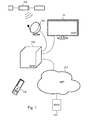
- the Figure 1 illustrates a general context of implementation of embodiments of the invention.
- a user device 100 for accessing an electronic program guide (EPG) is connected to a display screen 101 (DISP).
- the screen 101 may be controlled by the device 100 to display video content or interface data to allow a user to browse a catalog or a grid of video content programs proposed in the EPG.
- the user device 100 includes in memory a pre-loaded computer program for the implementation of the EPG.
- the computer program executed by the user device 100 manages the interactivity of the EPG, i.e. defines standard or template pages including navigation icons and defines the effects of selecting one of the icons for the purposes of to provide navigation in the EPG.
- the EPG thus allows the user to select one or more contents to watch.
- the device 100 can in particular give access to the user to television channels, radio stations, programs on demand (movies, event replay or other), or even the Internet.
- the content to which the user has access may be associated with descriptive data (title, actors, synopsis, posters, reviews, schedule, etc.).
- descriptive data title, actors, synopsis, posters, reviews, schedule, etc.
- a program broadcast on a television channel may be associated with a broadcast schedule, a summary, or the like. This data can be useful for the user to choose a program to watch.
- the EPG relies on one or more databases that include these descriptive data of video content and which also include said video content when it is not broadcast live (eg VOD).
- the descriptive data to be added to the standard pages defined in the EPG are thus retrieved from these databases, on request from the user terminal (according to a client / server relationship).
- the databases of video contents are stored in a remote server 103 (SERV) accessible at through a communication network 102 (NET), wired or not.
- a reading procedure opening a media player for display on the screen
- All or part of the descriptive databases may be local to said user device 100 in which case a download of these (updates) can be performed regularly (especially for a schedule of programs TV) from the remote server 103 (SERV) through the communication network 102 (NET).
- SESV remote server 103
- NET communication network 102
- these databases are hosted by the remote server 103 (SERV), causing the user device 100 to send requests to the remote server 103 when a new page of the EPG is to be displayed, after selecting an icon by the user to navigate to a new page of the EPG.
- SESV remote server 103
- the device 100 may also receive other data such as update data of the computer program managing the operation of the device (" firmware " in English terminology).
- the device 100 receives the audiovisual content and / or the other data via an antenna 104 (for example a satellite dish) from an antenna or a satellite 105 of a broadcasting network (for example by satellite or TNT , sign of "Digital Terrestrial Television").
- the device 100 can thus receive these data via the network 102 which can be the Internet network, via the broadcasting network (satellite or TNT) and / or hybrid manner via these two networks.
- the device 100 is also associated with a remote control 106 enabling the user to interact with the device.
- the remote server 103 comprises, in addition to the descriptive databases and video contents for the VOD, a user profile management module and a recommendation engine.
- the user profile management module allows users to connect to the VOD or TV service from any user terminal. For example, an interface proposed to launch the EPG on a terminal invites the user to connect, and thus to recover the preferences defined in his profile stored on the server 103, to customize the EPG interface that is displayed .
- the recommendation engine is of known type, for example the engine proposed by the company SPIDEO (trade name) and based on all or part of four bricks: Kinoprofil, Kinograph, Kinomix and Kinosocial (trade names) described in the document " spideo. tv / whitepaper / whitepaper-spideo-aug2013.pdf Colour
- the video content available to the user is indexed using keywords or "metadata" describing the characteristics of the content, eg gender, key personalities, context, mood, style, geography, etc. . These keywords are stored as descriptive data of the video content, by the server 103.
- the video content "Into the wild” can be indexed through the following metadata: “Beautiful Pictures”, “Change Air”, “Subtle”, “Road Movie”, “Change Life” “,” Man and Nature, “” Natural Landscape, “” Searching for Bloom, “” Rebel, “and” Inspired by Real Facts. "
- the search engine for example that of SPIDEO, creates links between the different contents having one or more common characteristics (keywords).
- keywords typically, a graph type model is used to represent the possible links.
- the reconciliations between the contents are not only made by exact comparison of the respective keywords, but a thesaurus can be used to link these contents, also on the basis of synonymy, antonymia, etc.
- Groups of key words for example taking the form of semantic expressions, can be used to propose recommendations. These groups can be predefined or automatically selected according to different criteria, for example according to the number of contents linked by the group of keywords.
- the device 100 may, for example, give access to a catalog of several thousand video contents (films, reports, clips, etc.) and / or to hundreds of television channels, each broadcasting dozens of programs in a single day. which makes navigation random (or "zapping " in English terminology) tedious.
- EPG electronic program guide
- SVOD video on demand subscription service
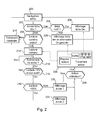
- Figure 2 illustrates steps mainly implemented at the user device 100, although details on operations performed at the server 103 and at the screen 101 are given.
- This initial step may include prior operations, consisting for example of launching the EPG application in the user device 100, by loading the instruction codes stored in the memory of the user device 100; by connecting the user to his subscriber account by conventional techniques, for example through a connection interface displayed on the screen 101 at the launch of the EPG application.
- This connection notably implements authentication exchanges between the user device 101 and the server profile management module 103, making it possible to recover user preference parameters that can define a personalized interface of the EPG; and retrieving descriptive content data for display within standard pages defined by the EPG application during the user's navigation in the EPG.
- step 200 the user navigates in the EPG using directional keys of the remote control 106 for example, which make it possible to switch from one selectable icon to another.
- each icon selectable is associated with an action such as navigation to another page of the EPG, launching the playback of video content, the output of the application EPG, etc. This action is triggered when the user selects the icon, for example by pressing a selection button on the remote control 106.
- step 200 When the user device 100 receives a signal representative of a selection instruction, by the user, of an icon proposed in the electronic program guide which is displayed to him, the method leaves step 200.
- the method of the Figure 2 go to step 202 where it is determined whether the action associated with the selected icon is the navigation to a movie sheet or program sheet, that is to say a page of the EPG which provides additional information ( descriptive data) on video content.
- a movie sheet can be accessed from the homepage of the EPG or in a set of proposals resulting from a search performed by the user.
- the application EPG executed in the user device 100 retrieves the descriptive data associated with the selected movie from the server 103, retrieves, in memory, the definition of the standard page " film sheet ", then integrates these descriptive data in the resulting standard page so as to control (that is to say, generate a display signal able to cause a display) the display of the film sheet thus constructed, on the screen 101.
- FIG. 3 schematically illustrates a page "film sheet" 300 of the EPG for the video "FILM 1" (commercial name) in which a number of additional information (summary, actors, director, duration, etc.) is integrated. Since the video "FILM 1" has already been noted by the logged in user, a selectable icon 302 indicates the assigned rating. This selectable icon 302 is also referred to as a selectable ranking or rating element in this document.
- This selectable icon 302 can be selected by the user to modify the rating assigned, for example in a new EPG page offering an interactive menu with three selectable icons each associated with a rating level or rating, for example three smileys (trade name ) as represented on the Figure 5 described below.
- the selection of one of the three smileys makes it possible to update in memory of the server 103 the rating assigned by the user to the video "FILM 1". Then the EPG returns to movie 300.
- step 208 it is determined in step 208 whether the action associated with the selected icon is the playback of the video content. In other words, if the user requests to view the selected movie by selecting for example the selectable icon "View” 304 in the film file 300.
- the selection signal is processed conventionally in step 210 not described here because it concerns actions in the EPG which are not directly concerned by the present invention, by example access for consultation to the profile of the user, the modification of preferences in the profile, a search conducted by the user, the output of the EPG, etc. Following step 210, the process returns to step 200.
- Step 212 the video content starts playing in step 212 (possibly from a break point during a previous read, breakpoint having been stored by the server 103).
- the video content is read according to conventional techniques: use of a multimedia player embedded in the user device 100 and recovery, by successive requests (streaming), the video content from the server 103 for display.
- Step 212 thus consists in generating a display signal able to cause a display on the screen 101 of the selected video content.
- step 214 the user device 100 waits, in step 214, an exit event ending the display of video content during its playback.
- the output event may include receiving a signal representative of an instruction of the user for stopping playback of the video content, i.e., a user signal (on the remote control 106 for example) asking to stop playback.
- a signal representative of an instruction of the user for stopping playback of the video content i.e., a user signal (on the remote control 106 for example) asking to stop playback.
- the output event may include reaching the end of the video content, i.e., the video content is finished.
- one aspect of the invention provides for the EPG to switch to an interactive screen selected from a plurality of interactive displays depending on the playback point of the video content when that output event occurs.
- the EPG selects in memory an interactive screen from a first interactive screen comprising one or more selectable icons for noting the video content read and a second interactive screen comprising a or several selectable icons different from the first interactive screen to note the video content read, then generates a display signal adapted to cause a display on the display device of the selected interactive menu.
- said selection between the first and the second interactive screen is a function of the playback position of the video content upon detection of the output event;
- selecting an interactive screen from the first and second interactive screens is performed only when the playback position of the video content upon detection of the output event is after a second read threshold position. , as illustrated later.
- the use of interactive screens for recording video content can only take place if no score has already been awarded. Said selection is therefore a function of the existence of a score already assigned to the video content.
- the selection of an interactive screen among the first and second interactive screens is performed only when said video content has not already been classified.
- This interactive multi-screen approach corresponds to the steps 216 to 222 described now.
- the test 216 consists in verifying if enough video content has been seen by the user to propose an interactive screen for recording this video content and if the video content read has not already been rated by the user.
- the test 216 to check if enough video content has been seen is to check if the current position of reading the video when the exit event occurs is after a threshold percentage, for example 3 %, of the length of the video.
- a threshold percentage for example 3 %
- other percentages can be used or markers embedded in the video can be provided (in which case it is checked whether the corresponding marker has been exceeded or not).
- the current reading position can easily be retrieved from the media player implemented by the user device.
- the verification of whether the video content read has already been noted may simply consist in retrieving, in the profile of the user on the server 103, the classification associated with this read video content. If a ranking is completed, then the audit concludes that there is a rating.
- the "no opinion" rating is considered a user-assigned ranking of the video content.
- the "no opinion" classification can be considered as the absence of a rating given to the video content.
- a conventional processing 210 is performed, ie for example the return to the EPG, for example on the film sheet 300 corresponding to the stopped video content.
- other pages than the film sheet can be provided, for example the display of an interactive menu to resume playback immediately (in which case we loop back to step 212) or to save the current position of reading (in the server 103) for later viewing.
- the test 218 consists in verifying whether enough video content has been seen by the user so that he can accurately record this video content, in which case an adapted interactive screen may be proposed to him.
- the test 218 amounts to checking whether the current position of reading the video when the exit event occurs is later than a threshold position, for example posterior to a marker provided in the video content itself. - even at the beginning of the end credits), or at 85% (or any other percentage) of the length of the video.
- the first interactive screen is selected from the first and second interactive screens, then displayed to the user, in step 220.
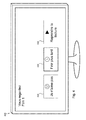
- An example of this first interactive screen 400 is illustrated in Figure 4 .
- the second interactive screen is selected from the first and second interactive screens, and then displayed to the user, in step 222.
- An example of this second interactive screen 500 is illustrated in Figure 5 .
- the selection of the interactive menus is contextual, according to the current reading position: the first interactive menu is selected when the read-out reading position is before a first threshold reading position of the video content (for example 85%) , and the second interactive menu is selected when the read-out reading position is later than the first read-threshold position.
- the first and second interactive screens are in memory of the user device 100 and more precisely defined in the code of the EPG application executed as standard pages, the descriptive data such as the title and a possible background image that can be those recovered with the film sheet. previously displayed to the user.
- the first interactive menu 400 includes a single selectable video content ranking element, here a selectable smiley "I do not like" 402.
- the first interactive menu includes, in addition to the icon 402, selectable items not dedicated to the classification or rating of video content: a 406 user-selectable icon to immediately continue playing video content and another icon 404 user-selectable for storing the current playback position of the video content upon detection of the output event and for resuming playback of the video content from that stored current position later.
- the storage takes place at the server 103, associated with the profile of the connected user.
- the second interactive menu 500 comprising a number of classification icons / selectable different notation than the first interactive menu, and in particular more notation icon that the first interactive menu.
- the second interactive menu 500 includes three selectable elements for ranking the video content, here a selectable smiley "I do not like" 502 identical to the icon 402, a selectable smiley "No opinion" 504 and a smiley selectable "Like” 506.
- a selectable smiley "I do not like" 502 identical to the icon 402 a selectable smiley "No opinion” 504 and a smiley selectable "Like” 506.
- a selectable smiley "I do not like” 502 identical to the icon 402
- a selectable smiley "No opinion” 504 and a smiley selectable "Like” 506.
- only the icons 502 and 506 can be proposed to the user in this second interactive menu.
- other visuals can be used with a greater number of ranking levels, for example a ranking of zero to five stars.
- an exit icon of the proposed screen may be provided in said screen displayed in order to pass this screen without noting the film being played.
- this output function without notation can be provided using a specific button on the remote control 106.
- this second interactive screen 500 does not include icons 404 and 406, thus reducing the complexity of navigation for the user.
- the user is able to navigate between the different icons of the interactive menus, using for example the directional arrows of the remote control 106 and a selection button.
- step 224 of a user action including the selection of one of the icons that are presented to it.
- the step 226 is to process the selection by the user.
- the selection of the icon 406 leads to resuming the playback of video content, that is, a return to step 212 from the current reading position.
- the selection of the icon 404 leads to the sending, by the user device 100 to the server 103, the current read position for storage in the profile of the user.
- any of the ranking icons 402, 502, 504 and 506 results in noting the video content viewed, and then returning to the movie clip 300 at step 206 where the assigned rating is visible in the icon 302.
- the classification or note declared by the user and thus attributed to the video content is stored first in memory of the user device 100 before being transmitted to the server 103 for storage in association with the profile of the connected user.
- the "no opinion" icon 504 may correspond to the lack of classification of the video content and therefore to a direct return to the film sheet without notation, that is to say to step 228 described later.
- an exit icon without notation or a specific key (output) of the remote control can be provided to go directly to step 228 without notation of the video content read.
- the rankings thus declared by the user on the multiple video contents that he has been able to view can be used in a recommendation mechanism.
- the user device 100 obtains video content recommendation information based on the stored ranking element for the at least one video content read; and generates a display signal adapted to cause a display on the display device of the recommendation information in the electronic program guide, that is to say to display the recommendation on a page of the EPG.
- the user device 100 receives a signal representative of an instruction of the user navigating in the electronic program guide, for obtaining additional data from a second video content, for example by accessing a new movie file; then in response to receiving the instruction for obtaining additional data, it obtains (for example upon request from the remote server 103) identification information, among a plurality of video contents stored in memory, of a video content that the user has previously classified in a predefined class (eg "I like") and which is close to said second video content given a mathematical distance calculated on the basis of keywords indexing video content ; and it uses the identification information of said near video content as recommendation information.
- a predefined class eg "I like”
- search by the server 103, video content close to that selected by the user can implement conventional mechanisms for calculating distances between metadata associated with each video content of a catalog of video content.
- This search by the server 103, and in particular the recommendation engine may include the identification of all the video contents that the connected user has already noted (for example "I like” or at least 4 stars on a scale of 0 to 5 stars); then determining, from these video content already noted, the closest video content selected by the user.
- different criteria may intervene in this determination, for example by taking into account the user's preferences (for example themes or key words filled in) to weight certain keywords during distance calculations between video contents.
- a weighting can be introduced during the distance calculations, this weighting moving away the contents noted "No opinion” and "I n". do not like, "compared to" liked “content.
- the weights for the content rated "No opinion” and "I do not like” can be infinite so that only "No opinion” content is selected.
- Identification information of the near video content thus determined is then returned by the recommendation engine, for example the Kinograph module of SPIDEO.
- this recommendation approach is the opposite of that conventionally accepted, since it starts from a second video content accessed by the user to indicate which other content he has already appreciated.
- the recommendation thus takes the form of confirmation or guarantee that can be presented with the second video content selected by the user, in order to offer him additional information to help him confirm his choice.
- step 200 if the user accesses a new movie file ("yes" output of test 202), it is determined in step 204 whether the associated video content has already been noted by the user. If so, the process continues at step 206 already described in connection with the Figure 3 .
- the corresponding movie sheet is displayed to the user in step 228, which movie sheet includes the confirmation or warranty information mentioned above.
- the Figure 6 illustrates such a film sheet 600, still for the video "FILM 1" when it has not yet been noted.
- the recommendation information is represented by reference 602 which includes the title "FILM 2" of another movie that the user liked, as a video content identifier and which includes at least one indexing keyword linking the second video content (of which the film sheet is accessed) to such close video content, here in the form of a semantic expression "Black humor with jubilant violence”.
- the user device 100 In response to receiving the instruction for obtaining additional data (that is to say, the access to Record Film second video content), the user device 100 obtains (the server 103) data additional second video content; then generates a display signal capable of causing a display on the display device of additional data of the second video content at the same time as the recommendation information, typically by the film sheet 600 in accordance with the Figure 6 .
- the movie sheet 300 is displayed.
- the Figure 7 illustrates a user device according to one embodiment.
- the device 100 of the Figure 1 may for example have a structure as described below.
- the device 700 has a memory unit 701 (MEM).
- MEM memory unit 701
- This memory unit comprises a random access memory for storing in an unsustainable manner calculation data used during the implementation of a method according to one embodiment.
- the memory unit furthermore comprises a non-volatile memory (for example of the EEPROM type) for storing, for example, a computer program according to one embodiment for its execution by a processor (not shown) of a processing unit 702 (PROC) of the device.
- PROC processing unit 702
- the device also comprises a first communication unit 703 (COM1) for implementing communications, via a communication network, in particular with a remote server in order to receive service data (EPG) and video content data.
- COM1 first communication unit 703
- EPG service data
- video content data video content data
- the device also includes a second communication unit 704 (COM2) for transmitting display data and display commands to a display and a third communication unit 705 (COM3) for receiving commands from a remote control allowing a user to navigate among the features offered by the device.
- a second communication unit 704 for transmitting display data and display commands to a display
- a third communication unit 705 for receiving commands from a remote control allowing a user to navigate among the features offered by the device.
Landscapes
- Engineering & Computer Science (AREA)
- Multimedia (AREA)
- Signal Processing (AREA)
- Databases & Information Systems (AREA)
- Health & Medical Sciences (AREA)
- General Health & Medical Sciences (AREA)
- Social Psychology (AREA)
- Computer Networks & Wireless Communication (AREA)
- Human Computer Interaction (AREA)
- Two-Way Televisions, Distribution Of Moving Picture Or The Like (AREA)
- User Interface Of Digital Computer (AREA)
Applications Claiming Priority (1)
| Application Number | Priority Date | Filing Date | Title |
|---|---|---|---|
| FR1461077A FR3028631A1 (fr) | 2014-11-17 | 2014-11-17 | Procede de classement d'un contenu et recommandation de contenu dans un guide electronique des programmes |
Publications (1)
| Publication Number | Publication Date |
|---|---|
| EP3021594A1 true EP3021594A1 (de) | 2016-05-18 |
Family
ID=53039490
Family Applications (1)
| Application Number | Title | Priority Date | Filing Date |
|---|---|---|---|
| EP15194772.8A Withdrawn EP3021594A1 (de) | 2014-11-17 | 2015-11-16 | Verfahren zur klassifizierung eines inhalts, und inhaltsempfehlung in einem elektronischen programmführer |
Country Status (2)
| Country | Link |
|---|---|
| EP (1) | EP3021594A1 (de) |
| FR (1) | FR3028631A1 (de) |
Cited By (6)
| Publication number | Priority date | Publication date | Assignee | Title |
|---|---|---|---|---|
| CN107172498A (zh) * | 2017-04-25 | 2017-09-15 | 北京潘达互娱科技有限公司 | 直播房间展示方法及装置 |
| CN108846005A (zh) * | 2018-04-23 | 2018-11-20 | 北京奇艺世纪科技有限公司 | 漫画资源推荐方法及装置 |
| CN109451328A (zh) * | 2018-12-10 | 2019-03-08 | 网易(杭州)网络有限公司 | 游戏直播的信息处理方法及装置 |
| CN110769270A (zh) * | 2019-11-08 | 2020-02-07 | 网易(杭州)网络有限公司 | 直播互动的方法及装置、电子设备、存储介质 |
| CN111447239A (zh) * | 2020-04-13 | 2020-07-24 | 北京字节跳动网络技术有限公司 | 视频流播放控制方法、设备及存储介质 |
| CN112637666A (zh) * | 2020-12-25 | 2021-04-09 | 四川长虹电器股份有限公司 | 一种智能电视端动态显示设置项的方法 |
Citations (6)
| Publication number | Priority date | Publication date | Assignee | Title |
|---|---|---|---|---|
| US20050004930A1 (en) * | 2003-04-16 | 2005-01-06 | Masashi Hatta | Hybrid personalization architecture |
| US20070039023A1 (en) * | 2003-09-11 | 2007-02-15 | Mitsuteru Kataoka | Content selection method and content selection device |
| EP2202657A1 (de) * | 2008-12-23 | 2010-06-30 | Axel Springer Digital TV Guide GmbH | Adaptives implizites Lernen für Empfehlersysteme |
| US8001561B2 (en) * | 2007-11-20 | 2011-08-16 | Samsung Electronics Co., Ltd. | System and method for automatically rating video content |
| US20130185291A1 (en) * | 2011-07-12 | 2013-07-18 | Mat Tyndall | Online rating and feedback system |
| EP2704445A1 (de) * | 2012-08-30 | 2014-03-05 | BlackBerry Limited | Bewertung von Medienfragmenten und Verwendung von bewerteten Medienfragmenten |
-
2014
- 2014-11-17 FR FR1461077A patent/FR3028631A1/fr active Pending
-
2015
- 2015-11-16 EP EP15194772.8A patent/EP3021594A1/de not_active Withdrawn
Patent Citations (6)
| Publication number | Priority date | Publication date | Assignee | Title |
|---|---|---|---|---|
| US20050004930A1 (en) * | 2003-04-16 | 2005-01-06 | Masashi Hatta | Hybrid personalization architecture |
| US20070039023A1 (en) * | 2003-09-11 | 2007-02-15 | Mitsuteru Kataoka | Content selection method and content selection device |
| US8001561B2 (en) * | 2007-11-20 | 2011-08-16 | Samsung Electronics Co., Ltd. | System and method for automatically rating video content |
| EP2202657A1 (de) * | 2008-12-23 | 2010-06-30 | Axel Springer Digital TV Guide GmbH | Adaptives implizites Lernen für Empfehlersysteme |
| US20130185291A1 (en) * | 2011-07-12 | 2013-07-18 | Mat Tyndall | Online rating and feedback system |
| EP2704445A1 (de) * | 2012-08-30 | 2014-03-05 | BlackBerry Limited | Bewertung von Medienfragmenten und Verwendung von bewerteten Medienfragmenten |
Cited By (12)
| Publication number | Priority date | Publication date | Assignee | Title |
|---|---|---|---|---|
| CN107172498A (zh) * | 2017-04-25 | 2017-09-15 | 北京潘达互娱科技有限公司 | 直播房间展示方法及装置 |
| CN107172498B (zh) * | 2017-04-25 | 2020-02-18 | 北京潘达互娱科技有限公司 | 直播房间展示方法及装置 |
| CN108846005A (zh) * | 2018-04-23 | 2018-11-20 | 北京奇艺世纪科技有限公司 | 漫画资源推荐方法及装置 |
| CN109451328A (zh) * | 2018-12-10 | 2019-03-08 | 网易(杭州)网络有限公司 | 游戏直播的信息处理方法及装置 |
| CN109451328B (zh) * | 2018-12-10 | 2021-09-24 | 网易(杭州)网络有限公司 | 游戏直播的信息处理方法及装置 |
| CN110769270A (zh) * | 2019-11-08 | 2020-02-07 | 网易(杭州)网络有限公司 | 直播互动的方法及装置、电子设备、存储介质 |
| CN111447239A (zh) * | 2020-04-13 | 2020-07-24 | 北京字节跳动网络技术有限公司 | 视频流播放控制方法、设备及存储介质 |
| CN111447239B (zh) * | 2020-04-13 | 2023-07-04 | 抖音视界有限公司 | 视频流播放控制方法、设备及存储介质 |
| US11889135B2 (en) | 2020-04-13 | 2024-01-30 | Douyin Vision Co., Ltd. | Video stream playing control method and apparatus, and storage medium |
| US12413799B2 (en) | 2020-04-13 | 2025-09-09 | Douyin Vision Co., Ltd. | Video stream playing control method and apparatus, and storage medium |
| CN112637666A (zh) * | 2020-12-25 | 2021-04-09 | 四川长虹电器股份有限公司 | 一种智能电视端动态显示设置项的方法 |
| CN112637666B (zh) * | 2020-12-25 | 2022-07-15 | 四川长虹电器股份有限公司 | 一种智能电视端动态显示设置项的方法 |
Also Published As
| Publication number | Publication date |
|---|---|
| FR3028631A1 (fr) | 2016-05-20 |
Similar Documents
| Publication | Publication Date | Title |
|---|---|---|
| EP2403239B1 (de) | Anzeigeverfahren von angepassten audiovisuellen Inhalten, sowie entsprechender Server | |
| US10362360B2 (en) | Interactive media display across devices | |
| US7613691B2 (en) | Dynamic insertion of supplemental video based on metadata | |
| US9100701B2 (en) | Enhanced video systems and methods | |
| EP2253143B1 (de) | System und verfahren zum programmieren von videorecordern | |
| EP3021594A1 (de) | Verfahren zur klassifizierung eines inhalts, und inhaltsempfehlung in einem elektronischen programmführer | |
| BRPI0616193A2 (pt) | canais virtuais | |
| US11126655B2 (en) | Metadata of partial content | |
| EP4619879A1 (de) | Vorrichtung und verfahren zur multimodalen videoanalyse | |
| US20250193494A1 (en) | Methods and systems for automated content generation | |
| EP1805586B1 (de) | Verfahren zur auswahl einer schaltfläche in einem grafikbalken und empfänger zum ausführen des verfahrens | |
| US20240305854A1 (en) | Methods and systems for automated content generation | |
| EP4254968A1 (de) | Verfahren zur erzeugung einer virtuellen fernsehkette für einen benutzer von mindestens einem rundfunkdienst für audiovisuelle inhalte, entsprechende erzeugungsvorrichtung, dienstausrüstung und computerprogramm | |
| EP4161081A1 (de) | Verfahren zur erzeugung eines personalisierten fernsehkanals für einen benutzer eines endgeräts, das für den zugang zu mindestens einem rundfunkdienst für audiovisuelle inhalte konfiguriert ist, entsprechende vorrichtung, dienstausrüstung, system und computerprogramm. | |
| US10592553B1 (en) | Internet video channel | |
| FR3034276A1 (fr) | Procede et dispositif d'acces a une pluralite de contenus, terminal et programme d'ordinateur correspondants | |
| EP4485950A1 (de) | Verfahren und audiovisueller decoder zur empfehlung einer liste von mindestens einem audiovisuellen programm | |
| EP2884379A1 (de) | Verfahren und Vorrichtung zur Kontrolle der Anzeige einer Vielzahl von Inhalten, entsprechendes Endgerät und Computerprogramm | |
| WO2004030353A1 (fr) | Procede de selection d'elements dans une liste avec insertion automatique d'elements et dispositif mettant en oeuvre le procede | |
| FR3026519A1 (fr) | Procede et dispositif de generation d'une liste ordonnee de contenus a afficher, terminal et programme d'ordinateur correspondants | |
| FR2876239A1 (fr) | Procede et systeme de constitution automatique d'un flux audiovisuel personnalise a partir de sources multiples | |
| FR2839233A1 (fr) | Procede de navigation affichant un document, recepteur mettant en oeuvre le procede, et interface graphique pour la presentation du procede | |
| FR3030980A1 (fr) | Procede et dispositif de generation d'une image representative d'un chapitrage d'un contenu multimedia, terminal et programme d'ordinateur correspondants. | |
| EP3032440A1 (de) | Verfahren und vorrichtung zur verwendung von dateninhalten einer content-bibliothek | |
| FR3007862A1 (fr) | Methode de restitution d'une portion de contenu audiovisuel lors d'une sequence de demarrage d'un dispositif recepteur-decodeur en fonction des centres d'interet de l'utilisateur |
Legal Events
| Date | Code | Title | Description |
|---|---|---|---|
| PUAI | Public reference made under article 153(3) epc to a published international application that has entered the european phase |
Free format text: ORIGINAL CODE: 0009012 |
|
| AK | Designated contracting states |
Kind code of ref document: A1 Designated state(s): AL AT BE BG CH CY CZ DE DK EE ES FI FR GB GR HR HU IE IS IT LI LT LU LV MC MK MT NL NO PL PT RO RS SE SI SK SM TR |
|
| AX | Request for extension of the european patent |
Extension state: BA ME |
|
| 17P | Request for examination filed |
Effective date: 20161020 |
|
| RBV | Designated contracting states (corrected) |
Designated state(s): AL AT BE BG CH CY CZ DE DK EE ES FI FR GB GR HR HU IE IS IT LI LT LU LV MC MK MT NL NO PL PT RO RS SE SI SK SM TR |
|
| STAA | Information on the status of an ep patent application or granted ep patent |
Free format text: STATUS: EXAMINATION IS IN PROGRESS |
|
| 17Q | First examination report despatched |
Effective date: 20170421 |
|
| STAA | Information on the status of an ep patent application or granted ep patent |
Free format text: STATUS: THE APPLICATION HAS BEEN WITHDRAWN |
|
| 18W | Application withdrawn |
Effective date: 20170921 |