EP3355175A1 - Appareil d'affichage et programme d'affichage - Google Patents
Appareil d'affichage et programme d'affichage Download PDFInfo
- Publication number
- EP3355175A1 EP3355175A1 EP18154148.3A EP18154148A EP3355175A1 EP 3355175 A1 EP3355175 A1 EP 3355175A1 EP 18154148 A EP18154148 A EP 18154148A EP 3355175 A1 EP3355175 A1 EP 3355175A1
- Authority
- EP
- European Patent Office
- Prior art keywords
- button
- buttons
- area
- size
- sensing area
- Prior art date
- Legal status (The legal status is an assumption and is not a legal conclusion. Google has not performed a legal analysis and makes no representation as to the accuracy of the status listed.)
- Ceased
Links
Images


Classifications
-
- G—PHYSICS
- G06—COMPUTING OR CALCULATING; COUNTING
- G06F—ELECTRIC DIGITAL DATA PROCESSING
- G06F3/00—Input arrangements for transferring data to be processed into a form capable of being handled by the computer; Output arrangements for transferring data from processing unit to output unit, e.g. interface arrangements
- G06F3/01—Input arrangements or combined input and output arrangements for interaction between user and computer
- G06F3/048—Interaction techniques based on graphical user interfaces [GUI]
- G06F3/0484—Interaction techniques based on graphical user interfaces [GUI] for the control of specific functions or operations, e.g. selecting or manipulating an object, an image or a displayed text element, setting a parameter value or selecting a range
- G06F3/04842—Selection of displayed objects or displayed text elements
-
- G—PHYSICS
- G06—COMPUTING OR CALCULATING; COUNTING
- G06F—ELECTRIC DIGITAL DATA PROCESSING
- G06F3/00—Input arrangements for transferring data to be processed into a form capable of being handled by the computer; Output arrangements for transferring data from processing unit to output unit, e.g. interface arrangements
- G06F3/01—Input arrangements or combined input and output arrangements for interaction between user and computer
- G06F3/048—Interaction techniques based on graphical user interfaces [GUI]
- G06F3/0481—Interaction techniques based on graphical user interfaces [GUI] based on specific properties of the displayed interaction object or a metaphor-based environment, e.g. interaction with desktop elements like windows or icons, or assisted by a cursor's changing behaviour or appearance
- G06F3/04812—Interaction techniques based on cursor appearance or behaviour, e.g. being affected by the presence of displayed objects
-
- G—PHYSICS
- G06—COMPUTING OR CALCULATING; COUNTING
- G06F—ELECTRIC DIGITAL DATA PROCESSING
- G06F3/00—Input arrangements for transferring data to be processed into a form capable of being handled by the computer; Output arrangements for transferring data from processing unit to output unit, e.g. interface arrangements
- G06F3/01—Input arrangements or combined input and output arrangements for interaction between user and computer
- G06F3/048—Interaction techniques based on graphical user interfaces [GUI]
- G06F3/0487—Interaction techniques based on graphical user interfaces [GUI] using specific features provided by the input device, e.g. functions controlled by the rotation of a mouse with dual sensing arrangements, or of the nature of the input device, e.g. tap gestures based on pressure sensed by a digitiser
- G06F3/0488—Interaction techniques based on graphical user interfaces [GUI] using specific features provided by the input device, e.g. functions controlled by the rotation of a mouse with dual sensing arrangements, or of the nature of the input device, e.g. tap gestures based on pressure sensed by a digitiser using a touch-screen or digitiser, e.g. input of commands through traced gestures
-
- G—PHYSICS
- G06—COMPUTING OR CALCULATING; COUNTING
- G06F—ELECTRIC DIGITAL DATA PROCESSING
- G06F3/00—Input arrangements for transferring data to be processed into a form capable of being handled by the computer; Output arrangements for transferring data from processing unit to output unit, e.g. interface arrangements
- G06F3/01—Input arrangements or combined input and output arrangements for interaction between user and computer
- G06F3/03—Arrangements for converting the position or the displacement of a member into a coded form
- G06F3/041—Digitisers, e.g. for touch screens or touch pads, characterised by the transducing means
- G06F3/0416—Control or interface arrangements specially adapted for digitisers
-
- G—PHYSICS
- G06—COMPUTING OR CALCULATING; COUNTING
- G06F—ELECTRIC DIGITAL DATA PROCESSING
- G06F3/00—Input arrangements for transferring data to be processed into a form capable of being handled by the computer; Output arrangements for transferring data from processing unit to output unit, e.g. interface arrangements
- G06F3/01—Input arrangements or combined input and output arrangements for interaction between user and computer
- G06F3/048—Interaction techniques based on graphical user interfaces [GUI]
- G06F3/0481—Interaction techniques based on graphical user interfaces [GUI] based on specific properties of the displayed interaction object or a metaphor-based environment, e.g. interaction with desktop elements like windows or icons, or assisted by a cursor's changing behaviour or appearance
- G06F3/04817—Interaction techniques based on graphical user interfaces [GUI] based on specific properties of the displayed interaction object or a metaphor-based environment, e.g. interaction with desktop elements like windows or icons, or assisted by a cursor's changing behaviour or appearance using icons
-
- G—PHYSICS
- G06—COMPUTING OR CALCULATING; COUNTING
- G06F—ELECTRIC DIGITAL DATA PROCESSING
- G06F3/00—Input arrangements for transferring data to be processed into a form capable of being handled by the computer; Output arrangements for transferring data from processing unit to output unit, e.g. interface arrangements
- G06F3/01—Input arrangements or combined input and output arrangements for interaction between user and computer
- G06F3/048—Interaction techniques based on graphical user interfaces [GUI]
- G06F3/0487—Interaction techniques based on graphical user interfaces [GUI] using specific features provided by the input device, e.g. functions controlled by the rotation of a mouse with dual sensing arrangements, or of the nature of the input device, e.g. tap gestures based on pressure sensed by a digitiser
- G06F3/0488—Interaction techniques based on graphical user interfaces [GUI] using specific features provided by the input device, e.g. functions controlled by the rotation of a mouse with dual sensing arrangements, or of the nature of the input device, e.g. tap gestures based on pressure sensed by a digitiser using a touch-screen or digitiser, e.g. input of commands through traced gestures
- G06F3/04886—Interaction techniques based on graphical user interfaces [GUI] using specific features provided by the input device, e.g. functions controlled by the rotation of a mouse with dual sensing arrangements, or of the nature of the input device, e.g. tap gestures based on pressure sensed by a digitiser using a touch-screen or digitiser, e.g. input of commands through traced gestures by partitioning the display area of the touch-screen or the surface of the digitising tablet into independently controllable areas, e.g. virtual keyboards or menus
-
- H—ELECTRICITY
- H04—ELECTRIC COMMUNICATION TECHNIQUE
- H04N—PICTORIAL COMMUNICATION, e.g. TELEVISION
- H04N1/00—Scanning, transmission or reproduction of documents or the like, e.g. facsimile transmission; Details thereof
- H04N1/0035—User-machine interface; Control console
- H04N1/00405—Output means
- H04N1/00408—Display of information to the user, e.g. menus
- H04N1/00411—Display of information to the user, e.g. menus the display also being used for user input, e.g. touch screen
-
- H—ELECTRICITY
- H04—ELECTRIC COMMUNICATION TECHNIQUE
- H04N—PICTORIAL COMMUNICATION, e.g. TELEVISION
- H04N1/00—Scanning, transmission or reproduction of documents or the like, e.g. facsimile transmission; Details thereof
- H04N1/0035—User-machine interface; Control console
- H04N1/00405—Output means
- H04N1/00408—Display of information to the user, e.g. menus
- H04N1/00413—Display of information to the user, e.g. menus using menus, i.e. presenting the user with a plurality of selectable options
-
- H—ELECTRICITY
- H04—ELECTRIC COMMUNICATION TECHNIQUE
- H04N—PICTORIAL COMMUNICATION, e.g. TELEVISION
- H04N1/00—Scanning, transmission or reproduction of documents or the like, e.g. facsimile transmission; Details thereof
- H04N1/0035—User-machine interface; Control console
- H04N1/00405—Output means
- H04N1/00474—Output means outputting a plurality of functional options, e.g. scan, copy or print
-
- G—PHYSICS
- G06—COMPUTING OR CALCULATING; COUNTING
- G06F—ELECTRIC DIGITAL DATA PROCESSING
- G06F2203/00—Indexing scheme relating to G06F3/00 - G06F3/048
- G06F2203/048—Indexing scheme relating to G06F3/048
- G06F2203/04806—Zoom, i.e. interaction techniques or interactors for controlling the zooming operation
-
- H—ELECTRICITY
- H04—ELECTRIC COMMUNICATION TECHNIQUE
- H04N—PICTORIAL COMMUNICATION, e.g. TELEVISION
- H04N2201/00—Indexing scheme relating to scanning, transmission or reproduction of documents or the like, and to details thereof
- H04N2201/0077—Types of the still picture apparatus
- H04N2201/0094—Multifunctional device, i.e. a device capable of all of reading, reproducing, copying, facsimile transception, file transception
Definitions
- the present invention relates to a display apparatus that has a touch panel for displaying operation buttons on a screen, and a display program that causes a computer to display buttons.
- Apparatuses that are provided with a touch panel are described, for example, in JP-A-2011-145769 and JP-A-2005-123866 .
- the apparatuses described in JP-A-2011-145769 and JP-A-2005-123866 display a plurality of buttons, which are graphical user interface (GUI) components, on a touch panel, and when a user touches one of the buttons, a process that has been assigned to the touched button is performed.
- GUI graphical user interface
- a sensing area that surrounds the button is provided around a button displayed on a touch panel.
- a sensing area is provided in consideration of user's operability, and if a user touches a position slightly off the button on the touch panel and the touched position is within the sensing area, the apparatus is controlled to perform the same process as the process to be performed when the button is touched.
- the size of the button displayed on the touch panel if the size of the sensing area is not changed together with the button-size change, the user may erroneously operate the button.
- An advantage of some aspects of the invention is that there is provided a display apparatus capable of providing good operability when the size of a button displayed on a touch panel is changed.
- An advantage of another aspect of the invention is that there is provided a display program capable of providing good operability when the size of the button is changed by a computer.
- a display apparatus includes a touch panel, a control section that displays a button on the touch panel while providing a sensing area that is continuous with the button around the button, and when the button or the sensing area of the button is touched, performs a process corresponding to the button, and a change section that changes the size of the button and reduces an area ratio of the sensing area to the button in enlarging the button and increases the area ratio in reducing the button.
- an area ratio of a sensing area to the button is reduced.
- the enlarged button enables a user to readily touch the button to which a desired process has been assigned.
- the area ratio of the sensing area to the button is reduced, and thereby the execution of the user's unintended process can be prevented.
- the size of the button displayed on the touch panel is reduced, the area ratio of the sensing area to the button is increased. In other words, if the size of the button is reduced, it becomes difficult for the user to touch the button to which a desired process has been assigned.
- the size of the button is reduced, to enable the process to be executed when the user touches a point outside the button, the area ratio of the sensing area to the button is increased, and thereby the execution of the user's intended process can be readily performed.
- the display apparatus further include a function section that changes the function of the process corresponding to the button in accordance with the size of the button.
- the change section maintain the area ratio at a constant ratio if the size of the button is greater than or equal to a predetermined size.
- the change section reduce a sensing area thickness that is a distance from a peripheral line of the button to a peripheral line of the sensing area in enlarging the button and increase the sensing area thickness in reducing the button.
- control section provide a button display area within the touch panel and display a plurality of the buttons within the button display area, and when enlarging one of the buttons, the change section reduce the other buttons to display all of the buttons within the button display area.
- the button that users frequently touch can be enlarged and emphasized, and thereby user's erroneous operation can be prevented.
- the sizes of the buttons other the enlarged button are reduced, the buttons are still displayed within the button display area without disappearing. Accordingly, before and after changing the size of the button, the number of processes that can be performed by operating the buttons in the button display area is not changed.
- buttons be displayed on the button, and the change section change the content of the characters being displayed on the button in accordance with the size of the button.
- the enlarged button can be more easily distinguished from the other buttons, and thereby user's erroneous operation can be further prevented.
- a computer-readable display program for causing a computer to implement functions, the functions including a function of displaying a button, a function of providing a sensing area that is continuous with the button around the button, and performing a process corresponding to the button when the button or the sensing area of the button is touched, and a function of reducing an area ratio of the sensing area to the button in enlarging the button and increasing the area ratio in reducing the button.
- an area ratio of a sensing area to the button is reduced.
- the enlarged button enables a user to readily touch the button to which a desired process has been assigned.
- the area ratio of the sensing area to the button is reduced, and thereby the execution of the user's unintended process can be prevented.
- the size of the button displayed on the touch panel is reduced, the area ratio of the sensing area to the button is increased. In other words, if the size of the button is reduced, it becomes difficult for the user to touch the button to which a desired process has been assigned.
- the size of the button is reduced, to enable the process to be executed when the user touches a point outside the button, the area ratio of the sensing area to the button is increased, and thereby the execution of the user's intended process can be readily performed.
- FIG. 1 is a block diagram of a multifunction peripheral according to an embodiment of the invention.
- a multifunction peripheral (display apparatus) 1 according to the embodiment has a printer function and a copy function.
- the multifunction peripheral 1 includes a printing mechanism 2, an optical scanner unit 3, a casing that accommodates these components, and a touch panel 4 that is disposed at a predetermined position on the housing.
- the touch panel 4 includes an image display unit 5 for displaying an operation screen and a position input unit 6 that is disposed on the screen of the image display unit 5.
- the position input unit 6 detects a user's touch position on an operation screen displayed on the image display unit 5.
- the image display unit 5 may be a liquid crystal display (LCD).
- the position input unit 6 may be, for example, a capacitive touch panel or an optical touch panel.
- the multifunction peripheral 1 also includes a controller 8, which controls the printing mechanism 2 and the scanner unit 3, and an interface section 9 that communicates with another device via a network.
- the controller 8 implements the print function. In other words, the controller 8 controls the printing mechanism 2 in accordance with print job data that has been received via the interface section 9, and performs print processing for printing contents described by the print job data.
- the controller 8 can also implement the copy function.
- the controller 8 performs the copy function by printing image data, which has been generated by scanning a document by the scanner unit 3, by the printing mechanism 2 in accordance with an operation input via the touch panel 4.
- the multifunction peripheral 1 may include other functions.
- the multifunction peripheral 1 may include a facsimile function for sending image data that has been generated by scanning a document by the scanner unit 3 to a destination that is input via the touch panel 4.
- the controller 8 includes a processor, a read-only memory (ROM), and a random access memory (RAM).
- the processor may be, for example, one of or a combination of a central processing unit (CPU), an application-specific integrated circuit (ASIC), and a signal processing circuit.
- the controller 8 includes a CPU.
- the controller 8 may include a hard disk drive (HDD) that stores received data and data of scanned documents.
- HDD hard disk drive
- the controller 8 implements a process control unit 11 (control unit) and a change unit 12 by reading a control program (display program) that are stored in the ROM and executing the control program by the CPU.
- the control program causes the controller 8 to function as a process control section (process control unit 11) and a change section (change unit 12).
- the process control unit 11 displays buttons 31 to 33, which are GUI components, within a button display area 25, which has been provided in advance, on the touch panel 4.
- the button display area 25 is a band-shaped rectangular area that extends in the left-right direction of the touch panel 4. A process is assigned to each of the buttons 31 to 33 displayed on the button display area 25.
- Fig. 2 illustrates an example operation screen displayed by the process control unit 11 on the touch panel 4.
- buttons 31 to 33 are displayed from the left side to the right side in a row.
- a print process is assigned to the first button 31, which is located at a left end.
- characters "Print" are displayed.
- a setting process is assigned to the second button 32, which is located at a central section.
- characters "Setup" are displayed.
- a menu display process is assigned to the third button 33, which is located at a right end.
- characters "Menu" are displayed.
- the setting process is a process for displaying a setting screen for setting a function of a process such as the number of print copies in a print process or a copy process.
- the menu display process is a process for displaying a menu screen for selecting another function or process in the multifunction peripheral 1.
- the process control unit 11 provides sensing areas 41 to 43 that are continuous with the buttons 31 to 33 and provided around the buttons 31 to 33 within the button display area 25 respectively.
- the sensing areas 41 to 43 surround the buttons 31 to 33 respectively, and the outlines of the sensing areas 41 to 43 correspond to the shapes of the buttons 31 to 33 respectively.
- the process control unit 11 causes the multifunction peripheral 1 to perform the same process (process corresponding to the button 31, the button 32, or the button 33) as the process that has been assigned to the touched button (the button 31, the button 32, or the button 33) or the button that corresponds to the touched sensing area (the sensing area 41, the sensing area 42, or the sensing area 43).
- the change unit 12 changes the sizes of the buttons 31 to 33 within the button display area 25 in accordance with a user's pinching operation. After the user's pinching operation has been completed, the change unit 12 maintains the sizes of the buttons 31 to 33 until a next pinching operation is performed.
- the pinching operation includes operations for narrowing or widening the distance between two points touched by a user on the touch panel 4.
- the change unit 12 increases the sizes of the buttons 31 to 33, and when the distance between the two points is narrowed, the change unit 12 reduces the sizes of the buttons 31 to 33.
- Maximum sizes and minimum sizes of the buttons 31 to 33 within the button display area 25 are set in advance. Accordingly, if the sizes of the buttons 31 to 33 have been increased to the maximum or reduced to the minimum and the pinching operation is further continued, the change unit 12 maintains the sizes of the buttons 31 to 33 to the maximum sizes or minimum sizes.
- the sizes of the buttons 31 to 33 illustrated in Fig. 2 are sizes of the buttons 31 to 33 in the initial state and are reference sizes of the buttons 31 to 33.
- the change unit 12 until the buttons 31 to 33 become predetermines sizes, reduces area ratios of the sensing areas 41 to 43 to the buttons 31 to 33 with the increase in sizes of the buttons 31 to 33 respectively, whereas increases the area rations of the sensing areas 41 to 43 to the buttons 31 to 33 with the reduction in sizes of the buttons 31 to 33 respectively.
- the change unit 12 reduces sensing area thicknesses W1 that are distances from left and right peripheral lines of the buttons 31 to 33 to right and left peripheral lines of the sensing areas 41 to 43 respectively, and sensing area thicknesses W2 that are distances from upper and lower peripheral lines of the buttons 31 to 33 to upper and lower peripheral lines of the sensing areas 41 to 43 respectively, and thereby changes the area ratios.
- the change unit 12 increases the sensing area thicknesses W1 and W2 of the sensing areas 41 to 43 respectively, and thereby changes the area ratios.
- Fig. 3 is a graph illustrating a relationship between an area of the button 31 and an area of the sensing area 41, an area of the button 32 and an area of the sensing area 42, or an area of the button 33 and an area of the sensing area 43.
- the horizontal axis shows an area of the button 31, 32, or 33 and the vertical axis shows an area of the corresponding sensing area 41, 42, or 43.
- the predetermined sizes are the reference sizes.
- the change unit 12 changes the sizes of the characters displayed on the buttons 31 to 33.
- the change unit 12 increases the sizes of the displayed characters as the buttons 31 to 33 are enlarged respectively, and reduces the sizes of the displayed characters as the buttons 31 to 33 are reduced respectively.
- the change unit 12 reduces the sizes of the other buttons, and thereby all of the three buttons 31 to 33 are displayed within the button display area 25.
- the change unit 12 reduces the sizes of the other buttons 31, 32, or 33 until the sensing areas 41, 42, or 43 corresponding to the other buttons 31, 32, or 33 are displayed within the button display areas 25.
- the sizes of the other buttons 31, 32, or 33 are determined so as to have maximum sizes respectively within ranges the sensing areas 41 to 43 do not overlap with each other.
- the sizes of the other buttons 31, 32, or 33 are changed such that the ratio of the sizes of the other buttons is maintained to a constant ratio.
- Fig. 4 illustrates the operation screen 35 in which the first button 31 is enlarged from a reference size.
- Fig. 5 illustrates the operation screen 35 in which the first button 31 is enlarged to a maximum size.
- Fig. 6 illustrates the operation screen 35 in which the first button 31 is reduced to a minimum size.
- the touch panel 4 displays the operation screen 35 illustrated in Fig. 2 .
- the first button 31, the second button 32, and the third button 33 are displayed.
- the sensing areas 41 to 43 are provided around the buttons 31 to 33 respectively.
- the sizes of the buttons 31 to 33 are reference sizes, and their shapes are the same.
- the sizes and shapes of the sensing areas 41 to 43 of the buttons 31 to 33 are the same.
- the change unit 12 increases the size of the first button 31 to a size larger than its reference size in accordance with the pinching operation.
- the change unit 12 also enlarges the characters displayed on the first button 31 together with the enlargement of the first button 31.
- the change unit 12 also enlarges the sensing area 41 of the first button 31 together with the enlargement of the first button 31. In this process, the change unit 12 enlarges the first button 31 and the sensing area 41 of the first button 31 while maintaining the area ratio of the sensing area 41 of the first button 31 to the first button 31 at a constant ratio.
- the change unit 12 When enlarging the first button 31, the change unit 12 reduces the other buttons (the second button 32 and the third button 33) to display all the buttons 31 to 33 within the button display area 25.
- the sensing areas 42 and 43 of the reduced buttons 32 and 33 are displayed within the button display area 25.
- the change unit 12 increases the sensing area thicknesses W1 and W2 of the sensing area 42 to increase the area ratio of the sensing area 42 of the second button 32 to the second button 32.
- the change unit 12 increases the sensing area thicknesses W1 and W2 of the sensing area 43 to increase the area ratio of the sensing area 43 of the third button 33 to the third button 33.
- a particular button that users frequently touch such as the first button 31, is enlarged to emphasize the particular button (the first button 31).
- the operability of the multifunction peripheral 1 can be increased and user's erroneous operation can be prevented.
- the area ratio of the sensing area 41 of the first button 31 to the first button 31 is maintained at a constant ratio.
- buttons (the second button 32 and the third button 33) other than the enlarged first button are reduced, the other buttons are still displayed within the button display area 25 without disappearing, and the other buttons can be operated. Accordingly, before and after the change of the size of the first button 31, the number of processes that can be performed via the operation screen 35 is not changed.
- the characters on the first button 31 are also enlarged. Accordingly, it becomes easier to distinguish the enlarged first button 31 from the other buttons (the second button 32 and the third button 33). This further prevents user's erroneous operation.
- the change unit 12 disables the upper sensing area section 41a and the lower sensing area section 41b, which have been moved outside the button display area 25. In other words, the change unit 12 disables the process corresponding to the first button 31 when a user touches the upper sensing area section 41a or the lower sensing area section 41b that have been moved outside the button display area 25.
- a user touches two points on the first button 31 on the operation screen 35 and performs a pinching operation (pinch-in operation) for narrowing the distance between the two touched points.
- the change unit 12 reduces the size of the first button 31 to its reference size.
- the change unit 12 also reduces the size of the characters displayed on the first button 31 together with the reduction of the first button 31.
- the change unit 12 further reduces the size of the sensing area 41 together with the reduction of the first button 31.
- the change unit 12 reduces the first button 31 and the sensing area 41 while maintaining the area ratio of the sensing area 41 to the first button 31 at the constant ratio.
- the change unit 12 reduces the size of the first button 31 to a size smaller than its reference size in accordance with the pinching operation.
- the change unit 12 also reduces the size of the characters displayed on the first button 31 together with the reduction of the first button 31.
- the change unit 12 further reduces the size of the sensing area 41 of the first button 31 together with the reduction of the first button 31.
- the change unit 12 reduces the size of the first button 31 while increasing the area ratio of the sensing area 41 of the first button 31 to the first button 31. As illustrated in Fig.
- the change unit 12 increases the thicknesses W1 and W2 of the sensing area 41 in accordance with the reduction of the first button 31 to increase the area ratio of the sensing area 41 of the first button 31 to the first button 31.
- the size of the first button 31 can be reduced to make the first button 31 less noticeable.
- the operability of the multifunction peripheral 1 can be increased, and thereby user's erroneous operation can be prevented.
- the area ratio of the sensing area 41 of the first button 31 is increased and the process that has been assigned to the first button 31 is performed even if a user touches a point outside the first button 31. Accordingly, the user can readily perform the desired process.
- the user touches two points on the first button 31 on the operation screen 35 and performs a pinching operation (pinch-out operation) for widening the distance between the two touched points.
- a pinching operation pinch-out operation
- the change unit 12 enlarges the first button 31 to its reference size.
- the sensing area 41 also returns to its original size.
- the change unit 12 also enlarges the characters displayed on the first button 31 together with the enlargement of the first button 31.
- the change unit 12 enlarges the sensing area 41 of the first button 31 together with the enlargement of the first button 31.
- the change unit 12 reduces the thicknesses W1 and W2 of the sensing area 41 in accordance with the enlargement of the first button 31 to reduce the area ratio of the sensing area 41 to the first button 31.
- the size of the first button 31 is changed. Similarly to the first button 31, the sizes of the second button 32 and the third button 33 can also be changed. As the sizes of the buttons 32 and 33 are changed, the sizes of the sensing areas 42 and 43 are changed. In the above-described embodiment, the size of a single button (the first button 31) is changed; however, two buttons may be enlarged or reduced.
- the change unit 12 may enlarge the other two buttons within the button display area 25. By this operation, the two buttons can be emphasized.
- buttons may be changed anytime; alternatively, a button-size change mode may be provided to enable a user to change the size of a button while the button-size change mode is on, and in a normal mode, the user is not allowed to change the size of a button.
- the trigger for changing the size of a button is not limited to the above-described embodiments. For example, a user may enter dimensions of a button by using numbers without using a pinching operation to change the size of the button, or a control program may automatically change the size of a button in accordance with the frequency of use of the button.
- the controller 8 may include a function unit 14 that changes functions of processes that have been assigned to the buttons 31 to 33 in accordance to the sizes of the buttons 31 to 33.
- a control program may cause the controller 8 to function as a process control section, a change section, and a function section (function unit 14).
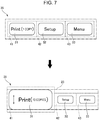
- Fig. 7 illustrates operation screens in which a function is changed by scaling the buttons.
- the function unit 14 changes the number of print copies (function) in a print process in accordance with the size of the first button 31. For example, when the first button 31 is a reference size, the function unit 14 sets the number of print copies in the print process to one. When the first button 31 is a maximum size, the function unit 14 sets the number of print copies in the print process to ten. As illustrated in Fig. 7 , the function unit 14 adds and shows the content of the function in the display on the first button 31. In other words, if the first button 31 is the reference size, as illustrated in the upper drawing in Fig. 7 , the function unit 14 adds and displays the content of the function of " (1 COPY)" to the end of the display "Print". If the first button 31 is the maximum size, as illustrated in the lower drawing in Fig. 7 , the function unit 14 adds and displays the content of the function of "(10 COPIES)" to the end of the display "Print".
- the multifunction peripheral 1 When a user touches the first button 31 of the reference size, the multifunction peripheral 1 prints one copy in the print process, and when a user touches the first button 31 of the maximum size, the multifunction peripheral 1 prints ten copies in the print process.
- a plurality of functions can be assigned to the buttons 31 to 33 respectively and thereby the operability of the multifunction peripheral 1 can be increased.
- the example display apparatus which is the multifunction peripheral 1
- various display apparatuses that includes the touch panel 4 may be used.
- an embodiment of the invention may employ a single-function printer that has only a print function or a single-function scanner that has only a scanner function.
- an embodiment of the invention may employ a computer apparatus that is connected to the touch panel 4 or a tablet-type device that includes the touch panel 4.
- a tablet-type operation terminal may be provided separately from a printer and the multifunction peripheral 1, and the operation terminal may communicate with the printer or the multifunction peripheral 1 for operation.
- the image display unit may be a device other than the touch panel 4, and for example, by using an input device such as a mouse or a touch pad, an input may be performed on an operation screen that is displayed on an image display section.
- the touch operation includes a click operation with the mouse, and other operations.
Landscapes
- Engineering & Computer Science (AREA)
- General Engineering & Computer Science (AREA)
- Theoretical Computer Science (AREA)
- Human Computer Interaction (AREA)
- Physics & Mathematics (AREA)
- General Physics & Mathematics (AREA)
- Multimedia (AREA)
- Signal Processing (AREA)
- User Interface Of Digital Computer (AREA)
Applications Claiming Priority (1)
| Application Number | Priority Date | Filing Date | Title |
|---|---|---|---|
| JP2017013926A JP6784179B2 (ja) | 2017-01-30 | 2017-01-30 | 表示装置および表示プログラム |
Publications (1)
| Publication Number | Publication Date |
|---|---|
| EP3355175A1 true EP3355175A1 (fr) | 2018-08-01 |
Family
ID=61094319
Family Applications (1)
| Application Number | Title | Priority Date | Filing Date |
|---|---|---|---|
| EP18154148.3A Ceased EP3355175A1 (fr) | 2017-01-30 | 2018-01-30 | Appareil d'affichage et programme d'affichage |
Country Status (4)
| Country | Link |
|---|---|
| US (1) | US20180217733A1 (fr) |
| EP (1) | EP3355175A1 (fr) |
| JP (1) | JP6784179B2 (fr) |
| CN (1) | CN108376049B (fr) |
Families Citing this family (2)
| Publication number | Priority date | Publication date | Assignee | Title |
|---|---|---|---|---|
| JP7484083B2 (ja) * | 2019-03-13 | 2024-05-16 | セイコーエプソン株式会社 | 電子機器およびプログラム |
| EP4589416A4 (fr) * | 2023-02-17 | 2026-01-07 | Samsung Electronics Co Ltd | Dispositif électronique qui change la configuration d'un écran en réponse à un changement de taille d'au moins une icône, et son procédé de commande |
Citations (4)
| Publication number | Priority date | Publication date | Assignee | Title |
|---|---|---|---|---|
| JP2005123866A (ja) | 2003-10-16 | 2005-05-12 | Canon Inc | 画像処理装置及び画像処理装置のユーザインタフェース提供方法 |
| US20060044283A1 (en) * | 2004-08-31 | 2006-03-02 | Michiaki Eri | Information processing apparatus and display control program |
| US20100060597A1 (en) * | 2008-09-10 | 2010-03-11 | Samsung Digital Imaging Co., Ltd. | Method and apparatus for displaying and selecting icons on a touch screen |
| JP2011145769A (ja) | 2010-01-12 | 2011-07-28 | Panasonic Electric Works Co Ltd | 入力装置 |
Family Cites Families (18)
| Publication number | Priority date | Publication date | Assignee | Title |
|---|---|---|---|---|
| JP4037378B2 (ja) * | 2004-03-26 | 2008-01-23 | シャープ株式会社 | 情報処理装置、画像出力装置、情報処理プログラムおよび記録媒体 |
| JP2006017478A (ja) * | 2004-06-30 | 2006-01-19 | Xanavi Informatics Corp | ナビゲーション装置 |
| US8734245B2 (en) * | 2007-11-02 | 2014-05-27 | Bally Gaming, Inc. | Game related systems, methods, and articles that combine virtual and physical elements |
| JP5330769B2 (ja) * | 2008-08-27 | 2013-10-30 | 京セラ株式会社 | 電子機器 |
| JP4752887B2 (ja) * | 2008-09-12 | 2011-08-17 | ソニー株式会社 | 情報処理装置、情報処理方法およびコンピュータプログラム |
| US8381125B2 (en) * | 2009-12-16 | 2013-02-19 | Apple Inc. | Device and method for resizing user interface content while maintaining an aspect ratio via snapping a perimeter to a gridline |
| JP2011175516A (ja) * | 2010-02-25 | 2011-09-08 | Brother Industries Ltd | 入力装置及び入力制御プログラム |
| US20110298723A1 (en) * | 2010-06-07 | 2011-12-08 | Christopher Brian Fleizach | Devices, Methods, and Graphical User Interfaces for Accessibility via a Touch-Sensitive Surface |
| JP5751934B2 (ja) * | 2010-10-15 | 2015-07-22 | キヤノン株式会社 | 情報処理装置、情報処理方法、及びプログラム |
| US9207837B2 (en) * | 2011-12-20 | 2015-12-08 | Nokia Technologies Oy | Method, apparatus and computer program product for providing multiple levels of interaction with a program |
| US9411510B2 (en) * | 2012-12-07 | 2016-08-09 | Apple Inc. | Techniques for preventing typographical errors on soft keyboards |
| CN103067577B (zh) * | 2012-12-21 | 2014-11-19 | 东莞宇龙通信科技有限公司 | 终端和信息显示方法 |
| KR102090964B1 (ko) * | 2013-02-22 | 2020-03-19 | 삼성전자주식회사 | 터치 스크린에 디스플레이되는 아이콘을 제어하는 휴대 단말 및 방법 |
| US20150199108A1 (en) * | 2014-01-16 | 2015-07-16 | Lenovo (Singapore) Pte. Ltd. | Changing user interface element based on interaction therewith |
| KR101596879B1 (ko) * | 2014-07-16 | 2016-03-07 | 지현조 | 대형화면을 갖는 휴대단말기에서의 터치제어방법 |
| WO2016018062A1 (fr) * | 2014-07-31 | 2016-02-04 | Samsung Electronics Co., Ltd. | Procédé et dispositif de distribution de contenu |
| CN105511756A (zh) * | 2015-12-09 | 2016-04-20 | 小米科技有限责任公司 | 操作处理方法及装置 |
| KR20190069465A (ko) * | 2016-10-25 | 2019-06-19 | 가부시키가이샤 한도오따이 에네루기 켄큐쇼 | 표시 장치, 표시 모듈, 전자 기기, 및 터치 패널 입력 시스템 |
-
2017
- 2017-01-30 JP JP2017013926A patent/JP6784179B2/ja active Active
-
2018
- 2018-01-12 US US15/869,229 patent/US20180217733A1/en not_active Abandoned
- 2018-01-25 CN CN201810074050.2A patent/CN108376049B/zh active Active
- 2018-01-30 EP EP18154148.3A patent/EP3355175A1/fr not_active Ceased
Patent Citations (4)
| Publication number | Priority date | Publication date | Assignee | Title |
|---|---|---|---|---|
| JP2005123866A (ja) | 2003-10-16 | 2005-05-12 | Canon Inc | 画像処理装置及び画像処理装置のユーザインタフェース提供方法 |
| US20060044283A1 (en) * | 2004-08-31 | 2006-03-02 | Michiaki Eri | Information processing apparatus and display control program |
| US20100060597A1 (en) * | 2008-09-10 | 2010-03-11 | Samsung Digital Imaging Co., Ltd. | Method and apparatus for displaying and selecting icons on a touch screen |
| JP2011145769A (ja) | 2010-01-12 | 2011-07-28 | Panasonic Electric Works Co Ltd | 入力装置 |
Also Published As
| Publication number | Publication date |
|---|---|
| JP6784179B2 (ja) | 2020-11-11 |
| CN108376049B (zh) | 2021-08-10 |
| JP2018124613A (ja) | 2018-08-09 |
| US20180217733A1 (en) | 2018-08-02 |
| CN108376049A (zh) | 2018-08-07 |
Similar Documents
| Publication | Publication Date | Title |
|---|---|---|
| US9232089B2 (en) | Display processing apparatus, control method, and computer program | |
| US10277757B2 (en) | Electronic device and image forming apparatus | |
| JP6171422B2 (ja) | 画像処理システム、制御方法及び制御プログラム | |
| EP2720131A2 (fr) | Dispositif de traitement d'image, support non volatil d'enregistrement lisible par ordinateur et procédé de détermination d'événements opérationnels | |
| US10228843B2 (en) | Image processing apparatus, method of controlling image processing apparatus, and recording medium | |
| JP7067201B2 (ja) | 画面作成プログラム、情報処理装置及び画面作成方法 | |
| EP2785036A2 (fr) | Dispositif d'affichage d'images de page | |
| JP6840571B2 (ja) | 画像処理装置、画像処理装置の制御方法、及びプログラム | |
| CN114063867B (zh) | 图像处理装置、图像处理装置的控制方法和记录介质 | |
| US10735606B2 (en) | Display device, image processing device and non-transitory recording medium determining continuity of operation two or more display areas | |
| US9870142B2 (en) | Displaying device which can receive pinch out operation | |
| JP2019020901A (ja) | 画像処理装置、画像表示方法、およびコンピュータプログラム | |
| US9137401B2 (en) | Electronic apparatus capable of changing content display language and display program | |
| US20180217733A1 (en) | Display apparatus and display program | |
| US10860267B2 (en) | Information processing apparatus that sets print settings, method of controlling the same, and non-transitory computer-readable storage medium | |
| JP6035318B2 (ja) | 表示入力装置及びこれを備えた画像形成装置 | |
| US10506116B2 (en) | Image processing apparatus causing display to display images, method, and non-transitory computer-readable recording medium storing computer-readable instructions | |
| JP5853778B2 (ja) | 印刷設定装置、印刷設定方法、印刷設定プログラムおよび記録媒体 | |
| JP7612930B2 (ja) | 画像処理装置、画像処理装置の制御方法、及びプログラム | |
| JP2017097814A (ja) | 情報処理装置、情報処理装置の制御方法、及びプログラム | |
| JP2011175516A (ja) | 入力装置及び入力制御プログラム | |
| JP7528582B2 (ja) | 情報処理装置およびプログラム | |
| US20240134510A1 (en) | Information processing device and program | |
| JP2026061067A (ja) | 電子機器 | |
| JP2018109927A (ja) | 画像表示装置およびエラー表示方法 |
Legal Events
| Date | Code | Title | Description |
|---|---|---|---|
| PUAI | Public reference made under article 153(3) epc to a published international application that has entered the european phase |
Free format text: ORIGINAL CODE: 0009012 |
|
| STAA | Information on the status of an ep patent application or granted ep patent |
Free format text: STATUS: THE APPLICATION HAS BEEN PUBLISHED |
|
| AK | Designated contracting states |
Kind code of ref document: A1 Designated state(s): AL AT BE BG CH CY CZ DE DK EE ES FI FR GB GR HR HU IE IS IT LI LT LU LV MC MK MT NL NO PL PT RO RS SE SI SK SM TR |
|
| AX | Request for extension of the european patent |
Extension state: BA ME |
|
| STAA | Information on the status of an ep patent application or granted ep patent |
Free format text: STATUS: REQUEST FOR EXAMINATION WAS MADE |
|
| 17P | Request for examination filed |
Effective date: 20190201 |
|
| RBV | Designated contracting states (corrected) |
Designated state(s): AL AT BE BG CH CY CZ DE DK EE ES FI FR GB GR HR HU IE IS IT LI LT LU LV MC MK MT NL NO PL PT RO RS SE SI SK SM TR |
|
| STAA | Information on the status of an ep patent application or granted ep patent |
Free format text: STATUS: EXAMINATION IS IN PROGRESS |
|
| 17Q | First examination report despatched |
Effective date: 20200325 |
|
| STAA | Information on the status of an ep patent application or granted ep patent |
Free format text: STATUS: THE APPLICATION HAS BEEN REFUSED |
|
| 18R | Application refused |
Effective date: 20211219 |