EP3545237B1 - Haushaltsgerät mit abnehmbarem haptischem bedienelement - Google Patents
Haushaltsgerät mit abnehmbarem haptischem bedienelement Download PDFInfo
- Publication number
- EP3545237B1 EP3545237B1 EP17797949.9A EP17797949A EP3545237B1 EP 3545237 B1 EP3545237 B1 EP 3545237B1 EP 17797949 A EP17797949 A EP 17797949A EP 3545237 B1 EP3545237 B1 EP 3545237B1
- Authority
- EP
- European Patent Office
- Prior art keywords
- screen
- household appliance
- operating element
- appliance
- display field
- Prior art date
- Legal status (The legal status is an assumption and is not a legal conclusion. Google has not performed a legal analysis and makes no representation as to the accuracy of the status listed.)
- Active
Links
Images

Classifications
-
- F—MECHANICAL ENGINEERING; LIGHTING; HEATING; WEAPONS; BLASTING
- F24—HEATING; RANGES; VENTILATING
- F24C—DOMESTIC STOVES OR RANGES ; DETAILS OF DOMESTIC STOVES OR RANGES, OF GENERAL APPLICATION
- F24C7/00—Stoves or ranges heated by electric energy
- F24C7/08—Arrangement or mounting of control or safety devices
- F24C7/082—Arrangement or mounting of control or safety devices on ranges, e.g. control panels, illumination
- F24C7/086—Arrangement or mounting of control or safety devices on ranges, e.g. control panels, illumination touch control
-
- D—TEXTILES; PAPER
- D06—TREATMENT OF TEXTILES OR THE LIKE; LAUNDERING; FLEXIBLE MATERIALS NOT OTHERWISE PROVIDED FOR
- D06F—LAUNDERING, DRYING, IRONING, PRESSING OR FOLDING TEXTILE ARTICLES
- D06F34/00—Details of control systems for washing machines, washer-dryers or laundry dryers
- D06F34/28—Arrangements for program selection, e.g. control panels therefor; Arrangements for indicating program parameters, e.g. the selected program or its progress
- D06F34/32—Arrangements for program selection, e.g. control panels therefor; Arrangements for indicating program parameters, e.g. the selected program or its progress characterised by graphical features, e.g. touchscreens
-
- F—MECHANICAL ENGINEERING; LIGHTING; HEATING; WEAPONS; BLASTING
- F24—HEATING; RANGES; VENTILATING
- F24C—DOMESTIC STOVES OR RANGES ; DETAILS OF DOMESTIC STOVES OR RANGES, OF GENERAL APPLICATION
- F24C7/00—Stoves or ranges heated by electric energy
- F24C7/08—Arrangement or mounting of control or safety devices
- F24C7/082—Arrangement or mounting of control or safety devices on ranges, e.g. control panels, illumination
- F24C7/083—Arrangement or mounting of control or safety devices on ranges, e.g. control panels, illumination on tops, hot plates
-
- F—MECHANICAL ENGINEERING; LIGHTING; HEATING; WEAPONS; BLASTING
- F24—HEATING; RANGES; VENTILATING
- F24F—AIR-CONDITIONING; AIR-HUMIDIFICATION; VENTILATION; USE OF AIR CURRENTS FOR SCREENING
- F24F11/00—Control or safety arrangements
- F24F11/89—Arrangement or mounting of control or safety devices
-
- G—PHYSICS
- G06—COMPUTING OR CALCULATING; COUNTING
- G06F—ELECTRIC DIGITAL DATA PROCESSING
- G06F3/00—Input arrangements for transferring data to be processed into a form capable of being handled by the computer; Output arrangements for transferring data from processing unit to output unit, e.g. interface arrangements
- G06F3/01—Input arrangements or combined input and output arrangements for interaction between user and computer
- G06F3/02—Input arrangements using manually operated switches, e.g. using keyboards or dials
-
- G—PHYSICS
- G06—COMPUTING OR CALCULATING; COUNTING
- G06F—ELECTRIC DIGITAL DATA PROCESSING
- G06F3/00—Input arrangements for transferring data to be processed into a form capable of being handled by the computer; Output arrangements for transferring data from processing unit to output unit, e.g. interface arrangements
- G06F3/01—Input arrangements or combined input and output arrangements for interaction between user and computer
- G06F3/03—Arrangements for converting the position or the displacement of a member into a coded form
- G06F3/041—Digitisers, e.g. for touch screens or touch pads, characterised by the transducing means
- G06F3/0416—Control or interface arrangements specially adapted for digitisers
-
- A—HUMAN NECESSITIES
- A47—FURNITURE; DOMESTIC ARTICLES OR APPLIANCES; COFFEE MILLS; SPICE MILLS; SUCTION CLEANERS IN GENERAL
- A47L—DOMESTIC WASHING OR CLEANING; SUCTION CLEANERS IN GENERAL
- A47L15/00—Washing or rinsing machines for crockery or tableware
- A47L15/42—Details
- A47L15/4293—Arrangements for programme selection, e.g. control panels; Indication of the selected programme, programme progress or other parameters of the programme, e.g. by using display panels
-
- D—TEXTILES; PAPER
- D06—TREATMENT OF TEXTILES OR THE LIKE; LAUNDERING; FLEXIBLE MATERIALS NOT OTHERWISE PROVIDED FOR
- D06F—LAUNDERING, DRYING, IRONING, PRESSING OR FOLDING TEXTILE ARTICLES
- D06F2105/00—Systems or parameters controlled or affected by the control systems of washing machines, washer-dryers or laundry dryers
- D06F2105/58—Indications or alarms to the control system or to the user
-
- F—MECHANICAL ENGINEERING; LIGHTING; HEATING; WEAPONS; BLASTING
- F25—REFRIGERATION OR COOLING; COMBINED HEATING AND REFRIGERATION SYSTEMS; HEAT PUMP SYSTEMS; MANUFACTURE OR STORAGE OF ICE; LIQUEFACTION SOLIDIFICATION OF GASES
- F25D—REFRIGERATORS; COLD ROOMS; ICE-BOXES; COOLING OR FREEZING APPARATUS NOT OTHERWISE PROVIDED FOR
- F25D2400/00—General features of, or devices for refrigerators, cold rooms, ice-boxes, or for cooling or freezing apparatus not covered by any other subclass
- F25D2400/36—Visual displays
- F25D2400/361—Interactive visual displays
-
- H—ELECTRICITY
- H03—ELECTRONIC CIRCUITRY
- H03K—PULSE TECHNIQUE
- H03K17/00—Electronic switching or gating, i.e. not by contact-making and –breaking
- H03K17/94—Electronic switching or gating, i.e. not by contact-making and –breaking characterised by the way in which the control signals are generated
- H03K17/96—Touch switches
-
- H—ELECTRICITY
- H03—ELECTRONIC CIRCUITRY
- H03K—PULSE TECHNIQUE
- H03K2217/00—Indexing scheme related to electronic switching or gating, i.e. not by contact-making or -breaking covered by H03K17/00
- H03K2217/94—Indexing scheme related to electronic switching or gating, i.e. not by contact-making or -breaking covered by H03K17/00 characterised by the way in which the control signal is generated
- H03K2217/94057—Rotary switches
-
- H—ELECTRICITY
- H03—ELECTRONIC CIRCUITRY
- H03K—PULSE TECHNIQUE
- H03K2217/00—Indexing scheme related to electronic switching or gating, i.e. not by contact-making or -breaking covered by H03K17/00
- H03K2217/94—Indexing scheme related to electronic switching or gating, i.e. not by contact-making or -breaking covered by H03K17/00 characterised by the way in which the control signal is generated
- H03K2217/94084—Transmission of parameters among sensors or between sensor and remote station
- H03K2217/94089—Wireless transmission
-
- H—ELECTRICITY
- H03—ELECTRONIC CIRCUITRY
- H03K—PULSE TECHNIQUE
- H03K2217/00—Indexing scheme related to electronic switching or gating, i.e. not by contact-making or -breaking covered by H03K17/00
- H03K2217/94—Indexing scheme related to electronic switching or gating, i.e. not by contact-making or -breaking covered by H03K17/00 characterised by the way in which the control signal is generated
- H03K2217/96—Touch switches
- H03K2217/96031—Combination of touch switch and LC display
Definitions
- the invention relates to a household appliance, the control element of the household appliance having a display panel.
- DE 10 2014 216 414 A1 discloses an operating device for a household appliance, with a first display panel and a rotatable operating element, the display panel being designed to be touch-sensitive and at least two different functions of the household appliance being selectable by touching the display panel on a display area associated with the respective function, the operating element having a display area, and wherein a display on the display area is coupled to the function selected via the display field and a parameter of the selected function can be changed by actuating the operating element and a parameter value set thereby is displayed on the display area of the operating element.
- DE 10 2014 216 414 A1 also discloses a home appliance. It is disadvantageous here that the user still frequently has to change the focus of his attention between the rotary knob and the display panel when operating the household appliance.
- the WO 2008/003572 A2 discloses a transfer of a residual heat indicator from a permanently installed screen to a removable control element.
- the task is solved by a household appliance whose Operating element has a display field, the display field being at least partially designed as a touch-sensitive screen.
- This operating element has the advantage that a user no longer needs to direct his attention away from the haptic operating element in order to operate the household appliance in order to operate or activate a setting selected by the haptic operating element.
- the screen enables a context-related display. The confirmation or activation is achieved by touching the touch-sensitive part (namely the touch-sensitive screen) of the display panel. Overall, a particularly clearly structured, focused and context-related device operation can be achieved, which results in improved operability.
- a haptic operating element can in particular be understood to mean an operating element that can be grasped by a user for his operation.
- the haptic control element can be a component of the household appliance.
- the operating element can then be viewed as a domestic appliance operating element.
- the touch-sensitive screen can also be referred to as a touch screen or touch screen.
- it can be a capacitive sensing screen.
- the touch-sensitive screen is, in particular, a screen constructed like a pixel.
- the touch-sensitive screen can be a monochrome (e.g. black and white) or a color screen.
- the entire display field is designed as a touch-sensitive screen. This enables a particularly large and varied touch-sensitive surface. It is an alternative development that part of the display field is designed as at least one touch-sensitive screen and the remaining part of the display field is designed as a non-touch-sensitive screen. This enables a particularly inexpensive construction.
- the operating element is an operating element that can be removed from the (remaining) household appliance. This enables improved child safety, improved cleanability and, through a variable choice of its contact point, improved usability.
- the control element can be provided, for example, to be detachably placed on a control panel of the household appliance.
- the operating element can have a data interface to the household appliance in order to exchange data with the household appliance.
- the operating element can be an operating element that can be magnetically attached to the (remaining) household appliance.
- the data interface is advantageously a wireless data interface, for example a short-range radio interface, e.g. in the form of a Bluetooth module, ZigBee module, etc.
- the removable control element can have at least one coil for transformer data transmission as the data interface. The coil also enables the removable control element to be supplied with energy by induction or transformation.
- the haptic operating element has the display field on its front face facing a user. This enables particularly good visibility and a large display area.
- the haptic operating element can also have at least one display field on its edge surface.
- the front face can correspond to a flat or slightly curved face of a button-shaped or cylindrical operating element.
- the display field can then in particular be circular or ring-shaped.
- the operating element is a rotary knob, in particular a removable rotary knob.
- This enables an intuitively particularly simple and also effective operation of the household appliance.
- two clearly separated, but optically coherent operating modes can be carried out, namely a rotation of the rotary knob on its lateral lateral surface and a pressing of the front face.
- control element has a data processing unit for exchanging data with the household appliance and for operating its screen.
- control element can even with a small amount of data being transferred operate.
- the household appliance can be relieved of the expense of operating the screen directly.
- the object is achieved by a household appliance having at least one haptic operating element as described above and a further, device-fixed screen.
- the household appliance has the same advantages as the haptic control element.
- the haptic control element can be viewed as a component of the household appliance.
- the household appliance can be an electrically operated household appliance.
- the household appliance can be a kitchen appliance.
- the household appliance can be, for example, a cooking appliance, a laundry treatment appliance or a refrigeration appliance.
- the cooking appliance can be an oven or have an oven (e.g. a stove).
- a screen that is fixed to the device is understood to mean a screen that is permanently attached to the household appliance.
- the device-fixed screen can in particular be arranged on a front side, in particular on a front panel, of the household appliance.
- the fixed screen can be, but is not limited to, a touch screen or touch screen.
- the device-fixed screen is designed at least optically similar to the display field of the control element. This can include in particular that the display field of the control element and the screen fixed to the device have the same resolution per unit area and / or the same color depth. As a result, a particularly uniform and clear and technically clear appearance of the display field and the screen that is fixed to the device is achieved.
- the haptic operating element can be attached or fastened to the household appliance at precisely one predetermined position.
- the haptic operating element can be attached or fastened at several positions on the household appliance.
- a user can choose his preferred position for operating the household appliance.
- the contents displayed in both displays can be adapted to the selected position of the haptic control element. This can also be referred to as an adaptive representation.
- the household appliance has a control device for operating the touch-sensitive display panel and the screen that is fixed to the device.
- the control device can be an operating module of the household appliance, which is, for example, coupled to a central control device of the household appliance.
- the control device can, however, also be the central control device.
- control device is set up to set up or configure at least one virtual sensor surface or sensor button as a control element of the household appliance on the touch-sensitive screen of the control element. This enables a particularly clearly structured, focused and context-related device operation. It is a further development that the touch-sensitive screen has or provides a single sensor key. Another development is that the touch-sensitive screen has or provides several sensor keys.
- the at least one sensor key is the only control element in at least one view of the display field and the screen fixed to the device.
- a clear operating structure can be provided which enables the user to operate the household appliance - at least in the view shown - exclusively via the haptic operating element.
- a view can in particular be understood to mean a view of the display field and the device-mounted screen belonging to a specific point in a menu structure (“menu view”).
- the household appliance can also be operated via it in an alternative development.
- the household appliance in particular its control device, is set up to match a graphical appearance on the display field of the control element to a graphical appearance of the screen that is fixed to the device.
- a particularly clear, uniform presentation is achieved across both displays.
- This in turn enables a particularly clear and high-quality representation and facilitates operability.
- the coordination can be understood, for example, as a functional, content-related and / or graphic coordination, for example through complementary functions and / or content as well as through a coordinated graphic design.
- the haptic operating element can be attached to the household appliance in such a way that it at least partially covers the screen that is fixed to the device.
- This can include that the haptic control element covers the device-fixed screen with only one part.
- the haptic operating element can be positioned entirely on the screen that is fixed to the device.
- the household appliance in particular its control device, is set up to match a graphical appearance on the display field of the control element to a graphical appearance of the sub-area of the fixed screen that is covered by the control element.
- This has the advantage that the display field of the haptic control element is perceived by the user as a part that is integrally connected to the screen that is fixed to the device.
- the household appliance in particular its control device, is set up to display on the display field of the control element the sub-area of the screen fixed to the device that is covered by the control element.
- the operating element covers partial areas of the display on the device-fixed screen and consequently makes them inaccessible to a user.
- the household appliance in particular its control device, is set up to display the covered partial area of the screen that is fixed to the appliance the display field of the control element in a magnifying glass effect. This enables improved operator guidance and a particularly high-quality appearance.
- the household appliance in particular its control device, is set up to run at least one graphic animation on the display field of the operating element. This makes it possible to draw a user's attention to the display field of the operating element. For example, by means of a so-called "flip coin" animation, it is possible to switch between two functions that can be triggered by the touch-sensitive screen of the control element in a visually high quality. It is a further development that the household appliance, in particular its control device, is set up to run the graphic animation in response to an actuation of a sensor button on the control element.
- Fig. 1 shows a household appliance in the form of an oven 1.
- the oven 1 has an oven door 2 with a viewing window 3 and a door handle 4.
- Above the oven door 2 there is a control panel 5 in which a device-fixed, colored screen 6 is embedded.
- the screen 6 can be a touch screen. Further actuation elements such as buttons, in particular sensor buttons, etc. can be present in the control panel 5, for example an on / off switch (not shown).
- the control panel 5 can alternatively be integrated into the oven door 2.
- the oven 1 also has a haptic control element that can be attached to the front in the form of a magnetically attachable rotary knob 7.
- the rotary toggle 7 has a button-shaped or cylindrical basic shape, of which a rear face serves as a support surface and a front face is visible to a user. A lateral lateral surface serves as a gripping surface in order to turn the rotary toggle 7.
- the rotary toggle 7 covers one part of the screen 6 and the other part projects downward beyond the screen 6.
- the rotary knob 7 has a touch-sensitive screen or touchscreen 8 on its front face.
- the touchscreen 8 takes up practically the entire front face and thus corresponds to the entire visible display field.
- the rotary knob 7 can have a data interface 9a for the oven 1 that transmits data wirelessly.
- the data interface 9a can be a radio interface, an interface that transmits data inductively, and so on.
- the rotary knob 7 can also have a data processing unit 9b (e.g. a microcontroller, ASIC, FPGA or other electronics) for exchanging data with the oven 1 via the data interface 9a and for operating the touchscreen 8.
- a data processing unit 9b e.g. a microcontroller, ASIC, FPGA or other electronics
- the oven 1 also has a control device 10 for operating the touchscreen 8 and the screen 6.
- the control device 10 can be a central control of the oven 1.
- the oven 1 or its control device 10 is set up to virtually set up at least one - here approximately semicircular - sensor surface or sensor button 11 as an operating element of the oven 1 on the touchscreen 8.
- the remainder of the surface of the touchscreen 8 can be set up in such a way that touching it does not trigger any action, ie it is not set up as a sensor key.
- the entire surface of the touchscreen 8 can be set up or configured as a sensor key.
- the graphic design of the touchscreen 8 is basically arbitrary.
- the area assigned to the sensor button 11 can have a different color than the rest of the area of the touchscreen 8.
- AAAA "Start”, “Set”, “Pause” , "Stop” etc.
- several sensor keys can be set up on the touchscreen 8 (not shown).
- the sensor button 11 is the only actuating element formed on the screen 6 and the touchscreen 8.
- the graphic displayed on the touchscreen 8 is matched to the graphic displayed on the screen 8.
- a plurality of maps 13, 14, 15 reproduced areas are shown here by way of example, the maps 13 to 15 being arranged next to one another in the manner of a fan.
- a middle card 14 protrudes figuratively, while the cards 13, 15 adjacent to it are arranged figuratively behind the middle card 14 and are displayed by this as if partially concealed. Only the information assigned to the middle card 14 is completely visible.
- each of the cards 13 to 15 can display parameters for a specific cooking mode or cooking function, e.g.
- each of the cards can display a set cooking space temperature (e.g. 160 ° C, 180 ° C or 200 ° C) and the symbolic type of heating (e.g. hot air, circulating air, bottom and top heat, etc.).
- the background color of the middle card 14 e.g. red
- the background color of the cards 13 and 15 e.g. white
- the background color of the sensor button 11 corresponds to the background color of the card 14.
- the “Circotherm” cooking function described by the middle card 14 is set in motion with the previously set oven temperature of 160 ° C and the activation of the fan.
- Parameters can be varied, for example, by turning the rotary knob 7 under the "Set” function. This results in the advantage that the user can perform both a selection function by turning the rotary knob 7 and the key function that often follows on the rotary knob 7. The user does not need to divert his attention away from the rotary knob 7 in order to search for a key.
- the sensor button 11 which is color-coordinated with the card 14, gives a user the impression that the sensor button 11 shows at least approximately that part of the screen 6 that is covered by the rotary knob 7. In this case, the sensor button 11 protrudes slightly downwards visually beyond the lower boundary of the screen 6, which creates an impression similar to using the rotary knob 7 as a magnifying glass (“magnifying glass effect”).
- the rotary knob 7 can also be attached magnetically to a left, right or upper side edge of the screen 6, as indicated by the ring 16, in addition to the lower edge of the screen 6.
- the oven 1 automatically recognizes the position at which the rotary knob 7 has been placed and reconfigures the graphic structure of the screen 6 and the touchscreen 8 accordingly. For example, when the rotary knob 7 is attached to a side edge of the screen 6, the sensor field 11 can be shown rotated by 90 ° clockwise, etc.
- the sensor field can have a circular shape in a view not shown here and, for example, be provided with the label "Start”, for example to start a cooking program or a cooking mode. If the user presses the sensor button, it contracts in a vertical direction up to a line and then expands back to the circular shape. However, after re-expanding, there will be a different label such as "pause”.
- This animation simulates the turning of a disc or coin, which has different inscriptions on both sides and thus enables different functions for activation.
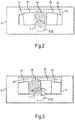
- Fig. 2 shows a front view of the device-fixed screen 6 and the rotary knob 7 in a first view.
- This first view is similar to that in Fig. 1 View shown and shows in the device-fixed screen 6 five cards 17 to 21 in a fan-shaped arrangement.
- the middle card 19 is figuratively in the foreground.
- the touchscreen 8 represents one shows the lower area of the middle map 19 in a magnifying glass view.
- Fig. 3 shows a front view of the device-fixed screen 6 and the rotary knob 7 in a second view.
- the rotary knob 7 by turning the rotary knob 7 (as indicated by the short curved arrow), the cards 17 to 21 are rotated analogously one after the other through the screen 6 (as indicated by the short curved arrow).
- the display on the touchscreen 8 With the pictorial rotation of the cards 17 to 21, the display on the touchscreen 8 also adapts.
- a screen can be dispensed with and the device-fixed screen can be arranged in the door.
- a numerical specification can also include exactly the specified number as well as a customary tolerance range, as long as this is not explicitly excluded.
Landscapes
- Engineering & Computer Science (AREA)
- General Engineering & Computer Science (AREA)
- Theoretical Computer Science (AREA)
- Chemical & Material Sciences (AREA)
- Combustion & Propulsion (AREA)
- Mechanical Engineering (AREA)
- Physics & Mathematics (AREA)
- General Physics & Mathematics (AREA)
- Human Computer Interaction (AREA)
- Textile Engineering (AREA)
- User Interface Of Digital Computer (AREA)
- Push-Button Switches (AREA)
- Electric Ovens (AREA)
Description
- Die Erfindung betrifft ein Haushaltsgerät, wobei das Bedienelement des Haushaltsgerätes ein Anzeigefeld aufweist.
-
DE 10 2014 216 414 A1 offenbart eine Bedienvorrichtung für ein Haushaltsgerät, mit einem ersten Anzeigefeld und einem drehbaren Bedienelement, wobei das Anzeigefeld berührsensitiv ausgebildet ist und zumindest zwei verschiedene Funktionen des Haushaltsgeräts durch Berühren des Anzeigefelds an einem der jeweiligen Funktion zugehörigen Anzeigebereich auswählbar sind, wobei das Bedienelement einen Anzeigebereich aufweist, und wobei ein Anzeigen auf dem Anzeigebereich mit der über das Anzeigefeld ausgewählten Funktion gekoppelt ist und ein Parameter der ausgewählten Funktion durch Betätigen des Bedienelements veränderbar ist und ein dadurch eingestellter Parameterwert auf dem Anzeigebereich des Bedienelements angezeigt ist.DE 10 2014 216 414 A1 offenbart auch ein Haushaltsgerät. Hierbei ist es nachteilig, dass der Nutzer bei der Bedienung des Haushaltsgeräts immer noch häufig den Fokus seiner Aufmerksamkeit zwischen dem Drehknebel und dem Anzeigefeld wechseln muss. - Die
DE 10 2014 223371 A1 offenbart alle Merkmale des Oberbegriffes des unabhängigen Anspruchs. - Die
WO 2008/003572 A2 offenbart eine Übertragung einer Restwärmeanzeige von einem fest installierten Bildschirm auf ein abnehmbares Bedienelement. - Es ist die Aufgabe der vorliegenden Erfindung, die Nachteile des Standes der Technik zumindest teilweise zu überwinden und insbesondere eine Möglichkeit einer verbesserten Bedienbarkeit eines Haushaltsgeräts mit einem Anzeigefeld und einem haptischen Bedienelement bereitzustellen.
- Diese Aufgabe wird gemäß den Merkmalen des unabhängigen Anspruchs gelöst. Bevorzugte Ausführungsformen sind insbesondere den abhängigen Ansprüchen entnehmbar.
- Die Aufgabe wird gelöst durch ein Haushaltsgerät, dessen Bedienelement ein Anzeigefeld aufweist, wobei das Anzeigefeld zumindest teilweise als ein berührungsempfindlicher Bildschirm ausgebildet ist.
- Dieses Bedienelement ergibt den Vorteil, dass ein Nutzer zur Bedienung des Haushaltsgeräts seine Aufmerksamkeit nicht mehr von dem haptischen Bedienelement wegzurichten braucht, um eine durch das haptische Bedienelement gewählte Einstellung zu betätigen oder zu aktivieren. Der Bildschirm ermöglicht dabei eine kontextbezogene Anzeige. Die Bestätigung oder Aktivierung wird durch eine Berührung des berührungsempfindlichen Teils (nämlich des berührungsempfindlichen Bildschirms) des Anzeigefelds erreicht. Insgesamt lässt sich so eine besonders klar strukturierte, fokussierte und kontextbezogene Gerätebedienung erreichen, was eine verbesserte Bedienbarkeit ergibt.
- Unter einem haptischen Bedienelement kann insbesondere ein Bedienelement verstanden werden, das von einem Nutzer zu seiner Bedienung ergriffen werden kann. Das haptische Bedienelement kann eine Komponente des Haushaltsgeräts sein. Das Bedienelement kann dann als ein Haushaltsgeräte-Bedienelement angesehen werden.
- Der berührungsempfindliche Bildschirm kann auch als Sensorbildschirm oder Touchscreen bezeichnet werden. Er kann z.B. ein kapazitiv abfühlender Bildschirm sein. Der berührungsempfindliche Bildschirm ist insbesondere ein bildpunktartig aufgebauter Bildschirm. Der berührungsempfindliche Bildschirm kann ein monochromer (z.B. schwarzweißer) oder ein farbiger Bildschirm sein.
- Es ist eine Weiterbildung, dass das gesamte Anzeigefeld als ein berührungsempfindlicher Bildschirm ausgebildet ist. Dies ermöglicht eine besonders großflächige und vielgestaltige berührungsempfindliche Fläche. Es ist eine alternative Weiterbildung, dass ein Teil des Anzeigefelds als mindestens ein berührungsempfindlicher Bildschirm ausgebildet ist und ein restlicher Teil des Anzeigefelds als ein nicht berührungsempfindlicher Bildschirm ausgebildet ist. Dies ermöglicht einen besonders preiswerten Aufbau.
- Grundsätzlich ist das Bedienelement ein von dem (restlichen) Haushaltsgerät abnehmbares Bedienelement. Dies ermöglicht eine verbesserte Kindersicherung, verbesserte Reinigbarkeit und durch eine variable Wahl seines Aufsetzpunkts eine verbesserte Bedienbarkeit. Das Bedienelement kann z.B. dazu vorgesehen sein, an einer Bedienblende des Haushaltsgeräts lösbar aufgesetzt zu werden.
- Das Bedienelement kann es eine Datenschnittstelle zu dem Haushaltsgerät aufweisen, um Daten mit dem Haushaltsgerät auszutauschen. Das Bedienelement kann ein an dem (restlichen) Haushaltsgerät magnetisch befestigbares Bedienelement sein. Die Datenschnittstelle ist vorteilhafterweise eine drahtlose Datenschnittstelle, beispielsweise eine Nahbereichs-Funkschnittstelle, z.B. in Form eines Bluetooth-Moduls, ZigBee-Moduls usw. Alternativ oder zusätzlich kann das abnehmbare Bedienelement als die Datenschnittstelle mindestens eine Spule zur transformatorischen Datenübertragung aufweisen. Die Spule ermöglicht zudem eine Energieversorgung des abnehmbaren Bedienelements durch Induktion oder Transformation.
- Es ist eine Weiterbildung, dass das haptische Bedienelement das Anzeigefeld an seiner frontseitigen, einem Nutzer zugewandten Stirnfläche aufweist. Dies ermöglicht eine besonders gute Sichtbarkeit und große Anzeigefläche. Zusätzlich kann das haptische Bedienelement mindestens ein Anzeigefeld auch an seiner Randfläche aufweisen. Die frontseitige Stirnfläche kann einer ebenen oder leicht gekrümmten Stirnfläche eines knopf- oder zylinderförmigen Bedienelements entsprechen. Das Anzeigefeld kann dann insbesondere kreisförmig oder ringförmig sein.
- Es ist eine Weiterbildung, dass praktisch die gesamte berührbare Frontseite des Bedienelements als Anzeigefeld ausgebildet ist, ggf. mit einem schmalen Rand.
- Es ist noch eine Ausgestaltung, dass das Bedienelement ein Drehknebel ist, insbesondere ein abnehmbarer Drehknebel. Dies ermöglicht eine intuitiv besonders einfache und zudem ein effektive Bedienung des Haushaltsgeräts. Es ergibt sich der weitere Vorteil, dass mittels eines einzigen Bedienelements zwei bedientechnisch klar getrennte, aber optisch zusammenhängende Bedienarten ausführbar sind, nämlich eine Drehung des Drehknebels an seiner seitlichen Mantelfläche und ein Drücken der frontseitigen Stirnfläche.
- Es ist eine weitere Ausgestaltung, dass das Bedienelement eine Datenverarbeitungseinheit zum Datenaustausch mit dem Haushaltsgerät und zum Betreiben seines Bildschirms aufweist. Dadurch kann das Bedienelement auch bei einer geringen Datenübertragungsmenge betrieben werden. Das Haushaltsgerät kann von einem Aufwand zum direkten Betreiben des Bildschirms entlastet werden.
- Die Aufgabe wird durch ein Haushaltsgerät, aufweisend mindestens ein haptisches Bedienelement wie oben beschrieben und einen weiteren, gerätefesten Bildschirm gelöst.
- Das Haushaltsgerät ergibt die gleichen Vorteile wie das haptische Bedienelement. Das haptische Bedienelement kann als eine Komponente des Haushaltsgeräts angesehen werden.
- Das Haushaltsgerät kann ein elektrisch betriebenes Haushaltsgerät sein. Das Haushaltsgerät kann ein Küchengerät sein. Das Haushaltsgerät kann beispielsweise ein Gargerät, ein Wäschebehandlungsgerät oder ein Kältegerät sein. Das Gargerät kann ein Backofen sein oder einen Backofen aufweisen (z.B. ein Herd).
- Unter einem gerätefesten Bildschirm wird ein Bildschirm verstanden, der fest an dem Haushaltsgerät angebracht ist. Der gerätefeste Bildschirm kann insbesondere an einer Frontseite, insbesondere an einer frontseitigen Blende, des Haushaltsgeräts angeordnet sein. Der gerätefeste Bildschirm kann ein berührungsempfindlicher Bildschirm oder Touchscreen sein, ist aber nicht darauf beschränkt.
- Es ist eine Weiterbildung, dass der gerätefeste Bildschirm zumindest optisch gleichartig zu dem Anzeigefeld des Bedienelements ausgebildet ist. Dies kann insbesondere umfassen, dass das Anzeigefeld des Bedienelements und der gerätefeste Bildschirm eine gleiche Auflösung pro Einheitsfläche und/oder eine gleiche Farbtiefe aufweisen. Dadurch wird ein besonders einheitliches und übersichtliches sowie darstellungstechnisch klares Erscheinungsbild von Anzeigefeld und gerätefestem Bildschirm erreicht.
- Es ist eine Weiterbildung, dass das haptische Bedienelement an genau einer vorgegebenen Position an dem Haushaltsgerät anbringbar oder befestigbar ist.
- Es ist eine zur besonders vielgestaltig und benutzerfreundlich variierbaren Anordnung vorteilhafte Weiterbildung, dass das haptische Bedienelement an mehreren Positionen an dem Haushaltsgerät anbringbar oder befestigbar ist. So kann ein Nutzer beispielsweise seine bevorzugte Position zur Bedienung des Haushaltsgeräts wählen. Die in beiden Anzeigen (d.h., in dem Anzeigefeld des Bedienelements und in dem gerätefesten Bildschirm) angezeigten Inhalte können an die ausgewählte Position des haptischen Bedienelements angepasst werden. Dies kann auch als eine adaptive Darstellung bezeichnet werden.
- Es ist eine Ausgestaltung, dass das Haushaltsgerät eine Steuereinrichtung zum Betreiben des berührungsempfindlichen Anzeigefelds und des gerätefesten Bildschirms aufweist. Dies ermöglicht auf eine besonders einfache Weise eine aufeinander abgestimmte Anzeige des Anzeigefelds und des gerätefesten Bildschirms. Die Steuereinrichtung kann ein Bedienmodul des Haushaltsgeräts sein, das z.B. mit einer zentralen Steuereinrichtung des Haushaltsgeräts gekoppelt ist. Die Steuereinrichtung kann aber auch die zentrale Steuereinrichtung sein.
- Es ist noch eine Ausgestaltung, dass die Steuereinrichtung dazu eingerichtet ist, auf dem berührungsempfindlichen Bildschirm des Bedienelements mindestens eine virtuelle Sensorfläche oder Sensortaste als ein Bedienelement des Haushaltsgeräts einzurichten oder zu konfigurieren. Dies ermöglicht eine besonders klar strukturierte, fokussierte und kontextbezogene Gerätebedienung. Es ist eine Weiterbildung, dass der berührungsempfindliche Bildschirm eine einzige Sensortaste aufweist oder bereitstellt. Es ist noch eine Weiterbildung, dass der berührungsempfindliche Bildschirm mehrere Sensortasten aufweist oder bereitstellt.
- Es ist eine weitere Ausgestaltung, dass die mindestens eine Sensortaste in zumindest einer Ansicht des Anzeigefelds und des gerätefesten Bildschirms das einzige Bedienelement ist. Dadurch kann eine klare Bedienstruktur bereitgestellt werden, die es dem Nutzer ermöglicht, das Haushaltsgerät - zumindest in der dargestellten Ansicht - ausschließlich über das haptische Bedienelement zu bedienen. Unter einer Ansicht kann insbesondere eine zu einem bestimmten Punkt in einer Menüstruktur gehörige Ansicht des Anzeigefelds und des gerätefesten Bildschirms verstanden werden ("Menüansicht").
- Insbesondere falls der gerätefeste Bildschirm ein berührungsempfindlicher Bildschirm ist, kann das Haushaltsgerät in einer alternativen Weiterbildung zusätzlich darüber bedient werden.
- Es ist die erfindungsgemäße Ausgestaltung, dass das Haushaltsgerät, insbesondere dessen Steuereinrichtung, dazu eingerichtet ist, ein grafisches Erscheinungsbild auf dem Anzeigefeld des Bedienelements auf ein grafisches Erscheinungsbild des gerätefesten Bildschirms abzustimmen. So wird eine besonders übersichtliche, einheitliche Darstellung über beide Anzeigen hinweg erreicht. Dies wiederum ermöglicht eine besonders klare und hochwertig wirkende Darstellung und erleichtert eine Bedienbarkeit. Unter der Abstimmung kann z.B. eine funktionale, inhaltliche und/oder grafische Abstimmung verstanden werden, beispielsweise durch sich ergänzende Funktionen und/oder Inhalte sowie durch ein aufeinander abgestimmtes grafisches Design.
- Es ist ferner die erfindungsgemäße Ausgestaltung, dass das haptische Bedienelement so an dem Haushaltsgerät anbringbar ist, dass es den gerätefesten Bildschirm zumindest teilweise überdeckt. Dies kann umfassen, dass das haptische Bedienelement den gerätefesten Bildschirm mit nur einem Teil überdeckt. In einer anderen Weiterbildung kann das haptische Bedienelement ganz auf dem gerätefesten Bildschirm positioniert sein.
- Es ist auch die erfindungsgemäße Ausgestaltung, dass das Haushaltsgerät, insbesondere dessen Steuereinrichtung, dazu eingerichtet ist, ein grafisches Erscheinungsbild auf dem Anzeigefeld des Bedienelements auf ein grafisches Erscheinungsbild des durch das Bedienelement abgedeckten Teilbereichs des gerätefesten Bildschirms abzustimmen. Dadurch wird der Vorteil erreicht, dass das Anzeigefeld des haptischen Bedienelements von dem Nutzer als ein mit dem gerätefesten Bildschirm integral verbundener Teil wahrgenommen wird.
- Es ist außerdem eine Ausgestaltung, dass das Haushaltsgerät, insbesondere dessen Steuereinrichtung, dazu eingerichtet ist, auf dem Anzeigefeld des Bedienelements den durch das Bedienelement abgedeckten Teilbereich des gerätefesten Bildschirms darzustellen. Dadurch lässt sich der Eindruck einer einzigen, zusammenhängenden Darstellung auf beiden Anzeigen hervorrufen. Insbesondere kann so vermieden werden, dass das Bedienelement Teilbereiche der Darstellung auf dem gerätefesten Bildschirm abdeckt und folglich für einen Nutzer unzugänglich macht.
- Es ist eine Weiterbildung, dass das Haushaltsgerät, insbesondere dessen Steuereinrichtung, dazu eingerichtet ist, den abgedeckten Teilbereich des gerätefesten Bildschirms auf dem Anzeigefeld des Bedienelements in einem Lupeneffekt darzustellen. Dies ermöglicht eine verbesserte Bedienerführung und eine besonders hochwertige Anmutung.
- Es ist zudem eine Ausgestaltung, dass das Haushaltsgerät, insbesondere dessen Steuereinrichtung, dazu eingerichtet ist, auf dem Anzeigefeld des Bedienelements mindestens eine grafische Animation ablaufen zu lassen. Dies ermöglicht es, eine Aufmerksamkeit eines Nutzers auf das Anzeigefeld des Bedienelements zu lenken. Beispielsweise kann mittels einer sog. "Flip Coin"-Animation optisch hochwertig zwischen zwei durch den berührungsempfindlichen Bildschirm des Bedienelements auslösbare Funktionen umgeschaltet werden. Es ist eine Weiterbildung, dass das Haushaltsgerät, insbesondere dessen Steuereinrichtung, dazu eingerichtet ist, die grafische Animation als Reaktion auf eine Betätigung einer Sensortaste des Bedienelements ablaufen zu lassen.
- Die oben beschriebenen Eigenschaften, Merkmale und Vorteile dieser Erfindung sowie die Art und Weise, wie diese erreicht werden, werden klarer und deutlicher verständlich im Zusammenhang mit der folgenden schematischen Beschreibung eines Ausführungsbeispiels, das im Zusammenhang mit den Zeichnungen näher erläutert wird.
- Fig.1
- zeigt eine Frontansicht eines Haushaltsgeräts mit einem gerätefesten Bildschirm und einem haptischen Bedienelement;
- Fig.2
- zeigt eine Frontansicht des gerätefesten Bildschirms und des haptischen Bedienelements in einer ersten Ansicht; und
- Fig.3
- zeigt eine Frontansicht des gerätefesten Bildschirms und des haptischen Bedienelements in einer zweiten Ansicht.
-
Fig.1 zeigt ein Haushaltsgerät in Form eines Backofens 1. Der Backofen 1 weist eine Backofentür 2 mit einem Sichtfenster 3 und einem Türgriff 4 auf. Oberhalb der Backofentür 2 befindet sich eine Bedienblende 5, in der ein gerätefester, farbiger Bildschirm 6 eingelassen ist. Der Bildschirm 6 kann ein Touchscreen sein. In der Bedienblende 5 können weitere Betätigungselemente wie Tasten, insbesondere Sensortasten, usw. vorhanden sein, beispielsweise ein Ein/Aus-Schalter (o. Abb.). Die Bedienblende 5 kann alternativ in die Backofentür 2 integriert sein. - Der Backofen 1 weist ferner ein frontseitig anbringbares haptisches Bedienelement in Form eines magnetisch befestigbaren Drehknebels 7 auf. Der Drehknebel 7 weist eine knopf- oder zylinderförmige Grundform auf, von der eine rückseitige Stirnfläche als Auflagefläche dient und eine frontseitige Stirnfläche für einen Nutzer sichtbar ist. Eine seitliche Mantelfläche dient als Grifffläche, um den Drehknebel 7 zu drehen. Der Drehknebel 7 überdeckt mit einem Teil den Bildschirm 6 und steht mit dem anderen Teil nach unten über den Bildschirm 6 hinaus.
- Der Drehknebel 7 weist an seiner frontseitigen Stirnfläche einen berührungsempfindlichen Bildschirm oder Touchscreen 8 auf. Der Touchscreen 8 nimmt praktisch die gesamte frontseitige Stirnfläche ein und entspricht somit dem gesamten sichtbaren Anzeigefeld.
- Der Drehknebel 7 kann eine drahtlos Daten übertragende Datenschnittstelle 9a zu dem Backofen 1 aufweisen. Die Datenschnittstelle 9a kann eine Funkschnittstelle, eine induktiv Daten übertragende Schnittstelle usw. sein. Der Drehknebel 7 kann ferner eine Datenverarbeitungseinheit 9b (z.B. einen Mikrocontroller, ASIC, FPGA oder eine andere Elektronik) zum Datenaustausch mit dem Backofen 1 über die Datenschnittstelle 9a und zum Betreiben des Touchscreens 8 aufweisen.
- Der Backofen 1 weist zudem eine Steuereinrichtung 10 zum Betreiben des Touchscreens 8 und des Bildschirms 6 auf. Die Steuereinrichtung 10 kann eine zentrale Steuerung des Backofens 1 sein.
- Der Backofen 1 bzw. dessen Steuereinrichtung 10 ist dazu eingerichtet, auf dem Touchscreen 8 mindestens eine - hier annähernd halbkreisförmige - Sensorfläche oder Sensortaste 11 als ein Bedienelement des Backofens 1 virtuell einzurichten. Die restliche Fläche des Touchscreens 8 kann so eingerichtet sein, dass seine Berührung keine Aktion auslöst, sie also nicht als Sensortaste eingerichtet ist. Alternativ kann die gesamte Fläche des Touchscreens 8 als Sensortaste eingerichtet oder konfiguriert sein.
- Die grafische Ausgestaltung des Touchscreens 8 ist grundsätzlich beliebig. So kann die der Sensortaste 11 zugeordnete Fläche eine andere Farbe aufweisen als die restliche Fläche des Touchscreens 8. Auch kann die der Sensortaste 11 zugeordnete Fläche eine Beschriftung 12 aufweisen, z.B. gemäß "AAAA" = "Start", "Set", "Pause", "Stopp" usw. Grundsätzlich können an dem Touchscreen 8 mehrere Sensortasten eingerichtet werden (o. Abb.). In der hier gezeigten Menüansicht ist die Sensortaste 11 das einzige auf dem Bildschirm 6 und dem Touchscreen 8 ausgebildete Betätigungselement.
- In der gezeigten Menüansicht ist die auf dem Touchscreen 8 angezeigte Grafik auf die auf dem Bildschirm 8 angezeigte Grafik abgestimmt. In dem Bildschirm 6 werden hier beispielhaft mehrere Karten 13, 14, 15 nachgebildete Bereiche angezeigt, wobei die Karten 13 bis 15 nach Art eines Fächers nebeneinander angeordnet sind. Dabei steht eine mittlere Karte 14 bildlich hervor, während die dazu benachbarten Karten 13, 15 bildlich hinter der mittleren Karte 14 angeordnet sind und von dieser wie teilweise verdeckt angezeigt werden. Nur die der mittleren Karte 14 zugeordnete Information ist vollständig sichtbar. Beispielsweise kann jede der Karten 13 bis 15 Parameter für eine bestimmte Garbetriebsart oder Garfunktion anzeigen, z.B. "XXXX" = "Circotherm", "YYYY" = "Circotherm ECO" und "ZZZZ" = "Ober- und Unterhitze". Ferner kann jede der Karten eine Soll-Garraumtemperatur (z.B. 160 °C, 180°C oder 200 °C) und symbolisch zugehörige Heizart (z.B. Heißluft, Umluft, Unter- und Oberhitze usw.) anzeigen. Die Hintergrundfarbe der mittleren Karte 14 (z.B. rot) ist eine andere als die Hintergrundfarbe der Karten 13 und 15 (z.B. weiß).
- Zur Abstimmung mit dem Bildschirm 6 entspricht die Hintergrundfarbe der Sensortaste 11 der Hintergrundfarbe der Karte 14. Dadurch wird grafisch die funktionale Zugehörigkeit der Sensortaste 11 zu der mittleren Karte 14 hervorgehoben, nämlich dass die durch die Beschriftung 12 der Sensortaste 11 beschriebene Funktion auf die durch die Karte 14 angezeigte Garbetriebsart oder Garfunktion wirkt. Drückt ein Nutzer beispielsweise auf die Sensortaste 11, wenn diese die Beschriftung 12 "Start" aufweist, wird die durch die mittlere Karte 14 beschriebene Garfunktion "Circotherm" mit der zuvor eingestellten Garraumtemperatur von 160°C und der Aktivierung des Umluftlüfters in Gang gesetzt. Parameter können beispielsweise durch Drehen des Drehknebels 7 unter der Funktion "Set" variiert werden. Dies ergibt den Vorteil, dass der Nutzer sowohl eine Auswahlfunktion durch Drehen des Drehknebels 7 als auch die häufig folgende Tastenfunktion an dem Drehknebel 7 durchführen kann. Der Nutzer braucht also seine Aufmerksamkeit nicht von dem Drehknebel 7 wegzulenken, um eine Taste zu suchen.
- Die farblich auf die Karte 14 abgestimmte Sensortaste 11 erweckt bei einem Nutzer den Eindruck, dass die Sensortaste 11 zumindest annähernd denjenigen Teilbereich des Bildschirms 6 zeigt, der durch den Drehknebel 7 abgedeckt wird. Dabei steht die Sensortaste 11 optisch nach unten leicht über die untere Begrenzung des Bildschirms 6 heraus, wodurch ein Eindruck ähnlich einer Verwendung des Drehknebels 7 als einer Lupe ("Lupeneffekt") erzeugt wird.
- Oberhalb der Karten 13 bis 15 kann der Bildschirm 6 weitere Informationen anzeigen, z.B. "BBBB" = "Backen", "CCCC" = "Garbetriebsarten" und/oder weitere Symbole (o. Abb.).
- Der Drehknebel 7 kann in einer Weiterbildung außer an dem unteren Rand des Bildschirms 6 auch z.B. an einem linken, rechten oder oberen Seitenrand des Bildschirms 6 magnetisch haften aufgesetzt werden, wie durch den Ring 16 angedeutet. Der Backofen 1 erkennt automatisch, an welcher Position der Drehknebel 7 aufgesetzt worden ist und konfiguriert den grafischen Aufbau des Bildschirms 6 und des Touchscreens 8 entsprechend um. Beispielweise kann bei einer Anbringung des Drehknebels 7 an einem Seitenrand des Bildschirms 6 das Sensorfeld 11 um 90° im Uhrzeigersinn gedreht dargestellt werden usw.
- Es ist auch möglich, auf dem Touchscreen 8 mindestens eine grafische Animation ablaufen zu lassen, z.B. eine Flip-Coin-Animation. Bei der Flip-Coin-Animation kann das Sensorfeld in einer hier nicht gezeigten Ansicht eine kreisrunde Form aufweisen und zum Beispiel mit der Aufschrift "Start" versehen sein, beispielsweise zum Starten eines Garprogramms oder einer Garbetriebsart. Betätigt der Nutzer die Sensortaste, zieht sie sich in vertikaler Richtung bis zu einem Strich zusammen und dehnt sich dann wieder auf die kreisrunde Form aus. Nach dem Wiederausdehnen ist jedoch eine andere Aufschrift vorhanden, z.B. "Pause". Diese Animation bildet ein Drehen einer Scheibe oder Münze nach, die auf ihren beiden Seiten eine unterschiedliche Aufschrift trägt und somit auch unterschiedliche Funktionen zur Aktivierung freigibt.
-
Fig.2 zeigt eine Frontansicht des gerätefesten Bildschirms 6 und des Drehknebels 7 in einer ersten Ansicht. Diese erste Ansicht ist ähnlich zu der inFig.1 gezeigten Ansicht und zeigt in dem gerätefesten Bildschirm 6 fünf Karten 17 bis 21 in fächerförmiger Anordnung. Die mittlere Karte 19 befindet sich bildlich im Vordergrund. Der Touchscreen 8 stellt einen unteren Bereich der mittleren Karte 19 in Lupenansicht dar. Durch Drücken der an dem Touchscreen 8 eingerichteten Sensortaste - hier eine den ganzen Touchscreen 8 einnehmenden Sensortaste 22 - kann analog zuFig.1 die der mittleren Karte 19 unterlegte Funktion(en) ausgelöst werden. -
Fig.3 zeigt eine Frontansicht des gerätefesten Bildschirms 6 und des Drehknebels 7 in einer zweiten Ansicht. In dieser zweiten Ansicht werden durch Drehen des Drehknebels 7 (wie durch den kurzen gekrümmten Pfeil angedeutet) die Karten 17 bis 21 analog der Reihe nach durch den Bildschirm 6 gedreht (wie durch den kurzen gekrümmten Pfeil angedeutet). Mit der bildlichen Drehung der Karten 17 bis 21 passt sich auch die Darstellung in dem Touchscreen 8 an. - Auf eine Blende kann verzichtet werden und der gerätefeste Bildschirm kann in der Tür angeordnet sein.
- Allgemein kann unter "ein", "eine" usw. eine Einzahl oder eine Mehrzahl verstanden werden, insbesondere im Sinne von "mindestens ein" oder "ein oder mehrere" usw., solange dies nicht explizit ausgeschlossen ist, z.B. durch den Ausdruck "genau ein" usw.
- Auch kann eine Zahlenangabe genau die angegebene Zahl als auch einen üblichen Toleranzbereich umfassen, solange dies nicht explizit ausgeschlossen ist.
-
- 1
- Backofen
- 2
- Backofentür
- 3
- Sichtfenster
- 4
- Türgriff
- 5
- Blende
- 6
- Bildschirm
- 7
- Drehknebel
- 8
- Touchscreen
- 9a
- Datenschnittstelle
- 9b
- Datenverarbeitungseinheit
- 10
- Steuereinrichtung
- 11
- Sensortaste
- 12
- Beschriftung
- 13
- Karte
- 14
- Karte
- 15
- Karte
- 16
- Ring
- 17
- Karte
- 18
- Karte
- 19
- Karte
- 20
- Karte
- 21
- Karte
- 22
- Sensortaste
Claims (6)
- Haushaltsgerät, aufweisend mindestens ein haptisches Bedienelement (7) und einen weiteren, gerätefesten Bildschirm (6),
wobei das Haushaltsgerät (1) eine Steuereinrichtung (10) zum Betreiben des Anzeigefelds (8) des Bedienelements (7) und des gerätefesten Bildschirms (6) aufweist, wobei das haptische Bedienelement (7) so an dem Haushaltsgerät (1) anbringbar ist, dass es den gerätefesten Bildschirm (6) zumindest teilweise überdeckt, dadurch gekennzeichnet, dass
das haptische Bedienelement ein zumindest teilweise als ein berührungsempfindlicher Bildschirm ausgebildetes Anzeigefeld (8) aufweist und
dass die Steuereinrichtung (10) dazu eingerichtet ist, ein grafisches Erscheinungsbild auf dem Anzeigefeld (8) des Bedienelements (7) auf ein grafisches Erscheinungsbild eines durch das Bedienelement (7) abgedeckten Teilbereichs des gerätefesten Bildschirms (6) abzustimmen. - Haushaltsgerät (1) nach Anspruch 1, dadurch gekennzeichnet, dass die Steuereinrichtung dazu eingerichtet ist, auf dem berührungsempfindlichen Bildschirm (8) des Bedienelements (7) mindestens eine Sensortaste (11, 22) als ein Bedienelement (7) des Haushaltsgeräts (1) einzurichten.
- Haushaltsgerät (1) nach Anspruch 2, dadurch gekennzeichnet, dass die mindestens eine Sensortaste (11, 22) in zumindest einer Ansicht des Anzeigefelds (8) und des gerätefesten Bildschirms (6) das einzige Bedienelement (7) ist.
- Haushaltsgerät (1) nach einem der Ansprüche 1 bis 3, dadurch gekennzeichnet, dass die Steuereinrichtung (10) dazu eingerichtet ist, ein grafisches Erscheinungsbild auf dem Anzeigefeld (8) des Bedienelements (7) auf ein grafisches Erscheinungsbild des gerätefesten Bildschirms (6) abzustimmen.
- Haushaltsgerät (1) nach Anspruch 1, dadurch gekennzeichnet, dass die Steuereinrichtung (10) dazu eingerichtet ist, auf dem Anzeigefeld (8) des Bedienelements den durch das Bedienelement (7) abgedeckten Teilbereich des gerätefesten Bildschirms (6) darzustellen, insbesondere in einem Lupeneffekt.
- Haushaltsgerät (1) nach einem der Ansprüche 1 bis 5, dadurch gekennzeichnet, dass die Steuereinrichtung (10) dazu eingerichtet ist, auf dem Anzeigefeld (8) des Bedienelements (7) mindestens eine grafische Animation ablaufen zu lassen.
Applications Claiming Priority (2)
| Application Number | Priority Date | Filing Date | Title |
|---|---|---|---|
| DE102016223476.5A DE102016223476A1 (de) | 2016-11-25 | 2016-11-25 | Haptisches Bedienelement für ein Haushaltsgerät |
| PCT/EP2017/079265 WO2018095773A1 (de) | 2016-11-25 | 2017-11-15 | Haptisches bedienelement für ein haushaltsgerät |
Publications (2)
| Publication Number | Publication Date |
|---|---|
| EP3545237A1 EP3545237A1 (de) | 2019-10-02 |
| EP3545237B1 true EP3545237B1 (de) | 2021-07-21 |
Family
ID=60327322
Family Applications (1)
| Application Number | Title | Priority Date | Filing Date |
|---|---|---|---|
| EP17797949.9A Active EP3545237B1 (de) | 2016-11-25 | 2017-11-15 | Haushaltsgerät mit abnehmbarem haptischem bedienelement |
Country Status (6)
| Country | Link |
|---|---|
| US (1) | US10782794B2 (de) |
| EP (1) | EP3545237B1 (de) |
| CN (1) | CN109983279B (de) |
| DE (1) | DE102016223476A1 (de) |
| ES (1) | ES2884251T3 (de) |
| WO (1) | WO2018095773A1 (de) |
Families Citing this family (9)
| Publication number | Priority date | Publication date | Assignee | Title |
|---|---|---|---|---|
| EP3410016A1 (de) * | 2017-06-02 | 2018-12-05 | Electrolux Appliances Aktiebolag | Benutzerschnittstelle für eine herdplatte |
| EP3806696B1 (de) | 2018-06-14 | 2025-12-10 | CSE, Inc. | Gerätetürgriffe mit integrierten grafischen anzeigen |
| DE102019215463A1 (de) * | 2019-10-09 | 2021-04-15 | BSH Hausgeräte GmbH | Bedienvorrichtung für ein Haushaltsgerät zur berührungsbasierten und zur berührungslosen Kapazitätsänderungserfassung, Haushaltsgerät sowie Verfahren |
| DE102019218798A1 (de) * | 2019-12-03 | 2021-06-10 | E.G.O. Elektro-Gerätebau GmbH | Verfahren zum Anzeigen eines Betriebszustands eines Kochgeräts und Kochgerät |
| DE102020120603A1 (de) | 2020-08-05 | 2022-02-10 | Miele & Cie. Kg | Bedienvorrichtung und Verfahren zum Betreiben eines Systems |
| JP7579133B2 (ja) * | 2020-12-23 | 2024-11-07 | 東芝ホームテクノ株式会社 | 加熱調理器 |
| DE102021200836A1 (de) | 2021-01-29 | 2022-08-04 | BSH Hausgeräte GmbH | Haushaltsgerätesystem mit mehreren Haushaltsgeräten und einer gemeinsamen, zentralen Bedienvorrichtung, sowie Verfahren |
| KR102803110B1 (ko) * | 2021-02-17 | 2025-05-07 | 삼성전자주식회사 | 조리 기기, 조리 기기의 제어 방법 및 조리 기기를 제어 가능한 노브 |
| DE102022203512A1 (de) | 2022-04-07 | 2023-10-12 | BSH Hausgeräte GmbH | Haushaltsgerät mit Touchscreen und abnehmbaren Drehknebel |
Family Cites Families (41)
| Publication number | Priority date | Publication date | Assignee | Title |
|---|---|---|---|---|
| DE19817195C1 (de) * | 1998-04-17 | 1999-09-09 | Bosch Siemens Hausgeraete | Kochfeld mit Bedienbereich |
| US6813524B2 (en) * | 2001-08-06 | 2004-11-02 | Emerson Electric Co. | Appliance control system with auxiliary inputs |
| JP4314810B2 (ja) * | 2002-11-18 | 2009-08-19 | 富士ゼロックス株式会社 | 触覚インタフェース装置 |
| US6867399B2 (en) * | 2003-03-14 | 2005-03-15 | General Electric Company | Methods and apparatus for operating a speedcooking oven |
| US20040207607A1 (en) * | 2003-04-15 | 2004-10-21 | Will Specks | Operating element having an integrated display element, and a method for command output using an operating element |
| JP2005291509A (ja) | 2004-03-31 | 2005-10-20 | Rinnai Corp | コンロ |
| DE102005027199A1 (de) | 2005-06-13 | 2006-12-14 | BSH Bosch und Siemens Hausgeräte GmbH | Hausgerätevorrichtung mit wenigstens einem berührungsempfindlichen Sensorfeld |
| CA2658556A1 (en) | 2005-07-25 | 2007-02-01 | Kimberly Ann Mcrae | Intuitive based control elements, and interfaces and devices using said intuitive based control elements |
| DE102006026187B4 (de) * | 2006-05-30 | 2010-04-29 | E.G.O. Elektro-Gerätebau GmbH | Bedieneinrichtung für ein Elektrogerät und Elektrogerät |
| DE102006030550A1 (de) | 2006-07-03 | 2008-01-17 | BSH Bosch und Siemens Hausgeräte GmbH | Bedieneinheit zur Anzeige und/oder Einstellung von Betriebsparameterwerten von zumindest einem Hausgerät |
| US8570295B2 (en) * | 2008-01-04 | 2013-10-29 | Tactus Technology, Inc. | User interface system |
| US9612659B2 (en) * | 2008-01-04 | 2017-04-04 | Tactus Technology, Inc. | User interface system |
| US8553005B2 (en) * | 2008-01-04 | 2013-10-08 | Tactus Technology, Inc. | User interface system |
| US8179375B2 (en) * | 2008-01-04 | 2012-05-15 | Tactus Technology | User interface system and method |
| US8922510B2 (en) * | 2008-01-04 | 2014-12-30 | Tactus Technology, Inc. | User interface system |
| US9052790B2 (en) * | 2008-01-04 | 2015-06-09 | Tactus Technology, Inc. | User interface and methods |
| US8922502B2 (en) * | 2008-01-04 | 2014-12-30 | Tactus Technology, Inc. | User interface system |
| US20170024054A1 (en) * | 2008-01-04 | 2017-01-26 | Tactus Technology, Inc. | Method for tactilely outputting data on a computing device |
| US8456438B2 (en) * | 2008-01-04 | 2013-06-04 | Tactus Technology, Inc. | User interface system |
| KR101023043B1 (ko) * | 2009-10-30 | 2011-03-24 | 한국과학기술연구원 | 햅틱 기능을 갖는 다이얼링 장치 및 그를 위한 리모트 컨트롤러 |
| CN101974840B (zh) | 2010-09-19 | 2016-03-30 | 海尔集团公司 | 一种洗衣机触摸显示屏及程序显示控制方法 |
| US8352643B2 (en) * | 2010-09-30 | 2013-01-08 | Immersion Corporation | Haptically enhanced interactivity with interactive content |
| DE102010062745A1 (de) | 2010-12-09 | 2012-06-14 | BSH Bosch und Siemens Hausgeräte GmbH | Bedienvorrichtung für ein Hausgerät sowie Hausgerät, insbesondere Kochfeld mit einer derartigen Bedienvorrichtung |
| DE102010063189A1 (de) | 2010-12-16 | 2012-06-21 | BSH Bosch und Siemens Hausgeräte GmbH | Bedienvorrichtung für ein Hausgerät sowie Hausgerät, insbesondere Backofen, mit einer Bedienvorrichtung |
| EP2766808B1 (de) * | 2011-10-13 | 2016-07-06 | Electrolux Home Products Corporation N.V. | Kontextabhängiges hilfesystem für ein haushaltsgerät |
| FR2986715B1 (fr) * | 2012-02-15 | 2014-10-17 | Archos | Procede et dispositif de controle d'au moins un appareil par au moins un autre appareil, appareil et systeme mettant en œuvre un tel dispositif |
| DE102012210563A1 (de) * | 2012-06-22 | 2013-12-24 | BSH Bosch und Siemens Hausgeräte GmbH | Betätigen eines Sensorbildschirms |
| JP2014014588A (ja) | 2012-07-11 | 2014-01-30 | Panasonic Corp | 洗濯機の操作表示装置 |
| KR101958779B1 (ko) * | 2012-09-28 | 2019-03-15 | 엘지전자 주식회사 | 디스플레이 디바이스 및 그 제어 방법 |
| US8743072B2 (en) * | 2012-09-28 | 2014-06-03 | Lg Electronics Inc. | Display device and control method thereof |
| KR20140042280A (ko) * | 2012-09-28 | 2014-04-07 | 엘지전자 주식회사 | 포터블 디바이스 및 그 제어 방법 |
| CN104423747A (zh) | 2013-08-30 | 2015-03-18 | 海尔集团公司 | 一种触摸显示装置及其显示方法、洗衣机 |
| PL3054825T3 (pl) * | 2013-11-27 | 2017-11-30 | Koninklijke Philips N.V. | Urządzenia kuchenne ze sterowaniem prędkością |
| US20150199012A1 (en) * | 2014-01-16 | 2015-07-16 | Symbol Technologies, Inc. | Method and apparatus for providing a haptic feedback to a rotary knob |
| US10299353B2 (en) * | 2014-04-02 | 2019-05-21 | Signify Holding B.V. | Methods for initiating state machines in response to touch events detected at home appliances |
| DE202014102831U1 (de) * | 2014-06-20 | 2014-07-03 | Hurst & Schröder GmbH | Bedienvorrichtung für elektrische Haushaltsgeräte |
| KR20160010093A (ko) | 2014-07-18 | 2016-01-27 | 삼성전자주식회사 | 가전 기기, 컨트롤러, 컨트롤러를 이용한 가전 기기 제어 시스템, 가전 기기의 제어 방법 및 상기 가전 기기의 제어 방법을 기록한 컴퓨터로 판독 가능한 기록 매체 |
| DE102014215778A1 (de) * | 2014-08-08 | 2016-02-11 | BSH Hausgeräte GmbH | Verfahren zum Betreiben eines Haushaltsgeräts mit einer haushaltsgeräteexternen Bedieneinheit sowie Haushaltsgerät |
| DE102014216414A1 (de) | 2014-08-19 | 2016-02-25 | BSH Hausgeräte GmbH | Bedienvorrichtung für ein Haushaltsgerät mit einem in einem Anzeigebereich ausgebildeten Bedienelement und zusätzlich im Bedienelement ausgebildeten berührsensitiven Anzeigefeldern sowie Haushaltsgerät und Verfahren zum Betreiben einer Bedienvorrichtung |
| DE102014223371A1 (de) | 2014-11-17 | 2016-05-19 | BSH Hausgeräte GmbH | Bedienung eines Haushaltsgeräts mittels eines abnehmbaren Bedienelements |
| US20190193652A1 (en) * | 2017-12-21 | 2019-06-27 | Dura Operating, Llc | Hmi controller |
-
2016
- 2016-11-25 DE DE102016223476.5A patent/DE102016223476A1/de not_active Ceased
-
2017
- 2017-11-15 US US16/463,395 patent/US10782794B2/en active Active
- 2017-11-15 CN CN201780072931.4A patent/CN109983279B/zh active Active
- 2017-11-15 WO PCT/EP2017/079265 patent/WO2018095773A1/de not_active Ceased
- 2017-11-15 EP EP17797949.9A patent/EP3545237B1/de active Active
- 2017-11-15 ES ES17797949T patent/ES2884251T3/es active Active
Non-Patent Citations (1)
| Title |
|---|
| None * |
Also Published As
| Publication number | Publication date |
|---|---|
| CN109983279B (zh) | 2021-02-23 |
| EP3545237A1 (de) | 2019-10-02 |
| US20190354195A1 (en) | 2019-11-21 |
| WO2018095773A1 (de) | 2018-05-31 |
| US10782794B2 (en) | 2020-09-22 |
| ES2884251T3 (es) | 2021-12-10 |
| DE102016223476A1 (de) | 2018-05-30 |
| CN109983279A (zh) | 2019-07-05 |
Similar Documents
| Publication | Publication Date | Title |
|---|---|---|
| EP3545237B1 (de) | Haushaltsgerät mit abnehmbarem haptischem bedienelement | |
| EP2884187B2 (de) | Verfahren zur Bedienerführung, Blendenbauteil und Herstellung eines Blendenbauteils | |
| EP2574261B1 (de) | Verfahren zur benutzerdefinierten Freischaltung einer elektrischen Küchenmaschine sowie elektrisch betriebene Küchenmaschine | |
| DE102015218518A1 (de) | Innovativer Drehregler mit variabler haptischer Rückmeldung | |
| EP3221644B1 (de) | Bedienung eines haushaltsgeräts mittels eines abnehmbaren bedienelements | |
| DE102008032453A1 (de) | Anzeigeverfahren und Gargerät hierfür | |
| DE102010060295A1 (de) | Programmgesteuertes Haushaltsgerät mit einer Bedien- und Anzeigeeinrichtung | |
| EP2065650A2 (de) | Hausgerät mit einer Bedienerschnittstelle, die ein Stellelement umfasst | |
| DE102008032450B4 (de) | Anzeigeverfahren und Gargerät hierfür | |
| DE102008032449B4 (de) | Verfahren zum Verändern wenigstens einer Anzeige eines Bedienmenüs eines Gargeräts | |
| DE102011102394B4 (de) | Vorrichtung und Verfahren zur Bedienung eines Kochfeldes | |
| DE102008032451C5 (de) | Anzeigeverfahren und Gargerät hierfür | |
| DE102008026527A1 (de) | Verfahren zum Betreiben eines Haushaltsgeräts und Haushaltsgerät | |
| EP2474255B1 (de) | Steuerungsvorrichtung für Elektrogeräte | |
| DE102008032447B4 (de) | Anzeigeverfahren für ein Gargerät | |
| WO2004109491A2 (de) | Bedienvorrichtung | |
| DE102008032452A1 (de) | Anzeigeverfahren und Gargerät hierfür | |
| DE202012013272U1 (de) | Mobile Einrichtung zur computergestützten Ein- und Ausgabe von Daten mit einer integrierten Bildschirmausgabeeinheit | |
| EP2652405B1 (de) | Bedienvorrichtung für ein hausgerät sowie hausgerät, insbesondere backofen, mit einer bedienvorrichtung | |
| DE102017208297B3 (de) | Barrierefreie Bedienung eines Hausgeräts | |
| DE102012011775B4 (de) | Steuereinrichtung für einen Laborabzug und Laborabzug | |
| DE102008032448B4 (de) | Anzeigeverfahren und Gargerät hierfür | |
| EP2466208B1 (de) | Backofen mit einer bedienvorrichtung | |
| EP4505114A1 (de) | Haushaltsgerät mit touchscreen und abnehmbaren drehknebel | |
| EP3503146A1 (de) | Haushaltsgerät mit bedienelement und anzeige |
Legal Events
| Date | Code | Title | Description |
|---|---|---|---|
| STAA | Information on the status of an ep patent application or granted ep patent |
Free format text: STATUS: UNKNOWN |
|
| STAA | Information on the status of an ep patent application or granted ep patent |
Free format text: STATUS: THE INTERNATIONAL PUBLICATION HAS BEEN MADE |
|
| PUAI | Public reference made under article 153(3) epc to a published international application that has entered the european phase |
Free format text: ORIGINAL CODE: 0009012 |
|
| STAA | Information on the status of an ep patent application or granted ep patent |
Free format text: STATUS: REQUEST FOR EXAMINATION WAS MADE |
|
| 17P | Request for examination filed |
Effective date: 20190625 |
|
| AK | Designated contracting states |
Kind code of ref document: A1 Designated state(s): AL AT BE BG CH CY CZ DE DK EE ES FI FR GB GR HR HU IE IS IT LI LT LU LV MC MK MT NL NO PL PT RO RS SE SI SK SM TR |
|
| AX | Request for extension of the european patent |
Extension state: BA ME |
|
| DAV | Request for validation of the european patent (deleted) | ||
| DAX | Request for extension of the european patent (deleted) | ||
| STAA | Information on the status of an ep patent application or granted ep patent |
Free format text: STATUS: EXAMINATION IS IN PROGRESS |
|
| 17Q | First examination report despatched |
Effective date: 20200415 |
|
| RIC1 | Information provided on ipc code assigned before grant |
Ipc: D06F 34/28 20200101ALI20210127BHEP Ipc: F24C 7/08 20060101AFI20210127BHEP Ipc: H03K 17/96 20060101ALI20210127BHEP Ipc: A47L 15/42 20060101ALI20210127BHEP |
|
| GRAP | Despatch of communication of intention to grant a patent |
Free format text: ORIGINAL CODE: EPIDOSNIGR1 |
|
| STAA | Information on the status of an ep patent application or granted ep patent |
Free format text: STATUS: GRANT OF PATENT IS INTENDED |
|
| RIC1 | Information provided on ipc code assigned before grant |
Ipc: D06F 105/58 20200101ALI20210207BHEP Ipc: A47L 15/42 20060101ALI20210207BHEP Ipc: F24C 7/08 20060101AFI20210207BHEP Ipc: D06F 34/28 20200101ALI20210207BHEP Ipc: H03K 17/96 20060101ALI20210207BHEP Ipc: D06F 34/32 20200101ALI20210207BHEP |
|
| INTG | Intention to grant announced |
Effective date: 20210311 |
|
| GRAS | Grant fee paid |
Free format text: ORIGINAL CODE: EPIDOSNIGR3 |
|
| GRAA | (expected) grant |
Free format text: ORIGINAL CODE: 0009210 |
|
| STAA | Information on the status of an ep patent application or granted ep patent |
Free format text: STATUS: THE PATENT HAS BEEN GRANTED |
|
| AK | Designated contracting states |
Kind code of ref document: B1 Designated state(s): AL AT BE BG CH CY CZ DE DK EE ES FI FR GB GR HR HU IE IS IT LI LT LU LV MC MK MT NL NO PL PT RO RS SE SI SK SM TR |
|
| REG | Reference to a national code |
Ref country code: GB Ref legal event code: FG4D Free format text: NOT ENGLISH |
|
| REG | Reference to a national code |
Ref country code: CH Ref legal event code: EP |
|
| REG | Reference to a national code |
Ref country code: DE Ref legal event code: R096 Ref document number: 502017010981 Country of ref document: DE |
|
| REG | Reference to a national code |
Ref country code: AT Ref legal event code: REF Ref document number: 1412924 Country of ref document: AT Kind code of ref document: T Effective date: 20210815 |
|
| REG | Reference to a national code |
Ref country code: IE Ref legal event code: FG4D Free format text: LANGUAGE OF EP DOCUMENT: GERMAN |
|
| REG | Reference to a national code |
Ref country code: LT Ref legal event code: MG9D |
|
| REG | Reference to a national code |
Ref country code: NL Ref legal event code: MP Effective date: 20210721 |
|
| REG | Reference to a national code |
Ref country code: ES Ref legal event code: FG2A Ref document number: 2884251 Country of ref document: ES Kind code of ref document: T3 Effective date: 20211210 |
|
| PG25 | Lapsed in a contracting state [announced via postgrant information from national office to epo] |
Ref country code: SE Free format text: LAPSE BECAUSE OF FAILURE TO SUBMIT A TRANSLATION OF THE DESCRIPTION OR TO PAY THE FEE WITHIN THE PRESCRIBED TIME-LIMIT Effective date: 20210721 Ref country code: RS Free format text: LAPSE BECAUSE OF FAILURE TO SUBMIT A TRANSLATION OF THE DESCRIPTION OR TO PAY THE FEE WITHIN THE PRESCRIBED TIME-LIMIT Effective date: 20210721 Ref country code: HR Free format text: LAPSE BECAUSE OF FAILURE TO SUBMIT A TRANSLATION OF THE DESCRIPTION OR TO PAY THE FEE WITHIN THE PRESCRIBED TIME-LIMIT Effective date: 20210721 Ref country code: FI Free format text: LAPSE BECAUSE OF FAILURE TO SUBMIT A TRANSLATION OF THE DESCRIPTION OR TO PAY THE FEE WITHIN THE PRESCRIBED TIME-LIMIT Effective date: 20210721 Ref country code: LT Free format text: LAPSE BECAUSE OF FAILURE TO SUBMIT A TRANSLATION OF THE DESCRIPTION OR TO PAY THE FEE WITHIN THE PRESCRIBED TIME-LIMIT Effective date: 20210721 Ref country code: BG Free format text: LAPSE BECAUSE OF FAILURE TO SUBMIT A TRANSLATION OF THE DESCRIPTION OR TO PAY THE FEE WITHIN THE PRESCRIBED TIME-LIMIT Effective date: 20211021 Ref country code: PT Free format text: LAPSE BECAUSE OF FAILURE TO SUBMIT A TRANSLATION OF THE DESCRIPTION OR TO PAY THE FEE WITHIN THE PRESCRIBED TIME-LIMIT Effective date: 20211122 Ref country code: NL Free format text: LAPSE BECAUSE OF FAILURE TO SUBMIT A TRANSLATION OF THE DESCRIPTION OR TO PAY THE FEE WITHIN THE PRESCRIBED TIME-LIMIT Effective date: 20210721 Ref country code: NO Free format text: LAPSE BECAUSE OF FAILURE TO SUBMIT A TRANSLATION OF THE DESCRIPTION OR TO PAY THE FEE WITHIN THE PRESCRIBED TIME-LIMIT Effective date: 20211021 |
|
| PG25 | Lapsed in a contracting state [announced via postgrant information from national office to epo] |
Ref country code: PL Free format text: LAPSE BECAUSE OF FAILURE TO SUBMIT A TRANSLATION OF THE DESCRIPTION OR TO PAY THE FEE WITHIN THE PRESCRIBED TIME-LIMIT Effective date: 20210721 Ref country code: LV Free format text: LAPSE BECAUSE OF FAILURE TO SUBMIT A TRANSLATION OF THE DESCRIPTION OR TO PAY THE FEE WITHIN THE PRESCRIBED TIME-LIMIT Effective date: 20210721 Ref country code: GR Free format text: LAPSE BECAUSE OF FAILURE TO SUBMIT A TRANSLATION OF THE DESCRIPTION OR TO PAY THE FEE WITHIN THE PRESCRIBED TIME-LIMIT Effective date: 20211022 |
|
| REG | Reference to a national code |
Ref country code: DE Ref legal event code: R097 Ref document number: 502017010981 Country of ref document: DE |
|
| PG25 | Lapsed in a contracting state [announced via postgrant information from national office to epo] |
Ref country code: DK Free format text: LAPSE BECAUSE OF FAILURE TO SUBMIT A TRANSLATION OF THE DESCRIPTION OR TO PAY THE FEE WITHIN THE PRESCRIBED TIME-LIMIT Effective date: 20210721 |
|
| PLBE | No opposition filed within time limit |
Free format text: ORIGINAL CODE: 0009261 |
|
| STAA | Information on the status of an ep patent application or granted ep patent |
Free format text: STATUS: NO OPPOSITION FILED WITHIN TIME LIMIT |
|
| PG25 | Lapsed in a contracting state [announced via postgrant information from national office to epo] |
Ref country code: SM Free format text: LAPSE BECAUSE OF FAILURE TO SUBMIT A TRANSLATION OF THE DESCRIPTION OR TO PAY THE FEE WITHIN THE PRESCRIBED TIME-LIMIT Effective date: 20210721 Ref country code: SK Free format text: LAPSE BECAUSE OF FAILURE TO SUBMIT A TRANSLATION OF THE DESCRIPTION OR TO PAY THE FEE WITHIN THE PRESCRIBED TIME-LIMIT Effective date: 20210721 Ref country code: RO Free format text: LAPSE BECAUSE OF FAILURE TO SUBMIT A TRANSLATION OF THE DESCRIPTION OR TO PAY THE FEE WITHIN THE PRESCRIBED TIME-LIMIT Effective date: 20210721 Ref country code: EE Free format text: LAPSE BECAUSE OF FAILURE TO SUBMIT A TRANSLATION OF THE DESCRIPTION OR TO PAY THE FEE WITHIN THE PRESCRIBED TIME-LIMIT Effective date: 20210721 Ref country code: CZ Free format text: LAPSE BECAUSE OF FAILURE TO SUBMIT A TRANSLATION OF THE DESCRIPTION OR TO PAY THE FEE WITHIN THE PRESCRIBED TIME-LIMIT Effective date: 20210721 Ref country code: AL Free format text: LAPSE BECAUSE OF FAILURE TO SUBMIT A TRANSLATION OF THE DESCRIPTION OR TO PAY THE FEE WITHIN THE PRESCRIBED TIME-LIMIT Effective date: 20210721 |
|
| 26N | No opposition filed |
Effective date: 20220422 |
|
| PG25 | Lapsed in a contracting state [announced via postgrant information from national office to epo] |
Ref country code: MC Free format text: LAPSE BECAUSE OF FAILURE TO SUBMIT A TRANSLATION OF THE DESCRIPTION OR TO PAY THE FEE WITHIN THE PRESCRIBED TIME-LIMIT Effective date: 20210721 |
|
| REG | Reference to a national code |
Ref country code: CH Ref legal event code: PL |
|
| PG25 | Lapsed in a contracting state [announced via postgrant information from national office to epo] |
Ref country code: LU Free format text: LAPSE BECAUSE OF NON-PAYMENT OF DUE FEES Effective date: 20211115 Ref country code: BE Free format text: LAPSE BECAUSE OF NON-PAYMENT OF DUE FEES Effective date: 20211130 |
|
| REG | Reference to a national code |
Ref country code: BE Ref legal event code: MM Effective date: 20211130 |
|
| PG25 | Lapsed in a contracting state [announced via postgrant information from national office to epo] |
Ref country code: LI Free format text: LAPSE BECAUSE OF NON-PAYMENT OF DUE FEES Effective date: 20211130 Ref country code: CH Free format text: LAPSE BECAUSE OF NON-PAYMENT OF DUE FEES Effective date: 20211130 |
|
| PG25 | Lapsed in a contracting state [announced via postgrant information from national office to epo] |
Ref country code: IE Free format text: LAPSE BECAUSE OF NON-PAYMENT OF DUE FEES Effective date: 20211115 |
|
| PG25 | Lapsed in a contracting state [announced via postgrant information from national office to epo] |
Ref country code: CY Free format text: LAPSE BECAUSE OF FAILURE TO SUBMIT A TRANSLATION OF THE DESCRIPTION OR TO PAY THE FEE WITHIN THE PRESCRIBED TIME-LIMIT Effective date: 20210721 |
|
| PG25 | Lapsed in a contracting state [announced via postgrant information from national office to epo] |
Ref country code: HU Free format text: LAPSE BECAUSE OF FAILURE TO SUBMIT A TRANSLATION OF THE DESCRIPTION OR TO PAY THE FEE WITHIN THE PRESCRIBED TIME-LIMIT; INVALID AB INITIO Effective date: 20171115 |
|
| REG | Reference to a national code |
Ref country code: AT Ref legal event code: MM01 Ref document number: 1412924 Country of ref document: AT Kind code of ref document: T Effective date: 20221115 |
|
| PG25 | Lapsed in a contracting state [announced via postgrant information from national office to epo] |
Ref country code: AT Free format text: LAPSE BECAUSE OF NON-PAYMENT OF DUE FEES Effective date: 20221115 |
|
| PG25 | Lapsed in a contracting state [announced via postgrant information from national office to epo] |
Ref country code: MK Free format text: LAPSE BECAUSE OF FAILURE TO SUBMIT A TRANSLATION OF THE DESCRIPTION OR TO PAY THE FEE WITHIN THE PRESCRIBED TIME-LIMIT Effective date: 20210721 |
|
| PG25 | Lapsed in a contracting state [announced via postgrant information from national office to epo] |
Ref country code: MT Free format text: LAPSE BECAUSE OF FAILURE TO SUBMIT A TRANSLATION OF THE DESCRIPTION OR TO PAY THE FEE WITHIN THE PRESCRIBED TIME-LIMIT Effective date: 20210721 |
|
| PG25 | Lapsed in a contracting state [announced via postgrant information from national office to epo] |
Ref country code: TR Free format text: LAPSE BECAUSE OF FAILURE TO SUBMIT A TRANSLATION OF THE DESCRIPTION OR TO PAY THE FEE WITHIN THE PRESCRIBED TIME-LIMIT Effective date: 20210721 |
|
| PGFP | Annual fee paid to national office [announced via postgrant information from national office to epo] |
Ref country code: DE Payment date: 20251130 Year of fee payment: 9 |
|
| PGFP | Annual fee paid to national office [announced via postgrant information from national office to epo] |
Ref country code: GB Payment date: 20251120 Year of fee payment: 9 |
|
| PGFP | Annual fee paid to national office [announced via postgrant information from national office to epo] |
Ref country code: IT Payment date: 20251128 Year of fee payment: 9 |
|
| PGFP | Annual fee paid to national office [announced via postgrant information from national office to epo] |
Ref country code: FR Payment date: 20251120 Year of fee payment: 9 |
|
| PGFP | Annual fee paid to national office [announced via postgrant information from national office to epo] |
Ref country code: ES Payment date: 20251216 Year of fee payment: 9 |