EP3742273B1 - Procédé et appareil de transfert de fichiers - Google Patents
Procédé et appareil de transfert de fichiers Download PDFInfo
- Publication number
- EP3742273B1 EP3742273B1 EP19212484.0A EP19212484A EP3742273B1 EP 3742273 B1 EP3742273 B1 EP 3742273B1 EP 19212484 A EP19212484 A EP 19212484A EP 3742273 B1 EP3742273 B1 EP 3742273B1
- Authority
- EP
- European Patent Office
- Prior art keywords
- file
- target device
- icon
- address
- drag operation
- Prior art date
- Legal status (The legal status is an assumption and is not a legal conclusion. Google has not performed a legal analysis and makes no representation as to the accuracy of the status listed.)
- Active
Links
Images


Classifications
-
- H—ELECTRICITY
- H04—ELECTRIC COMMUNICATION TECHNIQUE
- H04L—TRANSMISSION OF DIGITAL INFORMATION, e.g. TELEGRAPHIC COMMUNICATION
- H04L67/00—Network arrangements or protocols for supporting network services or applications
- H04L67/01—Protocols
- H04L67/06—Protocols specially adapted for file transfer, e.g. file transfer protocol [FTP]
-
- G—PHYSICS
- G06—COMPUTING OR CALCULATING; COUNTING
- G06F—ELECTRIC DIGITAL DATA PROCESSING
- G06F3/00—Input arrangements for transferring data to be processed into a form capable of being handled by the computer; Output arrangements for transferring data from processing unit to output unit, e.g. interface arrangements
- G06F3/01—Input arrangements or combined input and output arrangements for interaction between user and computer
- G06F3/048—Interaction techniques based on graphical user interfaces [GUI]
- G06F3/0484—Interaction techniques based on graphical user interfaces [GUI] for the control of specific functions or operations, e.g. selecting or manipulating an object, an image or a displayed text element, setting a parameter value or selecting a range
- G06F3/0486—Drag-and-drop
-
- G—PHYSICS
- G06—COMPUTING OR CALCULATING; COUNTING
- G06F—ELECTRIC DIGITAL DATA PROCESSING
- G06F16/00—Information retrieval; Database structures therefor; File system structures therefor
- G06F16/10—File systems; File servers
- G06F16/16—File or folder operations, e.g. details of user interfaces specifically adapted to file systems
- G06F16/168—Details of user interfaces specifically adapted to file systems, e.g. browsing and visualisation, 2d or 3d GUIs
-
- G—PHYSICS
- G06—COMPUTING OR CALCULATING; COUNTING
- G06F—ELECTRIC DIGITAL DATA PROCESSING
- G06F3/00—Input arrangements for transferring data to be processed into a form capable of being handled by the computer; Output arrangements for transferring data from processing unit to output unit, e.g. interface arrangements
- G06F3/01—Input arrangements or combined input and output arrangements for interaction between user and computer
- G06F3/048—Interaction techniques based on graphical user interfaces [GUI]
- G06F3/0481—Interaction techniques based on graphical user interfaces [GUI] based on specific properties of the displayed interaction object or a metaphor-based environment, e.g. interaction with desktop elements like windows or icons, or assisted by a cursor's changing behaviour or appearance
- G06F3/04817—Interaction techniques based on graphical user interfaces [GUI] based on specific properties of the displayed interaction object or a metaphor-based environment, e.g. interaction with desktop elements like windows or icons, or assisted by a cursor's changing behaviour or appearance using icons
-
- G—PHYSICS
- G06—COMPUTING OR CALCULATING; COUNTING
- G06F—ELECTRIC DIGITAL DATA PROCESSING
- G06F3/00—Input arrangements for transferring data to be processed into a form capable of being handled by the computer; Output arrangements for transferring data from processing unit to output unit, e.g. interface arrangements
- G06F3/01—Input arrangements or combined input and output arrangements for interaction between user and computer
- G06F3/048—Interaction techniques based on graphical user interfaces [GUI]
- G06F3/0481—Interaction techniques based on graphical user interfaces [GUI] based on specific properties of the displayed interaction object or a metaphor-based environment, e.g. interaction with desktop elements like windows or icons, or assisted by a cursor's changing behaviour or appearance
- G06F3/0482—Interaction with lists of selectable items, e.g. menus
-
- G—PHYSICS
- G06—COMPUTING OR CALCULATING; COUNTING
- G06F—ELECTRIC DIGITAL DATA PROCESSING
- G06F3/00—Input arrangements for transferring data to be processed into a form capable of being handled by the computer; Output arrangements for transferring data from processing unit to output unit, e.g. interface arrangements
- G06F3/01—Input arrangements or combined input and output arrangements for interaction between user and computer
- G06F3/048—Interaction techniques based on graphical user interfaces [GUI]
- G06F3/0484—Interaction techniques based on graphical user interfaces [GUI] for the control of specific functions or operations, e.g. selecting or manipulating an object, an image or a displayed text element, setting a parameter value or selecting a range
- G06F3/04842—Selection of displayed objects or displayed text elements
-
- G—PHYSICS
- G06—COMPUTING OR CALCULATING; COUNTING
- G06F—ELECTRIC DIGITAL DATA PROCESSING
- G06F3/00—Input arrangements for transferring data to be processed into a form capable of being handled by the computer; Output arrangements for transferring data from processing unit to output unit, e.g. interface arrangements
- G06F3/01—Input arrangements or combined input and output arrangements for interaction between user and computer
- G06F3/048—Interaction techniques based on graphical user interfaces [GUI]
- G06F3/0487—Interaction techniques based on graphical user interfaces [GUI] using specific features provided by the input device, e.g. functions controlled by the rotation of a mouse with dual sensing arrangements, or of the nature of the input device, e.g. tap gestures based on pressure sensed by a digitiser
- G06F3/0488—Interaction techniques based on graphical user interfaces [GUI] using specific features provided by the input device, e.g. functions controlled by the rotation of a mouse with dual sensing arrangements, or of the nature of the input device, e.g. tap gestures based on pressure sensed by a digitiser using a touch-screen or digitiser, e.g. input of commands through traced gestures
-
- H—ELECTRICITY
- H04—ELECTRIC COMMUNICATION TECHNIQUE
- H04L—TRANSMISSION OF DIGITAL INFORMATION, e.g. TELEGRAPHIC COMMUNICATION
- H04L12/00—Data switching networks
- H04L12/02—Details
- H04L12/16—Arrangements for providing special services to substations
- H04L12/18—Arrangements for providing special services to substations for broadcast or conference, e.g. multicast
- H04L12/1863—Arrangements for providing special services to substations for broadcast or conference, e.g. multicast comprising mechanisms for improved reliability, e.g. status reports
- H04L12/1868—Measures taken after transmission, e.g. acknowledgments
-
- H—ELECTRICITY
- H04—ELECTRIC COMMUNICATION TECHNIQUE
- H04L—TRANSMISSION OF DIGITAL INFORMATION, e.g. TELEGRAPHIC COMMUNICATION
- H04L51/00—User-to-user messaging in packet-switching networks, transmitted according to store-and-forward or real-time protocols, e.g. e-mail
- H04L51/04—Real-time or near real-time messaging, e.g. instant messaging [IM]
-
- H—ELECTRICITY
- H04—ELECTRIC COMMUNICATION TECHNIQUE
- H04L—TRANSMISSION OF DIGITAL INFORMATION, e.g. TELEGRAPHIC COMMUNICATION
- H04L65/00—Network arrangements, protocols or services for supporting real-time applications in data packet communication
- H04L65/40—Support for services or applications
-
- H—ELECTRICITY
- H04—ELECTRIC COMMUNICATION TECHNIQUE
- H04L—TRANSMISSION OF DIGITAL INFORMATION, e.g. TELEGRAPHIC COMMUNICATION
- H04L67/00—Network arrangements or protocols for supporting network services or applications
- H04L67/50—Network services
- H04L67/75—Indicating network or usage conditions on the user display
-
- H—ELECTRICITY
- H04—ELECTRIC COMMUNICATION TECHNIQUE
- H04W—WIRELESS COMMUNICATION NETWORKS
- H04W4/00—Services specially adapted for wireless communication networks; Facilities therefor
- H04W4/70—Services for machine-to-machine communication [M2M] or machine type communication [MTC]
-
- H—ELECTRICITY
- H04—ELECTRIC COMMUNICATION TECHNIQUE
- H04W—WIRELESS COMMUNICATION NETWORKS
- H04W4/00—Services specially adapted for wireless communication networks; Facilities therefor
- H04W4/80—Services using short range communication, e.g. near-field communication [NFC], radio-frequency identification [RFID] or low energy communication
-
- H—ELECTRICITY
- H04—ELECTRIC COMMUNICATION TECHNIQUE
- H04W—WIRELESS COMMUNICATION NETWORKS
- H04W76/00—Connection management
- H04W76/10—Connection setup
- H04W76/14—Direct-mode setup
-
- H—ELECTRICITY
- H04—ELECTRIC COMMUNICATION TECHNIQUE
- H04M—TELEPHONIC COMMUNICATION
- H04M1/00—Substation equipment, e.g. for use by subscribers
- H04M1/72—Mobile telephones; Cordless telephones, i.e. devices for establishing wireless links to base stations without route selection
- H04M1/724—User interfaces specially adapted for cordless or mobile telephones
- H04M1/72403—User interfaces specially adapted for cordless or mobile telephones with means for local support of applications that increase the functionality
- H04M1/72409—User interfaces specially adapted for cordless or mobile telephones with means for local support of applications that increase the functionality by interfacing with external accessories
- H04M1/72412—User interfaces specially adapted for cordless or mobile telephones with means for local support of applications that increase the functionality by interfacing with external accessories using two-way short-range wireless interfaces
-
- H—ELECTRICITY
- H04—ELECTRIC COMMUNICATION TECHNIQUE
- H04M—TELEPHONIC COMMUNICATION
- H04M2250/00—Details of telephonic subscriber devices
- H04M2250/64—Details of telephonic subscriber devices file transfer between terminals
Definitions
- the present invention relates to the field of communication, and more particular, to a file transfer method and a file transfer apparatus.
- WO 2018/196621 A1 discloses a file transferring method, wherein the method includes activating a transferring area on a display user interface in response to triggering of file transferring, tracking a drag trajectory according to a triggered dragging instruction of the user interface on which the transferring area is activated, detecting, when the dragging is released, that the transferring area and a file icon overlap, and transferring a corresponding file in response to the file icon overlapping with the transferring area.
- US 5 801 700 A discloses a system and a method for transferring files from a sending user to a recipient, wherein a drag-and-drop graphical user interface is utilized.
- a drag-and-drop graphical user interface is utilized.
- the user drags and drops onto the recipient's icon an icon, or set of selected icons, representing the file(s) to be transmitted.
- Information pertaining to the file and the recipient is captured from the icons and used to establish a session between the sender and the recipient.
- the file is transferred to the recipient via the established session.
- the present invention provides a file transfer method, a terminal device and a computer readable storage medium, which are capable of simplifying operations of file transfer.
- a file transfer method according to claim 1 is provided The method includes:
- the file is transferred by dragging the file onto the icon of the target device, the process is simple, and the third-party instant messaging software is not required to be installed on the terminal device, which is convenient to operate and simplifies the file transfer process.
- detecting the file drag operation includes: when a locally stored file is selected, detecting the file drag operation for the selected file.
- the file drag operation is detected only when a locally stored file is selected, thereby avoiding wasting of resources caused by continuous detection.
- detecting the file drag operation includes: if an end to which an icon of the file is dragged overlaps a position of the icon of the target device, determining that the file drag operation is detected; or detecting the file drag operation includes: if a trigger event generated by that the icon of the target device is pressed is detected during dragging the icon of the file, determining that the file drag operation is detected.
- icons of the target device are classed into two cases, one case is that the icon of the target device corresponds to a position on the desktop, and a file drag operation is generated if the file icon is dragged to the position, and the other case is that the icon of the target device corresponds to a button and a file drag operation is triggered if the file icon is dragged onto this button.
- the present invention provides the two detection schemes described above to achieve the detection of the file drag operation.
- the method further includes displaying the icon of the target device on a preset position when a locally stored file is selected.
- the icon of the target device is not required to be displayed all the time, and the user will not be interfered by the icon of the target device during operating the terminal device, and at the same time, the icon of the target device is hidden for saving area on the screen.
- one or more files can be selected in the file drag operation.
- the user can select one file for transfer at a time, or can select multiple files at the same time so as to achieve batch transfer.
- transferring the data of the file to the target device includes: acquiring an address of the target device; and transferring the data of the file to the target device according to the address of the target device.
- the address of the target device is first acquired and then the file is transferred, whereby simplifying the process of file transfer.
- acquiring the address of the target device includes: determining, according to a relationship between a location area of an interface where the icon of the target device is located and an address of the target device, determining the address of the target device corresponding to location area where an end of a trajectory in which the icon of the file is dragged is located, or acquiring the address of the target device includes: determining an address of the target device corresponding to a trigger event generated during process of dragging the icon of the file according to a relationship between the trigger event and the address of the target device, wherein the trigger event is generated when the icon of the target device is pressed.
- the target device there are two cases for acquiring the address of the target device.
- One case is that icons of respective target devices to which the terminal device is connected are in different location areas on the screen (or the desktop), and the target address corresponding to the file can be determined according to a relationship between the location areas of the target device on the interface and an address of the target device.
- the other case is that the file dragging operation triggers buttons, and each button corresponds to a trigger event, and the trigger event corresponds to an address of the target device or vice versa, thus, a corresponding to target device can be determined according to the trigger event in the terminal device.
- the method further includes displaying a file transfer record in response to the user clicking operation on the icon of the target device.
- the file transfer record is displayed by clicking on the icon of the target device, thereby facilitating to determine which files have been transferred.
- the method further includes: sending pairing information by broadcasting; receiving response information sent by the target device, wherein the response information includes identity information, which includes at least one of a user account and the device manufacturer identifiers; if the identity information carried by the response information is predetermined identity information, sending a connection establishment request to the target device; and receiving a connection establishment response sent by the target device.
- connection relationship between the terminal devices is established through pairing and response.
- the user account and/or the device manufacturer identifier are used as the authentication standard, and a connection between the terminal devices which adopts a unified user account and/or device manufacturer identifier can be established automatically, without manual operation, thereby simplifying the process of file transfer.
- a connection between the terminal devices which adopts a unified user account and/or device manufacturer identifier can be established automatically, without manual operation, thereby simplifying the process of file transfer.
- due to the existence of the above authentication process it is avoided to connect to unfamiliar mobile devices, which will cause problems in subsequent use.
- a terminal device according to claim 8 is provided.
- the terminal device includes:
- the detecting module is configured to detect the file drag operation for the selected file when a locally stored file is selected.
- the detecting module is configured to determine that a file drag operation is detected, if an end of a trajectory in which the icon of the file is dragged overlaps a position of the icon of the target device; or, the detecting module is configured to determine that the file drag operation is detected, if a trigger event generated by that the icon of the target device is pressed is detected during dragging the icon of the file.
- the terminal device further includes: an outputting module configured to display the icon of the target device on a preset position when a locally stored file is selected.
- the one or more files are selected in the file drag operation.
- the sending module includes: an acquiring sub-module configured to acquire an address of the target device; and a sending sub-module configured to send the data of the file to the target device according to the address of the target device.
- the acquiring sub-module is configured to determine the address of the target device corresponding to a location area where an end of a trajectory in which the icon of the file is dragged is located according to a relationship between a location area of an interface where the icon of the target device is located and the address of the target device; or the acquiring sub-module is configured to determine the address of the target device corresponding to a trigger event generated during a process of dragging the icon of the file according to a relationship between the trigger event and the address of the target device, wherein the trigger event is generated when the icon of the target device is pressed.
- the terminal device further includes: an outputting module, configured to display a file transfer record in response to clicking operation on the icon of the target device by the user.
- the terminal device further includes a receiving module, the sending module is further configured to send pairing information through broadcasting; the receiving module is configured to receive response information sent by the target device, wherein the response information includes identity information, and the identity information includes at least one of a user account and a device manufacturer identifier; the sending module is further configured to send a connection establishment request to the target device, if the identity information carried by the response information is predetermined identity information; and the receiving module is further configured to receive a connection establishment acknowledgement sent by the target device.
- the sending module is further configured to send pairing information through broadcasting
- the receiving module is configured to receive response information sent by the target device, wherein the response information includes identity information, and the identity information includes at least one of a user account and a device manufacturer identifier
- the sending module is further configured to send a connection establishment request to the target device, if the identity information carried by the response information is predetermined identity information
- the receiving module is further configured to receive a connection establishment acknowledgement sent by the target device.
- a computer readable storage media according to claim 15 is provided, the storage media is stored therein with computer instructions, which when being executed by a processor, performs the file transfer method according to the first aspect.
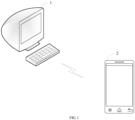
- FIG. 1 is an application scenario for a file transfer method according to one exemplary embodiment of the present invention.
- the terminal device 1 and the terminal device 2 can be two devices within a certain distance and belong to a single user, and a connection can be established between the two terminal devices.
- Both the terminal device 1 and the terminal device 2 may be mobile terminals, or may be other terminals, such as a computer.
- it is the main way to rely on third-party instant messaging software to achieve file transfer between the terminal device 1 and the terminal device 2.
- it is necessary to install and use these instant messaging software, and it is not convenient to perform such transfers.
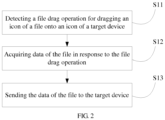
- FIG. 2 is a flowchart of the file transfer method according to one exemplary embodiment of the present invention. Referring to FIG. 2 , the method can be performed by the terminal device 1 or the terminal device 2 in the application scenario illustrated in FIG. 1 .
- the file transfer method may include the following steps.
- step S11 a file drag operation for dragging an icon of a file onto an icon of a target device is detected.
- the file drag operation is used to drag an icon of a file onto an icon of a target device.
- the file can be any type of file such as a picture, a document, a program installation package, a video, etc.
- a small picture or a document can be transferred through the file transfer method, and a large program installation package or a video can also be transferred through the file transfer method.
- the file transfer method has various utilities.
- the icon of the file is a graphic that the terminal device presents to the user to represent the visualization of the file.
- step S12 data of the file is acquired in response to the file drag operation.
- the data of the file may include all the data constituting the file, and the data of the file is stored in a storage unit of the terminal device.
- step S13 the data of the file is sent to the target device.
- the file transfer can be implemented based on, but not limited to, a local area network transmission protocol, a wireless high fidelity (WiFi) direct connection, a hot spot, a Bluetooth, and the like.
- WiFi wireless high fidelity
- the file can be sent through WiFi direct connection technology.
- the WiFi direct connection does not require an intermediate medium point, and on the other hand, the WiFi transmission speed is fast, and the transmission speed of a video stream can be guaranteed.
- the file is transferred by dragging the file onto the icon of the target device, the process is simple, and third-party instant messaging software is not required to be installed on the terminal device, the file transfer process is simplified and is convenient to operate.
- detecting the file drag operation includes: when a locally stored file is selected, detecting the file drag operation for the selected file.
- the file drag operation is detected only when the locally stored file is selected, thereby avoiding wasting resources due to continuous detections.
- detecting the file drag operation includes: if an end of a trajectory to which an icon of the file is dragged overlaps a position of the icon of the target device, determining that the file drag operation is detected. In an embodiment, detecting the file drag operation includes: if a trigger event generated by that the icon of the target device is pressed is detected during dragging the icon of the file, determining that the file drag operation is detected.
- icons of the target device are classed into two cases, one case is that an icon of the target device corresponds to a position on the desktop, and a file drag operation is generated if the file icon is dragged to the position, and the other case is that an icon of the target device corresponds to a button and a file drag operation is triggered if the file icon is dragged onto this button.
- the present invention provides the two detection schemes described above to achieve the detection of the file drag operation.
- the method further includes displaying an icon of the target device on a preset position when the locally stored file is selected.
- the icon of the target device is not required to be displayed all the time, and the user will not be interfered by the icon of the target device during operating the terminal device, and at the same time, the icon of the target device is hidden for saving space on the screen.
- one or more files can be selected in the file drag operation.
- the user may select one file for transfer at a time, or may select multiple files at the same time so as to achieve batch transfer.
- sending the data of the file to the target device includes: acquiring an address of the target device; and sending the data of the file to the target device according to the address of the target device.
- the address of the target device is first acquired and then the file is sent, whereby simplifying the process of file transfer.
- acquiring the address of the target device includes: determining, according to a relationship between a location area of an interface where the icon of the target device is located and an address of the target device, determining the address of the target device corresponding to a location area where an end of a trajectory in which the icon of the file is dragged is located.
- acquiring the address of the target device includes: determining an address of the target device corresponding to a trigger event generated during process of dragging the icon of the file according to a relationship between the trigger event and the address of the target device, wherein the trigger event is generated when the icon of the target device is pressed.
- the target device there are two cases for acquiring the address of the target device.
- One case is that icons of respective target devices to which the terminal device is connected are at different location areas on the screen (or the desktop), and the target device corresponding to the file can be determined according to a relationship between the location areas of the target devices on the interface and an address of the target device and a location area where the end of the trajectory in which the file is dragged.
- the other case is that the file dragging operation triggers buttons, and each button corresponds to a trigger event, and the trigger event corresponds to an address of the target device or vice versa, thus, a corresponding target device can be determined according to the trigger event in the terminal device.
- the method further includes displaying a file transfer record in response to the user clicking operation on the icon of the target device.
- the file transfer record is displayed by clicking on the icon of the target device, thereby facilitating determining which files have been transferred.
- the method further includes: sending pairing information by broadcasting; receiving response information sent by the target device, wherein the response information includes identity information, which includes at least one of a user account and the device manufacturer identifier; if the identity information carried by the response information is predetermined identity information, sending a connection establishment request to the target device; and receiving a connection establishment response sent by the target device.
- the predetermined identity information may be identity information of the terminal device which transfers the file.
- the user account refers to a user account that is logged in to the terminal device, and the device manufacturer identifier is used to indicate the manufacturer of the terminal device.
- connection relationship between the terminal devices is established through pairing and response.
- the user account and/or the device manufacturer identifier are used as the authentication standard, and a connection between the terminal devices which adopts a unified user account and/or device manufacturer identifier can be established automatically, without manual operation, thereby simplifying the process of file transfer. And at the same time, due to the existence of the above authentication process, connection to unauthorized terminal devices may be avoided.
- the pairing information may be Bluetooth pairing information, and connection between terminal devices, such as a terminal device and a mobile terminal, is achieved automatically through Bluetooth technology.
- the terminal devices can be connected manually for the first time, and can be connected by the above automatic connection mode during the second and subsequent connections.
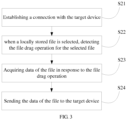
- FIG. 3 is a flowchart of a file transfer method according to one exemplary embodiment of the present invention.
- the method can be performed by the terminal device 1 or the terminal device 2 in the scenario illustrated in FIG. 1 .
- the file transfer method can include the following steps.
- step S21 a connection with the target device is established.
- the target device may be a peer device for file transfer.
- the target device when the terminal device 1 is to perform file transfer, the target device may be the terminal device 2.
- the target device When the terminal device 2 is to perform file transfer, the target device may be the terminal device 1.
- establishing a connection with the target device can include: sending the pairing information through broadcasting; receiving response information sent by the target device, wherein the response information includes identity information, which includes at least one of a user account and a device manufacturer identifier; if the identity information carried by the response information is a predetermined identity information, sending a connection establishment request to the target device; and receiving a connection establishment acknowledgement sent by the target device.
- the predetermined identity information may be identity information of the terminal device which transfers the file.
- the user account refers to a user account that is logged in to the terminal device, and the device manufacturer identifier is used to indicate a manufacturer of the terminal device.
- connection relationship between the terminal devices is established through pairing and acknowledgement.
- the user account and/or the device manufacturer identifier are used as the authentication standard, and a connection between the terminal devices which adopt a unified user account and/or device manufacturer identifier can be established automatically, without manual operation, thereby simplifying the process of file transfer. And at the same time, due to the existence of the above authentication process, connection to unauthorized terminal devices may be avoided.
- the pairing information may be Bluetooth pairing information, and the connection between the terminal devices, e.g., a terminal device and a mobile terminal, is achieved automatically through Bluetooth technology.
- the terminal device 1 sends Bluetooth pairing information through broadcasting, and the Bluetooth pairing information includes the user account.
- the terminal device 2 verifies whether the user account carried in the Bluetooth pairing information is identical as the user account logged in the terminal device 2, if yes, a response information is returned, the response information includes the user account, otherwise the response information is not returned; the terminal device 1 receives the response information sent by the terminal device 2; the terminal device 1 verifies whether the user account carried in the response information and the user account logged in the terminal device 2 are identical, if yes, the terminal device 1 sends a connection establishment request to the terminal device 2, the terminal device 2 receives the connection establishment request sent by the terminal device 1, the terminal device 2 transmits a connection establishment acknowledgement to the terminal device 1, and the terminal device 1 receives the connection establishment acknowledgement sent by the terminal device 2. If not, the terminal device 1 ends the connection establishment process.
- the process of verifying the user account by the terminal device 2 may be an optional step, and the terminal device 2 may send the response information after receiving the Bluetooth pairing information.
- a connection establishing process may be initiated by the terminal device 2, and the terminal device 1 responds.
- the Bluetooth pairing information and the response information can further include a manufacturer identifier, and in the connection establishing process, the terminal device 2 and the terminal device 1 verify whether the manufacturer identifiers are identical, in addition to verifying whether the user accounts are identical. For example, when receiving the Bluetooth pairing information, the terminal device 2 verifies whether a user account and a device manufacturer identifier carried by the Bluetooth pairing information are identical as a user account and a device manufacturer identifier of the terminal device 2, and if yes, the terminal device 2 returns a response information, and the response information includes the user account, otherwise no response information will be returned.
- the terminal device 2 when receiving the Bluetooth pairing information, the terminal device 2 verifies whether a user account and a device manufacturer identifier carried by the Bluetooth pairing information are identical as a local user account and a local device manufacturer identifier of the terminal device 1, and if yes, the terminal device 1 sends a connection establishment request, and the terminal device 2 receives the connection establishment request sent by the terminal device 1. Otherwise, the terminal device 1 does not send a connection establishment request.
- the device manufacturer identifier is carried in the pairing information and the response information, whereby ensuring that the products manufactured by the same manufacturer can adopt the automatic connection mode so as to ensure that both terminal devices have the file drag transfer function.
- step S21 can be repeatedly performed, that is, one terminal device can be connected to multiple terminal devices.
- step 22 when a locally stored file is selected, the file drag operation for the selected file is detected.
- the file drag operation is used to drag an icon of a file onto an icon of a target device.
- the file can be any type of file such as a picture, a document, a program installation package, a video, etc.
- a picture or a document with small size can be transferred through the file transfer method, and a program installation package or a video with great size can also be transferred through the file transfer method.
- the file transfer method has various utilities.
- the icon of the file is a graphic that the terminal device presents to the user to represent the visualization of the file.
- the file drag operation is detected only when the locally stored file is selected, thereby avoiding wasting resources due to continuous detections.
- detecting the file drag operation includes: if an end of a trajectory in which the icon of the file is dragged overlaps a position of the icon of the target device, determining that the file drag operation is detected.
- the location of the icon of the target device is stored in the terminal device, and it is only required to compare the location of the end of the trajectory in which the icon of the file is dragged with the locations of the icons of the respective target devices on the terminal device.
- the location of the icon of the target device is a location area, and it is only required that the end of the trajectory in which the icon of the file is dragged is in the location area of the icon of the target device.
- detecting the file drag operation includes: if a trigger event that is generated by pressing an icon of the target device is detected, determining that the file drag operation is detected.
- the icon of the target device is a button, and when the icon of the file is dragged onto the button and is released, during the process, there is a pressing action on the button, when the pressing action occurs, a trigger event is generated. If the terminal device detects the trigger event, it is determined that a file drag operation is detected.
- icons of the target device are classed into two cases, one case is that the icon of the target device corresponds to a position on the desktop, and a file drag operation is generated if the file icon is dragged to the position, and the other case is that the icon of the target device corresponds to a button and a file drag operation is triggered if the file icon is dragged onto this button.
- the present invention provides the two detection schemes described above to achieve the detection of the file drag operation.
- the method further includes displaying the icon of the target device on a preset position when the locally stored file is selected.
- the icon of the target device is not required to be displayed all the time, and the user will not be interfered by the icon of the target device during operating the terminal device, and at the same time, the icon of the target device is hidden for saving space on the screen.
- the method can further include: when the file transfer is completed and the file transfer operation is not performed over a set time, the icon of the target device is hidden.
- FIG. 4 is an interface diagram of a terminal device according to an exemplary embodiment.
- a terminal device e.g., a mobile terminal
- the user first enters a photo folder in which a plurality of photo files 10 are displayed. By clicking on 3 photos (checked parts), the photos to be transferred are selected.
- the terminal device detects that files are selected, and displays an icon 100 of a target device at a preset position. The user drags the icons of the files 10 onto the icon 100 of the target device through a file drag operation, as illustrated in FIG. 5 .
- the original icons of the files 10 may not be moved, and a dragged icon of the files 10 additionally appear, and when the drag operation ends, the dragged icon disappears.
- the preset location may be any predetermined location determined in advance; or may be a blank location on the desktop of the terminal device, such that the icon of the target device does not obscure other content on the desktop.
- step S23 data of the file is acquired in response to the file drag operation.
- the data of the file may include all the data constituting the file, and the data of the file is stored in a storage unit of the terminal device.
- acquiring the data of the file can include: acquiring a storage address of the selected file; and acquiring the data of the file from the storage address of the selected file.
- the storage address of the file is a physical storage address of the selected file in the terminal device, which is determined when the user selects the file. Because in the terminal device, a folder where the file is located may need to be determined in advance during the user selects the file, and a combination of the folder where the file is located and a name of the file corresponds to the physical storage address of the file.
- step S24 the data of the file is sent to the target device.
- one or more files can be selected in the file drag operation.
- the user may select one file for transfer at a time, or may select multiple files at the same time so as to achieve batch transfer.
- the files selected in the file drag operation include 3 files.
- sending the data of the file to the target device includes: acquiring an address of the target device; and sending the data of the file to the target device according to the address of the target device.
- the address of the target device when sending the file, the address of the target device is first acquired and then the file is sent, whereby simplifying the process of file transfer.
- the address of the target device may be an Internet Protocol (IP) address or a UUID (Universally Unique IDentifier) of a Bluetooth device.
- IP Internet Protocol
- UUID Universally Unique IDentifier
- the address of the target device can be acquired during the process of establishing a connection with the target device.
- acquiring the address of the target device includes: determining, according to a relationship between a location area of an interface where the icon of the target device is located and an address of the target device, the address of the target device corresponding to the location area where an end of a trajectory in which the icon of the file is dragged is located.
- acquiring the address of the target device includes: determining an address of the target device corresponding to a trigger event generated during process of dragging the icon of the file according to a relationship between the trigger event and the address of the target device, wherein the trigger event is generated when the icon of the target device is pressed.
- the target device there are two cases for acquiring the address of the target device.
- One case is that icons of respective target devices to which the terminal device is connected are at different location areas on the screen (or the desktop), and the target device corresponding to the file can be determined according to a relationship between the location area of the icon of the target device on the interface and an address of the target device, and a location area where the end of the trajectory in which the file is dragged.
- the other case is that the file dragging operation triggers buttons, and each button corresponds to a trigger event, and the trigger event corresponds to an address of the target device or vice versa, thus, a corresponding target device can be determined according to the trigger event in the terminal device.
- a relationship between the location area of the interface where the icon of the target device is located and the address of the target device or a relationship between the trigger event and the address of the target device can be stored in the terminal device.
- the location area of the interface where the icon of the target device is located or the trigger event can be preset. After establishing a connection with the target device, the location area or the trigger event is associated with the target device in sequence, so as to obtain a relationship between the location area and the target device or a relationship between the trigger event and the target device.
- the interface where the icon of the target device is located is also the desktop of the terminal device.
- a location area of the interface is an area that the icon of the target device covers on the desktop of the terminal device.
- the method further includes: when the file for the target device is selected, detecting a drag operation for the file; and taking a position at the end of the drag operation (the end of the trajectory of the drag operation) as a position of an icon of the target device, and displaying the icon of the target device on the position of the icon of the file after the dragging.
- a relationship between the location area of the interface where the icon of the target device is located and the address of the target device can be updated after the position of the icon of the target device changes.
- the file transfer can be implemented based on, but not limited to, a local area network transmission protocol, a wireless high fidelity (WiFi) direct connection, a hot spot, a Bluetooth, and the like.
- WiFi wireless high fidelity
- the file can be sent through WiFi direct connection technology.
- the WiFi direct connection does not require an intermediate medium point, and on the other hand, the WiFi transmission speed is fast, and the transmission speed of a video stream can be guaranteed.
- an identifier of the peer device (the sending terminal device) can also be displayed on the target device, and the target device automatically receives the file sent by the peer device and then saves it, without receiving confirmation by the user, thus no manual operation is required. And further, such file transfer usually occurs between different devices of the same user, or of two users face to face, and there is no security issue even without receiving confirmation.
- the terminal device sending the file or the target device following steps can be performed: in response a clicking operation on the icon of the target device (or the peer device) by the user, displaying file transfer record.
- the file transfer record can be displayed by clicking the icon of the target device, thereby facilitating determining which files have been transferred.
- the icon of the target device can be taken as a button, and the file transfer record is displayed when the button is clicked.
- the file transfer record can include a file name, a file size, a transfer time, and the like. This makes it easy to determine which files have been transferred.
- status of the file in current process can further be displayed, and the status of the file in current process include file a name, a file size, a percentage transmitted, a transfer speed, and etc. ⁇
- the file transfer record can be displayed on a pop-up interface.
- the pop-up interface includes a close button, and when the user clicks the close button, the terminal device receives a command of close, and then the pop-up interface is closed.
- FIG. 6 is a schematic diagram of a file transfer device according to one exemplary embodiment of the present invention. As illustrated in Fig. 6 , the file transfer device includes: a detecting module 301, an acquiring module 302, and a sending module 303.
- the detecting module 301 is configured to detect a file drag operation for dragging an icon of a file onto an icon of a target device
- the acquiring module 302 is configured to acquire data of the file in response to the detected file drag operation
- the sending module 303 is configured to transfer the data of the file to the target device.
- the detecting module 301 is configured to: when a locally stored file is selected, detect the file drag operation for the selected file.
- the detecting module 301 is configured to determine that a file drag operation is detected if an end of a trajectory to which an icon of the file is dragged overlaps a position of the icon of the target device. In an embodiment, the detecting module 301 is configured to determine that a file drag operation is detected if a trigger event generated by that the icon of the target device is pressed is detected during dragging the icon of the file.
- the device further includes an outputting module 304, configured to display an icon of the target device on a preset position when the locally stored file is selected.
- the selected file in the file drag operation includes at least one file.
- the sending module 303 includes: an acquiring sub-module 331, configured to acquire an address of the target device; and a sending sub-module 332, configured to send the data of the file to the target device according to the address of the target device.
- the acquiring sub-module 331 is configured to determine an address of the target device corresponding to a location area where an end of a trajectory in which the icon of the file is dragged is located according to a relationship between a location area of an interface where the icon of the target device is located and an address of the target device. In an embodiment, the acquiring sub-module 331 is configured to determine an address of the target device corresponding to a trigger event generated during process of dragging the icon of the file according to a relationship between the trigger event and the address of the target device, wherein the trigger event is generated when the icon of the target device is pressed.
- the outputting module 304 is configured to display a file transfer record in response to clicking operation on the icon of the target device by the user.
- the device further includes a sending module 303, configured to send pairing information through broadcasting; a receiving module 305, configured to receive response information sent by the target device, wherein the response information includes identity information, which includes at least one of a user account and a device manufacturer identifier; the sending module 303 is further configured to send a connection establishment request to the target device if a user account carried by the response information is identical to a locally used user account; and the receiving module 305 is further configured to receive a connection establishment acknowledgement sent by the target device.
- a sending module 303 configured to send pairing information through broadcasting
- a receiving module 305 configured to receive response information sent by the target device, wherein the response information includes identity information, which includes at least one of a user account and a device manufacturer identifier
- the sending module 303 is further configured to send a connection establishment request to the target device if a user account carried by the response information is identical to a locally used user account
- the receiving module 305 is further configured to receive a connection establishment acknowledgement sent by the target
- step S22 For the manner in which the detection module 301 detects the file drag operation, refer to step S22.
- step S23 For the manner in which the acquiring module 302 acquires the data of the file, refer to step S23.
- the sending module 303 sends the data of the file, refer to step S24, and detailed description is not repeated here.
- FIG. 7 is a block diagram of a file transfer apparatus 600 according to an exemplary embodiment of the present invention.
- the file transfer apparatus 600 can be any of the terminal devices described above.
- the file transfer apparatus 600 can include one or more of the following components: a processing component 602, a memory 604, a power component 606, a multimedia component 608, an audio component 610, an input/output (I/O) interface 612, a sensor component 614, and a communication component 616.
- the processing component 602 typically controls the overall operation of the file transfer apparatus 600, such as operations associated with display, telephone calls, data communications, camera operations, and recording operations.
- the processing component 602 can include one or more processors 620 to execute instructions to perform all or part of the steps of the method as described above.
- the processing component 602 can include one or more modules to facilitate interaction between the processing component 602 and other components.
- the processing component 602 can include a multimedia module to facilitate interaction between the processing component 602 and the multimedia component 608.
- the memory 604 is configured to store various types of data to support operation at the file transfer apparatus 600. Examples of such data include any application or instructions for method run on the file transfer apparatus 600, contact data, phone book data, messages, pictures, videos, and the like.
- the memory 604 can be implemented by any type of volatile or non-volatile storage device, or a combination thereof, such as static random access memory (SRAM), electrically erasable programmable read only memory (EEPROM), erasable, Programmable Read Only Memory (EPROM), Programmable Read Only Memory (PROM), Read Only Memory (ROM), Magnetic Memory, Flash Memory, magnetic disk or Optical Disk.
- SRAM static random access memory
- EEPROM electrically erasable programmable read only memory
- EPROM Programmable Read Only Memory
- PROM Programmable Read Only Memory
- ROM Read Only Memory
- Magnetic Memory Flash Memory
- magnetic disk or Optical Disk any type of volatile or non-volatile storage device, or a combination thereof, such as static random access memory (SRAM), electrically
- the power component 606 supplies power to various components of the file transfer apparatus 600.
- the power component 606 can include a power management system, one or more power sources, and other components associated with generating, managing, and distributing power for the apparatus 600.
- the multimedia component 608 includes a screen between the file transfer apparatus 600 and the user that provides an output interface.
- the screen can include a liquid crystal display (LCD) and a touch panel (TP). If the screen includes a touch panel, the screen can be implemented as a touch screen to receive input signals from the user.
- the touch panel includes one or more touch sensors to sense touches, slides, and gestures on the touch panel. The touch sensor can sense not only boundary of the touch or the sliding action, but also duration and pressure associated with the touch or the sliding operation.
- the audio component 610 is configured to output and/or input an audio signal.
- the audio component 610 includes a speaker for outputting an audio signal.
- the I/O interface 612 provides an interface between the processing component 602 and peripheral interface modules, which may be a keyboard, a click wheel, a button, or the like. These buttons can include, but are not limited to, a home button, a volume button, a start button, and a lock button.
- the sensor component 614 includes one or more sensors for providing the file transfer apparatus 600 with status assessment in various aspects.
- the sensor component 614 can include a humidity sensor, a temperature sensor, and the like.
- the communication component 616 is configured to facilitate wireless communication between the file transfer apparatus 600 and other devices.
- the communication component 616 can access a wireless network based on a communication standard, such as WiFi, 4G or 5G, or a combination thereof, so as to achieve detection of physical downlink control signaling.
- the communication component 616 receives broadcast signals or broadcast associated information from an external broadcast management system via a broadcast channel.
- the communication component 616 further includes an NFC module.
- the file transfer apparatus 600 can be implemented by one or more application specific integrated circuits (ASICs), digital signal processors (DSPs), digital signal processing devices (DSPDs), programmable logic devices (PLDs), field programmable gate array (FPGA), controller, microcontroller, microprocessor, or other electronic component implementation for performing the file transfer methods as described above.
- ASICs application specific integrated circuits
- DSPs digital signal processors
- DSPDs digital signal processing devices
- PLDs programmable logic devices
- FPGA field programmable gate array
- controller microcontroller, microprocessor, or other electronic component implementation for performing the file transfer methods as described above.
- non-transitory computer readable storage medium including instructions, such as the memory 604 including instructions executable by the processor 620 of the file transfer apparatus 600 to perform the file transfer method as described above.
- the non-transitory computer readable storage medium can be a ROM, a random access memory (RAM), a CD-ROM, a magnetic tape, a floppy disk, and an optical data storage device.
Landscapes
- Engineering & Computer Science (AREA)
- Theoretical Computer Science (AREA)
- General Engineering & Computer Science (AREA)
- Human Computer Interaction (AREA)
- Physics & Mathematics (AREA)
- General Physics & Mathematics (AREA)
- Computer Networks & Wireless Communication (AREA)
- Signal Processing (AREA)
- Multimedia (AREA)
- Data Mining & Analysis (AREA)
- Databases & Information Systems (AREA)
- User Interface Of Digital Computer (AREA)
Claims (15)
- Procédé de transfert de fichiers exécuté par un terminal dispositif (1), le procédé comprenant :détecter (S 11) une opération de glissement de fichier pour faire glisser l'icône d'un fichier sur l'icône d'un dispositif cible (2) ;acquérir (S12) des données du fichier en réponse à l'opération de glissement du fichier ; etenvoyer (S 13) les données du fichier au dispositif cible (2),caractérisé en ce que le procédé de transfert de fichiers comprend en outre l'envoi d'informations sur l'appariement par le biais de la diffusion ;recevoir des informations de réponse envoyées par le dispositif cible, dans lesquelles les informations de réponse comprennent des informations d'identité , et les informations d'identité comprennent au moins l'un des éléments suivants : un compte d'utilisateur connecté au dispositif cible (2) et un identifiant du fabricant du dispositif cible (2) ;si les informations d'identité portées par les informations de réponse et les informations d'identité du dispositif terminal (1) sont unifiées, envoi d'une demande d'établissement de connexion au dispositif cible (2) ; etrecevoir un accusé de réception d'établissement de connexion envoyé par le dispositif cible (2).
- Procédé de transfert de fichiers selon la revendication 1, comprenant en outre :
lorsqu'un fichier stocké localement est sélectionné, détecter l'opération de glissement de fichier pour le fichier sélectionné. - Procédé de transfert de fichier selon la revendication 1 ou 2, dans lequel détecter (S 11) l'opération de glissement de fichier comprend au moins l'une des opérations suivantes :déterminer que l'opération de glissement du fichier est détectée, si une extrémité d'une trajectoire dans laquelle l'icône du fichier est glissée chevauche une position de l'icône du dispositif cible ; oudéterminer que l'opération de glissement de fichier est détectée, si un événement déclencheur est détecté pendant le glissement de l'icône du fichier, dans lequel l'événement déclencheur est généré lorsque l'icône du dispositif cible est pressée.
- Procédé de transfert de fichiers selon l'une quelconque des revendications 1 à 3, comprenant en outre au moins l'un de :l'affichage de l'icône du dispositif cible sur une position prédéfinie lorsqu'un fichier stocké localement est sélectionné, ouafficher un enregistrement de transfert de fichier en réponse à une opération de clic sur l'icône du dispositif cible par l'utilisateur.
- Procédé de transfert de fichiers selon l'une quelconque des revendications 1 à 4, dans lequel un ou plusieurs fichiers sont sélectionnés lors de l'opération de glissement de fichiers.
- Procédé de transfert de fichier selon l'une quelconque des revendications 1 à 5, dans lequel l'envoi (S13) des données du fichier au dispositif cible comprend :acquérir (S 12) une adresse du dispositif cible ; etenvoyer les données du fichier au dispositif cible selon l'adresse de ce dernier.
- Procédé de transfert de fichiers selon la revendication 6, dans lequel l'acquisition (S 12) de l'adresse du dispositif cible comprend au moins l'un des éléments suivants :déterminer l'adresse du dispositif cible correspondant à une superficie où se trouve une fin de trajectoire dans laquelle l'icône du fichier est glissée selon une relation entre une superficie d'une interface où se trouve l'icône du dispositif cible et l'adresse du dispositif cible ; oudéterminer l'adresse du dispositif cible correspondant à un événement déclencheur généré au cours d'une opération de glissement de l'icône du fichier selon une relation entre l'événement déclencheur et l'adresse du dispositif cible, dans laquelle l'événement déclencheur est généré lorsque l'icône du dispositif cible est pressée.
- Dispositif terminal (1) comprenant :un module de détection (301), configuré pour détecter une opération de glissement de fichier visant à faire glisser l'icône d'un fichier sur l'icône d'un dispositif cible (2) ;un module d'acquisition (302) configuré pour acquérir des données du fichier en réponse à l'opération de glissement du fichier ; etun module d'envoi (303) configuré pour transférer les données du fichier au dispositif cible (2),caractérisé par le fait que le terminal comprend en outre un module de réception (305),le module d'envoi (303) est en outre configuré pour envoyer des informations d'appariement par diffusion ;le module de réception (305) est configuré pour recevoir des informations de réponse envoyées par le dispositif cible (2), dans lequel les informations de réponse comprennent des informations d'identité, et les informations d'identité comprennent au moins l'un des éléments suivants : un compte d'utilisateur qui est connecté au dispositif cible (2) et un identifiant de fabricant de dispositif du dispositif cible (2) ;le module d'envoi (303) est en outre configuré pour envoyer une demande d'établissement de connexion au dispositif cible (2), si les informations d'identité portées par les informations de réponse et les informations d'identité du deice terminal (1) sont unifiées ; etle module de réception (305) est en outre configuré pour recevoir un accusé de réception d'établissement de connexion envoyé par le dispositif cible (2).
- Dispositif terminal selon la revendication 8, dans lequel le module de détection (301) est configuré pour détecter l'opération de glissement de fichier pour le fichier sélectionné lorsqu'un fichier stocké localement est sélectionné.
- Dispositif terminal selon la revendication 8 ou 9, dans lequel le module de détection (301) est configuré pour déterminer qu'une opération de glissement de fichier est détectée, si une extrémité d'une trajectoire dans laquelle l'icône du fichier est glissée chevauche une position de l'icône du dispositif cible ; ou,
le module de détection (301) est configuré pour déterminer que l'opération de glissement de fichier est détectée, si un événement déclencheur est détecté pendant le glissement de l'icône du fichier, dans lequel l'événement déclencheur est généré lorsque l'icône du dispositif cible est pressée. - Dispositif terminal selon l'une quelconque des revendications 8 à 10, dans lequel le dispositif terminal comprend en outre un module de sortie (304) configuré pour :afficher l'icône du dispositif cible sur une position prédéfinie lorsqu'un fichier stocké localement est sélectionné ; et/ouafficher un enregistrement de transfert de fichier en réponse à une opération de clic sur l'icône du dispositif cible par l'utilisateur.
- Dispositif terminal selon l'une des revendications 8 à 11, dans lequel un ou plusieurs fichiers sont sélectionnés lors de l'opération de glissement de fichier.
- Dispositif terminal selon l'une quelconque des revendications 8 à 12, dans lequel le module d'envoi (303) comprend :un sous-module d'acquisition (331) configuré pour acquérir une adresse du dispositif cible ; etun sous-module d'envoi (332) configuré pour envoyer les données du fichier au dispositif cible selon l'adresse du dispositif cible.
- Dispositif terminal selon la revendication 13, dans lequel le sous-module d'acquisition (331) est configuré pour déterminer l'adresse du dispositif cible correspondant à une superficie de localisation où se trouve une fin de trajectoire dans laquelle l'icône du fichier est glissée selon une relation entre une superficie de localisation d'une interface où se trouve l'icône du dispositif cible et l'adresse du dispositif cible ; ou.
le sous-module d'acquisition (331) est configuré pour déterminer l'adresse du dispositif cible correspondant à un événement déclencheur généré au cours d'une opération de glissement de l'icône du fichier selon une relation entre l'événement déclencheur et l'adresse du dispositif cible, dans laquelle l'événement déclencheur est généré lorsque l'icône du dispositif cible est pressée. - Support de stockage lisible par ordinateur comprenant des instructions, qui, lorsqu'elles sont exécutées par un processeur, exécutent le procédé de transfert de fichiers selon l'une des revendications 1 à 7.
Applications Claiming Priority (1)
| Application Number | Priority Date | Filing Date | Title |
|---|---|---|---|
| CN201910419550.XA CN111970312A (zh) | 2019-05-20 | 2019-05-20 | 文件传输方法、装置及计算机可读存储介质 |
Publications (2)
| Publication Number | Publication Date |
|---|---|
| EP3742273A1 EP3742273A1 (fr) | 2020-11-25 |
| EP3742273B1 true EP3742273B1 (fr) | 2024-03-27 |
Family
ID=68732893
Family Applications (1)
| Application Number | Title | Priority Date | Filing Date |
|---|---|---|---|
| EP19212484.0A Active EP3742273B1 (fr) | 2019-05-20 | 2019-11-29 | Procédé et appareil de transfert de fichiers |
Country Status (7)
| Country | Link |
|---|---|
| US (1) | US11409429B2 (fr) |
| EP (1) | EP3742273B1 (fr) |
| JP (1) | JP7328900B2 (fr) |
| KR (1) | KR102303784B1 (fr) |
| CN (2) | CN117544614A (fr) |
| RU (1) | RU2743890C1 (fr) |
| WO (1) | WO2020232952A1 (fr) |
Families Citing this family (7)
| Publication number | Priority date | Publication date | Assignee | Title |
|---|---|---|---|---|
| JP7040547B2 (ja) * | 2020-03-10 | 2022-03-23 | カシオ計算機株式会社 | 情報処理装置及びプログラム |
| CN112291708B (zh) * | 2020-11-27 | 2023-06-23 | 歌尔科技有限公司 | 一种数据传输方法、装置、设备及计算机可读存储介质 |
| CN112698770B (zh) * | 2020-12-28 | 2022-08-16 | 北京小米移动软件有限公司 | 信息处理方法及装置、存储介质 |
| CN115220609B (zh) * | 2021-03-29 | 2024-09-10 | 北京小米移动软件有限公司 | 信息处理方法及装置、终端设备及存储介质 |
| WO2023287585A1 (fr) * | 2021-07-14 | 2023-01-19 | Secturion Systems, Inc. | Transfert de données sécurisé sur des réseaux sans fil à l'aide de dispositifs de chiffrements de stockage de données |
| CN113467684A (zh) * | 2021-07-19 | 2021-10-01 | 交互未来(北京)科技有限公司 | 文件传输方法及装置、存储介质及电子设备 |
| CN115633340A (zh) * | 2022-10-11 | 2023-01-20 | 展讯通信(天津)有限公司 | 一种文件传输方法、终端、电子设备及存储介质 |
Citations (4)
| Publication number | Priority date | Publication date | Assignee | Title |
|---|---|---|---|---|
| US20060083187A1 (en) * | 2004-10-18 | 2006-04-20 | Mobile (R&D) Ltd. | Pairing system and method for wirelessly connecting communication devices |
| US20140068469A1 (en) * | 2012-09-04 | 2014-03-06 | Pantech Co., Ltd. | Mobile apparatus and method for transferring information |
| WO2019071872A1 (fr) * | 2017-10-09 | 2019-04-18 | 华为技术有限公司 | Procédé et terminal de partage de fichiers |
| EP3484134A1 (fr) * | 2015-02-02 | 2019-05-15 | Apple Inc. | Dispositif, procédé et interface utilisateur graphique permettant d'établir une relation et une connexion entre deux dispositifs |
Family Cites Families (36)
| Publication number | Priority date | Publication date | Assignee | Title |
|---|---|---|---|---|
| US5801700A (en) * | 1996-01-19 | 1998-09-01 | Silicon Graphics Incorporated | System and method for an iconic drag and drop interface for electronic file transfer |
| US6219669B1 (en) * | 1997-11-13 | 2001-04-17 | Hyperspace Communications, Inc. | File transfer system using dynamically assigned ports |
| JP4246847B2 (ja) | 1999-04-30 | 2009-04-02 | 株式会社東芝 | ファクシミリ送受信方法、ファクシミリ送受信装置及び通信システム |
| US7031004B1 (en) * | 1999-08-26 | 2006-04-18 | Xerox Corporation | Web print submission from within an application |
| US7266776B2 (en) * | 2002-11-25 | 2007-09-04 | Aol Llc | Facilitating communications between computer users across a network |
| US7783985B2 (en) * | 2006-01-04 | 2010-08-24 | Citrix Systems, Inc. | Systems and methods for transferring data between computing devices |
| KR101200300B1 (ko) * | 2006-10-25 | 2012-11-12 | 삼성전자주식회사 | 브로드캐스팅 기능을 구비한 프리젠테이션 장치 및 그 방법 |
| US20080307367A1 (en) * | 2007-06-07 | 2008-12-11 | John Michael Garrison | Method and apparatus for a drag and drop operation implementing a hierarchical path name |
| JP2009048452A (ja) | 2007-08-21 | 2009-03-05 | Nikon Corp | 画像転送プログラム |
| JP4453738B2 (ja) * | 2007-10-18 | 2010-04-21 | ソニー株式会社 | ファイル転送方法、装置、およびプログラム |
| KR101012300B1 (ko) * | 2008-03-07 | 2011-02-08 | 삼성전자주식회사 | 터치스크린을 구비한 휴대 단말기의 사용자 인터페이스장치 및 그 방법 |
| US20100005138A1 (en) * | 2008-04-21 | 2010-01-07 | Topia Technology | Electronic file sharing |
| US8375336B2 (en) * | 2008-05-23 | 2013-02-12 | Microsoft Corporation | Panning content utilizing a drag operation |
| US8458363B2 (en) | 2008-06-08 | 2013-06-04 | Apple Inc. | System and method for simplified data transfer |
| JP2010092455A (ja) * | 2008-09-10 | 2010-04-22 | Ricoh Co Ltd | ファイル管理システム及びプログラム |
| US8321802B2 (en) * | 2008-11-13 | 2012-11-27 | Qualcomm Incorporated | Method and system for context dependent pop-up menus |
| CN101834937A (zh) * | 2010-03-19 | 2010-09-15 | 宇龙计算机通信科技(深圳)有限公司 | 一种终端之间进行信息交互的方法、装置及终端 |
| TWI477114B (zh) * | 2011-02-25 | 2015-03-11 | Univ Nat Chiao Tung | 以擴增實境為基礎並結合雲端計算之創新檔案傳輸方法 |
| KR101832370B1 (ko) * | 2011-07-14 | 2018-02-28 | 엘지전자 주식회사 | 이동 단말기 |
| JP5172997B2 (ja) * | 2011-07-15 | 2013-03-27 | シャープ株式会社 | 情報処理装置、操作画面表示方法、制御プログラムおよび記録媒体 |
| WO2012092896A2 (fr) * | 2012-02-06 | 2012-07-12 | 华为技术有限公司 | Procédé et dispositif de transmission de données |
| CN102542768B (zh) * | 2012-02-10 | 2013-10-09 | 华为终端有限公司 | 一种射频设备的配对方法、设备及系统 |
| CN102707880B (zh) * | 2012-04-24 | 2015-01-07 | 华为终端有限公司 | 文件传输的方法及终端 |
| CN102830906B (zh) * | 2012-07-04 | 2016-08-03 | 华为终端有限公司 | 基于用户界面进行文件处理的方法及终端设备 |
| CN103577089A (zh) * | 2012-08-10 | 2014-02-12 | 中兴通讯股份有限公司 | 文件传输的方法及触摸屏终端 |
| CN102984393B (zh) * | 2012-12-12 | 2015-06-17 | 努比亚技术有限公司 | 一种移动终端之间传输文件的方法及移动终端 |
| CN103731186B (zh) * | 2013-12-23 | 2018-05-01 | 上海斐讯数据通信技术有限公司 | 一种传输文件的方法及传输终端 |
| US10248363B2 (en) * | 2014-02-13 | 2019-04-02 | Hewlett-Packard Development Company, L.P. | Accessory modules |
| CN104053249A (zh) * | 2014-06-18 | 2014-09-17 | 广州三星通信技术研究有限公司 | 用于在电子终端之间传输数据的装置和方法及其系统 |
| CN104038263B (zh) | 2014-06-18 | 2017-01-11 | 小米科技有限责任公司 | 建立蓝牙连接的方法和装置 |
| CN104468741B (zh) * | 2014-11-21 | 2019-01-25 | 中兴通讯股份有限公司 | 云桌面的处理方法及装置 |
| CN104918208B (zh) | 2015-05-29 | 2018-12-07 | 努比亚技术有限公司 | 移动终端配对方法及移动终端 |
| WO2017016525A1 (fr) * | 2015-07-29 | 2017-02-02 | 腾讯科技(深圳)有限公司 | Procédé d'envoi groupé de données de service, terminal et serveur |
| JP6625887B2 (ja) | 2015-07-31 | 2019-12-25 | 任天堂株式会社 | 無線システム、無線機器、通信プログラム、および通信方法 |
| CN106547455A (zh) * | 2015-09-23 | 2017-03-29 | 百度在线网络技术(北京)有限公司 | 终端设备传输文件的方法及终端设备 |
| CN108803958B (zh) | 2017-04-26 | 2022-12-16 | 腾讯科技(深圳)有限公司 | 文件载入控制、云存储应用中实现上传的交互方法和装置 |
-
2019
- 2019-05-20 CN CN202311368160.7A patent/CN117544614A/zh active Pending
- 2019-05-20 CN CN201910419550.XA patent/CN111970312A/zh active Pending
- 2019-10-10 KR KR1020197033847A patent/KR102303784B1/ko active Active
- 2019-10-10 JP JP2019562562A patent/JP7328900B2/ja active Active
- 2019-10-10 WO PCT/CN2019/110484 patent/WO2020232952A1/fr not_active Ceased
- 2019-10-10 RU RU2019141051A patent/RU2743890C1/ru active
- 2019-11-20 US US16/689,598 patent/US11409429B2/en active Active
- 2019-11-29 EP EP19212484.0A patent/EP3742273B1/fr active Active
Patent Citations (5)
| Publication number | Priority date | Publication date | Assignee | Title |
|---|---|---|---|---|
| US20060083187A1 (en) * | 2004-10-18 | 2006-04-20 | Mobile (R&D) Ltd. | Pairing system and method for wirelessly connecting communication devices |
| US20140068469A1 (en) * | 2012-09-04 | 2014-03-06 | Pantech Co., Ltd. | Mobile apparatus and method for transferring information |
| EP3484134A1 (fr) * | 2015-02-02 | 2019-05-15 | Apple Inc. | Dispositif, procédé et interface utilisateur graphique permettant d'établir une relation et une connexion entre deux dispositifs |
| WO2019071872A1 (fr) * | 2017-10-09 | 2019-04-18 | 华为技术有限公司 | Procédé et terminal de partage de fichiers |
| EP3675460A1 (fr) * | 2017-10-09 | 2020-07-01 | Huawei Technologies Co., Ltd. | Procédé et terminal de partage de fichiers |
Also Published As
| Publication number | Publication date |
|---|---|
| US11409429B2 (en) | 2022-08-09 |
| WO2020232952A1 (fr) | 2020-11-26 |
| CN111970312A (zh) | 2020-11-20 |
| CN117544614A (zh) | 2024-02-09 |
| KR102303784B1 (ko) | 2021-09-24 |
| RU2743890C1 (ru) | 2021-03-01 |
| JP2021528706A (ja) | 2021-10-21 |
| KR20200135714A (ko) | 2020-12-03 |
| JP7328900B2 (ja) | 2023-08-17 |
| EP3742273A1 (fr) | 2020-11-25 |
| US20200371655A1 (en) | 2020-11-26 |
Similar Documents
| Publication | Publication Date | Title |
|---|---|---|
| EP3742273B1 (fr) | Procédé et appareil de transfert de fichiers | |
| EP3872611B1 (fr) | Procédé et appareil d'interaction multi-écran et support d'enregistrement | |
| JP6228676B2 (ja) | 接続状態プロンプティング方法および装置 | |
| RU2636524C2 (ru) | Способ, устройство и система для управления административной связью между учетной записью и устройством | |
| US10104599B2 (en) | Device binding methods and apparatuses | |
| JP6214812B2 (ja) | 振込処理方法および装置 | |
| JP2023511195A (ja) | メッセージ提示方法及び電子デバイス | |
| US20130238744A1 (en) | Object mediated data transfer between electronic devices | |
| JP2017539101A (ja) | 画像取得方法および装置 | |
| KR20190002575A (ko) | 디바이스 간의 복사하기 및 붙이기 | |
| JP2017516243A (ja) | スマートデバイス検出方法、装置、プログラム及び記録媒体 | |
| CN112162716A (zh) | 一种文件传输方法、装置、终端及存储介质 | |
| KR20170018295A (ko) | 스마트 기기 제어 방법, 장치, 프로그램 및 컴퓨터가 판독가능한 기록매체 | |
| CN115421846A (zh) | 跨设备控制方法、控制装置、电子设备和可读存储介质 | |
| CN113766305A (zh) | 显示设备及镜像投屏音频输出控制方法 | |
| US20220043852A1 (en) | Method and apparatus for recalling image file, control method and apparatus for recalling image file, and mobile terminal | |
| CN106792041A (zh) | 内容分享方法及装置 | |
| CA2808642A1 (fr) | Transfert de donnees entre dispositifs electroniques au moyen d'un objet | |
| CN105376318A (zh) | 文件传输方法、装置及系统 | |
| CN104572230A (zh) | 脚本文件的加载方法、脚本文件生成方法及装置 | |
| CN105302470B (zh) | 触摸屏设备的电子图像的控制方法、装置及触摸屏设备 | |
| KR20230132541A (ko) | 통신 설정 방법, 장치 및 저장 매체 | |
| CN106101293A (zh) | 账号管理方法及装置 | |
| CN112698770B (zh) | 信息处理方法及装置、存储介质 | |
| CN118555277A (zh) | 数据传输方法、装置、电子设备及存储介质 |
Legal Events
| Date | Code | Title | Description |
|---|---|---|---|
| PUAI | Public reference made under article 153(3) epc to a published international application that has entered the european phase |
Free format text: ORIGINAL CODE: 0009012 |
|
| STAA | Information on the status of an ep patent application or granted ep patent |
Free format text: STATUS: THE APPLICATION HAS BEEN PUBLISHED |
|
| AK | Designated contracting states |
Kind code of ref document: A1 Designated state(s): AL AT BE BG CH CY CZ DE DK EE ES FI FR GB GR HR HU IE IS IT LI LT LU LV MC MK MT NL NO PL PT RO RS SE SI SK SM TR |
|
| AX | Request for extension of the european patent |
Extension state: BA ME |
|
| STAA | Information on the status of an ep patent application or granted ep patent |
Free format text: STATUS: REQUEST FOR EXAMINATION WAS MADE |
|
| 17P | Request for examination filed |
Effective date: 20201222 |
|
| RBV | Designated contracting states (corrected) |
Designated state(s): AL AT BE BG CH CY CZ DE DK EE ES FI FR GB GR HR HU IE IS IT LI LT LU LV MC MK MT NL NO PL PT RO RS SE SI SK SM TR |
|
| STAA | Information on the status of an ep patent application or granted ep patent |
Free format text: STATUS: EXAMINATION IS IN PROGRESS |
|
| 17Q | First examination report despatched |
Effective date: 20220218 |
|
| GRAP | Despatch of communication of intention to grant a patent |
Free format text: ORIGINAL CODE: EPIDOSNIGR1 |
|
| STAA | Information on the status of an ep patent application or granted ep patent |
Free format text: STATUS: GRANT OF PATENT IS INTENDED |
|
| RIC1 | Information provided on ipc code assigned before grant |
Ipc: H04M 1/72412 20210101ALI20231013BHEP Ipc: G06F 16/16 20190101ALI20231013BHEP Ipc: G06F 3/04842 20220101ALI20231013BHEP Ipc: G06F 3/0482 20130101ALI20231013BHEP Ipc: G06F 3/0486 20130101AFI20231013BHEP |
|
| INTG | Intention to grant announced |
Effective date: 20231030 |
|
| P01 | Opt-out of the competence of the unified patent court (upc) registered |
Effective date: 20231221 |
|
| GRAS | Grant fee paid |
Free format text: ORIGINAL CODE: EPIDOSNIGR3 |
|
| GRAA | (expected) grant |
Free format text: ORIGINAL CODE: 0009210 |
|
| STAA | Information on the status of an ep patent application or granted ep patent |
Free format text: STATUS: THE PATENT HAS BEEN GRANTED |
|
| AK | Designated contracting states |
Kind code of ref document: B1 Designated state(s): AL AT BE BG CH CY CZ DE DK EE ES FI FR GB GR HR HU IE IS IT LI LT LU LV MC MK MT NL NO PL PT RO RS SE SI SK SM TR |
|
| REG | Reference to a national code |
Ref country code: GB Ref legal event code: FG4D |
|
| REG | Reference to a national code |
Ref country code: CH Ref legal event code: EP |
|
| REG | Reference to a national code |
Ref country code: DE Ref legal event code: R096 Ref document number: 602019048936 Country of ref document: DE |
|
| REG | Reference to a national code |
Ref country code: IE Ref legal event code: FG4D |
|
| PG25 | Lapsed in a contracting state [announced via postgrant information from national office to epo] |
Ref country code: LT Free format text: LAPSE BECAUSE OF FAILURE TO SUBMIT A TRANSLATION OF THE DESCRIPTION OR TO PAY THE FEE WITHIN THE PRESCRIBED TIME-LIMIT Effective date: 20240327 |
|
| REG | Reference to a national code |
Ref country code: LT Ref legal event code: MG9D |
|
| PG25 | Lapsed in a contracting state [announced via postgrant information from national office to epo] |
Ref country code: GR Free format text: LAPSE BECAUSE OF FAILURE TO SUBMIT A TRANSLATION OF THE DESCRIPTION OR TO PAY THE FEE WITHIN THE PRESCRIBED TIME-LIMIT Effective date: 20240628 |
|
| PG25 | Lapsed in a contracting state [announced via postgrant information from national office to epo] |
Ref country code: HR Free format text: LAPSE BECAUSE OF FAILURE TO SUBMIT A TRANSLATION OF THE DESCRIPTION OR TO PAY THE FEE WITHIN THE PRESCRIBED TIME-LIMIT Effective date: 20240327 Ref country code: RS Free format text: LAPSE BECAUSE OF FAILURE TO SUBMIT A TRANSLATION OF THE DESCRIPTION OR TO PAY THE FEE WITHIN THE PRESCRIBED TIME-LIMIT Effective date: 20240627 |
|
| PG25 | Lapsed in a contracting state [announced via postgrant information from national office to epo] |
Ref country code: RS Free format text: LAPSE BECAUSE OF FAILURE TO SUBMIT A TRANSLATION OF THE DESCRIPTION OR TO PAY THE FEE WITHIN THE PRESCRIBED TIME-LIMIT Effective date: 20240627 Ref country code: NO Free format text: LAPSE BECAUSE OF FAILURE TO SUBMIT A TRANSLATION OF THE DESCRIPTION OR TO PAY THE FEE WITHIN THE PRESCRIBED TIME-LIMIT Effective date: 20240627 Ref country code: LT Free format text: LAPSE BECAUSE OF FAILURE TO SUBMIT A TRANSLATION OF THE DESCRIPTION OR TO PAY THE FEE WITHIN THE PRESCRIBED TIME-LIMIT Effective date: 20240327 Ref country code: HR Free format text: LAPSE BECAUSE OF FAILURE TO SUBMIT A TRANSLATION OF THE DESCRIPTION OR TO PAY THE FEE WITHIN THE PRESCRIBED TIME-LIMIT Effective date: 20240327 Ref country code: GR Free format text: LAPSE BECAUSE OF FAILURE TO SUBMIT A TRANSLATION OF THE DESCRIPTION OR TO PAY THE FEE WITHIN THE PRESCRIBED TIME-LIMIT Effective date: 20240628 Ref country code: FI Free format text: LAPSE BECAUSE OF FAILURE TO SUBMIT A TRANSLATION OF THE DESCRIPTION OR TO PAY THE FEE WITHIN THE PRESCRIBED TIME-LIMIT Effective date: 20240327 Ref country code: BG Free format text: LAPSE BECAUSE OF FAILURE TO SUBMIT A TRANSLATION OF THE DESCRIPTION OR TO PAY THE FEE WITHIN THE PRESCRIBED TIME-LIMIT Effective date: 20240327 |
|
| REG | Reference to a national code |
Ref country code: NL Ref legal event code: MP Effective date: 20240327 |
|
| PG25 | Lapsed in a contracting state [announced via postgrant information from national office to epo] |
Ref country code: SE Free format text: LAPSE BECAUSE OF FAILURE TO SUBMIT A TRANSLATION OF THE DESCRIPTION OR TO PAY THE FEE WITHIN THE PRESCRIBED TIME-LIMIT Effective date: 20240327 Ref country code: LV Free format text: LAPSE BECAUSE OF FAILURE TO SUBMIT A TRANSLATION OF THE DESCRIPTION OR TO PAY THE FEE WITHIN THE PRESCRIBED TIME-LIMIT Effective date: 20240327 |
|
| PG25 | Lapsed in a contracting state [announced via postgrant information from national office to epo] |
Ref country code: NL Free format text: LAPSE BECAUSE OF FAILURE TO SUBMIT A TRANSLATION OF THE DESCRIPTION OR TO PAY THE FEE WITHIN THE PRESCRIBED TIME-LIMIT Effective date: 20240327 |
|
| REG | Reference to a national code |
Ref country code: AT Ref legal event code: MK05 Ref document number: 1670543 Country of ref document: AT Kind code of ref document: T Effective date: 20240327 |
|
| PG25 | Lapsed in a contracting state [announced via postgrant information from national office to epo] |
Ref country code: NL Free format text: LAPSE BECAUSE OF FAILURE TO SUBMIT A TRANSLATION OF THE DESCRIPTION OR TO PAY THE FEE WITHIN THE PRESCRIBED TIME-LIMIT Effective date: 20240327 |
|
| PG25 | Lapsed in a contracting state [announced via postgrant information from national office to epo] |
Ref country code: IS Free format text: LAPSE BECAUSE OF FAILURE TO SUBMIT A TRANSLATION OF THE DESCRIPTION OR TO PAY THE FEE WITHIN THE PRESCRIBED TIME-LIMIT Effective date: 20240727 |
|
| PG25 | Lapsed in a contracting state [announced via postgrant information from national office to epo] |
Ref country code: PT Free format text: LAPSE BECAUSE OF FAILURE TO SUBMIT A TRANSLATION OF THE DESCRIPTION OR TO PAY THE FEE WITHIN THE PRESCRIBED TIME-LIMIT Effective date: 20240729 Ref country code: SM Free format text: LAPSE BECAUSE OF FAILURE TO SUBMIT A TRANSLATION OF THE DESCRIPTION OR TO PAY THE FEE WITHIN THE PRESCRIBED TIME-LIMIT Effective date: 20240327 |
|
| PG25 | Lapsed in a contracting state [announced via postgrant information from national office to epo] |
Ref country code: ES Free format text: LAPSE BECAUSE OF FAILURE TO SUBMIT A TRANSLATION OF THE DESCRIPTION OR TO PAY THE FEE WITHIN THE PRESCRIBED TIME-LIMIT Effective date: 20240327 |
|
| PG25 | Lapsed in a contracting state [announced via postgrant information from national office to epo] |
Ref country code: CZ Free format text: LAPSE BECAUSE OF FAILURE TO SUBMIT A TRANSLATION OF THE DESCRIPTION OR TO PAY THE FEE WITHIN THE PRESCRIBED TIME-LIMIT Effective date: 20240327 Ref country code: EE Free format text: LAPSE BECAUSE OF FAILURE TO SUBMIT A TRANSLATION OF THE DESCRIPTION OR TO PAY THE FEE WITHIN THE PRESCRIBED TIME-LIMIT Effective date: 20240327 |
|
| PG25 | Lapsed in a contracting state [announced via postgrant information from national office to epo] |
Ref country code: AT Free format text: LAPSE BECAUSE OF FAILURE TO SUBMIT A TRANSLATION OF THE DESCRIPTION OR TO PAY THE FEE WITHIN THE PRESCRIBED TIME-LIMIT Effective date: 20240327 |
|
| PG25 | Lapsed in a contracting state [announced via postgrant information from national office to epo] |
Ref country code: PL Free format text: LAPSE BECAUSE OF FAILURE TO SUBMIT A TRANSLATION OF THE DESCRIPTION OR TO PAY THE FEE WITHIN THE PRESCRIBED TIME-LIMIT Effective date: 20240327 |
|
| PG25 | Lapsed in a contracting state [announced via postgrant information from national office to epo] |
Ref country code: SK Free format text: LAPSE BECAUSE OF FAILURE TO SUBMIT A TRANSLATION OF THE DESCRIPTION OR TO PAY THE FEE WITHIN THE PRESCRIBED TIME-LIMIT Effective date: 20240327 |
|
| PG25 | Lapsed in a contracting state [announced via postgrant information from national office to epo] |
Ref country code: SM Free format text: LAPSE BECAUSE OF FAILURE TO SUBMIT A TRANSLATION OF THE DESCRIPTION OR TO PAY THE FEE WITHIN THE PRESCRIBED TIME-LIMIT Effective date: 20240327 Ref country code: SK Free format text: LAPSE BECAUSE OF FAILURE TO SUBMIT A TRANSLATION OF THE DESCRIPTION OR TO PAY THE FEE WITHIN THE PRESCRIBED TIME-LIMIT Effective date: 20240327 Ref country code: RO Free format text: LAPSE BECAUSE OF FAILURE TO SUBMIT A TRANSLATION OF THE DESCRIPTION OR TO PAY THE FEE WITHIN THE PRESCRIBED TIME-LIMIT Effective date: 20240327 Ref country code: PT Free format text: LAPSE BECAUSE OF FAILURE TO SUBMIT A TRANSLATION OF THE DESCRIPTION OR TO PAY THE FEE WITHIN THE PRESCRIBED TIME-LIMIT Effective date: 20240729 Ref country code: PL Free format text: LAPSE BECAUSE OF FAILURE TO SUBMIT A TRANSLATION OF THE DESCRIPTION OR TO PAY THE FEE WITHIN THE PRESCRIBED TIME-LIMIT Effective date: 20240327 Ref country code: IS Free format text: LAPSE BECAUSE OF FAILURE TO SUBMIT A TRANSLATION OF THE DESCRIPTION OR TO PAY THE FEE WITHIN THE PRESCRIBED TIME-LIMIT Effective date: 20240727 Ref country code: ES Free format text: LAPSE BECAUSE OF FAILURE TO SUBMIT A TRANSLATION OF THE DESCRIPTION OR TO PAY THE FEE WITHIN THE PRESCRIBED TIME-LIMIT Effective date: 20240327 Ref country code: EE Free format text: LAPSE BECAUSE OF FAILURE TO SUBMIT A TRANSLATION OF THE DESCRIPTION OR TO PAY THE FEE WITHIN THE PRESCRIBED TIME-LIMIT Effective date: 20240327 Ref country code: CZ Free format text: LAPSE BECAUSE OF FAILURE TO SUBMIT A TRANSLATION OF THE DESCRIPTION OR TO PAY THE FEE WITHIN THE PRESCRIBED TIME-LIMIT Effective date: 20240327 Ref country code: AT Free format text: LAPSE BECAUSE OF FAILURE TO SUBMIT A TRANSLATION OF THE DESCRIPTION OR TO PAY THE FEE WITHIN THE PRESCRIBED TIME-LIMIT Effective date: 20240327 |
|
| PG25 | Lapsed in a contracting state [announced via postgrant information from national office to epo] |
Ref country code: IT Free format text: LAPSE BECAUSE OF FAILURE TO SUBMIT A TRANSLATION OF THE DESCRIPTION OR TO PAY THE FEE WITHIN THE PRESCRIBED TIME-LIMIT Effective date: 20240327 |
|
| PG25 | Lapsed in a contracting state [announced via postgrant information from national office to epo] |
Ref country code: IT Free format text: LAPSE BECAUSE OF FAILURE TO SUBMIT A TRANSLATION OF THE DESCRIPTION OR TO PAY THE FEE WITHIN THE PRESCRIBED TIME-LIMIT Effective date: 20240327 |
|
| REG | Reference to a national code |
Ref country code: DE Ref legal event code: R097 Ref document number: 602019048936 Country of ref document: DE |
|
| PG25 | Lapsed in a contracting state [announced via postgrant information from national office to epo] |
Ref country code: DK Free format text: LAPSE BECAUSE OF FAILURE TO SUBMIT A TRANSLATION OF THE DESCRIPTION OR TO PAY THE FEE WITHIN THE PRESCRIBED TIME-LIMIT Effective date: 20240327 |
|
| PG25 | Lapsed in a contracting state [announced via postgrant information from national office to epo] |
Ref country code: DK Free format text: LAPSE BECAUSE OF FAILURE TO SUBMIT A TRANSLATION OF THE DESCRIPTION OR TO PAY THE FEE WITHIN THE PRESCRIBED TIME-LIMIT Effective date: 20240327 |
|
| PLBE | No opposition filed within time limit |
Free format text: ORIGINAL CODE: 0009261 |
|
| STAA | Information on the status of an ep patent application or granted ep patent |
Free format text: STATUS: NO OPPOSITION FILED WITHIN TIME LIMIT |
|
| 26N | No opposition filed |
Effective date: 20250103 |
|
| PG25 | Lapsed in a contracting state [announced via postgrant information from national office to epo] |
Ref country code: SI Free format text: LAPSE BECAUSE OF FAILURE TO SUBMIT A TRANSLATION OF THE DESCRIPTION OR TO PAY THE FEE WITHIN THE PRESCRIBED TIME-LIMIT Effective date: 20240327 |
|
| REG | Reference to a national code |
Ref country code: CH Ref legal event code: PL |
|
| PG25 | Lapsed in a contracting state [announced via postgrant information from national office to epo] |
Ref country code: MC Free format text: LAPSE BECAUSE OF FAILURE TO SUBMIT A TRANSLATION OF THE DESCRIPTION OR TO PAY THE FEE WITHIN THE PRESCRIBED TIME-LIMIT Effective date: 20240327 |
|
| PG25 | Lapsed in a contracting state [announced via postgrant information from national office to epo] |
Ref country code: LU Free format text: LAPSE BECAUSE OF NON-PAYMENT OF DUE FEES Effective date: 20241129 |
|
| REG | Reference to a national code |
Ref country code: CH Ref legal event code: PL |
|
| PG25 | Lapsed in a contracting state [announced via postgrant information from national office to epo] |
Ref country code: CH Free format text: LAPSE BECAUSE OF NON-PAYMENT OF DUE FEES Effective date: 20241130 |
|
| REG | Reference to a national code |
Ref country code: BE Ref legal event code: MM Effective date: 20241130 |
|
| PG25 | Lapsed in a contracting state [announced via postgrant information from national office to epo] |
Ref country code: BE Free format text: LAPSE BECAUSE OF NON-PAYMENT OF DUE FEES Effective date: 20241130 |
|
| PG25 | Lapsed in a contracting state [announced via postgrant information from national office to epo] |
Ref country code: IE Free format text: LAPSE BECAUSE OF NON-PAYMENT OF DUE FEES Effective date: 20241129 |
|
| PGFP | Annual fee paid to national office [announced via postgrant information from national office to epo] |
Ref country code: DE Payment date: 20251119 Year of fee payment: 7 |
|
| PGFP | Annual fee paid to national office [announced via postgrant information from national office to epo] |
Ref country code: GB Payment date: 20251121 Year of fee payment: 7 |
|
| PGFP | Annual fee paid to national office [announced via postgrant information from national office to epo] |
Ref country code: FR Payment date: 20251126 Year of fee payment: 7 |
|
| PG25 | Lapsed in a contracting state [announced via postgrant information from national office to epo] |
Ref country code: HU Free format text: LAPSE BECAUSE OF FAILURE TO SUBMIT A TRANSLATION OF THE DESCRIPTION OR TO PAY THE FEE WITHIN THE PRESCRIBED TIME-LIMIT; INVALID AB INITIO Effective date: 20191129 |
|
| PG25 | Lapsed in a contracting state [announced via postgrant information from national office to epo] |
Ref country code: CY Free format text: LAPSE BECAUSE OF FAILURE TO SUBMIT A TRANSLATION OF THE DESCRIPTION OR TO PAY THE FEE WITHIN THE PRESCRIBED TIME-LIMIT; INVALID AB INITIO Effective date: 20191129 |