EP3907657A1 - Digitaler medienrahmen und verfahren zur konfiguration eines sichtfeldes eines digitalen medienrahmens - Google Patents
Digitaler medienrahmen und verfahren zur konfiguration eines sichtfeldes eines digitalen medienrahmens Download PDFInfo
- Publication number
- EP3907657A1 EP3907657A1 EP21172863.9A EP21172863A EP3907657A1 EP 3907657 A1 EP3907657 A1 EP 3907657A1 EP 21172863 A EP21172863 A EP 21172863A EP 3907657 A1 EP3907657 A1 EP 3907657A1
- Authority
- EP
- European Patent Office
- Prior art keywords
- digital media
- media frame
- image
- view
- digital
- Prior art date
- Legal status (The legal status is an assumption and is not a legal conclusion. Google has not performed a legal analysis and makes no representation as to the accuracy of the status listed.)
- Withdrawn
Links
Images







Classifications
-
- G—PHYSICS
- G06—COMPUTING OR CALCULATING; COUNTING
- G06F—ELECTRIC DIGITAL DATA PROCESSING
- G06F16/00—Information retrieval; Database structures therefor; File system structures therefor
- G06F16/90—Details of database functions independent of the retrieved data types
- G06F16/901—Indexing; Data structures therefor; Storage structures
-
- G—PHYSICS
- G06—COMPUTING OR CALCULATING; COUNTING
- G06F—ELECTRIC DIGITAL DATA PROCESSING
- G06F16/00—Information retrieval; Database structures therefor; File system structures therefor
- G06F16/30—Information retrieval; Database structures therefor; File system structures therefor of unstructured textual data
- G06F16/31—Indexing; Data structures therefor; Storage structures
- G06F16/316—Indexing structures
-
- G—PHYSICS
- G06—COMPUTING OR CALCULATING; COUNTING
- G06F—ELECTRIC DIGITAL DATA PROCESSING
- G06F16/00—Information retrieval; Database structures therefor; File system structures therefor
- G06F16/20—Information retrieval; Database structures therefor; File system structures therefor of structured data, e.g. relational data
- G06F16/22—Indexing; Data structures therefor; Storage structures
- G06F16/2228—Indexing structures
-
- G—PHYSICS
- G06—COMPUTING OR CALCULATING; COUNTING
- G06F—ELECTRIC DIGITAL DATA PROCESSING
- G06F16/00—Information retrieval; Database structures therefor; File system structures therefor
- G06F16/20—Information retrieval; Database structures therefor; File system structures therefor of structured data, e.g. relational data
- G06F16/24—Querying
- G06F16/245—Query processing
- G06F16/2455—Query execution
- G06F16/24564—Applying rules; Deductive queries
-
- G—PHYSICS
- G06—COMPUTING OR CALCULATING; COUNTING
- G06F—ELECTRIC DIGITAL DATA PROCESSING
- G06F16/00—Information retrieval; Database structures therefor; File system structures therefor
- G06F16/20—Information retrieval; Database structures therefor; File system structures therefor of structured data, e.g. relational data
- G06F16/24—Querying
- G06F16/245—Query processing
- G06F16/2458—Special types of queries, e.g. statistical queries, fuzzy queries or distributed queries
- G06F16/2477—Temporal data queries
-
- G—PHYSICS
- G06—COMPUTING OR CALCULATING; COUNTING
- G06F—ELECTRIC DIGITAL DATA PROCESSING
- G06F16/00—Information retrieval; Database structures therefor; File system structures therefor
- G06F16/20—Information retrieval; Database structures therefor; File system structures therefor of structured data, e.g. relational data
- G06F16/24—Querying
- G06F16/248—Presentation of query results
-
- G—PHYSICS
- G06—COMPUTING OR CALCULATING; COUNTING
- G06F—ELECTRIC DIGITAL DATA PROCESSING
- G06F16/00—Information retrieval; Database structures therefor; File system structures therefor
- G06F16/20—Information retrieval; Database structures therefor; File system structures therefor of structured data, e.g. relational data
- G06F16/25—Integrating or interfacing systems involving database management systems
- G06F16/252—Integrating or interfacing systems involving database management systems between a Database Management System and a front-end application
-
- G—PHYSICS
- G06—COMPUTING OR CALCULATING; COUNTING
- G06F—ELECTRIC DIGITAL DATA PROCESSING
- G06F16/00—Information retrieval; Database structures therefor; File system structures therefor
- G06F16/90—Details of database functions independent of the retrieved data types
- G06F16/95—Retrieval from the web
- G06F16/951—Indexing; Web crawling techniques
-
- G—PHYSICS
- G06—COMPUTING OR CALCULATING; COUNTING
- G06F—ELECTRIC DIGITAL DATA PROCESSING
- G06F16/00—Information retrieval; Database structures therefor; File system structures therefor
- G06F16/90—Details of database functions independent of the retrieved data types
- G06F16/95—Retrieval from the web
- G06F16/953—Querying, e.g. by the use of web search engines
- G06F16/9535—Search customisation based on user profiles and personalisation
-
- G—PHYSICS
- G06—COMPUTING OR CALCULATING; COUNTING
- G06F—ELECTRIC DIGITAL DATA PROCESSING
- G06F3/00—Input arrangements for transferring data to be processed into a form capable of being handled by the computer; Output arrangements for transferring data from processing unit to output unit, e.g. interface arrangements
- G06F3/01—Input arrangements or combined input and output arrangements for interaction between user and computer
- G06F3/048—Interaction techniques based on graphical user interfaces [GUI]
- G06F3/0481—Interaction techniques based on graphical user interfaces [GUI] based on specific properties of the displayed interaction object or a metaphor-based environment, e.g. interaction with desktop elements like windows or icons, or assisted by a cursor's changing behaviour or appearance
- G06F3/0482—Interaction with lists of selectable items, e.g. menus
-
- G—PHYSICS
- G06—COMPUTING OR CALCULATING; COUNTING
- G06F—ELECTRIC DIGITAL DATA PROCESSING
- G06F3/00—Input arrangements for transferring data to be processed into a form capable of being handled by the computer; Output arrangements for transferring data from processing unit to output unit, e.g. interface arrangements
- G06F3/01—Input arrangements or combined input and output arrangements for interaction between user and computer
- G06F3/048—Interaction techniques based on graphical user interfaces [GUI]
- G06F3/0484—Interaction techniques based on graphical user interfaces [GUI] for the control of specific functions or operations, e.g. selecting or manipulating an object, an image or a displayed text element, setting a parameter value or selecting a range
- G06F3/04842—Selection of displayed objects or displayed text elements
-
- G—PHYSICS
- G06—COMPUTING OR CALCULATING; COUNTING
- G06F—ELECTRIC DIGITAL DATA PROCESSING
- G06F3/00—Input arrangements for transferring data to be processed into a form capable of being handled by the computer; Output arrangements for transferring data from processing unit to output unit, e.g. interface arrangements
- G06F3/01—Input arrangements or combined input and output arrangements for interaction between user and computer
- G06F3/048—Interaction techniques based on graphical user interfaces [GUI]
- G06F3/0484—Interaction techniques based on graphical user interfaces [GUI] for the control of specific functions or operations, e.g. selecting or manipulating an object, an image or a displayed text element, setting a parameter value or selecting a range
- G06F3/0485—Scrolling or panning
-
- G—PHYSICS
- G06—COMPUTING OR CALCULATING; COUNTING
- G06F—ELECTRIC DIGITAL DATA PROCESSING
- G06F40/00—Handling natural language data
- G06F40/20—Natural language analysis
- G06F40/205—Parsing
-
- G—PHYSICS
- G06—COMPUTING OR CALCULATING; COUNTING
- G06V—IMAGE OR VIDEO RECOGNITION OR UNDERSTANDING
- G06V10/00—Arrangements for image or video recognition or understanding
- G06V10/20—Image preprocessing
- G06V10/24—Aligning, centring, orientation detection or correction of the image
- G06V10/245—Aligning, centring, orientation detection or correction of the image by locating a pattern; Special marks for positioning
-
- G—PHYSICS
- G06—COMPUTING OR CALCULATING; COUNTING
- G06V—IMAGE OR VIDEO RECOGNITION OR UNDERSTANDING
- G06V40/00—Recognition of biometric, human-related or animal-related patterns in image or video data
- G06V40/10—Human or animal bodies, e.g. vehicle occupants or pedestrians; Body parts, e.g. hands
- G06V40/16—Human faces, e.g. facial parts, sketches or expressions
- G06V40/161—Detection; Localisation; Normalisation
Definitions
- the present invention relates to a digital media frame and a method for configuring a field of view of a digital media frame.
- the present invention relates to prioritising the location of identified preferential image data on a display of a digital media frame.
- Digital media frames are well known in the art and are often referred to as a digital photo frames.
- a digital media frame is a standalone picture frame that displays digital photographs without requiring the input of a computing device.
- Digital media frames existed prior to the development of tablet computers, smart phones and the like.
- digital media frames are designed specifically for the display of stationary photographs and may be affixed to a wall or have a stand for resting on a surface.
- Digital media frames known heretofore have a range of features. For example, some have the ability to play videos as well as display photographs. Some digital media frames may be Wi-Fi enabled. Some utilise cloud storage and/ or have a Universal Serial Bus (USB) port or have a hub for receiving memory cards.
- USB Universal Serial Bus
- Digital media frames typically allow the display of pictures directly from a camera's memory card, and may provide internal memory storage. Some allow users to upload pictures to the frame's memory via a USB connection, or wirelessly via Bluetooth technology. Others include support for wireless connections or use cellular technology to upload from a mobile or desktop application to transfer and share files. Some frames allow photos to be shared from a frame to another. Digital media frames may have applications which support the loading of digital images over the Internet. Audio speakers may be provided for playing video content with sound.
- the aspect ratio of digital media frames varies. Typical aspect ratios may include 1: 1, 3:2, 16:9, and 4:3. Photographs sometimes do not exactly fit the aspect ratio of the digital media frame may have to be stretched, cropped, or made smaller in order to fit within the field of view of the display screen of the digital media frame. These actions may result in the displayed photograph missing desirable information, focussing on the wrong information or look empty or distorted. These problems can be addressed by preselecting a digital media frame having an aspect ratio that corresponds to the aspect ratio of the camera and/or by altering the aspect ratios of the photographs prior to being transferred to the digital media frame.
- a method for configuring a field of view of a digital media frame comprising
- At least one mode of the digital media frame at least one second portion of the digital image being located outside the field of view.
- the method further comprises cropping the at least one second portion while retaining the at least one first portion.
- the method further comprises applying an image processing algorithm to the digital image to identify the first predetermined characteristic.
- the image processing algorithm is configured for facial detection.
- the first predetermined characteristic comprises facial data.
- the facial data comprises at least one of eyes, mouth, hair, ears, and nose.
- the optimum location is selected with respect to at least one set of coordinates within the field of view.
- the at least one set of coordinates corresponds to the centre of the field of view.
- the at least first portion is positioned with respect to the centre of the field of view.
- the method further comprises applying at least one predefined display protocol.
- the at least one predefined display protocol comprises a group protocol wherein a plurality of faces are identified in a digital image; and the optimum position is selected with respect to the identified plurality of faces.
- a centre of the group of faces is identified and the photograph is displayed such that the centre of the group of faces corresponding to the centre of the field of view.
- the centre of the group of faces is identified using a triangulation technique.
- the at least one predefined display protocol provides instructions for displaying a series of photographs on tile spaces within the field of view.
- two or more photographs are displayed on the tile spaces without overlapping a portion of one photograph containing facial data with a portion of another photograph to minimise the occlusion of faces.
- a digital media frame comprising:
- the digital media frame comprises at least two display modes.
- one of the display modes is a portrait mode and the other one is a landscape mode.
- in the landscape mode at least one second portion of the digital image is located outside the field of view.
- the at least one second portion is cropped while the at least one first portion is retained.
- the processor is configured to apply an image processing algorithm to the digital image to identify the first predetermined characteristic.
- the image processing algorithm is configured for facial detection.
- a networked device comprising:
- the networked device may analyse the images remotely and apply meta data to the photographs to allow for configuration of field of view to be done independently.
- a computer program product for configuring a field of view of a digital media frame, the computer program product disposed on a non-transitory computer readable medium, the computer program product including computer program instructions that, when executed, cause a computer to carry out the steps of:
- a method for configuring a field of view of a display comprising
- a visual display unit comprising:
- a digital media frame platform comprising:
- identified predetermined characteristics are stored as characteristic metadata on the cloud and are accessible by the placement calculation module for calculating the optimum location.
- the placement calculation module is configured to identify setup information of the digital media frame.
- the placement calculation module communicates with the digital media frame for extracting setup information stored locally on the digital media frame.
- setup information is stored on the cloud as setup metadata and is accessible by the placement calculation module for calculating the optimum location.
- a user interface allows a user to select display preferences which are stored as user feedback metadata and stored on the cloud; the user feedback metadata is accessible by the placement calculation module for calculating the optimum location.
- the image analysis module is configured to identify night scene characteristics.
- the placement calculation module is configured to determine external environmental factors obtained from the setup information of the digital media frame.
- the external environmental factors comprise room light level data.
- the placement calculation module is configured to prioritise the display of image data containing a night scene over image data containing a daytime scene or vice versa based on the room light level data.
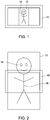
- FIG. 1 to 3 there is illustrated a prior art digital media frame 10 having a landscape aspect ratio device showing a portrait photograph 12 of a person 14.
- the digital media frame 10 is using a display mode called 'Fit to Screen' where the photograph 12 is scaled down so that it is fully visible within the display.
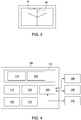
- the display mode of the device 10 is set to 'Fill Screen'.
- the photograph 12 is enlarged so that the screen is filled - in this case the width of the photograph 12 dictates that some of the photograph 12 is cropped.
- Figure 3 shows what the user sees on the screen.
- the resulting photograph 14 is cropped such that the face 16 is removed while the torso 18 of the person 14 is retained.
- the display of photographs with missing faces is typically not desirable by users.
- the digital media frame 100 comprises a processor/processing means 105 in communication with memory 110.
- the processor 105 functions to execute software instructions that can be loaded and stored in the memory 110.
- One or more software modules may be encoded in the memory 110.
- the software modules may comprise one or more software programs or applications having computer program code or a set of instructions configured to be executed by the processor 105.
- Such computer program code or instructions may be written in any combination of one or more programming languages.
- the problem of not displaying desirable portions of a photograph is addressed by the digital media frame 100.
- an image processing algorithm is applied to the digital image 12 to identify desirable portions of the image which are to be displayed.
- facial data is identified and the photograph is positioned such that that facial data visibility is prioritised on the screen 111.
- an image processing application 115 applies the image processing algorithm to the digital image 12 to identify the first predetermined characteristic.
- the image processing algorithm is configured for facial detection.
- the first predetermined characteristic may comprise facial data.
- Facial data may comprise at least one of eyes, mouth, hair, ears, and nose. It will be appreciated that it is not intended to limit the present teaching to facial data of humans in that it is envisaged that characteristics of animals or objects may also be determined when determining a portion of a photograph to be displayed in the optimum position of the field of view.
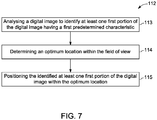
- Exemplary steps carried out by the image processing application 115 are illustrated in the flow chart 112 of Figure 7 .
- the image processing application 115 uses image analysis to analyse the digital image 12 on the digital media frame 100 to identify at least one first portion of the digital image having a first predetermined characteristic; step 113.
- the image processing application 115 determines an optimum location within the field of view of the screen 111; step 114.
- the identified first portion of the digital image is positioned within the optimum location, step 115.
- the first portion of the image is a face 16.
- the optimum location corresponds to a central area 120 on the display screen 111 as best illustrated in figure 6 .
- the face 16 of the person 14 in the digital image 12 is positioned within the central area 120, step 215.
- At least one second portion of the digital image 12 is located outside the field of view such as a portion of the torso 18.
- the torso portion of the person 14 may be cropped while the face 16 is retained for displaying on the screen 111.
- a detecting and classification means 122 may be provided such as a software application for detecting specific features of an image; it will be understood that this may entail edge detection software; one or more machine learning techniques such as deep learning algorithms implementing neural networks; pattern recognition, scene detection, image classification, feature extraction and face/feature detection.
- Machine Learning engines including but not limited to TensorFlow, PyTorch, MXNet can be used to apply inference techniques from pre-trained models to build up a comprehensive profile of information for each image analysed including but not limited to location of objects, faces, pets, group photos, scene classification, horizon detection. Inference can be performed remotely in the cloud as well as locally on the digital media frame device.
- the image profile is stored as metadata to accompany each image.
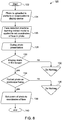
- step 122 A digital photograph 124 is uploaded to the digital media frame 100.
- the image processing application 115 applies a face detection machine learning algorithm to identify a set of coordinates corresponding to the face 16, step 128.
- a user can select one of a number of available display modes, step 128.
- the user selects the 'Fill Screen' display mode, step 130. In this mode, there is no need to alter the photograph, step 132.
- step 134 the user selects a portrait photograph on a landscape frame. If the facial data is retained there is no need to alter the photograph, step 136.
- the centre of the photograph 14 is positioned to correspond to the coordinates of the facial data, step 138.
- the photograph is displayed on the screen 111 with the face 16 visible and the process ends, step 140.
- the optimum location may be selected with respect to at least one set of coordinates within the field of view.
- the at least one set of coordinates corresponds to the centre of the field of view.
- the set of coordinates may correspond to other areas of the field of view which may or may not include the centre of the field of view and may be based on user preferences on how they wish the image to be displayed.
- the digital media frame 100 comprises the processor 105; a visual display screen 111; memory 110 comprising instructions which, when executed, cause the processor 105 to analyse the digital image 14 to identify at least one first portion of the digital image having a first predetermined characteristic; determine an optimum location 120 within the field of view; and position the identified first portion of the digital image 12 within the optimum location 120.
- the processor 105 may include a number of processors, a multiprocessor core, or some other type of processor, depending on the particular implementation.
- the memory 110 may be accessible by the processor 105, thereby enabling the processor 105 to receive and execute instructions stored on the memory 110.
- the memory 110 may be, for example, a random access memory (RAM) or any other suitable volatile or non-volatile computer readable storage medium.
- RAM random access memory
- the memory 110 may be fixed or removable and may contain one or more components or devices such as a hard drive, a flash memory, a rewritable optical disk, a rewritable magnetic tape, or some combination of the above.
- Other information and/or data relevant to the operation of the digital media player 100 such as a database 130 may also be stored on the memory 110.
- the database 130 may contain and/or maintain various data items and elements that are utilized throughout the various operations of the digital media frame 100 and the method for configuring a field of view of the digital media player 100. It should be noted that although the database 130 is depicted as being configured locally to the digital media frame 100, in certain implementations the database 130 and/or various other data elements stored therein may be located remotely.
- Such elements may be located on a remote device or server - not shown, and connected to the digital media frame 100 through a network in a manner known to those skilled in the art, in order to be loaded into a processor and executed.
- the program code of the software modules and one or more computer readable storage devices form a computer program product that may be manufactured and/or distributed in accordance with the present disclosure, as is known to those of skill in the art.
- the digital media frame 100 may include a communication means 155 operatively connected to the processor 105 and may be any interface that enables communication between the digital media frame 100 and other devices, machines and/or elements.
- the communication means 155 is configured for transmitting and/or receiving data from remote databases 160 and/or servers 165.
- the communication means 155 may include but is not limited to a Bluetooth, or cellular transceiver, a satellite communication transmitter/receiver, an optical port and/or any other such, interfaces for wirelessly connecting the computing device 100 to the other devices.
- the digital media frame 100 may be a networked device operable to communicate over the internet and/or to other networked devices.
- a user interface 170 is also operatively connected to the processor 105.
- the user interface 170 may comprise one or more input device(s) such as switch(es), button(s), key(s), and a touchscreen.
- the user interface 170 functions to facilitate the capture of commands from the user such as on-off commands or settings related to operation of the digital media frame.
- the processor 105 may be further operationally associated with one or more external devices.
- the one or more external devices may include but are not limited to an image capture device 175 such as a digital camera or smart phone or the like. Data may be transmitted to and/or from these external devices. Data from these external devices may be processed by the processor 105 implementing one or more of the software packages stored in memory 110. Data from the external devices may be stored in memory 110. Instructions such as predefined protocols stored in memory 110 may be sent to the external devices via the processor 105.
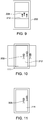
- FIGs 9 to 12 there is illustrated another digital media frame 200 which is also in accordance with the present teaching. The digital media frame 200 operates substantially similar to the digital media frame 100 with the exception that the image processing application 115 is configured to cater for group photographs.
- Figure 9 shows what this would look like in 'Fit to Screen' mode where a group of people 205is not centred in the photograph 212. If this is presented on a portrait frame in the 'Fill Screen' mode, the photograph 212 can be cropped where the key focus of the photograph 212 - which is the group of people 212 are only partially visible on the screen 113 as graphically illustrated in Figures 10 and 11 where one and half members of the group are occluded from the field of view. Applying a modified version of the algorithm articulated in Figure 8 , where image processing application 115 centres the photograph on the central triangulation of the group face coordinates. The resulting display presentation would be as depicted in Figure 12 .
- the digital media frame 200 has an associated group display protocol wherein a plurality of faces are identified in a digital image; and the optimum position is selected with respect to the identified plurality of faces.
- a centre of the group of faces is identified and the photograph is displayed such that the centre of the group of faces corresponds to the centre of the field of view as best illustrated in Figure 12 .
- the centre of the group of faces is identified using a triangulation technique.
- FIG. 13 to 15 there is illustrated another digital media frame 300 which operates in a tile mode.
- the tile mode presents photographs on tile spaces 305 on the display screen 111.
- the tile space is typically chosen randomly as shown in Figure 13 .
- the second photograph is a portrait photograph of a person, the result would be as shown in Figure 14 .
- the image processing application 115 may be configured to implement the exemplary operations as illustrated in the flow chart of Figure 16 .
- the process is initiated in step 322.
- a digital photograph is uploaded to the digital media frame 300, step 324.
- the image processing application 115 applies a face detection machine learning algorithm to identify a set of coordinates corresponding to the face 16, step 326.
- a user can select one of a number of available display modes, step 328.
- the user selects the 'Tile mode' display mode, step 330. In this mode, there is no need to alter the photographs if there is no overlap of photographs on the tile spaces, step 332.
- the processor checks if the previous photograph was a portrait with facial data. If there is no overlap of facial data, no action is needed, step 336. Step 338 ensures that the next photograph placement does not overlap facial data in a previous photograph as illustrated in Figure 16 .
- the digital media frame 300 has an associated predefined display protocol which provides instructions for displaying a series of photographs on tile spaces within the field of view of the screen 111.
- the protocol ensures that two or more photographs are displayed on the tile spaces without overlapping a portion of one photograph containing facial data with a portion of another photograph to minimise the occlusion of faces.
- FIG. 17A to 17C there is illustrated another digital media frame 400 which is also in accordance with the present teaching.
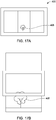
- the digital media frame 400 operates substantially similar to the digital media frame 100 with the exception that the image processing application 115 is configured to analyse scene aspects of the image instead of objects such as facial data.
- the horizon of a scene is detected 405 which is provided by way of example, and it is not intended to limit the present teaching to any particular object. Other prioritisation could be applied to preferred objects such as cars, mountains, pets, horizons, and the like.
- Figure 17A shows a landscape frame displaying an image with the horizon positioned low on the image 405 in 'Fit to Screen' mode.
- the photograph can be cropped and the key element of the photograph - which is the horizon 405 is not visible on the screen 113 as graphically illustrated in Figures 17B .
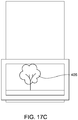
- the image processing application 115 identifies the location of the horizon 405 so that it is positioned centrally in the field of view as illustrated in Figure 17C . Otherwise the operation the digital media frame 400 is substantially similar the digital media frame 100.
- FIG. 18A to 18C there is illustrated another digital media frame 500 which is also in accordance with the present teaching.
- the digital media frame 500 operates substantially similar to the digital media frame 100 with the exception that the image processing application 115 is configured to analyse characteristic of objects instead of facial data.
- the object is a cat 505 which is provided by way of example, and it is not intended to limit the present teaching to any particular object.
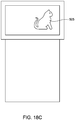
- Figure 18A shows a landscape frame displaying an image of a horizon containing the cat 505 in 'Fit to Screen' mode.
- the photograph can be cropped and the key element of the photograph - which is the image of the cat 405 is not visible on the screen 113 as graphically illustrated in Figures 18B .
- the image processing application 115 identifies characteristics of the cat 505 so that it is positioned centrally in the field of view as illustrated in Figure 18C . Otherwise the operation the digital media frame 400 is substantially similar the digital media frame 100.
- the system 600 is a cloud based architecture.
- a user may interface with the system 600 using a web application 602 or a mobile phone application 604.
- a user may upload photographs to the cloud 606 via the web application 602 or the mobile phone application 604.
- a processing module 612 is provided on the cloud 606 and is configured for image processing and connectivity management.
- the uploaded images to the cloud 602 may be stored in a raw image database 610.
- the digital media frame 617 comprises a connection manager 620 which is operable for communication with the processing module 612 on the cloud 602.
- An image processing application 618 is provided on the digital media frame 617 which may be configured to implement the algorithm as illustrated in the flow chart of Figure 8 .
- a display process module 622 is configured to compute the field of view.
- the processed image is displayed on a display 624. Once the image has been processed it may be uploaded from the digital media frame 617 to the cloud 606 and stored in a processed image database 615.
- FIG. 20 there is illustrated an exemplary image processing system 700 which is also in accordance with the present teaching.
- a user uploads a photograph using a mobile device 705 to a processing platform 710 on the cloud, step 1.
- the processing platform 710 is operable for communication with a digital media frame 712 which operates substantially similar to the digital media frames 100, 200, 300, 400, and 500 which have been previously described.
- the processing platform 710 has an image analysis module 715 configured to analyse the uploaded photograph to identify characteristic of the image data contained in the photograph. For example, the image analysis module 715 may identify if the photograph contains a single person, whether the layout of photograph is portrait, and if the coordinates of the person's face is located in an upper third region of the field of view, step 2.
- a placement calculation module 725 is configured to identify frame setup characteristics of the digital media frame 712.
- the placement calculation module 725 communicates with the digital media frame 712 for interrogating the digital media 712 for extracting information about its setup, step 3.
- the frame setup information of the digital media frame 712 is stored locally in memory 718.
- the placement calculation module 725 may acquire the frame setup information from memory 718 and store it on the cloud in a frame setup database 730. For example, the placement calculation module 725 may determine whether the digital media frame 712 is a landscape frame and/or whether it has 'fit to screen mode' enabled.
- other characteristics about the digital media frame 712 may be extracted from memory 718 of the digital media frame 712 and stored in the frame setup database 730 on the cloud 710 as frame setup metadata.
- the placement calculation module 725 is configured to determine the optimum location where the image should be placed in the field of view of the digital media frame 712 such that the face of the person would be located in an optimum display location on the screen in a similar manner as described with reference to Figure 5 .
- the image is then displayed on the visual display 732 of the digital media frame in accordance with the determined optimum location, step 5.
- a user interface 709 of the digital media frame 712 allows the user to select display preferences. For example, the user can adjust the position of the displayed photograph to a location other than the determined optimum location, step 6.
- the user selected display preferences may be stored on the cloud in a user feedback database 735 as metadata which can be accessed by the placement calculation module 725 and used for determining optimum locations of images which are subsequently up loaded to the processing platform 710.
- the user interface may be a remote control, touchscreen, keypad, or the like.
- the image processing system 700 may also be configured to process group photographs.
- the image analysis module 715 is configured to analyse the uploaded photograph similarly to step 2 as previously described in order to identify characteristic of the image data contained in the photograph. For example, the image analysis module 715 may identify if the photograph contains a group of people, whether the layout of photograph is landscape, and if the main body of faces of the group is located at particular region of the photograph, for example, on the right/left sides of the photograph.
- the placement calculation module 725 may acquire the frame setup information from memory 718 and store it on the cloud in a frame setup database 730 similarly to step 3 as previously described. For example, the placement calculation module 725 may determine whether the digital media frame 712 is a portrait frame and/or whether it has 'fit to screen mode' enabled.
- the placement calculation module 725 may be configured to determine the optimum location where the image should be placed in the field of view of the digital media frame 712 such that the faces of the group are located in an optimum display location in a similar manner as described with reference to Figure 12 .
- the user can adjust the position of the displayed photograph to a location other than the determined optimum location in a similar manner as previously described with reference to step 6.
- the user selected display preferences may be stored on the cloud in a user feedback database 735 as metadata which can be accessed by the placement calculation module 725 and used for determining optimum locations of group based images which are subsequently up loaded to the processing platform 710
- the image processing system 700 may also be configured to process photographs of horizons.
- the image analysis module 715 is configured to analyse the uploaded photograph similarly to step 2 as previously described in order to identify characteristic of the image data contained in the photograph. For example, the image analysis module 715 may identify that the uploaded photograph does not contain people, is of portrait layout, and identify the location of a horizon.
- the placement calculation module 725 may acquire the frame setup information from memory 718 and store it on the cloud in a frame setup database 730 similarly to step 3 as previously described. For example, the placement calculation module 725 may determine whether the digital media frame 712 is a landscape frame and/or whether it has 'fit to screen mode' enabled.
- the placement calculation module 725 may be configured to determine the optimum location where the image of the horizon should be placed in the field of view of the digital media frame 712 such that the horizon is located in an optimum display location in a similar manner as described with reference to Figure 17c .
- the user can adjust the position of the displayed photograph to a location other than the determined optimum location in a similar manner as previously described with reference to step 6.
- the user selected display preferences may be stored on the cloud in a user feedback database 735 as metadata which can be accessed by the placement calculation module 725 and used for determining optimum locations of horizon based images which are subsequently up loaded to the processing platform 710.
- the image processing system 700 may also be configured to process photographs of animals.
- the image analysis module 715 is configured to analyse the uploaded photograph similarly to step 2 as previously described in order to identify characteristic of the image data contained in the photograph. For example, the image analysis module 715 may identify that the uploaded photograph contains an animal such as a cat, whether the layout of photograph is landscape/portrait, and if the image of the cat is located in an upper third of photograph.
- the placement calculation module 725 may acquire the frame setup information from memory 718 and store it on the cloud in a frame setup database 730 similarly to step 3 as previously described. For example, the placement calculation module 725 may determine whether the digital media frame 712 is a landscape frame and/or whether it has 'fit to screen mode' enabled.
- the placement calculation module 725 may be configured to determine the optimum location where the image of the cat should be placed in the field of view of the digital media frame 712 such that the cat is located in an optimum display location in a similar manner as described with reference to Figure 18c .
- the user can adjust the position of the displayed photograph to a location other than the determined optimum location in a similar manner as previously described with reference to step 6.
- the user selected display preferences may be stored on the cloud in a user feedback database 735 as metadata which can be accessed by the placement calculation module 725 and used for determining optimum locations of animal based images which are subsequently up loaded to the processing platform 710.
- the image processing system 700 may also be configured to implement a tile mode similarly to that described with reference to Figure 15 .
- the placement calculation module 725 may acquire the frame setup information from memory 718 and store it on the cloud in a frame setup database 730 similarly to step 3 as previously described. For example, the placement calculation module 725 may determine whether it is a portrait frame, has a tile mode of operation, if the previous photograph had a portrait layout, and if the previous photograph had an image of a person's face in an upper third region of the photograph.
- the placement calculation module 725 may be configured to determine placement of the photographs in tiles such that facial data of previous photographs are not occluded by subsequently placed tiles in a similar manner similarly as described with reference to Figure 15 .
- the user can adjust the position of the displayed photograph to a location other than the determined optimum location in a similar manner as previously described with reference to step 6.
- the user selected display preferences may be stored on the cloud in a user feedback database 735 as metadata which can be accessed by the placement calculation module 725 and used for determining optimum locations of images which are subsequently up loaded to the processing platform 710 for displaying in tile mode.
- the image processing system 700 may also be configured to process night scene photographs.
- the image analysis module 715 is configured to analyse the uploaded photograph similarly to step 2 as previously described in order to identify characteristic of the image data contained in the photograph. For example, the image analysis module 715 may identify that the uploaded photograph contains an image of a night scene, that the photograph has a landscape/portrait layout, and if the photographs contains faces of one or more individuals.
- the placement calculation module 725 may acquire the frame setup information from memory 718 and store it on the cloud in a frame setup database 730 similarly to step 3 as previously described. For example, the placement calculation module 725 may determine whether the digital media frame 712 is a landscape/portrait frame.
- the placement calculation module 725 may determine external environmental factors such as an indication of room lighting levels which may indicate low or high brightness.
- the placement calculation module 725 may be configured to prioritise the display of photographs containing images of night scenes over images containing daytime scenes or vice versa based on the lighting level of the room where the digital media frame is located. It will be appreciated that other external environmental factors may be determined such as noise volume level, motion detection, or time at the display location for determining which images to prioritise for display.
- a user may upload a photograph to the processing platform 710 on the cloud using a client device such as a smart phone, step 1.
- the image analysis module 715 analyses the photograph to identify characteristic of the photograph such as but not limited to classification, exif data, object detection, etc., step 2.
- the placement module 725 determines the frame setup of the digital media frame 712 by using frame setup metadata which has been previously stored in the frame setup database 730 on the cloud and/or by extracting frame setup data from the memory 718 that is stored locally on the digital media 712.
- the frame setup data may include a display mode, orientation, characteristics of previous photographs, etc. step 3.
- the placement calculation module 725 is configured to perform a placement calculation based on at least one of image metadata, frame setup metadata and user feedback metadata, or any combination there of, step 4.
- the photograph is then displayed on the visual display 732 of the digital media frame 712 based on the placement calculation output from the placement module 725.
- the user can select display preference if desired using the user interface of the digital media frame 712 which can override the placement calculation such that the image is displayed in a preferred way based on the user preference selection(s).
- the preferences selected by the user may be stored as meta data in the user feedback database 735 such that any future placement calculations performed by the placement calculation module 725 may take account of historic user selections.
- the method for detecting characteristics in the digital image may be implemented in software, firmware, hardware, or a combination thereof.
- the method is implemented in software, as an executable program, and is executed by one or more special or general purpose digital computer(s), such as a personal computer (PC; IBM-compatible, Apple-compatible, or otherwise), personal digital assistant, workstation, minicomputer, or mainframe computer.
- PC personal computer
- IBM-compatible, Apple-compatible, or otherwise personal digital assistant
- workstation minicomputer
- mainframe computer mainframe computer.
- the steps of the method may be implemented by a server or computer in which the software modules reside or partially reside.
- such a computer will include, as will be well understood by the person skilled in the art, a processor, memory, and one or more input and/or output (I/O) devices (or peripherals) that are communicatively coupled via a local interface.
- the local interface can be, for example, but not limited to, one or more buses or other wired or wireless connections, as is known in the art.
- the local interface may have additional elements, such as controllers, buffers (caches), drivers, repeaters, and receivers, to enable communications. Further, the local interface may include address, control, and/or data connections to enable appropriate communications among the other computer components.
- the processor(s) may be programmed to perform the functions of the method for configuring a field of view of a digital media frame.
- the processor(s) is a hardware device for executing software, particularly software stored in memory.
- Processor(s) can be any custom made or commercially available processor, a primary processing unit (CPU), an auxiliary processor among several processors associated with a computer, a semiconductor based microprocessor (in the form of a microchip or chip set), a macro-processor, or generally any device for executing software instructions.
- Memory is associated with processor(s) and can include any one or a combination of volatile memory elements (e.g., random access memory (RAM, such as DRAM, SRAM, SDRAM, etc.)) and non-volatile memory elements (e.g., ROM, hard drive, tape, CDROM, etc.). Moreover, memory may incorporate electronic, magnetic, optical, and/or other types of storage media. Memory can have a distributed architecture where various components are situated remote from one another, but are still accessed by processor(s).
- the software in memory may include one or more separate programs.
- the separate programs comprise ordered listings of executable instructions for implementing logical functions in order to implement the functions of the modules.
- the software in memory includes the one or more components of the method and is executable on a suitable operating system (O/S).
- the present disclosure may include components provided as a source program, executable program (object code), script, or any other entity comprising a set of instructions to be performed.
- a source program the program needs to be translated via a compiler, assembler, interpreter, or the like, which may or may not be included within the memory, so as to operate properly in connection with the O/S.
- a methodology implemented according to the teaching may be expressed as (a) an object oriented programming language, which has classes of data and methods, or (b) a procedural programming language, which has routines, subroutines, and/or functions, for example but not limited to, C, C++, Pascal, Basic, Fortran, Cobol, Perl, Java, and Ada.
- a computer readable medium is an electronic, magnetic, optical, or other physical device or means that can contain or store a computer program for use by or in connection with a computer related system or method.
- Such an arrangement can be embodied in any computer-readable medium for use by or in connection with an instruction execution system, apparatus, or device, such as a computer-based system, processor-containing system, or other system that can fetch the instructions from the instruction execution system, apparatus, or device and execute the instructions.
- a "computer-readable medium” can be any means that can store, communicate, propagate, or transport the program for use by or in connection with the instruction execution system, apparatus, or device.
- the computer readable medium can be for example, but not limited to, an electronic, magnetic, optical, electromagnetic, infrared, or semiconductor system, apparatus, device, or propagation medium. Any method descriptions or blocks in the Figures, should be understood as representing modules, segments, or portions of code which include one or more executable instructions for implementing specific logical functions or steps in the process, as would be understood by those having ordinary skill in the art.
Landscapes
- Engineering & Computer Science (AREA)
- Theoretical Computer Science (AREA)
- Physics & Mathematics (AREA)
- General Engineering & Computer Science (AREA)
- Databases & Information Systems (AREA)
- General Physics & Mathematics (AREA)
- Data Mining & Analysis (AREA)
- Computational Linguistics (AREA)
- Software Systems (AREA)
- Human Computer Interaction (AREA)
- Multimedia (AREA)
- Health & Medical Sciences (AREA)
- General Health & Medical Sciences (AREA)
- Probability & Statistics with Applications (AREA)
- Mathematical Physics (AREA)
- Fuzzy Systems (AREA)
- Oral & Maxillofacial Surgery (AREA)
- Artificial Intelligence (AREA)
- Audiology, Speech & Language Pathology (AREA)
- User Interface Of Digital Computer (AREA)
- Information Transfer Between Computers (AREA)
- Processing Or Creating Images (AREA)
- Information Retrieval, Db Structures And Fs Structures Therefor (AREA)
Applications Claiming Priority (2)
| Application Number | Priority Date | Filing Date | Title |
|---|---|---|---|
| US13/588,939 US8825664B2 (en) | 2012-08-17 | 2012-08-17 | Indexing preview |
| US16/870,233 US11886502B2 (en) | 2012-08-17 | 2020-05-08 | Facilitating event creation via previews |
Publications (1)
| Publication Number | Publication Date |
|---|---|
| EP3907657A1 true EP3907657A1 (de) | 2021-11-10 |
Family
ID=48952253
Family Applications (1)
| Application Number | Title | Priority Date | Filing Date |
|---|---|---|---|
| EP21172863.9A Withdrawn EP3907657A1 (de) | 2012-08-17 | 2021-05-07 | Digitaler medienrahmen und verfahren zur konfiguration eines sichtfeldes eines digitalen medienrahmens |
Country Status (2)
| Country | Link |
|---|---|
| US (8) | US8825664B2 (de) |
| EP (1) | EP3907657A1 (de) |
Families Citing this family (54)
| Publication number | Priority date | Publication date | Assignee | Title |
|---|---|---|---|---|
| KR101380936B1 (ko) * | 2006-10-05 | 2014-04-10 | 스플렁크 인코퍼레이티드 | 시계열 검색 엔진 |
| US8825664B2 (en) | 2012-08-17 | 2014-09-02 | Splunk Inc. | Indexing preview |
| US10394946B2 (en) | 2012-09-07 | 2019-08-27 | Splunk Inc. | Refining extraction rules based on selected text within events |
| US8682906B1 (en) | 2013-01-23 | 2014-03-25 | Splunk Inc. | Real time display of data field values based on manual editing of regular expressions |
| US9753909B2 (en) | 2012-09-07 | 2017-09-05 | Splunk, Inc. | Advanced field extractor with multiple positive examples |
| US8751963B1 (en) * | 2013-01-23 | 2014-06-10 | Splunk Inc. | Real time indication of previously extracted data fields for regular expressions |
| US20140208217A1 (en) | 2013-01-22 | 2014-07-24 | Splunk Inc. | Interface for managing splittable timestamps across event records |
| US9152929B2 (en) | 2013-01-23 | 2015-10-06 | Splunk Inc. | Real time display of statistics and values for selected regular expressions |
| US9384223B2 (en) * | 2013-06-13 | 2016-07-05 | Bank Of America Corporation | Automation of MLOAD and TPUMP conversion |
| CN104331405B (zh) * | 2013-07-22 | 2020-01-10 | 腾讯科技(深圳)有限公司 | 数据报表的处理方法及装置 |
| US9684684B2 (en) * | 2014-07-08 | 2017-06-20 | Sybase, Inc. | Index updates using parallel and hybrid execution |
| US20160092045A1 (en) | 2014-09-30 | 2016-03-31 | Splunk, Inc. | Event View Selector |
| US9916326B2 (en) | 2015-01-27 | 2018-03-13 | Splunk, Inc. | Efficient point-in-polygon indexing technique for facilitating geofencing operations |
| US9607414B2 (en) | 2015-01-27 | 2017-03-28 | Splunk Inc. | Three-dimensional point-in-polygon operation to facilitate displaying three-dimensional structures |
| US9767122B2 (en) | 2015-01-27 | 2017-09-19 | Splunk Inc. | Efficient point-in-polygon indexing technique to facilitate displaying geographic data |
| US10026204B2 (en) * | 2015-01-27 | 2018-07-17 | Splunk Inc. | Efficient point-in-polygon indexing technique for processing queries over geographic data sets |
| US9836874B2 (en) | 2015-01-27 | 2017-12-05 | Splunk Inc. | Efficient polygon-clipping technique to reduce data transfer requirements for a viewport |
| US9842160B2 (en) | 2015-01-30 | 2017-12-12 | Splunk, Inc. | Defining fields from particular occurences of field labels in events |
| US11442924B2 (en) | 2015-01-30 | 2022-09-13 | Splunk Inc. | Selective filtered summary graph |
| US9916346B2 (en) * | 2015-01-30 | 2018-03-13 | Splunk Inc. | Interactive command entry list |
| US11544248B2 (en) | 2015-01-30 | 2023-01-03 | Splunk Inc. | Selective query loading across query interfaces |
| US10013454B2 (en) | 2015-01-30 | 2018-07-03 | Splunk Inc. | Text-based table manipulation of event data |
| US10915583B2 (en) | 2015-01-30 | 2021-02-09 | Splunk Inc. | Suggested field extraction |
| US10726037B2 (en) | 2015-01-30 | 2020-07-28 | Splunk Inc. | Automatic field extraction from filed values |
| US9922084B2 (en) | 2015-01-30 | 2018-03-20 | Splunk Inc. | Events sets in a visually distinct display format |
| US9922082B2 (en) | 2015-01-30 | 2018-03-20 | Splunk Inc. | Enforcing dependency between pipelines |
| US9977803B2 (en) | 2015-01-30 | 2018-05-22 | Splunk Inc. | Column-based table manipulation of event data |
| US11615073B2 (en) | 2015-01-30 | 2023-03-28 | Splunk Inc. | Supplementing events displayed in a table format |
| US10061824B2 (en) | 2015-01-30 | 2018-08-28 | Splunk Inc. | Cell-based table manipulation of event data |
| US10152480B2 (en) | 2015-01-31 | 2018-12-11 | Splunk Inc. | Archiving indexed data |
| US12481621B2 (en) * | 2015-01-31 | 2025-11-25 | Cisco Technology, Inc. | File browser user interface |
| US9961232B2 (en) * | 2015-06-30 | 2018-05-01 | Kyocera Document Solutions Inc. | Image forming device having different ways of storing preview data |
| US10733370B2 (en) * | 2015-08-18 | 2020-08-04 | Change Healthcare Holdings, Llc | Method, apparatus, and computer program product for generating a preview of an electronic document |
| CN106815260B (zh) | 2015-12-01 | 2021-05-04 | 阿里巴巴集团控股有限公司 | 一种索引建立方法及设备 |
| US10311043B2 (en) * | 2016-08-04 | 2019-06-04 | New Relic, Inc. | Log query user interface |
| US12013895B2 (en) | 2016-09-26 | 2024-06-18 | Splunk Inc. | Processing data using containerized nodes in a containerized scalable environment |
| US10353965B2 (en) * | 2016-09-26 | 2019-07-16 | Splunk Inc. | Data fabric service system architecture |
| US11281706B2 (en) | 2016-09-26 | 2022-03-22 | Splunk Inc. | Multi-layer partition allocation for query execution |
| US10956415B2 (en) | 2016-09-26 | 2021-03-23 | Splunk Inc. | Generating a subquery for an external data system using a configuration file |
| US11604795B2 (en) | 2016-09-26 | 2023-03-14 | Splunk Inc. | Distributing partial results from an external data system between worker nodes |
| US10545798B2 (en) * | 2017-01-31 | 2020-01-28 | Splunk Inc. | Resegmenting chunks of data for efficient load balancing across indexers |
| CN107861753B (zh) * | 2017-06-26 | 2020-12-11 | 平安普惠企业管理有限公司 | App生成索引、检索方法和系统及可读存储介质 |
| US12248484B2 (en) | 2017-07-31 | 2025-03-11 | Splunk Inc. | Reassigning processing tasks to an external storage system |
| US11074272B1 (en) | 2017-12-21 | 2021-07-27 | Seeq Corporation | System and method for managing streaming calculations |
| US10430064B2 (en) * | 2018-01-29 | 2019-10-01 | Amazon Technologies, Inc. | Techniques for utilizing translucent user interface elements |
| USD899433S1 (en) | 2018-02-14 | 2020-10-20 | Amazon Technologies, Inc. | Display screen or portion thereof with animated graphical user interface |
| CN109255065A (zh) * | 2018-09-18 | 2019-01-22 | 郑州云海信息技术有限公司 | 一种报表处理的方法及报表系统 |
| CN111930780B (zh) * | 2020-10-12 | 2020-12-18 | 上海冰鉴信息科技有限公司 | 数据查询方法及系统 |
| US12093272B1 (en) | 2022-04-29 | 2024-09-17 | Splunk Inc. | Retrieving data identifiers from queue for search of external data system |
| US12141137B1 (en) | 2022-06-10 | 2024-11-12 | Cisco Technology, Inc. | Query translation for an external data system |
| US12287790B2 (en) | 2023-01-31 | 2025-04-29 | Splunk Inc. | Runtime systems query coordinator |
| US12248666B2 (en) | 2023-07-05 | 2025-03-11 | Cisco Technology, Inc. | Simplifying configuration of metrics with data preview |
| CN116582582B (zh) * | 2023-07-14 | 2023-10-13 | 中冶武勘智诚(武汉)工程技术有限公司 | 组件式物联网数据采集方法、系统、设备及介质 |
| US12585638B2 (en) | 2023-07-17 | 2026-03-24 | Cisco Technology, Inc. | Query execution using a data processing scheme of a separate data processing system |
Citations (5)
| Publication number | Priority date | Publication date | Assignee | Title |
|---|---|---|---|---|
| US20090256925A1 (en) * | 2008-03-19 | 2009-10-15 | Sony Corporation | Composition determination device, composition determination method, and program |
| US20120134595A1 (en) * | 2009-08-11 | 2012-05-31 | Koninklijke Philips Electronics N.V. | Method and apparatus for providing an image for display |
| US20180146447A1 (en) * | 2013-10-10 | 2018-05-24 | Pushd, Inc. | Digital picture frame with improved display of community photographs |
| US20200218484A1 (en) * | 2013-10-10 | 2020-07-09 | Aura Home, Inc. | Digital picture frames and methods of frame setup |
| US20210048965A1 (en) * | 2013-10-10 | 2021-02-18 | Aura Home, Inc. | Digital picture frame with split screen display |
Family Cites Families (74)
| Publication number | Priority date | Publication date | Assignee | Title |
|---|---|---|---|---|
| US4571700A (en) * | 1983-06-16 | 1986-02-18 | International Business Machines Corporation | Page indexing system for accessing sequentially stored data representing a multi-page document |
| AU620994B2 (en) * | 1989-07-12 | 1992-02-27 | Digital Equipment Corporation | Compressed prefix matching database searching |
| US6147976A (en) * | 1996-06-24 | 2000-11-14 | Cabletron Systems, Inc. | Fast network layer packet filter |
| US6011795A (en) * | 1997-03-20 | 2000-01-04 | Washington University | Method and apparatus for fast hierarchical address lookup using controlled expansion of prefixes |
| GB9726654D0 (en) * | 1997-12-17 | 1998-02-18 | British Telecomm | Data input and retrieval apparatus |
| US6052683A (en) * | 1998-02-24 | 2000-04-18 | Nortel Networks Corporation | Address lookup in packet data communication networks |
| US6067574A (en) * | 1998-05-18 | 2000-05-23 | Lucent Technologies Inc | High speed routing using compressed tree process |
| US6212184B1 (en) * | 1998-07-15 | 2001-04-03 | Washington University | Fast scaleable methods and devices for layer four switching |
| US6567408B1 (en) * | 1999-02-01 | 2003-05-20 | Redback Networks Inc. | Methods and apparatus for packet classification with multi-level data structure |
| US6836894B1 (en) * | 1999-07-27 | 2004-12-28 | International Business Machines Corporation | Systems and methods for exploratory analysis of data for event management |
| US6718535B1 (en) * | 1999-07-30 | 2004-04-06 | Accenture Llp | System, method and article of manufacture for an activity framework design in an e-commerce based environment |
| US6275822B1 (en) * | 1999-11-09 | 2001-08-14 | Joint Technology, Corporation | Maintaining very large indexes supporting efficient relational querying |
| US7272589B1 (en) * | 2000-11-01 | 2007-09-18 | Oracle International Corporation | Database index validation mechanism |
| US6832229B2 (en) * | 2001-03-09 | 2004-12-14 | Oracle International Corporation | System and method for maintaining large-grained database concurrency with a log monitor incorporating dynamically redefinable business logic |
| US8024206B2 (en) * | 2001-08-30 | 2011-09-20 | Aol Inc. | Travel |
| US20040230667A1 (en) * | 2003-05-12 | 2004-11-18 | Wookey Michael J. | Loosely coupled intellectual capital processing engine |
| US7418449B2 (en) * | 2003-07-25 | 2008-08-26 | Enkata Technologies | System and method for efficient enrichment of business data |
| US7343604B2 (en) * | 2003-07-25 | 2008-03-11 | International Business Machines Corporation | Methods and apparatus for creation of parsing rules |
| US20050060372A1 (en) * | 2003-08-27 | 2005-03-17 | Debettencourt Jason | Techniques for filtering data from a data stream of a web services application |
| US20060064503A1 (en) * | 2003-09-25 | 2006-03-23 | Brown David W | Data routing systems and methods |
| US8027349B2 (en) * | 2003-09-25 | 2011-09-27 | Roy-G-Biv Corporation | Database event driven motion systems |
| US7539685B2 (en) * | 2003-12-30 | 2009-05-26 | Microsoft Corporation | Index key normalization |
| US7424467B2 (en) * | 2004-01-26 | 2008-09-09 | International Business Machines Corporation | Architecture for an indexer with fixed width sort and variable width sort |
| US7481368B2 (en) * | 2004-12-14 | 2009-01-27 | Siemens Corporate Research, Inc. | Systems, devices, and methods for managing RFID data |
| WO2006110873A2 (en) * | 2005-04-12 | 2006-10-19 | Accoona Corp. | Apparatuses, methods and systems to identify, generate, and aggregate qualified sales and marketing leads for distribution via an online competitive bidding system |
| US20070011353A1 (en) * | 2005-07-05 | 2007-01-11 | International Business Machines Corporation | System, method, and program product for extracting information from an identifier |
| US7937344B2 (en) * | 2005-07-25 | 2011-05-03 | Splunk Inc. | Machine data web |
| US20070185859A1 (en) * | 2005-10-12 | 2007-08-09 | John Flowers | Novel systems and methods for performing contextual information retrieval |
| US20110314148A1 (en) * | 2005-11-12 | 2011-12-22 | LogRhythm Inc. | Log collection, structuring and processing |
| DE102006037250A1 (de) * | 2006-08-09 | 2008-04-10 | Müller, Thomas | Verfahren und Vorrichtungen zur Identitätsverifikation |
| KR101380936B1 (ko) * | 2006-10-05 | 2014-04-10 | 스플렁크 인코퍼레이티드 | 시계열 검색 엔진 |
| US7580942B2 (en) * | 2007-01-12 | 2009-08-25 | Microsoft Corporation | Indexing and ranking processes for directory assistance services |
| US7925678B2 (en) * | 2007-01-12 | 2011-04-12 | Loglogic, Inc. | Customized reporting and mining of event data |
| WO2009032366A2 (en) * | 2007-05-22 | 2009-03-12 | Vidsys, Inc. | Optimal routing of audio, video, and control data through heterogeneous networks |
| US7870129B2 (en) * | 2007-05-25 | 2011-01-11 | International Business Machines Corporation | Handling error documents in a text index |
| US8296461B2 (en) * | 2007-08-07 | 2012-10-23 | Object Innovation Inc. | Data transformation and exchange |
| EP2183669B1 (de) * | 2007-08-27 | 2014-05-28 | Correlsense Ltd. | Vorrichtung und verfahren zum verfolgen von transaktionsbezogenen daten |
| FI124000B (fi) * | 2007-12-11 | 2014-01-31 | Documill Oy | Menetelmä ja järjestely tiedonhakutulosten käsittelemiseksi |
| CA2709623A1 (en) * | 2007-12-17 | 2009-06-25 | Samuel Palahnuk | Communications network system |
| US7882087B2 (en) * | 2008-01-15 | 2011-02-01 | At&T Intellectual Property I, L.P. | Complex dependencies for efficient data warehouse updates |
| US8055646B2 (en) * | 2008-08-05 | 2011-11-08 | International Business Machines Corporation | Prevention of redundant indexes in a database management system |
| US8572483B1 (en) * | 2008-08-12 | 2013-10-29 | Mark DiLorenzo | Presentation browser |
| US8499240B2 (en) * | 2008-10-31 | 2013-07-30 | Sap Ag | Rule-based presentation of log messages on a graphic timeline |
| CA2660748C (en) * | 2009-03-31 | 2016-08-09 | Trapeze Software Inc. | System for aggregating data and a method for providing the same |
| US8510263B2 (en) * | 2009-06-15 | 2013-08-13 | Verisign, Inc. | Method and system for auditing transaction data from database operations |
| US8386498B2 (en) * | 2009-08-05 | 2013-02-26 | Loglogic, Inc. | Message descriptions |
| US8458186B2 (en) * | 2009-11-06 | 2013-06-04 | Symantec Corporation | Systems and methods for processing and managing object-related data for use by a plurality of applications |
| US9635421B2 (en) * | 2009-11-11 | 2017-04-25 | Time Warner Cable Enterprises Llc | Methods and apparatus for audience data collection and analysis in a content delivery network |
| US9465879B2 (en) * | 2010-01-14 | 2016-10-11 | Excalibur Ip, Llc | Search engine recency using content preview |
| US9047283B1 (en) | 2010-01-29 | 2015-06-02 | Guangsheng Zhang | Automated topic discovery in documents and content categorization |
| US20110191679A1 (en) * | 2010-02-02 | 2011-08-04 | Futurewei Technologies, Inc. | System and Method for Online Media Preview |
| US8495429B2 (en) * | 2010-05-25 | 2013-07-23 | Microsoft Corporation | Log message anomaly detection |
| US9384112B2 (en) * | 2010-07-01 | 2016-07-05 | Logrhythm, Inc. | Log collection, structuring and processing |
| US8626778B2 (en) * | 2010-07-23 | 2014-01-07 | Oracle International Corporation | System and method for conversion of JMS message data into database transactions for application to multiple heterogeneous databases |
| JP5693092B2 (ja) * | 2010-08-24 | 2015-04-01 | キヤノン株式会社 | 情報処理装置、制御方法、及びプログラム |
| US8484230B2 (en) * | 2010-09-03 | 2013-07-09 | Tibco Software Inc. | Dynamic parsing rules |
| US8688435B2 (en) * | 2010-09-22 | 2014-04-01 | Voice On The Go Inc. | Systems and methods for normalizing input media |
| US8260803B2 (en) * | 2010-09-23 | 2012-09-04 | Hewlett-Packard Development Company, L.P. | System and method for data stream processing |
| US8606564B2 (en) * | 2010-11-01 | 2013-12-10 | Yahoo! Inc. | Extracting rich temporal context for business entities and events |
| US20120117015A1 (en) * | 2010-11-05 | 2012-05-10 | Nokia Corporation | Method and apparatus for providing rule-based recommendations |
| AU2011332881B2 (en) * | 2010-11-24 | 2016-06-30 | LogRhythm Inc. | Advanced intelligence engine |
| US8412696B2 (en) * | 2011-01-31 | 2013-04-02 | Splunk Inc. | Real time searching and reporting |
| US8589375B2 (en) * | 2011-01-31 | 2013-11-19 | Splunk Inc. | Real time searching and reporting |
| US9015141B2 (en) * | 2011-02-08 | 2015-04-21 | The Nielsen Company (Us), Llc | Methods, apparatus, and articles of manufacture to measure search results |
| US20120246303A1 (en) * | 2011-03-23 | 2012-09-27 | LogRhythm Inc. | Log collection, structuring and processing |
| US9430505B2 (en) * | 2011-04-18 | 2016-08-30 | Infosys Limited | Automated data warehouse migration |
| US9129225B2 (en) * | 2011-05-25 | 2015-09-08 | Nokia Technologies Oy | Method and apparatus for providing rule-based recommendations |
| US8849783B2 (en) * | 2011-09-30 | 2014-09-30 | Oracle International Corporation | Storage tape analytics user interface |
| WO2013075071A1 (en) * | 2011-11-18 | 2013-05-23 | Ayman Hammad | Mobile wallet store and service injection platform apparatuses, methods and systems |
| AU2013214801B2 (en) * | 2012-02-02 | 2018-06-21 | Visa International Service Association | Multi-source, multi-dimensional, cross-entity, multimedia database platform apparatuses, methods and systems |
| US20130290106A1 (en) * | 2012-03-08 | 2013-10-31 | Augme Technologies, Inc. | System and method for providing directions to items of interest |
| US10409798B2 (en) * | 2012-03-16 | 2019-09-10 | Capish International Ab | Method of providing an index structure in a database |
| US8655831B1 (en) * | 2012-07-31 | 2014-02-18 | Accenture Global Services Limited | Smart parsing of data |
| US8825664B2 (en) | 2012-08-17 | 2014-09-02 | Splunk Inc. | Indexing preview |
-
2012
- 2012-08-17 US US13/588,939 patent/US8825664B2/en active Active
- 2012-10-26 US US13/662,337 patent/US8515963B1/en active Active
-
2014
- 2014-07-28 US US14/445,001 patent/US9208206B2/en active Active
-
2015
- 2015-10-31 US US14/929,332 patent/US9442981B2/en active Active
-
2016
- 2016-07-31 US US15/224,655 patent/US9740788B2/en active Active
-
2017
- 2017-07-05 US US15/642,062 patent/US10650069B2/en active Active
-
2020
- 2020-05-08 US US16/870,233 patent/US11886502B2/en active Active
-
2021
- 2021-05-07 EP EP21172863.9A patent/EP3907657A1/de not_active Withdrawn
-
2023
- 2023-12-19 US US18/545,844 patent/US12443656B1/en active Active
Patent Citations (5)
| Publication number | Priority date | Publication date | Assignee | Title |
|---|---|---|---|---|
| US20090256925A1 (en) * | 2008-03-19 | 2009-10-15 | Sony Corporation | Composition determination device, composition determination method, and program |
| US20120134595A1 (en) * | 2009-08-11 | 2012-05-31 | Koninklijke Philips Electronics N.V. | Method and apparatus for providing an image for display |
| US20180146447A1 (en) * | 2013-10-10 | 2018-05-24 | Pushd, Inc. | Digital picture frame with improved display of community photographs |
| US20200218484A1 (en) * | 2013-10-10 | 2020-07-09 | Aura Home, Inc. | Digital picture frames and methods of frame setup |
| US20210048965A1 (en) * | 2013-10-10 | 2021-02-18 | Aura Home, Inc. | Digital picture frame with split screen display |
Also Published As
| Publication number | Publication date |
|---|---|
| US8825664B2 (en) | 2014-09-02 |
| US9442981B2 (en) | 2016-09-13 |
| US10650069B2 (en) | 2020-05-12 |
| US9208206B2 (en) | 2015-12-08 |
| US8515963B1 (en) | 2013-08-20 |
| US11886502B2 (en) | 2024-01-30 |
| US20160055214A1 (en) | 2016-02-25 |
| US20170300585A1 (en) | 2017-10-19 |
| US12443656B1 (en) | 2025-10-14 |
| US20140052733A1 (en) | 2014-02-20 |
| US20140337354A1 (en) | 2014-11-13 |
| US9740788B2 (en) | 2017-08-22 |
| US20200311160A1 (en) | 2020-10-01 |
| US20160342696A1 (en) | 2016-11-24 |
Similar Documents
| Publication | Publication Date | Title |
|---|---|---|
| EP3907657A1 (de) | Digitaler medienrahmen und verfahren zur konfiguration eines sichtfeldes eines digitalen medienrahmens | |
| EP3811608B1 (de) | Elektronische vorrichtung und verfahren zur bereitstellung einer benachrichtigung in bezug auf ein über ein display angezeigtes bild und ein im speicher gespeichertes bild basierend auf einer bildanalyse | |
| US20210352206A1 (en) | Digital media frame and method for configuring a field of view of a digital media frame | |
| US9990760B2 (en) | Generating a 3D interactive immersive experience from a 2D static image | |
| US10681287B2 (en) | Apparatus and method for displaying AR object | |
| KR101725884B1 (ko) | 이미지들에 대한 자동 프로세싱 | |
| AU2015307358B2 (en) | Photographing method and electronic device | |
| US9036943B1 (en) | Cloud-based image improvement | |
| US9384384B1 (en) | Adjusting faces displayed in images | |
| US11062422B2 (en) | Image processing apparatus, image communication system, image processing method, and recording medium | |
| EP3944143A1 (de) | Automatisierte erzeugung eines dreidimensionalen modells | |
| CN109743626B (zh) | 一种图像显示方法、图像处理方法和相关设备 | |
| US20180184062A1 (en) | Image Processing to Determine Center of Balance in a Digital Image | |
| WO2020017134A1 (ja) | ファイルの生成装置およびファイルに基づく映像の生成装置 | |
| US9554060B2 (en) | Zoom images with panoramic image capture | |
| CN104917959A (zh) | 一种拍照方法及终端 | |
| EP3108455B1 (de) | Transparenzbestimmung zur überlagerung von bildern auf einer elektronischen anzeige | |
| US10860166B2 (en) | Electronic apparatus and image processing method for generating a depth adjusted image file | |
| CN115623313B (zh) | 图像处理方法、图像处理装置、电子设备、存储介质 | |
| WO2016082470A1 (zh) | 一种图片处理方法、装置及计算机存储介质 | |
| CN109144363B (zh) | 一种信息处理方法及电子设备 | |
| US12591952B2 (en) | Image rotation | |
| CN114125425B (zh) | 多媒体系统、驱动方法及非暂态电脑可读取储存媒体 | |
| CN110618751A (zh) | 虚拟对象的显示方法、装置、终端设备及存储介质 | |
| US20260011066A1 (en) | Electronic device and method for displaying three-dimensional image |
Legal Events
| Date | Code | Title | Description |
|---|---|---|---|
| PUAI | Public reference made under article 153(3) epc to a published international application that has entered the european phase |
Free format text: ORIGINAL CODE: 0009012 |
|
| STAA | Information on the status of an ep patent application or granted ep patent |
Free format text: STATUS: THE APPLICATION HAS BEEN PUBLISHED |
|
| AK | Designated contracting states |
Kind code of ref document: A1 Designated state(s): AL AT BE BG CH CY CZ DE DK EE ES FI FR GB GR HR HU IE IS IT LI LT LU LV MC MK MT NL NO PL PT RO RS SE SI SK SM TR |
|
| B565 | Issuance of search results under rule 164(2) epc |
Effective date: 20210927 |
|
| STAA | Information on the status of an ep patent application or granted ep patent |
Free format text: STATUS: THE APPLICATION IS DEEMED TO BE WITHDRAWN |
|
| 18D | Application deemed to be withdrawn |
Effective date: 20220511 |