EP4094643A1 - Procédé de vérification pour un système de robot de cuisine - Google Patents
Procédé de vérification pour un système de robot de cuisine Download PDFInfo
- Publication number
- EP4094643A1 EP4094643A1 EP21176542.5A EP21176542A EP4094643A1 EP 4094643 A1 EP4094643 A1 EP 4094643A1 EP 21176542 A EP21176542 A EP 21176542A EP 4094643 A1 EP4094643 A1 EP 4094643A1
- Authority
- EP
- European Patent Office
- Prior art keywords
- appliance
- kitchen
- kitchen appliance
- displayed
- overview
- Prior art date
- Legal status (The legal status is an assumption and is not a legal conclusion. Google has not performed a legal analysis and makes no representation as to the accuracy of the status listed.)
- Pending
Links
Images


Classifications
-
- A—HUMAN NECESSITIES
- A47—FURNITURE; DOMESTIC ARTICLES OR APPLIANCES; COFFEE MILLS; SPICE MILLS; SUCTION CLEANERS IN GENERAL
- A47J—KITCHEN EQUIPMENT; COFFEE MILLS; SPICE MILLS; APPARATUS FOR MAKING BEVERAGES
- A47J36/00—Parts, details or accessories of cooking-vessels
- A47J36/32—Time-controlled igniting mechanisms or alarm devices
- A47J36/321—Time-controlled igniting mechanisms or alarm devices the electronic control being performed over a network, e.g. by means of a handheld device
-
- A—HUMAN NECESSITIES
- A47—FURNITURE; DOMESTIC ARTICLES OR APPLIANCES; COFFEE MILLS; SPICE MILLS; SUCTION CLEANERS IN GENERAL
- A47J—KITCHEN EQUIPMENT; COFFEE MILLS; SPICE MILLS; APPARATUS FOR MAKING BEVERAGES
- A47J36/00—Parts, details or accessories of cooking-vessels
- A47J36/32—Time-controlled igniting mechanisms or alarm devices
-
- G—PHYSICS
- G05—CONTROLLING; REGULATING
- G05B—CONTROL OR REGULATING SYSTEMS IN GENERAL; FUNCTIONAL ELEMENTS OF SUCH SYSTEMS; MONITORING OR TESTING ARRANGEMENTS FOR SUCH SYSTEMS OR ELEMENTS
- G05B19/00—Program-control systems
- G05B19/02—Program-control systems electric
- G05B19/04—Program control other than numerical control, i.e. in sequence controllers or logic controllers
- G05B19/042—Program control other than numerical control, i.e. in sequence controllers or logic controllers using digital processors
-
- G—PHYSICS
- G05—CONTROLLING; REGULATING
- G05B—CONTROL OR REGULATING SYSTEMS IN GENERAL; FUNCTIONAL ELEMENTS OF SUCH SYSTEMS; MONITORING OR TESTING ARRANGEMENTS FOR SUCH SYSTEMS OR ELEMENTS
- G05B2219/00—Program-control systems
- G05B2219/20—Pc systems
- G05B2219/26—Pc applications
- G05B2219/2643—Oven, cooking
Definitions
- the present invention is directed to a method for controlling a kitchen appliance system with at least 2 kitchen appliances, preferably for automatically processing at least one work step of a recipe for preparing a meal according to the preamble of the independent method claim. Furthermore, the invention also includes a device for controlling a kitchen appliance system with at least 2 kitchen appliances, preferably for automatically processing at least one work step of a recipe for preparing a meal according to the independent device claim. Furthermore, the present invention is also directed to a computer program product according to the corresponding claim for carrying out the method according to the invention.
- Household kitchen appliances with complex functions such as B. cooking, stirring, weighing, timing, etc., which can access digital recipes for partially automated preparation of a meal are known.
- a user works successively through the recipe steps in the order specified by the recipe, like when cooking from a recipe in a cookbook.
- the functionalities of various kitchen appliances can be used in a complementary manner in a manual or partially automated manner.
- various appliances for providing food preparation functions are provided in a kitchen.
- a user uses these different kitchen appliances according to the individual recipe steps, so that, for example, a foodstuff is first chopped up and cooked in a kitchen appliance and then another foodstuff is cooked in an oven.
- Such kitchen appliances can be interconnected to form a kitchen appliance system by networking in order to achieve the semi-automated preparation of the desired meal using one appliance.
- the operation of the existing devices is expensive and difficult due to the complexity of the system, especially if only a small display (display) to control the process and a variety of kitchen appliances to be coordinated are available.
- the various kitchen appliances have to carry out the next work step on the corresponding kitchen appliance, with the sequence quickly becoming confused due to intermediate manual steps, such as adding spices or water.
- the user must therefore initiate the next work step on the one hand according to the recipe and on the other hand according to the kitchen appliance, which is sometimes associated with a considerable control and/or search effort for the user to comply with the required sequence of the work steps.
- the object is achieved in particular by a method for controlling a kitchen appliance system, preferably for automatically processing at least one work step of a recipe for preparing a meal, using a central control device with at least one user input device and a (data) interface.
- the kitchen appliance system includes at least 2 kitchen appliances that are entered in a (digital) appliance list and each kitchen appliance from the appliance list has a (data) interface, which means that it can be controlled by the central control unit, and each kitchen appliance has at least one appliance function, which can be selected and/or set by at least one parameter in order to automatically carry out at least one work step from the recipe for the preparation of the meal using the respective appliance function of the kitchen appliance.
- a (digital and stored) recipe list can be present for this purpose, in which at least 2 recipes are present, with each recipe having corresponding work steps for preparing the food.
- the preparation of a meal also means the preparation of a drink or a foodstuff or a dough or an ice cream or the like.
- the user input device has a user interface for displaying and controlling the method, the user interface itself having at least one overview field that can be folded in and out, which in the folded state of the overview field contains parameters of (only) one Displays the kitchen appliance of the kitchen appliance system (with its current appliance functions) and displays at least part or all of the appliance list of the kitchen appliance system in an expanded state of the overview field, with (preferably simultaneously) parameters of at least every active kitchen appliance with the respective appliance function being displayed.
- An active kitchen appliance (from the appliance list) is understood to mean that it is switched on and can be reached in terms of data via the existing interface using the control method, in order to be able to exchange the parameters.
- the overview field that can be folded in and out allows the optimum overview of all kitchen appliances in the kitchen appliance system to be achieved, even with a geometrically small user interface (for a small display), in order to achieve optimum control for the user.
- the control of the work steps for the preparation of the food is also particularly easy for the user, as he can quickly and easily reach the desired kitchen appliance at any time by folding and unfolding the overview field, in order to initiate the next work step (from the recipe) and/or to be able to execute. It should be made clear at this point that even when the overview field is collapsed, the overview field remains on the user interface with a minimum size in order to display the state of (exclusively) one kitchen appliance with the corresponding parameters.
- the collapsible and expandable overview field can also be displayed permanently on the user interface (for optimal control for the user).
- control or control is intended to encompass the meaning of controls and rules, with the control preferably being carried out automatically.
- Recipe preferably means a digital recipe that is grouped with other recipes in the recipe list.
- a digital recipe is also a data set that defines a number of work steps for an electrically operable functional component of the kitchen appliance, a so-called appliance function.
- the definition of the work steps includes at least one start condition.
- each work step is assigned control commands in the form of parameters for one or more electrically operable functional components of the kitchen appliance or appliance functions.
- the definition of the recipe can also include methods or algorithms that the control unit can use to Depending on at least one measured parameter can determine whether a start condition is met.
- the definition can contain prioritization information and/or a prioritization algorithm (in the form of data) in order, for example, to shorten the time required to process the work steps or to reduce the workload for the user.
- the central control device has at least the user input device and an interface for communication with other devices, preferably kitchen appliances.
- the central control device can represent a separate structural unit or be distributed with its units in a higher-level device or device.
- the user input device comprises at least one display and one input device, which can also be combined with one another, e.g. B. with a touch screen.
- the display and the input device (for example keys, keyboard, mouse, multifunction button preferably rotatable, pivotable and pressable, joystick, touch pad) can be designed separately from one another.
- the central control device ideally also has a data memory for pure data (eg in the form of parameters) and executable program codes and a data processing unit, in particular a microprocessor, for the automatic processing of the program code.
- the device list is a data list in which the reachable and/or controllable kitchen devices of the kitchen device system are stored.
- the device list and/or the recipe list can also be stored in the data memory of the central control device.
- the kitchen appliances are expediently at least authenticated, authenticated or authorized in order to be able to be entered in the appliance list (see below). These measures are intended to prevent manipulation and misuse.
- the kitchen appliance can be an appliance with just one appliance function, for example a thermometer, or an appliance with many complex functions, for example food processors with at least partially automated or fully automated appliance functions for fully automatic food preparation.
- a blender, toaster, coffee machine, stove, oven, microwave, refrigerator, extractor hood, kettle, electric pan or pot can also be regarded as kitchen appliances.
- at least one of the kitchen appliances is designed as another appliance, such as a music system, a television, a computer, a light unit or the like.
- the kitchen appliances are preferably designed completely separately and/or at a spatial distance from one another. It is therefore a matter of separate kitchen appliances which, for example, are only connected to one another via an interface in order in particular to exchange data at least in the form of the parameters mentioned.
- Each device preferably includes electronics that work independently of one another. In particular, all devices are designed differently and/or structurally separate (not in one housing) from one another.
- the user can do this by selecting and confirming the corresponding kitchen appliance in the expanded overview field.
- the special kitchen appliance is already displayed in the collapsed overview field, the user can select it directly there.
- the user input device is a touch screen (touch-sensitive display)
- the corresponding kitchen appliance is selected and confirmed by touching the displayed (and selected) kitchen appliance in the expanded overview field.
- the corresponding kitchen appliance can be selected and confirmed in the expanded overview field using a key or mouse-controlled cursor.
- the expanded overview field can automatically switch to the collapsed overview field, with the selected kitchen appliance now being automatically displayed there with its current (just executed) appliance functions.
- the user now wants to manually control a special kitchen appliance (for the next work step or for control purposes), which is currently not shown in the collapsed overview field, he can do this by selecting and confirming the entire (or only part of) the overview field, which a change to the expanded overview field with the corresponding kitchen appliance takes place.
- the status of the overview field and/or the kitchen appliance displayed in the collapsed overview field and/or the order of the kitchen appliances displayed in the expanded overview field can also be changed automatically.
- the respective icon of the kitchen appliance also serves as an activation mark, for example the color of the icon can provide direct information, e.g. B. Green - kitchen appliance is active, yellow - kitchen appliance is switched on but inactive, red - kitchen appliance cannot be reached and/or controlled by the method.
- a background of the icon or a complete or partial inversion of the icon can be used as an activation mark to provide information about the give the current state of the device.
- the user can also specify which kitchen appliances are displayed with priority by selecting the activation mark.
- a change (a) between the collapsed and the expanded state of the overview field and/or (b) the displayed kitchen appliance in the collapsed overview field and/or (c) the order of the displayed kitchen appliances in the expanded overview field by activation takes place, the activation being controlled by a manual selection and/or a trigger signal and/or by an incoming warning signal from a kitchen appliance and/or in a time-dependent manner.
- the manual selection for a change in the overview field has already been described.
- a trigger signal can be generated, for example, by reaching a target of a work step (from the recipe), by a time elapsing on a timer, by reaching a desired temperature or firmness of the food, by reaching a speed and/or the end of a heating-up phase, whereby automatically a change in the overview field can be achieved.
- An incoming alert can also achieve an automatic change in the overview field, where the alert can be generated by, for example, a temperature overshoot, a timeout, a safety device (e.g., lid is missing), a lack of rotation, and so on.
- An incoming trigger signal and/or warning signal from a kitchen appliance can also change the overview field in such a way that the corresponding kitchen appliance with a warning (e.g. flashing icon or red triangle behind the icon) is preferred, in particular with its (critical/alarm-triggering) appliance function automatically is shown.
- a number of kitchen appliances can be combined into at least one appliance class, the appliance list with the existing appliance class (by marking or in areas) preferably being displayed when the overview field is expanded. This allows the user to see immediately whether optional devices are available for a work step or a device function. All devices in a device class can also be displayed, preferably with the respective device function, which further improves the overview for a user.
- the first mode can be freely selected and set by the user, so that the device he wants (after selecting the mode) is always displayed when the overview field is collapsed. Thus, the user always gets an optimal overview of the current status of the process when preparing his food. It is also conceivable that the 1st mode (in terms of software and/or manufacturer) is predefined by the kitchen appliance manufacturer and is therefore set so that it cannot be changed by a user.
- the overview of the control procedure can be improved for the user.
- the better overview also helps him when working through the next steps in the preparation of his food.
- the mode free for the user
- the mode can be selectable (e.g. via an option key/enter key option) and the order of the displayed devices (even from top to bottom or from bottom to top) can be changed. In this way, the user can easily configure his desired view of the overview field himself.
- the first and second adjustable modes can (only) be accessible and selectable by preselecting the respective status of the overview field.
- the user interface also has at least one control panel for at least one appliance function of the kitchen appliance, with the control panel of the kitchen appliance and the folded-in overview field (with the kitchen appliance) preferably being displayed simultaneously (and completely) for optimal overview.
- the panel is further divided into at least a status panel and an instruction panel.
- the status field the status of the respective kitchen appliance can be displayed in detail (partially or completely) with its current parameters, warnings, etc.
- the instruction field at least one parameter of the respective kitchen appliance (from the status field) can be changed and controlled by the user.
- the control panel is usually overlapped by the unfolded overview field in order to be able to change the kitchen appliance quickly and easily.
- the user interface of the user input device displays individual fields (as well as overview field, main information field, control field, control panel, etc.), which can also be used as input keys and / or scroll bars for controlling the method through the central Serve control unit, which based on input parameters that have been entered using the user interface, at least one device function of a kitchen appliance is triggered.
- the selection and activation of a field on the user interface triggers a process step in the background, which usually takes the form of executable program code (computer program) in the control unit, preferably stored in a (data) memory and then executed in a data processing unit, in particular a microprocessor. Values can also be entered via these fields or functions, devices and the like can be selected.
- the user interface has a main information field with control fields for the method, with the overview field being integrated in the main information field in the collapsed state.
- the control panel can be displayed together next to, preferably below, the main information field in order to achieve intuitive operation for the user.
- the overview field can at least partially overlap the control panel in the unfolded state in order to be able to select the kitchen appliance to be controlled from the appliance list in a simple manner.
- the (data) interface of the respective kitchen appliance is designed as a wireless interface, with the interface in particular being a short-range radio technology interface or local wireless network connection interface, in particular in the form of WLAN (according to the standard of the IEEE 802.11 family), Wi-Fi, UWB (ultra wide band) or Bluetooth interface is designed.
- the WLAN or WiFi interface offers the advantage of fast data exchange, even over longer distances.
- a direct connection to a network is also possible in order to access the Internet, for example, or to control the process using other devices.
- the Bluetooth interface makes it particularly easy to establish the data connection between the devices.
- protected and encrypted data exchange should preferably take place via the interfaces in order to avoid manipulation.
- the kitchen appliances ideally authenticate (proof of a specific identity), authenticate (check this proof of identity), authorize (granting access to the privileges) and/or exchange a key for encrypting the data.
- a high level of security of the data connection is extremely important, especially in the case of device functions that are hazardous to the body, in order to avoid danger.
- the present invention is also directed to a device for controlling a kitchen appliance system (according to the independent device claim), preferably for automatically processing at least one work step of a recipe for preparing a meal, with a central control device and at least one user input device and a (data) interface , wherein the central control unit is designed to carry out the method according to the preceding claims.
- a device for controlling a kitchen appliance system (according to the independent device claim), preferably for automatically processing at least one work step of a recipe for preparing a meal, with a central control device and at least one user input device and a (data) interface
- the central control unit is designed to carry out the method according to the preceding claims.
- the corresponding kitchen appliance can have at least one container for preparing the food, an agitator that protrudes into the container, and the central control unit with at least the user input device and the (data) interface in order to be able to perform some appliance functions itself.
- the kitchen appliance can have a heater in order to be able to heat the container or the contents in the container.
- the kitchen appliance can have scales in order to be able to easily determine the weight of the food to be fed in for the preparation of the meal. Based on the weight, the recipe can also be automatically adjusted by the control unit using appropriate methods and algorithms (e.g. food is prepared for 3 instead of 2 people).
- the device itself is designed as a computer, laptop, tablet, smart phone or smart TV. It is precisely these devices that are particularly suitable for forming the central control device with its user input device and the interface. These devices also have a data memory for the program code (computer program) and the data processing unit, in particular a microprocessor, to process the program code, which means that the method according to the invention can be implemented particularly easily overall.
- the input and reading of data for the parameters and the acquisition of data (of the measured parameters) via the interface is also convenient.
- the invention also includes a computer program product having instructions that cause the device according to the invention to execute the method according to the invention, in particular the required method steps. Furthermore, the invention is also aimed at a data memory with the computer program product.
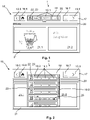
- FIG 1 a schematic user interface 16 of a central control unit 15 for displaying and controlling the method according to the invention for automatically processing at least one work step 12.1 of a recipe 12 for preparing a meal 11 is shown.
- This user interface 16 is presented on a display 15.2b by a user input device 15.2 (as in figure 4 and 5 shown).
- the user interface 16 has several areas or fields, which are divided into a main information field 17, an overview field 18, which can be folded out and out, at least one control field 19, an identification field 20 and a control panel 21. In this case, these fields can be arranged next to one another on the user interface 16 in order to provide the user with a good overview.
- the main information field 17, which is preferably arranged horizontally in the upper area of the user interface, is divided into individual control fields 19, such as B. one return key 19.5, one return key forward 19.6, one return key option 19.7 and/or one return key home 19.8.
- the overview field 18 is also arranged in the main information field 17 in the folded state I (see Fig. 1 ).
- At least the current parameters 10.8 (in fields 18.1 for the parameters) of the current kitchen appliance 10 are visible in the collapsed overview field 18 (see FIG. 8).
- the user thus receives a direct overview of which parameters 10.8 of the currently active kitchen appliance 10 are present.
- both the specified target values and the actual values for the respective device function 10.7 can be displayed (see Fig. 8 and 9).
- the device function 10.7 can be symbolized by icon 25 in order to get a better overview.
- An icon 22 can also be displayed in the collapsed overview field 18 for the respective active kitchen appliance 10, preferably on the left-hand edge of the overview panel 18.
- an identification field 20 below the main information field 17, in which the device name of the current kitchen appliance 10 can be displayed.
- This detection field 20 can also display the respective work step 12.1 from the recipe 12.
- the current state of the current kitchen appliance 10 is shown in the control panel 21, which is preferably arranged below the detection field 20, with instructions for the current work step 12.1 also being given to the user.
- the control panel 21 can be divided into a status field 21.1 (for the kitchen appliance with its parameters) and an instruction field 21.2 (for work instructions for the user), as shown in FIGS Figures 1 to 3 is shown.
- the collapsed overview field 18 can immediately show the kitchen appliance 10 with the warning in the overview field through this product reference. It is also conceivable that the overview field folds out automatically as a result of this warning in order to display the current kitchen appliance 10 with the warning, preferably at the top.
- the user can select and activate the collapsed overview field 18 (from 1 ) into the expanded overview field 18 (from 2 ) switch.
- the respective kitchen appliance 10 from the appliance list with its appliance function 10.7 and its appliance parameters 10.8 is now displayed—in the present case line by line below one another.
- a scroll bar 19.2 for scrolling the line-by-line displayed kitchen appliances 10 in the unfolded overview field 18 can be present.
- both an icon 22 for the kitchen appliance is shown symbolically in each line for a kitchen appliance 10 and an appliance name in field 18.2 as well as the parameters 10.8 in fields 18.2 in order to show the current status.
- the icons 22 used result in an intuitive overview for the user of the respective kitchen appliances 10 in the respective row of the expanded overview field 18. It is also conceivable that the existing kitchen appliances 10 in the second modes already mentioned (1st to 5th ) can be sorted or summarized in the displayed list. In the figure 3 is z. B. a bar for marking 24 of the two additional thermometers 10.5 is shown as a device type. As has been mentioned, other grouping or sorting can also be achieved through the adjustable modes.
- An activation marking 23 can be provided so that the user can also intuitively determine in the expanded overview field 18 which kitchen appliance 10 is currently active, or requires manual action or has sent out a warning.
- This activation marking 23 can, for example, consist of a symbol, such as an asterisk ("*") in the present case (see figure 2 and 3 ).
- the icon 22 itself can serve as an activation mark 23 by z.
- B. an inversion of the icon 22, as in figure 3 , to the additional thermometer 10.5 is shown, see the last two lower icons 22 in the list of the unfolded overview field 18.
- the kitchen appliance 10 that requires manual action could be at the top in the unfolded state (II) of the overview field 18 or at the second position, since the main device 10 (kitchen device 10 specified by the user) may always be displayed in the first place.
- the unfolded overview field 18 at least partially overlaps the underlying control panel 21, so that areas of the control panel 21 that have not been overlapped are still visible. These underlying areas can also be contrasted in color or by their brightness in order to improve the overview.
- control panel 21 off figure 1 the current status of the respective kitchen appliance 10 is shown in the status field 21.1 and the next step 12.1, here manual, includes the addition of 200 grams of water, which is evident from the instruction field 21.2.
- the overview field 18 in the unfolded state II is shown line by line in detail with the kitchen appliances 10 from the appliance list.
- a kitchen appliance 10 in the respective line
- the user can immediately switch to this appliance 10, which is then displayed accordingly on the control panel 21.
- the name or designation and the current parameters 10.8 for the kitchen appliances 10 are displayed in detail.
- the microwave oven 10 penultimate line labeled "MW turbo 7" is heated with circulating air using a fan with level 2 at currently 123 °C (actual temperature), with the target temperature being set at 160 °C is set.
- the heating process of the oven should continue for another 4 minutes (remaining time).
- the electric pan 10 from the last line of the overview field 18 is provided with the designation "Pan X".
- the current actual temperature is 140 °C and has therefore reached the preset target temperature of 140 °C.
- the remaining duration of the roasting process is displayed as 17 minutes.
- the displayed kitchen appliances 10 are not sorted according to appliance classes, which can be seen from the different appliance symbols line by line.
- the respective kitchen appliances 10 can be grouped according to appliance classes and displayed line by line (in the overview field 18 in the unfolded state II) (see Fig. 3 - last two lines).
- the device classes include semi-automated and fully automated cooking mixers, ovens, simple cooking and mixing devices (with a reduced range of functions, e.g. purely manual operation of the work steps), pans or temperature sensors, which can be identified and grouped via a (device class) icon.
- This icon 22 can also serve as an activation mark 23 in which it is, for example, with a different color or inversely to the other icon 22 is displayed.
- the activation mark 23 for a kitchen appliance 10 can also include a separate symbol or icon (here "*"), as already mentioned.
- the last two lines of the expanded overview field 18 show 2 additional thermometers that are grouped into a device class and displayed next to one another and one below the other. By grouping into device classes, a visual association can also be produced for the user in a simple manner, which can also be optically emphasized by a marking 24, for example in the form of a bar or a border, etc.
- the control fields 19 are provided in the main information field 17 in order to facilitate the overall control of the method according to the invention. This allows you to either go back or forth in the recipe 12 through the respective control panels, or jump to the starting point with the home button, or select various options with the options button (e.g., select the mode).
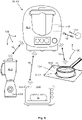
- the figure 4 shows a device 110 according to the invention in the form of a kitchen appliance 10.
- This kitchen appliance 10 is designed as a kitchen appliance 10.1 with complex functions.
- the individual device functions 10.7 include e.g. B. the device function 10.7a as an agitator, device function 10.7b as a heater, the device function 10.7c as a scale and the device function 10.7d as a heater.
- other device functions 10.7 may be present, but not in the figure 4 are shown.
- the device 110 has the central control device 15 in order to be able to monitor and control the kitchen appliance system 100 as a whole.
- a data memory 15.1 and the user input device 15.2 and the interface 15.3 and a data processing unit 15.4 are provided for this purpose.
- the present method can be stored as a computer program (product) in the data memory 15.1 and is processed by the data processing unit 15.4.
- the user input device 15.2 can be designed in several parts, namely with a display 15.2a and a multifunction button 15.2b.
- the user input device 15.2 itself is advantageously designed as a touch screen. However, if a display 15.2a without a touch function is used, a cursor can be used to select and activate a control field 19 or another field on the user interface 16. For example, the cursor can be controlled by the multifunction button 15.2b, wherein the multifunction button 15.2b itself can be designed to be rotatable, pivotable and pressable.
- a complete kitchen appliance system 100 with various kitchen appliances 10 is shown.
- the method according to the invention takes place on the device 110, which is shown as a kitchen appliance 10 with complex functions.
- the kitchen appliance system 100 also has a kitchen appliance 10.2 in the form of a mixer, a kitchen appliance 10.3 in the form of an oven, a kitchen appliance 1.4 in the form of a cooker and a kitchen appliance 10.5 in the form of an additional thermometer.
- Other kitchen appliances 10 (with different or similar appliance functions) can of course also be present in this system 100 .
- the respective kitchen appliances 10 communicate with the device 110 according to the invention via data connections 13, which are preferably designed as wireless connections.
- the respective kitchen appliances 10 each have a (data) interface that can be designed as a WLAN or WiFi or UWB or Bluetooth interface or other short-range radio technologies or local wireless network connections.
- a meal 11 is also shown, just like in the pan 10.12 of the kitchen appliance 10.4 in the form of a stove.
- What is special about the present kitchen appliance system 100 is that it is actuated and controlled at least partially automatically using a selected recipe 12 using the method according to the invention (with all kitchen appliances 12).
- the corresponding user interface 16 is provided in order to provide the user with an intuitive and optimal overview of the respective situation and state of the method.
- the kitchen appliance 10.1 with a complex function can also be a device 110, such as the tablet figure 6 to serve. It is advantageous here that the central control device 15 with its other elements is already fully integrated in such a tablet.
- the user input device 15.2 is also present on a tablet in order to display the user interface 16, as already mentioned. Since usually such a device 110 also has a camera 112 and a Speaker 113 and possibly a button 111 has other functions such. B. online help or participation in a chat room can take place without any problems.
- an overview field 18 in the unfolded state II is shown in a block representation (Kanban representation), the respective kitchen appliances 10.1 with the respective device names 18.2 and the current parameters 18.1 being shown in a block.
- a user can directly obtain a comprehensive overview of the respective kitchen appliance 10 with the (next to be carried out) work steps 12.1 from the recipe 12.
- FIGS. 1 and 2 are exemplary details of the user interface 16 are shown for better understanding.
- the overview field 18 is in the folded state I with the respective parameters 18.1 in detail figure 1 shown.
- a cooking process of 9 minutes then takes place, with the set target temperature being 100°C and the current actual temperature having reached 43°C.
- a stirring process takes place in stage 3 in the kitchen appliance 10 .
Landscapes
- Engineering & Computer Science (AREA)
- Food Science & Technology (AREA)
- Physics & Mathematics (AREA)
- General Physics & Mathematics (AREA)
- Automation & Control Theory (AREA)
- Electric Ovens (AREA)
- Selective Calling Equipment (AREA)
Priority Applications (4)
| Application Number | Priority Date | Filing Date | Title |
|---|---|---|---|
| EP21176542.5A EP4094643A1 (fr) | 2021-05-28 | 2021-05-28 | Procédé de vérification pour un système de robot de cuisine |
| AU2022202998A AU2022202998A1 (en) | 2021-05-28 | 2022-05-04 | Method for controlling a kitchen appliance system |
| CN202210500667.2A CN115399639A (zh) | 2021-05-28 | 2022-05-09 | 用于厨具系统的控制方法 |
| US17/752,126 US20230012415A1 (en) | 2021-05-28 | 2022-05-24 | Method for Controlling a Kitchen Appliance System |
Applications Claiming Priority (1)
| Application Number | Priority Date | Filing Date | Title |
|---|---|---|---|
| EP21176542.5A EP4094643A1 (fr) | 2021-05-28 | 2021-05-28 | Procédé de vérification pour un système de robot de cuisine |
Publications (1)
| Publication Number | Publication Date |
|---|---|
| EP4094643A1 true EP4094643A1 (fr) | 2022-11-30 |
Family
ID=76180962
Family Applications (1)
| Application Number | Title | Priority Date | Filing Date |
|---|---|---|---|
| EP21176542.5A Pending EP4094643A1 (fr) | 2021-05-28 | 2021-05-28 | Procédé de vérification pour un système de robot de cuisine |
Country Status (4)
| Country | Link |
|---|---|
| US (1) | US20230012415A1 (fr) |
| EP (1) | EP4094643A1 (fr) |
| CN (1) | CN115399639A (fr) |
| AU (1) | AU2022202998A1 (fr) |
Families Citing this family (1)
| Publication number | Priority date | Publication date | Assignee | Title |
|---|---|---|---|---|
| CN117031991A (zh) * | 2023-08-14 | 2023-11-10 | 杭州老板电器股份有限公司 | 集成灶及其烹饪控制方法和装置 |
Citations (2)
| Publication number | Priority date | Publication date | Assignee | Title |
|---|---|---|---|---|
| WO2015171630A2 (fr) * | 2014-05-05 | 2015-11-12 | Duke Manufacturing Co. | Système de gestion de traitement alimentaire |
| US20190001288A1 (en) * | 2017-06-30 | 2019-01-03 | Vita-Mix Management Corporation | Intelligent blending system |
Family Cites Families (9)
| Publication number | Priority date | Publication date | Assignee | Title |
|---|---|---|---|---|
| FR2798757B1 (fr) * | 1999-09-17 | 2002-07-05 | Moulinex Sa | Dispositif d'assistance de preparation culinaire |
| US8342080B2 (en) * | 2009-12-04 | 2013-01-01 | Richardson Steven M | Programmable cooking system and method |
| CN106264065A (zh) * | 2015-06-01 | 2017-01-04 | 阎卫中 | 一种智能厨房烹饪系统及智能辅助烹饪的方法 |
| PL3206095T3 (pl) * | 2016-02-09 | 2018-11-30 | Vorwerk Co Interholding | Układ i sposób do synchronizacji etapów przetwarzania żywności wielofunkcyjnego urządzenia do gotowania z etapami przetwarzania żywności zdalnego przyrządu kuchennego |
| US20170238751A1 (en) * | 2016-02-18 | 2017-08-24 | Meyer Intellectual Properties Limited | Wirelessly controlled cooking system |
| CN108008662A (zh) * | 2016-10-28 | 2018-05-08 | 松下电器(美国)知识产权公司 | 信息处理方法以及信息处理系统 |
| CN106774874B (zh) * | 2016-12-12 | 2020-01-21 | 快创科技(大连)有限公司 | 基于ar增强现实技术和基于颜色评价的烹饪辅助系统 |
| ES3008109T3 (en) * | 2017-02-22 | 2025-03-21 | Taurus Res And Development S L U | Method, system and computer programs for handling remote control of a cooking appliance to provide a customized diet |
| CN111046208A (zh) * | 2019-11-29 | 2020-04-21 | 珠海优特智厨科技有限公司 | 菜谱的展示方法及装置、存储介质、电子装置 |
-
2021
- 2021-05-28 EP EP21176542.5A patent/EP4094643A1/fr active Pending
-
2022
- 2022-05-04 AU AU2022202998A patent/AU2022202998A1/en active Pending
- 2022-05-09 CN CN202210500667.2A patent/CN115399639A/zh active Pending
- 2022-05-24 US US17/752,126 patent/US20230012415A1/en not_active Abandoned
Patent Citations (2)
| Publication number | Priority date | Publication date | Assignee | Title |
|---|---|---|---|---|
| WO2015171630A2 (fr) * | 2014-05-05 | 2015-11-12 | Duke Manufacturing Co. | Système de gestion de traitement alimentaire |
| US20190001288A1 (en) * | 2017-06-30 | 2019-01-03 | Vita-Mix Management Corporation | Intelligent blending system |
Also Published As
| Publication number | Publication date |
|---|---|
| US20230012415A1 (en) | 2023-01-12 |
| CN115399639A (zh) | 2022-11-29 |
| AU2022202998A1 (en) | 2022-12-15 |
Similar Documents
| Publication | Publication Date | Title |
|---|---|---|
| EP1338849B1 (fr) | Procédé de traitement et de préparation d'aliments dans un appareil de cuisson, panneau de commande pour appareil de cuisson et appareil de cuisson avec panneau de cuisson | |
| DE20203117U1 (de) | Vorrichtung zur Wärmebehandlung von Lebensmitteln | |
| EP2430367A1 (fr) | Console portable présentant en particulier une capacité multimédia | |
| EP3545237B1 (fr) | Appareil ménager avec élément de fonctionnement haptic amovible | |
| EP2215408B1 (fr) | Appareil électroménager avec dispositif d'affichage | |
| DE102009000652A1 (de) | Portable medienfähige Konsole | |
| EP3415061A1 (fr) | Appareil ménager | |
| EP3730015B1 (fr) | Appareil electromenager | |
| EP4094643A1 (fr) | Procédé de vérification pour un système de robot de cuisine | |
| EP3395216B1 (fr) | Procédé de commande coordonnée d'au moins deux appareils | |
| EP3857128A1 (fr) | Appareil électroménager, système d'appareil électroménager et procédé de fonctionnement d'un appareil électroménager | |
| EP3799771B1 (fr) | Machine de cuisine permettant de commander un autre appareil électroménager | |
| DE10342531B4 (de) | Steuerung für ein Haushaltgerät | |
| US12255751B2 (en) | Method for data communication with a domestic appliance by a mobile computer device, mobile computer device and domestic appliance | |
| DE102021201931B4 (de) | Küchenmaschine zur Synchronisation des Energiebedarfs nebst Verfahren | |
| EP2281419B1 (fr) | Dispositif d'affichage et appareil de cuisson equipe d'un tel dispositif | |
| EP4179929B1 (fr) | Système et procédé de préparation des aliments | |
| DE102008032452A1 (de) | Anzeigeverfahren und Gargerät hierfür | |
| EP3710752B1 (fr) | Système de préparation d'aliment | |
| DE102004032074C5 (de) | Herdschaltuhr | |
| DE102017131407B4 (de) | Verfahren zum Garen von Nahrungsmitteln | |
| EP4006427B1 (fr) | Appareil de cuisson doté d'une unité de commande et procédé d'affichage du contenu des sources de données externes | |
| DE102005043216A1 (de) | Verfahren zum Garen, Kochen oder Backen einer Speise in einem Ofen | |
| EP4528167A1 (fr) | Procédé de fonctionnement d'un appareil de cuisson, appareil de cuisson et système | |
| WO2016026748A1 (fr) | Dispositif de commande d'un appareil ménager, muni de deux champs d'affichage séparés et d'un élément de commande rotatif |
Legal Events
| Date | Code | Title | Description |
|---|---|---|---|
| PUAI | Public reference made under article 153(3) epc to a published international application that has entered the european phase |
Free format text: ORIGINAL CODE: 0009012 |
|
| STAA | Information on the status of an ep patent application or granted ep patent |
Free format text: STATUS: THE APPLICATION HAS BEEN PUBLISHED |
|
| AK | Designated contracting states |
Kind code of ref document: A1 Designated state(s): AL AT BE BG CH CY CZ DE DK EE ES FI FR GB GR HR HU IE IS IT LI LT LU LV MC MK MT NL NO PL PT RO RS SE SI SK SM TR |
|
| STAA | Information on the status of an ep patent application or granted ep patent |
Free format text: STATUS: REQUEST FOR EXAMINATION WAS MADE |
|
| 17P | Request for examination filed |
Effective date: 20230210 |
|
| RBV | Designated contracting states (corrected) |
Designated state(s): AL AT BE BG CH CY CZ DE DK EE ES FI FR GB GR HR HU IE IS IT LI LT LU LV MC MK MT NL NO PL PT RO RS SE SI SK SM TR |
|
| STAA | Information on the status of an ep patent application or granted ep patent |
Free format text: STATUS: EXAMINATION IS IN PROGRESS |
|
| 17Q | First examination report despatched |
Effective date: 20250912 |