EP4131027A1 - Audiovorschauverfahren und -vorrichtung sowie speichermedium - Google Patents
Audiovorschauverfahren und -vorrichtung sowie speichermedium Download PDFInfo
- Publication number
- EP4131027A1 EP4131027A1 EP21865659.3A EP21865659A EP4131027A1 EP 4131027 A1 EP4131027 A1 EP 4131027A1 EP 21865659 A EP21865659 A EP 21865659A EP 4131027 A1 EP4131027 A1 EP 4131027A1
- Authority
- EP
- European Patent Office
- Prior art keywords
- audio file
- file set
- target audio
- target
- interface
- Prior art date
- Legal status (The legal status is an assumption and is not a legal conclusion. Google has not performed a legal analysis and makes no representation as to the accuracy of the status listed.)
- Pending
Links
Images



Classifications
-
- G—PHYSICS
- G06—COMPUTING OR CALCULATING; COUNTING
- G06F—ELECTRIC DIGITAL DATA PROCESSING
- G06F16/00—Information retrieval; Database structures therefor; File system structures therefor
- G06F16/60—Information retrieval; Database structures therefor; File system structures therefor of audio data
- G06F16/64—Browsing; Visualisation therefor
-
- G—PHYSICS
- G06—COMPUTING OR CALCULATING; COUNTING
- G06F—ELECTRIC DIGITAL DATA PROCESSING
- G06F16/00—Information retrieval; Database structures therefor; File system structures therefor
- G06F16/60—Information retrieval; Database structures therefor; File system structures therefor of audio data
- G06F16/61—Indexing; Data structures therefor; Storage structures
-
- G—PHYSICS
- G06—COMPUTING OR CALCULATING; COUNTING
- G06F—ELECTRIC DIGITAL DATA PROCESSING
- G06F16/00—Information retrieval; Database structures therefor; File system structures therefor
- G06F16/60—Information retrieval; Database structures therefor; File system structures therefor of audio data
- G06F16/68—Retrieval characterised by using metadata, e.g. metadata not derived from the content or metadata generated manually
-
- G—PHYSICS
- G06—COMPUTING OR CALCULATING; COUNTING
- G06F—ELECTRIC DIGITAL DATA PROCESSING
- G06F16/00—Information retrieval; Database structures therefor; File system structures therefor
- G06F16/60—Information retrieval; Database structures therefor; File system structures therefor of audio data
- G06F16/68—Retrieval characterised by using metadata, e.g. metadata not derived from the content or metadata generated manually
- G06F16/686—Retrieval characterised by using metadata, e.g. metadata not derived from the content or metadata generated manually using information manually generated, e.g. tags, keywords, comments, title or artist information, time, location or usage information, user ratings
-
- G—PHYSICS
- G06—COMPUTING OR CALCULATING; COUNTING
- G06F—ELECTRIC DIGITAL DATA PROCESSING
- G06F3/00—Input arrangements for transferring data to be processed into a form capable of being handled by the computer; Output arrangements for transferring data from processing unit to output unit, e.g. interface arrangements
- G06F3/01—Input arrangements or combined input and output arrangements for interaction between user and computer
- G06F3/048—Interaction techniques based on graphical user interfaces [GUI]
- G06F3/0487—Interaction techniques based on graphical user interfaces [GUI] using specific features provided by the input device, e.g. functions controlled by the rotation of a mouse with dual sensing arrangements, or of the nature of the input device, e.g. tap gestures based on pressure sensed by a digitiser
- G06F3/0488—Interaction techniques based on graphical user interfaces [GUI] using specific features provided by the input device, e.g. functions controlled by the rotation of a mouse with dual sensing arrangements, or of the nature of the input device, e.g. tap gestures based on pressure sensed by a digitiser using a touch-screen or digitiser, e.g. input of commands through traced gestures
- G06F3/04886—Interaction techniques based on graphical user interfaces [GUI] using specific features provided by the input device, e.g. functions controlled by the rotation of a mouse with dual sensing arrangements, or of the nature of the input device, e.g. tap gestures based on pressure sensed by a digitiser using a touch-screen or digitiser, e.g. input of commands through traced gestures by partitioning the display area of the touch-screen or the surface of the digitising tablet into independently controllable areas, e.g. virtual keyboards or menus
-
- G—PHYSICS
- G06—COMPUTING OR CALCULATING; COUNTING
- G06F—ELECTRIC DIGITAL DATA PROCESSING
- G06F3/00—Input arrangements for transferring data to be processed into a form capable of being handled by the computer; Output arrangements for transferring data from processing unit to output unit, e.g. interface arrangements
- G06F3/16—Sound input; Sound output
- G06F3/165—Management of the audio stream, e.g. setting of volume, audio stream path
Definitions
- Embodiments of the present application relate to computer technologies, and in particular to an audio previewing method, an apparatus, and a storage medium.
- Music can help people relieve fatigue and relax their minds. People generally install a music application on a terminal to play songs in a song list.
- the music application provides a music library for a user, so that the user can find audio file sets such as favorite song lists, albums therefrom.
- the music application provides information such as cover images, title descriptions of multiple audio file sets on an audio file set list interface of the music library, for example, taking a song list as an example, the music application provides information such as cover images, title descriptions of multiple song lists on a song list interface of the music library, but the user often cannot determine whether a certain song list meets tastes based on the above information, so it is necessary to preview songs in the song list.
- the present application provides an audio previewing method, an apparatus and a storage medium.
- an embodiment of the present application provides an audio previewing method, including:
- the method when playing the audio preview clip of the at least one audio file in the target audio file set, the method further includes: switching, on the target audio file set interface, the audio preview clip that is currently played in response to a switching request of switching the audio preview clip that is currently played, and playing a switched audio preview clip.
- the target audio file set interface includes the information of each audio file in the at least one audio file; and the displaying, on the target audio file set interface, information of the audio file corresponding to the audio preview clip that is currently played includes: stressing out and displaying, on the target audio file set interface, the information of the audio file corresponding to the audio preview clip that is currently played.
- the method when playing, on the target audio file set interface, the audio preview clip of the at least one audio file in the target audio file set, the method further includes:
- the progress bar includes multiple segments, and each segment of the multiple segments corresponds to an audio preview clip of one audio file in the at least one audio file.
- the method before playing, on the target audio file set interface, the audio preview clip of the at least one audio file in the target audio file set, the method further includes: jumping to an audio file set detailed interface from the target audio file set interface in response to an entering request of entering the audio file set detailed interface of the target audio file set, where the audio file set detailed interface includes the information of each audio file in the target audio file set.
- the method when playing, on the target audio file set interface, the audio preview clip of the at least one audio file in the target audio file set, the method further includes: stopping playing, on the target audio file set interface, the audio preview clip of the at least one audio file in response to a playing request of playing each audio file in the target audio file set, and calling a player to play each audio file in the target audio file set.
- the method when playing, on the target audio file set interface, the audio preview clip of the at least one audio file in the target audio file set, the method further includes: stopping playing, on the target audio file set interface, the audio preview clip of the at least one audio file in response to a returning request of returning to a state before previewing the target audio file set, and displaying, on the target audio file set interface, an interface state before previewing the target audio file set.
- the method further includes: storing, on the target audio file set interface, the target audio file set in a preset unit in response to a collecting request of collecting the target audio file set after completing previewing.
- the method further includes: jumping to an audio file set detailed interface from the target audio file set interface in response to an entering request of entering the audio file set detailed interface of the target audio file set after completing previewing, where the audio file set detailed interface includes the information of each audio file in the target audio file set.
- the method further includes: displaying, on the target audio file set interface, an interface state before previewing the target audio file set in response to a returning request of returning to a state before previewing the target audio file set after completing previewing.
- th method further includes: calling, on the target audio file set interface, a player to play each audio file in the target audio file set in response to a playing request of playing each audio file in the target audio file set after completing previewing.
- the method further includes: replaying, on the target audio file set interface, the audio preview clip of the at least one audio file in response to a retrying request of repreviewing the target audio file set after completing previewing.
- the information includes at least one of name and singer.
- the switching, on the target audio file set interface, the audio preview clip that is currently played includes: switching, on the target audio file set interface, to an audio preview clip of a next audio file of the audio file corresponding to the audio preview clip that is currently played according to a play sequence of the at least one audio file.
- the method before playing, on the target audio file set interface, the audio preview clip of the at least one audio file in the target audio file set, the method further includes: determining the audio preview clip of the at least one audio file in the target audio file set, where the audio preview clip of the at least one audio file is a characteristic audio clip in the at least one audio file.
- an audio previewing apparatus including:
- the above-mentioned apparatus further includes a switching module, configured to, when the previewing module plays the audio preview clip of the at least one audio file in the target audio file set, switch, on the target audio file set interface, the audio preview clip that is currently played in response to a switching request of switching the audio preview clip that is currently played, and play a switched audio preview clip.
- a switching module configured to, when the previewing module plays the audio preview clip of the at least one audio file in the target audio file set, switch, on the target audio file set interface, the audio preview clip that is currently played in response to a switching request of switching the audio preview clip that is currently played, and play a switched audio preview clip.
- the target audio file set interface includes the information of each audio file in the at least one audio file; and the displaying module is specifically configured to: stress out and display, on the target audio file set interface, the information of the audio file corresponding to the audio preview clip that is currently played.
- the previewing module is further configured to:
- the progress bar includes multiple segments, and each segment of the multiple segments corresponds to an audio preview clip of one audio file in the at least one audio file.
- the previewing module is further configured to: jump to an audio file set detailed interface from the target audio file set interface in response to an entering request of entering the audio file set detailed interface of the target audio file set, where the audio file set detailed interface includes the information of each audio file in the target audio file set.
- the previewing module is further configured to: stop playing, on the target audio file set interface, the audio preview clip of the at least one audio file in response to a playing request of playing each audio file in the target audio file set, and call a player to play each audio file in the target audio file set.
- the previewing module is further configured to: stop playing, on the target audio file set interface, the audio preview clip of the at least one audio file in response to a returning request of returning to a state before previewing the target audio file set, and display, on the target audio file set interface, an interface state before previewing the target audio file set.
- the previewing module is further configured to: store, on the target audio file set interface, the target audio file set in a preset unit in response to a collecting request of collecting the target audio file set after completing previewing.
- the previewing module is further configured to: jump to an audio file set detailed interface from the target audio file set interface in response to an entering request of entering the audio file set detailed interface of the target audio file set after completing previewing, where the audio file set detailed interface includes the information of each audio file in the target audio file set.
- the previewing module is further configured to: display, on the target audio file set interface, an interface state before previewing the target audio file set in response to a returning request of returning to a state before previewing the target audio file set after completing previewing.
- the previewing module is further configured to: call, on the target audio file set interface, a player to play each audio file in the target audio file set one audio file in response to a playing request of playing each audio file in the target audio file set after completing previewing.
- the previewing module is further configured to: replay, on the target audio file set interface, the audio preview clip of the at least one audio file in response to a retrying request of repreviewing the target audio file set after completing previewing.
- the information includes at least one of name and singer.
- the switching module is specifically configured to: switch, on the target audio file set interface, to an audio preview clip of a next audio file of the audio file corresponding to the audio preview clip that is currently played according to a play sequence of the at least one audio file.
- the previewing module is further configured to: determine the audio preview clip of the at least one audio file in the target audio file set, where the audio preview clip of the at least one audio file is a characteristic audio clip in the at least one audio file.
- an audio previewing device including:
- an embodiment of the present application provides a computer-readable storage medium, the computer-readable storage medium stores a computer program, and the computer program enables a server to execute the method according to the first aspect.
- the present application provides a computer program product including computer program instructions, where the computer program instructions enable a computer to execute the method according to the first aspect.
- the present application provides a computer program, where the computer program enables a computer to execute the method according to the first aspect.
- the embodiments of the present application provide the audio previewing method, the apparatus and the storage medium, the method plays, on the target audio file set interface, the audio preview clip of the at least one audio file in the target audio file set in response to the previewing request of previewing the target audio file set without entering a target audio file set detailed interface, so that a user can quickly preview the target audio file set through auditory sense, and the user can preview at least one audio file in the target audio file set at a time, which is simple in operation.
- the embodiments of the present application further display, on the target audio file set interface, the information of the audio file corresponding to the audio preview clip that is currently played during previewing, such as name and/or singer, thereby the user can acquire specific information of the audio file in time when previewing on the target audio file set interface, and then quickly confirm whether the above target audio file set is favorite thereof, which is less consumed, simple in process, and convenient for the user to operate.
- Audio previewing related in the embodiments of the present application refers to preview, on a target audio file set interface, an audio preview clip of at least one audio file in a target audio file set, meanwhile display, on the target audio file set interface, information of an audio file corresponding to an audio preview clip that is currently played during previewing, such as name and/or singer, so that on the one hand, a user can quickly preview the target audio file set through auditory sense, and on the other hand, the user can acquire specific information of the audio file in time when previewing on the target audio file set interface, and then quickly confirm whether the target audio file set is favorite thereof.
- An audio previewing method provided by an embodiment of the present application may be applied to a preview scenario of an audio file set, for example, a preview scenario of a song list or a preview scenario of an album,or the like, which is not particularly limited in the embodiments of the present application.
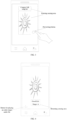
- the audio previewing method provided by the embodiments of the present application may be applied to an application scenario shown in FIG. 1.
- FIG. 1 only describes a possible application scenario of the audio previewing method provided by the embodiments of the present application by way of an example, and the application scenario of the audio previewing method provided by the embodiments of the present application is not limited to the application scenario shown in FIG. 1 .
- FIG. 1 is a schematic diagram of a possible application scenario of the audio previewing method.
- the preview scenario of the song list is taken as an example, where the above song list includes multiple songs, and specific songs may be determined according to actual situations.
- the above song list is campus folk, and the song list includes multiple campus folk songs, or, the above song list is rock, and the song list includes multiple rock songs, or the like, which is not particularly limited in the embodiments of the present application.
- user 1 using a user terminal to preview a song list is taken as an example.
- the user terminal may install a music application (Application, APP) that implements functions such as previewing song lists, playing songs.
- the user 1 may preview the song list through the APP on the user terminal to find a song list that is favorite thereof.
- the user 1 may open a certain song list interface through the above APP on the user terminal, such as a campus folk song list in FIG. 1 , and preview audio preview clips of multiple songs in the song list on the song list interface. That is, the above user terminal responds to a request of the user to preview the song list through the above APP, for example, a previewing button is provided on a campus folk song list interface as shown in FIG. 1 , and the above request may be generated by the user clicking the above previewing button.
- a previewing button is provided on a campus folk song list interface as shown in FIG. 1 , and the above request may be generated by the user clicking the above previewing button.
- the above user terminal plays, on the campus folk song list interface, the audio preview clips of the multiple songs in the above song list according to the above request, meanwhile displays, on the above song list interface, information of a song corresponding to an audio preview clip that is currently played during playing, such as name and/or singer.
- a name Good Life and a singer A of a song corresponding to the audio preview clip that is currently played are displayed on the campus folk song list interface, so that the user can quickly preview the song list through auditory sense, and acquire specific information of previewing songs in time when previewing on the song list interface, and then quickly confirm whether the song list is favorite thereof.
- the above user terminal may be devices such as a handheld device, a vehicle-mounted device, a wearable device, a computing device, and various forms of user equipment (User Equipment, UE), where the devices may install music APPs that can implement functions such as previewing song lists, playing songs, and the like.
- devices such as a handheld device, a vehicle-mounted device, a wearable device, a computing device, and various forms of user equipment (User Equipment, UE), where the devices may install music APPs that can implement functions such as previewing song lists, playing songs, and the like.
- UE User Equipment
- An execution subject of the method may be the user terminal in FIG. 1 .
- a workflow of the user terminal mainly includes previewing and displaying.
- the user terminal may play, on the target audio file set interface, the audio preview clip of the at least one audio file in the target audio file set in response to a previewing request of the target audio file set through an installed music App that implements functions such as previewing song lists and playing songs, meanwhile display, on the target audio file set interface, the information of the audio file corresponding to the audio preview clip that is currently played, such as name and/or singer, so that the user quickly confirms whether the target audio file set is favorite thereof, which is less consumed, simple in process, and convenient for the user to operate.
- FIG. 2 is a schematic flowchart of an audio previewing method provided by an embodiment of the present application
- an execution subject of this embodiment may be the user terminal in FIG. 1
- a specific execution subject may be determined according to actual application scenarios, which is not particularly limited in the embodiments of the present application.
- the audio previewing method provided by the embodiments of the present application may include the following steps: S201: playing, on a target audio file set interface, an audio preview clip of at least one audio file in a target audio file set in response to a previewing request of previewing the target audio file set.
- the target audio file set may be determined according to actual situations, such as a song list or an album.
- a target audio file set includes at least one audio file.
- the target audio file set is a song list as an example, the song list includes multiple songs.
- the at least one audio file included in the target audio file set may be determined according to actual situations, for example, the campus folk song list in FIG. 1 includes at least one campus folk song.
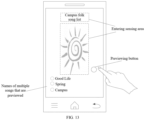
- the above previewing request of previewing the target audio file set may be acquired in the following manners: acquiring the previewing request of previewing the target audio file set through a previewing button provided on the target audio file set interface. For example, as shown in FIG. 1 , when the user needs to preview the above target audio file set, the previewing button on the target audio file set interface is clicked, and then, the user terminal acquires the previewing request of the user to preview the target audio file set through the previewing button. Where information such as a shape and a position of the above previewing button may be determined according to actual situations. For example, the previewing button in FIG.
- the above target audio file set interface may also be provided with a previewing sensing area.
- the above previewing sensing area may be clicked, in this way, the user terminal may acquire the previewing request of the user to preview the target audio file set through the above previewing sensing area.
- information such as a size and a position of the above previewing sensing area may be determined according to actual situations, which is not particularly limited in the embodiments of the present application.
- the method before playing, on the target audio file set interface, the audio preview clip of the at least one audio file in the target audio file set, the method further includes: determining the audio preview clip of the above at least one audio file in the target audio file set, where the audio preview clip of the above at least one audio file is a characteristic audio clip in the above at least one audio file, for example, taking that the target audio file set is a song list as an example, the above characteristic audio clip may be understood as a chorus part of a song in the song list, or a clip with a higher degree of recognition of a song, and the like.
- the above at least one audio file in the target audio file set may be determined according to actual situations.
- the above at least one audio file is at least one representative audio file in the above target audio file set, or the above at least one audio file is at least one audio file determined from the target audio file set by the user terminal based on historical preview audio information of the user, or the like.
- the above playing, on the target audio file set interface, the audio preview clip of the above at least one audio file in the target audio file set may include: playing, on the target audio file set interface, the audio preview clip of the at least one audio file in the target audio file set according to a playing sequence of the above at least one audio file.
- the playing sequence of the above at least one audio file may be preset, and may also be a playing sequence set by the user acquired after the user terminal displays the above at least one audio file on the target audio file set interface and generates a playing sequence setting prompt.
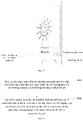
- the method before playing, on the target audio file set interface, the audio preview clip of the at least one audio file in the target audio file set, the method further includes: jumping to an audio file set detailed interface from the target audio file set interface in response to an entering request of entering the audio file set detailed interface of the target audio file set, where the audio file set detailed interface includes the information of each audio file in the target audio file set, such as name and/or singer.
- the above target audio file set interface may further be provided with an entering button, so that the user terminal may acquire the entering request of entering the audio file set detailed interface of the target audio file set through the entering button, and then jump to the above audio file set detailed interface to enable the user to further know the information of each audio file in the target audio file set, and to confirm whether the above target audio file set is favorite thereof.
- information such as a shape and a position of the entering button may also be determined according to actual situations, which is not particularly limited in the embodiments of the present application.
- the above target audio file set interface may also be provided with an entering sensing area.
- the above entering sensing area When the user needs to enter the above audio file set detailed interface, the above entering sensing area may be clicked, in this way, the user terminal acquires the entering request of the user to enter the audio file set detailed interface of the target audio file set through the above entering sensing area.
- information such as a size and a position of the above entering sensing area may also be determined according to actual situations.
- an area where a cover image and a title are located is the above entering sensing area, that is, an area where a cover image Little Sun and a title Campus Folk Song List are located in FIG. 3 is the above entering sensing area, which is not particularly limited in the embodiments of the present application.
- S202 information of an audio file corresponding to an audio preview clip that is currently played is displayed on the target audio file set interface.
- the information includes at least one of name and singer of the above audio file corresponding to the audio preview clip that is currently played.
- the user terminal displays, on the target audio file set interface, the information of the audio file corresponding to the audio preview clip that is currently played, such as name and/or singer, so that the user can acquire the specific information of the audio preview file in time when previewing on the target audio file set interface, and then quickly confirm whether the target audio file set is favorite thereof.
- the method when playing the audio preview clip of the at least one audio file in the target audio file set, may further include: stopping playing, on the target audio file set interface, the audio preview clip of the at least one audio file in response to a playing request of playing each audio file in the target audio file set, and calling a player to play each audio file in the target audio file set.
- the above user terminal plays the audio preview clip of the at least one audio file in the target audio file set
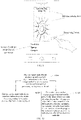
- a request of playing the entire target audio file set is acquired on the target audio file set interface, that is, the above playing request of playing each audio file in the target audio file set, then stops previewing according to this request, and plays the entire target audio file set.
- the above target audio file set interface may further be provided with a button for playing the entire target audio file set, so that the above user terminal may play the entire target audio file set through this button.
- a button for playing the entire target audio file set may also be determined according to actual situations.
- the above button in FIG. 4 is a triangle, and is on a lower left side of the target audio file set interface, which is not particularly limited in the embodiments of the present application.
- the above target audio file set interface may further be provided with a sensing area for playing the entire target audio file set.
- the above sensing area When the user needs to play the entire target audio file set, the above sensing area may be clicked, in this way, the user terminal acquires the playing request of the user to play the entire target audio file set through the above sensing area.
- information such as a size and a position of the above sensing area may also be determined according to actual situations, which is not particularly limited in the embodiments of the present application.
- the method may further include: stopping playing, on the target audio file set interface, the audio preview clip of the at least one audio file in response to a returning request of returning to a state before previewing the target audio file set, and displaying, on the target audio file set interface, an interface state before previewing the target audio file set.
- the user terminal plays the audio preview clip of the at least one audio file in the target audio file set, if the returning request of returning to the state before previewing the target audio file set is acquired on the target audio file set interface, and then the user terminal stops previewing according to this request, and returns to the state before previewing, that is, displaying, on the target audio file set interface, the interface state before previewing the target audio file set.
- the above target audio file set interface may further be provided with a returning button, so that the above user terminal may return to the state before previewing through this button.
- a shape and a position of the above returning button may be determined according to actual situations, which is not particularly limited in the embodiments of the present application.
- the above target audio file set interface may further be provided with a returning sensing area. When the user needs to return to the state before previewing, the above sensing area may be clicked, in this way, the above user terminal acquires the returning request of the user to return to the state before previewing the target audio file set through the above sensing area.
- information such as a size and a position of the above sensing area may also be determined according to actual situations. For example, an area where an audio file name and a singer are located is the above returning sensing area, that is, an area where Good life and singer A are located in FIG. 4 is the above returning sensing area, which is not particularly limited in the embodiments of the present application.
- the method may further include: storing, on the target audio file set interface, the target audio file set in a preset unit in response to a collecting request of collecting the target audio file set after completing previewing.
- the preset unit may be set according to actual situations, such as favorites. After completing previewing, if the user terminal acquires a request of collecting the target audio file set on the target audio file set interface, then collects the target audio file set according to this request, so that the user can quickly acquire the target audio file set in collected information later, which is simple and convenient.
- the above target audio file set interface may further be provided with a collecting button, so that the above user terminal may acquire the collecting request of collecting the target audio file set through this button, and then collect the entire target audio file set.
- a collecting button such as a shape and a position of the above collecting button may also be determined according to actual situations.
- the above button in FIG. 5 is a rhombus, and is on an upper left side of the target audio file set interface, which is not particularly limited in the embodiments of the present application.
- the above target audio file set interface may also be provided with a collecting sensing area.
- the above sensing area When the user needs to collect the entire target audio file set, the above sensing area may be clicked, in this way, the above user terminal acquires the collecting request of the user to collect the entire target audio file set through the above sensing area.
- information such as a size and a position of the above sensing area may also be determined according to actual situations, which is not particularly limited in the embodiments of the present application.
- the method may further include: jumping to an audio file set detailed interface from the target audio file set interface in response to an entering request of entering the audio file set detailed interface of the target audio file set after completing previewing, where the audio file set detailed interface includes the information of each audio file in the target audio file set.
- information such as a shape and a position of the above entering button may also be determined according to actual situations.
- the above button in FIG. 5 is a square, and is on an upper right side of the target audio file set interface, which is not particularly limited in the embodiments of the present application.
- the above target audio file set interface may also be provided with an entering sensing area. When the user needs to enter the above audio file set detailed interface, the above entering sensing area may be clicked, in this way, the user terminal acquires the entering request of the user to enter the audio file set detailed interface of the target audio file set through the above entering sensing area.
- information such as a size and a position of the above entering sensing area may also be determined according to actual situations.
- the method may further include: displaying, on the target audio file set interface, an interface state before previewing the target audio file set in response to a returning request of returning to a state before previewing the target audio file set after completing previewing.
- the above target audio file set interface may also be provided with a returning button, so that the user terminal may return to the state before previewing through this button.
- a returning button is a cross, which is not particularly limited in the embodiments of the present application.
- the above target audio file set interface may also be provided with a returning sensing area. When the user needs to return to the state before previewing, the above sensing area may be clicked, in this way, the user terminal acquires the returning request of the user to return to the state before previewing the target audio file set through the above sensing area.
- information such as a size and a position of the above sensing area may also be determined according to actual situations.
- a certain blank area on the target audio file set interface is the above returning sensing area, that is, a blank area where a cover image Little Sun is located in FIG. 5 is the above returning sensing area, which is not particularly limited in the embodiments of the present application.
- the method may further include: calling, on the target audio file set interface, a player to play each audio file in the target audio file set in response to a playing request of playing each audio file in the target audio file set after completing previewing.
- the above target audio file set interface may also be provided with a button for playing the entire target audio file set, so that the user terminal may play the entire target audio file set through this button.
- a button for playing the entire target audio file set may also be determined according to actual situations.
- the above button in FIG. 5 is a triangle, and is on a lower left side of the target audio file set interface, which is not particularly limited in the embodiments of the present application.
- the above target audio file set interface may also be provided with a sensing area for playing the entire target audio file set.
- the above sensing area When the user needs to play the entire target audio file set, the above sensing area may be clicked, in this way, the above user terminal acquires the playing request of the user to play the entire target audio file set through the above sensing area.
- information such as a size and a position of the above sensing area may also be determined according to actual situations, which is not particularly limited in the embodiments of the present application.
- the method may further include: replaying, on the target audio file set interface, the audio preview clip of the at least one audio file in response to a retrying request of repreviewing the target audio file set after completing previewing.
- the above user terminal After playing the audio preview clip of the at least one audio file in the target audio file set, if a request of repreviewing is acquired on the target audio file set interface after completing previewing, then the above user terminal replays the above audio preview clip of the at least one audio file according to this request, and repreviewing.
- the above target audio file set interface may further be provided with a retrying button, so that the above user terminal may acquire the retrying request of repreviewing the target audio file set through this button, and then repreview the target audio file set.
- a retrying button may also be determined according to actual situations.
- the above button in FIG. 5 is a circular arrow, and is on a lower right side of the target audio file set interface, which is not particularly limited in the embodiments of the present application.
- the above target audio file set interface may also be provided with a retrying sensing area.
- the above sensing area When the user needs to repreview the target audio file set, the above sensing area may be clicked, in this way, the above user terminal may repreview the target audio file set through the above sensing area.
- information such as a size and a position of the above sensing area may also be determined according to actual situations, which is not particularly limited in the embodiments of the present application.
- the embodiments of the present application play, on the target audio file set interface, the audio preview clip of the at least one audio file in the target audio file set in response to the previewing request of previewing the target audio file set without entering a target audio file set detailed interface, so that the user can quickly preview the target audio file set through auditory sense, and the user can preview the at least one audio file in the target audio file set at a time, which is simple in operation.
- the embodiments of the present application further display, on the target audio file set interface, the information of the audio file corresponding to the audio preview clip that is currently played during previewing, such as name and/or singer, thereby the user can acquire specific information of the audio file in time when previewing on the target audio file set interface, and then quickly confirm whether the above target audio file set is favorite thereof, which is less consumed, simple in process, and convenient for the user to operate.
- the embodiments of the present application may jump to the audio file set detailed interface from the target audio file set interface in response to the entering request of entering the audio file set detailed interface of the target audio file set before the previewing.
- the entire target audio file set is played on the target audio file set interface in response to the request of playing the entire target audio file set, or previewing is stopped on the target audio file set interface and the state before previewing is returned to in response to the returning request of returning to the state before previewing the target audio file set.
- the target audio file set is collected on the target audio file set interface in response to the collecting request, or, is repreviewed on the target audio file set interface in response to the request of repreviewing, or the like, which satisfy various application requirements and being suitable for actual applications.
- FIG. 6 is a schematic flowchart of another audio previewing method provided by an embodiment of the present application. As shown in FIG. 6 , the method includes:
- the user terminal may switch the previewed audio file on the target audio file set interface in response to the switching request of switching the audio preview clip that is currently played. For example, an audio preview clip of a next audio file of the audio file corresponding to the above audio preview clip that is currently played is switched to according to a play sequence of the above at least one audio file, and a switched audio preview clip is played.
- the above target audio file set interface may further be provided with a switching button, so that the above user terminal may acquire the switching request of switching the audio preview clip that is currently played through this button, and then switch the previewed audio file.
- a switching button may also be determined according to actual situations.
- the above button in FIG. 7 is a triangle with a vertical line, and is on a lower right side of the target audio file set interface, which is not particularly limited in the embodiments of the present application.
- the above target audio file collection interface may also be provided with a switching sensing area. When the user needs to switch the previewed audio file, the above sensing area may be clicked, in this way, the above user terminal may switch the previewed audio file through the above sensing area.
- information such as a size and a position of the above sensing area may also be determined according to actual situations, which is not particularly limited in the embodiments of the present application.
- the above switching request may further carry corresponding information of the switched audio file, for example, an audio preview clip of a third previewed audio file is switched to; and the above switching the audio preview clip that is currently played may include: switching to a target audio file according to the above corresponding information of the switched audio file carried in the switching request, and playing the audio preview clip of the target audio file.
- the embodiments of the present application may switch the audio preview clip that is currently played on the target audio file set interface in response to the switching request of switching the audio preview clip that is currently played, and play the switched audio preview clip, which satisfies a requirement of the user to switch the previewed audio file when previewing the at least one audio file.
- the embodiments of the present application play on the target audio file set interface, the audio preview clip of the at least one audio file in the target audio file set in response to the previewing request of previewing the target audio file set without entering the target audio file set detailed interface, so that the user can quickly preview the target audio file set through auditory sense, and the user can preview the at least one audio file in the target audio file set at a time, which is simple in operation.
- the embodiments of the present application further display, on the target audio file set interface, the information of the audio file corresponding to the audio preview clip that is currently played during previewing, such as name and/or singer, thereby the user can acquire specific information of the audio file in time when previewing on the target audio file set interface, and then quickly confirm whether the above target audio file set is favorite thereof, which is less consumed, simple in process, and convenient for the user to operate.
- the above target audio file set interface includes the information of each audio file in the above at least one audio file, such as name and/or singer, and then, when previewing, the embodiments of the present application display, on the target audio file set interface, the information of the audio file corresponding to the audio preview clip that is currently played, it is also considered to stress out and display, on the target audio file set interface, the information of the audio file corresponding to the audio preview clip that is currently played.
- FIG. 8 is a schematic flowchart of another audio previewing method provided by an embodiment of the present application. As shown in FIG. 8 , the method includes: S801: playing, on the target audio file set interface, an audio preview clip of at least one audio file in a target audio file set in response to a previewing request of previewing the target audio file set.
- Step S801 is implemented in a same way as the step S201, which will not be repeated here.
- the above target audio file set interface includes the information of each audio file in the at least one audio file, and information of an audio file corresponding to an audio preview clip that is currently played is stressed out and displayed on the target audio file set interface.
- a manner of the above stressing out and displaying may be highlighting and displaying, and may be specifically set according to actual situations, which is not particularly limited in the embodiments of the present application.
- the above target audio file set interface may include the information of each previewed audio file in the above at least one audio file, that is, the above user terminal may display, on the above target audio file set interface, the information of each previewed audio file in the at least one audio file , such as name and/or singer.
- the target audio file set is a campus folk song list as an example
- multiple previewed songs of the campus folk song list are Good Life, Spring and Campus
- a campus folk song list interface includes names and/or singers of the above multiple previewed songs.
- FIG. 9 only takes that only the names of the previewed songs are included as an example.
- the above user terminal plays the audio preview clip of the at least one audio file in the target audio file set according to the above previewing request
- the information of the audio file corresponding to the audio preview clip that is currently played may be stressed out and displayed, for example, highlighted and displayed, on the target audio file set interface, thereby the user can acquire specific information of the previewed audio file in time when previewing on the target audio file set interface, and then quickly confirm whether the above target audio file set is favorite thereof.
- step S802 references may be made to the above implementations of step S202, which will not be repeated here.
- the above target audio file set interface includes name and/or singer of each previewed audio file in the at least one audio file, which is convenient for the user to understand the target audio file set, and when previewing, the embodiments of the present application also consider to stress out and display, on the target audio file set interface, the above information of the audio file corresponding to the audio preview clip that is currently played, to remind the user the audio preview clip that is currently played, and then whether the target audio file set is favorite thereof is quickly confirmed.
- the embodiments of the present application play, on the target audio file set interface, the audio preview clip of the at least one audio file in the target audio file set in response to the previewing request of previewing the target audio file set without entering a target audio file set detailed interface, so that the user can quickly preview the target audio file set through auditory sense, and the user can preview the at least one audio file in the target audio file set at a time, which is less consumed, simple in process, and convenient the user to operate.
- FIG. 10 is a schematic flowchart of another audio previewing method provided by an embodiment of the present application. As shown in FIG. 10 , the method includes: S 1001: playing, on the target audio file set interface, an audio preview clip of at least one audio file in a target audio file set in response to a previewing request of previewing the target audio file set.
- S 1002 information of an audio file corresponding to an audio preview clip that is currently played is displayed on the target audio file set interface.
- Steps S1001-S1002 are implemented in a same way as the steps S201-S202, which will not be repeated here.
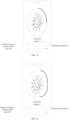
- the above user terminal may further determine the progress bar corresponding to the above audio preview clip of the at least one audio file, and the progress bar may be a total progress bar, for example, as shown in FIG. 11 .
- the above user terminal displays the progress bar on the target audio file set interface, and may display a preview progress on the above progress bar according to the play progress of the above audio preview clip of the at least one audio file, for example, a played progress is black, an unplayed progress is gray, which may be determined according to actual situations, which is convenient for the user to know the preview progress in time.
- the above progress bar may include multiple segments, and each segment of the multiple segments corresponds to an audio preview clip of one audio file in the at least one audio file, respectively.
- a segment of progress bar corresponding to an audio preview clip of each audio file is displayed on the target audio file set interface, that is, a total of four segments of progress bar are displayed, and a preview progress is displayed on the segment of progress bar corresponding to the audio preview clip of each audio file according to the play progress of the audio preview clip of each audio file, for example, a played progress is black, an unplayed progress is gray, so that the user can know the preview progress more accurately, which is suitable for application.
- the target audio file set interface includes the name and/or the singer of each audio file in the above at least one audio file
- an area of name and/or singer of each audio file is displayed on the target audio file set interface when playing the audio preview clip of the at least one audio file in the target audio file set, for example, as shown in FIG. 13 .
- a segment of progress bar corresponding to the audio preview clip of each audio file is displayed, and a preview progress is displayed on the segment of progress bar corresponding to the audio preview clip of each audio file according to a play progress of the audio preview clip of each audio file, for example, a played progress is black, and an unplayed progress is gray, and the like.
- the embodiments of the present application Before playing the audio preview clip of the at least one audio file in the target audio file set, the embodiments of the present application also consider determining a progress bar corresponding to the audio preview clip of the at least one audio file, and then displaying the above progress bar on the target audio file set interface when playing the audio preview clip of the at least one audio file in the target audio file set, where the progress bar represents the play progress of the above audio preview clip of the at least one audio file, so that the user can know the preview progress in time.
- the embodiments of the present application play, on the target audio file set interface, the audio preview clip of the at least one audio file in the target audio file set in response to the previewing request of previewing the target audio file set without entering a target audio file set detailed interface, so that the user can quickly preview the target audio file set through auditory sense, and the user can preview the at least one audio file in the target audio file set at a time, which is simple in operation.
- the embodiments of the present application further display, on the target audio file set interface, the information of the audio file corresponding to the preview clip that is currently played during previewing, such as name and/or singer, thereby the user can acquire specific information of the audio file in time when previewing on the target audio file set interface, then quickly confirm whether the above target audio file set is favorite thereof, which is less consumed, simple in process, and convenient for the user to operate.
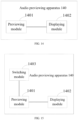
- FIG. 14 is a schematic structural diagram of an audio previewing apparatus provided by an embodiment of the present application.
- the audio previewing apparatus 140 includes a previewing module 1401 and a displaying module 1402.
- the audio previewing apparatus here may be the above user terminal itself, or a chip or an integrated circuit that realizes functions of a user terminal. It needs to be illustrated here that a division of the previewing module and the displaying module is only a logical function division, and the two may be integrated or independent physically.
- the previewing module 1401 is configured to play, on a target audio file set interface, an audio preview clip of at least one audio file in a target audio file set in response to a previewing request of previewing the target audio file set.
- the displaying module 1402 is configured to display, on the target audio file set interface, information of an audio file corresponding to an audio preview clip that is currently played.
- FIG. 15 is a schematic structural diagram of another audio previewing apparatus provided by an embodiment of the present application.
- the audio previewing apparatus 140 further includes: a switching module 1403.
- the switching module 1403 is configured to, when the previewing module plays the audio preview clip of the at least one audio file in the target audio file set, switch, on the target audio file set interface, the audio preview clip that is currently played in response to a switching request of switching the audio preview clip that is currently played, and play a switched audio preview clip.
- the target audio file set interface includes the information of each audio file in the at least one audio file.
- the displaying module 1402 is specifically configured to: stress out and display, on the target audio file set interface, the information of the audio file corresponding to the audio preview clip that is currently played.
- the previewing module 1401 is further configured to:
- the progress bar includes multiple segments, and each segment of the multiple segments corresponds to an audio preview clip of one audio file in the at least one audio file.
- the previewing module 1401 is further configured to: jump to an audio file set detailed interface from the target audio file set interface in response to an entering request of entering the audio file set detailed interface of the target audio file set, where the audio file set detailed interface includes the information of each audio file in the target audio file set.
- the previewing module 1401 is further configured to: stop playing, on the target audio file set interface, the audio preview clip of the at least one audio file in response to a playing request of playing each audio file in the target audio file set, and call a player to play each audio file in the target audio file set.
- the previewing module 1401 is further configured to: stop playing, on the target audio file set interface, the audio preview clip of the at least one audio file in response to a returning request of returning to a state before previewing the target audio file set, and display, on the target audio file set interface, an interface state before previewing the target audio file set.
- the previewing module 1401 is further configured to: store, on the target audio file set interface, the target audio file set in a preset unit in response to a collecting request of collecting the target audio file set after completing previewing.
- the previewing module 1401 is further configured to: jump to an audio file set detailed interface from the target audio file set interface in response to an entering request of entering the audio file set detailed interface of the target audio file set after completing previewing, where the audio file set detailed interface includes the information of each audio file in the target audio file set.
- the previewing module 1401 is further configured to: display, on the target audio file set interface, an interface state before previewing the target audio file set in response to a returning request of returning to a state before previewing the target audio file set after completing previewing.
- the previewing module 1401 is further configured to: call, on the target audio file set interface, a player to play each audio file in the target audio file set one audio file in response to a playing request of playing each audio file in the target audio file set after completing previewing.
- the previewing module 1401 is further configured to: replay, on the target audio file set interface, the audio preview clip of the at least one audio file in response to a retrying request of repreviewing the target audio file set after completing previewing.
- the information includes at least one of name and singer.
- the switching module 1403 is specifically configured to: switch, on the target audio file set interface, to an audio preview clip of a next audio file of the audio file corresponding to the audio preview clip that is currently played according to a play sequence of the at least one audio file.
- the previewing module 1401 is further configured to: determine the audio preview clip of the at least one audio file in the target audio file set, where the audio preview clip of the at least one audio file is a characteristic audio clip in the at least one audio file.
- FIG. 16A and FIG. 16B schematically respectively provide a possible basic hardware architecture of an audio previewing device described in the present application.
- the audio previewing device may be the above user terminal, and includes at least one processor 1601 and a communication interface 1603. Further optionally, a memory 1602 and a bus 1604 may also be included.
- the number of the processor 1601 may be one or more, and FIG. 16A and FIG. 16B only show one of the processors 1601.
- the processor 1601 may be a CPU, a graphics processor (graphics processing unit, GPU), or a digital signal processor (digital signal processor, DSP). If the audio previewing device has multiple processors 1601, types of the multiple processors 1601 may be different or may be the same.
- the multiple processors 1601 of the audio previewing device may also be integrated into a multi-core processor.
- the memory 1602 stores computer instructions and data; and the memory 1602 may store computer instructions and data required to implement the audio previewing method provided by the present application.
- the memory 1602 stores instructions of steps for implementing the above audio previewing method.
- the memory 1602 may be any one or any combination of the following storage media: non-volatile memory (for example, read only memory (ROM), solid state drive (SSD), hard disk drive (HDD), optical disk)), and volatile memory.
- the communication interface 1603 may provide information input/output for the at least one processor. It may also include any one or any combination of the following devices: devices with a network access function such as a network interface (for example, an Ethernet interface), a wireless network card, and the like.
- the communication interface 1603 may also be used for data communication between the audio previewing device and other computing devices or terminals.
- the bus 1604 is represented by a thick line in FIG. 16A and FIG. 16B .
- the bus 1604 may connect the processor 1601 with the memory 1602 and the communication interface 1603.
- the processor 1601 can access the memory 1602 through the bus 1604, and can also use the communication interface 1603 to perform data interaction with other computing devices or terminals.
- the audio previewing device executes the computer instructions in the memory 1602, so that the audio previewing device implements the above audio previewing method provided by the present application, or the audio previewing device deploys the above audio previewing apparatus.
- the memory 1602 may include the previewing module 1401 and the displaying module 1402.
- the inclusion here only relates that the instructions stored in the memory, when being executed, respectively implement functions of the previewing module and the displaying module, which are not limited to physical structures.
- the memory 1602 includes the previewing module 1401, the displaying module 1402, and the switching module 1403.
- the inclusion here only relates that the instructions stored in the memory, when being executed, respectively implement functions of the previewing module, the displaying module, and the switching module, which are not limited to physical structures.
- the above audio previewing apparatus may be implemented by software as shown in FIG. 16A and FIG. 16B , and may also be implemented as a hardware module or as a circuit unit through hardware.
- the present application provides a computer-readable storage medium.
- the computer program product includes computer instructions that indicate a computing device to execute the audio previewing method provided by the present application.
- the present application provides a chip including at least one processor and a communication interface, and the communication interface provides information input and/or output for the at least one processor. Further, the chip may also include at least one memory, and the memory is configured to store computer instructions. The at least one processor is configured to call and run the computer instructions to execute the audio previewing method provided by the present application.
- the present application provides a computer program product including computer program instructions, where the computer program instructions enable a computer to execute the above audio previewing method provided by the present application.
- the present application provides a computer program, where the computer program enables a computer to execute the above audio previewing method provided by the present application.
- the disclosed apparatus and method may be implemented in other ways.
- the apparatus embodiments described above are only illustrative.
- the division of the unit is only a logical function division, and there may be other divisions ways in actual implementations, for example, multiple units or components may be combined or be integrated into another system, or some features may be ignored or not implemented.
- coupling or direct coupling or communication connection shown or discussed herein may be an indirect coupling or communication connection through some interfaces, apparatuses or units, and may be in electrical, mechanical or other forms.
- the units described as separate components may or may not be physically separated, and the components displayed as units may or may not be physical units, that is, they may be located in one place, or may be distributed onto multiple network units. Some or all of the units may be selected according to actual needs for the purpose of implementing the solutions of the present embodiments.
- each functional unit in the various embodiments of the present application may be integrated into one processing unit, or each unit may physically exist separately, or two or more units may be integrated into one unit.
- the above integrated units may be implemented in a form of hardware, or may be implemented in a form of hardware plus software functional units.
Landscapes
- Engineering & Computer Science (AREA)
- Theoretical Computer Science (AREA)
- Multimedia (AREA)
- General Engineering & Computer Science (AREA)
- General Physics & Mathematics (AREA)
- Physics & Mathematics (AREA)
- Databases & Information Systems (AREA)
- Data Mining & Analysis (AREA)
- Library & Information Science (AREA)
- Software Systems (AREA)
- Human Computer Interaction (AREA)
- Health & Medical Sciences (AREA)
- Audiology, Speech & Language Pathology (AREA)
- General Health & Medical Sciences (AREA)
- Reverberation, Karaoke And Other Acoustics (AREA)
- User Interface Of Digital Computer (AREA)
- Signal Processing For Digital Recording And Reproducing (AREA)
- Management Or Editing Of Information On Record Carriers (AREA)
Applications Claiming Priority (2)
| Application Number | Priority Date | Filing Date | Title |
|---|---|---|---|
| CN202010955529.4A CN112035698B (zh) | 2020-09-11 | 2020-09-11 | 音频试听方法、装置及存储介质 |
| PCT/CN2021/104205 WO2022052603A1 (zh) | 2020-09-11 | 2021-07-02 | 音频试听方法、装置及存储介质 |
Publications (2)
| Publication Number | Publication Date |
|---|---|
| EP4131027A1 true EP4131027A1 (de) | 2023-02-08 |
| EP4131027A4 EP4131027A4 (de) | 2023-05-31 |
Family
ID=73588913
Family Applications (1)
| Application Number | Title | Priority Date | Filing Date |
|---|---|---|---|
| EP21865659.3A Pending EP4131027A4 (de) | 2020-09-11 | 2021-07-02 | Audiovorschauverfahren und -vorrichtung sowie speichermedium |
Country Status (4)
| Country | Link |
|---|---|
| EP (1) | EP4131027A4 (de) |
| CN (1) | CN112035698B (de) |
| BR (1) | BR112021020552A2 (de) |
| WO (1) | WO2022052603A1 (de) |
Families Citing this family (4)
| Publication number | Priority date | Publication date | Assignee | Title |
|---|---|---|---|---|
| CN112035698B (zh) * | 2020-09-11 | 2022-02-25 | 北京字跳网络技术有限公司 | 音频试听方法、装置及存储介质 |
| CN112989104B (zh) * | 2021-03-17 | 2023-06-02 | 杭州网易云音乐科技有限公司 | 信息展示方法及装置、计算机可读存储介质、电子设备 |
| CN114020394B (zh) * | 2021-11-17 | 2025-06-20 | 维沃移动通信有限公司 | 图像显示方法、装置及电子设备 |
| CN116304168A (zh) * | 2021-12-20 | 2023-06-23 | 腾讯科技(深圳)有限公司 | 音频播放方法、装置、设备、存储介质和计算机程序产品 |
Family Cites Families (13)
| Publication number | Priority date | Publication date | Assignee | Title |
|---|---|---|---|---|
| US6965863B1 (en) * | 1998-11-12 | 2005-11-15 | Microsoft Corporation | Speech recognition user interface |
| US8161411B2 (en) * | 2003-04-25 | 2012-04-17 | Apple Inc. | Graphical user interface for browsing, searching and presenting media items |
| JP4581934B2 (ja) * | 2005-09-14 | 2010-11-17 | ソニー株式会社 | 再生装置、再生方法および再生プログラム |
| US20090100093A1 (en) * | 2007-10-16 | 2009-04-16 | Nokia Corporation | Apparatus, system, method and computer program product for previewing media files |
| US9749709B2 (en) * | 2010-03-23 | 2017-08-29 | Apple Inc. | Audio preview of music |
| CN103400593B (zh) * | 2013-07-03 | 2016-02-24 | 网易(杭州)网络有限公司 | 一种试听音频的方法及装置 |
| CN105609121B (zh) * | 2014-11-20 | 2019-03-12 | 广州酷狗计算机科技有限公司 | 多媒体播放进度控制方法及装置 |
| CN104750818B (zh) * | 2015-03-30 | 2019-03-19 | Oppo广东移动通信有限公司 | 基于无线音乐系统的歌曲试听方法、控制终端及系统 |
| CN105677189B (zh) * | 2016-02-19 | 2020-02-18 | 腾讯科技(深圳)有限公司 | 控制应用的方法和装置 |
| US20170357909A1 (en) * | 2016-06-14 | 2017-12-14 | Xerox Corporation | System and method to efficiently label documents alternating machine and human labelling steps |
| CN107480181B (zh) * | 2017-07-05 | 2020-11-24 | 百度在线网络技术(北京)有限公司 | 音频播放方法、装置、设备及服务器 |
| CN107454465B (zh) * | 2017-07-31 | 2020-12-29 | 北京小米移动软件有限公司 | 视频播放进度展示方法及装置、电子设备 |
| CN112035698B (zh) * | 2020-09-11 | 2022-02-25 | 北京字跳网络技术有限公司 | 音频试听方法、装置及存储介质 |
-
2020
- 2020-09-11 CN CN202010955529.4A patent/CN112035698B/zh active Active
-
2021
- 2021-07-02 BR BR112021020552A patent/BR112021020552A2/pt unknown
- 2021-07-02 WO PCT/CN2021/104205 patent/WO2022052603A1/zh not_active Ceased
- 2021-07-02 EP EP21865659.3A patent/EP4131027A4/de active Pending
Also Published As
| Publication number | Publication date |
|---|---|
| CN112035698A (zh) | 2020-12-04 |
| CN112035698B (zh) | 2022-02-25 |
| WO2022052603A1 (zh) | 2022-03-17 |
| EP4131027A4 (de) | 2023-05-31 |
| BR112021020552A2 (pt) | 2023-04-11 |
| US20220318302A1 (en) | 2022-10-06 |
Similar Documents
| Publication | Publication Date | Title |
|---|---|---|
| EP4131027A1 (de) | Audiovorschauverfahren und -vorrichtung sowie speichermedium | |
| JP4453738B2 (ja) | ファイル転送方法、装置、およびプログラム | |
| KR101651577B1 (ko) | 로컬 및 원격 미디어 아이템 관리 | |
| US9880801B2 (en) | Navigation systems and methods | |
| US20110302493A1 (en) | Visual shuffling of media icons | |
| WO2007070206A1 (en) | Active preview for media items | |
| US7007246B2 (en) | Information input device, operation method for information processing device, information processing device, recording medium and program | |
| CN105094557A (zh) | 一种显示控制方法及装置、电子设备 | |
| WO2017032089A1 (zh) | 一种搜索方法及终端 | |
| KR20140027332A (ko) | 상이한 파일 호스트를 이용한 파일 액세스 기법 | |
| JP7712043B2 (ja) | 映像とコメントを同時に消費する経験を提供する方法、システム、およびコンピュータプログラム | |
| EP4258133A1 (de) | Verfahren und vorrichtung, vorrichtung und speichermedium zur bearbeitung von tutorialbasierten multimediaressourcen | |
| CN114173175A (zh) | 媒体资源的播放方法、装置、设备及存储介质 | |
| US9684441B2 (en) | Apparatus and associated methods | |
| KR20220043488A (ko) | 음악 관련 컨텐츠의 분석 결과를 제공하는 방법 및 컴퓨터가 판독가능한 기록 매체 | |
| EP4647883A1 (de) | Medieninteraktionsverfahren und -vorrichtung, vorrichtung und speichermedium | |
| CN109857901A (zh) | 信息展示方法和装置、以及用于信息搜索的方法和装置 | |
| US12072929B2 (en) | Song recommendation method and apparatus, electronic device, and storage medium | |
| CN108268199B (zh) | 信息处理方法、介质、装置和计算设备 | |
| CN114356166A (zh) | 应用图标显示方法及相关设备 | |
| US12596746B2 (en) | Audio previewing method, apparatus and storage medium | |
| CN109032448A (zh) | 应用显示方法、装置、存储介质及电子设备 | |
| US20240404560A1 (en) | Tutorial-based multimedia resource editing method and apparatus, device, and storage medium | |
| US20140359440A1 (en) | Shuffle functionality for a media player | |
| JP4371101B2 (ja) | 再生機器 |
Legal Events
| Date | Code | Title | Description |
|---|---|---|---|
| STAA | Information on the status of an ep patent application or granted ep patent |
Free format text: STATUS: THE INTERNATIONAL PUBLICATION HAS BEEN MADE |
|
| PUAI | Public reference made under article 153(3) epc to a published international application that has entered the european phase |
Free format text: ORIGINAL CODE: 0009012 |
|
| STAA | Information on the status of an ep patent application or granted ep patent |
Free format text: STATUS: REQUEST FOR EXAMINATION WAS MADE |
|
| 17P | Request for examination filed |
Effective date: 20221025 |
|
| AK | Designated contracting states |
Kind code of ref document: A1 Designated state(s): AL AT BE BG CH CY CZ DE DK EE ES FI FR GB GR HR HU IE IS IT LI LT LU LV MC MK MT NL NO PL PT RO RS SE SI SK SM TR |
|
| A4 | Supplementary search report drawn up and despatched |
Effective date: 20230428 |
|
| RIC1 | Information provided on ipc code assigned before grant |
Ipc: G06F 3/04886 20220101ALI20230421BHEP Ipc: G06F 16/68 20190101ALI20230421BHEP Ipc: G06F 16/61 20190101ALI20230421BHEP Ipc: G06F 16/64 20190101AFI20230421BHEP |
|
| STAA | Information on the status of an ep patent application or granted ep patent |
Free format text: STATUS: EXAMINATION IS IN PROGRESS |
|
| 17Q | First examination report despatched |
Effective date: 20231012 |
|
| DAV | Request for validation of the european patent (deleted) | ||
| DAX | Request for extension of the european patent (deleted) | ||
| APBN | Date of receipt of notice of appeal recorded |
Free format text: ORIGINAL CODE: EPIDOSNNOA2E |
|
| APAF | Appeal reference modified |
Free format text: ORIGINAL CODE: EPIDOSCREFNE |
|
| APAF | Appeal reference modified |
Free format text: ORIGINAL CODE: EPIDOSCREFNE |
|
| APBR | Date of receipt of statement of grounds of appeal recorded |
Free format text: ORIGINAL CODE: EPIDOSNNOA3E |
|
| APAF | Appeal reference modified |
Free format text: ORIGINAL CODE: EPIDOSCREFNE |