JP2012141976A - Apparatus and method for controlling a screen display in portable terminal - Google Patents
Apparatus and method for controlling a screen display in portable terminal Download PDFInfo
- Publication number
- JP2012141976A JP2012141976A JP2011281311A JP2011281311A JP2012141976A JP 2012141976 A JP2012141976 A JP 2012141976A JP 2011281311 A JP2011281311 A JP 2011281311A JP 2011281311 A JP2011281311 A JP 2011281311A JP 2012141976 A JP2012141976 A JP 2012141976A
- Authority
- JP
- Japan
- Prior art keywords
- portable terminal
- magnification
- output screen
- output
- screen
- Prior art date
- Legal status (The legal status is an assumption and is not a legal conclusion. Google has not performed a legal analysis and makes no representation as to the accuracy of the status listed.)
- Granted
Links
Images


Classifications
-
- G—PHYSICS
- G06—COMPUTING OR CALCULATING; COUNTING
- G06F—ELECTRIC DIGITAL DATA PROCESSING
- G06F3/00—Input arrangements for transferring data to be processed into a form capable of being handled by the computer; Output arrangements for transferring data from processing unit to output unit, e.g. interface arrangements
- G06F3/01—Input arrangements or combined input and output arrangements for interaction between user and computer
- G06F3/048—Interaction techniques based on graphical user interfaces [GUI]
- G06F3/0484—Interaction techniques based on graphical user interfaces [GUI] for the control of specific functions or operations, e.g. selecting or manipulating an object, an image or a displayed text element, setting a parameter value or selecting a range
- G06F3/04847—Interaction techniques to control parameter settings, e.g. interaction with sliders or dials
-
- G—PHYSICS
- G06—COMPUTING OR CALCULATING; COUNTING
- G06F—ELECTRIC DIGITAL DATA PROCESSING
- G06F1/00—Details not covered by groups G06F3/00 - G06F13/00 and G06F21/00
- G06F1/16—Constructional details or arrangements
- G06F1/1613—Constructional details or arrangements for portable computers
- G06F1/1633—Constructional details or arrangements of portable computers not specific to the type of enclosures covered by groups G06F1/1615 - G06F1/1626
- G06F1/1684—Constructional details or arrangements related to integrated I/O peripherals not covered by groups G06F1/1635 - G06F1/1675
- G06F1/1694—Constructional details or arrangements related to integrated I/O peripherals not covered by groups G06F1/1635 - G06F1/1675 the I/O peripheral being a single or a set of motion sensors for pointer control or gesture input obtained by sensing movements of the portable computer
-
- G—PHYSICS
- G06—COMPUTING OR CALCULATING; COUNTING
- G06F—ELECTRIC DIGITAL DATA PROCESSING
- G06F3/00—Input arrangements for transferring data to be processed into a form capable of being handled by the computer; Output arrangements for transferring data from processing unit to output unit, e.g. interface arrangements
- G06F3/01—Input arrangements or combined input and output arrangements for interaction between user and computer
- G06F3/017—Gesture based interaction, e.g. based on a set of recognized hand gestures
-
- G—PHYSICS
- G06—COMPUTING OR CALCULATING; COUNTING
- G06F—ELECTRIC DIGITAL DATA PROCESSING
- G06F3/00—Input arrangements for transferring data to be processed into a form capable of being handled by the computer; Output arrangements for transferring data from processing unit to output unit, e.g. interface arrangements
- G06F3/01—Input arrangements or combined input and output arrangements for interaction between user and computer
- G06F3/048—Interaction techniques based on graphical user interfaces [GUI]
- G06F3/0481—Interaction techniques based on graphical user interfaces [GUI] based on specific properties of the displayed interaction object or a metaphor-based environment, e.g. interaction with desktop elements like windows or icons, or assisted by a cursor's changing behaviour or appearance
-
- G—PHYSICS
- G06—COMPUTING OR CALCULATING; COUNTING
- G06F—ELECTRIC DIGITAL DATA PROCESSING
- G06F3/00—Input arrangements for transferring data to be processed into a form capable of being handled by the computer; Output arrangements for transferring data from processing unit to output unit, e.g. interface arrangements
- G06F3/01—Input arrangements or combined input and output arrangements for interaction between user and computer
- G06F3/048—Interaction techniques based on graphical user interfaces [GUI]
- G06F3/0484—Interaction techniques based on graphical user interfaces [GUI] for the control of specific functions or operations, e.g. selecting or manipulating an object, an image or a displayed text element, setting a parameter value or selecting a range
- G06F3/04845—Interaction techniques based on graphical user interfaces [GUI] for the control of specific functions or operations, e.g. selecting or manipulating an object, an image or a displayed text element, setting a parameter value or selecting a range for image manipulation, e.g. dragging, rotation, expansion or change of colour
-
- G—PHYSICS
- G06—COMPUTING OR CALCULATING; COUNTING
- G06F—ELECTRIC DIGITAL DATA PROCESSING
- G06F3/00—Input arrangements for transferring data to be processed into a form capable of being handled by the computer; Output arrangements for transferring data from processing unit to output unit, e.g. interface arrangements
- G06F3/01—Input arrangements or combined input and output arrangements for interaction between user and computer
- G06F3/048—Interaction techniques based on graphical user interfaces [GUI]
- G06F3/0487—Interaction techniques based on graphical user interfaces [GUI] using specific features provided by the input device, e.g. functions controlled by the rotation of a mouse with dual sensing arrangements, or of the nature of the input device, e.g. tap gestures based on pressure sensed by a digitiser
- G06F3/0488—Interaction techniques based on graphical user interfaces [GUI] using specific features provided by the input device, e.g. functions controlled by the rotation of a mouse with dual sensing arrangements, or of the nature of the input device, e.g. tap gestures based on pressure sensed by a digitiser using a touch-screen or digitiser, e.g. input of commands through traced gestures
- G06F3/04883—Interaction techniques based on graphical user interfaces [GUI] using specific features provided by the input device, e.g. functions controlled by the rotation of a mouse with dual sensing arrangements, or of the nature of the input device, e.g. tap gestures based on pressure sensed by a digitiser using a touch-screen or digitiser, e.g. input of commands through traced gestures for inputting data by handwriting, e.g. gesture or text
-
- G—PHYSICS
- G06—COMPUTING OR CALCULATING; COUNTING
- G06F—ELECTRIC DIGITAL DATA PROCESSING
- G06F3/00—Input arrangements for transferring data to be processed into a form capable of being handled by the computer; Output arrangements for transferring data from processing unit to output unit, e.g. interface arrangements
- G06F3/14—Digital output to display device ; Cooperation and interconnection of the display device with other functional units
-
- G—PHYSICS
- G06—COMPUTING OR CALCULATING; COUNTING
- G06T—IMAGE DATA PROCESSING OR GENERATION, IN GENERAL
- G06T3/00—Geometric image transformations in the plane of the image
- G06T3/40—Scaling of whole images or parts thereof, e.g. expanding or contracting
-
- H—ELECTRICITY
- H04—ELECTRIC COMMUNICATION TECHNIQUE
- H04B—TRANSMISSION
- H04B1/00—Details of transmission systems, not covered by a single one of groups H04B3/00 - H04B13/00; Details of transmission systems not characterised by the medium used for transmission
- H04B1/38—Transceivers, i.e. devices in which transmitter and receiver form a structural unit and in which at least one part is used for functions of transmitting and receiving
- H04B1/40—Circuits
-
- G—PHYSICS
- G06—COMPUTING OR CALCULATING; COUNTING
- G06F—ELECTRIC DIGITAL DATA PROCESSING
- G06F2203/00—Indexing scheme relating to G06F3/00 - G06F3/048
- G06F2203/048—Indexing scheme relating to G06F3/048
- G06F2203/04806—Zoom, i.e. interaction techniques or interactors for controlling the zooming operation
-
- G—PHYSICS
- G06—COMPUTING OR CALCULATING; COUNTING
- G06F—ELECTRIC DIGITAL DATA PROCESSING
- G06F2203/00—Indexing scheme relating to G06F3/00 - G06F3/048
- G06F2203/048—Indexing scheme relating to G06F3/048
- G06F2203/04808—Several contacts: gestures triggering a specific function, e.g. scrolling, zooming, right-click, when the user establishes several contacts with the surface simultaneously; e.g. using several fingers or a combination of fingers and pen
Landscapes
- Engineering & Computer Science (AREA)
- Theoretical Computer Science (AREA)
- General Engineering & Computer Science (AREA)
- Physics & Mathematics (AREA)
- General Physics & Mathematics (AREA)
- Human Computer Interaction (AREA)
- Computer Hardware Design (AREA)
- Computer Networks & Wireless Communication (AREA)
- Signal Processing (AREA)
- User Interface Of Digital Computer (AREA)
- Controls And Circuits For Display Device (AREA)
- Position Input By Displaying (AREA)
Abstract
【課題】携帯用端末機の出力画面の倍率調節性能を向上させるため、携帯用端末機において傾きを用いて出力画面の倍率を調節する携帯用端末機の出力画面制御装置及びその方法を提供する。
【解決手段】携帯用端末機の出力画面制御装置であって、倍率が調節された出力画面を表示する表示部と、前記出力画面の中の拡大又は縮小地点を設定する入力部と、前記出力画面の拡大又は縮小の倍率を判断するための基準情報を保存するメモリ部と、前記携帯用端末機の傾きを測定して、前記測定された傾きを用いて出力画面の倍率の調節有無を判断する倍率確認部と、前記倍率確認部によって確認された倍率に応じて出力画面を制御する制御部とを有する。
【選択図】 図2A portable terminal output screen control apparatus and method for adjusting the magnification of an output screen using tilt in a portable terminal in order to improve the magnification adjustment performance of the output screen of the portable terminal. .
An output screen control apparatus for a portable terminal, wherein a display unit displays an output screen with an adjusted magnification, an input unit sets an enlargement / reduction point in the output screen, and the output A memory unit that stores reference information for determining the magnification of the screen enlargement or reduction, and the inclination of the portable terminal is measured, and whether the magnification of the output screen is adjusted is determined using the measured inclination. And a control unit that controls the output screen according to the magnification confirmed by the magnification confirmation unit.
[Selection] Figure 2
Description
本発明は、携帯用端末機の出力画面の倍率を調節するための装置及び方法に関し、特に携帯用端末機の傾きを用いて出力画面の倍率を調節し、さらにリンク項目選択の正確度を高めるために現出力倍率に応じてリンク項目の出力倍率を制御する携帯用端末機の出力画面制御装置及びその方法に関する。 The present invention relates to an apparatus and method for adjusting the magnification of an output screen of a portable terminal, and more particularly, to adjust the magnification of the output screen using the inclination of the portable terminal and further improve the accuracy of link item selection. Therefore, the present invention relates to an output screen control apparatus and method for a portable terminal that controls the output magnification of a link item according to the current output magnification.
近年、携帯用端末機は、携帯の便利性の影響でその使用が急激に拡大している。
従って、サービス提供者(端末機の製造者)は多くの使用者を確保するためにより便利な機能を有する携帯用端末機を競争的に開発している。
例えば、携帯用端末機は、フォンブック、ゲーム、スケジューラ、短文メッセージサービス、マルチメディアメッセージサービス、放送メッセージサービス、インターネットサービス、電子メール、モーニングコール、MP3、デジタルカメラなどの機能を提供している。
In recent years, the use of portable terminals has increased rapidly due to the convenience of carrying.
Accordingly, service providers (manufacturers of terminals) are competitively developing portable terminals having more convenient functions in order to secure many users.
For example, a portable terminal provides functions such as a phone book, a game, a scheduler, a short message service, a multimedia message service, a broadcast message service, an Internet service, electronic mail, a wake-up call, MP3, and a digital camera.
また、最近ではタッチスクリーンパネルを入力手段とする携帯用端末機が主に使用されてきている。タッチスクリーンパネルを入力手段として具備した携帯用端末機はタッチスクリーンパネルを用いて画面の表示を制御できる機能、すなわち、画面を拡大或いは縮小できる機能を提供している。一般的に、従来の携帯用端末機においてはマルチタッチを用いた画面拡大及び縮小方式を提供している。 Recently, portable terminals using a touch screen panel as an input means have been mainly used. A portable terminal equipped with a touch screen panel as an input means provides a function capable of controlling screen display using the touch screen panel, that is, a function capable of enlarging or reducing the screen. In general, a conventional portable terminal provides a screen enlargement and reduction method using multi-touch.
マルチタッチを用いる方式は携帯用端末機において使用者の二つの指でタッチした二つの地点を認識し、二つの地点の距離変化に応じて出力画面を拡大或いは縮小して表示する方式である。すなわち、マルチ方式は画面をタッチした二つの指の距離変化に応じて画面拡大及び縮小を行うため、望むレベルまで画面を拡大するか縮小するためには使用者が画面に指を接触して画面を拡大或いは縮小した後、指を外す動作を幾つか繰り返されなければならない。 The multi-touch method is a method of recognizing two points touched by two fingers of a user in a portable terminal and displaying an enlarged or reduced output screen according to a change in the distance between the two points. In other words, since the multi method enlarges and reduces the screen according to the change in the distance between two fingers touching the screen, the user touches the screen with the finger to enlarge or reduce the screen to a desired level. After enlarging or reducing the size, the operation of removing the finger must be repeated several times.
しかしながら、上記のような動作を繰り返すことは画面拡大及び縮小のための使用者の入力が複数回なされなければならず、さらに、タッチスクリーンパネルの表面にムラが生じるという問題が発生する。
また、マルチタッチ方式を用いて画面拡大及び縮小を行う場合、使用者は拡大/縮小のための動作と共に画面スクロール動作を行うことができないという問題が発生する。
従って、携帯用端末機において上述のようなマルチタッチ方式の問題を解決するための画面の拡大及び縮小機能が要求されている。
However, repeating the operation as described above requires a user's input to enlarge and reduce the screen a plurality of times, and causes a problem that unevenness occurs on the surface of the touch screen panel.
Further, when the screen is enlarged and reduced using the multi-touch method, there arises a problem that the user cannot perform the screen scrolling operation together with the operation for enlargement / reduction.
Accordingly, there is a demand for a screen enlargement / reduction function for solving the problems of the multi-touch method as described above in a portable terminal.
そこで、本発明は上記従来の携帯用端末機における問題点に鑑みてなされたものであって、本発明の目的は、携帯用端末機の出力画面の倍率調節性能を向上させるため、携帯用端末機において傾きを用いて出力画面の倍率を調節する携帯用端末機の出力画面制御装置及びその方法を提供することにある。 Accordingly, the present invention has been made in view of the problems in the conventional portable terminal, and the object of the present invention is to improve the magnification adjustment performance of the output screen of the portable terminal. It is an object of the present invention to provide a portable terminal output screen control apparatus and method for adjusting the magnification of an output screen using tilt in a machine.
本発明の他の目的は、携帯用端末機において出力画面に含まれたリンク項目の選択率を向上させるため、携帯用端末機においてリンク項目を拡大出力してリンク項目が選択される携帯用端末機の出力画面制御装置及びその方法を提供することにある。
本発明のまた他の目的は、携帯用端末機において画面出力倍率に応じるリンク項目の拡大出力の有無を判断する携帯用端末機の出力画面制御装置及びその方法を提供することにある。
Another object of the present invention is to provide a portable terminal in which a link item is selected by expanding the link item in the portable terminal in order to improve the selection rate of the link item included in the output screen in the portable terminal. The present invention provides an output screen control apparatus and a method thereof.
Another object of the present invention is to provide a portable terminal output screen control apparatus and method for determining whether or not an enlarged output of a link item corresponding to a screen output magnification is determined in a portable terminal.
上記目的を達成するためになされた本発明による携帯用端末機の出力画面制御装置は、携帯用端末機の出力画面制御装置であって、倍率が調節された出力画面を表示する表示部と、前記出力画面の中の拡大又は縮小地点を設定する入力部と、前記出力画面の拡大又は縮小の倍率を判断するための基準情報を保存するメモリ部と、前記携帯用端末機の傾きを測定して、前記測定された傾きを用いて出力画面の倍率の調節有無を判断する倍率確認部と、前記倍率確認部によって確認された倍率に応じて出力画面を制御する制御部とを有することを特徴とする。 An output screen control device for a portable terminal according to the present invention, which has been made to achieve the above object, is an output screen control device for a portable terminal, and includes a display unit that displays an output screen with an adjusted magnification, An input unit for setting an enlargement / reduction point in the output screen, a memory unit for storing reference information for determining a magnification of the output screen, and a tilt of the portable terminal are measured. A magnification confirmation unit that determines whether or not the output screen magnification is adjusted using the measured inclination, and a control unit that controls the output screen according to the magnification confirmed by the magnification confirmation unit. And
上記目的を達成するためになされた本発明による携帯用端末機の出力画面制御方法は、携帯用端末機の出力画面制御方法であって、出力画面の中の拡大又は縮小地点を設定する段階と、前記携帯用端末機の傾きを測定する段階と、前記測定された携帯用端末機の傾きと基準情報とを用いて前記出力画面の倍率の調節有無、及び出力倍率を判断する段階と、前記判断された出力倍率に応じて前記出力画面を制御する段階と、前記倍率が調節された出力画面を出力する段階とを有することを特徴とする。 An output screen control method for a portable terminal according to the present invention made to achieve the above object is an output screen control method for a portable terminal, wherein an enlargement or reduction point in the output screen is set. Measuring the tilt of the portable terminal, determining whether to adjust the magnification of the output screen using the measured tilt of the portable terminal and reference information, and determining the output magnification, The method includes a step of controlling the output screen according to the determined output magnification, and a step of outputting the output screen with the magnification adjusted.
本発明に係る携帯用端末機の出力画面制御装置及びその方法によれば、携帯端末機において出力画面を制御するために、携帯用端末機の傾きを用いて出力画面の倍率を調節できるという効果があり、また、画面の出力倍率に応じるリンク項目を拡大出力して出力画面の倍率調節の性能を向上させ、リンク項目の選択率を向上させることができるという効果がある。 According to the output screen control apparatus and method of a portable terminal according to the present invention, the magnification of the output screen can be adjusted using the inclination of the portable terminal in order to control the output screen in the portable terminal. In addition, there is an effect that the link item corresponding to the output magnification of the screen is enlarged and output, the magnification adjustment performance of the output screen is improved, and the link item selection rate can be improved.
次に、本発明に係る携帯用端末機の出力画面制御装置及びその方法を実施するための形態の具体例を図面を参照しながら説明する。 Next, a specific example of an output screen control apparatus and method for a portable terminal according to the present invention will be described with reference to the drawings.
本発明を説明するに当たって、関連する公知機能或いは構成に対する具体的な説明が本発明の要旨を不明確にする恐れがあると判断される場合、その詳細な説明を省略する。 In describing the present invention, if it is determined that a specific description of a related known function or configuration may obscure the gist of the present invention, a detailed description thereof will be omitted.
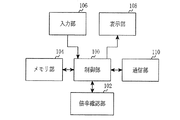
図1は、本発明の一実施形態による傾きを用いて出力画面の倍率を調節する携帯用端末機の構成を示すブロック図である。
図1を参照すると、携帯用端末機は、制御部100、倍率確認部102、メモリ部104、入力部106、表示部108、及び通信部110を含んで構成される。
FIG. 1 is a block diagram illustrating a configuration of a portable terminal that adjusts a magnification of an output screen using inclination according to an embodiment of the present invention.
Referring to FIG. 1, the portable terminal includes a
携帯用端末機の制御部100は、携帯用端末機の全般的な動作を制御する。
例えば、音声通話及びデータ通信のための処理及び制御を行う。また、制御部100は、本発明によって携帯用端末機の傾きを用いた出力画面の拡大/縮小を用いて既存のマルチタッチ基盤の指タッチを用いた出力画面の拡大/縮小の問題を解決するように処理する。
The
For example, processing and control for voice call and data communication are performed. In addition, the
すなわち、制御部100は、携帯用端末機の傾きを測定した後、測定された傾きの程度が出力画面の拡大のための傾きであるのか、又は出力画面の縮小のための傾きであるのか確認する。また、制御部100は、測定された傾きを用いて拡大又は縮小の倍率を確認する。
この際、制御部100は、傾きを用いて確認した倍率を示すズームゲージを出力することで変更される画面倍率を示し、出力画面の倍率が決定されると出力されたズームゲージが消えるように処理する。
これによって、携帯用端末機の使用者はズームゲージが消える前に示される画面倍率が出力画面の倍率として設定されることが分かる。
That is, after measuring the inclination of the portable terminal, the
At this time, the
Accordingly, the user of the portable terminal can recognize that the screen magnification shown before the zoom gauge disappears is set as the magnification of the output screen.
倍率確認部102は、制御部100の制御下で携帯用端末機の傾きを測定するセンシング部を含むことができ、センシング部を介して取得されるセンシング情報を用いて携帯用端末機の傾きを判断できる。以後、携帯用端末機の倍率確認部102は判断された傾きを介して変更する出力画面の倍率を把握することができる。
The
メモリ部104は、ロム(ROM)、ラム(RAM)、フラッシュROMなどで構成される。ROMは、制御部100及び倍率確認部104の処理及び制御のためのプログラムのマイクロコードと各種参照データを保存する。
RAMは、制御部100のワーキングメモリで、各種プログラムを行う際に発生する一時的なデータを保存する。
また、フラッシュROMは電話番号簿、受発信メッセージ、メタデータ、及びデータ保存用データベースのような更新可能な各種保管用データを保存し、本発明による出力画面の拡大又は縮小倍率の判断のための基準情報を保存する。
The
The RAM is a working memory of the
In addition, the flash ROM stores various updatable storage data such as a telephone directory, incoming / outgoing messages, metadata, and a data storage database for determining the enlargement or reduction ratio of the output screen according to the present invention. Save reference information.
入力部106は、0〜9の数字キーボタンと、メニューボタン、キャンセルボタン、確認ボタン、通話ボタン、終了ボタン、インターネットアクセスボタン、ナビゲーションキー(又は方向キー)ボタン、及び文字入力キーなど複数の機能キーを具備し、使用者が押すキーに対応するキー入力データを制御部100に提供する。また、入力部106は本発明による出力画面の中の拡大又は縮小地点を設定する使用者の入力を制御部100に提供する。
The
表示部108は、携帯用端末機の動作する際に発生する状態情報、文字、多量の動画及び静止画像などを表示するもので、本発明による画面の倍率が調節された画面を出力、表示する。表示部108は、カラー液晶ディスプレイ装置(LCD)、AMOLED(Active Matrics Organic Light Emitting Diode)などを使用してもよく、表示部108は、タッチ入力装置を具備してタッチ入力方式の機器に適用する場合に入力装置としも使用する。
The
通信部110は、アンテナ(図示せず)を介して入出力されるデータの無線信号を送受信処理する機能を行う。
例えば、送信である場合、送信するデータをチャンネルコーディング及び拡散した後、RF処理して送信する機能を行い、受信である場合、受信されたRF信号を基底帯域信号に変換して基底帯域信号を逆拡散及びチャンネル復号してデータを復元する機能を行う。
The
For example, in the case of transmission, the transmission data is subjected to channel coding and spreading and then subjected to RF processing and transmitted. In the case of reception, the received RF signal is converted into a baseband signal to convert the baseband signal. A function of restoring data by despreading and channel decoding is performed.
倍率確認部102の役割は、携帯用端末機の制御部100によって行われてもよいが、本発明ではこれを別途に構成して図に示したのは説明の便宜のための例示的な構成であって決して本発明の範囲を制限しようとするものではなく、当業者であれば本発明の範囲内で多様な変形構成が可能であることを理解できるはずである。例えば、これら全てを制御部100で処理するように構成してもよい。
The role of the
図2は、本発明の一実施形態による携帯用端末機を用いて出力画面の倍率を調節する段階を説明するためのフローチャートである。
図2を参照すると、出力画面の倍率を調節するための携帯用端末機の使用者は、まずステップS201で拡大又は縮小機能を支援するアプリケーションを実行する。
ここで、拡大又は縮小機能を支援するアプリケーションは、インターネットブラウザ、電子書籍ビューア、イメージビューア、電子新聞ビューアなどがある。
FIG. 2 is a flowchart illustrating a step of adjusting a magnification of an output screen using a portable terminal according to an embodiment of the present invention.
Referring to FIG. 2, the user of the portable terminal for adjusting the magnification of the output screen first executes an application that supports the enlargement / reduction function in step S201.
Here, examples of applications that support the enlargement or reduction function include an Internet browser, an electronic book viewer, an image viewer, and an electronic newspaper viewer.
次に、携帯用端末機の使用者は、ステップS203に進行して出力画面を拡大又は縮小させる機能を行なうか否かを確認する。
もし、ステップS203で出力画面の拡大又は縮小機能を行なわないと判断した場合、携帯用端末機の使用者はステップS201の段階にもどる。
Next, the user of the portable terminal proceeds to step S203 and confirms whether or not to perform a function of enlarging or reducing the output screen.
If it is determined in step S203 that the enlargement or reduction function of the output screen is not performed, the user of the portable terminal returns to step S201.
一方、ステップS203で出力画面の拡大又は縮小機能を行なうと判断した場合、携帯用端末機の使用者は、ステップS205に進行してタッチ入力を用いて基準点を設定する。
ここで、基準点は、出力画面の中の拡大又は縮小しようとする地点を示すもので、携帯用端末機は基準点(使用者のタッチ入力が発生した地点)を基に出力画面の一定領域を拡大又は縮小するように処理する。
On the other hand, if it is determined in step S203 that the enlargement or reduction function of the output screen is to be performed, the user of the portable terminal proceeds to step S205 and sets a reference point using touch input.
Here, the reference point indicates a point to be enlarged or reduced in the output screen, and the portable terminal is a fixed area of the output screen based on the reference point (a point where the user's touch input is generated). Are processed to be enlarged or reduced.
次に、携帯用端末機の使用者は、ステップS207に進行して予め定められた方向に端末機を傾かせて拡大又は縮小させる機能を行う。
すなわち、携帯用端末機は、使用者によって傾かされる程度(量)及び方向に応じて出力画面の倍率を調節することができる。
次に、携帯用端末機の使用者はこのアルゴリズムを終了する。
Next, the user of the portable terminal proceeds to step S207 and performs a function of tilting the terminal in a predetermined direction to enlarge or reduce it.
That is, the portable terminal can adjust the magnification of the output screen according to the degree (amount) and the direction of tilting by the user.
Next, the user of the portable terminal ends this algorithm.
図3は、本発明の一実施形態による携帯用端末機において使用者の傾きに応じて出力画面の倍率を調節する段階を説明するためのフローチャートである。 FIG. 3 is a flowchart illustrating a step of adjusting a magnification of an output screen according to a user's inclination in a portable terminal according to an embodiment of the present invention.
図3を参照すると、携帯用端末機は、まずステップS301で拡大又は縮小機能を支援するアプリケーションを実行する。
ここで、拡大又は縮小機能を支援するアプリケーションは、先の説明と同様にインターネットブラウザ、電子書籍ビューア、イメージビューア、電子新聞ビューアなどがある。
Referring to FIG. 3, the portable terminal first executes an application that supports an enlargement or reduction function in step S301.
Here, examples of applications that support the enlargement or reduction function include an Internet browser, an electronic book viewer, an image viewer, and an electronic newspaper viewer, as described above.
次に、携帯用端末機はステップS303に進行して使用者から出力画面の中の拡大又は縮小しようとする地点を示す基準点設定のためのタッチ入力を感知したか否かを確認する。
もし、ステップS303で基準点設定のためのタッチ入力を感知してない場合、携帯用端末機はステップS301の段階にもどる。
Next, the portable terminal proceeds to step S303 and checks whether a touch input for setting a reference point indicating a point to be enlarged or reduced in the output screen is detected from the user.
If the touch input for setting the reference point is not detected in step S303, the portable terminal returns to step S301.
一方、ステップS303で基準点設定のためのタッチ入力を感知した場合、携帯用端末機はステップS305に進行して出力画面にズームゲージを出力(表示)するように処理する。
ここで、ズームゲージは、出力画面の倍率を示すゲージであって、ズームゲージが上がれるほど高い倍率に出力され、ズームゲージが下がれるほど出力画面が低い倍率に出力される。また、携帯用端末機の使用者は出力されるズームゲージを直接調節して出力画面の倍率を調節してもよい。
On the other hand, if a touch input for setting a reference point is detected in step S303, the portable terminal proceeds to step S305 and processes to output (display) a zoom gauge on the output screen.
Here, the zoom gauge is a gauge indicating the magnification of the output screen, and the higher the zoom gauge is, the higher the output is. The lower the zoom gauge is, the lower the output screen is. In addition, the user of the portable terminal may adjust the magnification of the output screen by directly adjusting the zoom gauge to be output.
次に、携帯用端末機はステップS307に進行して端末機の現在状態に対する傾きを測定する。
これは使用者による携帯用端末機の傾かせによって携帯用端末機の出力画面の倍率が調節されることであり、出力画面の倍率調節のための傾きを感知したか否かを判断するためのものである。
Next, the portable terminal proceeds to step S307 and measures the inclination of the terminal with respect to the current state.
This is because the magnification of the output screen of the portable terminal is adjusted by the tilting of the portable terminal by the user, and it is determined whether or not the tilt for adjusting the magnification of the output screen is detected. Is.
次に、携帯用端末機はステップS309に進行してステップS307で測定した傾きを用いて携帯用端末機の出力画面を拡大しようとする使用者による傾かせであるかどうかを確認する。
もし、ステップS309で出力画面を拡大しようとする使用者による傾かせであると確認された場合、携帯用端末機はステップS311に進行して測定された傾きに応じた出力画面の拡大倍率を確認する。
Next, the portable terminal proceeds to step S309 and uses the inclination measured in step S307 to check whether the inclination is caused by a user who intends to enlarge the output screen of the portable terminal.
If it is confirmed in step S309 that the user intends to enlarge the output screen, the portable terminal proceeds to step S311 and confirms the magnification of the output screen according to the measured inclination. To do.
次に、携帯用端末機はステップS313に進行して確認された倍率に基準点周辺を拡大するように処理した後、ステップS315に進行して拡大倍率に応じて既出力されたズームゲージを変更する。すなわち、携帯用端末機は変更されたズームゲージを用いて出力画面の現在の拡大された倍率を示す。 Next, the portable terminal proceeds to step S313 to process the magnification around the reference point to the confirmed magnification, and then proceeds to step S315 to change the output zoom gauge according to the magnification. To do. That is, the portable terminal uses the changed zoom gauge to indicate the current enlarged magnification of the output screen.
一方、ステップS309で出力画面を縮小しようとする使用者による傾かせであると確認された場合、携帯用端末機はステップS317に進行して測定された傾きに応じた出力画面の縮小倍率を確認する。 On the other hand, if it is confirmed in step S309 that the user intends to reduce the output screen, the portable terminal proceeds to step S317 to check the reduction magnification of the output screen according to the measured inclination. To do.
次に、携帯用端末機はステップS319に進行して確認された倍率に基準点周辺を縮小するように処理した後、ステップS321に進行して縮小倍率に応じて既出力されたズームゲージを変更する。すなわち、携帯用端末機は変更されたズームゲージを用いて出力画面の現在の縮小された倍率を示す。すなわち、ズームゲージの数値(倍率)は端末機の傾きが固定されるまで傾きの変化に応じて変更される。 Next, the portable terminal proceeds to step S319 to perform processing to reduce the periphery of the reference point to the confirmed magnification, and then proceeds to step S321 to change the output zoom gauge according to the reduction magnification. To do. That is, the portable terminal uses the changed zoom gauge to indicate the current reduced magnification of the output screen. In other words, the numerical value (magnification) of the zoom gauge is changed according to the change in tilt until the tilt of the terminal is fixed.
例えば、携帯用端末機は使用者の傾きに対する拡大及び縮小の倍率を次のようにまとめて保存することができる。

この際、携帯用端末機は、端末機の動作状態に応じて出力画面の倍率を変更するように傾き情報を区分する。
すなわち、横モードに動作する携帯用端末機はX軸センシング情報を用いて傾きを把握した後、出力画面の倍率を調節し、
縦モードに動作する携帯用端末機はY軸センシング情報を用いて傾きを把握した後、出力画面の倍率を調節することができる。
また、傾きの変化が増加することは携帯用端末機が使用者によってさらに傾かせられたことになる。
At this time, the portable terminal classifies the tilt information so as to change the magnification of the output screen according to the operation state of the terminal.
That is, the portable terminal operating in the horizontal mode grasps the tilt using the X-axis sensing information, adjusts the magnification of the output screen,
The portable terminal operating in the vertical mode can adjust the magnification of the output screen after grasping the tilt using the Y-axis sensing information.
In addition, an increase in the tilt change means that the portable terminal is further tilted by the user.
上記の拡大/縮小の倍率に応じてズームゲージを変更した携帯用端末機は、ステップS323に進行して端末機に対する傾き変更の測定を終了するのか否かを確認する。
すなわち、携帯用端末機は、使用者が現在出力画面の倍率が適当であると判断して端末機を傾かせる段階を終了したのか確認(端末機の傾きが固定したのか確認)することである。
もし、ステップS323で端末機に対する傾き変化の測定が終了していない場合(傾きの変化が継続的に発生する場合)、携帯用端末機はステップS307の段階にもどる。
The portable terminal that has changed the zoom gauge according to the magnification / reduction ratio described above proceeds to step S323 and confirms whether or not the measurement of the inclination change with respect to the terminal is terminated.
That is, the portable terminal confirms whether the user has determined that the magnification of the current output screen is appropriate and has tilted the terminal (confirms whether the tilt of the terminal is fixed). .
If the measurement of the tilt change with respect to the terminal is not completed in step S323 (when the tilt change occurs continuously), the portable terminal returns to the step S307.
一方、ステップS323で端末機に対する傾きの測定が終了(傾きが固定した場合)する場合、携帯用端末機はステップS325に進行してズームゲージの出力を中断する。この際、携帯用端末機は傾きに応じた倍率調節段階で一定時間の間の傾きが測定されてない場合、既出力のズームゲージが消えるようにする。
次に、携帯用端末機はステップS327に進行して現在倍率を出力画面の倍率に使用した後、このアルゴリズムを終了する。
On the other hand, when the measurement of the tilt with respect to the terminal ends in step S323 (when the tilt is fixed), the portable terminal proceeds to step S325 and interrupts the output of the zoom gauge. At this time, the portable terminal is configured such that the zoom gauge that has already been output disappears when the inclination is not measured for a certain period of time in the magnification adjustment step according to the inclination.
Next, the portable terminal proceeds to step S327 and uses the current magnification as the magnification of the output screen, and then ends this algorithm.
図4は、本発明の一実施形態による携帯用端末機のリンク選択の過程を説明するためのフローチャートである。
図4を参照すると、リンク選択過程は、携帯用端末機に出力された画面に含まれたリンクを使用者から選択する段階を示す。
FIG. 4 is a flowchart illustrating a link selection process of a portable terminal according to an embodiment of the present invention.
Referring to FIG. 4, the link selection process shows a step of selecting a link included in a screen output to a portable terminal from a user.
まず、携帯用端末機は、ステップS401で拡大又は縮小機能を支援するアプリケーションを実行する。
ここで、拡大又は縮小機能を支援するアプリケーションは、先の説明と同様にインターネットブラウザ、電子書籍ビューア、イメージビューア、電子新聞ビューアなどがある。
この際、携帯用端末機は複数のリンクを含むページを出力しているとする。
First, the portable terminal executes an application that supports an enlargement or reduction function in step S401.
Here, examples of applications that support the enlargement or reduction function include an Internet browser, an electronic book viewer, an image viewer, and an electronic newspaper viewer, as described above.
At this time, it is assumed that the portable terminal outputs a page including a plurality of links.
次に、携帯用端末機は、ステップS403に進行してリンク項目の選択のための使用者のタッチ入力を感知したか否かを確認する。
すなわち、ステップS403は、出力画面に含まれたリンクを選択したタッチ入力が発生したか否かを確認することである。
もし、ステップS403でリンク項目の選択のための使用者のタッチ入力を感知してない場合、携帯用端末機はステップS401の段階にもどる。
Next, the portable terminal proceeds to step S403 and confirms whether or not a user touch input for selecting a link item is detected.
That is, step S403 is to confirm whether or not a touch input that selects a link included in the output screen has occurred.
If the user's touch input for selecting the link item is not detected in step S403, the portable terminal returns to step S401.
一方、ステップS403でリンク項目の選択のための使用者のタッチ入力を感知した場合、携帯用端末機はステップS405に進行して使用者のタッチ入力を感知した位置周辺に複数のリンク項目が存在するのか確認する。
これは携帯用端末機の使用者が限定された大きさに含まれたリンク項目を不明確に選択した状況が生じたのか否かを確認することであり、携帯用端末機は複数のリンク項目が存在する場合、使用者のタッチ入力が正確ではないと判断する。
On the other hand, if the user's touch input for selecting the link item is detected in step S403, the portable terminal proceeds to step S405 and there are a plurality of link items around the position where the user's touch input is detected. Check if you want to.
This is to check whether or not there is a situation in which the user of the portable terminal has selected the link item included in the limited size indefinitely. Is present, it is determined that the user's touch input is not accurate.
もし、ステップS405で使用者のタッチ入力が感知された位置周辺に一つのリンク項目だけが存在することを確認した場合、携帯用端末機はステップS411に進行して使用者によって選択されたリンク項目に対する動作を行う。この際、携帯用端末機はリンク項目に対する動作で該当リンクと接続されたページを出力するように処理することもできる。 If it is determined in step S405 that only one link item exists around the position where the user's touch input is detected, the portable terminal proceeds to step S411 and selects the link item selected by the user. Perform the operation for. At this time, the portable terminal can process the link item to output a page connected to the link.
一方、ステップS405で使用者のタッチ入力が感知された位置周辺に複数のリンク項目が存在することを確認した場合、携帯用端末機はステップS407に進行してズーム画面状態でリンク項目が選択されたのか確認する。ここで、ステップS407はステップS405と同様に携帯用端末機の使用者が限定された大きさに含まれたリンク項目を不明確に選択した状況が発生したのか否かを確認することである。 On the other hand, if it is confirmed in step S405 that there are a plurality of link items around the position where the user's touch input is detected, the portable terminal proceeds to step S407 and the link item is selected in the zoom screen state. Check if it was. Here, step S407 is to confirm whether or not a situation has occurred in which the user of the portable terminal has unclearly selected the link item included in the limited size as in step S405.
もし、ステップS407でズーム画面状態ではない状況でリンク項目を選択した状況が発生したことを確認した場合、携帯用端末機はステップS413に進行してタッチ入力が感知された位置を予め定めた倍率に拡大することで既出力されたリンク項目が拡大され出力されるように処理する。 If it is confirmed in step S407 that the link item is selected in a state that is not in the zoom screen state, the portable terminal proceeds to step S413 and determines the position at which the touch input is detected as a predetermined magnification. The link item that has already been output is expanded and output so that it is output.
次に、携帯用端末機はステップS415に進行してリンク項目の選択のための使用者の入力を再感知した後、ステップS411に進行して使用者によって再選択されたリンク項目に対する動作を行う。
すなわち、携帯用端末機は拡大されたリンク項目に対する使用者の選択を再感知することである。
Next, the portable terminal proceeds to step S415 to re-sense the user's input for selecting a link item, and then proceeds to step S411 to perform an operation on the link item reselected by the user. .
That is, the portable terminal re-senses the user's selection for the enlarged link item.
一方、ステップS407でズーム画面状態でリンク項目を選択した状況が発生したことを確認した場合、携帯用端末機はステップS409に進行して臨界値以上のズーム状態でリンク項目を選択する状況であるのか否かを確認する。
この際、携帯用端末機は最小ズーム倍率から最大ズーム倍率の間を複数のレベルに分けて、一定レベル以上のズームが面状態を基に不明確にリンク項目を選択した状況が発生したのか判断することができる。
On the other hand, if it is confirmed in step S407 that the link item is selected in the zoom screen state, the portable terminal proceeds to step S409 and selects the link item in the zoom state equal to or greater than the critical value. Confirm whether or not.
At this time, the portable terminal divides the range between the minimum zoom magnification and the maximum zoom magnification into a plurality of levels, and determines whether or not a zoom level above a certain level has unclearly selected a link item based on the surface condition. can do.
一例として、携帯用端末機は下記の表2と同様にズーム倍率を区分してリンク項目に対する選択の正確性を把握することができる。
ここで、携帯用端末機は、最小0.4の倍率から最大4.0の倍率まで出力画面の倍率を調節することができ、3レベル以上の倍率状態で使用者によるリンク項目の選択が正確に行われたと判断することができる。
もし、ステップS409で不正確にリンク項目を選択した状況が発生したことを確認した場合(一定レベル未満のズーム画面状態でリンク項目を選択した状況が発生したことを確認した場合)、携帯用端末機はステップS413に進行してタッチ入力が感知された位置を予め定めた倍率に拡大することで既出力されたリンク項目が拡大され出力されるように処理した後、ステップS415に進行してリンク項目の選択のための使用者の入力を再感知する。
Here, the portable terminal can adjust the magnification of the output screen from a minimum magnification of 0.4 to a maximum magnification of 4.0, and the link item can be accurately selected by the user in three or more magnification states. It can be determined that this was done.
If it is confirmed in step S409 that the situation in which the link item has been selected incorrectly has occurred (if it has been confirmed that the situation in which the link item has been selected in a zoom screen state below a certain level has occurred), the portable terminal The machine proceeds to step S413 to enlarge the position where touch input is sensed to a predetermined magnification so that the previously output link item is enlarged and output, and then proceeds to step S415 to link. Re-sense user input for item selection.
一方、ステップS409で不正確にリンク項目を選択した状況が発生してないことを確認した場合(一定レベル以上のズーム画面状態でリンク項目を選択した状況が発生したことを確認した場合)、携帯用端末機は使用者によるリンク項目の選択が正確であると判断してステップS411に進行した後、使用者によって選択されたリンク項目に対する動作を行う。
次に、携帯用端末機はこのアルゴリズムを終了する。
On the other hand, when it is confirmed in step S409 that the situation in which the link item is selected incorrectly has not occurred (when it has been confirmed that the situation in which the link item has been selected in a zoom screen state above a certain level has occurred) The terminal determines that the selection of the link item by the user is accurate and proceeds to step S411, and then performs an operation on the link item selected by the user.
Next, the portable terminal ends this algorithm.
図5(A)〜(D)は、本発明の一実施形態による携帯用端末機において出力画面の倍率を調節する画面を示す図である。
図5(A)は、本発明の一実施形態による携帯用端末機において基準点を設定する画面を示す図である。
5A to 5D are diagrams illustrating screens for adjusting the magnification of the output screen in the portable terminal according to an embodiment of the present invention.
FIG. 5A is a diagram illustrating a screen for setting a reference point in a portable terminal according to an embodiment of the present invention.
図5(A)を参照すると、携帯用端末機500は、インターネットブラウザ、電子書籍ビューア、イメージビューア、電子新聞ビューアのような出力画面の拡大又は縮小機能を支援するアプリケージョンを実行した後、アプリケーションに該当する内容を出力する(符号501)。これによって、出力画面の倍率を調節するための携帯用端末機の使用者はタッチ入力を介して倍率調節地点に該当する基準点を設定する(符号503)。
Referring to FIG. 5A, the
図5(B)は、本発明の一実施形態による携帯用端末機においてズームゲージを出力した画面を示す図である。
図5(B)を参照すると、携帯用端末機は図5(A)と同様に使用者によって基準点が設定される場合、拡大/縮小の倍率を示すズームゲージを出力する(符号505)。この際、ズームゲージは使用者による出力画面の倍率の調節に応じてゲージの倍率も共に調節され、携帯用端末機の使用者はゲージを直接調節して出力画面の倍率を調節することもできる。
FIG. 5B is a diagram illustrating a screen on which a zoom gauge is output in the portable terminal according to an embodiment of the present invention.
Referring to FIG. 5B, when the reference point is set by the user as in FIG. 5A, the portable terminal outputs a zoom gauge indicating the enlargement / reduction magnification (reference numeral 505). At this time, the zoom gauge adjusts the magnification of the output screen according to the adjustment of the magnification of the output screen by the user, and the user of the portable terminal can adjust the magnification of the output screen by directly adjusting the gauge. .
図5(C)は、本発明の一実施形態による携帯用端末機において傾きを用いて出力画面を拡大させた画面を示す図である。
図5(C)を参照すると、携帯用端末機の使用者は本発明による携帯用端末機の傾きを介して出力画面の倍率を調節することができる。
この際、携帯用端末機は横モード状態であることに応じてX軸のセンシング情報の変更を確認し、出力画面を拡大するのかまたは縮小するのかを把握する。
FIG. 5C is a diagram illustrating a screen obtained by enlarging an output screen using tilt in the portable terminal according to an embodiment of the present invention.
Referring to FIG. 5C, the user of the portable terminal can adjust the magnification of the output screen through the inclination of the portable terminal according to the present invention.
At this time, the portable terminal confirms whether the X-axis sensing information is changed according to the horizontal mode state, and grasps whether the output screen is enlarged or reduced.
すなわち、例えば、使用者が横モードの携帯用端末機の上側を使用者側の方に引っ張り寄せる場合、X軸のセンシング情報が変更されることが確認され、変更された情報に応じて出力画面を拡大させる(符号507)ことができる。これによって、図5(A)に示した出力の内容より少ない項目の内容が出力されるが、基準点周辺の内容はセンシング情報の変化程度、言い換えると傾きの程度に従って大きく拡大出力されて拡大倍率に応じて既出力されたズームゲージの状態を変更する(符号509)。 That is, for example, when the user pulls the upper side of the portable terminal in the horizontal mode toward the user side, it is confirmed that the X-axis sensing information is changed, and the output screen is displayed according to the changed information. Can be enlarged (reference numeral 507). As a result, the contents of items smaller than the output contents shown in FIG. 5A are output, but the contents around the reference point are greatly enlarged and output in accordance with the degree of change in sensing information, in other words, the degree of inclination. The state of the zoom gauge that has already been output is changed in response to (509).
図5(D)は、本発明の一実施形態による携帯用端末機において傾きを用いて出力画面を縮小させた画面を示す図である。
図5(D)を参照すると、携帯用端末機の使用者は本発明による携帯用端末機の傾きを介して出力画面の倍率を調節することができ、横モード状態であることに応じて携帯用端末機はX軸のセンシング情報の変化を確認して出力画面を拡大するのか、又は縮小するのかを把握する。
もし、携帯用端末機が縦モード状態である場合、携帯用端末機はY軸センシング情報の変化を確認して出力画面の倍率を調節することができる。
FIG. 5D is a view illustrating a screen obtained by reducing the output screen using the tilt in the portable terminal according to the embodiment of the present invention.
Referring to FIG. 5D, the user of the portable terminal can adjust the magnification of the output screen through the inclination of the portable terminal according to the present invention, and the portable terminal can be changed according to the horizontal mode state. The terminal for the terminal confirms whether the output screen is enlarged or reduced by confirming the change of the sensing information of the X axis.
If the portable terminal is in the vertical mode, the portable terminal can adjust the magnification of the output screen by checking the change of the Y-axis sensing information.
すなわち、例えば、使用者が横モードの携帯用端末機の上側を使用者側とは逆の方に押し出す場合、X軸のセンシング情報が変更されることが確認され、変更された情報に応じて出力画面を縮小させる(符号511)ことができる。これによって、図5(A)に示した出力の内容より多い項目の内容が出力されるが、基準点周辺の内容はセンシング情報の変化程度、言い換えると傾きの程度に従って縮小され出力される。また、携帯用端末機は出力画面を縮小させた後、縮小倍率に応じて出力のズームゲージの状態を変更する(符号513)。 That is, for example, when the user pushes the upper side of the portable terminal in the transverse mode in the direction opposite to the user side, it is confirmed that the sensing information of the X axis is changed, and according to the changed information The output screen can be reduced (reference numeral 511). As a result, the contents of items more than the output contents shown in FIG. 5A are output, but the contents around the reference point are reduced and output according to the change degree of the sensing information, in other words, the inclination degree. Also, the portable terminal reduces the output screen and then changes the state of the output zoom gauge according to the reduction magnification (reference numeral 513).
図5(A)〜(D)に示すように、端末機の傾きに応じて変更されるズームゲージは、端末機の傾き変化が測定されてない場合には消えて、携帯用端末機はズームゲージが消える前の倍率を出力画面の倍率に設定することができる。 As shown in FIGS. 5A to 5D, the zoom gauge changed according to the tilt of the terminal disappears when the tilt change of the terminal is not measured, and the portable terminal zooms. The magnification before the gauge disappears can be set as the magnification on the output screen.
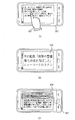
図6(A)〜(C)は、本発明の一実施形態による携帯用端末機においてリンク項目の選択を制御する画面を示す図である。
図6(A)は、本発明の一実施形態による携帯用端末機においてリンク項目の選択を感知する画面を示す図である。
6A to 6C are diagrams illustrating screens for controlling selection of link items in a portable terminal according to an embodiment of the present invention.
FIG. 6A is a diagram illustrating a screen for detecting selection of a link item in a portable terminal according to an embodiment of the present invention.
図6(A)を参照すると、携帯用端末機は、インターネットブラウザ、電子書籍ビューア、イメージビューア、電子新聞ビューアのような出力画面の拡大又は縮小機能を支援するアプリケージョンを実行した後、アプリケーション実行に従う内容を出力する。
もし、実行したアプリケージョンが電子新聞ビューアである場合、複数のリンク項目を出力した(符号600)後、使用者によって選択された項目に対する詳しいニュースを提供する。
この時、携帯用端末機の使用者は、図に示すように出力画面のリンク項目のうち、興味あるニュースに対するリンク項目を選択する(符号601)。
Referring to FIG. 6A, the portable terminal executes an application that supports an enlargement or reduction function of an output screen such as an Internet browser, an electronic book viewer, an image viewer, and an electronic newspaper viewer, and then executes the application. Output the contents according to.
If the executed application is an electronic newspaper viewer, after outputting a plurality of link items (reference numeral 600), detailed news on the item selected by the user is provided.
At this time, the user of the portable terminal selects the link item for the news of interest from the link items on the output screen as shown in the figure (reference numeral 601).
図6(B)は、本発明の一実施形態による携帯用端末機において使用者のタッチ入力周辺に存在するリンク項目を拡大した画面を示す図である。
図6(B)を参照すると、使用者が図6(A)のように限定された出力画面に含まれたリンク項目が使用者より選択された場合、リンク項目の間隔が狭くて使用者が選択したいリンク項目を正確に選択できず周辺の他のリンク項目が選択されることが発生することがある。
FIG. 6B is a diagram illustrating a screen in which link items existing around the touch input of the user are enlarged in the portable terminal according to the embodiment of the present invention.
Referring to FIG. 6B, when the link item included in the limited output screen as shown in FIG. 6A is selected by the user, the interval between the link items is narrow and the user It may occur that the link item to be selected cannot be accurately selected and other link items in the vicinity are selected.
本発明による携帯用端末機は以下のような状況において上記のような不正確なリンク項目の選択が発生したと判断することができる。
一つ目は、携帯用端末機はリンク項目間の間隔が狭い場合、上記のような状況が発生すると判断することであり、出力画面が拡大されてない状態がなる。
二つ目は、携帯用端末機の出力画面が拡大されたが、リンク項目を正確に区分できる程度まで拡大されてない状態がなる。
The portable terminal according to the present invention can determine that an incorrect link item has been selected as described above in the following situation.
The first is that the portable terminal determines that the above situation occurs when the interval between link items is narrow, and the output screen is not enlarged.
Second, although the output screen of the portable terminal has been enlarged, it has not been enlarged to the extent that link items can be accurately classified.
これによって、携帯用端末機は上述のような状況が発生したことを確認した場合、使用者によって選択されたリンク項目の周辺を基に予め定められた範囲の領域を拡大出力して(符号603)使用者によるリンク項目の選択過程を再び行う。
すなわち、図に示すように、携帯用端末機は図6(A)に示すリンク項目のうち一部の項目だけ拡大して使用者による選択の正確度を向上させる。
Accordingly, when the portable terminal confirms that the above situation has occurred, the portable terminal expands and outputs an area in a predetermined range based on the periphery of the link item selected by the user (
That is, as shown in the figure, the portable terminal expands only a part of the link items shown in FIG. 6A to improve the accuracy of selection by the user.
図6(C)は、本発明の一実施形態による携帯用端末機において使用者によって選択されたリンク項目の詳しい内容を出力した画面を示す図である。
図6(C)を参照すると、携帯用端末機は図6(B)と同様の動作を介してリンク項目の選択過程の正確性を向上させることができる。
FIG. 6C is a diagram illustrating a screen on which the detailed contents of the link item selected by the user in the portable terminal according to the embodiment of the present invention are output.
Referring to FIG. 6C, the portable terminal can improve the accuracy of the link item selection process through the same operation as in FIG. 6B.
図6(B)に示すように拡大されたリンク項目から使用者が興味ある項目を再選択するようにすることで、図に示すように選択されたリンク項目に対する詳しい内容を出力することができる。図6(C)は、使用者が選択したリンク項目の見出し(符号605)と見出しと係る記事(符号607)を共に出力したことを示す。
これにより、携帯用端末機の使用者がリンク項目を間違って選択した場合、キャンセル過程を行った後、さらに正常的なリンク項目を選択する過程を行う既存の方法より便利にリンク項目の内容を検索することができる。
By reselecting the item that the user is interested in from the expanded link items as shown in FIG. 6B, it is possible to output detailed contents for the selected link item as shown in the figure. . FIG. 6C shows that the headline (reference numeral 605) of the link item selected by the user and the article (reference numeral 607) related to the headline are output together.
As a result, if the user of the portable terminal selects the link item by mistake, the content of the link item is more convenient than the existing method of performing the process of selecting a more normal link item after performing the cancellation process. You can search.
上述のように、本発明は携帯端末機において出力画面を制御するための装置及び方法に関するもので、携帯用端末機の傾きを用いて出力画面の倍率を調節して、画面の出力倍率に応じるリンク項目を拡大出力して出力画面の倍率調節の性能を向上させ、リンク項目の選択率を向上させることができる。 As described above, the present invention relates to an apparatus and method for controlling an output screen in a portable terminal, and adjusts the magnification of the output screen using the inclination of the portable terminal to respond to the output magnification of the screen. By expanding and outputting the link item, the magnification adjustment performance of the output screen can be improved, and the selection rate of the link item can be improved.
尚、本発明は、上述の実施例に限られるものではない。本発明の技術的範囲から逸脱しない範囲内で多様に変更実施することが可能である。 The present invention is not limited to the above-described embodiments. Various modifications can be made without departing from the technical scope of the present invention.
100 制御部
102 倍率確認部
104 メモリ部
106 入力部
108 表示部
110 通信部
DESCRIPTION OF
Claims (18)
倍率が調節された出力画面を表示する表示部と、
前記出力画面の中の拡大又は縮小地点を設定する入力部と、
前記出力画面の拡大又は縮小の倍率を判断するための基準情報を保存するメモリ部と、
前記携帯用端末機の傾きを測定して、前記測定された傾きを用いて出力画面の倍率の調節有無を判断する倍率確認部と、
前記倍率確認部によって確認された倍率に応じて出力画面を制御する制御部とを有することを特徴とする携帯用端末機の出力画面制御装置。 An output screen control device for a portable terminal,
A display for displaying the output screen with the magnification adjusted;
An input unit for setting an enlargement or reduction point in the output screen;
A memory unit that stores reference information for determining the magnification of the output screen;
A magnification confirmation unit that measures the inclination of the portable terminal and determines whether to adjust the magnification of the output screen using the measured inclination,
An output screen control device for a portable terminal, comprising: a control unit that controls an output screen in accordance with the magnification confirmed by the magnification confirmation unit.
ここで、横モードに動作する前記携帯用端末機はX軸センシング情報、縦モードに動作する前記携帯用端末機はY軸センシング情報を用いて傾きを把握することを特徴とする請求項1に記載の携帯用端末機の出力画面制御装置。 The magnification confirmation unit classifies inclination information for changing a magnification of the output screen according to an operation state of the portable terminal.
The apparatus of claim 1, wherein the portable terminal operating in the horizontal mode grasps the tilt using the X-axis sensing information, and the portable terminal operating in the vertical mode uses the Y-axis sensing information. The output screen control apparatus of the portable terminal as described.
出力画面の中の拡大又は縮小地点を設定する段階と、
前記携帯用端末機の傾きを測定する段階と、
前記測定された携帯用端末機の傾きと基準情報とを用いて前記出力画面の倍率の調節有無、及び出力倍率を判断する段階と、
前記判断された出力倍率に応じて前記出力画面を制御する段階と、
前記倍率が調節された出力画面を出力する段階とを有することを特徴とする携帯用端末機の出力画面制御方法。 An output screen control method for a portable terminal,
Setting an enlargement or reduction point in the output screen; and
Measuring the tilt of the portable terminal;
Determining whether to adjust the magnification of the output screen using the measured inclination of the portable terminal and reference information, and the output magnification;
Controlling the output screen in accordance with the determined output magnification;
And outputting an output screen with the magnification adjusted. 8. A method for controlling an output screen of a portable terminal.
ここで、横モードに動作する前記携帯用端末機はX軸センシング情報、縦モードに動作する前記携帯用端末機はY軸センシング情報を用いて傾きを把握することを特徴とする請求項10に記載の携帯用端末機の出力画面制御方法。 The step of determining the output magnification classifies inclination information for changing the magnification of the output screen according to an operation state of the portable terminal,
The apparatus of claim 10, wherein the portable terminal operating in the horizontal mode uses the X-axis sensing information, and the portable terminal operating in the vertical mode uses the Y-axis sensing information. The output screen control method of the portable terminal as described.
前記確認された倍率に応じて選択された前記リンク項目の周辺を拡大させる段階とを含むことを特徴とする請求項17に記載の携帯用端末機の出力画面制御方法。
The step of enlarging the periphery of the link includes the step of checking the magnification of the output screen,
The method of claim 17, further comprising: enlarging a periphery of the link item selected according to the confirmed magnification.
Applications Claiming Priority (2)
| Application Number | Priority Date | Filing Date | Title |
|---|---|---|---|
| KR10-2010-0137448 | 2010-12-29 | ||
| KR1020100137448A KR101830962B1 (en) | 2010-12-29 | 2010-12-29 | Apparatus and method for controlling screen display in portable terminal |
Publications (2)
| Publication Number | Publication Date |
|---|---|
| JP2012141976A true JP2012141976A (en) | 2012-07-26 |
| JP6068797B2 JP6068797B2 (en) | 2017-01-25 |
Family
ID=45442855
Family Applications (1)
| Application Number | Title | Priority Date | Filing Date |
|---|---|---|---|
| JP2011281311A Expired - Fee Related JP6068797B2 (en) | 2010-12-29 | 2011-12-22 | Apparatus and method for controlling output screen of portable terminal |
Country Status (5)
| Country | Link |
|---|---|
| US (3) | US9229631B2 (en) |
| EP (2) | EP2472382A3 (en) |
| JP (1) | JP6068797B2 (en) |
| KR (1) | KR101830962B1 (en) |
| CN (2) | CN108563394B (en) |
Families Citing this family (13)
| Publication number | Priority date | Publication date | Assignee | Title |
|---|---|---|---|---|
| KR101830962B1 (en) | 2010-12-29 | 2018-02-22 | 삼성전자주식회사 | Apparatus and method for controlling screen display in portable terminal |
| KR101861377B1 (en) * | 2012-03-09 | 2018-05-28 | 삼성전자주식회사 | Method for controlling screen based on motion of mobile terminal and the mobile terminal therefor |
| KR20150012265A (en) * | 2012-05-11 | 2015-02-03 | 엠파이어 테크놀로지 디벨롭먼트 엘엘씨 | Input error remediation |
| KR101976177B1 (en) * | 2012-07-09 | 2019-05-08 | 엘지전자 주식회사 | Mobile terminal and method for controlling of the same |
| US20140325345A1 (en) * | 2013-04-26 | 2014-10-30 | Amazon Technologies, Inc. | Consistent Scaling of Web-Based Content Across Devices Having Different Screen Metrics |
| WO2017183652A1 (en) * | 2016-04-19 | 2017-10-26 | 日立マクセル株式会社 | Portable terminal device |
| US9967390B2 (en) * | 2016-08-30 | 2018-05-08 | Google Llc | Device-orientation controlled settings |
| JP6991754B2 (en) * | 2017-07-03 | 2022-01-13 | 株式会社ミツトヨ | Terminal devices and programs |
| CN107463323B (en) * | 2017-07-24 | 2018-03-30 | 上海壹账通金融科技有限公司 | The picture method of controlling operation thereof and mobile terminal of mobile terminal |
| CN111247506A (en) * | 2017-10-11 | 2020-06-05 | 深圳传音通讯有限公司 | Screen control method and screen control system based on intelligent terminal |
| DE102018100196A1 (en) * | 2018-01-05 | 2019-07-11 | Bcs Automotive Interface Solutions Gmbh | Method for operating a human-machine interface and human-machine interface |
| KR102266628B1 (en) * | 2020-11-23 | 2021-06-18 | (주)스토리포유 | Server for diagnosing of trees change of condition, and system thereof |
| CN115220620B (en) * | 2021-04-20 | 2025-02-25 | 华为技术有限公司 | Graphical interface display method, electronic device, medium and program product |
Citations (5)
| Publication number | Priority date | Publication date | Assignee | Title |
|---|---|---|---|---|
| WO2001027735A1 (en) * | 1999-10-12 | 2001-04-19 | Myorigo Oy | Operation method of user interface of hand-held device |
| JP2001211408A (en) * | 2000-01-27 | 2001-08-03 | Fuji Photo Film Co Ltd | Image reproduction method and device and electronic camera |
| US20050001815A1 (en) * | 2003-06-09 | 2005-01-06 | Casio Computer Co., Ltd. | Electronic appliance having magnifying-glass display function, display controlling method, and display control program |
| WO2009044770A1 (en) * | 2007-10-02 | 2009-04-09 | Access Co., Ltd. | Terminal device, link selection method, and display program |
| US20100058254A1 (en) * | 2008-08-29 | 2010-03-04 | Tomoya Narita | Information Processing Apparatus and Information Processing Method |
Family Cites Families (15)
| Publication number | Priority date | Publication date | Assignee | Title |
|---|---|---|---|---|
| US6211856B1 (en) * | 1998-04-17 | 2001-04-03 | Sung M. Choi | Graphical user interface touch screen with an auto zoom feature |
| US6201554B1 (en) * | 1999-01-12 | 2001-03-13 | Ericsson Inc. | Device control apparatus for hand-held data processing device |
| CN100578435C (en) | 2005-07-08 | 2010-01-06 | 三菱电机株式会社 | Touch panel display device and portable device |
| US8462109B2 (en) * | 2007-01-05 | 2013-06-11 | Invensense, Inc. | Controlling and accessing content using motion processing on mobile devices |
| US7889185B2 (en) * | 2007-01-05 | 2011-02-15 | Apple Inc. | Method, system, and graphical user interface for activating hyperlinks |
| KR100922493B1 (en) | 2007-06-27 | 2009-10-20 | 삼성전자주식회사 | Browser navigation method and device using zoom |
| JP5361159B2 (en) * | 2007-09-06 | 2013-12-04 | キヤノン株式会社 | Image display control device, control method therefor, program, and recording medium |
| TWM341898U (en) * | 2008-02-04 | 2008-10-01 | Aiptek Int Inc | Image processing device |
| EP2133563A1 (en) | 2008-06-09 | 2009-12-16 | Siemens Aktiengesellschaft | Method for the determination of a nacelle-inclination |
| US8547348B2 (en) * | 2008-09-10 | 2013-10-01 | Opera Software Asa | Method and apparatus for providing finger touch layers in a user agent |
| US8558803B2 (en) | 2008-11-28 | 2013-10-15 | Samsung Electronics Co., Ltd. | Input device for portable terminal and method thereof |
| US8291348B2 (en) * | 2008-12-31 | 2012-10-16 | Hewlett-Packard Development Company, L.P. | Computing device and method for selecting display regions responsive to non-discrete directional input actions and intelligent content analysis |
| US8587617B2 (en) * | 2009-02-04 | 2013-11-19 | Raytheon Company | Apparatus and method for map zooming |
| JP2010257037A (en) | 2009-04-22 | 2010-11-11 | Sony Corp | Information processing apparatus and method, and program |
| KR101830962B1 (en) | 2010-12-29 | 2018-02-22 | 삼성전자주식회사 | Apparatus and method for controlling screen display in portable terminal |
-
2010
- 2010-12-29 KR KR1020100137448A patent/KR101830962B1/en not_active Expired - Fee Related
-
2011
- 2011-12-13 EP EP11193370.1A patent/EP2472382A3/en not_active Ceased
- 2011-12-13 EP EP20150043.6A patent/EP3654157A1/en not_active Ceased
- 2011-12-22 US US13/335,687 patent/US9229631B2/en active Active
- 2011-12-22 CN CN201810397304.4A patent/CN108563394B/en active Active
- 2011-12-22 CN CN201110435619.1A patent/CN102681757B/en not_active Expired - Fee Related
- 2011-12-22 JP JP2011281311A patent/JP6068797B2/en not_active Expired - Fee Related
-
2015
- 2015-11-27 US US14/953,251 patent/US10503380B2/en active Active
-
2019
- 2019-12-09 US US16/708,144 patent/US10949072B2/en active Active
Patent Citations (12)
| Publication number | Priority date | Publication date | Assignee | Title |
|---|---|---|---|---|
| WO2001027735A1 (en) * | 1999-10-12 | 2001-04-19 | Myorigo Oy | Operation method of user interface of hand-held device |
| CN1379871A (en) * | 1999-10-12 | 2002-11-13 | 迈奥里高有限公司 | Operation method of user interface of hand-held device |
| JP2003511786A (en) * | 1999-10-12 | 2003-03-25 | ミオリゴ オイ | Method of operating user interface of portable device |
| JP2001211408A (en) * | 2000-01-27 | 2001-08-03 | Fuji Photo Film Co Ltd | Image reproduction method and device and electronic camera |
| US20050001815A1 (en) * | 2003-06-09 | 2005-01-06 | Casio Computer Co., Ltd. | Electronic appliance having magnifying-glass display function, display controlling method, and display control program |
| JP2005025170A (en) * | 2003-06-09 | 2005-01-27 | Casio Comput Co Ltd | Electronic device, display control method and program |
| WO2009044770A1 (en) * | 2007-10-02 | 2009-04-09 | Access Co., Ltd. | Terminal device, link selection method, and display program |
| CN101809531A (en) * | 2007-10-02 | 2010-08-18 | 株式会社爱可信 | Terminal device, link selection method, and display program |
| US20100275150A1 (en) * | 2007-10-02 | 2010-10-28 | Access Co., Ltd. | Terminal device, link selection method, and display program |
| KR20120092686A (en) * | 2007-10-02 | 2012-08-21 | 가부시키가이샤 아쿠세스 | Terminal device, link selection method, and computer-readable recording medium stored thereon display program |
| US20100058254A1 (en) * | 2008-08-29 | 2010-03-04 | Tomoya Narita | Information Processing Apparatus and Information Processing Method |
| JP2010055511A (en) * | 2008-08-29 | 2010-03-11 | Sony Corp | Information processor and information processing method |
Also Published As
| Publication number | Publication date |
|---|---|
| CN108563394B (en) | 2022-11-18 |
| EP2472382A3 (en) | 2015-10-28 |
| US20160077729A1 (en) | 2016-03-17 |
| EP3654157A1 (en) | 2020-05-20 |
| KR101830962B1 (en) | 2018-02-22 |
| CN102681757A (en) | 2012-09-19 |
| US20200117351A1 (en) | 2020-04-16 |
| JP6068797B2 (en) | 2017-01-25 |
| US20120169775A1 (en) | 2012-07-05 |
| US10503380B2 (en) | 2019-12-10 |
| EP2472382A2 (en) | 2012-07-04 |
| CN102681757B (en) | 2018-05-29 |
| US10949072B2 (en) | 2021-03-16 |
| US9229631B2 (en) | 2016-01-05 |
| KR20120075683A (en) | 2012-07-09 |
| CN108563394A (en) | 2018-09-21 |
Similar Documents
| Publication | Publication Date | Title |
|---|---|---|
| JP6068797B2 (en) | Apparatus and method for controlling output screen of portable terminal | |
| KR101979666B1 (en) | Operation Method For plural Touch Panel And Portable Device supporting the same | |
| US8009146B2 (en) | Method, apparatus and computer program product for facilitating data entry via a touchscreen | |
| US7986309B2 (en) | Electronic device with touch screen and method of displaying information using the same | |
| US9600153B2 (en) | Mobile terminal for displaying a webpage and method of controlling the same | |
| US9372614B2 (en) | Automatic enlargement of viewing area with selectable objects | |
| US9891805B2 (en) | Mobile terminal, and user interface control program and method | |
| EP1970799A2 (en) | Electronic device and method of controlling mode thereof and mobile communication terminal | |
| KR20120075826A (en) | Method and apparatus for scrolling for electronic device | |
| JP2009026155A (en) | Input display device and mobile radio terminal device | |
| EP2843522A1 (en) | Portable information terminal | |
| US9298364B2 (en) | Mobile electronic device, screen control method, and storage medium strong screen control program | |
| US10359870B2 (en) | Apparatus, method, computer program and user interface | |
| US20150277661A1 (en) | User interface device, user interface method, and program | |
| WO2011056320A1 (en) | Methods for displaying status components at a wireless communication device | |
| US20160077551A1 (en) | Portable apparatus and method for controlling portable apparatus | |
| JP6538785B2 (en) | Electronic device, control method of electronic device, and program | |
| KR20130023948A (en) | Apparatus and method for selecting icon in portable terminal | |
| KR101504349B1 (en) | Apparatus and method of resizing graphical user interface for mobile communication terminal | |
| KR100999884B1 (en) | Character input device and method of portable terminal | |
| JP2014232444A (en) | Portable device, control program, and control method for portable device | |
| KR101289729B1 (en) | Apparatus and method for character input in portable communication system | |
| KR101078323B1 (en) | Apparatus and method for character input in portable communication system | |
| JP5626424B2 (en) | Terminal device, display control method, and program having display function | |
| JP2007094521A (en) | Small information terminal device |
Legal Events
| Date | Code | Title | Description |
|---|---|---|---|
| A621 | Written request for application examination |
Free format text: JAPANESE INTERMEDIATE CODE: A621 Effective date: 20141212 |
|
| A521 | Request for written amendment filed |
Free format text: JAPANESE INTERMEDIATE CODE: A523 Effective date: 20150202 |
|
| A977 | Report on retrieval |
Free format text: JAPANESE INTERMEDIATE CODE: A971007 Effective date: 20160119 |
|
| A131 | Notification of reasons for refusal |
Free format text: JAPANESE INTERMEDIATE CODE: A131 Effective date: 20160126 |
|
| A521 | Request for written amendment filed |
Free format text: JAPANESE INTERMEDIATE CODE: A523 Effective date: 20160426 |
|
| A131 | Notification of reasons for refusal |
Free format text: JAPANESE INTERMEDIATE CODE: A131 Effective date: 20160726 |
|
| A521 | Request for written amendment filed |
Free format text: JAPANESE INTERMEDIATE CODE: A523 Effective date: 20161026 |
|
| TRDD | Decision of grant or rejection written | ||
| A01 | Written decision to grant a patent or to grant a registration (utility model) |
Free format text: JAPANESE INTERMEDIATE CODE: A01 Effective date: 20161206 |
|
| A61 | First payment of annual fees (during grant procedure) |
Free format text: JAPANESE INTERMEDIATE CODE: A61 Effective date: 20161226 |
|
| R150 | Certificate of patent or registration of utility model |
Ref document number: 6068797 Country of ref document: JP Free format text: JAPANESE INTERMEDIATE CODE: R150 |
|
| R250 | Receipt of annual fees |
Free format text: JAPANESE INTERMEDIATE CODE: R250 |
|
| R250 | Receipt of annual fees |
Free format text: JAPANESE INTERMEDIATE CODE: R250 |
|
| R250 | Receipt of annual fees |
Free format text: JAPANESE INTERMEDIATE CODE: R250 |
|
| R250 | Receipt of annual fees |
Free format text: JAPANESE INTERMEDIATE CODE: R250 |
|
| LAPS | Cancellation because of no payment of annual fees |