JP2012141976A - 携帯用端末機の出力画面制御装置及びその方法 - Google Patents
携帯用端末機の出力画面制御装置及びその方法 Download PDFInfo
- Publication number
- JP2012141976A JP2012141976A JP2011281311A JP2011281311A JP2012141976A JP 2012141976 A JP2012141976 A JP 2012141976A JP 2011281311 A JP2011281311 A JP 2011281311A JP 2011281311 A JP2011281311 A JP 2011281311A JP 2012141976 A JP2012141976 A JP 2012141976A
- Authority
- JP
- Japan
- Prior art keywords
- portable terminal
- magnification
- output screen
- output
- screen
- Prior art date
- Legal status (The legal status is an assumption and is not a legal conclusion. Google has not performed a legal analysis and makes no representation as to the accuracy of the status listed.)
- Granted
Links
Images


Classifications
-
- G—PHYSICS
- G06—COMPUTING OR CALCULATING; COUNTING
- G06F—ELECTRIC DIGITAL DATA PROCESSING
- G06F3/00—Input arrangements for transferring data to be processed into a form capable of being handled by the computer; Output arrangements for transferring data from processing unit to output unit, e.g. interface arrangements
- G06F3/01—Input arrangements or combined input and output arrangements for interaction between user and computer
- G06F3/048—Interaction techniques based on graphical user interfaces [GUI]
- G06F3/0484—Interaction techniques based on graphical user interfaces [GUI] for the control of specific functions or operations, e.g. selecting or manipulating an object, an image or a displayed text element, setting a parameter value or selecting a range
- G06F3/04847—Interaction techniques to control parameter settings, e.g. interaction with sliders or dials
-
- G—PHYSICS
- G06—COMPUTING OR CALCULATING; COUNTING
- G06F—ELECTRIC DIGITAL DATA PROCESSING
- G06F1/00—Details not covered by groups G06F3/00 - G06F13/00 and G06F21/00
- G06F1/16—Constructional details or arrangements
- G06F1/1613—Constructional details or arrangements for portable computers
- G06F1/1633—Constructional details or arrangements of portable computers not specific to the type of enclosures covered by groups G06F1/1615 - G06F1/1626
- G06F1/1684—Constructional details or arrangements related to integrated I/O peripherals not covered by groups G06F1/1635 - G06F1/1675
- G06F1/1694—Constructional details or arrangements related to integrated I/O peripherals not covered by groups G06F1/1635 - G06F1/1675 the I/O peripheral being a single or a set of motion sensors for pointer control or gesture input obtained by sensing movements of the portable computer
-
- G—PHYSICS
- G06—COMPUTING OR CALCULATING; COUNTING
- G06F—ELECTRIC DIGITAL DATA PROCESSING
- G06F3/00—Input arrangements for transferring data to be processed into a form capable of being handled by the computer; Output arrangements for transferring data from processing unit to output unit, e.g. interface arrangements
- G06F3/01—Input arrangements or combined input and output arrangements for interaction between user and computer
- G06F3/017—Gesture based interaction, e.g. based on a set of recognized hand gestures
-
- G—PHYSICS
- G06—COMPUTING OR CALCULATING; COUNTING
- G06F—ELECTRIC DIGITAL DATA PROCESSING
- G06F3/00—Input arrangements for transferring data to be processed into a form capable of being handled by the computer; Output arrangements for transferring data from processing unit to output unit, e.g. interface arrangements
- G06F3/01—Input arrangements or combined input and output arrangements for interaction between user and computer
- G06F3/048—Interaction techniques based on graphical user interfaces [GUI]
- G06F3/0481—Interaction techniques based on graphical user interfaces [GUI] based on specific properties of the displayed interaction object or a metaphor-based environment, e.g. interaction with desktop elements like windows or icons, or assisted by a cursor's changing behaviour or appearance
-
- G—PHYSICS
- G06—COMPUTING OR CALCULATING; COUNTING
- G06F—ELECTRIC DIGITAL DATA PROCESSING
- G06F3/00—Input arrangements for transferring data to be processed into a form capable of being handled by the computer; Output arrangements for transferring data from processing unit to output unit, e.g. interface arrangements
- G06F3/01—Input arrangements or combined input and output arrangements for interaction between user and computer
- G06F3/048—Interaction techniques based on graphical user interfaces [GUI]
- G06F3/0484—Interaction techniques based on graphical user interfaces [GUI] for the control of specific functions or operations, e.g. selecting or manipulating an object, an image or a displayed text element, setting a parameter value or selecting a range
- G06F3/04845—Interaction techniques based on graphical user interfaces [GUI] for the control of specific functions or operations, e.g. selecting or manipulating an object, an image or a displayed text element, setting a parameter value or selecting a range for image manipulation, e.g. dragging, rotation, expansion or change of colour
-
- G—PHYSICS
- G06—COMPUTING OR CALCULATING; COUNTING
- G06F—ELECTRIC DIGITAL DATA PROCESSING
- G06F3/00—Input arrangements for transferring data to be processed into a form capable of being handled by the computer; Output arrangements for transferring data from processing unit to output unit, e.g. interface arrangements
- G06F3/01—Input arrangements or combined input and output arrangements for interaction between user and computer
- G06F3/048—Interaction techniques based on graphical user interfaces [GUI]
- G06F3/0487—Interaction techniques based on graphical user interfaces [GUI] using specific features provided by the input device, e.g. functions controlled by the rotation of a mouse with dual sensing arrangements, or of the nature of the input device, e.g. tap gestures based on pressure sensed by a digitiser
- G06F3/0488—Interaction techniques based on graphical user interfaces [GUI] using specific features provided by the input device, e.g. functions controlled by the rotation of a mouse with dual sensing arrangements, or of the nature of the input device, e.g. tap gestures based on pressure sensed by a digitiser using a touch-screen or digitiser, e.g. input of commands through traced gestures
- G06F3/04883—Interaction techniques based on graphical user interfaces [GUI] using specific features provided by the input device, e.g. functions controlled by the rotation of a mouse with dual sensing arrangements, or of the nature of the input device, e.g. tap gestures based on pressure sensed by a digitiser using a touch-screen or digitiser, e.g. input of commands through traced gestures for inputting data by handwriting, e.g. gesture or text
-
- G—PHYSICS
- G06—COMPUTING OR CALCULATING; COUNTING
- G06F—ELECTRIC DIGITAL DATA PROCESSING
- G06F3/00—Input arrangements for transferring data to be processed into a form capable of being handled by the computer; Output arrangements for transferring data from processing unit to output unit, e.g. interface arrangements
- G06F3/14—Digital output to display device ; Cooperation and interconnection of the display device with other functional units
-
- G—PHYSICS
- G06—COMPUTING OR CALCULATING; COUNTING
- G06T—IMAGE DATA PROCESSING OR GENERATION, IN GENERAL
- G06T3/00—Geometric image transformations in the plane of the image
- G06T3/40—Scaling of whole images or parts thereof, e.g. expanding or contracting
-
- H—ELECTRICITY
- H04—ELECTRIC COMMUNICATION TECHNIQUE
- H04B—TRANSMISSION
- H04B1/00—Details of transmission systems, not covered by a single one of groups H04B3/00 - H04B13/00; Details of transmission systems not characterised by the medium used for transmission
- H04B1/38—Transceivers, i.e. devices in which transmitter and receiver form a structural unit and in which at least one part is used for functions of transmitting and receiving
- H04B1/40—Circuits
-
- G—PHYSICS
- G06—COMPUTING OR CALCULATING; COUNTING
- G06F—ELECTRIC DIGITAL DATA PROCESSING
- G06F2203/00—Indexing scheme relating to G06F3/00 - G06F3/048
- G06F2203/048—Indexing scheme relating to G06F3/048
- G06F2203/04806—Zoom, i.e. interaction techniques or interactors for controlling the zooming operation
-
- G—PHYSICS
- G06—COMPUTING OR CALCULATING; COUNTING
- G06F—ELECTRIC DIGITAL DATA PROCESSING
- G06F2203/00—Indexing scheme relating to G06F3/00 - G06F3/048
- G06F2203/048—Indexing scheme relating to G06F3/048
- G06F2203/04808—Several contacts: gestures triggering a specific function, e.g. scrolling, zooming, right-click, when the user establishes several contacts with the surface simultaneously; e.g. using several fingers or a combination of fingers and pen
Landscapes
- Engineering & Computer Science (AREA)
- Theoretical Computer Science (AREA)
- General Engineering & Computer Science (AREA)
- Physics & Mathematics (AREA)
- General Physics & Mathematics (AREA)
- Human Computer Interaction (AREA)
- Computer Hardware Design (AREA)
- Computer Networks & Wireless Communication (AREA)
- Signal Processing (AREA)
- User Interface Of Digital Computer (AREA)
- Controls And Circuits For Display Device (AREA)
- Position Input By Displaying (AREA)
Abstract
【解決手段】携帯用端末機の出力画面制御装置であって、倍率が調節された出力画面を表示する表示部と、前記出力画面の中の拡大又は縮小地点を設定する入力部と、前記出力画面の拡大又は縮小の倍率を判断するための基準情報を保存するメモリ部と、前記携帯用端末機の傾きを測定して、前記測定された傾きを用いて出力画面の倍率の調節有無を判断する倍率確認部と、前記倍率確認部によって確認された倍率に応じて出力画面を制御する制御部とを有する。
【選択図】 図2
Description
従って、サービス提供者(端末機の製造者)は多くの使用者を確保するためにより便利な機能を有する携帯用端末機を競争的に開発している。
例えば、携帯用端末機は、フォンブック、ゲーム、スケジューラ、短文メッセージサービス、マルチメディアメッセージサービス、放送メッセージサービス、インターネットサービス、電子メール、モーニングコール、MP3、デジタルカメラなどの機能を提供している。
また、マルチタッチ方式を用いて画面拡大及び縮小を行う場合、使用者は拡大/縮小のための動作と共に画面スクロール動作を行うことができないという問題が発生する。
従って、携帯用端末機において上述のようなマルチタッチ方式の問題を解決するための画面の拡大及び縮小機能が要求されている。
本発明のまた他の目的は、携帯用端末機において画面出力倍率に応じるリンク項目の拡大出力の有無を判断する携帯用端末機の出力画面制御装置及びその方法を提供することにある。
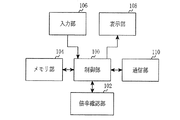
図1を参照すると、携帯用端末機は、制御部100、倍率確認部102、メモリ部104、入力部106、表示部108、及び通信部110を含んで構成される。
例えば、音声通話及びデータ通信のための処理及び制御を行う。また、制御部100は、本発明によって携帯用端末機の傾きを用いた出力画面の拡大/縮小を用いて既存のマルチタッチ基盤の指タッチを用いた出力画面の拡大/縮小の問題を解決するように処理する。
この際、制御部100は、傾きを用いて確認した倍率を示すズームゲージを出力することで変更される画面倍率を示し、出力画面の倍率が決定されると出力されたズームゲージが消えるように処理する。
これによって、携帯用端末機の使用者はズームゲージが消える前に示される画面倍率が出力画面の倍率として設定されることが分かる。
RAMは、制御部100のワーキングメモリで、各種プログラムを行う際に発生する一時的なデータを保存する。
また、フラッシュROMは電話番号簿、受発信メッセージ、メタデータ、及びデータ保存用データベースのような更新可能な各種保管用データを保存し、本発明による出力画面の拡大又は縮小倍率の判断のための基準情報を保存する。
例えば、送信である場合、送信するデータをチャンネルコーディング及び拡散した後、RF処理して送信する機能を行い、受信である場合、受信されたRF信号を基底帯域信号に変換して基底帯域信号を逆拡散及びチャンネル復号してデータを復元する機能を行う。
図2を参照すると、出力画面の倍率を調節するための携帯用端末機の使用者は、まずステップS201で拡大又は縮小機能を支援するアプリケーションを実行する。
ここで、拡大又は縮小機能を支援するアプリケーションは、インターネットブラウザ、電子書籍ビューア、イメージビューア、電子新聞ビューアなどがある。
もし、ステップS203で出力画面の拡大又は縮小機能を行なわないと判断した場合、携帯用端末機の使用者はステップS201の段階にもどる。
ここで、基準点は、出力画面の中の拡大又は縮小しようとする地点を示すもので、携帯用端末機は基準点(使用者のタッチ入力が発生した地点)を基に出力画面の一定領域を拡大又は縮小するように処理する。
すなわち、携帯用端末機は、使用者によって傾かされる程度(量)及び方向に応じて出力画面の倍率を調節することができる。
次に、携帯用端末機の使用者はこのアルゴリズムを終了する。
ここで、拡大又は縮小機能を支援するアプリケーションは、先の説明と同様にインターネットブラウザ、電子書籍ビューア、イメージビューア、電子新聞ビューアなどがある。
もし、ステップS303で基準点設定のためのタッチ入力を感知してない場合、携帯用端末機はステップS301の段階にもどる。
ここで、ズームゲージは、出力画面の倍率を示すゲージであって、ズームゲージが上がれるほど高い倍率に出力され、ズームゲージが下がれるほど出力画面が低い倍率に出力される。また、携帯用端末機の使用者は出力されるズームゲージを直接調節して出力画面の倍率を調節してもよい。
これは使用者による携帯用端末機の傾かせによって携帯用端末機の出力画面の倍率が調節されることであり、出力画面の倍率調節のための傾きを感知したか否かを判断するためのものである。
もし、ステップS309で出力画面を拡大しようとする使用者による傾かせであると確認された場合、携帯用端末機はステップS311に進行して測定された傾きに応じた出力画面の拡大倍率を確認する。

すなわち、横モードに動作する携帯用端末機はX軸センシング情報を用いて傾きを把握した後、出力画面の倍率を調節し、
縦モードに動作する携帯用端末機はY軸センシング情報を用いて傾きを把握した後、出力画面の倍率を調節することができる。
また、傾きの変化が増加することは携帯用端末機が使用者によってさらに傾かせられたことになる。
すなわち、携帯用端末機は、使用者が現在出力画面の倍率が適当であると判断して端末機を傾かせる段階を終了したのか確認(端末機の傾きが固定したのか確認)することである。
もし、ステップS323で端末機に対する傾き変化の測定が終了していない場合(傾きの変化が継続的に発生する場合)、携帯用端末機はステップS307の段階にもどる。
次に、携帯用端末機はステップS327に進行して現在倍率を出力画面の倍率に使用した後、このアルゴリズムを終了する。
図4を参照すると、リンク選択過程は、携帯用端末機に出力された画面に含まれたリンクを使用者から選択する段階を示す。
ここで、拡大又は縮小機能を支援するアプリケーションは、先の説明と同様にインターネットブラウザ、電子書籍ビューア、イメージビューア、電子新聞ビューアなどがある。
この際、携帯用端末機は複数のリンクを含むページを出力しているとする。
すなわち、ステップS403は、出力画面に含まれたリンクを選択したタッチ入力が発生したか否かを確認することである。
もし、ステップS403でリンク項目の選択のための使用者のタッチ入力を感知してない場合、携帯用端末機はステップS401の段階にもどる。
これは携帯用端末機の使用者が限定された大きさに含まれたリンク項目を不明確に選択した状況が生じたのか否かを確認することであり、携帯用端末機は複数のリンク項目が存在する場合、使用者のタッチ入力が正確ではないと判断する。
すなわち、携帯用端末機は拡大されたリンク項目に対する使用者の選択を再感知することである。
この際、携帯用端末機は最小ズーム倍率から最大ズーム倍率の間を複数のレベルに分けて、一定レベル以上のズームが面状態を基に不明確にリンク項目を選択した状況が発生したのか判断することができる。
もし、ステップS409で不正確にリンク項目を選択した状況が発生したことを確認した場合(一定レベル未満のズーム画面状態でリンク項目を選択した状況が発生したことを確認した場合)、携帯用端末機はステップS413に進行してタッチ入力が感知された位置を予め定めた倍率に拡大することで既出力されたリンク項目が拡大され出力されるように処理した後、ステップS415に進行してリンク項目の選択のための使用者の入力を再感知する。
次に、携帯用端末機はこのアルゴリズムを終了する。
図5(A)は、本発明の一実施形態による携帯用端末機において基準点を設定する画面を示す図である。
図5(B)を参照すると、携帯用端末機は図5(A)と同様に使用者によって基準点が設定される場合、拡大/縮小の倍率を示すズームゲージを出力する(符号505)。この際、ズームゲージは使用者による出力画面の倍率の調節に応じてゲージの倍率も共に調節され、携帯用端末機の使用者はゲージを直接調節して出力画面の倍率を調節することもできる。
図5(C)を参照すると、携帯用端末機の使用者は本発明による携帯用端末機の傾きを介して出力画面の倍率を調節することができる。
この際、携帯用端末機は横モード状態であることに応じてX軸のセンシング情報の変更を確認し、出力画面を拡大するのかまたは縮小するのかを把握する。
図5(D)を参照すると、携帯用端末機の使用者は本発明による携帯用端末機の傾きを介して出力画面の倍率を調節することができ、横モード状態であることに応じて携帯用端末機はX軸のセンシング情報の変化を確認して出力画面を拡大するのか、又は縮小するのかを把握する。
もし、携帯用端末機が縦モード状態である場合、携帯用端末機はY軸センシング情報の変化を確認して出力画面の倍率を調節することができる。
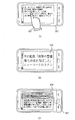
図6(A)は、本発明の一実施形態による携帯用端末機においてリンク項目の選択を感知する画面を示す図である。
もし、実行したアプリケージョンが電子新聞ビューアである場合、複数のリンク項目を出力した(符号600)後、使用者によって選択された項目に対する詳しいニュースを提供する。
この時、携帯用端末機の使用者は、図に示すように出力画面のリンク項目のうち、興味あるニュースに対するリンク項目を選択する(符号601)。
図6(B)を参照すると、使用者が図6(A)のように限定された出力画面に含まれたリンク項目が使用者より選択された場合、リンク項目の間隔が狭くて使用者が選択したいリンク項目を正確に選択できず周辺の他のリンク項目が選択されることが発生することがある。
一つ目は、携帯用端末機はリンク項目間の間隔が狭い場合、上記のような状況が発生すると判断することであり、出力画面が拡大されてない状態がなる。
二つ目は、携帯用端末機の出力画面が拡大されたが、リンク項目を正確に区分できる程度まで拡大されてない状態がなる。
すなわち、図に示すように、携帯用端末機は図6(A)に示すリンク項目のうち一部の項目だけ拡大して使用者による選択の正確度を向上させる。
図6(C)を参照すると、携帯用端末機は図6(B)と同様の動作を介してリンク項目の選択過程の正確性を向上させることができる。
これにより、携帯用端末機の使用者がリンク項目を間違って選択した場合、キャンセル過程を行った後、さらに正常的なリンク項目を選択する過程を行う既存の方法より便利にリンク項目の内容を検索することができる。
102 倍率確認部
104 メモリ部
106 入力部
108 表示部
110 通信部
Claims (18)
- 携帯用端末機の出力画面制御装置であって、
倍率が調節された出力画面を表示する表示部と、
前記出力画面の中の拡大又は縮小地点を設定する入力部と、
前記出力画面の拡大又は縮小の倍率を判断するための基準情報を保存するメモリ部と、
前記携帯用端末機の傾きを測定して、前記測定された傾きを用いて出力画面の倍率の調節有無を判断する倍率確認部と、
前記倍率確認部によって確認された倍率に応じて出力画面を制御する制御部とを有することを特徴とする携帯用端末機の出力画面制御装置。 - 前記制御部は、前記出力画面の拡大又は縮小のための入力を感知した場合、前記出力画面の現在倍率を示すズームゲージを前記表示部に出力するように処理することを特徴とする請求項1に記載の携帯用端末機の出力画面制御装置。
- 前記制御部は、前記携帯用端末機の傾き変化がない場合、出力された前記ズームゲージが消えるように処理することを特徴とする請求項2に記載の携帯用端末機の出力画面制御装置。
- 前記制御部は、前記ズームゲージが消える前の維持した状態の倍率を出力画面の倍率に設定することを特徴とする請求項2に記載の携帯用端末機の出力画面制御装置。
- 前記制御部は、前記携帯用端末機の傾きに応じた倍率に出力画面を制御した後、前記ズームゲージの状態を変更することを特徴とする請求項2に記載の携帯用端末機の出力画面制御装置。
- 前記倍率確認部は、前記携帯用端末機の傾きの測定のためのセンシング部を含むことを特徴とする請求項1に記載の携帯用端末機の出力画面制御装置。
- 前記倍率確認部は、前記携帯用端末機の動作状態に従って、前記出力画面の倍率を変更するようにする傾き情報を区分し、
ここで、横モードに動作する前記携帯用端末機はX軸センシング情報、縦モードに動作する前記携帯用端末機はY軸センシング情報を用いて傾きを把握することを特徴とする請求項1に記載の携帯用端末機の出力画面制御装置。 - 前記倍率確認部は、複数のリンク項目を含む出力画面においてリンク項目の選択を感知した場合、前記リンク項目の周辺を拡大させることを特徴とする請求項1に記載の携帯用端末機の出力画面制御装置。
- 前記倍率確認部は、前記出力画面の倍率に応じて選択されたリンク項目の周辺を拡大させることを特徴とする請求項8に記載の携帯用端末機の出力画面制御装置。
- 携帯用端末機の出力画面制御方法であって、
出力画面の中の拡大又は縮小地点を設定する段階と、
前記携帯用端末機の傾きを測定する段階と、
前記測定された携帯用端末機の傾きと基準情報とを用いて前記出力画面の倍率の調節有無、及び出力倍率を判断する段階と、
前記判断された出力倍率に応じて前記出力画面を制御する段階と、
前記倍率が調節された出力画面を出力する段階とを有することを特徴とする携帯用端末機の出力画面制御方法。 - 前記出力画面の拡大又は縮小のための入力を感知した場合、前記出力画面の現在倍率を示すズームゲージを出力する段階をさらに有することを特徴とする請求項10に記載の携帯用端末機の出力画面制御方法。
- 前記携帯用端末機の傾き変化がない場合、出力された前記ズームゲージが消えるように処理する段階をさらに有することを特徴とする請求項11に記載の携帯用端末機の出力画面制御方法。
- 前記ズームゲージが消える前に維持した状態の倍率を前記出力画面の倍率に設定する段階をさらに有することを特徴とする請求項11に記載の携帯用端末機の出力画面制御方法。
- 前記携帯用端末機の傾きに応じた倍率に前記出力画面を制御した後、前記ズームゲージの状態を変更する段階をさらに有することを特徴とする請求項11に記載の携帯用端末機の出力画面制御方法。
- 前記携帯用端末機の傾きを測定する段階は、センシング部を介して前記携帯用端末機の傾きを測定する段階を含むことを特徴とする請求項10に記載の携帯用端末機の出力画面制御方法。
- 前記出力倍率を判断する段階は、前記携帯用端末機の動作状態に従って前記出力画面の倍率を変更するようにする傾き情報を区分し、
ここで、横モードに動作する前記携帯用端末機はX軸センシング情報、縦モードに動作する前記携帯用端末機はY軸センシング情報を用いて傾きを把握することを特徴とする請求項10に記載の携帯用端末機の出力画面制御方法。 - 複数のリンク項目を含む出力画面においてリンク項目の選択を感知した場合、前記リンク項目の周辺を拡大させる段階をさらに有することを特徴とする請求項10に記載の携帯用端末機の出力画面制御方法。
- 前記リンクの周辺を拡大させる段階は、前記出力画面の倍率を確認する段階と、
前記確認された倍率に応じて選択された前記リンク項目の周辺を拡大させる段階とを含むことを特徴とする請求項17に記載の携帯用端末機の出力画面制御方法。
Applications Claiming Priority (2)
| Application Number | Priority Date | Filing Date | Title |
|---|---|---|---|
| KR1020100137448A KR101830962B1 (ko) | 2010-12-29 | 2010-12-29 | 휴대용 단말기에서 출력 화면을 제어하기 위한 장치 및 방법 |
| KR10-2010-0137448 | 2010-12-29 |
Publications (2)
| Publication Number | Publication Date |
|---|---|
| JP2012141976A true JP2012141976A (ja) | 2012-07-26 |
| JP6068797B2 JP6068797B2 (ja) | 2017-01-25 |
Family
ID=45442855
Family Applications (1)
| Application Number | Title | Priority Date | Filing Date |
|---|---|---|---|
| JP2011281311A Expired - Fee Related JP6068797B2 (ja) | 2010-12-29 | 2011-12-22 | 携帯用端末機の出力画面制御装置及びその方法 |
Country Status (5)
| Country | Link |
|---|---|
| US (3) | US9229631B2 (ja) |
| EP (2) | EP3654157A1 (ja) |
| JP (1) | JP6068797B2 (ja) |
| KR (1) | KR101830962B1 (ja) |
| CN (2) | CN102681757B (ja) |
Families Citing this family (13)
| Publication number | Priority date | Publication date | Assignee | Title |
|---|---|---|---|---|
| KR101830962B1 (ko) | 2010-12-29 | 2018-02-22 | 삼성전자주식회사 | 휴대용 단말기에서 출력 화면을 제어하기 위한 장치 및 방법 |
| KR101861377B1 (ko) * | 2012-03-09 | 2018-05-28 | 삼성전자주식회사 | 이동 단말에서 모션 기반의 화면 제어 방법 및 이를 위한 이동 단말 |
| WO2013169262A1 (en) * | 2012-05-11 | 2013-11-14 | Empire Technology Development Llc | Input error remediation |
| KR101976177B1 (ko) * | 2012-07-09 | 2019-05-08 | 엘지전자 주식회사 | 이동 단말기 및 이동 단말기의 제어 방법 |
| US20140325345A1 (en) * | 2013-04-26 | 2014-10-30 | Amazon Technologies, Inc. | Consistent Scaling of Web-Based Content Across Devices Having Different Screen Metrics |
| CN109074222B (zh) * | 2016-04-19 | 2022-10-25 | 麦克赛尔株式会社 | 移动终端装置 |
| US9967390B2 (en) * | 2016-08-30 | 2018-05-08 | Google Llc | Device-orientation controlled settings |
| JP6991754B2 (ja) * | 2017-07-03 | 2022-01-13 | 株式会社ミツトヨ | 端末装置およびプログラム |
| CN107463323B (zh) * | 2017-07-24 | 2018-03-30 | 上海壹账通金融科技有限公司 | 移动终端的图片操作控制方法及移动终端 |
| WO2019071486A1 (zh) * | 2017-10-11 | 2019-04-18 | 深圳传音通讯有限公司 | 一种基于智能终端的屏幕控制方法及屏幕控制系统 |
| DE102018100196A1 (de) * | 2018-01-05 | 2019-07-11 | Bcs Automotive Interface Solutions Gmbh | Verfahren zum Betreiben einer Mensch-Maschinen-Schnittstelle sowie Mensch-Maschinen-Schnittstelle |
| KR102266628B1 (ko) * | 2020-11-23 | 2021-06-18 | (주)스토리포유 | 수목 활력도 진단서버 및 그 진단시스템 |
| CN115220620B (zh) * | 2021-04-20 | 2025-02-25 | 华为技术有限公司 | 图形界面显示方法、电子设备、介质以及程序产品 |
Citations (5)
| Publication number | Priority date | Publication date | Assignee | Title |
|---|---|---|---|---|
| WO2001027735A1 (en) * | 1999-10-12 | 2001-04-19 | Myorigo Oy | Operation method of user interface of hand-held device |
| JP2001211408A (ja) * | 2000-01-27 | 2001-08-03 | Fuji Photo Film Co Ltd | 画像再生方法及び装置並びに電子カメラ |
| US20050001815A1 (en) * | 2003-06-09 | 2005-01-06 | Casio Computer Co., Ltd. | Electronic appliance having magnifying-glass display function, display controlling method, and display control program |
| WO2009044770A1 (ja) * | 2007-10-02 | 2009-04-09 | Access Co., Ltd. | 端末装置、リンク選択方法および表示プログラム |
| US20100058254A1 (en) * | 2008-08-29 | 2010-03-04 | Tomoya Narita | Information Processing Apparatus and Information Processing Method |
Family Cites Families (15)
| Publication number | Priority date | Publication date | Assignee | Title |
|---|---|---|---|---|
| US6211856B1 (en) * | 1998-04-17 | 2001-04-03 | Sung M. Choi | Graphical user interface touch screen with an auto zoom feature |
| US6201554B1 (en) * | 1999-01-12 | 2001-03-13 | Ericsson Inc. | Device control apparatus for hand-held data processing device |
| WO2007007682A1 (ja) * | 2005-07-08 | 2007-01-18 | Mitsubishi Electric Corporation | タッチパネル表示装置および携帯機器 |
| US8462109B2 (en) * | 2007-01-05 | 2013-06-11 | Invensense, Inc. | Controlling and accessing content using motion processing on mobile devices |
| US7889185B2 (en) * | 2007-01-05 | 2011-02-15 | Apple Inc. | Method, system, and graphical user interface for activating hyperlinks |
| KR100922493B1 (ko) | 2007-06-27 | 2009-10-20 | 삼성전자주식회사 | 줌을 이용한 브라우저 탐색 방법 및 장치 |
| JP5361159B2 (ja) * | 2007-09-06 | 2013-12-04 | キヤノン株式会社 | 画像表示制御装置、その制御方法、プログラム、および記録媒体 |
| TWM341898U (en) * | 2008-02-04 | 2008-10-01 | Aiptek Int Inc | Image processing device |
| EP2133563A1 (en) | 2008-06-09 | 2009-12-16 | Siemens Aktiengesellschaft | Method for the determination of a nacelle-inclination |
| RU2495477C2 (ru) * | 2008-09-10 | 2013-10-10 | ОПЕРА СОФТВЭА ЭйСиЭй | Способ и устройство выбора объекта на экране дисплея |
| US8558803B2 (en) | 2008-11-28 | 2013-10-15 | Samsung Electronics Co., Ltd. | Input device for portable terminal and method thereof |
| US8291348B2 (en) * | 2008-12-31 | 2012-10-16 | Hewlett-Packard Development Company, L.P. | Computing device and method for selecting display regions responsive to non-discrete directional input actions and intelligent content analysis |
| US8587617B2 (en) * | 2009-02-04 | 2013-11-19 | Raytheon Company | Apparatus and method for map zooming |
| JP2010257037A (ja) | 2009-04-22 | 2010-11-11 | Sony Corp | 情報処理装置および方法、並びにプログラム |
| KR101830962B1 (ko) | 2010-12-29 | 2018-02-22 | 삼성전자주식회사 | 휴대용 단말기에서 출력 화면을 제어하기 위한 장치 및 방법 |
-
2010
- 2010-12-29 KR KR1020100137448A patent/KR101830962B1/ko not_active Expired - Fee Related
-
2011
- 2011-12-13 EP EP20150043.6A patent/EP3654157A1/en not_active Ceased
- 2011-12-13 EP EP11193370.1A patent/EP2472382A3/en not_active Ceased
- 2011-12-22 CN CN201110435619.1A patent/CN102681757B/zh not_active Expired - Fee Related
- 2011-12-22 US US13/335,687 patent/US9229631B2/en active Active
- 2011-12-22 JP JP2011281311A patent/JP6068797B2/ja not_active Expired - Fee Related
- 2011-12-22 CN CN201810397304.4A patent/CN108563394B/zh active Active
-
2015
- 2015-11-27 US US14/953,251 patent/US10503380B2/en active Active
-
2019
- 2019-12-09 US US16/708,144 patent/US10949072B2/en active Active
Patent Citations (12)
| Publication number | Priority date | Publication date | Assignee | Title |
|---|---|---|---|---|
| WO2001027735A1 (en) * | 1999-10-12 | 2001-04-19 | Myorigo Oy | Operation method of user interface of hand-held device |
| CN1379871A (zh) * | 1999-10-12 | 2002-11-13 | 迈奥里高有限公司 | 手持装置用户界面操作方法 |
| JP2003511786A (ja) * | 1999-10-12 | 2003-03-25 | ミオリゴ オイ | 携帯装置のユーザ・インターフェース動作方法 |
| JP2001211408A (ja) * | 2000-01-27 | 2001-08-03 | Fuji Photo Film Co Ltd | 画像再生方法及び装置並びに電子カメラ |
| US20050001815A1 (en) * | 2003-06-09 | 2005-01-06 | Casio Computer Co., Ltd. | Electronic appliance having magnifying-glass display function, display controlling method, and display control program |
| JP2005025170A (ja) * | 2003-06-09 | 2005-01-27 | Casio Comput Co Ltd | 電子機器、表示制御方法及びプログラム |
| WO2009044770A1 (ja) * | 2007-10-02 | 2009-04-09 | Access Co., Ltd. | 端末装置、リンク選択方法および表示プログラム |
| CN101809531A (zh) * | 2007-10-02 | 2010-08-18 | 株式会社爱可信 | 终端装置、链接选择方法以及显示程序 |
| US20100275150A1 (en) * | 2007-10-02 | 2010-10-28 | Access Co., Ltd. | Terminal device, link selection method, and display program |
| KR20120092686A (ko) * | 2007-10-02 | 2012-08-21 | 가부시키가이샤 아쿠세스 | 단말 장치, 링크 선택 방법 및 표시 프로그램이 기록된 컴퓨터 판독가능한 기록 매체 |
| US20100058254A1 (en) * | 2008-08-29 | 2010-03-04 | Tomoya Narita | Information Processing Apparatus and Information Processing Method |
| JP2010055511A (ja) * | 2008-08-29 | 2010-03-11 | Sony Corp | 情報処理装置及び情報処理方法 |
Also Published As
| Publication number | Publication date |
|---|---|
| US10949072B2 (en) | 2021-03-16 |
| EP3654157A1 (en) | 2020-05-20 |
| US10503380B2 (en) | 2019-12-10 |
| CN102681757B (zh) | 2018-05-29 |
| US9229631B2 (en) | 2016-01-05 |
| CN108563394A (zh) | 2018-09-21 |
| EP2472382A3 (en) | 2015-10-28 |
| KR101830962B1 (ko) | 2018-02-22 |
| CN102681757A (zh) | 2012-09-19 |
| US20120169775A1 (en) | 2012-07-05 |
| CN108563394B (zh) | 2022-11-18 |
| US20160077729A1 (en) | 2016-03-17 |
| US20200117351A1 (en) | 2020-04-16 |
| JP6068797B2 (ja) | 2017-01-25 |
| KR20120075683A (ko) | 2012-07-09 |
| EP2472382A2 (en) | 2012-07-04 |
Similar Documents
| Publication | Publication Date | Title |
|---|---|---|
| JP6068797B2 (ja) | 携帯用端末機の出力画面制御装置及びその方法 | |
| KR101979666B1 (ko) | 표시부에 출력되는 입력 영역 운용 방법 및 이를 지원하는 단말기 | |
| US8009146B2 (en) | Method, apparatus and computer program product for facilitating data entry via a touchscreen | |
| US7986309B2 (en) | Electronic device with touch screen and method of displaying information using the same | |
| US9600153B2 (en) | Mobile terminal for displaying a webpage and method of controlling the same | |
| KR101662726B1 (ko) | 전자 기기의 스크롤 방법 및 장치 | |
| US9372614B2 (en) | Automatic enlargement of viewing area with selectable objects | |
| US9891805B2 (en) | Mobile terminal, and user interface control program and method | |
| US20180292966A1 (en) | Apparatus and method for providing an interface in a device with touch screen | |
| EP1970799A2 (en) | Electronic device and method of controlling mode thereof and mobile communication terminal | |
| EP2717145A2 (en) | Apparatus and method for switching split view in portable terminal | |
| JP2009026155A (ja) | 入力表示装置および移動無線端末装置 | |
| EP2843522A1 (en) | Portable information terminal | |
| US20120137258A1 (en) | Mobile electronic device, screen control method, and storage medium storing screen control program | |
| US10359870B2 (en) | Apparatus, method, computer program and user interface | |
| US20110107208A1 (en) | Methods for Status Components at a Wireless Communication Device | |
| US20150277661A1 (en) | User interface device, user interface method, and program | |
| US20160077551A1 (en) | Portable apparatus and method for controlling portable apparatus | |
| JP6538785B2 (ja) | 電子機器、電子機器の制御方法およびプログラム | |
| KR20130023948A (ko) | 휴대용 단말기에서 아이콘을 선택하기 위한 장치 및 방법 | |
| KR101504349B1 (ko) | 이동통신단말기에서의 화면 크기조절장치 및 그 방법 | |
| KR100999884B1 (ko) | 휴대용 단말기의 문자 입력 장치 및 방법 | |
| KR101289729B1 (ko) | 휴대용 단말기의 문자 입력 장치 및 방법 | |
| KR101078323B1 (ko) | 휴대용 단말기의 문자 입력 장치 및 방법 | |
| JP2007094521A (ja) | 小型情報端末装置 |
Legal Events
| Date | Code | Title | Description |
|---|---|---|---|
| A621 | Written request for application examination |
Free format text: JAPANESE INTERMEDIATE CODE: A621 Effective date: 20141212 |
|
| A521 | Request for written amendment filed |
Free format text: JAPANESE INTERMEDIATE CODE: A523 Effective date: 20150202 |
|
| A977 | Report on retrieval |
Free format text: JAPANESE INTERMEDIATE CODE: A971007 Effective date: 20160119 |
|
| A131 | Notification of reasons for refusal |
Free format text: JAPANESE INTERMEDIATE CODE: A131 Effective date: 20160126 |
|
| A521 | Request for written amendment filed |
Free format text: JAPANESE INTERMEDIATE CODE: A523 Effective date: 20160426 |
|
| A131 | Notification of reasons for refusal |
Free format text: JAPANESE INTERMEDIATE CODE: A131 Effective date: 20160726 |
|
| A521 | Request for written amendment filed |
Free format text: JAPANESE INTERMEDIATE CODE: A523 Effective date: 20161026 |
|
| TRDD | Decision of grant or rejection written | ||
| A01 | Written decision to grant a patent or to grant a registration (utility model) |
Free format text: JAPANESE INTERMEDIATE CODE: A01 Effective date: 20161206 |
|
| A61 | First payment of annual fees (during grant procedure) |
Free format text: JAPANESE INTERMEDIATE CODE: A61 Effective date: 20161226 |
|
| R150 | Certificate of patent or registration of utility model |
Ref document number: 6068797 Country of ref document: JP Free format text: JAPANESE INTERMEDIATE CODE: R150 |
|
| R250 | Receipt of annual fees |
Free format text: JAPANESE INTERMEDIATE CODE: R250 |
|
| R250 | Receipt of annual fees |
Free format text: JAPANESE INTERMEDIATE CODE: R250 |
|
| R250 | Receipt of annual fees |
Free format text: JAPANESE INTERMEDIATE CODE: R250 |
|
| R250 | Receipt of annual fees |
Free format text: JAPANESE INTERMEDIATE CODE: R250 |
|
| LAPS | Cancellation because of no payment of annual fees |