JP3732011B2 - Information processing device - Google Patents
Information processing device Download PDFInfo
- Publication number
- JP3732011B2 JP3732011B2 JP21663798A JP21663798A JP3732011B2 JP 3732011 B2 JP3732011 B2 JP 3732011B2 JP 21663798 A JP21663798 A JP 21663798A JP 21663798 A JP21663798 A JP 21663798A JP 3732011 B2 JP3732011 B2 JP 3732011B2
- Authority
- JP
- Japan
- Prior art keywords
- password
- information
- scene
- input
- registered
- Prior art date
- Legal status (The legal status is an assumption and is not a legal conclusion. Google has not performed a legal analysis and makes no representation as to the accuracy of the status listed.)
- Expired - Fee Related
Links
Images




Landscapes
- Storage Device Security (AREA)
- Calculators And Similar Devices (AREA)
- Information Retrieval, Db Structures And Fs Structures Therefor (AREA)
Description
【0001】
【発明の属する技術分野】
本発明は、シークレット機能を使用してデータの保護が行える手段を備えた情報処理装置に関するもので、特にデータの保護手段として一種類のみでなく、データのシークレットレベルに応じて保護の種類が変えられる手段を備えた情報処理装置に関するものである。
【0002】
【従来の技術】
従来、紙の手帳を使用する場合には、一般に競合メーカの情報は、別なページに記載するなどして対応することが多々あったが、それでも、予定やアポイントを記載するスケジュールの場合には、同一のページに記載しないと意味をなさないため、使用上煩雑であった。
【0003】
上記紙の手帳を電子化しさらにプラスアルファの機能を搭載した電子手帳や携帯情報端末では、データの関連付けができるため、検索機能を用いることによって多少なりとも必要なときに情報の取り出しができるようになった。さらに、置き忘れなどを考慮して、パスワードを入力しないと情報を見ることができなくする「シークレット機能」を備えている。
【0004】
しかし、上記「シークレット機能」では、パスワードによって保護できる情報は一通りでしかなく、つまり色々な使用場面における最大公約数的な機能で構成されているだけである。
【0005】
例えば、「シークレット機能」を使用すると、必要な場合にその都度、パスワードを入力する。また、通常パスワードの種類は1種類であるため、自分の覚えやすい文字列を記憶しておけばよい。さらに、上記の電子手帳や携帯情報端末に記憶されているデータに対しては、1件単位で「シークレットにするしない」が設定可能であるため、シークレットにしておきたいデータに対してのみ「シークレット」とすることができる。
【0006】
【発明が解決しようとする課題】
しかしながら、上記従来の電子手帳や携帯情報端末のシークレット機能の技術においては、なお以下のような問題を有している。
【0007】
上記の「シークレット機能」においては、「シークレット機能」を解除したい場合にその都度、パスワードを入力しなければならない、煩雑さがある。また、通常パスワードは1種類であるため、パスワードを入力して、「シークレット」を解除した場合、データの表示において隠しておいて見せたくないデータまで表示してしまう問題が存在している。
【0008】
具体的には、従来のシークレット機能では、保護している間は、登録されているデータが全く見えなくなってしまう。例えば、スケジュール管理を行う場合には、スケジュールデータを保護してしまうと、毎回保護解除してから入力するようにでもしない限り、保護されて表示されないスケジュールとダブルブッキングしてしまう。これは、単に表示されないからというだけではなく、新たに入力されたスケジュールが、過去に入力した別なスケジュールと重複しているかという判定でさえも、保護されたデータを除外して判定してしまうのが、一般的であり、さらに、表示されていないデータと重複している旨をユーザに警告表示しても、ユーザにとっては、ピンとこないからである。一方、データに保護をかけていなければ、紛失したときはもとより、多種多様な場合において情報の漏洩等の問題を招いてしまう。
【0009】
例えば、図19に示すように、図19(c)は表示保護が行われていない場合あるいは表示保護が解除された場合を示すもので、データd1からd9までがスケジュールデータとして登録されている。図19(a)は、これらのデータに対して社内関連のデータであるデータd1、d4、d5、d8をシークレット機能にて非表示にした場合の画面であり、さらに図19(b)は、データd1からd9までのすべてのデータに対してシークレット機能にて非表示にした場合の画面である。
【0010】
このように図19(a)の場合には第3者に対して社内の秘密事項に関しては表示保護がなされているが、社外との打ち合わせに関しては保護しきれていない。さらに、それらをも保護しようとすると図19(b)のようになりこれでは何の予定が設定されているのか全くわからない状況となってします。
【0011】
さらに、これらの場合の表示保護用のパスワードの入力画面は、図5の(b)に示すような1つの入力欄が設けられているだけである。
【0012】
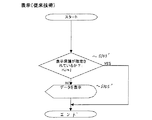
これらの場合の表示の処理シーケンスとしては、図20に示すように、データを表示する場合に表示保護が指定されているか否かをチェックし(S103’)、指定されている場合には何もせずに、この処理シーケンスを抜けてしまう。一方、指定されていない場合にはデータを表示し(S105’)て、この処理シーケンスを抜けてしまう。
【0013】
本発明は、上記問題点を解決するためになされたもので、その目的とするところは、データを“分類”ごとに“個別”に保護できる分類別保護機能と、保護されたデータも本来の意味合いが類推できるあらかじめ登録済みの“分類名”を“簡略表示”することにより、本来の内容を隠したままでも、内容をある程度推察することが可能な表示を実現する表示マスク機能と、さらに上記分類別保護機能は複数の分類ごとにパスワードの設定ができ、そのパスワードが簡単に取り扱える機能を有する、具体的には、毎回保護解除する必要なしに、データをあたりさわりのない本来の意味合いが類推できる“分類名”を“簡略表示”することで、第3者には、内容自体を把握できないようにしておきながらも、使っている本人には、何が書いてあるのか推察できることで情報の保護が行われ、また必要であれば、保護解除してやることにより、実際の具体的内容を表示することができ、さらに状況に応じて必要な部分(分類)だけを保護解除できる、機能を備えた情報処理装置を提供することである。
【0014】
【課題を解決するための手段】
本発明の請求項1に係る情報処理装置は、入力された情報に対して、パスワードの入力、登録、照合の処理を行う情報の保護機能を備えた情報処理装置において、
情報を分類ごとに個別に分類名を設定する設定手段と、
前記設定手段で設定された分類名を記憶する分類名記憶手段と、
前記保護機能で保護された情報に対応する分類名を抽出する分類名抽出手段と、
前記入力された情報を前記分類名抽出手段で抽出された情報の分類名に置き換えて表示する表示マスク手段とを有し、
前記パスワードで情報の保護がされている場合、前記表示マスク手段により分類名を表示することを特徴とする。
【0015】
本発明の請求項2に係る情報処理装置は、請求項1記載の情報処理装置において、前記情報に付けられた分類名ごとに、異なるパスワードを設定できることを特徴とする。
【0016】
本発明の請求項3に係る情報処理装置は、請求項2記載の情報処理装置において、前記分類名ごとに設けられたパスワードを1度に1つあるいは複数入力することにより、該入力したパスワードが対応して設定されている分類名が付された全情報の保護を解除できることを特徴とする。
【0021】
【発明の実施の形態】
以下、本発明における情報処理装置の実施の形態について図面を用いて説明する。
【0022】
まず、本発明の情報処理装置の基本概念及びその構成について説明する。
【0023】
本発明における情報処理装置の基本概念としては、以下の点である。
【0024】
[従来の課題点]
社内と社外、ビジネスとプライベート、得意先A社の情報とB社の情報など、個人で手にする情報には互いに見せたくない(見せる訳にはいかない)という関係が存在している。しかし、個人で情報を持ち歩く「手帳」や「携帯情報端末」では、こういった情報も1つの端末に入れた状態で持ち運ぶため、こういった情報の管理が、しばしば問題になってしまう。特にスケジュールなどの管理では、相手に知られたくない予定がある場合でも、その有無を知ることができないと、全く意味を成さないので、やむを得ず混在して記入するしかなかった。
【0025】
したがって、厳密には、スケジュールの確認や追記は人に見られないように行う必要が生じ、大変煩わしかった。また、情報が保護されている時には、その内容は全く表示されておらず、保護を解除しない限り、どんな情報が保存されているのか推察することもできなかった。さらに、パスワードを解除した時点では、すべての情報が見ることができてしまうので、入力中の画面を見られたら同じであり、何の解決にもなっていなかった。
【0026】
[解決策]
1)情報が保護されている時には、その内容は全く表示されておらず、保護を解除しない限り、どんな情報が保存されているのか推察することもできなかったのを、データを“分類”ごとに“個別”に保護できる分類別保護機能と、保護されたデータも本来の意味合いが類推できるあらかじめ登録済みの“分類名”を“簡略表示”することにより、本来の内容を隠したままでも、内容をある程度推察することが可能な表示を実現する表示マスク機能と、を備えることで、毎回保護解除する必要なしに、データをあたりさわりのない本来の意味合いが類推できる“分類名”を“簡略表示”することで、第3者には、内容自体を把握できないようにしておきながらも、使っている本人には、何が書いてあるのか推察できることで情報の保護が行われる。
【0027】
2)情報が保護されている時には、常にパスワードなどの入力を必要としたのを、使用する分類名を切り替えるだけで保護解除を行えるようにしたので、切り替えが簡単に行える。自分で携帯して使っている分には、自分の操作を覗かれることはあっても、他人が操作しているわけではないので、それで十分であるが、そういった簡単な手段は今まで実現していなかった。
【0028】
3)情報の保護に関して、複数の保護機能を併せ持つものすら存在していなかったが、1回のパスワードの入力で、複数に分類された情報の保護を解除できるものは存在していなかった。それを1回のパスワードの入力で、複数に分類された情報の保護を解除できるようにしたので、編集時の手間が少なくて済む。
【0029】
4)情報の保護に関して、複数の保護機能を併せ持つものすら存在していなかったが、1度に複数のパスワードを入力でき、複数に分類された情報の保護を解除できるものは存在していなかった。そこで、1度に複数のパスワードを入力でき、複数に分類された情報の保護を解除できるようにしたので、情報の確認や編集を行う時の手間が少なくて済む。
【0030】
5)情報の保護に関して、複数の保護機能を併せ持つものすら存在していなかったが、複数のパスワードを続けて入力しても、個別のパスワードとして認識し、他の人から見ればあたかも1つのパスワードのように見せかけながら、複数に分類された情報の保護を解除できるものは存在していなかった。そこで、1回のパスワードの入力で、複数に分類された情報の保護を解除できるようにしたので、情報の確認や編集を行う時の手間が少なくて済むのはもちろんだが、パスワード入力をしているところを、他の人から見られても、複数のパスワードであるにもかかわらず、あたかも1つのパスワードのように見えてしまう上、どこが境目かわからないようにした。つまり、覗いているだけの人にとって全部覚えるには長すぎることから、セキュリティを維持しつつ、簡単に保護解除できるようにした。
【0031】
6)情報の保護に関して、複数の保護機能を併せ持つものすら存在していなかったが、複数のパスワードの前後に全く関係ない情報を併せて続けて入力しても、個別のパスワードとして認識し、他の人から見ればあたかも1つのパスワードのように見せかけながら、複数に分類された情報の保護を解除できるものは存在していなかった。そこで、パスワードの前後の文字を(任意の長さで)パスワードとして認識させない機能を有することで、通常、パスワードの先頭から(もしくは後ろから)覚えようとする人の心理に反し、常にパスワードの先頭部分は全く関係ない文字を入れておいた上で続けてパスワードを入力できるので、万が一、パスワード入力中を幾度となく覗き込まれてしまっても、容易にパスワードを推察されることができないためセキュリティが強化できる。
【0032】
7)情報の保護に関して、複数の保護機能を併せ持つものすら存在していなかったが、複数のパスワードの前後及びパスワードの間に全く関係ない情報を併せて続けて入力しても、個別のパスワードとして認識し、他の人から見ればあたかも1つのパスワードのように見せかけながら、複数に分類された情報の保護を解除できるものは存在していなかった。そこで、パスワードの前後及び間に文字を(任意の長さで)パスワードとして認識させない機能を有することで、通常、パスワードの先頭から(もしくは後ろから)覚えようとする人の心理に反し、常にパスワードの先頭部分は全く関係ない文字を入れておいた上で続けてパスワードを入力できるので、万が一、パスワード入力中を幾度となく覗き込まれてしまっても、容易にパスワードを推察されることができないためセキュリティが強化できる。
【0033】
次に、本発明における情報処理装置の基本構成に関して説明する。
【0034】
図1は、本発明における情報処理装置の外観を示した斜視図である。
【0035】
図1に示すように、1は本装置の本体キャビネット部であり、2は表示部と透明なタブレットを一体とした入出力部であり、図示していない外部との、例えばIR通信、無線通信、ケーブル通信等の通信部やペン保持部等を有し、内部には上記入出力部2、上記図示していない外部との通信部、インターフェース等を制御する各種制御回路及び電源部等を内蔵している。また、3は蓋部であり、本体キャビネット部1の背面にヒンジにて接続されており、入出力部2を覆うように回動し、持ち運び時に入出力部2を保護する役目を果たしている。
【0036】
図2は、表示部と透明なタブレットを一体とした入出力部2の分解斜視図である。
【0037】
この入出力部2は、液晶表示部201と、モード(アプリケーション)選択キー202と、機能選択キー203と、座標入力手段としての透明タブレット204と、を備えている。また、この入出力部2には上記以外に情報の入力手段として図示していないが数字あるいは文字入力キーを備えていてもよい。
【0038】
液晶表示部201は、薄型で文字を表示可能なマトリックス方式のものであり、必要に応じてカラー液晶のものであったり、あるいはバックライトを背面に設けた構成であってもよい。
【0039】
透明タブレット204は、上記液晶表示部201の大きさを有しており、例えば、透明なシート2枚の内側に透明電極を設け、通常状態において各々の電極が接触しないように小さな突起状のスペーサーが規則正しく印刷されており、指あるいはペン等にてタッチして指示することで上記2枚の透明シートに設けられた透明電極が接触し、選択された位置を検出する仕組みとなっている。この透明タブレット204には、上記液晶表示部201の上部にモード(アプリケーション)選択キー202が、下部に機能選択キー203が、それぞれ貼られた状態で構成されている。
【0040】
モード(アプリケーション)選択キー202は、モードつまりアプリケーションキーを表示したフィルムであり、機能選択キー203は、ファンクションキーを表示したフィルムであり、上記液晶表示部201と透明タブレット204との間に挿入されているもので、使用頻度の高い機能が分かりやすいイメージやアイコンやシンボル等で印刷されている。
【0041】
モード(アプリケーション)選択キー202は、例えばスケジュールを管理するスケジュールモード、電話番号を管理するアドレス帳モード、テキスト形式や手書き形式のメモ・文章を管理するメモ・レポートモード、電卓による計算を行う電卓モード、世界各地の時刻などを確認できる世界時計モード等の各種アプリケーションモードから使用者が任意のモードを選択するためのキーである。
【0042】
機能選択キー203は、上記モード(アプリケーション)選択キーにて任意に選択されたモードにおいて、電源をOFFする機能、メニューを選択する機能、処理を中止・クリアする機能、カーソルやスクロールの制御を行う機能などのオペレーション上共通に使用される機能を使用者が選択するためのキーである。
【0043】
以下に、本発明の情報処理装置に関して実施例にて詳細に説明する。
【0044】
ここでは、対象アプリケーションとしてスケジュールの場合について説明を行う。
【0045】
図3は、本発明における情報処理装置をスケジュール管理装置として想定した場合の機能ブロック図である。
【0046】
この装置1のシステムは、入出力部2、タブレット制御部4、液晶駆動回路部5、コモン回路部6、セグメント回路部7、中央制御部8、RTC9、ROM10、RAM11から構成されている。
【0047】
入出力部2は、上記図2で説明したように液晶表示部201と透明タブレット204を中心に構成されている。
【0048】
タブレット制御部4は、透明ダブレット204から座標情報を取り出すために制御をつかさどるもので、透明タブレット204の一方の透明シートに設けられている透明電極と、他方の透明シートに設けられている透明電極とに接続されており、指やペン等で指示された位置を上記透明電極の接触により検出する。
【0049】
液晶駆動回路部5は、液晶を点灯させるドット位置等をビットマップとして記憶しており、必要に応じてコモン回路6、セグメント回路7に信号を送る。
【0050】
コモン回路6とセグメント回路7は、上記液晶駆動回路部5からの信号によって液晶表示部201に表示を行わせる。
【0051】
中央制御部8は、本装置1全体の制御を行う部分であり、日付の比較処理等を行う比較部801、特定の日よりある日付の算出処理等を行う演算部802、読み取られた座標値を命令に変換する座標・命令変換部803、その命令に基づいてカレンダーを表示するためのカレンダー表示情報を作成し、液晶駆動回路部5に送出するカレンダー表示部804が含まれており、各種命令により入力情報または出力情報を制御する。
【0052】
RTC9は、図示していないクロック信号に基づいて現在の時刻を計時して出力したり、アラーム機能やタイマーカウンタとして使用したり、あるいはブザーを鳴らすための出力信号としても使用される。
【0053】
ROM10は、上記中央制御部8、つまり本装置1の動作を制御するための制御プログラムが記憶されているプログラムエリア101、カレンダーを作成するときに必要な月別の日にち等の情報を記憶しているカレンダー情報エリア102、液晶表示部201に表示する文字のフォントを記憶しているフォント情報エリア103を有している。さらに、入出力部2の液晶表示部201の表示内容の位置と、モード(アプリケーション)選択キー202と機能選択キー203の各キーの位置とを座標として記憶している座標情報エリア104を有している。そのため、座標情報エリア104の記憶内容は、タブレット制御部4にて検出された座標がどのキーやどの位置に対応しているのかを判断するために使用される。
【0054】
RAM11は、使用者が入出力部2より入力した年月日・時刻・予定内容をスケジュール情報として記憶する第1記憶部としてスケジュール情報エリア111、このスケジュール内容を一時的に保持する第2記憶部としてのバッファエリア113、情報の保護を行うためのパスワード登録エリア112、入力されているXY座標値を記憶する座標記憶エリア115、年月日を保持する日付記憶エリア116、座標の入力設定を通常か、曜日単位であるかを切り替えるためのフラグを記憶する切り替え用フラグ118等を有している。なお、バッファエリア113が保持する内容は、液晶表示部201に表示されたカレンダーを使用者が透明タブレット204を指やペン等で指示したときに、その座標を読み込み、その座標に基づいて中央制御部8が特定したスケジュール内容等である。また、日付記憶エリア116が保持する内容は、液晶表示部201に表示されたカレンダーを使用者が透明タブレット204を指やペン等で指示したときに、その座標を読み込み、その座標より算出された年月日である。また、透明タブレット204は、連続的に入力した状態でペン等を他の日付に移動させると、上記バッファエリア113の内容は変換しないが、日付記憶エリア116の内容はペン等を他の日付に移動することにより更新される。
【0055】
次に、スケジュールにおけるデータの表示画面、入力画面、及び分類名の表示シーンの切り替え画面について説明する。
【0056】
なお、これ以降本文及び図面の記載において、“分類”あるいは“分類名”のことを“シーン”と記載することがある。通常、映像等において“シーン”とは、場面や一コマを表しているが、本発明においては入出力表示部に表示された情報の表示画面あるいはその情報の属する分類のことを“シーン”という言葉を使用することとする。
【0057】
図4は、本発明における保護機能を用いた場合のスケジュールデータの画面表示例である。
【0058】
図4(a)は、全シーンの表示保護を解除した状態であり、つまり何も表示保護を行っていない状態でもある。そのため、データd1からd9までのすべてのスケジュールデータがそのまま表示されている。そのため、従来の表示画面においてもこの状態は存在していた。この図4(a)の画面は、下記の図5で説明するパスワード入力画面にてパスワードが入力されて照合OKとなった場合に表示される画面状態でもある。
【0059】
図4(b)は、本発明の表示マスクを使用した状態であり、データd1からd9までのスケジュールデータに対して、秘密にしておきたいため各々の対応した分類名(タイトル名)、つまりシーン名が付けられている。図4(b)は、d2、d9のデータが表示保護解除された場合の例であり、それ以外のデータは表示保護がされた状態である。d1、d4、d5、d8の社内に関係するデータにはシーン名として“社内”が表示され、d3のデータには“IGM”が表示され、d6、d7のデータには“プライベート”が表示されている。この図4(b)の画面は、下記図6で説明する表示シーンの切り替え(ON/OFFの設定切り替え)によって表示される画面状態である。
【0060】
図5は、表示シーン(分類名)の切り替えを行うためのパスワードの入力画面である。
【0061】
図5(a)は、表示保護が設定されているデータすべてに対して全シーン(分類名)の解除を行うためのパスワードの入力欄と、任意の表示保護が設定されているデータに対してシーン1からシーン4までの複数のシーン(分類名)の解除を行うためのパスワードの入力欄のように、複数のパスワードの入力欄が設けられた入力画面である。
【0062】
図5(b)は、パスワードの入力欄は1つしか設けられていない場合の入力画面である(これは従来でも存在していた入力画面である)。
【0063】
なお、この図5(a)、(b)のパスワードの入力画面は、表示保護解除時の入力のために使用される画面だけでなく、各表示シーンに対してパスワードを登録する場合にも使用される画面でもある。これらの照合解除用の入力画面及び登録用の入力画面は、本装置において図示していないメニューキーをタッチすることにより、メニュー画面が表示され、そのメニュー内に設けられている1つの機能を選択することで実行できるものとする。
【0064】
図6は、スケジュールデータの入力画面である。
【0065】
図6(a)は、スケジュールデータの入力画面であり、シーンのエリアをタッチすることによって、シーンの切り替えが行える。つまり、シーンのエリアの下向き三角印(▼)をタッチすることで、あらかじめ登録されているシーン名(分類名)がサブメニューとして表示され、それを選択することでシーン名(分類名)の設定が行える。図6(a)の入力画面へは、例えば通常のスケジュールデータの入力画面において、[シーン]といったボタンを設けておき、それをタッチすることによってこの画面に遷移するようにしてもよい。あるいは既に登録されているデータに対しては、そのデータを表示している状態で、メニュー等の共通キーから各種メニュー項目を表示し、その中に設けられている、例えば“シーン名(分類名)設定”といった項目を選択することによってこの画面に遷移するようにしてもよい。
【0066】
図6(b)は、シーン名(分類名)の有効無効の設定切り替えを行う画面である。
【0067】
図示されているように、シーン1からシーン5までのシーン名(分類名)が表示され、この画面で各シーンの左端にある各シーンのチェックBOXをチェックすることによって、該当シーンに対しての表示保護の設定解除がなされる。この場合は、スケジュールデータでシーン1、シーン2、シーン3を設定しているデータは表示保護が行われる。つまり、図4(a)においては、データd3を除くd1からd9までの8個のデータが表示保護される。図6(b)の設定切り替え画面へは、メニュー等の共通キーから各種メニュー項目を表示し、その中に設けられている、例えば“表示シーン名(分類名)の切り替え”といった項目を選択することによってこの画面に遷移するようにしてもよい。
【0068】
図6(c)は、上記シーン名(分類名)の名称入力を行う画面である。
【0069】
図示されているように、シーン1の入力欄にはカーソルが表示されており、ここに入力することによって、例えば図6(b)のようなシーン名(分類名)が表示されるようになる。図6(c)の名称入力画面へは、メニュー等の共通キーから各種メニュー項目を表示し、その中に設けられている、例えば“表示シーン名(分類名)の名称入力”といった項目を選択することによってこの画面に遷移するようにしてもよい。
【0070】
図7は、上記図4(a)のデータd1からd8までの入力されて登録されたデータ構造を表したものである。
【0071】
図示しているこれらのデータは、スケジュール情報エリア111に1データに対してひとつのブロック形式で記憶した場合の一例である。1ブロックは、スケジュールの日付である年月日のエリアと、時刻(時分)である開始時刻と終了時刻のエリアと、予定内容のエリアと、表示保護用のシーン番号(シーンフラグ)のエリアとから構成されている。例えば、図7のシーンフラグの値は、図6(b)を用いていることから、シーン番号1はプライベート、シーン番号2は社内、シーン番号3は山下、シーン番号4はIGMとなる。
【0072】
次に、以上の画面操作及び本装置での制御を行うための処理シーケンスについて説明する。
【0073】
まずはじめに以下の各処理シーケンスのフローチャートで使用される変数名等を最初に表1で定義しておく。
【0074】
【表1】

各処理シーケンスに関してフローチャートを用いて説明する。
【0076】
(表示マスク例)
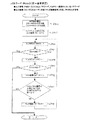
図8は、表示しようとするデータの属性、つまりシーンフラグを判断して表示マスクをかけるか否かを判断する処理のフローチャートである。
【0077】
S101)表示しようとするデータのシーン番号を読み取る。
【0078】
S102)生のデータを表示内容用のバッファに設定する。
【0079】
S103)該当データが表示保護されているか否かをチェックする(シーンフラグの値にて判断する)。表示保護が指定されている場合は、処理ステップS105へ進み、指定されていない場合は処理ステップS104へ進む。
【0080】
S104)表示保護が指定されていないため、シーン番号を無効番号(0)に切り替える。
【0081】
S105)シーン番号にしたがって、データを表示する。例えば、シーン番号が無効番号(0)の場合には、生のデータを表示し、それ以外の場合には、該当するシーン番号のシーン名(分類名)を表示する。
【0082】
上記処理シーケンスによって上記図4の(a)が表示される(本例は上記[解決策](1)に相当する)。
【0083】
(表示保護の解除例0)
図9は、各データが所持しているシーンフラグをON/OFFすることによって、該当するデータに対して表示保護の設定解除を行う処理のフローチャートである。
【0084】
S151)シーン番号をカウントするチェックカウンタを初期化する。
【0085】
S152)シーン番号をカウントするチェックカウンタ値のシーン番号に対して、分類名が登録されているか否かをチェックする。もし登録されていない場合は、つまりこれ以上分類名が登録されていない場合には本処理を終了する。
【0086】
S153)使用者によって、各シーンごとに表示保護のON/OFFが指定される。例えば、デフォルトとして、全シーンOFF状態であってもよい。
【0087】
S154)上記で指定された結果をシーンフラグに設定する。
【0088】
S155)シーン番号をカウントするチェックカウンタを更新する。その後、上記処理ステップS152に戻る。
【0089】
上記処理シーケンスによって上記図6の(b)が表示される(本例は上記[解決策](2)に相当する)。
【0090】
(表示保護の解除例1)
図10は、パスワードによる表示保護を解除するための処理、つまり全モードを解除するための処理のフローチャートである。
【0091】
S201)全モード解除用のパスワードが登録されているか否かをチェックする。登録されていない場合には下記図11の処理ステップS207へ進む。
【0092】
S202)パスワードは登録されているため、使用者は照合するためのパスワードを入力する。
【0093】
S203)上記処理ステップS202で入力されたパスワードを一時的に記憶する。
【0094】
S204)既に登録されているパスワードを読み出す。
【0095】
S205)入力されたパスワードと既に登録されているパスワードとを比較照合する。照合不一致の場合は、下記図11の処理ステップS207へ進む。
【0096】
S206)照合一致のため、すべてのシーンの表示保護設定を解除する。その後、本処理を終了する。
【0097】
上記処理シーケンスは、上記図5(b)の1つしか入力欄を設けていないパスワード入力画面においてなされてもよいし、また図5(a)のように複数の入力欄を設けたパスワード入力画面においてなされてもよい(本例は上記[解決策](3)に相当する)。
【0098】
(表示保護の解除例2)
図11は、パスワードによる表示保護を解除するための処理、つまり個別モードを解除するための処理のフローチャートである。
【0099】
S207)シーン番号をカウントするチェックカウンタを初期化する。
【0100】
S208)シーン番号をカウントするチェックカウンタ値が示すシーン番号のパスワードが登録されているか否かをチェックする。もし登録されていない場合は本処理を終了する。
【0101】
S209)表示保護を解除したいシーンに対して、各シーンごとにパスワードを入力する。
【0102】
S210)上記処理ステップS209で入力されたパスワードをシーンごとに記憶する。
【0103】
S211)シーン番号をカウントするチェックカウンタ値が示すシーン番号の入力欄にパスワードが入力されているか否かをチェックする。
【0104】
S212)既に登録されている該当するチェックカウンタ値が示すシーン番号のパスワードを読み出す。
【0105】
S213)入力されたパスワードと既に登録されているパスワードとを比較照合する。照合不一致の場合は、処理ステップS215へ進む。
【0106】
S214)照合一致のため、該当するシーン番号のシーンの表示保護設定を解除する。
【0107】
S215)シーン番号をカウントするチェックカウンタを更新する。
【0108】
S216)更新されたカウンタ値のシーン番号に対してパスワードが登録されているか否かをチェックする。もし、登録されている場合には処理ステップS211に戻り、もうこれ以上パスワードが登録されていない場合には本処理を終了する。
【0109】
本処理は上記図10の(表示保護の解除例1)の続きであってもよいし、これ単独であってもよい。
【0110】
また、上記処理シーケンスは、上記図5(a)のように複数の入力欄を設けたパスワード入力画面においてなされてもよい。
【0111】
なお、本処理は処理ステップS208で先頭のシーン番号のパスワードが登録されているか否かをチェックし、もし登録されていない場合には処理を終了する方向で説明したが、この方法に限定されず、複数のシーン番号に対してそのいずれかにパスワードが設定されていることを想定して、処理シーケンスの最初にすべてをチェックしいずれかにパスワードが設定されているか否かをチェックする方法であってもよい(本例は上記[解決策](4)に相当する)。
【0112】
(表示保護の解除例3)
図12は、パスワードによる表示保護を解除するための処理、つまり1つのシーンに関して複数のパスワードが設定できてそれを解除するための処理のフローチャートである。
【0113】
ここでは、図5(b)のようにパスワードの入力欄を1つしか設けていない場合を想定し、その入力欄に複数のパスワードを続けて入力する場合の処理について説明する。
【0114】
S220)シーン番号をカウントするチェックカウンタを初期化する。
【0115】
S221)シーン番号をカウントするチェックカウンタ値が示すシーン番号のパスワードが登録されているか否かをチェックする。もし登録されていない場合は本処理を終了する。
【0116】
S222)パスワードを入力する。
【0117】
S223)上記処理ステップS222で入力されたパスワードを一時的に記憶する。
【0118】
S224)既に登録されている該当するチェックカウンタ値が示すシーン番号のパスワードを読み出す。
【0119】
S225)入力されて一時的に記憶されているパスワードの中に既に登録されているパスワードが含まれているか否かをチェックする。含まれていない場合は、処理ステップS228へ進む。
【0120】
S226)含まれているため、該当するシーン番号のシーンの表示保護設定を解除する。
【0121】
S227)一時記憶から該当するパスワードの部分を取り除く。
【0122】
S228)シーン番号をカウントするチェックカウンタを更新する。
【0123】
S229)更新されたカウンタ値のシーン番号に対してパスワードが登録されているか否かをチェックする。もし、登録されている場合には処理ステップS224に戻り、もうこれ以上パスワードが登録されていない場合には本処理を終了する。
【0124】
なお、本処理では図5(b)のようにパスワードの入力欄を1つしか設けていない場合は想定して記載したが、それに限定されなくてもよい。例えば図5(a)のように複数のパスワード入力欄があり、その各々の入力欄に対して、上記方法を適用するものであってもよい(本例は上記[解決策](5)に相当する)。
【0125】
(表示保護の解除例4)
図13は、パスワードによる表示保護を解除するための処理、つまり複数のシーンに関して1つのパスワードが設定できてそれを解除するための処理のフローチャートである。
【0126】
ここでは、図5(b)のようにパスワードの入力欄を1つしか設けていない場合を想定し、その入力欄に1つのパスワードを入力することによって、そのパスワードを含んでいるシーンに対して表示保護の解除を行う場合の処理について説明する。
【0127】
S230)シーン番号をカウントするチェックカウンタを初期化する。
【0128】
S231)シーン番号をカウントするチェックカウンタ値が示すシーン番号のパスワードが登録されているか否かをチェックする。もし登録されていない場合は本処理を終了する。
【0129】
S232)パスワードを入力する。
【0130】
S233)上記処理ステップS232で入力されたパスワードを一時的に記憶する。
【0131】
S234)既に登録されている該当するチェックカウンタ値が示すシーン番号のパスワードを読み出す。
【0132】
S235)入力されて一時的に記憶されているパスワードの中に既に登録されているパスワードが含まれているか否かをチェックする。含まれていない場合は、処理ステップS238へ進む。
【0133】
S236)含まれているため、該当するシーン番号のシーンの表示保護設定を解除する。
【0134】
S238)シーン番号をカウントするチェックカウンタを更新する。
【0135】
S239)更新されたカウンタ値のシーン番号に対してパスワードが登録されているか否かをチェックする。もし、登録されている場合には処理ステップS234に戻り、もうこれ以上パスワードが登録されていない場合には本処理を終了する。
【0136】
なお、本処理では図5(b)のようにパスワードの入力欄を1つしか設けていない場合は想定して記載したが、それに限定されなくてもよい。例えば図5(a)のように複数のパスワード入力欄があり、その各々の入力欄に対して、上記方法を適用するものであってもよい(本例は上記[解決策](5)に相当する)。
【0137】
(表示保護の解除例5)
図14は、パスワードによる表示保護を解除するための処理、つまり任意のシーンを解除するために無効文字を含めたパスワードが設定できてそれを解除するための処理のフローチャートである。
【0138】
ここでは、図5(b)のようにパスワードの入力欄を1つしか設けていない場合を想定し、その入力欄に複数のパスワードを続けて入力する場合の処理について説明する。
【0139】
S220)シーン番号をカウントするチェックカウンタを初期化する。
【0140】
S221)シーン番号をカウントするチェックカウンタ値が示すシーン番号のパスワードが登録されているか否かをチェックする。もし登録されていない場合は本処理を終了する。
【0141】
S222)パスワードを入力する。
【0142】
S223)上記処理ステップS222で入力されたパスワードを一時的に記憶する。
【0143】
SA220)上記で一時記憶した文字列の長さを先頭からの無効文字列の長さとチェックする。その結果、短い場合は本処理を終了する。
【0144】
SA221)チェックの結果正規の長さより長いため、一時記憶していた文字列の先頭からあらかじめ規定していた長さ分削除し、再度記憶する。
【0145】
SA222)上記一時記憶している文字列の長さを末尾からの無効文字列の長さとチェックする。その結果、短い場合は本処理を終了する。
【0146】
SA223)チェックの結果正規の長さより長いため、一時記憶していた文字列の末尾よりあらかじめ規定していた長さ分削除し、再度記憶する。
【0147】
S224)既に登録されている該当するチェックカウンタ値が示すシーン番号のパスワードを読み出す。
【0148】
S225)上記で一時的に記憶されているパスワードの中に既に登録されているパスワードが含まれているか否かをチェックする。含まれていない場合は、処理ステップS228へ進む。
【0149】
S226)含まれているため、該当するシーン番号のシーンの表示保護設定を解除する。
【0150】
S227)一時記憶から該当するパスワードの部分を取り除く。
【0151】
S228)シーン番号をカウントするチェックカウンタを更新する。
【0152】
S229)更新されたカウンタ値のシーン番号に対してパスワードが登録されているか否かをチェックする。もし、登録されている場合には処理ステップS224に戻り、もうこれ以上パスワードが登録されていない場合には本処理を終了する。
【0153】
なお、本処理では図5(b)のようにパスワードの入力欄を1つしか設けていない場合は想定して記載したが、それに限定されなくてもよい。例えば図5(a)のように複数のパスワード入力欄があり、その各々の入力欄に対して、上記方法を適用するものであってもよい(本例は上記[解決策](6)、(7)に相当する)。
【0154】
また、ここでは、上記図12の場合の1つのシーンに関して複数のパスワードが設定できてそれを解除するための処理について記載したが、それに限定されるものではない。例えば、上記図13の場合においても適用できる。
【0155】
次に、上記表示保護の解除の処理で使用されているパスワードのチェック方法に関して説明する。
【0156】
(パスワード・チェック例1)
図15は、パスワード・チェックの処理で、決められた長さの文字列を前後に付加した場合の処理のフローチャートである。
【0157】
ここでは、入力されたパスワードの前後にパスワードとは全く無関係な文字が入力されていても、登録されているパスワードが含まれていれば、入力されたパスワードが登録されているパスワードを同じであったと判定する。ただし、このときのパスワードの文字列はその中に他の文字を含まない連続したものでなければならない。
【0158】
この処理は、上記図12(任意の長さの文字列を前後に付加した場合)と図14(決められた長さの文字列を前後に付加した場合)のパスワードの比較照合処理で使用される。
【0159】
S300)入力されて一時記憶された文字列の文字数と、あらかじめ登録されているパスワードの文字数とを設定する。
【0160】
S301)各文字数のチェック用カウンタ及びチェック結果フラグを初期化する。
【0161】
S302)一時記憶用の文字列の文字数のカウンタを更新する。
【0162】
S303)一時記憶用の文字列の文字数のカウンタは規定値を越えているか否かをチェックする。もし、越えている場合は本処理を終了する。
【0163】
S304)登録パスワードの文字数のカウンタを更新する。
【0164】
S305)登録パスワードの文字数のカウンタは規定値を越えているか否かをチェックする。もし、越えている場合は本処理を終了する。
【0165】
S306)チェック結果フラグを初期化する。
【0166】
S307)一時記憶用のカウンタの値が指している文字と登録パスワードのカウンタの値が指している文字を比較照合する。もし、照合不一致の場合は本処理を終了する。
【0167】
S308)照合一致のため、OKの結果をチェック結果フラグに設定する。
【0168】
以上の処理を一時記憶用の文字列あるいは登録パスワードの文字列のカウンタが各々の規定値を越えるまで繰り返し行われる。
【0169】
具体的には、パスワード1=“ひらけ”、パスワード2=“ごま”、…で登録されている場合、パスワードの解除の際に“ひらけごま”と入力した場合にはパスワード1が入力されたものと認識されるが、“すぐひらけよ”や“とってもひどいものだらけ”と入力した場合にはパスワード1とは認識されない。
【0170】
(パスワード・チェック例2)
図16は、パスワード・チェックの処理で、決められた長さの文字列を前後に付加した場合の処理のフローチャートである。
【0171】
ここでは、入力されたパスワードの中の前後にパスワードとは全く無関係な文字が入力されていても、登録されているパスワードが含まれていれば、入力されたパスワードが登録されているパスワードを同じであったと判定する。ただし、このときのパスワードの文字列はその中に他の文字を含まない連続したものでなければならない。
【0172】
この処理は、上記図12(任意の長さの文字列を前後に付加した場合)のパスワードの比較照合処理で使用される。
【0173】
S310)入力されて一時記憶された文字列の文字数と、あらかじめ登録されているパスワードの文字数とを設定する。
【0174】
S311)各文字数のチェック用カウンタ及びチェック結果フラグを初期化する。
【0175】
S312)一時記憶用の文字列の文字数のカウンタを更新する。
【0176】
S313)一時記憶用の文字列の文字数のカウンタは規定値を越えているか否かをチェックする。もし、越えている場合はこれ以上比較するものがないため本処理を終了する。
【0177】
S314)一時記憶用のカウンタの値が指している文字と登録パスワードのカウンタの値が指している文字を比較照合する。もし、照合不一致の場合は処理ステップS312に戻る。
【0178】
S315)照合一致のため、OKの結果をチェック結果フラグに設定する。
【0179】
S316)一時記憶用の文字列の文字数のカウンタを更新する。
【0180】
S317)一時記憶用の文字列の文字数のカウンタは規定値を越えているか否かをチェックする。もし、越えている場合はこれ以上比較するものがないため本処理を終了する。
【0181】
S318)登録パスワードの文字数のカウンタを更新する。
【0182】
S319)登録パスワードの文字数のカウンタは規定値を越えているか否かをチェックする。もし、越えている場合はこれ以上比較するものがないため本処理を終了する。
【0183】
S320)チェック結果フラグを初期化する。
【0184】
S321)一時記憶用のカウンタの値が指している文字と登録パスワードのカウンタの値が指している文字を比較照合する。もし、照合不一致の場合は処理ステップS316に戻る。
【0185】
S322)照合一致のため、OKの結果をチェック結果フラグに設定する。
【0186】
以上の処理を一時記憶用の文字列あるいは登録パスワードの文字列のカウンタが各々の規定値を越えるまで繰り返し行われる。
【0187】
具体的には、パスワード1=“ひらけ”、パスワード2=“ごま”、…で登録されている場合、パスワードの解除の際に“ひらけごま”や“すぐひらけよ”と入力した場合にはパスワード1が入力されたものと認識されるが、“とってもひどいものだらけ”と入力した場合にはパスワード1とは認識されない。
【0188】
(パスワード・チェック例3)
図17は、パスワード・チェックの処理で、入力された文字列の中のを前後及び間に無効文字列を付加した場合の処理のフローチャートである。
【0189】
ここでは、入力されたパスワードの中の前後及び間にパスワードとは全く無関係な文字が入力されていても、登録されているパスワードが含まれていれば、入力されたパスワードが登録されているパスワードを同じであったと判定する。
【0190】
この処理は、上記図12(任意の長さの文字列を前後に付加した場合)のパスワード比較照合処理で使用される。
【0191】
S310)入力されて一時記憶された文字列の文字数と、あらかじめ登録されているパスワードの文字数とを設定する。
【0192】
SA311)各文字数のチェック用カウンタ及びチェック結果フラグを初期化する。
【0193】
S316)一時記憶用の文字列の文字数のカウンタを更新する。
【0194】
SA317)一時記憶用の文字列の文字数のカウンタは規定値を越えているか否かをチェックする。もし、越えている場合にはこれ以上比較するものがないため処理ステップSA323に進む。
【0195】
S318)登録パスワードの文字数のカウンタを更新する。
【0196】
SA319)登録パスワードの文字数のカウンタは規定値を越えているか否かをチェックする。もし、越えている場合にはこれ以上比較するものがないため処理ステップSA323に進む。
【0197】
S321)一時記憶用のカウンタの値が指している文字と登録パスワードのカウンタの値が指している文字を比較照合する。もし、照合不一致の場合は処理ステップS318に戻る。
【0198】
SA322)照合一致のため、OKの結果をチェック結果フラグをチェック一致回数の控えとして加算更新する。その後、処理ステップS316に戻る。
【0199】
SA323)チェック結果フラグの一致回数の控えが登録パスワードの文字数の規定値に一致しているか否かをチェックする。
【0200】
SA324a)一致している場合は、その結果をチェック結果フラグにOKとして設定する。その後、本処理を終了する。
【0201】
SA324a)不一致の場合は、その結果をチェック結果フラグにNGとして設定する。その後、本処理を終了する。
【0202】
以上の処理を一時記憶用の文字列あるいは登録パスワードの文字列のカウンタが各々の規定値を越えるまで繰り返し行われる。
【0203】
具体的には、パスワード1=“ひらけ”、パスワード2=“ごま”、…で登録されている場合、パスワードの解除の際に“ひらけごま”や“すぐひらけよ”や、さらには、“とってもひどいものだらけ”と入力した場合でもパスワード1として認識される。
【0204】
(パスワード・チェック例4)
図18は、パスワード・チェックの処理で、入力されたパスワードが登録されているものと全く同じかどうかを判定する場合の処理のフローチャートである。
【0205】
ここでは、入力されたパスワードの中の登録されているパスワードが含まれていれば、入力されたパスワードが登録されているパスワードを同じであったと判定する。
【0206】
この処理は、上記図10(全モード解除の場合)と図11(個別モード解除の場合)のパスワードの比較照合処理で使用される。
【0207】
S310)入力されて一時記憶された文字列の文字数と、あらかじめ登録されているパスワードの文字数とを設定する。
【0208】
SB311)各文字数のチェック用カウンタ及びチェック結果フラグを初期化する。
【0209】
SB312)登録パスワードの文字数のカウンタを更新する。
【0210】
SB313)登録パスワードの文字数のカウンタは規定値を越えているか否かをチェックする。もし、越えている場合はこれ以上比較するものがないため本処理を終了する。
【0211】
SB314)一時記憶用のカウンタの値が指している文字と登録パスワードのカウンタの値が指している文字を比較照合する。もし、照合不一致の場合は処理ステップSB323に進む。
【0212】
S315)照合一致のため、OKの結果をチェック結果フラグに設定する。
【0213】
S316)一時記憶用の文字列の文字数のカウンタを更新する。
【0214】
S317)一時記憶用の文字列の文字数のカウンタは規定値を越えているか否かをチェックする。もし、越えている場合はこれ以上比較するものがないため本処理を終了する。
【0215】
S318)登録パスワードの文字数のカウンタを更新する。
【0216】
S319)登録パスワードの文字数のカウンタは規定値を越えているか否かをチェックする。もし、越えている場合はこれ以上比較するものがないため本処理を終了する。
【0217】
S320)チェック結果フラグを初期化する。
【0218】
S321)一時記憶用のカウンタの値が指している文字と登録パスワードのカウンタの値が指している文字を比較照合する。もし、照合不一致の場合は処理ステップSB323に進む。
【0219】
S322)照合一致のため、OKの結果をチェック結果フラグに設定する。その後、処理ステップS316に戻る。
【0220】
SB323)照合不一致のため、NGの結果をチェック結果フラグに設定する。その後、本処理を終了する。
【0221】
以上の処理を一時記憶用の文字列あるいは登録パスワードの文字列のカウンタが各々の規定値を越えるまで繰り返し行われる。
【0222】
具体的には、パスワード1=“ひらけ”、パスワード2=“ごま”、…で登録されている場合、パスワードの解除の際に“ひらけごま”や“すぐひらけよ”と入力した場合にはパスワード1が入力されたものと認識されるが、“とってもひどいものだらけ”と入力した場合にはパスワード1とは認識されない。
【0223】
なお、以上の説明においては対象アプリケーションとしてはスケジュールの場合について記載したが、それに限定されず、例えば、アドレス帳、メモ・文章等のレポート、アクションリスト等の個人情報を管理するものであってもよい。
【0224】
以上、ここまで挙げた実施形態における情報処理装置は、上記実施例における各処理シーケンス等を含めた処理方法に基づいて処理が実行されるものである。そのため、上記データの表示保護を含めたシークレット機能の処理を行うための処理プログラムは装置内のROM、RAMまたは記憶媒体に記憶されている。あるいは分離可能な外付けの記憶装置に格納されていてもよい。それらは例えば、CD−ROM、MD、DVD等の光ディスク、フロッピーディスク、ICカード等の記録媒体に格納されていてもよい。このような分離可能な情報記録媒体の場合には、装置1本体に装着された場合、装置1本体のインストーラにより装置1本体にダウンロードされてRAM等に格納される方法であってもよい。
【0225】
このプログラムを起動することによって、本発明の情報処理装置によるシークレット機能の処理がなされるものとする。
【0226】
以上、ここまでに挙げた内容は、本発明の主旨を変えない限り前記記載内容に限定されるものではない。
【0227】
【発明の効果】
本発明における情報処理装置では、各請求項において以下の効果がそれぞれ得られる。
【0228】
本発明の請求項1においては、第3者には、内容自体を把握できないようにしておきながらも、使っている本人には、何が書いてあるのか推察できることで情報の保護が実現できる効果を有している。
【0229】
本発明の請求項2、3においては、複数の保護機能を併せ持つことで情報の保護を解除できるようにし、さらに1度に複数のパスワードを入力できて複数に分類された情報の保護を解除できるようにしたので、情報の確認や編集を行う時の手間が少なくて済む効果を有している。
【図面の簡単な説明】
【図1】本発明による情報処理装置の外観斜視図である。
【図2】本発明による情報処理装置の液晶表示部の構成を示す分解斜視図である。
【図3】本発明による情報処理装置の全体構成を示す機能ブロック図である。
【図4】本発明による情報処理装置の保護機能を用いた表示画面の一例を説明するための表示画面図である。
【図5】本発明による情報処理装置の保護機能を用いたパスワード入力画面の一例を説明するための表示画面図である。
【図6】本発明による情報処理装置のデータ入力画面の一例を説明するための表示画面図である。
【図7】本発明による情報処理装置の入力されたデータ構造の一例を説明するためのデータ構造図である。
【図8】本発明による情報処理装置の保護機能を用いた場合の表示マスクの処理シーケンスを説明するためのフローチャートである。
【図9】本発明による情報処理装置の保護機能を用いた場合の別の表示保護解除の処理シーケンスを説明するためのフローチャートである。
【図10】本発明による情報処理装置の保護機能を用いた場合の表示保護解除の処理シーケンスを説明するためのフローチャートである。
【図11】本発明による情報処理装置の保護機能を用いた場合の別の表示保護解除の処理シーケンスを説明するためのフローチャートである。
【図12】本発明による情報処理装置の保護機能を用いた場合の別の表示保護解除の処理シーケンスを説明するためのフローチャートである。
【図13】本発明による情報処理装置の保護機能を用いた場合の別の表示保護解除の処理シーケンスを説明するためのフローチャートである。
【図14】本発明による情報処理装置の保護機能を用いた場合の別の表示保護解除の処理シーケンスを説明するためのフローチャートである。
【図15】本発明による情報処理装置の保護機能を用いた場合のパスワード・チェックの処理シーケンスを説明するためのフローチャートである。
【図16】本発明による情報処理装置の保護機能を用いた場合の別のパスワード・チェックの処理シーケンスを説明するためのフローチャートである。
【図17】本発明による情報処理装置の保護機能を用いた場合の別のパスワード・チェックの処理シーケンスを説明するためのフローチャートである。
【図18】本発明による情報処理装置の保護機能を用いた場合の別のパスワード・チェックの処理シーケンスを説明するためのフローチャートである。
【図19】従来の情報処理装置の保護機能を用いた画面表示の一例を説明するための表示画面図である。
【図20】従来の情報処理装置の保護機能を用いた場合の表示マスクの処理シーケンスを説明するためのフローチャートである。
【符号の説明】
1 本体キャビネット部
2 入出力部
3 蓋部
201 液晶表示部
204 透明タブレット
4 タブレット制御部
5 液晶駆動回路部
6 コモン回路部
7 セグメント回路部
8 中央制御部(CPU)
9 RTC
10 ROM
11 RAM[0001]
BACKGROUND OF THE INVENTION
The present invention relates to an information processing apparatus having means for protecting data using a secret function, and in particular, not only one type of data protection means, but also the type of protection varies depending on the data secret level. The present invention relates to an information processing apparatus provided with a means.
[0002]
[Prior art]
Conventionally, when using a paper notebook, in general, information on competing manufacturers has often been dealt with by listing it on a separate page. Since it does not make sense unless it is described on the same page, it is cumbersome to use.
[0003]
Electronic notebooks and personal digital assistants that have the above-mentioned paper notebooks digitized and equipped with a plus alpha function can associate data, so that the search function can be used to retrieve information when necessary. became. In addition, taking into account misplacement, etc., it has a “secret function” that makes it impossible to view information without entering a password.
[0004]
However, in the “secret function”, there is only one type of information that can be protected by a password, that is, it is composed of functions of the greatest common divisor in various usage situations.
[0005]
For example, when the “secret function” is used, a password is input whenever necessary. Further, since there is usually only one type of password, it is only necessary to store a character string that is easy to remember. Furthermore, since the data stored in the above electronic notebook or personal digital assistant can be set to “Do not make secret” on a case-by-case basis, only the data that is to be kept secret can be set to “Secret”. ".
[0006]
[Problems to be solved by the invention]
However, the conventional electronic notebook and the technology of the secret function of the portable information terminal still have the following problems.
[0007]
In the “secret function” described above, there is a complication that a password must be input each time the “secret function” is canceled. In addition, since there is only one type of normal password, there is a problem in that even if the password is entered and “secret” is canceled, data that is not desired to be displayed hidden is displayed in the data display.
[0008]
Specifically, with the conventional secret function, registered data is completely invisible during protection. For example, when performing schedule management, if the schedule data is protected, it is double-booked with a schedule that is protected and not displayed unless it is input after the protection is canceled each time. This is not just because it is not displayed, but even if the newly entered schedule overlaps with another schedule entered in the past, it will be judged excluding protected data. This is because it is general, and even if a warning is displayed to the user that it is duplicated with data that is not displayed, the user will not be pinned. On the other hand, if data is not protected, it will cause problems such as information leakage in various cases as well as when it is lost.
[0009]
For example, as shown in FIG. 19, FIG. 19C shows a case where display protection is not performed or a case where display protection is canceled, and data d1 to d9 are registered as schedule data. FIG. 19A shows a screen when data d1, d4, d5, and d8, which are data related to the company, are hidden by the secret function, and FIG. This is a screen when all data from data d1 to d9 is hidden by the secret function.
[0010]
In this way, in the case of FIG. 19 (a), the third party is protected with respect to the confidential matters inside the company, but is not fully protected with respect to meetings with outside the company. Furthermore, if you try to protect them, it will be as shown in Fig. 19 (b), and you will never know what schedule is set.
[0011]
Furthermore, the input screen for the password for protecting the display in these cases has only one input field as shown in FIG.
[0012]
As the display processing sequence in these cases, as shown in FIG. 20, it is checked whether or not display protection is designated when displaying data (S103 ′), and if it is designated, nothing is done. Instead, the process sequence is exited. On the other hand, if it is not designated, data is displayed (S105 ') and the processing sequence is exited.
[0013]
The present invention has been made to solve the above-mentioned problems. The purpose of the present invention is to provide a protection function by classification that can protect data “individually” for each “classification”, and the protected data is also original. A display mask function that realizes a display that can infer the contents to some extent even if the original contents are hidden by “simplified display” of the “classified names” that have been registered in advance so that the meaning can be inferred. The protection function for each category allows you to set passwords for multiple categories, and has a function that allows easy handling of the passwords.Specifically, it is possible to analogize the original meaning without touching the data without having to cancel protection each time. By “simplified display” of possible “category name”, the third party can not understand the content itself, but what is written on the person who is using it Information can be inferred, and if necessary, by removing the protection, the actual concrete contents can be displayed, and only the necessary part (classification) is released depending on the situation. It is to provide an information processing apparatus having a function.
[0014]
[Means for Solving the Problems]
An information processing apparatus according to
AffectionFor each categorySetting means for setting;
Classification name storage means for storing the classification name set by the setting means;
A category name extracting means for extracting a category name corresponding to the information protected by the protection function;
Display mask means for displaying the input information by replacing it with the classification name of the information extracted by the classification name extraction means,
When the information is protected by the password, the classification name is displayed by the display mask means.
[0015]
An information processing apparatus according to
[0016]
An information processing apparatus according to
[0021]
DETAILED DESCRIPTION OF THE INVENTION
Embodiments of an information processing apparatus according to the present invention will be described below with reference to the drawings.
[0022]
First, the basic concept and configuration of the information processing apparatus of the present invention will be described.
[0023]
The basic concept of the information processing apparatus according to the present invention is as follows.
[0024]
[Conventional issues]
There is a relationship that does not want to show each other's information (internal and external, business and private, customer A company information and B company information, etc.). However, since the “notebook” and “portable information terminal” that carry information personally carry such information in a single terminal, the management of such information often becomes a problem. Especially in the management of schedules etc., even if there is a plan that you do not want to be known to the other party, if you can not know the presence or absence, it makes no sense at all, so there was no choice but to write in mixed.
[0025]
Therefore, strictly speaking, it is necessary to confirm and add schedules so that they cannot be seen by humans, which is very troublesome. Also, when the information was protected, the contents were not displayed at all, and it was impossible to infer what information was stored unless the protection was removed. Furthermore, since all information can be seen when the password is released, it is the same as seeing the screen being entered, and it did not solve anything.
[0026]
[solution]
1) When the information is protected, the contents are not displayed at all, and unless the protection is canceled, it is impossible to infer what information is stored. Even if the original contents are hidden, the protection function by classification that can be protected individually and the "classified name" that has been registered in advance can be inferred from the original meaning of the protected data. By providing a display mask function that realizes a display that can infer the contents to some extent, it is possible to “simplify” “classification names” that can be used to infer the original meaning without touching the data without having to cancel protection each time. By “displaying”, information is protected by allowing the third party to know what is written, while making it impossible for the third party to understand the content itself. That.
[0027]
2) When information is protected, it is always necessary to enter a password, etc., but protection can be canceled simply by switching the classification name to be used, so switching can be performed easily. As long as you carry it yourself, you may be able to peep at your own operation, but it is not enough for others to operate it. It wasn't.
[0028]
3) Regarding the protection of information, there was not even one having a plurality of protection functions, but there was no one capable of releasing protection of information classified into a plurality by one password input. Since it is made possible to cancel the protection of the information classified into a plurality of information by inputting the password once, it is possible to reduce the trouble of editing.
[0029]
4) Regarding the protection of information, there was not even one having multiple protection functions, but there was no one that could enter multiple passwords at once and unlock protection of multiple classified information. . Therefore, since a plurality of passwords can be input at a time and the protection of the information classified into a plurality of information can be released, it is possible to reduce the time and effort when confirming and editing the information.
[0030]
5) Regarding the protection of information, there was not even one that had multiple protection functions, but even if multiple passwords were entered in succession, they were recognized as individual passwords, as if they were viewed by other people as if they were one password There was no one that could unprotect the information classified into multiple categories. Therefore, since the protection of information classified into multiple categories can be canceled with a single password entry, of course, less time is required when checking and editing information, Even if it is seen by other people, even though it is multiple passwords, it looks as if it were a single password. In other words, it's too long to remember everything for a peeping person, so you can easily unprotect while maintaining security.
[0031]
6) Although there was not even one having multiple protection functions for information protection, even if information that has nothing to do before and after multiple passwords is entered continuously, it is recognized as an individual password, From the point of view, there is no one that can remove protection of information classified into multiple categories while pretending to be a single password. Therefore, by having a function that prevents the characters before and after the password from being recognized as a password (with an arbitrary length), it is usually against the mind of the person trying to remember from the beginning (or from the back) of the password, and always at the beginning of the password. Since the password can be entered continuously after putting unrelated characters in the part, even if it is looked into the password entry several times, the password can not be easily guessed, so security Can be strengthened.
[0032]
7) Regarding protection of information, even those with multiple protection functions did not exist, but even if information that is completely irrelevant before and after a plurality of passwords is entered continuously, it can be used as an individual password. There is no one that can recognize and remove the protection of information classified into a plurality of people while making it look as if it is a single password. Therefore, by having a function that prevents characters from being recognized as a password (with an arbitrary length) before and after the password, it is usually against the psychology of the person trying to remember from the beginning (or from the back) of the password. Since you can enter the password after putting the irrelevant characters at the beginning of the password, you can not guess the password easily even if you look into the password several times Therefore, security can be strengthened.
[0033]
Next, the basic configuration of the information processing apparatus according to the present invention will be described.
[0034]
FIG. 1 is a perspective view showing an appearance of an information processing apparatus according to the present invention.
[0035]
As shown in FIG. 1, 1 is a main body cabinet part of the apparatus, 2 is an input / output part in which a display part and a transparent tablet are integrated, and, for example, IR communication or wireless communication with an outside not shown. It has a communication unit such as cable communication, a pen holding unit, and the like, and includes the input /
[0036]
FIG. 2 is an exploded perspective view of the input /
[0037]
The input /
[0038]
The liquid
[0039]
The
[0040]
A mode (application)
[0041]
The mode (application)
[0042]
The
[0043]
Hereinafter, the information processing apparatus of the present invention will be described in detail with reference to examples.
[0044]
Here, the case where the target application is a schedule will be described.
[0045]
FIG. 3 is a functional block diagram when the information processing apparatus according to the present invention is assumed as a schedule management apparatus.
[0046]
The system of the
[0047]
The input /
[0048]
The tablet control unit 4 controls the extraction of coordinate information from the
[0049]
The liquid crystal
[0050]
The common circuit 6 and the segment circuit 7 cause the liquid
[0051]
The central control unit 8 is a part that controls the
[0052]
The RTC 9 measures and outputs the current time based on a clock signal (not shown), is used as an alarm function or a timer counter, or is used as an output signal for sounding a buzzer.
[0053]
The
[0054]
The
[0055]
Next, the data display screen, input screen, and classification name display scene switching screen in the schedule will be described.
[0056]
In the following description of the text and drawings, “classification” or “classification name” may be described as “scene”. Normally, a “scene” in a video or the like represents a scene or a frame, but in the present invention, a display screen of information displayed on an input / output display unit or a classification to which the information belongs is called “scene”. Use words.
[0057]
FIG. 4 is a screen display example of schedule data when the protection function according to the present invention is used.
[0058]
FIG. 4A shows a state in which the display protection of all scenes is canceled, that is, no display protection is performed. Therefore, all schedule data from data d1 to d9 are displayed as they are. Therefore, this state also exists in the conventional display screen. The screen of FIG. 4A is also a screen state that is displayed when a password is entered on the password input screen described in FIG.
[0059]
FIG. 4B shows a state in which the display mask of the present invention is used, and it is desired to keep the schedule data from data d1 to d9 secret, so that each corresponding classification name (title name), that is, scene Named. FIG. 4B shows an example in which the display protection of data d2 and d9 is canceled, and the other data is in a state in which display protection is performed. “In-house” is displayed as the scene name in the data related to d1, d4, d5, and d8, “IGM” is displayed in the d3 data, and “private” is displayed in the d6 and d7 data. ing. The screen of FIG. 4B is a screen state displayed by switching the display scene (ON / OFF setting switching) described with reference to FIG.
[0060]
FIG. 5 is a password input screen for switching display scenes (classification names).
[0061]
FIG. 5A shows a password input field for canceling all scenes (classification names) for all data for which display protection is set, and for data for which arbitrary display protection is set. It is an input screen provided with a plurality of password input fields such as a password input field for canceling a plurality of scenes (classification names) from
[0062]
FIG. 5B shows an input screen when only one password input field is provided (this is an input screen that has existed in the past).
[0063]
The password input screens shown in FIGS. 5A and 5B are not only used for inputting when the display protection is canceled, but also used when registering a password for each display scene. It is also a screen. On these input screens for cancellation of registration and registration, a menu screen is displayed by touching a menu key (not shown) on this device, and one function provided in the menu is selected. Can be executed.
[0064]
FIG. 6 is a schedule data input screen.
[0065]
FIG. 6A shows an input screen for schedule data, and the scene can be switched by touching the area of the scene. In other words, by touching the downward triangle mark (▼) of the scene area, the pre-registered scene name (category name) is displayed as a submenu. By selecting it, the scene name (category name) is set. Can be done. For example, a button such as [Scene] may be provided on the input screen for normal schedule data, and the screen may be changed to this screen by touching it. Alternatively, for data that has already been registered, various menu items are displayed from a common key such as a menu while the data is displayed, and for example, “scene name (classification name) It is also possible to change to this screen by selecting an item such as “)”.
[0066]
FIG. 6B is a screen for switching the setting of validity / invalidity of the scene name (classification name).
[0067]
As shown in the figure, scene names (classification names) from
[0068]
FIG. 6C is a screen for inputting the name of the scene name (category name).
[0069]
As shown in the drawing, a cursor is displayed in the input field of the
[0070]
FIG. 7 shows a data structure that is inputted and registered from the data d1 to d8 in FIG. 4A.
[0071]
The data shown in the figure is an example in the case where one data is stored in the
[0072]
Next, a processing sequence for performing the above-described screen operation and control by this apparatus will be described.
[0073]
First, variable names and the like used in the flowcharts of the following processing sequences are first defined in Table 1.
[0074]
[Table 1]
Each processing sequence will be described using a flowchart.
[0076]
(Example of display mask)
FIG. 8 is a flowchart of a process for determining whether to apply a display mask by determining an attribute of data to be displayed, that is, a scene flag.
[0077]
S101) The scene number of the data to be displayed is read.
[0078]
S102) Raw data is set in the display content buffer.
[0079]
S103) It is checked whether or not the corresponding data is display protected (determined by the value of the scene flag). If display protection is designated, the process proceeds to process step S105, and if not designated, the process proceeds to process step S104.
[0080]
S104) Since display protection is not designated, the scene number is switched to the invalid number (0).
[0081]
S105) Data is displayed according to the scene number. For example, when the scene number is an invalid number (0), raw data is displayed, and in other cases, the scene name (classification name) of the corresponding scene number is displayed.
[0082]
FIG. 4A is displayed by the processing sequence (this example corresponds to the above [solution] (1)).
[0083]
(Example of canceling display protection 0)
FIG. 9 is a flowchart of processing for canceling the setting of display protection for the corresponding data by turning ON / OFF the scene flag possessed by each data.
[0084]
S151) A check counter for counting scene numbers is initialized.
[0085]
S152) It is checked whether or not a classification name is registered for the scene number of the check counter value for counting the scene number. If it is not registered, that is, if no more classification names are registered, this processing is terminated.
[0086]
S153) ON / OFF of display protection is designated for each scene by the user. For example, as a default, the entire scene may be off.
[0087]
S154) The result specified above is set in the scene flag.
[0088]
S155) The check counter for counting the scene number is updated. Thereafter, the process returns to the processing step S152.
[0089]
FIG. 6B is displayed by the processing sequence (this example corresponds to the above [solution] (2)).
[0090]
(Example of canceling display protection 1)
FIG. 10 is a flowchart of processing for canceling display protection by a password, that is, processing for canceling all modes.
[0091]
S201) It is checked whether a password for canceling all modes is registered. If not registered, the process proceeds to the process step S207 of FIG.
[0092]
S202) Since the password is registered, the user inputs a password for verification.
[0093]
S203) Temporarily storing the password input in the above processing step S202.
[0094]
S204) The already registered password is read out.
[0095]
S205) The input password is compared with the already registered password. If the verification does not match, the process proceeds to processing step S207 in FIG.
[0096]
S206) Because of the collation match, the display protection setting for all scenes is canceled. Thereafter, this process is terminated.
[0097]
The processing sequence may be performed on a password input screen having only one input field shown in FIG. 5B, or a password input screen having a plurality of input fields as shown in FIG. 5A. (This example corresponds to the above [Solution] (3)).
[0098]
(Example 2 of canceling display protection)
FIG. 11 is a flowchart of processing for canceling display protection by a password, that is, processing for canceling the individual mode.
[0099]
S207) A check counter for counting scene numbers is initialized.
[0100]
S208) It is checked whether or not the password of the scene number indicated by the check counter value for counting the scene number is registered. If it is not registered, the process is terminated.
[0101]
S209) For each scene whose display protection is to be canceled, a password is input for each scene.
[0102]
S210) The password input in the above processing step S209 is stored for each scene.
[0103]
S211) It is checked whether or not a password is entered in the scene number input field indicated by the check counter value for counting the scene number.
[0104]
S212) The password of the scene number indicated by the corresponding check counter value already registered is read.
[0105]
S213) The input password is compared with the already registered password. If there is a mismatch, the process proceeds to processing step S215.
[0106]
S214) Since the collation coincides, the display protection setting of the scene with the corresponding scene number is canceled.
[0107]
S215) The check counter for counting the scene number is updated.
[0108]
S216) It is checked whether or not a password is registered for the scene number of the updated counter value. If it has been registered, the process returns to step S211. If no more passwords have been registered, this process is terminated.
[0109]
This process may be a continuation of (Display protection cancellation example 1) in FIG. 10 or may be a single process.
[0110]
Further, the processing sequence may be performed on a password input screen provided with a plurality of input fields as shown in FIG.
[0111]
In this process, whether or not the password of the first scene number is registered in process step S208 has been described. If it is not registered, the process is terminated. However, the present invention is not limited to this method. Assuming that a password is set for one of multiple scene numbers, check all at the beginning of the processing sequence and check whether a password is set for one of them. (This example corresponds to the above [Solution] (4)).
[0112]
(Example 3 of canceling display protection)
FIG. 12 is a flowchart of a process for canceling display protection by a password, that is, a process for releasing a plurality of passwords that can be set for one scene.
[0113]
Here, assuming a case where only one password input field is provided as shown in FIG. 5B, processing when a plurality of passwords are continuously input in the input field will be described.
[0114]
S220) A check counter for counting scene numbers is initialized.
[0115]
S221) It is checked whether or not the password of the scene number indicated by the check counter value for counting the scene number is registered. If it is not registered, the process is terminated.
[0116]
S222) Enter the password.
[0117]
S223) The password input in the above process step S222 is temporarily stored.
[0118]
S224) The password of the scene number indicated by the corresponding check counter value already registered is read.
[0119]
S225) It is checked whether or not a password that has already been registered is included in the input password that is temporarily stored. If not included, the process proceeds to processing step S228.
[0120]
S226) Since it is included, the display protection setting of the scene with the corresponding scene number is canceled.
[0121]
S227) The corresponding password portion is removed from the temporary storage.
[0122]
S228) The check counter for counting the scene number is updated.
[0123]
S229) It is checked whether or not a password is registered for the scene number of the updated counter value. If it has been registered, the process returns to step S224. If no more passwords have been registered, this process is terminated.
[0124]
In this process, the case where only one password input field is provided as shown in FIG. 5B is described, but the present invention is not limited thereto. For example, there are a plurality of password input fields as shown in FIG. 5A, and the above method may be applied to each of the input fields (this example is described in [Solution] (5) above). Equivalent to).
[0125]
(Example 4 of canceling display protection)
FIG. 13 is a flowchart of processing for canceling display protection by a password, that is, processing for canceling a password that can be set for a plurality of scenes.
[0126]
Here, assuming that only one password entry field is provided as shown in FIG. 5B, by inputting one password in the entry field, a scene including the password is entered. Processing for canceling display protection will be described.
[0127]
S230) A check counter for counting scene numbers is initialized.
[0128]
S231) It is checked whether or not the password of the scene number indicated by the check counter value for counting the scene number is registered. If it is not registered, the process is terminated.
[0129]
S232) Enter the password.
[0130]
S233) Temporarily storing the password input in the above processing step S232.
[0131]
S234) The password of the scene number indicated by the corresponding check counter value already registered is read.
[0132]
S235) It is checked whether or not a password that has already been registered is included in the input password that is temporarily stored. If not included, the process proceeds to processing step S238.
[0133]
S236) Since it is included, the display protection setting of the scene with the corresponding scene number is canceled.
[0134]
S238) The check counter for counting the scene number is updated.
[0135]
S239) It is checked whether or not a password is registered for the scene number of the updated counter value. If it is registered, the process returns to step S234, and if no more passwords are registered, this process is terminated.
[0136]
In this process, the case where only one password input field is provided as shown in FIG. 5B is described, but the present invention is not limited thereto. For example, there are a plurality of password input fields as shown in FIG. 5A, and the above method may be applied to each of the input fields (this example is described in [Solution] (5) above). Equivalent to).
[0137]
(Example 5 of canceling display protection)
FIG. 14 is a flowchart of processing for canceling display protection by a password, that is, processing for canceling a password including an invalid character for canceling an arbitrary scene.
[0138]
Here, assuming a case where only one password input field is provided as shown in FIG. 5B, processing when a plurality of passwords are continuously input in the input field will be described.
[0139]
S220) A check counter for counting scene numbers is initialized.
[0140]
S221) It is checked whether or not the password of the scene number indicated by the check counter value for counting the scene number is registered. If it is not registered, the process is terminated.
[0141]
S222) Enter the password.
[0142]
S223) The password input in the above process step S222 is temporarily stored.
[0143]
SA220) The length of the character string temporarily stored above is checked with the length of the invalid character string from the beginning. As a result, if it is short, this processing is terminated.
[0144]
SA221) As a result of the check, since the length is longer than the normal length, the length specified in advance is deleted from the beginning of the temporarily stored character string and stored again.
[0145]
SA222) The length of the temporarily stored character string is checked with the length of the invalid character string from the end. As a result, if it is short, this processing is terminated.
[0146]
SA223) As a result of the check, since the length is longer than the normal length, the length specified in advance is deleted from the end of the temporarily stored character string and stored again.
[0147]
S224) The password of the scene number indicated by the corresponding check counter value already registered is read.
[0148]
S225) It is checked whether a password already registered is included in the password temporarily stored above. If not included, the process proceeds to processing step S228.
[0149]
S226) Since it is included, the display protection setting of the scene with the corresponding scene number is canceled.
[0150]
S227) The corresponding password portion is removed from the temporary storage.
[0151]
S228) The check counter for counting the scene number is updated.
[0152]
S229) It is checked whether or not a password is registered for the scene number of the updated counter value. If it has been registered, the process returns to step S224. If no more passwords have been registered, this process is terminated.
[0153]
In this process, the case where only one password input field is provided as shown in FIG. 5B is described, but the present invention is not limited thereto. For example, there are a plurality of password input fields as shown in FIG. 5A, and the above method may be applied to each of the input fields (this example is the above-mentioned [Solution] (6), (Corresponding to (7)).
[0154]
In addition, here, a process for setting and releasing a plurality of passwords for one scene in the case of FIG. 12 has been described, but the present invention is not limited to this. For example, the present invention can also be applied to the case of FIG.
[0155]
Next, a method for checking a password used in the display protection cancellation process will be described.
[0156]
(Password check example 1)
FIG. 15 is a flowchart of processing when a character string of a predetermined length is added before and after in the password check processing.
[0157]
Here, even if characters completely unrelated to the password are entered before and after the entered password, if the registered password is included, the entered password is the same as the registered password. It is determined that However, the password string at this time must be a continuous string that does not contain other characters.
[0158]
This process is used in the password comparison / collation process of FIG. 12 (when a character string of an arbitrary length is added before and after) and FIG. 14 (when a character string of a predetermined length is added before and after). The
[0159]
S300) Set the number of characters of the input character string temporarily stored and the number of characters of the password registered in advance.
[0160]
S301) A check counter for each number of characters and a check result flag are initialized.
[0161]
S302) The counter of the number of characters in the character string for temporary storage is updated.
[0162]
S303) It is checked whether the counter of the number of characters in the character string for temporary storage exceeds a specified value. If it exceeds, this process is terminated.
[0163]
S304) Update the counter of the number of characters of the registered password.
[0164]
S305) It is checked whether or not the counter for the number of characters in the registered password exceeds a specified value. If it exceeds, this process is terminated.
[0165]
S306) The check result flag is initialized.
[0166]
S307) The character indicated by the temporary storage counter value is compared with the character indicated by the registered password counter value. If the verification does not match, the process ends.
[0167]
S308) The result of OK is set in the check result flag for matching.
[0168]
The above processing is repeated until the character string counter for temporary storage or the character string counter for the registered password exceeds the respective prescribed value.
[0169]
Specifically, if
[0170]
(Password check example 2)
FIG. 16 is a flowchart of processing when a character string of a predetermined length is added before and after in the password check processing.
[0171]
Here, even if characters that are completely unrelated to the password are entered before and after the entered password, if the registered password is included, the entered password is the same as the registered password. It is determined that However, the password string at this time must be a continuous string that does not contain other characters.
[0172]
This process is used in the password comparison / collation process of FIG. 12 (when a character string of an arbitrary length is added before and after).
[0173]
S310) The number of characters in the character string input and temporarily stored and the number of characters in the password registered in advance are set.
[0174]
S311) A counter for checking the number of characters and a check result flag are initialized.
[0175]
S312) The counter of the number of characters in the character string for temporary storage is updated.
[0176]
S313) It is checked whether the counter of the number of characters of the character string for temporary storage exceeds a specified value. If it exceeds, there is no further comparison and the process is terminated.
[0177]
S314) The character indicated by the temporary storage counter value is compared with the character indicated by the registered password counter value. If there is a mismatch, the process returns to step S312.
[0178]
S315) For the collation match, the OK result is set in the check result flag.
[0179]
S316) The counter of the number of characters in the character string for temporary storage is updated.
[0180]
S317) It is checked whether the counter of the number of characters of the character string for temporary storage exceeds a specified value. If it exceeds, there is nothing to compare any more and the process is terminated.
[0181]
S318) The counter of the number of characters of the registered password is updated.
[0182]
S319) It is checked whether the counter for the number of characters in the registered password exceeds a specified value. If it exceeds, there is no further comparison and the process is terminated.
[0183]
S320) A check result flag is initialized.
[0184]
S321) The character indicated by the temporary storage counter value is compared with the character indicated by the registered password counter value. If there is a mismatch, the process returns to step S316.
[0185]
S322) For the collation match, the OK result is set in the check result flag.
[0186]
The above processing is repeated until the character string counter for temporary storage or the character string counter for the registered password exceeds the respective prescribed value.
[0187]
Specifically, if
[0188]
(Password check example 3)
FIG. 17 is a flowchart of processing when an invalid character string is added before, after, and between characters in an input character string in the password check process.
[0189]
Here, even if characters that are completely unrelated to the password are entered before, after, and between the entered passwords, if the registered password is included, the entered password is registered. Are determined to be the same.
[0190]
This process is used in the password comparison / collation process of FIG. 12 (when a character string of an arbitrary length is added before and after).
[0191]
S310) The number of characters in the character string input and temporarily stored and the number of characters in the password registered in advance are set.
[0192]
SA311) A check counter for each number of characters and a check result flag are initialized.
[0193]
S316) The counter of the number of characters in the character string for temporary storage is updated.
[0194]
SA317) It is checked whether or not the counter of the number of characters in the character string for temporary storage exceeds a specified value. If so, there is no further comparison and the process proceeds to processing step SA323.
[0195]
S318) The counter of the number of characters of the registered password is updated.
[0196]
SA319) It is checked whether the counter for the number of characters in the registered password exceeds a specified value. If so, there is no further comparison and the process proceeds to processing step SA323.
[0197]
S321) The character indicated by the temporary storage counter value is compared with the character indicated by the registered password counter value. If there is a mismatch, the process returns to step S318.
[0198]
SA322) For collation match, the OK result is added and updated using the check result flag as a copy of the number of check matches. Thereafter, the process returns to processing step S316.
[0199]
SA323) It is checked whether or not the number of matches of the check result flag matches the specified value of the number of characters of the registered password.
[0200]
SA324a) If they match, the result is set as OK in the check result flag. Thereafter, this process is terminated.
[0201]
SA324a) In the case of mismatch, the result is set as NG in the check result flag. Thereafter, this process is terminated.
[0202]
The above processing is repeated until the character string counter for temporary storage or the character string counter for the registered password exceeds the respective prescribed value.
[0203]
Specifically, if you have registered with
[0204]
(Password check example 4)
FIG. 18 is a flowchart of a process for determining whether or not the input password is exactly the same as that registered in the password check process.
[0205]
Here, if the registered password is included in the input password, it is determined that the registered password is the same as the registered password.
[0206]
This process is used in the password comparison / collation process of FIG. 10 (when all modes are canceled) and FIG. 11 (when individual modes are canceled).
[0207]
S310) The number of characters in the character string input and temporarily stored and the number of characters in the password registered in advance are set.
[0208]
SB311) The counter for checking the number of characters and the check result flag are initialized.
[0209]
SB312) The counter of the number of characters of the registered password is updated.
[0210]
SB313) It is checked whether or not the counter of the number of characters of the registered password exceeds a specified value. If it exceeds, there is nothing to compare any more and the process is terminated.
[0211]
SB314) The character indicated by the temporary storage counter value is compared with the character indicated by the registered password counter value. If there is a mismatch, the process proceeds to processing step SB323.
[0212]
S315) For the collation match, the OK result is set in the check result flag.
[0213]
S316) The counter of the number of characters in the character string for temporary storage is updated.
[0214]
S317) It is checked whether the counter of the number of characters of the character string for temporary storage exceeds a specified value. If it exceeds, there is nothing to compare any more and the process is terminated.
[0215]
S318) The counter of the number of characters of the registered password is updated.
[0216]
S319) It is checked whether the counter for the number of characters in the registered password exceeds a specified value. If it exceeds, there is nothing to compare any more and the process is terminated.
[0217]
S320) A check result flag is initialized.
[0218]
S321) The character indicated by the temporary storage counter value is compared with the character indicated by the registered password counter value. If there is a mismatch, the process proceeds to processing step SB323.
[0219]
S322) For the collation match, the OK result is set in the check result flag. Thereafter, the process returns to processing step S316.
[0220]
SB323) Since the collation does not match, the NG result is set in the check result flag. Thereafter, this process is terminated.
[0221]
The above processing is repeated until the character string counter for temporary storage or the character string counter for the registered password exceeds the respective prescribed value.
[0222]
Specifically, if
[0223]
In the above description, the target application is described as a schedule. However, the present invention is not limited to this. For example, an address book, a memo / sentence report, an action list, or other personal information may be managed. Good.
[0224]
As described above, the information processing apparatus according to the embodiment described so far executes processing based on the processing method including each processing sequence in the above-described embodiment. For this reason, a processing program for performing processing of the secret function including data display protection is stored in a ROM, RAM, or storage medium in the apparatus. Alternatively, it may be stored in a separable external storage device. For example, they may be stored in a recording medium such as an optical disk such as a CD-ROM, MD, or DVD, a floppy disk, or an IC card. In the case of such a separable information recording medium, a method in which the information recording medium is downloaded to the
[0225]
By starting this program, the secret function processing by the information processing apparatus of the present invention is performed.
[0226]
As mentioned above, the content mentioned so far is not limited to the said description content, unless the main point of this invention is changed.
[0227]
【The invention's effect】
In the information processing apparatus according to the present invention, the following effects can be obtained in each claim.
[0228]
According to
[0229]
[Brief description of the drawings]
FIG. 1 is an external perspective view of an information processing apparatus according to the present invention.
FIG. 2 is an exploded perspective view showing a configuration of a liquid crystal display unit of the information processing apparatus according to the present invention.
FIG. 3 is a functional block diagram showing an overall configuration of an information processing apparatus according to the present invention.
FIG. 4 is a display screen diagram for explaining an example of a display screen using the protection function of the information processing apparatus according to the present invention.
FIG. 5 is a display screen diagram for explaining an example of a password input screen using the protection function of the information processing apparatus according to the present invention.
FIG. 6 is a display screen diagram for explaining an example of a data input screen of the information processing apparatus according to the present invention.
FIG. 7 is a data structure diagram for explaining an example of an input data structure of the information processing apparatus according to the present invention.
FIG. 8 is a flowchart for explaining a display mask processing sequence when the protection function of the information processing apparatus according to the present invention is used;
FIG. 9 is a flowchart for explaining another processing sequence for canceling display protection when the protection function of the information processing apparatus according to the present invention is used.
FIG. 10 is a flowchart for explaining a display protection release processing sequence when the protection function of the information processing apparatus according to the present invention is used;
FIG. 11 is a flowchart for explaining another processing sequence for canceling display protection when the protection function of the information processing apparatus according to the present invention is used.
FIG. 12 is a flowchart for explaining another display protection cancellation processing sequence when the protection function of the information processing apparatus according to the present invention is used;
FIG. 13 is a flowchart for explaining another display protection release processing sequence when the protection function of the information processing apparatus according to the present invention is used;
FIG. 14 is a flowchart for explaining another display protection release processing sequence when the protection function of the information processing apparatus according to the present invention is used;
FIG. 15 is a flowchart for explaining a password check processing sequence when the protection function of the information processing apparatus according to the present invention is used;
FIG. 16 is a flowchart for explaining another password check processing sequence when the protection function of the information processing apparatus according to the present invention is used;
FIG. 17 is a flowchart for explaining another password check processing sequence when the protection function of the information processing apparatus according to the present invention is used;
FIG. 18 is a flowchart for explaining another password check processing sequence when the protection function of the information processing apparatus according to the present invention is used;
FIG. 19 is a display screen diagram for explaining an example of a screen display using a protection function of a conventional information processing apparatus.
FIG. 20 is a flowchart for explaining a display mask processing sequence when a protection function of a conventional information processing apparatus is used;
[Explanation of symbols]
1 Main body cabinet
2 I / O section
3 Lid
201 Liquid crystal display
204 Transparent tablet
4 Tablet control unit
5 Liquid crystal drive circuit
6 Common circuit section
7 Segment circuit
8 Central control unit (CPU)
9 RTC
10 ROM
11 RAM
Claims (3)
情報を分類ごとに個別に分類名を設定する設定手段と、
前記設定手段で設定された分類名を記憶する分類名記憶手段と、
前記保護機能で保護された情報に対応する分類名を抽出する分類名抽出手段と、
前記入力された情報を前記分類名抽出手段で抽出された情報の分類名に置き換えて表示する表示マスク手段とを有し、
前記パスワードで情報の保護がされている場合、前記表示マスク手段により分類名を表示することを特徴とする情報処理装置。 In an information processing apparatus having an information protection function that performs password input, registration, and verification processing on input information ,
And setting means for setting a classification name separately for each classification of the information,
Classification name storage means for storing the classification name set by the setting means;
A category name extracting means for extracting a category name corresponding to the information protected by the protection function;
Display mask means for displaying the input information by replacing it with the classification name of the information extracted by the classification name extraction means,
When the information is protected by the password, the information masking apparatus displays the classification name by the display mask means.
Priority Applications (1)
| Application Number | Priority Date | Filing Date | Title |
|---|---|---|---|
| JP21663798A JP3732011B2 (en) | 1998-07-31 | 1998-07-31 | Information processing device |
Applications Claiming Priority (1)
| Application Number | Priority Date | Filing Date | Title |
|---|---|---|---|
| JP21663798A JP3732011B2 (en) | 1998-07-31 | 1998-07-31 | Information processing device |
Publications (2)
| Publication Number | Publication Date |
|---|---|
| JP2000047944A JP2000047944A (en) | 2000-02-18 |
| JP3732011B2 true JP3732011B2 (en) | 2006-01-05 |
Family
ID=16691569
Family Applications (1)
| Application Number | Title | Priority Date | Filing Date |
|---|---|---|---|
| JP21663798A Expired - Fee Related JP3732011B2 (en) | 1998-07-31 | 1998-07-31 | Information processing device |
Country Status (1)
| Country | Link |
|---|---|
| JP (1) | JP3732011B2 (en) |
Families Citing this family (5)
| Publication number | Priority date | Publication date | Assignee | Title |
|---|---|---|---|---|
| JP2006127276A (en) * | 2004-10-29 | 2006-05-18 | Fuji Xerox Co Ltd | Method, device and program for object processing, and method, device and program for object management |
| WO2007080629A1 (en) * | 2006-01-10 | 2007-07-19 | Fujitsu Limited | Mobile terminal apparatus, address book transfer apparatus, information display method in mobile terminal apparatus, address book transfer method, and computer program |
| JP5239922B2 (en) * | 2009-02-12 | 2013-07-17 | ブラザー工業株式会社 | Display device |
| CN104182678A (en) * | 2014-04-24 | 2014-12-03 | 东莞盛世科技电子实业有限公司 | Password verification device and password verification method |
| CN110516451B (en) * | 2019-07-24 | 2021-03-02 | 杭州电子科技大学 | Block chain-based derived ciphertext piece secret level change and decryption reminding notification method |
-
1998
- 1998-07-31 JP JP21663798A patent/JP3732011B2/en not_active Expired - Fee Related
Also Published As
| Publication number | Publication date |
|---|---|
| JP2000047944A (en) | 2000-02-18 |
Similar Documents
| Publication | Publication Date | Title |
|---|---|---|
| US6336125B2 (en) | Method and device for generating application data and storage medium containing thereon a program for generating application data | |
| KR930012132B1 (en) | Information processing device | |
| CA2482490C (en) | Pre-login data access | |
| CA2218221A1 (en) | Will information management and disclosure system and method, and program storage medium thereof | |
| JPH1174929A (en) | E-mail processing method and computer-readable recording medium storing e-mail processing program | |
| JPH11143724A (en) | Information processing apparatus and computer-readable recording medium recording information processing program | |
| CN109033163B (en) | Method and device for adding diary in calendar | |
| JPH0488547A (en) | Compact electronic equipment | |
| CN102830901A (en) | office equipment | |
| JP3732011B2 (en) | Information processing device | |
| EP0803823B1 (en) | Information processor with scheduling function | |
| US6172664B1 (en) | Electronic apparatuses capable of scrambling confidential data for display | |
| JP2001197423A (en) | Small-sized image display device | |
| JP2503291B2 (en) | Small electronic devices | |
| JP2641733B2 (en) | Electronic equipment for information processing | |
| CN107590648A (en) | A kind of method of statistical phenomeon, terminal and computer-readable medium | |
| CN106649469A (en) | Chat record information management method and terminal | |
| CN112099703A (en) | Desktop pendant display method, device and electronic device | |
| JP2938280B2 (en) | Document creation device and mode setting control method | |
| JPH09146892A (en) | Electronics | |
| JPH03282924A (en) | Information processor | |
| CN119883066A (en) | Display method, display device, electronic equipment and storage medium | |
| JPH1153320A (en) | Schedule data processing device and storage medium | |
| JPH11328053A (en) | Information processing device | |
| JP2004178164A (en) | Electronic data name card case and management method of electronic data name card |
Legal Events
| Date | Code | Title | Description |
|---|---|---|---|
| A977 | Report on retrieval |
Free format text: JAPANESE INTERMEDIATE CODE: A971007 Effective date: 20050310 |
|
| A131 | Notification of reasons for refusal |
Free format text: JAPANESE INTERMEDIATE CODE: A131 Effective date: 20050705 |
|
| A521 | Request for written amendment filed |
Free format text: JAPANESE INTERMEDIATE CODE: A523 Effective date: 20050905 |
|
| RD02 | Notification of acceptance of power of attorney |
Free format text: JAPANESE INTERMEDIATE CODE: A7422 Effective date: 20050905 |
|
| TRDD | Decision of grant or rejection written | ||
| A01 | Written decision to grant a patent or to grant a registration (utility model) |
Free format text: JAPANESE INTERMEDIATE CODE: A01 Effective date: 20051004 |
|
| A61 | First payment of annual fees (during grant procedure) |
Free format text: JAPANESE INTERMEDIATE CODE: A61 Effective date: 20051011 |
|
| R150 | Certificate of patent or registration of utility model |
Free format text: JAPANESE INTERMEDIATE CODE: R150 |
|
| FPAY | Renewal fee payment (event date is renewal date of database) |
Free format text: PAYMENT UNTIL: 20081021 Year of fee payment: 3 |
|
| FPAY | Renewal fee payment (event date is renewal date of database) |
Free format text: PAYMENT UNTIL: 20091021 Year of fee payment: 4 |
|
| FPAY | Renewal fee payment (event date is renewal date of database) |
Free format text: PAYMENT UNTIL: 20091021 Year of fee payment: 4 |
|
| FPAY | Renewal fee payment (event date is renewal date of database) |
Free format text: PAYMENT UNTIL: 20101021 Year of fee payment: 5 |
|
| FPAY | Renewal fee payment (event date is renewal date of database) |
Free format text: PAYMENT UNTIL: 20111021 Year of fee payment: 6 |
|
| FPAY | Renewal fee payment (event date is renewal date of database) |
Free format text: PAYMENT UNTIL: 20121021 Year of fee payment: 7 |
|
| FPAY | Renewal fee payment (event date is renewal date of database) |
Free format text: PAYMENT UNTIL: 20131021 Year of fee payment: 8 |
|
| LAPS | Cancellation because of no payment of annual fees |