KR20170054746A - 컨텐츠와 연관된 영역 선택 방법 및 전자장치 - Google Patents
컨텐츠와 연관된 영역 선택 방법 및 전자장치 Download PDFInfo
- Publication number
- KR20170054746A KR20170054746A KR1020150157290A KR20150157290A KR20170054746A KR 20170054746 A KR20170054746 A KR 20170054746A KR 1020150157290 A KR1020150157290 A KR 1020150157290A KR 20150157290 A KR20150157290 A KR 20150157290A KR 20170054746 A KR20170054746 A KR 20170054746A
- Authority
- KR
- South Korea
- Prior art keywords
- range
- processor
- pressure value
- area
- electronic device
- Prior art date
- Legal status (The legal status is an assumption and is not a legal conclusion. Google has not performed a legal analysis and makes no representation as to the accuracy of the status listed.)
- Withdrawn
Links
Images







Classifications
-
- H—ELECTRICITY
- H04—ELECTRIC COMMUNICATION TECHNIQUE
- H04N—PICTORIAL COMMUNICATION, e.g. TELEVISION
- H04N21/00—Selective content distribution, e.g. interactive television or video on demand [VOD]
- H04N21/40—Client devices specifically adapted for the reception of or interaction with content, e.g. set-top-box [STB]; Operations thereof
- H04N21/43—Processing of content or additional data, e.g. demultiplexing additional data from a digital video stream; Elementary client operations, e.g. monitoring of home network or synchronising decoder's clock; Client middleware
- H04N21/442—Monitoring of processes or resources, e.g. detecting the failure of a recording device, monitoring the downstream bandwidth, the number of times a movie has been viewed, the storage space available from the internal hard disk
- H04N21/44213—Monitoring of end-user related data
- H04N21/44218—Detecting physical presence or behaviour of the user, e.g. using sensors to detect if the user is leaving the room or changes his face expression during a TV programme
-
- G—PHYSICS
- G06—COMPUTING OR CALCULATING; COUNTING
- G06F—ELECTRIC DIGITAL DATA PROCESSING
- G06F3/00—Input arrangements for transferring data to be processed into a form capable of being handled by the computer; Output arrangements for transferring data from processing unit to output unit, e.g. interface arrangements
- G06F3/01—Input arrangements or combined input and output arrangements for interaction between user and computer
- G06F3/048—Interaction techniques based on graphical user interfaces [GUI]
- G06F3/0487—Interaction techniques based on graphical user interfaces [GUI] using specific features provided by the input device, e.g. functions controlled by the rotation of a mouse with dual sensing arrangements, or of the nature of the input device, e.g. tap gestures based on pressure sensed by a digitiser
- G06F3/0488—Interaction techniques based on graphical user interfaces [GUI] using specific features provided by the input device, e.g. functions controlled by the rotation of a mouse with dual sensing arrangements, or of the nature of the input device, e.g. tap gestures based on pressure sensed by a digitiser using a touch-screen or digitiser, e.g. input of commands through traced gestures
- G06F3/04883—Interaction techniques based on graphical user interfaces [GUI] using specific features provided by the input device, e.g. functions controlled by the rotation of a mouse with dual sensing arrangements, or of the nature of the input device, e.g. tap gestures based on pressure sensed by a digitiser using a touch-screen or digitiser, e.g. input of commands through traced gestures for inputting data by handwriting, e.g. gesture or text
-
- G—PHYSICS
- G06—COMPUTING OR CALCULATING; COUNTING
- G06F—ELECTRIC DIGITAL DATA PROCESSING
- G06F3/00—Input arrangements for transferring data to be processed into a form capable of being handled by the computer; Output arrangements for transferring data from processing unit to output unit, e.g. interface arrangements
- G06F3/01—Input arrangements or combined input and output arrangements for interaction between user and computer
- G06F3/048—Interaction techniques based on graphical user interfaces [GUI]
- G06F3/0487—Interaction techniques based on graphical user interfaces [GUI] using specific features provided by the input device, e.g. functions controlled by the rotation of a mouse with dual sensing arrangements, or of the nature of the input device, e.g. tap gestures based on pressure sensed by a digitiser
- G06F3/0488—Interaction techniques based on graphical user interfaces [GUI] using specific features provided by the input device, e.g. functions controlled by the rotation of a mouse with dual sensing arrangements, or of the nature of the input device, e.g. tap gestures based on pressure sensed by a digitiser using a touch-screen or digitiser, e.g. input of commands through traced gestures
-
- G—PHYSICS
- G06—COMPUTING OR CALCULATING; COUNTING
- G06F—ELECTRIC DIGITAL DATA PROCESSING
- G06F3/00—Input arrangements for transferring data to be processed into a form capable of being handled by the computer; Output arrangements for transferring data from processing unit to output unit, e.g. interface arrangements
- G06F3/01—Input arrangements or combined input and output arrangements for interaction between user and computer
- G06F3/03—Arrangements for converting the position or the displacement of a member into a coded form
- G06F3/041—Digitisers, e.g. for touch screens or touch pads, characterised by the transducing means
-
- G—PHYSICS
- G06—COMPUTING OR CALCULATING; COUNTING
- G06F—ELECTRIC DIGITAL DATA PROCESSING
- G06F3/00—Input arrangements for transferring data to be processed into a form capable of being handled by the computer; Output arrangements for transferring data from processing unit to output unit, e.g. interface arrangements
- G06F3/01—Input arrangements or combined input and output arrangements for interaction between user and computer
- G06F3/048—Interaction techniques based on graphical user interfaces [GUI]
- G06F3/0481—Interaction techniques based on graphical user interfaces [GUI] based on specific properties of the displayed interaction object or a metaphor-based environment, e.g. interaction with desktop elements like windows or icons, or assisted by a cursor's changing behaviour or appearance
- G06F3/0482—Interaction with lists of selectable items, e.g. menus
-
- G—PHYSICS
- G06—COMPUTING OR CALCULATING; COUNTING
- G06F—ELECTRIC DIGITAL DATA PROCESSING
- G06F3/00—Input arrangements for transferring data to be processed into a form capable of being handled by the computer; Output arrangements for transferring data from processing unit to output unit, e.g. interface arrangements
- G06F3/01—Input arrangements or combined input and output arrangements for interaction between user and computer
- G06F3/048—Interaction techniques based on graphical user interfaces [GUI]
- G06F3/0484—Interaction techniques based on graphical user interfaces [GUI] for the control of specific functions or operations, e.g. selecting or manipulating an object, an image or a displayed text element, setting a parameter value or selecting a range
- G06F3/04842—Selection of displayed objects or displayed text elements
-
- G—PHYSICS
- G06—COMPUTING OR CALCULATING; COUNTING
- G06F—ELECTRIC DIGITAL DATA PROCESSING
- G06F3/00—Input arrangements for transferring data to be processed into a form capable of being handled by the computer; Output arrangements for transferring data from processing unit to output unit, e.g. interface arrangements
- G06F3/01—Input arrangements or combined input and output arrangements for interaction between user and computer
- G06F3/048—Interaction techniques based on graphical user interfaces [GUI]
- G06F3/0484—Interaction techniques based on graphical user interfaces [GUI] for the control of specific functions or operations, e.g. selecting or manipulating an object, an image or a displayed text element, setting a parameter value or selecting a range
- G06F3/04845—Interaction techniques based on graphical user interfaces [GUI] for the control of specific functions or operations, e.g. selecting or manipulating an object, an image or a displayed text element, setting a parameter value or selecting a range for image manipulation, e.g. dragging, rotation, expansion or change of colour
-
- G06K9/325—
-
- H—ELECTRICITY
- H04—ELECTRIC COMMUNICATION TECHNIQUE
- H04N—PICTORIAL COMMUNICATION, e.g. TELEVISION
- H04N21/00—Selective content distribution, e.g. interactive television or video on demand [VOD]
- H04N21/40—Client devices specifically adapted for the reception of or interaction with content, e.g. set-top-box [STB]; Operations thereof
- H04N21/41—Structure of client; Structure of client peripherals
- H04N21/422—Input-only peripherals, i.e. input devices connected to specially adapted client devices, e.g. global positioning system [GPS]
- H04N21/42204—User interfaces specially adapted for controlling a client device through a remote control device; Remote control devices therefor
- H04N21/42206—User interfaces specially adapted for controlling a client device through a remote control device; Remote control devices therefor characterized by hardware details
- H04N21/42224—Touch pad or touch panel provided on the remote control
Landscapes
- Engineering & Computer Science (AREA)
- General Engineering & Computer Science (AREA)
- Theoretical Computer Science (AREA)
- Human Computer Interaction (AREA)
- Physics & Mathematics (AREA)
- General Physics & Mathematics (AREA)
- User Interface Of Digital Computer (AREA)
- Health & Medical Sciences (AREA)
- General Health & Medical Sciences (AREA)
- Social Psychology (AREA)
- Multimedia (AREA)
- Signal Processing (AREA)
- Computer Networks & Wireless Communication (AREA)
- Databases & Information Systems (AREA)
Abstract
Description
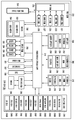
도 2는 본 발명의 다양한 실시예에 따른 전자장치의 블록도이다.
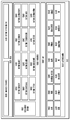
도 3은 본 발명의 다양한 실시예에 따른 프로그램 모듈의 블록도이다.
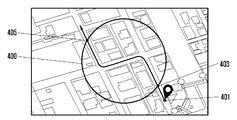
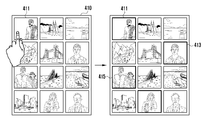
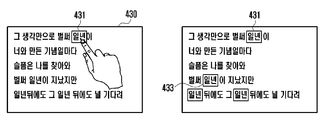
도 4a 내지 4d는 본 발명의 다양한 실시예에 따른 컨텐츠와 연관된 영역을 선택하는 방법에 대응하는 실시예에 대한 예시도이다.
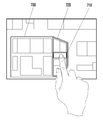
도 5a와 5b는 본 발명의 다양한 실시예에 따른 사용자 입력에 대응하는 압력값을 기반으로 지오펜스 영역을 설정하는 과정을 도시한 예시도이다.
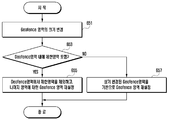
도 6a와 6c는 본 발명의 다양한 실시예에 따른 사용자 입력에 대응하는 압력값에 기반하여 선택된 특정 영역을 변경하는 방법을 설명하기 위한 순서도이다.
도 7은 본 발명의 다양한 실시예에 따른 사용자 입력에 대응하는 압력값을 기반으로 지오펜스 영역을 변경하는 과정을 도시한 예시도이다.
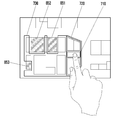
도 8은 본 발명의 다양한 실시예에 따른 제한 영역으로 설정된 객체를 제외하고, 지오펜스 영역을 변경하는 과정을 도시한 예시도이다.
도 9는 본 발명의 다양한 실시예에 따른 건물 또는 지역을 기준으로 지오펜스 영역을 변경하는 과정을 도시한 예시도이다.
도 10은 본 발명의 다양한 실시예에 따른 평면 기반의 지오펜스 영역 변경뿐만 아니라, 수직(vertical)을 기반으로 지오펜스 영역을 변경하는 과정을 도시한 예시도이다.
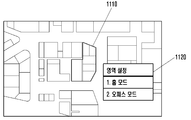
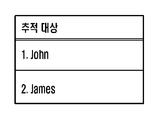
도 11a, 11b, 11c는 본 발명의 다양한 실시예에 따른 지오펜스 영역으로 진입하는 전자장치에 대해 설정하는 과정을 도시한 예시도이다.
106 : 서버 110 : 버스(bus)
120 : 프로세서 130 : 메모리
140 : 프로그램 141 : 커널
143 : 미들웨어
145 : 어플리케이션 프로그래밍 인터페이스(API)
147 : 어플리케이션 150 : 입출력 인터페이스
160 : 디스플레이 162 : 네트워크
170 : 통신 인터페이스
Claims (20)
- 전자장치에 있어서,
컨텐츠를 표시하고, 사용자 입력을 수신하기 위한 디스플레이;
상기 사용자 입력에 대응하는 압력을 감지하기 위한 센서; 및
프로세서를 포함하고,
상기 프로세서는,
상기 전자장치와 기능적으로 연결된 상기 디스플레이를 통하여 상기 컨텐츠를 표시하고,
상기 센서를 이용하여, 상기 컨텐츠의 적어도 일부 영역에 대한 상기 사용자 입력에 대응하는 압력값을 획득하고,
상기 획득된 압력값이 제 1 압력값이면, 상기 표시된 컨텐츠의 제 1 범위를 선택하고,
상기 획득된 압력값이 제 2 압력값이면, 상기 표시된 컨텐츠의 제 2 범위를 선택하고, 및
상기 제 1 범위 및 상기 제 2 범위 중 선택된 범위에 대응하는 인디케이션을 상기 디스플레이를 통하여 표시하도록 설정된 전자장치. - 제 1 항에 있어서, 상기 컨텐츠는 지도(정보)를 포함하고,
상기 프로세서는,
상기 지도에 포함된 객체의 높이, 객체의 종류, 객체의 단위 크기, 또는 그 조합에 적어도 기반하여 상기 제 1 범위 또는 상기 제 2 범위를 선택하도록 설정된 전자장치. - 제 2 항에 있어서,
상기 프로세서는,
상기 선택된 범위를 지오펜스 영역으로 지정하도록 설정된 전자장치. - 제 1 항에 있어서, 상기 컨텐츠는 텍스트를 포함하고,
상기 프로세서는,
상기 텍스트에 포함된 단어, 구문, 문장, 문단, 페이지, 또는 그 조합에 적어도 기반하여 상기 제 1 범위 또는 상기 제 2 범위를 선택하도록 설정된 전자장치. - 제 1 항에 있어서, 상기 컨텐츠는 적어도 하나의 이미지를 포함하고,
상기 프로세서는,
상기 적어도 하나의 이미지에 포함된 인물, 장소, 배경, 구도, 색상, 또는 그 조합에 적어도 기반하여 상기 제 1 범위 또는 상기 제 2 범위를 선택하도록 설정된 전자장치. - 제 1 항에 있어서,
상기 프로세서는,
메모리를 더 포함하고, 상기 메모리에 저장된 적어도 하나의 기준값에 기반하여, 상기 측정값을 제 1 입력값 또는 제 2 입력값으로 판단하도록 설정된 전자장치. - 제 1 항에 있어서,
상기 프로세서는,
상기 표시된 컨텐츠에 포함된 객체의 속성 및 특징에 기반하여, 상기 제 1 범위 또는 상기 제 2 범위를 선택하도록 설정된 전자장치. - 제 1 항에 있어서,
상기 프로세서는,
상기 선택된 범위 내에 지정된(specified) 제한 영역이 포함되어 있는지 여부를 확인하고; 및
상기 제한 영역이 포함되어 있는 경우 상기 선택된 범위에서 상기 제한 영역은 제외한 인디케이션을 상기 디스플레이를 통하여 표시하는 전자장치. - 디스플레이를 통하여 컨텐츠를 표시하는 동작;
상기 표시된 컨텐츠의 적어도 일부 영역에 대한 사용자 입력을 감지하는 동작;
상기 감지된 사용자 입력에 대응하는 압력값을 획득하는 동작;
상기 획득된 압력값이 제 1 압력값이면, 상기 표시된 컨텐츠의 제 1 범위를 선택하는 동작;
상기 획득된 압력값이 제 2 압력값이면, 상기 표시된 컨텐츠의 제 2 범위를 선택하는 동작;
상기 제 1 범위 및 상기 제 2 범위 중 선택된 범위에 대응하는 인디케이션을 상기 디스플레이를 통해 표시하는 동작;을 포함하는 방법. - 제 9 항에 있어서,
상기 제 1 범위 또는 상기 제 2 범위를 선택하는 동작은,
상기 표시된 컨텐츠가 지도 관련 컨텐츠인 경우 상기 지도에 포함된 객체의 높이, 객체의 종류, 객체의 단위 크기, 또는 그 조합에 적어도 기반하여 상기 제 1 범위 또는 상기 제 2 범위를 선택하는 동작;을 포함하는 방법. - 제 10 항에 있어서,
상기 선택된 제 1 범위 또는 상기 선택된 제 2 범위를 지오펜스 영역으로 지정하는 동작; 을 더 포함하는 방법. - 제 9 항에 있어서,
상기 제 1 범위 또는 상기 제 2 범위를 선택하는 동작은,
상기 표시된 컨텐츠가 텍스트를 포함한 경우 상기 텍스트에 포함된 단어, 구문, 문장, 문단, 페이지, 또는 그 조합에 적어도 기반하여 상기 제 1 범위 또는 상기 제 2 범위를 선택하는 동작;을 포함하는 방법. - 제 9 항에 있어서,
상기 제 1 범위 또는 상기 제 2 범위를 선택하는 동작은,
상기 표시된 컨텐츠가 적어도 하나의 이미지를 포함한 경우 상기 적어도 하나의 이미지에 포함된 인물, 장소, 배경, 구도, 색상, 또는 그 조합에 적어도 기반하여 상기 제 1 범위 또는 상기 제 2 범위를 선택하는 동작;을 포함하는 방법. - 제 9 항에 있어서,
상기 제 1 범위 또는 상기 제 2 범위를 선택하는 동작은,
상기 표시된 컨텐츠에 포함된 객체의 속성 및 특징에 더 기반하여, 상기 제 1 범위 및 상기 제 2 범위를 선택하는 동작을 포함하는 방법. - 제 9 항에 있어서,
상기 제 1 범위 및 상기 제 2 범위는,
상기 컨텐츠의 적어도 일부 영역을 기반으로 기 설정된 범위인 것을 특징으로 하는 방법. - 전자장치에 있어서,
컨텐츠를 표시하고, 사용자 입력을 수신하기 위한 디스플레이;
상기 사용자 입력에 대응하는 압력을 감지하기 위한 센서; 및
프로세서를 포함하고,
상기 프로세서는,
상기 전자장치와 기능적으로 연결된 상기 디스플레이를 통하여 상기 컨텐츠를 표시하고,
상기 센서를 이용하여, 상기 컨텐츠의 적어도 일부 영역에 대한 상기 사용자 입력에 대응하는 압력값을 획득하고,
상기 획득된 압력값이 제 1 압력값이면, 상기 일부 영역에 포함된 객체의 속성 및 특징에 기반하여 상기 표시된 컨텐츠의 제 1 범위를 선택하고,
상기 획득된 압력값이 제 2 압력값이면, 상기 일부 영역에 포함된 객체의 속성 및 특징에 기반하여 상기 표시된 컨텐츠의 제 2 범위를 선택하고, 및
상기 제 1 범위 및 상기 제 2 범위 중 선택된 범위에 대응하는 인디케이션을 상기 디스플레이를 통하여 표시하도록 설정된 전자장치. - 제 16 항에 있어서, 상기 컨텐츠는 지도를 포함하고,
상기 프로세서는,
상기 지도에 포함된 객체의 높이, 객체의 종류, 또는 객체의 단위 크기 별로 상기 제 1 범위 또는 상기 제 2 범위를 선택하고,
상기 선택된 범위를 지오펜스 영역으로 지정하도록 설정된 전자장치. - 제 16 항에 있어서, 상기 컨텐츠는 텍스트를 포함하고,
상기 프로세서는,
상기 텍스트에 포함된 단어, 구문, 문단, 페이지, 또는 그 조합에 적어도 기반하여 상기 제 1 범위 또는 상기 제 2 범위를 선택하도록 설정된 전자장치. - 제 16 항에 있어서, 상기 컨텐츠는 적어도 하나의 이미지를 포함하고,
상기 프로세서는,
상기 적어도 하나의 이미지에 포함된 인물, 장소, 배경, 구도, 색상, 또는 그 조합에 적어도 기반하여 상기 제 1 범위 또는 상기 제 2 범위를 선택하도록 설정된 전자장치. - 제 16 항에 있어서,
상기 프로세서는,
상기 선택된 범위 내에 지정된(specified) 제한 영역이 포함되어 있는지 여부를 확인하고; 및
상기 제한 영역이 포함되어 있는 경우 상기 선택된 범위에서 상기 제한 영역은 제외한 인디케이션을 상기 디스플레이를 통하여 표시하는 전자장치.
Priority Applications (2)
| Application Number | Priority Date | Filing Date | Title |
|---|---|---|---|
| KR1020150157290A KR20170054746A (ko) | 2015-11-10 | 2015-11-10 | 컨텐츠와 연관된 영역 선택 방법 및 전자장치 |
| US15/348,960 US20170131896A1 (en) | 2015-11-10 | 2016-11-10 | Electronic device and method for selecting area associated with content |
Applications Claiming Priority (1)
| Application Number | Priority Date | Filing Date | Title |
|---|---|---|---|
| KR1020150157290A KR20170054746A (ko) | 2015-11-10 | 2015-11-10 | 컨텐츠와 연관된 영역 선택 방법 및 전자장치 |
Publications (1)
| Publication Number | Publication Date |
|---|---|
| KR20170054746A true KR20170054746A (ko) | 2017-05-18 |
Family
ID=58667702
Family Applications (1)
| Application Number | Title | Priority Date | Filing Date |
|---|---|---|---|
| KR1020150157290A Withdrawn KR20170054746A (ko) | 2015-11-10 | 2015-11-10 | 컨텐츠와 연관된 영역 선택 방법 및 전자장치 |
Country Status (2)
| Country | Link |
|---|---|
| US (1) | US20170131896A1 (ko) |
| KR (1) | KR20170054746A (ko) |
Families Citing this family (8)
| Publication number | Priority date | Publication date | Assignee | Title |
|---|---|---|---|---|
| KR102104934B1 (ko) * | 2015-12-22 | 2020-04-27 | 후아웨이 테크놀러지 컴퍼니 리미티드 | 압력을 사용하여 대상을 필터링하기 위한 방법 및 장치 |
| US10496274B2 (en) * | 2016-04-20 | 2019-12-03 | Motorola Solutions, Inc. | Geofence parameters based on type of touch on a touch screen |
| US10732989B2 (en) * | 2017-02-09 | 2020-08-04 | Yanir NULMAN | Method for managing data, imaging, and information computing in smart devices |
| KR102364429B1 (ko) * | 2017-05-17 | 2022-02-17 | 삼성전자주식회사 | 콘텐츠를 표시하기 위한 방법 및 그 전자 장치 |
| KR102313755B1 (ko) * | 2017-06-07 | 2021-10-18 | 엘지전자 주식회사 | 이동 단말기 및 그 제어 방법 |
| CN111831175B (zh) * | 2020-01-17 | 2022-04-22 | 北京嘀嘀无限科技发展有限公司 | 地理围栏识别方法和系统、计算机可读存储介质 |
| CN112770261B (zh) * | 2021-01-11 | 2022-12-27 | 浙江航芯科技有限公司 | 不规则电子围栏定位系统及方法 |
| JPWO2024142247A1 (ko) * | 2022-12-27 | 2024-07-04 |
Family Cites Families (3)
| Publication number | Priority date | Publication date | Assignee | Title |
|---|---|---|---|---|
| US9269178B2 (en) * | 2012-06-05 | 2016-02-23 | Apple Inc. | Virtual camera for 3D maps |
| KR101946365B1 (ko) * | 2012-08-20 | 2019-02-11 | 엘지전자 주식회사 | 디스플레이 디바이스 및 그 제어 방법 |
| KR20170022192A (ko) * | 2015-08-19 | 2017-03-02 | 삼성전자주식회사 | 터치 센서를 구비하고 있는 전자장치 |
-
2015
- 2015-11-10 KR KR1020150157290A patent/KR20170054746A/ko not_active Withdrawn
-
2016
- 2016-11-10 US US15/348,960 patent/US20170131896A1/en not_active Abandoned
Also Published As
| Publication number | Publication date |
|---|---|
| US20170131896A1 (en) | 2017-05-11 |
Similar Documents
| Publication | Publication Date | Title |
|---|---|---|
| US10996847B2 (en) | Method for providing content search interface and electronic device for supporting the same | |
| KR20170058152A (ko) | 전자 장치 및 전자 장치의 디스플레이 설정 방법 | |
| KR20180080629A (ko) | 전자 장치 및 전자 장치의 어플리케이션 실행 히스토리 표시 방법 | |
| KR20170099157A (ko) | 온도 정보를 제공하는 방법 및 이를 지원하는 전자 장치 | |
| KR20170071960A (ko) | 전자 장치의 사용자 인터페이스 제공 방법 및 장치 | |
| US10510170B2 (en) | Electronic device and method for generating image file in electronic device | |
| KR20180097360A (ko) | 복수의 생체 센서를 이용하여 인증을 수행하기 위한 전자 장치 및 그의 동작 방법 | |
| US20170131896A1 (en) | Electronic device and method for selecting area associated with content | |
| KR20180108192A (ko) | 위치 결정 방법, 전자 장치 및 저장 매체 | |
| KR20180041911A (ko) | 전자 장치 및 전자 장치에서의 디스플레이 제어 방법 | |
| KR20170077730A (ko) | 컨텐트 인식 장치 및 그 동작 방법 | |
| KR20170030349A (ko) | 입력의 압력을 감지하는 전자 장치 및 그 동작 방법 | |
| KR20180089810A (ko) | 전자 장치 및 전자 장치의 터치 좌표 판단 방법 | |
| KR20170137404A (ko) | 어플리케이션을 전환하기 위한 방법 및 그 전자 장치 | |
| KR20170014407A (ko) | 전자장치의 보안 장치 및 제어 방법 | |
| KR20180094290A (ko) | 전자 장치 및 전자 장치의 수중 촬영 판단 방법 | |
| US20170031591A1 (en) | Screen controlling method and electronic device for supporting the same | |
| KR20180014632A (ko) | 전자 장치 및 그의 동작 방법 | |
| KR20180091380A (ko) | 전자 장치 및 그의 동작 방법 | |
| KR20160105121A (ko) | 전자 장치의 동작 방법, 전자 장치 및 저장 매체 | |
| KR20170052003A (ko) | 복수의 디스플레이들을 갖는 전자 장치 및 그 동작 방법 | |
| KR20180086078A (ko) | 전자 장치 및 전자 장치의 화면 표시 방법 | |
| KR20180051002A (ko) | 터치 스크린을 이용하는 전자 장치에서 애플리케이션의 실행을 제어하는 방법과 이를 위한 전자 장치 | |
| KR20170119948A (ko) | 전자 장치 및 그 제어 방법 | |
| KR102564468B1 (ko) | 경로 정보를 제공하기 위한 전자 장치 및 방법 |
Legal Events
| Date | Code | Title | Description |
|---|---|---|---|
| PA0109 | Patent application |
St.27 status event code: A-0-1-A10-A12-nap-PA0109 |
|
| P22-X000 | Classification modified |
St.27 status event code: A-2-2-P10-P22-nap-X000 |
|
| PG1501 | Laying open of application |
St.27 status event code: A-1-1-Q10-Q12-nap-PG1501 |
|
| P22-X000 | Classification modified |
St.27 status event code: A-2-2-P10-P22-nap-X000 |
|
| PC1203 | Withdrawal of no request for examination |
St.27 status event code: N-1-6-B10-B12-nap-PC1203 |
|
| P22-X000 | Classification modified |
St.27 status event code: A-2-2-P10-P22-nap-X000 |
|
| R18 | Changes to party contact information recorded |
Free format text: ST27 STATUS EVENT CODE: A-3-3-R10-R18-OTH-X000 (AS PROVIDED BY THE NATIONAL OFFICE) |
|
| R18-X000 | Changes to party contact information recorded |
St.27 status event code: A-3-3-R10-R18-oth-X000 |
|
| R18 | Changes to party contact information recorded |
Free format text: ST27 STATUS EVENT CODE: A-3-3-R10-R18-OTH-X000 (AS PROVIDED BY THE NATIONAL OFFICE) |
|
| R18-X000 | Changes to party contact information recorded |
St.27 status event code: A-3-3-R10-R18-oth-X000 |
|
| R18 | Changes to party contact information recorded |
Free format text: ST27 STATUS EVENT CODE: A-3-3-R10-R18-OTH-X000 (AS PROVIDED BY THE NATIONAL OFFICE) |
|
| R18-X000 | Changes to party contact information recorded |
St.27 status event code: A-3-3-R10-R18-oth-X000 |