WO2013144993A1 - Procédé d'affichage, procédé permettant de sélectionner un morceau de musique, dispositif d'affichage, dispositif audio et programme - Google Patents
Procédé d'affichage, procédé permettant de sélectionner un morceau de musique, dispositif d'affichage, dispositif audio et programme Download PDFInfo
- Publication number
- WO2013144993A1 WO2013144993A1 PCT/JP2012/002066 JP2012002066W WO2013144993A1 WO 2013144993 A1 WO2013144993 A1 WO 2013144993A1 JP 2012002066 W JP2012002066 W JP 2012002066W WO 2013144993 A1 WO2013144993 A1 WO 2013144993A1
- Authority
- WO
- WIPO (PCT)
- Prior art keywords
- music
- display
- screen
- distribution
- displayed
- Prior art date
- Legal status (The legal status is an assumption and is not a legal conclusion. Google has not performed a legal analysis and makes no representation as to the accuracy of the status listed.)
- Ceased
Links
Images






Classifications
-
- G—PHYSICS
- G06—COMPUTING OR CALCULATING; COUNTING
- G06F—ELECTRIC DIGITAL DATA PROCESSING
- G06F16/00—Information retrieval; Database structures therefor; File system structures therefor
- G06F16/60—Information retrieval; Database structures therefor; File system structures therefor of audio data
- G06F16/68—Retrieval characterised by using metadata, e.g. metadata not derived from the content or metadata generated manually
- G06F16/683—Retrieval characterised by using metadata, e.g. metadata not derived from the content or metadata generated manually using metadata automatically derived from the content
-
- G—PHYSICS
- G06—COMPUTING OR CALCULATING; COUNTING
- G06F—ELECTRIC DIGITAL DATA PROCESSING
- G06F16/00—Information retrieval; Database structures therefor; File system structures therefor
- G06F16/60—Information retrieval; Database structures therefor; File system structures therefor of audio data
- G06F16/63—Querying
- G06F16/638—Presentation of query results
-
- G—PHYSICS
- G06—COMPUTING OR CALCULATING; COUNTING
- G06F—ELECTRIC DIGITAL DATA PROCESSING
- G06F16/00—Information retrieval; Database structures therefor; File system structures therefor
- G06F16/60—Information retrieval; Database structures therefor; File system structures therefor of audio data
- G06F16/64—Browsing; Visualisation therefor
Definitions
- the present invention relates to a display method, a music selection method, a display device, an audio device, and a program for presenting information for efficiently searching for a target music piece.
- search items such as the age and genre of songs released are displayed one after another, and the corresponding song is extracted based on the user's response
- search device that presents the information (for example, Patent Document 1).
- Patent Document 1 when the technology of Patent Document 1 is used, there is not much problem if the subsequent music has already been imaged. However, if it is desired to narrow down the candidates while browsing a large number of music, it is not always easy to use. It's not good. For example, in the case of Patent Document 1, since the corresponding music is presented based on the user's answer, for example, it is possible to know how many songs with a BPM of 100 to 110 exist. Or the distribution state of the music in the periphery cannot be known. In addition, it is impossible to grasp what kind of music (for example, the distribution state of BPM and KEY of each music) is a large number of music (entire music) that are candidates for selection. In other words, since the method of Patent Document 1 cannot be viewed from the whole music, it is not suitable for a selection method that narrows down the candidates for subsequent music from a vague image among many music.
- the distribution state of BPM and KEY of each music is a large number of music (entire music) that are candidates
- the present invention provides a display method, a music selection method, a display device, an audio device, and a program capable of efficiently narrowing down music candidates after grasping the distribution state of a large number of music pieces.
- the purpose is to provide.
- the display method of the present invention includes a first display step of displaying a plurality of music distribution screens in which music icon groups corresponding to each music are mapped based on different attributes, and at least one music among the plurality of music distribution screens.
- a music list display screen that lists the music corresponding to the music icons included in the arbitrary range is displayed.
- a second display step based on the range specifying step for specifying an arbitrary range and the result of specifying the arbitrary range.
- the display device of the present invention includes a first display unit that displays a plurality of music distribution screens in which music icon groups corresponding to each music are mapped based on different attributes, and at least one music among the plurality of music distribution screens.
- a music list display screen listing music corresponding to the music icons included in the arbitrary range is displayed.
- a second display means based on the range designation means for designating an arbitrary range and the result of the specification of the arbitrary range.
- an arbitrary range is designated on the music distribution screen, and the music list is displayed based on the designation result, so that the user can select the music candidate after grasping the distribution state of the entire music. .
- the “music distribution screen” does not necessarily have to be mapped based on one attribute. For example, it may be mapped to a plane coordinate based on two attributes, or may be mapped to a three-dimensional space based on three attributes.
- mapping when mapping is performed based on a plurality of attributes, not all attributes need to be different from “a plurality of music distribution screens mapped based on different attributes”. For example, when the first music distribution screen is mapped based on the attribute A and the attribute B and the second music distribution screen is mapped based on the attribute A and the attribute C, the first music distribution screen The second music distribution screen corresponds to “a plurality of music distribution screens mapped based on different attributes”. That is, each music distribution screen should just have a different attribute or its combination.
- a third display step of displaying a music information screen relating to the preceding music being played back is further executed, and the music distribution screen displays the music icon corresponding to the preceding music as another music icon. It is characterized by being displayed separately.
- the user can grasp the music information relating to the preceding music.
- the music list display screen displays a list for selecting the subsequent music to be played next to the preceding music, and the music distribution screen has a higher mixing affinity between the two music. , Mapping so that the distance between the two corresponding music icons is close, and displaying the music icon corresponding to the subsequent music separately from the music icon corresponding to the preceding music and the other music icons To do.
- the mixing affinity of two corresponding music pieces can be indicated by the distance between the two music icons on the music distribution screen.
- the music distribution screen displays an auxiliary line made up of a plurality of concentric circles centering on the preceding music piece, or an auxiliary image in which the concentric circles are color-coded.
- auxiliary image may be drawn with a different hue color for each concentric circle, or a gradation drawn so that a specific color gradually becomes darker / lighter depending on the diameter of the concentric circle. It may be.
- the music distribution screen displays an axis corresponding to the attribute.
- This configuration can be used as a guide when the user specifies an arbitrary range by displaying the axis corresponding to the attribute.
- the music distribution screen is displayed in a zoom-in display or a zoom-out display according to a specified arbitrary range.
- the music distribution screen is displayed in a zoomed-in display (an arbitrary range is enlarged), or an arbitrary range is displayed on the music distribution screen.
- the music distribution screen can be displayed in a zoom-out manner (an arbitrary range is reduced and displayed), and the music candidates can be narrowed down efficiently.
- the music list display screen is characterized in that each music is sorted and displayed according to the mixing affinity for the preceding music.
- the music list is sorted and displayed according to the mixing affinity for the preceding music, it is possible to efficiently search for the succeeding music suitable for mixing with the preceding music.
- a sort condition selection step for selecting any sort condition from a plurality of sort conditions including mixing affinity and one or more attributes is further executed.
- the music is sorted and displayed according to the selected sorting condition.
- the sorting condition can be selected according to the user's preference and the purpose of the music selection.
- the music selection method of the present invention is characterized by executing each step in the above display method and a music selection step of selecting any music from the music displayed on the music list display screen.
- the second display step may include any of the music distribution screens when any range is designated on any of the music distribution screens among the plurality of music distribution screens.
- the music icon included in the arbitrary range specified in the above and other music icons are displayed separately.
- the range designation result in the other music distribution screen can be reflected on the music distribution screen.
- music icons that are included in an arbitrary range are normally displayed, and music icons that are not included in an arbitrary range are grayed out. Thereby, the music candidates can be narrowed down more efficiently.
- the music distribution screen has one or more attributes among the BPM (Beats Per Minute), tonality (KEY), genre, image (bright / dark, song tone, etc.), artist name, and label. It is mapped based on.
- the acoustic device of the present invention includes: each means in the display device; a music selection means for selecting any music from the music displayed on the music list display screen; and a playback means for playing back the selected music. , Provided.
- the audio device is a concept that includes not only an audio device dedicated to music playback but also a device that can operate as a playback device by installing a dedicated application on a PC or various tablet terminals.
- the program of the present invention causes a computer to execute each step in the above display method or the above music selection method.
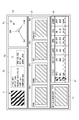
- PC It is a block diagram of PC concerning one Embodiment of this invention. It is a figure which shows the example of a display of the browse screen of a file music player. It is a functional block diagram of PC. It is a figure which shows an example of the attribute employable as a music distribution screen. It is a figure which shows rotation operation of a radar chart. It is a figure which shows the calculation reference
- FIG. 1 is a configuration diagram showing a schematic configuration of the PC 10 (display device, acoustic device).
- the PC 10 includes a display unit 11, an operation unit 12, an external storage device interface unit (hereinafter referred to as an “external storage device I / F unit”) 13, a communication unit 14, a control unit 15, and a storage.
- an external storage device I / F unit external storage device interface unit
- the reproduction processing unit 17, and the audio output unit 18 a bus 19 for connecting them is provided.
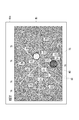
- the display unit 11 displays a browse screen D0 (see FIG. 2) of the file music player on the display screen.
- a plurality of music distribution screens 60 corresponding to different attributes are displayed in the music distribution display area Eb of the browse screen D0, and music candidates for searching for the target music are narrowed down using these.
- Each music distribution screen 60 is a distribution diagram in which music icons 71 corresponding to a large number of music are arranged according to a predetermined mapping rule. The user zooms in on the music distribution screen 60 so that all the music icons 71 can be visually recognized, so that the entire music can be seen from a bird's-eye view.
- mapping rules since the corresponding attributes and / or combinations thereof (hereinafter also simply referred to as “mapping rules”) differ depending on each music distribution screen 60, it is possible to grasp the music distribution from various angles, and to efficiently select music candidates. You can narrow down.
- a music artwork having transparency is used as the music icon 71.
- the mixing affinity between the two pieces of music is displayed in the mixing affinity display area Ee on the browse screen D0.
- “Mixing affinity” is an index that quantitatively represents the degree of compatibility when two music pieces are mixed and reproduced. That is, if the mixing affinity is high, the two music pieces can be mixed without a sense of incongruity, and if the mixing affinity is low, it means that the music is not suitable for mixing. In this way, by presenting the mixing affinity to the user, even a DJ beginner can easily and quickly select a music piece to realize mixing reproduction.
- the operation unit 12 includes a mouse, a keyboard, a touch pad, and the like, and is used for a user to perform various operations. In the present embodiment, it is mainly used for attribute selection on the music distribution screen 60, range designation on the music distribution screen 60 (designation of music icon group to be narrowed down), music selection operation, and the like.
- the external storage device I / F unit 13 inputs and outputs information between the PC 10 and the external storage device 30 such as reading music information from the external storage device 30.
- the external storage device 30 refers to a storage device (such as an external hard disk device) locally connected to the PC 10 or a USB memory that can be read by a memory slot.
- the communication unit 14 communicates between the PC 10 and a device on the network NT, such as acquiring music and music information from a memory of a device (such as a Web server) on the network NT via the network NT such as the Internet or an intranet. I do.
- a device such as a Web server
- the communication form may be wired communication or wireless communication.
- the control unit 15 includes a CPU (Central Processing Unit), a ROM (Read Only Memory), a RAM (Random Access Memory), and the like, and performs various arithmetic processes. Also, display control of the display unit 11 based on the operation of the operation unit 12, information input / output control via the external storage device I / F unit 13 and the communication unit 14, music analysis processing / playback control, and the like are performed.
- a CPU Central Processing Unit
- ROM Read Only Memory
- RAM Random Access Memory
- the storage unit 16 includes a hard disk drive and the like, and stores a dedicated application 20 (DJ software) for realizing a file music player, and stores music and music information.
- “Music piece” refers to a music file (or a path of a music file).
- “Music information” means BPM (Beats Per Minute), KEY (tone), identification information (music ID), title, artist, composer, genre, label, album, remixer, artwork image file ( Or image file path), release date (release date), rate (evaluated by user), voice waveform data, presence or absence of music, melody, harmony, rhythm, database registration date, last update date of song file, song length (Playback time), playback history such as playback count and playback date and time.
- the artwork refers to an album artwork, a music artwork, or an image associated with the music by the user.
- BPM BPM
- KEY genre
- voice waveform data presence / absence of musical tone
- melody melody
- harmony rhythm
- etc. may be set in advance as part of the music accompanying information.
- 20 may be obtained from the analysis result of the music file by 20.
- the user may input (select) / edit these pieces of information.
- the reproduction processing unit 17 performs reproduction processing of the music file under the control of the control unit 15 and outputs the reproduction signal to the audio output unit 18.
- the audio output unit 18 includes a DSP (Digital Signal Processor), an amplifier, a speaker, or headphones, and outputs a reproduction signal. Note that an external device may be used as the audio output unit 18.
- DSP Digital Signal Processor
- the browse screen D0 includes a playback music display area Ea on the upper left of the screen, a music distribution display area Eb on the middle of the screen, a narrowing result display area Ec on the lower left of the screen, a music list display area Ed on the lower right of the screen, and an upper screen. And a right mixing affinity display area Ee.
- the reproduction music display area Ea is an area for displaying the music information (music information display screen) of the currently reproduced music, the artwork display area 51 for displaying the music artwork, the music title name, the artist name, It has a first music information display area 52 that displays the release date, label, composer name, and the like, and a second music information display area 53 that displays BPM, KEY, genre, and the like.
- the music distribution display area Eb is an area for displaying a plurality of attribute-specific music distribution screens 60.
- the music displayed on each music distribution screen 60 is intended for music stored in the storage unit 16.
- the BPM distribution screen 60a (see FIG. 7) in which the music icon 71 is mapped according to BPM
- the genre distribution screen 60b in which the music icon 71 is mapped according to the genre
- the music icon 71 according to KEY is displayed in the music distribution display area Eb.
- the mapped KEY distribution screen 60c see FIG. 9
- the BPM / KEY distribution screen 60d see FIG. 10
- a music distribution screen 60 based on attributes other than these can be displayed in the music distribution display area Eb (details will be described later).
- the number of music distribution screens 60 to be displayed is arbitrary.
- the narrowing-down result display area Ec is an area for displaying music icons 71 narrowed down by specifying a range on each music distribution screen 60.
- the narrowing result is displayed on the music distribution screen 60 mapped based on the same mapping rule as the BPM distribution screen 60a.
- the screen displayed in the narrowing-down result display area Ec is referred to as a “narrowing result display screen 60e (see FIG. 11)”.
- the music list display area Ed displays a list of music corresponding to the music icons 71 narrowed down by range specification on each music distribution screen 60.
- Each piece of music displays a parameter of each attribute in a “title (TITLE)” column or an “artist (ARTIST)” column, and a reduced artwork 57 in a “TITLE” column.
- the attribute items to be displayed in the music list display area Ed can be arbitrarily selected by the user.
- the mixing affinity display area Ee is a graph showing the mixing affinity between two songs of the music being played (hereinafter referred to as “preceding music”) and the music to be played next (hereinafter referred to as “following music”). This is an area to be displayed.
- the attribute-specific mixing affinity which is the mixing affinity for each attribute, is displayed by the shape of the radar chart 55 including three axes.
- the “BPM” axis indicates the mixing affinity for BPM
- the “KEY” axis indicates the mixing affinity for tonality
- the “ITEM” axis indicates the mixing affinity for genre or artist. A method for calculating each mixing affinity will be described later.
- the operation of the browse screen D0 will be briefly described.
- the user selects a preceding song from the song list display area Ed using a cursor key or the like.
- the selected music is displayed as a cursor (illustration, shaded display).
- the preceding music is determined by the operation of the enter key or the like, the music information is displayed in the reproduction music display area Ea and the mixing affinity is displayed in the mixing affinity display area Ee.
- the mixing affinity for each attribute displayed in the mixing affinity display area Ee Is the maximum.
- the preceding music mark M1 (see FIG. 7 and the like) indicating the preceding music is superimposed and displayed on each music distribution screen 60 in the music distribution display area Eb.
- an arbitrary range is designated on each music distribution screen 60 with a mouse or the like in order to select subsequent music.
- the music icons included in the designated range (hereinafter referred to as “designated range 73”) are narrowed down by the AND condition and displayed in the narrowing-down result display area Ec and the music list display area Ed.
- the subsequent music mark M2 indicating the subsequent music is displayed on each music distribution screen 60 in the music distribution display area Eb (FIG. 7). Etc.) are superimposed and displayed.
- the mixing affinity for each attribute displayed in the mixing affinity display area Ee also changes. The user selects a music suitable for mixing reproduction while confirming the mixing affinity display area Ee.
- the enter key is pressed, the music displayed at the cursor is determined as the subsequent music, and mixing reproduction is performed.
- the main functions of the PC 10 are parameter storage means 110, music file storage means 120, music information display means 130, music distribution display means 140 (first display means), narrowing result display means 150, music list display means 160. (Second display means), mixing affinity display means 170, attribute selection means 180, range specification means 190, sort condition selection means 210, music selection means 220, rotation operation means 230, and reproduction means 240 are provided.
- the parameter storage means 110 and the music file storage means 120 are realized by the storage unit 16.
- the attribute selection unit 180, the range specification unit 190, the sort condition selection unit 210, the music selection unit 220, and the rotation operation unit 230 are realized by the operation unit 12.
- Each other means is realized by the control of the control unit 15 using the dedicated application 20.
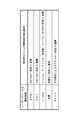
- the parameter storage means 110 stores attribute parameters of each attribute for each music piece. Examples of the attribute include BPM and KEY (see FIG. 4). For these attribute parameters, information attached to the music file as music accompanying information or information obtained from the analysis result is used.
- the music file storage unit 120 stores a music file (music audio data) of each music.
- the music information display means 130 displays music information related to the music being played in the playback music display area Ea.
- Each display means including the music information display means 130 receives necessary attributes from the parameter storage means 110. Get parameters and display them. For example, for the attribute “KEY”, the main KEY parameter (the most frequently detected KEY or the rust portion KEY) of the music is acquired. Also, for the attribute “BPM”, the main BPM parameter (the most frequently detected BPM or the rust portion BPM) of the music is acquired.
- the music distribution display means 140 displays the music distribution screen 60 in which the music icon 71 group corresponding to each music is mapped according to a predetermined mapping rule in the music distribution display area Eb.
- the “mapping rule” refers to an adopted attribute, a combination of attributes, an axis arrangement, an axis shape (linear axis, circular axis), a music icon 71 arrangement rule, and the like. That is, even if the music distribution screens 60 are mapped according to the same attribute, the mapping rules are considered to be different if the axis arrangement, axis shape, and arrangement rules are different.
- the music distribution display means 140 displays the music distribution screen 60 corresponding to the attribute selected by the attribute selection means 180.
- the attribute selection means 180 selects the attribute of each music distribution screen 60 displayed on the music distribution display area Eb from the attribute candidate list shown in FIG. For example, a plurality of attributes can be selected for one music distribution screen 60.
- the arrangement and shape of the shaft can be selected.
- an arrangement rule of the music icon 71 when each attribute is selected one shown in the “arrangement rule” column of FIG.
- a plurality of music distribution screen patterns in which attribute-axis arrangement-axis shape are combined in advance are prepared, and one to be displayed in the music distribution display area Eb is selected from them.
- four patterns of a BPM distribution screen 60a (see FIG. 7), a genre distribution screen 60b (see FIG. 8), a KEY distribution screen 60c (see FIG. 9), and a BPM / KEY distribution screen 60d (see FIG. 10) are prepared. It is conceivable to select one or more patterns from these.
- the music distribution screen 60 may be scrolled by a left / right key or a flick operation as in a cover flow, for example, or a desired pattern may be selected from the music distribution screen pattern list. Further, the arrangement order of the music distribution screen 60 may be changed by a drag operation.
- each attribute parameter may be reflected depending on the display form.
- the KEY difference may be displayed by the frame color of the music icon 71 on the music distribution screen 60 mapped based on BPM.
- the frame color of each music icon 71 may be determined by associating the fifth degree and the hue. According to this configuration, more information (attribute parameters) can be displayed on one music distribution screen 60.
- other methods such as changing the size of the music icon 71, changing the content / shape / color of the icon itself, changing the transparency, and the like can be considered.
- the “fifth degree” refers to a tonality space in which each of the 12 major and minor keys is arranged in an annular shape, and the subgenus is arranged in the clockwise direction and the counterclockwise direction in each key. A combination of major and minor keys located at the same angle is a parallel tone. For this reason, the tonality located closer to the fifth degree includes more common pitches, and dissonance is less likely to occur when mixing.
- the display form of the music icon 71 may be changed according to the mixing affinity with the preceding music.
- the display form may be changed according to the attribute-specific mixing affinity of the attributes adopted in each music distribution screen 60, or a predetermined attribute-specific mixing affinity (for example, the attributes shown in FIG. 6).
- the display form may be changed according to any one of the candidates.
- the music distribution display means 140 displays the music icon 71 corresponding to the preceding music and the succeeding music separately from the other music icons.
- the music icon 71 corresponding to the preceding music and the subsequent music is distinguished from the other music icons 71 by displaying the preceding music mark M1 and the subsequent music mark M2 in a superimposed manner.
- the music icon 71 can be distinguished by changing the display form such as adding a frame, enlarging the display, changing the content / shape / color of the icon itself, flashing, and vibrating. It is done.
- the music distribution display means 140 displays the axis corresponding to the attribute of each music distribution screen 60 on each music distribution screen 60. Further, as necessary, the axis name, separator line, scale label, and the like are additionally displayed on each axis. Further, each music distribution screen 60 performs zoom-in display or zoom-out display for each designation of the designated range 73 by the range designating unit 190. For example, when the designated range 73 is small with respect to the music distribution screen 60, the music distribution screen 60 is zoomed in so as to have the maximum size including the designated range 73 (the designated range 73 and the music icon 71 are enlarged and displayed. ).
- the music distribution screen 60 is zoomed out so as to have the maximum size including the designated range 73 (the designated range 73 and the music icon 71 are reduced). indicate). Note that it may be possible to select whether or not zoom-in / out display is necessary in accordance with the presetting or how to designate the designated range 73.
- the music distribution display means 140 when the specified range 73 is specified on any of the music distribution screens 60 among the plurality of music distribution screens 60 displayed in the music distribution display area Eb, the other music distribution screens 60.
- the music icon 71 included in the designated range 73 designated on any of the music distribution screens 60 and the other music icons 71 are displayed separately.
- the music icons 71 of A and B are included in the designated range 73 in the first music distribution screen 60 among the music A, B, and C
- the second music distribution screen 60 A and B are normally displayed, and C is grayed out. That is, each time the designated range 73 is set, the number of music icons 71 that are grayed out in each music distribution screen 60 increases.
- the narrowing result display means 150 displays the music icon 71 narrowed down based on the range designation result in the music distribution display area Eb in the narrowing result display area Ec. For example, when the designated range is not set in the music distribution display area Eb, the BPM distribution screen 60a and the narrowing-down result display screen 60e are the same display (because the mapping rules are common). Further, after the range is designated, only the music icon 71 (music icon 71 not grayed out) normally displayed on the BPM distribution screen 60a is displayed.
- the music list display means 160 displays the music list narrowed down based on the range designation result in the music distribution display area Eb in the music list display area Ed. Further, the music list is sorted and displayed in accordance with the selection by the sort condition selection means 210.
- the sort condition selection unit 210 selects a sort condition from among the attribute candidates shown in FIG. 4 in addition to “mixing affinity”. For example, when the attribute “BPM” is selected, the BPM is sorted in order of increasing / decreasing BPM.
- “mixing affinity” is selected as the sorting condition, an attribute (hereinafter referred to as “vertex attribute”) assigned to the axis located at the vertex of the radar chart 55 by the rotation operation of the radar chart 55 by the rotation operation means 230.
- the respective music candidates are arranged in the order closer to the BPM “100.000” of the music being reproduced.
- the vertex attribute is “KEY”
- the KEYs are arranged in the order from “BM”
- the vertex attribute is “ITEM”
- they are arranged in descending order of the attribute-specific mixing affinity of “ITEM”.
- the ascending order and descending order of the array may be switched.
- the sort condition is not displayed according to the attribute-specific mixing affinity corresponding to the vertex attribute of the radar chart 55, but “total mixing affinity”. It may be sorted and displayed in the order according to “degree”.
- the “total mixing affinity” can be calculated by a predetermined calculation formula using the attribute-specific mixing affinity as a parameter, such as a total value of attribute-specific mixing affinity.
- the music list display means 160 displays the music to be selected (subsequent music) separately from other music in accordance with the selection operation by the music selection means 220.
- the target music string is shaded in accordance with the selection operation of the music selection means 220 (see FIG. 2).
- the mixing affinity display means 170 displays the mixing affinity of the succeeding music with respect to the preceding music on the radar chart 55. Further, when a rotation operation is performed by the rotation operation means 230, the radar chart 55 is rotated and displayed according to the operation. For example, as shown in FIG. 5, it is conceivable to rotate each axis by 120 ° every time a predetermined key is pressed.
- the attribute-specific mixing affinity is determined based on the relative value of the attribute parameter of the subsequent music with respect to the preceding music.
- the attribute “BPM” is calculated from the degree of coincidence or difference between the BPMs of two songs. For example, if the difference in BPM is 1.0 or less, the score is 10 points, and if the difference in BPM is greater than 1.0 and 2.0 or less, it is tabulated to calculate the mixing affinity by attribute. May be.
- the score is 10 points, and in the case of the Major / Minor relationship, the score is 8 points and 5 degrees shifted (both sides on the fifth degree range) and 6 points. You may calculate from a table like a point. Further, in the case of the attribute “ITEM”, for example, +2 points when the artists of the two songs match, +2 points when the genres match, +2 points when the composers match, and when the age is close (for example, 1 Within the year), the attribute-specific mixing affinity may be calculated by adding a score for each attribute item, such as +2.
- the attribute “volume” it may be calculated from the degree of coincidence or difference between the volumes of two songs.
- the attribute “title” it may be calculated from the matching degree or difference of title names by character analysis. For example, +2 points when the same word is used in the title names of two music pieces, and +1 point when highly related words (for example, “winter” and “snow”) are used.
- the attribute-specific mixing affinity may be calculated by adding points based on the collation result of each word when the title name is divided into phrases.
- the reproduction means 240 reads the music selected from the music list displayed on the music list display means 160 from the music file storage means 120 and reproduces it.
- the music distribution screen 60 will be described in detail with reference to FIGS. 7 to 10 will be described on the assumption that the range designation results for the other music distribution screens 60 are not reflected (the gray-out display is omitted).
- FIG. 7 is a diagram showing a display example of the BPM distribution screen 60a.
- music icons 71 mapped according to the BPM and the number of reproductions and an axis 72 corresponding to the BPM are displayed.
- Each music icon 71 is arranged on the upper side as the BPM is larger, and is arranged on the left side as the number of reproductions is larger (priority display).
- the newest reproduction date is displayed on the near side (the uppermost layer).
- the preceding music mark M1 is superimposed on the music icon 71 of the music corresponding to the preceding music
- the subsequent music mark M2 is superimposed on the music icon 71 of the music corresponding to the subsequent music. indicate.
- the preceding music mark M1 and the subsequent music mark M2 are displayed so as to be distinguishable from each other by color coding or the like.
- a dotted line frame with reference numeral 73 indicates a designated range.
- the range is specified by drawing a rectangular frame.
- the range may be specified by a circle or a polygon instead of a rectangular frame.
- the range may be specified by a locus drawn by itself. For example, by dragging with the mouse left clicked, a quadrangular frame with the left clicked position as the vertex is drawn.
- Whether or not it is included in the designated range 73 may be determined by whether or not the entire music icon 71 is included, or at least a part of the music icon 71 is included. You may determine by whether it is contained. Further, when most of the music icon 71 (a predetermined ratio or more) is included, it may be determined that it is included in the designated range 73.
- FIG. 8 is a diagram showing a display example of the genre distribution screen 60b.
- each music icon 71 mapped according to the genre and the number of times of reproduction, a circular frame 75 indicating genre division, and a first circular auxiliary line 85 indicating the distance from the center of the genre distribution screen 60b, , Is displayed.
- Each music icon 71 is classified for each genre, and arranged so as to be closer to the center as the number of reproductions increases (priority display).
- the circular frame 75 is displayed in an appropriate size so that the user can grasp the genre classification after mapping each music icon 71.
- the genre name is displayed as text in the vicinity of the circular frame 75.
- the preceding music mark M1 and the subsequent music mark M2 are superimposed on the music icons 71 and 71 of the music corresponding to the preceding music and the subsequent music, respectively.
- the range is specified by drawing a circular frame as indicated by reference numeral 73.
- the range specifying operation is the same as that on the BPM distribution screen 60a. For example, when the mouse is dragged with the mouse left clicked, an elliptical frame based on the left clicked position is drawn. That is, it is not necessary to specify the frame type before the specified range 73 is drawn.
- auxiliary image in which each concentric circle is displayed by color may be displayed.
- the “auxiliary image” may be drawn with colors of different hues for each concentric circle, or may be drawn with gradation so that a specific color gradually becomes darker / lighter depending on the diameter of the concentric circles. There may be.
- FIG. 9 is a diagram showing a display example of the KEY distribution screen 60c.
- each music icon 71 mapped in accordance with the KEY and ITEM mix affinity, a straight auxiliary line 76 indicating the KEY classification, and a second circular auxiliary indicating the distance from the center of the KEY distribution screen 60c.
- Line 86 is displayed.
- Each music icon 71 is arranged in the fifth-degree range and thus in a circle, and is arranged closer to the center as the mix affinity of the attribute “ITEM” is higher (priority display). That is, the genre and artist are the same as that of the preceding music, or the closer to the released age, the closer to the center (see FIG. 6).
- the preceding music mark M1 and the succeeding music mark M2 are superimposed and displayed on the music icons 71 and 71 of the music corresponding to the preceding music and the subsequent music, respectively.
- the range is specified by specifying a sector area delimited by the straight auxiliary line 76.
- the designation operation is performed by, for example, performing a left click operation on a desired sector area using a mouse or the like.
- FIG. 10 is a diagram showing a display example of the BPM / KEY distribution screen 60d.
- the BPM / KEY distribution screen 60d shows each music icon 71 mapped according to BPM and KEY, a horizontal axis 78 corresponding to BPM, a vertical axis 79 corresponding to KEY, and KEY and BPM of the preceding music.
- Two band lines 81 and 82 and a third circular auxiliary line 87 (“auxiliary line” in the claims) indicating the distance from the preceding music mark M1 are displayed.
- the arrangement of each music icon 71 in the horizontal direction is determined according to BPM
- the arrangement in the vertical direction is determined according to KEY.
- a band 81 indicates a predetermined range before and after the BPM of the preceding music
- a band 82 indicates a predetermined range before and after the KEY of the preceding music. That is, the music icon 71 and the preceding music mark M1 corresponding to the preceding music are arranged at the position where the two band lines 81 and 82 intersect. Further, since the third circular auxiliary line 87 is a plurality of concentric circles centering on the music icon 71 corresponding to the preceding music, the mixing affinity based on the BPM / KEY with the preceding music can be grasped at a glance. ing.
- the preceding music mark M1 and the succeeding music mark M2 are superimposed and displayed on the music icons 71 and 71 of the music corresponding to the preceding music and the subsequent music, respectively.
- the designated range 73 is designated by drawing a rectangular frame as in the BPM distribution screen 60 a.
- an “auxiliary image” in which each concentric circle is displayed by color may be displayed.
- the arrangement of the band lines 81 and 82 is fixed so that the intersection (preceding music mark M1) of the two band lines 81 and 82 is always a fixed position on the BPM / KEY distribution screen 60d, and the axes 78 and 79 are fixed.
- the scale label may be changed. For example, when the arrangement of the band lines 81 and 82 is fixed as shown in FIG. 10 and the key of the preceding music is “Gm”, “Gm” is written at the label position of “Bm”. When the BPM of the preceding music is “120”, “120” is written at the label position of “100”.
- the two band lines 81 are displayed so that the preceding music mark M1 is displayed substantially at the center of the BPM / KEY distribution screen 60d. , 82 are preferably fixedly displayed.
- each music distribution screen 60 is provided with each music icon 71 according to each mapping rule. Moreover, the attribute similarity between music is high, so that the distance between the music icons 71 is small. That is, the ease of mixing reproduction is indicated by the distance between the music icons 71. Furthermore, by displaying the preceding music mark M1 and the subsequent music mark M2 on each music distribution screen 60, it is possible to determine at a glance whether or not the subsequent music selected in the music list display area Ed is really suitable for mixing. can do.
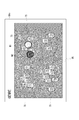
- FIG. 11 is a diagram showing a display example of the narrowing-down result display screen 60e based on the range specifying operation by each music distribution screen 60 shown in FIGS.
- the narrowing-down result display screen 60e has the same mapping rule as the BPM distribution screen 60a, but is different in that the music icon 71 corresponding to the preceding music is indicated by an icon frame 71a. Further, only the music icon 71 included in the specified range 73 of all the music distribution screens 60 shown in FIG. 7 to FIG. 10 and the music icon 71 corresponding to the preceding music are displayed as the narrowing result, and the others are displayed. It is also different in that it is not displayed (others are grayed out on the BPM distribution screen 60a).
- songs for three songs other than the preceding music are listed in the music list display area Ed (see FIG. 2).
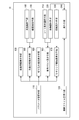
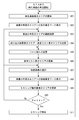
- the preceding music selection operation is performed before the flow starts.
- the reproduction music display area Ea is updated (music information regarding the preceding music being reproduced is displayed, S01: third display step), and the music distribution display area
- the preceding music mark M1 is displayed on each music distribution screen 60 in Eb (S02).
- the music list display area Ed is updated (S06).
- the steps S05 and S06 are omitted.
- the subsequent music is selected from the music list display area Ed (S07: music selection step)
- the subsequent music mark M2 is displayed on each music distribution screen 60 in the music distribution display area Eb (S08).
- the mixing affinity display area Ee is updated in accordance with the selection operation of the subsequent music (S09).
- the music candidates are narrowed down based on the range designation result on each music distribution screen 60. Therefore, the user selects the music candidates after grasping the distribution state of the entire music. it can.
- the user since a plurality of music distribution screens 60 having different attributes are displayed, the user can narrow down music candidates in stages. In this way, it is possible to look down on the whole music and narrow down by attribute, so if you want to mix and play within DJ performances, narrow down the candidates for subsequent music from a vague image. Convenience is good when going.
- each music distribution screen 60 reflects the range specification result in the other music distribution screens 60 (the music icon 71 outside the specified range 73 is grayed out), so that the music candidates can be narrowed down more efficiently. Can do.
- the attribute-specific mixing affinity of each attribute is displayed on the radar chart 55, so that the attribute-specific mixing affinity for the preceding music can be easily shown to the user. Thereby, the user can determine at a glance whether the selected music is suitable for mixing and in which attribute the mixing is suitable.
- a comprehensive evaluation of a plurality of attribute-specific mixing affinities can be indicated by the area in the polygon of the radar chart 55.
- the music distribution screen 60 mapped based on one or two attributes is illustrated, but a music distribution screen 60 mapped based on three or more attributes may be used.
- the four music distribution screens 60 displayed in the music distribution display area Eb do not necessarily have different mapping rules.
- a configuration may be used in which two music distribution screens 60 based on the same mapping rule are displayed with different magnification rates.
- the music file and the music accompanying information are both stored in the storage unit 16, but may be stored in different areas.
- the PC 10 may be configured to be able to communicate with a first database that manages music files and a second database that manages music accompanying information, and acquires necessary information from each database.
- the subsequent music is finally selected from the music list.
- the music icon 71 is double-clicked on each music distribution screen 60.
- Subsequent music may be selectable by operation.
- the mixing affinity with the preceding music is calculated, and if the result exceeds the predetermined value, a message such as “This music is suitable for mixing” is displayed, or the calculation result is the predetermined value. In the following cases, a message such as “This song is not suitable for mixing” may be displayed, and advice to the user may be displayed.
- the music icons 71 corresponding to all the music stored in the storage unit 16 are displayed on the music distribution screen 60.
- the filtering condition input for example, text input or condition selection
- filtering conditions genre, artist, album, BPM, playlist, keyword, and the like are conceivable.
- the music icons 71 included in the designated range 73 in each music distribution screen 60 are narrowed down by the AND condition, but the music icons 71 are displayed based on other logical operation expressions such as an OR condition. It may be extracted.
- the areas Ea to Ee displayed on the browse screen D0 do not necessarily have to be displayed simultaneously on the same screen.
- the narrowing-down result display area Ec and the music list display area Ed are displayed, and after the subsequent music is selected, the mixing affinity display area Ee is displayed. You may pass through a process.
- each function of the PC 10 shown in the above embodiment can be provided by being stored in various storage media (CD-ROM, flash memory, etc.). That is, a program for causing a computer to function as each function of the PC 10 and a storage medium storing the program are also included in the scope of rights of the present invention.
- the present invention is applied to the PC 10 (file music player) is illustrated, but the present invention is applied to a tablet terminal installed with an audio device dedicated to music playback or a music playback application. Also good.
- the present invention is realized by the PC 10
- the main part of the present invention may be realized by a server on the network.
- the display method or the music selection method of the present invention can be realized by the server and the user terminal connected to the server via the network.
- a communication means with the display part 11, the operation part 12, and a server becomes a required component in a user terminal.
- the present invention can also be applied to cloud computing. Other modifications can be made as appropriate without departing from the scope of the present invention.
Landscapes
- Engineering & Computer Science (AREA)
- Theoretical Computer Science (AREA)
- Multimedia (AREA)
- Data Mining & Analysis (AREA)
- Databases & Information Systems (AREA)
- Physics & Mathematics (AREA)
- General Engineering & Computer Science (AREA)
- General Physics & Mathematics (AREA)
- Library & Information Science (AREA)
- User Interface Of Digital Computer (AREA)
- Auxiliary Devices For Music (AREA)
- Reverberation, Karaoke And Other Acoustics (AREA)
Priority Applications (2)
| Application Number | Priority Date | Filing Date | Title |
|---|---|---|---|
| JP2014506988A JP5926370B2 (ja) | 2012-03-26 | 2012-03-26 | 表示装置およびプログラム |
| PCT/JP2012/002066 WO2013144993A1 (fr) | 2012-03-26 | 2012-03-26 | Procédé d'affichage, procédé permettant de sélectionner un morceau de musique, dispositif d'affichage, dispositif audio et programme |
Applications Claiming Priority (1)
| Application Number | Priority Date | Filing Date | Title |
|---|---|---|---|
| PCT/JP2012/002066 WO2013144993A1 (fr) | 2012-03-26 | 2012-03-26 | Procédé d'affichage, procédé permettant de sélectionner un morceau de musique, dispositif d'affichage, dispositif audio et programme |
Publications (1)
| Publication Number | Publication Date |
|---|---|
| WO2013144993A1 true WO2013144993A1 (fr) | 2013-10-03 |
Family
ID=49258369
Family Applications (1)
| Application Number | Title | Priority Date | Filing Date |
|---|---|---|---|
| PCT/JP2012/002066 Ceased WO2013144993A1 (fr) | 2012-03-26 | 2012-03-26 | Procédé d'affichage, procédé permettant de sélectionner un morceau de musique, dispositif d'affichage, dispositif audio et programme |
Country Status (2)
| Country | Link |
|---|---|
| JP (1) | JP5926370B2 (fr) |
| WO (1) | WO2013144993A1 (fr) |
Cited By (5)
| Publication number | Priority date | Publication date | Assignee | Title |
|---|---|---|---|---|
| JP2015137856A (ja) * | 2014-01-20 | 2015-07-30 | ヤフー株式会社 | 行き先候補表示システム、行き先候補表示方法及びプログラム |
| WO2015158997A1 (fr) * | 2014-04-17 | 2015-10-22 | Renault S.A.S. | Procédé d'adaptation d'une représentation de contenu musicaux |
| CN105632488A (zh) * | 2016-02-23 | 2016-06-01 | 深圳市海云天教育测评有限公司 | 一种语音测评的方法及装置 |
| WO2019239538A1 (fr) * | 2018-06-14 | 2019-12-19 | Pioneer DJ株式会社 | Dispositif sonore et programme |
| CN113515209A (zh) * | 2020-11-26 | 2021-10-19 | 腾讯科技(深圳)有限公司 | 音乐筛选方法、装置、设备及介质 |
Citations (5)
| Publication number | Priority date | Publication date | Assignee | Title |
|---|---|---|---|---|
| JPH08137902A (ja) * | 1994-11-10 | 1996-05-31 | Fujitsu Ltd | イメージ空間域指定サウンド検索装置 |
| JP2006039704A (ja) * | 2004-07-23 | 2006-02-09 | Matsushita Electric Ind Co Ltd | プレイリスト生成装置 |
| JP2007011913A (ja) * | 2005-07-04 | 2007-01-18 | Sharp Corp | 楽曲管理装置および情報表示方法 |
| WO2008107986A1 (fr) * | 2007-03-07 | 2008-09-12 | Pioneer Corporation | Dispositif et procédé d'inspection de données |
| JP2010129022A (ja) * | 2008-12-01 | 2010-06-10 | Yahoo Japan Corp | 情報検索装置、検索結果提示方法及びプログラム |
Family Cites Families (2)
| Publication number | Priority date | Publication date | Assignee | Title |
|---|---|---|---|---|
| JP4973409B2 (ja) * | 2007-09-13 | 2012-07-11 | オンキヨー株式会社 | オーディオ装置及び曲再生プログラム |
| US8233999B2 (en) * | 2009-08-28 | 2012-07-31 | Magix Ag | System and method for interactive visualization of music properties |
-
2012
- 2012-03-26 WO PCT/JP2012/002066 patent/WO2013144993A1/fr not_active Ceased
- 2012-03-26 JP JP2014506988A patent/JP5926370B2/ja active Active
Patent Citations (5)
| Publication number | Priority date | Publication date | Assignee | Title |
|---|---|---|---|---|
| JPH08137902A (ja) * | 1994-11-10 | 1996-05-31 | Fujitsu Ltd | イメージ空間域指定サウンド検索装置 |
| JP2006039704A (ja) * | 2004-07-23 | 2006-02-09 | Matsushita Electric Ind Co Ltd | プレイリスト生成装置 |
| JP2007011913A (ja) * | 2005-07-04 | 2007-01-18 | Sharp Corp | 楽曲管理装置および情報表示方法 |
| WO2008107986A1 (fr) * | 2007-03-07 | 2008-09-12 | Pioneer Corporation | Dispositif et procédé d'inspection de données |
| JP2010129022A (ja) * | 2008-12-01 | 2010-06-10 | Yahoo Japan Corp | 情報検索装置、検索結果提示方法及びプログラム |
Cited By (7)
| Publication number | Priority date | Publication date | Assignee | Title |
|---|---|---|---|---|
| JP2015137856A (ja) * | 2014-01-20 | 2015-07-30 | ヤフー株式会社 | 行き先候補表示システム、行き先候補表示方法及びプログラム |
| WO2015158997A1 (fr) * | 2014-04-17 | 2015-10-22 | Renault S.A.S. | Procédé d'adaptation d'une représentation de contenu musicaux |
| FR3020156A1 (fr) * | 2014-04-17 | 2015-10-23 | Renault Sas | Procede d'adaptation d'une representation de contenus musicaux |
| CN105632488A (zh) * | 2016-02-23 | 2016-06-01 | 深圳市海云天教育测评有限公司 | 一种语音测评的方法及装置 |
| WO2019239538A1 (fr) * | 2018-06-14 | 2019-12-19 | Pioneer DJ株式会社 | Dispositif sonore et programme |
| CN113515209A (zh) * | 2020-11-26 | 2021-10-19 | 腾讯科技(深圳)有限公司 | 音乐筛选方法、装置、设备及介质 |
| CN113515209B (zh) * | 2020-11-26 | 2023-07-25 | 腾讯科技(深圳)有限公司 | 音乐筛选方法、装置、设备及介质 |
Also Published As
| Publication number | Publication date |
|---|---|
| JP5926370B2 (ja) | 2016-05-25 |
| JPWO2013144993A1 (ja) | 2015-08-03 |
Similar Documents
| Publication | Publication Date | Title |
|---|---|---|
| US8745513B2 (en) | Method and apparatus for use in accessing content | |
| JP4955690B2 (ja) | 音楽ライブラリをビジュアル化するための方法および装置 | |
| US9552419B2 (en) | Systems and methods to facilitate media search | |
| US7681150B2 (en) | Device and method for processing information | |
| US8327268B2 (en) | System and method for dynamic visual presentation of digital audio content | |
| US8233999B2 (en) | System and method for interactive visualization of music properties | |
| US7802178B2 (en) | Information display apparatus, information display method, information display program, graphical user interface, music reproduction apparatus, and music reproduction program | |
| JP4683290B2 (ja) | 表示装置、表示方法、表示プログラム | |
| US8315968B2 (en) | Music information processing apparatus, music delivering system, and music information processing method that can satisfy a request from a user | |
| US20100053168A1 (en) | Method for graphically displaying pieces of music | |
| JP5926370B2 (ja) | 表示装置およびプログラム | |
| JP2006039704A (ja) | プレイリスト生成装置 | |
| US20130339853A1 (en) | Systems and Method to Facilitate Media Search Based on Acoustic Attributes | |
| KR20070068452A (ko) | 재생리스트를 시각적으로 생성하는 장치 및 방법 | |
| KR20120051343A (ko) | 음악 시각화 방법을 이용한 음악 재생 시스템 및 방법 | |
| KR20070065799A (ko) | 컨텐츠 선택 방법 및 컨텐츠 선택 장치 | |
| CN104919526B (zh) | 用于操作信息娱乐系统的方法 | |
| CN101815999B (zh) | 选择内容项集合中的至少一个的方法 | |
| JP6223120B2 (ja) | 楽曲検索装置および楽曲検索システム | |
| JP5706960B2 (ja) | 画像配置方法、ブラウズ方法、表示制御装置、サーバー、通信システム、画像配置システムおよびプログラム | |
| JP4539552B2 (ja) | コンテンツ検索装置及びコンテンツ検索プログラム | |
| WO2012117470A1 (fr) | Procédé de navigation, dispositif de commande d'affichage, serveur, terminal utilisateur, système de communication, système de positionnement d'objets et programme | |
| JP2010118045A (ja) | データ分類装置、データ分類方法、データ分類プログラム | |
| TWI494794B (zh) | 電子裝置與其資料選取方法 | |
| WO2025181874A1 (fr) | Dispositif de performance musicale, programme et procédé de commande |
Legal Events
| Date | Code | Title | Description |
|---|---|---|---|
| 121 | Ep: the epo has been informed by wipo that ep was designated in this application |
Ref document number: 12872510 Country of ref document: EP Kind code of ref document: A1 |
|
| ENP | Entry into the national phase |
Ref document number: 2014506988 Country of ref document: JP Kind code of ref document: A |
|
| NENP | Non-entry into the national phase |
Ref country code: DE |
|
| 122 | Ep: pct application non-entry in european phase |
Ref document number: 12872510 Country of ref document: EP Kind code of ref document: A1 |